
US English


7 Executive Business Partner, Creator Ecosystem Resume Templates with Example
By Ria · Last Updated On September 29, 2026
Resume Example Page 1

This guide shows you how to build an Executive Business Partner, Creator Ecosystem resume that is clear, focused, and easy to review. You will learn how to organize your evidence and compare professional resume formats.

Strong resumes for this role connect executive support with operating judgment. Show calendar strategy, confidential coordination, cross-functional project leadership, process redesign, executive approvals, partner communication, and AI-enabled workflows only when your experience supports them.

The same complete resume is presented in 7 layouts so you can compare reading order, section emphasis, and recruiter scan paths. Use the examples to choose a structure that keeps experience, skills, education, projects, and credentials easy to find.

What Makes a Great Executive Business Partner, Creator Ecosystem Resume in 2026

A strong resume for this role shows executive partnership, sound judgment, and disciplined follow-through. It makes complex support work easy to scan and ties responsibilities to visible operating impact.

Use direct evidence for calendar strategy, project management, process redesign, confidential planning, executive approvals, external partner relations, and AI workflows. Match keywords to work you can support with real experience.

The examples shown below are intentionally detailed to demonstrate a range of experiences, skills, accomplishments and relevant keywords. We prefer detailed resumes as they provide more context to the hiring managers and also help the ATS systems identify relevant qualifications and score your resume better for a match. But the length of a resume is an individual choice. If you want a one page resume, just keep the most relevant experience and information for the job. Note: Resume examples are for educational purposes only. Use only information that accurately reflects your experience and qualifications. References to real organizations do not imply affiliation or endorsement.

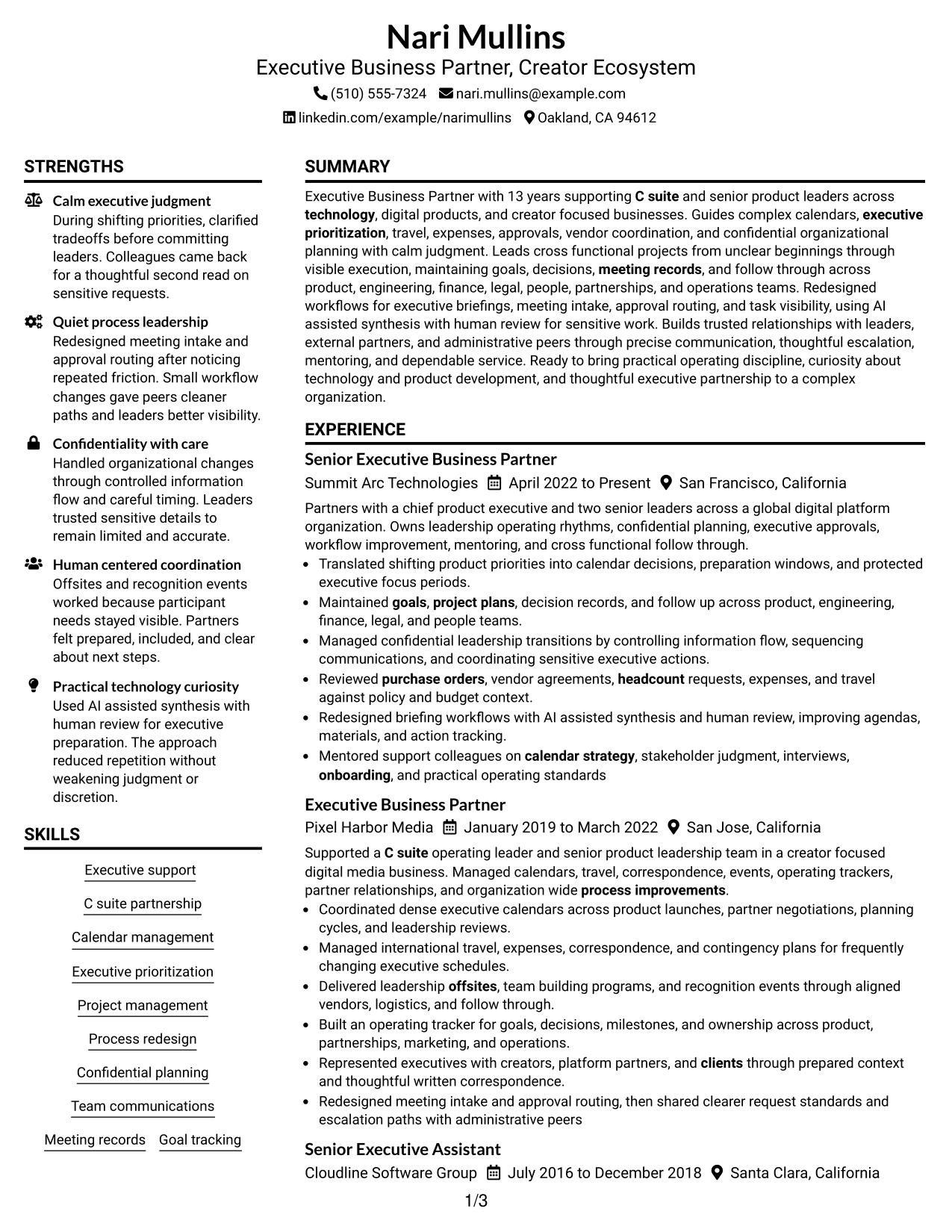
#1 Plain Two Column Format Resume Example

The Plain Two Column Format separates key resume sections into parallel areas, helping recruiters scan a detailed record without losing the main reading path.
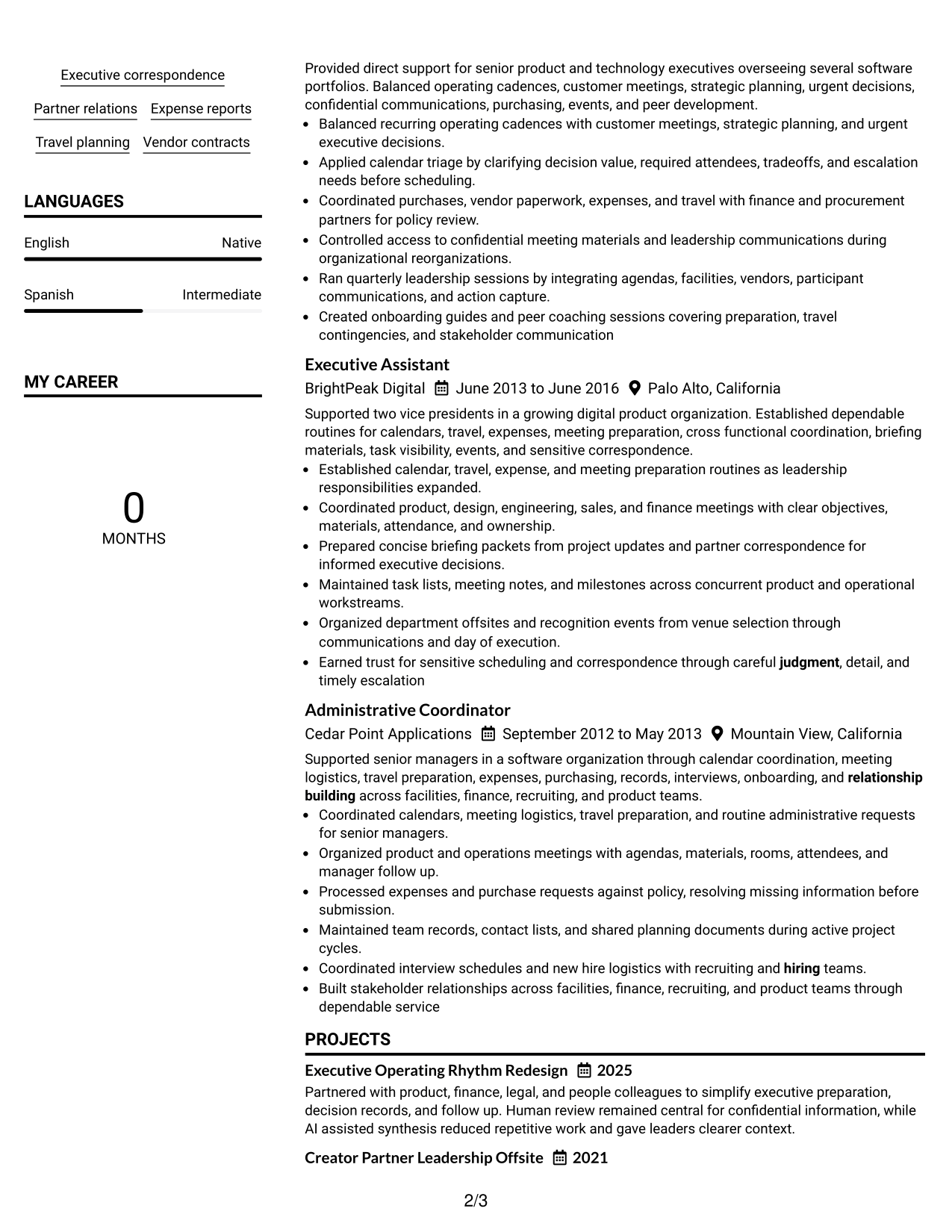
 
Resume Example Page 1   Resume Example Page 2

Resume Snapshot

  • 13 years of direct executive support experience
  • C-suite and senior product leadership partnership
  • Cross-functional project and process leadership
  • AI-assisted executive workflows with human review

Why This Format Works

  • Parallel sections keep extensive experience and supporting credentials easy to locate.
  • Clear separation helps recruiters compare career progression with skills and education.
  • Compact organization gives achievements room without making the resume feel scattered.

Best For

  • Detailed executive support histories
  • Broad cross-functional experience
  • Readers comparing skills with experience
  • Resumes with projects and certifications
  • Dense evidence needing clear separation

Resume Keywords

  • Executive Business Partner
  • Creator Ecosystem
  • C suite
  • senior product leaders
  • Executive support
  • calendar strategy
  • Executive prioritization
  • Travel planning
  • Expense reports
  • purchase orders
  • headcount
  • Vendor contracts
  • Meeting records
  • project plans
  • Goal
See all keywords
 

#2 Simple One Column Format Resume Example

The Simple One Column Format uses one direct reading path, helping recruiters follow experience, achievements, skills, education, and credentials in order.
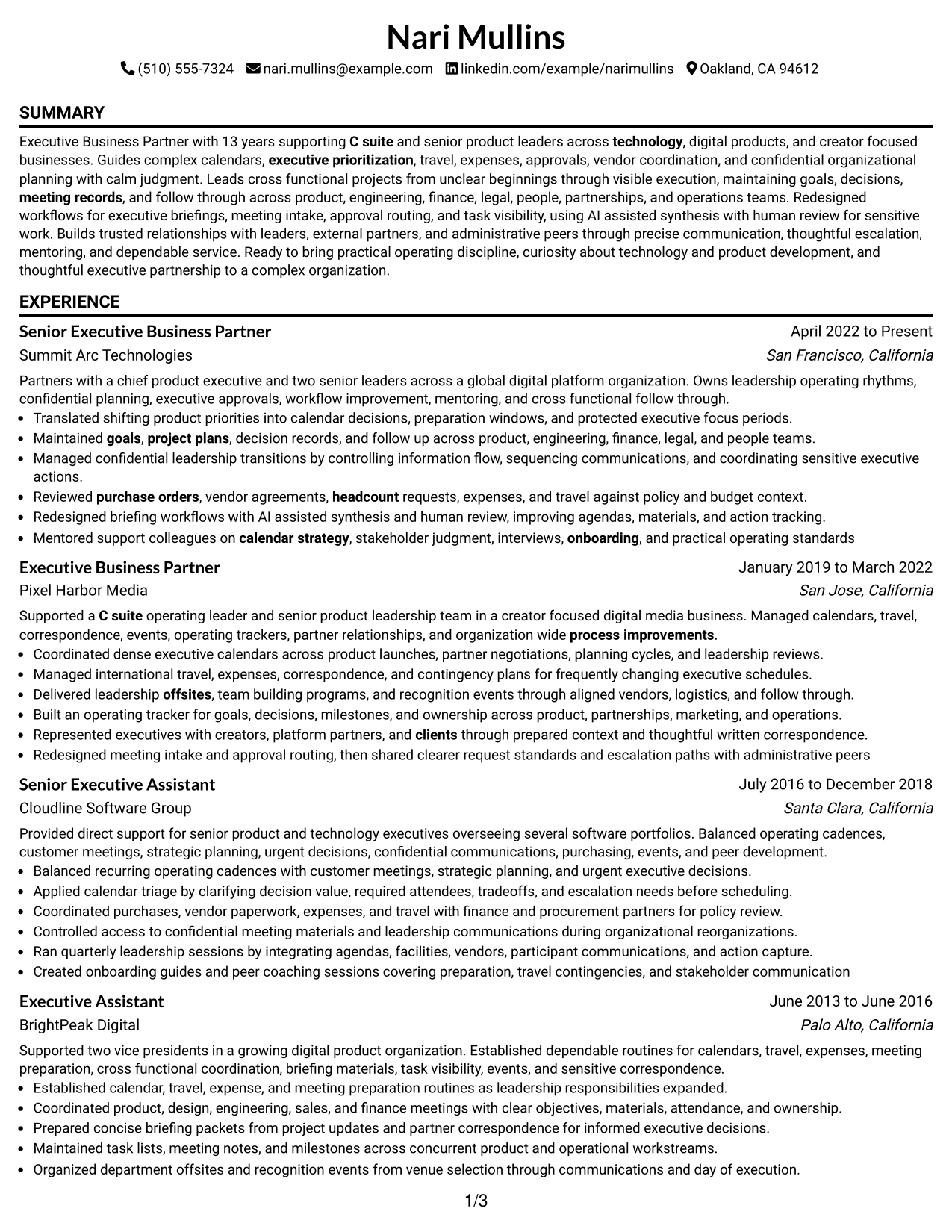
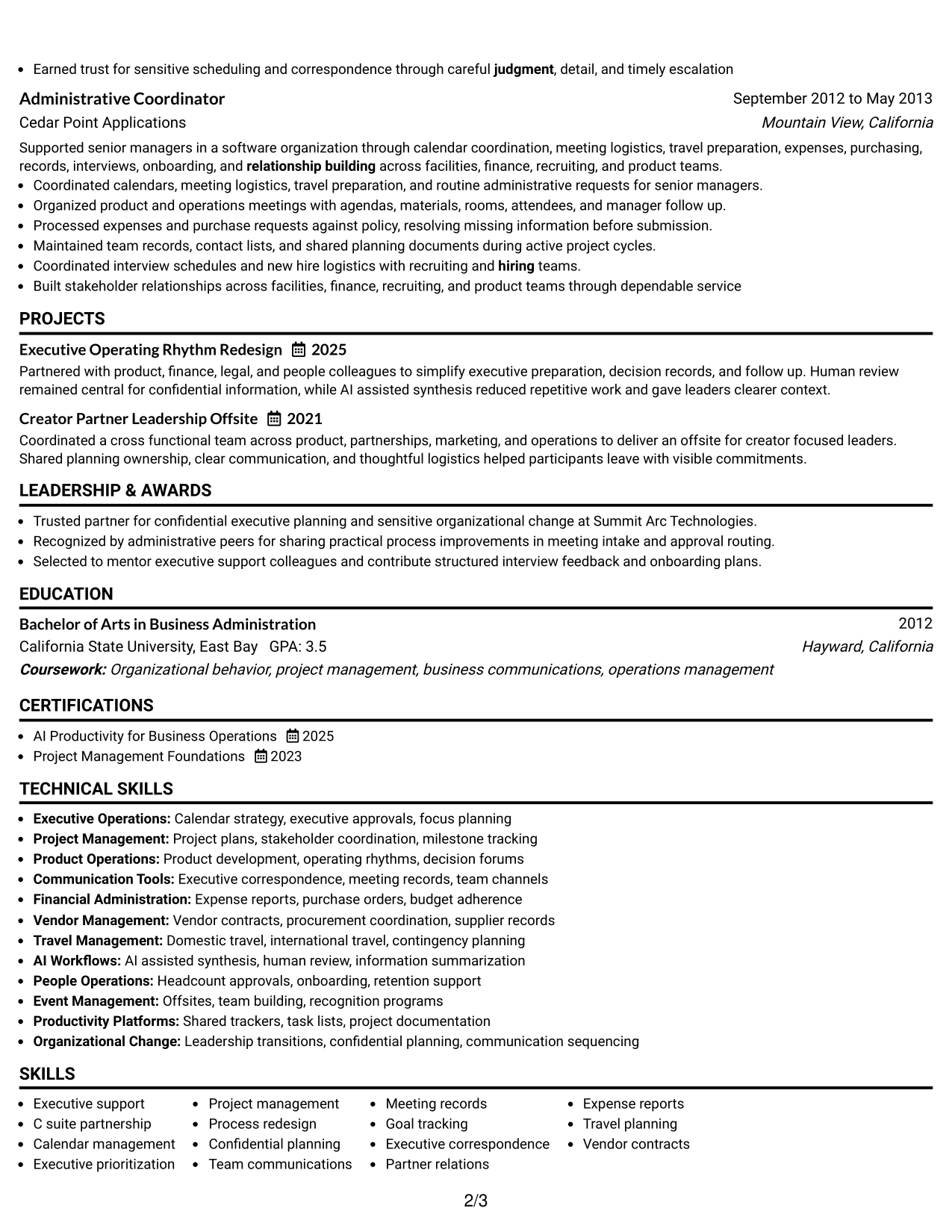
 
Resume Example Page 1   Resume Example Page 2

Why This Format Works

  • One reading path makes career progression simple to follow from section to section.
  • Full-width experience areas support clear achievement bullets and operating context.
  • Straight section order keeps skills, education, and credentials easy to verify.

Best For

  • Linear career stories
  • Long experience sections
  • Simple recruiter scanning
  • Applications favoring conventional structure
  • Content that reads best in sequence
 

#3 Clean Two Column Sidebar Format Resume Example

The Clean Two Column Sidebar Format creates a main content area beside a compact sidebar, helping recruiters separate career evidence from supporting details.
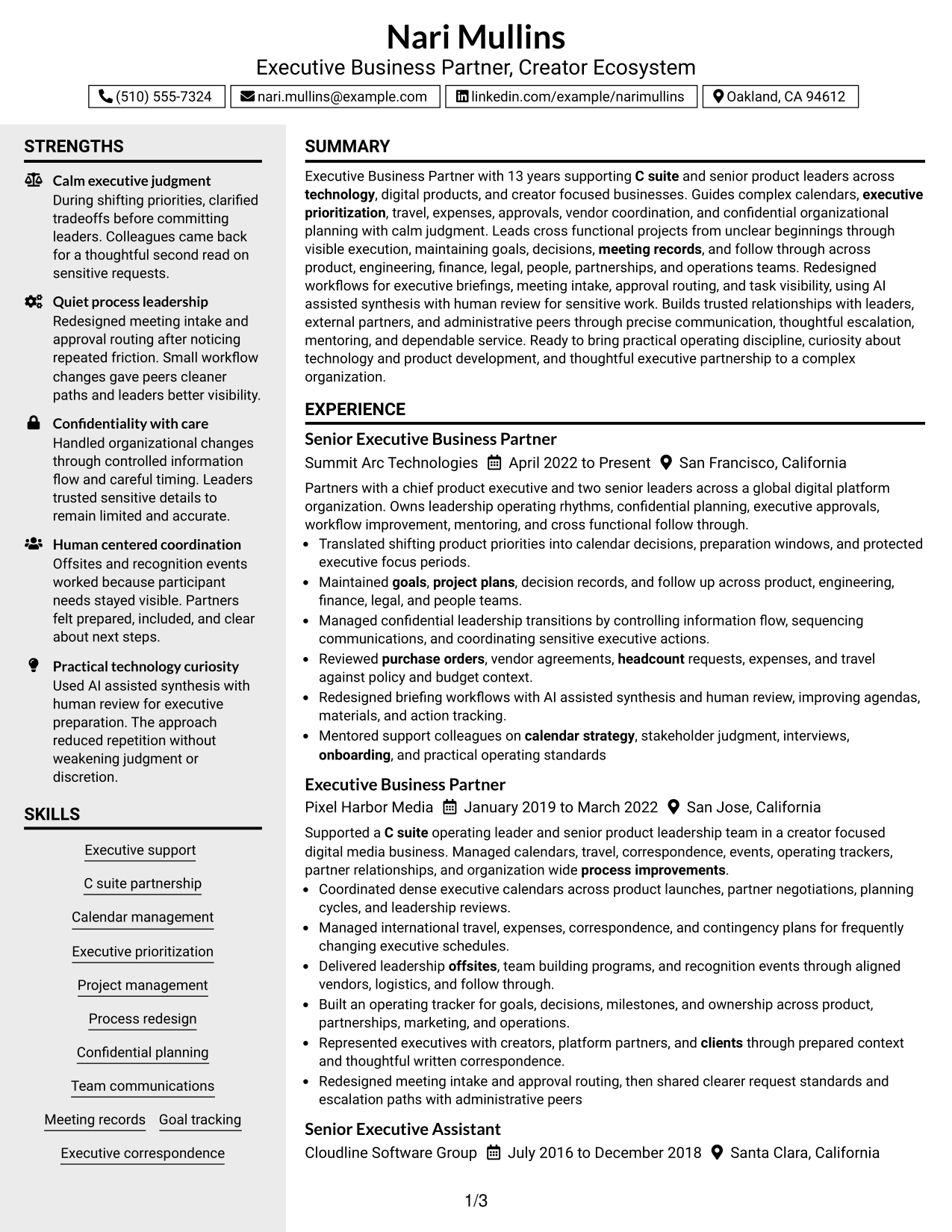
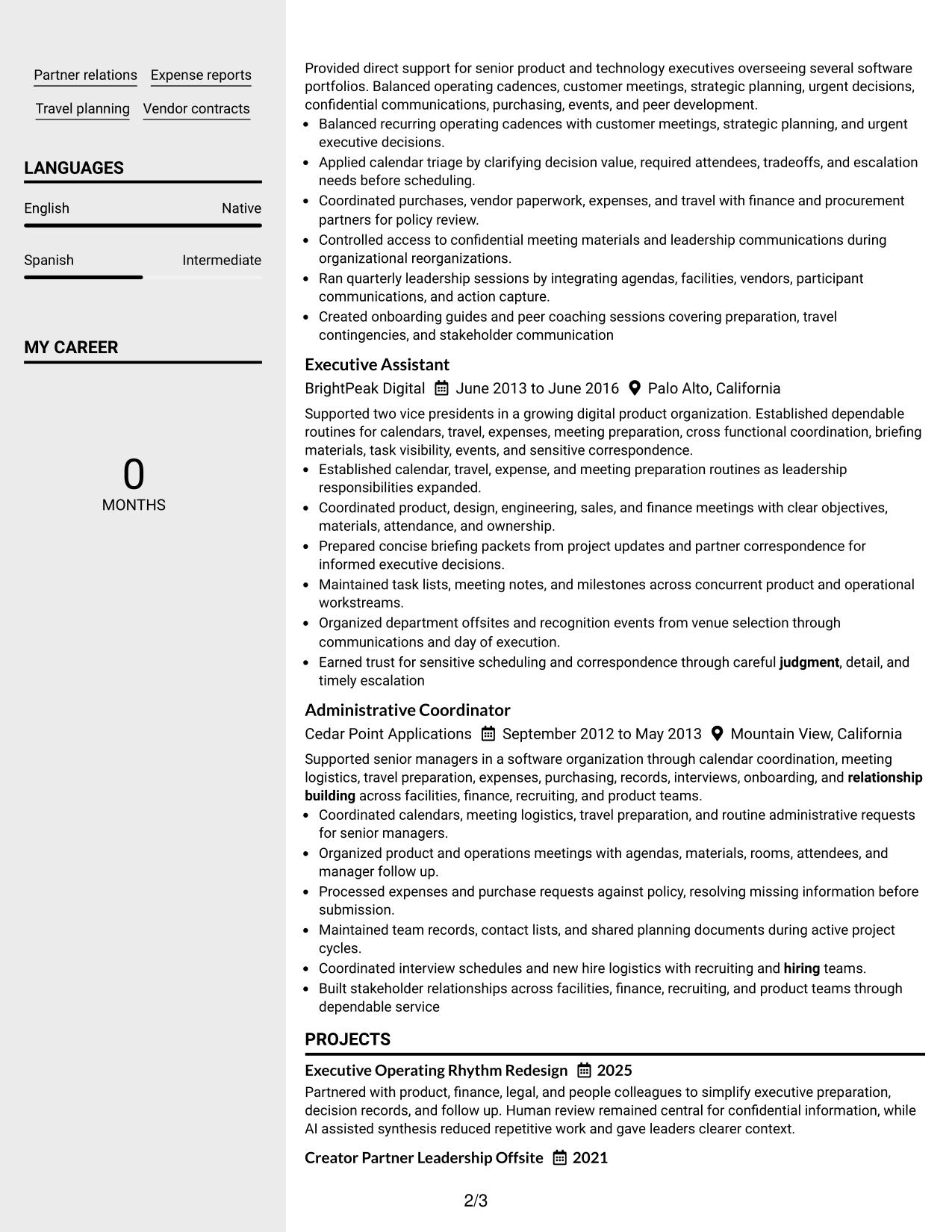
 
Resume Example Page 1   Resume Example Page 2

Why This Format Works

  • Main content space keeps experience and achievements central during recruiter review.
  • Sidebar separation gives skills and credentials a distinct place without interrupting progression.
  • Two-column grouping helps readers move between career evidence and supporting sections.

Best For

  • Experience-led resumes with supporting details
  • Visible skills and credential groups
  • Readers who compare sections quickly
  • Mixed career and project content
  • Compact organization without a photo
 

#4 Two Column Format Resume Example

The Two Column Format balances parallel content areas, helping recruiters scan career history and supporting resume sections with less vertical movement.
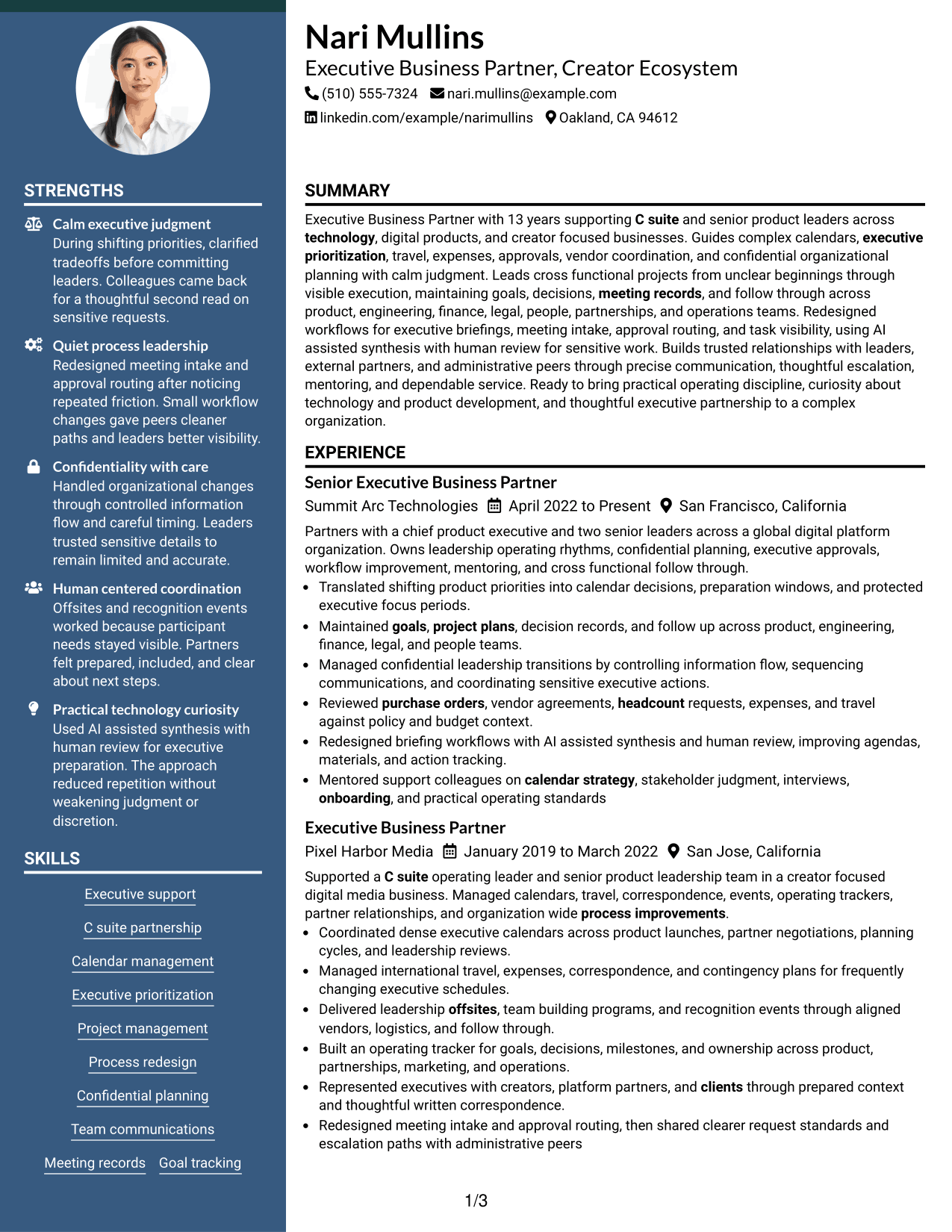
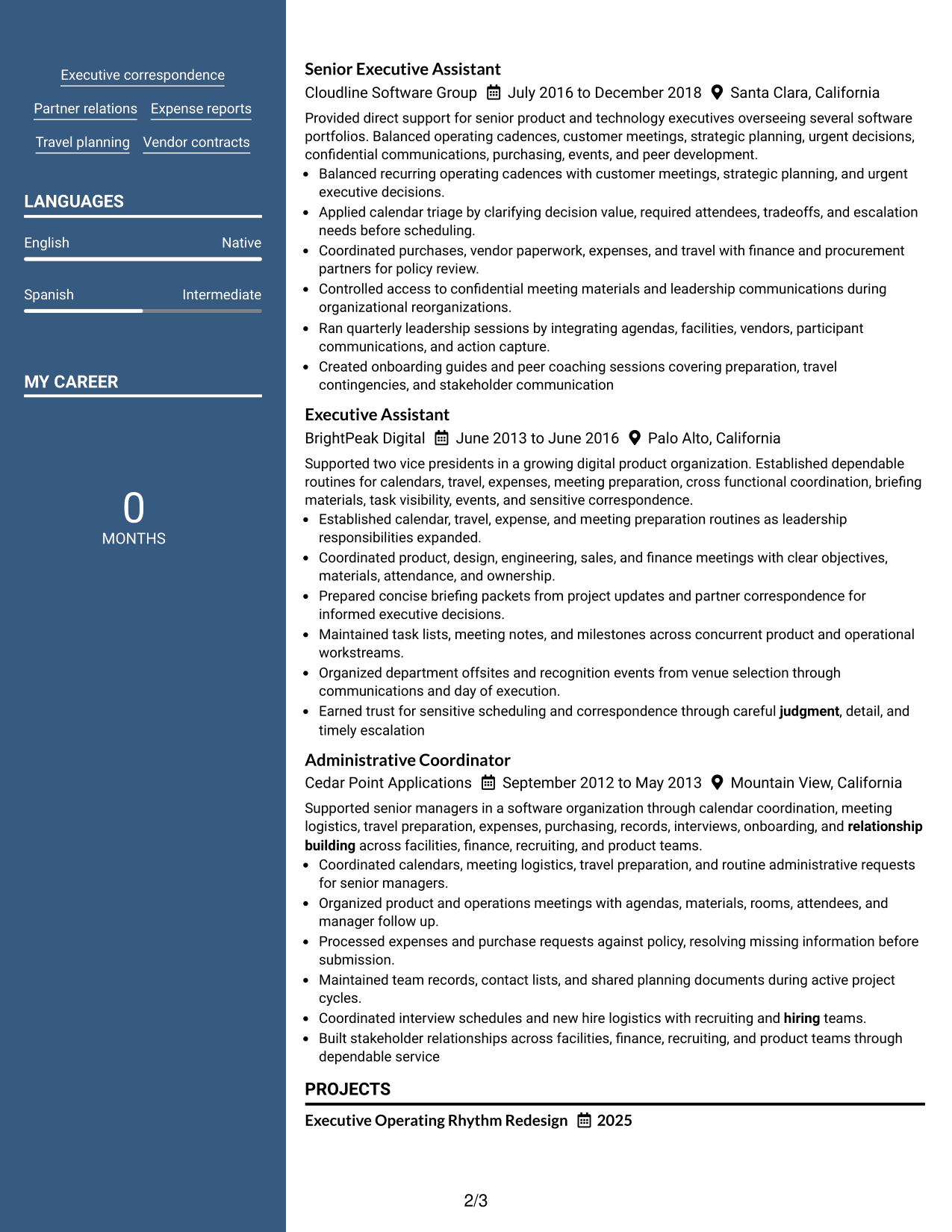
 
Resume Example Page 1   Resume Example Page 2

Why This Format Works

  • Balanced columns divide substantial content into manageable groups for faster review.
  • Career history remains readable while skills and education stay separately visible.
  • Section boundaries help recruiters locate achievements, projects, and credentials without backtracking.

Best For

  • Substantial career histories
  • Balanced experience and skills content
  • Resumes with several supporting sections
  • Readers needing quick section access
  • Compact presentation of broad evidence


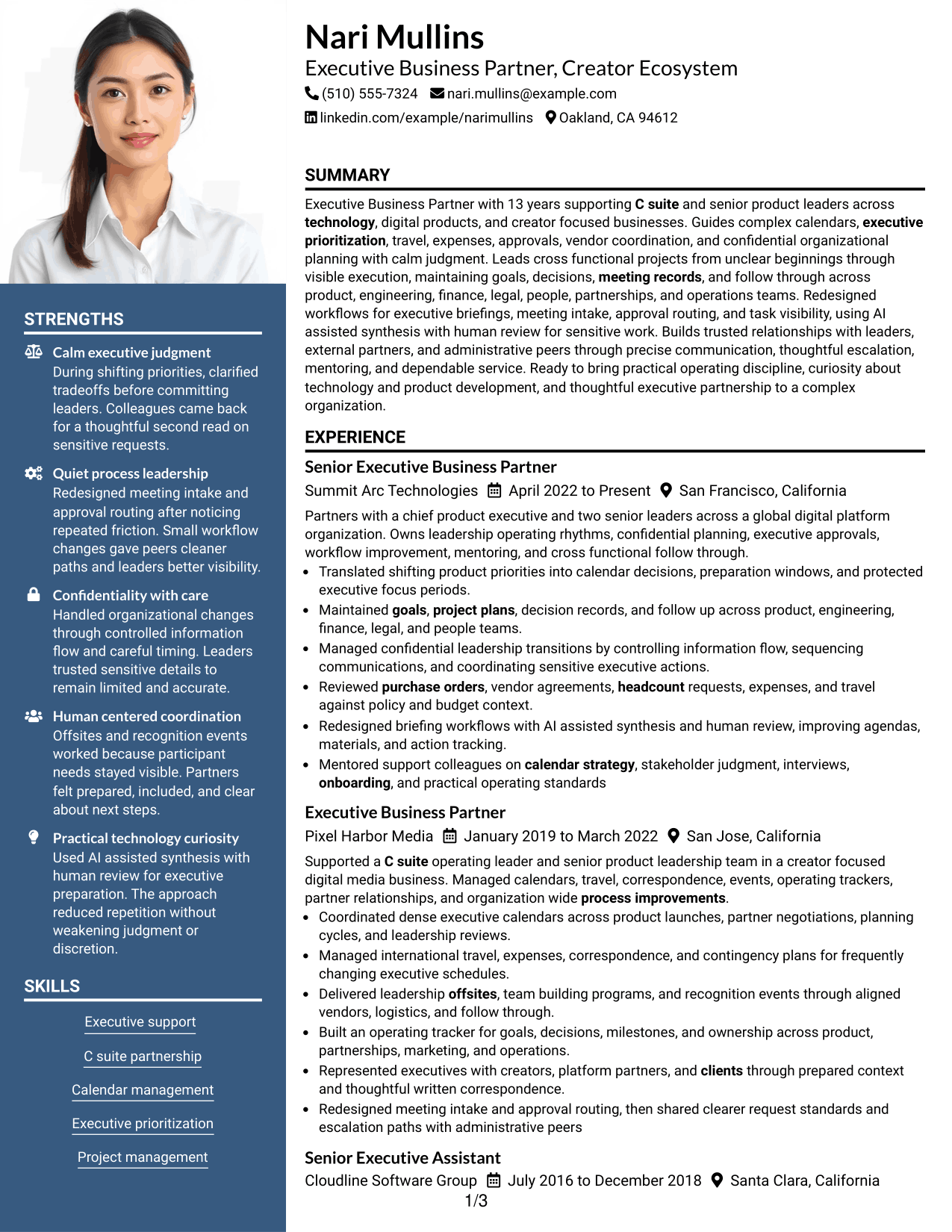
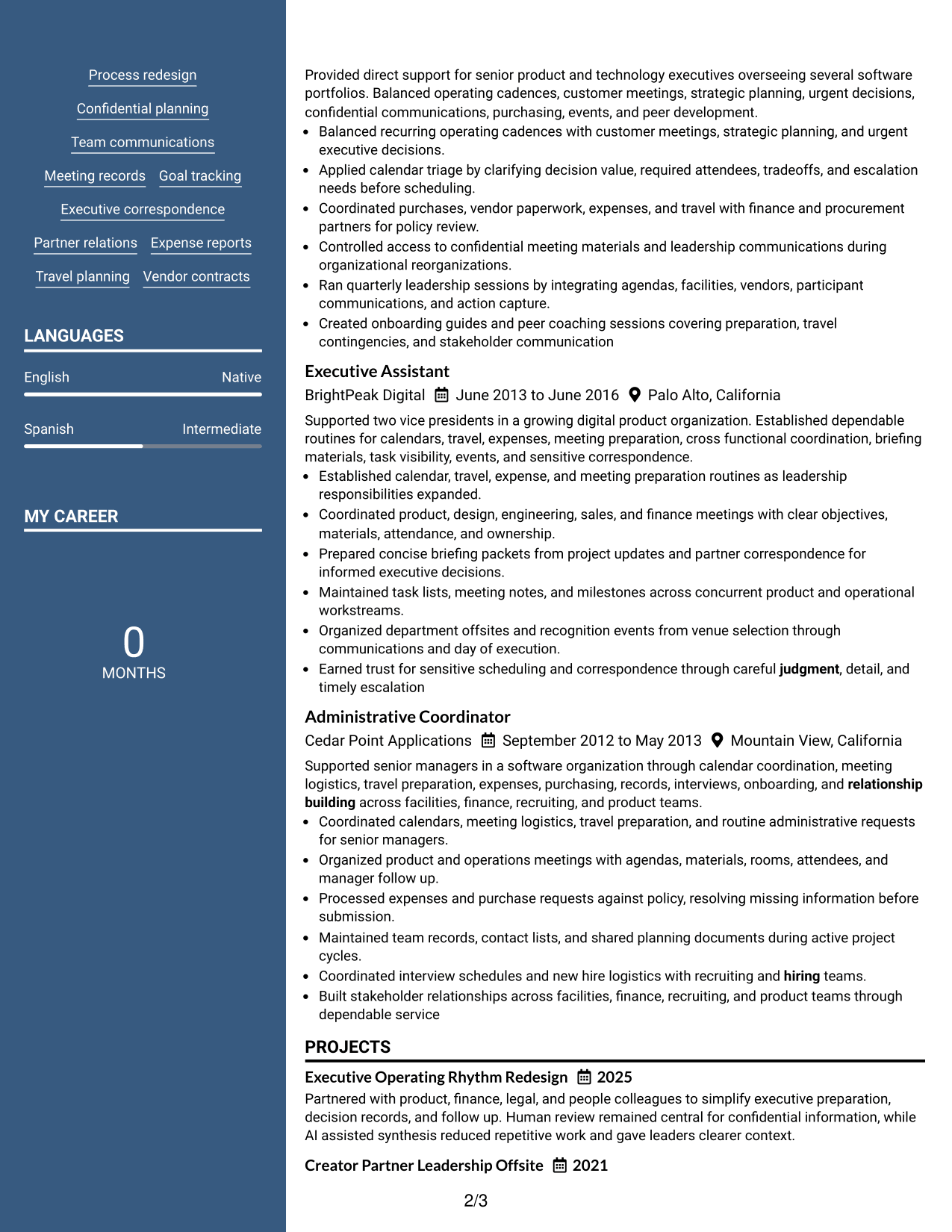
#5 Photo Header Two Column Format Resume Example

The Photo Header Two Column Format combines a photo-based header with two content columns, helping recruiters identify the applicant while scanning structured resume sections.
 
Resume Example Page 1   Resume Example Page 2

Why This Format Works

  • Two body columns keep experience and supporting sections clearly separated below the header.
  • Structured grouping helps recruiters locate achievements, skills, education, and credentials efficiently.
  • Photo header adds personal identification without changing the resume's evidence hierarchy.

Best For

  • Markets where resume photos are customary
  • International application contexts
  • Applicants wanting visible personal identification
  • Broad content needing two-column structure
  • Resumes balancing experience with credentials
 

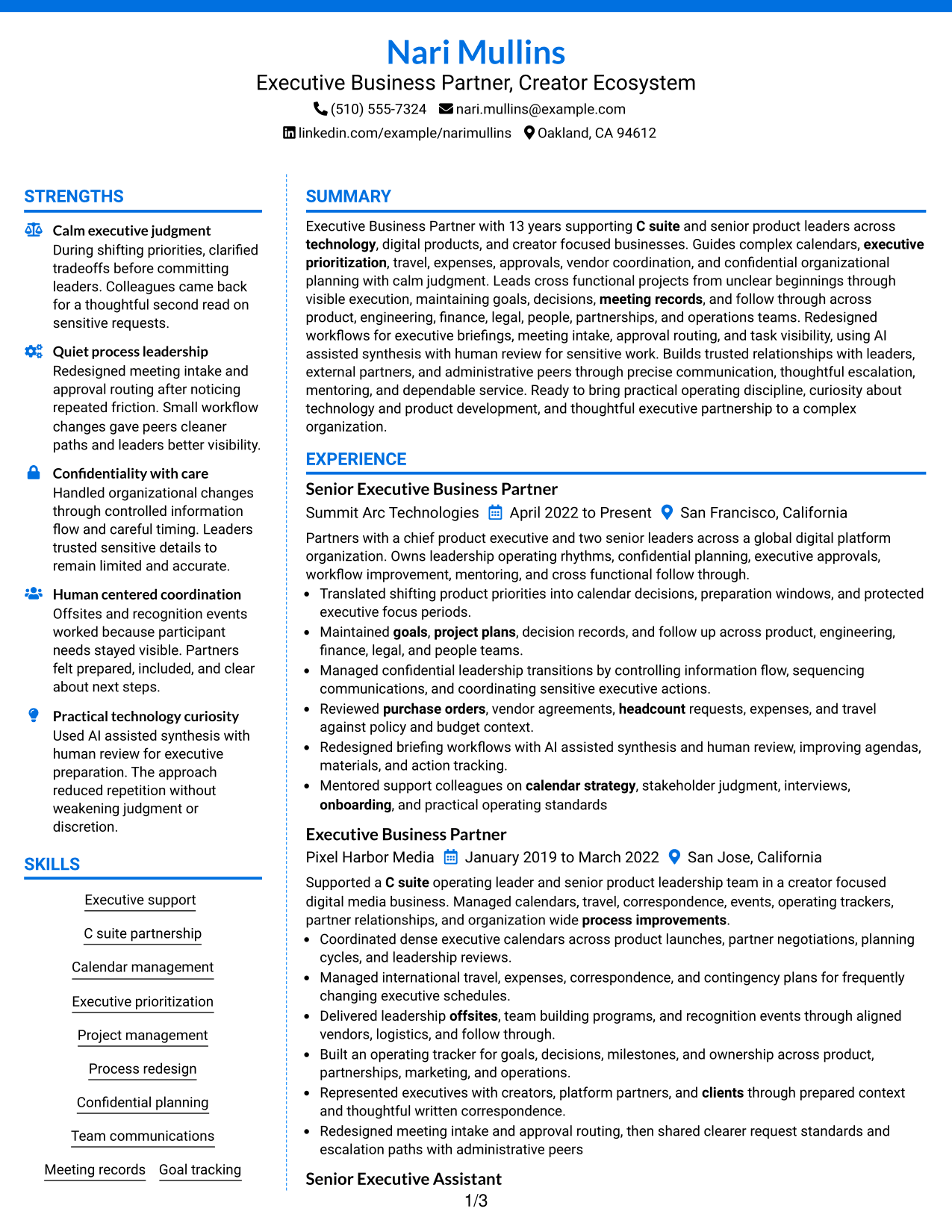
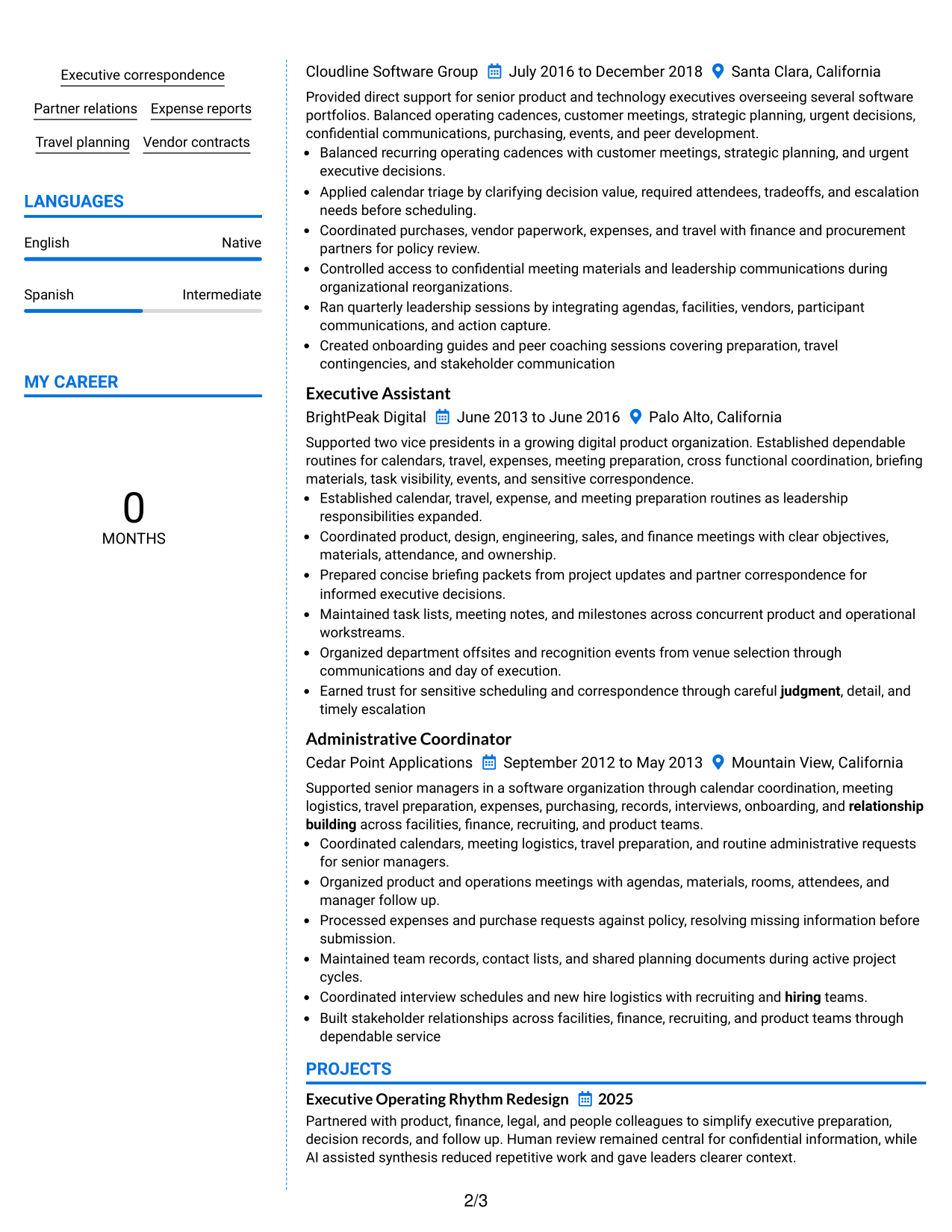
#6 Colored Two Column Format Resume Example

The Colored Two Column Format uses color-supported section separation across two columns, helping recruiters distinguish content groups during a quick scan.
 
Resume Example Page 1   Resume Example Page 2

Why This Format Works

  • Color contrast makes major section boundaries easier to notice during fast review.
  • Two-column organization keeps experience distinct from skills, education, and credentials.
  • Separated content groups help recruiters find projects and achievements with less searching.

Best For

  • Readers who value strong section cues
  • Broad resumes with multiple content groups
  • Applications allowing moderate visual color
  • Quick comparison of career and support sections
  • Complex content needing stronger visual separation
 

#7 Stylish Two Column Designer Format Resume Example

The Stylish Two Column Designer Format adds stronger visual structure to two columns, helping recruiters navigate a polished resume with several content sections.
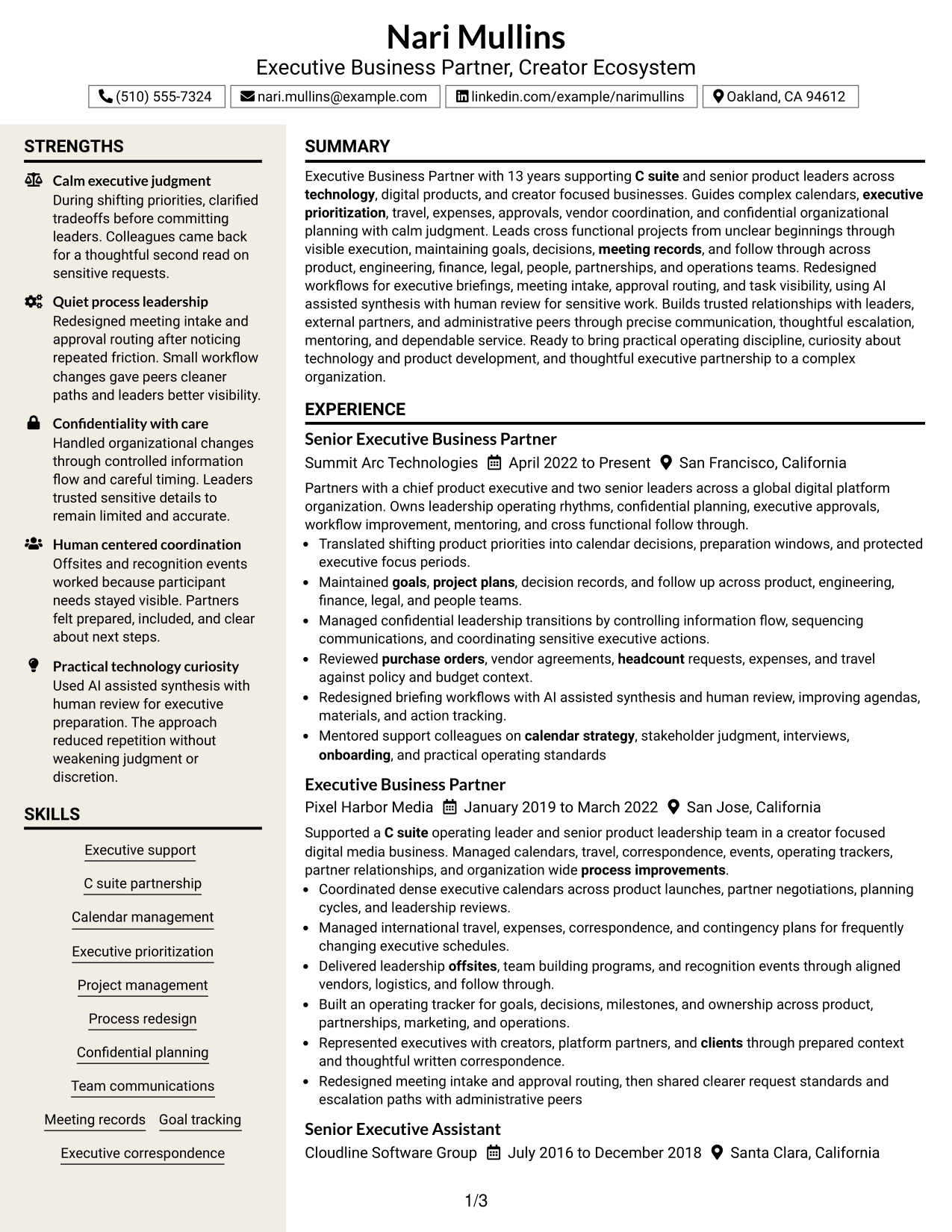
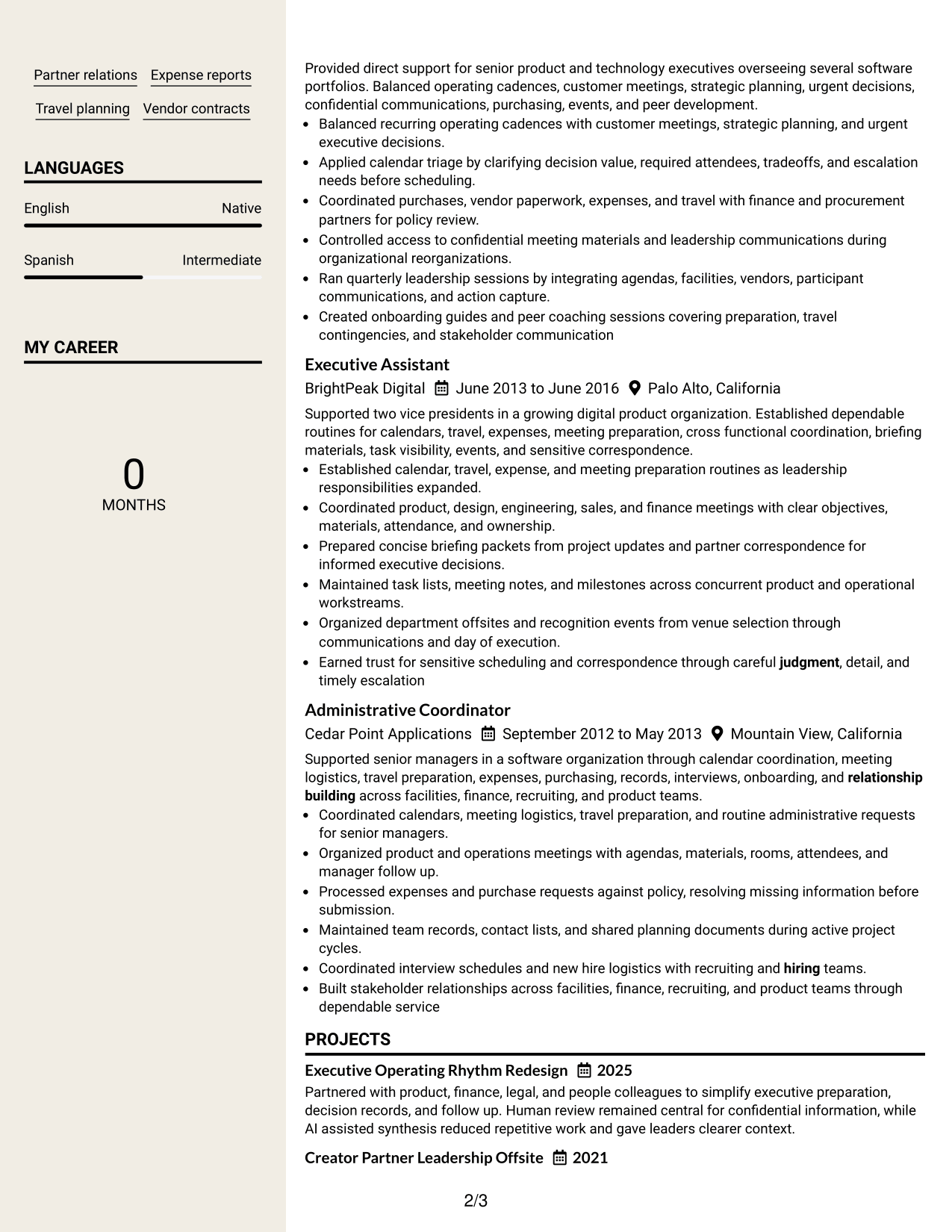
 
Resume Example Page 1   Resume Example Page 2

Why This Format Works

  • Distinct section styling helps readers recognize changes between experience and supporting content.
  • Two-column structure provides clear navigation across achievements, skills, projects, and credentials.
  • Visual separation supports a polished review path without changing the underlying evidence.

Best For

  • Applications welcoming stronger visual styling
  • Resumes with varied supporting sections
  • Readers navigating several evidence types
  • Career content needing clear visual landmarks
  • Professional portfolios without fixed page assumptions


Why Build Your Executive Business Partner, Creator Ecosystem Resume with ResumeInMinutes

ResumeInMinutes helps you turn complex executive support and operating work into clear resume sections that recruiters can scan quickly and tailor for a specific role.

  • Professional resume formats
  • ATS-friendly section structure
  • Role-aligned keyword guidance
  • Clear experience and project organization
  • Free PDF resume previews
  • Flexible resume customization

Use the structure to highlight executive support, cross-functional coordination, confidential work, process improvement, and technology-focused operations without adding claims your background does not support.


See Also


Frequently Asked Questions

Are these Executive Business Partner, Creator Ecosystem resume templates ATS-friendly?

Yes. The layouts use clear section structure and readable headings. Keep your wording simple and include role-relevant terms only when they match your real experience.

Are these different resumes?

No. This guide shows one complete Executive Business Partner, Creator Ecosystem resume in different visual formats so you can compare organization and presentation.

What should an Executive Business Partner, Creator Ecosystem resume include?

Include a focused summary, executive support experience, project and process work, skills, education, certifications, and relevant operating tools or workflows. Show confidential judgment and cross-functional leadership with specific evidence.

Can I download the resume templates as PDFs?

Yes. Each resume design includes a free PDF preview so you can compare the layout before choosing a format.

Which resume style works well for an Executive Business Partner, Creator Ecosystem role?

A clear one-column or well-organized two-column format can work well when it keeps experience, skills, and credentials easy to scan. Choose the layout that best fits your content volume and reading order.

How should I show executive support impact without inventing metrics?

Describe scope, decisions, stakeholders, processes, and outcomes you can verify. For example, explain how you improved meeting preparation, approval routing, project visibility, or executive focus without adding unsupported numbers.

Should I include a photo on my resume?

Include a photo only when it is appropriate for the country and application context. For most U.S. applications, a no-photo resume is usually the safer choice.

Can I customize these resume templates?

Yes. You can adjust the text and design while keeping the resume focused on your verified executive support, operations, project leadership, and process improvement experience.


ATS score 75%

How we calculate this score

  • Keywords: 60% of the total. AI extracts keywords from your job description. If you do not provide one, a standard job description for the title matching your resume is used. This is not a match to a specific vacancy.
  • Text-based resume: 20%. The text resume assessed here receives 100 for this part.
  • Resume quality: 20%. We start at 100 and subtract points for issues found by our resume checks, down to a minimum of zero.
  • Keyword coverage = 100 × (confirmed matches + 0.8 × possible matches) ÷ total keywords, rounded and capped at 100. Possible matches still need checking. Saved generation audits use their saved keyword percentage.
  • Final score = 60% of keyword coverage + 20% of the text score + 20% of the quality score, rounded to a whole number. Without keywords, no overall ATS score is available.

What this score means

Our scores are estimates, not employer ratings. They may contain errors and do not guarantee accurate parsing, a ranking, an interview, or a job. Check your document against the employer’s requirements. You are responsible for relying on this score.

Terms and Conditions

Score weights: Keywords 60% · Text based resume 20% · Resume quality 20%

Live keyword match: 28 of 48 (58%) · Resume quality: 100%

Resume quality 100% · Weight 20% · Issues (0)

Details
  • ✓Name present: Nari Mullins
  • ✓Email format: nari.mullins@example.com
  • ✓Phone format: (510) 555-7324
  • ✓Experience 1: Job title: Senior Executive Business Partner
  • ✓Experience 1: Company name: Summit Arc Technologies
  • ✓Experience 1: Employment dates: April 2022 to Present
  • ✓Experience 1: Description or achievements: Present
  • ✓Experience 2: Job title: Executive Business Partner
  • ✓Experience 2: Company name: Pixel Harbor Media
  • ✓Experience 2: Employment dates: January 2019 to March 2022
  • ✓Experience 2: Description or achievements: Present
  • ✓Experience 3: Job title: Senior Executive Assistant
  • ✓Experience 3: Company name: Cloudline Software Group
  • ✓Experience 3: Employment dates: July 2016 to December 2018
  • ✓Experience 3: Description or achievements: Present
  • ✓Experience 4: Job title: Executive Assistant
  • ✓Experience 4: Company name: BrightPeak Digital
  • ✓Experience 4: Employment dates: June 2013 to June 2016
  • ✓Experience 4: Description or achievements: Present
  • ✓Experience 5: Job title: Administrative Coordinator
  • ✓Experience 5: Company name: Cedar Point Applications
  • ✓Experience 5: Employment dates: September 2012 to May 2013
  • ✓Experience 5: Description or achievements: Present
  • ✓No placeholder fields
  • ✓No repeated achievement bullets
  • ✓No empty bullets

No issues found by the current checks.

Text Based Resume 100% · Weight 20%

Parsed text
Nari Mullins
Executive Business Partner, Creator Ecosystem
(510) 555-7324
nari.mullins@example.com
linkedin.com/example/narimullins
Oakland, CA 94612
STRENGTHS
Calm executive judgment
During shifting priorities, clarified tradeoffs before committing leaders. Colleagues came back for a thoughtful second read on sensitive requests.
Quiet process leadership
Redesigned meeting intake and approval routing after noticing repeated friction. Small workflow changes gave peers cleaner paths and leaders better visibility.
Confidentiality with care
Handled organizational changes through controlled information flow and careful timing. Leaders trusted sensitive details to remain limited and accurate.
Human centered coordination
Offsites and recognition events worked because participant needs stayed visible. Partners felt prepared, included, and clear about next steps.
Practical technology curiosity
Used AI assisted synthesis with human review for executive preparation. The approach reduced repetition without weakening judgment or discretion.
SUMMARY
Executive Business Partner with 13 years supporting C suite and senior product leaders across technology, digital products, and creator focused businesses. Guides complex calendars, executive prioritization, travel, expenses, approvals, vendor coordination, and confidential organizational planning with calm judgment. Leads cross functional projects from unclear beginnings through visible execution, maintaining goals, decisions, meeting records, and follow through across product, engineering, finance, legal, people, partnerships, and operations teams. Redesigned workflows for executive briefings, meeting intake, approval routing, and task visibility, using AI assisted synthesis with human review for sensitive work. Builds trusted relationships with leaders, external partners, and administrative peers through precise communication, thoughtful escalation, mentoring, and dependable service. Ready to bring practical operating discipline, curiosity about technology and product development, and thoughtful executive partnership to a complex organization.
EXPERIENCE
Senior Executive Business Partner
Summit Arc Technologies
April 2022 to Present
San Francisco, California
Partners with a chief product executive and two senior leaders across a global digital platform organization. Owns leadership operating rhythms, confidential planning, executive approvals, workflow improvement, mentoring, and cross functional follow through.
Translated shifting product priorities into calendar decisions, preparation windows, and protected executive focus periods.
Maintained goals, project plans, decision records, and follow up across product, engineering, finance, legal, and people teams.
Managed confidential leadership transitions by controlling information flow, sequencing communications, and coordinating sensitive executive actions.
Reviewed purchase orders, vendor agreements, headcount requests, expenses, and travel against policy and budget context.
Redesigned briefing workflows with AI assisted synthesis and human review, improving agendas, materials, and action tracking.
Mentored support colleagues on calendar strategy, stakeholder judgment, interviews, onboarding, and practical operating standards
Executive Business Partner
Pixel Harbor Media
January 2019 to March 2022
San Jose, California
Supported a C suite operating leader and senior product leadership team in a creator focused digital media business. Managed calendars, travel, correspondence, events, operating trackers, partner relationships, and organization wide process improvements.
Coordinated dense executive calendars across product launches, partner negotiations, planning cycles, and leadership reviews.
Managed international travel, expenses, correspondence, and contingency plans for frequently changing executive schedules.
Delivered leadership offsites, team building programs, and recognition events through aligned vendors, logistics, and follow through.
Built an operating tracker for goals, decisions, milestones, and ownership across product, partnerships, marketing, and operations.
Represented executives with creators, platform partners, and clients through prepared context and thoughtful written correspondence.
Redesigned meeting intake and approval routing, then shared clearer request standards and escalation paths with administrative peers
Senior Executive Assistant
Cloudline Software Group
July 2016 to December 2018
Santa Clara, California
Provided direct support for senior product and technology executives overseeing several software portfolios. Balanced operating cadences, customer meetings, strategic planning, urgent decisions, confidential communications, purchasing, events, and peer development.
Balanced recurring operating cadences with customer meetings, strategic planning, and urgent executive decisions.
Applied calendar triage by clarifying decision value, required attendees, tradeoffs, and escalation needs before scheduling.
Coordinated purchases, vendor paperwork, expenses, and travel with finance and procurement partners for policy review.
Controlled access to confidential meeting materials and leadership communications during organizational reorganizations.
Ran quarterly leadership sessions by integrating agendas, facilities, vendors, participant communications, and action capture.
Created onboarding guides and peer coaching sessions covering preparation, travel contingencies, and stakeholder communication
Executive Assistant
BrightPeak Digital
June 2013 to June 2016
Palo Alto, California
Supported two vice presidents in a growing digital product organization. Established dependable routines for calendars, travel, expenses, meeting preparation, cross functional coordination, briefing materials, task visibility, events, and sensitive correspondence.
Established calendar, travel, expense, and meeting preparation routines as leadership responsibilities expanded.
Coordinated product, design, engineering, sales, and finance meetings with clear objectives, materials, attendance, and ownership.
Prepared concise briefing packets from project updates and partner correspondence for informed executive decisions.
Maintained task lists, meeting notes, and milestones across concurrent product and operational workstreams.
Organized department offsites and recognition events from venue selection through communications and day of execution.
Earned trust for sensitive scheduling and correspondence through careful judgment, detail, and timely escalation
Administrative Coordinator
Cedar Point Applications
September 2012 to May 2013
Mountain View, California
Supported senior managers in a software organization through calendar coordination, meeting logistics, travel preparation, expenses, purchasing, records, interviews, onboarding, and relationship building across facilities, finance, recruiting, and product teams.
Coordinated calendars, meeting logistics, travel preparation, and routine administrative requests for senior managers.
Organized product and operations meetings with agendas, materials, rooms, attendees, and manager follow up.
Processed expenses and purchase requests against policy, resolving missing information before submission.
Maintained team records, contact lists, and shared planning documents during active project cycles.
Coordinated interview schedules and new hire logistics with recruiting and hiring teams.
Built stakeholder relationships across facilities, finance, recruiting, and product teams through dependable service
SKILLS
Partner relations
Travel planning
Meeting records
Executive correspondence
Team communications
Calendar management
Executive prioritization
Confidential planning
Project management
C suite partnership
Executive support
Process redesign
Vendor contracts
Expense reports
Goal tracking
LANGUAGES
English
Native
Spanish
Intermediate
MY CAREER
0Months
PROJECTS
Executive Operating Rhythm Redesign
2025
Partnered with product, finance, legal, and people colleagues to simplify executive preparation, decision records, and follow up. Human review remained central for confidential information, while AI assisted synthesis reduced repetitive work and gave leaders clearer context.
Creator Partner Leadership Offsite
2021
Coordinated a cross functional team across product, partnerships, marketing, and operations to deliver an offsite for creator focused leaders. Shared planning ownership, clear communication, and thoughtful logistics helped participants leave with visible commitments.
LEADERSHIP & AWARDS
Trusted partner for confidential executive planning and sensitive organizational change at Summit Arc Technologies.
Recognized by administrative peers for sharing practical process improvements in meeting intake and approval routing.
Selected to mentor executive support colleagues and contribute structured interview feedback and onboarding plans.
EDUCATION
Bachelor of Arts in Business Administration
California State University, East Bay
GPA: 3.5
2012
Hayward, California
Coursework: Organizational behavior, project management, business communications, operations management
CERTIFICATIONS
AI Productivity for Business Operations
2025
Project Management Foundations
2023
TECHNICAL SKILLS
Executive Operations: Calendar strategy, executive approvals, focus planning
Project Management: Project plans, stakeholder coordination, milestone tracking
Product Operations: Product development, operating rhythms, decision forums
Communication Tools: Executive correspondence, meeting records, team channels
Financial Administration: Expense reports, purchase orders, budget adherence
Vendor Management: Vendor contracts, procurement coordination, supplier records
Travel Management: Domestic travel, international travel, contingency planning
AI Workflows: AI assisted synthesis, human review, information summarization
People Operations: Headcount approvals, onboarding, retention support
Event Management: Offsites, team building, recognition programs
Productivity Platforms: Shared trackers, task lists, project documentation
Organizational Change: Leadership transitions, confidential planning, communication sequencing
PROFESSIONAL AFFILIATIONS
Executive Support Peer Mentoring Circle, Mentor
Administrative Operations Community, Process Improvement Facilitator
ADDITIONAL INFORMATION
Work Status
: Authorized to work in United States. No sponsorship required.

Matched keywords (28)

  • Executive Business Partner
  • Creator Ecosystem
  • C suite
  • senior product leaders
  • Executive support
  • calendar strategy
  • Executive prioritization
  • Travel planning
  • Expense reports
  • purchase orders
  • headcount
  • Vendor contracts
  • Meeting records
  • project plans
  • Goal
  • external partners
  • clients
  • process improvements
  • Offsites
  • mentor
  • hiring
  • onboarding
  • retention
  • technology
  • product development
  • discretion
  • relationship building
  • judgment

Missing keywords (20)

  • complex executive calendars
  • confidential organizational changes
  • annual budgets
  • company policies
  • team communication channels
  • group tasks
  • multi stakeholder projects
  • workflow redesign
  • team building events
  • recognition activities
  • AI enabled workflows
  • Bachelor's degree
  • 8+ years
  • direct executive support
  • matrixed environments
  • integrity
  • attention to detail
  • team orientation
  • hybrid
  • work authorization
Disclaimer: All names, images, contact information, employment histories, achievements, security clearances, military credentials, and other qualifications shown in this content are fictional and used for illustrative purposes only. Any resemblance to actual persons, living or deceased, is purely coincidental.

Resume and cover-letter examples and recommendations in this article reflect general best practices and professional experience and are provided for guidance only. Results may vary based on role, industry, region, and hiring organization.

Content Accuracy and Verification: To the fullest extent permitted by applicable law, we do not represent or warrant that resume or cover-letter guidance, examples, recommendations, or related information are accurate, complete, current, error-free, or suitable for any particular purpose. You are responsible for independently reviewing and verifying the information before relying on it.

ATS and Cover-Letter Scores: ATS scores are estimates calculated using our own formula, informed by publicly available guidance on resume formatting and keyword matching. They are not scores issued or endorsed by an ATS provider or employer. Cover-letter scores are also our own assessments. Parsing, weighting, screening criteria, and results vary between systems, employers, job descriptions, and document formats. No score guarantees successful parsing, a particular ranking, an interview, or employment. Use scores as general guidance and independently check your documents against the employer’s requirements. To the fullest extent permitted by applicable law, we accept no liability for errors in scores or parsing, or losses arising from reliance on these assessments. Nothing in this notice excludes liability or limits consumer rights that cannot lawfully be excluded or limited.

Terms and Conditions
 
> JP 1 1
PDF Footer and Margins Setup
The margins are applied to the document, and the footer shows up in the preview and the PDF

Footer Font Settings

Are you applying for a specific job
so we can tailor your resume to it?
Are you applying for a specific job
so we can tailor your cover letter to it?
Type your details as text to generate a personalized resume Type your details as text to generate a personalized cover letter
Website link found! Ready to create resume from:
Drag the into the box to verify you're human.
Drop here

My Resumes

Displaying {number_of_files} files (out of {total_of_all_files} total)
Name File Type Last Modified: Description:

Rename File

Filename already exists!

Delete Files

Warning: This action is irreversible. Once you click submit, the files will be permanently deleted.

Heading text
Upload From Computer Upload
Select From Existing
LinkedIn
Drag & Drop files anywhere in this tab, or

Uploaded Files

Delete Name Last Updated Use This File
Select this to use the file for generating your resume and cover letter. Only one source—uploaded file, selected file, or LinkedIn text—can be used.

My Files

Resumes or cover letters you create will appear here. No files available yet.
Delete Name Last Updated Use This File
Select this to use the file for generating your resume and cover letter. Only one source—uploaded file, selected file, or LinkedIn text—can be used.

Add LinkedIn Profile PDF

You can download your LinkedIn profile as a PDF by opening linkedin.com in a web browser, clicking your profile photo, selecting the “More” or “Resources” button, and choosing “Save to PDF.” You can then attach the PDF using the Upload From Computer tab.

Paste Your LinkedIn Profile Text

If you have copied the LinkedIn profile text, paste it below. See how to copy your profile from LinkedIn

Select this to use the LinkedIn profile text for generating your resume and cover letter. Only one source—uploaded file, selected file, or LinkedIn text—can be used.

Try these controls

<
>


