
33 Property Management Specialist Resume Templates with Example
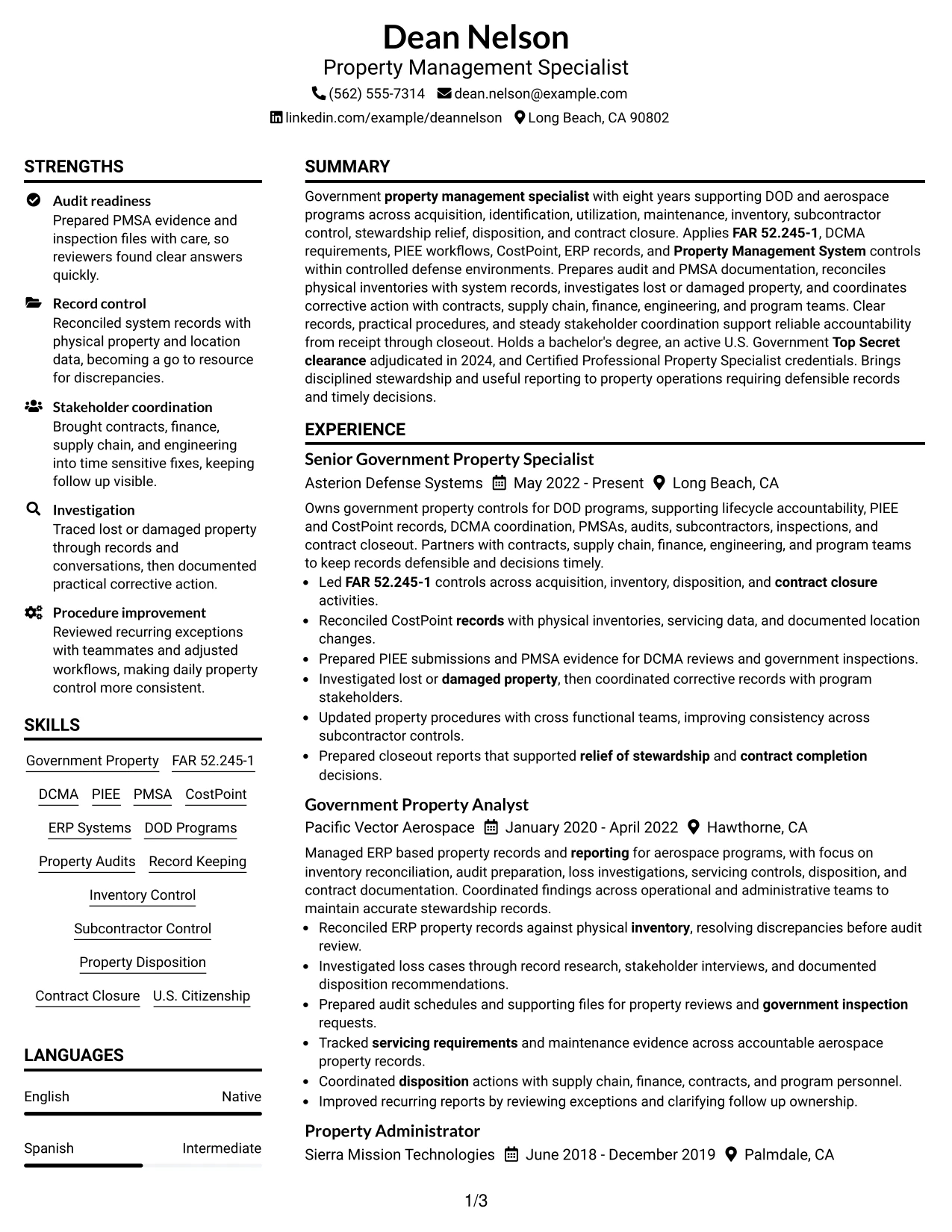
This guide shows you how to build a Property Management Specialist resume that is clear, focused, and easy to adapt. It helps you organize your experience so recruiters can quickly understand your value.
A strong resume for this role should connect property control work with accurate records, accountable processes, audits, and business results. Use clear sections for experience, skills, education, certifications, and achievements.
This guide presents one resume example in 33 layouts. Each format shows ways to organize content, improve ATS readability, and present qualifications for Property Management Specialist opportunities.
What Makes a Great Property Management Specialist Resume in 2026
Strong Property Management Specialist resumes in 2026 show clear ownership of property processes, accurate documentation, and results that support reliable operations.
Focus on searchable resume content such as government property management, lifecycle accountability, audits, inventory control, reporting, and procedures that show how work was completed.
The examples shown below are intentionally detailed to demonstrate a range of experiences, skills, accomplishments and relevant keywords. We prefer detailed resumes as they provide more context to the hiring managers and also help the ATS systems identify relevant qualifications and score your resume better for a match. But the length of a resume is an individual choice. If you want a one page resume, just keep the most relevant experience and information for the job. Note: Resume examples are for educational purposes only. Use only information that accurately reflects your experience and qualifications. References to real organizations do not imply affiliation or endorsement.
#1 Plain Two Column Format Resume Example
This Plain Two Column Format organizes Property Management Specialist resume content with a 2-column layout, helping recruiters review experience, skills, education, and credentials in a clear order.


Resume Snapshot
- Government property lifecycle management focus
- Audit and PMSA readiness experience
- ERP records and inventory control focus
- Professional credentials and security clearance
Why This Format Works
- Balanced sections help reviewers find experience, credentials, and skills quickly
- Separate areas make career information easier to follow
- Clear spacing supports fast resume scanning
Best For
- Resume sections with balanced content
- ATS-focused layouts
- Clear credential organization
- Experience-focused resumes
- Professional summary placement
Resume Keywords
- Property Management Specialist
- acquisition
- identification
- utilization
- maintenance
- Inventory
- Subcontractor Control
- relief of stewardship
- Disposition
- Contract Closure
- Property Management System
- FAR 52.245-1
- agency clauses
- DCMA
- accountability
#2 Simple One Column Format Resume Example
This Simple One Column Format organizes Property Management Specialist resume content with a 1-column layout, helping recruiters review experience, skills, education, and credentials in a clear order.


Why This Format Works
- A single reading path keeps important resume sections in order
- Simple sections reduce distractions during review
- Consistent headings make information easier to locate
Best For
- Straightforward resume structure
- Simple section order
- Easy content updates
- Clean text presentation
- ATS-readable formats
#3 Clean Two Column Sidebar Format Resume Example
This Clean Two Column Sidebar Format organizes Property Management Specialist resume content with a 2-column layout, helping recruiters review experience, skills, education, and credentials in a clear order.


Why This Format Works
- Sidebar space separates supporting details from the main career story
- Organized sections help reviewers compare information quickly
- Clear grouping improves navigation through resume content
Best For
- Supporting information areas
- Resume detail organization
- Separated content needs
- Structured career review
- Clear section navigation
#4 Two Column Format Resume Example
This Two Column Format organizes Property Management Specialist resume content with a 2-column layout, helping recruiters review experience, skills, education, and credentials in a clear order.


Why This Format Works
- Parallel columns create distinct areas for different resume sections
- Balanced content blocks support quick comparison of information
- Structured spacing helps readers follow experience details
Best For
- Balanced information layouts
- Multiple resume sections
- Experience and skills display
- Readable content grouping
- Professional document structure
#5 Photo Header Two Column Format Resume Example
This Photo Header Two Column Format organizes Property Management Specialist resume content with a 2-column layout, helping recruiters review experience, skills, education, and credentials in a clear order.


Why This Format Works
- The header area gives contact information a visible starting point
- Separate columns help divide career history and supporting details
- Visual sections guide readers through the resume
Best For
- Header-centered layouts
- Contact visibility needs
- Visual section separation
- Photo-supported formats
- Organized career details
#6 Colored Two Column Format Resume Example
This Colored Two Column Format organizes Property Management Specialist resume content with a 2-column layout, helping recruiters review experience, skills, education, and credentials in a clear order.


Why This Format Works
- Color accents create section boundaries without changing content meaning
- Column organization separates key resume information
- Defined areas help reviewers locate credentials and experience
Best For
- Accent-based organization
- Section contrast needs
- Resume navigation
- Credential visibility
- Structured information display
#7 Stylish Two Column Designer Format Resume Example
This Stylish Two Column Designer Format organizes Property Management Specialist resume content with a 2-column layout, helping recruiters review experience, skills, education, and credentials in a clear order.


Why This Format Works
- Creative section placement can highlight different resume areas clearly
- Sidebar organization supports quick access to supporting details
- Distinct blocks help separate major content categories
Best For
- Creative professional layouts
- Visual content grouping
- Section emphasis needs
- Modern resume presentation
- Organized details
#8 Modern Icon Format Resume Example
This Modern Icon Format organizes Property Management Specialist resume content with a 2-column layout, helping recruiters review experience, skills, education, and credentials in a clear order.


Why This Format Works
- Icons help identify sections while keeping information organized
- Two columns provide separate paths for resume content
- Visual markers can improve section recognition
Best For
- Icon-supported sections
- Two-column organization
- Visual navigation needs
- Modern content display
- Readable resume structure
#9 Modern Full Background Two Column Format Resume Example
This Modern Full Background Two Column Format organizes Property Management Specialist resume content with a 2-column layout, helping recruiters review experience, skills, education, and credentials in a clear order.


Why This Format Works
- Full background styling frames the resume while sections remain readable
- Column separation supports organized content review
- Structured areas help readers move through experience
Best For
- Large visual backgrounds
- Organized professional content
- Two-column resumes
- Section clarity needs
- Modern presentation
#10 Dark Mode Two Column Format Resume Example
This Dark Mode Two Column Format organizes Property Management Specialist resume content with a 2-column layout, helping recruiters review experience, skills, education, and credentials in a clear order.


Why This Format Works
- Dark contrast creates clear boundaries between resume sections
- Two columns organize content for quick comparison
- Section order helps reviewers understand career details
Best For
- Dark themed layouts
- Professional visual contrast
- Two-column organization
- Resume section clarity
- Modern document styles
#11 Dark Mode Box Header Format Resume Example
This Dark Mode Box Header Format organizes Property Management Specialist resume content with a 2-column layout, helping recruiters review experience, skills, education, and credentials in a clear order.


Why This Format Works
- Box headers create visible section starts for easier navigation
- Column structure keeps supporting details separate
- Defined content areas improve resume readability
Best For
- Box-based organization
- Clear section starts
- Two-column content flow
- Structured resume review
- Professional layouts
#12 Elegant Full Background Two Column Format Resume Example
This Elegant Full Background Two Column Format arranges resume information in a clear format, helping recruiters review experience, achievements, skills, education, and credentials.


Why This Format Works
- Background sections guide readers through experience and credentials
- Open spacing supports review of career information
- Separate areas improve resume content navigation
Best For
- Large content organization needs
- Balanced resume sections
- Credential review
- Career information display
- Readable professional formats
#13 Creative Two Tone Format Resume Example
This Creative Two Tone Format arranges resume information in a clear format, helping recruiters review experience, achievements, skills, education, and credentials.


Why This Format Works
- Two tone areas separate major resume sections clearly
- Color contrast supports faster movement between content groups
- Distinct sections organize achievements and skills
Best For
- Visual section separation
- Modern document styling
- Content grouping needs
- Organized achievement display
- Creative professional resumes
#14 Minimal Header Format Resume Example
This Minimal Header Format arranges resume information in a clear format, helping recruiters review experience, achievements, skills, education, and credentials.


Why This Format Works
- A centered header gives contact details a clear starting point
- Single column flow keeps sections easy to follow
- Simple spacing supports quick resume review
Best For
- Straightforward resume reading
- Simple header layouts
- ATS-friendly structures
- Clear information order
- Easy content updates
#15 Plain One Column with Shaded Labels Resume Example
This Plain One Column with Shaded Labels arranges resume information in a clear format, helping recruiters review experience, achievements, skills, education, and credentials.


Why This Format Works
- Shaded labels help readers identify resume sections quickly
- One column order supports consistent content scanning
- Clear labels separate education skills and experience
Best For
- Label-focused organization
- Section recognition needs
- Simple content flow
- Resume scanning needs
- Structured details
#16 Text/Fang Style Resume Example
This Text/Fang Style arranges resume information in a clear format, helping recruiters review experience, achievements, skills, education, and credentials.


Why This Format Works
- Text-focused organization keeps attention on resume content
- Single column reading reduces visual interruptions
- Consistent sections support recruiter review
Best For
- Text-centered documents
- Focused reading order
- Clean resume structure
- Content-first layouts
- Professional review
#17 Bold Color Header Professional Format Resume Example
This Bold Color Header Professional Format arranges resume information in a clear format, helping recruiters review experience, achievements, skills, education, and credentials.


Why This Format Works
- Header emphasis creates a strong entry point for resume details
- Content areas help reviewers find important sections
- Two columns balance supporting and primary information
Best For
- Strong header visibility
- Balanced content areas
- Professional section grouping
- Resume navigation needs
- Clear information hierarchy
#18 Photo Header Color Sidebar Format Resume Example
This Photo Header Color Sidebar Format arranges resume information in a clear format, helping recruiters review experience, achievements, skills, education, and credentials.


Why This Format Works
- Sidebar organization separates supporting details from career history
- Photo space supports visual contact presentation
- Section grouping helps readers compare information
Best For
- Photo-supported layouts
- Sidebar information needs
- Visual contact sections
- Two-column organization
- Resume presentation needs
#19 Top Left Header Color Accent Format Resume Example
This Top Left Header Color Accent Format arranges resume information in a clear format, helping recruiters review experience, achievements, skills, education, and credentials.


Why This Format Works
- Accent placement creates clear section boundaries
- Two areas help organize resume details
- Visual order supports fast document navigation
Best For
- Accent-based organization
- Header-focused resumes
- Section navigation
- Balanced content display
- Readable layouts
#20 Centered Header Classic Two Column Format Resume Example
This Centered Header Classic Two Column Format arranges resume information in a clear format, helping recruiters review experience, achievements, skills, education, and credentials.


Why This Format Works
- Centered contact presentation creates a balanced document opening
- Columns separate information for easier comparison
- Section alignment supports organized review
Best For
- Centered header designs
- Classic document balance
- Two-column organization
- Professional resume review
- Clear section flow
#21 Left Aligned Header Clean Two Column Format Resume Example
This Left Aligned Header Clean Two Column Format arranges resume information in a clear format, helping recruiters review experience, achievements, skills, education, and credentials.


Why This Format Works
- Left alignment creates a natural reading path
- Two columns divide supporting and main content
- Clean grouping improves information discovery
Best For
- Aligned professional layouts
- Two-column content needs
- Simple navigation
- Resume readability
- Organized information
#22 Simple Two Column Format Resume Example
This Simple Two Column Format arranges resume information in a clear format, helping recruiters review experience, achievements, skills, education, and credentials.


Why This Format Works
- Simple columns create clear spaces for resume sections
- Balanced areas support quick comparison
- Structured layout helps readers locate qualifications
Best For
- Balanced resume content
- Simple section grouping
- Two-column reading
- ATS-readable layouts
- Professional formats
#23 Accent Divider Modern Two Column Format Resume Example
This Accent Divider Modern Two Column Format presents resume information in a clear structure that helps recruiters review experience, achievements, skills, education, and credentials.


Why This Format Works
- Divider lines separate sections for faster resume navigation
- Two columns organize supporting and main content areas
- Section spacing helps reviewers follow career details
Best For
- Section navigation needs
- Balanced resume content
- Two-column organization
- Career detail review
- ATS readability
#24 Shaded Labels Clean Two Column Format Resume Example
This Shaded Labels Clean Two Column Format presents resume information in a clear structure that helps recruiters review experience, achievements, skills, education, and credentials.


Why This Format Works
- Labels create clear entry points for resume information
- Columns separate content groups for easier comparison
- Shaded areas guide attention between sections
Best For
- Label-driven layouts
- Organized information groups
- Resume section clarity
- Content comparison needs
- Professional documents
#25 Photo Header Color Accent International Format Resume Example
This Photo Header Color Accent International Format presents resume information in a clear structure that helps recruiters review experience, achievements, skills, education, and credentials.


Why This Format Works
- Header styling gives contact details a visible location
- Columns help organize resume content categories
- Photo placement supports visual contact presentation
Best For
- Visual contact headers
- Photo-supported layouts
- International formats
- Structured career information
- Resume presentation needs
#26 Large Profile Photo International Two Column Format Resume Example
This Large Profile Photo International Two Column Format presents resume information in a clear structure that helps recruiters review experience, achievements, skills, education, and credentials.


Why This Format Works
- Large photo space creates a distinct visual header
- Two columns divide information into readable areas
- Section organization helps review credentials and history
Best For
- Large header presentation
- Photo-based documents
- Two-column layouts
- Visual contact details
- Career information display
#27 One Column Format with Photo Resume Example
This One Column Format with Photo presents resume information in a clear structure that helps recruiters review experience, achievements, skills, education, and credentials.


Why This Format Works
- Photo placement adds a visible contact section
- Single column order keeps content easy to scan
- Simple flow supports consistent resume review
Best For
- Photo resume formats
- Single column reading
- Contact visibility
- Simple section flow
- Resume updates
#28 One Column Format with Photo Right Resume Example
This One Column Format with Photo Right presents resume information in a clear structure that helps recruiters review experience, achievements, skills, education, and credentials.


Why This Format Works
- Right photo placement creates a clear visual balance
- Single column structure keeps sections connected
- Content order helps reviewers locate information
Best For
- Right-side photo layouts
- Single column structure
- Visual contact placement
- Readable resume content
- Professional presentation
#29 One Column Boxed Contact Header Format Resume Example
This One Column Boxed Contact Header Format presents resume information in a clear structure that helps recruiters review experience, achievements, skills, education, and credentials.


Why This Format Works
- Boxed headers create clear starting points
- Single column reading supports focused review
- Contact details remain separated from resume sections
Best For
- Boxed contact details
- Simple resume structures
- Clear document starts
- ATS-friendly organization
- Section separation
#30 One Column Shaded Contact Header Format Resume Example
This One Column Shaded Contact Header Format presents resume information in a clear structure that helps recruiters review experience, achievements, skills, education, and credentials.


Why This Format Works
- Shaded header areas identify the resume beginning
- Single column flow keeps information organized
- Section transitions improve content discovery
Best For
- Shaded header designs
- Clean resume flow
- Contact section visibility
- Structured information
- Easy scanning
#31 Boxed Contact Header with Job Title Format Resume Example
This Boxed Contact Header with Job Title Format presents resume information in a clear structure that helps recruiters review experience, achievements, skills, education, and credentials.


Why This Format Works
- Job title placement gives the document a clear focus
- Header separation supports quick contact review
- Single column structure guides resume reading
Best For
- Title-focused resumes
- Contact header needs
- Single column layouts
- Professional introductions
- Clear document hierarchy
#32 Plain Professional Layout with Job Title & Shaded Labels Resume Example
This Plain Professional Layout with Job Title & Shaded Labels presents resume information in a clear structure that helps recruiters review experience, achievements, skills, education, and credentials.


Why This Format Works
- Shaded labels help readers identify sections quickly
- Job title placement adds document context
- Organized sections support resume scanning
Best For
- Label-based organization
- Job title visibility
- Simple professional formats
- Resume section review
- Readable content
#33 Classic One Column Resume Format Resume Example
This Classic One Column Resume Format presents resume information in a clear structure that helps recruiters review experience, achievements, skills, education, and credentials.


Why This Format Works
- Classic ordering keeps resume sections familiar
- Single column flow supports straightforward review
- Consistent headings improve information finding
Best For
- Traditional resume structures
- Single column layouts
- Familiar section order
- ATS-focused resumes
- Professional review
Why Build Your Property Management Specialist Resume with ResumeInMinutes
ResumeInMinutes helps professionals organize experience, skills, certifications, and achievements into readable resume formats that are easy to review and customize.
- ATS-friendly resume structures
- Multiple professional layouts
- Clear section organization
- Skills and keyword guidance
- Free PDF previews
- Resume customization options
Choose a layout that helps reviewers find relevant experience, credentials, and measurable contributions quickly.
See Also
- 7 Account Manager - Commercial Property Casualty Resume Templates with Example
- 33 Entry-Level Property Accountant Resume Templates with Example 2026 (ATS-Optimized)
- 7 Groundskeeper - Residential Property Grounds Resume Templates with Example
- 33 Junior Property Accountant Resume Templates with Example 2026 (ATS-Optimized)
- 7 Maintenance Tech - Property Maintenance Resume Templates with Example
- 33 Property Accountant Resume Templates with Example 2026 (ATS-Optimized)
- 7 Records & Property Evidence Manager Resume Templates with Example
- 7 Senior Claims Adjuster - Property & Casualty Resume Templates with Example
- 30+ Entry-Level Property Accountant Cover Letter Templates with Example 2026
- 30+ Junior Property Accountant Cover Letter Templates with Example 2026
Frequently Asked Questions
Are these Property Management Specialist resume templates ATS-friendly?
Yes. The formats use clear sections and readable structures that help ATS systems and recruiters find relevant resume information.
Are these different resumes?
No. This guide presents one Property Management Specialist resume example shown in different layouts and styles.
What should a Property Management Specialist resume include?
Include a summary, experience, education, skills, certifications, projects when relevant, and achievements that show accurate property management work.
Can I download the resume templates as PDFs?
Yes. Each design provides a PDF preview so you can compare layouts.
Which resume style works for a Property Management Specialist position?
The best layout depends on the content you need to present. Choose a format that keeps sections easy to scan and supports ATS readability.
How can experienced professionals improve this resume?
Use clear achievements, relevant keywords, and evidence of accurate records, audits, controls, and process improvements.
Should I include a photo on my resume?
For many U.S. applications, a no-photo resume is commonly used.
Can I customize these resume templates?
Yes. You can adjust resume text and layout choices to match your target role.




