33 Senior Application Developer - Securitized Products Technology Resume Templates with Example 2026 (ATS-Optimized)
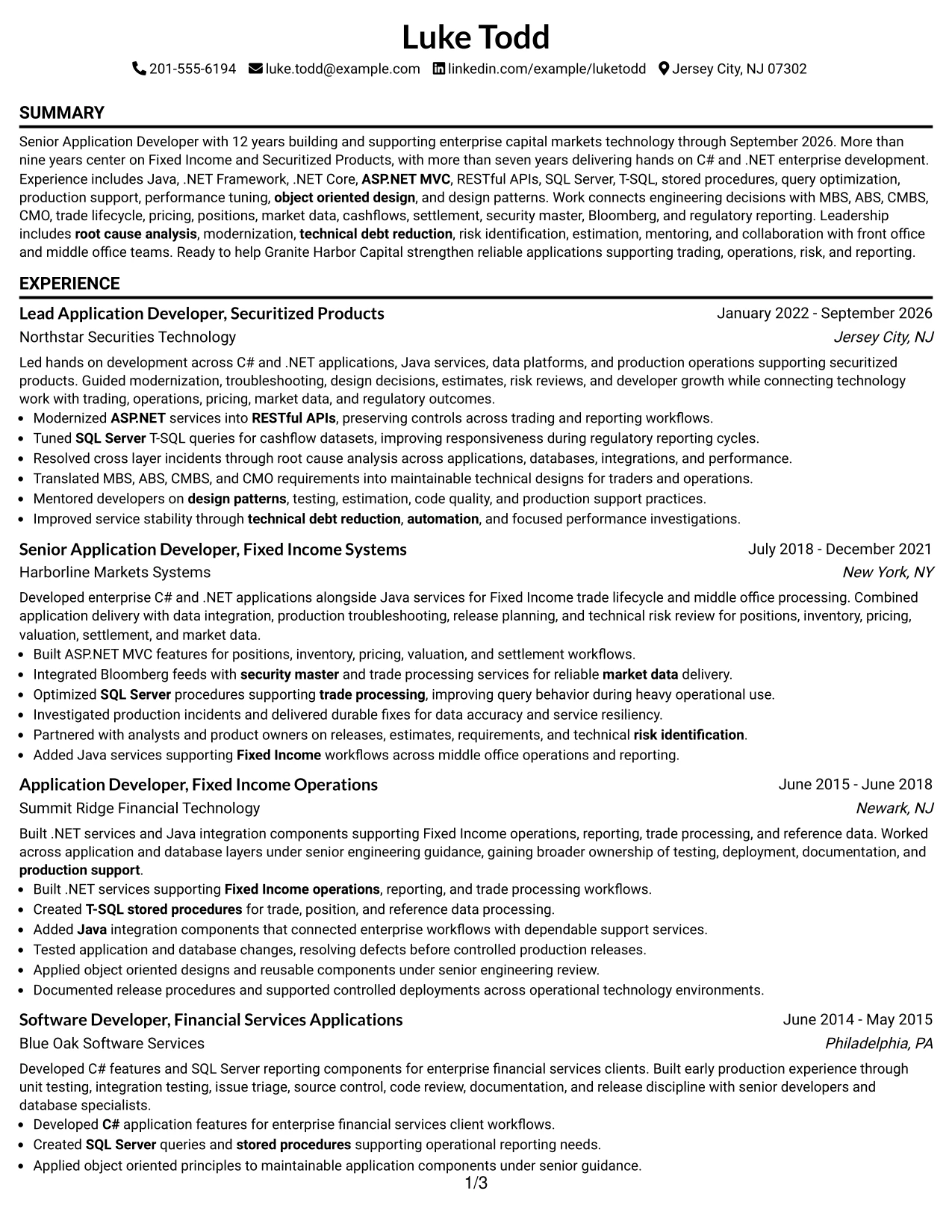
This guide shows you how to create a Senior Application Developer - Securitized Products Technology resume that is clear, focused, and easy to review. You will see how to organize technical depth, capital-markets experience, and leadership evidence in a way that supports both recruiter scanning and detailed review.
Strong resumes for this role should make C#/.NET, Java, SQL Server, RESTful APIs, production support, and object-oriented design easy to find. They should also connect that engineering work to Fixed Income and Securitized Products areas such as MBS, ABS, CMBS, CMO, pricing, positions, market data, cashflows, settlement, and regulatory reporting.
Below, one complete resume example is presented in 33 ATS-friendly resume layouts so you can compare reading order, section hierarchy, spacing, and visual emphasis while keeping the same underlying career evidence.
What Makes a Great Senior Application Developer - Securitized Products Technology Resume in 2026
A strong resume is technically specific, easy to scan, and grounded in business-critical outcomes. It should show senior ownership across development, modernization, troubleshooting, performance, and production support.
Use exact keywords supported by your background, including C#, .NET Framework, .NET Core, Java, ASP.NET MVC, RESTful APIs, SQL Server, T-SQL, MBS, ABS, CMBS, CMO, Bloomberg, and Fixed Income.
The examples shown below are intentionally detailed to demonstrate a range of experiences, skills, accomplishments and relevant keywords. We prefer detailed resumes as they provide more context to the hiring managers and also help the ATS systems identify relevant qualifications and score your resume better for a match. But the length of a resume is an individual choice. If you want a one page resume, just keep the most relevant experience and information for the job. Note: Resume examples are for educational purposes only. Use only information that accurately reflects your experience and qualifications. References to real organizations do not imply affiliation or endorsement.
#1 Simple One Column Format Resume Example
Simple One Column Format uses a clear one-column structure with defined section order. That gives reviewers a predictable path through the resume.


Resume Snapshot
- 12 years of enterprise application development
- 9+ years in Fixed Income and Securitized Products
- 7+ years of hands-on C#/.NET development
- Bachelor's Degree in Computer Science
Why This Format Works
- One-column reading order keeps senior experience chronology direct and uninterrupted.
- Full-width sections give technical accomplishments and production support details room.
- Section separation makes MBS, ABS, CMBS, and CMO knowledge easier to locate.
- Balanced structure keeps technical leadership visible beside hands-on engineering evidence.
- Consistent reading order supports review of Java, APIs, and backend services.
- Compact grouping helps reviewers find Bloomberg and market-data experience quickly.
Best For
- One-column resumes with deep chronology
- Applications favoring linear review
- Resumes with broad technical skill sets
- Evidence-heavy production support backgrounds
- Readers comparing skills and experience
- Applications requiring clear section hierarchy
#2 Plain One Column with Shaded Labels Resume Example
Reviewers can move quickly from the top of the resume into its ordered sections without losing the document hierarchy. Plain One Column with Shaded Labels keeps navigation direct and easy to follow.


Why This Format Works
- One-column reading order keeps senior experience chronology direct and uninterrupted.
- Full-width sections give technical accomplishments and production support details room.
- Shaded labels make SQL Server, skills, and experience sections easier to distinguish.
- Structured presentation keeps root cause analysis and performance tuning evidence distinct.
- Clear section boundaries make education and technical skills easy to verify.
- Available text space supports detailed capital-markets experience without compressing chronology.
Best For
- One-column resumes with deep chronology
- Applications favoring linear review
- Readers comparing skills and experience
- Applications requiring clear section hierarchy
- Technical resumes with domain specialization
- Candidates balancing leadership and coding
#3 One Column Format with Photo Right Resume Example
Experience and technical evidence remain the main focus, with the one-column structure supporting clear section separation. One Column Format with Photo Right helps reviewers locate detailed proof without unnecessary detours. The header image is visually separate from the body content.


Why This Format Works
- One-column reading order keeps senior experience chronology direct and uninterrupted.
- Full-width sections give technical accomplishments and production support details room.
- Header image stays separate from C#/.NET, SQL Server, and Fixed Income evidence.
- Visual hierarchy helps reviewers connect trade lifecycle knowledge with engineering responsibilities.
- Orderly sections make mentoring, estimation, and technical risk evidence easier to scan.
- Focused grouping supports both enterprise technology depth and securitized-products specialization.
Best For
- One-column resumes with deep chronology
- Applications favoring linear review
- Regions where resume photos are customary
- Candidates balancing leadership and coding
- Senior technical resumes with deep chronology
- Applications needing fast ATS parsing
#4 Clean Two Column Sidebar Format Resume Example
Content is balanced across two columns, which keeps major sections distinct without crowding. Clean Two Column Sidebar Format gives the resume a controlled reading rhythm.


Why This Format Works
- Two-column organization keeps technical skills separate from detailed experience chronology.
- Parallel space helps surface C#/.NET depth without shortening senior experience.
- Focused grouping supports both enterprise technology depth and securitized-products specialization.
- Clear chronology keeps twelve years of application development easy to follow.
- Defined sections separate C#/.NET depth from Fixed Income domain knowledge.
- Readable spacing gives production support and modernization evidence enough room.
Best For
- Two-column resumes with dense content
- Readers comparing skills and chronology
- Senior technical resumes with deep chronology
- Applications needing fast ATS parsing
- Detailed enterprise development experience
- Fixed Income technology applications
#5 Two Column Format Resume Example
For applications that need both quick scanning and detailed review, this two-column organization keeps sections easy to locate. Two Column Format supports a professional review flow.


Why This Format Works
- Two-column organization keeps technical skills separate from detailed experience chronology.
- Parallel space helps surface C#/.NET depth without shortening senior experience.
- Readable spacing gives production support and modernization evidence enough room.
- Strong hierarchy helps SQL Server and T-SQL skills stand out clearly.
- Organized experience sections support quick review of senior development ownership.
- Section separation makes MBS, ABS, CMBS, and CMO knowledge easier to locate.
Best For
- Two-column resumes with dense content
- Readers comparing skills and chronology
- Detailed enterprise development experience
- Fixed Income technology applications
- Resumes with broad technical skill sets
- Evidence-heavy production support backgrounds
#6 Photo Header Two Column Format Resume Example
A restrained visual hierarchy gives the resume a polished look while keeping the two-column body readable. Photo Header Two Column Format uses styling to separate sections without obscuring the content. The header image is visually separate from the body content.


Why This Format Works
- Two-column organization keeps technical skills separate from detailed experience chronology.
- Parallel space helps surface C#/.NET depth without shortening senior experience.
- Header image stays separate from C#/.NET, SQL Server, and Fixed Income evidence.
- Balanced structure keeps technical leadership visible beside hands-on engineering evidence.
- Consistent reading order supports review of Java, APIs, and backend services.
- Compact grouping helps reviewers find Bloomberg and market-data experience quickly.
Best For
- Two-column resumes with dense content
- Readers comparing skills and chronology
- Regions where resume photos are customary
- Evidence-heavy production support backgrounds
- Readers comparing skills and experience
- Applications requiring clear section hierarchy
#7 Simple Two Column Format Resume Example
Simple Two Column Format uses a clear two-column structure with defined section order. That gives reviewers a predictable path through the resume.


Why This Format Works
- Two-column organization keeps technical skills separate from detailed experience chronology.
- Parallel space helps surface C#/.NET depth without shortening senior experience.
- Compact grouping helps reviewers find Bloomberg and market-data experience quickly.
- Structured presentation keeps root cause analysis and performance tuning evidence distinct.
- Clear section boundaries make education and technical skills easy to verify.
- Available text space supports detailed capital-markets experience without compressing chronology.
Best For
- Two-column resumes with dense content
- Readers comparing skills and chronology
- Readers comparing skills and experience
- Applications requiring clear section hierarchy
- Technical resumes with domain specialization
- Candidates balancing leadership and coding
#8 Text/Fang Style Resume Example
Reviewers can move quickly from the top of the resume into its ordered sections without losing the document hierarchy. Text/Fang Style keeps navigation direct and easy to follow.


Why This Format Works
- One-column reading order keeps senior experience chronology direct and uninterrupted.
- Full-width sections give technical accomplishments and production support details room.
- Available text space supports detailed capital-markets experience without compressing chronology.
- Visual hierarchy helps reviewers connect trade lifecycle knowledge with engineering responsibilities.
- Orderly sections make mentoring, estimation, and technical risk evidence easier to scan.
- Focused grouping supports both enterprise technology depth and securitized-products specialization.
Best For
- One-column resumes with deep chronology
- Applications favoring linear review
- Technical resumes with domain specialization
- Candidates balancing leadership and coding
- Senior technical resumes with deep chronology
- Applications needing fast ATS parsing
#9 One Column Boxed Contact Header Format Resume Example
Experience and technical evidence remain the main focus, with the one-column structure supporting clear section separation. One Column Boxed Contact Header Format helps reviewers locate detailed proof without unnecessary detours.


Why This Format Works
- One-column reading order keeps senior experience chronology direct and uninterrupted.
- Full-width sections give technical accomplishments and production support details room.
- Boxed header separates contact details from the detailed technical resume body.
- Clear chronology keeps twelve years of application development easy to follow.
- Defined sections separate C#/.NET depth from Fixed Income domain knowledge.
- Readable spacing gives production support and modernization evidence enough room.
Best For
- One-column resumes with deep chronology
- Applications favoring linear review
- Senior technical resumes with deep chronology
- Applications needing fast ATS parsing
- Detailed enterprise development experience
- Fixed Income technology applications
#10 Plain Two Column Format Resume Example
Content is balanced across two columns, which keeps major sections distinct without crowding. Plain Two Column Format gives the resume a controlled reading rhythm.


Why This Format Works
- Two-column organization keeps technical skills separate from detailed experience chronology.
- Parallel space helps surface C#/.NET depth without shortening senior experience.
- Readable spacing gives production support and modernization evidence enough room.
- Strong hierarchy helps SQL Server and T-SQL skills stand out clearly.
- Organized experience sections support quick review of senior development ownership.
- Section separation makes MBS, ABS, CMBS, and CMO knowledge easier to locate.
Resume Keywords
- C#
- .NET Framework
- .NET Core
- Java
- SQL Server
- T-SQL
- RESTful APIs
- Fixed Income
- MBS
- ABS
- CMBS
- CMO
- Bloomberg
- Production Support
#11 Colored Two Column Format Resume Example
For applications that need both quick scanning and detailed review, this two-column organization keeps sections easy to locate. Colored Two Column Format supports a professional review flow.


Why This Format Works
- Two-column organization keeps technical skills separate from detailed experience chronology.
- Parallel space helps surface C#/.NET depth without shortening senior experience.
- Color accents separate sections while preserving focus on technical qualifications.
- Balanced structure keeps technical leadership visible beside hands-on engineering evidence.
- Consistent reading order supports review of Java, APIs, and backend services.
- Compact grouping helps reviewers find Bloomberg and market-data experience quickly.
Best For
- Two-column resumes with dense content
- Readers comparing skills and chronology
- Resumes with broad technical skill sets
- Evidence-heavy production support backgrounds
- Readers comparing skills and experience
- Applications requiring clear section hierarchy
#12 One Column Shaded Contact Header Format Resume Example
A restrained visual hierarchy gives the resume a polished look while keeping the one-column body readable. One Column Shaded Contact Header Format uses styling to separate sections without obscuring the content.


Why This Format Works
- One-column reading order keeps senior experience chronology direct and uninterrupted.
- Full-width sections give technical accomplishments and production support details room.
- Shaded labels make SQL Server, skills, and experience sections easier to distinguish.
- Structured presentation keeps root cause analysis and performance tuning evidence distinct.
- Clear section boundaries make education and technical skills easy to verify.
- Available text space supports detailed capital-markets experience without compressing chronology.
Best For
- One-column resumes with deep chronology
- Applications favoring linear review
- Readers comparing skills and experience
- Applications requiring clear section hierarchy
- Technical resumes with domain specialization
- Candidates balancing leadership and coding
#13 Boxed Contact Header with Job Title Format Resume Example
Boxed Contact Header with Job Title Format uses a clear one-column structure with defined section order. That gives reviewers a predictable path through the resume.


Why This Format Works
- One-column reading order keeps senior experience chronology direct and uninterrupted.
- Full-width sections give technical accomplishments and production support details room.
- Boxed header separates contact details from the detailed technical resume body.
- Visual hierarchy helps reviewers connect trade lifecycle knowledge with engineering responsibilities.
- Orderly sections make mentoring, estimation, and technical risk evidence easier to scan.
- Focused grouping supports both enterprise technology depth and securitized-products specialization.
Best For
- One-column resumes with deep chronology
- Applications favoring linear review
- Technical resumes with domain specialization
- Candidates balancing leadership and coding
- Senior technical resumes with deep chronology
- Applications needing fast ATS parsing
#14 Stylish Two Column Designer Format Resume Example
Reviewers can move quickly from the top of the resume into its parallel sections without losing the document hierarchy. Stylish Two Column Designer Format keeps navigation direct and easy to follow.


Why This Format Works
- Two-column organization keeps technical skills separate from detailed experience chronology.
- Parallel space helps surface C#/.NET depth without shortening senior experience.
- Focused grouping supports both enterprise technology depth and securitized-products specialization.
- Clear chronology keeps twelve years of application development easy to follow.
- Defined sections separate C#/.NET depth from Fixed Income domain knowledge.
- Readable spacing gives production support and modernization evidence enough room.
Best For
- Two-column resumes with dense content
- Readers comparing skills and chronology
- Senior technical resumes with deep chronology
- Applications needing fast ATS parsing
- Detailed enterprise development experience
- Fixed Income technology applications
#15 Modern Icon Format Resume Example
Experience and technical evidence remain the main focus, with the two-column structure supporting clear section separation. Modern Icon Format helps reviewers locate detailed proof without unnecessary detours.


Why This Format Works
- Two-column organization keeps technical skills separate from detailed experience chronology.
- Parallel space helps surface C#/.NET depth without shortening senior experience.
- Icons aid section recognition while two-column structure carries detailed engineering evidence.
- Strong hierarchy helps SQL Server and T-SQL skills stand out clearly.
- Organized experience sections support quick review of senior development ownership.
- Section separation makes MBS, ABS, CMBS, and CMO knowledge easier to locate.
Best For
- Two-column resumes with dense content
- Readers comparing skills and chronology
- Detailed enterprise development experience
- Fixed Income technology applications
- Resumes with broad technical skill sets
- Evidence-heavy production support backgrounds
#16 Plain Professional Layout with Job Title & Shaded Labels Resume Example
Content is spaced through one continuous column, which keeps major sections distinct without crowding. Plain Professional Layout with Job Title & Shaded Labels gives the resume a controlled reading rhythm.


Why This Format Works
- One-column reading order keeps senior experience chronology direct and uninterrupted.
- Full-width sections give technical accomplishments and production support details room.
- Shaded labels make SQL Server, skills, and experience sections easier to distinguish.
- Balanced structure keeps technical leadership visible beside hands-on engineering evidence.
- Consistent reading order supports review of Java, APIs, and backend services.
- Compact grouping helps reviewers find Bloomberg and market-data experience quickly.
Best For
- One-column resumes with deep chronology
- Applications favoring linear review
- Resumes with broad technical skill sets
- Evidence-heavy production support backgrounds
- Readers comparing skills and experience
- Applications requiring clear section hierarchy
#17 Classic One Column Resume Format Resume Example
For applications that need both quick scanning and detailed review, this one-column organization keeps sections easy to locate. Classic One Column Resume Format supports a professional review flow.


Why This Format Works
- One-column reading order keeps senior experience chronology direct and uninterrupted.
- Full-width sections give technical accomplishments and production support details room.
- Compact grouping helps reviewers find Bloomberg and market-data experience quickly.
- Structured presentation keeps root cause analysis and performance tuning evidence distinct.
- Clear section boundaries make education and technical skills easy to verify.
- Available text space supports detailed capital-markets experience without compressing chronology.
Best For
- One-column resumes with deep chronology
- Applications favoring linear review
- Readers comparing skills and experience
- Applications requiring clear section hierarchy
- Technical resumes with domain specialization
- Candidates balancing leadership and coding
#18 One Column Format with Photo Resume Example
A restrained visual hierarchy gives the resume a polished look while keeping the one-column body readable. One Column Format with Photo uses styling to separate sections without obscuring the content. The header image is visually separate from the body content.


Why This Format Works
- One-column reading order keeps senior experience chronology direct and uninterrupted.
- Full-width sections give technical accomplishments and production support details room.
- Header image stays separate from C#/.NET, SQL Server, and Fixed Income evidence.
- Visual hierarchy helps reviewers connect trade lifecycle knowledge with engineering responsibilities.
- Orderly sections make mentoring, estimation, and technical risk evidence easier to scan.
- Focused grouping supports both enterprise technology depth and securitized-products specialization.
Best For
- One-column resumes with deep chronology
- Applications favoring linear review
- Regions where resume photos are customary
- Candidates balancing leadership and coding
- Senior technical resumes with deep chronology
- Applications needing fast ATS parsing
#19 Minimal Header Format Resume Example
Minimal Header Format uses a clear one-column structure with defined section order. That gives reviewers a predictable path through the resume.


Why This Format Works
- One-column reading order keeps senior experience chronology direct and uninterrupted.
- Full-width sections give technical accomplishments and production support details room.
- Minimal header leaves more visual attention for senior engineering experience.
- Clear chronology keeps twelve years of application development easy to follow.
- Defined sections separate C#/.NET depth from Fixed Income domain knowledge.
- Readable spacing gives production support and modernization evidence enough room.
Best For
- One-column resumes with deep chronology
- Applications favoring linear review
- Senior technical resumes with deep chronology
- Applications needing fast ATS parsing
- Detailed enterprise development experience
- Fixed Income technology applications
#20 Modern Full Background Two Column Format Resume Example
Reviewers can move quickly from the top of the resume into its parallel sections without losing the document hierarchy. Modern Full Background Two Column Format keeps navigation direct and easy to follow.


Why This Format Works
- Two-column organization keeps technical skills separate from detailed experience chronology.
- Parallel space helps surface C#/.NET depth without shortening senior experience.
- Background styling adds distinction while clear sections preserve technical readability.
- Strong hierarchy helps SQL Server and T-SQL skills stand out clearly.
- Organized experience sections support quick review of senior development ownership.
- Section separation makes MBS, ABS, CMBS, and CMO knowledge easier to locate.
Best For
- Two-column resumes with dense content
- Readers comparing skills and chronology
- Detailed enterprise development experience
- Fixed Income technology applications
- Resumes with broad technical skill sets
- Evidence-heavy production support backgrounds
#21 Dark Mode Two Column Format Resume Example
Experience and technical evidence remain the main focus, with the two-column structure supporting clear section separation. Dark Mode Two Column Format helps reviewers locate detailed proof without unnecessary detours.


Why This Format Works
- Two-column organization keeps technical skills separate from detailed experience chronology.
- Parallel space helps surface C#/.NET depth without shortening senior experience.
- Dark styling creates contrast while section structure keeps technical evidence readable.
- Balanced structure keeps technical leadership visible beside hands-on engineering evidence.
- Consistent reading order supports review of Java, APIs, and backend services.
- Compact grouping helps reviewers find Bloomberg and market-data experience quickly.
Best For
- Two-column resumes with dense content
- Readers comparing skills and chronology
- Resumes with broad technical skill sets
- Evidence-heavy production support backgrounds
- Readers comparing skills and experience
- Applications requiring clear section hierarchy
#22 Dark Mode Box Header Format Resume Example
Content is balanced across two columns, which keeps major sections distinct without crowding. Dark Mode Box Header Format gives the resume a controlled reading rhythm.


Why This Format Works
- Two-column organization keeps technical skills separate from detailed experience chronology.
- Parallel space helps surface C#/.NET depth without shortening senior experience.
- Dark styling creates contrast while section structure keeps technical evidence readable.
- Structured presentation keeps root cause analysis and performance tuning evidence distinct.
- Clear section boundaries make education and technical skills easy to verify.
- Available text space supports detailed capital-markets experience without compressing chronology.
Best For
- Two-column resumes with dense content
- Readers comparing skills and chronology
- Readers comparing skills and experience
- Applications requiring clear section hierarchy
- Technical resumes with domain specialization
- Candidates balancing leadership and coding
#23 Elegant Full Background Two Column Format Resume Example
For applications that need both quick scanning and detailed review, this two-column organization keeps sections easy to locate. Elegant Full Background Two Column Format supports a professional review flow.


Why This Format Works
- Two-column organization keeps technical skills separate from detailed experience chronology.
- Parallel space helps surface C#/.NET depth without shortening senior experience.
- Background styling adds distinction while clear sections preserve technical readability.
- Visual hierarchy helps reviewers connect trade lifecycle knowledge with engineering responsibilities.
- Orderly sections make mentoring, estimation, and technical risk evidence easier to scan.
- Focused grouping supports both enterprise technology depth and securitized-products specialization.
Best For
- Two-column resumes with dense content
- Readers comparing skills and chronology
- Technical resumes with domain specialization
- Candidates balancing leadership and coding
- Senior technical resumes with deep chronology
- Applications needing fast ATS parsing
#24 Creative Two Tone Format Resume Example
A restrained visual hierarchy gives the resume a polished look while keeping the two-column body readable. Creative Two Tone Format uses styling to separate sections without obscuring the content.


Why This Format Works
- Two-column organization keeps technical skills separate from detailed experience chronology.
- Parallel space helps surface C#/.NET depth without shortening senior experience.
- Color accents separate sections while preserving focus on technical qualifications.
- Clear chronology keeps twelve years of application development easy to follow.
- Defined sections separate C#/.NET depth from Fixed Income domain knowledge.
- Readable spacing gives production support and modernization evidence enough room.
Best For
- Two-column resumes with dense content
- Readers comparing skills and chronology
- Senior technical resumes with deep chronology
- Applications needing fast ATS parsing
- Detailed enterprise development experience
- Fixed Income technology applications
#25 Bold Color Header Professional Format Resume Example
Bold Color Header Professional Format uses a clear two-column structure with defined section order. That gives reviewers a predictable path through the resume.


Why This Format Works
- Two-column organization keeps technical skills separate from detailed experience chronology.
- Parallel space helps surface C#/.NET depth without shortening senior experience.
- Color accents separate sections while preserving focus on technical qualifications.
- Strong hierarchy helps SQL Server and T-SQL skills stand out clearly.
- Organized experience sections support quick review of senior development ownership.
- Section separation makes MBS, ABS, CMBS, and CMO knowledge easier to locate.
Best For
- Two-column resumes with dense content
- Readers comparing skills and chronology
- Detailed enterprise development experience
- Fixed Income technology applications
- Resumes with broad technical skill sets
- Evidence-heavy production support backgrounds
#26 Photo Header Color Sidebar Format Resume Example
Reviewers can move quickly from the top of the resume into its parallel sections without losing the document hierarchy. Photo Header Color Sidebar Format keeps navigation direct and easy to follow. The header image is visually separate from the body content.


Why This Format Works
- Two-column organization keeps technical skills separate from detailed experience chronology.
- Parallel space helps surface C#/.NET depth without shortening senior experience.
- Color accents separate sections while preserving focus on technical qualifications.
- Balanced structure keeps technical leadership visible beside hands-on engineering evidence.
- Consistent reading order supports review of Java, APIs, and backend services.
- Compact grouping helps reviewers find Bloomberg and market-data experience quickly.
Best For
- Two-column resumes with dense content
- Readers comparing skills and chronology
- Regions where resume photos are customary
- Evidence-heavy production support backgrounds
- Readers comparing skills and experience
- Applications requiring clear section hierarchy
#27 Top Left Header Color Accent Format Resume Example
Experience and technical evidence remain the main focus, with the two-column structure supporting clear section separation. Top Left Header Color Accent Format helps reviewers locate detailed proof without unnecessary detours.


Why This Format Works
- Two-column organization keeps technical skills separate from detailed experience chronology.
- Parallel space helps surface C#/.NET depth without shortening senior experience.
- Color accents separate sections while preserving focus on technical qualifications.
- Structured presentation keeps root cause analysis and performance tuning evidence distinct.
- Clear section boundaries make education and technical skills easy to verify.
- Available text space supports detailed capital-markets experience without compressing chronology.
Best For
- Two-column resumes with dense content
- Readers comparing skills and chronology
- Readers comparing skills and experience
- Applications requiring clear section hierarchy
- Technical resumes with domain specialization
- Candidates balancing leadership and coding
#28 Centered Header Classic Two Column Format Resume Example
Content is balanced across two columns, which keeps major sections distinct without crowding. Centered Header Classic Two Column Format gives the resume a controlled reading rhythm.


Why This Format Works
- Two-column organization keeps technical skills separate from detailed experience chronology.
- Parallel space helps surface C#/.NET depth without shortening senior experience.
- Available text space supports detailed capital-markets experience without compressing chronology.
- Visual hierarchy helps reviewers connect trade lifecycle knowledge with engineering responsibilities.
- Orderly sections make mentoring, estimation, and technical risk evidence easier to scan.
- Focused grouping supports both enterprise technology depth and securitized-products specialization.
Best For
- Two-column resumes with dense content
- Readers comparing skills and chronology
- Technical resumes with domain specialization
- Candidates balancing leadership and coding
- Senior technical resumes with deep chronology
- Applications needing fast ATS parsing
#29 Left Aligned Header Clean Two Column Format Resume Example
For applications that need both quick scanning and detailed review, this two-column organization keeps sections easy to locate. Left Aligned Header Clean Two Column Format supports a professional review flow.


Why This Format Works
- Two-column organization keeps technical skills separate from detailed experience chronology.
- Parallel space helps surface C#/.NET depth without shortening senior experience.
- Focused grouping supports both enterprise technology depth and securitized-products specialization.
- Clear chronology keeps twelve years of application development easy to follow.
- Defined sections separate C#/.NET depth from Fixed Income domain knowledge.
- Readable spacing gives production support and modernization evidence enough room.
Best For
- Two-column resumes with dense content
- Readers comparing skills and chronology
- Senior technical resumes with deep chronology
- Applications needing fast ATS parsing
- Detailed enterprise development experience
- Fixed Income technology applications
#30 Accent Divider Modern Two Column Format Resume Example
A restrained visual hierarchy gives the resume a polished look while keeping the two-column body readable. Accent Divider Modern Two Column Format uses styling to separate sections without obscuring the content.


Why This Format Works
- Two-column organization keeps technical skills separate from detailed experience chronology.
- Parallel space helps surface C#/.NET depth without shortening senior experience.
- Readable spacing gives production support and modernization evidence enough room.
- Strong hierarchy helps SQL Server and T-SQL skills stand out clearly.
- Organized experience sections support quick review of senior development ownership.
- Section separation makes MBS, ABS, CMBS, and CMO knowledge easier to locate.
Best For
- Two-column resumes with dense content
- Readers comparing skills and chronology
- Detailed enterprise development experience
- Fixed Income technology applications
- Resumes with broad technical skill sets
- Evidence-heavy production support backgrounds
#31 Shaded Labels Clean Two Column Format Resume Example
Shaded Labels Clean Two Column Format uses a clear two-column structure with defined section order. That gives reviewers a predictable path through the resume.


Why This Format Works
- Two-column organization keeps technical skills separate from detailed experience chronology.
- Parallel space helps surface C#/.NET depth without shortening senior experience.
- Shaded labels make SQL Server, skills, and experience sections easier to distinguish.
- Balanced structure keeps technical leadership visible beside hands-on engineering evidence.
- Consistent reading order supports review of Java, APIs, and backend services.
- Compact grouping helps reviewers find Bloomberg and market-data experience quickly.
Best For
- Two-column resumes with dense content
- Readers comparing skills and chronology
- Resumes with broad technical skill sets
- Evidence-heavy production support backgrounds
- Readers comparing skills and experience
- Applications requiring clear section hierarchy
#32 Photo Header Color Accent International Format Resume Example
Reviewers can move quickly from the top of the resume into its parallel sections without losing the document hierarchy. Photo Header Color Accent International Format keeps navigation direct and easy to follow. The header image is visually separate from the body content.


Why This Format Works
- Two-column organization keeps technical skills separate from detailed experience chronology.
- Parallel space helps surface C#/.NET depth without shortening senior experience.
- Color accents separate sections while preserving focus on technical qualifications.
- Structured presentation keeps root cause analysis and performance tuning evidence distinct.
- Clear section boundaries make education and technical skills easy to verify.
- Available text space supports detailed capital-markets experience without compressing chronology.
Best For
- Two-column resumes with dense content
- Readers comparing skills and chronology
- Regions where resume photos are customary
- Applications requiring clear section hierarchy
- Technical resumes with domain specialization
- Candidates balancing leadership and coding
#33 Large Profile Photo International Two Column Format Resume Example
Experience and technical evidence remain the main focus, with the two-column structure supporting clear section separation. Large Profile Photo International Two Column Format helps reviewers locate detailed proof without unnecessary detours. The header image is visually separate from the body content.


Why This Format Works
- Two-column organization keeps technical skills separate from detailed experience chronology.
- Parallel space helps surface C#/.NET depth without shortening senior experience.
- Header image stays separate from C#/.NET, SQL Server, and Fixed Income evidence.
- Visual hierarchy helps reviewers connect trade lifecycle knowledge with engineering responsibilities.
- Orderly sections make mentoring, estimation, and technical risk evidence easier to scan.
- Focused grouping supports both enterprise technology depth and securitized-products specialization.
Best For
- Two-column resumes with dense content
- Readers comparing skills and chronology
- Regions where resume photos are customary
- Candidates balancing leadership and coding
- Senior technical resumes with deep chronology
- Applications needing fast ATS parsing
Why Build Your Senior Application Developer - Securitized Products Technology Resume with ResumeInMinutes
ResumeInMinutes helps experienced application developers organize technical skills, production ownership, capital-markets knowledge, and leadership evidence into a resume that is easier to scan and tailor.
- Professional resume layouts
- ATS-friendly section structure
- Role-specific keyword support
- Experience and skills organization
- Free PDF resume previews
- Resume customization support
You can use these formats to present senior C#/.NET and Java development, SQL Server depth, production support, modernization work, and Fixed Income domain knowledge without losing a clear review path.
See Also
- 33 Senior Application Developer - Securitized Products Resume Templates with Example 2026 (ATS-Optimized)
- 33 Front End Web Applications Developer - Mid-Level JavaScript Resume Templates with Example 2026 (ATS-Optimized)
- 33 Mobile Application Developer Intern Resume Templates with Example 2026 (ATS-Optimized)
- 33 AI Automation Engineer / Full-Stack Developer Resume Templates with Example 2026 (ATS-Optimized)
- 33 AI Engineer / Applied AI Developer Resume Templates with Example 2026 (ATS-Optimized)
- 33 AI Engineer, Developer Experience Resume Templates with Example 2026 (ATS-Optimized)
- 33 AI Hyper Automation Developer Resume Templates with Example 2026 (ATS-Optimized)
- 33 AI/ML Engineer Intern, Cloud & Developer Infra Resume Templates with Example 2026 (ATS-Optimized)
- 30+ Front End Web Applications Developer - Mid-Level JavaScript Cover Letter Templates with Example 2026
- 30+ Mobile Application Developer Intern Cover Letter Templates with Example 2026
Frequently Asked Questions
Are these Senior Application Developer - Securitized Products Technology resume templates ATS-friendly?
Yes. The templates use clear sections and readable structure, and the example includes grounded keywords such as C#, .NET, Java, SQL Server, T-SQL, Fixed Income, MBS, ABS, CMBS, CMO, Bloomberg, and RESTful APIs.
Are these different resumes?
No. The guide uses one Senior Application Developer - Securitized Products Technology resume example across multiple layouts and design themes.
What should this resume include?
Include a focused summary, senior application development experience, technical skills, Fixed Income and Securitized Products knowledge, production support, modernization work, education, projects, and relevant keywords.
Can I download the resume templates as PDFs?
Yes. Each resume style provides a free PDF download so you can preview the format and compare how the same content reads in different layouts.
Which resume style works well for this senior application development role?
A clean one-column format supports direct chronological review, while a balanced two-column format can help separate technical skills from deeper experience. Choose the layout that keeps your strongest evidence easy to find.
How should I show Fixed Income and Securitized Products knowledge?
Use specific terms that match your real work, such as MBS, ABS, CMBS, CMO, trade lifecycle, pricing, positions, market data, cashflows, settlement, Bloomberg, and regulatory reporting.
Should I include a photo on my resume?
Include a photo only when it is customary or expected in your country or region. For U.S. applications, a no-photo resume is generally the safer choice.
Can I customize these resume templates?
Yes. You can adjust the resume text, layout, design style, and PDF format while keeping the content aligned with your actual Senior Application Developer - Securitized Products Technology background.