81. How do you prevent cross-site scripting when rendering user-controlled data in PHP?
Explain context-aware output encoding for HTML text and attributes, safe templating defaults, URL and JavaScript contexts, input validation, and Content Security Policy as defense in depth.
I prevent XSS by encoding untrusted data for its exact output context. I use htmlspecialchars() for HTML text and ordinary quoted attributes, validate URL schemes, avoid inline JavaScript data insertion, keep template auto-escaping enabled, and add a restrictive Content Security Policy as defense in depth.
See the Code while reading this explanation.
This question asks how to stop information supplied by a visitor from becoming harmful instructions in another visitor's browser. The key is to handle the information safely at the place where it is displayed. Text, links, page properties, and browser instructions do not follow the same rules, so each needs suitable protection. Checking information when it enters the application is helpful, but that check cannot replace safe handling when displaying it. A complete answer should also cover safer page-building tools, extra browser restrictions, safe failure, careful records, and tests that prove the protection works.
Useful clarifying questions:
- In which contexts can user-controlled data appear: HTML text, attributes, URLs, JavaScript, CSS, or permitted HTML?
- Does the application use plain PHP templates or a template engine with automatic escaping?
- Are relative URLs or any schemes other than HTTPS required?
- Must users be allowed to submit limited HTML formatting?
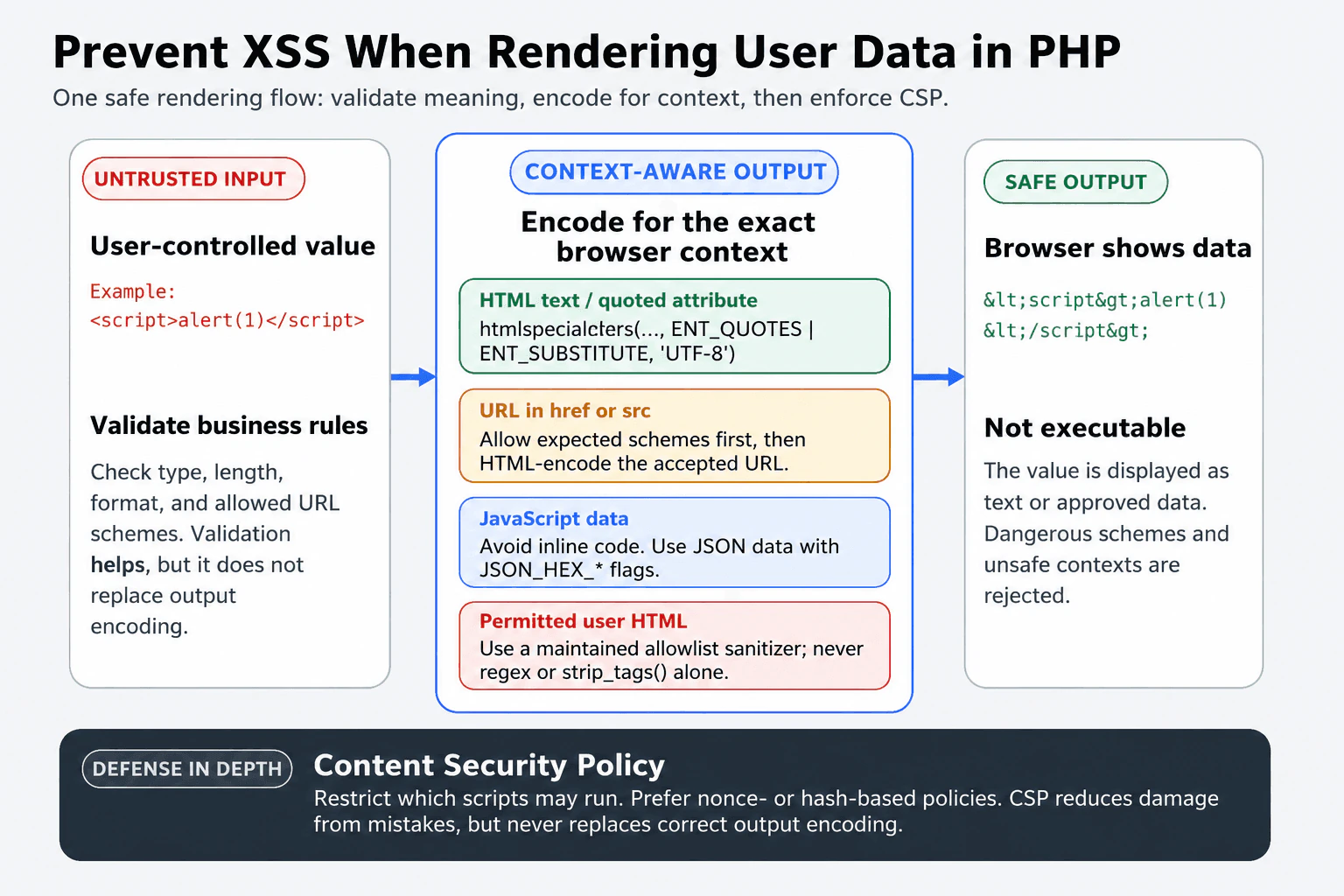
The main rule is to encode untrusted data when it is rendered, using the encoder required by that exact browser context. Input validation should enforce business rules, such as expected length, type, format, and allowed values, but filtering or validation alone is not complete XSS protection.
For HTML text and ordinary quoted attributes, I use htmlspecialchars($value, ENT_QUOTES | ENT_SUBSTITUTE, 'UTF-8'). It converts characters such as <, >, &, single quotes, and double quotes into text that the HTML parser will not interpret as markup. ENT_SUBSTITUTE replaces invalid byte sequences safely. Attribute values must remain quoted. This rule does not make dangerous attributes such as onclick, style, or srcdoc safe, so I do not place untrusted data in those contexts.
A template engine should keep automatic escaping enabled by default. Developers should avoid raw-output features. When raw output is genuinely required, the value must come from a narrowly controlled source or be processed by a maintained, allowlist-based HTML sanitizer. A custom regular expression, strip_tags(), or a blacklist is not a reliable HTML sanitizer.
URLs require semantic validation as well as HTML encoding. I parse the URL and allow only the schemes the application needs, commonly https and, when justified, http. I reject unexpected schemes such as javascript: and data:. I then apply HTML attribute encoding when placing the accepted URL in a quoted href or src attribute. Encoding by itself cannot make a dangerous URL scheme safe. If relative URLs are allowed, I validate them with a separate policy instead of treating them as absolute URLs.
For JavaScript, I avoid placing user-controlled values directly inside inline scripts, event-handler attributes, or dynamically generated code. A safer design is to place serialized data in a non-executable data element and let trusted external JavaScript read it. When PHP must serialize data for an HTML script element, I use json_encode() with JSON_THROW_ON_ERROR, JSON_HEX_TAG, JSON_HEX_AMP, JSON_HEX_APOS, and JSON_HEX_QUOT. I never build JavaScript source by concatenating quoted user strings, and I do not pass untrusted strings to eval(), new Function(), or HTML-generating DOM APIs.
For CSS contexts, I avoid inserting user-controlled values into style attributes or style blocks. CSS has different parsing rules, and HTML encoding is not sufficient. I prefer selecting from predefined server-side values or applying a strict allowlist for a narrowly defined property.
Content Security Policy, or CSP, is a browser-enforced restriction on which scripts may run. A strong policy can block inline scripts, plugins, unsafe framing, and scripts from unapproved sources. Nonce-based or hash-based policies are stronger than allowing 'unsafe-inline'. CSP can reduce the impact of an encoding mistake, but it is defense in depth and never replaces context-aware output encoding.
When a value fails validation or cannot be encoded safely, the application should reject it or display a safe fallback instead of rendering the original value. Security logs can record the route, field name, validation reason, request identifier, and account identifier when appropriate. They should not contain passwords, session identifiers, authorization headers, private tokens, or unnecessarily complete attack payloads.
I verify the controls with automated tests containing HTML tags, closing tags, quote-breaking input, event handlers, dangerous URL schemes, malformed UTF-8, and strings containing </script>. I inspect the final browser DOM to confirm that values remain text or approved data, test the CSP response header, review CSP violation reports carefully, and use a security scanner as an additional check rather than as the only proof.
- Inventory every location where user-controlled data is rendered.
- Classify each location as HTML text, ordinary quoted attribute, URL, JavaScript data, CSS, or permitted HTML.
- Validate the value against business rules and any context-specific allowlist.
- Prefer redesigning the page when the destination context is dangerous, such as an event-handler attribute, inline CSS, or executable JavaScript.
- Encode the value at output time with the correct context-specific method.
- Keep template automatic escaping enabled and restrict raw-output operations.
- Use a maintained allowlist-based sanitizer only when rendering user-authored HTML is an actual requirement.
- Add a restrictive CSP as defense in depth.
- Reject unsafe values or show a safe fallback, and log only non-secret diagnostic details.
- Test malicious boundary cases and inspect the final DOM and security headers.
<?php

declare(strict_types=1);

function escapeHtml(string $value): string
{
    return htmlspecialchars(
        $value,
        ENT_QUOTES | ENT_SUBSTITUTE,
        'UTF-8'
    );
}

function validateAbsoluteHttpUrl(string $value): ?string
{
    if ($value === '' || strlen($value) > 2048) {
        return null;
    }

    $validated = filter_var($value, FILTER_VALIDATE_URL);
    if ($validated === false) {
        return null;
    }

    $scheme = strtolower((string) parse_url($validated, PHP_URL_SCHEME));
    if (!in_array($scheme, ['https', 'http'], true)) {
        return null;
    }

    return $validated;
}

function jsonForHtmlScript(mixed $value): string
{
    return json_encode(
        $value,
        JSON_THROW_ON_ERROR
        | JSON_HEX_TAG
        | JSON_HEX_AMP
        | JSON_HEX_APOS
        | JSON_HEX_QUOT
    );
}

$userName = (string) ($_GET['name'] ?? 'Guest');
$submittedUrl = (string) ($_GET['url'] ?? '');
$safeUrl = validateAbsoluteHttpUrl($submittedUrl);

$nonce = base64_encode(random_bytes(18));
header(
    "Content-Security-Policy: default-src 'self'; "
    . "script-src 'self' 'nonce-{$nonce}'; "
    . "object-src 'none'; base-uri 'self'; frame-ancestors 'none'"
);

$pageData = [
    'displayName' => $userName,
];
?>
<!doctype html>
<html lang="en">
<head>
    <meta charset="utf-8">
    <meta name="viewport" content="width=device-width, initial-scale=1">
    <title>Safe output example</title>
</head>
<body>
    <h1>Hello, <?= escapeHtml($userName) ?></h1>

    <?php if ($safeUrl !== null): ?>
        <a href="<?= escapeHtml($safeUrl) ?>" rel="noopener noreferrer">
            Visit submitted link
        </a>
    <?php else: ?>
        <p>The submitted link is not allowed.</p>
    <?php endif; ?>

    <script type="application/json" id="page-data"><?= jsonForHtmlScript($pageData) ?></script>
    <script nonce="<?= escapeHtml($nonce) ?>">
        const element = document.getElementById('page-data');
        const data = JSON.parse(element.textContent);
        console.log(data.displayName);
    </script>
</body>
</html>The interviewer is testing whether the candidate understands that XSS prevention depends on where untrusted data is rendered. A strong answer should distinguish HTML text, attributes, URLs, JavaScript, and permitted HTML; explain safe PHP and template behavior; avoid relying on filtering alone; include defense in depth; and describe safe failure, logging, and verification.
Common mistakes include treating input validation or filtering as complete protection; encoding data when it is stored instead of for its final output context; double-encoding or later decoding an already safe value; omitting ENT_QUOTES; leaving attributes unquoted; using HTML encoding inside event handlers, CSS, or JavaScript source; validating a URL's format but not its scheme; allowing javascript: or unnecessary data: URLs; inserting PHP values directly into JavaScript strings; using innerHTML when textContent is sufficient; using strip_tags(), a blacklist, or regular expressions as an HTML sanitizer; disabling template auto-escaping; marking untrusted content as raw; relying only on CSP; weakening CSP with broad sources or 'unsafe-inline'; and logging secrets or complete malicious payloads unnecessarily.
Start with one sentence: encode at output time for the exact browser context. Then distinguish HTML text, URLs, JavaScript, and permitted HTML. State clearly that validation and CSP are supporting controls, not substitutes for context-aware encoding.