This interview guide is for educational and informational purposes only. It is designed to help readers prepare, but it does not guarantee any interview result, hiring decision, offer, or outcome. Interview questions, hiring criteria, and preferred answers can vary by employer, interviewer, industry, location, and time. All answers, examples, and explanations in this guide are suggested examples for interview preparation, not definitive answers or instructions for professional practice. They are based on research and judgment, are provided without warranties of any kind, and should be adapted to the question, role, and applicable laws and professional requirements. Diagrams are simplified illustrations intended to highlight the main concepts and their relationships; actual situations, systems, and practices may be more complex. Alternative approaches may be equally valid or better suited to a particular question, context, or interviewer. To the fullest extent permitted by applicable law, the contributors and publisher are not liable for decisions made, actions taken, or losses incurred based on this guide.
State Laws and Professional Responsibilities
Laws and requirements governing an occupation vary by state and jurisdiction. You are responsible for checking the current laws, licensing requirements, and scope-of-practice rules that apply to your location and role, and for ensuring that your answers and actions comply with them. Adapt examples in this guide to those requirements. This guide is not legal advice.
Identity, Image, and Privacy Notice
To respect individual privacy, some names, profile photographs, avatars, biographical details, and other identifying information displayed in this guide may be replaced with pseudonyms, licensed stock images, illustrative avatars, composite images, or representative descriptions. Unless a person is expressly identified as an actual contributor, a displayed name, image, or profile should not be understood as depicting or identifying a specific candidate, interviewer, employee, or other real individual. These representations are provided for editorial and illustrative purposes only and do not imply endorsement, employment, participation, or affiliation with this guide or any company mentioned in it. Any resemblance to an actual person is coincidental.
Company Notice
This guide is an independent educational resource and is not affiliated with, endorsed by, sponsored by, or approved by the company named in this guide. Company names identify reported interview experiences or the employer context of clearly labeled original practice exercises. Interview practices can change without notice, and inclusion of company-specific content does not mean these questions are official, complete, or guaranteed to be asked. To the fullest extent permitted by law, the author, contributors, and publisher are not responsible for outcomes related to use of this material.
Content Accuracy and Verification
To the fullest extent permitted by applicable law, we do not represent or warrant that interview guides, questions, answers, examples, or diagrams are accurate, complete, current, error-free, or suitable for any particular purpose. You are responsible for independently reviewing and verifying the information before relying on it.
Questions or comments?
Contact us for general questions, or share feedback, technical corrections, and comments with the community.
1. What is DevOps, and how does it change the way software is built and operated?DevOpsEasy
i Question Details
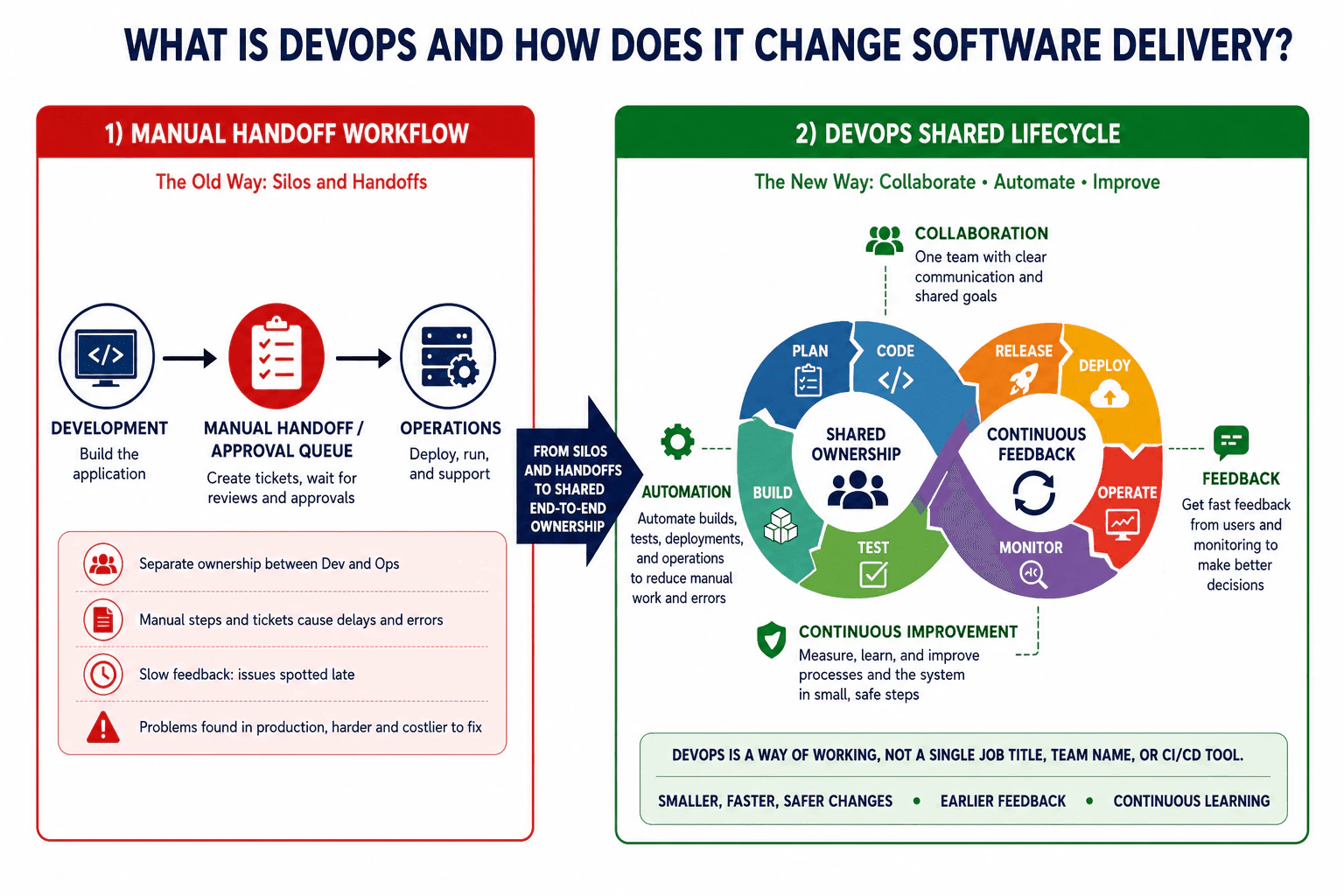
A team currently passes releases from development to operations through a manual handoff queue. Explain what DevOps means in this context and how its approach to ownership, collaboration, automation, feedback, and continuous improvement differs from the handoff-based workflow. Distinguish the practice from a single job title, team name, or CI/CD tool.
Short Interview Answer (30-60 seconds)
DevOps is a way of working where development and operations share responsibility for a service across its lifecycle. Instead of developers building software and passing it through a manual approval queue to operations, the teams collaborate, automate repeatable work, watch the system together, and use feedback to improve it. The practical result is smaller, faster, and safer changes, earlier feedback, and continuous learning. DevOps is not one job title, team name, or CI/CD tool.
Detailed Explanation
DevOps changes software delivery by replacing separate groups and slow handoffs with shared responsibility. Developers and operations work together throughout the life of the software. Repeated work is automated where it is safe to do so. The team checks results earlier instead of waiting until a problem reaches users. They also learn from what happens after a release and use that information to make the next change better. DevOps is mainly about how people work together, supported by good processes and useful tools. It is not simply another name for a person, department, or deployment product.
Useful Questions to Ask the Interviewer
Is the current release process mostly manual, or is some of it already automated?
Do development and operations share responsibility for production today?
What kind of feedback does the team receive after a release?
How to Explain It in an Interview
In a manual handoff workflow, development builds the application and then sends it through a handoff and approval queue to operations. Operations deploys, runs, and supports it. This creates separate ownership. Manual steps and tickets can add delays and errors. Feedback can be slow, so problems may be discovered late in production, where they are often harder and more costly to correct.
With DevOps, the goal is shared ownership across the software lifecycle. The team works together through planning, coding, building, testing, releasing, deploying, operating, and monitoring. This does not mean every person performs every task. It means development and operations share goals, responsibility, and information instead of treating production as someone else's problem.
Collaboration gives the team shared goals and clear communication. Automation reduces repeated manual work in builds, tests, deployments, and operations. Feedback from users and monitoring helps the team make better decisions. Continuous improvement means the team measures results, learns from them, and improves both the process and the system in small, safe steps.
DevOps does not require every production deployment to be fully automatic. A company can keep approvals when risk, regulation, or business policy requires them. The goal is to make controls useful and repeatable rather than depending on a slow handoff queue. Automation also does not remove operational responsibility. Automated steps can fail, so teams still need monitoring, clear ownership, and safe recovery procedures.
The overall result is a delivery model that supports smaller, faster, and safer changes, earlier feedback, and continuous learning.
Why Interviewers Ask This
Interviewers ask this question to check whether I understand DevOps as a way of working rather than as one tool, job title, or team name. They want to see whether I understand shared ownership, collaboration, automation, feedback, and continuous improvement. They also want to know whether I can explain why these practices can reduce slow manual handoffs and help teams deliver software more safely and reliably.
Common interview mistakes
A common mistake is saying DevOps is simply a DevOps Engineer job title or a separate DevOps team. Another mistake is treating CI/CD as the definition of DevOps. CI/CD can support DevOps, but it is only part of the approach. Teams also make mistakes when they automate a poor process without improving ownership, collaboration, or feedback. Another mistake is assuming automation removes the need for monitoring and human judgment. Production systems still need clear responsibility, observation, recovery procedures, and learning after failures.
Interview tip
Start by contrasting the manual handoff workflow with shared ownership. Then explain collaboration, automation, feedback, and continuous improvement. Mention the lifecycle from planning through monitoring. Finish by saying that DevOps is a way of working supported by tools, not one job title, team name, or CI/CD product.
Interviewer may ask next
Does adopting DevOps mean every production deployment must be fully automatic?
No. DevOps does not require every production deployment to happen automatically. A team can keep approvals when risk, regulation, or business policy requires them. The important behavior is that the delivery process has shared ownership, useful automation, clear feedback, and repeatable controls. This matters because blindly removing approvals can increase risk, while keeping unnecessary manual queues can slow delivery. The team should automate safe repeatable work and keep human decisions where they provide real value.
What is the main tradeoff when a team increases automation in a DevOps workflow?
The main tradeoff is that automation reduces repeated manual effort and inconsistency, but the automation itself becomes something the team must design, test, monitor, and maintain. Automating builds, tests, deployments, and operational tasks can make changes faster and more consistent, but a bad automated rule can also repeat a mistake quickly. This matters in production, so teams should add useful checks, clear failure handling, monitoring, and safe recovery while keeping shared human ownership of the outcome.
2. What is CI/CD, and what problem does it solve in software delivery?DevOpsEasy
i Question Details
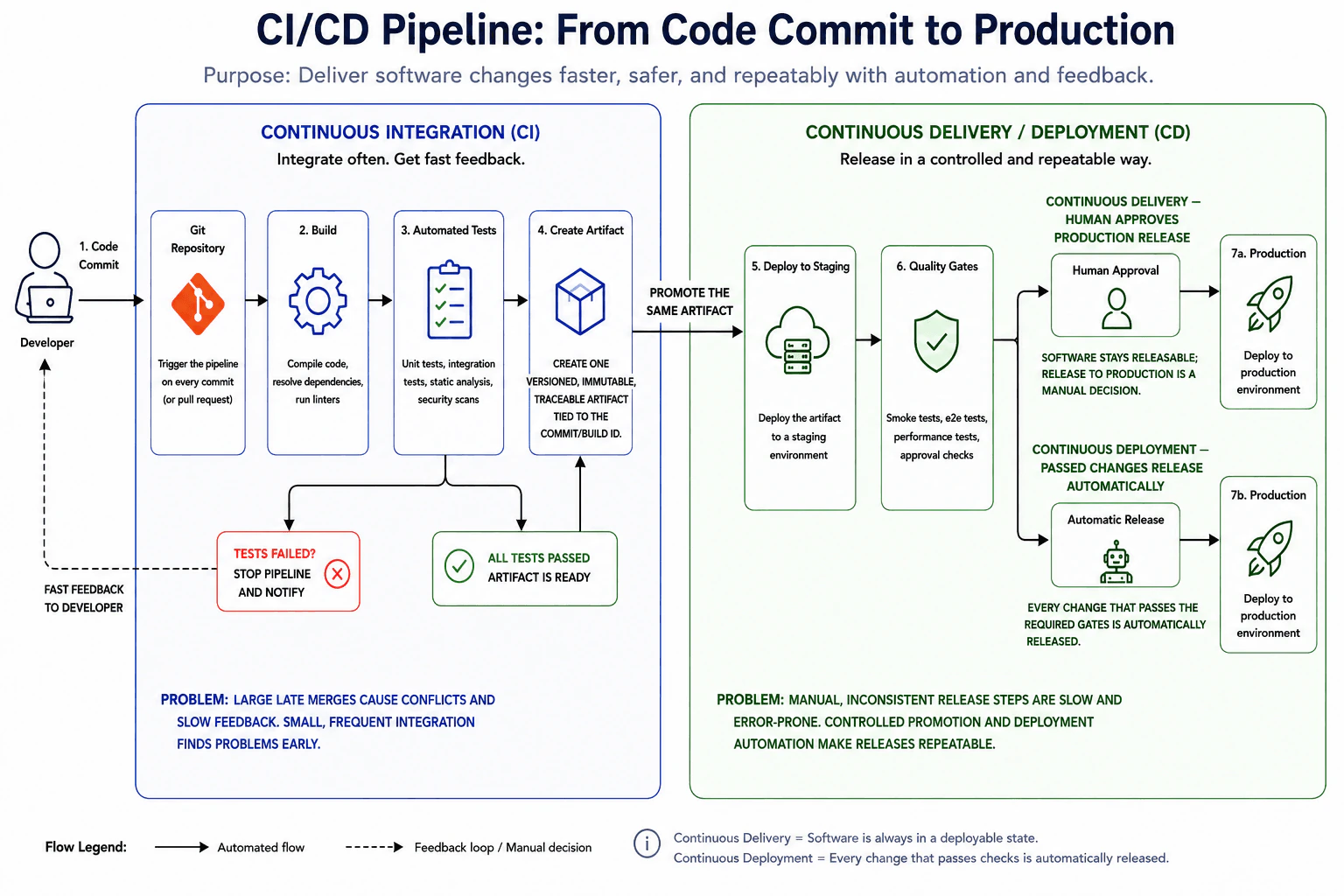
A team integrates large changes late and deploys releases through manual, inconsistent steps. Explain the purpose of continuous integration and continuous delivery or deployment in this context. Cover small and frequent integration, automated build and test feedback, creation of a traceable artifact, controlled promotion, deployment automation, and the distinction between keeping software releasable and automatically releasing it to production.
Short Interview Answer (30-60 seconds)
CI/CD helps teams integrate code often, test changes quickly, and deliver software through a controlled and repeatable process. Continuous Integration builds and tests small changes so problems are found early. After the checks pass, the pipeline creates one versioned and traceable artifact and promotes that same artifact through staging and quality gates. Continuous Delivery keeps the software ready for production but can require a human release decision. Continuous Deployment goes further and automatically releases a change to production after all required gates pass.
Detailed Explanation
CI/CD gives a team a safer and more repeatable way to move a software change from a developer to users. Instead of waiting for many large changes and combining them near release time, developers send small changes often. Automatic checks quickly show whether a change works. After the checks pass, the team keeps one identified package and moves that same package through later checks. This reduces late surprises, repeated manual work, and uncertainty about what was tested or released. It also makes the release process easier to repeat and understand.
Useful Questions to Ask the Interviewer
Does your team require a human approval before production releases?
Does your pipeline promote the same built artifact through staging and production?
Which automated checks must pass before a change can reach production?
How to Explain It in an Interview
Continuous Integration means developers integrate small changes frequently. A commit or pull request triggers the pipeline. The pipeline builds the application and runs automated checks such as unit tests, integration tests, static analysis, and security scans. If a required test or check fails, the pipeline stops that change and sends fast feedback to the developer. The failed change does not continue toward release.
When the required CI checks pass, the pipeline creates one versioned, immutable, and traceable artifact. That artifact is tied to the commit or build identity. The important production practice is to promote the same artifact instead of rebuilding different packages for different environments. This makes it easier to know that the software tested in staging is the same software being considered for production.
The artifact is deployed to staging. Additional quality gates can run there, such as smoke tests, end to end tests, performance tests, and approval checks. Controlled promotion means the artifact moves forward only after the required conditions pass.
Continuous Delivery keeps the software in a releasable state. After the required gates pass, a human can approve the production release. Continuous Deployment removes that manual production decision. A change that passes the required gates is released to production automatically.
CI/CD solves two major delivery problems shown in the workflow. First, large late integrations create conflicts and slow feedback. Small frequent integration finds problems earlier. Second, manual and inconsistent release steps are slow and error prone. Automated checks, traceable artifacts, controlled promotion, and deployment automation make the process more repeatable. The main limitation is that automation is only as useful as its checks. Weak tests or poor gates can still allow bad changes through, so production teams also need monitoring and a recovery plan.
Why Interviewers Ask This
Interviewers ask this to check whether I understand CI/CD as a complete software delivery workflow rather than only knowing the terms. They want to see whether I can explain frequent integration, automated build and test feedback, traceable artifacts, controlled promotion, deployment automation, failure handling, and the difference between Continuous Delivery and Continuous Deployment.
Common interview mistakes
A common mistake is saying CI only means running tests. CI also includes integrating small changes frequently and receiving automated build and test feedback. Another mistake is rebuilding the application separately for each environment instead of promoting the same tested artifact. Teams also confuse Continuous Delivery with Continuous Deployment. Continuous Delivery keeps software ready to release while allowing a human production decision. Continuous Deployment automatically releases changes that pass the required gates. Another mistake is allowing failed checks to continue through the pipeline instead of stopping the change and returning fast feedback to the developer.
Interview tip
Explain CI/CD as one flow from a small code change to production. Start with frequent integration and fast automated feedback. Then explain the versioned traceable artifact and why the same artifact is promoted through staging and quality gates. Finish with the key distinction: Continuous Delivery keeps software ready for production with a human release decision, while Continuous Deployment automatically releases changes that pass the required gates.
Interviewer may ask next
What should happen when an automated test fails during Continuous Integration?
The pipeline should stop that change and send fast feedback to the developer. The failed path should not continue to artifact creation or later promotion as a successful release candidate. This matters because CI is supposed to detect problems early and prevent a known failing change from moving deeper into the delivery process. After the problem is corrected, the pipeline can run again and continue only when the required checks pass.
When would you choose Continuous Delivery instead of Continuous Deployment?
I would choose Continuous Delivery when the software should remain ready for production but the organization still needs a human production release decision. The pipeline can automate the build, tests, artifact creation, staging deployment, and quality gates, then wait for approval before production. This is useful when release timing or operational policy requires explicit control. The tradeoff is that production release completion depends on a person, while Continuous Deployment removes that manual decision and releases passing changes automatically.
3. How do continuous integration, continuous delivery, and continuous deployment differ?DevOpsEasy
i Question Details
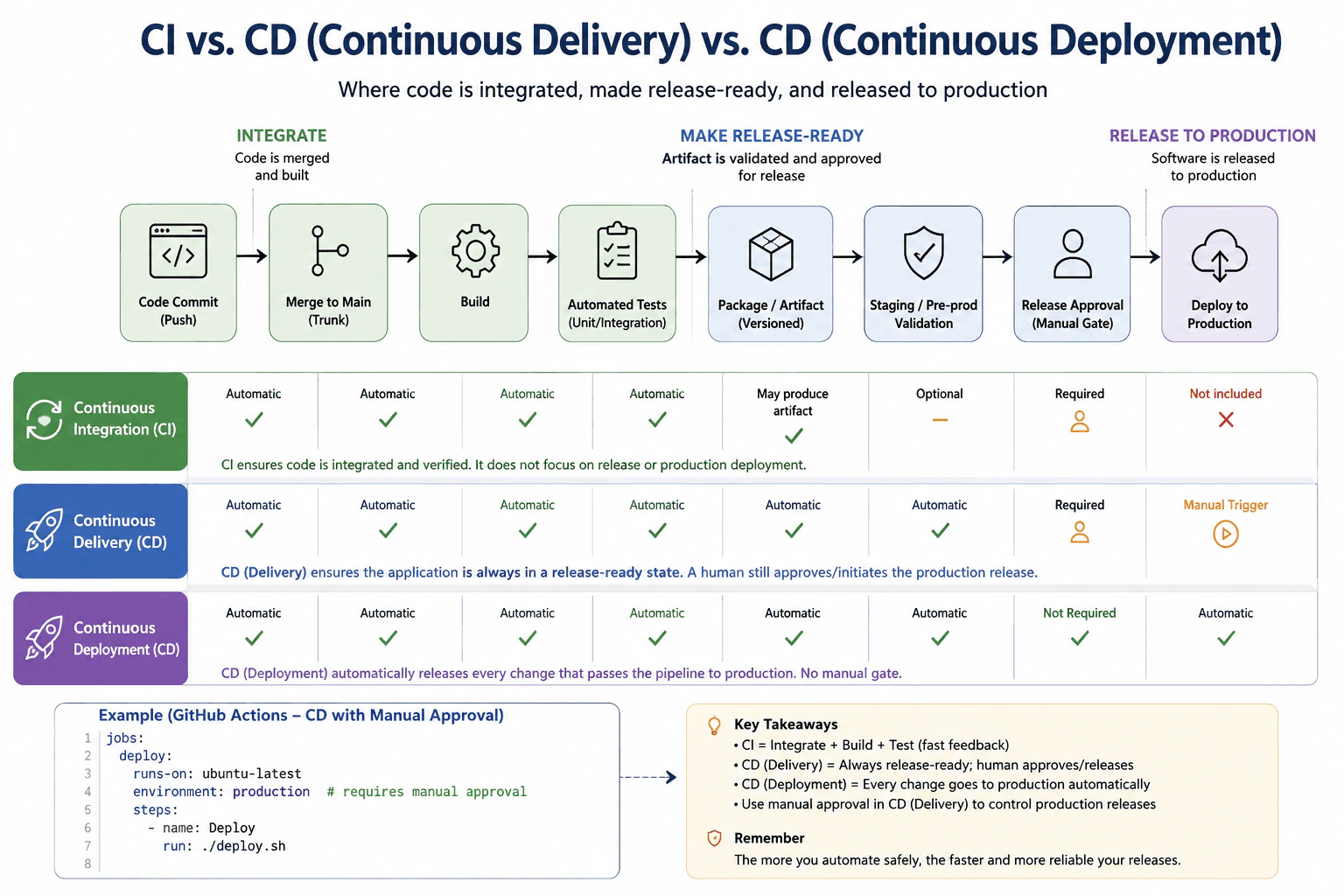
Compare the three practices at the point where code is integrated, made release-ready, and released to production. Clarify which steps remain automated and where a human approval may still exist.
Short Interview Answer (30-60 seconds)
Continuous integration automatically integrates code changes and validates them with builds and tests. Continuous delivery extends that process so the application is always ready to release, but production deployment can still require a human approval or manual action. Continuous deployment goes one step further and automatically sends every change that successfully passes the required pipeline checks to production. The main difference is therefore how far automation continues toward production.
The easiest way to compare these practices is to ask where automation stops. Continuous integration focuses on combining code changes and checking that they work. Continuous delivery continues until the software is prepared and ready for production, but a person can still decide when the production release happens. Continuous deployment continues through the production step automatically. All three can share early pipeline steps such as merging code, building it, testing it, and creating a versioned artifact. The important difference is the final release boundary and whether a human decision remains.
Useful Questions to Ask the Interviewer
Are you asking about the normal conceptual difference or a specific pipeline implementation?
Does your delivery process require human approval before production?
How to Explain It in an Interview
I would describe the three practices as increasing levels of automation.
With continuous integration, developers frequently merge changes into the main code line. The pipeline automatically builds the code and runs automated tests such as unit and integration tests. It may also create an artifact. The main goal is fast feedback so integration problems are found early. Production deployment is outside the main goal of continuous integration.
Continuous delivery extends that workflow. After the required checks pass, the pipeline creates a versioned package or artifact and can validate it in a staging or preproduction environment. The software stays ready for release. A production deployment may still wait for a human approval. In the diagram example, the production environment has an approval gate before the deployment job runs.
Continuous deployment removes that normal manual gate. If a change passes every required automated check, the pipeline automatically deploys it to production.
The main tradeoff is control versus speed. Continuous delivery keeps a deliberate production decision. Continuous deployment reduces waiting and manual work. In either model, a failed required check stops that change from progressing. If production has a problem, the team still needs monitoring and a safe recovery method such as rollback or roll forward. Automation does not remove operational controls.
Code
jobs = {
"deploy": {
"runs-on": "ubuntu-latest",
# The production environment is configured with required reviewers."environment": "production",
"steps": [
{
# This command runs only after the environment rules allow the job."name": "Deploy",
"run": "./deploy.sh",
}
],
}
}
Why Interviewers Ask This
Interviewers ask this to check whether I understand where automation stops in a software delivery pipeline. They want to know if I can separate code integration and testing from preparing a release and from actually sending software to production. They also want to see whether I understand where a human approval can exist and how that choice affects release speed and operational control.
Common interview mistakes
A common mistake is treating continuous delivery and continuous deployment as the same thing. Delivery means the software is kept ready to release, while deployment means a passing change normally reaches production automatically. Another mistake is saying continuous integration automatically deploys to production. Its main purpose is integration and fast automated validation. Teams also sometimes assume continuous deployment means there are no controls. In practice, automated tests, security checks, deployment validation, monitoring, and recovery controls become even more important because there is no normal manual production gate.
Interview tip
Explain the practices as one pipeline with three stopping points. Say that continuous integration focuses on integration and validation, continuous delivery keeps the software ready for production but can keep a human approval, and continuous deployment automatically continues through production after the required checks pass. This makes the difference easy to remember and directly answers where automation stops.
Interviewer may ask next
What happens in continuous deployment if an automated test or required validation fails?
The change should not continue to production when a required pipeline check fails. Continuous deployment means successful changes are automatically deployed, not that every change is deployed regardless of quality. The failed check stops that pipeline execution so the problem can be corrected and a new validated change can proceed. This matters because automated validation becomes a primary safety gate when there is no normal human production approval.
Why might a team choose continuous delivery instead of continuous deployment?
A team may choose continuous delivery when it wants strong automation but still needs a deliberate human decision before production. The pipeline can automatically build, test, package, and validate the release so the software remains ready to deploy. An authorized person then approves or starts the production release. The tradeoff is slower release flow and some manual waiting in exchange for additional control when business timing, compliance, risk, or operational coordination makes that useful.
4. Why is version control essential to a CI/CD workflow?DevOpsEasy
i Question Details
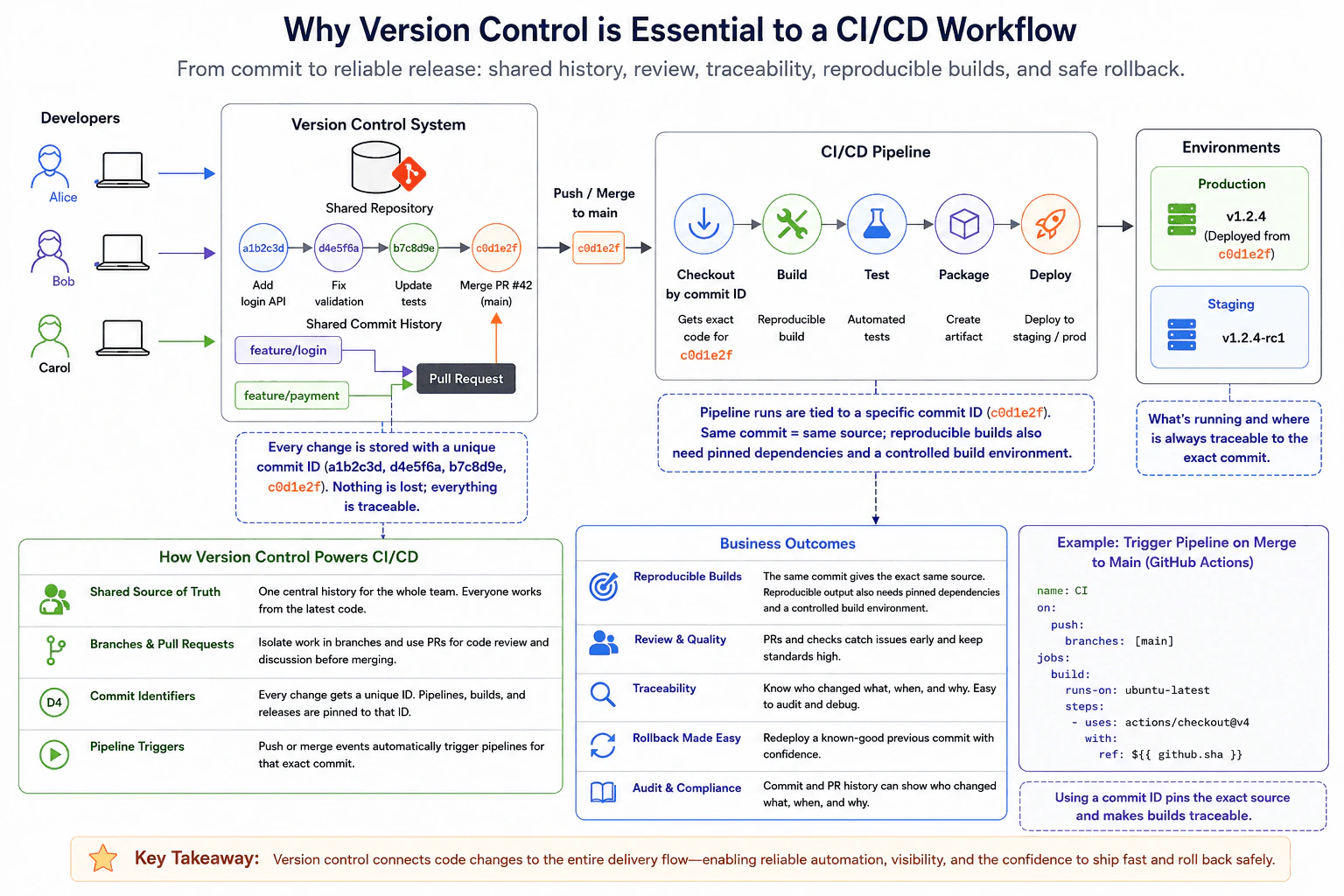
Explain how a shared source history, branches or pull requests, commit identifiers, and pipeline triggers support reproducible builds, review, traceability, and rollback. Keep the focus on release flow rather than general source-control commands.
Short Interview Answer (30-60 seconds)
Version control is essential because it gives the CI/CD workflow one shared history and a specific commit to build, test, package, and deploy. Branches and pull requests support review before changes reach the main branch. A push or merge can trigger the pipeline for that exact commit. The commit identifier also links builds and deployments back to the source change, which improves traceability and lets the team redeploy a known good previous commit when rollback is needed.
Version control gives the delivery process one trusted history of the code. Team members can work on separate changes, review them before they become part of the main code, and identify every accepted change with a unique value. Automation can start when an accepted change reaches the main code. The same accepted version can then move through checking, building, testing, packaging, and deployment. This makes it easier to understand what was released, who changed it, and which earlier version should be restored if a release causes a problem.
Useful Questions to Ask the Interviewer
Does the team trigger delivery when code is pushed to the main branch, when a pull request is merged, or through another release event?
Are build artifacts promoted between environments, or does each environment rebuild from source?
How does the team record which commit is running in each environment?
How to Explain It in an Interview
I would start with the shared repository. It gives the team one shared commit history instead of separate copies with no common record. Developers can create branches for isolated work and use pull requests for discussion, automated checks, and code review before merging.
After a change is accepted, the commit gets a unique identifier. In the diagram, the accepted commit is c0d1e2f. A push or merge to the main branch can trigger the CI/CD pipeline. The pipeline checks out that exact commit, then builds it, runs automated tests, creates an artifact, and deploys it to an environment.
The commit identifier is important because it connects the source change to the pipeline run, artifact, and deployment. That gives the team traceability. They can answer what changed, when it changed, and which source version produced a release.
The same commit also gives the pipeline the same source code. That alone does not guarantee identical build output. Reproducible output also needs pinned dependencies and a controlled build environment.
For rollback, the team can redeploy a known good previous commit or, when available, the known good artifact produced from that commit. This is safer than manually guessing which source files should be changed during an incident.
The practical value is that version control connects review, automation, traceability, and recovery. It becomes the source reference that the rest of the release workflow can follow.
Interviewers ask this to check whether I understand how source history connects to an automated release flow. They want to see whether I can explain shared history, review through branches and pull requests, commit identifiers, pipeline triggers, traceability, reproducible builds, and safe rollback without confusing version control with the build or deployment system.
Common interview mistakes
A common mistake is saying that version control alone makes a build reproducible. A commit pins the source, but dependencies and the build environment must also be controlled. Another mistake is building from a moving branch name without recording the actual commit identifier. Teams can also lose traceability if deployments are not linked back to commits. For rollback, another mistake is choosing an arbitrary older commit instead of a verified known good version.
Interview tip
Explain the release flow in order. Start with the shared repository, then branches and pull requests, then the commit identifier, then the pipeline trigger, and finally build, test, packaging, deployment, traceability, and rollback. Mention that a commit pins the source but does not by itself guarantee identical build output.
Interviewer may ask next
If the same commit is built twice, will both builds always be identical?
No. The same commit gives both runs the same source code, but identical output is not guaranteed by version control alone. Dependencies can change, build tools can change, external downloads can differ, and the build environment can vary. Reproducible builds therefore need controls such as pinned dependencies and a controlled build environment in addition to the commit identifier. This matters because the commit provides traceability, while the build process controls whether the output can actually be reproduced.
Should a team rebuild an old commit during rollback or redeploy a previously created artifact?
When a verified artifact from the known good commit is available, redeploying that artifact is usually the clearer recovery path because it uses the exact output that was already built and tested. Rebuilding the old commit can still be necessary when the artifact is unavailable, but the result depends on whether dependencies and the build environment are reproducible. In both cases, version control identifies the known good source commit and keeps the recovery action traceable.
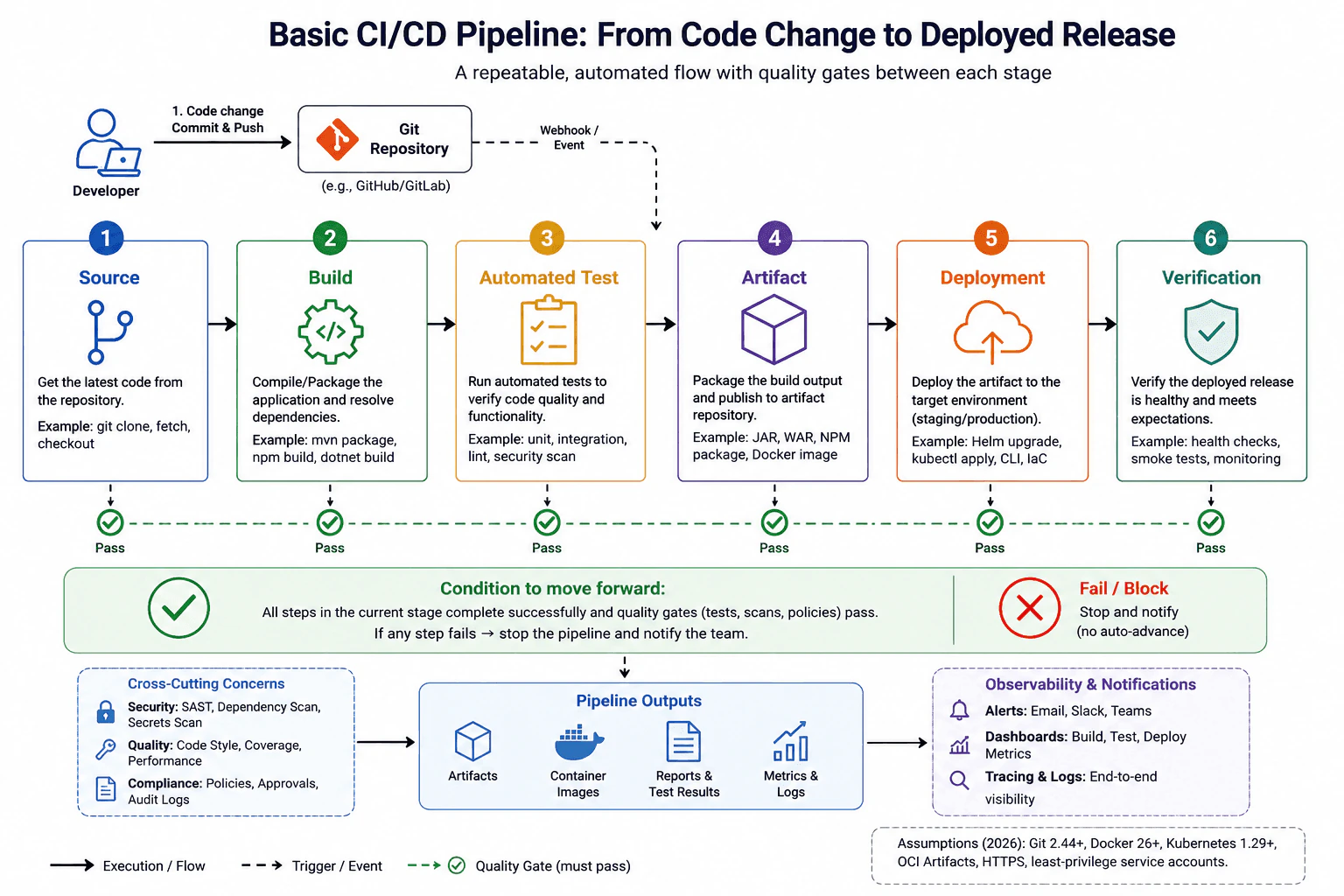
5. What stages would you include in a basic CI/CD pipeline?DevOpsEasy
i Question Details
A team wants a repeatable path from a source-code change to a deployed release. Describe the purpose and ordering of the source, build, automated-test, artifact, deployment, and verification stages, including the condition that allows work to move from one stage to the next.
Short Interview Answer (30-60 seconds)
I would use six main stages: source, build, automated test, artifact, deployment, and verification. Each stage should have a clear exit condition. Work moves forward only when the current stage completes successfully and its required checks pass. If a gate fails, I stop the pipeline and notify the team instead of automatically moving forward. I would also store a versioned artifact so the same tested output can be deployed rather than rebuilding it for each environment.
Detailed Explanation
A basic delivery process should move a code change through a clear series of checks before people depend on it. First, the change is saved in the shared code repository. Next, the system creates the software, checks that it works, stores the exact result, places that result in the chosen environment, and finally confirms that the release is healthy. Each step has a condition that must succeed before the next step starts. If a required check fails, the process stops and the team is notified instead of continuing with a bad release.
Useful Questions to Ask the Interviewer
Does the team deploy automatically to production, or is approval required before production?
Which automated checks are required before a release can move forward?
Does the same stored artifact move through staging and production?
How to Explain It in an Interview
I would describe the pipeline as six ordered stages with a gate after each stage.
Source. A developer commits and pushes code to the Git repository. A repository event can trigger the pipeline. The source gate confirms that the expected change is available and repository rules are satisfied.
Build. The pipeline restores dependencies and compiles or packages the application. The build gate passes only when the build finishes successfully and required build quality checks pass.
Automated test. The pipeline runs appropriate unit tests, integration tests, linting, static analysis, and security checks. The gate passes only when the required tests and quality policies succeed.
Artifact. The successful build output is packaged and published to an artifact repository. Examples include a JAR file, package, or container image. The stored artifact should be versioned and traceable to the source change. I prefer promoting the same tested artifact instead of rebuilding it for each environment.
Deployment. Automation deploys that artifact to the target environment such as staging or production. Infrastructure configuration, application configuration, and secrets are handled by their appropriate systems. The deployment gate confirms that the deployment completed successfully.
Verification. The pipeline runs smoke tests, health checks, and other release checks. Logs, metrics, traces, and alerts help operators observe the deployed system. Verification proves that deployment completion alone is not enough. The service must also meet its expected health criteria.
If any required gate fails, I stop automatic promotion, notify the team, correct the problem, and run the appropriate pipeline work again. Production pipelines may also include approvals, progressive delivery, or rollback rules, but those are policy choices around the same core flow.
Why Interviewers Ask This
Interviewers ask this to see whether I understand how a code change moves safely and repeatably toward a release. They want to hear that I can separate source control, building, testing, artifact storage, deployment, and verification. They also want to know whether I understand quality gates, failure handling, artifact reuse, and the difference between deploying software and proving that the deployed software is healthy.
Common interview mistakes
Common mistakes include treating deployment as the final proof of success, rebuilding the application separately for every environment, allowing failed tests or scans to be ignored, and storing artifacts without a version or source reference. Another mistake is mixing responsibilities. Git stores source history, the CI system coordinates pipeline work, the artifact repository stores build outputs, deployment automation changes the target environment, and observability tools report runtime signals. A good pipeline keeps these responsibilities clear and blocks automatic promotion when a required gate fails.
Interview tip
Explain the stages in order and give one sentence for the purpose of each stage. Then emphasize the gate rule: the next stage starts only after the current stage and its required checks succeed. Mention that a failed gate stops automatic promotion and that the same tested artifact should normally be promoted rather than rebuilt. Finish by saying that verification checks the real deployed service, not just whether the deployment command completed.
Interviewer may ask next
What should happen if verification fails after the application has already been deployed?
Automatic release promotion should stop, and the failure should be reported immediately. The exact response depends on the deployment policy. The team may roll back to a known good artifact, roll forward with a corrected version, or stop traffic to the unhealthy release during progressive delivery. Verification failure matters because a successful deployment operation does not prove that the application is healthy. The response should use the previously stored and traceable artifacts rather than creating an untested replacement.
Why should the same artifact be promoted through environments instead of rebuilding it for production?
The same tested artifact should normally be promoted because it keeps the production release consistent with what earlier stages actually tested. Rebuilding can produce a different output because dependencies, build inputs, or build conditions may change. Promotion also improves traceability because one artifact version can be linked to its commit, build, tests, and deployment history. The tradeoff is that runtime configuration and secrets must be kept separate from the artifact so the same package can work safely in different environments.
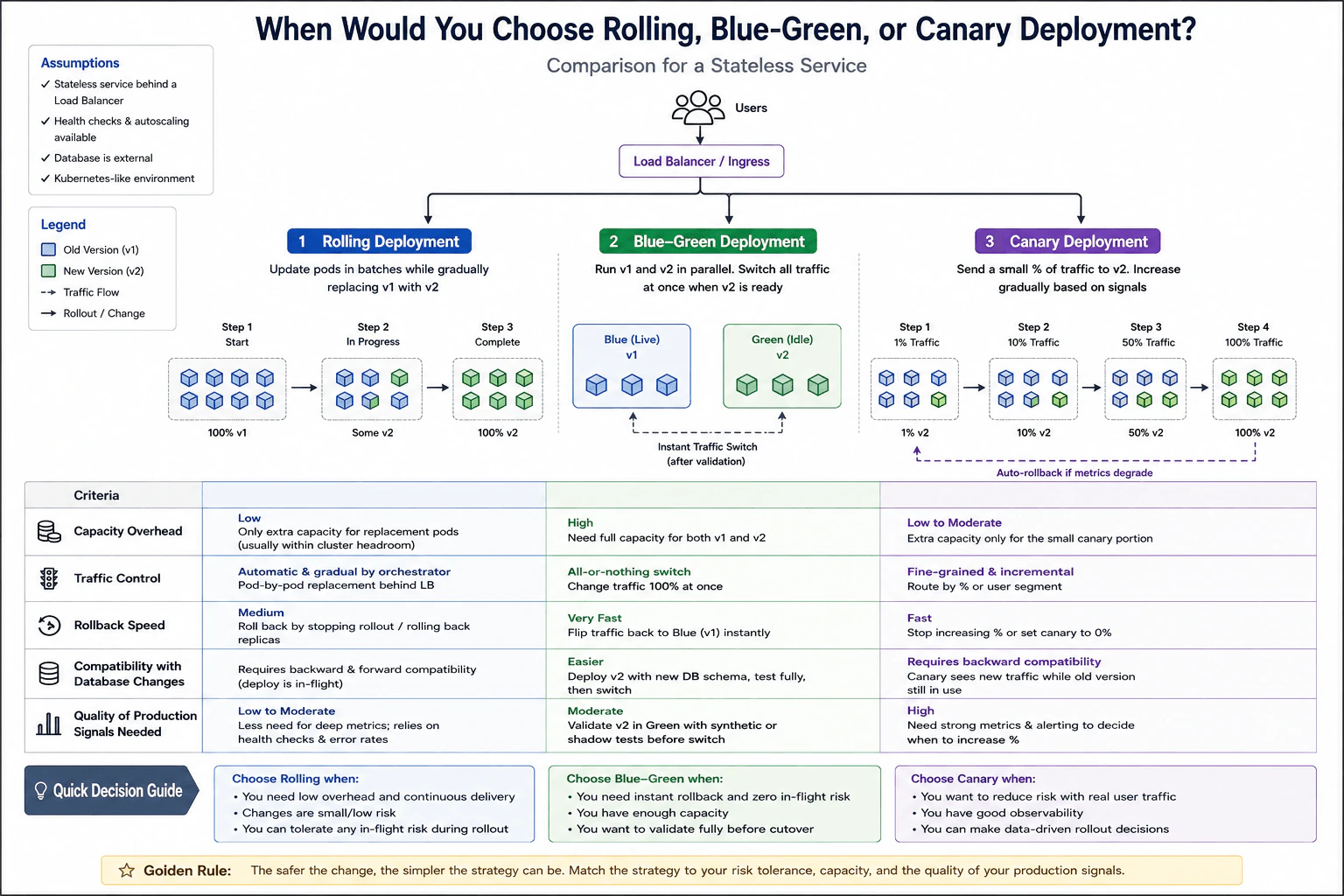
6. When would you choose rolling, blue-green, or canary deployment?DevOpsMedium
i Question Details
Compare the three strategies for a stateless service. Evaluate capacity overhead, traffic control, rollback speed, compatibility with database changes, and the quality of production signals needed before increasing exposure.
Short Interview Answer (30-60 seconds)
I choose rolling when I want low extra capacity and the change is small enough to tolerate old and new versions running together. I choose blue green when very fast rollback matters and I can afford two complete environments. I choose canary when change risk is higher and I have strong production signals plus fine grained traffic control. Database changes must remain compatible with every application version that can still serve traffic or be restored during rollback.
Detailed Explanation
Rolling, blue green, and canary are three ways to move a stateless service from an old version to a new version. The choice depends on how much spare capacity is available, how carefully traffic must be controlled, how quickly the team must return to the old version, whether both application versions can safely use the database, and how much trusted production feedback is available. Rolling changes replicas gradually. Blue green keeps two complete environments and switches traffic. Canary exposes a small amount of real traffic first, then increases it only when results remain healthy.
Useful Questions to Ask the Interviewer
How much spare capacity can the service use during a release?
Do we have traffic controls that can route a percentage or user segment?
How fast must rollback be if the new version is unhealthy?
Will the release include database schema changes?
Which production signals are trusted enough to decide whether exposure should increase?
How to Explain It in an Interview
For a stateless service, rolling deployment is usually the simplest choice when capacity is limited and the change has low or moderate risk. The orchestrator gradually replaces old replicas with new replicas. This normally needs only a small amount of extra capacity. Traffic control is limited because users can reach both versions while the rollout is in progress. Rollback is slower than a traffic switch because replicas must be changed back. Database changes must stay compatible while both application versions are active.
Blue green deployment keeps the current version in one full environment and the new version in another. After the new environment is validated, traffic moves to it at once. The main benefit is very fast application rollback because traffic can be sent back to the old environment. The main cost is high capacity because both environments exist at the same time. Database changes still need careful sequencing because the old environment may need to work again after rollback.
Canary deployment sends a small share of traffic to the new version, such as one percent, then increases exposure in stages. It is useful when the change is risky or uncertain. It needs fine grained routing and strong production signals such as errors, latency, service objectives, business indicators, logs, alerts, and anomaly detection. If those signals degrade, the release should stop increasing exposure and the canary can be reduced to zero. This limits blast radius but requires stronger observability and more operational discipline.
Why Interviewers Ask This
Interviewers ask this to see whether I can match a deployment strategy to release risk and production constraints. They want to know if I understand capacity cost, traffic control, rollback speed, database compatibility, and the quality of production signals required before increasing exposure.
Common interview mistakes
Common mistakes are treating rolling as an instant rollback method, assuming blue green removes the need for database compatibility planning, and using canary without reliable traffic control or production signals. Another mistake is increasing canary exposure only because basic health checks pass. Health checks show availability, but a canary decision should also consider user facing errors, latency, service objectives, business indicators, logs, and alerts. It is also a mistake to assume that switching application traffic automatically reverses a database change.
Interview tip
Compare the three strategies using the same five points: capacity, traffic control, rollback speed, database compatibility, and production signals. Then give a practical choice. Rolling favors low overhead, blue green favors very fast application rollback, and canary favors controlled risk with strong observability.
Interviewer may ask next
What happens if a database change is not compatible with both old and new application versions?
The deployment becomes unsafe while both versions can still serve traffic or while the old version may be restored. Rolling and canary directly run old and new versions together, so the schema must support both. Blue green can switch application traffic quickly, but rollback may reactivate the old environment, so database changes still need careful sequencing. A common pattern is to make an additive compatible schema change first, deploy the new application, move usage to the new schema, and remove old schema elements only after rollback is no longer required.
Why would you choose canary instead of blue green if both can reduce release risk?
I choose canary when I need to learn from real production traffic before exposing everyone. Blue green validates a complete new environment and then switches all traffic, so application rollback is very fast but the first full production switch can affect the entire audience. Canary exposes only a small share first and increases that share when production signals stay healthy. The tradeoff is that canary needs stronger observability, fine grained routing, and more careful promotion logic.
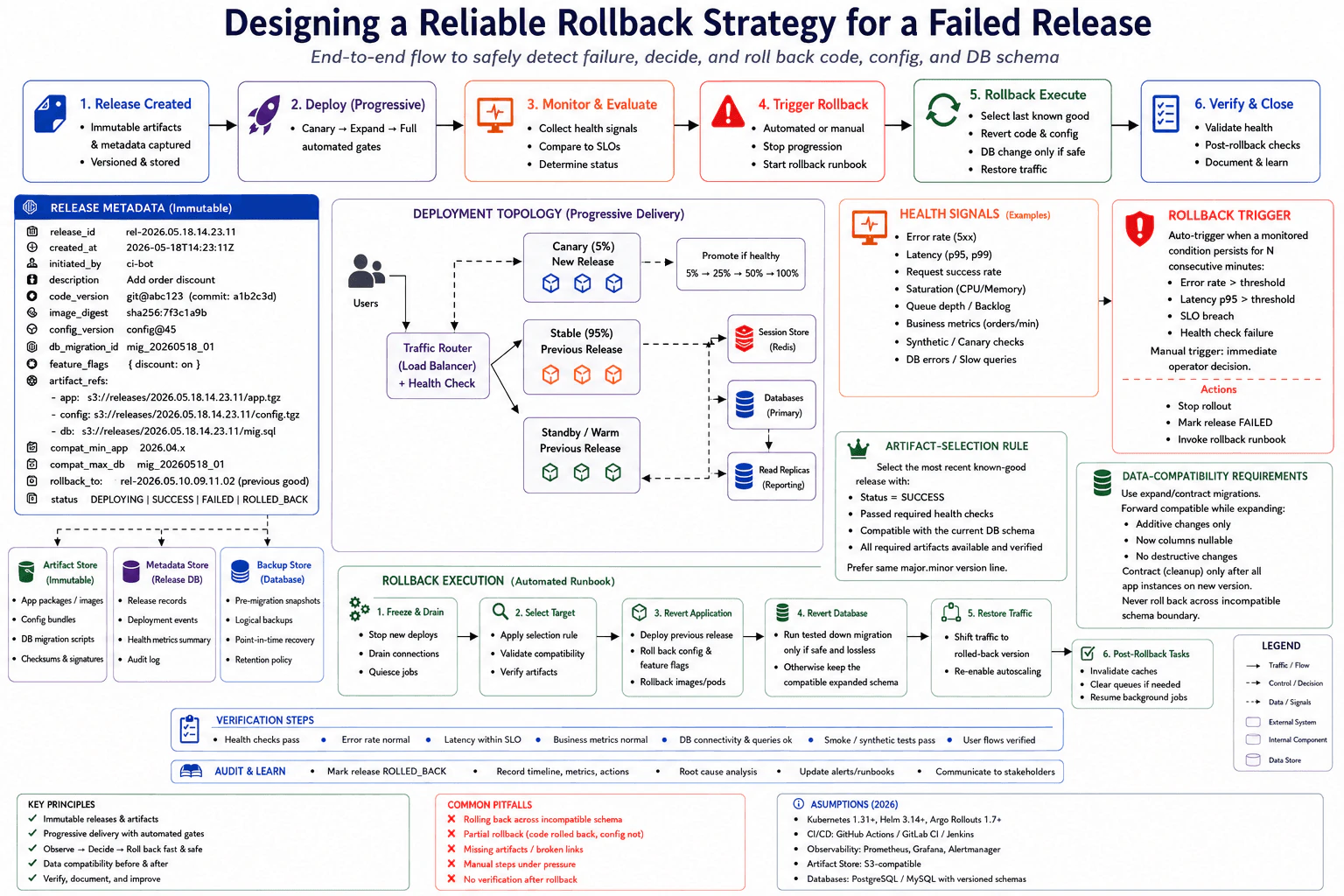
7. How would you design a reliable rollback strategy for a failed release?DevOpsMedium
i Question Details
A deployment can change application code, configuration, and database schema. Define the release metadata, health signals, rollback trigger, artifact-selection rule, data-compatibility requirement, and verification steps needed to restore service safely.
Short Interview Answer (30-60 seconds)
I would prepare rollback before deployment. Every release would have an immutable record containing the exact code artifact, image digest, configuration version, database migration identifier, feature flags, compatibility information, status, and previous known good release. I would deploy progressively, watch error rate, latency, health checks, saturation, business metrics, and database errors, and stop promotion when defined conditions remain unhealthy. The rollback process would select the most recent successful release with verified artifacts and a compatible database schema. I would restore code and configuration, change the database only when a tested reversal is safe and lossless, restore traffic, and verify service and data health before closing the incident.
Detailed Explanation
A reliable rollback plan means deciding how to return to a working version before a new release begins. I would keep an exact record of each release and keep the previous working version available. I would first send only a small amount of traffic to the new version and watch whether the service remains healthy. If important checks stay bad, promotion stops. The system then selects a known working version, restores traffic to it, and confirms that normal service and data behavior have returned before the incident is closed.
Useful Questions to Ask the Interviewer
Do you use canary or another progressive release method?
Which health signals should trigger automatic rollback?
Must the previous application version work with the current database schema?
Are application and configuration artifacts stored as immutable versions?
How to Explain It in an Interview
I would store release metadata such as the release identifier, source commit, code version, image digest, configuration version, database migration identifier, feature flags, artifact references, compatibility information, deployment status, and rollback target. The artifact store must keep the exact application package, configuration bundle, and migration scripts used for that release.
I would deploy progressively. For example, I could start with a 5 percent canary and promote it only while health remains acceptable. I would watch request errors, p95 and p99 latency, request success, CPU and memory saturation, queue depth, business metrics, synthetic checks, health checks, and database errors. Automatic rollback should require a monitored failure condition to persist for a defined period. An operator can still trigger rollback immediately.
When rollback starts, I would stop further rollout, drain work when required, and select the most recent known good release with status SUCCESS. It must have passed required health checks, have all required artifacts available and verified, and remain compatible with the current database schema. I would prefer a target from the same major minor version line when appropriate.
For database safety, I would use expand and contract migrations. Expansion should use compatible changes such as nullable columns. Destructive cleanup happens only after every application instance uses the new version. A down migration runs only when it is tested, safe, and lossless. Otherwise the compatible expanded schema stays in place.
After restoring code, configuration, and traffic, I would verify health checks, error rate, latency, business metrics, database connectivity, synthetic tests, and important user flows. I would then invalidate caches or clear queues only when required, resume background jobs, mark the release as rolled back, record the timeline, and update the runbook.
Why Interviewers Ask This
Interviewers want to see whether I can restore service safely after a bad release instead of simply deploying an older application. They are testing my understanding of release records, verified artifacts, health signals, rollback decisions, database compatibility, progressive delivery, verification, and incident recovery. They also want to know whether I understand that application recovery and database recovery are separate decisions and that an unsafe database change can make a rollback worse.
Common interview mistakes
Common mistakes include rebuilding an older version instead of using the exact stored artifact, restoring application code while leaving incompatible configuration behind, choosing a rollback target only by version number, and ignoring database compatibility. Another mistake is triggering rollback from a short metric spike instead of using a sustained failure condition. Teams may also assume every database migration can be reversed or restore a database snapshot even when that would discard valid production writes. Finally, a rollback is incomplete if the team restores traffic but skips health checks, business metrics, database validation, synthetic tests, user flow verification, incident records, or runbook updates.
Interview tip
Explain rollback as a prepared production workflow rather than a command that deploys an older version. Walk through release metadata, health signals, the trigger, target selection, database compatibility, execution, and verification in that order. Emphasize that code and configuration are normally restored from exact stored artifacts, while database recovery needs stricter safety checks. Finish by saying that rollback is complete only after service health, data behavior, and important user flows are verified.
Interviewer may ask next
What would you do if the previous application version is not compatible with the current database schema?
I would not roll the application back across an incompatible schema boundary. The previous application can be restored only if it can safely use the current schema. This is why I would use expand and contract migrations. Compatible expansion happens before the new application depends on the change, while destructive cleanup happens later. A down migration is acceptable only when it has been tested and is safe and lossless. If compatibility cannot be guaranteed, I would stop promotion and mitigate the failed release without forcing an unsafe application and database rollback.
What is the tradeoff between automatic rollback and requiring operator approval?
I would use automatic rollback for clear and well tested failure conditions and keep an immediate manual trigger for cases that need human judgment. Automation reduces recovery time when error rate, latency, health checks, or service objectives remain outside defined limits for the configured period. The tradeoff is that poor thresholds can react to noise and cause unnecessary rollback. Manual approval adds context but takes longer. Progressive delivery reduces the risk of either approach because only a limited amount of traffic reaches the new release before promotion.
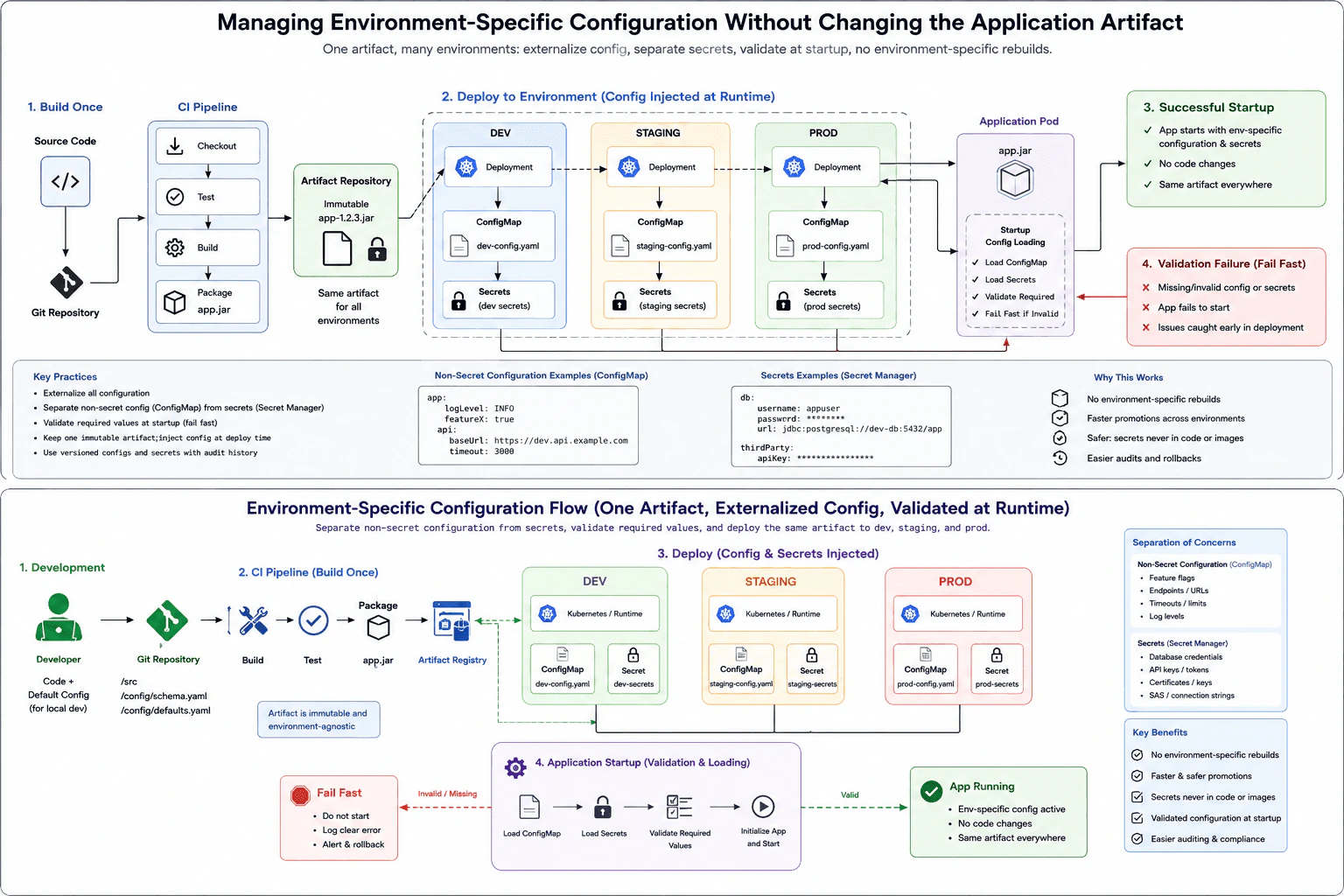
8. How would you manage environment-specific configuration without changing the application artifact?DevOpsMedium
i Question Details
The same tested artifact must run in development, staging, and production while endpoints, feature settings, and secrets differ. Design a configuration flow that separates non-secret configuration from secrets, validates required values, and prevents an environment-specific rebuild.
Short Interview Answer (30-60 seconds)
I would build and test the application once, store that immutable artifact, and promote the same artifact through development, staging, and production. I would keep normal values such as endpoints, feature settings, log levels, and timeouts in external configuration such as a ConfigMap. I would keep passwords, API keys, and tokens in a separate secret system. At startup, the application loads both sources and validates every required value. If validation fails, it should fail fast instead of starting with incomplete or unsafe configuration.
Detailed Explanation
I would create the application package only once and use that same tested package in development, staging, and production. Each environment would supply its own settings when the application starts. Normal settings and sensitive values would be stored separately. This means changing an endpoint, feature setting, password, or token does not require rebuilding the application package. Before the application starts serving traffic, it checks that every required value exists and is valid. If an important value is missing or incorrect, startup stops immediately so the problem is found during deployment instead of later while users are using the service.
Useful Questions to Ask the Interviewer
Are the applications running in Kubernetes or another deployment platform?
What system is used to store and deliver secrets?
Do configuration changes require approval, version history, or an audit record?
How to Explain It in an Interview
I would use a build once and configure at runtime model. Source code goes through checkout, testing, build, and packaging in the CI pipeline. The result is one immutable application artifact, such as app.jar. That artifact is stored in an artifact repository and promoted unchanged to development, staging, and production.
For normal environment values, I would use external configuration. In Kubernetes, a ConfigMap is a common choice. Each environment can have its own API endpoint, feature setting, log level, timeout, or other safe value without changing the artifact.
Secrets are kept separately. Passwords, API keys, tokens, and similar values can be supplied through Kubernetes Secrets or a managed secret system. Secrets should not be committed to Git or packaged inside the application artifact. Access should follow least privilege.
When the application Pod starts, the application loads its ConfigMap values and secrets, then validates every required setting. If all required values are valid, initialization continues and the application starts. If a required value is missing or invalid, the application fails fast and does not begin serving traffic.
The main benefit is that the exact tested artifact moves through every environment. This makes promotion easier to trace and avoids environment specific rebuilds. The operational tradeoff is that configuration and secret changes become important deployment inputs, so they need controlled access, validation, and useful change history.
Why Interviewers Ask This
Interviewers ask this to check whether I understand the boundary between an application artifact and runtime configuration. They also want to see whether I can promote one tested artifact through several environments, separate normal settings from secrets, validate required values before startup, and avoid rebuilding the application only because an environment value changed.
Common interview mistakes
Common mistakes include putting production settings directly inside the application artifact, building a different artifact for each environment, storing secrets in Git, treating secrets like normal configuration, and starting the application before required values are validated. Another mistake is rebuilding during promotion, because production would then run a different artifact from the one that was already tested. Teams should also avoid giving broad access to secrets or changing configuration without validation and useful change history.
Interview tip
Start with the main rule: build once and promote the same immutable artifact. Then explain three boundaries clearly. Normal configuration stays outside the artifact, secrets are stored separately with restricted access, and startup validation stops the application when required values are missing or invalid.
Interviewer may ask next
What should happen if a required secret is missing when the application starts?
The application should fail fast and should not begin serving traffic. Startup should load the required configuration and secrets, validate them, and stop initialization when a required value is missing or invalid. This matters because allowing the service to start with incomplete configuration can create harder failures later. The deployment system can report the failed startup so the configuration problem can be corrected before the application is considered ready.
Why promote the same artifact instead of rebuilding it for production?
I would promote the same tested artifact because rebuilding for production creates a new output that is not exactly the artifact already tested in development or staging. Keeping one immutable artifact gives better consistency and traceability. Environment differences are supplied through external configuration and secrets instead. The tradeoff is that configuration becomes an important deployment input, so access, validation, version history, and secret permissions must be managed carefully.
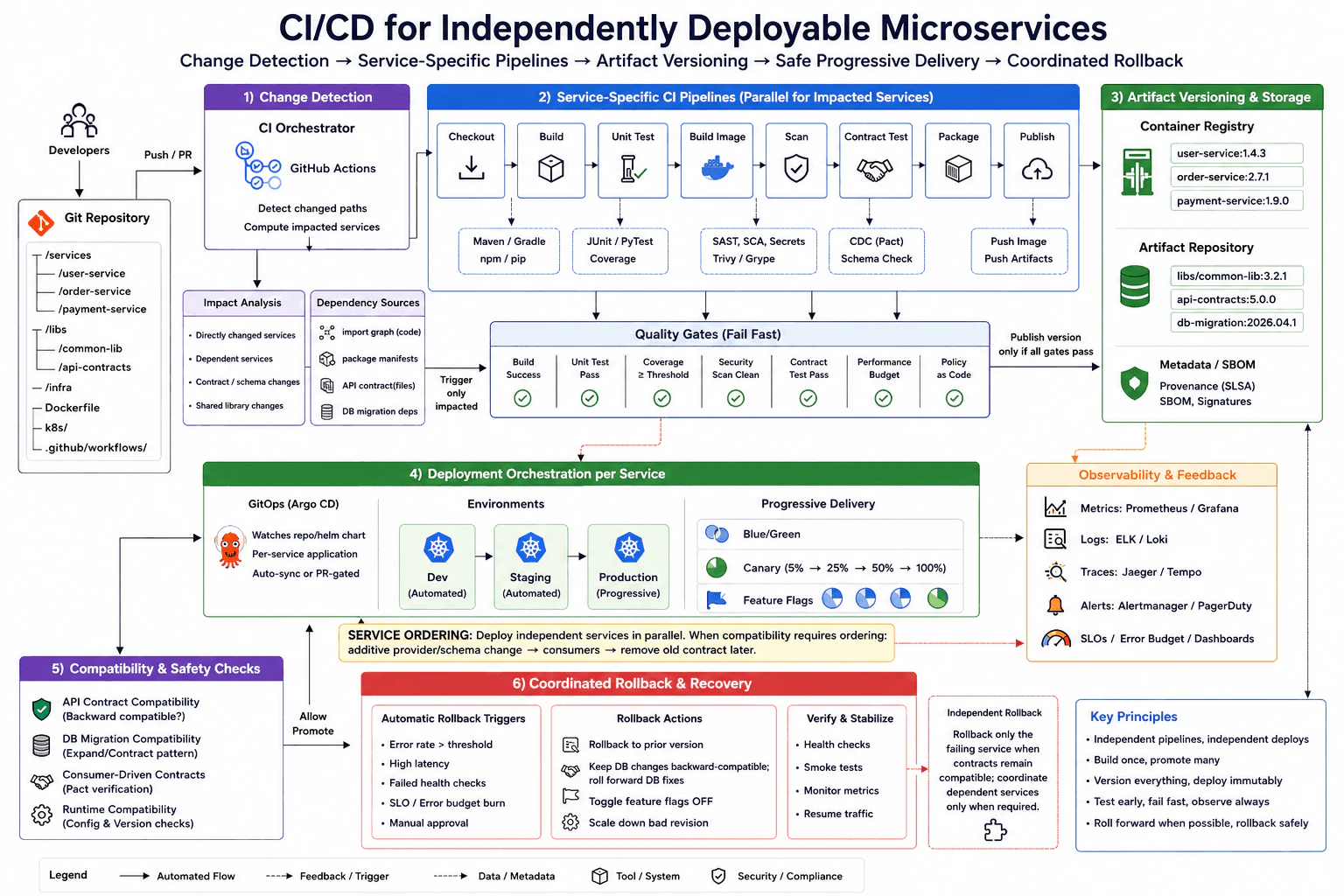
9. How would you design CI/CD for independently deployable microservices?DevOpsHard
i Question Details
A repository contains services with separate release cadences and shared libraries. Design change detection, dependency testing, artifact versioning, service-specific pipelines, deployment ordering, compatibility checks, progressive rollout, and coordinated rollback without rebuilding unchanged services.
Short Interview Answer (30-60 seconds)
I would detect which services and shared dependencies changed, calculate the affected services, and start CI only for those services. Each affected service gets its own pipeline for build, tests, security checks, contract tests, packaging, and publishing. I would publish immutable versioned images and metadata once, then promote those same artifacts through environments with GitOps. Independent services can deploy in parallel. When compatibility requires ordering, I would make an additive provider or schema change first, deploy consumers next, and remove the old contract later. Production uses canary or blue green delivery with health and service level gates. If a release fails, I would normally roll back only the failing service when contracts remain compatible, and coordinate dependent services only when required.
Detailed Explanation
The main goal is to let every service move at its own speed without rebuilding or redeploying software that did not change. When code is pushed, the delivery system first finds which service folders, shared libraries, contracts, or database dependencies changed. It then starts work only for services affected by those changes. Each affected service is tested and packaged separately. The exact package that passes testing is stored and later promoted through development, staging, and production. Releases are introduced gradually and watched closely. A failure should normally affect only the service that caused it.
Useful Questions to Ask the Interviewer
Is this one repository containing all services and shared libraries?
Which dependencies are shared between services?
Are API and database changes required to remain backward compatible?
Is production deployment automatic or approval based?
What service level signals should stop a progressive rollout?
How to Explain It in an Interview
I would start with change detection. A CI orchestrator such as GitHub Actions reads changed paths and combines that information with dependency sources such as package manifests, import relationships, API contracts, and database migration dependencies. The result is the set of affected services. A shared library change can therefore trigger its dependent services, while an isolated service change triggers only that service.
Each affected service runs its own CI pipeline. Typical stages are checkout, build, unit tests, image build, security scanning, contract testing, packaging, and publishing. Quality gates stop the pipeline when the build, tests, coverage, security checks, contract checks, performance budget, or policy checks fail.
Successful pipelines publish immutable versioned container images and other artifacts. I also publish provenance, an SBOM, and signatures. I build once and promote the same tested artifact instead of rebuilding it for each environment.
For delivery, GitOps with Argo CD can reconcile each service independently into Kubernetes. Development and staging can be automatic, while production uses progressive delivery. A canary can move through 5 percent, 25 percent, 50 percent, and then 100 percent traffic. Blue green delivery and feature flags are also useful controls.
Deployment ordering depends on compatibility. Independent services deploy in parallel. When ordering is required, I first introduce an additive provider or schema change, then deploy consumers, and remove the old contract only after consumers have moved.
Metrics, logs, traces, alerts, service level objectives, and error budgets provide feedback. If a release fails, I roll back the failing service to its prior immutable version when contracts remain compatible. I coordinate dependent services only when compatibility requires it. Database changes stay backward compatible, so database recovery normally uses a roll forward fix rather than reversing a destructive migration.
Why Interviewers Ask This
Interviewers ask this to see whether I can design delivery around service independence instead of treating a repository as one large application. They want to test change detection, dependency reasoning, isolated pipelines, immutable artifacts, compatibility checks, safe deployment ordering, progressive delivery, observability, and recovery. They also want to know whether I understand the difference between rebuilding software and promoting an already tested artifact, and whether I can limit the effect of a failed release.
Common interview mistakes
A common mistake is rebuilding every service after every repository change, which removes much of the value of independent deployment. Another mistake is detecting only changed folders and ignoring shared library, API contract, or database dependencies. Teams also make releases harder to reproduce when they rebuild an artifact for each environment instead of promoting one immutable artifact. Other mistakes include using mutable image tags, skipping contract tests, removing an old API contract before consumers have migrated, deploying incompatible provider and consumer changes in the wrong order, treating readiness checks as complete evidence of application health, and automatically reversing database migrations that are not safely reversible. Another mistake is rolling back several healthy services when only one service failed and contracts are still compatible.
Interview tip
Explain the design as one continuous flow: detect impact, test only affected services, build immutable artifacts once, verify compatibility, promote each service independently, release progressively, observe production, and recover with the smallest safe scope. Clearly call out that dependency changes can expand the affected service set and that compatibility determines deployment ordering and rollback scope.
Interviewer may ask next
What happens when a shared library changes and several services depend on it?
I would expand the affected service set to include every service that depends on that library. The change detection step should use dependency information in addition to file paths, so the library itself and its downstream services receive the required build, unit, integration, security, and contract checks. Unrelated services remain untouched. This matters because checking only the library folder could miss behavior changes in consumers, while rebuilding the entire repository would waste time and reduce service independence.
How would you handle a release that requires an API or database change before consumers can move?
I would use backward compatible changes and an ordered rollout. For an API or schema dependency, I would first deploy an additive provider or schema change that supports both old and new consumers. I would then deploy the consumers and verify their health. Only after every required consumer has moved would I remove the old contract in a later release. This allows most services to keep independent release cadences while introducing ordering only where compatibility requires it. If a service release fails, I would roll back only that service when contracts remain compatible and coordinate dependent services only when required. For database recovery, I prefer a roll forward fix when reversing the migration would be unsafe.
10. How would you implement a GitOps deployment model for multiple environments?DevOpsHard
i Question Details
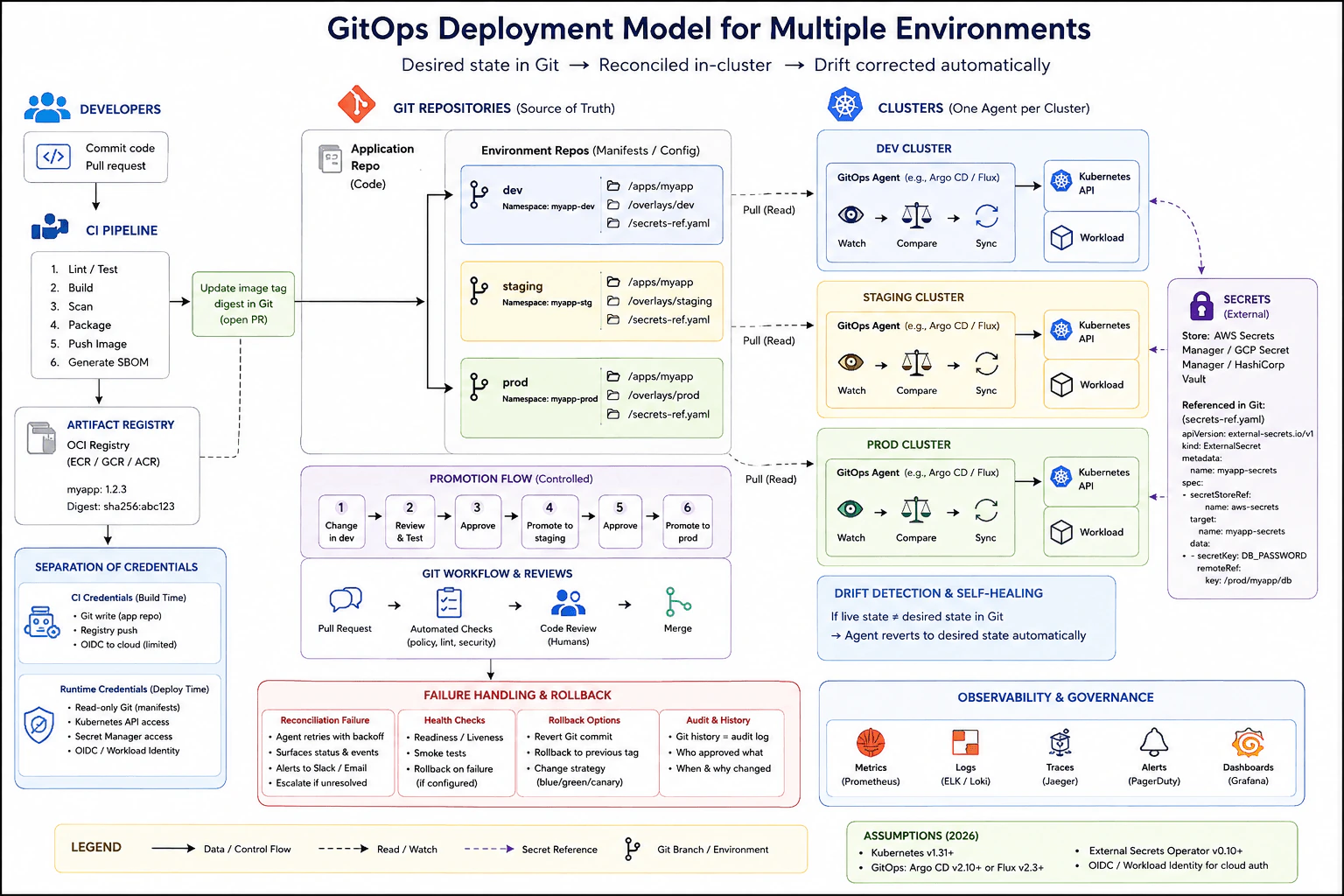
Application artifacts are built in CI, while desired deployment state is stored in environment repositories and reconciled by in-cluster agents. Design promotion, review, drift correction, secret references, rollback, reconciliation failure handling, and separation of CI credentials from runtime credentials.
Short Interview Answer (30-60 seconds)
I would build the application once in CI, publish the immutable container image to an OCI registry, and keep the desired deployment state in Git. I would maintain separate configuration for dev, staging, and production. Promotion would happen through reviewed pull requests that update the image reference. An in cluster GitOps agent such as Argo CD or Flux would read its environment repository, compare desired state with the Kubernetes cluster, and reconcile differences. Secrets would remain in an external secret store. CI credentials and runtime credentials would stay separate and use least privilege.
Detailed Explanation
The main idea is to separate building the application from deciding what should run in each environment. CI creates the application package once and stores it in a registry. Git records which version should run in dev, staging, and production. Changes move forward only after checks, review, and approval. Each environment regularly compares the approved Git state with the running system. If someone changes the running system directly, the approved state can restore it. Sensitive values stay outside Git, and separate identities are used for build work and runtime access.
Useful Questions to Ask the Interviewer
Do you want a separate repository for each environment, or separate environment paths in one repository?
Should production promotion require manual approval or a change window?
Which external secret store and workload identity system are available?
Should drift always be corrected automatically, or should some resources only create an alert?
How to Explain It in an Interview
I would separate CI from deployment control. CI handles linting, tests, build, security scanning, packaging, image publishing, and software bill of materials generation. It publishes an immutable OCI image to the registry. CI can update the image tag or digest in Git through a pull request, but it does not need Kubernetes deployment credentials.
Desired state lives in environment Git repositories for dev, staging, and production. Each environment contains application manifests, its environment overlay, and secret references. Promotion uses a controlled pull request flow. Automated policy, lint, and security checks run first. A human reviews the change, then the approved image reference moves from dev to staging and finally to production.
Each Kubernetes cluster runs its own GitOps agent, such as Argo CD or Flux. The agent reads its environment repository, compares desired state with live state, and synchronizes required changes through the Kubernetes API. If live state differs from Git, the agent can restore the approved state when automatic drift correction is allowed.
Secret values are not stored in Git. Git keeps references used by an external secrets integration. The runtime identity reads only the required secret values from a service such as AWS Secrets Manager, Google Cloud Secret Manager, or HashiCorp Vault.
For rollback, I would revert the Git commit or restore the previous image reference. The agent then reconciles the cluster back to that known good state. Readiness, liveness, and smoke checks help detect bad deployments. If reconciliation fails, the controller retries with backoff, exposes status and events, sends alerts, and allows controlled manual intervention. Prometheus metrics, logs, traces, alerts, dashboards, and Git history provide operational visibility and audit history.
Why Interviewers Ask This
Interviewers ask this to see whether I understand Git as the source of desired deployment state, controlled promotion between environments, continuous reconciliation, drift correction, external secret handling, rollback, reconciliation failure handling, and separation of build credentials from runtime credentials. They also want to see whether I can separate CI, artifact storage, Git review, Kubernetes deployment control, identity, and observability responsibilities.
Common interview mistakes
Common mistakes include letting CI deploy directly to production while also claiming Git is the deployment source of truth, rebuilding the application during every promotion instead of promoting the same tested artifact, storing plaintext secrets in Git, giving the CI identity broad Kubernetes access, sharing one powerful credential between CI and runtime controllers, changing production manually without updating Git, treating a retry as a rollback, and assuming every reconciliation failure repairs itself automatically. Another mistake is rolling back only the live cluster while leaving Git on the bad version, because the controller can apply that bad desired state again.
Interview tip
Explain the design as one clear flow. Start with build once, then publish the artifact, then store desired state in Git, then promote through reviewed Git changes, then let one controller per cluster reconcile its environment. After that, cover drift correction, secret references, rollback, failure handling, credential separation, and observability. Make the boundary between CI credentials and runtime credentials explicit because it is an important security decision.
Interviewer may ask next
What would you do if the GitOps controller cannot reconcile production after a configuration change?
I would keep Git as the source of desired state and treat this as a reconciliation failure rather than bypassing the GitOps process. The controller should retry with backoff and expose the error through status, events, logs, and alerts. I would determine whether the cause is an invalid manifest, missing dependency, permission problem, unavailable external service, or another runtime issue. If the new desired state is bad, I would revert the Git commit or restore the previous known good image reference. If emergency manual intervention is required, I would correct Git afterward so live state and desired state converge again.
Why promote the same image between environments instead of rebuilding it for staging and production?
I would promote the same immutable image because the artifact tested in one environment should be the artifact approved for the next environment. Rebuilding can create a different artifact because dependencies, build inputs, or tooling may have changed. The tradeoff is that environment differences must come from configuration rather than separate application builds. Git records which image reference belongs in each environment, and reviewed pull requests move that reference from dev to staging and then production.
More questions load as you scroll
DevOps Engineer Resume Examples
Explore the resume examples below to find the one that best matches your target DevOps Engineer role.
Disclaimer: This interview guide is for educational and informational purposes only. It is designed to help readers prepare, but it does not guarantee any interview result, hiring decision, offer, or outcome. Interview questions, hiring criteria, and preferred answers can vary by employer, interviewer, industry, location, and time. All answers, examples, and explanations in this guide are suggested examples for interview preparation, not definitive answers or instructions for professional practice. They are based on research and judgment, are provided without warranties of any kind, and should be adapted to the question, role, and applicable laws and professional requirements. Diagrams are simplified illustrations intended to highlight the main concepts and their relationships; actual situations, systems, and practices may be more complex. Alternative approaches may be equally valid or better suited to a particular question, context, or interviewer. To the fullest extent permitted by applicable law, the contributors and publisher are not liable for decisions made, actions taken, or losses incurred based on this guide.
State Laws and Professional Responsibilities: Laws and requirements governing an occupation vary by state and jurisdiction. You are responsible for checking the current laws, licensing requirements, and scope-of-practice rules that apply to your location and role, and for ensuring that your answers and actions comply with them. Adapt examples in this guide to those requirements. This guide is not legal advice.
Content Accuracy and Verification: To the fullest extent permitted by applicable law, we do not represent or warrant that interview guides, questions, answers, examples, or diagrams are accurate, complete, current, error-free, or suitable for any particular purpose. You are responsible for independently reviewing and verifying the information before relying on it.