This interview guide is for educational and informational purposes only. It is designed to help readers prepare, but it does not guarantee any interview result, hiring decision, offer, or outcome. Interview questions, hiring criteria, and preferred answers can vary by employer, interviewer, industry, location, and time. All answers, examples, and explanations in this guide are suggested examples for interview preparation, not definitive answers or instructions for professional practice. They are based on research and judgment, are provided without warranties of any kind, and should be adapted to the question, role, and applicable laws and professional requirements. Diagrams are simplified illustrations intended to highlight the main concepts and their relationships; actual situations, systems, and practices may be more complex. Alternative approaches may be equally valid or better suited to a particular question, context, or interviewer. To the fullest extent permitted by applicable law, the contributors and publisher are not liable for decisions made, actions taken, or losses incurred based on this guide.
State Laws and Professional Responsibilities
Laws and requirements governing an occupation vary by state and jurisdiction. You are responsible for checking the current laws, licensing requirements, and scope-of-practice rules that apply to your location and role, and for ensuring that your answers and actions comply with them. Adapt examples in this guide to those requirements. This guide is not legal advice.
Identity, Image, and Privacy Notice
To respect individual privacy, some names, profile photographs, avatars, biographical details, and other identifying information displayed in this guide may be replaced with pseudonyms, licensed stock images, illustrative avatars, composite images, or representative descriptions. Unless a person is expressly identified as an actual contributor, a displayed name, image, or profile should not be understood as depicting or identifying a specific candidate, interviewer, employee, or other real individual. These representations are provided for editorial and illustrative purposes only and do not imply endorsement, employment, participation, or affiliation with this guide or any company mentioned in it. Any resemblance to an actual person is coincidental.
Company Notice
This guide is an independent educational resource and is not affiliated with, endorsed by, sponsored by, or approved by the company named in this guide. Company names identify reported interview experiences or the employer context of clearly labeled original practice exercises. Interview practices can change without notice, and inclusion of company-specific content does not mean these questions are official, complete, or guaranteed to be asked. To the fullest extent permitted by law, the author, contributors, and publisher are not responsible for outcomes related to use of this material.
Content Accuracy and Verification
To the fullest extent permitted by applicable law, we do not represent or warrant that interview guides, questions, answers, examples, or diagrams are accurate, complete, current, error-free, or suitable for any particular purpose. You are responsible for independently reviewing and verifying the information before relying on it.
Questions or comments?
Contact us for general questions, or share feedback, technical corrections, and comments with the community.
71. Write a Python script that counts events for each user in a JSON activity log.Automation And ScriptingEasy
i Question Details
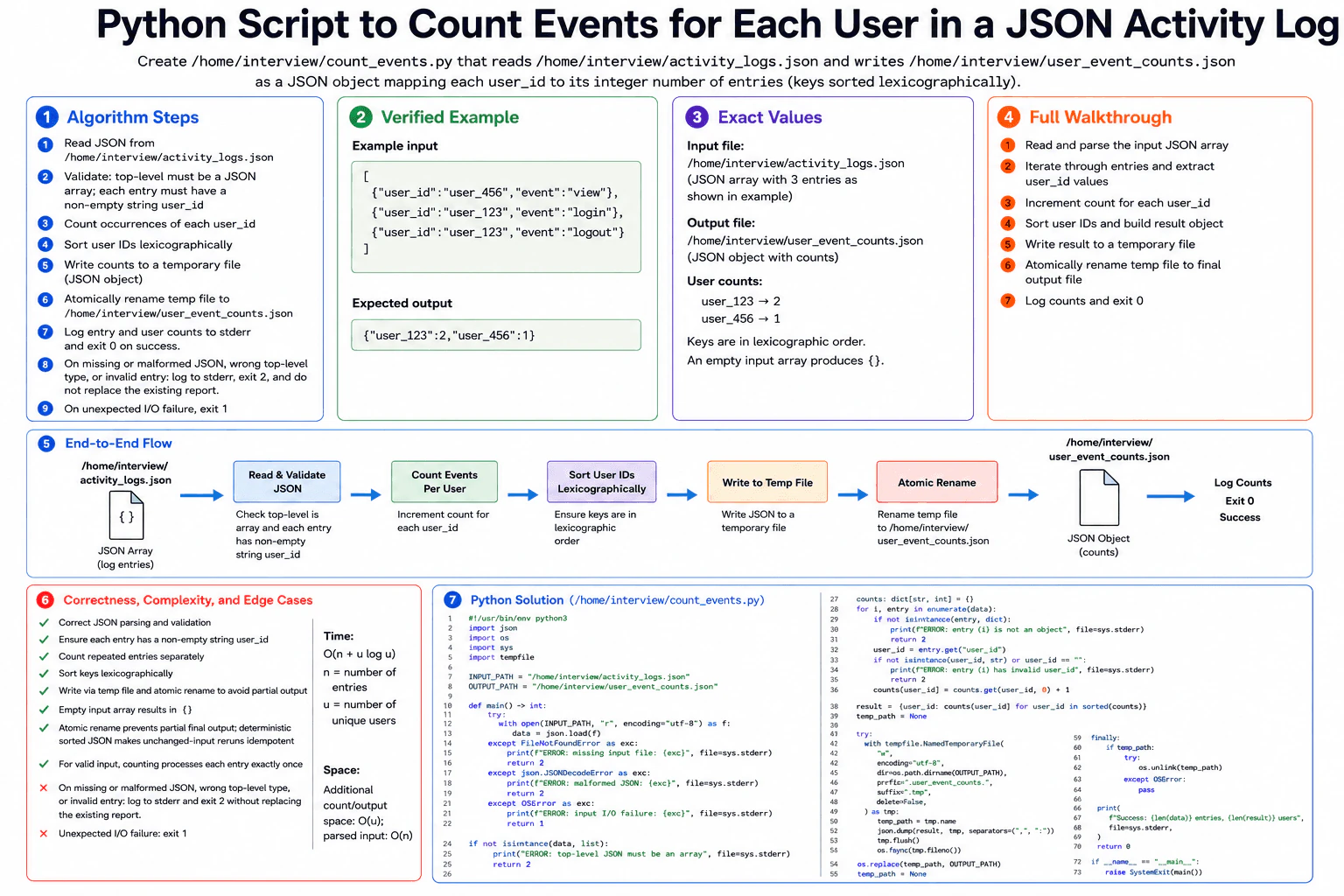
Create /home/interview/count_events.py with no arguments. It must read /home/interview/activity_logs.json, whose top level is a JSON array. Every entry must be an object with a non-empty string user_id; any other fields are allowed and repeated entries count separately. Write /home/interview/user_event_counts.json as a JSON object mapping each user ID to its integer number of entries, with keys in lexicographic order; an empty array produces {} and the input is never modified. Write a temporary file and rename it atomically, so a rerun with unchanged input is idempotent and a failure publishes no partial output. Missing or malformed JSON, a wrong top-level type, or an invalid entry must log an error to stderr and exit 2 without replacing an existing report; unexpected I/O failure exits 1; success logs entry and user counts and exits 0. The task is local, so use one pass, no retry, and no network timeout. Example input: [{"user_id":"user_456","event":"view"},{"user_id":"user_123","event":"login"},{"user_id":"user_123","event":"logout"}]. Expected JSON data: {"user_123":2,"user_456":1}.
Short Interview Answer (30-60 seconds)
I would read the JSON array, validate every entry, and use a dictionary to count events for each user ID. I increment the count once for every valid entry, then sort the unique user IDs lexicographically before building the output object. I write that object to a temporary file and atomically replace the final report so a failure cannot publish partial output. The time is O(n + u log u). The count and output structures use O(u) space, plus O(n) for the parsed input.
The script reads one local activity file and creates a report showing how many entries belong to each user. Every entry must contain a non-empty user ID. Repeated entries count again. The report must list user IDs in lexicographic order. The input file must stay unchanged. The script first creates a temporary report and only replaces the final report after writing succeeds. Bad input exits with code 2. Unexpected file problems exit with code 1. A successful run reports the entry and user totals and exits with code 0.
Useful Questions to Ask the Interviewer
Should extra fields in each activity entry be ignored? Yes. Only user_id is required for counting.
Should an existing report stay unchanged when input validation fails? Yes. The required behavior is to leave it unchanged.
How to Explain It in an Interview
1. Understand the input and required output
The program takes no command-line arguments. It reads /home/interview/activity_logs.json. The top level must be a JSON array. Every element must be an object with a non-empty string user_id. Other fields are allowed. Repeated entries count separately.
The program writes /home/interview/user_event_counts.json. This file contains one JSON object. Each key is a user ID. Each value is that user's number of entries. The keys must be in lexicographic order. An empty input array produces {}.
2. Count events with a dictionary
I start with an empty dictionary named counts. The key is a user ID. The value is the number of valid entries seen for that user.
The central invariant is simple. After processing any valid prefix of the array, counts[user_id] equals the number of processed entries for that user.
For each entry, I first check that it is an object. Then I read user_id and check that it is a non-empty string. If either check fails, I print an error to stderr and return exit code 2 before publishing any new report.
For a valid entry, I update the count with counts[user_id] = counts.get(user_id, 0) + 1.
3. Walk through the verified example
The input is [{"user_id":"user_456","event":"view"},{"user_id":"user_123","event":"login"},{"user_id":"user_123","event":"logout"}].
After the first entry, the state is {"user_456": 1}.
After the second entry, the state is {"user_456": 1, "user_123": 1}.
After the third entry, the state is {"user_456": 1, "user_123": 2}.
Next, I sort the user IDs lexicographically. The order becomes user_123, then user_456. The final JSON data is {"user_123":2,"user_456":1}.
4. Publish the report safely
After all validation and counting succeed, I build a new result object using the sorted keys. I create a temporary file in the same directory as the final report. I write the complete JSON object there first. I flush the file and call os.fsync so the temporary file data is handed to the operating system for writing.
Then I call os.replace to replace /home/interview/user_event_counts.json. Because the temporary file is created in the same directory, the local rename is atomic. A reader sees either the previous complete report or the new complete report, not a partly written report.
5. Handle failures and success
A missing input file, malformed JSON, wrong top-level type, or invalid entry prints an error to stderr and exits with code 2. These failures happen before publication, so an existing report is not replaced.
Other unexpected input or output I/O failures print an error to stderr and exit with code 1. If an unpublished temporary file exists after an output failure, the code tries to remove it.
On success, the script prints the total number of entries and unique users to stderr and exits with code 0.
6. Explain correctness, complexity, and edge cases
The counts are correct because every valid entry increments exactly one user's count by one. Repeated entries therefore count separately. Sorting the unique user IDs before building the result gives the required key order. Writing to a temporary file before os.replace prevents a partial final report from being published. The generated JSON is deterministic, so unchanged input produces the same JSON data on a rerun.
For n input entries and u unique users, reading and counting takes O(n) time. Sorting takes O(u log u) time. Total time is O(n + u log u). The count and output structures use O(u) additional space. The parsed input uses O(n) space. Important edge cases are an empty array, repeated users, invalid entries, malformed JSON, a missing input file, and unexpected I/O failures.
Key Insight / Why This Solution Works
Use one pass over the parsed JSON array and store counts in a Python dictionary. Each key is a user_id. Each value is the number of valid entries seen for that user. The central invariant is that after processing any valid prefix of the input, every stored count exactly matches the number of processed entries for that user. After counting, sort the unique user IDs and build the result in that order. This separates counting from the required output ordering. Finally, write the complete result to a same-directory temporary file and use os.replace so the final report is published atomically.
Example
The program defines fixed input and output paths because the task takes no arguments. main() first opens and parses the input JSON. A missing file or malformed JSON returns exit code 2. Other unexpected input I/O problems return 1. The code then checks that the top level is a list. It validates each entry and increments counts[user_id] once per entry. After counting, it creates result from lexicographically sorted user IDs. It creates a temporary file in the output directory, writes the JSON, flushes and syncs it, and calls os.replace for atomic publication. If output I/O fails, it returns 1 and tries to remove any unpublished temporary file. On success, it logs the number of entries and users to stderr and returns 0.
Code
#!/usr/bin/env python3import json
import os
import sys
import tempfile
INPUT_PATH = "/home/interview/activity_logs.json"
OUTPUT_PATH = "/home/interview/user_event_counts.json"defmain() -> int:
# Read and parse the complete local JSON input before changing the report.try:
withopen(INPUT_PATH, "r", encoding="utf-8") as input_file:
data = json.load(input_file)
except FileNotFoundError as exc:
# A missing input is a required validation-style failure with exit code 2.print(f"ERROR: missing input file: {exc}", file=sys.stderr)
return2except json.JSONDecodeError as exc:
# Malformed JSON must not replace an existing report.print(f"ERROR: malformed JSON: {exc}", file=sys.stderr)
return2except OSError as exc:
# Other unexpected read failures use exit code 1.print(f"ERROR: input I/O failure: {exc}", file=sys.stderr)
return1# The contract requires a JSON array at the top level.ifnotisinstance(data, list):
print("ERROR: top-level JSON must be an array", file=sys.stderr)
return2# Map each user_id to the number of valid entries seen for that user.
counts: dict[str, int] = {}
# Validate and count each entry. Stop immediately if an entry is invalid.for index, entry inenumerate(data):
ifnotisinstance(entry, dict):
print(f"ERROR: entry {index} is not an object", file=sys.stderr)
return2
user_id = entry.get("user_id")
ifnotisinstance(user_id, str) or user_id == "":
print(f"ERROR: entry {index} has invalid user_id", file=sys.stderr)
return2# Repeated entries count separately, so increment once for every entry.
counts[user_id] = counts.get(user_id, 0) + 1# Build the result in lexicographic key order for deterministic output.
result = {user_id: counts[user_id] for user_id insorted(counts)}
# Keep the temporary file in the output directory for the atomic replacement.
temp_path: str | None = Nonetry:
with tempfile.NamedTemporaryFile(
"w",
encoding="utf-8",
dir=os.path.dirname(OUTPUT_PATH),
prefix=".user_event_counts.",
suffix=".tmp",
delete=False,
) as temp_file:
temp_path = temp_file.name
# Write the complete result before changing the final report path.
json.dump(result, temp_file, separators=(",", ":"))
temp_file.flush()
# Flush the temporary file data through the operating-system file layer.
os.fsync(temp_file.fileno())
# Publish the new complete report with an atomic same-directory replacement.
os.replace(temp_path, OUTPUT_PATH)
temp_path = Noneexcept OSError as exc:
# Unexpected output I/O failures use exit code 1.print(f"ERROR: output I/O failure: {exc}", file=sys.stderr)
return1finally:
# Remove an unpublished temporary file after a failed output operation.if temp_path isnotNone:
try:
os.unlink(temp_path)
except OSError:
# Cleanup failure must not hide the original output failure.pass# Report the required entry and unique-user counts on success.print(
f"Success: {len(data)} entries, {len(result)} users",
file=sys.stderr,
)
return0if __name__ == "__main__":
# The script has no arguments. It processes the fixed paths defined above.raise SystemExit(main())
Where it is used
This pattern is useful in local automation scripts that summarize logs, audit records, job results, or usage events. A dictionary works well when records need to be grouped and counted by an identifier. Writing a temporary file and then atomically replacing the final file is useful when another process must never see a partly written report.
Why Interviewers Ask This
This question checks more than basic dictionary counting. The interviewer can see whether you read a file contract carefully, validate structured input, handle repeated records correctly, produce deterministic ordered output, and distinguish validation failures from unexpected I/O failures. It also tests practical automation habits such as writing errors to stderr, using meaningful exit codes, keeping reruns idempotent, and publishing files atomically so another process never sees a partly written report.
Common interview mistakes
A common mistake is counting only distinct events instead of counting every entry. Another is accepting an empty user_id or a non-object entry. Candidates may sort or otherwise change the input even though the input must never be modified. Another mistake is writing directly to the final report path, which can expose partial output after a failure. It is also easy to return exit code 2 for every I/O problem instead of using exit code 1 for unexpected I/O failures. Finally, forgetting the O(u log u) key-sorting cost gives the wrong complexity.
Interview tip
Explain the solution in three stages: validate and count, sort the user IDs, then publish with a temporary file and atomic rename. This makes both the counting logic and the failure-safety requirement easy for the interviewer to follow.
Interviewer may ask next
How would you change the solution if the activity log were too large to load fully into memory?
The counting idea can stay the same, but the input would need to be processed incrementally. A normal JSON array is not naturally record-by-record with json.load, so I would use an incremental JSON parser or change the input format to newline-delimited JSON if the contract allowed it. I would keep the same counts dictionary, sort the u user IDs at the end, and use the same temporary-file and atomic-replace publication. Time remains O(n + u log u). Counting/output space remains O(u), while keeping the whole O(n) parsed input in memory is avoided. The tradeoff is a more complex parser or a changed input format.
What changes if the report does not require user IDs in lexicographic order?
The counting pass stays the same. I could build the output directly from the counts dictionary without sorting its keys. Correctness is preserved because each dictionary value still equals the number of entries for that user. The total expected time becomes O(n) under normal Python dictionary hashing behavior. Additional count/output space remains O(u), plus O(n) for the parsed input in this implementation. The tradeoff is losing the deterministic lexicographic ordering required by the original question.
72. Write a Python script that extracts the database section of an INI file as JSON.Automation And ScriptingEasy
i Question Details
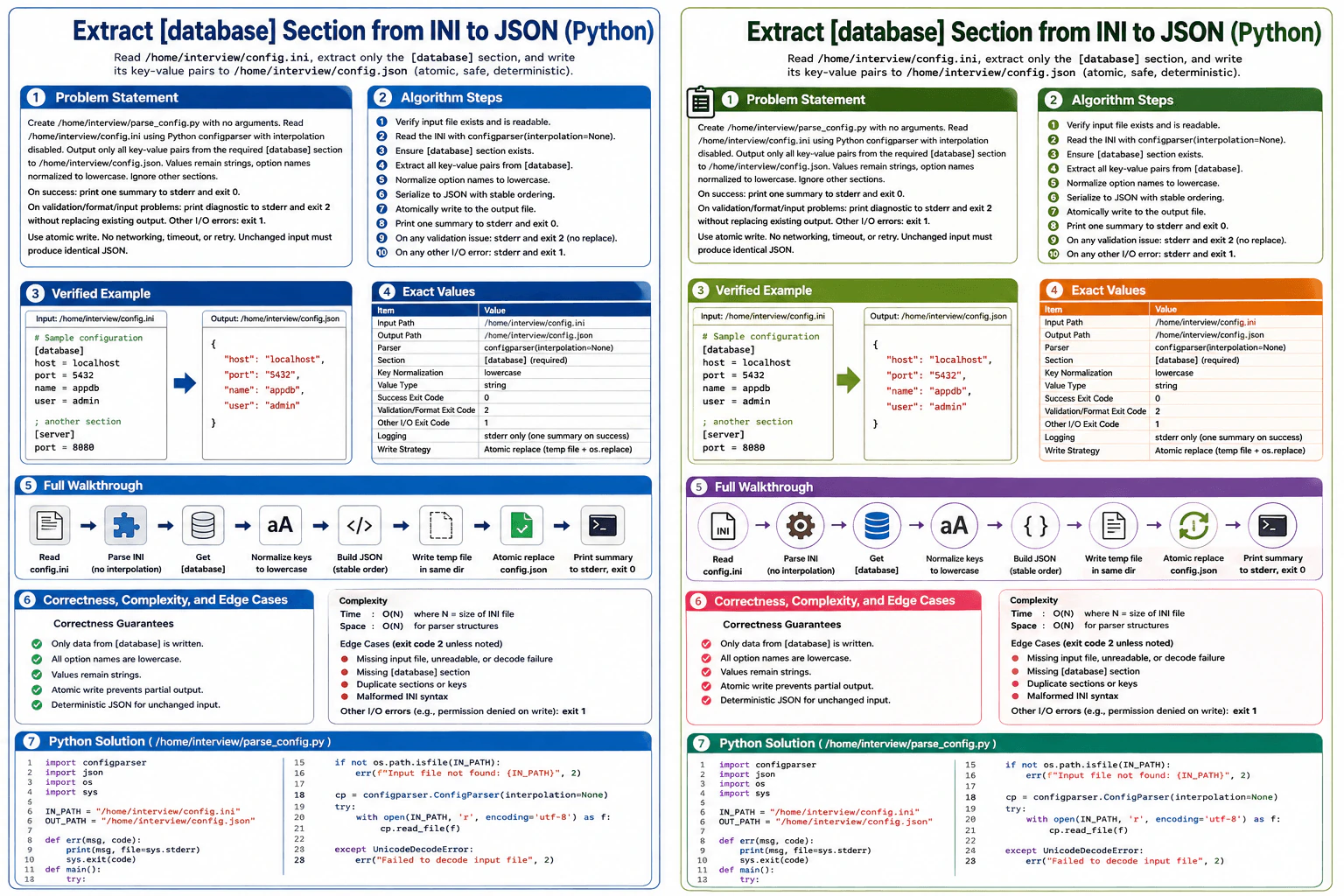
Create /home/interview/parse_config.py with no arguments. Read /home/interview/config.ini using Python configparser with interpolation disabled. The file may contain multiple sections, but output only all key-value pairs from the required [database] section to /home/interview/config.json; values remain strings, option names are normalized to lowercase, and other sections are ignored. Blank lines and standard # or ; comments are allowed. Duplicate sections or keys, malformed syntax, a missing database section, decode failure, or missing input must produce an stderr diagnostic and exit 2 without replacing an existing output; other I/O errors exit 1. Use an atomic write, print one summary to stderr, and exit 0 on success. No network operation, timeout, or retry applies, and unchanged input must produce identical JSON. Example: [database] host=localhost port=5432 name=appdb user=admin. Expected JSON data: {"host":"localhost","port":"5432","name":"appdb","user":"admin"}. Write all operational logging to stderr; the atomic replacement makes the operation idempotent for unchanged input and prevents partial output.
Short Interview Answer (30-60 seconds)
I would read the fixed INI file with Python configparser and disable interpolation. After parsing succeeds, I would require the database section and copy only its key-value pairs into a dictionary. ConfigParser makes option names lowercase, while all values stay as strings. I would serialize that dictionary deterministically, write it to a temporary file in the output directory, and atomically replace config.json. Input or parsing problems exit 2, other I/O errors exit 1. The solution takes O(N) time and O(N) auxiliary space.
The script reads one fixed configuration file and creates one JSON file. It must copy only the information inside the database section. Other sections are ignored. Database names become lowercase in the output, while their values stay as text. Bad input must not damage an existing output file. The script therefore reads and checks the whole input first. It then builds deterministic JSON, writes the complete result to a temporary file, and replaces the real output only after that write succeeds. This keeps the operation safe and repeatable for unchanged input.
Useful Questions to Ask the Interviewer
Should an existing config.json remain unchanged for every input or parsing error?
Should the success summary and every error message be written only to stderr?
Is preserving every database value as a string required even when a value looks numeric?
How to Explain It in an Interview
1. Read and parse the INI file
The program takes no arguments. It always reads /home/interview/config.ini. I create configparser.ConfigParser with interpolation=None, so values are read literally. Blank lines and normal # or ; comment lines are accepted by ConfigParser. The parser is strict, so duplicate sections and duplicate option names are rejected. A missing input file, UTF-8 decode failure, duplicate definition, or malformed INI file produces a diagnostic on stderr and exit code 2. Other I/O failures use exit code 1.
2. Require the database section
After parsing succeeds, I check whether [database] exists. If it is missing, I print a diagnostic to stderr and return exit code 2. This check happens before any output replacement, so an existing /home/interview/config.json stays unchanged.
3. Extract only the required key-value pairs
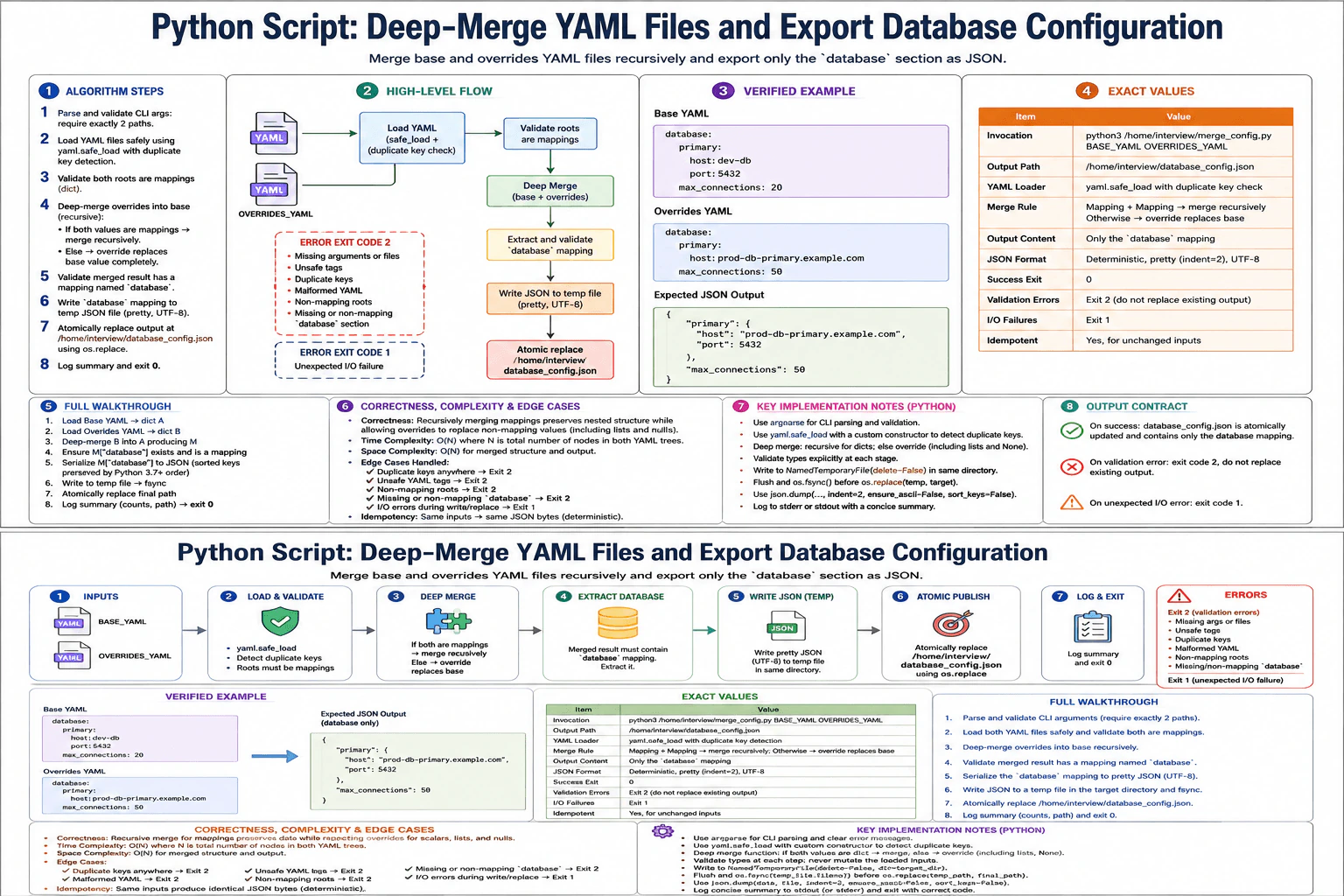
I read all items from [database] into a Python dictionary. ConfigParser normalizes option names to lowercase by default. It also keeps the values as strings. Other sections are never copied. In the diagram example, the database section contains host=localhost, port=5432, name=appdb, and user=admin. A separate server section is ignored.
4. Build deterministic JSON
The dictionary is serialized in its stable insertion order. ConfigParser preserves the option order read from the INI file, and Python dictionaries preserve insertion order. For the shown input, the JSON data is {"host":"localhost","port":"5432","name":"appdb","user":"admin"}. Running the script again with the unchanged input produces the same JSON bytes.
5. Write the result atomically
I create a temporary file in the same directory as config.json. I write the complete JSON to that file, flush it, and call os.fsync. Only then do I call os.replace to atomically replace config.json. If creating, writing, flushing, or replacing the temporary file fails, I print an error to stderr, remove the temporary file when possible, and exit 1. The old output is never replaced by a partial file.
6. Report success and complexity
After os.replace succeeds, the script prints one summary line to stderr and returns 0. There is no network operation, timeout, or retry. If N is the size of the INI input, the work is O(N). ConfigParser stores parsed data, and the script also stores the selected dictionary and JSON text, so auxiliary space is O(N). The main invariant is that config.json is replaced only after parsing, validation, serialization, and the temporary-file write have all succeeded.
Key Insight / Why This Solution Works
The solution follows a validate-then-replace pattern. First, ConfigParser reads the INI file with interpolation disabled and strict duplicate checking. Next, the script verifies that [database] exists and copies only that section into a dictionary. ConfigParser supplies lowercase option names, and values remain strings. The dictionary is serialized deterministically. The central invariant is that the existing config.json is not replaced until the complete new JSON has been successfully written to a temporary file. A same-directory temporary file followed by os.replace provides the atomic replacement shown in the diagram.
Example
The program defines the fixed input and output paths and then runs main(). It creates a ConfigParser with interpolation disabled. The input is opened as UTF-8 and parsed with read_file(). FileNotFoundError, UnicodeDecodeError, and configparser.Error are treated as input or format problems and return 2. Other OSError failures while reading return 1.
After parsing, the code checks for the required database section. If it is absent, it returns 2 before touching the output. It converts parser.items("database", raw=True) into a dictionary. ConfigParser has already normalized option names to lowercase, and the values remain strings.
json.dumps creates compact deterministic JSON. The dictionary preserves the INI option order, so the diagram example is written as {"host":"localhost","port":"5432","name":"appdb","user":"admin"}. A trailing newline is added consistently.
For the atomic write, tempfile.mkstemp creates a temporary file in the same directory as config.json. The script writes the full JSON, flushes it, calls os.fsync, and then uses os.replace. If an I/O failure happens before successful replacement, the temporary file is removed when possible and the function returns 1. After successful replacement, the script prints exactly one summary to stderr and returns 0.
Code
import configparser
import json
import os
import sys
import tempfile
INPUT_PATH = "/home/interview/config.ini"
OUTPUT_PATH = "/home/interview/config.json"defprint_error(message: str) -> None:
# Every operational diagnostic goes to stderr.print(f"ERROR: {message}", file=sys.stderr)
defmain() -> int:
# Disable interpolation so values are read literally.# ConfigParser is strict by default, so duplicate sections and keys fail.
parser = configparser.ConfigParser(interpolation=None)
try:
# Read the required input as strict UTF-8.# Missing input and decode failures are required exit-2 cases.withopen(INPUT_PATH, "r", encoding="utf-8") as input_file:
parser.read_file(input_file)
except FileNotFoundError:
print_error(f"input file not found: {INPUT_PATH}")
return2except UnicodeDecodeError as exc:
print_error(f"failed to decode input file: {exc}")
return2except configparser.Error as exc:
# Duplicate sections, duplicate keys, and malformed INI syntax arrive here.
print_error(f"invalid INI file: {exc}")
return2except OSError as exc:
# Other read-related I/O errors use exit code 1.
print_error(f"failed to read input file: {exc}")
return1# The database section is mandatory.# Return before creating a temp file so an existing output stays untouched.if"database"notin parser:
print_error("missing required [database] section")
return2# Export only [database]. ConfigParser lowercases option names by default.# raw=True makes the intent explicit that values are returned without interpolation.
database = dict(parser.items("database", raw=True))
# Keep the stable dictionary order and preserve every value as a JSON string.# Compact separators produce deterministic bytes for unchanged input.
json_text = (
json.dumps(
database,
ensure_ascii=False,
separators=(",", ":"),
)
+ "\n"
)
output_directory = os.path.dirname(OUTPUT_PATH)
temp_path: str | None = Nonetry:
# Create the temporary file beside the final output.# Keeping both on the same filesystem allows atomic os.replace().
temp_fd, temp_path = tempfile.mkstemp(
prefix=".config.json.",
suffix=".tmp",
dir=output_directory,
text=True,
)
# Write and flush the complete new JSON before changing config.json.with os.fdopen(temp_fd, "w", encoding="utf-8", newline="\n") as temp_file:
temp_file.write(json_text)
temp_file.flush()
os.fsync(temp_file.fileno())
# Replace the destination only after the temporary file is complete.
os.replace(temp_path, OUTPUT_PATH)
temp_path = Noneexcept OSError as exc:
# Remove an unfinished temporary file when possible.# The existing output is not replaced by a partial file.if temp_path isnotNone:
try:
os.unlink(temp_path)
except OSError:
pass
print_error(f"failed to write output file: {exc}")
return1# Emit exactly one operational summary after successful replacement.print(
f"SUCCESS: wrote {len(database)} database key-value pairs to {OUTPUT_PATH}",
file=sys.stderr,
)
return0if __name__ == "__main__":
sys.exit(main())
Where it is used
This pattern is useful in DevOps scripts that convert configuration from one format to another. It is especially useful when generated configuration must be safe to update. Reading and validating first prevents bad input from destroying a good output file, while a temporary file followed by atomic replacement prevents consumers from seeing a partially written configuration.
Why Interviewers Ask This
This question checks whether a DevOps candidate can write a small Python automation script with reliable operational behavior. It tests ConfigParser knowledge, strict parsing, interpolation control, lowercase option names, string preservation, and JSON serialization. It also tests failure classification, stderr logging, meaningful exit codes, and safe file replacement. The atomic-write requirement shows whether the candidate thinks about partial files and preserving a previously valid configuration when something goes wrong.
Common interview mistakes
Forgetting interpolation=None and accidentally allowing ConfigParser interpolation.
Exporting every section instead of only [database].
Converting values such as 5432 to numbers even though all values must remain strings.
Changing ConfigParser's lowercase option-name behavior and producing keys with the wrong case.
Writing directly to config.json before parsing and validation finish, which can damage an existing valid output.
Using the wrong exit code or writing operational messages to stdout instead of stderr.
Interview tip
Explain the order of operations clearly: parse the entire input, validate [database], build the JSON, write a complete temporary file, and only then atomically replace config.json. That sequence shows both scripting skill and production-safe failure handling.
Interviewer may ask next
What happens if config.json already exists and config.ini is malformed?
The INI parser fails before any temporary output is created or os.replace is called. The script prints a diagnostic to stderr and returns exit code 2. The existing config.json therefore remains unchanged. The same rule applies to duplicate sections, duplicate keys, decode failure, a missing input file, or a missing database section. Processing takes at most O(N) time up to the failure point and can use O(N) parser memory.
Why create the temporary file in the same directory as config.json?
The final step uses os.replace. Atomic replacement requires the source and destination to be on the same filesystem. Creating the temporary file in the destination directory makes that condition reliable. The full JSON is written and flushed before replacement, so readers do not see a partial result. The overall complexity remains O(N) time and O(N) auxiliary space. The tradeoff is that the output directory must permit creation of the temporary file.
73. Write a Python script that extracts domains from a file of URLs using a regular expression.Automation And ScriptingEasy
i Question Details
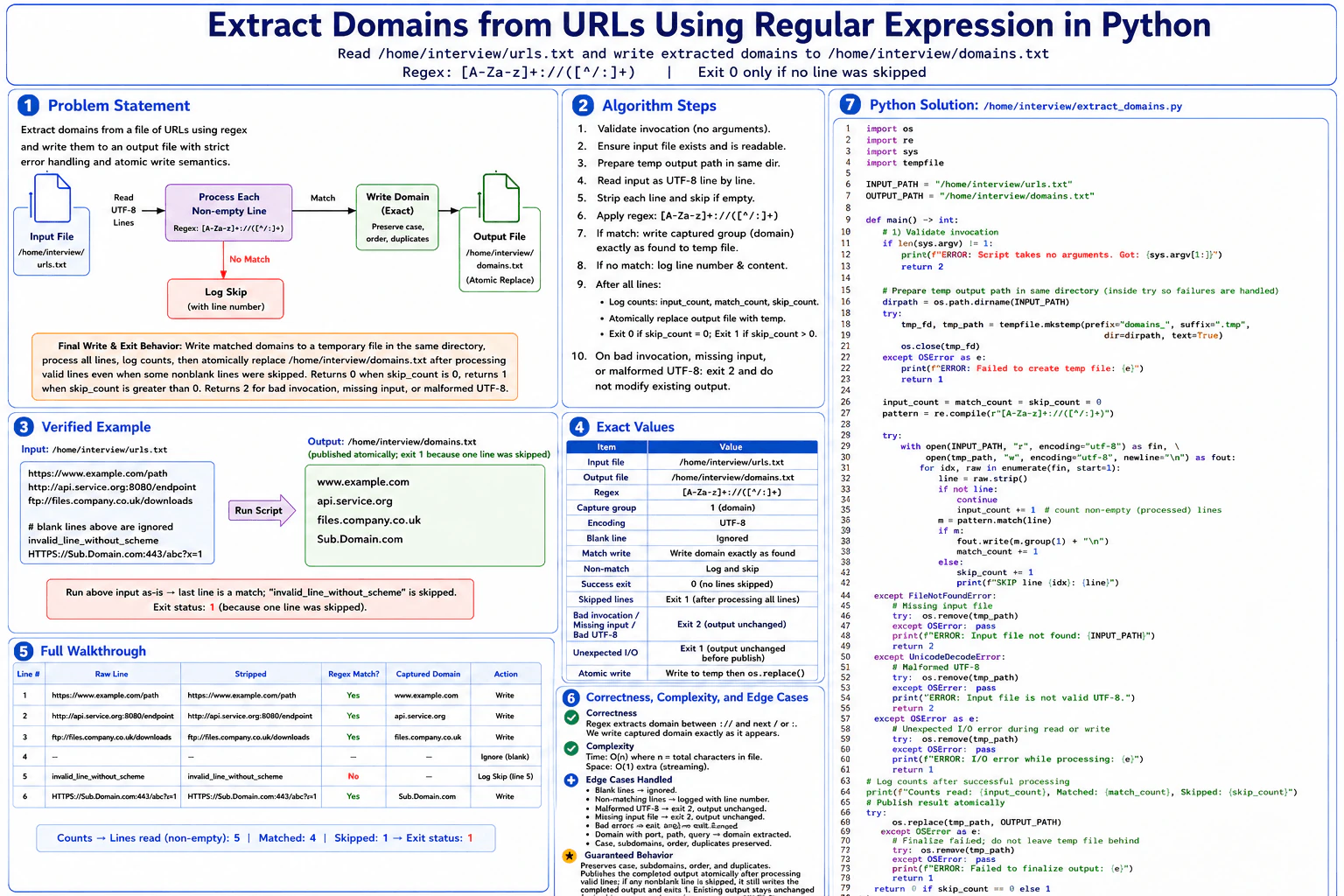
Create /home/interview/extract_domains.py with no arguments. Read UTF-8 lines from /home/interview/urls.txt and apply the regular expression [A-Za-z]+://([^/:]+) to each stripped, non-empty line. For every matching line, write the captured domain exactly as found—preserving case, subdomains, order, and duplicates—to /home/interview/domains.txt, one domain per line; the port, path, and scheme are not written. Blank lines are ignored. A nonblank line that does not match is skipped, logged by line number, and makes the final exit status 1 after all valid lines are processed; malformed UTF-8, missing input, or bad script invocation exits 2 and leaves any existing output unchanged. Unexpected I/O failure exits 1. Publish the completed valid result atomically, log input, match, and skip counts, and exit 0 only when no line was skipped. There is no remote request, timeout, or retry; rerunning is idempotent. Example input: https://www.example.com/path http://api.service.org:8080/endpoint ftp://files.company.co.uk/downloads. Expected output: www.example.com api.service.org files.company.co.uk.
Short Interview Answer (30-60 seconds)
I would stream the URL file as UTF-8, strip each line, ignore blanks, and apply the required regular expression to every non-empty line. A match writes capture group 1 to a temporary file exactly as found. A non-match is logged by line number, but processing continues. After successful processing, I atomically replace the final output. The total time is O(n). Memory does not grow with total file size, although Python holds the current line in memory.
The script reads URL lines from /home/interview/urls.txt. It ignores blank lines. For each non-empty line, it checks whether the beginning contains a valid scheme followed by a domain. If the regex matches, only the captured domain is written. Case, subdomains, order, and duplicates stay unchanged. Invalid non-empty lines are logged and skipped, but later valid lines are still processed. The completed valid result is published atomically. Missing input, malformed UTF-8, or bad invocation must leave any existing output unchanged.
Useful Questions to Ask the Interviewer
Should the final input, match, and skip counts go to standard output while skipped-line and error messages go to standard error?
How to Explain It in an Interview
1. Understand the input and required output
The script is /home/interview/extract_domains.py and accepts no arguments. It reads /home/interview/urls.txt as UTF-8. For each stripped, non-empty line, it applies [A-Za-z]+://([^/:]+). Capture group 1 is the domain. The scheme, port, path, and query are not written. The final file is /home/interview/domains.txt, with one captured domain per line.
2. Prepare safe output before processing
The script creates a temporary file in the same directory as the final output. This temporary file receives all valid domains. Using the same directory lets os.replace publish the completed file with atomic replacement semantics. Until that final replacement happens, the existing /home/interview/domains.txt is not changed.
3. Process every non-empty line in order
Each raw line is stripped. Blank lines are ignored and do not increase the input count. Every remaining line increases input_count exactly once. The regex is applied with match, so matching starts at the beginning of the stripped line. If it matches, group(1) is written exactly as found and match_count increases. If it does not match, skip_count increases and the 1-based line number is logged. Processing continues after a skipped line.
4. Walk through the diagram example
Line 1, https://www.example.com/path, captures www.example.com. Line 2, http://api.service.org:8080/endpoint, captures api.service.org, so port 8080 is excluded. Line 3 captures files.company.co.uk. The blank line is ignored. Line 5, invalid_line_without_scheme, does not match, so it is logged and skipped. Line 6, HTTPS://Sub.Domain.com:443/abc?x=1, captures Sub.Domain.com. The final counts are 5 non-empty input lines, 4 matches, and 1 skip.
5. Publish the completed result and choose the exit status
After all valid processing succeeds, the script logs the input, match, and skip counts and calls os.replace to publish the temporary file as /home/interview/domains.txt. The four domains from the example are therefore written even though one non-empty line was skipped. The script exits 0 when skip_count is 0. It exits 1 when one or more non-empty lines were skipped.
6. Handle failures correctly
Bad invocation, missing input, and malformed UTF-8 return exit code 2. The temporary file is removed and the existing output is not replaced. Other unexpected I/O failures return 1 and also avoid publishing partial output. A failure while creating the temporary file returns 1. A failure during final os.replace also returns 1.
7. Explain correctness and complexity
The invariant is that the temporary output contains exactly the captured domains from successfully matched non-empty lines processed so far, in original order and with original spelling. Each input character is examined only a constant number of times, so total time is O(n), where n is the file size in characters. The diagram describes the solution as streaming with O(1) extra space relative to total file size. More precisely, Python temporarily holds the current line and stripped string, so transient memory is O(L), where L is the longest line.
Key Insight / Why This Solution Works
Use a streaming read-transform-write pipeline. Create a temporary output in the same directory as the final file. Then read the input line by line. Strip each line and ignore blanks. For every non-empty line, apply [A-Za-z]+://([^/:]+). A match contributes capture group 1 directly to the temporary file. A non-match is logged and counted, but does not stop later processing. The central invariant is that the temporary file always contains exactly the matched domains processed so far, in their original order, case, and duplicate count. After successful processing, os.replace atomically publishes the completed result.
Example
The program first checks that no command-line arguments were supplied. It then creates a temporary file beside /home/interview/domains.txt. Next, it opens /home/interview/urls.txt as UTF-8. Each line is stripped. Blank lines are ignored. Every non-empty line increases input_count and is matched with the required regex. A match writes capture group 1 immediately to the temporary output and increases match_count. A non-match logs its 1-based line number and increases skip_count. Missing input and malformed UTF-8 return 2 after temporary-file cleanup. Other I/O failures return 1. When processing succeeds, counts are logged and os.replace publishes the completed temporary file. The final status is 0 when no line was skipped and 1 otherwise.
Code
import os
import re
import sys
import tempfile
INPUT_PATH = "/home/interview/urls.txt"
OUTPUT_PATH = "/home/interview/domains.txt"
PATTERN = re.compile(r"[A-Za-z]+://([^/:]+)")
defremove_temp(path: str | None) -> None:
# Remove an unfinished temporary result so it cannot be mistaken for valid output.if path isNone:
returntry:
os.remove(path)
except FileNotFoundError:
# The path may already have been removed or renamed successfully.passexcept OSError:
# Cleanup is best effort and must not hide the original failure status.passdefmain() -> int:
# This script accepts no arguments beyond the script name itself.iflen(sys.argv) != 1:
print(
f"ERROR: Script takes no arguments. Got: {sys.argv[1:]}",
file=sys.stderr,
)
return2
temp_path: str | None = None
input_count = 0
match_count = 0
skip_count = 0
output_dir = os.path.dirname(OUTPUT_PATH)
try:
# Create the temporary file in the destination directory.# Keeping both files in the same directory supports atomic os.replace.
temp_fd, temp_path = tempfile.mkstemp(
prefix="domains_",
suffix=".tmp",
dir=output_dir,
text=True,
)
os.close(temp_fd)
except OSError as error:
# Failure to create the temporary output is an unexpected I/O failure.print(f"ERROR: Failed to create temp file: {error}", file=sys.stderr)
return1try:
# Open the fixed input path separately so a missing input is classified as exit 2.
input_file = open(INPUT_PATH, "r", encoding="utf-8")
except FileNotFoundError:
remove_temp(temp_path)
print(f"ERROR: Input file not found: {INPUT_PATH}", file=sys.stderr)
return2except OSError as error:
remove_temp(temp_path)
print(f"ERROR: I/O failure while opening input: {error}", file=sys.stderr)
return1try:
# Stream valid domains directly to the temporary output file.with (
input_file,
open(
temp_path,
"w",
encoding="utf-8",
newline="\n",
) as output_file,
):
for line_number, raw_line inenumerate(input_file, start=1):
# Remove surrounding whitespace exactly as required.
line = raw_line.strip()
# Blank lines are ignored and are not included in input_count.ifnot line:
continue
input_count += 1match = PATTERN.match(line)
ifmatch:
# Capture group 1 is the domain between :// and the next /, :, or end.# Write it exactly as found to preserve case, subdomains, order, and duplicates.
output_file.write(match.group(1) + "\n")
match_count += 1else:
# A bad non-empty line is recoverable: log it and continue processing.
skip_count += 1print(
f"SKIP line {line_number}: {line}",
file=sys.stderr,
)
except UnicodeDecodeError:
# Malformed UTF-8 is fatal and must leave the existing final output unchanged.
remove_temp(temp_path)
print("ERROR: Input file is not valid UTF-8.", file=sys.stderr)
return2except OSError as error:
# Any unexpected read or write failure aborts publication and returns exit 1.
remove_temp(temp_path)
print(f"ERROR: I/O failure while processing: {error}", file=sys.stderr)
return1# Log the required counts only after all input lines were processed successfully.print(f"Counts read: {input_count}, Matched: {match_count}, Skipped: {skip_count}")
try:
# Publish the completed valid result atomically.# Skipped non-empty lines do not prevent publication of the valid matches.assert temp_path isnotNone
os.replace(temp_path, OUTPUT_PATH)
except OSError as error:
# A failed final replacement leaves the previous destination unchanged.
remove_temp(temp_path)
print(f"ERROR: Failed to finalize output: {error}", file=sys.stderr)
return1# Exit 0 only when every non-empty line matched. Otherwise return 1 after publication.return0if skip_count == 0else1if __name__ == "__main__":
# Diagram example for /home/interview/urls.txt:# https://www.example.com/path# http://api.service.org:8080/endpoint# ftp://files.company.co.uk/downloads# <blank line># invalid_line_without_scheme# HTTPS://Sub.Domain.com:443/abc?x=1## Published domains for that example:# www.example.com# api.service.org# files.company.co.uk# Sub.Domain.com# Final status: 1 because one non-empty line is skipped.
sys.exit(main())
Where it is used
This pattern is useful in DevOps automation that transforms configuration files, extracts fields from logs, prepares deployment inputs, or creates derived files that other processes read. Writing to a temporary file and then replacing the destination is especially useful when readers must never see a partially generated result.
Why Interviewers Ask This
This question checks practical automation skills, not only regex syntax. The interviewer is testing whether you can follow an exact file contract, preserve data without unwanted normalization, distinguish recoverable bad records from fatal errors, use meaningful process exit codes, and protect existing output from partial writes. It also checks whether you understand streaming file processing, atomic replacement, idempotent reruns, and how Python exceptions map to operational behavior.
Common interview mistakes
A common mistake is changing the required regex instead of using [A-Za-z]+://([^/:]+). Another is lowercasing domains, removing duplicates, or changing their order. Candidates may accidentally count blank lines, stop after the first non-matching line, or forget that valid domains must still be published when skips occur. Another serious mistake is writing directly to the final output file, because an error could leave partial output. It is also easy to return the wrong exit code for missing input, malformed UTF-8, or an unexpected I/O failure.
Interview tip
Explain the temporary-file rule before showing the loop. Say that recoverable bad lines are logged while processing continues, but fatal file or encoding errors prevent os.replace. This makes the atomic-output and exit-code behavior easy for the interviewer to verify.
Interviewer may ask next
How would this solution handle a very large URL file?
The same design already scales well because it streams one line at a time and writes each match directly to the temporary file. Total time remains O(n), where n is the number of input characters. Memory does not grow with the total file size. More precisely, transient memory is O(L) for the longest current line. The main extra resource is temporary disk space proportional to the output. The tradeoff is that atomic publication requires keeping that temporary output until os.replace succeeds.
What happens if malformed UTF-8 is discovered after several valid domains have already been written to the temporary file?
Iteration raises UnicodeDecodeError. The script removes the temporary file, returns exit code 2, and never calls os.replace. Therefore the existing /home/interview/domains.txt remains unchanged even though some valid domains had already reached the temporary file. Correctness is preserved because only a completely processed valid input is published for this fatal-error case. Processing time is O(n) up to the failure point, and transient memory remains O(L).
74. Write a reusable Bash filter that appends a live timestamp to each input line.Automation And ScriptingMedium
i Question Details
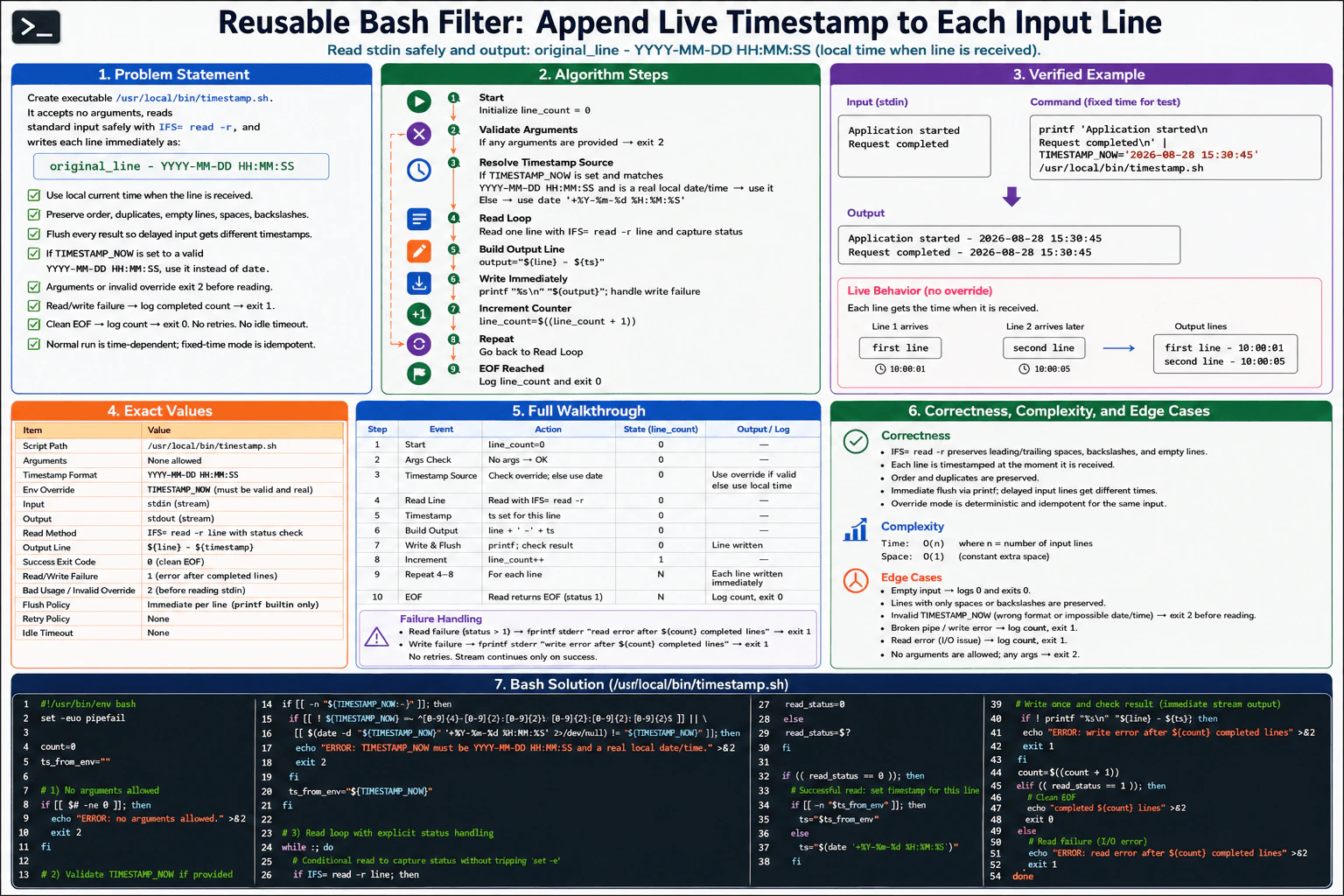
Create executable /usr/local/bin/timestamp.sh. It accepts no arguments, reads standard input safely with IFS= read -r, and writes each line immediately as original_line - YYYY-MM-DD HH:MM:SS, using the local current time when that line is received. Preserve order, duplicates, empty lines, spaces, and backslashes, and flush every result so delayed input receives different timestamps. For deterministic testing only, when TIMESTAMP_NOW is set to a valid YYYY-MM-DD HH:MM:SS value, use it instead of calling date. Arguments or an invalid override exit 2 before reading. A read or write failure logs how many lines completed and exits 1; clean EOF logs the count and exits 0. Do not retry writes and impose no idle timeout because the input is a stream. Normal execution is intentionally time-dependent rather than idempotent; fixed-time mode is idempotent for the same input. Example: printf 'Application started Request completed ' | TIMESTAMP_NOW='2026-08-28 15:30:45' /usr/local/bin/timestamp.sh must output Application started - 2026-08-28 15:30:45 Request completed - 2026-08-28 15:30:45.
Short Interview Answer (30-60 seconds)
I would implement this as a streaming Bash filter. I first reject arguments and validate TIMESTAMP_NOW before reading stdin. Then I read one line at a time with IFS= read -r, choose either the fixed test timestamp or the current local time, and write the result immediately. I increment the completed count only after a successful write. Clean EOF exits
Read or write failure exits
The solution is O(n) time and O(1) auxiliary space.
The script receives text from standard input as a stream. For every line, it keeps the original content and adds a timestamp in YYYY-MM-DD HH:MM:SS format. It writes each result immediately, so lines that arrive later can receive later timestamps. A valid TIMESTAMP_NOW value gives deterministic test output. Arguments or an invalid override are rejected before input is read. The script tracks only successfully written lines. Clean EOF is success. Read or write failure reports the completed count and exits with an error.
Useful Questions to Ask the Interviewer
Should TIMESTAMP_NOW be accepted only when it has the exact YYYY-MM-DD HH:MM:SS format and represents a real local date and time?
On a read or write failure, should the script stop immediately without retrying?
Should the script wait indefinitely for additional stream input instead of using an idle timeout?
How to Explain It in an Interview
1. Validate before reading input
The script must accept no arguments. If an argument is present, it writes an error to stderr and exits 2 before reading stdin. If TIMESTAMP_NOW is set, the script first checks the exact YYYY-MM-DD HH:MM:SS shape. It also uses GNU date to confirm that the value is a real date and time. An invalid override also exits 2 before reading.
2. Initialize the state
The completed-line counter starts at 0. The script also records whether a validated TIMESTAMP_NOW override is active. The important invariant is that count always equals the number of output lines that completed successfully.
3. Read one stream line
The script repeatedly calls IFS= read -r line inside a conditional so set -e does not terminate the script before the read status can be examined. A read status of 0 means a line was received. Status 1 means clean EOF in the illustrated solution. Any other read status is treated as an I/O failure.
4. Choose the timestamp
For every successfully received line, the script chooses its timestamp at that point. If the fixed override is active, it uses TIMESTAMP_NOW. Otherwise, it calls date '+%Y-%m-%d %H:%M:%S'. Because the live timestamp is obtained inside the loop, delayed input can receive a different time.
5. Write immediately and update the counter
The script writes exactly one result with printf '%s - %s\n' "$line" "$ts". There is no retry and no application-level batching. If printf fails, the script reports how many earlier lines completed and exits 1. The counter increases only after the output operation succeeds.
6. Handle EOF and failures
On clean EOF, the script logs the completed-line count to stderr and exits
A read failure logs the completed count and exits
A write failure does the same. There is no idle timeout because stdin is intentionally treated as a stream.
7. Walk through the verified example
The input contains Application started followed by Request completed. TIMESTAMP_NOW is 2026-08-28 15:30:45. The first line therefore becomes Application started - 2026-08-28 15:30:45. The second becomes Request completed - 2026-08-28 15:30:45. Order is preserved and both output lines use the same deterministic timestamp.
8. Complexity and edge cases
For n input lines, the diagram shows O(n) time because each received line is processed once. Auxiliary space is O(1) because the script keeps only the current line, timestamp, status values, and counter. Empty lines, duplicates, spaces, and backslashes are preserved. Normal mode is intentionally time-dependent. Fixed-time mode is deterministic and idempotent for the same input.
Technical Approach
Use a single streaming loop. Validate all startup conditions before touching stdin. Then perform the same sequence for every received line: read it safely, choose its timestamp, write one formatted result, and increment the counter only after the write succeeds. The central invariant is that count equals the number of fully completed output lines. This makes failure reporting accurate. The read status is captured explicitly so clean EOF and an I/O failure can follow different exit paths.
Practical Complexity & Trade-offs
Let n be the number of input lines. The time complexity is O(n) because each received line is handled once. Auxiliary space is O(1) because the script does not collect the stream in memory. It keeps only the current line, one timestamp, a few status variables, and the completed-line counter. The script may wait indefinitely for another input line because the design intentionally has no idle timeout.
Example
The final implementation is Bash because the question specifically requires the executable /usr/local/bin/timestamp.sh. The script starts with set -euo pipefail and rejects any command-line arguments. It then validates TIMESTAMP_NOW before reading stdin. The validation checks both the exact text shape and a GNU date round trip so impossible dates or times are rejected.
The main loop performs IFS= read -r line inside an if statement. This lets the script capture the read status without set -e stopping execution. Status 0 enters the normal processing path. Status 1 is treated as clean EOF in the illustrated solution. Other statuses are read failures.
For a successful read, the timestamp is chosen immediately. A validated override is reused in fixed-time mode. Otherwise, date is called for the current local time. The script then performs one printf for the output line. If that write fails, it logs the number of earlier completed lines and exits 1. Only a successful write increments count.
Clean EOF logs completed count and exits
A read failure logs completed count and exits
There are no write retries and no idle timeout.
Code
#!/usr/bin/env bashset -u
if (($# != 0)); thenprintf'ERROR: no arguments allowed\n' >&2
exit 2
fi
timestamp_override=
if [[ -v TIMESTAMP_NOW ]]; thenif [[ ! $TIMESTAMP_NOW =~ ^[0-9]{4}-[0-9]{2}-[0-9]{2}[[:space:]][0-9]{2}:[0-9]{2}:[0-9]{2}$ ]]; thenprintf'ERROR: TIMESTAMP_NOW must be YYYY-MM-DD HH:MM:SS and a real local date/time.\n' >&2
exit 2
fi
normalized=$(LC_ALL=C date -d "$TIMESTAMP_NOW"'+%Y-%m-%d %H:%M:%S' 2> /dev/null) || {
printf'ERROR: TIMESTAMP_NOW must be YYYY-MM-DD HH:MM:SS and a real local date/time.\n' >&2
exit 2
}
if [[ $normalized != "$TIMESTAMP_NOW" ]]; thenprintf'ERROR: TIMESTAMP_NOW must be YYYY-MM-DD HH:MM:SS and a real local date/time.\n' >&2
exit 2
fi
timestamp_override=$TIMESTAMP_NOWelif ! command -v date > /dev/null 2>&1; thenprintf'ERROR: date is required\n' >&2
exit 2
fi
count=0
whiletrue; do
line=
IFS= read -r line
read_status=$?
if ((read_status != 0)) && [[ -z $line ]]; thenif ((read_status == 1)); thenprintf'completed %d lines\n'"$count" >&2
exit 0
fiprintf'ERROR: read error after %d completed lines\n'"$count" >&2
exit 1
fiif [[ -n $timestamp_override ]]; then
timestamp=$timestamp_overrideelse
timestamp=$(LC_ALL=C date'+%Y-%m-%d %H:%M:%S') || {
printf'ERROR: timestamp error after %d completed lines\n'"$count" >&2
exit 1
}
fiif ! printf'%s - %s\n'"$line""$timestamp"; thenprintf'ERROR: write error after %d completed lines\n'"$count" >&2
exit 1
fi
((count += 1))
if ((read_status != 0)); thenprintf'completed %d lines\n'"$count" >&2
exit 0
fidone
Where it is used
This pattern is useful in shell pipelines, log processing, deployment scripts, service wrappers, and command-line automation. It lets one process add timing information to another process's output without first collecting the whole stream. The deterministic TIMESTAMP_NOW mode is especially useful in automated tests because the same input can produce the same expected timestamped output.
Why Interviewers Ask This
This question tests practical shell-stream reasoning. The interviewer wants to see whether you can safely preserve input, timestamp each line at the correct moment, avoid buffering a live stream, validate a deterministic test override, and use precise exit behavior. It also tests whether you understand set -e interactions with read, whether your counter remains correct after a failed write, and whether you can distinguish normal EOF from an I/O failure instead of treating every loop termination the same way.
Common interview mistakes
Reading stdin before checking arguments or TIMESTAMP_NOW. Invalid startup input must exit 2 before any read.
Checking only the timestamp pattern and accepting impossible dates or times.
Using read as an unconditional command under set -e and losing the chance to inspect its failure status.
Incrementing count before the output succeeds. That makes the completed-line count wrong after a write failure.
Using echo or unsafe reading that changes spaces, backslashes, or empty-line behavior instead of IFS= read -r and printf.
Buffering the whole input, retrying failed writes, or adding an idle timeout even though the required design is a live stream.
Interview tip
Explain the completed-line invariant first: count means lines that were successfully written, not merely lines that were read. Then explain the three exit classes clearly: invalid startup input exits 2 before reading, read or write failure exits 1 with the completed count, and clean EOF logs the count and exits 0.
Interviewer may ask next
How would you test that delayed input receives different timestamps in normal mode?
Leave TIMESTAMP_NOW unset. Use a producer that writes one line, waits for at least one second, and then writes another line into /usr/local/bin/timestamp.sh. The first output should appear before the delay finishes, and the second should contain a later local timestamp. The streaming algorithm does not change. Time remains O(n) and auxiliary space remains O(1). The tradeoff is that this wall-clock test is less deterministic than fixed-time testing.
What changes if every output timestamp must use UTC instead of local time?
The streaming loop, completed-line invariant, read handling, write handling, and exit codes stay the same. Only the timestamp source and override contract change. Live mode would call a UTC-producing date command, and the fixed override would be validated against the required UTC representation. Time remains O(n) and auxiliary space remains O(1). The tradeoff is that UTC is easier to compare across machines, but it no longer represents each machine's local wall-clock time.
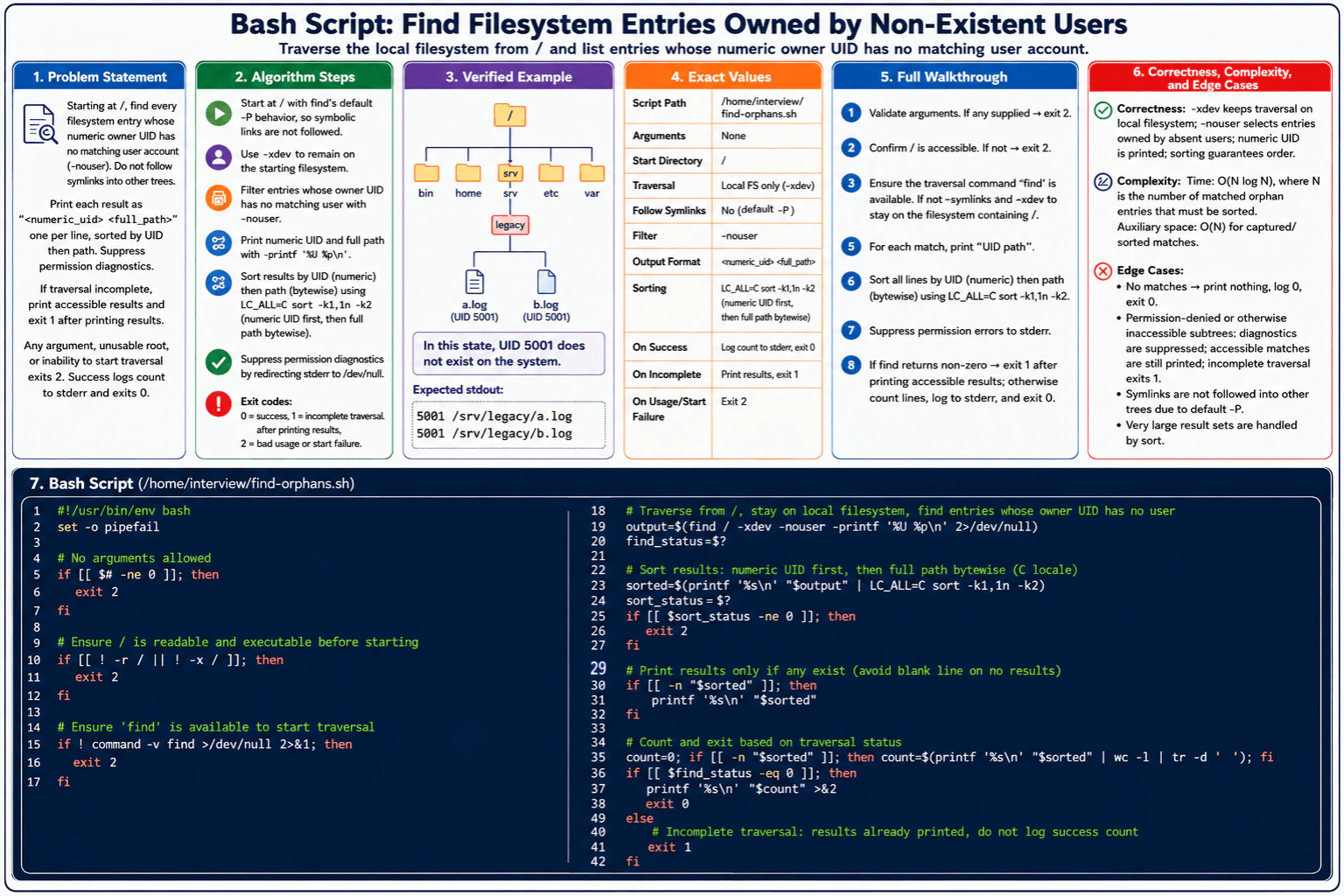
75. Write a Bash script that finds filesystem entries owned by non-existent users.Automation And ScriptingMedium
i Question Details
Create executable /home/interview/find-orphans.sh with no arguments. Starting at /, use local filesystem traversal only (-xdev) and identify every entry whose numeric owner UID has no matching user account (-nouser). Do not follow symbolic links into other trees. Print each result to stdout exactly as <numeric_uid> <full_path>, one per line, sorted by numeric UID and then bytewise path; print nothing if none exist. Permission diagnostics must be suppressed as required, while accessible results remain available; if traversal was incomplete, exit 1 after printing those results. Any argument, failure to start traversal, or unusable root exits 2; complete success logs the result count to stderr and exits 0. The script is read-only and idempotent, with no retries, network operation, or timeout. Verified example state: /srv/legacy/a.log and /srv/legacy/b.log are owned by absent UID 5001. Expected stdout: 5001 /srv/legacy/a.log 5001 /srv/legacy/b.log. Use no retry attempt after a traversal error.
Short Interview Answer (30-60 seconds)
I would use find from / with its default -P behavior, -xdev, and -nouser. I capture each accessible orphan entry as its numeric UID and full path, suppress traversal diagnostics, and sort the matches with LC_ALL=C by numeric UID and then bytewise path. I print nothing when there are no matches. Complete traversal logs the count to stderr and exits 0. Incomplete traversal exits 1 after printing accessible results. Invalid usage or startup failure exits 2.
The script must start at / and find filesystem entries owned by numeric user IDs that no longer have matching user accounts. It must stay on the filesystem containing / and must not follow symbolic links into other trees. Every accessible match is printed as its numeric UID, one space, and its full path. The lines are ordered by numeric UID and then bytewise path. Permission diagnostics are hidden. A complete scan logs the count to stderr. An incomplete scan still prints accessible matches and exits 1. The script performs no retries, network operations, or writes.
Useful Questions to Ask the Interviewer
Should the search stay only on the filesystem containing /? Yes. The required command uses -xdev.
Should permission errors discard results that were already accessible? No. Accessible matches must still be printed.
How should paths be ordered when two entries have the same UID? Use bytewise path order with the C locale.
How to Explain It in an Interview
1. Validate how the script is started
The script accepts no arguments. If any argument is supplied, it exits 2. Before traversal, it checks that / is readable and searchable. An unusable root also exits 2. It then checks that the find command is available. If traversal cannot be started for this reason, the script exits 2.
2. Traverse the local filesystem and select orphan owners
The scan starts at /. find uses its default -P behavior, so it does not follow symbolic links. The -xdev option keeps traversal on the filesystem containing /. The -nouser test selects entries whose numeric owner UID has no matching user account. -printf '%U %p\n' produces the numeric UID followed by the full path. Diagnostics are redirected to /dev/null, while successfully found matches remain available.
The script saves the exit status from find immediately. A status of 0 means traversal completed. A nonzero status after traversal started means the traversal was incomplete.
3. Sort the collected results
The captured records are sorted with LC_ALL=C sort -k1,1n -k2. The first key is numeric, so owner UIDs are compared as numbers. The second key starts at the full path and uses the C locale, so paths are ordered bytewise. If this required sorting stage fails, the script exits 2 rather than reporting a successful run.
4. Walk through the verified example
The example contains /srv/legacy/a.log and /srv/legacy/b.log. Both entries are owned by UID 5001. There is no matching user account for UID 5001, so both entries satisfy -nouser.
The required stdout is: 5001 /srv/legacy/a.log5001 /srv/legacy/b.log
Both records have the same UID. The bytewise path key therefore places a.log before b.log.
5. Print results and choose the exit status
If sorted output is non-empty, the script prints it to stdout. If there are no matching entries, it prints zero bytes to stdout and keeps the result count at zero.
If find completed successfully, the script prints the numeric result count to stderr and exits
If traversal started but find returned nonzero, all accessible matches have already been printed and the script exits
It does not retry the traversal.
6. Explain why the result is correct
The central invariant is that every collected record came from an accessible filesystem entry selected by find -nouser while traversal stayed on the filesystem containing /. Each record contains that entry's numeric owner UID and full path. Sorting changes only record order. It does not add or remove matches. Suppressing diagnostic messages also does not suppress successfully collected results.
7. Explain complexity and edge cases
The illustrated solution uses O(N log N) time for sorting N matched orphan entries and O(N) auxiliary space for the captured and sorted matches. Important edge cases are no matches, permission-denied or otherwise inaccessible subtrees, an unusable root, supplied arguments, inability to start find, sorting failure, and incomplete traversal.
Key Insight / Why This Solution Works
The solution separates the work into traversal, filtering, ordering, and exit handling. find begins at /, keeps its default -P symbolic-link behavior, uses -xdev to stay on the starting filesystem, and uses -nouser to select entries whose owner UID has no matching account. Each selected entry becomes a numeric_uid full_path record. The central invariant is that every collected record represents an accessible entry that satisfied -nouser. LC_ALL=C sort -k1,1n -k2 then orders those records by numeric UID and full path without changing which entries were found.
Example
The required solution is an executable Bash script at /home/interview/find-orphans.sh. It first rejects arguments with exit 2. It checks that / is readable and searchable, then checks that find is available. Next it runs find / -xdev -nouser and formats every accessible match as numeric UID plus full path while sending diagnostics to /dev/null. The script saves find's exit status before doing any later work. It sorts captured records with LC_ALL=C sort -k1,1n -k2 and treats sorting failure as exit 2. It prints sorted output only when non-empty, so a no-match run writes nothing to stdout. It counts actual result lines. Complete traversal logs that count to stderr and exits 0. Incomplete traversal exits 1 after accessible results have been printed. No retry is performed.
Code
#!/usr/bin/env bashset -u
if (($# != 0)); thenprintf'Usage: %s\n'"$0" >&2
exit 2
fiif [[ ! -d / || ! -r / || ! -x / ]] || ! command -v find > /dev/null 2>&1; thenprintf'ERROR: traversal cannot start at /\n' >&2
exit 2
fiif ! command -v sort > /dev/null 2>&1 || ! command -v mktemp > /dev/null 2>&1; thenprintf'ERROR: required local utilities are unavailable\n' >&2
exit 2
fi
work_dir=$(mktemp -d) || {
printf'ERROR: could not create temporary workspace\n' >&2
exit 2
}
cleanup() { rm -rf -- "$work_dir"; }
trap cleanup EXIT
trap'exit 1' HUP INT TERM
matches="$work_dir/matches"
sorted="$work_dir/sorted"# GNU find defaults to -P, so it does not follow symbolic links.# Keep accessible matches even if a permission error makes traversal incomplete.
find / -xdev -nouser -printf'%U %p\n' > "$matches" 2> /dev/null
find_status=$?
# Buffer before printing so stdout is always in the required deterministic order.if ! LC_ALL=C sort -k1,1n -k2 "$matches" > "$sorted"; thenprintf'ERROR: could not sort traversal results\n' >&2
exit 1
fiif ! commandcat"$sorted"; thenprintf'ERROR: could not write traversal results\n' >&2
exit 1
fiif ((find_status != 0)); thenexit 1
fi
count=$(wc -l < "$sorted") || exit 1
printf'%d\n'"$count" >&2
Where it is used
This pattern is useful for Linux administration, filesystem audits, account-cleanup work, migrations, and security reviews. Deleted accounts can leave files behind whose numeric UIDs no longer map to users. The same scripting pattern is also useful when an operations tool must preserve accessible partial results, suppress expected diagnostics, produce deterministic output, and use distinct exit codes for success, incomplete work, and startup failure.
Why Interviewers Ask This
This question tests practical Linux and Bash reasoning rather than only command memorization. The interviewer can see whether you understand find, -xdev, -nouser, default -P behavior, deterministic sorting, stdout versus stderr, and exit-status handling. It also checks whether you preserve accessible partial results after traversal errors, handle an empty result correctly, distinguish startup failure from incomplete traversal, avoid forbidden retries, and keep an administrative script read-only and idempotent.
Common interview mistakes
A common mistake is forgetting -xdev and crossing into mounted filesystems. Another is claiming that -xdev prevents symbolic-link following, when that behavior comes from find's default -P mode. Candidates may also use the wrong sort keys, fail to save find's exit status immediately, print a blank line when there are no matches, discard accessible results after permission errors, log a success count after incomplete traversal, or return exit 0 when traversal was incomplete. Retrying after a traversal error would also violate the stated contract.
Interview tip
Explain the exit codes as three separate states: exit 2 means the script could not validly start or complete required startup processing, exit 1 means traversal started but was incomplete after accessible results were printed, and exit 0 means traversal completed and the result count was logged to stderr.
Interviewer may ask next
How would you change the solution for a very large number of orphan entries so the script does not keep all matches in shell variables?
I would stream the find records into an external sort instead of storing the complete result set in shell variables. I would still preserve find's status separately so an incomplete traversal remains distinguishable from successful sorting. The required ordering would stay numeric UID first and bytewise path second. Sorting would still require O(N log N) time for N matches, but shell-variable memory use would be reduced. The tradeoff is more careful pipeline-status and temporary-storage handling.
What would change if the search were allowed to cross mounted filesystems?
I would remove -xdev from the find command. The -nouser filter, default -P symbolic-link behavior, output format, C-locale sorting, diagnostic suppression, counting, and exit rules could remain the same. Correctness would then mean examining every reachable filesystem below / instead of only the filesystem containing /. The traversal could become much larger, while sorting N matched orphan records would still use O(N log N) time and O(N) auxiliary space in the illustrated implementation.
76. Write a Bash script that saves commits unique to `feature-api` while excluding merges.Automation And ScriptingMedium
i Question Details
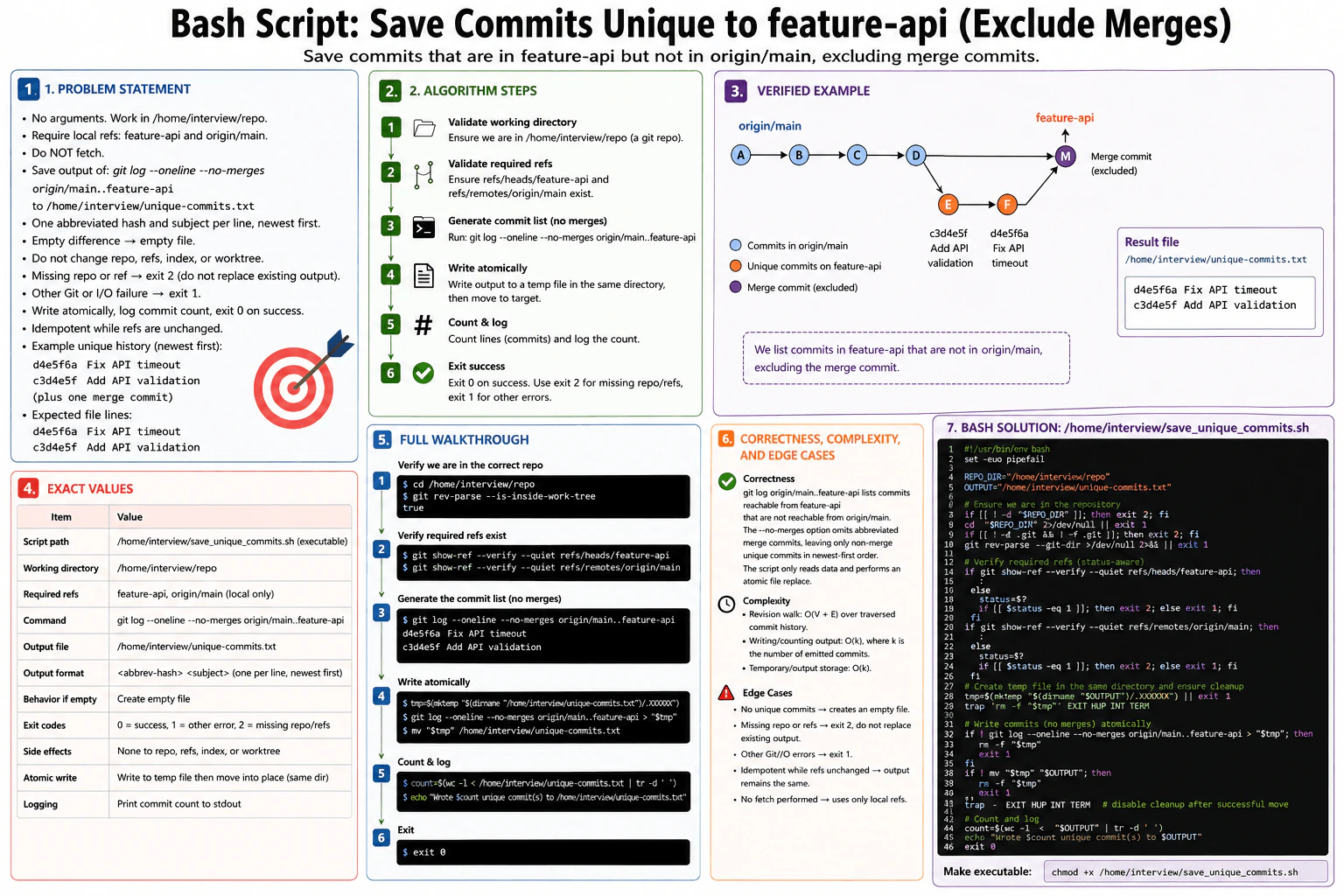
Create executable /home/interview/save_unique_commits.sh with no arguments. Work in /home/interview/repo, require local refs feature-api and origin/main, and do not fetch. Save the output of the equivalent of git log --oneline --no-merges origin/main..feature-api to /home/interview/unique-commits.txt: one abbreviated commit hash and subject per line, newest first, excluding every merge commit and including only commits absent from origin/main. An empty difference creates an empty file, and the repository, refs, index, and worktree must not change. Missing repository or refs exits 2 without replacing an existing output; another Git or I/O failure exits 1. Write atomically, log the commit count, and exit 0 on success. There is no network timeout or retry, and the result is idempotent while refs are unchanged. Example unique history newest first: d4e5f6a Fix API timeout, c3d4e5f Add API validation, plus one merge commit. Expected file: d4e5f6a Fix API timeout c3d4e5f Add API validation.
Short Interview Answer (30-60 seconds)
I would validate /home/interview/repo and the two required local refs first, without fetching anything. Then I would run git log --oneline --no-merges origin/main..feature-api and write its output to a temporary file beside the final output. Only after Git succeeds would I atomically rename that file to /home/interview/unique-commits.txt. I would then count and log the commits. The revision walk is O(V + E), while writing and storing k emitted lines is O(k).
The script takes no arguments. It works in /home/interview/repo. It requires the existing local refs feature-api and origin/main, and it must not fetch from the network. It saves commits that are reachable from feature-api but not reachable from origin/main. Merge commits are excluded. Each output line contains an abbreviated commit hash and subject, newest first. A missing repository or required ref exits 2 without replacing an existing output. Another Git or I/O failure exits 1. A successful run writes atomically, logs the commit count, and exits 0.
Useful Questions to Ask the Interviewer
Should origin/main mean only the existing local remote-tracking ref, with no fetch? Yes, that matches the requirement.
If there are no unique non-merge commits, should the script replace the output with an empty file? Yes.
Should the existing output remain untouched until the complete Git command succeeds? Yes, because the required write is atomic.
How to Explain It in an Interview
1. Validate the repository and required refs
I first check that /home/interview/repo exists. If it is missing, I exit 2 before creating a temporary file, so an existing output is not replaced. I then enter the directory and verify that Git can use it as a repository. I check the exact local refs refs/heads/feature-api and refs/remotes/origin/main. A missing required ref exits 2. Another Git or I/O failure exits 1. I never run git fetch, so there is no network timeout or retry.
2. Generate exactly the required commit list
The main command is git log --oneline --no-merges origin/main..feature-api. The revision range origin/main..feature-api means commits reachable from feature-api that are not reachable from origin/main. The --no-merges option removes merge commits. The --oneline option produces one abbreviated commit hash and subject per line. The result is written in the same newest-first order shown in the diagram.
3. Walk through the verified example
The shared history is A -> B -> C. The main side continues to D. The feature side contains c3d4e5f Add API validation and then d4e5f6a Fix API timeout. The merge commit M has both histories as parents, and feature-api points to M. The revision range removes commits already reachable from origin/main, and --no-merges removes M. The file therefore contains d4e5f6a Fix API timeout followed by c3d4e5f Add API validation.
4. Write the output atomically
I create a temporary file in the same directory as /home/interview/unique-commits.txt. Git writes its complete result to that temporary file. A cleanup trap removes the temporary file if the script fails or is interrupted. If Git succeeds, mv renames the temporary file to the final path. Because the temporary file and destination are in the same directory and filesystem, the rename is the atomic replacement step used by this solution.
5. Count, log, and finish
After the successful rename, I disable the temporary-file cleanup trap because the temporary pathname no longer exists. I count the lines in the final file and print the count with the output path. If there are no matching commits, Git produces no lines, so the final file is empty and the count is zero. The script exits 0 on success. It only reads Git history, so the repository, refs, index, and worktree do not change. If the refs stay unchanged, repeated runs produce the same result.
6. Explain complexity and edge cases
The revision walk is O(V + E) over the commit graph Git actually traverses, where V is the traversed commits and E is the traversed parent relationships. Writing and counting the emitted result is O(k), where k is the number of output commits. Temporary and output storage is O(k). Important cases are an empty difference, missing repository, missing required refs, another Git or I/O failure, and repeated execution with unchanged refs.
Technical Approach
The key idea is to use Git's revision-set operation instead of manually comparing commit hashes. origin/main..feature-api selects commits reachable from feature-api but not from origin/main. --no-merges then excludes every merge commit. The central invariant is that the existing output is not replaced until validation and the complete Git log operation have succeeded. The script performs all validation before creating or publishing the final output, uses only local refs, and never modifies repository state.
Practical Complexity & Trade-offs
Let V be the number of commits Git traverses and E be the parent links it examines. The revision walk is O(V + E). Let k be the number of commits written to the result file. Writing and counting those lines is O(k). The temporary file and final output together represent O(k) generated output storage. The total work should not be described as only O(k), because Git may need to inspect more commits than it finally prints.
Example
The required implementation is Bash, matching both the question and the approved diagram. The script defines the fixed repository and output paths and takes no arguments. It checks whether the repository path exists, enters it, and verifies Git metadata. It then validates refs/heads/feature-api and refs/remotes/origin/main, mapping an absent required ref to exit 2 and other Git errors to exit 1. Next it creates a temporary file in the output directory and installs a cleanup trap. The Git log command writes the unique non-merge commits into that temporary file. A successful same-directory mv publishes the result atomically. The script disables cleanup after the move, counts the output lines, logs the count, and exits 0. After saving the script as /home/interview/save_unique_commits.sh, run chmod +x /home/interview/save_unique_commits.sh once to satisfy the executable-file requirement.
Code
#!/usr/bin/env bashset -u
repo=/home/interview/repo
output=/home/interview/unique-commits.txt
if (($# != 0)); thenprintf'Usage: %s\n'"$0" >&2
exit 2
fiif [[ ! -d $repo ]]; thenprintf'ERROR: required repository is missing\n' >&2
exit 2
fiif ! cd -- "$repo"; thenprintf'ERROR: could not enter repository\n' >&2
exit 1
fiif [[ ! -d .git && ! -f .git ]]; thenprintf'ERROR: required repository is missing\n' >&2
exit 2
fiif ! git rev-parse --git-dir > /dev/null 2>&1; thenprintf'ERROR: repository metadata is unusable\n' >&2
exit 1
ficheck_ref() {
local ref=$1 status
git show-ref --verify --quiet "$ref"
status=$?
if ((status == 1)); thenprintf'ERROR: required ref %s is missing\n'"$ref" >&2
exit 2
elif ((status != 0)); thenprintf'ERROR: could not validate ref %s\n'"$ref" >&2
exit 1
fi
}
check_ref refs/heads/feature-api
check_ref refs/remotes/origin/main
output_dir=${output%/*}
temp_file=$(mktemp --tmpdir="$output_dir" .unique-commits.txt.tmp.XXXXXX) || {
printf'ERROR: could not create temporary output\n' >&2
exit 1
}
cleanup() { rm -f -- "$temp_file"; }
trap cleanup EXIT
trap'exit 1' HUP INT TERM
if ! git log --oneline --no-merges origin/main..feature-api > "$temp_file"; thenprintf'ERROR: git log failed\n' >&2
exit 1
fi
count=$(wc -l < "$temp_file") || exit 1
if ! mv -f -- "$temp_file""$output"; thenprintf'ERROR: could not publish output atomically\n' >&2
exit 1
fitrap - EXIT HUP INT TERM
printf'Wrote %d unique commit(s) to %s\n'"$count""$output" >&2
Where it is used
This pattern is useful in CI pipelines, release scripts, deployment notes, audit reports, and branch comparison tools. It can create a stable list of commits that exist on a feature or release branch but are not yet part of a base branch. The same-directory temporary-file and rename pattern is also useful whenever a script must avoid exposing a partially written result.
Why Interviewers Ask This
This question checks whether you understand Git revision ranges, merge filtering, shell exit statuses, and safe file replacement. It also tests whether you distinguish missing required inputs from operational failures. A strong answer shows that you can avoid unnecessary network access, protect an existing output when validation fails, keep Git state unchanged, handle an empty result correctly, and explain the revision-walk complexity accurately instead of measuring only the lines written.
Common interview mistakes
A common mistake is running git fetch, even though this task requires only the existing local refs. Reversing the range to feature-api..origin/main selects the wrong commits. Forgetting --no-merges allows merge commits into the file. Writing directly to /home/interview/unique-commits.txt can replace a good previous result before the operation is complete. Another mistake is treating every git show-ref error as a missing ref instead of separating an absent ref from another Git failure. It is also incorrect to describe the total runtime as O(k) when Git may traverse more history than it emits.
Interview tip
Explain the solution as three safety boundaries: validate all required local state first, generate the exact revision difference into a temporary file, and publish it only with the final atomic rename. Then mention the exit-code split and the no-fetch rule.
Interviewer may ask next
What would change if the script were allowed to refresh `origin/main` from the remote before creating the file?
I would add an explicit fetch before validating and comparing the refs. That introduces network, authentication, timeout, and retry behavior that the current problem intentionally avoids. After a successful fetch, the same git log --oneline --no-merges origin/main..feature-api range can be used. The local history walk remains O(V + E), while network time becomes an additional external cost. The tradeoff is fresher remote state versus slower and less deterministic execution.
What would change if merge commits also had to be included?
I would remove only the --no-merges option. The range origin/main..feature-api would stay unchanged, so commits already reachable from origin/main would still be excluded. Unique merge commits reachable from feature-api could then appear in the output. The validation, atomic-write, counting, and exit-code behavior would remain the same. The revision walk is still O(V + E), while writing and counting stays O(k), although k may become larger.
77. Write a Python script that correlates three service logs by request ID.Automation And ScriptingHard
i Question Details
Create /home/interview/trace_request.py, invoked as python3 /home/interview/trace_request.py REQUEST_ID. Read exactly /home/interview/frontend.log, /home/interview/api.log, and /home/interview/database.log; each nonblank line is one JSON object containing string timestamp and request_id fields and may contain any additional fields. Select records whose request ID exactly matches the non-empty argument, preserve every original field without adding or removing fields, retain duplicates, and sort by parsed RFC 3339 timestamp ascending; ties use file order frontend, api, database, then line number. Atomically write the resulting JSON array to /home/interview/request_trace.json; no matches yields [] and inputs are unchanged. Wrong arguments, a missing file, malformed JSON or timestamp, or invalid required field exits 2 and publishes no partial result; unexpected I/O failure exits 1; success logs file, record, and match counts and exits 0. Read each file once with no retries or network timeout; reruns are idempotent. Example frontend line: {"timestamp":"2026-02-13T10:15:30.123Z","service":"frontend","request_id":"req_abc123","message":"Request received","duration_ms":142}; API line: {"timestamp":"2026-02-13T10:15:30.245Z","service":"api","request_id":"req_abc123","message":"Processing request"}. Expected output is a two-object array in that chronological order with those exact fields. Use no retry after a parsing or file-read failure.
Short Interview Answer (30-60 seconds)
I would read the three required log files once in frontend, API, then database order. I would validate every nonblank record, keep only exact request ID matches, and keep the parsed timestamp, file order, and line number as separate sort metadata. Then I would sort the matches and atomically replace the output file. The time is O(N + M log M), where M is the number of matches. Auxiliary space is O(M), plus the memory needed to serialize the output.
The script receives one request ID and looks through three fixed log files. Each nonblank line must describe one valid record with a timestamp and request ID. The script checks every record, keeps only records whose request ID matches exactly, and does not change any fields. Matching records are put in time order. If times are equal, frontend comes before API, then database, then the original line number decides. Only after all input succeeds does the script safely replace the result file. Any required input problem stops the result from being published.
Useful Questions to Ask the Interviewer
Should an empty string be rejected as the request ID? The stated contract says yes.
Should blank log lines be ignored? Yes. The diagram ignores blank lines.
Should malformed nonmatching records still fail the run? Yes. Every nonblank record is validated before filtering.
Should an existing output file remain unchanged when validation fails? Yes. Publication happens only after all input succeeds.
How to Explain It in an Interview
1. Understand the input and output
The command is python3 /home/interview/trace_request.py REQUEST_ID. The script reads exactly /home/interview/frontend.log, /home/interview/api.log, and /home/interview/database.log. It writes one JSON array to /home/interview/request_trace.json. No matches means []. The three input files are never modified.
2. Validate and read the files once
I first check that there is exactly one non-empty request ID argument. Then I open each required file once in frontend, API, database order. Blank lines are skipped. Every nonblank line must be valid JSON and must contain a JSON object. Its timestamp and request_id fields must both be strings. The timestamp must be valid RFC 3339. A wrong argument count, missing input file, malformed record, bad timestamp, or invalid required field exits with code 2. An unexpected I/O failure exits with code 1. There are no retries and no network operations.
3. Collect exact matches without changing records
For every valid record, I compare record["request_id"] with the requested ID using exact string equality. If it matches, I keep the original JSON object unchanged. I also keep separate metadata containing the parsed timestamp, file order, and original line number. This metadata is used only for sorting and is never added to the output object. Duplicate matching records are retained.
4. Walk through the example
The frontend example is {"timestamp":"2026-02-13T10:15:30.123Z","service":"frontend","request_id":"req_abc123","message":"Request received","duration_ms":142}. The API example is {"timestamp":"2026-02-13T10:15:30.245Z","service":"api","request_id":"req_abc123","message":"Processing request"}. Both match req_abc123. The database example in the diagram has a different request ID, so it is not selected. The frontend timestamp is earlier, so the frontend object appears first and the API object second. Their original fields remain unchanged.
5. Sort deterministically and publish atomically
The sort key is (parsed timestamp, file order, line number). File order is frontend first, API second, database third. The line number breaks a remaining tie between records from the same file. After all three files have been read and validated successfully, I create a temporary file in the output directory. I write the complete array there, flush it, close it, and atomically replace /home/interview/request_trace.json. A validation or earlier read failure therefore cannot publish a partial result.
6. Explain correctness, complexity, and edge cases
Every nonblank record is validated before filtering, so an invalid record cannot be silently skipped. Only exact request ID matches enter the result. The three-part sort key exactly implements the required ordering. The original JSON object is stored separately from its sort metadata, so no fields are added or removed. With N total records and M matching records, reading and validation take O(N), while sorting takes O(M log M). Total time is O(N + M log M). Auxiliary space is O(M), plus output serialization. Important cases are no matches, duplicate matches, equal timestamps, blank lines, and rerunning the script with the same unchanged inputs.
Key Insight / Why This Solution Works
The key idea is to separate validation, matching, ordering metadata, and publication. Every nonblank record is fully validated before the request ID check. A matching record is stored unchanged together with three separate sort values: its parsed timestamp, the fixed file order, and its original line number. The central invariant is that every item in the match list is a fully validated exact request ID match and its original JSON object has not been modified. Sorting by those three values gives the required deterministic order. The final file is replaced only after all reads, validation, filtering, and sorting succeed.
Example
The program first validates the command line. It requires exactly one non-empty request ID. It then processes the three fixed files in frontend, API, database order because that order is also a timestamp tie-breaker.
Each file is opened once. The program skips blank lines. For every nonblank line, it parses strict JSON, requires a JSON object, checks that timestamp and request_id are strings, and parses the RFC 3339 timestamp. Validation happens before filtering, so even a malformed record with a different request ID still causes exit code 2.
When a record's request ID matches exactly, the program stores a tuple containing its parsed timestamp, file order, line number, and untouched JSON object. Duplicate records are not removed. After all three files succeed, the tuples are sorted using timestamp first, then file order, then line number. Only the original JSON objects are copied into the result array.
For publication, the program creates a temporary file in the same directory as the final output. It writes the complete JSON array, flushes and syncs the file, closes it, and calls os.replace. This keeps the previous final output unchanged until the new result is complete. A missing required input file or validation error returns 2. An unexpected read, write, or replace I/O error returns 1. Success prints the number of files, total records, matching records, and output path, then returns 0.
Code
import json
import os
import re
import sys
import tempfile
from datetime import datetime
from pathlib import Path
from typing importAny
INPUT_FILES = (
Path("/home/interview/frontend.log"),
Path("/home/interview/api.log"),
Path("/home/interview/database.log"),
)
OUTPUT_FILE = Path("/home/interview/request_trace.json")
# Require an RFC 3339 date-time with seconds and an explicit UTC/offset suffix.
RFC3339_PATTERN = re.compile(
r"^\\d{4}-\\d{2}-\\d{2}[Tt]\\d{2}:\\d{2}:\\d{2}(?:\\.\\d+)?(?:[Zz]|[+-]\\d{2}:\\d{2})$"
)
classInputError(Exception):
"""Usage or input-data error that must exit with code 2."""defparse_rfc3339(value: str) -> datetime:
# Reject text that does not have the required RFC 3339 shape.ifnot RFC3339_PATTERN.fullmatch(value):
raise InputError(f"invalid RFC 3339 timestamp: {value!r}")
# datetime.fromisoformat accepts +00:00, so convert a trailing Z to that form.
normalized = value[:-1] + "+00:00"if value[-1] in"Zz"else value
if normalized[10] == "t":
normalized = normalized[:10] + "T" + normalized[11:]
try:
parsed = datetime.fromisoformat(normalized)
except ValueError as exc:
raise InputError(f"invalid RFC 3339 timestamp: {value!r}") from exc
# The pattern requires a zone, but keep this check explicit for correctness.if parsed.tzinfo isNone:
raise InputError(f"timestamp has no time zone: {value!r}")
return parsed
defreject_non_json_constant(value: str) -> Any:
# Python normally accepts NaN and Infinity, but they are not valid JSON values.raise ValueError(f"invalid JSON constant: {value}")
defmain() -> int:
# The script requires exactly one non-empty request ID argument.iflen(sys.argv) != 2or sys.argv[1] == "":
print(
"usage: python3 /home/interview/trace_request.py REQUEST_ID",
file=sys.stderr,
)
return2
request_id = sys.argv[1]
matches: list[tuple[datetime, int, int, dict[str, Any]]] = []
total_records = 0# Read each required file exactly once in the required tie-break order.for file_order, path inenumerate(INPUT_FILES):
try:
with path.open("r", encoding="utf-8") as log_file:
for line_number, line inenumerate(log_file, start=1):
# Blank lines are ignored and are not counted as records.ifnot line.strip():
continue
total_records += 1# Every nonblank line must be one valid JSON object.try:
record = json.loads(
line,
parse_constant=reject_non_json_constant,
)
except (json.JSONDecodeError, ValueError) as exc:
raise InputError(f"{path}:{line_number}: malformed JSON") from exc
ifnotisinstance(record, dict):
raise InputError(f"{path}:{line_number}: JSON value must be an object")
# Both required fields must exist and must contain strings.
timestamp = record.get("timestamp")
record_request_id = record.get("request_id")
ifnotisinstance(timestamp, str) ornotisinstance(record_request_id, str):
raise InputError(
f"{path}:{line_number}: timestamp and request_id must be strings"
)
# Parse every timestamp before filtering so all records are validated.
parsed_timestamp = parse_rfc3339(timestamp)
# Keep only exact matches. Do not remove duplicate matching records.if record_request_id == request_id:
# Store sort metadata separately so record fields stay unchanged.
matches.append((parsed_timestamp, file_order, line_number, record))
except FileNotFoundError:
# A missing required input file is a specified exit-code-2 condition.print(f"missing required file: {path}", file=sys.stderr)
return2except InputError as exc:
# Malformed JSON, timestamp, or required fields are input errors.print(exc, file=sys.stderr)
return2except UnicodeError as exc:
# Undecodable file content cannot form the required JSON records.print(f"{path}: invalid text input: {exc}", file=sys.stderr)
return2except OSError as exc:
# Other file-read failures are unexpected I/O errors.print(f"I/O error reading {path}: {exc}", file=sys.stderr)
return1# Apply the exact deterministic ordering rule from the problem.
matches.sort(key=lambda item: (item[0], item[1], item[2]))
# Serialize only the original JSON objects, never the internal sort metadata.
output_records = [item[3] for item in matches]
temp_path: str | None = Nonetry:
# Create the temporary file beside the destination so os.replace is atomic.
fd, temp_path = tempfile.mkstemp(
prefix=".request_trace.",
suffix=".tmp",
dir=OUTPUT_FILE.parent,
)
with os.fdopen(fd, "w", encoding="utf-8") as temp_file:
# Write the complete result before changing the published output path.
json.dump(output_records, temp_file, ensure_ascii=False)
temp_file.write("\\n")
temp_file.flush()
os.fsync(temp_file.fileno())
# Publish the completed file with one atomic replacement operation.
os.replace(temp_path, OUTPUT_FILE)
temp_path = Noneexcept OSError as exc:
# An unexpected create, write, flush, or replace failure exits with code 1.print(f"I/O error writing {OUTPUT_FILE}: {exc}", file=sys.stderr)
return1finally:
# Remove an unpublished temporary file after a failed output operation.if temp_path isnotNone:
try:
os.unlink(temp_path)
except FileNotFoundError:
passexcept OSError:
pass# Log file, record, and match counts only after publication succeeds.print(
f"files={len(INPUT_FILES)} records={total_records} "f"matches={len(matches)} output={OUTPUT_FILE}"
)
return0if __name__ == "__main__":
# Execute the required command-line program.raise SystemExit(main())
Where it is used
This pattern is useful for incident debugging and request tracing across several services. It also fits small operational tools that must combine records from multiple files, filter them by one identifier, order them deterministically, and publish a complete result without exposing a partially written output file.
Why Interviewers Ask This
This question tests whether you can turn a detailed operational contract into precise Python behavior. The interviewer is checking input validation, deterministic ordering, exact filtering, duplicate preservation, safe file publication, and correct error classification. It also tests whether you understand why internal sort metadata must stay separate from the JSON output, why every input record must be validated before filtering, and how to state the O(N + M log M) time and O(M) auxiliary-space costs accurately.
Common interview mistakes
A common mistake is filtering by request ID before validating the whole record. That can silently ignore malformed nonmatching lines, which violates the contract. Another mistake is adding file_order or line_number fields to the output objects instead of keeping that metadata separately. Candidates may also forget the exact tie-break order, accidentally remove duplicate matches, read a file more than once, retry after a failure, or write directly to the final path and expose a partial result. A missing required input file must return 2, while an unexpected I/O failure returns 1.
Interview tip
Explain the solution around four guarantees: validate every nonblank record, keep matching objects unchanged, sort with the exact three-part key, and publish only with an atomic replacement after every input operation succeeds.
Interviewer may ask next
What changes if the log files become very large but the matching records still fit in memory?
The same algorithm still works. Each input file is already streamed one line at a time, so nonmatching records are not stored. Only the M matching records and their sort metadata remain in memory. The time is still O(N + M log M), and auxiliary space remains O(M), plus output serialization. The main cost is reading more input records, but no change to the ordering or atomic-publication logic is needed.
What changes if the matching records are too large to fit in memory?
I would replace the single in-memory match list with an external-sort design. Matching records could be sorted in bounded-size chunks and written to temporary files. Those chunks would then be merged using the same (timestamp, file order, line number) key before the final atomic replacement. Correctness stays the same because every stage uses the identical ordering rule. Comparison work remains O(N + M log M) overall, while memory can be limited to the chosen chunk and merge-buffer sizes. The tradeoff is additional temporary disk I/O and more implementation complexity.
78. Write a Python script that deep-merges YAML files and exports the database configuration.Automation And ScriptingHard
i Question Details
Create /home/interview/merge_config.py, invoked exactly as python3 /home/interview/merge_config.py BASE_YAML OVERRIDES_YAML. Load both files with YAML safe loading; each must be a top-level mapping. Merge dictionaries recursively: when both values are mappings, merge them; otherwise the override replaces the base value completely, including lists and nulls. Do not mutate either parsed input. Require the merged result to contain a mapping named database, and write only that mapping to /home/interview/database_config.json as deterministic, pretty UTF-8 JSON. Missing arguments or files, unsafe tags, duplicate keys, malformed YAML, non-mapping roots, or a missing or non-mapping database section exits 2 without replacing an existing output; unexpected I/O failure exits 1. Atomically publish the report, log a summary, and exit 0. There is no network timeout or retry, and unchanged inputs are idempotent. Example base: database: {primary: {host: dev-db, port: 5432}, max_connections: 20}; override: database: {primary: {host: prod-db-primary.example.com}, max_connections: 50}. Expected JSON data: {"primary":{"host":"prod-db-primary.example.com","port":5432},"max_connections":50}.
Short Interview Answer (30-60 seconds)
I would safely load both YAML files, reject duplicate keys and invalid top-level values, and deep-merge them without changing either parsed input. When both values are mappings, I merge them recursively. Otherwise, the override replaces the base value completely, including lists and nulls. I then validate the merged database mapping and atomically replace the JSON output. For normal tree-shaped configuration data, the merge and serialization take O(N) time and use O(N) auxiliary space.
This task combines two YAML configuration files. The second file changes values from the first file. Nested groups must stay merged instead of being replaced as a whole. Lists, simple values, and null values are replaced completely. The original loaded data must stay unchanged. After merging, the program keeps only the database part and writes it as readable JSON. Bad input must not damage an older output file. A successful run publishes the completed file with one atomic replacement.
Useful Questions to Ask the Interviewer
Should duplicate keys introduced through YAML merge-key features also be rejected, or only duplicate explicit keys in the same mapping?
Should the success summary be written to standard error or standard output?
For deterministic JSON, should stable input mapping order be preserved, as shown in the diagram, or should keys be sorted canonically?
How to Explain It in an Interview
1. Validate and safely load the inputs
The script expects exactly two paths after the script name: BASE_YAML and OVERRIDES_YAML. It opens both files as UTF-8 and uses a loader derived from yaml.SafeLoader. Safe loading rejects unsafe custom tags. A custom mapping constructor rejects duplicate explicit keys. Each loaded root must be a mapping. Missing arguments, missing files, malformed YAML, unsafe tags, duplicate keys, and non-mapping roots return exit code 2.
2. Deep-merge without mutating either input
The merge function creates a new dictionary. It starts with the base keys in their existing order. For a key that exists in both mappings, it checks both values. If both values are mappings, it recursively creates another merged dictionary. Otherwise, it copies the override value into the result. Lists, scalar values, and None therefore replace the base value completely. Base-only and override-only values are also copied, so neither parsed input is modified.
3. Validate and extract the database mapping
After the complete merge, the script looks for the key database. That value must exist and must be a mapping. If it is missing or has another type, the script returns exit code 2 before any final output replacement happens. This keeps an existing /home/interview/database_config.json unchanged on validation failures.
4. Walk through the supplied example
The base contains database.primary.host = dev-db, database.primary.port = 5432, and database.max_connections = 20. The override contains database.primary.host = prod-db-primary.example.com and database.max_connections = 50. The two database values are mappings, so they merge. The two primary values are also mappings, so they merge. The host changes to prod-db-primary.example.com, the port remains 5432, and max_connections changes to 50. The final database data is {"primary":{"host":"prod-db-primary.example.com","port":5432},"max_connections":50}.
5. Serialize and publish atomically
The script serializes only the validated database mapping as pretty UTF-8 JSON. It keeps stable mapping order with sort_keys=False, uses indent=2, and uses ensure_ascii=False. It writes to a temporary file in the same directory as the final output. It flushes Python's buffer and calls os.fsync() on the temporary file. It then calls os.replace() to atomically publish the completed file at /home/interview/database_config.json. Readers therefore see either the previous complete file or the new complete file, not a partially written file.
6. Handle exits, logging, and repeat runs
Input and data errors use exit code 2 and do not replace an existing output. Unexpected read, temporary-file, flush, fsync, or replacement failures use exit code 1. On success, the script logs a short summary containing the number of top-level database keys and the output path, then exits 0. There is no network work, timeout, or retry. With unchanged inputs, the same merge order and JSON formatting produce the same output bytes.
Key Insight / Why This Solution Works
The key idea is a non-mutating recursive deep merge. The central invariant is: for every key already placed in the result, the result contains a copied base value when no override exists; if an override exists and both values are mappings, the result contains their recursive merge; otherwise the result contains a copy of the override value. The function never writes into either parsed YAML mapping. After the merge, the database value is validated before publication. A temporary file followed by os.replace() provides the atomic publish step shown in the diagram.
Example
The program defines StrictSafeLoader as a subclass of yaml.SafeLoader. Its mapping constructor checks explicit keys and raises a YAML error if the same explicit key appears twice in one mapping. load_yaml_mapping() opens one file, parses it with that safe loader, and verifies that the root is a mapping. deep_merge() builds a fresh dictionary. It recursively merges a value only when both the base and override values are mappings. Every other override value replaces the base value completely and is deep-copied.
write_database_json_atomically() creates a temporary file in /home/interview, writes only the database mapping as pretty UTF-8 JSON, flushes it, calls os.fsync(), and publishes it with os.replace(). main() checks the exact two-argument CLI contract, loads both YAML files, performs the merge, validates the merged database mapping, and writes the file. Required input and data errors return 2. Unexpected OSError failures return 1. Success logs a summary and returns 0.
Code
#!/usr/bin/env python3import copy
import json
import os
import sys
import tempfile
from collections.abc import Mapping
from typing importAnyimport yaml
OUTPUT_PATH = "/home/interview/database_config.json"classDuplicateKeyError(yaml.YAMLError):
"""Raised when one YAML mapping repeats an explicit key."""classStrictSafeLoader(yaml.SafeLoader):
"""Safe YAML loader that also rejects duplicate explicit mapping keys."""defconstruct_mapping_without_duplicates(
loader: StrictSafeLoader,
node: yaml.MappingNode,
deep: bool = False,
) -> dict[Any, Any]:
# Track each explicit key in this mapping before normal construction.# YAML merge keys are handled by SafeLoader's normal merge behavior.
seen_keys: set[Any] = set()
for key_node, _ in node.value:
# Do not treat the special YAML merge key itself as a normal duplicate.if key_node.tag == "tag:yaml.org,2002:merge":
continue
key = loader.construct_object(key_node, deep=deep)
try:
# Reject a repeated explicit key instead of silently keeping a value.if key in seen_keys:
raise DuplicateKeyError(f"duplicate YAML key: {key!r}")
seen_keys.add(key)
except TypeError as exc:
# Python dictionaries require hashable mapping keys.raise yaml.constructor.ConstructorError(
"while constructing a mapping",
node.start_mark,
"found an unhashable key",
key_node.start_mark,
) from exc
# Keep the rest of PyYAML SafeLoader's mapping behavior unchanged.return yaml.SafeLoader.construct_mapping(loader, node, deep=deep)
StrictSafeLoader.add_constructor(
yaml.resolver.BaseResolver.DEFAULT_MAPPING_TAG,
construct_mapping_without_duplicates,
)
defload_yaml_mapping(path: str) -> dict[Any, Any]:
# A missing input file is a required exit-code-2 validation error.try:
withopen(path, "r", encoding="utf-8") as yaml_file:
data = yaml.load(yaml_file, Loader=StrictSafeLoader)
except FileNotFoundError:
raise ValueError(f"file not found: {path}") fromNone# Each YAML document must contain a top-level mapping.ifnotisinstance(data, Mapping):
raise ValueError(f"YAML root must be a mapping: {path}")
# Return a normal dictionary while leaving the parsed object unchanged later.returndict(data)
defdeep_merge(base: Mapping[Any, Any], overrides: Mapping[Any, Any]) -> dict[Any, Any]:
# Build a new result so neither parsed input mapping is mutated.
result: dict[Any, Any] = {}
# Process base keys first to keep their stable mapping order.for key, base_value in base.items():
if key notin overrides:
# Base-only values are copied into the independent result.
result[key] = copy.deepcopy(base_value)
continue
override_value = overrides[key]
# Recursively merge only when both values are mappings.ifisinstance(base_value, Mapping) andisinstance(override_value, Mapping):
result[key] = deep_merge(base_value, override_value)
else:
# Lists, scalars, None, and other non-mapping values replace fully.
result[key] = copy.deepcopy(override_value)
# Append values that exist only in the override mapping.for key, override_value in overrides.items():
if key notin base:
result[key] = copy.deepcopy(override_value)
return result
defwrite_database_json_atomically(database: Mapping[Any, Any]) -> None:
output_dir = os.path.dirname(OUTPUT_PATH)
temp_path: str | None = Nonetry:
# Put the temporary file beside the final file so replace stays local.with tempfile.NamedTemporaryFile(
mode="w",
encoding="utf-8",
dir=output_dir,
prefix=".database_config.",
suffix=".tmp",
delete=False,
) as temp_file:
temp_path = temp_file.name
# Write only the database mapping as deterministic pretty UTF-8 JSON.
json.dump(
database,
temp_file,
indent=2,
ensure_ascii=False,
sort_keys=False,
)
temp_file.write("\n")
# Finish buffered writes before publishing the temporary file.
temp_file.flush()
os.fsync(temp_file.fileno())
# Replace the old output only after the new file is complete.
os.replace(temp_path, OUTPUT_PATH)
temp_path = Nonefinally:
# On failure before replacement, remove only the temporary file.if temp_path isnotNone:
try:
os.unlink(temp_path)
except FileNotFoundError:
passdefmain(argv: list[str]) -> int:
# Require the exact CLI shape from the problem statement.iflen(argv) != 3:
print(
"Usage: python3 /home/interview/merge_config.py BASE_YAML OVERRIDES_YAML",
file=sys.stderr,
)
return2
base_path = argv[1]
overrides_path = argv[2]
try:
# Parse and validate both YAML inputs before publishing any output.
base = load_yaml_mapping(base_path)
overrides = load_yaml_mapping(overrides_path)
# Merge into a new dictionary without modifying either parsed input.
merged = deep_merge(base, overrides)
# The final merged result must contain a mapping named "database".
database = merged.get("database")
ifnotisinstance(database, Mapping):
print(
"Error: merged result must contain a mapping named 'database'.",
file=sys.stderr,
)
return2# Publish only the validated database mapping.
write_database_json_atomically(database)
except (DuplicateKeyError, yaml.YAMLError, ValueError) as exc:
# Malformed YAML, unsafe tags, duplicate keys, missing files,# and validation failures are required exit-code-2 errors.print(f"Error: {exc}", file=sys.stderr)
return2except OSError as exc:
# Unexpected read, write, flush, fsync, or replace errors use exit 1.print(f"I/O error: {exc}", file=sys.stderr)
return1# Log a concise success summary and return the required success code.print(
f"Wrote database configuration with {len(database)} top-level keys to {OUTPUT_PATH}.",
file=sys.stderr,
)
return0if __name__ == "__main__":
sys.exit(main(sys.argv))
Where it is used
This pattern is common in DevOps configuration tooling. It is useful for combining a shared base configuration with environment-specific overrides, such as development and production settings. Atomic publication is useful when another process may read the generated configuration while it is being updated because readers should not observe a partially written file.
Why Interviewers Ask This
This question checks whether a DevOps engineer can turn configuration rules into safe automation. The interviewer is looking for correct recursive merge behavior, safe YAML parsing, duplicate-key handling, clear exit-code boundaries, and protection of an existing output file. It also tests understanding of mutation, deterministic serialization, atomic file replacement, idempotency, practical Python error handling, and whether the candidate can explain failure behavior as clearly as the successful path.
Common interview mistakes
Common mistakes are using a shallow dict.update(), which would lose primary.port; recursively merging lists even though lists must be replaced; mutating the parsed base mapping in place; allowing duplicate explicit YAML keys silently; using an unsafe YAML loader; replacing the output before all validation succeeds; and writing directly to the final path instead of using a temporary file followed by os.replace(). Another mistake is classifying every OSError as exit code 2. A missing input file is a required validation error, while unexpected I/O failures use exit code 1.
Interview tip
Explain the solution as three guarantees: validate safely first, perform a non-mutating recursive merge second, and publish atomically last. Then use primary.host, primary.port, and max_connections from the supplied example to show exactly why nested mappings merge while ordinary values are replaced.
Interviewer may ask next
How would you change the script if the JSON keys had to be in canonical sorted order?
I would keep the same validation, merge, and atomic-publish flow, but use sort_keys=True in json.dump(). The merge result would not change. The output order would become independent of the input mapping order. Sorting adds comparison work during serialization, so mappings with K keys can require O(K log K) sorting work instead of the stable-order serialization shown in the diagram. The main tradeoff is canonical ordering versus extra sorting work.
How would you handle configuration files so large that keeping both parsed inputs and a complete merged copy in memory is too expensive?
The current non-mutating design intentionally keeps parsed input structures and builds a new merged structure, so it uses O(N) auxiliary memory for normal tree-shaped data. To reduce peak memory substantially, I would need to change the processing model, for example by using a more streaming-friendly format or a restricted configuration schema that can be processed incrementally. Correctness would then require keeping enough state to resolve overrides before emitting affected values. The tradeoff is lower peak memory versus much more implementation complexity and reduced support for general YAML features.
79. Write a Bash utility that reports the systemd service managing a process.Automation And ScriptingHard
i Question Details
Create executable /home/devops/trace_service.sh PID. Accept exactly one positive decimal PID that exists when validation begins. Resolve the managing systemd .service unit from the PID rather than guessing from the executable name, then print a structured stdout report containing PID: <pid>, SERVICE: <unit>, a ---- STATUS ---- header followed by full systemctl status <unit> --no-pager output, and a ---- LOGS ---- header followed by the last 20 entries from journalctl -u <unit> -n 20 --no-pager. Invalid arguments, a missing PID, or a process not managed by a service exits 2 without a guessed report. If the unit is identified but status or journal retrieval partly fails, print the available section, log the failed command, and exit 1; full success logs the unit and exits 0. The script must not restart or signal the process. It uses no network call, retry, or timeout; it is read-only, though repeated status and log output can naturally change over time. Example PID 4567 owned by nginx.service must begin PID: 4567 SERVICE: nginx.service, include nginx's full status, and end with no more than its latest 20 journal entries. The read-only command is idempotent with respect to system state captured at one instant.
Short Interview Answer (30-60 seconds)
I would validate exactly one positive decimal PID and confirm that /proc/<pid> exists. Then I would read /proc/<pid>/cgroup and take the last path component ending in .service, so I never guess from the executable name. After resolving the unit, I print the PID and service, then run full systemctl status and the latest 20 journalctl entries. The script makes a constant number of read-only system queries and uses O(1) extra script space besides command output.
The utility receives one process ID. That PID must be a positive decimal number and must exist when validation starts. The script finds the systemd service that owns the process by reading the process cgroup information. It never guesses from the executable name. After finding the service, it prints the PID, service name, full service status, and no more than the latest 20 journal entries. Bad input, a missing PID, or no managing service returns exit code 2. A status or log command failure after resolving the service returns 1. Full success returns 0.
Useful Questions to Ask the Interviewer
If the PID exists but its cgroup path contains no .service component, should I treat it as not managed by a service and exit 2?
If systemctl status fails, should I still try journalctl, and vice versa?
Should the utility remain completely read-only with no restart, signal, network call, retry, or timeout?
How to Explain It in an Interview
1. Validate the input and PID
The script requires exactly one argument. The argument must match a positive decimal PID, so zero, negative values, text, and extra arguments are rejected. It then checks that /proc/<pid> exists. This verifies that the process exists when validation begins. If either validation check fails, the script writes an error to stderr and exits with code 2.
For the diagram example, the PID is 4567, so the process directory is /proc/4567.
2. Resolve the managing systemd service
The script reads /proc/4567/cgroup. It takes the cgroup path field, splits that path on /, and looks for path components ending in .service. The last matching component becomes the unit name.
For PID 4567, the cgroup path contains /system.slice/nginx.service. The resolved unit is therefore nginx.service.
This is the central correctness rule. The service name comes directly from the PID's cgroup information. The script never guesses from the executable name. If no .service component is found, it exits 2 without printing a guessed report.
3. Print the structured report header
After resolving the unit, the script prints: PID: 4567SERVICE: nginx.service
These two lines identify the exact process and service used for the rest of the report.
4. Gather full status and recent logs
The script prints ---- STATUS ---- and runs systemctl status "nginx.service" --no-pager. Its normal output goes directly to stdout, so the full status output is preserved.
Next, the script prints ---- LOGS ---- and runs journalctl -u "nginx.service" -n 20 --no-pager. This returns no more than the latest 20 journal entries for the resolved unit.
The two retrieval commands are handled independently. If status fails, the script records that failure but still attempts the logs command. If logs fail, any status output already printed remains available. Each failed command is written to stderr.
5. Return the correct exit code
Exit code 0 means the unit was resolved and both retrieval commands succeeded. Exit code 1 means the unit was resolved but at least one of the status or log commands returned failure. Exit code 2 means invalid arguments, a PID that was missing during validation, or no managing .service unit.
The script does not restart, stop, kill, or otherwise signal the process. It makes no network call and uses no retries or timeouts.
6. Explain correctness, complexity, and edge cases
The key invariant is that UNIT is taken only from a .service path component found in /proc/<pid>/cgroup. Every later command uses that same resolved unit. This keeps the report consistent and prevents executable-name guessing.
The script performs a constant number of read-only system operations for one PID. Its own extra state is only a small set of scalar variables and failure flags, so auxiliary script space is O(1) besides command output. Important cases include invalid input, a missing PID, no .service component, one retrieval command failing, both retrieval commands failing, and the process disappearing after the initial validation check.
Technical Approach
The key insight is to use the PID's cgroup path as the source of truth for systemd ownership. First validate exactly one positive decimal PID and confirm /proc/<pid> exists. Then read /proc/<pid>/cgroup, split the cgroup paths into /-separated components, and select the last component ending in .service. The central invariant is that the reported service must come from that PID's cgroup data. It is never inferred from the executable name. After the unit is resolved, the same unit is used for both systemctl status and journalctl, and failures from those two commands are tracked independently.
Practical Complexity & Trade-offs
The script makes a constant number of read-only system operations for one PID: it checks /proc/<pid>, reads the PID's cgroup information, runs one systemctl status command, and runs one journalctl command. The cgroup pipeline streams its input and the script stores only small scalar values such as the PID, unit name, and two failure flags. Auxiliary script space is O(1) besides the output produced by the system commands. The amount of displayed status and journal text is output data, not extra algorithm state.
Example
Because the original task explicitly requires an executable Bash utility, the final implementation is Bash and matches the diagram. The script starts with set -u, validates exactly one positive decimal PID, and verifies that /proc/$PID exists. It then reads /proc/$PID/cgroup with a streaming pipeline. awk selects the cgroup path field, tr splits the path into components, grep keeps components ending in .service, and tail -n 1 selects the final matching service component.
If no unit is found, the script exits 2 before producing a guessed report. After a unit is found, it prints PID and SERVICE. It then prints the STATUS header and runs systemctl status "$UNIT" --no-pager. It separately prints the LOGS header and runs journalctl -u "$UNIT" -n 20 --no-pager. Each command writes its normal output directly to stdout. A nonzero command result sets its failure flag and logs the exact failed command to stderr. Both retrieval commands are attempted. The script exits 0 only when both succeed, otherwise it exits 1.
Code
#!/usr/bin/env bashset -u
if (($# != 1)) || [[ ! $1 =~ ^[1-9][0-9]*$ ]]; thenprintf'Usage: %s <PID (positive decimal)>\n'"$0" >&2
exit 2
fi
pid=$1if [[ ! -d /proc/$pid ]]; thenprintf'PID %s does not exist\n'"$pid" >&2
exit 2
fi
unit=
while IFS= read -r cgroup_line || [[ -n $cgroup_line ]]; do
cgroup_path=${cgroup_line#*:}
cgroup_path=${cgroup_path#*:}
IFS=/ read -r -a components <<< "$cgroup_path"for component in"${components[@]}"; doif [[ $component == *.service ]]; then
unit=$componentfidonedone < "/proc/$pid/cgroup" 2> /dev/null
if [[ -z $unit ]]; thenprintf'PID %s is not managed by a systemd service\n'"$pid" >&2
exit 2
fiprintf'PID: %s\n'"$pid"printf'SERVICE: %s\n'"$unit"
status_failed=0
logs_failed=0
printf'%s\n''---- STATUS ----'if ! systemctl status "$unit" --no-pager; thenprintf'Command failed: systemctl status "%s" --no-pager\n'"$unit" >&2
status_failed=1
fiprintf'%s\n''---- LOGS ----'if ! journalctl -u "$unit" -n 20 --no-pager; thenprintf'Command failed: journalctl -u "%s" -n 20 --no-pager\n'"$unit" >&2
logs_failed=1
fiif ((status_failed != 0 || logs_failed != 0)); thenexit 1
fiprintf'Resolved service: %s\n'"$unit" >&2
Where it is used
This pattern is useful in Linux production troubleshooting, incident response, monitoring support, and operational automation. An engineer may receive only a PID from ps, an alert, or another diagnostic tool. The script can map that PID to its actual systemd service and immediately show service status and recent unit logs without changing the process or service.
Why Interviewers Ask This
This problem tests whether you can automate Linux troubleshooting safely and precisely. The interviewer is checking your understanding of /proc, cgroups, systemd service ownership, Bash validation, stdout versus stderr, command exit codes, and partial failure handling. It also tests operational judgment. A strong solution gathers useful diagnostics without guessing the service name, changing service state, restarting anything, or signaling the target process.
Common interview mistakes
One mistake is guessing the service from the executable name instead of reading /proc/<pid>/cgroup. Another is accepting PID 0 even though the input must be a positive decimal PID. A candidate may also exit immediately after a failed systemctl status command and never try to collect logs. Another mistake is returning exit code 2 for a status or log failure after the unit has already been identified. It is also incorrect to restart, stop, kill, or signal the process because the utility must remain read-only.
Interview tip
Lead with the ownership lookup. Explain that /proc/<pid>/cgroup is the source of truth and that you only accept an actual path component ending in .service. Then explain why status and log collection are independent and finish with the meanings of exit codes 0, 1, and 2.
Interviewer may ask next
What happens if the process disappears after the initial `/proc/<pid>` validation but before the cgroup is read?
That is a normal race because a process can exit at any time. The initial check still correctly proves that the PID existed when validation began. If /proc/<pid>/cgroup disappears before it can be read, the service cannot be resolved safely. The script must not guess a unit name. A production version can treat the empty resolution as exit code 2 and write a clear stderr message. The approach remains read-only and still uses O(1) auxiliary script space besides command output.
What should the script do if `systemctl status` fails but `journalctl` succeeds?
It should still run both sections. The STATUS header and any status output remain on stdout, and the failed systemctl status "$UNIT" --no-pager command is logged to stderr. Then the script prints the LOGS header and runs journalctl -u "$UNIT" -n 20 --no-pager. If that succeeds, its logs are still available. Because the service was resolved but one retrieval command failed, the final exit code is 1.
80. How does replication improve reliability, and what new problems does it create?Distributed Systems And ReliabilityEasy
i Question Details
A service stores the same data on several nodes to survive one node failure. Describe replica placement, write propagation, read selection, failure detection, promotion or repair, consistency lag, duplicate or conflicting updates, and the availability and cost tradeoffs introduced by replication.
Short Interview Answer (30-60 seconds)
At a high level, replication keeps several copies of the same data so one node failure does not stop the service. The challenge is keeping those copies useful and reasonably up to date. I would explain it through the write path, read path, and failure-recovery path. Writes go to a primary and then to secondary replicas. Reads can use a healthy replica. The benefit is higher availability and durability. The downside is lag, duplicate or conflicting updates, recovery complexity, and higher cost.
Detailed Explanation
The goal is to keep the same data on several nodes so one failed node does not stop the service. The hard part is keeping those copies close enough to each other while the system keeps serving requests. A failed copy must also be noticed and safely replaced or brought back. The diagram organizes the answer into three main parts: how writes reach all copies, how reads choose a healthy copy, and how failures are detected and repaired. It also shows the extra delay, complexity, and cost that replication creates.
Useful Questions to Ask the Interviewer
How much delay between replicas is acceptable for reads?
Must a write wait for more than one replica before success is returned?
Can normal reads use secondary replicas, or must important reads use the primary?
How quickly should the service recover after a replica or primary fails?
How to Explain It in an Interview
1. Start with replica placement and request controls
I would place replicas in independent failure areas when possible. The diagram uses separate nodes or availability zones. This matters because copies on the same failed machine would not protect us.
Requests first pass through the Entry Point & Controls. It handles authentication, authorization, validation, rate limiting, and a Request ID used as an idempotency key. That key helps recognize the same write request when a retry happens, which reduces accidental duplicate writes.
2. Explain the leader-based write path
For a write, the Service Layer sends the change to Replica 1, the Primary. The primary then replicates the update to Replica 2 and Replica 3, which are Secondary replicas. Replication can be synchronous or asynchronous.
The write is acknowledged using the configured policy. The system may accept the primary commit, or it may wait for a quorum. A quorum means enough replicas have accepted the write before success is returned. Waiting for more replicas can reduce data-loss risk, but it can make writes slower.
3. Explain the read path
For reads, the Service Layer uses the Choose Replica step. Strong reads can use the Primary. Other reads may use the nearest or least-loaded healthy replica. A low-latency read may also accept a slightly older value.
That older value happens because a Secondary can be at version vN or still be lagging. The Primary is shown at the current version. This small delay is the main consistency risk when reads use replicas.
4. Explain failure detection, promotion, and repair
The Failure Detection & Recovery flow starts with health checks or heartbeats between members or a coordinator. After a timeout or threshold, the Decision step can mark a node unhealthy.
The Act step may promote a healthy Secondary when the failed node was the leader. It can also reconfigure membership and start repair. A Recovering / Replacement Replica copies missed data from a healthy replica until it catches up. Coordination / Consensus supports leader election and membership when the design requires it.
Observability supports this work with logs, metrics, traces, and alerts. These signals help operators notice failures and understand recovery behavior.
5. Finish with the problems and trade-offs
Replication improves availability because healthy replicas can continue serving data after a node failure. It also improves durability because several nodes hold copies.
The downside is more complexity. Replicas can lag and return stale data. Concurrent updates can conflict. Retries can create duplicate writes when duplicate protection is missing. Failure detection can also make mistakes or take time. Stronger consistency can reduce availability during network partitions. More replicas also increase storage, network traffic, monitoring work, and infrastructure cost.
Practical Complexity & Trade-offs
The benefit is better availability and durability. One failed node does not have to stop the whole service, and another healthy replica can take over. The downside is that copies may not be updated at exactly the same moment. Waiting for more replicas makes writes safer, but it can add delay and reduce availability during network problems. Reading from a nearby Secondary can be faster, but that copy may be behind. Replication also adds more machines, storage, network traffic, monitoring, leader changes, repair work, and failure cases. We accept that extra cost when surviving node failures matters.
Why Interviewers Ask This
Interviewers want to see whether you understand that replication creates both benefits and new problems. They are testing how you reason about replica placement, write acknowledgement, replica reads, failure detection, leader promotion, repair, stale data, duplicate or conflicting updates, and cost. They also want to hear clear trade-offs instead of claims such as instant failover, zero lag, or perfect availability.
Interviewer may ask next
What would you change if every read must return the newest committed data?
I would keep the same leader-based design, but I would make the Choose Replica rule stricter. Reads that require the newest committed value would go to Replica 1, the Primary, instead of a Secondary that may still be lagging.
Replica 2 and Replica 3 could still hold copies for reliability and recovery. They simply would not serve these strong reads while they might be behind. The write path would stay the same. Replica 1 accepts the write, replication sends the update to the Secondaries, and the configured acknowledgement policy decides when success can be returned.
The failure path also stays the same. If the Primary fails, health checks detect the problem and the Act step can promote a healthy Secondary. Reads needing the newest data may pause while that change happens.
The main downside is lower read availability and possibly higher latency. Stronger correctness gives the system fewer replicas that it can safely use during failures or network problems.
What happens if the Primary fails while one Secondary is still behind?
I would use the existing Failure Detection & Recovery path. Health checks or heartbeats stop arriving, and the Decision step marks the Primary unhealthy after the configured timeout or threshold. The Act step then uses the leader-election and membership rules to choose a healthy Secondary when the design allows promotion.
The important point is that a Secondary may still be behind. The system should not assume every replica contains every recent write. The risk depends on the configured write acknowledgement policy. Waiting for a quorum before acknowledging a write can reduce the chance of losing an acknowledged update.
After promotion, new writes go to the new Primary. The failed or replacement node becomes a Recovering / Replacement Replica. It copies missed data from a healthy replica until it catches up, then it can rejoin the replica set.
The downside is recovery time and extra coordination. Stronger acknowledgement rules reduce data-loss risk, but they can make writes slower and less available during failures.
More questions load as you scroll
Disclaimer: This interview guide is for educational and informational purposes only. It is designed to help readers prepare, but it does not guarantee any interview result, hiring decision, offer, or outcome. Interview questions, hiring criteria, and preferred answers can vary by employer, interviewer, industry, location, and time. All answers, examples, and explanations in this guide are suggested examples for interview preparation, not definitive answers or instructions for professional practice. They are based on research and judgment, are provided without warranties of any kind, and should be adapted to the question, role, and applicable laws and professional requirements. Diagrams are simplified illustrations intended to highlight the main concepts and their relationships; actual situations, systems, and practices may be more complex. Alternative approaches may be equally valid or better suited to a particular question, context, or interviewer. To the fullest extent permitted by applicable law, the contributors and publisher are not liable for decisions made, actions taken, or losses incurred based on this guide.
State Laws and Professional Responsibilities: Laws and requirements governing an occupation vary by state and jurisdiction. You are responsible for checking the current laws, licensing requirements, and scope-of-practice rules that apply to your location and role, and for ensuring that your answers and actions comply with them. Adapt examples in this guide to those requirements. This guide is not legal advice.
Content Accuracy and Verification: To the fullest extent permitted by applicable law, we do not represent or warrant that interview guides, questions, answers, examples, or diagrams are accurate, complete, current, error-free, or suitable for any particular purpose. You are responsible for independently reviewing and verifying the information before relying on it.