189 DevOps Engineer Interview Questions & Answers

105 top • 14 Amazon • 12 Apple • 15 Google • 9 Meta • 14 Microsoft • 8 Netflix • 12 NVIDIA

DevOps Engineer icon

Questions with Detailed ExplanationsWith Detailed Explanations

(Last Updated: September 1, 2026)

21. How would you design a multi-region AWS web application with regional failover?Cloud InfrastructureHard

Question Details

Design an active-passive or active-active architecture for a public application that must continue when one region is unavailable. Cover global traffic routing, regional load balancing and compute, data replication and consistency, health evaluation, failover control, recovery objectives, and failback.

Short Interview Answer (30-60 seconds)

At a high level, the goal is to keep the public application running when one AWS region fails. The main challenge is moving users to another region while keeping the application and its data ready there. I would explain the design in three parts: global routing and health checks, the regional application stacks, and cross-region recovery. Route 53 and AWS Global Accelerator handle global entry, each region uses multi-AZ compute, and data is copied across regions. The trade-off is higher cost, operational complexity, and possible replication delay.

Detailed Explanation

The application must continue serving users even when an entire AWS region becomes unavailable. The hard part is more than moving traffic. The backup region also needs healthy application capacity and recent data. The diagram uses an active primary region and a passive secondary region. Each region spreads the application across multiple Availability Zones. Important data is copied between regions in the background. Health signals control when traffic moves to the secondary region. After recovery, traffic is moved back carefully instead of switching immediately.

Useful Questions to Ask the Interviewer
  1. What recovery time is acceptable after a regional outage?
  2. How much recent data can the business afford to lose?
  3. Should the passive region keep full capacity running or scale up after failover?
  4. Should failback be automatic or require an operator decision?
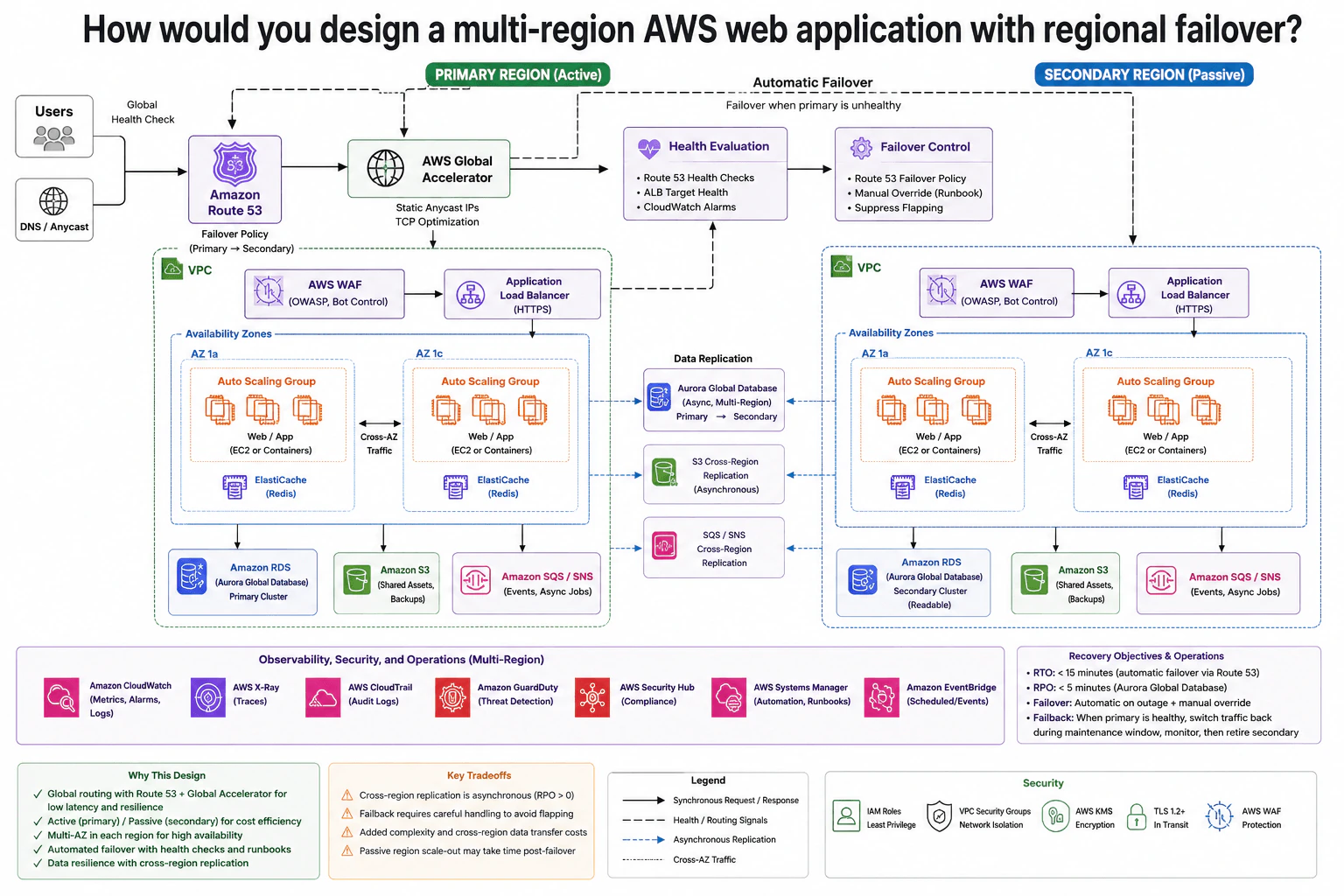
How would you design a multi-region AWS web application with regional failover? diagram
How to Explain It in an Interview
1. Start with global routing and health evaluation

I would start with the global entry point because regional failover begins there. Users reach Amazon Route 53, which uses the primary-to-secondary failover policy shown in the diagram. AWS Global Accelerator provides static anycast IPs and sends traffic toward the regional application path. Health evaluation uses Route 53 health checks, Application Load Balancer target health, and CloudWatch alarms. The failover-control step also allows a manual override and suppresses repeated switching between regions.

2. Explain the normal request path in the primary region

During normal operation, the primary region is active. Traffic passes through AWS WAF, which provides the OWASP and bot controls shown in the diagram. It then reaches the Application Load Balancer over HTTPS. The load balancer sends requests to the web or application tier. That tier runs in Auto Scaling Groups across two Availability Zones. This means one Availability Zone can fail without removing all regional application capacity.

The application also uses ElastiCache Redis in the regional stack. Its durable database is Amazon RDS using an Aurora Global Database primary cluster. Amazon S3 stores shared assets and backups. Amazon SQS and SNS handle events and background jobs.

3. Explain how data is prepared for regional failover

The passive region contains the same main application layers, so it can receive user traffic after a regional failure. Aurora Global Database copies changes asynchronously from the primary cluster to the secondary cluster. Asynchronous means the copy happens separately from the user request, so the secondary may be slightly behind. Amazon S3 uses Cross-Region Replication for the data shown in the diagram.

The diagram also shows cross-region handling for SQS and SNS. In a real AWS implementation, queues and topics do not automatically replicate between regions. This part needs explicit event forwarding or application logic while keeping the same cross-region recovery purpose shown in the diagram.

4. Explain failover and the recovery targets

If the health evaluation decides that the primary region is unhealthy, the failover control sends traffic toward the secondary region. The secondary Application Load Balancer then distributes requests to its own multi-AZ application tier. The diagram targets an RTO below 15 minutes. RTO means the allowed time to restore service. It also shows an RPO below 5 minutes for Aurora Global Database. RPO means the amount of recent data that could be lost after a sudden failure.

5. Explain failback, operations, and the main trade-off

When the primary region becomes healthy again, I would not move traffic back immediately. The diagram says to verify primary health, switch traffic back during a maintenance window, monitor the system, and then retire the temporary secondary role. CloudWatch, X-Ray, CloudTrail, GuardDuty, Security Hub, Systems Manager, and EventBridge support monitoring, security, automation, and operations across regions. The benefit is strong regional resilience. The downside is more infrastructure, more operational work, cross-region data-transfer cost, and possible replication delay.

Practical Complexity & Trade-offs

The benefit is that a full regional outage does not have to stop the application. Each region also uses more than one Availability Zone, so smaller failures are easier to survive. The downside is cost and complexity. We keep infrastructure in a second region and copy data across regions. That creates extra transfer and operating costs. Aurora and S3 replication happen asynchronously, so the secondary copy can be slightly behind. Failback also needs care because switching traffic back too quickly can cause repeated changes. A passive region may also need time to scale after failover.

Why Interviewers Ask This

Interviewers ask this question to see whether you can design for a full regional failure, not only a server failure. They want to understand your judgment around global routing, regional load balancing, multi-AZ compute, data replication, health checks, recovery targets, and failback. They also want you to explain trade-offs clearly and avoid unrealistic claims such as instant failover, zero replication delay, or perfect availability.
Interviewer may ask next
What would you change if the business required a much shorter recovery time after a regional outage?

I would keep the same active-passive design, but I would make the secondary region warmer before a failure happens. The biggest change would be the amount of web and application capacity already running there. Instead of waiting for a large scale-up after failover, I would keep enough capacity available across the secondary Availability Zones to handle important traffic quickly.

I would also test the Route 53 health checks, Application Load Balancer target health signals, CloudWatch alarms, and failover runbook more often. The same failover control would still move traffic only when the primary is considered unhealthy.

The data design would stay the same. Aurora Global Database and S3 Cross-Region Replication would continue preparing the secondary region in the background.

The downside is higher cost. A warmer passive region uses more compute even while normal traffic is still going to the primary region.

How would you handle the risk that the secondary Aurora cluster is slightly behind when the primary region fails?

I would treat that small delay as part of the recovery design instead of pretending it cannot happen. Aurora Global Database replication is asynchronous, so the secondary cluster may not contain the newest changes when the primary region suddenly disappears.

I would define the allowed data-loss window through the RPO. The diagram targets an RPO below five minutes. During failover, the application would use the available secondary data while operators watch database health and recovery signals. I would not claim that every last write must already exist in the secondary region.

When the primary region returns, I would verify database and application health before failback. Then I would switch traffic back during a controlled maintenance window and monitor the result.

The downside is simple. Asynchronous replication helps performance and regional availability, but it cannot guarantee zero data loss during a sudden regional failure.

22. What is Kubernetes, and what problem does it solve for containerized workloads?Containers And KubernetesEasy

Question Details

A team can build and run individual containers but now needs to operate many replicated services across several machines. Explain Kubernetes at the orchestration boundary: distinguish it from a container image and container runtime, and cover the responsibilities of desired-state management, scheduling, service discovery, rollout, scaling, and recovery without treating the platform as an application build system.

Short Interview Answer (30-60 seconds)

At a high level, Kubernetes is a container orchestration platform that manages many containerized applications across several machines. The main challenge is keeping the running cluster matched to the desired state when Pods fail, workloads scale, or applications change. I would explain it through the control plane, worker nodes, and Kubernetes automation. It handles scheduling, service discovery, rollouts, scaling, and recovery. Kubernetes does not build applications or replace the container runtime that actually runs containers.

Detailed Explanation

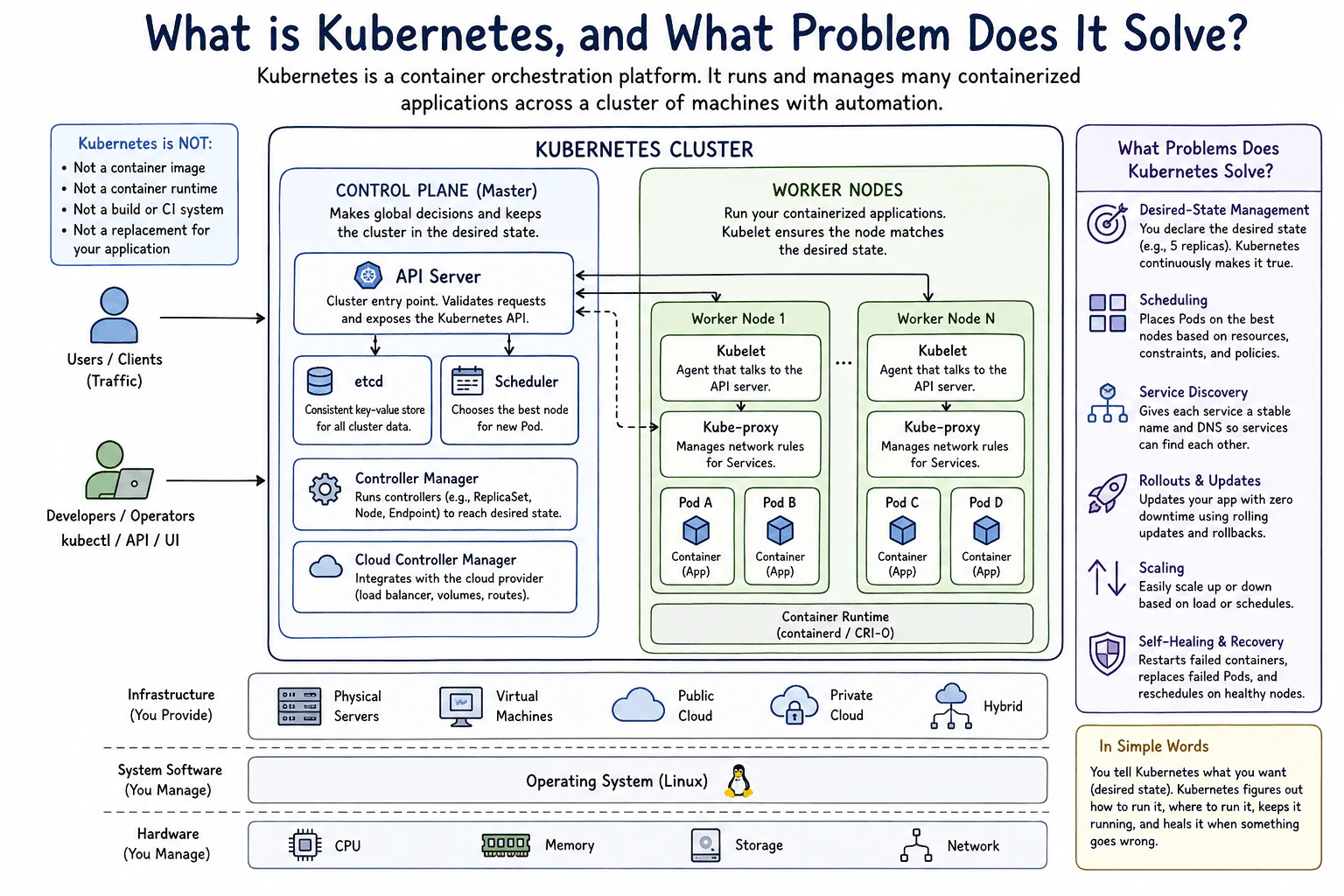
The team already knows how to build containers and run them one at a time. The harder problem begins when many copies of an application must run across several machines. Containers can fail. Machines can become unhealthy. Traffic can change, and application versions must be updated. Kubernetes solves this operating problem by coordinating the cluster. The diagram divides that work into a control plane that makes cluster-wide decisions, worker nodes that run applications, and automation that keeps the running system close to the state the team requested.

Useful Questions to Ask the Interviewer
  1. How many services and replicas do we expect to run?
  2. Will the workloads run on physical servers, virtual machines, public cloud, private cloud, or a hybrid setup?
  3. Do we need automatic scaling and rolling updates?
  4. What recovery behavior is expected when a Pod or worker node fails?
What is Kubernetes, and what problem does it solve for containerized workloads? diagram
How to Explain It in an Interview
1. Explain the Kubernetes boundary

I would first explain that Kubernetes manages containerized applications after they have been built. It is not a container image. It is not a container runtime. It is also not a build or CI system.

The application still runs inside containers. A container runtime such as containerd or CRI-O actually starts those containers. Kubernetes sits above that runtime and coordinates where workloads run and how they stay available.

2. Explain the control plane

Next, I would describe the CONTROL PLANE (Master) as the part making cluster-wide decisions. Developers and operators send control requests through kubectl, an API, or a UI. Those requests enter through the API Server.

The API Server validates requests and exposes the Kubernetes API. etcd is the consistent key-value store for cluster data. The Scheduler chooses the best node for a new Pod. The Controller Manager runs controllers, such as ReplicaSet, Node, and Endpoint controllers, to move the cluster toward its desired state. The Cloud Controller Manager integrates with a cloud provider for things such as load balancers, volumes, and routes.

3. Explain how worker nodes run applications

The worker nodes are where the containerized applications run. Each shown worker node has a kubelet. The kubelet talks to the API Server and helps keep the Pods assigned to its node running as requested.

The diagram also shows kube-proxy managing network rules for Services. Pods contain the application containers. Under the Pods, the container runtime starts and manages those containers on the operating system.

4. Explain the automation Kubernetes provides

The key idea is desired-state management. The team declares what it wants, such as five replicas. Kubernetes continually works to make the real cluster match that requested state.

Scheduling places Pods on suitable nodes using resources, constraints, and policies. Service discovery gives each service a stable name and DNS so services can find each other. Rollouts update applications with rolling updates and support rollback. Scaling changes workload capacity based on load or schedules.

5. Explain recovery and the underlying platform

Kubernetes also watches for failures. It can restart failed containers, replace failed Pods, and reschedule workloads onto healthy nodes. This is the self-healing and recovery behavior shown in the diagram.

The cluster can run on physical servers, virtual machines, public cloud, private cloud, or hybrid infrastructure. Kubernetes still depends on the operating system, CPU, memory, storage, network, and container runtime underneath it. Its job is orchestration. It does not replace those layers or the application build process.

Practical Complexity & Trade-offs

The benefit is that Kubernetes automates work that becomes difficult across many machines. It can place Pods, keep the requested number running, provide service discovery, perform rolling updates, scale workloads, and recover from failures. The important boundary is that Kubernetes does not do everything. The container runtime still runs containers. The operating system and infrastructure still provide CPU, memory, storage, and networking. The build or CI system still creates the application artifacts. We use Kubernetes because it coordinates these running workloads, but the underlying platform responsibilities shown in the diagram still remain.

Why Interviewers Ask This

Interviewers ask this to check whether you understand the difference between containers and orchestration. They want to see that you know Kubernetes does not build the application or replace the container runtime. They also want you to explain why desired-state management, scheduling, service discovery, rollouts, scaling, and recovery become important when containerized workloads grow across several machines.

Interviewer may ask next
What happens in this design when a Pod or worker node fails?

Kubernetes keeps using the same desired-state model. The team has already declared how the application should look, such as the number of replicas that should be running. Controllers watch the cluster and detect when the actual state no longer matches that request.

If a container fails, Kubernetes can restart it. If a Pod must be replaced, the control plane works toward creating the required replacement. The Scheduler chooses a suitable worker node for a new Pod. The kubelet on that worker node then helps keep the assigned Pod running through the container runtime.

If a whole worker node becomes unhealthy, Kubernetes can reschedule workloads onto healthy nodes. This reduces manual recovery work and helps keep services available. The limit is the underlying infrastructure. Kubernetes can place replacement workloads only when healthy nodes have enough CPU, memory, storage, and network capacity.

How does Kubernetes update an application without acting as the application build system?

Kubernetes manages the rollout after the application container has already been built. The build or CI system creates the application artifact outside the orchestration work shown in the diagram. Kubernetes does not replace that build process.

When developers or operators request an update through kubectl, the API, or a UI, the request enters through the API Server. The desired state changes to describe the updated workload. Controllers then work toward that new state. The Scheduler selects worker nodes for new Pods, and kubelets use the container runtime to run their containers.

The diagram shows rolling updates and rollback as Kubernetes responsibilities. A rolling update changes the application gradually instead of replacing every running copy at once. If needed, rollback moves the workload back toward the earlier desired state. The application and its container image still come from the separate build process.

23. When should you run a Pod directly instead of using a Deployment?Containers And KubernetesEasy

Question Details

Compare a standalone Pod with a Deployment-managed set of Pods. Explain ownership, desired replica count, replacement after failure, rolling updates, rollback, and why a production stateless application normally needs a controller.

Short Interview Answer (30-60 seconds)

At a high level, the choice is about whether Kubernetes should manage the Pod for you. A standalone Pod is useful for short-lived work, debugging, experiments, or special-purpose tasks. A Deployment is better for long-running stateless applications because it manages a ReplicaSet, keeps the desired number of Pods running, replaces lost managed Pods, and supports rolling updates and rollback. The trade-off is that a Deployment adds controller management, but it gives much safer production behavior.

Detailed Explanation

The goal is to decide when one simple running unit is enough and when the platform should keep the application running for us. The hard part is failure and ongoing operation. A single unit is easy to start, but it will not be recreated automatically if it disappears or its machine is lost. A managed group adds that protection and also makes updates easier. I would explain this in three parts: the direct Pod case, the Deployment-managed case, and the production benefits that come from using a controller.

Useful Questions to Ask the Interviewer
  1. Is this workload short-lived or expected to run continuously?
  2. Does the application need more than one replica?
  3. Do we need automatic replacement after Pod or node failure?
  4. Do we need rolling updates and rollback?
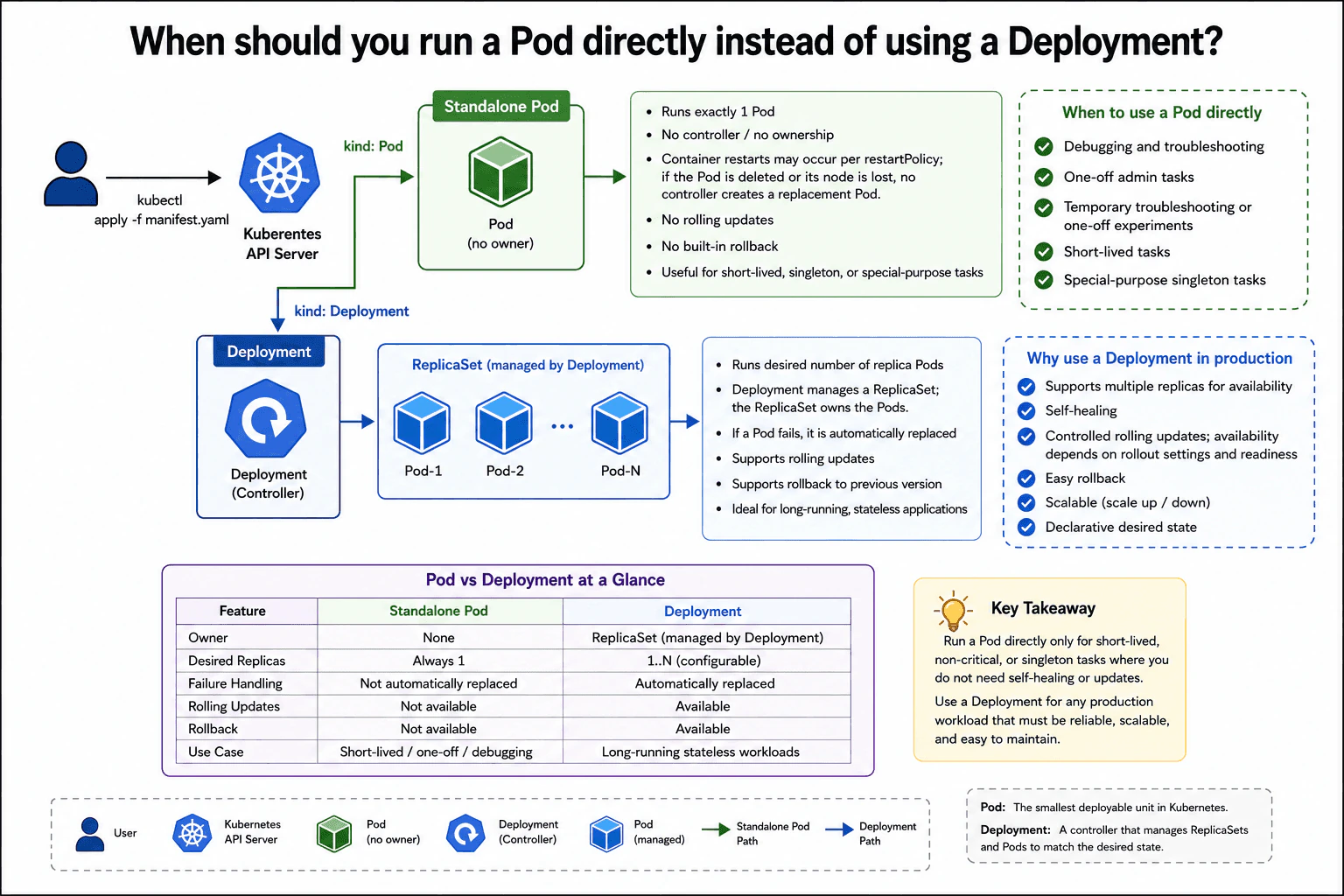
When should you run a Pod directly instead of using a Deployment? diagram
How to Explain It in an Interview
1. Start with the direct Pod case

I would use a standalone Pod when I only need one simple Kubernetes workload. The diagram shows a manifest with kind: Pod going through the Kubernetes API Server and creating one Pod with no controller owner.

That Pod can still restart its container based on its restartPolicy. However, if the Pod itself is deleted or its node is lost, no controller creates a new replacement Pod. This makes a direct Pod a good fit for debugging, one-off administration, temporary experiments, short-lived tasks, and special-purpose singleton work.

2. Explain what the Deployment adds

For a long-running stateless application, I would normally use a Deployment. The diagram shows a manifest with kind: Deployment going through the Kubernetes API Server to the Deployment controller.

The Deployment manages a ReplicaSet. The ReplicaSet owns the Pods and keeps the requested number of active replicas running. The desired replica count is configurable, so the application can run one Pod or several Pods.

3. Explain desired replicas and failure replacement

The main operational difference is that the controller keeps the actual state close to the desired state. A standalone Pod is just one Pod. There is no controller maintaining a replica count for it.

With a Deployment, the ReplicaSet watches the managed Pods. If a managed Pod is deleted or no longer counts as an active replica, the ReplicaSet creates another Pod. If a node is lost, Kubernetes can eventually remove the lost Pod and the controller can create a replacement elsewhere.

4. Explain updates and rollback

A standalone Pod does not provide built-in rolling updates. I would normally replace it manually when I want to run a new version.

A Deployment supports controlled rolling updates. Kubernetes can gradually replace old Pods with new Pods. Availability during that rollout depends on the rollout settings and whether the new Pods are ready. A Deployment also supports rollback to an earlier revision if a rollout causes a problem.

5. Explain why production stateless apps normally need a controller

For production, I usually want automatic replacement, a declared replica count, scaling, controlled updates, and rollback. The Deployment provides those behaviors through its ReplicaSet.

The benefit is safer and easier operation. The downside is an extra management layer. For a temporary task, that layer may not be needed. For a long-running stateless service, it is normally worth using.

Practical Complexity & Trade-offs

The benefit of a standalone Pod is simplicity. It is easy to create when I only need one temporary or special-purpose workload. The downside is that no controller replaces it if the Pod disappears or its node is lost. A Deployment adds more management, but that management is useful in production. It keeps the desired replica count, replaces lost managed Pods, supports scaling, and gives controlled rolling updates and rollback. The trade-off is simple: direct Pods are lighter for temporary work, while Deployments are safer and easier to operate for long-running stateless applications.

Why Interviewers Ask This

Interviewers ask this to see whether you understand Kubernetes controllers instead of only knowing commands. They want to know if you can explain ownership, desired replicas, failure recovery, rolling updates, rollback, and production operations. A strong answer shows that you understand why a standalone Pod and a Deployment behave differently, and that you can choose the simpler option when controller management is not needed.

Interviewer may ask next
What changes if the application must keep three replicas running at all times?

I would use the Deployment path shown in the diagram. The important change is that we now have a desired replica count that Kubernetes must maintain.

The Deployment manages a ReplicaSet, and the ReplicaSet owns the Pods. I would set the desired replica count to three. Kubernetes then works to keep three active managed Pods running. If one Pod is deleted or stops counting as an active replica, the ReplicaSet creates another Pod so the workload can return to three replicas.

A standalone Pod would not give us that behavior. It represents only that individual Pod, and no controller keeps a group of replacement Pods running for it.

The same Deployment also gives us controlled rolling updates, rollback, and easier scaling later. The downside is that we now depend on controller management instead of using one very simple Pod object. That extra management is appropriate because maintaining several replicas is now an explicit requirement.

What happens if a standalone Pod and a Deployment-managed Pod are both lost because their node fails?

They behave differently because only the Deployment-managed workload has a controller maintaining its desired state. For the standalone Pod, no controller creates a replacement Pod when that Pod is gone. If its node is lost, the workload can stay unavailable until someone creates another Pod.

For the Deployment-managed workload, the ReplicaSet owns the Pods and maintains the desired replica count. After Kubernetes determines that a managed Pod is gone or no longer counts as active, the ReplicaSet creates another Pod so the workload can return to the requested count.

This is different from restarting a container inside an existing Pod. A container may restart according to the Pod's restartPolicy, but that does not mean a deleted standalone Pod is recreated.

The benefit of the Deployment is automatic recovery toward the declared desired state. The downside is additional controller management, which is unnecessary for some temporary or one-off workloads.

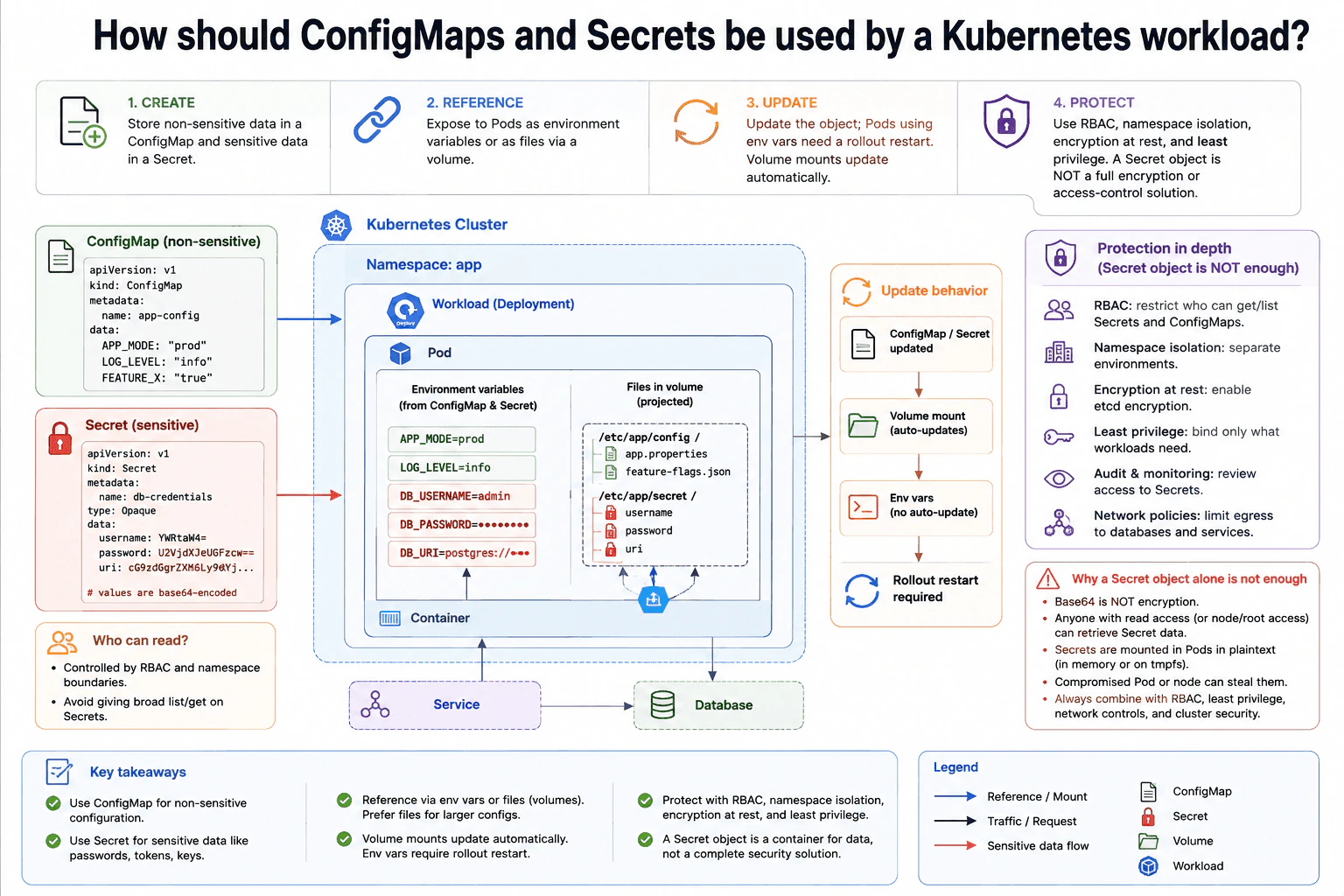
24. How should ConfigMaps and Secrets be used by a Kubernetes workload?Containers And KubernetesEasy

Question Details

A container needs non-sensitive settings and a database credential. Design how each value is created, referenced by the Pod, updated, and protected, and explain why a Secret object alone should not be treated as a complete encryption or access-control solution.

Short Interview Answer (30-60 seconds)

At a high level, I would separate normal settings from sensitive credentials. The main challenge is giving both values to the Pod safely and handling updates correctly. I would use a ConfigMap for non-sensitive settings and a Secret for database credentials, then expose them through environment variables or mounted files. Mounted files can receive updated values, while environment variables require replacement Pods. The key trade-off is that a Secret stores sensitive data, but it is not a complete encryption or access-control solution.

Detailed Explanation

The workload needs two kinds of configuration. Normal application settings do not need secret handling, while the database credential must be protected. The design keeps those values separate so each can receive the right controls. The ConfigMap carries normal settings. The Secret carries sensitive database data. The Pod can read either object through environment variables or mounted files. Updates behave differently for those two methods. The final part of the design adds several security layers because storing a value in a Secret does not make that value completely protected.

Useful Questions to Ask the Interviewer
  1. Should configuration changes take effect without restarting the Pods?
  2. Can the application read configuration from mounted files, or does it require environment variables?
  3. Is Kubernetes encryption at rest already enabled for Secret data?
  4. Which users and Service Accounts should be allowed to read the database credential?
How should ConfigMaps and Secrets be used by a Kubernetes workload? diagram
How to Explain It in an Interview
1. Separate normal settings from sensitive data

I would first separate values by sensitivity. The ConfigMap holds normal settings such as APP_MODE, LOG_LEVEL, and FEATURE_X. The Secret holds the database username, password, and URI.

The Secret example contains base64-encoded values. Base64 is only an encoding format. It is not encryption, so anyone who can read the Secret data can decode it.

2. Reference both objects from the Pod

The Deployment creates a Pod that runs the application container. The Pod can reference ConfigMap and Secret keys as environment variables. The diagram shows normal values such as APP_MODE=prod and sensitive values such as DB_USERNAME, DB_PASSWORD, and DB_URI.

The Pod can also project both objects into mounted files. ConfigMap files appear under /etc/app/config. Secret files appear under /etc/app/secret. The application chooses environment variables or files based on how it reads configuration.

The Service sends application traffic to the workload. The application then uses its database settings and credentials when connecting to the Database.

3. Handle configuration updates correctly

If the ConfigMap or Secret changes, Kubernetes can update values exposed through the mounted volume. The application still needs to reread those files before the new value affects its behavior.

Environment variables are different. A running process keeps the environment it received when the container started. Updating the ConfigMap or Secret does not rewrite those values. The Deployment therefore needs a rollout restart so replacement Pods start with the updated environment.

4. Protect access with several layers

I would use RBAC to restrict who can get or list Secrets and ConfigMaps. Namespace boundaries help separate workloads, while least privilege gives each identity only the permissions it needs. Encryption at rest should also be enabled so Secret data stored by the Kubernetes control plane is encrypted rather than relying only on base64 encoding.

Audit monitoring should record access to Secrets. Network policies can also limit where the workload may connect, such as restricting egress toward the Database and required services.

5. Explain why a Secret alone is not enough

A Secret is a useful Kubernetes object, but it is not a complete security boundary. A process inside an authorized Pod may read the mounted credential or environment value. A compromised Pod or node can therefore expose it. An identity with enough Kubernetes access may also retrieve the Secret.

That is why the design combines Secrets with RBAC, namespace separation, least privilege, encryption at rest, auditing, and network controls. The Secret stores sensitive data in the right Kubernetes object, while the surrounding controls provide the stronger protection.

Time & Space Complexity

The benefit is that ConfigMaps and Secrets clearly separate normal settings from sensitive data. Both can be exposed as environment variables or mounted files. Mounted files are useful when values may change because Kubernetes can update the projected files. The application still has to reread them. The downside is that environment variables stay fixed for the life of the running container, so updated values require replacement Pods. A Secret also does not make credentials fully safe. Base64 is not encryption, and an authorized or compromised Pod may read the value. We therefore add RBAC, namespace separation, least privilege, encryption at rest, auditing, and network controls.

Why Interviewers Ask This

Interviewers want to see whether you understand Kubernetes configuration and security boundaries. They are checking whether you know when to use a ConfigMap instead of a Secret, how a Pod consumes each one, and how updates behave. They also want good security judgment. A strong candidate understands that a Secret is useful for sensitive data, but still needs RBAC, encryption, least privilege, and other protections around it.

Interviewer may ask next
What would you change if configuration updates must reach the application without restarting the Pod?

I would keep the same ConfigMap and Secret design, but I would prefer mounted files for values that must change while the Pod stays running. Kubernetes can update ConfigMap and Secret data exposed through projected volumes after the objects change.

The application must then notice the new file contents and reload them. Kubernetes updating the mounted data does not automatically make the application use the new value. The application needs its own reload behavior, such as rereading the file when it detects a change.

I would avoid environment variables for values that require live updates. Environment variables are fixed when the container process starts. Updating the ConfigMap or Secret does not change the environment of that running process.

The main downside is more application complexity. The application must safely reload configuration while it is running. For settings that cannot be reloaded safely, I would still use a controlled Deployment rollout.

Why is storing the database password in a Kubernetes Secret not enough to protect it?

A Kubernetes Secret is the correct object for the database password, but I would not treat it as the complete security solution. The value may be base64 encoded, and base64 is not encryption. An identity that can read the Secret can decode the stored value.

I would keep the Secret and add the protection shown in the design. RBAC limits who can get or list it. Namespace separation and least privilege reduce unnecessary access. Encryption at rest protects Secret data stored by the control plane. Audit monitoring records access, and network policies restrict where the workload can connect.

The credential also has to become readable by the authorized application. A compromised Pod or node may therefore expose it after delivery.

The downside is that these extra controls add operational work, but they are needed because the Secret object alone is only one layer of protection.

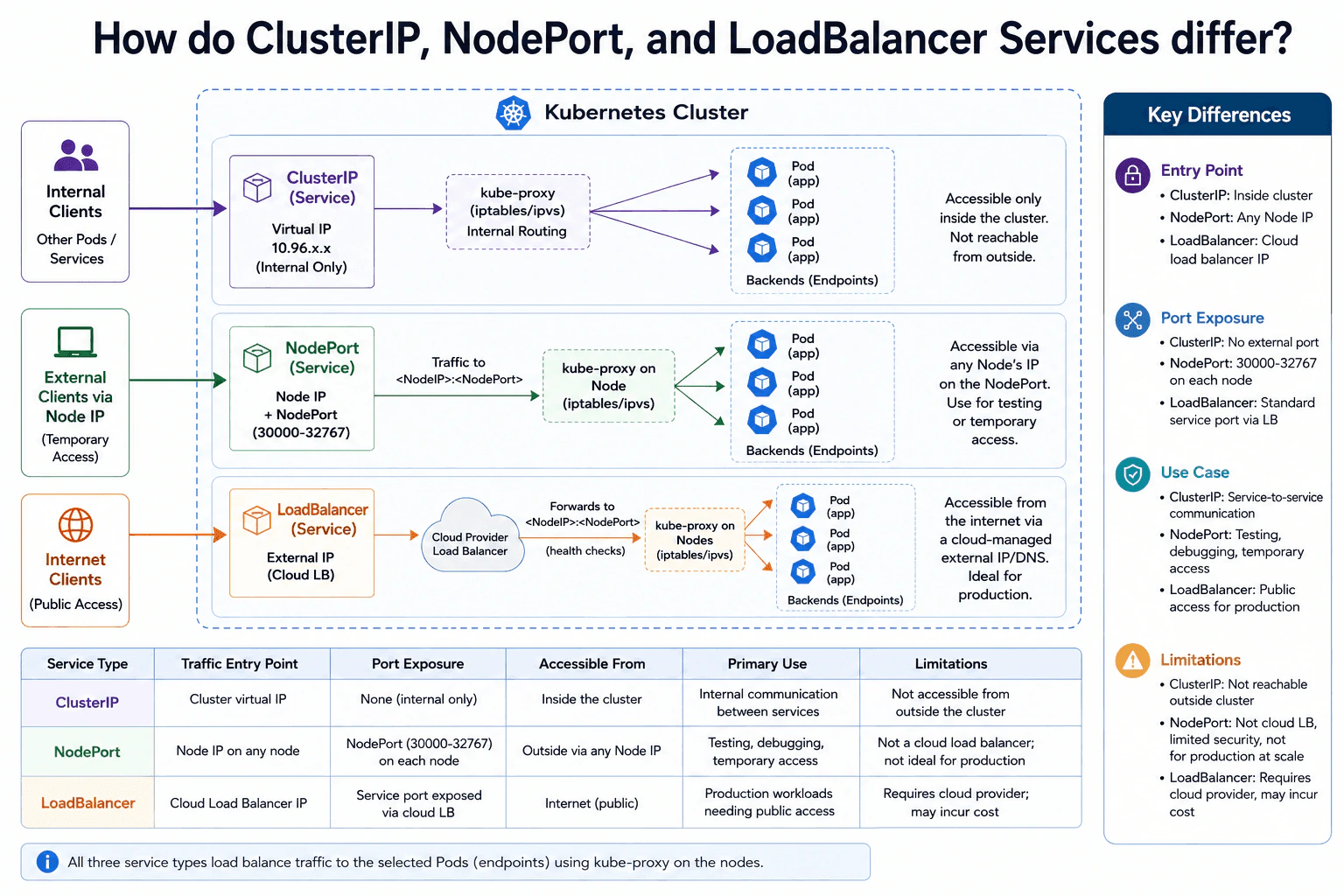
25. How do ClusterIP, NodePort, and LoadBalancer Services differ?Containers And KubernetesEasy

Question Details

A Kubernetes application needs internal service-to-service access, temporary access through cluster nodes, or a cloud-managed external endpoint. Map each requirement to the Service behavior, traffic entry point, port exposure, and operational limitations.

Short Interview Answer (30-60 seconds)

At a high level, these three Kubernetes Services differ mainly in how traffic enters the cluster. The main challenge is exposing the application only as much as needed. I would explain three access paths: ClusterIP for internal service-to-service traffic, NodePort for temporary access through node IPs, and LoadBalancer for a cloud-managed public endpoint. All three send traffic to selected Pods. The trade-off is that more external access usually adds more operational complexity, exposure, or cost.

Detailed Explanation

The goal is to choose the right way for clients to reach an application running in Kubernetes. Some clients are other applications inside the cluster. Some need temporary access through a cluster node. Public users may instead need a stable endpoint managed by a cloud provider. The main challenge is giving each client enough access without exposing more of the cluster than necessary. The diagram organizes the answer into three choices: ClusterIP for internal traffic, NodePort for node-based access, and LoadBalancer for a cloud-managed external entry point.

Useful Questions to Ask the Interviewer
  1. Does the application need access only from inside the cluster?
  2. Is outside access temporary, such as testing or debugging?
  3. Does production traffic need a cloud-managed public endpoint?
How do ClusterIP, NodePort, and LoadBalancer Services differ? diagram
How to Explain It in an Interview
1. Start with the common Service behavior

I would first explain what the three choices have in common. Each one is a Kubernetes Service that sends traffic toward selected Pod endpoints. In the diagram, kube-proxy on the nodes provides this routing with iptables or IPVS. The main difference is where clients enter and which ports become reachable.

2. Use ClusterIP for internal service-to-service access

For traffic that stays inside the cluster, I would use ClusterIP. It gives the Service a virtual cluster IP, shown as a 10.96.x.x address in the diagram. Other Pods and Services inside the cluster send traffic to that address. kube-proxy then routes the traffic toward one of the selected Pod endpoints. There is no external entry point. Clients outside the cluster cannot directly reach this Service. This makes ClusterIP the normal choice for internal application communication.

3. Use NodePort for temporary access through cluster nodes

For temporary outside access, I would use NodePort. The diagram shows a NodePort from the standard 30000-32767 range exposed on every node. A client connects to any node IP using that port. Traffic reaches kube-proxy on the node and is forwarded toward a selected Pod endpoint. This works well for testing, debugging, and temporary access. The limitation is that clients need a node IP plus a high port number. NodePort is not a cloud-managed load balancer and is usually less convenient for public production access.

4. Use LoadBalancer for a cloud-managed public endpoint

For public production traffic, I would use LoadBalancer. In the diagram, the cloud provider creates an external load balancer with an external IP or DNS name. Internet clients connect to that endpoint instead of addressing individual nodes. The load balancer forwards traffic into the Service path through the node and NodePort path shown in this design. kube-proxy then sends traffic toward a selected Pod endpoint. This gives clients a cleaner public entry point.

5. Choose the smallest exposure that meets the requirement

The decision is mainly about where traffic must enter. ClusterIP stays inside the cluster. NodePort exposes a port on every node for direct node-based access. LoadBalancer adds a cloud-managed external endpoint for public traffic. The main trade-off is operational. NodePort exposes node-level ports and requires clients to know node addresses. LoadBalancer is easier for public clients, but it depends on cloud-provider support, may take time to provision, and may add cost.

Practical Complexity & Trade-offs

The benefit is that Kubernetes gives clear choices for different access needs. ClusterIP keeps traffic inside the cluster and avoids unnecessary outside exposure. NodePort gives quick external access through any node IP, which is useful for testing. The downside is that it exposes a high port on every node and is harder to use as a clean production endpoint. LoadBalancer gives public clients an external IP or DNS name managed by the cloud provider. The downside is that it depends on cloud support, may take time to provision, and may cost money. The best choice is the smallest exposure that meets the requirement.

Why Interviewers Ask This

Interviewers ask this question to check whether you understand how Kubernetes Services expose applications. They want more than the three names. They want to see whether you can match internal traffic, temporary node access, and public cloud access to the right Service. A strong answer also explains the entry point, port exposure, and operational downside of each choice without exposing the application more than necessary.

Interviewer may ask next
What would you change if a NodePort-based test service now needs stable public production access?

I would change the external access method from NodePort to LoadBalancer while keeping the same selected backend Pods. The important change is the traffic entry point.

With NodePort, clients must connect to a node IP and a high NodePort. With LoadBalancer, the cloud provider creates an external load balancer with an external IP or DNS name. Public clients connect to that endpoint instead. In the design shown by the diagram, the load balancer then forwards traffic through the node and NodePort path. kube-proxy on the nodes continues routing the traffic toward one of the selected Pod endpoints.

This makes the public endpoint easier for production clients because they no longer need individual node addresses. The Service still reaches the same application Pods. The main downside is that LoadBalancer depends on cloud-provider support. It may also add cost, and creating the external load balancer may take some time.

What would you choose if only other applications inside the Kubernetes cluster need to call this service?

I would use ClusterIP because the application does not need any direct external access. The Service gets a virtual cluster IP that other Pods and Services inside the cluster can use.

When an internal client sends traffic to that Service address, kube-proxy provides the node-level routing behavior shown in the diagram. The request is then sent toward one of the selected Pod endpoints. There is no need to expose a NodePort because outside clients do not need to enter through a node. There is also no reason to create a cloud LoadBalancer because the application does not need a public endpoint.

This keeps the network exposure limited to the actual requirement and keeps the design simple. The main downside is intentional. A client outside the cluster cannot directly reach the ClusterIP Service. If that requirement changes later, the Service exposure would need to change.

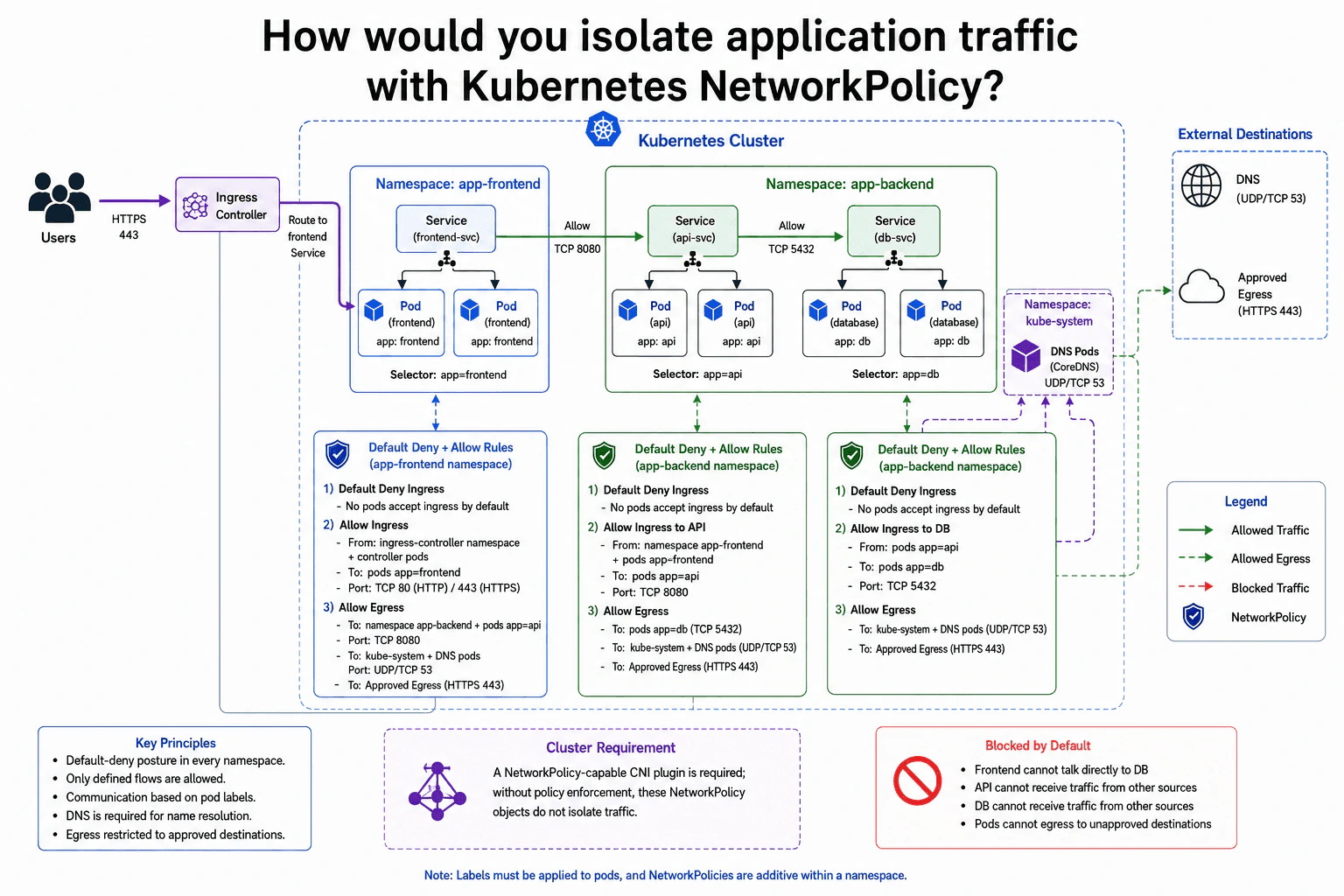
26. How would you isolate application traffic with Kubernetes NetworkPolicy?Containers And KubernetesMedium

Question Details

Two namespaces contain a frontend, an API, and a database. Design a default-deny posture that permits only frontend-to-API, API-to-database, required DNS, and approved egress. Define the selected Pods, ingress and egress directions, and the dependency on a policy-capable network plugin.

Short Interview Answer (30-60 seconds)

At a high level, I would isolate the workloads with a default-deny NetworkPolicy posture. The main challenge is allowing only the traffic each Pod really needs. I would explain three flows: users to the frontend, frontend to API, and API to database, plus required DNS and approved egress. Policies select Pods by labels and control ingress and egress separately. A policy-capable CNI plugin must enforce them. The trade-off is stronger isolation with more policy configuration to maintain.

Detailed Explanation

The goal is to stop application Pods from communicating freely while keeping every required application path working. Users still need to reach the frontend. The frontend needs the API, and the API needs the database. Pods also need DNS so they can resolve names, plus access to approved external destinations. The difficult part is allowing these exact paths without opening wider access. The diagram solves this with a default-deny approach, Pod labels, namespace-aware rules, and separate ingress and egress permissions.

Useful Questions to Ask the Interviewer
  1. Which external destinations should be approved for egress?
  2. Which namespace contains the Ingress Controller?
  3. Are TCP 80, 443, 8080, and 5432 the required application ports?
  4. Which NetworkPolicy-capable CNI plugin is used by the cluster?
How would you isolate application traffic with Kubernetes NetworkPolicy? diagram
How to Explain It in an Interview
1. Start with default deny

I would start by denying traffic and then adding only required paths. The diagram has an app-frontend namespace and an app-backend namespace. Frontend Pods have app=frontend. API Pods have app=api, and database Pods have app=db.

NetworkPolicy applies to selected Pods. The Services provide stable destinations, while the policies decide which Pod traffic is allowed.

2. Allow users to reach the frontend

Users send HTTPS traffic to the Ingress Controller. The controller then routes traffic to the frontend Service and frontend Pods.

The frontend policy allows ingress from the ingress-controller namespace and its controller Pods. It allows the frontend ports shown in the diagram, TCP 80 and TCP 443. Other frontend ingress stays denied.

3. Allow frontend to API

The frontend may call the API on TCP 8080. Because this crosses namespaces, the frontend egress rule selects the app-backend namespace and Pods with app=api.

The API ingress rule matches the other side. It accepts traffic from the app-frontend namespace and Pods with app=frontend. This creates the allowed frontend-to-API path while unrelated sources remain blocked.

4. Allow API to database

The API may reach database Pods on TCP 5432. Both workloads are inside app-backend, so Pod labels can identify the allowed peers. The API egress rule selects Pods with app=db, and the database ingress rule accepts traffic from Pods with app=api.

This means the frontend cannot talk directly to the database. The database also rejects traffic from other application sources by default.

5. Allow DNS and approved egress

The selected application Pods need DNS for name resolution. Their policies allow UDP and TCP port 53 to DNS Pods in the kube-system namespace, matching the DNS path shown in the cluster.

The diagram also permits HTTPS 443 to approved external destinations. Other external destinations remain blocked by the default-deny egress posture.

6. Explain the enforcement requirement

NetworkPolicy objects describe the desired network rules, but they do not enforce packets by themselves. A NetworkPolicy-capable CNI plugin must enforce those rules in the cluster. Without policy enforcement, these NetworkPolicy objects do not provide the isolation shown in the design.

The benefit is least-privilege communication between workloads. The downside is that every required dependency, including DNS and approved egress, must be represented correctly or legitimate traffic can fail.

Practical Complexity & Trade-offs

The benefit is strong isolation. A compromised frontend cannot directly reach the database, and Pods cannot freely contact unapproved destinations. The downside is more configuration and testing. Every real dependency must have the correct ingress and egress rule. DNS is easy to forget, so an application can appear broken even when its containers are healthy. Cross-namespace communication also needs careful namespace and Pod selection. NetworkPolicy objects alone are not enough because the cluster needs a CNI plugin that enforces them. This design is safer, but policy changes must stay synchronized with application changes.

Why Interviewers Ask This

Interviewers ask this to see whether you understand Kubernetes network isolation beyond creating Services. They want to know if you can use default deny, select the right Pods, separate ingress from egress, handle cross-namespace communication, keep DNS working, restrict external access, and understand that a NetworkPolicy-capable CNI plugin must enforce the rules. The question tests practical security judgment more than memorized YAML.

Interviewer may ask next
What would you change if the API needed to call one additional external HTTPS service?

I would keep the same default-deny design and add only that required external path. The API Pods are already selected by the API policy in the app-backend namespace, so I would change that policy's egress rules.

I would allow the new approved destination on HTTPS 443. I would not open general internet access. The API-to-database rule on TCP 5432 and the DNS rule on UDP/TCP 53 would stay unchanged.

After the change, I would test both sides. The API should reach the new approved service, while unrelated external destinations should still fail. The existing frontend-to-API and API-to-database paths should continue working.

The main downside is maintenance. Every new external dependency needs a matching policy update. If the destination is missing or selected incorrectly, the API can fail even though its Pod is healthy.

What happens if the cluster network plugin does not enforce Kubernetes NetworkPolicy?

The NetworkPolicy objects may still exist, but the isolation shown in the diagram cannot be trusted. The important change is at the cluster networking layer rather than inside the frontend, API, or database applications.

I would use a NetworkPolicy-capable CNI plugin before relying on these policies for security. After enforcement is available, I would test every expected path. Users should reach the frontend. The frontend should reach the API on TCP 8080. The API should reach the database on TCP 5432. DNS on UDP/TCP 53 and approved HTTPS egress should also work.

I would also confirm that unwanted paths stay blocked, especially frontend-to-database and unapproved external egress.

The downside is operational work. Changing or configuring cluster networking affects a broad part of the platform, so it needs careful testing before production use.

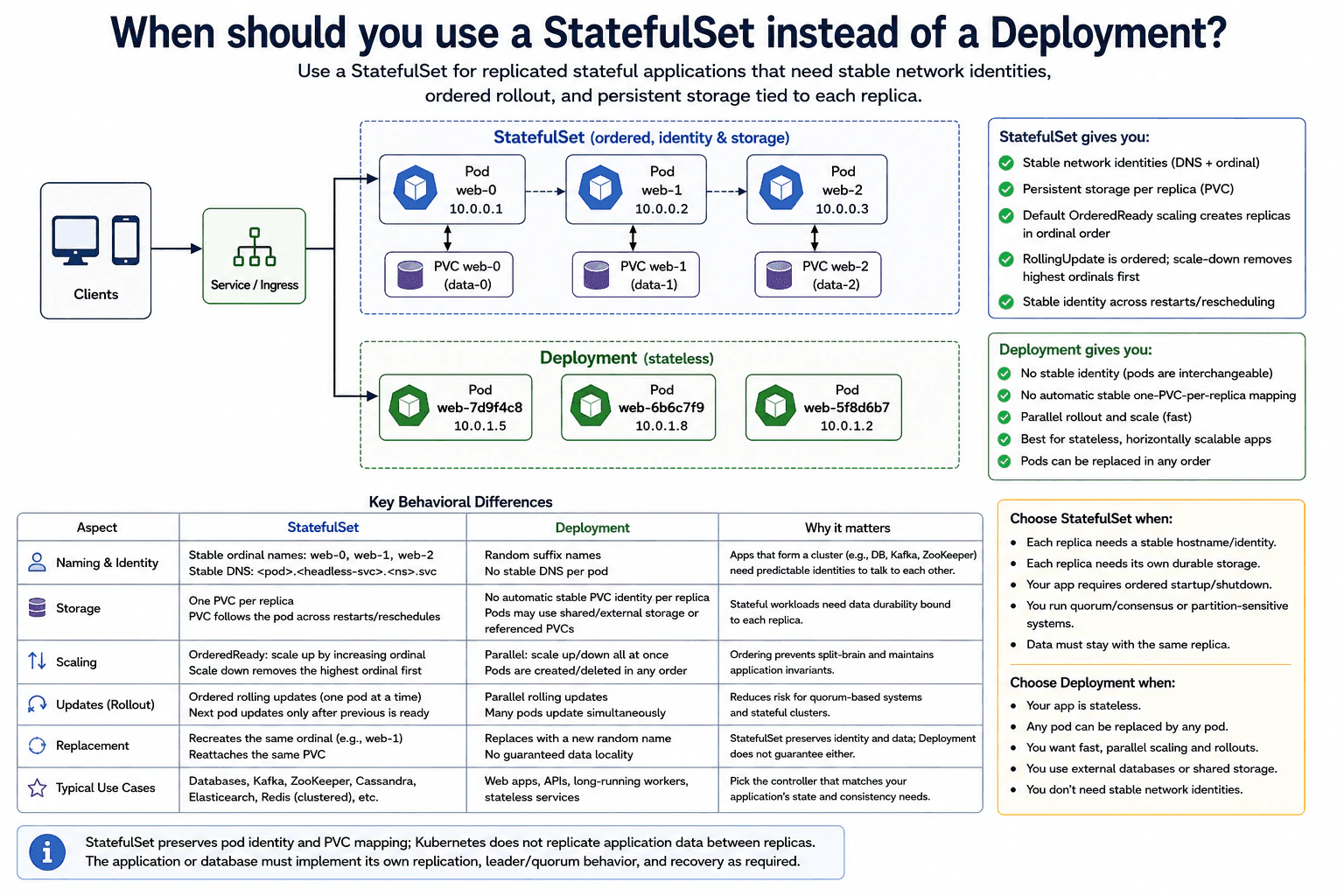
27. When should you use a StatefulSet instead of a Deployment?Containers And KubernetesMedium

Question Details

A replicated service needs stable network identities, ordered rollout, and persistent storage tied to each replica. Compare StatefulSet and Deployment behavior for naming, storage claims, scaling, updates, replacement, and application-level data replication.

Short Interview Answer (30-60 seconds)

At a high level, I would use a StatefulSet when each replica must keep a stable identity and its own persistent storage. The main challenge is keeping stateful replicas predictable during restarts, scaling, and updates. I would compare identity and storage, lifecycle behavior, and replacement. StatefulSet gives ordinal pod names, ordered operations, and stable PVC mappings. Deployment is better for interchangeable stateless pods. The trade-off is that StatefulSet gives stronger lifecycle control, but operations are usually more ordered and less parallel.

Detailed Explanation

The service runs several replicas at the same time. Some applications can treat every replica as interchangeable. Other applications need each replica to keep a known name and stay connected to its own stored data. That difference determines whether StatefulSet or Deployment is the better Kubernetes controller. The diagram compares them through naming, storage, scaling, updates, and replacement. It also shows an important boundary. Kubernetes can preserve replica identity and PVC mapping, but the application still manages how its data is copied and coordinated between replicas.

Useful Questions to Ask the Interviewer
  1. Does every replica need a stable hostname or ordinal identity?
  2. Does each replica need its own persistent storage?
  3. Must replicas start, update, or stop in a controlled order?
  4. Does the application already manage data replication, leader behavior, or quorum rules?
When should you use a StatefulSet instead of a Deployment? diagram
How to Explain It in an Interview
1. Start with the workload type

I would first ask whether the replicas are interchangeable. A Deployment creates pods with generated names such as web-7d9f4c8. A replacement pod can receive a different name, which is normally fine for stateless services.

A StatefulSet creates predictable ordinal names such as web-0, web-1, and web-2. The diagram also shows stable per-pod DNS based on that identity. This is useful when cluster members need predictable names to find or recognize each other.

2. Compare storage behavior

The next difference is storage. Each StatefulSet replica in the diagram has its own PVC. A PVC, or PersistentVolumeClaim, is Kubernetes' request for persistent storage.

For example, web-0 has its own PVC mapping and web-1 has another. If web-1 is recreated, the StatefulSet recreates the same ordinal and reconnects it to the same PVC mapping. A Deployment does not automatically provide a stable one-PVC-per-replica mapping. Its pods may use shared storage, external storage, or referenced PVCs.

3. Compare scaling and rolling updates

With the default OrderedReady behavior, StatefulSet creates replicas in increasing ordinal order. Scale-down removes the highest ordinal first. This controlled order helps applications whose members depend on startup or shutdown sequence.

StatefulSet RollingUpdate is also ordered. Updates normally proceed from the highest ordinal toward the lowest, waiting for the updated pod to become ready before continuing. Deployment replicas are interchangeable, so scaling and rolling updates can happen more freely and with more parallelism.

4. Explain replacement and restart behavior

Replacement makes the difference easy to see. If StatefulSet pod web-1 disappears, Kubernetes recreates the web-1 identity and reconnects its PVC mapping. This keeps the replica predictable across restart or rescheduling.

A Deployment replacement normally receives a new generated pod name. Kubernetes does not promise stable per-replica identity for Deployment pods.

5. Explain what StatefulSet does not solve

StatefulSet does not replicate application data. Kubernetes preserves pod identity and PVC mapping, but it does not copy database records between web-0, web-1, and web-2.

The application or database must implement its own replication, leader or quorum behavior, and recovery rules. So I would use StatefulSet for databases and other stateful clustered systems needing stable identity and storage. I would use Deployment for web apps, APIs, long-running workers, and other stateless services.

Time & Space Complexity

The benefit is predictable replica behavior. StatefulSet keeps ordinal identities and stable PVC mappings, so a recreated replica can return with the same identity and storage relationship. Ordered scaling and updates also help applications that care about member order. The downside is that these operations are more controlled and can be less parallel than Deployment operations. Deployment is simpler when every pod is interchangeable. Another important limitation is that StatefulSet does not copy application data between replicas. The application or database must still handle replication, leader or quorum rules, and recovery after failures.

Why Interviewers Ask This

Interviewers want to see whether you understand the difference between stateful and stateless workloads. They are also checking whether you know which guarantees Kubernetes provides and which responsibilities stay inside the application. A strong answer explains stable identity, PVC mapping, ordered lifecycle behavior, replacement, and the limits of StatefulSet. The interviewer is looking for engineering judgment, not only memorized Kubernetes definitions.

Interviewer may ask next
What would change if the replicas no longer needed stable identities or dedicated per-replica storage?

I would move toward a Deployment because the main reasons for using StatefulSet would disappear. The replicas could become interchangeable, so a replacement would not need to return with the same ordinal name or reconnect to a stable per-replica PVC mapping.

The Service or Ingress could still send traffic to the workload. The main change would be the workload controller. Instead of predictable names such as web-0, web-1, and web-2, Deployment pods could use generated names and be replaced without preserving replica identity.

Scaling and rolling updates could also happen with more parallelism. That is useful for web applications, APIs, and long-running stateless workers.

The design stays correct only when important application data does not depend on one specific pod. Data can instead live in shared or external storage when required. The downside is that we lose the stable per-replica identity and automatic stable PVC mapping that StatefulSet provides.

Does using a StatefulSet mean Kubernetes automatically replicates database data between replicas?

No. StatefulSet does not copy application data between replicas. Its job in this diagram is to preserve predictable pod identity, ordered lifecycle behavior, and the mapping between each replica and its PVC.

For example, Kubernetes can recreate web-1 as web-1 and reconnect it to the same PVC mapping. That does not mean data from web-0 is automatically copied to web-1 or web-2.

The database or application must implement its own replication rules. It must also handle leader or quorum behavior when the system needs those rules. Recovery logic also belongs to the application or database design.

This separation is important. Kubernetes manages the workload lifecycle and storage attachment pattern. The application manages the meaning and consistency of the stored data. The downside is that operating a stateful cluster still requires application-specific replication and recovery knowledge.

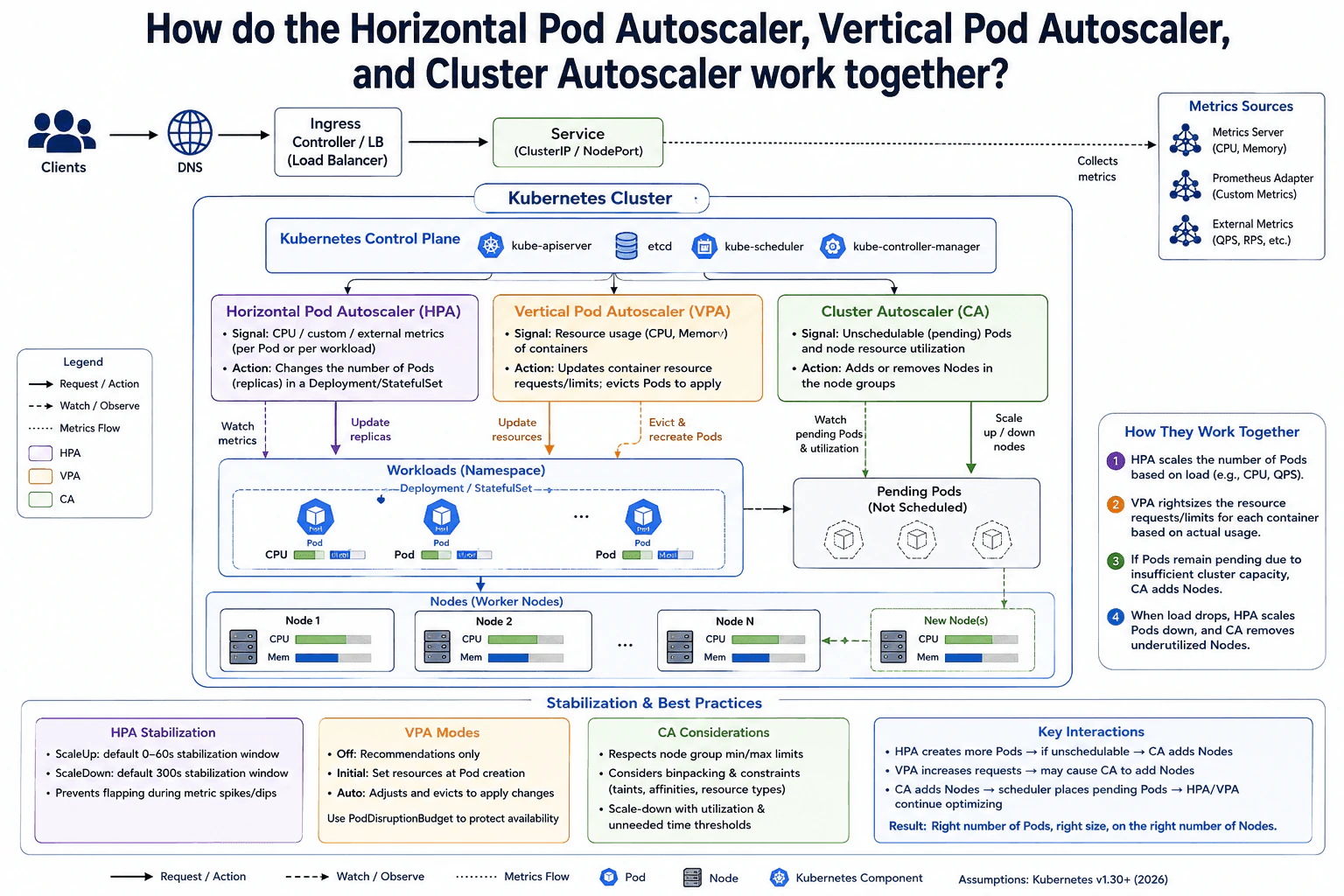
28. How do the Horizontal Pod Autoscaler, Vertical Pod Autoscaler, and Cluster Autoscaler work together?Containers And KubernetesMedium

Question Details

Design scaling for a service whose request load changes and whose Pods sometimes cannot be scheduled. Explain the signal and object changed by each autoscaler, interactions between them, stabilization concerns, and how pending Pods can lead to node-capacity changes.

Short Interview Answer (30-60 seconds)

At a high level, I would use three autoscalers for three different scaling problems. The main challenge is keeping enough Pods and node capacity without causing constant scaling changes. I would explain this as Pod-count scaling, Pod-size scaling, and node scaling. HPA changes replica count from load signals. VPA adjusts each Pod's CPU and memory resources. If new Pods stay Pending because nodes lack capacity, Cluster Autoscaler adds nodes. The trade-off is that these control loops can affect each other.

Detailed Explanation

The goal is to keep the service responsive when demand changes while using cluster resources efficiently. The difficult part is that there are three different things we can scale. We can change how many Pods run, how much CPU and memory each Pod requests, and how many worker nodes exist. These changes can affect each other. The diagram solves this by giving HPA, VPA, and Cluster Autoscaler different jobs, then connecting them through workload metrics, Pending Pods, scheduling, and node capacity.

Useful Questions to Ask the Interviewer
  1. Which metrics should drive HPA, such as CPU, memory, QPS, or another custom metric?
  2. Should VPA only recommend resources, set them when Pods start, or update running workloads automatically?
  3. What minimum and maximum node counts should Cluster Autoscaler respect?
  4. How much scaling delay or temporary Pending capacity is acceptable?
How do the Horizontal Pod Autoscaler, Vertical Pod Autoscaler, and Cluster Autoscaler work together? diagram
How to Explain It in an Interview
1. Start with the request and workload

I would first explain what is being scaled. Clients reach the Ingress Controller or load balancer, which sends traffic to the Service. The Service routes requests to Pods in the workload. Those Pods run on worker nodes.

The cluster also collects scaling signals. The diagram shows Metrics Server for CPU and memory. It also shows Prometheus Adapter for custom metrics and external metrics such as QPS or RPS.

2. HPA changes how many Pods run

HPA answers the question, "Do I need more or fewer Pod replicas?" It can react to CPU, memory, custom metrics, or external metrics.

HPA changes the replica count on a Deployment or StatefulSet. Kubernetes then creates or removes Pods to match that desired count. Stabilization windows and scaling policies help prevent rapid up-and-down changes when metrics briefly spike or fall.

3. VPA changes the resource size of each Pod

VPA solves a different problem. It looks at CPU and memory usage for containers. It then recommends or applies better resource values for each Pod.

The diagram shows three VPA modes. Off mode gives recommendations only. Initial mode sets resources when Pods are created. Auto mode can apply updated resource values and evict Pods so they are recreated with the new settings. A PodDisruptionBudget can help protect availability during those replacements.

4. Pending Pods can trigger node scaling

More replicas or larger resource requests can exceed the capacity of the current worker nodes. The scheduler then cannot place some Pods. Those Pods remain Pending because they are unschedulable with the available CPU or memory.

Cluster Autoscaler watches these unschedulable Pending Pods and node utilization. If adding a node would make the Pending Pods schedulable, it can increase the node group size. After a new node joins, the scheduler can place the Pending Pods there.

Cluster Autoscaler can also remove underused nodes when workloads can safely fit elsewhere. It follows configured minimum and maximum node limits and considers scheduling constraints such as taints and affinities.

5. Explain how the three scaling loops interact

The key point is that each autoscaler changes a different object. HPA changes the number of Pod replicas. VPA changes per-Pod CPU and memory resource settings. Cluster Autoscaler changes the number of worker nodes.

Those decisions still interact. HPA can create extra Pods that do not fit, which can cause Cluster Autoscaler to add nodes. VPA can increase Pod resource requests, which can also create scheduling pressure. When load falls, HPA may remove Pods, and Cluster Autoscaler may later remove underused nodes. The main operational challenge is keeping these control loops stable instead of letting them react too aggressively to short-lived changes.

Practical Complexity & Trade-offs

The benefit is that each autoscaler solves a different problem. HPA gives the service more or fewer Pods. VPA helps each Pod ask for a better amount of CPU and memory. Cluster Autoscaler changes the amount of worker-node capacity underneath them. The downside is that one change can trigger another. More HPA replicas can create Pending Pods. Larger VPA requests can do the same. Cluster Autoscaler may then add nodes. Scaling also takes time, so short traffic spikes should not cause constant changes. HPA stabilization windows, sensible VPA modes, PodDisruptionBudgets, node limits, and scale-down delays help keep the system stable.

Why Interviewers Ask This

Interviewers want to see whether you understand that Kubernetes scaling happens at different levels. They want you to separate replica scaling, Pod resource sizing, and node-capacity scaling. They also want to see whether you understand scheduling pressure, Pending Pods, and how independent control loops affect each other. A strong answer also discusses stabilization and safe scale-down behavior instead of assuming scaling is instant.

Interviewer may ask next
What happens if HPA creates more Pods, but the new Pods cannot be scheduled because the cluster has no free CPU or memory?

The new Pods stay Pending until enough node capacity becomes available. HPA has already done its job by increasing the workload replica count. The scheduler then tries to place those Pods on worker nodes, but it cannot place them if their resource requests do not fit.

Cluster Autoscaler handles the next step. It watches unschedulable Pending Pods and checks whether adding a node to the node group would make them schedulable. If so, it can scale the node group up. The new node then joins the cluster, and the scheduler can place the Pending Pods on it.

This means HPA does not directly create nodes. It can indirectly create the demand that causes Cluster Autoscaler to add nodes. The downside is delay. Creating a Pod is usually faster than provisioning a new worker node, so some Pods may remain Pending while the extra capacity is being added.

How would you prevent HPA and VPA from causing unstable scaling when both react to CPU-related behavior?

I would keep their responsibilities separate and configure them carefully. HPA should decide how many Pod replicas the workload needs. VPA should decide what CPU and memory resources each Pod should request.

The interaction matters because changing a Pod's CPU request can change the utilization percentage that HPA sees. That can cause a different HPA replica decision even if real traffic has not changed much. The diagram therefore treats stabilization as an important part of the design.

I would use HPA stabilization windows and sensible scaling policies so it does not react to every short metric spike. For VPA, I could begin with Off mode and review recommendations before allowing automatic changes. Initial mode is another safer option because it applies resources when Pods are created. If Auto mode is used, a PodDisruptionBudget can help protect availability while Pods are replaced.

The downside is slower reaction. Conservative settings reduce unnecessary scaling changes, but they can also make the system respond more slowly to real demand changes.

29. How would you protect a replicated Kubernetes workload during voluntary disruptions?Containers And KubernetesHard

Question Details

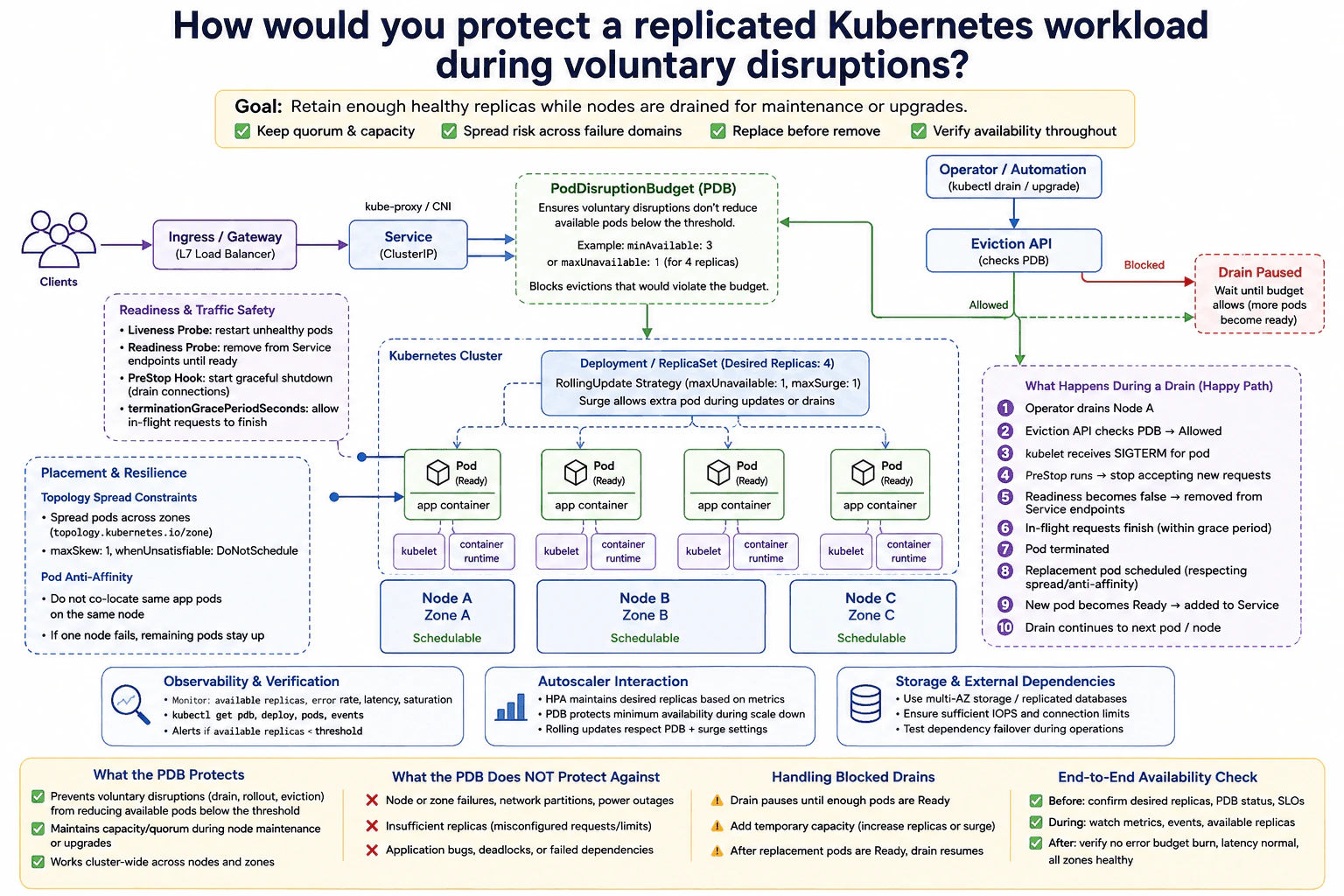
A service must retain enough healthy replicas while nodes are drained for maintenance or an upgrade. Design replica placement, readiness, a PodDisruptionBudget, topology spread or anti-affinity, surge capacity, eviction behavior, and autoscaler interaction. Explain what the budget does and does not protect against, how blocked drains are handled, and how availability is verified throughout the operation.

Short Interview Answer (30-60 seconds)

At a high level, the goal is to keep enough healthy replicas serving traffic while Kubernetes drains nodes for maintenance. The main challenge is removing pods without dropping capacity below a safe level. I would explain this through replica placement and readiness, the PodDisruptionBudget and eviction flow, and replacement plus verification. I would spread pods across failure domains, use controlled extra capacity when needed, and pause drains when the budget blocks eviction. The trade-off is safer maintenance can make drains take longer.

Detailed Explanation

The service must stay available while administrators intentionally drain nodes for maintenance or upgrades. The difficult part is deciding when a pod can leave without reducing healthy capacity too far. The diagram solves this by spreading replicas across nodes and zones, checking readiness, controlling voluntary evictions with a PodDisruptionBudget, and replacing removed pods before continuing. Traffic leaves a pod before termination, and the operation pauses when another eviction would break the budget. Availability is checked before, during, and after the drain.

Useful Questions to Ask the Interviewer
  1. How many healthy replicas must remain available during maintenance?
  2. How many zones and schedulable nodes are available?
  3. Can we temporarily increase replicas during a drain?
  4. What error, latency, and availability limits must remain healthy?
  5. How long may a blocked drain wait before operator action?
How would you protect a replicated Kubernetes workload during voluntary disruptions? diagram
How to Explain It in an Interview
1. Start with placement and readiness

I would first make sure replicas are not concentrated on one node. The Deployment and ReplicaSet keep four desired replicas in the diagram. Topology Spread Constraints distribute pods across zones. Pod Anti-Affinity avoids placing the same application pods together when possible.

Clients enter through the Ingress / Gateway and Service. Only Ready pods should receive traffic. A readiness probe removes an unready pod from Service endpoints. A liveness probe can restart an unhealthy container.

2. Protect voluntary evictions with the PDB

Next, I would define how many pods must remain available. The diagram shows a PodDisruptionBudget using minAvailable: 3 or maxUnavailable: 1 for four replicas. If another voluntary eviction would cross that limit, the Eviction API rejects it and the drain waits.

A PDB protects against voluntary disruptions that use the eviction mechanism. It does not protect against sudden node or zone failures, network partitions, power loss, application bugs, deadlocks, or failed dependencies.

3. Drain a node safely

Operator / Automation starts kubectl drain. The Eviction API checks the PDB for protected pods. When eviction is allowed, Kubernetes starts graceful pod termination.

The pod receives SIGTERM. The PreStop hook begins graceful shutdown. Readiness becomes false, so the pod is removed from Service endpoints. In-flight requests get time to finish within terminationGracePeriodSeconds. The pod then terminates.

4. Restore capacity before continuing

The Deployment / ReplicaSet restores the desired replica count and the scheduler places the replacement using the spread and anti-affinity rules. The new pod must become Ready before it receives Service traffic.

The RollingUpdate settings shown are maxUnavailable: 1 and maxSurge: 1. Those values control Deployment rollouts. For a plain node drain, temporary extra capacity is normally created by increasing replicas or by having enough existing cluster capacity. The HPA may change the desired replica count from metrics, but a PDB does not stop the HPA from changing that count. The Cluster Autoscaler, however, must respect PDB-protected evictions when it voluntarily removes pods during node scale-down.

5. Handle blocked drains and verify availability

If the PDB blocks an eviction, I would not force the drain immediately. I would wait for another pod to become Ready or add temporary replica and node capacity. After enough healthy pods exist, the drain can continue.

Throughout the operation, I would watch available replicas, pod readiness, PDB status, Deployment status, drain events, error rate, latency, and saturation. I would also check storage and external dependencies. Before, during, and after maintenance, these signals confirm that enough replicas remain healthy and the service continues working.

Practical Complexity & Trade-offs

The benefit is safer planned maintenance. The PodDisruptionBudget stops voluntary evictions from removing too many available pods at once. Topology spreading reduces the chance that one node or zone contains too much of the service. Extra replica or node capacity can let replacements become Ready before more pods leave. The downside is that a drain may stop when the cluster has no safe capacity left. That can make maintenance slower and temporarily cost more resources. A PDB is also limited. It cannot prevent crashes, power failures, network problems, application bugs, or broken dependencies.

Why Interviewers Ask This

Interviewers want to see whether you understand planned Kubernetes disruption, pod health, and safe capacity management. They also want to see whether you know what a PodDisruptionBudget can and cannot control. A strong answer connects placement, readiness, graceful termination, eviction behavior, autoscaling, blocked drains, and monitoring. The important skill is operational judgment, not memorizing Kubernetes object names.

Interviewer may ask next
What would you do if kubectl drain stays blocked because the PodDisruptionBudget will not allow another eviction?

I would not bypass the budget immediately. A blocked drain means another voluntary eviction would reduce available pods below the PDB limit.

First, I would check PDB status, pod readiness, Deployment status, and Kubernetes events. If a replacement pod exists but is not Ready, I would find the reason. It may be waiting for CPU, memory, a node, or an external dependency.

If the cluster can support it, I would add temporary capacity. I could increase the replica count and, if needed, provide another schedulable node. The replacement pod should still follow the topology spread and anti-affinity rules. Once enough replacement pods are Ready and serving through the Service, the Eviction API can allow another eviction.

The downside is that maintenance takes longer and may use extra resources. I would accept that cost rather than force an eviction that removes the protection the PDB was designed to provide.

How would HPA and Cluster Autoscaler behavior affect this design during maintenance?

I would treat the two autoscalers differently. The HPA changes the Deployment's desired replica count from application metrics. A PodDisruptionBudget does not prevent the HPA from reducing that desired count, so I would avoid an aggressive HPA scale-down policy during maintenance if it could remove needed spare capacity.

The Cluster Autoscaler works at the node level. When it voluntarily removes pods to scale down a node, PDB-protected evictions can block that operation. It also needs enough remaining node capacity for replacement pods to be scheduled.

Before a drain, I would confirm desired replicas, available replicas, PDB status, and free schedulable capacity. During maintenance, I would watch those values together with events and application metrics.

The downside is that keeping extra replica or node capacity may reduce short-term cost savings. That is usually acceptable because service availability is the higher priority during planned maintenance.

30. How would you design east-west traffic management with a Kubernetes service mesh?Containers And KubernetesHard

Question Details

Several services need uniform service identity, mutual TLS, retries, timeouts, circuit breaking, traffic splitting, and request telemetry. Design the control and data planes, workload enrollment, certificate lifecycle, policy ownership, retry budgets, failure behavior when mesh components are unavailable, resource overhead, rollout, and a path to remove or bypass the mesh without losing basic service connectivity.

Short Interview Answer (30-60 seconds)

At a high level, the goal is to manage service-to-service traffic in one consistent way. The main challenge is adding service identity, mTLS, retries, timeouts, traffic control, and telemetry without putting that logic into every application. I would explain the design in three parts: the control plane, the proxy-based data plane, and operations. Envoy sidecars enforce the policies between services. The trade-off is extra CPU, memory, and operational complexity for each workload.

Detailed Explanation

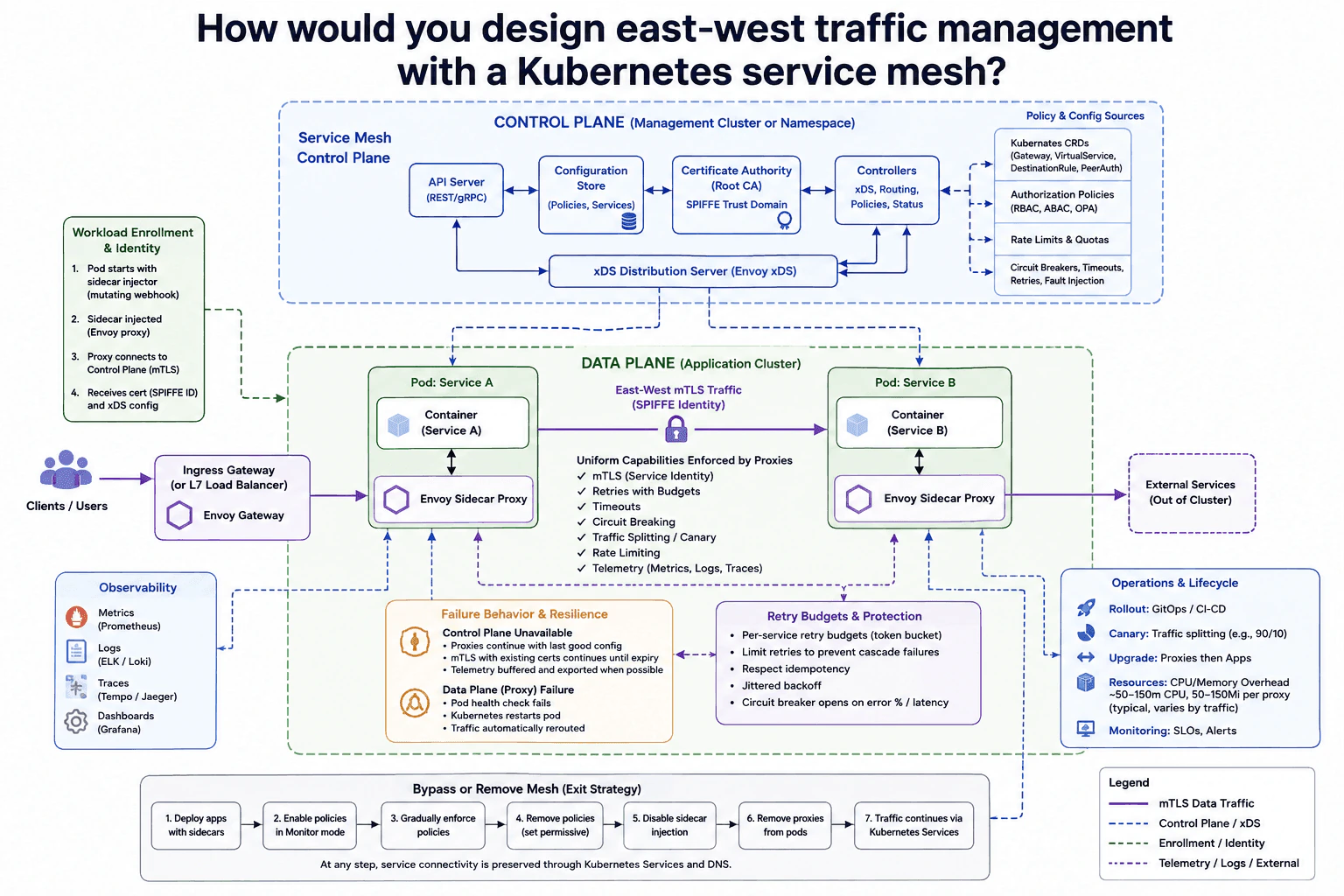
The goal is to make communication between Kubernetes services safe, predictable, and easy to control. Each service should get the same identity and traffic rules without adding that logic to every application. The difficult part is keeping requests working when mesh components fail and keeping a way to remove the mesh later. The diagram separates management from service traffic. The control plane distributes configuration and identity information. Envoy sidecars handle service-to-service traffic. Kubernetes Services and DNS remain the basic connectivity path if the mesh is removed.

Useful Questions to Ask the Interviewer
  1. Should every namespace join the mesh, or only selected workloads?
  2. How strict should mTLS and authorization become during rollout?
  3. Which requests are safe to retry without causing duplicate work?
  4. What service-level goals should drive timeouts and circuit breakers?
How would you design east-west traffic management with a Kubernetes service mesh? diagram
How to Explain It in an Interview
1. Explain the control plane

I would keep management separate from application traffic. The Service Mesh Control Plane contains an API Server, Configuration Store, Certificate Authority, Controllers, and an xDS Distribution Server.

Policy and Config Sources contain Kubernetes CRDs, authorization policies, rate limits, quotas, retries, timeouts, circuit breakers, and fault-injection settings. Controllers turn those settings into proxy configuration. The xDS Distribution Server sends that configuration to the Envoy sidecars.

This matters because application traffic does not need to pass through the control plane. The control plane manages behavior. The proxies carry the actual requests.

2. Enroll workloads and give them service identity

When a Pod starts, a mutating webhook injects an Envoy sidecar proxy. The proxy connects to the Control Plane using mTLS. It receives its certificate, SPIFFE identity, and xDS configuration.

The Certificate Authority is the root of trust for the SPIFFE trust domain. That means each workload gets a service identity instead of being trusted only because of its network address. Existing certificates continue working until they expire if the control plane becomes unavailable.

This identity is then used by the proxies when Service A talks to Service B.

3. Handle east-west traffic in the data plane

For normal east-west traffic, Service A sends through its Envoy sidecar to the Envoy sidecar beside Service B. The connection uses mTLS with SPIFFE service identity.

The proxies enforce retries with budgets, timeouts, circuit breaking, traffic splitting, rate limiting, and telemetry. A retry budget limits how many extra attempts a service may create. The diagram uses a per-service token-bucket style budget. Retries should respect idempotency, which means only retrying operations that are safe to repeat. Jittered backoff adds small random delays so many clients do not retry together.

Circuit breakers can open when error rate or latency becomes too high. This protects an unhealthy service from more traffic.

4. Collect request telemetry

The proxies also produce metrics, logs, and traces. Metrics go to Prometheus. Logs go to ELK or Loki. Traces go to Tempo or Jaeger. Grafana provides dashboards.

This gives the team consistent request telemetry without writing separate traffic instrumentation into every service. Monitoring, SLOs, and alerts then help operators see failures during rollout and normal operation.

5. Handle failures, resource cost, and rollout

If the Control Plane is unavailable, proxies keep their last good configuration. Existing mTLS certificates continue until expiry. Telemetry may be buffered or dropped when possible instead of blocking service traffic.

If a data-plane proxy fails, the Pod health check fails. Kubernetes restarts the Pod, and traffic moves to healthy endpoints.

Each proxy also adds resource cost. The diagram shows roughly 50 to 150 millicores of CPU and 50 to 150 MiB of memory per proxy, depending on traffic. Rollout should use GitOps or CI/CD, canary traffic splitting, monitoring, and gradual policy enforcement. For upgrades, update proxies before applications.

6. Keep a safe bypass and removal path

The mesh should not become the only way services can connect. Start with applications using sidecars. Enable policies in monitor mode first. Then enforce them gradually.

To leave the mesh, remove the policies, disable sidecar injection, and restart workloads without proxies. After verification, remove the proxy components from the Pods. Traffic then continues through Kubernetes Services and DNS.

The main trade-off is clear. The mesh gives uniform security and traffic control, but it adds proxy resource cost and more operational work.

Practical Complexity & Trade-offs

The benefit is that security and traffic rules become uniform across services. mTLS, service identity, retries, timeouts, traffic splitting, rate limiting, circuit breaking, and telemetry are handled by the proxies instead of being added to every application. The downside is extra cost and complexity. Each sidecar uses CPU and memory. The diagram shows about 50 to 150 millicores of CPU and 50 to 150 MiB of memory per proxy, depending on traffic. Retry budgets are also important because too many retries can make an outage worse. Keeping Kubernetes Services and DNS available gives the team a safe exit path.

Why Interviewers Ask This

Interviewers want to see whether you understand the difference between the control plane and the data plane. They also want to see how you handle service identity, mTLS, retries, failures, resource overhead, rollout, and removal of the mesh. A strong answer shows good judgment about gaining uniform traffic control without making the mesh a permanent requirement for basic Kubernetes connectivity.

Interviewer may ask next
What happens if the service-mesh control plane is unavailable for several hours?

I would keep the existing data plane serving traffic with its last good configuration. The Envoy sidecars already have the routing and policy information they received through xDS, so an immediate control-plane failure should not stop normal service-to-service requests.

Existing mTLS certificates can continue working until they expire. The important limit is certificate lifetime. If the Control Plane and Certificate Authority stay unavailable long enough, workloads may eventually be unable to obtain usable replacement identity material.

Configuration changes also stop during the outage because the sidecars cannot receive new xDS updates. Telemetry may still be sent when its destination is available. If that path has problems, the diagram allows telemetry to be buffered or dropped when possible rather than blocking service traffic.

The downside is that the data plane becomes more stale during a long outage. I would monitor xDS health, certificate expiry, SLOs, and alerts closely.

How would you remove the service mesh later without breaking service-to-service connectivity?

I would remove it gradually instead of switching everything off at once. The diagram first runs applications with sidecars and enables policies in monitor mode. That lets the team observe the rules before they start blocking requests.

Next, I would enforce policies gradually and verify normal traffic. When it is time to leave the mesh, I would remove those policies first. Then I would disable sidecar injection and restart selected workloads so they come back without Envoy proxies.

After each step, I would confirm that services can still reach each other through Kubernetes Services and DNS. Once the workloads are healthy without sidecars, the remaining proxy components can be removed.

The connectivity stays correct because Kubernetes Services remain the basic service-discovery and routing path. The downside is that mesh features such as mTLS, retries, traffic splitting, rate limiting, and uniform telemetry disappear unless another layer replaces them.

More questions load as you scroll

Disclaimer: This interview guide is for educational and informational purposes only. It is designed to help readers prepare, but it does not guarantee any interview result, hiring decision, offer, or outcome. Interview questions, hiring criteria, and preferred answers can vary by employer, interviewer, industry, location, and time. The examples and explanations reflect the authors' research and judgment, are provided without warranties of any kind, and should not be treated as the only correct approach. Diagrams are simplified illustrations intended to highlight the main components and their interactions; actual systems and implementations may be more complex. Alternative approaches may be equally valid or better suited to a particular question, context, or interviewer. To the fullest extent permitted by applicable law, the author, contributors, and publisher are not liable for decisions made, actions taken, or losses incurred based on this guide.

Content Accuracy and Verification: To the fullest extent permitted by applicable law, we do not represent or warrant that interview guides, questions, answers, examples, or diagrams are accurate, complete, current, error-free, or suitable for any particular purpose. You are responsible for independently reviewing and verifying the information before relying on it.