1. How would you autoscale GPU nodes for training workloads without wasting GPU hours on idle Pods?
Training demand is bursty and GPU nodes are expensive. Design the cloud capacity loop from queued or pending GPU work to node provisioning, scheduling, readiness, and safe scale-down; cover GPU type and topology constraints, minimum and maximum capacity, warm-up delay, checkpoints or job disruption, quotas, failed provisioning, utilization evidence, and safeguards against oscillation or stranded idle capacity.
At a high level, the goal is to add GPU capacity only when training work needs it. The hard part is that GPU nodes are expensive and slow to warm up. I would explain the design in three flows: detect pending GPU demand, provision and schedule the right nodes, then safely remove idle capacity. The control loop uses GPU type, topology, quotas, cooldowns, checkpoints, and utilization evidence. The trade-off is balancing faster startup against paying for warm idle GPUs.
The goal is to give training jobs enough GPU capacity without paying for machines that sit unused. Demand can arrive in bursts, and GPU nodes need time before they are ready. The design uses one control loop. It watches waiting GPU work, adds the right capacity, waits for healthy nodes, schedules Pods, and later removes unused nodes safely. Quotas, cooldowns, checkpoints, and utilization data keep scaling stable.
- Which GPU types and topologies must the training jobs support?
- What minimum and maximum capacity should each GPU node group allow?
- How much warm capacity is acceptable for faster startup?
- Can lower-priority training jobs be interrupted when a recent checkpoint exists?
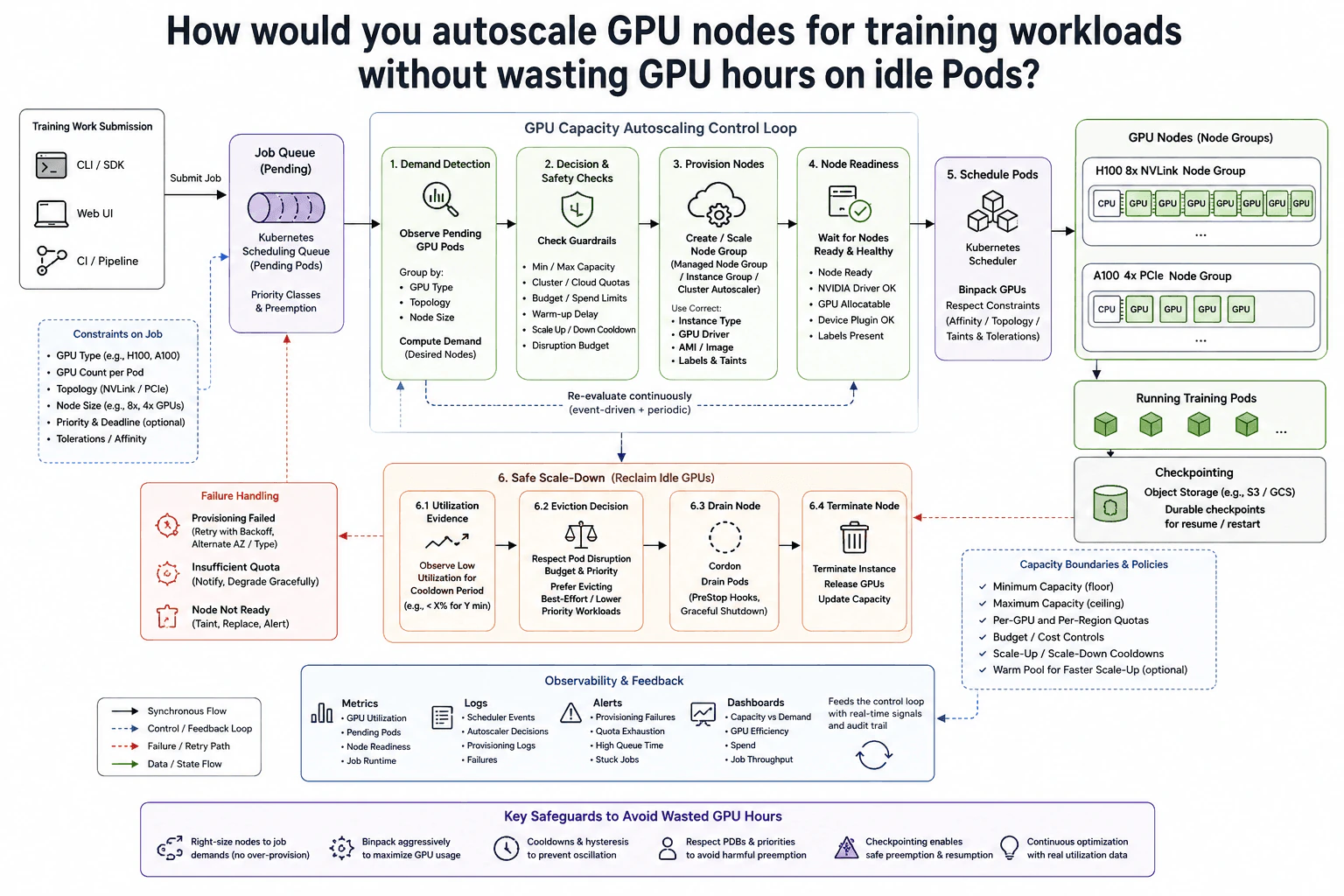
I would start from the demand signal. Training work enters through the CLI or SDK, Web UI, or CI pipeline. The job carries GPU type, GPU count, topology, node size, priority, and scheduling constraints.
Pending Pods wait in the Kubernetes scheduling queue. Priority classes and preemption rules help decide which work should run first.
The GPU Capacity Autoscaling Control Loop watches pending GPU Pods. It groups demand by GPU type, topology, and node size, then calculates the desired node count.
Before adding nodes, it checks minimum and maximum capacity, cluster or cloud quotas, budget limits, warm-up delay, cooldowns, and disruption limits. This prevents a short spike from causing repeated scaling.
When more capacity is needed, the controller creates or scales the matching GPU node group. The node uses the required instance type, GPU driver, image, labels, and taints.
The control loop waits for Node Ready, a working NVIDIA driver, allocatable GPUs, a working device plugin, and the expected labels. If provisioning fails, it retries with backoff and may use an allowed alternate availability zone or GPU type. A node that never becomes ready can be tainted, replaced, and alerted on.
The Kubernetes Scheduler places Pods after suitable nodes are ready. It respects GPU requests, affinity or topology rules, taints, and tolerations.
It also binpacks GPUs, meaning it fills suitable nodes well before spreading work. The diagram shows separate H100 NVLink and A100 PCIe node groups. Running training Pods periodically write durable checkpoints to object storage.
For scale-down, the controller looks for low GPU utilization over a cooldown period. It checks disruption budgets and job priority before choosing a target.
The node is cordoned so no new Pods land there. Existing Pods are drained with graceful shutdown. The instance is then terminated and its GPUs are released. Checkpoints make restart safer when interruption is allowed.
Metrics, logs, alerts, and dashboards feed real signals back into the control loop. These include GPU utilization, pending Pods, node readiness, job runtime, provisioning failures, quota exhaustion, queue time, and stuck jobs.
Cooldowns and hysteresis stop rapid scaling changes. Minimum capacity provides a floor, while maximum capacity and quotas limit growth. Warm capacity reduces startup delay, but idle warm GPUs cost money.
The benefit is that GPU capacity follows real training demand instead of staying permanently large. Binpacking also helps use each node well before more machines are added. The downside is that new GPU nodes need warm-up time, so a job may wait when capacity is low. A warm pool makes startup faster, but idle GPUs cost money. Cooldowns and hysteresis stop rapid scaling changes, but they may keep extra capacity for a short time. Safe scale-down also takes longer because the controller must respect running jobs, checkpoints, priorities, and disruption rules before a node can be drained and terminated.
Interviewers want to see whether you can connect Kubernetes scheduling demand to expensive GPU capacity. They are testing judgment, not memorization. A strong answer shows that you can choose the right GPU type and topology, respect quotas and limits, wait for real node readiness, recover from provisioning failures, use utilization evidence for scale-down, protect long-running jobs with checkpoints, and explain the cost versus startup-time trade-off clearly.