This interview guide is for educational and informational purposes only. It is designed to help readers prepare, but it does not guarantee any interview result, hiring decision, offer, or outcome. Interview questions, hiring criteria, and preferred answers can vary by employer, interviewer, industry, location, and time. All answers, examples, and explanations in this guide are suggested examples for interview preparation, not definitive answers or instructions for professional practice. They are based on research and judgment, are provided without warranties of any kind, and should be adapted to the question, role, and applicable laws and professional requirements. Diagrams are simplified illustrations intended to highlight the main concepts and their relationships; actual situations, systems, and practices may be more complex. Alternative approaches may be equally valid or better suited to a particular question, context, or interviewer. To the fullest extent permitted by applicable law, the contributors and publisher are not liable for decisions made, actions taken, or losses incurred based on this guide.
State Laws and Professional Responsibilities
Laws and requirements governing an occupation vary by state and jurisdiction. You are responsible for checking the current laws, licensing requirements, and scope-of-practice rules that apply to your location and role, and for ensuring that your answers and actions comply with them. Adapt examples in this guide to those requirements. This guide is not legal advice.
Identity, Image, and Privacy Notice
To respect individual privacy, some names, profile photographs, avatars, biographical details, and other identifying information displayed in this guide may be replaced with pseudonyms, licensed stock images, illustrative avatars, composite images, or representative descriptions. Unless a person is expressly identified as an actual contributor, a displayed name, image, or profile should not be understood as depicting or identifying a specific candidate, interviewer, employee, or other real individual. These representations are provided for editorial and illustrative purposes only and do not imply endorsement, employment, participation, or affiliation with this guide or any company mentioned in it. Any resemblance to an actual person is coincidental.
Company Notice
This guide is an independent educational resource and is not affiliated with, endorsed by, sponsored by, or approved by the company named in this guide. Company names identify reported interview experiences or the employer context of clearly labeled original practice exercises. Interview practices can change without notice, and inclusion of company-specific content does not mean these questions are official, complete, or guaranteed to be asked. To the fullest extent permitted by law, the author, contributors, and publisher are not responsible for outcomes related to use of this material.
Content Accuracy and Verification
To the fullest extent permitted by applicable law, we do not represent or warrant that interview guides, questions, answers, examples, or diagrams are accurate, complete, current, error-free, or suitable for any particular purpose. You are responsible for independently reviewing and verifying the information before relying on it.
Questions or comments?
Contact us for general questions, or share feedback, technical corrections, and comments with the community.
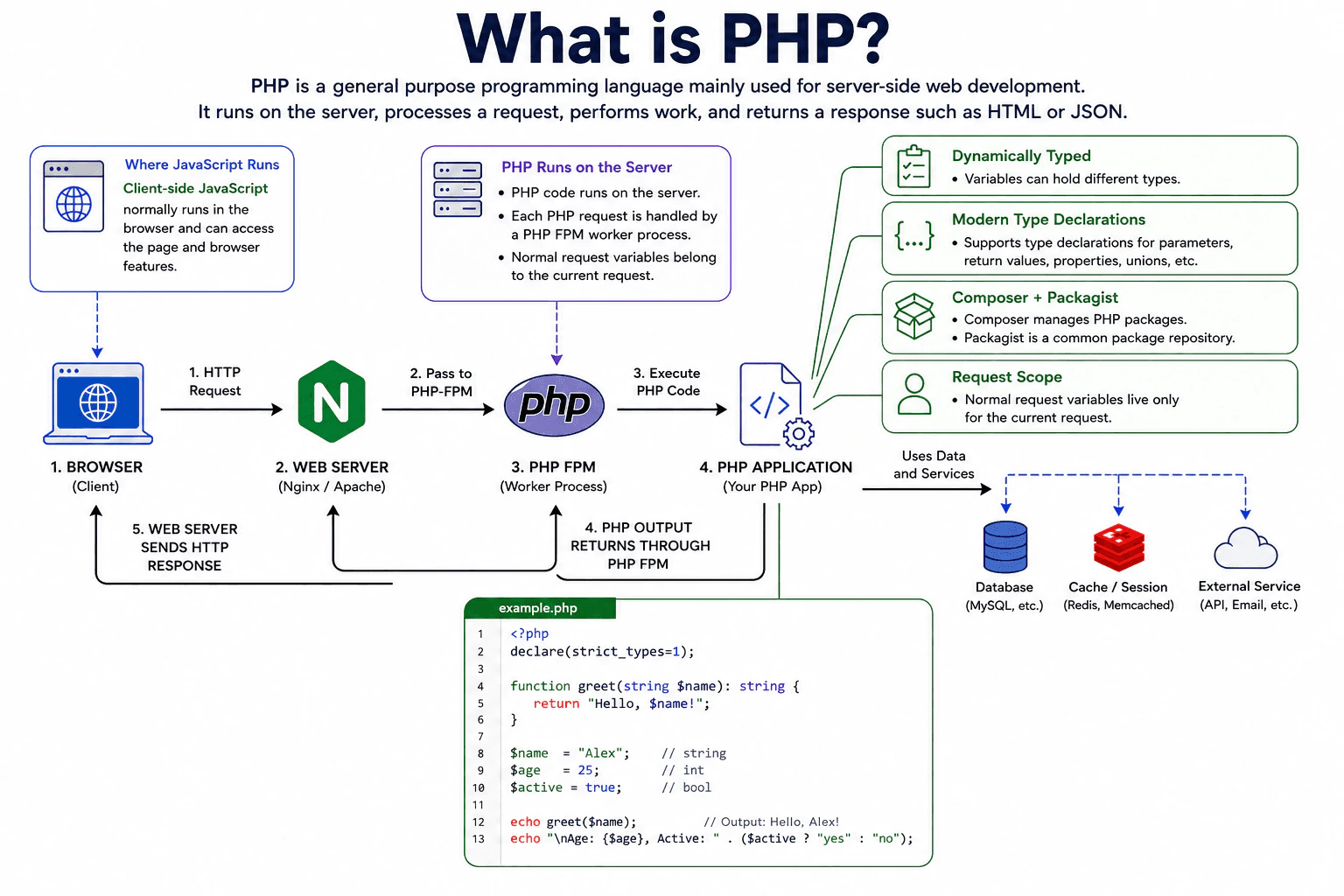
Define PHP and explain its primary purpose, server-side execution model, dynamic type system, request lifecycle, common web-development uses, package ecosystem, major strengths and tradeoffs, and how it differs from client-side JavaScript.
Short Interview Answer (30-60 seconds)
PHP is a general purpose programming language that is especially suited to server side web development. PHP code normally runs on the server, processes a request, performs application work, and produces a response such as HTML or JSON. PHP is dynamically typed, while modern PHP also supports explicit type declarations. Its mature web support, Composer package ecosystem, broad hosting support, and straightforward request model make it practical for many web applications.
Detailed Explanation
PHP is a language often used to make websites do useful work. It usually runs on the computer that sends the website to the visitor. When a person opens a page or submits information, PHP can check the information, make decisions, read or save data, and prepare what the visitor receives. It is popular because it works well for many kinds of websites, has many reusable tools, connects easily to common data stores, and can be used for both small sites and large business systems.
Useful Questions to Ask the Interviewer
Should I explain PHP mainly in the context of traditional web applications?
Would you like me to compare PHP with JavaScript running in the browser?
How to Explain It in an Interview
PHP is a general purpose programming language with strong support for server side web development. In a common production setup, a web server receives an HTTP request and passes PHP work through a server interface, often PHP FPM. PHP creates the request context, runs the application entry code, performs work such as validation, business logic, database access, or service calls, produces output such as HTML or JSON, and then completes request shutdown.
With traditional PHP FPM, worker processes can stay alive and handle many requests over time, but normal user application variables belong to the current request and should not be treated as shared mutable state between requests. Separate workers also do not share ordinary PHP variables. Long running PHP runtimes are different because application objects and static state can remain in memory between requests, so explicit state cleanup is important.
PHP is dynamically typed. A variable can hold values of different types during execution. Modern PHP also supports explicit parameter types, return types, property types, union types, intersection types, nullable types, and other type declarations. The strict types declaration changes scalar type coercion behavior for relevant function calls, but it does not turn PHP into a statically typed language.
PHP has a large package ecosystem centered on Composer, with Packagist commonly used as a package repository. Composer, Packagist, Laravel, and Symfony are separate from the core PHP language.
PHP strengths include mature web capabilities, a large ecosystem, broad deployment support, and a simple request based execution model. Tradeoffs include runtime type mistakes when types are not controlled carefully and additional lifecycle concerns in long running processes. Traditional PHP worker processes also consume memory for the runtime and loaded application state, so production systems usually tune worker counts according to available memory and workload.
Client side JavaScript normally runs in the browser and can directly work with the page and browser features. PHP normally runs on the server and prepares data or content that is sent back to the client.
Where it is used
PHP is used in server web applications, REST APIs, content management systems, ecommerce systems, internal business applications, command line tools, scheduled jobs, and queue workers. A typical production application may combine PHP with a web server, PHP FPM, Composer dependencies, a database, a cache, and external services. WordPress and Drupal are also built with PHP, but they are separate software projects rather than features of the PHP language.
Why Interviewers Ask This
Interviewers ask this question to check whether the candidate understands the role of PHP, where PHP code normally runs, how a web request is processed, how PHP handles types, and how PHP fits into a modern web application. It also tests whether the candidate can distinguish the PHP language from PHP FPM, web servers, frameworks, extensions, Composer packages, databases, and browser JavaScript.
Common interview mistakes
A common mistake is saying PHP normally runs in the browser like client side JavaScript. PHP normally runs on the server. Another mistake is saying all PHP requests share ordinary application variables. Standard PHP FPM commonly uses separate worker processes, and normal request variables should not be treated as shared state across requests. Candidates may also call PHP completely untyped. PHP is dynamically typed, but modern PHP supports extensive explicit type declarations. Another mistake is treating Laravel, Symfony, Composer, Packagist, PHP FPM, or database extensions as if they were all built into the PHP language.
Interview tip
Start by saying that PHP is a general purpose language especially suited to server side web development. Then explain the request flow in simple order: receive a request, run PHP application code, perform the required work, and return a response such as HTML or JSON. Mention dynamic typing with modern type declarations, Composer as the common dependency manager, and the difference between server side PHP and JavaScript running in the browser.
Interviewer may ask next
Does PHP keep normal application variables between PHP FPM requests?
Normally, no. In the traditional PHP FPM request model, normal user application variables belong to the current request and should not be relied on as persistent state for a later request. A PHP FPM worker process can remain alive and handle later requests, but request initialization and shutdown separate normal request execution. Different worker processes also do not share ordinary PHP variables. This matters because persistent application data should normally be stored in an appropriate system such as a database, cache, session store, or external service. Long running runtimes are different because application state can remain in memory and must be reset deliberately.
What are the main tradeoffs of PHP dynamic typing in production applications?
Dynamic typing gives PHP flexibility, but it can allow some type mistakes to appear only when particular code runs. Modern PHP reduces this risk with parameter types, return types, property types, union types, intersection types, nullable types, and other declarations. The strict types declaration can make relevant scalar argument and return handling stricter, but PHP remains dynamically typed. Static analysis tools can detect additional problems before execution, although those tools are separate from the PHP runtime. The main tradeoff is flexibility versus earlier detection of type mistakes, so production applications often use clear type declarations where they improve correctness and maintainability.
2. What is PHP used for, and how does server-side PHP execution work?Language SpecificEasy
i Question Details
Explain the request path from web server to PHP runtime, generation of the HTTP response, and how this differs from code executed in the browser.
Short Interview Answer (30-60 seconds)
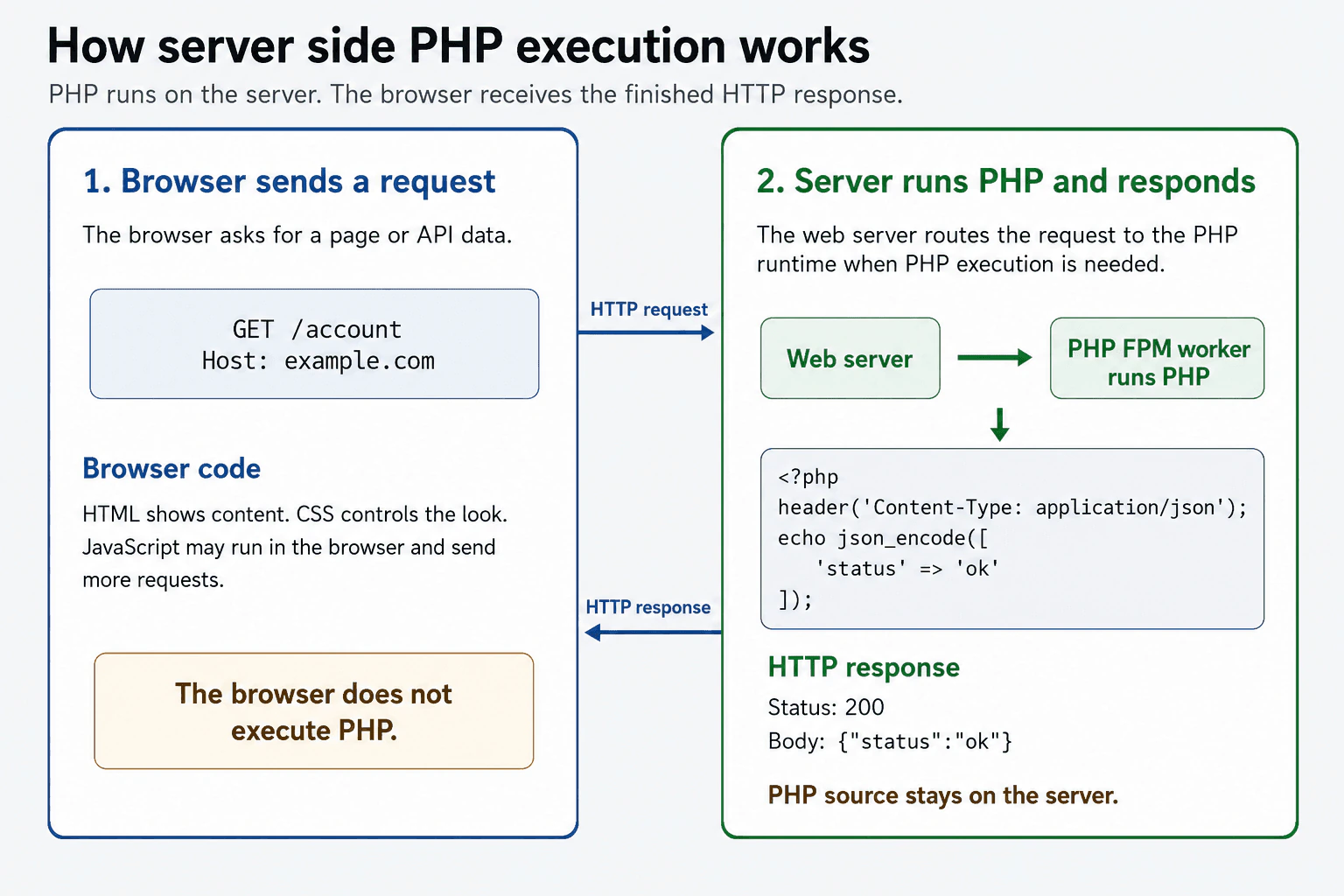
PHP is mainly used to build dynamic websites, web APIs, command line tools, and background jobs. For a web request, the web server routes the request to a PHP runtime when PHP execution is required. PHP runs the application code, may access a database or another service, and builds an HTTP response such as HTML or JSON. The browser receives and processes that response. It does not execute or normally receive the PHP source code.
Detailed Explanation
PHP is often used to create websites and online services whose results depend on user input, saved information, or business rules. When a person requests a PHP powered page, the important work normally happens on a computer controlled by the website owner. That computer reads the request, runs the application instructions, prepares a result, and returns it to the visitor. The visitor receives the finished page or data rather than the private PHP instructions. This allows the application to work with accounts, databases, permissions, and secret values without sending that private logic to the visitor.
Useful Questions to Ask the Interviewer
Should I explain both HTML pages and JSON API responses?
Should I include the role of PHP FPM in a production setup?
Should I compare PHP with JavaScript running in the browser?
How to Explain It in an Interview
PHP is used for dynamic websites, web APIs, content management systems, form processing, command line programs, scheduled tasks, and queue workers. In a common web setup, a browser sends an HTTP request to a web server such as Nginx or Apache.
The web server first decides how to handle the requested path. It may return a static file directly, such as an image or style sheet. When the route requires PHP, the server passes the request to a PHP runtime. In many production systems, PHP FPM manages a pool of worker processes that can execute these requests.
A PHP worker starts the application entry script and makes request information available through PHP input mechanisms. The application can validate input, check authentication, read a session, query a database, call another service, and apply business rules. PHP then creates response content and can set HTTP headers and a status code. The web server delivers that HTTP response to the browser.
The response may contain HTML, JSON, a file, or redirect instructions. The browser processes the returned result. HTML describes page content, CSS controls presentation, and JavaScript can run in the browser. PHP itself normally remains on the server, so database credentials and private application code must never be placed in browser content.
With a normal PHP FPM setup, each request has its own request data and variables. Worker processes do not automatically share mutable request variables. Shared application state must be stored in a suitable external system such as a database, cache, file, or session store.
PHP execution uses processor time and memory in the worker handling the request. Slow database calls, large results, or excessive allocations can keep a worker busy and increase memory use. Production systems therefore set worker limits, request time limits, memory limits, logging, error handling, and secure server rules. OPcache can improve performance by keeping compiled PHP bytecode in shared memory, which reduces repeated script parsing and compilation.
Where it is used
This execution model is used when PHP renders account pages, handles forms, authenticates users, processes orders, reads and writes database records, manages sessions, accepts file uploads, or returns JSON from an API. It is useful whenever trusted code must apply private business rules or use resources that should not be exposed to the browser. PHP is also used outside HTTP requests for command line scripts, scheduled tasks, data imports, and queue workers.
Why Interviewers Ask This
Interviewers ask this question to check whether the candidate understands what PHP is used for and how a web request reaches PHP in a real application. They are evaluating whether the candidate can explain the separate roles of the browser, web server, PHP runtime, and application code. They also want to confirm that the candidate knows PHP source code normally stays on the server and that the browser receives only the generated HTTP response.
Common interview mistakes
A common mistake is saying that the browser executes PHP. The browser receives the result generated by PHP, not the original PHP source code. Another mistake is treating the web server and PHP runtime as the same component in every setup. They may be integrated, but many production systems use a web server with separate PHP FPM worker processes. Candidates may also say PHP can return only HTML, although it can return JSON, files, redirects, different status codes, and other HTTP content. Another mistake is assuming that request variables are automatically shared across workers or later requests. Shared state needs an appropriate external store. It is also incorrect to assume that every request reaches PHP because a web server can serve static files directly.
Interview tip
Explain the path in order. Start with the browser request, then describe web server routing, PHP runtime execution, application work, and HTTP response delivery. Finish by stating clearly that PHP normally runs on the server while HTML, CSS, and JavaScript are processed in the browser.
Interviewer may ask next
What happens if a PHP source file is served as a static file instead of being passed to the PHP runtime?
The PHP code is not executed. Depending on the web server configuration, the source contents could be returned to the client. This matters because the file may reveal application logic, file paths, or sensitive configuration values. Production server rules must route executable PHP files to the PHP runtime and prevent PHP source files from being downloaded as ordinary static content.
Why do production systems use a PHP FPM worker pool, and what tradeoff must be managed?
A PHP FPM worker pool keeps PHP processes ready to handle requests, which avoids creating a new operating system process for every request and allows controlled concurrency. Each active worker consumes memory, and each worker can handle only one request at a time in the normal request model. Too few workers can make requests wait, while too many workers can exhaust memory or overload databases and other services. The pool size must therefore match available memory, expected traffic, and downstream service capacity.
3. What is a PHP array?Language SpecificEasy
i Question Details
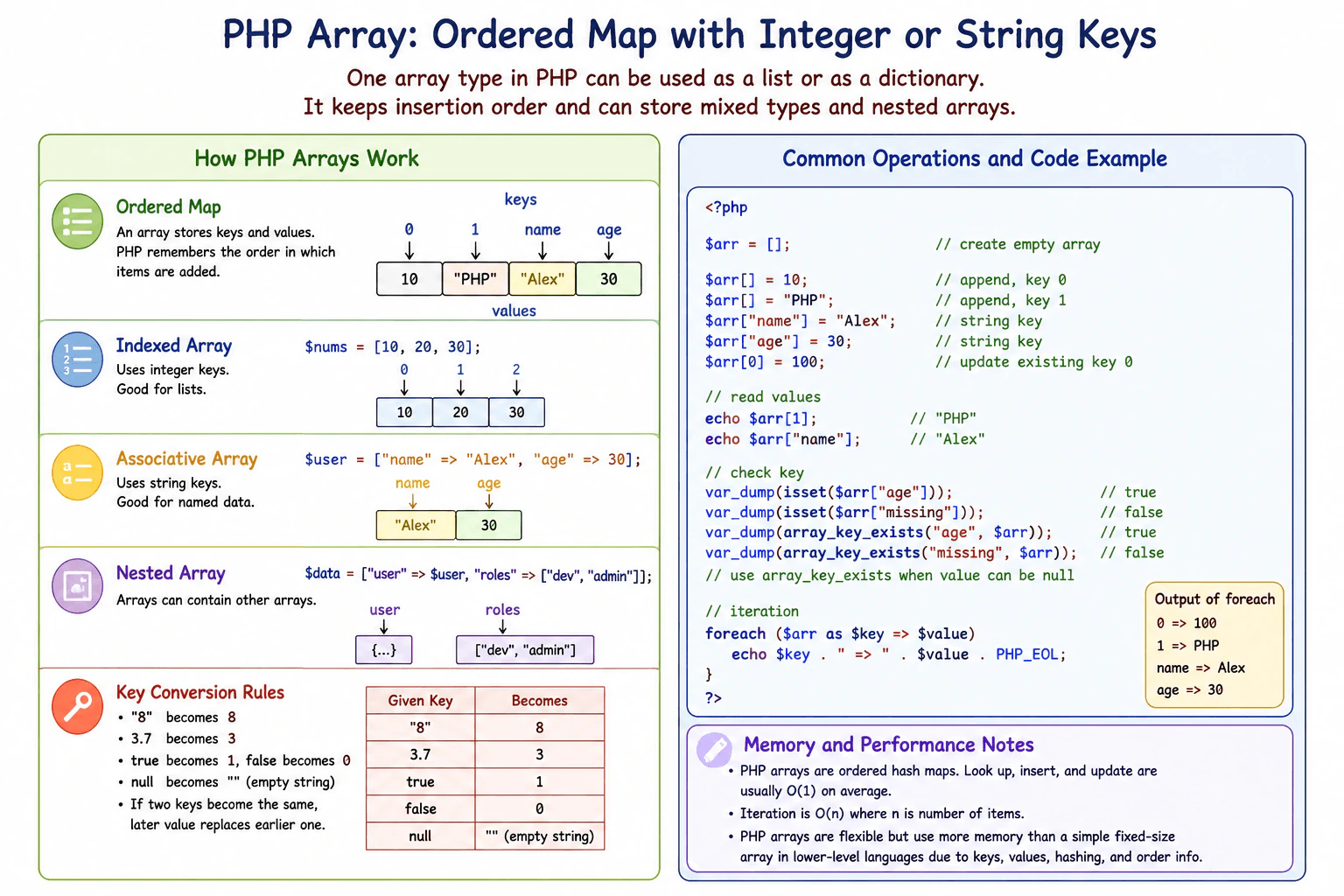
Define a PHP array as an ordered map that can use integer or string keys. Explain indexed and associative arrays, insertion order, mixed value types, nested arrays, key conversion, common read and write operations, iteration, and the practical memory and performance tradeoffs compared with a simple fixed-size array in lower-level languages.
Short Interview Answer (30-60 seconds)
A PHP array is an ordered map. It stores values under integer or string keys and keeps insertion order. I can use it like an indexed list with integer keys or like an associative collection with named string keys. Values can have different types and can contain nested arrays. PHP arrays are very flexible, but they use more memory than a simple fixed size array in a lower level language.
Detailed Explanation
A PHP array is a flexible container that stores several values together. Each value has a key that helps PHP find it. A key can be a number or text. PHP also remembers the order in which entries were added. The same array feature can therefore represent a simple list, named values, or data containing other arrays. The stored values do not need to be the same kind. This flexibility makes PHP arrays useful for many everyday tasks, but it also makes them use more memory than a simple fixed size group of values in many lower level languages.
Useful Questions to Ask the Interviewer
Would you like me to explain both indexed and associative arrays?
Should I also cover key conversion and memory tradeoffs?
How to Explain It in an Interview
A PHP array is an ordered map. A map connects a key to a value, and ordered means PHP preserves insertion order.
An indexed array normally uses integer keys such as 0, 1, and 2. An associative array uses string keys such as name or email. PHP uses the same array type for both forms, and one array can contain both integer and string keys.
Array values can have different PHP types. One entry can hold a string, another an integer, and another an array. Arrays inside arrays are called nested arrays.
PHP converts some key types. A valid decimal integer string such as "8" becomes the integer key 8. A float key is converted to an integer by removing its fractional part. True becomes the integer key 1, false becomes 0, and null becomes an empty string key. If two supplied keys become the same final key, a later assignment replaces the earlier value.
I read or write a value by its key. Empty brackets append a value using the next available integer key. I normally iterate through an array with foreach, which can provide both the key and value.
If a key may contain null and I must distinguish that from a missing key, I use array_key_exists. isset returns false when the key is missing and also when its value is null.
PHP arrays provide convenient key access and flexible values, but this ordered map structure uses more memory than a compact fixed size array. Array assignment uses value semantics. PHP can avoid an immediate physical copy through copy on write behavior, and separation occurs when a shared array must be modified.
Where it is used
PHP arrays are commonly used for lists of records, configuration data, request values, decoded JSON data, database result rows, lookup tables, grouped values, and nested application data. Indexed arrays are useful when values are mainly handled as a sequence. Associative arrays are useful when values have meaningful names. For very large collections or specialized workloads, another structure may be preferable when lower memory use or more specific behavior is important.
Why Interviewers Ask This
Interviewers ask this to check whether the candidate understands what a PHP array really is instead of treating it as only a simple list. They want to see knowledge of integer and string keys, insertion order, key conversion, mixed values, nested arrays, common access operations, iteration, value assignment, memory cost, and practical performance tradeoffs.
Common interview mistakes
A common mistake is saying that a PHP array is only a list. It is an ordered map and supports integer and string keys. Another mistake is assuming every supplied key keeps its original type even when PHP converts it. Candidates may also use isset when they need to distinguish a missing key from a present key whose value is null. Another mistake is saying array assignment makes the two variables references to the same array. Normal assignment uses value semantics, while PHP can delay physical copying through copy on write behavior. PHP arrays should also not be described as compact fixed size arrays because their flexibility has a significant memory cost.
Interview tip
Start by saying that a PHP array is an ordered map with integer or string keys. Then explain indexed and associative use, insertion order, mixed values, key conversion, and foreach. Finish with one practical detail, such as array_key_exists for a null value, plus the memory tradeoff of PHP arrays.
Interviewer may ask next
What happens if a PHP array key is written as the string "8" instead of the integer 8?
PHP converts the valid decimal integer string "8" to the integer key 8. This means the string form and integer form refer to the same resulting key. If both are assigned in the same array, the later assignment replaces the earlier value for that key. This matters when array keys come from input because developers should understand which strings PHP converts and which remain strings.
When might a PHP array be a poor choice for a very large collection?
A PHP array can be a poor choice when memory efficiency is a major concern. Its ordered map structure stores information for keys, values, lookup, and ordering, so it uses more memory than a compact fixed size array in many lower level languages. The tradeoff is convenience and flexibility. For a very large or specialized collection, another data structure may provide lower memory use or behavior that better matches the workload.
4. What scalar, compound, and special data types does PHP support?Language SpecificEasy
i Question Details
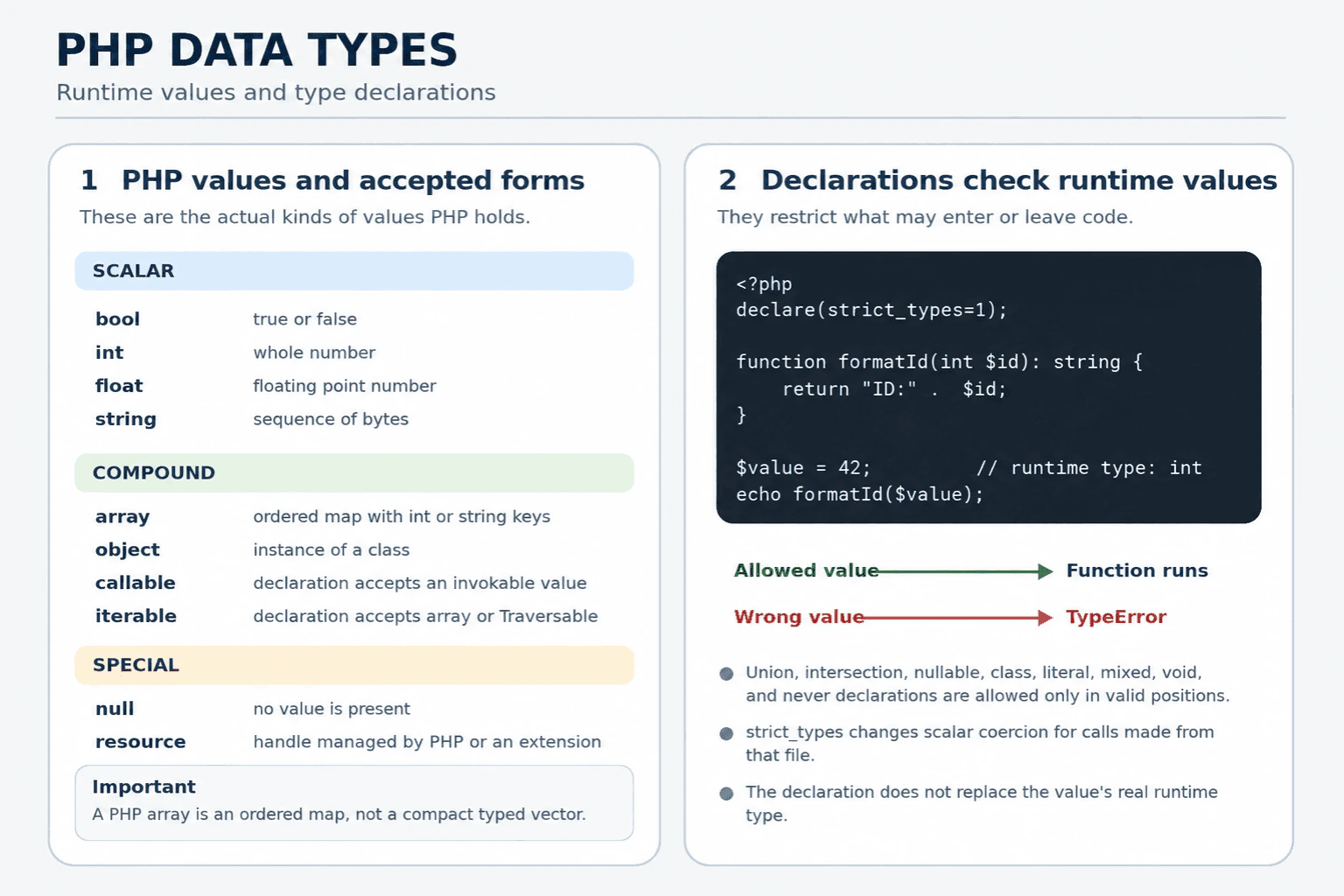
Describe booleans, integers, floats, strings, arrays, objects, callables, iterables, null, and resources, including how type declarations relate to runtime values.
Short Interview Answer (30-60 seconds)
PHP has four scalar types: bool, int, float, and string. Its main compound value types are array and object. Callable describes a value PHP can invoke, while iterable is a type alias for array or Traversable rather than a separate runtime value. Null represents no value, and resource represents a handle managed by PHP or an extension. Type declarations restrict accepted runtime values, but they do not replace or rename the actual type of a value.
Detailed Explanation
PHP can store simple values, collections, created objects, executable values, missing values, and handles to outside systems. These groups help developers choose suitable values and explain what a function accepts or returns. Some names describe actual values that exist while the program runs. Other names are rules that accept one or more kinds of value. Understanding this difference prevents mistakes when validating input, copying data, calling functions, processing collections, and working with files or other external services in a real application.
Useful Questions to Ask the Interviewer
Should I explain both runtime values and declaration only types?
Should I include copying and memory behavior for arrays and objects?
How to Explain It in an Interview
The four scalar types are bool, int, float, and string. A bool is true or false. An int is a whole number within the range supported by the platform. A float uses floating point representation, so some decimal values cannot be stored exactly. A string is a sequence of bytes. Unicode character operations often require the optional mbstring extension.
The main compound value types are array and object. A PHP array is an ordered map with integer or string keys. It can represent a list or lookup structure, but it is not a compact typed vector. Array assignment has value behavior. PHP normally delays the physical copy until one copy is modified, which reduces unnecessary copying, but a changed large array can still require significant memory. An object is an instance of a class. Assigning an object variable copies its object handle, so both variables refer to the same object. The clone keyword creates a new object, and nested object properties remain shared unless they are also cloned.
A callable describes a value PHP can invoke. Examples include a closure, a valid function name, and a valid method callback. Iterable is not a separate runtime value. It is an alias that accepts an array or an object implementing Traversable.
Null is the single value of the null type and means that no value is present. A resource is a special handle created by PHP or an extension for something such as a stream. Resource cannot be used as a user defined type declaration, and many newer APIs use objects instead.
Type declarations can restrict parameters, return values, properties, and class constants where supported. PHP also supports union and intersection declarations, nullable declarations, class types, literal true and false types, mixed, void, and never in their valid positions. A declaration checks the actual runtime value and throws TypeError when the value is not accepted. Strict types changes scalar coercion rules for calls made from the file that enables it, but PHP remains dynamically typed.
Where it is used
Scalar values are used for flags, identifiers, counts, measurements, and text. Arrays are used for configuration, request data, grouped results, and database rows, although dedicated objects can provide clearer contracts for important domain data. Objects model entities, services, value objects, and application behavior. Callables are used for callbacks, sorting rules, event handlers, and middleware. Iterable declarations let a function process either an array or a Traversable object and can support lazy iteration when an iterator or generator is supplied. Null represents an intentionally absent result. Resources appear in stream and extension APIs. Type declarations improve production code by making contracts clearer and causing invalid values to fail earlier.
Why Interviewers Ask This
Interviewers ask this question to check whether the candidate understands the values PHP can hold and the declarations PHP can use to restrict those values. They are also testing whether the candidate can distinguish actual runtime types from aliases and declarations such as iterable, mixed, void, and never. This knowledge helps a developer design clear function contracts, predict conversions, and avoid incorrect assumptions about arrays, objects, callables, null values, and resources.
Common interview mistakes
A common mistake is describing iterable as a separate runtime value. It is an alias for array or Traversable. Another mistake is assuming that callable means every string or array is valid. The value must describe something PHP can actually invoke in the current context. Developers also incorrectly describe a PHP array as a compact list. It is an ordered map and can use much more memory than a compact typed structure. Another mistake is saying normal array assignment permanently shares one mutable array. It has value behavior, although PHP normally delays copying until modification. Object assignment is also often misunderstood. It copies an object handle rather than cloning the object. Other mistakes include using float for exact money calculations, assuming PHP strings automatically understand Unicode characters, declaring resource as a parameter type, and believing strict types disables every automatic conversion in PHP.
Interview tip
Name the four scalar types first. Then explain array and object behavior. Clarify that callable describes an invokable value and iterable accepts array or Traversable. Finish with null, resource, and the key point that declarations validate runtime values rather than creating different runtime values.
Interviewer may ask next
Is iterable an actual runtime value type, and what values satisfy it?
No. Iterable is a type alias that accepts an array or an object implementing Traversable. The actual runtime value remains an array or an object. This matters because each form can have different methods, copying behavior, memory use, and iteration behavior. An iterator or generator can produce values lazily, while an array normally keeps its elements in memory.
What are the main memory and behavior differences between assigning an array and assigning an object?
Array assignment has value behavior, while object assignment copies an object handle. PHP normally uses delayed copying for arrays, so assigning an array does not always duplicate all data immediately. A later modification can cause a separate array structure to be created, which may increase memory use. Assigning an object does not clone it, so changes through either variable affect the same object. Use clone only when an independent object is required, and remember that cloning is shallow unless nested objects are explicitly cloned.
5. What is the difference between echo and print in PHP?Language SpecificEasy
i Question Details
Compare return values, accepted arguments, expression use, and practical significance.
Short Interview Answer (30-60 seconds)
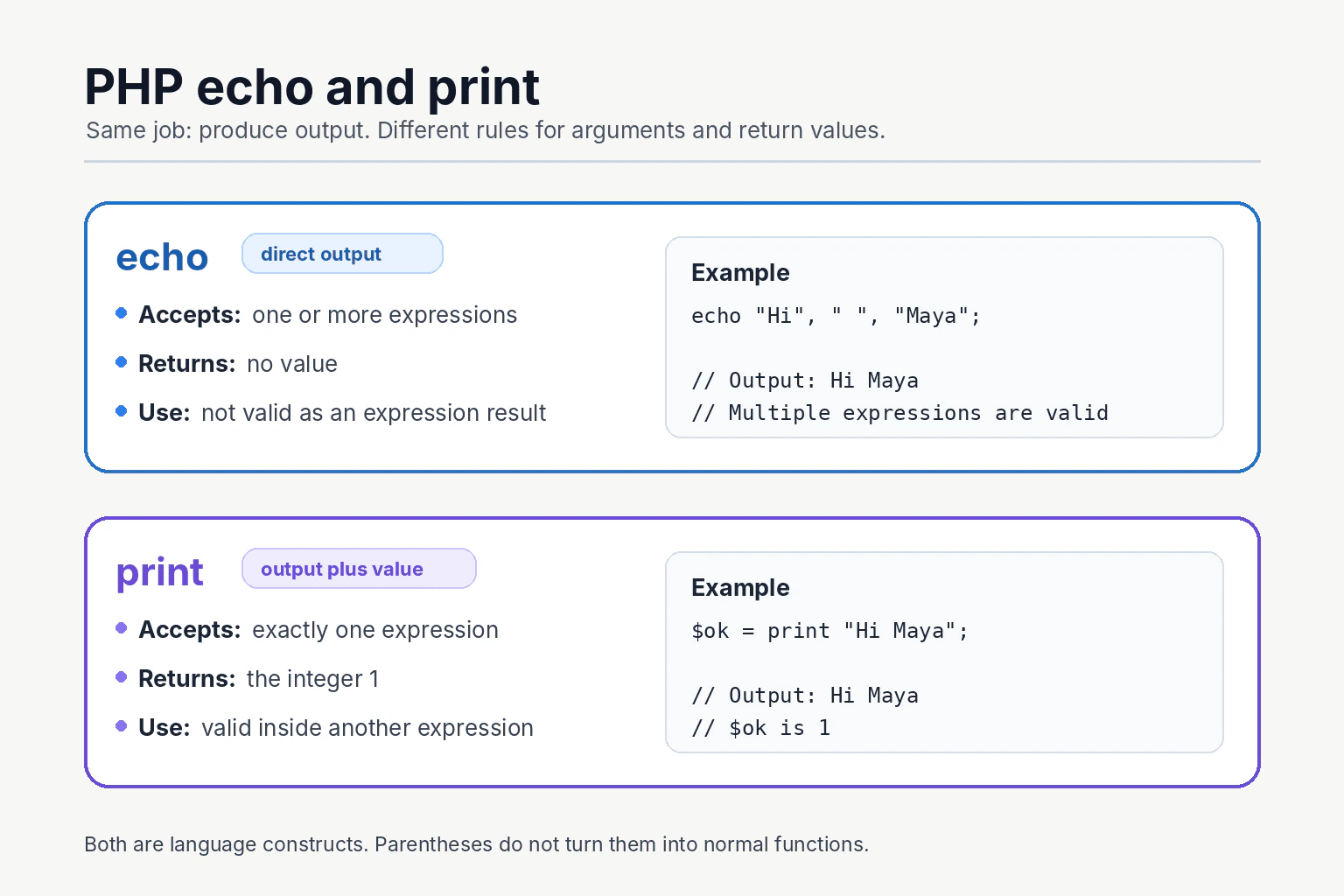
I normally use echo for direct output. Echo can output one or more comma separated expressions and does not return a value. Print accepts one expression and always returns the integer 1, so it can be used as part of another expression. Both are PHP language constructs, and performance or memory differences are normally not a useful reason to choose between them.
Detailed Explanation
Both echo and print send a value to PHP output. They are often used to build a web page, show a command line message, or produce simple text. The main difference is how each construct fits into PHP code. Echo can output several separate expressions and gives no result back. Print handles one expression and gives back the number 1. Most applications can use either one for a single value, so the practical choice is usually based on clear code rather than speed or memory.
Useful Questions to Ask the Interviewer
Does the example need to output several separate expressions?
Does the output operation need to be used inside another expression?
How to Explain It in an Interview
Echo and print are PHP language constructs used to produce output. They are not normal functions, so parentheses are not required and they cannot be called as variable functions or with named arguments.
Echo accepts one or more expressions separated by commas. It produces their string forms in order and does not add spaces or new lines. Echo has no return value, so it cannot be used where PHP requires an expression result.
Print accepts one expression. It produces that value and always returns the integer 1. Because it returns a value, print can be used inside an expression, such as a condition or a conditional expression. This is valid, but it is uncommon because a separate output statement is usually easier to read.
Parentheses do not turn either construct into a function. Echo can still output separately parenthesized expressions when commas remain outside the parentheses. However, echo followed by one pair of parentheses containing several comma separated values is invalid because that content is not one valid PHP expression.
Both constructs convert suitable values to strings even when strict types are enabled. For example, an integer becomes its text form. An array produces an Array conversion warning and the text Array, so var_dump or print_r is more suitable for inspecting an array. An object must support string conversion before it can be output directly.
There is normally no useful performance reason to prefer one construct. Memory use depends more on the expressions being created. For example, joining many values into one string can allocate a combined string, while separate echo arguments can avoid creating that combined result. In production, readability, correct escaping, buffering, and response handling matter more.
Where it is used
Echo is commonly used in PHP templates, command line scripts, generated HTML, debugging messages, and simple text responses. Print can produce the same output when one expression is supplied, but its return value is rarely needed in production code. Framework applications often place output inside templates or response objects instead of calling either construct throughout business logic. When output contains untrusted data for an HTML page, the data must be escaped correctly before either construct sends it.
Why Interviewers Ask This
Interviewers ask this question to check whether the candidate understands basic PHP output constructs. It tests knowledge of return values, argument rules, expression use, value conversion, and practical coding judgment. It also shows whether the candidate can explain a small language difference without making unsupported performance or memory claims.
Common interview mistakes
A common mistake is calling echo or print a normal function. Both are language constructs. Another mistake is saying that print returns the value it outputs. Print always returns the integer 1. Candidates may also claim that echo accepts only one expression, but it can accept several expressions separated by commas. Another mistake is believing that parentheses turn either construct into a function call. They do not. It is also incorrect to use echo directly as an expression because it has no return value. Finally, candidates should not claim that one construct always uses less memory or is meaningfully faster in every application.
Interview tip
Start with the practical choice. Say that echo is normally used for direct output. Then compare argument count, return value, and expression use. Mention that both are language constructs and finish by saying that readability matters more than tiny performance claims.
Interviewer may ask next
What happens when parentheses are used with multiple echo expressions?
Parentheses do not make echo a function. Echo can output multiple separately parenthesized expressions when the commas remain outside the parentheses. However, placing several comma separated values inside one pair of parentheses after echo is invalid because PHP expects that pair of parentheses to contain one valid expression. This matters because function style syntax can hide the real grammar of the construct.
Can separate echo arguments reduce memory use compared with string concatenation?
They can avoid creating one combined concatenated string in some cases. Echo can evaluate and output separate expressions without first building the same full joined string. However, the actual memory and performance effect depends on the expressions, output buffering, and runtime context. This matters when producing large output, but it does not justify a general claim that echo is always faster or always uses less memory than print.
6. What is the difference between == and === in PHP?Language SpecificEasy
i Question Details
Explain type juggling versus strict comparison, provide representative surprising comparisons, and state when strict comparison should be preferred.
Short Interview Answer (30-60 seconds)
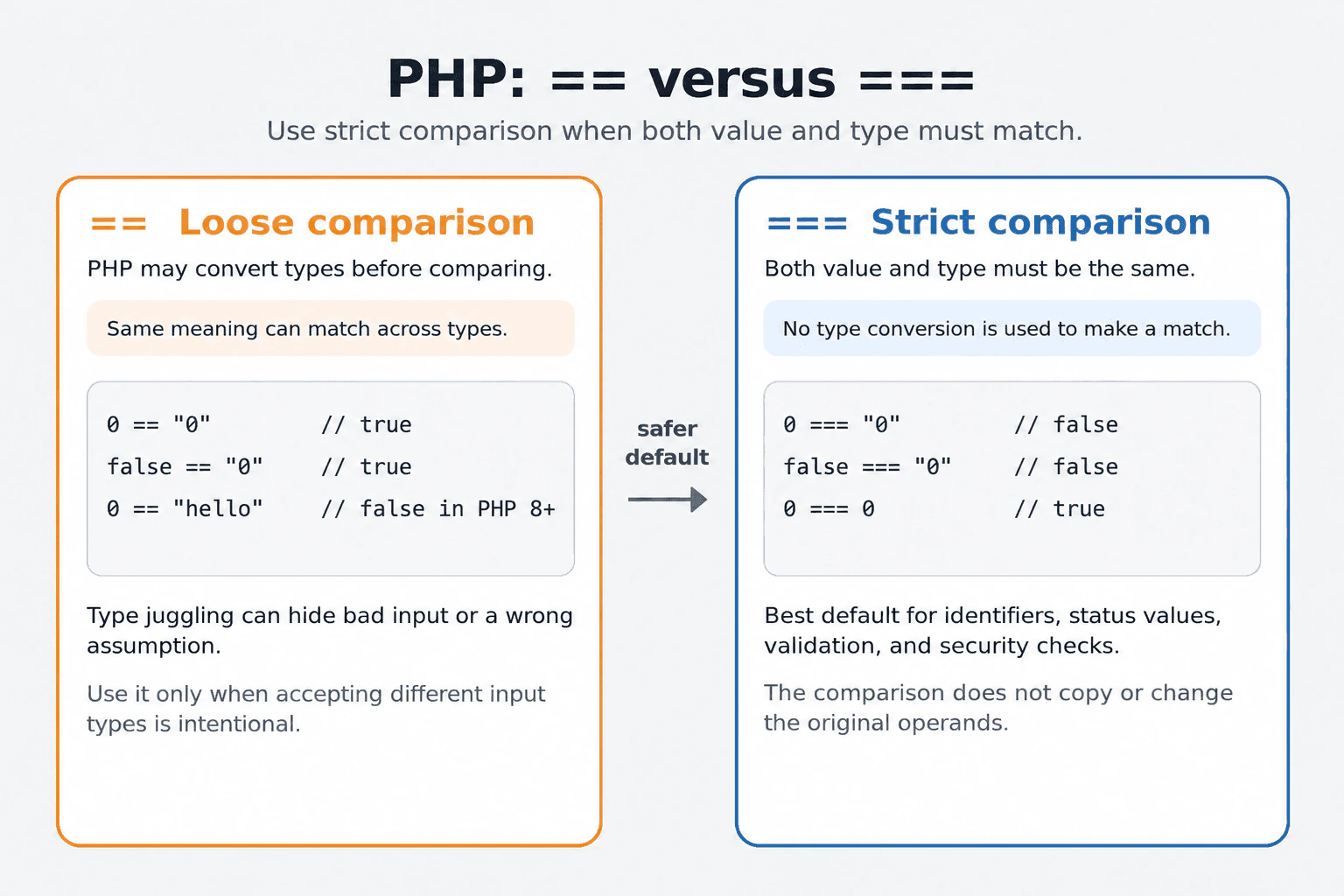
I use === by default when the type matters. The == operator performs loose comparison, so PHP may convert the operands before comparing them. For example, 0 == "0" is true. The === operator performs strict comparison, so both the value and type must match. Therefore, 0 === "0" is false. Strict comparison usually makes production code safer and easier to understand.
The practical rule is to use the stricter check when two values must have the same form as well as the same meaning. The other check may treat values from different sources as equal after changing how one value is understood during the comparison. This can be convenient, but it can also hide invalid input or a wrong assumption. In most application code, the stricter check is safer because it clearly separates values such as zero, false, null, and text. The less strict check should be used only when accepting different forms is an intentional requirement.
Useful Questions to Ask the Interviewer
Can the compared values come from different sources, such as a form and a database?
Should values with different types be accepted as equal?
Must the code support PHP versions older than PHP 8?
How to Explain It in an Interview
In PHP, == is the loose equality operator. It checks whether two operands are equal after PHP applies its comparison conversion rules. This behavior is called type juggling. The original variables are not permanently changed by the comparison.
The === operator is the identity operator. It returns true only when both operands have the same type and the same value. PHP does not convert different types to make them match.
For example, 0 == "0" is true because PHP compares the numeric string with the integer as numeric values. However, 0 === "0" is false because one operand is an integer and the other is a string.
Boolean comparisons can also be surprising. false == "0" is true because PHP converts both operands to boolean for that loose comparison. false === "0" is false because their types differ.
A version boundary also matters. In PHP 8 and later, 0 == "hello" is false because a number compared with a nonnumeric string is compared as strings instead of converting the string to zero. Before PHP 8, that comparison was true.
For arrays, == checks whether both arrays contain the same key and value pairs, while === also requires the same order and matching value types. For objects, === means both operands refer to the same object instance.
Use === for identifiers, status values, validation results, authentication decisions, and function return values. Use == only when accepting equivalent values of different types is deliberate and tested.
Scalar comparisons normally have trivial time and memory cost. Comparing arrays or objects can require examining their contents, so the cost can grow with the amount of data. These operators do not copy or permanently change the operands.
Example
The executable example compares the same values with == and ===. It shows numeric string conversion, boolean comparison behavior, and the PHP 8 and later rule for comparing zero with a nonnumeric string. The operands remain unchanged after every comparison.
Code
<?php// A numeric string can equal an integer with loose comparison.var_dump(0 == "0");
var_dump(0 === "0");
// A boolean comparison can make the string "0" behave like false.var_dump(false == "0");
var_dump(false === "0");
// In PHP 8 and later, zero is not loosely equal to a nonnumeric string.var_dump(0 == "hello");
var_dump(0 === "hello");
// The comparison does not change the original operands.$number = 0;
$text = "0";
$unusedResult = $number == $text;
var_dump($number, $text);
Where it is used
Strict comparison is used when checking function return values, validating request data, comparing identifiers, matching status values, and separating false, null, zero, and empty strings. It is also important with functions such as in_array and array_search, where strict mode prevents values with different types from matching. Loose comparison is suitable only when the application intentionally accepts equivalent values in different types.
Why Interviewers Ask This
Interviewers ask this question to check whether the candidate understands PHP comparison rules, automatic type conversion, and the risks of comparing values from different sources. It also tests whether the candidate can choose predictable comparisons for validation, function results, identifiers, and security sensitive conditions.
Common interview mistakes
A common mistake is assuming that == compares only the visible values. PHP may first apply comparison conversion rules. Another mistake is using == when false, null, zero, and an empty string must remain different. Developers may also assume that declare(strict_types=1) changes == into strict comparison, but it does not affect comparison operators. A further mistake is using in_array or array_search without strict mode when different value types must not match. Code must also avoid relying on loose comparison behavior from PHP versions before PHP 8.
Interview tip
Begin by saying that == may compare after type conversion, while === requires the same type and value. Give the example 0 == "0" being true and 0 === "0" being false. Then state that === is the safer default when predictable types matter.
Interviewer may ask next
Does declare(strict_types=1) make == behave like ===?
No. The declaration does not change comparison operators. The == operator still performs loose comparison, and === still requires the same type and value. This matters because strict function argument handling cannot prevent a condition from producing an unexpected result when that condition uses loose comparison.
When should strict mode be used with in_array or array_search?
Strict mode should be used when both the type and value must match. Passing true as the strict argument prevents values such as the integer 0 from matching the string "0". This improves predictability for identifiers and controlled value lists. The tradeoff is that equivalent values with different types no longer match, so input should be normalized first when that flexibility is required.
7. What is the difference between isset(), empty(), and array_key_exists()?Language SpecificEasy
i Question Details
Compare behavior for missing keys, null, false, zero, empty strings, and arrays, and explain common bugs caused by choosing the wrong check.
Short Interview Answer (30-60 seconds)
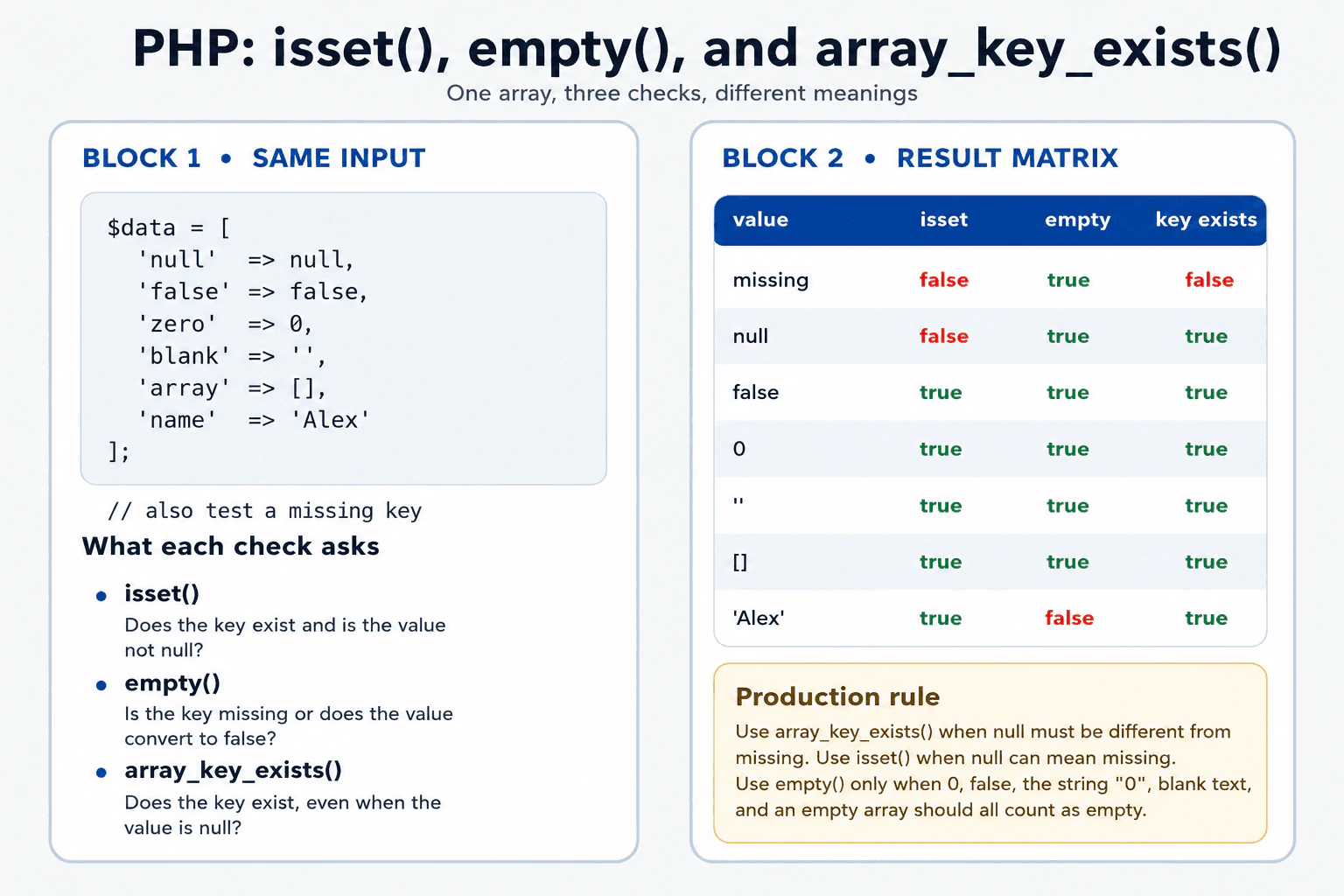
Use isset() when the key must exist and its value must not be null. Use array_key_exists() when you only need to know whether the key is present, even when its value is null. Use empty() when missing keys and values such as null, false, zero, an empty string, the string "0", and an empty array should all count as empty. The main risk is that empty() can reject valid values such as zero or false.
These three checks answer different questions about an array value. One checks whether a named place exists and contains something other than null. One checks only whether the named place exists. The last checks whether the value should be treated as having no useful content. This difference matters because zero, false, and the text "0" may be valid information. Choosing the wrong check can reject valid input, overwrite saved data, or confuse a missing field with a field that was intentionally supplied with no value.
Useful Questions to Ask the Interviewer
Should a stored null value count as present?
Are zero, false, and the string "0" valid values?
Must missing input be different from supplied empty input?
How to Explain It in an Interview
isset($array['key']) is a PHP language construct. It returns true only when the key exists and its value is not null. It returns false for both a missing key and a key whose value is null. Values such as false, 0, "", "0", and an empty array still make isset() return true because they are not null.
array_key_exists('key', $array) is a PHP array function. It checks only whether the key exists. It returns true even when the stored value is null. Use it when null has a real meaning or when an update operation must distinguish an omitted field from a field explicitly set to null. It checks only the given array level. It does not search nested arrays automatically.
empty($array['key']) is also a PHP language construct. It returns true when the key is missing or when the value converts to false. Relevant empty values include null, false, 0, 0.0, negative zero, "", "0", and an empty array. It can safely check a missing array key without producing an undefined key warning.
For example, a quantity of 0 and an enabled flag of false may be valid. Using empty() would treat both as empty. In that case, use array_key_exists() to confirm that the field was supplied, then validate its value separately. Use isset() instead when null should be treated the same as a missing value.
Each check performs a direct lookup for the requested key. It does not copy the array or its stored value. The result is a boolean, so the extra memory cost is negligible. In production code, choose the check based on the meaning of missing, null, and empty values rather than relying on truthiness by accident.
Example
The example creates one PHP array containing null, false, zero, an empty string, the string "0", an empty array, and a normal string. It also checks a missing key. For each key, the program prints the results from isset(), empty(), and array_key_exists(). isset() returns false only for the missing key and the null value. empty() returns true for the missing key and every stored empty value. array_key_exists() returns true for every stored key, including the key containing null, and false only for the missing key.
Code
<?phpdeclare(strict_types=1);
$data = [
'nullValue' => null,
'falseValue' => false,
'zeroValue' => 0,
'emptyString' => '',
'zeroString' => '0',
'emptyArray' => [],
'name' => 'Alex',
];
$keys = [
'missingKey',
'nullValue',
'falseValue',
'zeroValue',
'emptyString',
'zeroString',
'emptyArray',
'name',
];
foreach ($keysas$key) {
echo$key . PHP_EOL;
// True only when the key exists and the value is not nullecho'isset: ' . (isset($data[$key]) ? 'true' : 'false') . PHP_EOL;
// True when the key is missing or the value converts to falseecho'empty: ' . (empty($data[$key]) ? 'true' : 'false') . PHP_EOL;
// True whenever the key exists, including a key with a null valueecho'array_key_exists: '
. (array_key_exists($key, $data) ? 'true' : 'false')
. PHP_EOL
. PHP_EOL;
}
Where it is used
isset() is useful for optional configuration, cached values, and request fields where null means unavailable. array_key_exists() is useful for partial API updates, database result arrays, decoded JSON objects represented as arrays, and configuration merging where an explicitly supplied null value must be different from a missing key. empty() is useful for form fields where missing input and all PHP empty values should receive the same treatment. For numeric fields, boolean flags, and values where the string "0" is valid, key presence and value validation should be handled separately.
Why Interviewers Ask This
Interviewers ask this question to check whether the candidate understands the difference between a missing array key, a present key with a null value, and a present key containing a value that PHP treats as empty. It also tests whether the candidate can choose the correct check for validation, request data, configuration, and update operations without silently rejecting valid values.
Common interview mistakes
A common mistake is using isset() when a key containing null must still count as present. Another mistake is using empty() for required numeric or boolean input. It treats 0, 0.0, false, the string "0", an empty string, null, and an empty array as empty, so valid data may be rejected. Developers may also assume that array_key_exists() searches every nested level, but it checks only the supplied array level. Another mistake is checking only whether a field is present and then skipping separate type and business rule validation.
Interview tip
State the decision rule first. Say that isset() means the key exists and the value is not null, array_key_exists() means the key exists even when its value is null, and empty() groups missing keys with values that convert to false. Then compare null, zero, false, and the string "0" because those examples show the practical difference clearly.
Interviewer may ask next
What happens when a key exists but its value is null?
array_key_exists() returns true because the key is present. isset() returns false because the value is null. empty() returns true because null is an empty value in PHP. This matters in a partial update request where an omitted field may mean keep the old value, while a supplied null value may mean clear the old value. array_key_exists() preserves that distinction.
Should empty() be used to validate numeric and boolean input?
Usually no when zero or false are valid values. empty() returns true for 0, 0.0, negative zero, false, the string "0", an empty string, null, an empty array, and a missing key. This may reject valid input. A safer production approach is to use array_key_exists() or isset() according to the required presence rule, then validate the type and allowed value separately.
8. Is PHP case-sensitive?Language SpecificEasy
i Question Details
Explain which identifiers are case-sensitive, why relying on case-insensitive behavior is unsafe, and how PSR naming and filesystem case sensitivity affect production code.
Short Interview Answer (30-60 seconds)
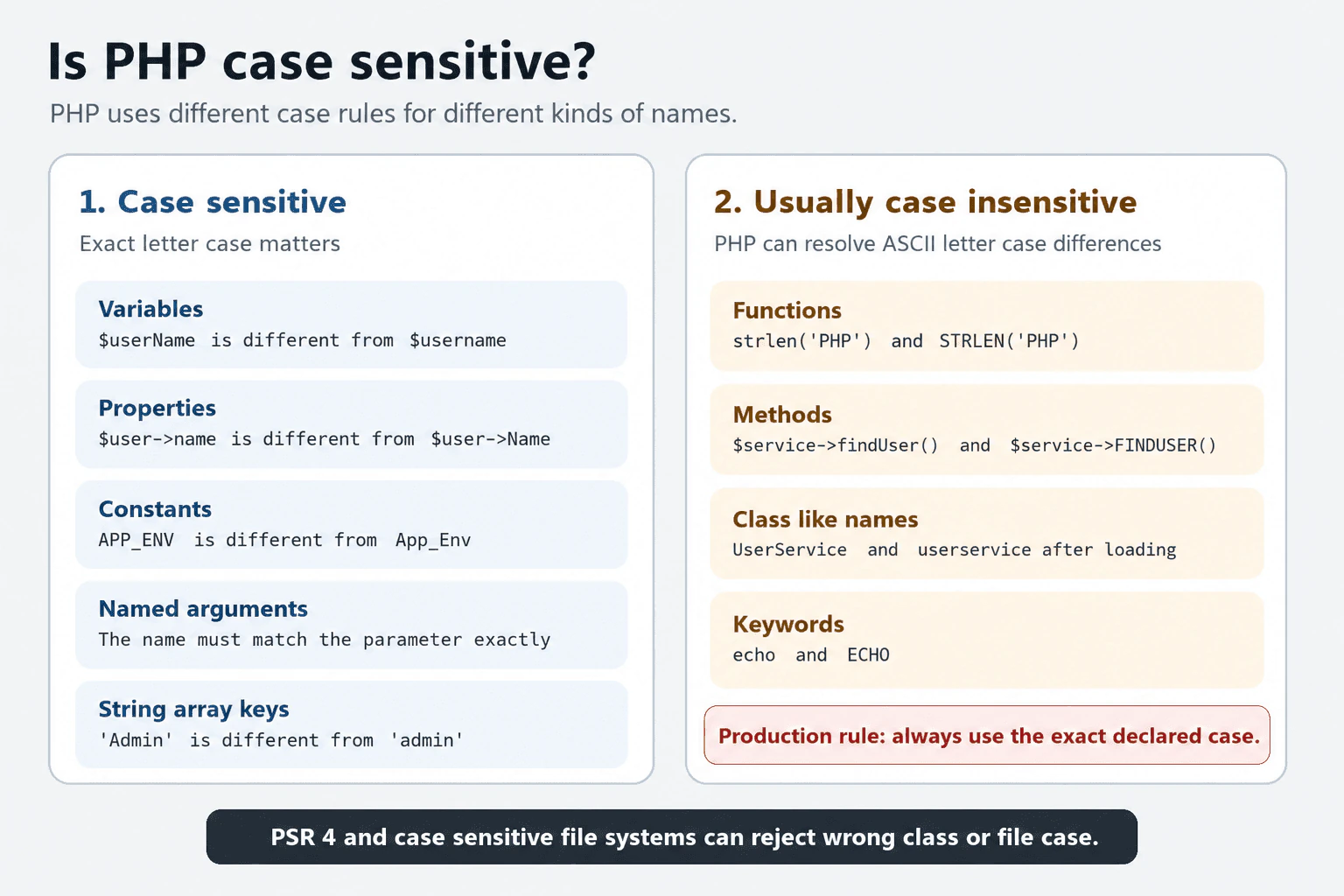
PHP is partly case sensitive. Variable names, property names, constant names, named argument names, and string array keys are case sensitive. Function names, method names, and class like names are generally case insensitive at the PHP runtime level. I still use the exact declared case everywhere because PSR 4 autoloading, file names, development tools, and production file systems expect consistent case.
Detailed Explanation
PHP does not use one letter case rule for every name. Some names treat capital and small letters as different. Other names treat them as the same. This means a spelling change may create a different value in one place but still find the same code in another place. The difference can cause confusing errors during development or after deployment. A safe developer therefore writes every name with the same capital and small letters used when that name was first created. This keeps the code clear and prevents avoidable production failures.
Useful Questions to Ask the Interviewer
Should I include Composer and PSR 4 autoloading behavior?
Should I explain differences between development and production file systems?
How to Explain It in an Interview
PHP is partly case sensitive. Variable names are case sensitive. Therefore, $userName and $username are two different variables. Object and static property names are also case sensitive. User defined constant names and class constant names are case sensitive. Named argument names must exactly match the declared parameter names. String array keys are also case sensitive, although array keys are data values rather than PHP identifiers.
Function names and method names are case insensitive for ordinary ASCII letter differences. Class, interface, trait, and enum names are also generally resolved without regard to ASCII letter case after PHP knows the declaration. PHP keywords are case insensitive as well.
This runtime behavior should not be used as a naming strategy. Code that calls UserService as userservice may work when the class is already loaded, but it can fail during autoloading. PSR 4 requires class names to be referenced with the correct case. Namespace directories and class file names must also match the declared case.
The file system adds another production risk. A case insensitive development system may treat UserService.php and userservice.php as the same path. A case sensitive production system treats them as different paths. The application can therefore work locally and fail on a Linux server.
The practical rule is to use the exact declared case everywhere. Consistent case has no meaningful runtime memory cost. Any direct performance difference is negligible. Correct naming mainly improves reliability, portability, readability, static analysis, and autoloading.
Where it is used
These rules matter when declaring and reading variables, accessing object properties, using constants, calling functions and methods, passing named arguments, and reading string array keys. They are especially important in Composer projects that use PSR 4 autoloading. Teams also rely on consistent case during code review, testing, static analysis, deployment, and development across different operating systems.
Why Interviewers Ask This
Interviewers ask this question to check whether the candidate knows that PHP applies different case rules to different names. It tests knowledge of variables, properties, constants, functions, methods, classes, named arguments, and autoloading. It also checks whether the candidate can choose consistent naming that remains safe across development and production systems.
Common interview mistakes
A common mistake is saying that PHP is completely case sensitive or completely case insensitive. Another mistake is assuming that $total and $Total are the same variable. Developers may also forget that property names, constant names, named argument names, and string array keys are case sensitive. A serious production mistake is using the wrong case for a class, namespace directory, or file because the application worked on a case insensitive development system. This can cause PSR 4 autoloading to fail on a case sensitive production system.
Interview tip
Begin by saying that PHP is partly case sensitive. Give one clear example from each group, such as variables being case sensitive and function names being case insensitive. Finish with the production rule that every reference should use the exact declared case, especially for PSR 4 class names and file paths.
Interviewer may ask next
Are named argument names case sensitive in PHP?
Yes, named argument names are case sensitive. The name used in the call must match the declared parameter name exactly. A different letter case does not select that parameter and causes an unknown named parameter error. This matters because changing a public parameter name or its case can break callers that use named arguments.
Why can incorrect class name case work locally but fail in production?
It can happen because the PHP runtime and the file system perform different jobs. PHP generally resolves an already known class name without ASCII case sensitivity, but an autoloader must first map the requested name to a file path. PSR 4 requires matching case, and a case sensitive production file system treats differently cased paths as different files. Exact case prevents this portability and deployment problem.
9. What does the null coalescing operator do in PHP?Language SpecificEasy
i Question Details
Explain the behavior of ?? with undefined and null values, compare it with isset-based logic, and describe chained coalescing.
Short Interview Answer (30-60 seconds)
The null coalescing operator returns the value on its left when that value exists and is not null. Otherwise, it returns the value on its right. It behaves like an isset check followed by a conditional choice. It also preserves valid values such as false, zero, and an empty string.
The null coalescing operator helps PHP choose a backup value. PHP first checks the value on the left. When that value is available and does not contain null, PHP uses it. When the value is missing or contains null, PHP uses the value on the right. This is useful when information may come from a form, a setting, or saved data and the program needs a safe backup. Values such as false, zero, and an empty string are still accepted. They do not cause PHP to choose the backup.
Useful Questions to Ask the Interviewer
Should a missing value and a null value use the same fallback?
Must a present array key containing null be different from a missing key?
Should several possible values be checked in a preferred order?
How to Explain It in an Interview
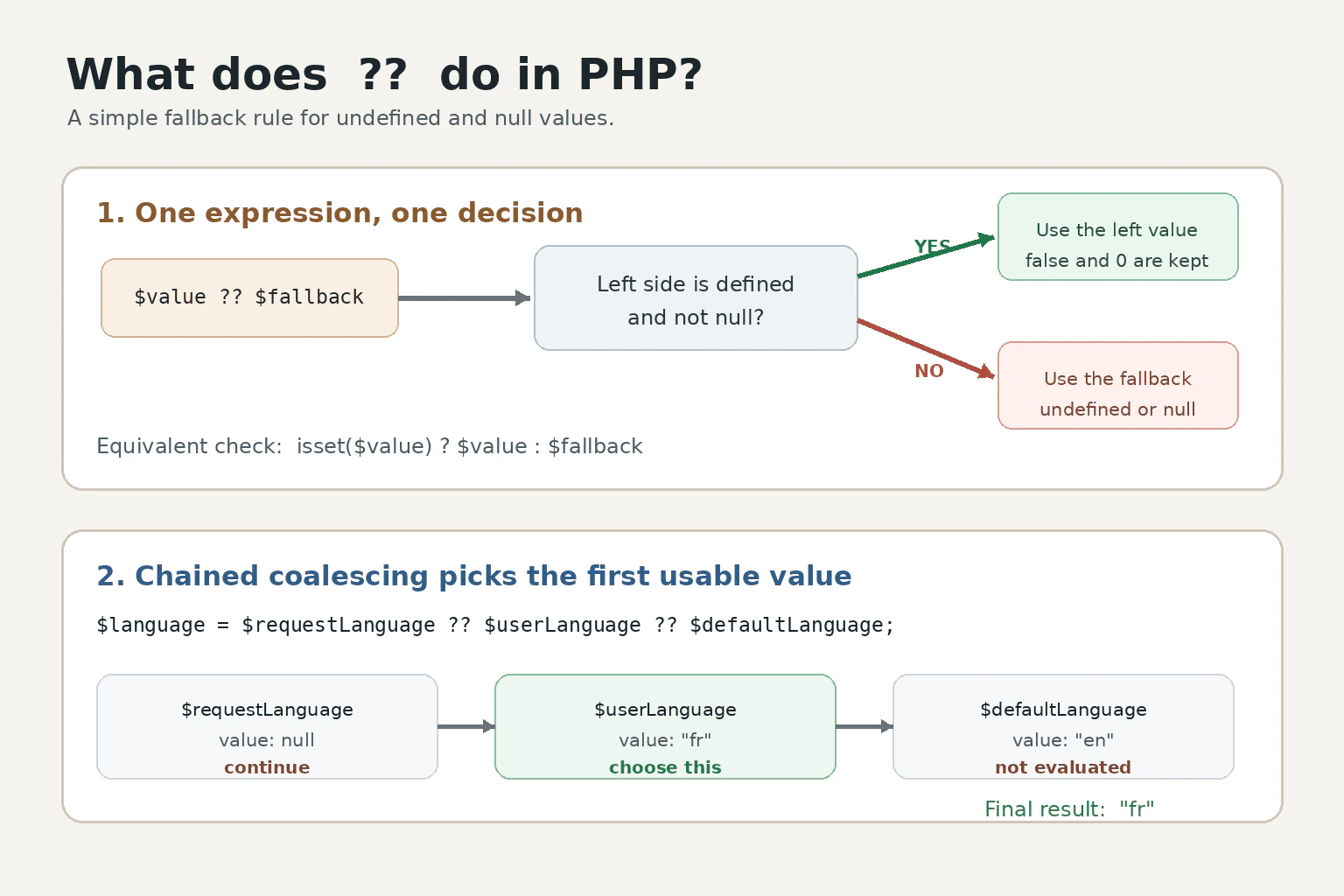
The operator is written as ??. The expression $value ?? $fallback behaves like isset($value) ? $value : $fallback.
PHP returns the left value when it is defined and not null. If the variable or array key is undefined, or its value is null, PHP evaluates and returns the right expression. Using ?? with a missing variable or array key does not produce the warning that a normal direct read can produce. php.net
For example, $name = $_GET['name'] ?? 'Guest'; keeps the submitted name when it exists and is not null. Otherwise, it uses Guest. False, zero, an empty string, and an empty array remain valid left values.
The operator can be chained. In $language = $requestLanguage ?? $userLanguage ?? $defaultLanguage;, PHP returns the first value that is defined and not null. The operator is right associative, and later fallback expressions are not evaluated after a suitable value is found. php.net
Use ?? when undefined and null should have the same result. Use array_key_exists when a present array key containing null must be distinguished from a missing key. php.net
The operator has low precedence, so parentheses improve correctness when it is mixed with concatenation or arithmetic. It produces a result value rather than a variable, which matters in functions that return by reference. php.net
Its direct runtime and memory overhead is small. It creates no special collection and does not copy a selected value merely because ?? is used. Normal PHP value and copy behavior still applies. Expensive fallback expressions are skipped when the left value is usable.
Example
The example demonstrates the same rules described in the answer. The false value is preserved because it is defined and not null. The null value and the missing array key use their fallback values. The chained expression checks the request value, then the user value, and finally the application default. It returns the first value that is defined and not null.
Code
<?phpdeclare(strict_types=1);
$options = [
'enabled' => false,
'theme' => null,
];
// False is defined and not null, so PHP keeps it.$enabled = $options['enabled'] ?? true;
// Null causes PHP to use the fallback value.$theme = $options['theme'] ?? 'light';
// A missing key also causes PHP to use the fallback value.$language = $options['language'] ?? 'en';
$requestLanguage = null;
$userLanguage = 'fr';
$defaultLanguage = 'en';
// PHP returns the first value that is defined and not null.$selectedLanguage = $requestLanguage ?? $userLanguage ?? $defaultLanguage;
var_dump($enabled);
echo$theme . PHP_EOL;
echo$language . PHP_EOL;
echo$selectedLanguage . PHP_EOL;
Where it is used
It is commonly used to provide defaults for optional form fields, query parameters, decoded data, configuration arrays, environment settings, cache results, and values selected from several sources. It is most suitable when an undefined value and a null value should both trigger the same fallback.
Why Interviewers Ask This
Interviewers ask this question to check whether the candidate understands how PHP handles undefined and null values. It also tests whether the candidate can choose safe fallback values, compare the operator with isset logic, and recognize cases where a missing array key must be distinguished from a key whose value is null.
Common interview mistakes
A common mistake is thinking that ?? rejects every value that PHP can treat as false. It does not. False, zero, an empty string, and an empty array are preserved. Another mistake is using it when null must be distinguished from a missing array key. Both cases select the fallback because the operator follows isset behavior. Developers may also forget its low precedence when combining it with concatenation or arithmetic. Another limitation is assuming its result can be returned as a variable reference.
Interview tip
State the main rule first. Say that PHP returns the left value when it is defined and not null. Then compare it with isset logic, mention that false and zero are preserved, explain chained fallback values, and finish with the array_key_exists distinction.
Interviewer may ask next
What happens if the left value is false, zero, or an empty string?
PHP returns the left value. The null coalescing operator only selects the right expression when the left value is undefined or null. False, zero, and an empty string are defined values, so preserving them matters when they are valid input or configuration choices.
When should array_key_exists be used instead of the null coalescing operator?
Use array_key_exists when a present array key containing null must be distinguished from a missing key. The null coalescing operator follows isset behavior, so both cases select the fallback. array_key_exists gives the required distinction, but it needs more explicit conditional logic.
10. How do include, require, include_once, and require_once differ in PHP?Language SpecificEasy
i Question Details
Compare failure behavior and duplicate inclusion, and explain why Composer autoloading is normally preferred for classes.
Short Interview Answer (30-60 seconds)
The practical differences are failure handling and duplicate evaluation. include raises a warning and returns false if PHP cannot load the file, so execution normally continues. require raises an Error in PHP 8, so code after it does not run unless that Error is caught. include_once and require_once keep the matching failure behavior but skip a file that PHP has already included during the current execution. For classes, I normally prefer Composer autoloading because it loads class files when their classes are needed and avoids manual file lists.
Detailed Explanation
These four PHP statements let one file run code from another file. The main choices are what should happen when the requested file is missing and whether PHP should run a file again after it was already loaded. An optional file may be allowed to fail. A required setup file may not. Running the same file twice can repeat output and other actions, or cause errors when it declares the same class or function again. Composer usually handles class files automatically.
Useful Questions to Ask the Interviewer
Is the file optional or required?
Can several code paths request the same file?
Does the file return data, produce output, or declare classes?
How to Explain It in an Interview
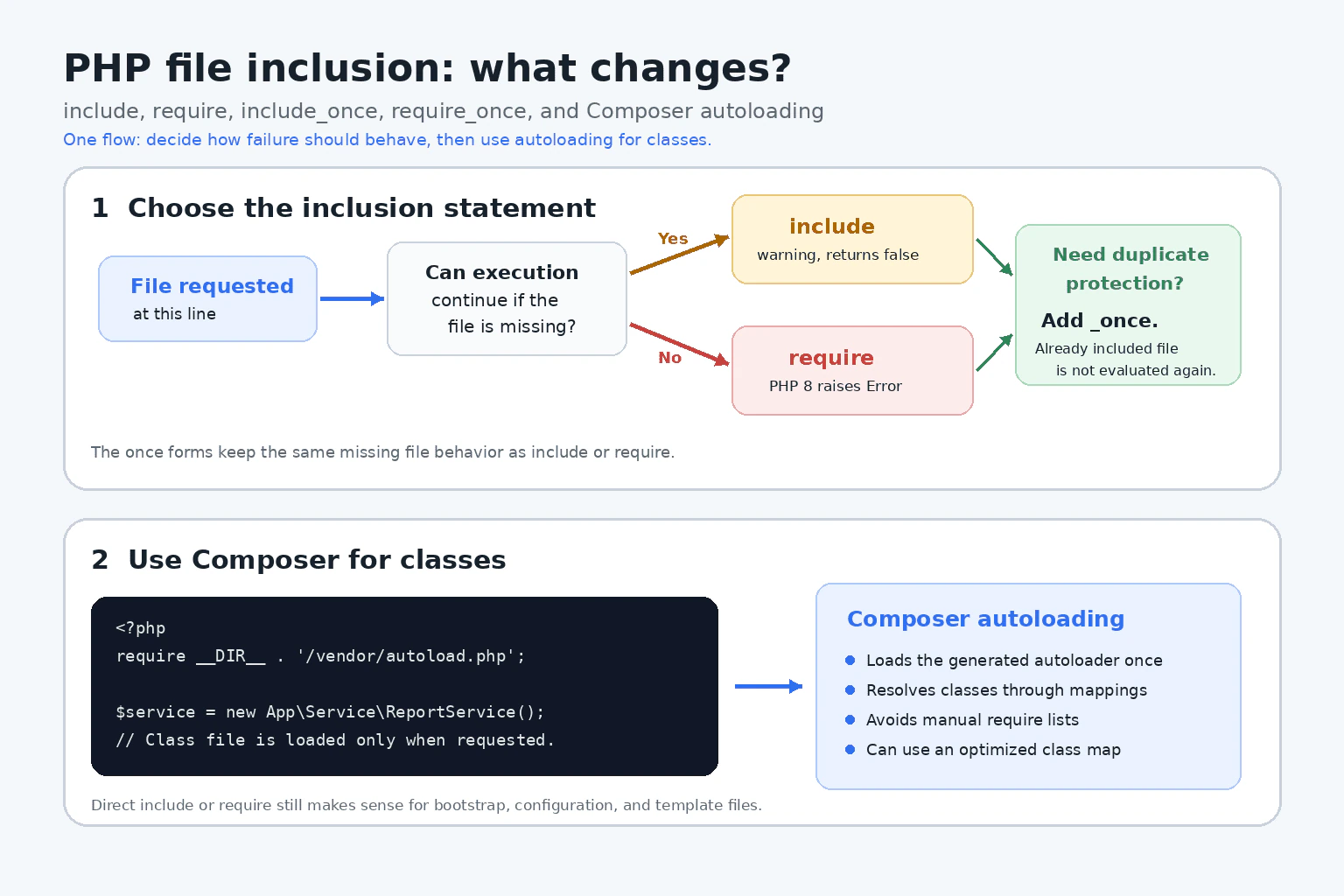
include and require are PHP language constructs that evaluate another file.
If include cannot load the file, PHP raises an E_WARNING warning and returns false. Use it only when the file is optional and the application handles failure safely.
If require cannot load the file, PHP raises an Error in PHP 8. Code after it does not run unless a catch block catches that Error. Use require when continuing without the file would be unsafe.
include_once follows include failure behavior. require_once follows require failure behavior. The once forms also check whether PHP already included the resolved file in the current execution. If so, PHP skips another evaluation and the once expression returns true.
A successful inclusion can return a value from the included file. Without an explicit return, it normally returns 1. Included code inherits the variable scope of the inclusion line. Classes and functions still follow their normal declaration rules.
The once forms add a lookup against PHP records of included files. PHP retains those records for the current execution. The time and memory cost is normally small. OPcache may reduce compilation work, but it does not change inclusion behavior.
For classes, Composer autoloading is normally preferred. The application loads Composer's autoloader once. Composer then resolves a class when PHP needs it, commonly through PSR 4 mappings. This avoids manual class file lists. An optimized class map can reduce file system checks in production.
Where it is used
require is commonly used for a mandatory application bootstrap file or Composer's generated autoloader. require_once can help in procedural or older code when several execution paths may reach the same mandatory declaration file. include is suitable for an optional template or content file only when failure is expected and handled safely. include_once can protect an optional shared file from repeated evaluation. Configuration files that return arrays may also be loaded directly. Application classes, interfaces, traits, and enums are normally loaded through Composer autoloading.
Why Interviewers Ask This
Interviewers ask this question to check whether the candidate understands PHP file inclusion, missing file behavior, duplicate evaluation, return values, and variable scope. It also tests whether the candidate can choose safely between optional and required files and explain why Composer autoloading is normally preferred for classes.
Common interview mistakes
A common mistake is saying that include fails silently. It raises a warning and returns false. Another mistake is saying that require can never be caught. In PHP 8, a failed require raises an Error that implements Throwable, so a matching catch block can catch it. Candidates also assume that once means once for each written path string. PHP checks whether the resolved file was already included during the current execution. Another mistake is assuming that the once forms undo earlier side effects or unload declarations. They only skip another evaluation. Developers should not build inclusion paths from untrusted input because this can create file inclusion vulnerabilities. They should also avoid hiding failures with the at operator. Manually requiring every class file is normally less maintainable than Composer autoloading.
Interview tip
Answer in three parts. First compare missing file behavior. Second explain that the once forms prevent another evaluation of a file already included during the current execution. Third say that Composer autoloading is normally preferred for classes because it resolves class files when needed and removes manual class file lists.
Interviewer may ask next
What happens when require_once is called after the same file was already loaded with include?
PHP skips another evaluation when the requested path resolves to a file already included during the current execution. The once check recognizes files previously loaded through include, require, include_once, or require_once. require_once returns true in this skipped case. This prevents repeated declarations and side effects, but it does not undo anything performed by the first evaluation.
What are the production tradeoffs between require_once and Composer autoloading?
require_once resolves the file request, checks PHP records of included files, and immediately loads and evaluates the file when it has not already been included. Composer autoloading performs a lookup when PHP requests a class, so unused class files normally remain unloaded. This improves organization and can reduce unnecessary class file loading. In production, an optimized class map gives direct paths for known classes. The tradeoff is that deployment must include the generated autoloader and regenerate it when relevant autoload mappings or class files change.
More questions load as you scroll
Php Developer Resume Examples
Explore the resume examples below to find the one that best matches your target Php Developer role.
Disclaimer: This interview guide is for educational and informational purposes only. It is designed to help readers prepare, but it does not guarantee any interview result, hiring decision, offer, or outcome. Interview questions, hiring criteria, and preferred answers can vary by employer, interviewer, industry, location, and time. All answers, examples, and explanations in this guide are suggested examples for interview preparation, not definitive answers or instructions for professional practice. They are based on research and judgment, are provided without warranties of any kind, and should be adapted to the question, role, and applicable laws and professional requirements. Diagrams are simplified illustrations intended to highlight the main concepts and their relationships; actual situations, systems, and practices may be more complex. Alternative approaches may be equally valid or better suited to a particular question, context, or interviewer. To the fullest extent permitted by applicable law, the contributors and publisher are not liable for decisions made, actions taken, or losses incurred based on this guide.
State Laws and Professional Responsibilities: Laws and requirements governing an occupation vary by state and jurisdiction. You are responsible for checking the current laws, licensing requirements, and scope-of-practice rules that apply to your location and role, and for ensuring that your answers and actions comply with them. Adapt examples in this guide to those requirements. This guide is not legal advice.
Content Accuracy and Verification: To the fullest extent permitted by applicable law, we do not represent or warrant that interview guides, questions, answers, examples, or diagrams are accurate, complete, current, error-free, or suitable for any particular purpose. You are responsible for independently reviewing and verifying the information before relying on it.