This interview guide is for educational and informational purposes only. It is designed to help readers prepare, but it does not guarantee any interview result, hiring decision, offer, or outcome. Interview questions, hiring criteria, and preferred answers can vary by employer, interviewer, industry, location, and time. All answers, examples, and explanations in this guide are suggested examples for interview preparation, not definitive answers or instructions for professional practice. They are based on research and judgment, are provided without warranties of any kind, and should be adapted to the question, role, and applicable laws and professional requirements. Diagrams are simplified illustrations intended to highlight the main concepts and their relationships; actual situations, systems, and practices may be more complex. Alternative approaches may be equally valid or better suited to a particular question, context, or interviewer. To the fullest extent permitted by applicable law, the contributors and publisher are not liable for decisions made, actions taken, or losses incurred based on this guide.
State Laws and Professional Responsibilities
Laws and requirements governing an occupation vary by state and jurisdiction. You are responsible for checking the current laws, licensing requirements, and scope-of-practice rules that apply to your location and role, and for ensuring that your answers and actions comply with them. Adapt examples in this guide to those requirements. This guide is not legal advice.
Identity, Image, and Privacy Notice
To respect individual privacy, some names, profile photographs, avatars, biographical details, and other identifying information displayed in this guide may be replaced with pseudonyms, licensed stock images, illustrative avatars, composite images, or representative descriptions. Unless a person is expressly identified as an actual contributor, a displayed name, image, or profile should not be understood as depicting or identifying a specific candidate, interviewer, employee, or other real individual. These representations are provided for editorial and illustrative purposes only and do not imply endorsement, employment, participation, or affiliation with this guide or any company mentioned in it. Any resemblance to an actual person is coincidental.
Company Notice
This guide is an independent educational resource and is not affiliated with, endorsed by, sponsored by, or approved by the company named in this guide. Company names identify reported interview experiences or the employer context of clearly labeled original practice exercises. Interview practices can change without notice, and inclusion of company-specific content does not mean these questions are official, complete, or guaranteed to be asked. To the fullest extent permitted by law, the author, contributors, and publisher are not responsible for outcomes related to use of this material.
Content Accuracy and Verification
To the fullest extent permitted by applicable law, we do not represent or warrant that interview guides, questions, answers, examples, or diagrams are accurate, complete, current, error-free, or suitable for any particular purpose. You are responsible for independently reviewing and verifying the information before relying on it.
Questions or comments?
Contact us for general questions, or share feedback, technical corrections, and comments with the community.
11. What is a Python namespace?Language SpecificEasy
i Question Details
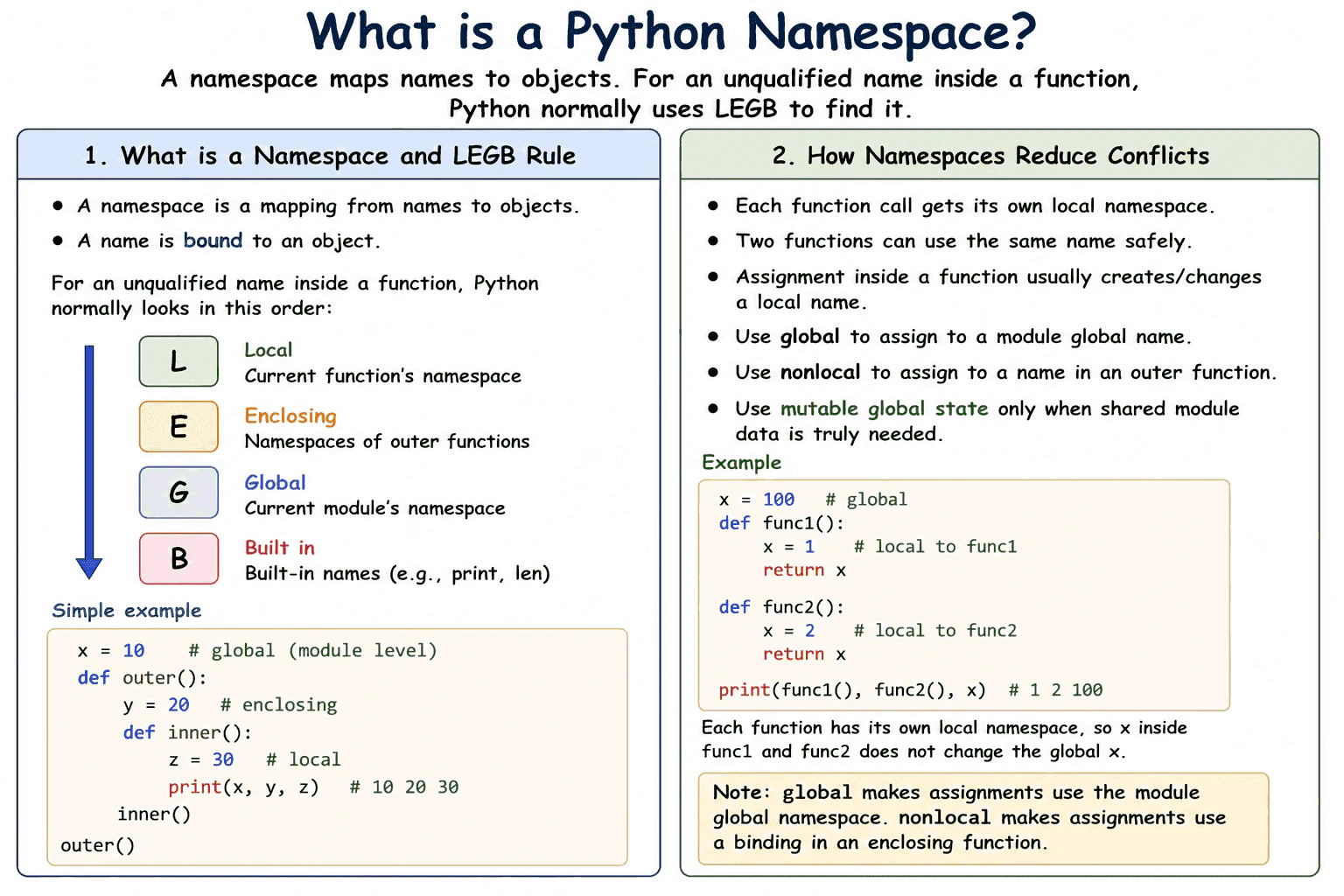
Explain what a namespace maps, identify local, enclosing, global, and built-in namespaces, and describe how namespaces reduce naming conflicts.
Short Interview Answer (30-60 seconds)
A Python namespace is a mapping from names to objects. For an unqualified name, Python normally searches the local, enclosing, global, and built in namespaces in that order. Separate namespaces let functions and modules reuse the same name without automatically changing one another.
Detailed Explanation
A Python namespace maps names to objects. After count = 5, the current namespace binds the name count to the integer object 5. The name is not the object itself.
Useful Questions to Ask the Interviewer
Should I focus on Python language behavior, or also explain the runtime and standard library?
Which Python version and execution environment should I assume?
Would you like a small code example together with production tradeoffs and edge cases?
For an unqualified name inside a function, Python normally follows the local, enclosing, global, and built in lookup order. The local namespace belongs to the current function call. Enclosing namespaces belong to outer functions. The global namespace belongs to the current module. The built in namespace provides names such as print and len.
Namespaces reduce conflicts because separate functions and modules can use the same name independently. Assignment inside a function normally makes that name local to the function. The global statement allows assignment to a module global name. The nonlocal statement allows assignment to a name in an enclosing function.
One important edge case is that assigning to a name anywhere in a function normally makes it local throughout that function. Reading it before the assignment can raise UnboundLocalError.
Namespace entries require memory for name bindings, and lookup adds a small implementation dependent runtime cost. In production code, clear local names, explicit imports, and limited mutable global state make behavior easier to understand and test.
Where it is used
Namespaces are used whenever Python executes modules, functions, class bodies, imports, and built in operations. Function namespaces keep parameters and temporary values separate for each active call. Module namespaces organize functions, classes, constants, and imported names. Class bodies use a namespace to collect names that become class attributes. In production applications, namespaces help separate code across modules and reduce accidental naming conflicts.
Why Interviewers Ask This
Interviewers ask this question to check whether a candidate understands how Python binds names to objects and resolves names at runtime. It also tests knowledge of scope, shadowing, function behavior, module organization, and the risks of unclear shared state.
Common interview mistakes
A common mistake is saying that a variable directly contains an object. In Python, a name is bound to an object through a namespace. Another mistake is assuming that assignment inside a function changes a global name. It normally creates or updates a local binding unless global is declared. Developers may also hide built in names by assigning names such as list, str, or len. Another mistake is treating namespace and scope as the same thing. A namespace stores bindings, while a scope defines where a name can be resolved. It is also incorrect to assume that the local namespace is shared by every call to the same function.
Interview tip
Start by saying that a namespace maps names to objects. Then explain the local, enclosing, global, and built in lookup order. Finish with one practical point about shadowing or about two functions safely using the same local name.
Interviewer may ask next
Why can reading a local name before assigning it raise UnboundLocalError?
It raises UnboundLocalError because assignment to that name anywhere in the function normally makes the name local throughout the function. Python then tries to read the local binding before it has received a value. This matters because a global name with the same spelling will not be used for that read. The code must assign the local value first or explicitly declare global or nonlocal when that is the intended behavior.
What is the tradeoff of storing mutable application state in a module global namespace?
Module global state is easy to access, but mutable global values create shared state that can be changed from many places. This can make tests, concurrent code, and debugging harder because behavior depends on hidden changes. Module globals are reasonable for functions, classes, imported names, and constants, while frequently changing application state is usually clearer when passed explicitly or managed by a dedicated object.
12. What is the difference between local and global variables?Language SpecificEasy
i Question Details
Explain where local and global names are created, their visibility and lifetime, and when the global declaration is required for assignment.
Short Interview Answer (30-60 seconds)
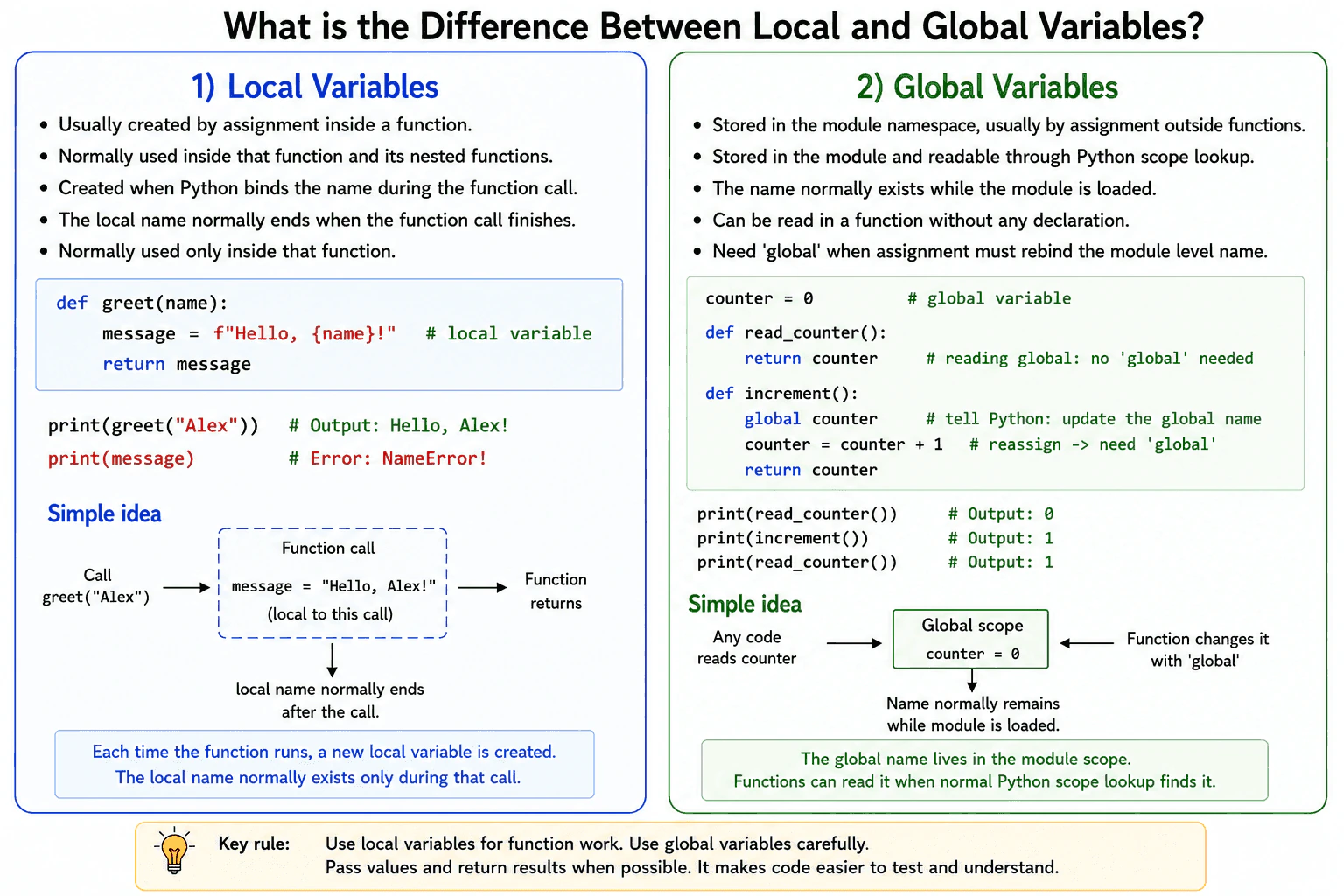
A local variable is a name created inside a function and is normally visible only in that function call. A global variable is a name stored in the module namespace. A function can read a global name without a declaration. It needs the global declaration only when it will assign a new value to that name. Mutating an existing global object does not require global when the name itself is not reassigned. In production code, I usually prefer function arguments and return values because they make dependencies clear and testing easier.
The practical rule is to use local names for function work and limit changes to global state.
Useful Questions to Ask the Interviewer
Should I focus on Python language behavior, or also explain the runtime and standard library?
Which Python version and execution environment should I assume?
Would you like a small code example together with production tradeoffs and edge cases?
A name assigned inside a function is local by default. It is visible inside that function call. Its binding disappears when the call ends, although the referenced object can remain alive if another reference still points to it.
A global name is stored in the module namespace. Code in the module and functions in that module can read it. The name normally remains available while the module remains loaded.
A function does not need global to read a global name. It needs global when an assignment should rebind that module level name. Without the declaration, Python treats an assigned name as local throughout the function. Reading it before the local assignment then raises UnboundLocalError.
The global statement is not needed when code only mutates an existing global object, such as appending to a list, because the name is not rebound. Assignment binds a name to an object and does not copy that object. Local and global name access normally has small constant time cost, although local lookup is generally simpler. Mutable global state can make testing and concurrent execution harder to control.
Example
The example creates request_count in the module namespace. The read_count function reads that global name without a global declaration. The record_request function uses global because it assigns a new integer to request_count. The local name message exists only inside that function call. The recent_requests list is also global, but appending to it does not require global because the code mutates the existing list instead of assigning a different object to the name. The assignments only bind names to objects and do not copy the referenced objects.
Code
# Create names in the module namespace.
request_count = 0
recent_requests = []
defread_count():
# Reading a global name does not require global.return request_count
defrecord_request(request_name):
# Assignment must update the module level request_count name.global request_count
# Integers are immutable, so this creates a new integer and rebinds the name.
request_count = request_count + 1# Appending mutates the existing global list.# No global declaration is needed because the list name is not reassigned.
recent_requests.append(request_name)
# This name is local to the current function call.
message = f"Recorded request {request_count}: {request_name}"return message
print(read_count())
print(record_request("health check"))
print(record_request("user profile"))
print(read_count())
print(recent_requests)
Where it is used
Local variables are used for request data, validation results, temporary calculations, loop state, and values needed during one function call. Global names are often used for constants, configuration created when a module loads, shared clients, and carefully controlled caches. Read only global constants are usually simple to manage. Mutable global state should be limited because one call can affect later calls, tests, or concurrent work. Function arguments, return values, and instance attributes usually make ownership and dependencies clearer.
Why Interviewers Ask This
Interviewers ask this question to check whether a candidate understands Python scope and name binding. They want to know whether the candidate can predict which name a function will read, when assignment creates a local name, when global is required, and how shared state can affect production code.
Common interview mistakes
A common mistake is using global just to read a global name. Reading alone does not require it. Another mistake is assigning to a global name without declaring it global. Python then treats that name as local throughout the function, which can cause UnboundLocalError. Developers may also think that mutating a global list requires global. It does not unless the list name itself is reassigned. Another mistake is assuming that global means one shared namespace for the entire application. A global name belongs to a specific module namespace. Excessive mutable global state can also create test isolation problems and unexpected behavior during concurrent execution.
Interview tip
Start with the main rule. Names assigned inside a function are local by default. Then explain that reading a module level name needs no declaration, while rebinding it requires global. Mention that mutating an existing global object is different from rebinding its name. Finish by explaining why explicit arguments and return values are usually safer in production.
Interviewer may ask next
What happens if a function reads and then assigns to a global name without using global?
Python treats the name as local throughout that function because the function contains an assignment to it. Reading the name before the local value has been assigned raises UnboundLocalError. This matters because Python decides the scope from the function code, not from the order in which branches happen to run.
Why does appending to a global list not require global, while replacing the list does?
Appending changes the existing list object, so the global name continues to point to the same object and no global declaration is required. Replacing the list assigns a different object to the name, so global is required when that assignment should update the module namespace. Mutation can be convenient, but shared mutable objects make testing and concurrent access harder to control.
13. How does Python resolve names using the LEGB rule?Language SpecificEasy
i Question Details
Explain the Local, Enclosing, Global, and Built-in lookup order, including the effect of global and nonlocal declarations on assignment.
Short Interview Answer (30-60 seconds)
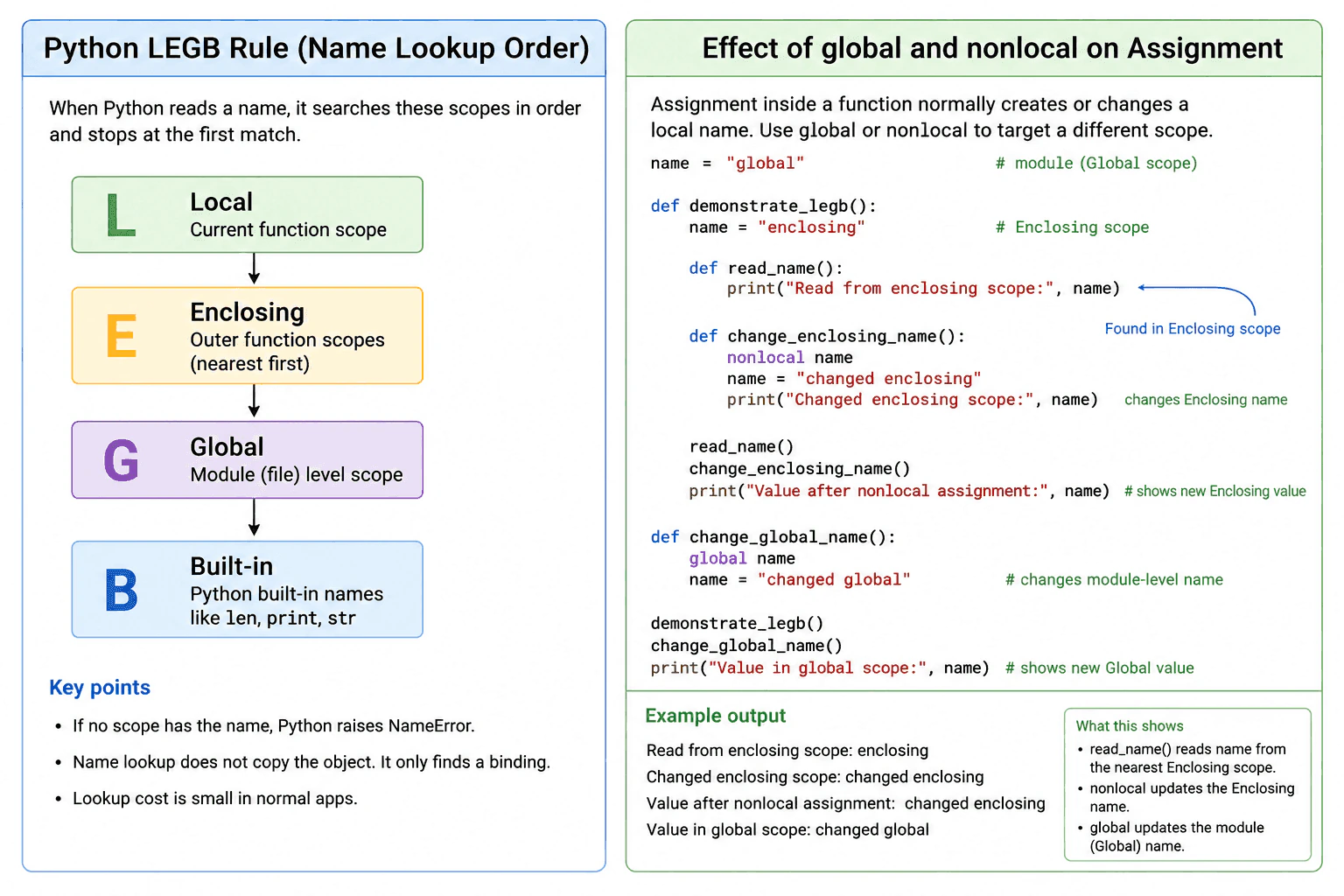
Python resolves a name in Local, Enclosing, Global, and Built in scope order. It stops when it finds the first matching binding. Assignment inside a function normally creates or changes a local name. The global declaration makes assignment use the module scope, while nonlocal makes assignment use the nearest enclosing function scope that already contains that name.
Python uses the LEGB rule to decide which binding a name refers to. It checks the Local scope of the current function first. It then checks Enclosing function scopes, starting with the nearest outer function. Next, it checks the Global scope of the current module. Finally, it checks the Built in scope, which contains names such as len and print. Python uses the first match. If no match exists, it raises NameError.
Useful Questions to Ask the Interviewer
Should I focus on Python language behavior, or also explain the runtime and standard library?
Which Python version and execution environment should I assume?
Would you like a small code example together with production tradeoffs and edge cases?
Assignment has an important rule. Assigning to a name inside a function normally makes that name local throughout that function. Reading it before the local assignment can therefore raise UnboundLocalError. The global declaration makes assignments target the module scope. The nonlocal declaration makes assignments target an existing binding in the nearest enclosing function scope. It cannot target the module scope.
These rules matter in closures, decorators, callbacks, and nested helper functions. Use global and nonlocal only when changing outer state is intentional. Passing values and returning results is often clearer. Name lookup does not copy the referenced object. It only finds a binding. The lookup cost is normally small, and it does not create a new object by itself.
Example
The example uses the same name in module and enclosing function scopes. The first nested function only reads the name, so Python finds the nearest enclosing binding. The second nested function declares the name as nonlocal, so its assignment changes the enclosing binding. The final function declares the name as global, so its assignment changes the module binding. The printed output shows each change in that order.
Code
name = "global"defdemonstrate_legb():
# This binding belongs to the enclosing function scope.
name = "enclosing"defread_name():
# There is no local binding named name here.# Python therefore reads the nearest enclosing binding.print("Read from enclosing scope:", name)
defchange_enclosing_name():
# nonlocal targets the existing binding in demonstrate_legb.nonlocal name
name = "changed enclosing"print("Changed enclosing scope:", name)
read_name()
change_enclosing_name()
print("Value after nonlocal assignment:", name)
defchange_global_name():
# global targets the binding in the module scope.global name
name = "changed global"
demonstrate_legb()
change_global_name()
print("Value in global scope:", name)
Where it is used
LEGB behavior is used whenever Python reads names inside functions. It is especially visible in nested functions, closures, decorators, callbacks, and module configuration. A closure may read state from an enclosing function. It may use nonlocal when it must update that saved state. A function may use global to update module state, although passing configuration or returning a result is usually clearer and easier to test.
Why Interviewers Ask This
Interviewers ask this question to check whether a candidate understands Python scope rules and can predict which value a name will refer to. It also tests whether the candidate can use global and nonlocal correctly, recognize variable shadowing, and avoid scope related bugs in nested functions.
Common interview mistakes
A common mistake is thinking that assignment searches all LEGB scopes. Normal assignment inside a function creates or changes a local binding. Another mistake is reading a name before assigning to it in the same function, which can raise UnboundLocalError. Developers may also use global when they need nonlocal, or try to use nonlocal when no enclosing function binding exists. Another mistake is assuming that a class body acts like an enclosing function scope for methods. Shadowing Built in names such as list, str, or print can also make code confusing.
Interview tip
State the LEGB order first. Then clearly separate name lookup from assignment. Explain that global targets the module scope and nonlocal targets an existing binding in the nearest enclosing function scope. Mention UnboundLocalError as the main assignment edge case.
Interviewer may ask next
Why can a function raise UnboundLocalError when a global binding with the same name exists?
It happens because assignment anywhere in that function normally makes the name local throughout the function body. Python then tries to read the local binding before it has a value. Declaring the name as global changes the assignment target to the module scope. Passing the value into the function is often clearer because it avoids hidden shared state.
Does LEGB name lookup copy objects or create meaningful memory overhead?
No, normal name lookup finds a binding to an existing object and does not copy that object. Checking additional scopes can require additional lookup work, but the cost is usually small compared with normal application work. The larger production concern is clarity, because heavy use of global or nonlocal state can make behavior harder to test and reason about.
14. What are *args and **kwargs used for?Language SpecificEasy
i Question Details
Explain how *args collects extra positional arguments, how **kwargs collects extra keyword arguments, and how both forms are used for unpacking during function calls.
Short Interview Answer (30-60 seconds)
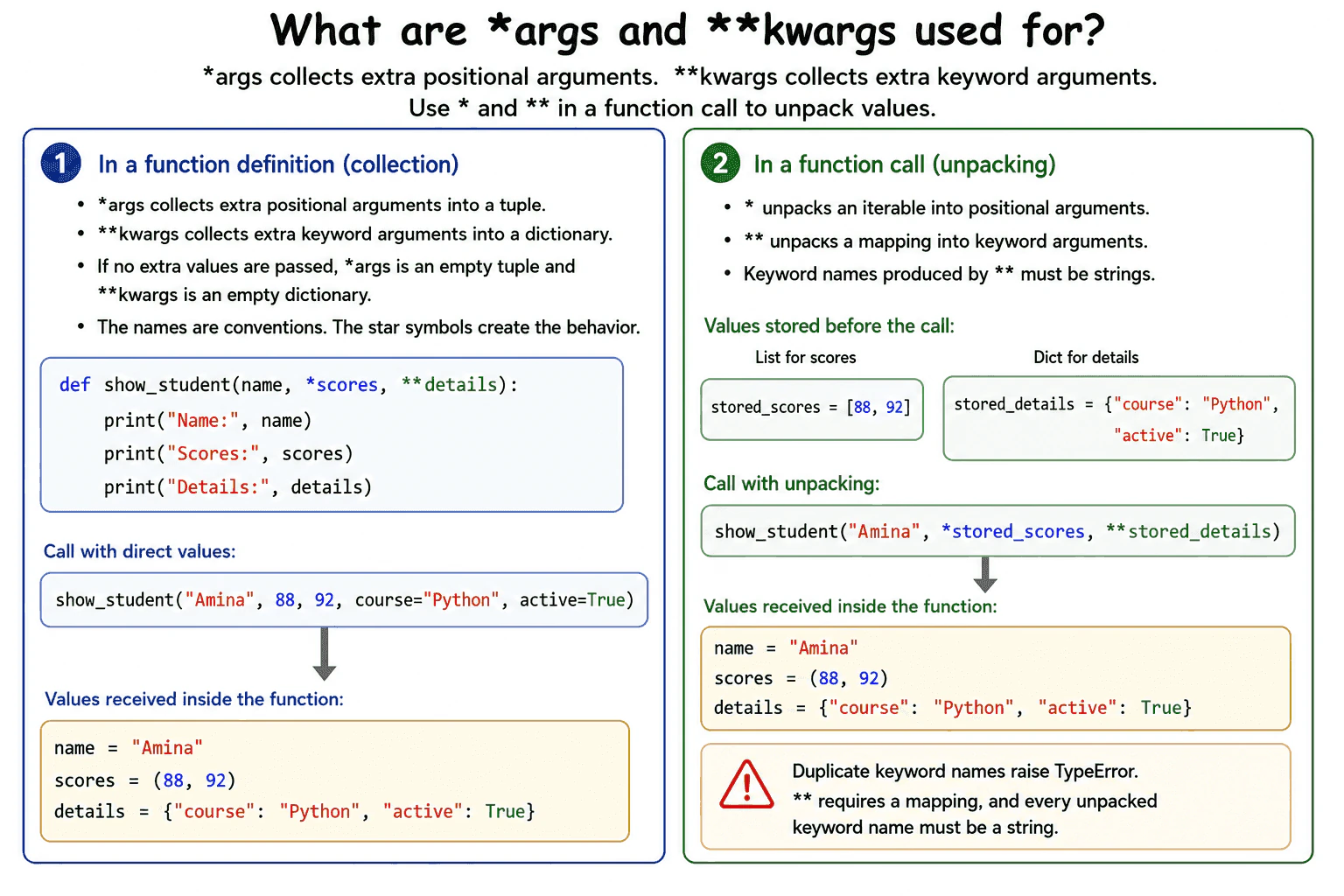
*args collects extra positional arguments into a tuple, while **kwargs collects extra keyword arguments into a dictionary. In a function call, * unpacks an iterable into positional arguments, and ** unpacks a mapping into keyword arguments. I use these forms when the number of values can vary or when forwarding arguments, but I prefer explicit parameters when the expected inputs are known.
*args and **kwargs let a function receive additional arguments when their exact number is not fixed. In a function definition, *args collects unmatched positional arguments into a tuple. Positional arguments are matched by their order. **kwargs collects unmatched keyword arguments into a dictionary. Keyword arguments are passed using names.
Useful Questions to Ask the Interviewer
Should I focus on Python language behavior, or also explain the runtime and standard library?
Which Python version and execution environment should I assume?
Would you like a small code example together with production tradeoffs and edge cases?
The names args and kwargs are conventions. The star symbols create the behavior. Even when no extra values are passed, the function receives an empty tuple for *args and an empty dictionary for **kwargs.
The syntax works in the opposite direction during a call. One star reads values from an iterable and passes them as separate positional arguments. Two stars read a mapping and pass its entries as separate keyword arguments. Keyword names produced by ** must be strings.
These forms are useful in wrappers, decorators, callbacks, configuration helpers, and functions that forward arguments. However, they can hide which inputs are accepted. Explicit parameters are clearer when the interface is known.
Python must process every collected or unpacked value, so call setup time and temporary memory grow with the number of arguments. Duplicate keyword names and invalid keyword keys raise TypeError.
Example
The example defines a function with one required parameter, extra positional parameters, and extra keyword parameters. The name parameter receives the required value. scores receives the remaining positional values as a tuple. details receives the remaining keyword values as a dictionary. The first call passes each value directly. The second call uses * to unpack a list into positional arguments and ** to unpack a dictionary into keyword arguments. Both calls give the function the same values and produce the same output.
Code
defshow_student(name, *scores, **details):
# name receives the required positional argument.print(f"Name: {name}")
# scores is a tuple of extra positional arguments.print(f"Scores: {scores}")
# details is a dictionary of extra keyword arguments.print(f"Details: {details}")
# Pass each value directly.
show_student(
"Amina",
88,
92,
course="Python",
active=True,
)
print()
# Store positional values in a list.
stored_scores = [88, 92]
# Store keyword values in a dictionary.
stored_details = {
"course": "Python",
"active": True,
}
# One star unpacks the list into positional arguments.# Two stars unpack the dictionary into keyword arguments.
show_student("Amina", *stored_scores, **stored_details)
Where it is used
This feature is used in wrapper functions that pass arguments to another function, decorators that preserve a wrapped function call, callback systems, logging helpers with optional context, constructors with optional settings, and reusable utilities that accept varying inputs. It is also useful when values are already stored in a list, tuple, generator, or dictionary and must be passed to a function. In production code, explicit parameters are usually better when the accepted inputs are known because they improve readability, validation, documentation, editor support, and type checking.
Why Interviewers Ask This
Interviewers ask this question to check whether a candidate understands flexible function parameters, positional and keyword argument matching, and unpacking during function calls. It also tests whether the candidate knows when this flexibility is useful and when explicit parameters would create a clearer production interface.
Common interview mistakes
A common mistake is thinking args and kwargs are required names. They are only conventions. The star symbols create the behavior. Another mistake is expecting *args to be a list, but it is a tuple. kwargs is a dictionary. Developers may also use flexible parameters when named parameters would make the interface clearer. During a call, duplicate keyword names raise TypeError. Values passed with must come from a mapping, and every resulting keyword name must be a string. Unpacking an iterable with * also consumes its values, so a generator may be exhausted after the call.
Interview tip
Explain the two directions clearly. In a function definition, the stars collect extra arguments. In a function call, the stars unpack stored values. Then state that *args is a tuple, **kwargs is a dictionary, and explicit parameters are better when the accepted inputs are known.
Interviewer may ask next
What happens if the same keyword is supplied directly and through ** unpacking?
Python raises TypeError because the call supplies more than one value for the same keyword. For example, passing course directly and also unpacking a mapping containing course creates a duplicate. This matters when keyword data comes from several sources, so the values should be merged and checked before the call.
What is the tradeoff of using *args and **kwargs in production code?
They provide flexibility, but they make the accepted interface less obvious. They are useful for wrappers, decorators, callbacks, and argument forwarding. Explicit parameters are better when the inputs are known because they improve readability, validation, documentation, editor support, and type checking. There is also call setup cost because Python must collect or unpack each supplied value.
15. What are default function arguments?Language SpecificEasy
i Question Details
Explain when default expressions are evaluated, how callers can omit corresponding arguments, and why mutable default values can cause shared-state bugs.
Short Interview Answer (30-60 seconds)
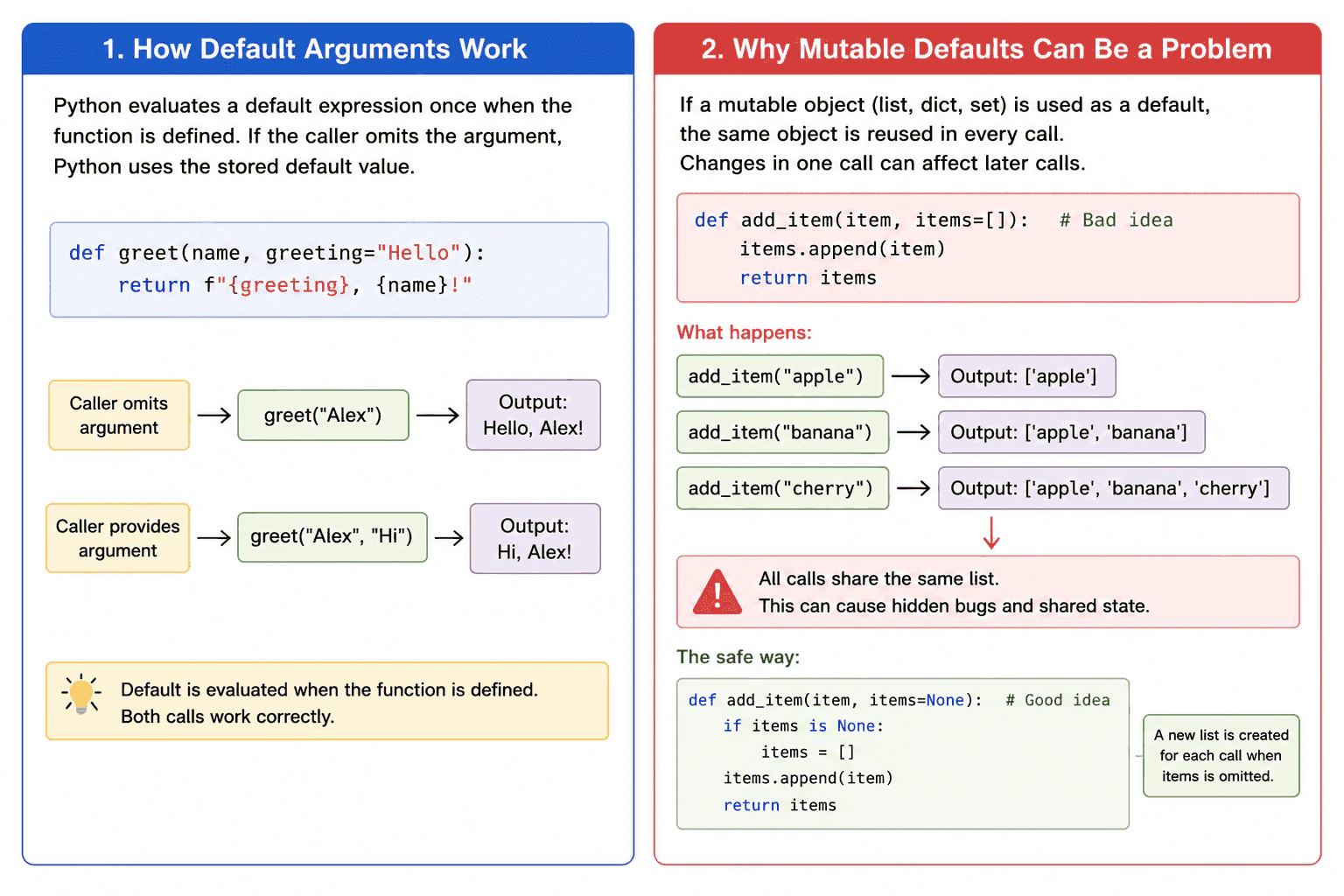
Default function arguments let callers omit selected arguments because the function already has stored values for them. Python evaluates each default expression when the def statement runs, not each time the function is called. Immutable defaults such as numbers, strings, and None are usually safe. For a list, dictionary, or set that should be new for every call, I use None and create the object inside the function.
The practical rule is simple. Use a fixed immutable value as a default. Use None when each call needs a new mutable object.
Useful Questions to Ask the Interviewer
Should I focus on Python language behavior, or also explain the runtime and standard library?
Which Python version and execution environment should I assume?
Would you like a small code example together with production tradeoffs and edge cases?
A default function argument is a parameter that has a value in the function definition. When the caller omits that argument, Python uses the stored default value. The caller can still provide another value.
Python evaluates a default expression when execution reaches the def statement. The resulting object is stored with the function. If the def statement runs again, such as when an enclosing function is called again, new defaults are created for that new function object.
This behavior matters for mutable objects. A list, dictionary, or set can change after creation. If one is used as a default and the function changes it, later calls that omit the argument reuse the same object and can see earlier changes.
The safe pattern is to use None and create a new object inside the function. This adds one small allocation for each omitted call. Memory is separate for each created object and grows only with the data stored in it. When None is a valid input, use a unique sentinel object instead.
Example
The function uses None as the stored default. When the caller omits items, the function creates a new list for that call. The first call returns a list containing apple. The second call returns a different list containing banana. When the caller provides an existing list, the function uses and changes that exact list. The final two printed values both contain orange and grape because they refer to the same provided list.
Code
defadd_item(item, items=None):
# None is the stored default value.# Create a new list only when the caller omits items.if items isNone:
items = []
# Add the requested value to the selected list.
items.append(item)
return items
# These calls each receive a separate new list.
first_result = add_item("apple")
second_result = add_item("banana")
print(first_result)
print(second_result)
# A list provided by the caller is used directly.
existing_items = ["orange"]
third_result = add_item("grape", existing_items)
print(third_result)
print(existing_items)
Where it is used
Default arguments are useful for optional settings such as retry counts, timeout values, formatting choices, logging flags, and dependency options. Immutable defaults such as integers, strings, booleans, tuples containing immutable values, and None are common. In production code, functions that collect records, build result lists, or update dictionaries should create a fresh mutable object for each call unless shared state is intentional, documented, and tested. Creating a new empty list or dictionary has a small constant time and memory cost, which is normally safer than keeping accidental shared state.
Why Interviewers Ask This
Interviewers ask this question to check whether a candidate understands when Python evaluates default expressions, how omitted arguments are handled, and why mutable defaults can create shared state. It also tests whether the candidate can choose a safe implementation for production code.
Common interview mistakes
A common mistake is believing that Python evaluates a default expression for every call. Another mistake is using an empty list, dictionary, or set as a default and changing it inside the function. Developers may also write if not items when they only want to detect an omitted value. That condition also treats an intentionally empty list as missing. Use if items is None when None is the marker. Another mistake is assuming a function call used as a default runs on every call. It runs when execution reaches the def statement. Mutable defaults can be used intentionally for shared state or caching, but that behavior should be explicit, documented, and carefully tested.
Interview tip
Start with the main rule that Python evaluates default expressions when the def statement runs. Then explain that callers may omit those arguments. Finish with the mutable default bug and the None pattern. This clearly covers the behavior, the risk, and the safe solution.
Interviewer may ask next
What happens if a function uses an empty list as its default value?
The same list is reused by calls that omit the argument. Python created and stored that list when execution reached the def statement. If one call changes it, a later call can see the earlier data. This matters because it creates hidden shared state. Use None and create a new list inside the function when calls need independent data.
What should you use when None is a valid argument value?
Use a unique sentinel object as the default. Create it once with object(), then compare the argument with that sentinel by using is. This separates an omitted argument from an explicit None value. The tradeoff is a little more code, but the function preserves the real meaning of None while still detecting whether the caller supplied the argument.
16. What are positional-only and keyword-only parameters?Language SpecificEasy
i Question Details
Explain the / and * markers in function signatures, how they constrain calls, and why an API author might use them.
Short Interview Answer (30-60 seconds)
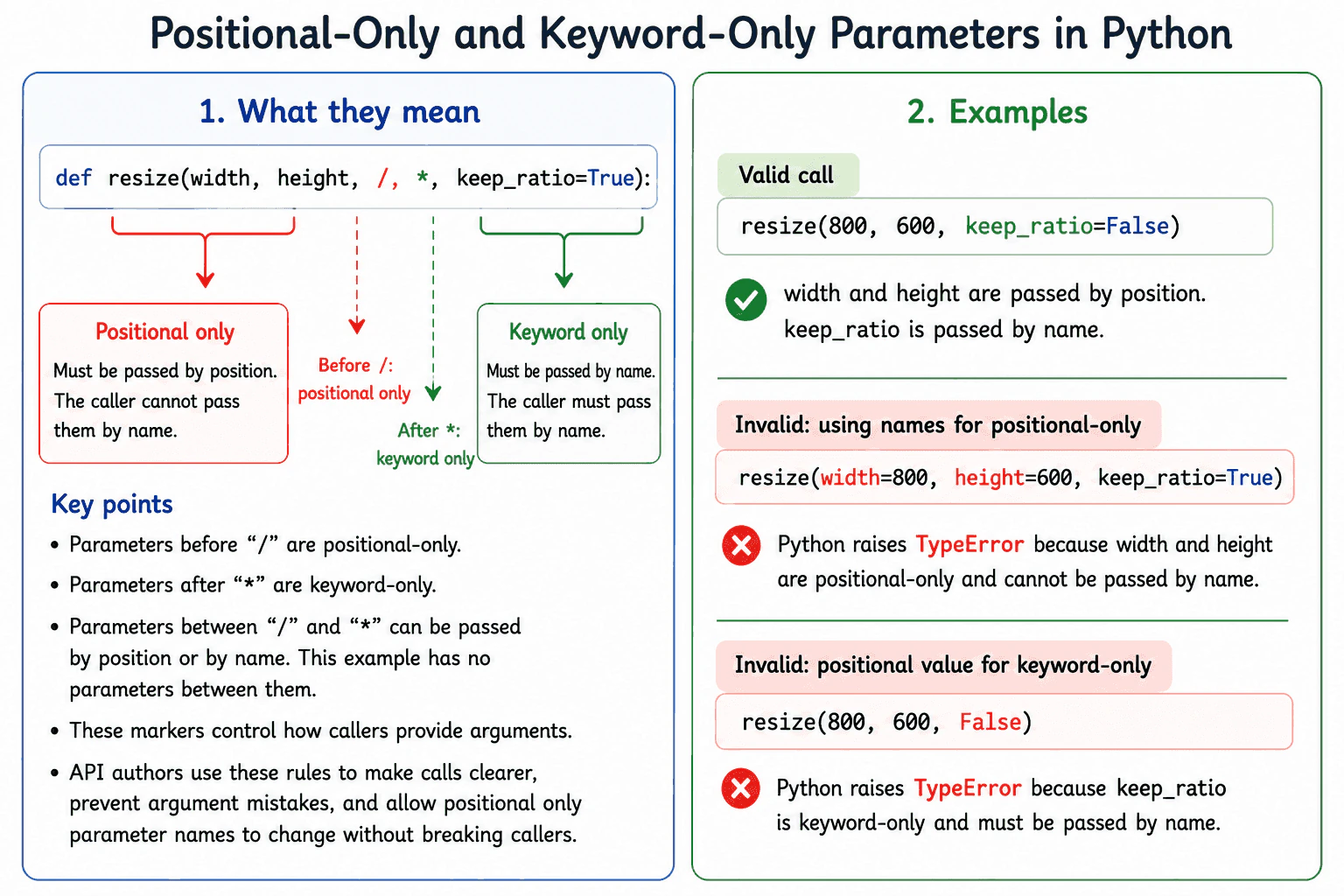
Positional only parameters must be passed by position, while keyword only parameters must be passed by name. Parameters before / are positional only. Parameters after * are keyword only. Parameters between the two markers can usually be passed either way. API authors use these rules to make calls clearer, prevent incorrect argument order, and avoid making some parameter names part of the public API.
Use / and * when a function should control how callers provide arguments. Parameters before / are positional only. Their values must be supplied in order. Parameters after a bare * are keyword only, so callers must write their names. Parameters between / and * can normally be passed by position or by name.
Useful Questions to Ask the Interviewer
Should I focus on Python language behavior, or also explain the runtime and standard library?
Which Python version and execution environment should I assume?
Would you like a small code example together with production tradeoffs and edge cases?
For example, def resize(width, height, /, *, keep_ratio=True) requires width and height by position and keep_ratio by name. Therefore, resize(800, 600, keep_ratio=False) is valid. Passing width=800 or passing False as a third positional value raises TypeError during argument binding.
An API author may hide positional only parameter names so those names can change later without breaking callers. Keyword only options make calls easier to read and reduce mistakes when several values have similar types. However, unnecessary restrictions can make a simple function less convenient. These markers do not change the function result and do not create separate application data. Their direct performance and memory effects are normally insignificant. The main benefits are readability, safer calls, and better control of API compatibility.
Example
The function places width and height before /, so callers must pass them by position. It places keep_ratio after *, so callers must pass it by name. The valid call prints the supplied values. Each invalid call is placed inside a try block so the program can show the TypeError raised during argument binding and then continue.
Code
defresize(width, height, /, *, keep_ratio=True):
# width and height appear before the slash.# Callers must pass them by position.# keep_ratio appears after the star.# Callers must pass it by name.print(f"Width: {width}")
print(f"Height: {height}")
print(f"Keep ratio: {keep_ratio}")
# This call is valid.# The first two values are passed by position.# The final option is passed by name.
resize(800, 600, keep_ratio=False)
try:
# This call is invalid because width and height are positional only.
resize(width=800, height=600, keep_ratio=True)
except TypeError as error:
print(f"Error: {error}")
try:
# This call is invalid because keep_ratio is keyword only.
resize(800, 600, False)
except TypeError as error:
print(f"Error: {error}")
Where it is used
These rules are useful in public libraries, framework functions, data processing utilities, and internal services used by many callers. Positional only parameters fit values with a natural order, such as width and height, or values whose parameter names should not become part of the public contract. Keyword only parameters fit options such as timeout, strict mode, retries, logging, and output format because the names make each choice clear. They are especially helpful when several optional values have the same type and could otherwise be passed in the wrong order.
Why Interviewers Ask This
Interviewers ask this question to check whether a candidate understands Python function signatures and argument binding. It also tests whether the candidate can design clear public APIs, prevent ambiguous calls, and make careful compatibility decisions.
Common interview mistakes
A common mistake is thinking callers include / or * in a function call. These markers appear only in the function definition. Another mistake is assuming every parameter before * is positional only. A parameter is positional only only when it appears before /. Developers may also forget that parameters between / and * can usually be passed either by position or by name. Another mistake is changing an existing public signature without checking callers, because adding either restriction can break previously valid calls. Finally, the name of a positional only parameter can still appear as a separate key inside **kwargs when the function accepts extra keyword arguments.
Interview tip
State the rule for / first, then the rule for *. Show one short function signature and one valid call. Finish by explaining that the main purpose is clearer calls and better API compatibility, not faster execution.
Interviewer may ask next
Can the name of a positional only parameter also appear inside `**kwargs`?
Yes. If a function accepts kwargs, the same text can appear as a separate keyword key because Python does not use it to bind the positional only parameter. For example, in def collect(name, /, kwargs), the call collect("A", name="B") gives "A" to the positional only parameter and stores {"name": "B"} in kwargs. This matters because positional only names are not reserved for keyword binding, although using the same name twice can confuse readers.
When should an API author avoid keyword only parameters?
An API author should avoid them when positional use is already clear, natural, and convenient. Requiring names for every simple argument can make calls longer without preventing a realistic mistake. The tradeoff is between explicit calls and ease of use. Keyword only parameters are most valuable for optional settings, boolean choices, and values that callers could easily place in the wrong order.
17. What is a lambda function?Language SpecificEasy
i Question Details
Explain lambda syntax, its single-expression restriction, suitable use cases, and when a named function is clearer.
Short Interview Answer (30-60 seconds)
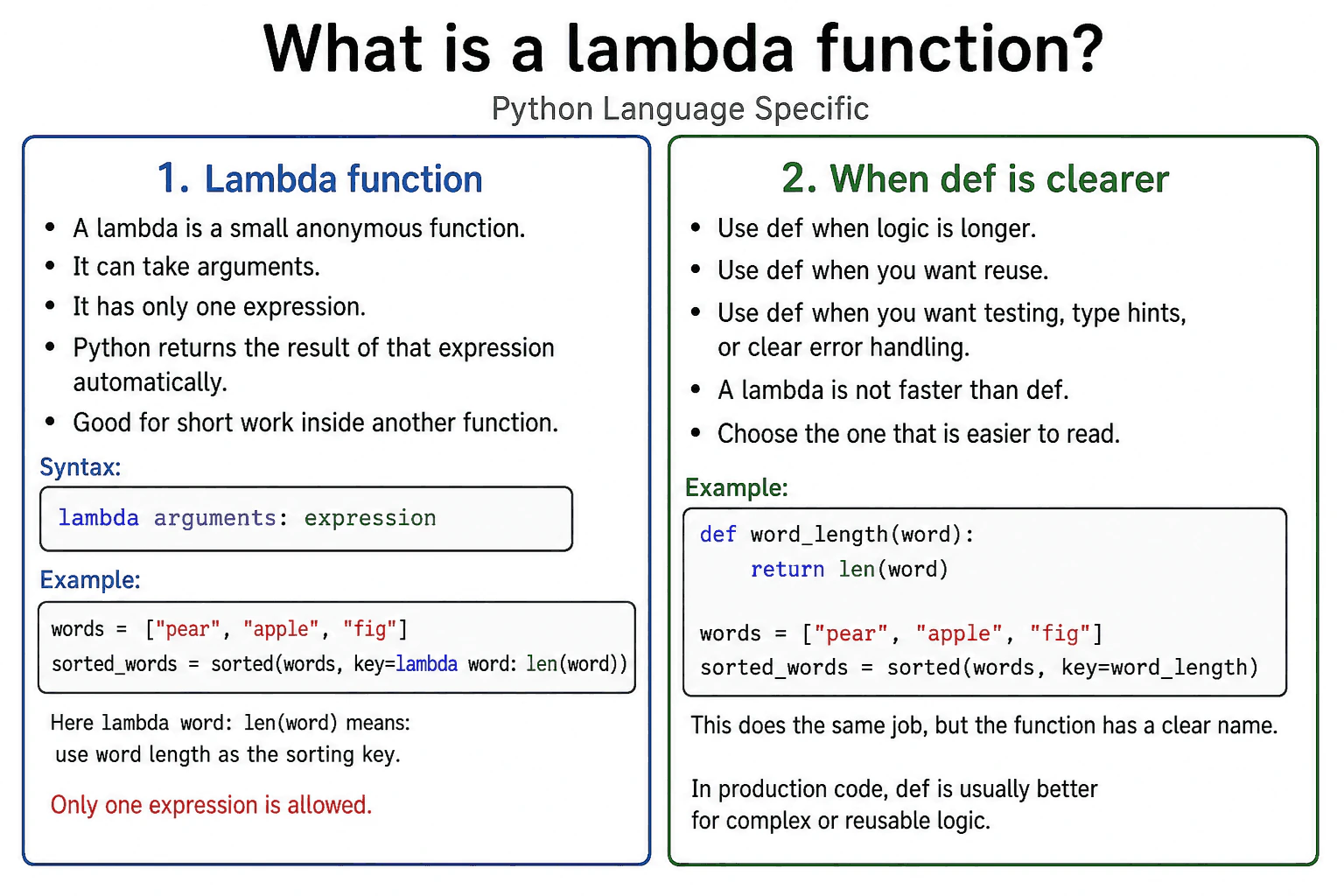
A lambda function is a small anonymous function created with the lambda keyword. It can accept multiple arguments, but its body contains one expression. Python evaluates that expression and returns the result automatically. I use a lambda for a short operation passed to a function such as sorted. I use a named function when the logic needs several steps, reuse, testing, or a clear name.
Detailed Explanation
Use a lambda when you need a very small function for a short and clear operation. A lambda function is created with the lambda keyword. Arguments appear before a colon, and one expression appears after it. For example, lambda value: value * 2 creates a function that returns twice the given value.
Useful Questions to Ask the Interviewer
Should I focus on Python language behavior, or also explain the runtime and standard library?
Which Python version and execution environment should I assume?
Would you like a small code example together with production tradeoffs and edge cases?
A lambda does not need a name when it is created, but Python still creates a normal function object. The function can be stored, passed to another function, or called later. Python evaluates the single expression and returns its result automatically. Statements such as return, try, and normal assignment statements cannot appear in the body. Some expression forms, including a conditional expression, are allowed, but complex expressions reduce readability.
Lambdas are useful as short key functions for sorted, min, and max, or as small callbacks. A named function is clearer when logic needs several steps, reuse, documentation, type hints, testing, or error handling. A lambda has no special speed advantage over def. Creating either form allocates a function object. If a lambda closes over outside variables, it keeps references to them, which can extend the lifetime of those objects.
Where it is used
Lambda functions are commonly used as key functions when sorting records, selecting a minimum or maximum item, or grouping values by one field. They can also be used for small callbacks and simple transformations passed directly to another function. A named function is better when the logic is reused, needs several steps, requires annotations or documentation, needs clear error handling, or should be tested separately.
Why Interviewers Ask This
Interviewers ask this question to check whether the candidate understands Python function syntax, expression evaluation, function objects, closures, and readable coding choices. They also want to know whether the candidate can choose between a short lambda and a named function in production code.
Common interview mistakes
A common mistake is thinking that lambda creates a special or faster kind of function. Python creates a normal function object, and lambda has no special speed benefit. Another mistake is trying to place statements such as return, try, or a normal assignment statement inside the body. Only one expression is allowed. Developers may also place complex conditional logic inside a lambda, which makes the code hard to read. Another important mistake appears when lambdas created inside a loop close over the same changing variable. The variable is looked up when the function is called, so every lambda may see the final loop value unless the current value is captured with a default argument.
Interview tip
Start by saying that a lambda is a small anonymous function with one expression. Explain that the expression result is returned automatically. Give one practical use such as a sorting key. Finish by saying that a named function is clearer for complex, reusable, documented, or separately tested logic.
Interviewer may ask next
What happens when lambdas created in a loop use the loop variable?
They normally look up the loop variable when each function is called, not when each function is created. Because the lambdas close over the same variable, they may all return a result based on its final value. This matters when creating callbacks in a loop. The current value can be captured by placing it in a default argument, but a named function may be clearer when the behavior is not obvious.
Does using a lambda improve performance or memory use compared with def?
No, a lambda does not provide a general performance or memory advantage over def. Both forms create function objects, and their execution cost depends mainly on the work performed by the function. A closure created by either form can keep references to outside objects and extend their lifetime. The main tradeoff is readability and convenience, not speed or memory savings.
18. What is a list comprehension?Language SpecificEasy
i Question Details
Explain list-comprehension syntax with optional filtering, compare it with an equivalent loop, and discuss when a comprehension becomes too complex to remain readable.
Short Interview Answer (30-60 seconds)
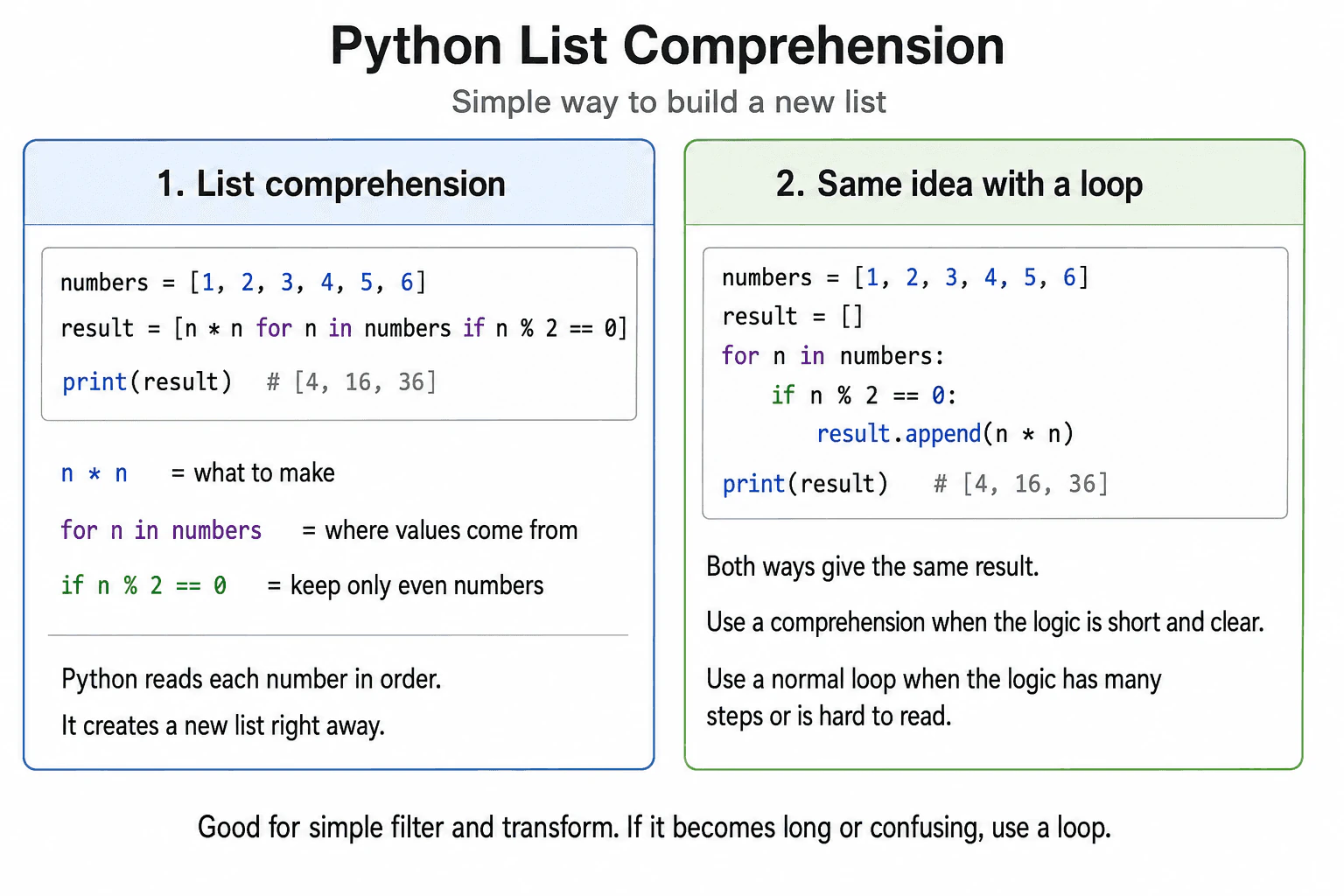
A list comprehension is a concise way to create a new list from an iterable. Its basic form is [expression for item in iterable], and it can include an optional filter such as [expression for item in iterable if condition]. It creates the complete list immediately. I use it for one clear transformation and perhaps one simple condition. I use a normal loop when the logic needs several steps or becomes difficult to read.
Detailed Explanation
A list comprehension creates a new list by iterating over an iterable and evaluating an expression for each selected item. Its basic syntax is [expression for item in iterable]. An optional filter appears after the for clause, as in [number * number for number in numbers if number % 2 == 0].
Useful Questions to Ask the Interviewer
Should I focus on Python language behavior, or also explain the runtime and standard library?
Which Python version and execution environment should I assume?
Would you like a small code example together with production tradeoffs and edge cases?
For numbers equal to [1, 2, 3, 4, 5, 6], Python visits each value in order. It tests whether the number is even. When the condition is true, it squares the number and adds the result to the new list. The output is [4, 16, 36]. An equivalent loop starts with an empty list, checks the same condition, and calls append with the same expression.
For this example, both forms take linear time because they inspect every input value. If n values are checked and k results are kept, the new list uses space proportional to k, not counting the internal size of newly created result objects.
A comprehension is best for simple transformation and filtering. Use a normal loop for complex conditions, several actions, logging, error handling, or logic that needs clear intermediate steps.
Where it is used
List comprehensions are useful when production code needs a new list made from existing data. Examples include selecting active records, converting strings to numbers, extracting fields from objects, normalizing API values, and preparing display data. They are a good choice when each item has one clear transformation and perhaps one simple condition. A normal loop is usually clearer when the work includes logging, exception handling, several temporary values, multiple actions, or complex business rules. A generator expression may be better when the full result does not need to be stored in memory at once.
Why Interviewers Ask This
Interviewers ask this question to check whether a candidate understands Python iteration, filtering, expression evaluation, and list creation. They also want to see whether the candidate can choose readable code instead of using compact syntax when the logic is too complex.
Common interview mistakes
A common mistake is putting the filter before the for clause. A filtering condition belongs after the iterable clause. Another mistake is using a comprehension only for side effects, such as printing values or changing unrelated state. A comprehension should normally create useful result values. Developers may also place several conditions, nested loops, or long expressions inside one comprehension, which can make valid code difficult to understand. Another mistake is assuming that a comprehension changes the original list. It creates a new outer list. However, if the new and original lists contain references to the same mutable objects, changing one shared object can be visible through both lists. An empty iterable is not an error. It simply produces an empty list. If the expression or condition raises an exception, list creation stops and the exception is propagated.
Interview tip
Start with the basic syntax. Show one example with a filter. Explain the equivalent loop and state that both create the same result. Then mention eager list creation, linear work for a simple single loop, and the readability rule: use a normal loop when the comprehension becomes hard to understand.
Interviewer may ask next
Does a list comprehension modify the original list?
No, a list comprehension creates a new outer list. It reads values from the original iterable and stores the expression results in a separate list. This matters because adding or removing items from the new outer list does not change the original outer list. The limitation is that both lists can still refer to the same mutable inner objects, so changing one shared object may be visible through both lists.
When should a generator expression be used instead of a list comprehension?
Use a generator expression when values can be processed one at a time and the complete result does not need to be stored immediately. A generator expression produces values lazily, which can reduce memory use for large inputs. The tradeoff is that it does not provide a ready list, it is normally consumed during iteration, and operations that require indexing, repeated traversal, or a stored result may still require converting it to a list.
19. What is unpacking in Python?Language SpecificEasy
i Question Details
Explain iterable unpacking, starred targets, swapping values, nested unpacking, and errors caused by mismatched numbers of values.
Short Interview Answer (30-60 seconds)
Unpacking lets Python take values from an iterable and assign them to several targets in one statement. Normal unpacking requires the number and structure of the values to match the targets. A starred target can collect remaining values into a new list. Unpacking is useful for fixed records, swapping values, and nested data, but it should be used carefully when the input shape may change.
Detailed Explanation
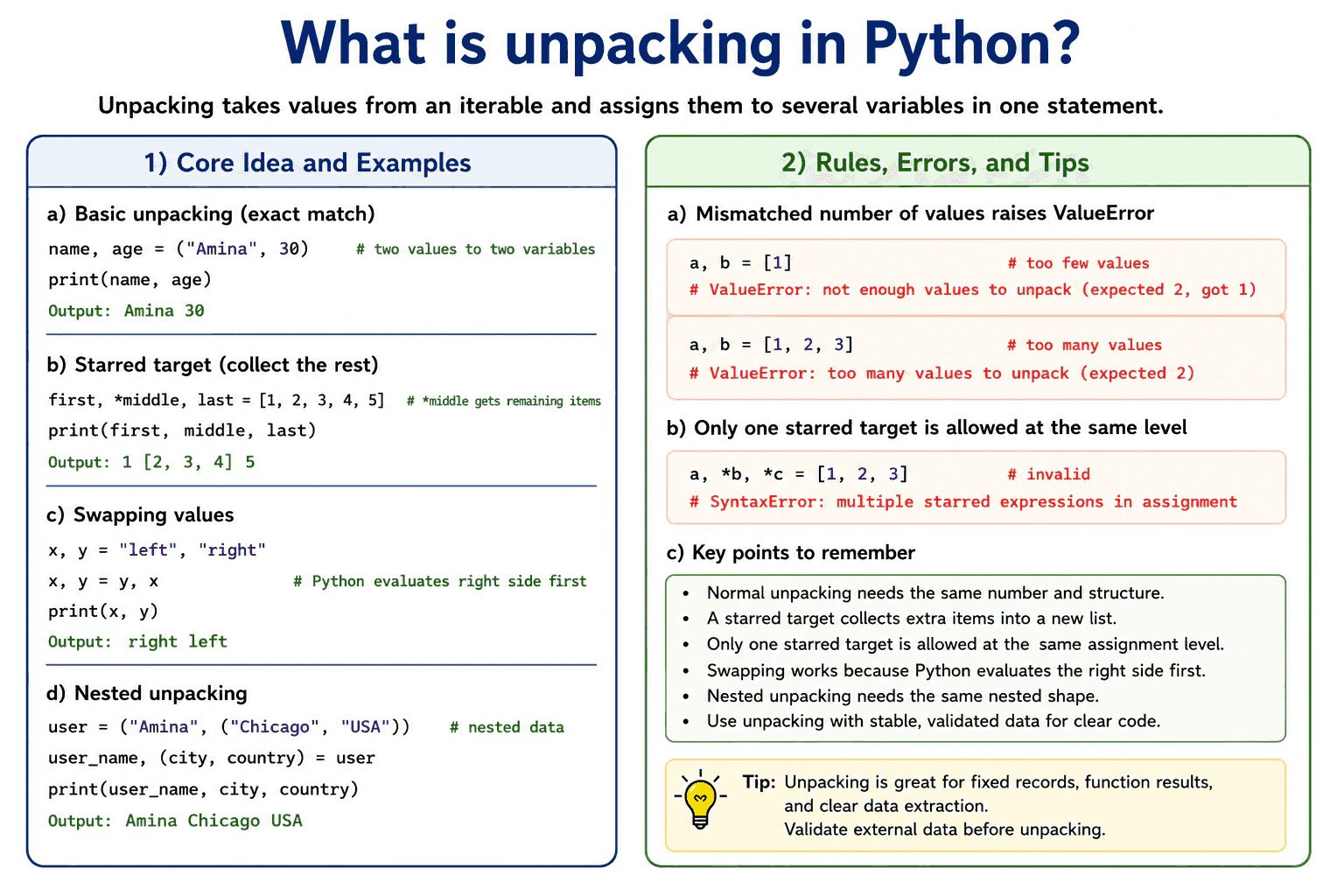
Unpacking lets Python assign items from an iterable to several targets in one statement. For example, name, age = ("Amina", 30) assigns one value to each target. Python iterates over the object and requires the values to match the target structure.
Useful Questions to Ask the Interviewer
Should I focus on Python language behavior, or also explain the runtime and standard library?
Which Python version and execution environment should I assume?
Would you like a small code example together with production tradeoffs and edge cases?
Normal unpacking raises ValueError when there are too few or too many values. A starred target handles a variable number of values. In first, *middle, last = values, Python assigns the first and last items normally and stores the remaining items in a new list named middle. Only one starred target is allowed at the same assignment level.
Python also supports swapping with left, right = right, left. Python evaluates the right side first, then assigns those results to the targets. Nested unpacking works when the target shape matches the data shape, such as name, (city, country) = user.
Use unpacking for stable records, function results, dictionary item iteration, and clear data extraction. Avoid deep or fragile unpacking when external data may change. Unpacking processes the required items, so its time cost grows with the number of values read. A starred target also allocates a new list for the collected values.
Where it is used
Unpacking is commonly used when reading fixed tuple results, receiving several values from a function, iterating through dictionary key and value pairs, separating fields from validated records, swapping variables, and extracting values from nested data. A starred target is useful when some positions are fixed and the remaining values should be collected. In production code, unpacking is clearest when the input structure is known and stable.
Why Interviewers Ask This
Interviewers ask this question to check whether a candidate understands assignment with iterables, exact value matching, starred targets, nested structures, and the errors Python raises when the structure does not match. It also tests whether the candidate knows when unpacking improves clarity and when explicit validation is safer.
Common interview mistakes
Common mistakes include using a different number of targets and values, which raises ValueError, and using more than one starred target at the same assignment level, which causes SyntaxError. Another mistake is assuming that a starred target preserves the original iterable type. Python stores the collected values in a new list. Nested unpacking also fails with ValueError when the data shape does not match the target shape. Deep unpacking can reduce readability and make changing input formats harder to handle.
Interview tip
Begin by saying that unpacking assigns iterable values to several targets. Then explain exact matching, starred targets, swapping, nested unpacking, and ValueError. Mention that a starred target creates a new list and that unpacking is safest when the input shape is stable.
Interviewer may ask next
What happens when the number or structure of values does not match the targets?
Python raises ValueError when normal unpacking receives too few or too many values. It also raises ValueError when a nested value does not match the nested target structure. This matters because unpacking assumes a known shape, so uncertain external data should be validated before assignment.
What are the performance and memory costs of a starred target?
A starred target reads the iterable and stores the collected values in a new list. The time cost grows with the number of values processed, and the extra memory cost grows with the number of values collected. This is convenient for small or expected records, but direct iteration can use less memory when the remaining input is very large.
20. How does sequence slicing work?Language SpecificEasy
i Question Details
Explain start, stop, and step semantics, omitted bounds, negative indices, reverse slicing, and whether slicing creates a new object for common built-in sequences.
Short Interview Answer (30-60 seconds)
Sequence slicing selects items with sequence[start:stop:step]. Start is included, stop is excluded, and step controls the direction and distance between selected items. Omitted bounds use defaults that depend on the step direction. Negative indices count from the end, and a negative step can produce a reversed result. For a list, slicing creates a new outer list and copies references to the selected elements. Immutable built in sequences return a result of the same type, but code should not depend on whether Python reuses an existing immutable object for some slices.
Detailed Explanation
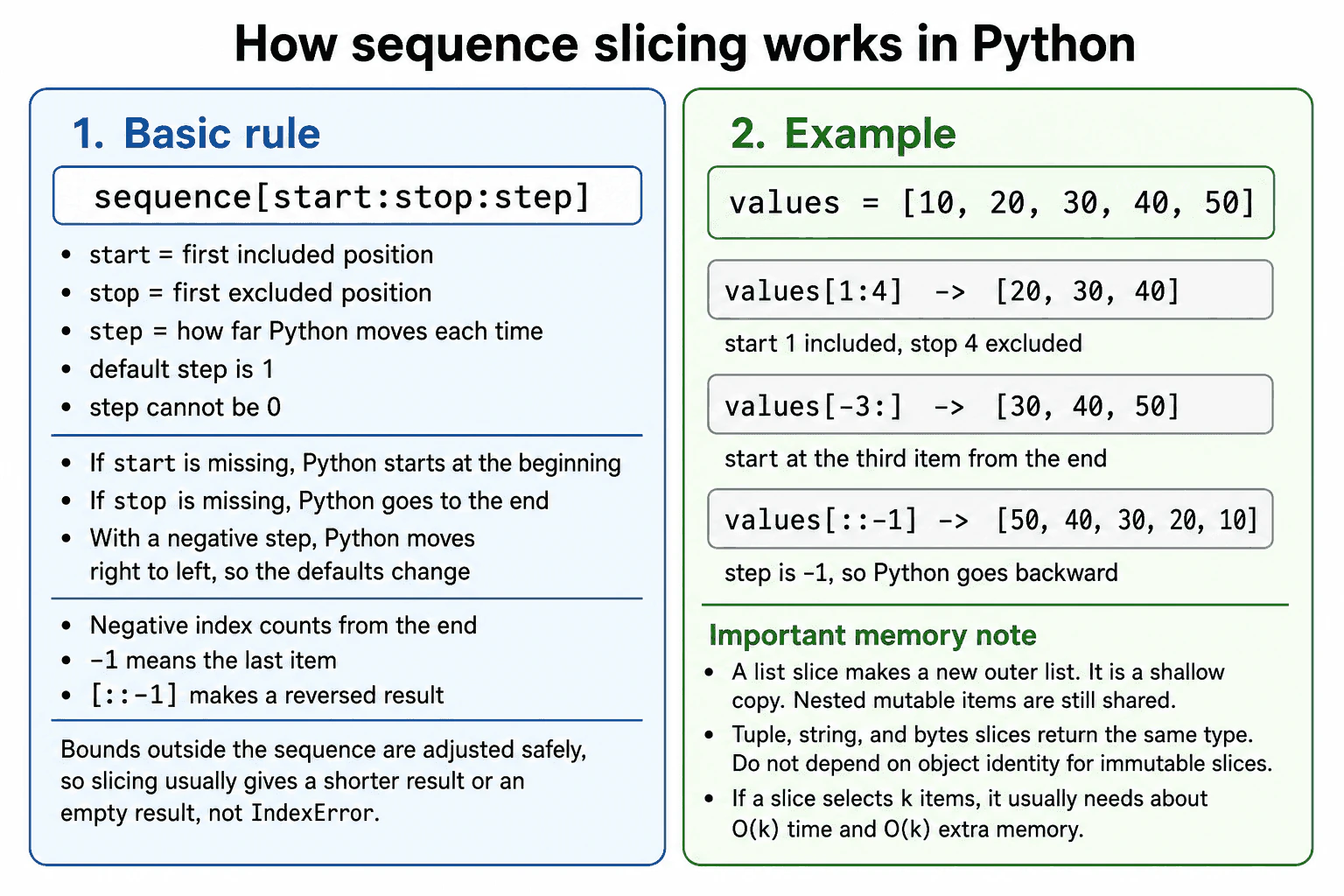
Sequence slicing uses sequence[start:stop:step]. Start is the first included position. Stop is the first excluded position. Step tells Python how far to move after each selected item. The normal step is 1, and a step of zero raises ValueError.
Useful Questions to Ask the Interviewer
Should I focus on Python language behavior, or also explain the runtime and standard library?
Which Python version and execution environment should I assume?
Would you like a small code example together with production tradeoffs and edge cases?
For values = [10, 20, 30, 40, 50], values[1:4] returns [20, 30, 40]. An omitted start normally means the beginning, and an omitted stop normally means the end. With a negative step, the defaults change so Python can move from right to left. For example, values[::-1] returns [50, 40, 30, 20, 10].
Negative indices count from the end. values[-3:] returns [30, 40, 50]. Slice bounds outside the sequence are adjusted safely, so slicing normally returns a shorter or empty result instead of raising IndexError.
A list slice creates a new outer list, but nested mutable objects are still shared because the copy is shallow. Tuple, string, and bytes slices return the same sequence type. Python may reuse an immutable object for some full or empty slices, so object identity should not be assumed. A typical slice selecting k items takes about O(k) time and O(k) extra memory.
Where it is used
Slicing is used to select pages of results, remove prefixes, read recent records, divide strings, extract sections of bytes, copy a list, and reverse small sequences. It is useful when the code needs a clear independent outer sequence. It should be used carefully with large collections or inside repeated loops because each ordinary slice can copy many items and allocate additional memory. When copying is unnecessary, iterators, index based loops, or library specific views may be more suitable.
Why Interviewers Ask This
Interviewers ask this question to check whether a candidate understands Python index rules, slice direction, boundary handling, copying behavior, and performance cost. It also tests whether the candidate can explain important differences between mutable and immutable sequence results without making unsafe assumptions about object identity.
Common interview mistakes
A common mistake is expecting the stop position to be included. Another mistake is using a step of zero, which raises ValueError. Developers may also choose incorrect start and stop values for a negative step because movement is from right to left. Some assume a list slice is a deep copy, but nested mutable objects remain shared. Another mistake is comparing slice results with is and assuming every immutable slice must have a new identity. Code should compare values unless object identity is part of a documented guarantee. Repeated large slices can also create avoidable copying and memory use.
Interview tip
Begin with the rule that start is included and stop is excluded. Then explain step, omitted bounds, negative indices, and reverse slicing with one small list. Finish by stating that list slicing makes a shallow outer copy, while immutable sequence identity should not be assumed.
Interviewer may ask next
What happens when slice bounds are outside the sequence or the step is zero?
Bounds outside the sequence are normally adjusted to valid limits, so the result is shortened or empty instead of raising IndexError. A step of zero is different and raises ValueError because Python cannot advance through the sequence. This matters because slicing is tolerant of range boundaries but still requires a valid direction and distance.
Why can slicing be expensive in production code?
An ordinary slice that selects k items usually takes about O(k) time and O(k) extra memory because Python must build the result and copy values or references into it. For lists, the new list is only a shallow copy, so nested mutable objects remain shared. This matters in large collections and repeated loops, where iterators, index based processing, or supported views may avoid unnecessary allocation.
More questions load as you scroll
Disclaimer: This interview guide is for educational and informational purposes only. It is designed to help readers prepare, but it does not guarantee any interview result, hiring decision, offer, or outcome. Interview questions, hiring criteria, and preferred answers can vary by employer, interviewer, industry, location, and time. All answers, examples, and explanations in this guide are suggested examples for interview preparation, not definitive answers or instructions for professional practice. They are based on research and judgment, are provided without warranties of any kind, and should be adapted to the question, role, and applicable laws and professional requirements. Diagrams are simplified illustrations intended to highlight the main concepts and their relationships; actual situations, systems, and practices may be more complex. Alternative approaches may be equally valid or better suited to a particular question, context, or interviewer. To the fullest extent permitted by applicable law, the contributors and publisher are not liable for decisions made, actions taken, or losses incurred based on this guide.
State Laws and Professional Responsibilities: Laws and requirements governing an occupation vary by state and jurisdiction. You are responsible for checking the current laws, licensing requirements, and scope-of-practice rules that apply to your location and role, and for ensuring that your answers and actions comply with them. Adapt examples in this guide to those requirements. This guide is not legal advice.
Content Accuracy and Verification: To the fullest extent permitted by applicable law, we do not represent or warrant that interview guides, questions, answers, examples, or diagrams are accurate, complete, current, error-free, or suitable for any particular purpose. You are responsible for independently reviewing and verifying the information before relying on it.