This interview guide is for educational and informational purposes only. It is designed to help readers prepare, but it does not guarantee any interview result, hiring decision, offer, or outcome. Interview questions, hiring criteria, and preferred answers can vary by employer, interviewer, industry, location, and time. All answers, examples, and explanations in this guide are suggested examples for interview preparation, not definitive answers or instructions for professional practice. They are based on research and judgment, are provided without warranties of any kind, and should be adapted to the question, role, and applicable laws and professional requirements. Diagrams are simplified illustrations intended to highlight the main concepts and their relationships; actual situations, systems, and practices may be more complex. Alternative approaches may be equally valid or better suited to a particular question, context, or interviewer. To the fullest extent permitted by applicable law, the contributors and publisher are not liable for decisions made, actions taken, or losses incurred based on this guide.
State Laws and Professional Responsibilities
Laws and requirements governing an occupation vary by state and jurisdiction. You are responsible for checking the current laws, licensing requirements, and scope-of-practice rules that apply to your location and role, and for ensuring that your answers and actions comply with them. Adapt examples in this guide to those requirements. This guide is not legal advice.
Identity, Image, and Privacy Notice
To respect individual privacy, some names, profile photographs, avatars, biographical details, and other identifying information displayed in this guide may be replaced with pseudonyms, licensed stock images, illustrative avatars, composite images, or representative descriptions. Unless a person is expressly identified as an actual contributor, a displayed name, image, or profile should not be understood as depicting or identifying a specific candidate, interviewer, employee, or other real individual. These representations are provided for editorial and illustrative purposes only and do not imply endorsement, employment, participation, or affiliation with this guide or any company mentioned in it. Any resemblance to an actual person is coincidental.
Company Notice
This guide is an independent educational resource and is not affiliated with, endorsed by, sponsored by, or approved by the company named in this guide. Company names identify reported interview experiences or the employer context of clearly labeled original practice exercises. Interview practices can change without notice, and inclusion of company-specific content does not mean these questions are official, complete, or guaranteed to be asked. To the fullest extent permitted by law, the author, contributors, and publisher are not responsible for outcomes related to use of this material.
Content Accuracy and Verification
To the fullest extent permitted by applicable law, we do not represent or warrant that interview guides, questions, answers, examples, or diagrams are accurate, complete, current, error-free, or suitable for any particular purpose. You are responsible for independently reviewing and verifying the information before relying on it.
Questions or comments?
Contact us for general questions, or share feedback, technical corrections, and comments with the community.
Explain where module, class, function, and method docstrings are placed, how they are exposed through __doc__, and how they support documentation tools.
Short Interview Answer (30-60 seconds)
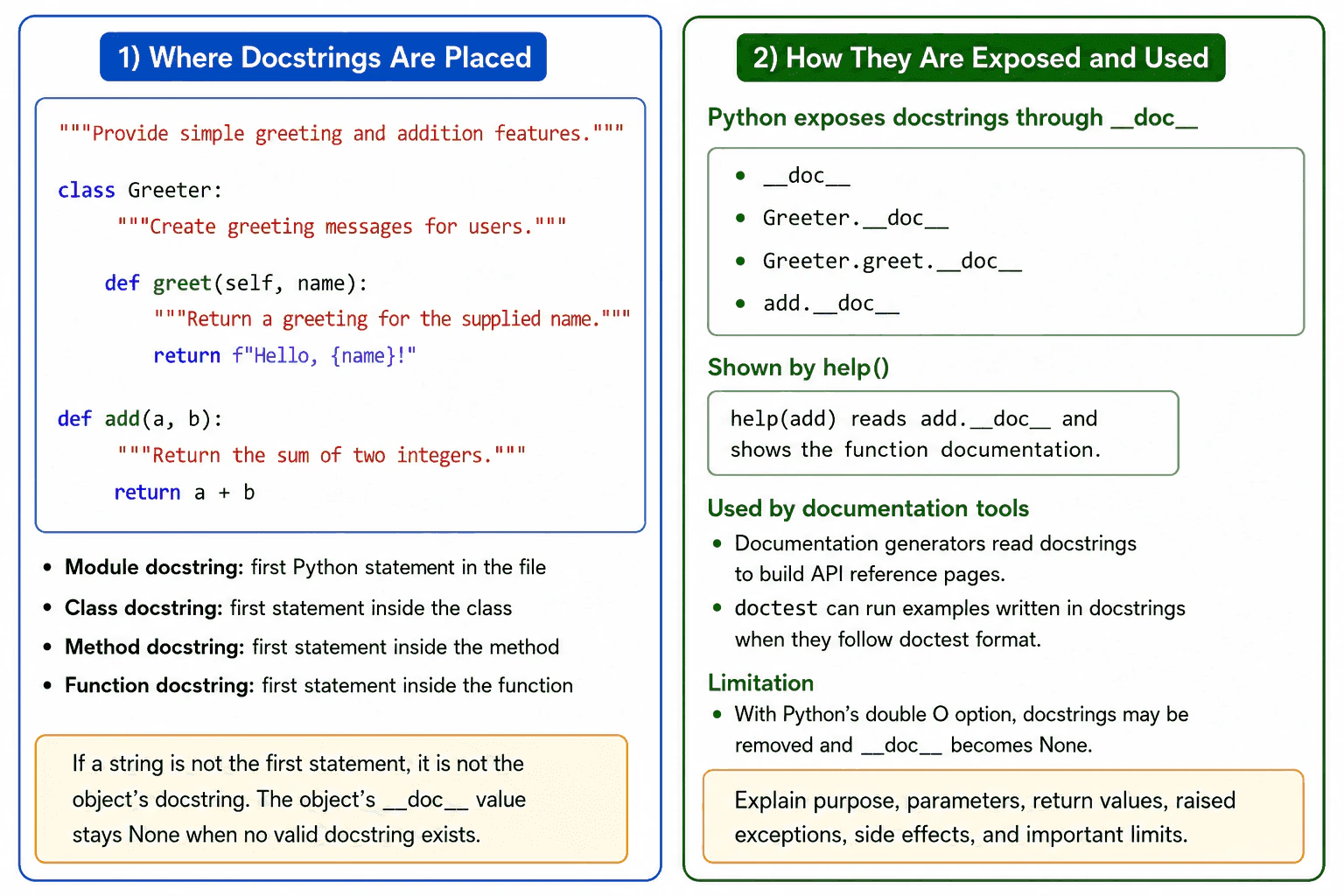
Docstrings are string literals used to document a Python module, class, function, or method. The string must be the first statement in the object being documented. Python makes the text available through the object’s __doc__ attribute, so help and documentation tools can read it. I use docstrings to explain purpose, parameters, return values, raised exceptions, side effects, and behavior that is not obvious from the code.
Use a docstring when documentation should stay close to a Python object and remain available to tools. A docstring is a string literal used as the first statement in a module, class, function, or method. A module docstring is the first statement in the file. Comments, an encoding declaration, or an interpreter line may appear before it because they are not Python statements. Class, function, and method docstrings appear immediately inside their bodies.
Useful Questions to Ask the Interviewer
Should I focus on Python language behavior, or also explain the runtime and standard library?
Which Python version and execution environment should I assume?
Would you like a small code example together with production tradeoffs and edge cases?
Python exposes the text through the object’s __doc__ attribute. The built in help function and documentation generators can inspect this value. A string placed after another statement is only an unused string expression and does not become the docstring.
Docstrings should describe public purpose and behavior. They may explain parameters, return values, raised exceptions, side effects, and limits. They should not repeat obvious code or replace clear names and type hints.
A docstring does not run each time a function is called, so it normally has no meaningful call performance cost. Its text uses memory while available. Python can remove docstrings when started with the double O optimization option, causing __doc__ to be None.
Example
The example uses one module docstring, one class docstring, one method docstring, and one function docstring. Each string is the first statement in the object it documents. The program reads each value through __doc__ and calls help on the function. The example also shows that the documented class, method, and function continue to run normally because docstrings describe behavior without changing the program logic.
Code
"""Provide simple greeting and addition features.
This is the module docstring because it is the first Python statement.
"""classGreeter:
"""Create greeting messages for users."""defgreet(self, name: str) -> str:
"""Return a greeting for the supplied name."""returnf"Hello, {name}!"defadd(left: int, right: int) -> int:
"""Return the sum of two integers."""return left + right
if __name__ == "__main__":
# Read the module docstring.print(__doc__)
# Read the class docstring from the class object.print(Greeter.__doc__)
# Read the method docstring from the method object.print(Greeter.greet.__doc__)
# Read the function docstring from the function object.print(add.__doc__)
# Display documentation collected by the built in help function.help(add)
# Run the documented code to show that docstrings do not change its logic.
greeter = Greeter()
print(greeter.greet("Sam"))
print(add(2, 3))
Where it is used
Docstrings are used in reusable modules, public classes, library functions, service methods, command line tools, and internal application code. Editors can display them while a developer writes code. The built in help function can show them during development and debugging. Documentation generators can collect them to create API reference pages. The doctest module can also run examples written in docstrings when those examples follow its required format.
Why Interviewers Ask This
Interviewers ask this question to check whether the candidate understands Python documentation rules, where docstrings must be placed, how Python exposes them through __doc__, and how tools use them to build useful documentation.
Common interview mistakes
A common mistake is placing the string after another statement. That string does not become the object’s docstring. Another mistake is assuming comments are available through __doc__. Comments are ignored for this purpose. Developers may also repeat obvious code, forget to document important exceptions or side effects, or leave the text unchanged after behavior changes. Another mistake is assuming __doc__ always contains text. It is None when an object has no docstring, and it may also be None when Python removes docstrings under the double O optimization option.
Interview tip
Start by saying that a docstring is the first string statement inside a module, class, function, or method. Then explain that Python exposes it through __doc__. Mention help and documentation generators, and finish with one limitation such as __doc__ being None when no docstring exists or when docstrings are removed by optimization.
Interviewer may ask next
What happens if the string is not the first statement in a function?
It does not become the function’s docstring. Python only recognizes a string literal as the docstring when it is the first statement in the function body. The later string is evaluated as an unused expression, and the function’s __doc__ value remains None when no valid docstring is present. This matters because help and documentation tools cannot retrieve that later string as the function documentation.
Do docstrings affect runtime performance or memory use?
They normally do not add work each time a documented function or method is called. The text is created and kept available with the documented object, so it uses memory based on the amount of documentation stored. This cost is usually small, but large numbers of long docstrings can increase memory use. Python can remove docstrings with the double O optimization option, but the tradeoff is that __doc__, help output, and tools that depend on runtime docstrings lose that information.
42. What is the difference between comments and docstrings?Language SpecificEasy
i Question Details
Compare ignored source comments with runtime string literals used as documentation, including placement, accessibility, and intended purpose.
Short Interview Answer (30-60 seconds)
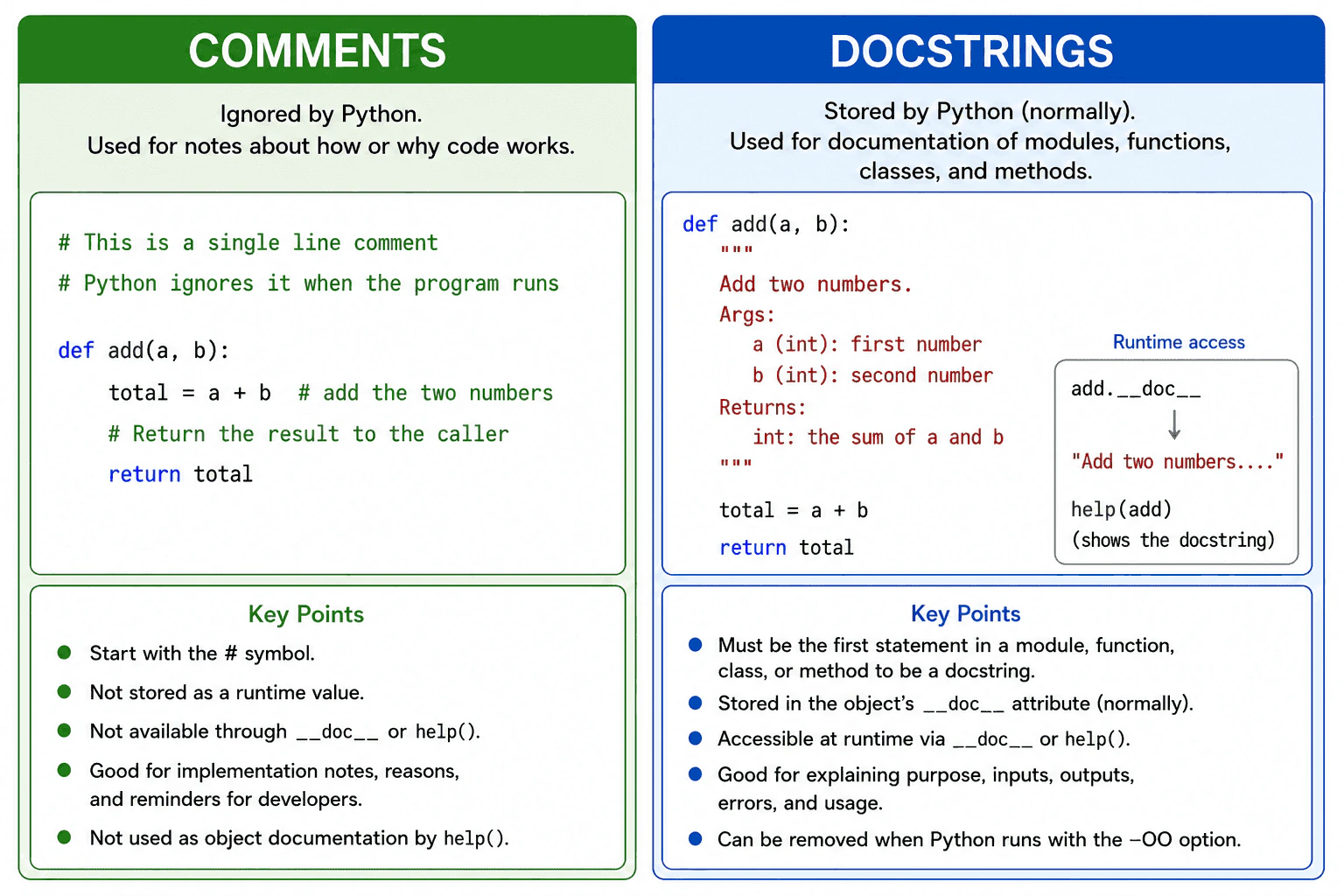
Comments are notes in the source code that Python does not keep as runtime values. They normally begin with the number sign. Docstrings are string literals placed as the first statement in a module, function, class, or method. Python normally stores a valid docstring in the __doc__ attribute, so help and documentation tools can read it. I use comments to explain implementation decisions and docstrings to describe how reusable code should be used.
Detailed Explanation
Use comments for implementation notes and docstrings for documentation that tools and developers should be able to access. A comment normally begins with the number sign. Python ignores it while creating the executable program, so it does not become a normal runtime value or add runtime memory for the running code.
Useful Questions to Ask the Interviewer
Should I focus on Python language behavior, or also explain the runtime and standard library?
Which Python version and execution environment should I assume?
Would you like a small code example together with production tradeoffs and edge cases?
A docstring is a string literal placed as the first statement in a module, function, class, or method. Python recognizes that position and normally stores the text in the object through its __doc__ attribute. The help function, editors, inspection tools, and documentation generators can read it.
Placement is important. A string written later inside a function is only a string expression. It is not that function's docstring. Triple quoted strings are common because they support several lines, but a single quoted string can also be a valid docstring.
Docstrings have a small memory and loading cost because their strings are normally stored at runtime. Running Python with the OO optimization option can remove docstrings, so production code should not depend on them for required program behavior. Comments should explain reasons or unusual choices. Docstrings should explain purpose, inputs, results, errors, and expected use.
Where it is used
Comments are useful near complex business rules, unusual workarounds, security decisions, and code whose reason is not obvious. Docstrings are useful in reusable modules, public functions, classes, methods, libraries, services, and test helpers. Editors, the help function, inspection tools, and documentation generators can use docstrings to show developers how an object should be used. Required configuration, validation rules, and application behavior should remain in real code rather than comments or docstrings.
Why Interviewers Ask This
Interviewers ask this question to check whether a candidate understands the difference between source text that Python ignores and documentation that Python can store on an object. It also tests whether the candidate knows where docstrings must appear, how tools access them, and when each form of documentation is appropriate in production code.
Common interview mistakes
A common mistake is calling every triple quoted string a docstring. It is a docstring only when it appears as the first statement in a supported object. Another mistake is expecting comments to be available through __doc__ or runtime inspection. Developers may also place important program data in a docstring even though the OO optimization option can remove docstrings. Other mistakes include writing comments that only repeat obvious code, using docstrings for temporary notes, and allowing documentation to become outdated when the implementation changes.
Interview tip
Start with the practical difference. Say that comments explain the implementation in source code, while docstrings document an object and are normally available at runtime. Then mention the required first statement placement and the OO optimization limitation.
Interviewer may ask next
What happens to docstrings when Python runs with the OO optimization option?
Python can remove docstrings when the OO optimization option is used. The affected object's __doc__ attribute will then usually be None instead of containing the original text. This matters because documentation and inspection features may lose that information, so required application behavior or data must not depend on docstrings.
Should a production codebase use comments or docstrings for every piece of code?
No. Use docstrings for important reusable modules and objects, and use comments when the reason behind an implementation choice is not clear from the code. Excessive documentation can repeat obvious code and become outdated. The main tradeoff is better guidance against the maintenance work and small runtime memory cost of stored docstrings.
43. How does Python's import system find and load modules?Language SpecificMedium
i Question Details
Explain the role of sys.modules, import finders and loaders, sys.path, package resolution, caching, and the practical causes of circular-import failures.
Short Interview Answer (30-60 seconds)
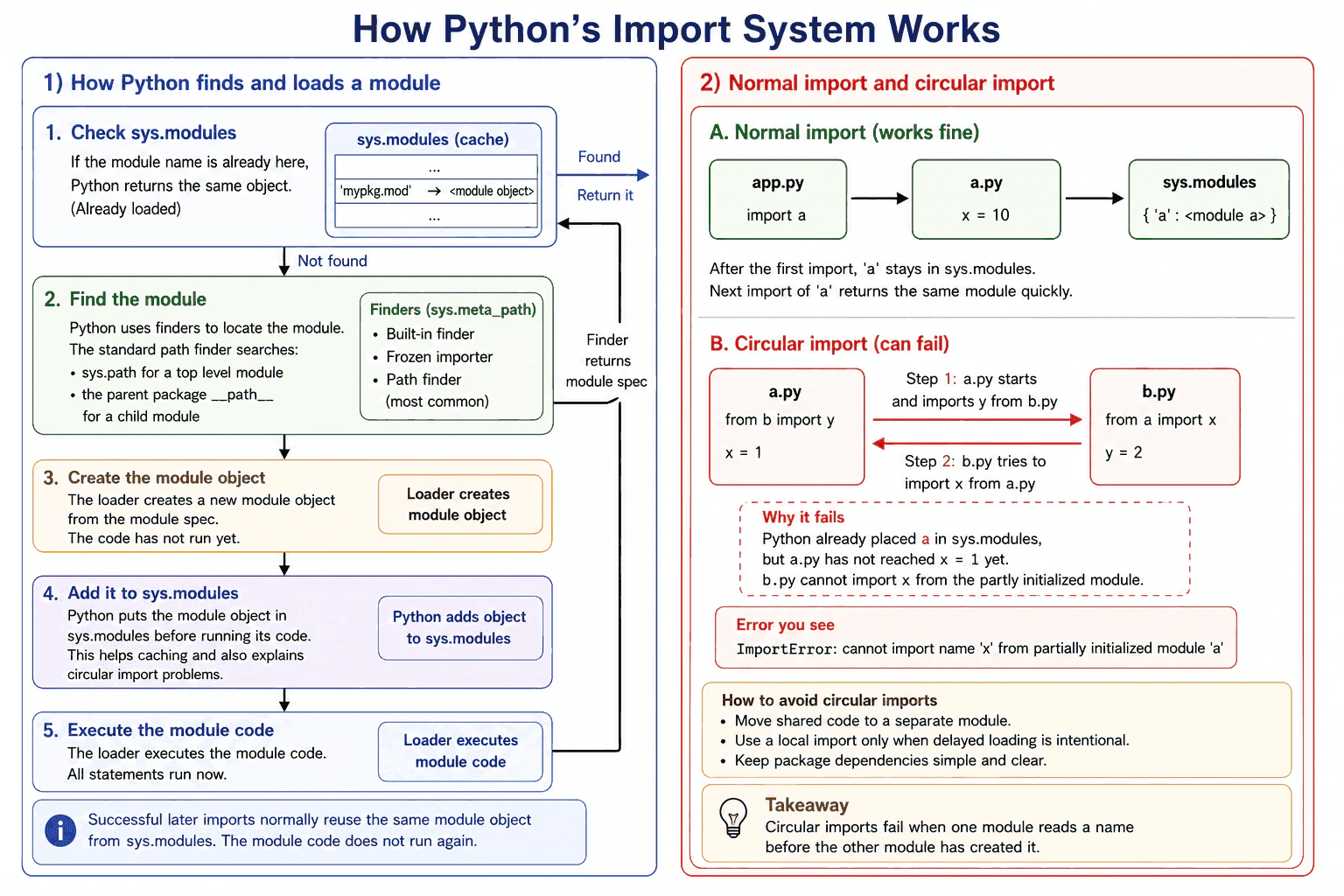
Python first checks sys.modules for the fully qualified module name. If the module is already there, Python normally reuses the cached module object. Otherwise, finders try to locate it, usually through sys.meta_path. The standard path finder searches sys.path for a top level module or the parent package path for a child module. A loader then creates the module when needed and executes its code. Python places the module in sys.modules before execution finishes, which prevents repeated loading but can expose a partly initialized module during a circular import.
Detailed Explanation
Python first checks sys.modules, a dictionary that maps fully qualified module names to module objects. If the requested name is present, Python normally reuses that object instead of finding and executing the module again.
Useful Questions to Ask the Interviewer
Should I focus on Python language behavior, or also explain the runtime and standard library?
Which Python version and execution environment should I assume?
Would you like a small code example together with production tradeoffs and edge cases?
For a new import, Python asks the finders in sys.meta_path for a module specification. The standard path finder searches sys.path for a top level module. For a child module, it searches the parent package path, usually stored in __path__. The specification identifies details such as the loader and module origin.
The loader creates the module when needed and executes its code. Before execution, Python places the module in sys.modules. This early insertion prevents endless repeated loading and lets recursive imports refer to the same object. If execution fails, Python removes the failing module entry, although modules imported successfully as side effects can remain cached.
A circular import fails when one module reads a name from another before that name has been created. This may cause an ImportError or AttributeError involving a partly initialized module. In production, keep package boundaries clear, avoid unnecessary import time work, and move shared definitions into a separate module when two modules depend on each other.
Where it is used
This behavior matters when structuring large applications, publishing reusable packages, loading installed libraries, building plugin systems, running test suites, and diagnosing imports that work locally but fail in containers or production. The first successful import can involve finder work, file access, bytecode loading or compilation, and module execution. Later imports normally perform a fast lookup in sys.modules and reuse the same object. Cached modules continue to use memory while they remain in sys.modules or are referenced elsewhere. Imports inside functions can delay optional or expensive dependencies, but they can also make dependencies and failures less visible.
Why Interviewers Ask This
Interviewers ask this question to check whether a candidate understands what Python actually does during an import. It tests knowledge of module caching, search paths, packages, finders, loaders, partial initialization, circular imports, and sound package design in production.
Common interview mistakes
A common mistake is saying that Python simply searches every directory on the computer. Python uses registered finders, and the standard path based finder searches configured locations. Another mistake is saying that every import executes the module again. Successful imports are normally reused from sys.modules. Developers may also assume that importing a package automatically imports every child module, which is not generally true. A local file can shadow a standard library or installed module when it has the same name. Editing sys.path inside application code can hide packaging problems. Moving an import into a function may delay a circular dependency, but it does not always remove the underlying design problem. Deleting a module from sys.modules also does not guarantee that old references to the previous module object disappear.
Interview tip
Explain the process in runtime order. Start with sys.modules. Then describe sys.meta_path, the module specification, the loader, sys.path for top level modules, and the package path for child modules. Finish by explaining that early insertion into sys.modules can expose a partly initialized module during a circular import.
Interviewer may ask next
What happens if a module raises an exception while Python is importing it?
Python propagates the exception and removes the failing module entry that it inserted into sys.modules for that import. This matters because a later import can try to load that module again instead of receiving the failed partial object from the cache. Modules that were imported successfully as side effects are not automatically removed, so they can remain in sys.modules. Code should avoid important irreversible work at import time because some side effects may already have happened before the failure.
What are the tradeoffs of importing a module inside a function?
A function level import delays the import until that function runs. It can reduce initial startup work, support an optional dependency, or delay a dependency that would otherwise participate in a circular import. After the first successful import, later calls normally reuse the object from sys.modules, although each call still performs the import statement and cache lookup. The tradeoff is that dependencies become less visible and import errors occur later. It is useful when delayed loading is intentional, but it should not be used only to hide poor package structure.
44. What is an exception in Python?Language SpecificEasy
i Question Details
Define an exception as an object that signals an abnormal condition and changes normal control flow until handled. Explain raising, try and except, matching exception types, else, finally, exception messages and tracebacks, custom exception classes, chaining, cleanup, and why code should catch the narrowest exception it can handle correctly.
Short Interview Answer (30-60 seconds)
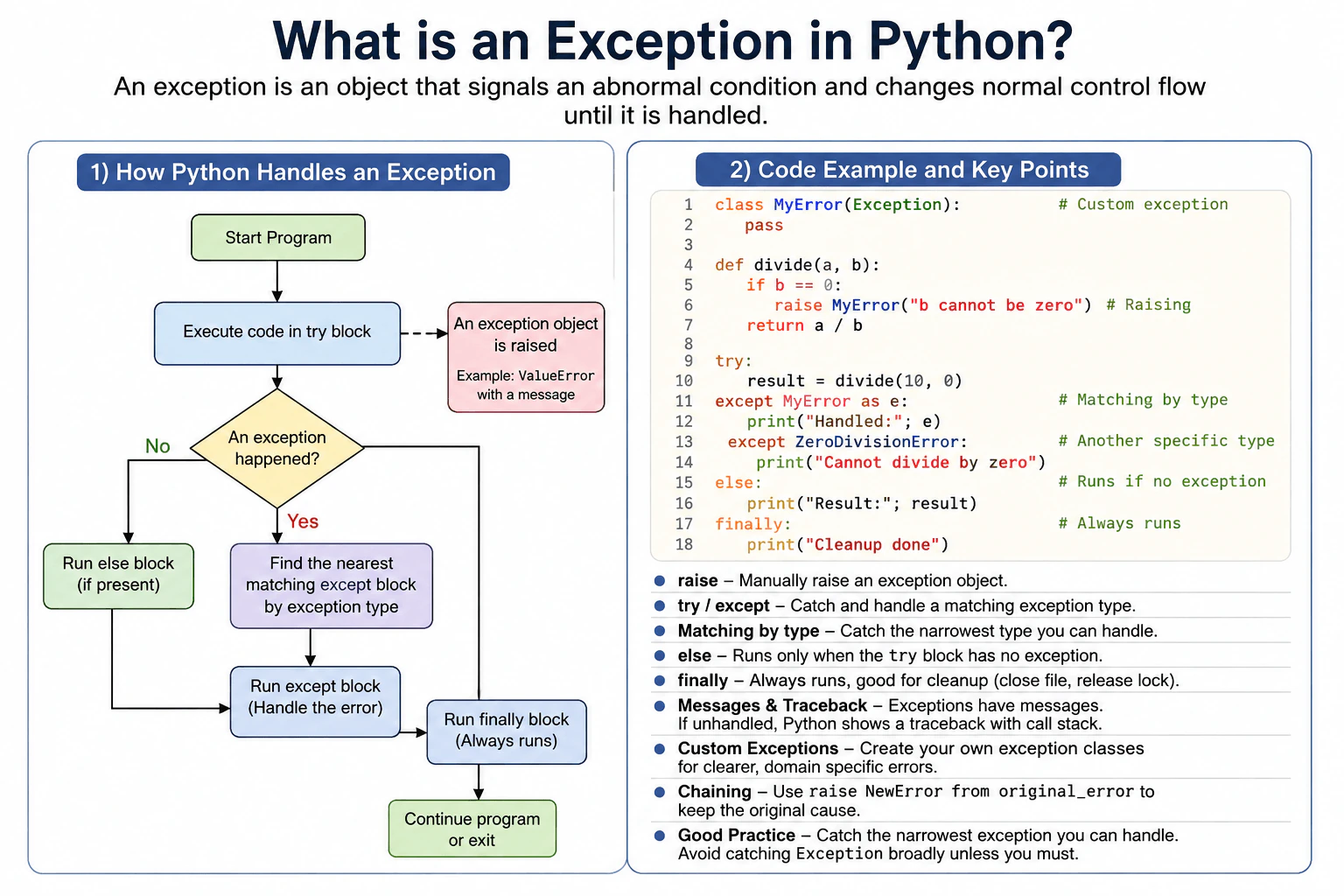
An exception is an object that tells Python that an abnormal condition happened. When an exception is raised, normal control flow stops and Python looks for a matching except block. I catch the narrowest exception type that I can handle correctly, and I use finally when cleanup should run whether the operation succeeds or fails.
Detailed Explanation
An exception is Python's way of reporting that something abnormal happened while a program was running. For example, a program may try to open a missing file or turn invalid text into a number. Instead of continuing normally, Python changes the path of execution and looks for code that knows how to respond. This lets a program recover from expected problems, show a useful message, or stop safely. It also helps developers understand where a failure happened and make sure important cleanup work still occurs.
Useful Questions to Ask the Interviewer
Would you like a simple example using built in exceptions?
Should I also explain custom exceptions and exception chaining?
How to Explain It in an Interview
An exception in Python is an object. Python can raise one automatically when an operation fails, or code can raise one explicitly with raise.
Code that may fail goes inside try. An except block handles a compatible exception type. Python searches for a matching handler, so production code should catch the narrowest type it can handle correctly.
The else block runs when the try block completes without raising an exception. The finally block normally runs whether the operation succeeds or fails, so it is useful for cleanup.
An exception object can contain a message. If an exception remains unhandled, Python reports it with a traceback that shows the calls leading to the failure. Custom exceptions normally inherit from Exception directly or indirectly. Exception chaining, such as raise NewError from original_error, keeps the original cause visible. Broad exception handling can hide unexpected bugs, so it should be used only when the code has a clear recovery, logging, or shutdown responsibility.
Where it is used
Exceptions are used in production code when handling failures such as missing files, invalid input, failed conversions, network problems, database errors, and unavailable resources. They are also useful at application boundaries where code can log an error, return a useful response, retry an operation when appropriate, release resources, or allow the exception to continue to a higher level that can handle it correctly.
Why Interviewers Ask This
Interviewers ask this to check whether a candidate understands how Python represents abnormal conditions, changes normal control flow, matches exception handlers, keeps useful debugging information, and performs cleanup safely. They also want to see whether the candidate knows to catch only exception types that the program can handle correctly.
Common interview mistakes
Common mistakes include catching Exception when only one specific error is expected, using a bare except that hides problems that should remain visible, ignoring an exception without a clear reason, and putting too much unrelated code inside one try block. Another mistake is assuming that finally means the exception was handled. A finally block performs cleanup but does not automatically suppress the exception. Developers can also lose useful debugging context by raising a new exception without preserving the original cause when exception chaining would be clearer.
Interview tip
Start by saying that an exception is an object that signals an abnormal condition and changes normal control flow. Then explain raise, try, except, else, and finally in that order. Finish by saying that production code should catch the narrowest exception type it can handle correctly and preserve useful error context.
Interviewer may ask next
What happens if no except block matches the raised exception?
The exception keeps propagating through the active call stack until Python finds a compatible handler. If no handler is found, that execution context ends because of the unhandled exception, and Python normally reports the exception with a traceback. In a simple main program this usually terminates the program, while in a thread, task, or framework the surrounding runtime may handle the failure differently. This matters because an except block handles only compatible exception types and unexpected errors should remain visible.
Why should production code avoid catching Exception everywhere?
Production code should usually catch the narrowest exception type that it can handle correctly. Catching Exception broadly can also capture unexpected programming errors and make them harder to notice or debug. A broad handler can be appropriate at a clear application boundary for logging, cleanup, or controlled shutdown, but it should normally preserve or report the failure. The tradeoff is that broad catching gives one place to control failures, while increasing the risk of hiding defects that specific handlers would leave visible.
45. How does exception handling work with try, except, else, and finally?Language SpecificEasy
i Question Details
Explain which block runs under success or failure, how exceptions are matched, and why finally is used for cleanup.
Short Interview Answer (30-60 seconds)
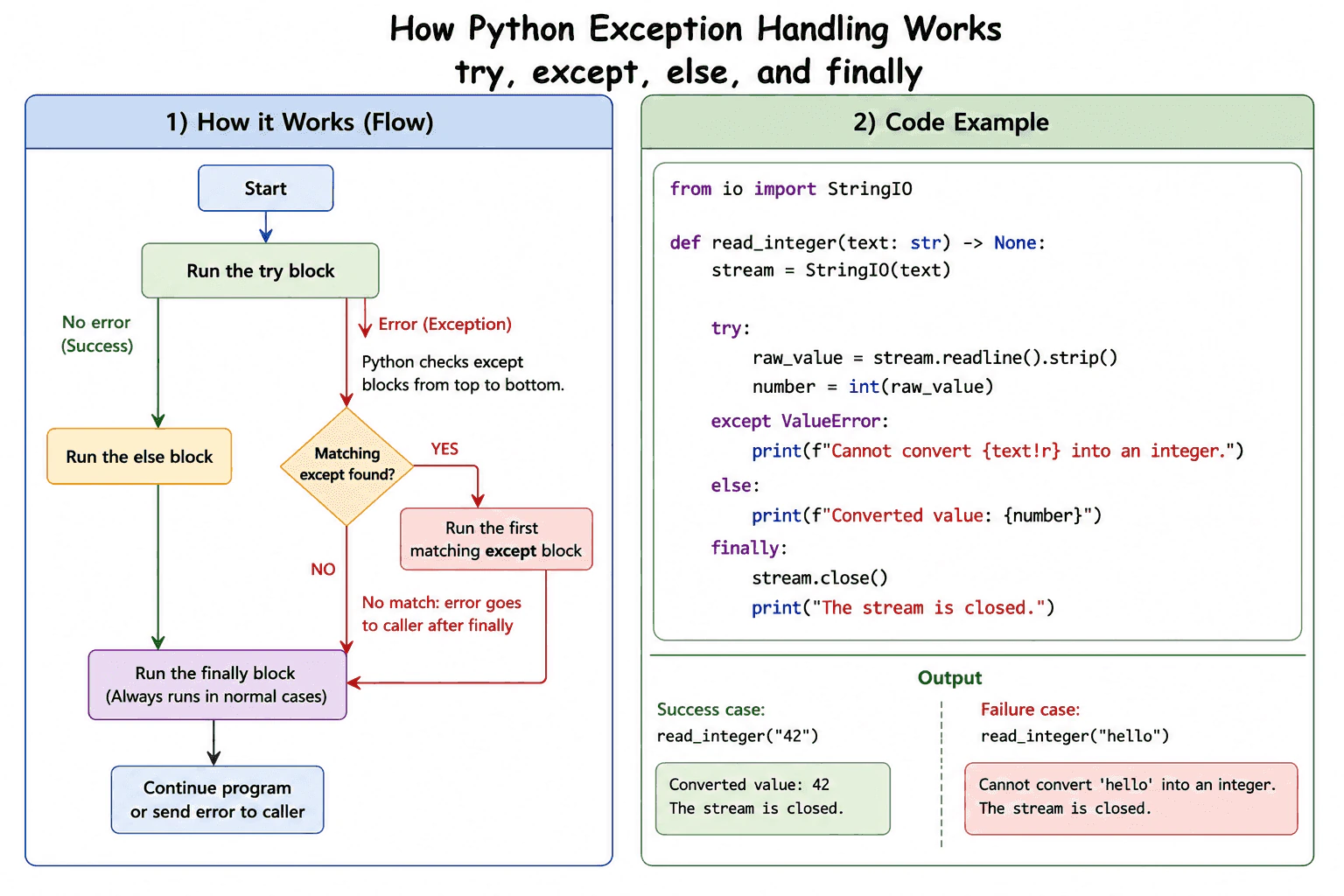
Use try for code that may fail, except for expected errors, else for work that should run only when try succeeds, and finally for cleanup. Python checks except clauses from top to bottom and runs the first compatible handler. The finally block normally runs whether the operation succeeds, fails, or returns, so it is useful for releasing resources.
Use try for code that may fail, except for expected errors, else for work that should happen only after success, and finally for cleanup. Python runs the try block first. If try finishes without an exception, Python skips every except block, runs else, and then runs finally. If an exception is raised inside try, Python stops the remaining statements in that block and checks the except clauses from top to bottom. The first clause with a compatible exception type runs. A handler for a parent class also matches its child exception classes, so specific handlers should come before broad handlers.
Useful Questions to Ask the Interviewer
Should I focus on Python language behavior, or also explain the runtime and standard library?
Which Python version and execution environment should I assume?
Would you like a small code example together with production tradeoffs and edge cases?
If no handler matches, the exception continues to the caller after finally runs. An exception raised inside else is not handled by the earlier except clauses, but finally still runs. Finally also normally runs before return, break, or continue completes. It is therefore useful for closing files, releasing locks, and freeing other resources.
Finally is not an absolute guarantee if the process is forcibly stopped or exits immediately. Avoid return inside finally because it can hide an active exception or replace an earlier return value. In production, catch only errors you can handle and keep the try block small.
Example
The example creates an in memory text stream and tries to read an integer from it. Valid text lets the try block finish, so else prints the converted value. Invalid text raises ValueError, so the matching except block prints an error message. The finally block closes the stream in both cases. An unexpected exception would continue to the caller after the stream is closed.
Code
from io import StringIO
defread_integer(text: str) -> None:
# Create a resource that should always be closed.
stream = StringIO(text)
try:
# Read the text and try to convert it into an integer.
raw_value = stream.readline().strip()
number = int(raw_value)
except ValueError:
# This block runs only when the conversion fails.print(f"Cannot convert {text!r} into an integer.")
else:
# This block runs only when the try block succeeds.print(f"Converted value: {number}")
finally:
# This block normally runs after success or failure.
stream.close()
print("The stream is closed.")
# Demonstrate the success path.
read_integer("42")
# Demonstrate the handled failure path.
read_integer("hello")
Where it is used
This structure is used when reading files, parsing input, calling databases, using network connections, acquiring locks, and managing temporary resources. A program can perform the risky operation inside try, handle a known failure inside except, process the successful result inside else, and release the resource inside finally. When a resource supports a context manager, the with statement is often clearer because it keeps setup and cleanup together.
Why Interviewers Ask This
Interviewers ask this question to check whether the candidate understands Python control flow during success and failure. It also tests whether the candidate can match exceptions correctly, avoid hiding unexpected errors, and place cleanup logic in the correct block.
Common interview mistakes
A common mistake is catching Exception when only one known error is expected. This can hide unrelated problems. Another mistake is placing too much code inside try, which makes it difficult to know which operation failed. Developers may expect else to run after except, but else runs only when try finishes without an exception. An error raised inside else is not caught by the earlier except clauses. A broad handler placed before a specific handler also prevents the specific handler from running. Avoid a bare except because it also catches signals such as KeyboardInterrupt and SystemExit. Returning from finally can suppress an active exception or replace an earlier return value.
Interview tip
Explain the blocks in execution order. Say that try performs the risky work, except handles the first matching error, else means the try block succeeded, and finally performs cleanup. Also mention that specific exception types should come before broad ones.
Interviewer may ask next
What happens if an exception is raised inside the else block?
The earlier except clauses do not handle it because they only handle exceptions raised inside try. The finally block still normally runs, and then the new exception continues to the caller. This matters because work placed in else should be allowed to fail visibly unless it has its own error handling.
When should a context manager be used instead of try and finally?
Use a context manager when the resource supports the with statement because it keeps acquisition and cleanup together and is usually easier to read. Try and finally is still useful for custom cleanup or for resources without a suitable context manager. The main tradeoff is that manual cleanup gives more control but creates more code that must remain correct.
46. How do you raise an exception in Python?Language SpecificEasy
i Question Details
Explain the raise statement, raising built-in or custom exception instances, re-raising the active exception, and preserving the original cause with exception chaining.
Short Interview Answer (30-60 seconds)
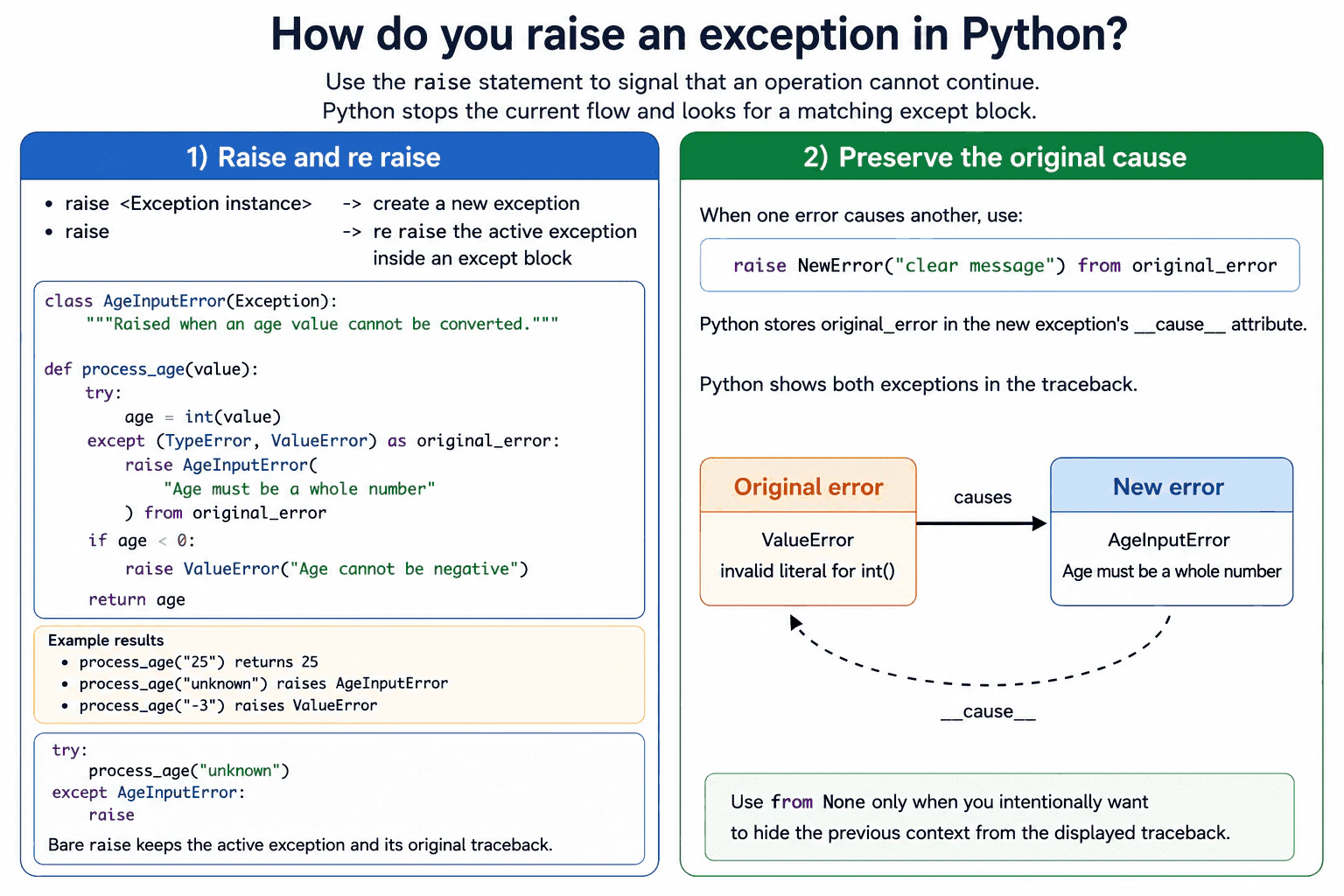
Use the raise statement when an operation cannot continue normally. I usually raise a specific built in or custom exception instance, such as raise ValueError("Age cannot be negative"). Inside an except block, raise by itself re raises the active exception and preserves its original traceback. When one error causes a new error, raise NewError(...) from original_error creates an explicit exception chain and preserves the original cause.
Use raise when an operation cannot return a valid result. The usual form is raise followed by an exception instance, such as raise ValueError("Age cannot be negative"). Python stops normal execution and searches outward for a matching except block. If no handler matches, Python ends the current program flow and prints a traceback.
Useful Questions to Ask the Interviewer
Should I focus on Python language behavior, or also explain the runtime and standard library?
Which Python version and execution environment should I assume?
Would you like a small code example together with production tradeoffs and edge cases?
Use a built in exception when its meaning fits the problem. Use a custom exception that inherits from Exception when the failure belongs to your application domain.
Inside an except block, raise with no value re raises the active exception. This keeps the original exception type and traceback. Writing raise error instead raises that exception object again from the current location and can add another traceback frame.
When converting one exception into another, use raise NewError(...) from original_error. Python stores the original exception in the new exception's __cause__ attribute and shows both errors in the traceback. Python also keeps an implicit __context__ when a new exception is raised during exception handling. Use from None only when you intentionally want to hide that context from the displayed traceback.
Raising an exception creates traceback data and unwinds stack frames, so it is slower and uses more memory than normal branching. Exceptions should represent failures, not common control flow.
Example
The example validates an age value. A value that cannot be converted to an integer first causes TypeError or ValueError. The code converts that failure into a custom AgeInputError and uses explicit exception chaining to preserve the original cause. A negative integer raises a built in ValueError. The process_age function catches AgeInputError, adds simple logging, and uses bare raise to re raise the same active exception with its original traceback.
Code
classAgeInputError(Exception):
"""Raised when an age value cannot be converted to an integer."""defparse_age(value):
# Try to convert the supplied value into an integer.try:
age = int(value)
except (TypeError, ValueError) as original_error:
# Raise a clearer custom exception for the application.# The from clause preserves the original conversion error.raise AgeInputError("Age must be a whole number") from original_error
# Raise a built in exception when the value breaks the business rule.if age < 0:
raise ValueError("Age cannot be negative")
return age
defprocess_age(value):
try:
return parse_age(value)
except AgeInputError:
# A real application could record useful context in its logs here.print("The supplied age could not be parsed")
# Re raise the active exception with its original traceback.raiseif __name__ == "__main__":
examples = ["25", "unknown", "-3"]
for example in examples:
try:
result = process_age(example)
print(f"Valid age: {result}")
except (AgeInputError, ValueError) as error:
print(f"Error: {error}")
Where it is used
Exceptions are raised when validating API input, parsing configuration, checking file contents, enforcing business rules, or reporting failed database and network operations. Custom exceptions help callers handle domain failures without depending on low level implementation details. Exception chaining is useful when an application converts a parsing, database, or library error into a clearer application error while preserving the original cause for logs and debugging.
Why Interviewers Ask This
Interviewers ask this question to check whether a candidate understands how Python creates, propagates, and preserves errors. It also tests whether the candidate can choose a suitable exception type, define a custom exception, re raise an active exception correctly, and preserve the original cause for debugging.
Common interview mistakes
A common mistake is raising Exception for every failure instead of choosing a specific exception type. Another mistake is using bare raise when no exception is active, which causes RuntimeError. Developers may also write raise error when they mean to preserve the current traceback exactly, or replace a low level error without using the from clause, which makes the cause less clear. Other mistakes include catching exceptions too early, hiding unexpected errors with a broad except block, using unclear messages, and using exceptions for common branches that can be handled with normal conditions.
Interview tip
Explain three cases in order. First, show how to raise a specific built in or custom exception instance. Second, explain that bare raise re raises the active exception inside an except block. Third, show that raise new_error from original_error preserves the original cause. Mention that specific exception types and useful messages improve handling and debugging.
Interviewer may ask next
What happens if raise is used with no value when no exception is active?
It raises RuntimeError because there is no active exception to re raise. Bare raise depends on the current exception handling context and is normally used inside an except block. This matters because bare raise preserves an existing failure but cannot create a new application error by itself.
What is the difference between explicit exception chaining and raise from None?
Explicit chaining with raise NewError(...) from original_error stores the original exception in __cause__ and displays both failures. Using raise NewError(...) from None suppresses the previous exception context in the displayed traceback. This can make an error message cleaner, but it can also hide useful debugging information, so it should be used only when the original context is not helpful to the caller.
47. How does exception chaining work?Language SpecificHard
i Question Details
Explain implicit context through __context__, explicit causes using raise ... from ..., suppression with from None, traceback presentation, and when preserving causal information improves debugging.
Short Interview Answer (30-60 seconds)
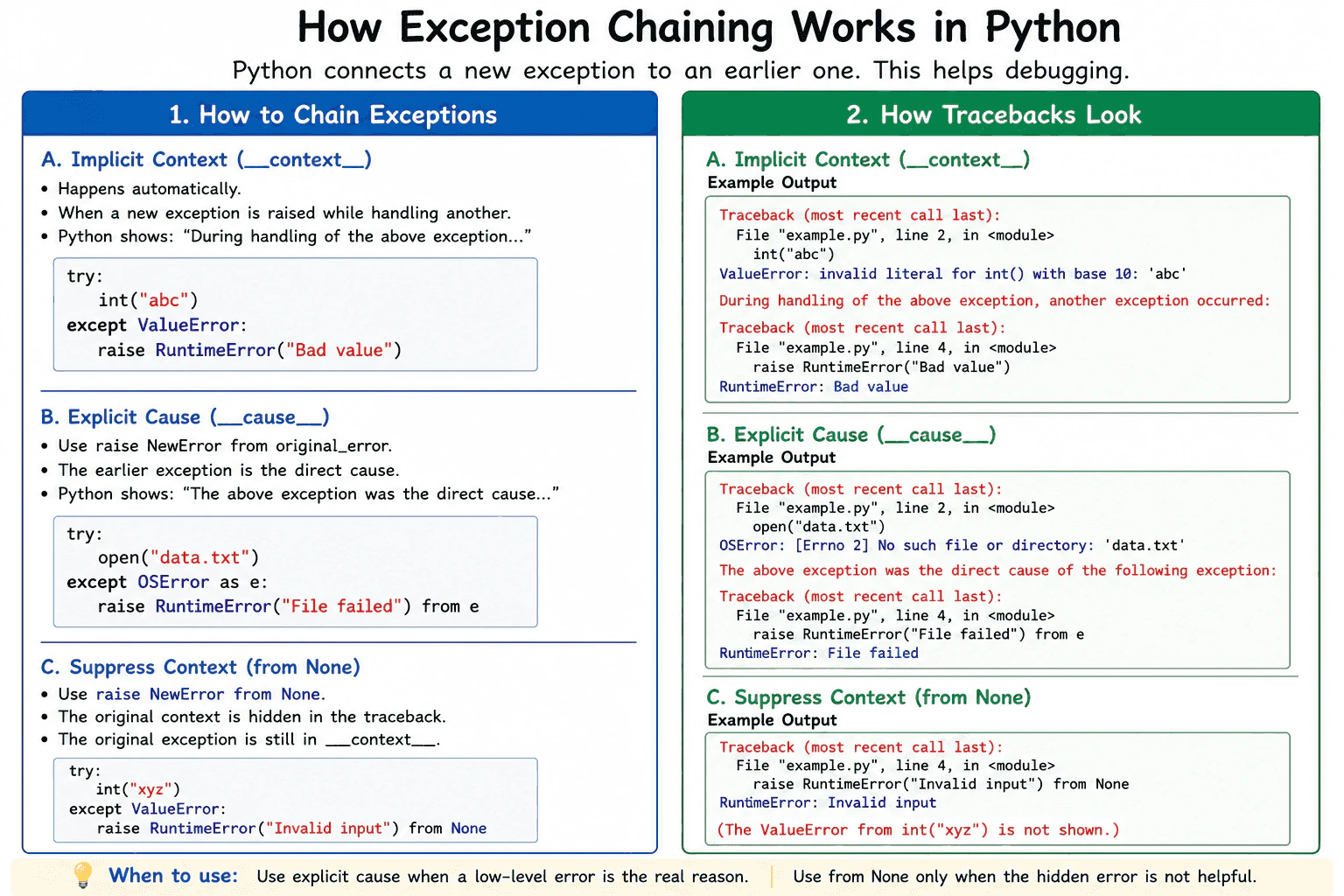
Exception chaining connects a new exception to an earlier exception. If I raise a new exception while handling another one, Python automatically stores the earlier exception in __context__. If the earlier exception is the direct cause, I use raise NewError from original_error, which stores it in __cause__. If I use from None, Python hides the automatic context from the normal traceback but does not remove the stored __context__. Explicit chaining is usually best when translating a low level failure into a clearer application error because the traceback keeps the real cause.
Detailed Explanation
The practical rule is to preserve the earlier exception when it explains why the new exception occurred. If a new exception is raised while another exception is being handled, Python automatically assigns the active exception to the new exception's __context__. The traceback normally says that another exception occurred while handling the earlier one.
Useful Questions to Ask the Interviewer
Should I focus on Python language behavior, or also explain the runtime and standard library?
Which Python version and execution environment should I assume?
Would you like a small code example together with production tradeoffs and edge cases?
Use raise NewError from original_error when the earlier exception is the direct cause. Python stores that exception in __cause__, sets context suppression, and presents the cause before the new exception. The traceback says that the new exception was the direct result of the earlier one. This makes error translation clear across abstraction layers.
Use raise NewError from None when the automatic context is not useful to the person reading the traceback. Python sets __cause__ to None and __suppress_context__ to true. The original exception can still remain in __context__, but the standard traceback does not display it.
Chaining adds little work beyond exception creation and traceback handling. It can keep references to earlier exceptions, traceback frames, and local values while the exception chain remains reachable. Production code should preserve useful causes, avoid retaining exception objects unnecessarily, and suppress context only when the hidden details do not help debugging.
Where it is used
Exception chaining is used when application code converts a parsing, file, network, database, or library error into a clearer domain specific error. A service layer may raise a business error from a lower level storage error. A library may expose a stable public exception while preserving its internal cause. API code may return a safe client message while internal logging records the complete chained traceback.
Why Interviewers Ask This
Interviewers ask this question to check whether a candidate understands how Python records relationships between exceptions and presents them in tracebacks. It also tests whether the candidate can translate low level failures into clearer application errors without losing useful debugging information.
Common interview mistakes
A common mistake is raising a replacement exception without from when the original exception is the known direct cause. The automatic context may still exist, but the intended causal relationship is less precise. Another mistake is believing that from None deletes the original exception. It only suppresses implicit context in the standard traceback. Developers may also suppress useful context only to shorten logs, catch Exception too broadly before translating it, or log only the final error message instead of the complete traceback. Another mistake is using chaining when a bare raise is better. A bare raise should be used when the same exception should continue with its existing traceback.
Interview tip
Explain the three cases in order. Start with automatic __context__, then explicit __cause__ through raise from, and finally suppression through from None. State that explicit chaining is useful when translating an error while preserving its real cause. Also mention that from None hides traceback context but does not erase __context__.
Interviewer may ask next
What values are stored after raise NewError from None?
The new exception has __cause__ set to None and __suppress_context__ set to true. If it was raised while another exception was active, that earlier exception can still be stored in __context__. This matters because the standard traceback hides the context, but debugging code can still inspect the stored relationship.
When should a bare raise be used instead of exception chaining?
A bare raise should be used when the current exception should continue unchanged with its existing traceback. Exception chaining should be used when code intentionally creates a different exception and needs to record the relationship. The tradeoff is clarity at the abstraction boundary. A new domain error may be easier for callers to handle, while the chained cause preserves the lower level details needed for production debugging.
48. What is the with statement used for?Language SpecificEasy
i Question Details
Explain how with manages setup and cleanup around a block, how it is commonly used with files and locks, and why it is safer than manual cleanup.
Short Interview Answer (30-60 seconds)
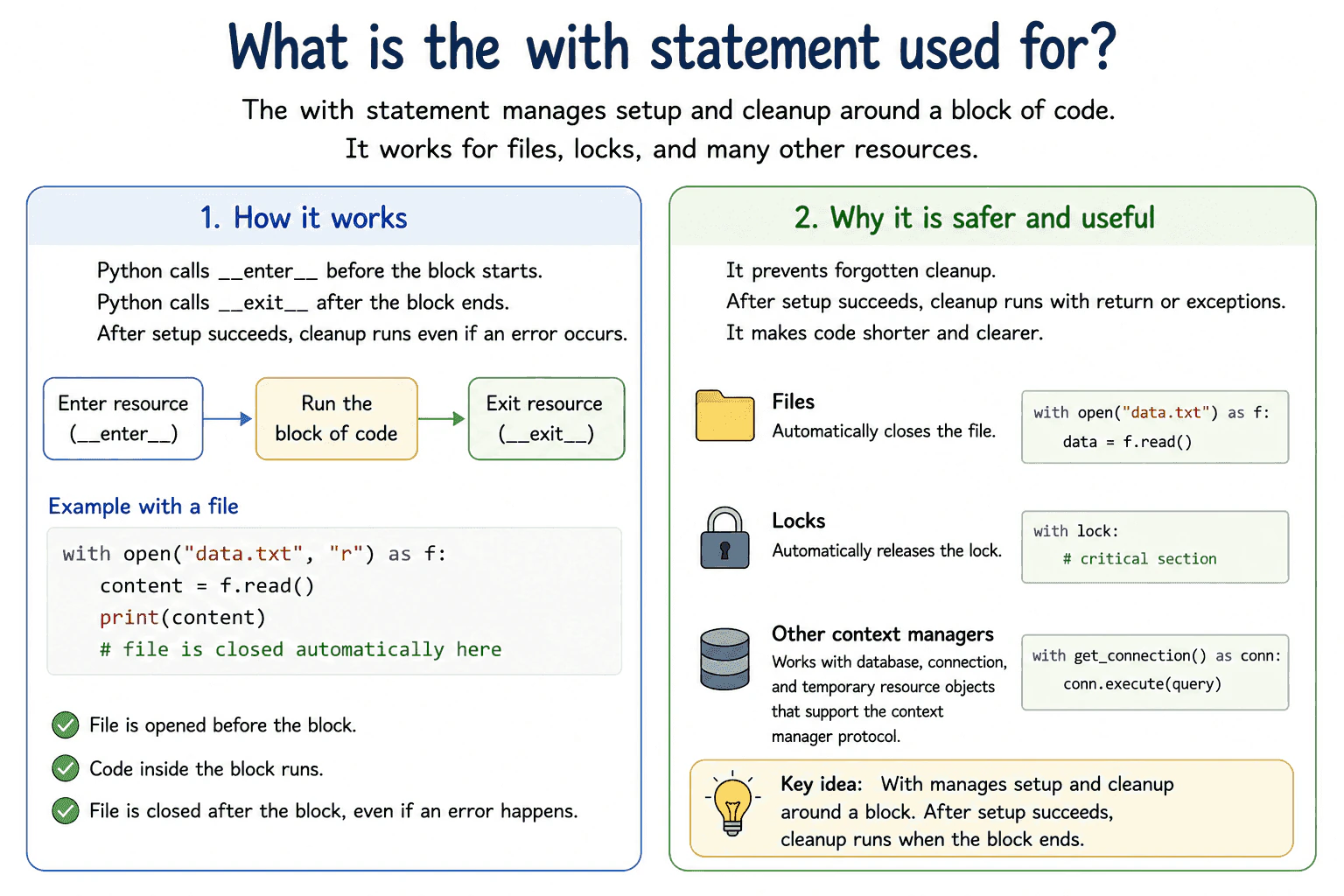
The with statement manages setup and cleanup around a block of code. Python enters a context manager before the block and exits it after the block, even when an exception occurs. It is commonly used to close files and release locks safely, so cleanup is not missed because of an early return or an error.
Detailed Explanation
Use the with statement when some work needs reliable setup and cleanup. The object after with must be a context manager. Python calls its __enter__ method before the block. The returned value can be assigned with as. When the block ends, Python calls __exit__ with information about any exception.
Useful Questions to Ask the Interviewer
Should I focus on Python language behavior, or also explain the runtime and standard library?
Which Python version and execution environment should I assume?
Would you like a small code example together with production tradeoffs and edge cases?
For a file, entering returns the open file object and exiting closes it. For a lock, entering acquires the lock and exiting releases it. Cleanup normally runs after successful work, an early return, or an exception. The __exit__ method may suppress an exception by returning a true value, although most context managers let the exception continue.
This is safer than manually calling close or release because manual cleanup can be skipped. A try and finally statement can provide the same guarantee, but with is usually shorter and makes the resource lifetime clear.
Only objects that implement the context manager protocol can be used directly. If __enter__ fails, that context manager is not entered, so its __exit__ method is not called. The statement adds a small method call cost. It does not copy the managed value, and it normally uses only a small amount of extra memory.
Where it is used
The with statement is used when reading or writing files, acquiring thread locks, managing database transactions, opening temporary resources, and using library objects that require reliable cleanup. In production code, it limits a resource to one clear block and helps prevent open files, unreleased locks, unfinished transactions, and leaked connections. For asynchronous resources, Python uses async with instead of the regular with statement.
Why Interviewers Ask This
Interviewers ask this question to check whether a candidate understands context managers, automatic cleanup, exception flow, and safe resource handling in Python. They also want to see whether the candidate knows when with is clearer and safer than manual cleanup.
Common interview mistakes
Common mistakes include opening a file without with and forgetting to close it, acquiring a lock without guaranteed release, using a file after the with block has closed it, and assuming every object supports the context manager protocol. Another mistake is believing that with always hides exceptions. Exceptions normally continue after cleanup unless __exit__ explicitly returns a true value. It is also incorrect to assume that __exit__ runs when __enter__ itself fails.
Interview tip
Begin by saying that with guarantees setup and cleanup around a block. Use files and locks as examples. Then explain that cleanup still occurs after an early return or an exception, which makes with safer and clearer than manual cleanup.
Interviewer may ask next
What happens if an exception is raised inside a with block?
Python calls the context manager __exit__ method with the exception details before control leaves the block. This gives the context manager a chance to clean up the resource. The exception normally continues, but __exit__ can suppress it by returning a true value. This matters because accidental suppression can hide a production failure.
When would you use try and finally instead of with?
Use try and finally when the object does not support the context manager protocol or when the cleanup process does not fit one clear managed block. Both forms can guarantee cleanup. The main tradeoff is that try and finally gives more control, while with is shorter, easier to read, and less likely to contain cleanup mistakes.
49. How do context managers implement the with statement?Language SpecificMedium
i Question Details
Explain the __enter__ and __exit__ protocol, how exception information is passed to __exit__, how suppression works, and how contextlib.contextmanager provides an alternative implementation style.
Short Interview Answer (30-60 seconds)
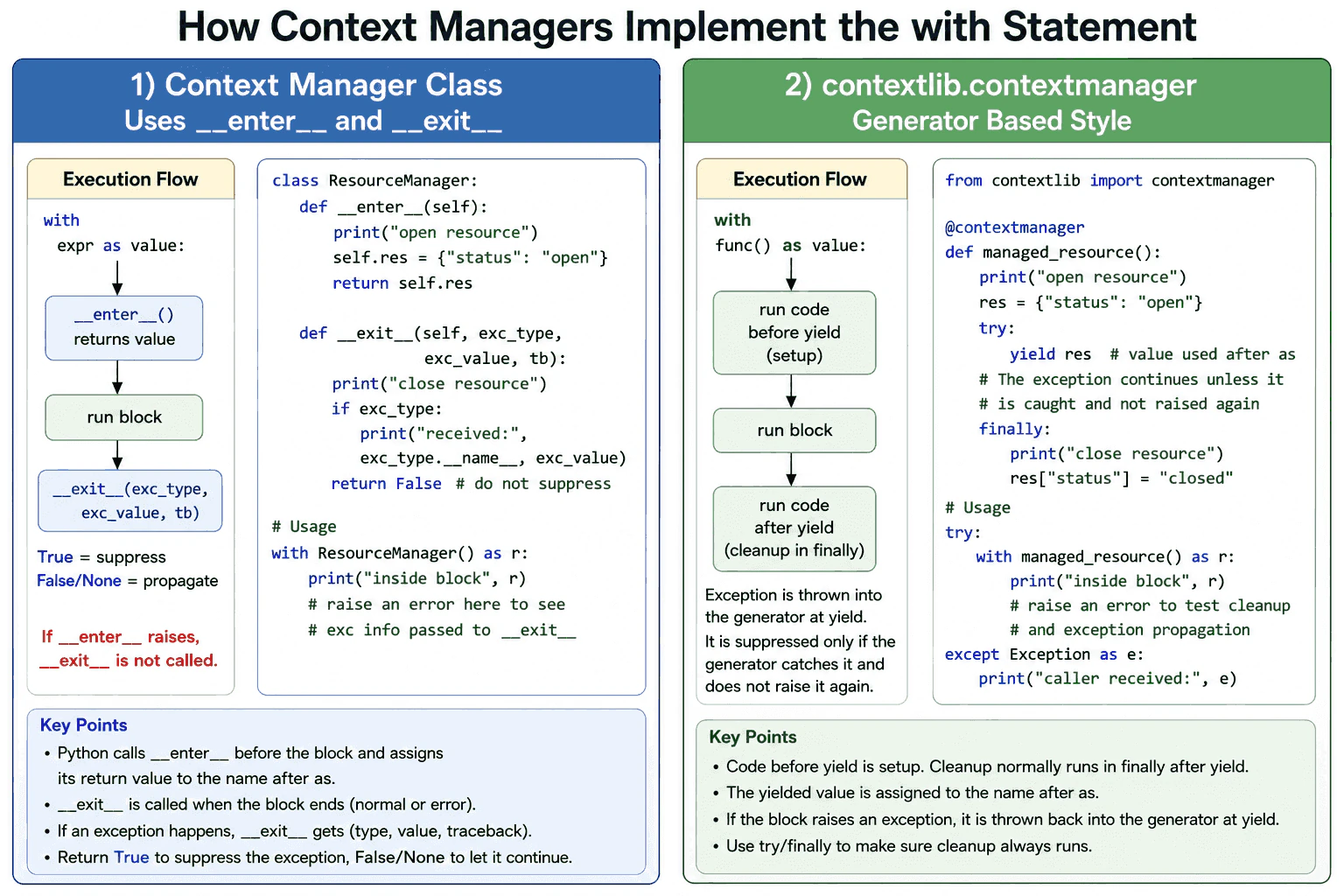
A context manager implements the with statement through __enter__ and __exit__. Python calls __enter__ before the block and assigns its return value to the name after as. If __enter__ succeeds, Python calls __exit__ when control leaves the block. When an exception occurs, __exit__ receives its type, value, and traceback. Returning True suppresses that exception. Returning False or None lets it continue. The contextlib.contextmanager decorator provides the same protocol through a generator that performs setup before yield and cleanup after yield.
The practical purpose of a context manager is to prepare a resource and release it reliably. Python first evaluates the expression after with and obtains a context manager. It calls __enter__, and the returned value becomes the value after as. If __enter__ raises an exception, the block never starts and __exit__ is not called.
Useful Questions to Ask the Interviewer
Should I focus on Python language behavior, or also explain the runtime and standard library?
Which Python version and execution environment should I assume?
Would you like a small code example together with production tradeoffs and edge cases?
After __enter__ succeeds, Python runs the block. When control leaves the block normally, Python calls __exit__ with three None values. If the block raises an exception, Python passes the exception type, exception object, and traceback. Returning True tells Python that the exception was handled. Returning False or None allows it to continue.
The contextlib.contextmanager decorator offers a generator based style. Code before yield performs setup. The yielded value becomes the as value. Code after yield performs cleanup. A try and finally block is normally used so cleanup still runs when the block fails.
Context managers are useful for files, locks, transactions, temporary resources, and temporary state changes. Their time and memory cost is normally small. Python creates a manager object or generator object, but it does not automatically copy the managed resource.
Example
The code demonstrates both supported implementation styles. ResourceManager uses __enter__ for setup and returns the resource used after as. Its __exit__ method always closes the resource after __enter__ succeeds. It prints any exception information and returns False, so the original exception continues. The managed_resource function uses contextlib.contextmanager. It creates the resource before yield, yields the value used after as, and closes it in a finally block. The example catches the propagated ValueError outside the with statement so the program can continue and show that cleanup happened.
Code
from contextlib import contextmanager
classResourceManager:
def__enter__(self):
# Create the resource before the with block starts.print("Class manager: opening resource")
self.resource = {"status": "open"}
# This returned value is assigned after as.returnself.resource
def__exit__(self, exception_type, exception_value, traceback):
# This method runs when control leaves the with block.self.resource["status"] = "closed"print("Class manager: closing resource")
# Python provides exception details when the block fails.if exception_type isnotNone:
print(f"Class manager received: {exception_type.__name__}: {exception_value}")
# False means that an active exception must continue.returnFalse@contextmanagerdefmanaged_resource():
# Code before yield performs setup.print("Generator manager: opening resource")
resource = {"status": "open"}
try:
# The yielded value is assigned after as.yield resource
finally:
# The finally block guarantees cleanup after yield.
resource["status"] = "closed"print("Generator manager: closing resource")
defmain():
# Normal completion calls __exit__ with three None values.with ResourceManager() as class_resource:
print(f"Inside class manager: {class_resource}")
print(f"After class manager: {class_resource}")
try:
# The raised error is sent back into the generator at yield.with managed_resource() as generator_resource:
print(f"Inside generator manager: {generator_resource}")
raise ValueError("example failure")
except ValueError as error:
# The generator manager did not suppress the exception.print(f"Caller received: {error}")
print(f"After generator manager: {generator_resource}")
if __name__ == "__main__":
main()
Where it is used
Context managers are used when code must always release or restore something after use. Common production examples include closing files, releasing thread locks, committing or rolling back database transactions, closing network connections, managing temporary files, changing a working directory for a limited block, and measuring execution time. They make ownership and cleanup visible at the point of use. They should not suppress broad exceptions unless they can fully handle those failures and leave the application in a valid state.
Why Interviewers Ask This
Interviewers ask this question to check whether the candidate understands what Python does behind the with statement. It tests knowledge of the context manager protocol, cleanup guarantees, exception flow, exception suppression, and the contextlib module. It also tests whether the candidate knows when a class or a generator based context manager is clearer in production code.
Common interview mistakes
A common mistake is to say that __exit__ always runs. It runs only after __enter__ completes successfully. Another mistake is returning True without realizing that it suppresses the active exception. Developers may also assume that the value after as must be the context manager itself, but __enter__ can return another object. With contextlib.contextmanager, the generator must yield exactly once. Cleanup should normally be placed in a finally block. Catching an exception around yield and then ending normally can suppress that exception, so the code must raise it again when suppression is not intended. A context manager also does not automatically make a resource safe for concurrent use.
Interview tip
Start with the __enter__ and __exit__ protocol. Explain what value is assigned after as. Then name the three exception values passed to __exit__ and state that True suppresses the exception. Mention that __exit__ is not called when __enter__ fails. Finish by explaining that contextlib.contextmanager uses setup before yield and cleanup after yield.
Interviewer may ask next
What happens if __enter__ raises an exception?
The with block does not start, and Python does not call that context manager's __exit__ method. This matters because any partial setup completed inside __enter__ must be cleaned up by __enter__ itself before it raises. A safer design may perform risky setup before changing persistent state or use a local try and except block to undo partial work.
When should you choose contextlib.contextmanager instead of a class?
Choose contextlib.contextmanager when setup and cleanup are small and fit clearly around one yield. It reduces boilerplate and is often easier to read. Choose a class when the manager needs several methods, reusable state, inheritance, or more complex behavior. Both styles have small object creation overhead, and the clearer design is usually more important than that minor cost.
50. How do async iterators and async context managers work?Language SpecificHard
i Question Details
Explain the __aiter__ and __anext__ protocols, StopAsyncIteration, async for, the __aenter__ and __aexit__ protocols, async with, and appropriate resource-management use cases.
Short Interview Answer (30-60 seconds)
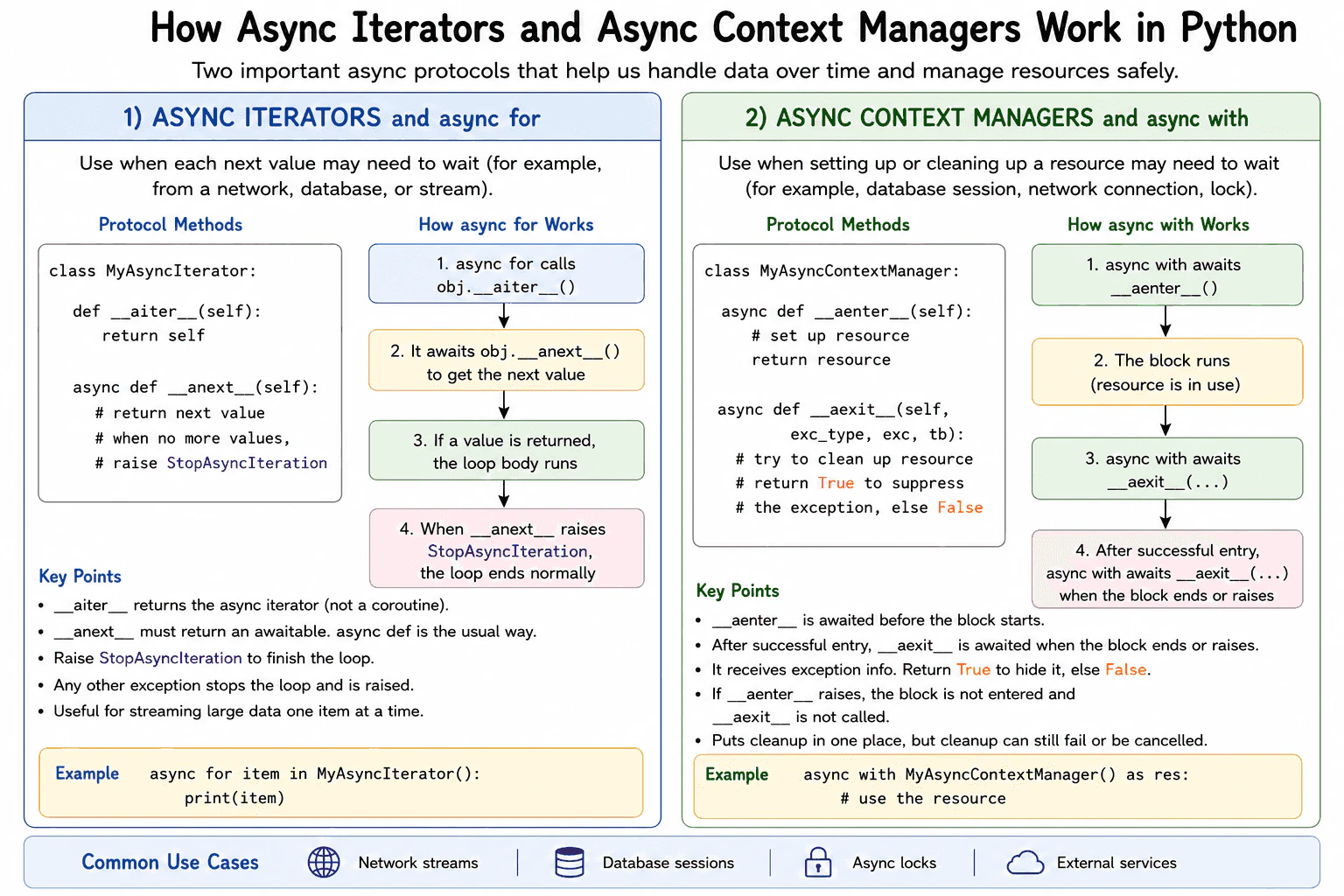
Use an async iterator when getting the next value may require waiting. It implements __aiter__ and __anext__. Async for calls __aiter__, awaits each __anext__ result, and stops when __anext__ raises StopAsyncIteration. Use an async context manager when resource setup or cleanup may require waiting. It implements __aenter__ and __aexit__, and async with awaits both methods. These protocols are common for network streams, database sessions, locks, and other input or output resources.
Use an async iterator for values that become available over time. The __aiter__ method must return an async iterator directly. Its __anext__ method returns an awaitable that produces one value. When no value remains, it raises StopAsyncIteration. Async for performs these calls and awaits automatically. Any other exception leaves the loop and continues through normal exception handling.
Useful Questions to Ask the Interviewer
Should I focus on Python language behavior, or also explain the runtime and standard library?
Which Python version and execution environment should I assume?
Would you like a small code example together with production tradeoffs and edge cases?
Use an async context manager when entering or leaving a resource may require waiting. Async with awaits __aenter__, runs the block, and then awaits __aexit__. The __aexit__ method receives information about any exception. A truthy return value suppresses that exception. A false value lets it continue. If __aenter__ fails, the block is never entered and __aexit__ is not called.
Each iteration adds an awaited method call, so it has more overhead than a normal loop. It is useful when waiting time is much larger than that overhead. It does not speed up CPU heavy work. Async iteration can process one value at a time, so it can avoid storing the full result in memory. Cancellation still requires care because cleanup code can also be interrupted while it awaits.
Example
The example uses AsyncNumbers as a single use async iterator. Its __aiter__ method returns the same iterator object. Its __anext__ method waits briefly, returns the next number, and raises StopAsyncIteration after three values. AsyncResource is an async context manager. Its __aenter__ method waits and opens the resource. Its __aexit__ method waits and closes the resource, then returns false so exceptions are not hidden. Main enters the resource with async with and consumes the values with async for. The output is Resource opened, the numbers 1, 2, and 3, Resource closed, and Finished.
Code
import asyncio
classAsyncNumbers:
def__init__(self, limit: int):
# Save the final value and current positionself.limit = limit
self.current = 0def__aiter__(self):
# Return the async iterator directlyreturnselfasyncdef__anext__(self):
# End the async for loop after the final valueifself.current >= self.limit:
raise StopAsyncIteration
# Simulate waiting for a value from an external sourceawait asyncio.sleep(0.1)
self.current += 1returnself.current
classAsyncResource:
asyncdef__aenter__(self):
# Simulate asynchronous resource setupawait asyncio.sleep(0.1)
print("Resource opened")
returnselfasyncdef__aexit__(self, exception_type, exception_value, traceback):
# Simulate asynchronous resource cleanupawait asyncio.sleep(0.1)
print("Resource closed")
# Do not suppress an exception from the blockreturnFalseasyncdefmain():
# Await resource setup before entering the blockasyncwith AsyncResource():
# Await each value from the async iteratorasyncfor number in AsyncNumbers(3):
print(number)
# Resource cleanup finishes before this line runsprint("Finished")
if __name__ == "__main__":
asyncio.run(main())
Where it is used
Async iterators are used for streamed network messages, paginated service responses, database rows, log events, and other values that arrive gradually. Async context managers are used for database sessions, transactions, HTTP connections, asynchronous locks, and temporary service connections. In production, they help keep the event loop available while operations wait. They also place setup and cleanup in one reusable object. A developer must still handle timeouts, cancellation, partial setup, and cleanup failures.
Why Interviewers Ask This
Interviewers ask this question to check whether a candidate understands Python asynchronous protocols, awaited runtime behavior, exception flow, cancellation risks, and safe resource management. It also tests whether the candidate can choose the correct tool for values that arrive over time and resources whose setup or cleanup must wait for input or output.
Common interview mistakes
A common mistake is defining __aiter__ with async def in modern Python. That returns a coroutine instead of returning the async iterator directly. Another mistake is returning a plain value from __anext__ instead of returning an awaitable, or raising StopIteration instead of StopAsyncIteration. Developers may also use for instead of async for, or with instead of async with. Returning true from __aexit__ by accident can hide an important exception. Breaking out of async for does not automatically call a custom cleanup method on every async iterator. Resource cleanup should therefore use an explicit async context manager when cleanup is required. Cancellation and failures inside cleanup must also be considered.
Interview tip
Explain the two protocols separately. First say that async for gets the iterator from __aiter__, awaits __anext__, and stops on StopAsyncIteration. Then say that async with awaits __aenter__ and __aexit__ for resource setup and cleanup. Mention that these tools help with waiting operations, not CPU heavy work. Finish with a database or network example and one cancellation warning.
Interviewer may ask next
What happens if __aenter__ raises an exception?
The async with block is not entered, and __aexit__ is not called for that failed entry. This matters because any resource acquired before the failure must be released inside __aenter__ or by another protected cleanup step. The main tradeoff is that setup code becomes more careful because __aexit__ only protects resources after entry succeeds.
When is an async iterator better than returning a complete list?
An async iterator is better when values arrive gradually, may require waiting, or may be too large to store together. It can produce one value at a time and keep memory use close to the iterator state instead of the full result size. The tradeoff is one awaited protocol call per item, more complex error handling, and a result that may be consumed only once when the iterator keeps mutable position like the example.
More questions load as you scroll
Disclaimer: This interview guide is for educational and informational purposes only. It is designed to help readers prepare, but it does not guarantee any interview result, hiring decision, offer, or outcome. Interview questions, hiring criteria, and preferred answers can vary by employer, interviewer, industry, location, and time. All answers, examples, and explanations in this guide are suggested examples for interview preparation, not definitive answers or instructions for professional practice. They are based on research and judgment, are provided without warranties of any kind, and should be adapted to the question, role, and applicable laws and professional requirements. Diagrams are simplified illustrations intended to highlight the main concepts and their relationships; actual situations, systems, and practices may be more complex. Alternative approaches may be equally valid or better suited to a particular question, context, or interviewer. To the fullest extent permitted by applicable law, the contributors and publisher are not liable for decisions made, actions taken, or losses incurred based on this guide.
State Laws and Professional Responsibilities: Laws and requirements governing an occupation vary by state and jurisdiction. You are responsible for checking the current laws, licensing requirements, and scope-of-practice rules that apply to your location and role, and for ensuring that your answers and actions comply with them. Adapt examples in this guide to those requirements. This guide is not legal advice.
Content Accuracy and Verification: To the fullest extent permitted by applicable law, we do not represent or warrant that interview guides, questions, answers, examples, or diagrams are accurate, complete, current, error-free, or suitable for any particular purpose. You are responsible for independently reviewing and verifying the information before relying on it.