This interview guide is for educational and informational purposes only. It is designed to help readers prepare, but it does not guarantee any interview result, hiring decision, offer, or outcome. Interview questions, hiring criteria, and preferred answers can vary by employer, interviewer, industry, location, and time. All answers, examples, and explanations in this guide are suggested examples for interview preparation, not definitive answers or instructions for professional practice. They are based on research and judgment, are provided without warranties of any kind, and should be adapted to the question, role, and applicable laws and professional requirements. Diagrams are simplified illustrations intended to highlight the main concepts and their relationships; actual situations, systems, and practices may be more complex. Alternative approaches may be equally valid or better suited to a particular question, context, or interviewer. To the fullest extent permitted by applicable law, the contributors and publisher are not liable for decisions made, actions taken, or losses incurred based on this guide.
State Laws and Professional Responsibilities
Laws and requirements governing an occupation vary by state and jurisdiction. You are responsible for checking the current laws, licensing requirements, and scope-of-practice rules that apply to your location and role, and for ensuring that your answers and actions comply with them. Adapt examples in this guide to those requirements. This guide is not legal advice.
Identity, Image, and Privacy Notice
To respect individual privacy, some names, profile photographs, avatars, biographical details, and other identifying information displayed in this guide may be replaced with pseudonyms, licensed stock images, illustrative avatars, composite images, or representative descriptions. Unless a person is expressly identified as an actual contributor, a displayed name, image, or profile should not be understood as depicting or identifying a specific candidate, interviewer, employee, or other real individual. These representations are provided for editorial and illustrative purposes only and do not imply endorsement, employment, participation, or affiliation with this guide or any company mentioned in it. Any resemblance to an actual person is coincidental.
Company Notice
This guide is an independent educational resource and is not affiliated with, endorsed by, sponsored by, or approved by the company named in this guide. Company names identify reported interview experiences or the employer context of clearly labeled original practice exercises. Interview practices can change without notice, and inclusion of company-specific content does not mean these questions are official, complete, or guaranteed to be asked. To the fullest extent permitted by law, the author, contributors, and publisher are not responsible for outcomes related to use of this material.
Content Accuracy and Verification
To the fullest extent permitted by applicable law, we do not represent or warrant that interview guides, questions, answers, examples, or diagrams are accurate, complete, current, error-free, or suitable for any particular purpose. You are responsible for independently reviewing and verifying the information before relying on it.
Questions or comments?
Contact us for general questions, or share feedback, technical corrections, and comments with the community.
1. Your manager wants you to bring your work laptop to DEFCON, how would you secure it?Security ArchitectureMediumMeta
Short Interview Answer (30-60 seconds)
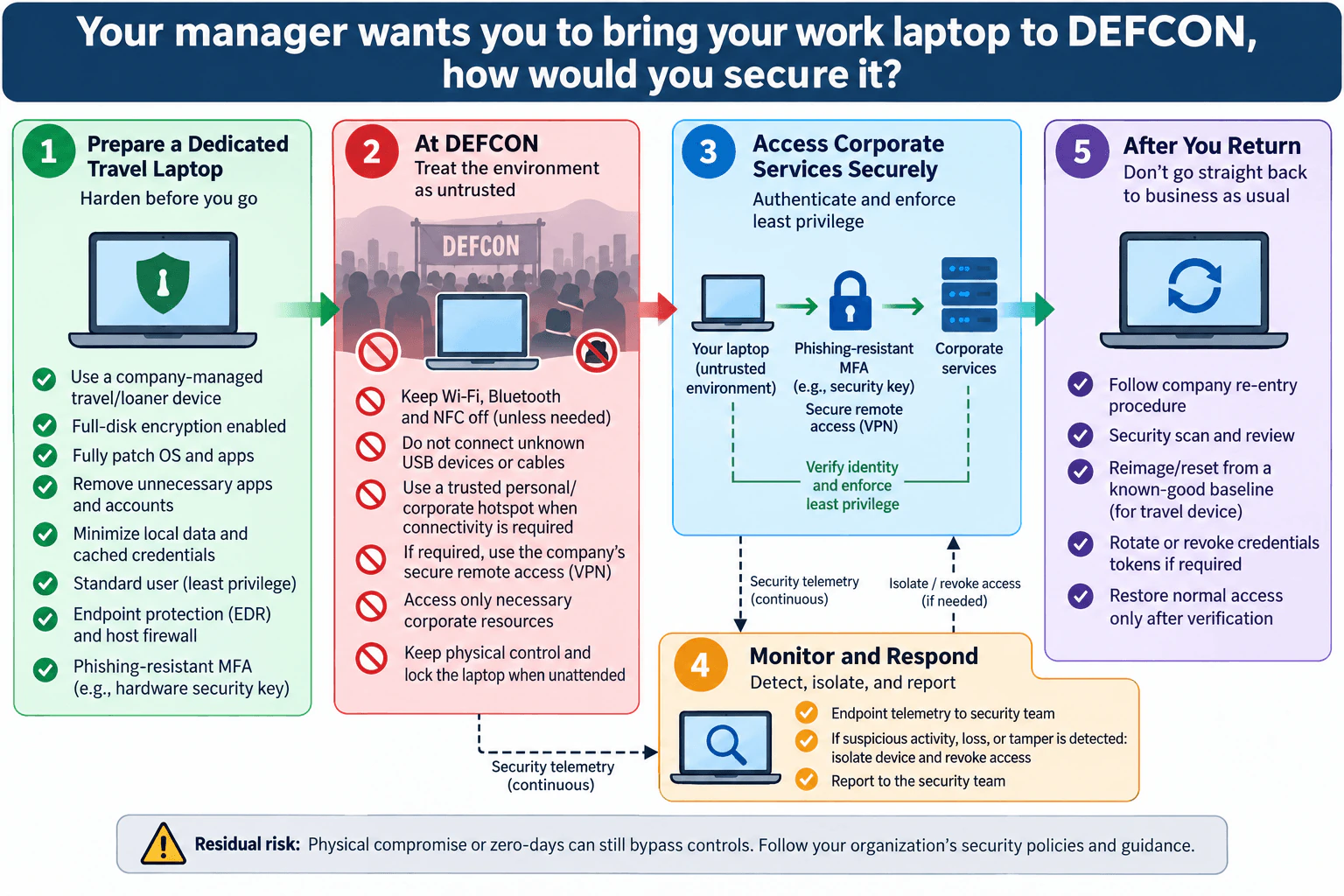
I would use a company-managed travel device if possible, minimize local data and privileges, patch and encrypt it, keep EDR and the host firewall enabled, use phishing-resistant MFA and approved secure remote access, avoid untrusted radios and peripherals, monitor continuously, and verify or reimage the device before normal re-entry.
Detailed Explanation
The question is asking how I would safely operate a corporate endpoint in an unusually untrusted environment while still allowing necessary work. My goal is not to make the laptop impossible to compromise. It is to reduce attack surface, protect company data and credentials, minimize the blast radius, detect suspicious activity, and recover safely. I would treat the laptop, nearby networks, wireless interfaces, peripherals, and physical surroundings as separate trust boundaries. I would use layered controls before, during, and after the event instead of relying on one control such as a VPN.
Useful Questions to Ask the Interviewer
Does company policy allow a normal production laptop at the event, or can I use a dedicated travel or loaner device?
What work resources must I access while there, and can that access be reduced temporarily?
What approved connectivity and secure remote-access method should I use?
Does the security team require a post-travel scan, credential action, or full reimage before normal access is restored?
How to Explain It in an Interview
1. Start with a dedicated, hardened device
My first choice is a company-managed travel or loaner laptop rather than carrying a normal workstation with unnecessary data and access. Before travel, I would fully patch the operating system and applications, enable full-disk encryption, remove unnecessary applications and accounts, minimize cached credentials and local sensitive data, and use a standard non-administrative account for normal work. Full-disk encryption protects stored information when the device is not booted and properly locked, but once the operating system has unlocked the data, endpoint and access controls become responsible for protecting it.
I would keep the host firewall and endpoint detection and response, or EDR, enabled. EDR supplies endpoint telemetry that the security team can use to identify and investigate suspicious behavior. I would also provision phishing-resistant multi-factor authentication, such as an approved hardware security key using a phishing-resistant cryptographic authentication method. Phishing-resistant authentication is stronger than manually entered one-time codes because the authentication exchange can be bound to the legitimate verifier instead of depending on the user to recognize a fake sign-in page.
2. Treat the event environment as untrusted
At DEFCON I would minimize unnecessary interfaces. Wi-Fi, Bluetooth, and NFC would remain off unless there is a business need. Each enabled radio creates another reachable interface, so disabling unused radios reduces unnecessary exposure. I would not connect unknown USB devices or cables because an untrusted peripheral creates another physical trust-boundary crossing. I would keep the laptop under physical control and lock it whenever it is unattended.
If connectivity is required, I would use a trusted personal or corporate hotspot when company policy allows it. I would then use the company's approved secure remote-access solution, such as its VPN, for required corporate access. The VPN protects the network path but does not make the endpoint, surrounding environment, or attached peripherals trustworthy, so it remains only one layer of the design.
3. Cross the corporate boundary with strong identity and least privilege
The laptop at the event remains an untrusted endpoint environment. Access to corporate services should therefore require strong identity verification rather than assuming that possession of the laptop establishes trust. I would authenticate with phishing-resistant MFA and use only the approved secure remote-access path.
I would access only the corporate resources required for the trip. This applies least privilege and reduces blast radius. If my work at the event does not require an administrative system, sensitive dataset, or other privileged resource, I should not access it from the travel device. I would also avoid storing reusable credentials, cached tokens, or sensitive files locally when they are unnecessary.
4. Keep telemetry flowing and fail safely
Prevention is not enough. Endpoint telemetry should continue to reach the security team when connectivity allows. Useful evidence includes EDR alerts, authentication events, remote-access logs, and device-management status. The security team owns investigation and containment decisions rather than expecting the traveler to perform ad hoc incident response.
If I see suspicious activity, lose physical control of the laptop, or receive a credible tamper alert, I would stop normal work and report it through the company's incident process. The safe response is to isolate the device and revoke or suspend its corporate access when required. I would not reconnect simply because the device appears normal. This is a fail-closed trust decision: normal business access remains restricted until security verifies the endpoint.
5. Verify the laptop before restoring normal trust
After returning, I would follow the company's re-entry procedure. That can include a security scan and review, and for a dedicated travel device the approved process may require reimaging or resetting it from a known-good baseline. If investigation or policy requires it, affected credentials or tokens should be rotated or revoked. Normal access should be restored only after verification.
This recovery step matters because compromise or persistence may not produce an obvious symptom. Reimaging a travel device from a known-good baseline can provide stronger recovery assurance than assuming that a device is trustworthy because no alert is visible. The exact decision belongs to the organization's security policy and security team.
Trust boundaries and control mapping
The main protected assets are corporate data, credentials, the employee identity, the laptop, and the corporate services reachable from it. The employee is the authorized actor. The event environment, nearby networks, radios, peripherals, and unknown people are untrusted. The most important boundary crossing occurs when the travel laptop requests corporate access. Phishing-resistant MFA verifies identity, the approved remote-access path protects the connection, and least privilege limits what that identity can reach.
Full-disk encryption addresses unauthorized access to stored data if the device is lost or stolen while its data remains locked. Patching, application reduction, standard-user operation, the firewall, and EDR reduce endpoint attack surface or improve detection. Disabling unused radios and rejecting unknown peripherals reduce unnecessary external interfaces. Telemetry supports detection, isolation and access revocation support response, and verified re-entry or reimaging supports recovery.
Tradeoffs and residual risk
A dedicated travel laptop, disabled interfaces, restricted access, and a possible post-trip reimage create operational cost and inconvenience. They can make normal work slower and may prevent access to systems that would otherwise be convenient. That is intentional: the architecture trades convenience for smaller exposure and blast radius during a temporary high-risk situation.
The controls also have limits. A VPN protects network traffic but does not make the endpoint trustworthy or prevent every attack. Full-disk encryption does not protect information that the running operating system has already unlocked. MFA does not protect against every endpoint compromise, and endpoint security tools can miss previously unknown attacks. Physical compromise and zero-day vulnerabilities remain residual risks. The final decision should therefore follow the organization's security policies and guidance.
Technical Approach
Use a company-managed travel or loaner device when possible.
Before travel, patch the OS and applications, enable full-disk encryption, remove unnecessary applications, accounts, local data, cached credentials, and privileges, and verify EDR and the host firewall are active.
Provision phishing-resistant MFA for required corporate access.
At the event, treat networks, wireless interfaces, peripherals, and physical surroundings as untrusted; keep unnecessary Wi-Fi, Bluetooth, and NFC disabled and reject unknown USB devices or cables.
Use trusted personal or corporate connectivity when required and the company's approved secure remote-access path.
Access only the corporate resources necessary for the trip.
Keep endpoint telemetry active.
If suspicious activity, loss, or tampering occurs, isolate the device, notify the security team, and revoke or suspend access as required.
After returning, perform the organization's re-entry review and, when required, reimage or reset the travel device from a known-good baseline and rotate or revoke affected credentials or tokens.
Restore normal corporate access only after verification.
Practical Complexity & Trade-offs
The main cost is operational rather than computational. A dedicated travel laptop requires inventory, configuration, patching, support, and possibly a full rebuild after the trip. Restricting applications, data, radios, privileges, and corporate access can make work less convenient. Phishing-resistant MFA and approved remote access require identity and access infrastructure. EDR and logging consume endpoint, network, storage, and security-team capacity. Reimaging and credential rotation take staff time. The benefit is a smaller attack surface and blast radius during a temporary high-risk event. No control removes all risk, so the organization still needs security ownership and a process for accepting residual risk.
Where it is used
This approach is appropriate for authorized business travel to security conferences, other conferences with untrusted networks and peripherals, high-risk travel, temporary work from public locations, or any situation where a corporate endpoint must operate outside the organization's normal trusted environment. Organizations adapt the exact controls to their own travel-device, remote-access, endpoint-monitoring, incident-response, and re-entry policies.
Why Interviewers Ask This
This question tests whether I can apply defense in depth to a real endpoint that must operate in an untrusted environment. The interviewer wants to see whether I reduce attack surface before travel, protect identity and data, control network and physical exposure, limit corporate access, detect suspicious behavior, respond safely, and verify the device before restoring normal trust. It also tests judgment: I should not claim that encryption, a VPN, MFA, or endpoint protection makes the laptop completely safe.
Common interview mistakes
Common mistakes are relying only on a VPN, carrying a normal laptop containing unnecessary sensitive data, leaving Wi-Fi or Bluetooth enabled when they are not needed, plugging in unknown USB devices or cables, working as a local administrator, using weak or phishable authentication when stronger approved authentication is available, accessing more corporate systems than necessary, disabling EDR because the event is noisy, ignoring physical security, and reconnecting the laptop to the normal corporate environment immediately after returning. Another mistake is claiming the design makes the laptop completely safe. Encryption, MFA, remote access, EDR, and a firewall reduce specific risks but do not eliminate physical compromise, endpoint malware, stolen authenticated sessions, or zero-day vulnerabilities.
Interview tip
Lead with the risk decision: treat the event as untrusted and minimize what you bring. Then walk through the same lifecycle as the diagram: harden before travel, reduce exposure at DEFCON, require strong identity and least-privileged corporate access, monitor and contain suspicious behavior, and verify or reimage before normal re-entry. Explain which risk each control addresses and finish by acknowledging residual risk rather than saying the laptop is completely secure.
Interviewer may ask next
What would you do if you detected suspicious activity or lost physical control of the laptop during DEFCON?
I would treat the device as potentially compromised. I would stop normal work, report the event immediately through the company's security process, and follow the security team's containment instructions. The device should be isolated and corporate access or relevant credentials and tokens should be revoked or suspended when required. I would preserve centrally collected security telemetry rather than performing unnecessary destructive investigation on the laptop myself. I would not restore normal trust just because the laptop appears to work normally. After the trip, I would follow the company's investigation and re-entry process, which may include a known-good reimage and credential or token rotation before normal access is restored.
Why isn't using a VPN enough to secure the laptop at DEFCON?
A VPN protects the network path, but it does not make the laptop, user, peripherals, radios, or surrounding environment trustworthy. I therefore use defense in depth: a hardened and minimally provisioned device, full-disk encryption, disabled unnecessary interfaces, phishing-resistant MFA, least-privileged corporate access, endpoint monitoring, physical control, incident containment, and verified post-trip recovery. The VPN is one layer of that architecture, not the security architecture by itself.
2. Design a secure system to help our employees work remotely.Security ArchitectureHardMeta
Short Interview Answer (30-60 seconds)
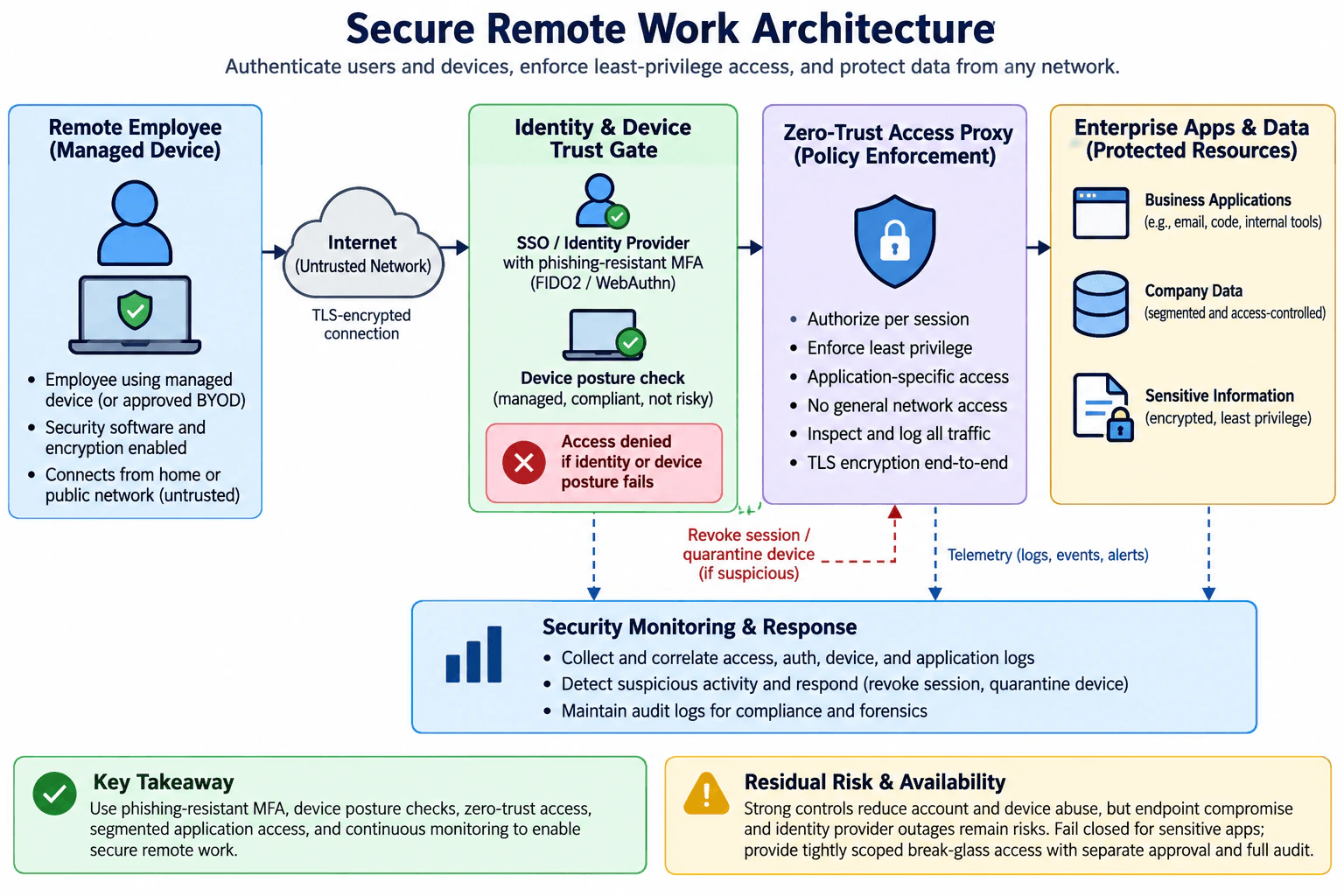
I would use Zero Trust remote access: verify the employee and device first, require phishing-resistant MFA, authorize each session through an application-aware access proxy, expose only approved resources, encrypt traffic, and continuously monitor access, device, and application telemetry for rapid revocation or quarantine.
Detailed Explanation
The question asks for a practical architecture that lets employees safely reach company applications and data from home, public networks, or other remote locations. I would not trust a connection just because the employee has authenticated or owns a company device. The design should verify both identity and device posture, limit access to the specific application needed, encrypt communication across the untrusted network, protect sensitive company data, record useful security evidence, and provide a safe response when identity, device, access, or availability checks fail.
Useful Questions to Ask the Interviewer
Are employees expected to use only company-managed devices, or must approved BYOD devices also be supported?
Which resources must be reachable remotely: web applications, developer tools, data stores, or legacy network services?
Which applications contain the most sensitive information and therefore need stricter access policies?
Do any legacy systems require broad network-level connectivity, or can most access be application-specific?
What availability requirements exist for the identity provider and remote-access service?
How to Explain It in an Interview
I would start with a Zero Trust principle: network location is not a trust signal by itself. NIST SP 800-207 states that Zero Trust does not grant implicit trust based solely on physical or network location or asset ownership, and that authentication and authorization of both the subject and device occur before a session to an enterprise resource is established. csrc.nist.gov
1. Remote employee and endpoint
The actor is the remote employee. The primary endpoint is a managed device, with approved BYOD treated as an explicit exception rather than automatically trusted. The device should have the organization's required security software, disk encryption, and compliance state. The employee may be connecting from a home or public network, so the Internet is an untrusted boundary.
A managed device reduces risk but does not prove the device is safe. A compromised endpoint can still abuse an otherwise valid authenticated session. This remains an important residual risk.
2. Identity and device trust gate
The first control point verifies both the person and the device. The employee authenticates through the organization's SSO or identity provider using phishing-resistant multi-factor authentication. NIST SP 800-63B identifies WebAuthn, as used by authenticators implementing FIDO2 specifications, as an example of phishing-resistant authentication because the authenticator output is bound to the verifier identity rather than relying on manual entry of a reusable authentication output. pages.nist.gov
The same gate evaluates device posture, such as whether the device is managed, compliant, and not currently considered risky. Identity success alone is therefore insufficient. If either identity verification or required device posture fails, access is denied rather than allowing the connection to proceed.
3. Zero Trust access proxy
After the trust gate succeeds, the request reaches a Zero Trust access proxy that acts as the policy-enforcement point. It authorizes access per session and applies least privilege. An employee gets access to the approved application or resource needed for the job, not general connectivity to the company's internal network. This limits lateral movement and reduces the blast radius if an account or endpoint is compromised.
This separation between the employee and protected resources matches the NIST Zero Trust model, where a subject reaches a resource through policy decision and policy enforcement functions rather than receiving implicit trust from network placement. nvlpubs.nist.gov
Traffic crossing the untrusted network uses TLS-protected connections. The diagram also says the access proxy can inspect and log traffic. I would interpret that carefully: the proxy can enforce access policy and log the session, identity, destination, request metadata, and other information visible at its enforcement point. It cannot generically inspect application payloads that remain cryptographically opaque through uninterrupted end-to-end TLS unless the architecture deliberately terminates that TLS connection. I would not add TLS interception unless it were a separately justified requirement.
4. Protected applications and data
Behind the proxy are enterprise applications and company data. Business applications such as email, code systems, and internal tools remain individually protected. Company data is segmented and access-controlled, and sensitive information receives encryption and least-privilege access.
The key architectural rule is that successful remote authentication does not create broad network trust. Authorization remains resource-specific. NIST's Zero Trust architecture explicitly focuses protection on resources rather than treating network segments as inherently trusted. csrc.nist.gov
5. Monitoring, evidence, and response
The identity system, device trust gate, access proxy, and protected applications send relevant authentication, access, device, event, and alert telemetry to the security monitoring and response capability. The security team correlates those records to detect suspicious behavior.
If activity becomes suspicious, the smallest useful response is to revoke the affected session. If evidence indicates that the endpoint itself is risky, the device can also be quarantined. Audit records should be retained according to the organization's evidence and retention requirements so investigators can reconstruct authentication and access activity. The logs themselves should have tightly controlled access because they may contain sensitive security metadata.
6. Failure and recovery behavior
Normal protected access should fail closed when the user cannot authenticate, the device does not satisfy required posture, or the access policy cannot safely authorize the requested resource. The organization should avoid silently bypassing these checks merely to preserve convenience.
Availability needs separate planning because the identity provider and access proxy become important dependencies. If either is unavailable, ordinary sensitive application access should not automatically fall back to unrestricted network access. For a small set of critical systems, the diagram allows tightly scoped break-glass access with separate approval and full auditing. That emergency path should remain exceptional and should not become a permanent alternative to normal controls.
For recovery after a suspected compromise, revoke affected sessions, quarantine the risky endpoint when appropriate, verify the employee and device again, restore the endpoint to a trusted state through the organization's normal endpoint process, and then re-establish the minimum required application access.
7. Ownership and validation
Identity administrators own authentication and access-policy configuration. Endpoint or security operations owns device posture signals and quarantine actions. Application and data owners determine which users need access to each protected resource. Security operations owns monitoring and incident response. Emergency access should require separate authorization rather than allowing one administrator to both approve and exercise unrestricted access.
I would validate the design with safe tests: confirm that an unmanaged or noncompliant device is denied; confirm that a valid employee can reach an approved application but cannot obtain unrelated network access; confirm that access events appear in monitoring; and confirm that revoking a session actually stops further protected access.
Tradeoffs and residual risk
This architecture improves security by combining phishing-resistant authentication, device posture, application-specific authorization, segmentation, encrypted transport, and continuous monitoring. The tradeoff is more operational complexity and some user friction. The identity provider and access proxy are also high-value availability dependencies. Strong controls reduce account and device abuse but do not eliminate endpoint compromise, malicious actions performed through legitimate access, software vulnerabilities inside protected applications, or identity-provider outages. CISA's Zero Trust Maturity Model similarly treats identity, devices, networks, applications and workloads, data, and visibility and analytics as complementary parts of a broader Zero Trust approach rather than relying on a single perimeter control. cisa.gov
Technical Approach
Identify the remote employee, endpoint, enterprise applications, company data, and sensitive information that require protection.
Treat the employee's network as untrusted and require encrypted transport.
Verify the employee through SSO with phishing-resistant MFA.
Check device posture before allowing protected access.
Deny access when required identity or device checks fail.
Send successful requests through a Zero Trust access proxy.
Authorize each session for only the required application and avoid general internal-network access.
Keep applications and data segmented and access-controlled.
Collect identity, access, device, and application telemetry.
Revoke suspicious sessions and quarantine risky devices when justified.
Fail closed for normal sensitive access when critical trust checks cannot be completed.
Maintain a tightly scoped, separately approved, fully audited break-glass path only where business-critical availability requires it.
Regularly test denial, least-privilege access, telemetry, revocation, and recovery behavior.
Practical Complexity & Trade-offs
The main cost is operational rather than algorithmic. Employees need compatible authentication methods and managed or approved devices. Security teams must operate identity, device-compliance, access-policy, logging, and response systems. Application owners must maintain accurate access rules, which creates ongoing maintenance work. Stronger checks can add login friction or delay access when a device becomes noncompliant. The access proxy and identity provider also add infrastructure and availability dependencies. Financial cost comes from endpoint management, identity services, access infrastructure, monitoring storage, and operational staffing. Human cost comes from support, policy reviews, exception handling, and incident response. The benefit is a smaller attack surface and smaller blast radius because remote users do not automatically receive broad internal-network access.
Where it is used
This pattern is useful when employees need to reach company email, source-code systems, internal business tools, file or data systems, and other protected applications from home or public networks. It is especially useful when the organization has a mix of remote users and cloud or internal applications and wants application-specific access instead of treating a successful remote login as permission to enter the whole corporate network. Approved BYOD can also fit the pattern when the organization has a defined device-posture policy for those devices.
Why Interviewers Ask This
This question tests whether I can turn broad remote-work requirements into one defensible security architecture. The interviewer is looking for judgment around identity, endpoint trust, untrusted networks, least privilege, segmentation, monitoring, failure behavior, availability, and residual risk. A strong answer should show how controls work together instead of treating VPN, MFA, endpoint security, and logging as an unrelated checklist.
Common interview mistakes
A common mistake is to say "use a VPN and MFA" without defining what the employee can reach after authentication. Another is trusting a company-owned device automatically instead of checking its current posture. Granting remote users broad internal-network connectivity creates unnecessary lateral-movement risk. Other mistakes include using identity authentication without resource-level authorization, treating logs as prevention rather than detection evidence, failing open when posture or identity checks cannot be completed, collecting excessive telemetry without access controls, and claiming that encrypted end-to-end traffic can always be payload-inspected by an intermediate proxy. It is also a mistake to design break-glass access as an ordinary fallback instead of a tightly scoped, separately approved, audited exception.
Interview tip
Draw the flow from left to right: remote employee and device, untrusted Internet, identity and device trust gate, Zero Trust access proxy, then protected applications and data. Explain the deny path before the allow path. Finish with monitoring, session revocation, availability dependencies, break-glass access, and the residual risk of endpoint compromise.
Interviewer may ask next
What would you do if an employee passes MFA but their device fails the posture check?
I would deny normal protected access because the architecture requires both identity verification and acceptable device posture. I would record the failed policy decision for monitoring and direct the employee through the organization's endpoint remediation process. Access should be retried only after the device returns to an approved state. I would not compensate for a failed posture check by granting broad network access just because MFA succeeded.
What happens if the identity provider is unavailable during an important business incident?
Normal sensitive access should not silently become unrestricted. The identity provider is a major availability dependency, so it should be designed and operated for resilience. For a small set of truly critical applications, I would allow a preplanned break-glass path that is tightly scoped, separately approved, strongly controlled, and fully audited. After normal identity service is restored, I would terminate emergency access that is no longer required, review its audit trail, and return users to the standard identity, device, and per-session authorization flow.
3. Threat-model a Signal-like messaging application.Threat ModelingHardMeta
Short Interview Answer (30-60 seconds)
I would protect message plaintext, session keys, identity keys, and metadata while treating the messaging service and network as untrusted. Use authenticated asynchronous key agreement, Double Ratchet end-to-end encryption, contact key verification, and metadata minimization, while accepting endpoint compromise, traffic analysis, and denial of service as important residual risks.
Detailed Explanation
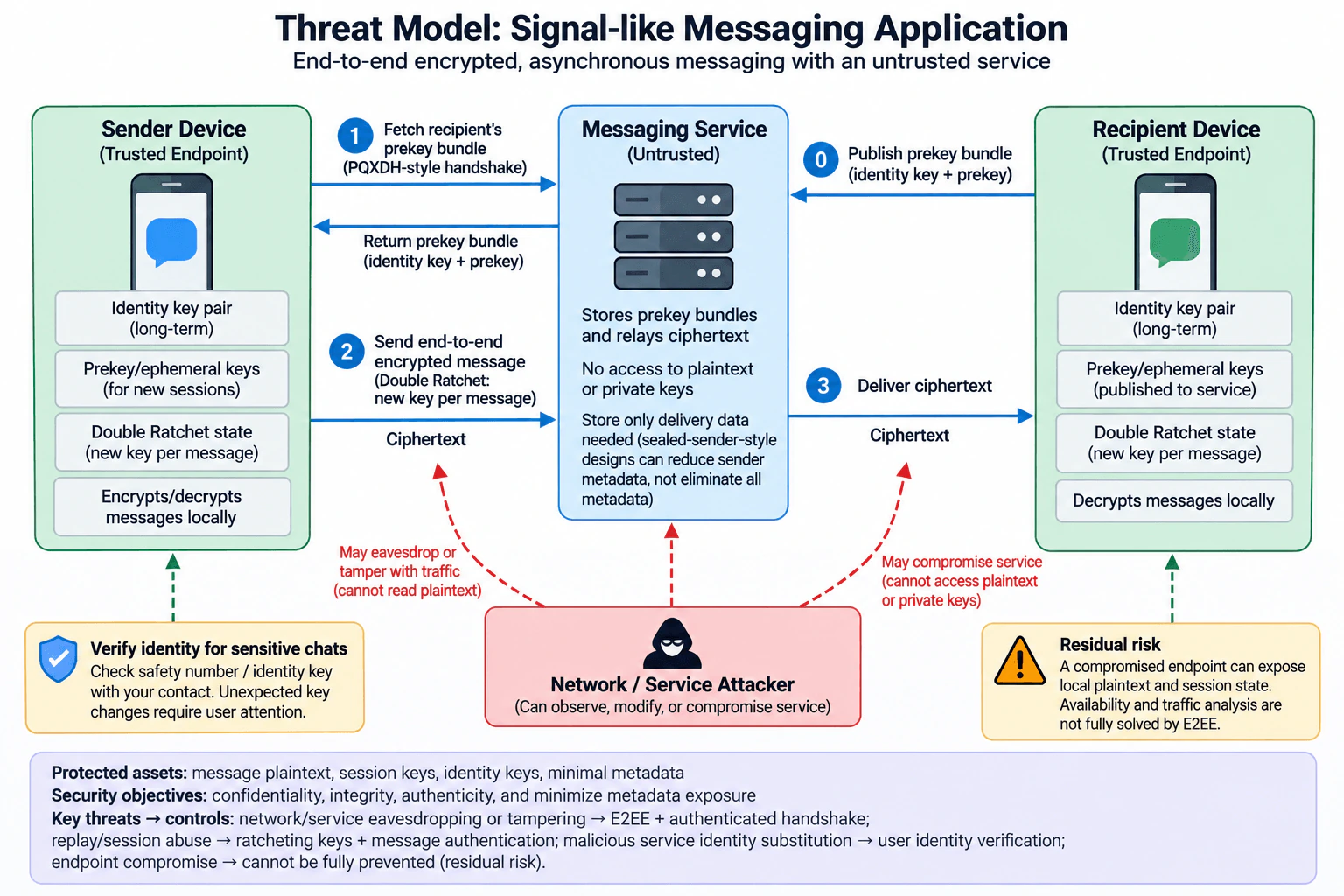
A Signal-like application must protect messages even when the network or messaging service cannot be trusted. I would model the sender device, recipient device, messaging service, and a network or service attacker. The main assets are plaintext messages, identity keys, session keys, and sensitive metadata. The security objectives are confidentiality, integrity, authenticity, and reduced metadata exposure. The design should prevent the service from learning plaintext or endpoint private keys, reject tampered messages, make suspicious contact-key changes visible, resist replay within the protocol's state model, and clearly acknowledge that compromised endpoints, traffic analysis, and availability remain outside complete end-to-end encryption protection.
Useful Questions to Ask the Interviewer
Are the sender and recipient devices assumed trusted initially, or should we include an already-compromised endpoint?
Should the messaging service be considered honest-but-curious, fully malicious, or potentially compromised by an attacker?
Is asynchronous messaging required, meaning a recipient may be offline when the sender starts a session?
How important is metadata privacy compared with message-content confidentiality?
Should availability attacks be in scope, or should we focus mainly on confidentiality, integrity, and authenticity?
How to Explain It in an Interview
1. Define the assets and security objectives
The protected assets are message plaintext, identity private keys, prekey and ephemeral private material, Double Ratchet session state, and metadata that could reveal communication relationships. The main objectives are confidentiality of message content, integrity of messages, authenticity of the cryptographic peer, and minimization of metadata exposure.
2. Define actors and trust boundaries
There are three primary system components: the sender device, the messaging service, and the recipient device. The endpoints hold private identity-key material, locally generated prekey or ephemeral private material, and Double Ratchet state, and they perform encryption and decryption locally. The service is outside the trusted endpoint boundary. It stores the recipient's published public prekey bundle and relays ciphertext, but under the intended design it should not receive message plaintext or endpoint private keys.
The attacker model includes an adversary who can observe or modify network traffic and may compromise or control the messaging service. That attacker may attempt eavesdropping, ciphertext tampering, replay, denial of delivery, traffic analysis, or substitution of public key material. Endpoint compromise is also considered, but it is a residual-risk case because cryptography cannot protect plaintext from malware or an attacker who controls a device while plaintext or live session state is available.
3. Model the important data flows
First, the recipient publishes the public material required for asynchronous session establishment to the messaging service. For a PQXDH-style design, that bundle includes the recipient's public identity key and required signed, one-time, and post-quantum prekey material. The sender fetches the recipient's prekey bundle through the untrusted service and uses PQXDH to establish a shared secret for an asynchronous session. The sender then encrypts messages locally and sends ciphertext through the service. The service stores or forwards the ciphertext, and the recipient decrypts it locally.
After session establishment, the Double Ratchet derives new keys as messages are exchanged. This gives each message fresh derived key material and provides protection for earlier messages if later key material is compromised. After new Diffie-Hellman ratchet input is incorporated, it can also provide recovery for later messages from some prior key compromise. These properties do not protect a device that remains actively controlled by an attacker.
4. Map threats to controls
Threat: a network observer or compromised service tries to read message contents. Control: end-to-end encryption keeps message encryption and decryption on the endpoints, so the service handles ciphertext rather than plaintext. Residual risk: timing, routing, connection information, and other delivery metadata may still reveal communication patterns.
Threat: an attacker alters ciphertext in transit. Control: authenticated encryption and authenticated protocol state cause unauthorized modification to fail verification instead of becoming accepted plaintext. The safe behavior is to reject a message whose authentication check fails.
Threat: an attacker replays old protocol messages or ciphertext. Control: session state, message counters, ratchet progression, and authenticated message processing distinguish valid protocol progress from previously processed or invalid messages. Implementations must still support legitimate delayed or out-of-order delivery according to the protocol while not treating an already-consumed message key as a fresh new message.
Threat: a malicious or compromised service substitutes public key material during session establishment. Control: PQXDH authenticates parties based on their public keys, but that does not by itself prove that a server-provided identity key belongs to the real-world person the user intended. For sensitive conversations, users can compare the conversation's safety number or equivalent identity-key fingerprint through a trusted independent path. This verifies that both parties are seeing consistent cryptographic key material; it should not be described as proving a person's real-world identity. Unexpected safety-number or identity-key changes should be surfaced for user attention, and a previously verified safety number should not silently continue as verified after a change.
Threat: the service learns communication metadata. Control: retain only delivery information that is necessary and use sealed-sender-style techniques where appropriate to reduce sender metadata visible to the service. This reduces exposure but does not eliminate traffic-analysis risk, because delivery still requires routing information and network observers can observe timing and connections.
Threat: an endpoint is compromised. Control: keep private keys and ratchet state on endpoints and minimize unnecessary exposure, but this cannot fully solve device compromise. Malware with access to the application or operating system may obtain plaintext or active session state. This is an explicit residual risk rather than something end-to-end encryption should be claimed to prevent.
Threat: the service is unavailable or intentionally drops messages. Control: preserve confidentiality and integrity rather than falling back to plaintext. Messages may remain queued or undelivered. End-to-end encryption does not prevent an untrusted relay from denying service.
5. Prioritize the risks
Server or network compromise has broad exposure because message delivery crosses that boundary, so protecting message confidentiality and integrity there is a top priority. Public-key substitution is especially important for sensitive conversations because it can undermine confidence in the cryptographic peer if users have never verified the expected key material. Endpoint compromise has very high impact because it can expose plaintext directly. Metadata exposure and denial of service are also meaningful. Their exact likelihood and business impact depend on the application's users and threat environment, so I would state that uncertainty instead of inventing numeric probabilities.
6. Safe failure behavior
Cryptographic authentication failures should fail closed: reject the invalid message rather than display unauthenticated plaintext. Unexpected contact-key or safety-number changes should be surfaced to the user, especially for sensitive conversations. If a previously verified safety number changes, the verification state should require renewed user approval before it is trusted again. If the messaging service is unavailable, the system should leave messages queued or undelivered rather than fall back to an unencrypted transport. Confidentiality must not be silently traded away for availability.
7. Validation and evidence
I would validate the model with protocol tests around authenticated asynchronous key establishment, message tampering, replay, out-of-order delivery, contact-key changes, and service-compromise assumptions. I would verify that server-side message storage contains ciphertext and only the public or delivery data required by the design, not endpoint private keys or message plaintext. I would test that modified ciphertext is rejected, consumed message keys are not reused as fresh messages, legitimate out-of-order delivery behaves as designed, and a changed safety number or equivalent contact-key state produces the intended user-visible warning or re-verification behavior.
8. Tradeoffs and residual risk
End-to-end encryption deliberately prevents the service from inspecting message plaintext, which improves confidentiality but limits server-side features that require plaintext. Frequent key evolution improves protection around key compromise but increases protocol and state-management complexity. Contact-key verification improves confidence that the cryptographic peer has not been silently substituted, but it creates usability friction and does not by itself establish a person's real-world identity. Metadata-minimization mechanisms reduce server knowledge but cannot completely eliminate timing and traffic-analysis information. The largest residual risk is endpoint compromise, followed by traffic analysis and denial of service, because end-to-end encryption alone cannot fully solve those problems.
Technical Approach
Define scope and assumptions: trusted sender and recipient endpoints, an untrusted network and messaging service, asynchronous delivery, and an attacker who can observe or modify traffic and may compromise the service.
Draw the data flow: recipient publishes a public prekey bundle; sender fetches it; authenticated asynchronous key agreement establishes a shared secret; sender sends ciphertext; service relays ciphertext; recipient decrypts locally.
Examine each trust-boundary crossing for eavesdropping, tampering, replay, public-key substitution, metadata exposure, and denial of service.
Map threats to controls: end-to-end authenticated encryption, PQXDH-style key establishment, Double Ratchet key evolution, contact-key verification, and metadata minimization.
Define fail-safe behavior for invalid ciphertext, unexpected key changes, and service outage.
Validate with negative and state-transition tests.
Record residual risks, especially endpoint compromise, traffic analysis, and denial of service.
Practical Insights
The main cost is not CPU time; it is security and operational complexity. Clients must safely store identity keys and ratchet state, generate and manage prekeys, handle lost or out-of-order messages, and keep protocol state synchronized. The server must publish or distribute public prekey material and relay ciphertext without depending on plaintext inspection. Metadata-minimization techniques add protocol and abuse-prevention complexity. Contact-key verification adds user friction. Testing is also more expensive because key changes, replay, delayed delivery, compromised-service behavior, and recovery paths must be tested carefully across client versions.
Why Interviewers Ask This
This question tests whether the candidate can turn a real security-sensitive system into an explicit threat model instead of listing generic controls. A strong answer identifies assets, actors, trust boundaries, attacker capabilities, important data flows, concrete threats, mitigations, safe failure behavior, and residual risk. It also tests judgment about what end-to-end encryption does and does not protect, especially when the messaging service is untrusted, endpoints may be compromised, and metadata or availability remains exposed.
Common interview mistakes
Common mistakes are saying that TLS alone provides end-to-end encryption; treating the messaging server as trusted just because it belongs to the application operator; claiming the server sees no metadata at all; claiming the Double Ratchet prevents every consequence of endpoint compromise; treating a threat, vulnerability, exploit, and risk as the same thing; listing STRIDE categories without mapping them to actual data flows; forgetting public-key substitution during session establishment; ignoring replay and out-of-order-message behavior; saying that safety numbers prove a person's real-world identity; and promising availability or metadata anonymity that the design does not provide.
Interview tip
Start with the trust decision: endpoints hold plaintext and private keys; the network and messaging service are untrusted. Then walk through one message from prekey publication to encrypted delivery, naming the threat at each boundary and the control that addresses it. Finish by stating what remains unsolved: compromised endpoints, traffic analysis, metadata leakage, and denial of service.
Interviewer may ask next
How would your threat model change if the messaging service were fully malicious rather than only untrusted for confidentiality?
I would assume the service can substitute public key material, drop, delay, reorder, replay, or selectively deliver ciphertext, and manipulate metadata. End-to-end authenticated encryption still prevents the service from directly decrypting valid endpoint-encrypted messages, but server-supplied key substitution becomes a central threat. I would emphasize independent comparison of safety numbers or equivalent key fingerprints for sensitive conversations, strict rejection of invalid authenticated messages, careful replay and session-state handling, and visible treatment of unexpected key changes. Safety-number comparison confirms consistent cryptographic key material; it does not by itself establish real-world identity. Availability remains outside the service-independent security guarantee because a malicious relay can refuse to deliver messages.
What happens if one user's endpoint is compromised?
A compromised endpoint can expose plaintext available on that device and may expose active cryptographic state, so end-to-end encryption cannot provide complete protection. The Double Ratchet limits the value of some compromised key material by continually deriving new keys and can restore protection for later messages after fresh Diffie-Hellman ratchet material is introduced, assuming the attacker no longer controls the endpoint. It does not help while malware continues to observe the device. The practical response is to treat endpoint compromise as a major residual risk, remove or recover the affected device through the product's trusted device lifecycle, re-establish trusted cryptographic state, and require renewed verification where appropriate.
4. Did you solve any challenges or investigations using tools?NEWBehavioralEasyMeta
Interview tip:
Use STAR to structure your answer: briefly explain the Situation and Task, make Action the most detailed part, and finish with the Result. For example, describe a security investigation where you used tools to collect evidence, narrow the cause, verify your findings, communicate what you discovered, and help resolve the issue.
Situation
In my last role, I investigated a security alert involving unusual authentication activity on an internal account. The alert alone did not show whether it was a real compromise or normal user behavior, so I needed more evidence before taking action.
Task
I was responsible for investigating the activity, deciding whether the account was at risk, and giving the team clear evidence for the next step. I also wanted to avoid disrupting the user unless the data supported a security response.
Action
I started in our security information and event management tool and reviewed the authentication logs around the alert. I compared successful and failed sign in events, source addresses, timestamps, and device information. I then used our endpoint security tool to check the related device for suspicious processes, unusual connections, and recent security detections. Next, I compared the activity with the user's normal access pattern and checked threat intelligence sources for information about the external addresses involved. The evidence showed that the unusual access came from a new network, but the endpoint showed no signs of malware or suspicious execution. I documented each finding and explained to the team which evidence lowered the likelihood of an active compromise and which uncertainty still remained. We then confirmed the activity through the proper internal process before closing the investigation.
Result
The investigation showed that the activity was legitimate and did not require incident containment. We avoided an unnecessary account disruption while still treating the alert seriously. I learned that security tools are most useful when I combine evidence from several sources instead of making a decision from one alert alone.
Why Interviewers Ask This
Interviewers ask this question to understand how the candidate uses security tools during a real investigation. A strong answer shows that the candidate can collect evidence, compare multiple data sources, avoid premature conclusions, communicate findings clearly, and make a sound security decision.
Interviewer may ask next
Why did you use several tools instead of relying only on the original alert?
The original alert showed unusual behavior, but it did not explain the cause. I used authentication logs, endpoint data, and threat intelligence because each source answered a different part of the investigation. Combining them gave me stronger evidence and reduced the chance of making a decision based on one signal.
What would you have done if the endpoint data had shown suspicious activity?
I would have treated the investigation as a likely security incident. I would have preserved the evidence, followed the incident response process, and worked with the team to contain the affected account or device as needed. I would also have continued reviewing related authentication and endpoint activity to understand the scope before recommending further actions.
Cybersecurity Engineer Resume Examples
Explore the resume examples below to find the one that best matches your target Cybersecurity Engineer role.
Disclaimer: This interview guide is for educational and informational purposes only. It is designed to help readers prepare, but it does not guarantee any interview result, hiring decision, offer, or outcome. Interview questions, hiring criteria, and preferred answers can vary by employer, interviewer, industry, location, and time. All answers, examples, and explanations in this guide are suggested examples for interview preparation, not definitive answers or instructions for professional practice. They are based on research and judgment, are provided without warranties of any kind, and should be adapted to the question, role, and applicable laws and professional requirements. Diagrams are simplified illustrations intended to highlight the main concepts and their relationships; actual situations, systems, and practices may be more complex. Alternative approaches may be equally valid or better suited to a particular question, context, or interviewer. To the fullest extent permitted by applicable law, the contributors and publisher are not liable for decisions made, actions taken, or losses incurred based on this guide.
State Laws and Professional Responsibilities: Laws and requirements governing an occupation vary by state and jurisdiction. You are responsible for checking the current laws, licensing requirements, and scope-of-practice rules that apply to your location and role, and for ensuring that your answers and actions comply with them. Adapt examples in this guide to those requirements. This guide is not legal advice.
Company Notice: This guide is an independent educational resource and is not affiliated with, endorsed by, sponsored by, or approved by the company named in this guide. Company names identify reported interview experiences or the employer context of clearly labeled original practice exercises. Interview practices can change without notice, and inclusion of company-specific content does not mean these questions are official, complete, or guaranteed to be asked. To the fullest extent permitted by law, the author, contributors, and publisher are not responsible for outcomes related to use of this material.
Content Accuracy and Verification: To the fullest extent permitted by applicable law, we do not represent or warrant that interview guides, questions, answers, examples, or diagrams are accurate, complete, current, error-free, or suitable for any particular purpose. You are responsible for independently reviewing and verifying the information before relying on it.