This interview guide is for educational and informational purposes only. It is designed to help readers prepare, but it does not guarantee any interview result, hiring decision, offer, or outcome. Interview questions, hiring criteria, and preferred answers can vary by employer, interviewer, industry, location, and time. All answers, examples, and explanations in this guide are suggested examples for interview preparation, not definitive answers or instructions for professional practice. They are based on research and judgment, are provided without warranties of any kind, and should be adapted to the question, role, and applicable laws and professional requirements. Diagrams are simplified illustrations intended to highlight the main concepts and their relationships; actual situations, systems, and practices may be more complex. Alternative approaches may be equally valid or better suited to a particular question, context, or interviewer. To the fullest extent permitted by applicable law, the contributors and publisher are not liable for decisions made, actions taken, or losses incurred based on this guide.
State Laws and Professional Responsibilities
Laws and requirements governing an occupation vary by state and jurisdiction. You are responsible for checking the current laws, licensing requirements, and scope-of-practice rules that apply to your location and role, and for ensuring that your answers and actions comply with them. Adapt examples in this guide to those requirements. This guide is not legal advice.
Identity, Image, and Privacy Notice
To respect individual privacy, some names, profile photographs, avatars, biographical details, and other identifying information displayed in this guide may be replaced with pseudonyms, licensed stock images, illustrative avatars, composite images, or representative descriptions. Unless a person is expressly identified as an actual contributor, a displayed name, image, or profile should not be understood as depicting or identifying a specific candidate, interviewer, employee, or other real individual. These representations are provided for editorial and illustrative purposes only and do not imply endorsement, employment, participation, or affiliation with this guide or any company mentioned in it. Any resemblance to an actual person is coincidental.
Company Notice
This guide is an independent educational resource and is not affiliated with, endorsed by, sponsored by, or approved by the company named in this guide. Company names identify reported interview experiences or the employer context of clearly labeled original practice exercises. Interview practices can change without notice, and inclusion of company-specific content does not mean these questions are official, complete, or guaranteed to be asked. To the fullest extent permitted by law, the author, contributors, and publisher are not responsible for outcomes related to use of this material.
Content Accuracy and Verification
To the fullest extent permitted by applicable law, we do not represent or warrant that interview guides, questions, answers, examples, or diagrams are accurate, complete, current, error-free, or suitable for any particular purpose. You are responsible for independently reviewing and verifying the information before relying on it.
Questions or comments?
Contact us for general questions, or share feedback, technical corrections, and comments with the community.
1. What security measures would you implement first in a startup company?Security ArchitectureMediumMicrosoft
Short Interview Answer (30-60 seconds)
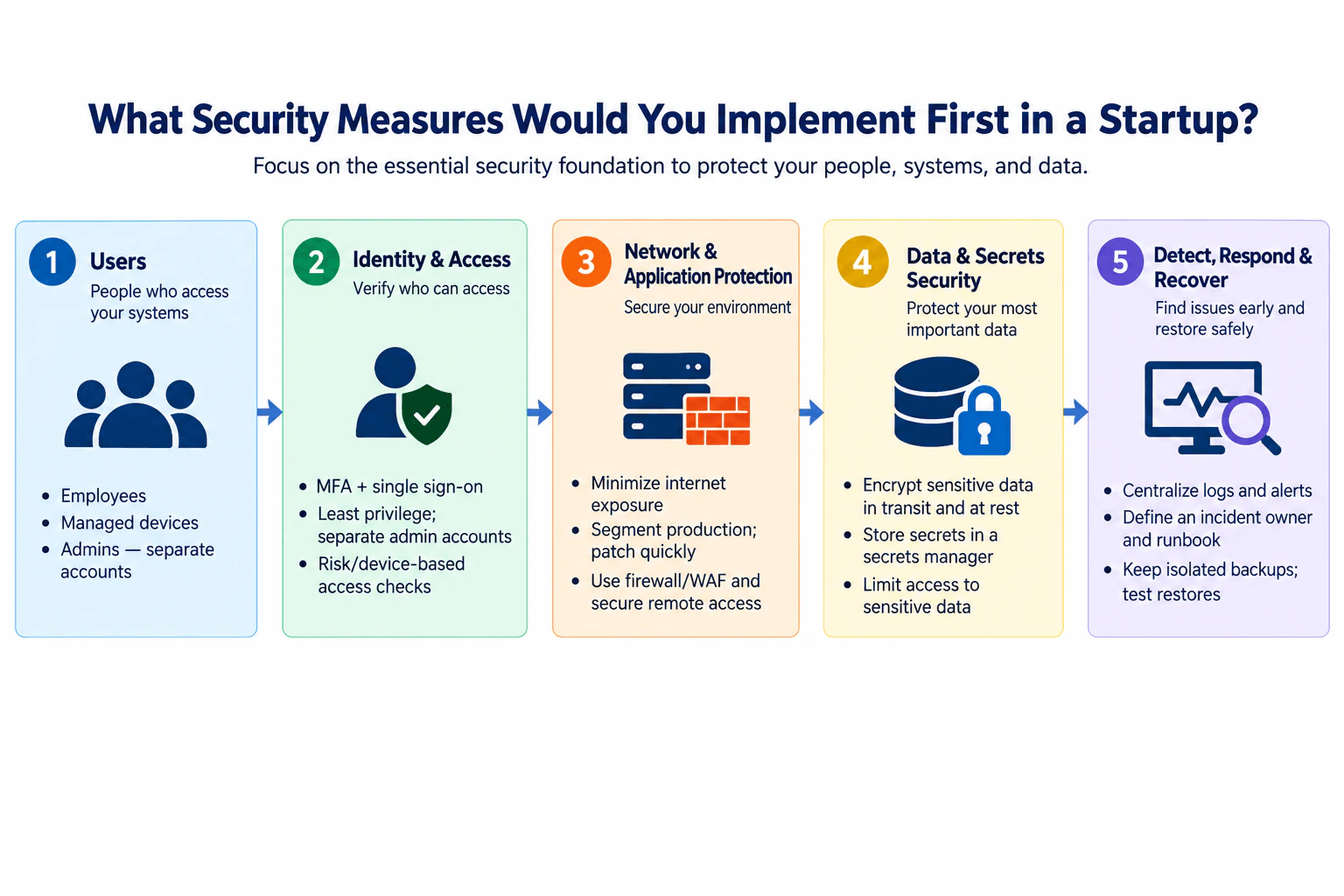
I would start with identity and device security, then reduce network exposure, protect data and secrets, and establish detection and recovery. That means MFA, single sign-on, least privilege, separate admin accounts, segmentation, encryption, centralized logs, an incident runbook, and isolated backups with tested restores.
Detailed Explanation
The question is mainly about prioritization. A startup usually has limited people, time, and money, so I would not begin with a large security-tool catalog. I would first protect the users, devices, systems, and sensitive data that could create the most damage if compromised. My foundation would follow five stages: users, identity and access, network and application protection, data and secrets security, and detection, response, and recovery. The goal is defense in depth with controls that provide strong risk reduction while remaining practical for a small team to operate.
Useful Questions to Ask the Interviewer
What are the startup's most critical applications and sensitive data?
Are employees using company-managed devices, personal devices, or both?
Is production primarily cloud-hosted, on-premises, or a mixture?
How many people need administrator or production access?
Does the startup already have centralized identity, logging, or backup capabilities?
How to Explain It in an Interview
I would explain the design as one ordered security foundation rather than a collection of unrelated products.
Users and devices. The main actors are employees and administrators using company systems. Where practical, I would use managed devices so the startup can apply baseline security configuration and keep supported software updated. Administrative work should use separate administrator accounts instead of giving everyday user accounts permanent elevated privileges. This reduces the impact of a compromised normal account and creates a clearer administrative boundary.
Identity and access. I would enable multi-factor authentication, or MFA, which requires an additional authentication factor, and use single sign-on so access can be managed centrally. Permissions should follow least privilege: users receive only the access needed for their work. Administrator privileges should be separated from normal accounts. Risk- or device-based access checks can add another decision point before sensitive access is granted. If an identity or device fails a required access condition, sensitive access should be denied rather than silently bypassing the control.
This layer protects the boundary between people or devices and company resources. It reduces risk from stolen credentials, excessive privileges, and uncontrolled administrative access. It does not prove that every authenticated user is trustworthy, so additional layers remain necessary.
Network and application protection. Next, I would minimize services exposed directly to the internet. Production should be separated from less trusted environments so a compromise does not automatically provide broad access. Systems should be patched promptly based on risk and operational constraints. Firewalls can restrict unwanted network paths, and a web application firewall, or WAF, can help filter supported web traffic when the application is exposed through HTTP or HTTPS. Remote administrative access should use an approved secure access path instead of broadly exposing management interfaces.
The design goal is to reduce blast radius. Identity controls decide who may access resources, while network and application controls restrict where that identity can reach. Segmentation is not complete isolation, and a firewall or WAF cannot correct application logic flaws, so these controls are complementary rather than substitutes.
Data and secrets security. Sensitive data should be encrypted in transit and at rest where appropriate. Access to sensitive data should be limited to the people and workloads that require it. Application secrets such as credentials, tokens, and keys should be stored in a dedicated secrets-management system rather than hard-coded into source code or ordinary configuration files.
The protected assets here are sensitive business data and credentials that provide access to systems. Encryption reduces exposure if protected data or storage is obtained, but it does not prevent an already authorized identity from misusing data. Access controls and monitoring therefore remain necessary.
Detect, respond, and recover. I would centralize useful security logs and alerts from the systems that matter most so suspicious activity can be investigated. Someone must be the named incident owner, and the team should have a short, usable runbook describing who coordinates containment, investigation, communication, and recovery.
For recovery, I would maintain isolated backups of critical information and test restores. A successful backup job does not prove that recovery will work. The team should periodically restore important data or services and verify the restored state before treating recovery as successful.
Operational ownership and validation. Each control needs an owner. Identity access should be reviewed when people join, change roles, or leave. Important administrative access should be reviewed periodically. Network exposure should be compared with the intended public services. Logging can be validated by generating safe expected events and confirming they arrive at the central monitoring location. Backup recovery should be tested instead of assuming that stored backups are usable.
Failure behavior. For sensitive access, failure of an access-control dependency should not automatically grant broad access. The startup should define a narrowly scoped emergency administrative path for authorized recovery and protect it separately. If centralized logging fails, the team should treat that as loss of detection coverage and restore monitoring promptly. If a backup restore fails, the service should not be declared recovered until the restored data and system state are verified.
Tradeoffs and residual risk. These controls add setup work, access reviews, patching effort, alert triage, backup storage, and recovery testing. Strong access checks may add user friction, and segmentation can add operational complexity. I would therefore favor a small number of centrally managed controls that provide broad protection before adding specialized tools. Residual risk still remains from software vulnerabilities, compromised authorized users, provider failures, configuration mistakes, and activity that monitoring does not detect. The security foundation should evolve as the startup's people, systems, data, and risks change.
Key Insight / Why This Solution Works
Identify the users, devices, systems, sensitive data, and administrative access that need protection first.
Establish centralized identity controls with MFA, single sign-on, least privilege, separate administrator accounts, and appropriate risk- or device-based access checks.
Minimize internet exposure, segment production from less trusted environments, patch systems, and restrict network and remote-administration paths.
Encrypt sensitive data in transit and at rest where appropriate, centralize application secrets, and limit access to sensitive information.
Centralize useful security logs and alerts and assign an incident owner with a practical response runbook.
Maintain isolated backups for critical data, test restoration, and verify restored assets before declaring recovery complete.
Review access, exposure, alerts, and recovery tests as the startup changes so the controls remain aligned with current risk.
Where it is used
This approach fits an early-stage or growing company that needs a practical security baseline for employees, administrator access, production applications, sensitive business data, and operational recovery. It is especially useful when a small engineering or security team must protect internet-facing or cloud-hosted systems without building a large enterprise security program. The same sequence is useful when formalizing security after rapid growth: centralize identity first, reduce unnecessary exposure, protect data and secrets, then establish dependable detection, incident ownership, and tested recovery.
Why Interviewers Ask This
This question tests whether I can prioritize security under startup constraints rather than simply list controls. The interviewer wants to see whether I understand which protections reduce important risks first, how identity, network, data, detection, response, and recovery work together, and how I balance risk reduction against cost, operational effort, and a small team's limited time.
Common interview mistakes
A common mistake is listing many security products without explaining priority or risk reduction. Another is focusing on perimeter controls while administrator accounts are still protected only by weak or shared credentials. Giving every engineer broad production access defeats least privilege and increases blast radius. Treating a firewall or WAF as complete application security is also incorrect. Secrets should not be hard-coded into repositories or ordinary configuration files. Encryption is not a substitute for access control. Centralized logs without an owner or response process provide limited operational value. Finally, creating backups without isolating them and testing restores can create false confidence in recovery.
Interview tip
Lead with prioritization rather than a tool list. Explain the five layers in order: users and devices, identity and access, network and applications, data and secrets, then detection, response, and recovery. For each layer, briefly state the risk it reduces and one limitation. Emphasize controls that provide broad protection while remaining simple enough for a small startup team to operate.
Interviewer may ask next
If you could implement only three security measures during the startup's first week, which would you choose?
I would first establish centralized identity with MFA, least privilege, and separate administrator accounts. Second, I would reduce unnecessary internet and production exposure while establishing secure administrative access. Third, I would protect recoverability with isolated backups and a tested restore for the most critical data. Those choices address account compromise and privilege abuse, exposed systems and excessive blast radius, and the ability to recover from destructive incidents. I would then add centralized logging, stronger data and secrets controls, and more mature response processes as quickly as the team can operate them reliably.
What happens if the centralized identity or security tooling fails?
For sensitive access, I would prefer controlled failure rather than automatically bypassing authentication or granting broad access. The startup should define a narrowly scoped emergency administrative process with strong protection and clear ownership so authorized staff can recover critical services when normal identity access is unavailable. A logging or monitoring outage should be treated as temporary loss of detection coverage and investigated promptly. Backup and restore processes should remain independently usable enough to support recovery from a larger outage. The tradeoff is that safer failure behavior can reduce availability, so emergency paths must be designed, protected, documented, and tested before they are needed.
2. What are some common ports that a typical Windows or Unix workstation uses?Network SecurityEasyMicrosoft
Short Interview Answer (30-60 seconds)
Common examples are DNS 53, DHCP UDP 67/68, HTTP 80, HTTPS 443, and NTP UDP 123. Windows may also use Kerberos 88, LDAP 389, SMB 445, and RDP 3389. Unix-like systems commonly use SSH TCP 22 when enabled.
Detailed Explanation
This question asks for common TCP and UDP port numbers that a normal Windows or Unix workstation may use during everyday network activity. The key point is that using a service port does not necessarily mean the workstation listens on that port. A client normally connects from a temporary local source port to a server's well-known destination port. Operating-system role and configuration also matter. For example, a domain-joined Windows workstation may use Kerberos and SMB, while a Unix-like workstation may listen for SSH only when its SSH server is enabled.
Useful Questions to Ask the Interviewer
Do you want common destination service ports, locally listening ports, or both?
Should I include enterprise Windows domain services such as Kerberos, LDAP, and SMB?
Should I focus on normal workstation roles rather than services that are mainly associated with servers?
How to Explain It in an Interview
I would group the ports by purpose instead of only memorizing numbers.
For basic network services, DNS commonly uses TCP or UDP port 53 for name resolution. DHCP uses UDP port 67 on the server side and UDP port 68 on the client side. NTP commonly uses UDP port 123 for time synchronization. Web clients commonly connect to HTTP on port 80 and HTTPS on port 443. IANA maintains the authoritative service-name and port-number assignments. iana.org
For Windows workstations in an Active Directory environment, common traffic can include Kerberos on TCP or UDP 88 for authentication, DNS on TCP or UDP 53, LDAP on TCP 389, SMB on TCP 445, and RPC-related traffic when required. Microsoft documents these ports for communication between Windows clients and domain controllers. UDP 389 may also appear for Active Directory DC Locator behavior, so I would not describe every UDP 389 packet simply as normal LDAP application traffic. learn.microsoft.com
SMB commonly uses TCP 445. In Microsoft's SMB specification, an SMB server using Direct TCP should listen on port 445, while the SMB client's TCP source port can be another available port. This is a useful example of the difference between a service's destination port and a client's source port. learn.microsoft.com
Remote Desktop Protocol, or RDP, listens on TCP 3389 by default when Remote Desktop is enabled. It is incorrect to say that every Windows workstation listens on 3389. Microsoft documents 3389 as the default listener and also warns against directly exposing Remote Desktop to the public Internet without appropriate protection. learn.microsoft.com
On Unix and Unix-like systems, SSH is commonly associated with TCP port 22. A workstation connecting to another machine's SSH service sends traffic to that server's port 22. The local workstation listens on port 22 only if an SSH server is enabled and configured to use that port. IANA registers port 22 for SSH. iana.org
Direction is important. For example, when a workstation opens an HTTPS website, it normally chooses a temporary local source port and connects to the server's destination port 443. The server replies from its service port back to that temporary client port. Therefore, seeing HTTPS traffic involving a workstation does not mean the workstation is running an HTTPS server.
From a security perspective, I would compare actual listening ports with the workstation's intended role. If SSH, SMB, or RDP is listening but not required, disabling or restricting that service reduces attack surface. If the service is required, host firewall policy should limit access to appropriate sources. A firewall can restrict network reachability, but an allowed port alone does not authenticate a user or prove that an endpoint is trustworthy.
I would validate what is really listening or communicating with operating-system socket information, host firewall logs, endpoint telemetry, and, when justified and authorized, packet capture. Port numbers are useful indicators, but they do not prove application identity because software can use nonstandard ports or tunnel traffic through another protocol.
The main tradeoff is functionality versus attack surface. Services such as SMB, RDP, or SSH can provide legitimate file sharing or administration, but every unnecessary reachable listener adds software that must be configured, patched, monitored, and protected.
Technical Approach
Clarify whether the interviewer means service destination ports, locally listening ports, or both.
Start with common workstation network services: DNS 53, DHCP UDP 67/68, HTTP 80, HTTPS 443, and NTP UDP 123.
Add Windows-specific examples when relevant: Kerberos 88, LDAP TCP 389, SMB TCP 445, and RDP TCP 3389.
Add SSH TCP 22 as a common Unix-like administration service when enabled.
Explain that outbound clients usually use temporary local source ports rather than the well-known service port locally.
For security review, compare listening ports with the workstation's intended role and disable or restrict unnecessary listeners.
Validate observations with socket data, firewall logs, endpoint telemetry, or an authorized packet capture.
Practical Insights
There is little computational cost in identifying ports. The important cost is operational. Every enabled listening service requires configuration, patching, access control, monitoring, and troubleshooting. Disabling unnecessary services reduces attack surface, but disabling a required service can break functions such as remote administration, authentication, file sharing, name resolution, or time synchronization.
Why Interviewers Ask This
The interviewer is checking basic TCP/IP knowledge and whether the candidate understands how common workstation services map to ports. A stronger answer also distinguishes a server's well-known destination port from a client's temporary source port and recognizes that a port being commonly associated with Windows or Unix does not mean it should always be open or listening.
Common interview mistakes
Common mistakes include saying that every workstation listens on every listed port, confusing a client's temporary source port with a server's well-known destination port, forgetting whether TCP or UDP is involved, and assuming RDP or SSH is always enabled. Another mistake is saying that a familiar port proves which application generated the traffic. Ports are conventional service identifiers, not proof of application identity or endpoint trust.
Interview tip
Start with five or six familiar ports, then demonstrate deeper understanding by explaining direction: a workstation may connect to a service port without listening on that port. Separate normal cross-platform services from Windows-specific and Unix-specific examples.
Interviewer may ask next
What is the difference between a listening port and a client source port?
A listening port belongs to a service waiting for incoming traffic, such as an SSH server listening on TCP 22. A client usually chooses a temporary local source port when it starts an outbound connection. For example, a browser might connect from a temporary source port to a web server's TCP port 443. The server then sends responses from port 443 back to that temporary client port.
If TCP 445 or TCP 3389 is listening on a Windows workstation, does that automatically mean the workstation is insecure?
No. TCP 445 can legitimately support SMB, and TCP 3389 can legitimately support Remote Desktop when those functions are required. Microsoft documents TCP 445 for Direct TCP SMB and TCP 3389 as the default RDP listening port. learn.microsoft.com The security decision depends on whether the service is needed, who can reach it, authentication and authorization controls, patch state, host firewall policy, and monitoring. If the service is unnecessary, disabling it or reducing its network reachability lowers attack surface.
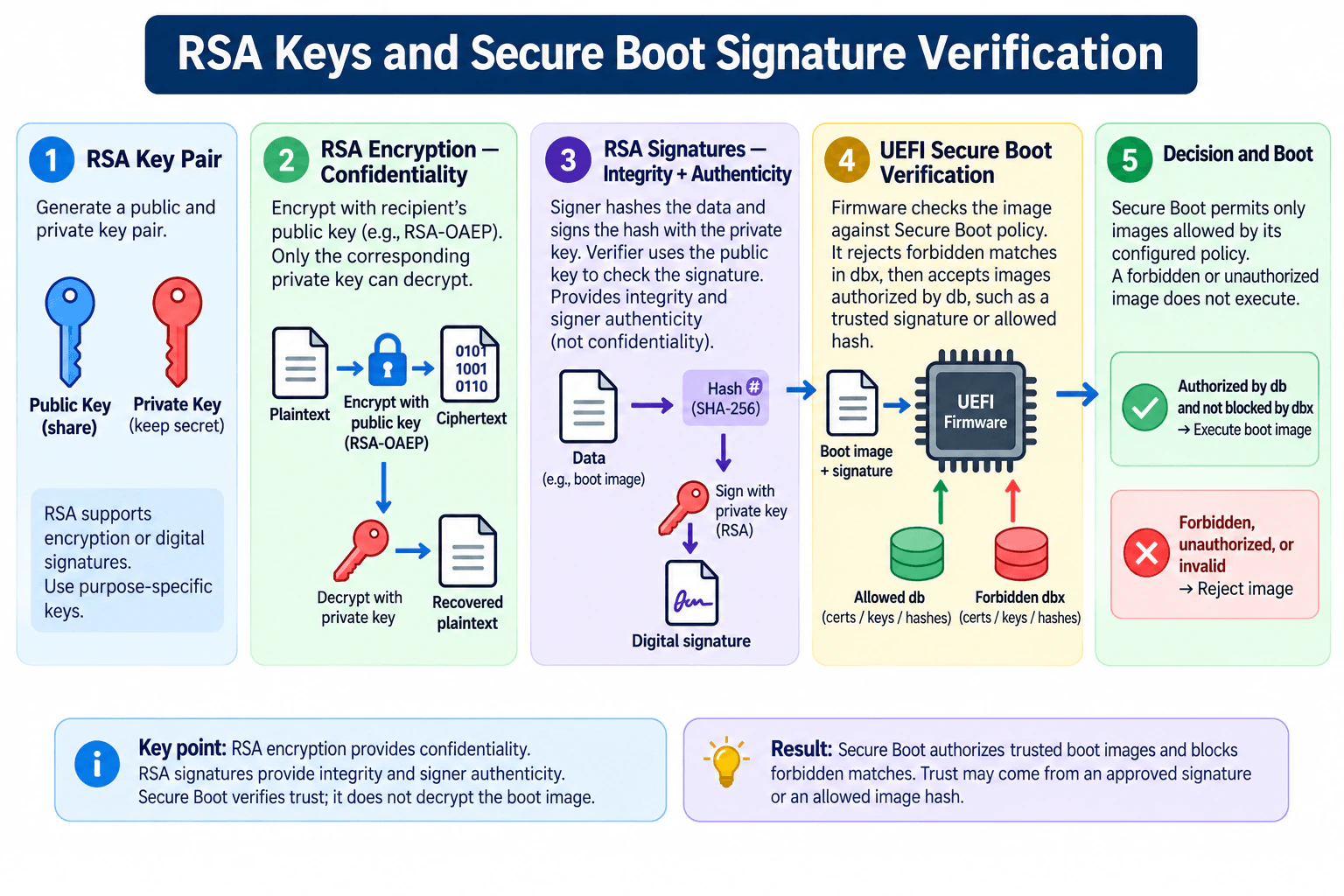
RSA encryption uses the recipient's public key for confidentiality and the corresponding private key for decryption. RSA signatures use a private key to sign and a public key to verify integrity and authenticity. Secure Boot checks dbx first, then authorizes trusted images through db; otherwise it rejects them.
Detailed Explanation
The practical decision is whether RSA is being used for confidentiality or for trust verification. Encryption and digital signatures use related public-key ideas, but they solve different problems. Encryption protects data from unauthorized reading. A signature helps detect unauthorized modification and ties the signature to the holder of the corresponding private key. UEFI Secure Boot applies signature and hash-based trust checks before allowing a boot image to execute. Its trust boundary is firmware-controlled boot policy: forbidden matches are rejected, while an image authorized by the configured allowed database can continue to boot.
Useful Questions to Ask the Interviewer
Do you want RSA encryption explained separately from RSA digital signatures?
Should I explain Secure Boot at the UEFI policy level, including the allowed db and forbidden dbx databases?
Should I focus on the verification decision rather than platform-specific key-enrollment administration?
How to Explain It in an Interview
Start by separating the two RSA use cases.
For encryption, assume a recipient has a purpose-specific RSA public/private key pair. The public key can be shared. A sender encrypts plaintext using the recipient's public key with a vetted encryption scheme such as RSA-OAEP. The resulting ciphertext can be decrypted with the corresponding private key. The protected asset is the plaintext, the public key is not secret, and the private key must remain protected.
RSA signatures solve a different problem. The signing process hashes the data and uses the signing private key as part of a standardized signature scheme. The verifier uses the corresponding public key and the expected hash computation to verify the signature. Successful verification provides evidence that the signed content has not been altered in a way that invalidates the signature and that the signature was generated using the corresponding private key. It does not provide confidentiality.
RSA can support both encryption and signature schemes, but encryption keys and signing keys should be treated as purpose-specific rather than casually reusing one key pair for unrelated roles. This reduces coupling and makes key lifecycle, compromise response, and policy easier to manage.
Secure Boot then applies public-key and hash-based trust to the boot path. The protected action is executing a boot image. The important trust boundary is the UEFI firmware and its configured Secure Boot policy. The boot image, its signature information, and any applicable image hash are inputs to that decision. Firmware checks the forbidden signature database, dbx, before checking the allowed signature database, db. A matching dbx entry prevents the image from executing. If the image is not forbidden, db can authorize it through trusted certificates, keys, or explicitly allowed image hashes.
The safe failure path is rejection: a forbidden, unauthorized, or invalid image does not execute. Secure Boot is therefore an authorization and integrity mechanism for pre-boot code, not encryption of the boot image. The firmware does not decrypt the operating-system loader simply to decide whether it is trusted.
Verification should include positive and negative tests. A correctly authorized image should boot. A signed image that is modified so its verified digest no longer matches should fail signature verification unless another valid authorization path applies. An image, certificate, key, or hash represented in dbx should be rejected even if it would otherwise be accepted through db. An explicitly allowed image hash can also authorize the exact image represented by that policy entry.
The main limitation is that Secure Boot establishes trust according to configured firmware policy; it does not prove that authorized software is free of vulnerabilities. If a trusted signing key is compromised, an allowed entry is incorrect, or the firmware policy is poorly managed, harmful or vulnerable code may still be considered trusted until the policy is corrected or revoked. Secure Boot also does not replace runtime application-security controls after the verified boot process has progressed.
The tradeoff is stronger pre-boot integrity versus key and policy-management complexity. Certificates, signing keys, allowed db entries, forbidden dbx entries, updates, and revocations must be maintained carefully. Failing closed protects integrity, but a bad revocation or missing authorization can also prevent legitimate software from booting.
Technical Approach
Identify the RSA purpose: confidentiality or digital signature verification.
For confidentiality, encrypt with the recipient's public key using a vetted RSA encryption scheme such as RSA-OAEP and decrypt with the corresponding private key.
For signing, hash the data as required by the chosen signature scheme, create the signature with the signing private key, and verify it with the corresponding public key.
For Secure Boot, treat firmware policy as the trust boundary and boot-image execution as the protected action.
Check the image against dbx first; reject any forbidden match.
If it is not forbidden, determine whether db authorizes the image through a trusted certificate, key, signature chain, or allowed image hash.
Execute only an authorized image; otherwise reject it.
Test accepted, tampered, unauthorized, and revoked cases.
Practical Insights
RSA operations are more computationally expensive than symmetric cryptography, so RSA encryption is generally used for relatively small data rather than bulk data. Secure Boot adds cryptographic verification during startup, but the larger operational cost is managing signing keys, certificates, allowed db entries, forbidden dbx entries, updates, and revocations. Protecting private keys can also require stronger administrative or hardware controls. A wrong trust-policy update can create an availability problem by blocking legitimate boot software.
Why Interviewers Ask This
This question tests whether the candidate can distinguish encryption from digital signatures, explain asymmetric-key roles correctly, connect hashing and signature verification to software integrity, and reason about how Secure Boot makes a fail-safe authorization decision before boot code executes.
Common interview mistakes
Common mistakes are confusing encryption with signing, saying that signatures provide confidentiality, describing signature verification as decrypting the boot image, assuming Secure Boot accepts only certificate-signed images and forgetting allowed hashes, ignoring dbx precedence over db, treating an allowed signature as proof that software has no vulnerabilities, casually reusing one RSA key pair for unrelated purposes, and describing Secure Boot as protection for all runtime application behavior.
Interview tip
Lead with the distinction: RSA encryption provides confidentiality, RSA signatures provide integrity and signer authenticity, and Secure Boot uses verification rather than boot-image decryption. Then explain the firmware decision in one sequence: check dbx, check authorization in db, execute if allowed, otherwise reject.
Interviewer may ask next
What happens if a boot image is allowed by db but also matches an entry in dbx?
The dbx decision takes precedence. Firmware checks dbx before db, and a matching forbidden certificate, key, or image hash prevents the image from executing even if it would otherwise be authorized through db. This allows previously trusted software, signing identities, or specific images to be revoked.
Does a valid Secure Boot signature prove that the boot software is secure?
No. Successful Secure Boot verification shows that the image satisfies the configured trust policy; it does not prove that the authorized software contains no vulnerabilities. A compromised trusted signing key, an incorrect policy entry, or legitimately signed but vulnerable software remains a residual risk until the trust policy, software, or revocation state is updated.
4. What are the standard event log names on Windows machines?Incident ResponseEasyMicrosoft
Short Interview Answer (30-60 seconds)
The classic standard Windows event logs are Application, Security, and System. In modern Event Viewer, the Windows Logs category also contains Setup and Forwarded Events. Application records application events, Security records audited security activity, and System records events from Windows system components.
Detailed Explanation
This question asks you to name the main event logs available on Windows and show that you understand the terminology. The classic standard logs are Application, Security, and System. Application contains events written by applications. Security contains security audit events when the relevant auditing is enabled. System contains events written by Windows system components. On modern Windows, Event Viewer places these under Windows Logs and also includes Setup and Forwarded Events. For a short interview answer, name the classic three first, then mention the additional modern logs if the interviewer wants the complete Windows Logs category.
Useful Questions to Ask the Interviewer
Are you asking for the classic standard event logs or all logs in the modern Windows Logs category?
Would you like me to explain what type of evidence each log normally contains?
How to Explain It in an Interview
I would start with the classic three standard logs documented by Microsoft: Application, Security, and System.
Application contains events logged by applications. The application or its components decide which events to record. These can include startup problems, crashes, configuration errors, or other application-specific conditions.
Security contains audited security events. Examples include successful and failed logons and audited access to objects. The important limitation is that many security events depend on the configured audit policy. Therefore, the absence of an expected event does not by itself prove that an action did not happen.
System contains events logged by Windows system components. Examples include failures involving drivers, services, or other operating-system components.
There is an important modern-Windows distinction. The Windows Logs category in Event Viewer contains Application, Security, Setup, System, and Forwarded Events. Setup records installation and setup-related events. Forwarded Events contains events collected from other computers when Windows Event Forwarding is configured. Microsoft documentation distinguishes this broader modern Windows Logs category from the classic Application, Security, and System logs.
During incident response, these logs are evidence sources, not automatic proof of compromise. I would select the logs relevant to the investigative question, correlate timestamps and related events, and use supporting endpoint, identity, network, or other telemetry when needed before confirming an incident.
Practical Insights
There is little cost to simply knowing or viewing these logs because Windows provides the event-logging infrastructure. Operational cost appears when an organization collects and retains large amounts of event data centrally. More logging can improve investigation coverage, but it also increases storage, SIEM ingestion, analyst workload, and maintenance. Security logs may contain usernames, system information, and other sensitive evidence, so access and retention should be controlled.
Why Interviewers Ask This
Interviewers ask this to check whether you know the basic Windows evidence sources used in troubleshooting and incident response. They expect you to recognize the main log names, understand what each log records, and know that modern Windows exposes more channels than the three classic logs.
Common interview mistakes
Common mistakes are naming only the Security log, forgetting Application and System, or claiming that the classic three are the only logs on modern Windows. Another mistake is treating an event as proof of compromise without correlation. Analysts may also assume Security records every security-relevant action even when the required audit policy was not enabled. Finally, do not confuse a log name with an event provider, event source, event ID, channel, or individual .evtx file.
Interview tip
Lead with Application, Security, and System because those are the classic standard logs. Then show current Windows knowledge by adding that the modern Windows Logs category also includes Setup and Forwarded Events. Keep the distinction clear rather than presenting all five as if Microsoft has always defined them identically.
Interviewer may ask next
Which Windows event log would you check first for suspicious logon activity?
I would usually start with the Security log because Windows security auditing can record successful and failed logons and related authentication events. I would first confirm that the relevant audit policy was enabled, then correlate the events with accounts, timestamps, source systems, endpoint evidence, and other telemetry before concluding that an incident occurred.
Are Application, Security, and System the only event logs available on modern Windows?
No. They are the classic standard logs, but modern Windows exposes additional logs and channels. The Windows Logs category also includes Setup and Forwarded Events, and Applications and Services Logs contains many provider-specific Admin, Operational, Analytic, and Debug channels. An investigator should use the channels that provide evidence relevant to the incident being examined.
5. What steps would you take if you discovered an active security compromise of a client's computer?Incident ResponseMediumMicrosoft
Short Interview Answer (30-60 seconds)
I would confirm and scope the compromise, preserve evidence, and use the smallest safe authorized containment action. Then I would investigate, eradicate the root cause, restore from a known-good state, validate security controls, monitor for recurrence, document the incident, and keep authorized stakeholders informed.
Detailed Explanation
The question asks how I would respond when a client's computer is actively compromised while protecting the client, preserving useful evidence, and avoiding unnecessary damage. My first job is to understand the affected asset, immediate scope, severity, and business impact. I would then preserve evidence and choose the smallest safe authorized containment action. After containment, I would investigate what happened and whether other systems or accounts are affected. I would remove the root cause, recover from a trusted state, validate the computer, monitor for recurrence, document the incident, and communicate throughout the response.
Useful Questions to Ask the Interviewer
Is the compromise already confirmed, or are we still validating an alert or indicator?
How critical is the affected computer to the client's business operations?
Do we have authorization to isolate the endpoint immediately if that is the safest containment action?
Are there legal, privacy, regulatory, disciplinary, or law-enforcement considerations that affect evidence handling or notification?
What endpoint, identity, network, and other relevant telemetry is available for the investigation?
How to Explain It in an Interview
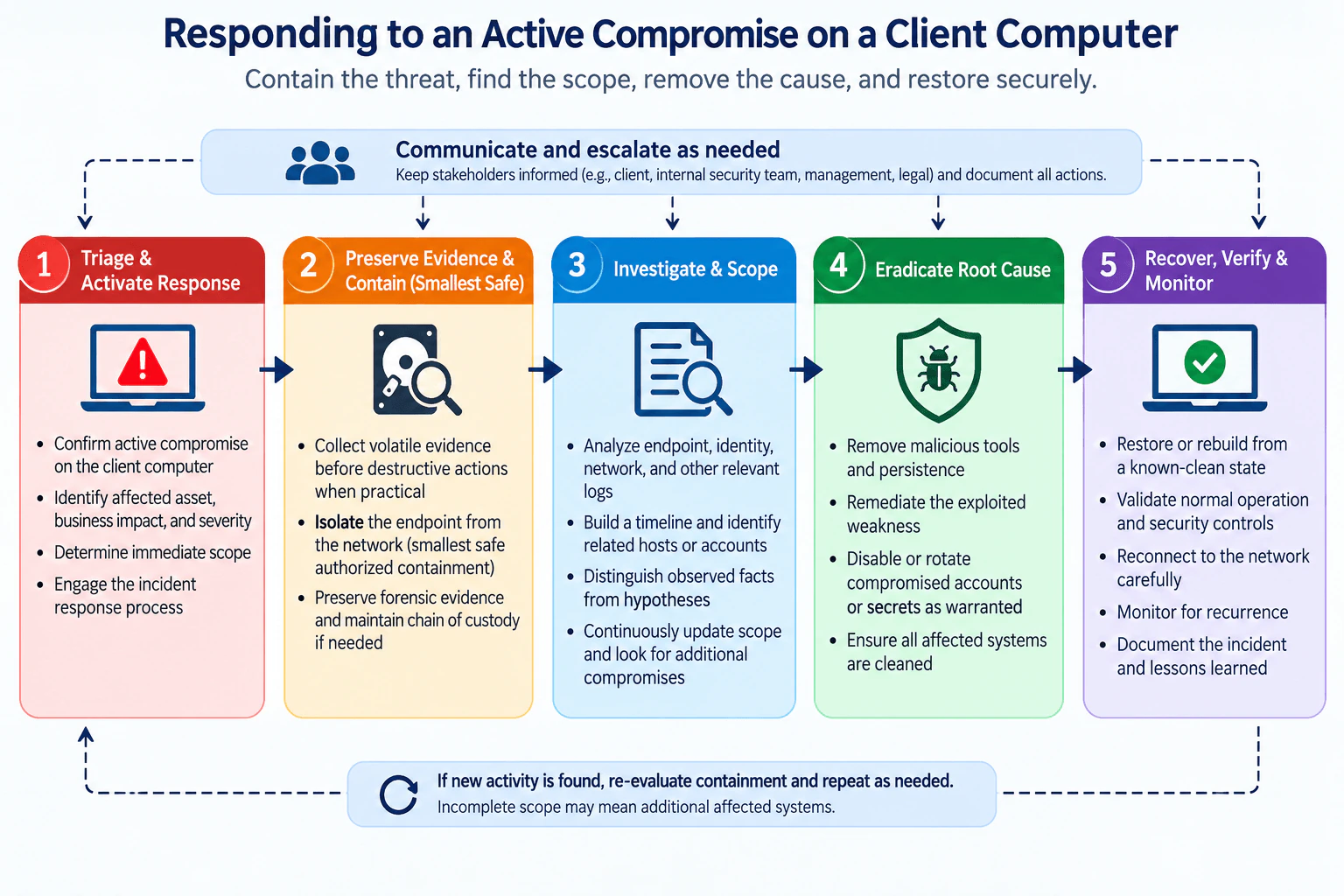
I would organize my response into the same five stages shown in the approved diagram, with communication and escalation continuing across all stages.
Triage and activate the response. I would first confirm what is known about the active compromise and identify the affected computer, user, business impact, severity, and immediate scope. I would distinguish an alert or indicator from proof, and I would keep observed facts separate from hypotheses about the attacker or root cause. Because the question states that an active compromise has been discovered, I would activate the authorized incident-response process and begin documenting important facts and decisions.
Preserve evidence and contain with the smallest safe action. Before taking destructive actions, I would collect volatile evidence when practical and preserve relevant forensic evidence. If evidence may be needed for legal, regulatory, disciplinary, or law-enforcement purposes, I would maintain provenance and chain of custody. I would isolate the endpoint from the network when that is the smallest safe authorized containment action. I would avoid assuming that isolation has solved the incident. Isolation is containment, not root-cause remediation.
Investigate and scope. I would analyze relevant endpoint, identity, network, and other available logs or evidence to determine what happened. I would build and continuously update a timeline of observed activity. I would look for related hosts or accounts, distinguish verified facts from hypotheses, and determine whether the compromise extends beyond the first computer. If new evidence shows additional activity, I would update the scope and re-evaluate containment rather than assuming my original boundary was complete.
Eradicate the root cause. Once I understand enough of the scope to act safely, I would remove malicious tools and persistence mechanisms, remediate the exploited weakness, and disable or rotate compromised accounts or secrets when the evidence warrants it. I would address all affected systems identified during the investigation instead of cleaning only the first endpoint. Current NIST SP 800-61 Rev. 3 guidance explicitly treats eradication as eliminating effects such as persistence mechanisms and entry points and recommends identifying affected hosts and services so weaknesses can be remediated. nvlpubs.nist.gov
Recover, verify, and monitor. I would restore or rebuild the computer from a known-good state, validate normal operation and security controls, and reconnect it carefully. Recovery is not verified merely because the computer boots or the malware is no longer visible. I would monitor for recurrence and watch for evidence that the original scope or eradication was incomplete. If new malicious activity appears, I would return to investigation and containment, exactly as the diagram's feedback loop shows.
Communication and escalation continue throughout the response. I would keep authorized stakeholders such as the client, the internal security team, management, and legal or privacy personnel informed when appropriate. I would communicate validated facts, known impact, uncertainty, decisions, and next steps while protecting sensitive evidence and personal data.
The main tradeoff is speed of containment versus evidence preservation and business availability. Fast isolation can reduce additional attacker activity, but unnecessarily powering off or destroying a system can lose volatile evidence and interrupt important work. I would therefore choose the smallest safe authorized containment action and document why I chose it. Another limitation is incomplete initial scope. A compromise that appears limited to one computer may involve other hosts, identities, or entry points, so recovery must include verification and monitoring rather than assuming success.
Technical Approach
Confirm what is known about the active compromise and separate facts from indicators or hypotheses.
Identify the affected asset and user, immediate scope, business impact, and severity.
Activate the authorized incident-response process and start documentation.
Preserve volatile and forensic evidence when practical, including chain of custody when needed.
Apply the smallest safe authorized containment action, such as isolating the affected endpoint when appropriate.
Analyze relevant endpoint, identity, network, and other available evidence.
Build and update a timeline and identify related hosts, accounts, or additional compromises.
Remove malicious tools and persistence, remediate the exploited weakness, and rotate compromised accounts or secrets when warranted.
Restore or rebuild from a known-good state and validate normal operation and security controls.
Reconnect carefully and monitor for recurrence.
If new activity appears, re-scope the incident and repeat investigation and containment as needed.
Document the incident, communicate with authorized stakeholders, and capture lessons learned.
Practical Insights
The main costs are operational, not algorithmic. Fast containment may reduce security damage but can interrupt the client's work. Evidence collection and investigation require skilled people, secure evidence storage, time, and controlled access. Rebuilding a computer or changing affected credentials can create downtime. Broader scoping means reviewing more hosts, accounts, and logs. Legal or privacy coordination can add work when applicable. Continued monitoring also uses logging, detection, and analyst capacity. The practical goal is to reduce risk without taking broader or more destructive actions than the evidence justifies.
Why Interviewers Ask This
This question tests whether I can make safe decisions during an active security incident instead of reacting blindly. The interviewer wants to see whether I can balance fast containment with evidence preservation and business impact, distinguish temporary containment from root-cause remediation, investigate beyond the first computer, communicate appropriately, and verify that recovery is actually safe.
Common interview mistakes
Common mistakes are immediately wiping or shutting down the computer without considering volatile evidence; treating a single indicator as proof of an entire attack hypothesis; isolating the endpoint and declaring the incident resolved; investigating only the first computer without checking related hosts or accounts; removing malware without eliminating persistence or fixing the exploited weakness; rotating credentials without evidence they are affected, or failing to rotate them when compromise is established; restoring service without validating security controls; reconnecting too early; failing to monitor for recurrence; failing to maintain a timeline or chain of custody when required; and communicating unverified conclusions as established facts.
Interview tip
Present the response in a simple sequence: triage, preserve and contain, investigate, eradicate, then recover and verify. Emphasize that containment is temporary, evidence should be protected, scope may expand as new facts appear, and communication continues throughout the incident.
Interviewer may ask next
Would you immediately disconnect the compromised computer from the network?
If active compromise is confirmed and network isolation is the smallest safe authorized containment action, I would isolate the endpoint quickly to limit further attacker activity. I would not automatically power it off because that can destroy volatile evidence. When practical, I would preserve useful volatile evidence first. I would also consider business impact and available containment options. Isolation is temporary containment, so I would still investigate scope, eradicate the root cause, recover the system, verify it, and monitor for recurrence.
What would you do if new signs of compromise appeared after the computer had been restored?
I would treat that as evidence that the original scope or eradication may have been incomplete. I would preserve the new evidence, update the timeline, return to investigation and containment, and re-scope affected hosts, accounts, and attacker activity. I would determine whether persistence, an entry point, a compromised identity, or another affected system was missed. Recovery would resume only after the expanded scope is addressed and the environment can be validated and monitored again.
6. Give an example of how attackers can escalate privileges.Identity And Access ManagementEasyMicrosoft
Short Interview Answer (30-60 seconds)
For example, an attacker may compromise a normal user account and exploit a vulnerable local service running as administrator or root. If successful, the attacker's actions execute with the service's higher privileges, allowing operations and resource access that the original account was not authorized to perform.
Detailed Explanation
Privilege escalation means an attacker who already has some access obtains a higher level of permission. In this example, the attacker starts with a compromised standard user account that has limited permissions. A local service runs with administrator or root privileges. If that service has a real exploitable vulnerability or insecure configuration, the attacker may abuse the weakness and cross the privilege boundary. The resulting privileged context can perform actions denied to the original account, such as changing protected settings or accessing sensitive resources. Without that weakness, the escalation path should fail.
Useful Questions to Ask the Interviewer
Should I focus on local privilege escalation after the attacker already has a standard user account?
Would you like me to explain the defensive controls as well as the attack path?
Should I keep the example platform-neutral or discuss a specific operating system?
How to Explain It in an Interview
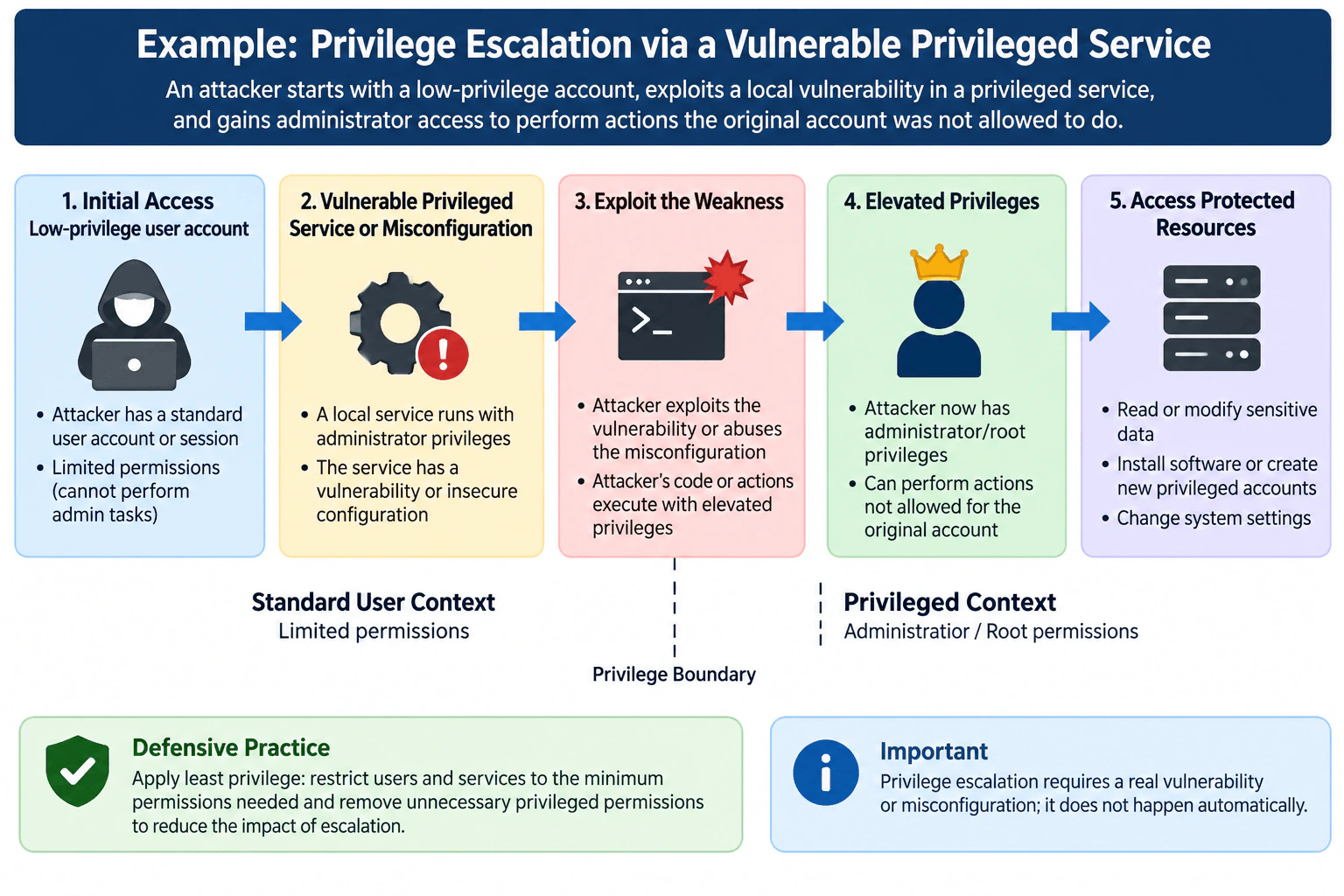
The easiest way to explain this is as one left-to-right privilege-boundary crossing.
Initial access: The attacker controls a standard user account or session. This context has limited permissions and cannot perform administrator tasks.
Vulnerable privileged service: A local service runs with administrator or root privileges. Assume that the service has a genuine exploitable vulnerability or insecure configuration.
Exploitation: The attacker abuses that weakness so attacker-controlled actions execute with the service's elevated privileges.
Elevated privileges: The attacker now operates in an administrator or root context and can perform actions that were denied to the original user.
Protected resources: Depending on the permissions of the elevated context, the attacker may read or modify sensitive data, change protected system settings, install software, or create privileged accounts.
The key trust boundary is the privilege boundary between the standard-user context and the administrator or root context. The operating system's authorization controls decide whether the current security context may perform a protected operation. Before escalation, privileged operations should be denied because the standard account lacks the required permissions. After successful exploitation, the attacker's actions may inherit the privileged service's authority.
This example does not require federation, OAuth, OpenID Connect, SAML, API tokens, or an external identity provider. Those mechanisms are not part of the approved diagram. The relevant identities are the compromised human user context and the privileged service context. The protected resources are system settings, sensitive data, software-management functions, and privileged-account operations that require higher authorization.
A safe failure occurs when the privileged service cannot be exploited or the insecure configuration is absent. In that case, the attacker remains in the standard-user context, and protected operations continue to be denied by normal authorization checks.
The main defensive lesson is least privilege. Users and services should receive only the minimum permissions required for their functions. Least privilege does not remove an underlying vulnerability, so the vulnerability or insecure configuration must also be remediated. However, reducing unnecessary privileged permissions can limit what an attacker gains if exploitation succeeds.
Logging is useful for detecting unexpected privileged execution, protected-resource access, privileged-account creation, and sensitive configuration changes. The limitation is that privilege escalation is a broad attack category. This answer intentionally describes only the single example shown in the diagram: exploitation of a vulnerable or insecurely configured privileged local service.
Technical Approach
Confirm that the attacker begins in a low-privilege user context.
Identify local services or components that run with administrator or root permissions.
Find and remediate exploitable vulnerabilities or insecure configurations in those privileged components.
Apply least privilege so users and services have only the permissions they require.
Keep protected operations denied when the caller remains in the standard-user context.
Log and investigate unexpected privileged execution, sensitive configuration changes, protected-resource access, and privileged-account creation.
Practical Insights
The main technical cost is finding, testing, and fixing vulnerabilities or insecure configurations in privileged software. Least privilege also requires careful testing because removing permissions can break legitimate functions when dependencies are not understood. Operational costs include patching, configuration management, privilege reviews, logging, and alert investigation. The tradeoff is additional maintenance and testing in exchange for reducing the likelihood and impact of privilege escalation.
Why Interviewers Ask This
The interviewer wants to know whether you understand the difference between initial access and privilege escalation, how an attacker can cross from a standard-user security context into a privileged context, and why a vulnerability or insecure configuration is required for this example. A strong answer also explains least privilege as a way to reduce the impact of successful escalation.
Common interview mistakes
A common mistake is saying that compromising a normal account automatically provides administrator access. It does not; in this example, the attacker still needs an exploitable vulnerability or insecure configuration in a privileged component. Another mistake is confusing initial access with privilege escalation. Initial access gives the attacker a foothold, while privilege escalation raises the attacker's permission level. Also avoid saying that least privilege fixes the underlying vulnerability. Least privilege limits permissions and potential impact, while remediation removes the specific weakness.
Interview tip
Use one simple flow: low-privilege account, vulnerable privileged service, exploitation, administrator or root context, and then protected-resource access. Explicitly state that escalation requires a real vulnerability or insecure configuration, and finish by explaining least privilege plus remediation as the defensive lesson.
Interviewer may ask next
How would you reduce the risk of this type of privilege escalation?
Patch the vulnerable privileged service or correct the insecure configuration first. Then apply least privilege so users and services receive only the permissions they need. Keep ordinary activity in non-privileged contexts and log unexpected privileged execution, protected-resource access, privileged-account creation, and sensitive configuration changes. Remediation removes the specific weakness, while least privilege limits the impact if another weakness is later exploited.
What happens if the attacker cannot exploit the privileged service?
The attacker remains in the original low-privilege security context. Protected operations continue to be evaluated with that account's existing permissions, so actions requiring administrator or root authority are denied. The attempt may still create useful security logs, but privilege escalation has not occurred unless the attacker actually obtains a higher authorization level.
7. What is NTLM relay, and how can you defend against it?Identity And Access ManagementMediumMicrosoft
Short Interview Answer (30-60 seconds)
NTLM relay forwards a victim's live NTLM authentication to another service without learning the password. I defend against it by reducing NTLM, preferring Kerberos, requiring SMB signing, enforcing LDAP signing and channel binding where applicable, enabling Extended Protection on supported services, and auditing remaining NTLM use.
Detailed Explanation
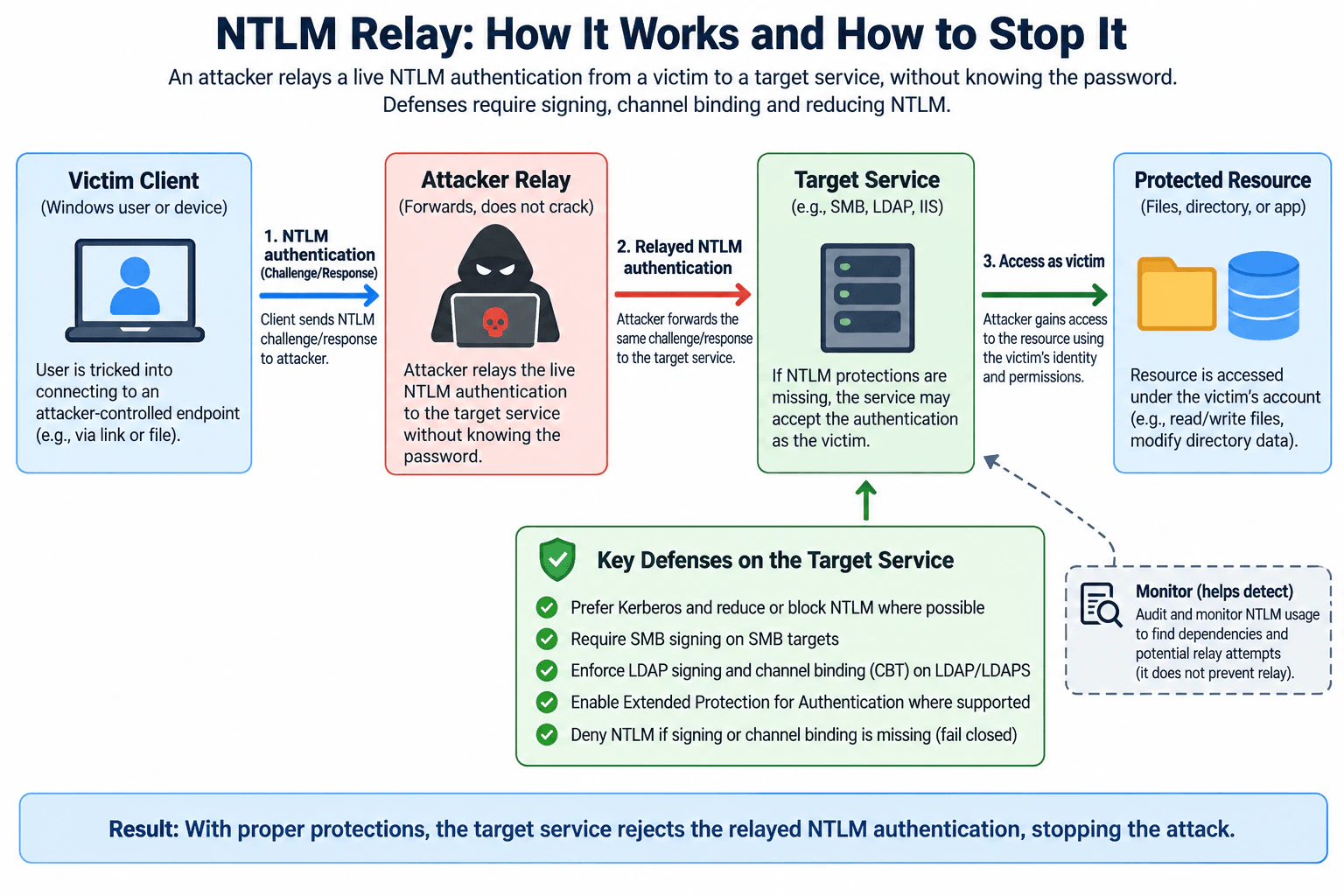
NTLM relay abuses a live challenge-response authentication exchange instead of cracking a password. A victim is induced to connect to an attacker-controlled endpoint. The attacker forwards the NTLM authentication exchange to a target service. If that service accepts the exchange without effective relay protections, it can authenticate the connection as the victim and then allow whatever that identity is authorized to access. The practical defense is to reduce NTLM and make remaining target services require protections such as signing, channel binding, or service binding. Monitoring identifies dependencies and suspicious use, but it does not prevent relay by itself.
Useful Questions to Ask the Interviewer
Which target services are in scope, such as SMB, LDAP, LDAPS, or IIS?
Can affected clients and services use Kerberos instead of NTLM?
Are there legacy systems that cannot support signing, channel binding, or Extended Protection?
Should I cover only prevention, or also NTLM migration and detection?
How to Explain It in an Interview
Start with the practical decision: NTLM relay is not mainly a password-strength problem. NTLM is a challenge-response protocol. The attacker forwards a live authentication exchange and does not need the victim's plaintext password. Microsoft describes NTLM as challenge-response authentication, and Kerberos is the preferred authentication method in Active Directory environments. learn.microsoft.com
The main subject is the victim user or device. The attacker-controlled endpoint is the untrusted boundary. The target service, such as SMB, LDAP, or IIS, is the verifier and relying service. The protected resource can be a file, directory object, or application resource. After authentication succeeds, the target service's authorization rules decide what that identity may access. The audit boundary consists of authentication and service logs that show NTLM use, rejected requests, and remaining dependencies.
The flow matches the diagram. First, the victim is tricked into connecting to an attacker-controlled endpoint and starts NTLM authentication. In a full NTLM exchange, the attacker can forward the negotiation to the real target, relay the target's challenge back to the victim, and then forward the victim's response to the target. The target therefore validates a response created by the victim for a challenge that originated from the target. If the target lacks protections that bind the authentication or subsequent protocol traffic to the intended service or connection, it may accept the relayed authentication as the victim. The attacker can then access only the resources that the victim identity is normally authorized to use.
My first defensive choice is to reduce or block NTLM where possible and prefer Kerberos in Active Directory environments. Microsoft states that Kerberos version 5 is the preferred authentication method for Active Directory, while NTLM remains for compatibility and other scenarios. Because legacy applications may still depend on NTLM, I would audit usage before restricting it broadly. learn.microsoft.com
For SMB targets, I require SMB signing. SMB signing protects message integrity and helps prevent relay and spoofing attacks. Microsoft documents that signed SMB traffic includes signatures that receivers validate and that signing helps protect deployments from relay attacks. learn.microsoft.com
For Active Directory LDAP targets, I use LDAP signing and, for TLS-protected LDAP scenarios, LDAP channel binding where applicable. LDAP signing protects the authenticity and integrity of LDAP messages. LDAP channel binding uses a Channel Binding Token, or CBT, to bind application-layer authentication to the underlying SSL or TLS session. When channel binding is required, a missing or mismatched token causes the connection to be rejected. learn.microsoft.com
For services that support Extended Protection for Authentication, I enable it according to the service's supported configuration. Extended Protection binds authentication to a secure channel or intended service using mechanisms such as channel binding and service binding. Microsoft explicitly describes these mechanisms as protections against authentication relay and man-in-the-middle attacks. learn.microsoft.com
Fail-closed behavior is important, but it must be stated per service. I would not use a universal rule that every service should reject NTLM whenever either signing or channel binding is absent, because those protections are protocol-specific. Instead, when an SMB service is configured to require SMB signing, unsigned traffic should be rejected. When LDAP channel binding is configured as required, missing or invalid channel-binding information should cause rejection. When Extended Protection is required, authentication that fails the service's binding policy should be denied. Microsoft documents this rejection behavior for required signing, channel binding, and Extended Protection policies. learn.microsoft.com
For evidence and validation, I would first audit NTLM usage and identify which applications, devices, and services still depend on it. I would then test representative clients against hardened services and confirm that authentication which does not meet required signing or binding policies is rejected. I would also review service and authentication logs for remaining NTLM dependencies and suspicious activity. Monitoring helps detect and plan remediation, but it is not itself a relay-prevention control.
The main tradeoff is compatibility. Older applications, appliances, workgroup systems, or unusual name-resolution paths may still depend on NTLM. Immediately blocking it everywhere can cause outages. A safer migration is to audit first, move compatible systems to Kerberos, enable service-specific relay protections, test affected applications, restrict NTLM progressively, and keep only narrow temporary exceptions with clear ownership and review.
Residual risk remains wherever NTLM must stay enabled and a target service lacks effective relay protections. SMB signing, LDAP channel binding, and Extended Protection are not interchangeable universal controls; each applies to particular protocols or service configurations. The goal is to remove unnecessary NTLM paths and make every remaining target reject authentication or traffic that fails the protection required for that service.
Technical Approach
Inventory NTLM use and identify the victim identities, target services, and protected resources involved.
Prefer Kerberos and reduce or block NTLM on paths that do not require it.
Require SMB signing on SMB targets.
Enforce LDAP signing and appropriate LDAP channel binding on Active Directory LDAP or LDAPS targets.
Enable Extended Protection for Authentication on supported services where its channel-binding or service-binding protection applies.
Test legacy dependencies before broad enforcement and document narrow exceptions.
Configure each protected service to reject authentication or traffic that fails the protection required for that specific protocol or service.
Audit NTLM use and service authentication events to identify remaining dependencies and suspicious activity.
Review exceptions and continue reducing NTLM exposure.
Practical Insights
The main cost is operational rather than computational. Signing and channel-binding checks add some processing, but compatibility work is usually the larger concern. Legacy applications or devices can fail when NTLM is blocked or stricter authentication protections are enforced. Teams need time to inventory dependencies, test changes, update applications, handle exceptions, review logs, and maintain policies. Stronger enforcement lowers relay risk but can increase migration effort and temporary support costs.
Why Interviewers Ask This
Interviewers want to see whether I understand that NTLM relay forwards a live challenge-response authentication instead of cracking a password. They also want to know whether I can map service-specific protections to the correct target, explain fail-closed behavior, reduce legacy NTLM dependencies safely, and distinguish prevention from detection.
Common interview mistakes
A common mistake is saying the attacker cracks or learns the victim's password. NTLM relay normally forwards a live challenge-response exchange instead. Another mistake is treating stronger passwords as the primary relay defense; password complexity does not stop authentication forwarding. It is also wrong to present one protection as universal. SMB signing is an SMB control, LDAP signing and channel binding protect LDAP scenarios, and Extended Protection applies only to services that support and correctly configure it. Monitoring helps detect use and dependencies but does not itself prevent relay. Finally, blocking NTLM everywhere without first identifying legitimate dependencies can cause production outages.
Interview tip
Lead with one sentence: NTLM relay forwards authentication rather than cracking the password. Then explain the victim-to-attacker-to-target flow and map each defense to the service it protects: reduce NTLM, prefer Kerberos, require SMB signing, use LDAP signing and channel binding where applicable, and enable Extended Protection on supported services. Mention compatibility and service-specific fail-closed behavior to show practical judgment.
Interviewer may ask next
Why does SMB signing help prevent NTLM relay to an SMB server?
SMB signing uses the authenticated session key to add cryptographic signatures to SMB messages. The receiver validates those signatures, which protects message integrity and binds the traffic to the authenticated SMB session. When signing is required, traffic that does not meet the signing requirement is rejected. Microsoft explicitly identifies SMB signing as protection against relay and spoofing attacks.
Why not simply disable NTLM everywhere immediately?
Reducing or eliminating NTLM is the preferred direction when the environment can support it, but immediate global blocking can break applications, devices, workgroup systems, or authentication paths that still depend on NTLM. I would first audit NTLM use, move compatible systems to Kerberos, enable the correct service-specific relay protections, test dependencies, and then restrict NTLM progressively. Temporary exceptions should be narrow, owned, monitored, and periodically reviewed.
8. What is Kerberos, and how does it work?Identity And Access ManagementMediumMicrosoft
Short Interview Answer (30-60 seconds)
Kerberos is a ticket-based authentication protocol. A client gets a Ticket-Granting Ticket from the KDC, exchanges it for a service ticket, and presents that ticket with a fresh authenticator to the target service. Tickets are time-limited, and the service still performs authorization separately.
Detailed Explanation
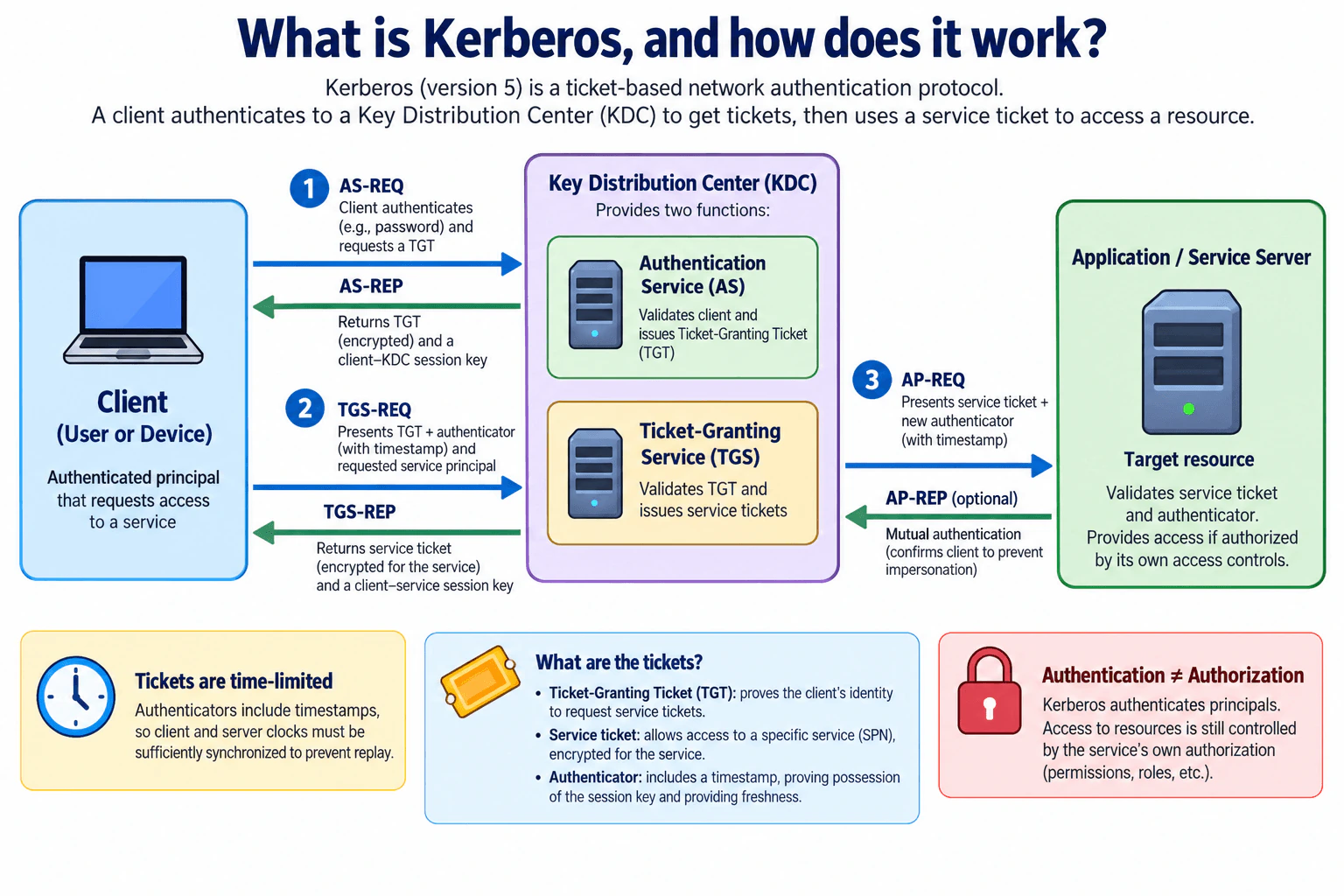
Kerberos solves a practical authentication problem: a user or device needs to prove its identity to network services without repeatedly giving a reusable password to each service. It uses a trusted Key Distribution Center, or KDC, with an Authentication Service and a Ticket-Granting Service. The client first obtains a Ticket-Granting Ticket, then exchanges that ticket for a service-specific ticket. Finally, it presents the service ticket and a fresh authenticator to the application server. The server validates them and separately decides whether the authenticated principal is authorized.
Useful Questions to Ask the Interviewer
Are you asking about standard Kerberos V5 or a particular implementation such as Active Directory Kerberos?
Should I include optional mutual authentication and replay protection in the explanation?
Do you want me to explain only Kerberos authentication, or also how the target service performs authorization afterward?
How to Explain It in an Interview
Start with the trust model. Kerberos is a trusted third-party authentication protocol. The Key Distribution Center is the central trusted party that issues Kerberos credentials. In the diagram, the KDC has two logical functions: the Authentication Service, or AS, and the Ticket-Granting Service, or TGS. The client is the authenticated principal, and the application or service server is the verifier and protected resource boundary.
Initial authentication with the AS: The client sends an AS-REQ asking the Authentication Service for a Ticket-Granting Ticket, or TGT. For password-based Kerberos, the reusable password is not sent to every application server. The client's long-term key, normally derived from or associated with the credential, is used in the initial authentication process. If the request succeeds, the AS-REP provides a TGT and a client-KDC session key. The TGT is protected so the client cannot freely modify its contents.
Request a service ticket from the TGS: When the client wants a specific service, it sends a TGS-REQ containing the TGT, an authenticator, and the identity of the requested service. The authenticator includes freshness information and demonstrates possession of the session key associated with the TGT. After validating the request, the TGS returns a TGS-REP containing a service ticket and a client-service session key. The service ticket is protected for the target service.
Authenticate to the application server: The client sends an AP-REQ to the application or service server. It contains the service ticket and a new authenticator. The server validates the service ticket, verifies the authenticator, checks ticket validity and freshness, and confirms that the request is acceptable. If those checks fail, authentication is denied rather than treated as successful.
Optional mutual authentication: Kerberos can also authenticate the server back to the client. If the client requests mutual authentication, the server returns an AP-REP. The response demonstrates that the server possesses the expected session key, which helps the client confirm that it is communicating with the intended authenticated service.
Authorization is separate: Kerberos proves the identity of a principal; it does not by itself grant every permission on the target resource. After successful authentication, the application or service must still apply its own authorization rules, such as permissions, roles, or access-control policy. This matches the diagram's separate authentication-versus-authorization callout.
Tickets and authenticators are time-sensitive. Authenticators contain timestamps, so Kerberos systems require sufficiently synchronized clocks for freshness checks. Servers also need replay protection because an attacker who captures a valid authentication exchange should not be able to reuse the same authenticator successfully. Expired tickets, invalid cryptographic protection, unacceptable clock skew, or detected replay should cause authentication to fail.
The main benefit is single sign-on within a Kerberos trust environment. After initial authentication, the client can obtain service tickets without repeatedly presenting its long-term credential to each application. The tradeoff is that Kerberos depends on trusted KDC infrastructure, protected service keys, correct service identities, secure ticket storage, and synchronized time. If a valid ticket or session key is stolen, it can present risk while it remains usable, so endpoint and credential protection still matter.
The approved diagram's end-to-end flow is therefore: Client -> Authentication Service for the TGT, Client -> Ticket-Granting Service with the TGT and authenticator for a service ticket, and Client -> Application Server with the service ticket and a fresh authenticator. An optional AP-REP provides mutual authentication, while the target service's own access controls make the final authorization decision.
Technical Approach
Identify the Kerberos principal and the target service.
Send an AS-REQ to the Authentication Service and obtain a TGT plus a client-KDC session key.
Send a TGS-REQ containing the TGT, an authenticator, and the requested service principal.
Receive a service ticket and a client-service session key in the TGS-REP.
Send an AP-REQ containing the service ticket and a fresh authenticator to the target service.
Have the service validate the ticket, cryptographic protection, ticket lifetime, authenticator freshness, and replay conditions.
If mutual authentication is requested, validate the server's AP-REP.
After Kerberos authentication succeeds, apply the service's separate authorization policy.
Deny authentication if the ticket, authenticator, freshness, or replay checks fail.
Practical Insights
Kerberos improves usability by supporting single sign-on and reduces the need to present a reusable password to every service. The operational cost is that the organization must run and protect the KDC, maintain service principals and keys, keep system clocks sufficiently synchronized, protect cached tickets and session keys, and troubleshoot ticket or service-identity problems. Applications still need their own authorization controls. The KDC is also an important infrastructure dependency when clients need to obtain new Kerberos credentials.
Why Interviewers Ask This
This question tests whether the candidate understands ticket-based authentication, centralized trust, the Authentication Service and Ticket-Granting Service, session keys, replay resistance, optional mutual authentication, and the difference between authentication and authorization. A strong answer should explain the AS, TGS, TGT, service ticket, authenticator, application server, and the direction of the main Kerberos exchanges.
Common interview mistakes
Common mistakes are saying that Kerberos sends the user's password to each application server; treating the TGT as the ticket presented directly to every target service; forgetting that the TGS issues a separate service ticket; omitting the authenticator from the TGS or application exchange; treating AP-REP as mandatory instead of optional for mutual authentication; assuming encryption alone prevents replay; ignoring ticket lifetime and clock synchronization; and saying that successful Kerberos authentication automatically authorizes access. The target service still makes its own authorization decision.
Interview tip
Explain Kerberos as three main exchanges: the AS issues a TGT, the TGS exchanges the TGT for a service ticket, and the application server validates the service ticket plus authenticator. Then mention optional mutual authentication, time-based replay protection, and the separation between authentication and authorization.
Interviewer may ask next
What is the difference between a Ticket-Granting Ticket and a service ticket?
A Ticket-Granting Ticket, or TGT, is issued during the initial Authentication Service exchange and is used to request additional tickets from the Ticket-Granting Service. It is not normally presented directly to the final application. A service ticket is issued by the TGS for a particular service and is presented to that target service. This lets the client authenticate to multiple services without repeatedly using its long-term credential.
What happens if clocks are out of sync or an authenticator is replayed?
Kerberos authenticators contain timestamps to provide freshness. If the timestamp falls outside the permitted clock-skew window, the request can be rejected. Servers also use replay protection so that the same valid authenticator cannot simply be reused. Therefore, excessive clock skew or a detected replay should cause authentication to fail instead of granting access.
9. Tell me about a real-world vulnerability that occurred recently.Vulnerability ManagementEasyMicrosoft
Short Interview Answer (30-60 seconds)
A recent example is CVE-2026-58644, a Microsoft SharePoint remote code execution vulnerability. Microsoft reported exploitation as detected in July 2026. I would identify affected servers, prioritize exposed systems, install Microsoft's applicable security updates, investigate for compromise, and verify the fix before closure. msrc.microsoft.com
Detailed Explanation
This question asks me to choose a genuine recent vulnerability and explain why it mattered in practice. A good example is CVE-2026-58644, a Microsoft SharePoint remote code execution vulnerability. Microsoft listed exploitation as detected in its July 2026 security release, making it more urgent than a vulnerability known only from a theoretical report. Microsoft also lists security updates addressing this CVE for supported SharePoint Server editions. I would explain the vulnerability briefly, then focus on identifying affected assets, determining exposure and business importance, patching them safely, investigating possible compromise, and collecting evidence that remediation actually worked. msrc.microsoft.com
Useful Questions to Ask the Interviewer
Would you like me to focus mainly on the vulnerability itself or on how I would manage the remediation?
Should I assume the SharePoint servers are internet-facing, internal, or discuss both cases?
Would you like me to include how I would verify that remediation is complete?
How to Explain It in an Interview
I would start with the practical decision: I would treat CVE-2026-58644 as a high-priority vulnerability on affected SharePoint Server systems because Microsoft identifies it as a remote code execution vulnerability and reports exploitation as detected. Remote code execution means successful exploitation can result in attacker-controlled code running on the affected system. The important vulnerability-management point is that documented exploitation changes the urgency beyond simply looking at a scanner severity value. msrc.microsoft.com
My first step would be scope. I would use the asset inventory to identify every on-premises SharePoint Server instance, its edition, update level, network exposure, business owner, and importance. Microsoft Support pages list CVE-2026-58644 among vulnerabilities addressed by security updates for SharePoint Server 2016, SharePoint Server 2019, and SharePoint Server Subscription Edition. I would compare each asset's actual state with Microsoft's current guidance instead of assuming that every SharePoint deployment has the same exposure. support.microsoft.com
Next, I would prioritize contextual risk. Internet-facing or otherwise broadly reachable affected servers would normally come first. I would also consider the sensitivity of hosted data, business criticality, privileges available to the SharePoint environment, segmentation, compensating controls, and whether exploitation indicators are present. This separates scanner severity from real organizational risk.
For remediation, I would install the Microsoft security update applicable to the affected SharePoint edition through the organization's approved emergency-change process. Microsoft's support documentation identifies updates that address CVE-2026-58644 and provides installation information for the relevant SharePoint editions. I would test the update where practical, take appropriate recovery precautions, deploy it to affected systems, and confirm that the intended update state is present after installation. support.microsoft.com
Because Microsoft reported exploitation as detected, I would not assume that patching alone proves the environment is safe. I would review relevant SharePoint, IIS, endpoint, identity, and network evidence for suspicious activity within the organization's authorized investigation scope. If evidence indicates compromise, I would move the system into incident response so containment, credential or secret review, persistence analysis, recovery, and additional scoping can occur.
Finally, I would verify remediation before closure. I would confirm the installed update or build state against current Microsoft guidance, perform an authorized rescan or equivalent validation where appropriate, verify that affected systems were not missed, and attach evidence to the vulnerability record. A successful deployment job alone is not enough because it proves an installation action was attempted, not necessarily that every vulnerable asset reached a verified safe state.
The main limitation is that Microsoft's advisory can establish that a vulnerability exists and that exploitation has been detected generally, but it cannot prove that a particular organization was attacked. That conclusion requires local evidence. The main tradeoff is operational risk versus security urgency: emergency SharePoint patching can affect availability or compatibility, but delaying remediation of a vulnerability with detected exploitation can leave valuable systems exposed.
Technical Approach
Verify the vulnerability identifier, product, impact, and exploitation status using Microsoft authoritative sources.
Identify all potentially affected on-premises SharePoint Server assets and their current update state.
Determine network exposure, business criticality, sensitive data, privileges, segmentation, and compensating controls.
Prioritize affected exposed or critical assets, especially because Microsoft reports exploitation as detected.
Select and test the Microsoft security update applicable to each supported SharePoint edition.
Deploy the update through an authorized change process with appropriate recovery planning.
Review relevant telemetry for evidence of compromise rather than assuming patching erases prior attacker activity.
Confirm the installed update state and perform an authorized rescan or other validation.
Escalate confirmed compromise to incident response.
Close the vulnerability only after recording remediation and verification evidence.
Practical Insights
The main costs are people, testing time, possible maintenance windows, and operational risk. Security teams must find affected servers, validate versions and updates, coordinate with SharePoint owners, deploy patches, investigate suspicious activity, and retest. Emergency changes can cause availability or application-compatibility problems, so backup and recovery planning matter. However, delaying a vulnerability for which exploitation has been detected can create greater business risk. Long-term maintenance requires accurate inventories, regular security updates, useful logging, clear ownership, exception tracking, and evidence-based closure.
Why Interviewers Ask This
This question tests whether I can explain a genuine recent vulnerability and connect public vulnerability information to practical risk decisions. A strong answer should verify the CVE and vendor status, distinguish severity from contextual risk, prioritize affected assets, explain remediation, and require evidence before closure rather than simply repeating a scanner result. These expectations match the original Vulnerability Management specification.
Common interview mistakes
Common mistakes include naming a CVE without verifying it, claiming unsupported technical details about how exploitation works, treating a vulnerability scanner's severity as the complete risk decision, failing to identify which SharePoint assets are actually affected, assuming every SharePoint deployment has identical exposure, declaring success because a patch deployment job completed, ignoring possible compromise that occurred before patching, or claiming that a specific organization was breached without local evidence. Another mistake is saying CISA lists this specific CVE as known exploited unless that claim is independently verified; Microsoft's authoritative July 2026 release is sufficient to support the statement that exploitation was detected.
Interview tip
Keep the explanation simple and evidence-based. Name the CVE, say what product and impact it involves, explain why detected exploitation increases urgency, then describe how you would identify affected systems, prioritize risk, patch, investigate possible compromise, and verify closure. Avoid unsupported exploit details or claims about a specific organization's compromise.
Interviewer may ask next
How would you prioritize CVE-2026-58644 if your company had hundreds of SharePoint servers?
I would first identify which servers are potentially affected and confirm their actual update state against current Microsoft guidance. Then I would prioritize by external exposure, reachability, business criticality, sensitive data, privileges, segmentation, compensating controls, and evidence of suspicious activity. Because Microsoft reports exploitation as detected, affected exposed systems would receive accelerated attention. I would patch in controlled waves where necessary, verify each deployment, investigate possible compromise, and track any temporary exception with a named owner, compensating controls, and a defined remediation deadline. msrc.microsoft.com
What would you do if the security update was installed but you found evidence that the server may have been compromised earlier?
I would not close the vulnerability simply because it was patched. I would escalate the system into the incident-response process, preserve relevant evidence, determine the scope of suspicious activity, contain the affected system as appropriate, review identities and secrets that may have been exposed, investigate persistence, and recover to a verified safe state. After recovery, I would confirm the required security update remains installed, validate the system again, and document both remediation and incident evidence before closure.
10. Describe how you added technical value to a business problem through your solutions engineering experience.NEWBehavioralMediumMicrosoft
Interview tip:
Use STAR to structure your answer: briefly explain the Situation and Task, make Action the most detailed part, and finish with the Result. For example, describe a business problem where you used your solutions engineering experience to understand the operational need, identify security risks, design a practical technical solution, explain your decisions to business and technical stakeholders, and deliver a useful result.
Situation
In my last role, a business team wanted to give an external partner access to an internal application so they could complete an important operational process. The fastest proposal was to create shared credentials and provide broad application access. That would have solved the immediate business need, but it also created security concerns around identity, access control, accountability, and monitoring.
Task
I was responsible for helping the team find a solution that supported the business process without introducing unnecessary security risk. My goal was to understand what the partner actually needed, translate that need into technical requirements, and design an approach that the application and infrastructure teams could support.
Action
I first met with the business owner and application team to understand the exact workflow instead of starting with a security control. I learned which application functions the partner needed, how often access would be used, and which internal functions were not required. I then reviewed the proposed access path and identified the main risks. Shared credentials would make it difficult to know who performed an action, and broad permissions would expose functions that were not needed. I proposed individual identities with role based access control so each user would have only the permissions required for the business process. I also recommended using the existing identity service for authentication instead of creating a separate credential process. I worked with the application team to define the minimum role permissions and confirmed that security logs would record sign in activity and important application actions. I explained the design to the business owner in simple terms. I focused on how individual access improved accountability and how limited permissions reduced the impact of a compromised account. When the team raised concerns about additional setup work, I separated the essential controls from optional improvements so we could protect the main risks without making the solution unnecessarily complex. I then helped validate the access flow and logging before the partner was given access.
Result
The team delivered a solution that supported the business process while giving each external user accountable and limited access. The business owner understood why the security controls were needed, and the technical teams had a clear design they could operate. I learned that solutions engineering adds the most value when I start with the business problem, identify the risks that truly matter, and design security controls that are practical for the people who must use and support them.
Why Interviewers Ask This
Interviewers ask this question to understand whether a candidate can connect technical knowledge to a real business need. A strong answer shows that the candidate can discover requirements, identify meaningful risks, make practical design decisions, communicate with different stakeholders, and use technical judgment to improve the final solution rather than applying security controls without considering the business context.
Interviewer may ask next
Why did you choose individual identities and role based access control instead of the original shared access approach?
I chose individual identities because accountability was important for external access. With shared credentials, we would have had difficulty determining which person performed a specific action. Role based access control also allowed us to give the partner only the functions required for the business process. Together, those choices addressed the most important identity and authorization risks without changing the purpose of the solution.
What would you do differently if you handled a similar business problem today?
I would involve the application team and business owner in the access design even earlier. In this case, we reached a good solution, but some of the initial discussion focused on whether security controls would delay the work. Starting with the business workflow and required permissions from the beginning would make the design conversation clearer and help everyone understand which controls are essential before implementation starts.
Cybersecurity Engineer Resume Examples
Explore the resume examples below to find the one that best matches your target Cybersecurity Engineer role.
Disclaimer: This interview guide is for educational and informational purposes only. It is designed to help readers prepare, but it does not guarantee any interview result, hiring decision, offer, or outcome. Interview questions, hiring criteria, and preferred answers can vary by employer, interviewer, industry, location, and time. All answers, examples, and explanations in this guide are suggested examples for interview preparation, not definitive answers or instructions for professional practice. They are based on research and judgment, are provided without warranties of any kind, and should be adapted to the question, role, and applicable laws and professional requirements. Diagrams are simplified illustrations intended to highlight the main concepts and their relationships; actual situations, systems, and practices may be more complex. Alternative approaches may be equally valid or better suited to a particular question, context, or interviewer. To the fullest extent permitted by applicable law, the contributors and publisher are not liable for decisions made, actions taken, or losses incurred based on this guide.
State Laws and Professional Responsibilities: Laws and requirements governing an occupation vary by state and jurisdiction. You are responsible for checking the current laws, licensing requirements, and scope-of-practice rules that apply to your location and role, and for ensuring that your answers and actions comply with them. Adapt examples in this guide to those requirements. This guide is not legal advice.
Company Notice: This guide is an independent educational resource and is not affiliated with, endorsed by, sponsored by, or approved by the company named in this guide. Company names identify reported interview experiences or the employer context of clearly labeled original practice exercises. Interview practices can change without notice, and inclusion of company-specific content does not mean these questions are official, complete, or guaranteed to be asked. To the fullest extent permitted by law, the author, contributors, and publisher are not responsible for outcomes related to use of this material.
Content Accuracy and Verification: To the fullest extent permitted by applicable law, we do not represent or warrant that interview guides, questions, answers, examples, or diagrams are accurate, complete, current, error-free, or suitable for any particular purpose. You are responsible for independently reviewing and verifying the information before relying on it.