
1. How do you ensure security in a BYOD environment?
BYOD means bring your own device.
I treat BYOD devices as untrusted until they pass enrollment, posture, and identity checks. I require MFA, make a least-privilege access decision, isolate company data in managed apps or a work profile, monitor access, and revoke or selectively wipe enterprise data when a device becomes risky.
A BYOD design has to protect company applications and data without treating an employee-owned device as company property. I would keep the personal device outside the enterprise-managed boundary and require it to pass device enrollment, posture checks, and strong user authentication before company access. The policy decision should consider both identity and device state, then grant only the minimum required access. Company data should remain inside managed applications or a work profile where possible. Monitoring, revocation, remediation, and selective enterprise wipe complete the lifecycle while minimizing unnecessary access to personal information.
- What company applications and data may employees access from personal devices?
- Which device types and operating systems are supported?
- Are employees willing and permitted to enroll a managed work profile or enterprise application on the device?
- What device conditions should block access, such as an unsupported OS version, missing encryption, or a rooted or jailbroken device?
- What privacy limits should apply to information collected from employee-owned devices?
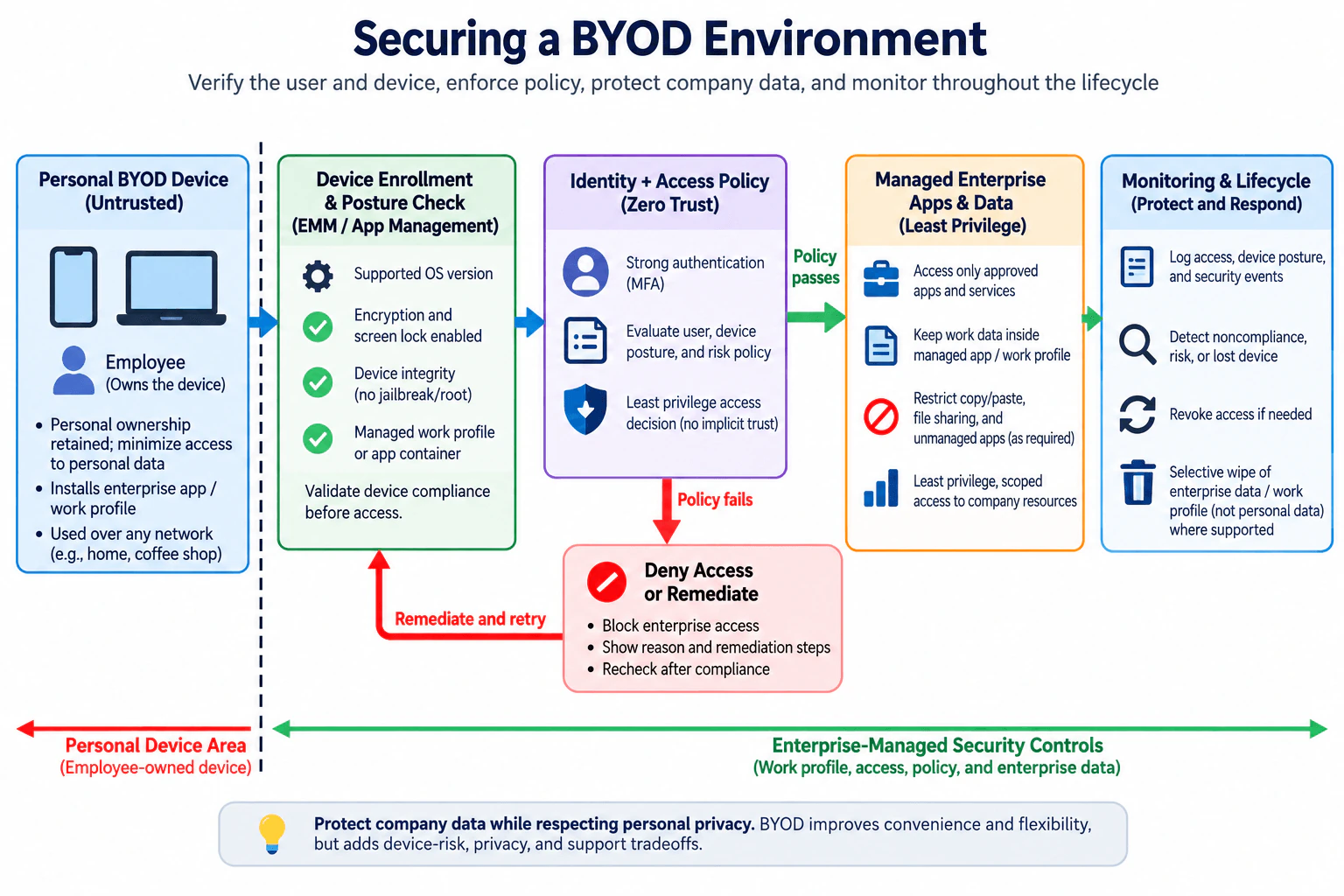
I would start by separating ownership from trust. The employee owns the device, so I minimize access to personal information, but ownership does not give the device automatic access to company resources. The enterprise-managed security controls begin after the personal-device boundary and cover device enrollment and posture evaluation, identity and access policy, managed work data, and monitoring and lifecycle response.
First, I establish device posture. The enterprise mobility management or application-management layer checks the conditions required by policy, such as a supported OS version, encryption, screen lock, device-integrity signals such as jailbreak or root status, and the presence of a managed work profile or approved application. These controls reduce risk from unsupported or clearly noncompliant endpoints. NIST SP 800-124 Rev. 2 covers centralized management and security of both organization-provided and personally owned mobile devices.
Second, I verify the user with multifactor authentication, or MFA. I then make a Zero Trust access decision using the user identity, current device posture, and applicable risk policy. There is no implicit trust simply because the device belongs to an employee or is connected from a particular network. NIST SP 800-207 states that Zero Trust does not grant implicit trust based on network location or asset ownership and requires authentication and authorization before access to an enterprise resource is established.
If the policy passes, I grant only the approved applications and services required by that identity. This is least privilege. Work data stays inside the managed application or work profile where the platform supports that separation. Policy can restrict copy, paste, file sharing, or transfer of enterprise data to unmanaged applications when required and supported. This reduces the amount of company data exposed if the personal side of the device is compromised.
If the policy fails, the safe behavior is to deny enterprise access rather than silently allow it. The user should receive a reason and approved remediation steps. After remediation, the device posture is checked again before enterprise access is restored.
I continuously log enterprise access events, relevant device-posture results, and security events. Useful signals include a device becoming noncompliant, being reported lost, or showing risky access activity. The response should be scoped to enterprise resources: revoke enterprise access first and selectively remove enterprise data or the managed work profile where supported. NIST SP 800-124 Rev. 2 describes enterprise wipe for BYOD and also warns that remote wipe should not be the only protection because a device may be offline or data may already have been accessed.
The responsibility boundary is clear: the employee retains ownership of the personal device, while the organization controls the work profile, enterprise access, policy, and enterprise data. Security or endpoint-management operators maintain posture and lifecycle controls, while authorized identity and application owners define the access a compliant user may receive.
The main tradeoff is security versus privacy and usability. Stronger device controls can improve assurance but increase support effort and may expose more information about a personal device. I would therefore collect only the device information required for the security decision and keep enterprise data separated from personal data wherever the management model supports it.
The residual risk is that the organization does not fully control the underlying personal endpoint. A device can be compromised in a way posture checks do not detect, a user can expose information outside managed channels, and a selective wipe may not execute immediately if the device cannot receive the command. That is why the design uses defense in depth instead of relying on enrollment, MFA, or wipe alone.
- Define which enterprise applications and data BYOD users may access.
- Treat the employee-owned device as untrusted by default.
- Enroll the managed work profile or approved enterprise application and collect only security-relevant posture information.
- Check required posture conditions such as supported OS version, encryption, screen lock, device integrity, and managed work-profile or application status.
- Authenticate the user with MFA.
- Evaluate identity, current device posture, and risk at the access-policy decision point.
- If policy fails, deny enterprise access, show approved remediation steps, and recheck posture before restoring access.
- If policy passes, grant only approved applications and services using least privilege.
- Keep enterprise data inside the managed application or work profile and restrict movement to unmanaged applications where required and supported.
- Log enterprise access, posture, and security events and detect meaningful changes such as noncompliance or a lost device.
- Revoke enterprise access when risk is confirmed and selectively wipe enterprise data or the work profile where supported.
- Verify that denial, remediation, revocation, monitoring, and selective-wipe workflows continue to behave as designed.
The main cost is operational rather than computational. The organization needs identity and MFA services, device or work-profile management, policy enforcement, logging, and people to maintain policies and support users. Employees may need extra enrollment and remediation steps. More posture checks can increase confidence but can also block legitimate users when a device is outdated or a management dependency is unavailable. Collecting too much device information creates a privacy risk, so telemetry should be limited to what is necessary for the security decision. Selective enterprise wipe and work-data isolation reduce privacy impact compared with treating a personal device like a fully company-owned endpoint, but support depends on the device and management model.
This architecture is useful when employees use personally owned phones, tablets, or other supported endpoints to access company email, collaboration tools, internal applications, or other approved enterprise services. It fits environments where the organization wants BYOD flexibility but still needs identity verification, device-posture enforcement, managed work data, least-privilege access, monitoring, and a way to revoke access when a device is lost or becomes noncompliant.
The interviewer wants to know whether I can secure company data on devices the organization does not own. A strong answer should separate personal ownership from enterprise control, avoid trusting a device merely because the user is an employee, and combine device posture, identity, least-privilege access, work-data isolation, monitoring, revocation, and recovery into one coherent architecture. It also tests whether I understand the privacy and usability tradeoffs of managing a personal device.
Common mistakes are trusting the device because the employee owns it, relying on MFA without checking device posture, granting broad access instead of application-scoped least privilege, mixing personal and enterprise data without a managed boundary, collecting unnecessary personal-device information, treating remote wipe as guaranteed protection, removing personal data when only enterprise data should be removed, failing open when required posture validation fails, and collecting monitoring data without defining a response to meaningful security signals.
Explain the design as one flow: untrusted personal device, enrollment and posture check, MFA and policy decision, least-privilege access to managed enterprise apps and data, then monitoring and lifecycle response. Explicitly mention the privacy boundary and the deny-or-remediate path. That shows architecture judgment instead of listing disconnected BYOD controls.


