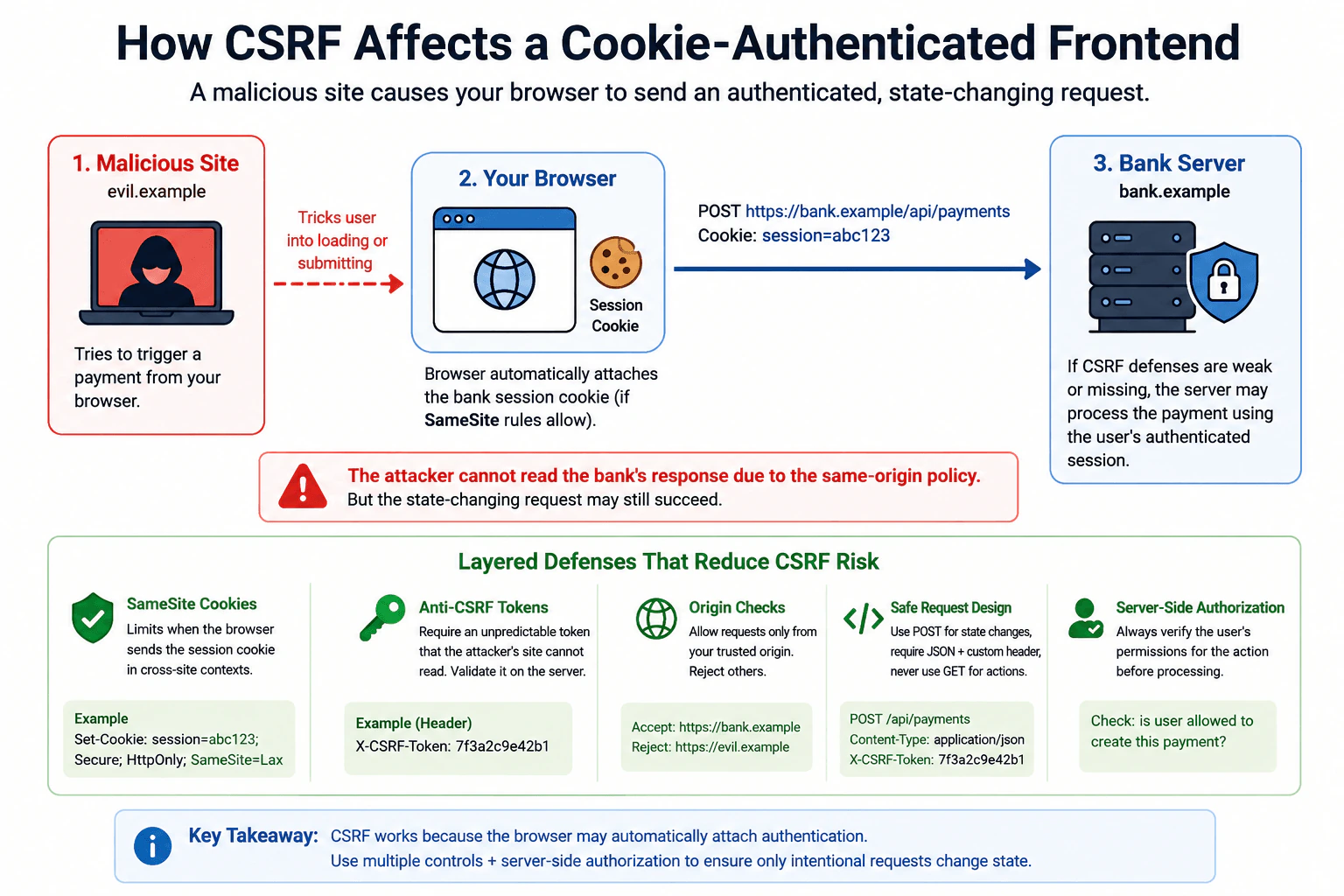
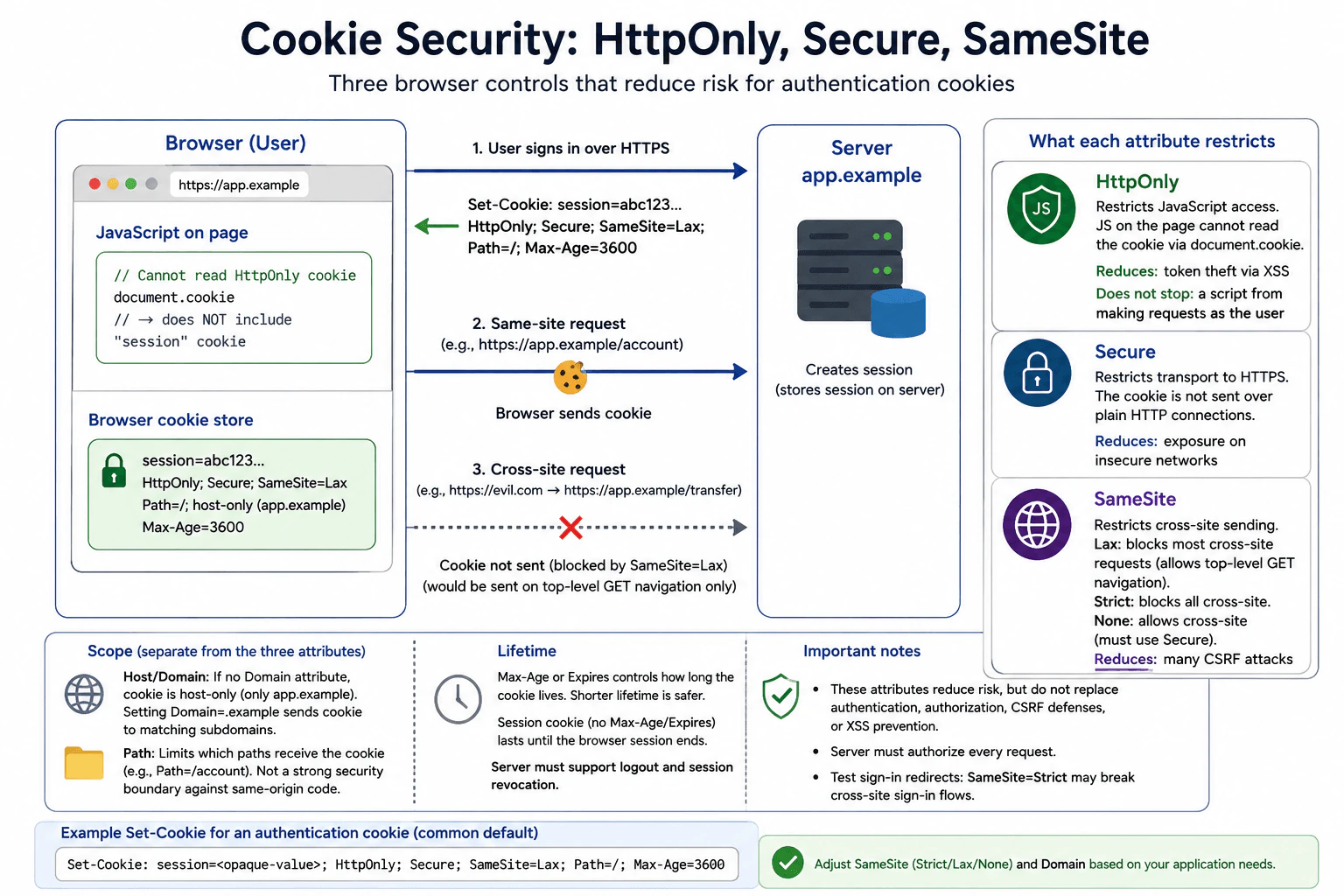
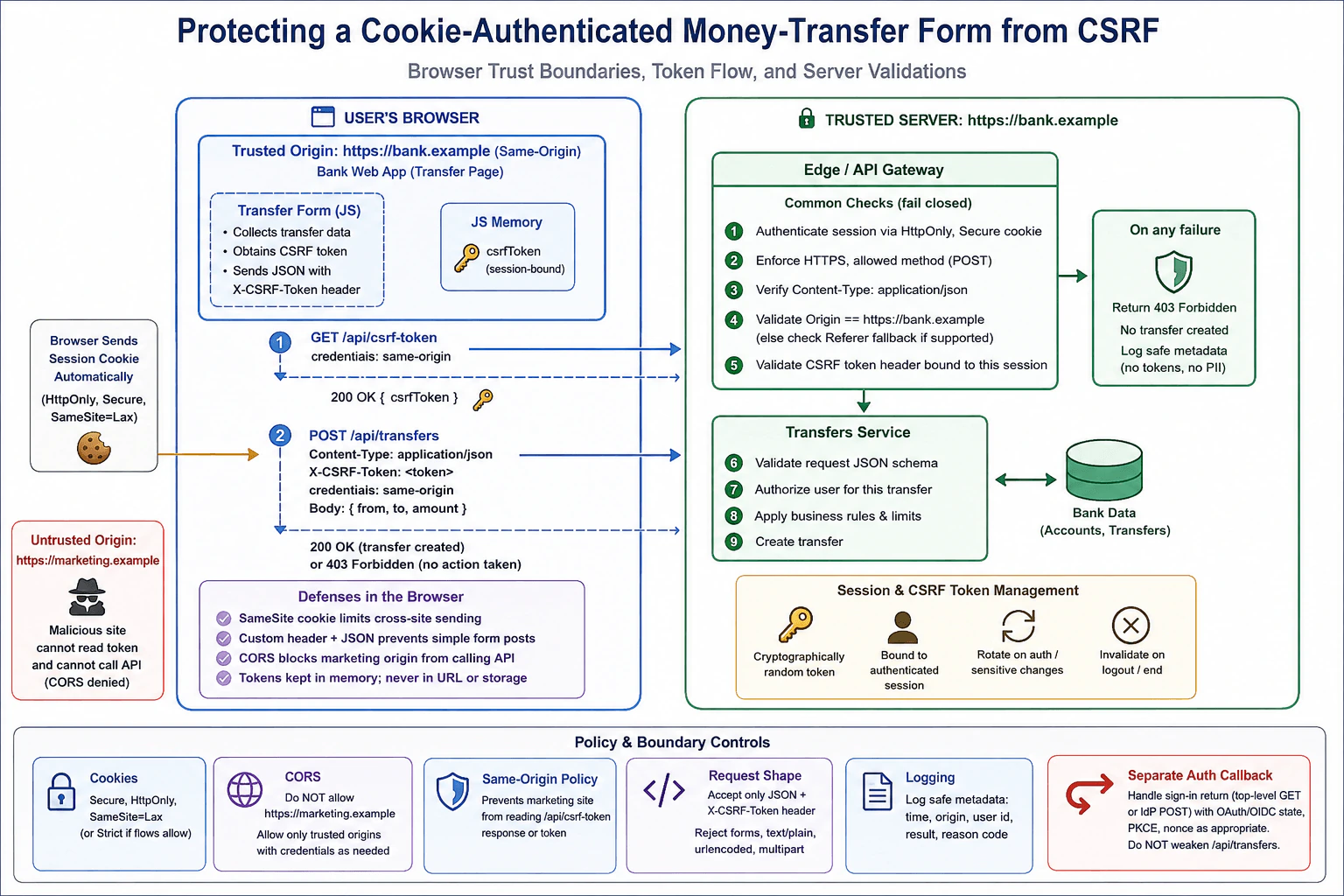
277 JavaScript Frontend Developer Interview Questions & Answers

133 top • 30 Amazon • 15 Apple • 29 Google • 18 Meta • 21 Microsoft • 20 Netflix • 11 NVIDIA

JavaScript Frontend Developer icon

Questions with Detailed ExplanationsWith Detailed Explanations

(Last Updated: September 1, 2026)

101. How would you restore back-forward cache eligibility without breaking page state?PerformanceHard

Question Details

A commerce application reloads whenever users press Back, and DevTools reports that pages are excluded from the back-forward cache because of an unload handler and an open cross-page communication resource. Describe how you would confirm every blocker, replace incompatible lifecycle logic, pause and resume timers or connections around pagehide and pageshow, and verify restored state after a persisted navigation. Include tests that distinguish a bfcache restore from a normal reload.

Short Interview Answer (30-60 seconds)

I would first reproduce the Back navigation and use the browser Back forward cache diagnostics to list every exclusion reason. I would remove the unload handler, remove any unnecessary beforeunload handler, and move lifecycle cleanup to pagehide. I would pause timers, animation work, observers, and cross page connections there, then resume only the resources that need to run when pageshow fires. I would use event.persisted to detect a real cached restore, avoid repeating one time initialization, and verify the result with DevTools, the navigation entry type, the Network panel, and preserved page state.

Detailed Explanation

See the Code while reading this explanation.

When a shopper presses Back, the browser should be able to show the previous page immediately instead of loading the document again. Here, some page behavior stops the browser from keeping that page ready in memory. I would first find every blocking behavior. Then I would replace unsafe leaving page logic with browser lifecycle events that work with cached restoration. I would pause work while the page is stored, restart it when the page returns, and check that the cart, form values, scroll position, media state when relevant, and other visible state are still correct.

Useful Questions to Ask the Interviewer
  1. Which browsers and commerce routes show the Back navigation reload?
  2. What cross page resource stays open, such as a WebSocket or BroadcastChannel?
  3. Which state must remain exactly as the shopper left it?
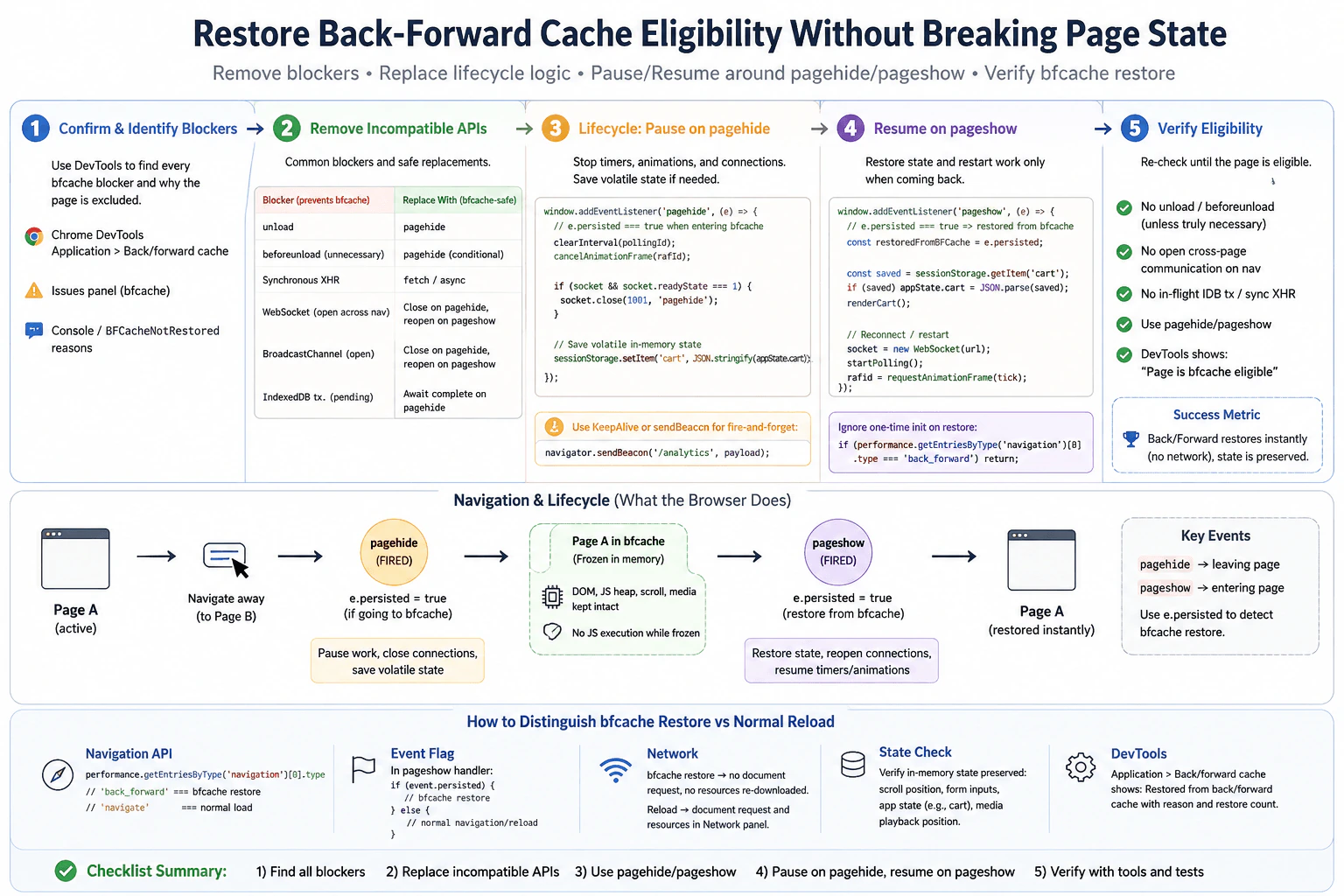
How would you restore back-forward cache eligibility without breaking page state? diagram
How to Explain It in an Interview

I would start with the user visible symptom: pressing Back reloads the document instead of restoring the previous page from the Back forward cache. My baseline is a repeatable navigation from the affected commerce page to another page and then Back, using the same browser, device class, production build, cache state, and steps each time. The success metric is a persisted restore with no new document request and with the page state still correct.

First, I would open the browser Back forward cache diagnostics and reproduce the navigation. I would record every reported exclusion reason instead of stopping after the first one. In this case, the known blockers are an unload handler and an open cross page communication resource. I would also review any other reasons that DevTools reports, such as an unnecessary beforeunload handler, a pending IndexedDB transaction, synchronous request work, or another resource that cannot remain active across the navigation.

Next, I would remove the unload listener. If a beforeunload listener is not required to protect unsaved user work, I would remove it too. Cleanup moves to pagehide. When pagehide runs, I stop polling timers, cancel pending animation work, disconnect observers when appropriate, and close WebSocket or BroadcastChannel resources that should not remain active while the page is stored. If analytics must be sent while leaving, I would use navigator.sendBeacon or another lifecycle safe request instead of relying on unload.

The pagehide event has a persisted flag. When it is true, the browser is preserving the page for a cached history restore. The DOM, JavaScript heap, scroll position, and normal in memory application state stay with that frozen page. I would not rebuild that state unnecessarily. I would save only volatile state that the application also needs as a fallback after a normal reload.

When pageshow fires, event.persisted being true tells me that this specific page display came from the Back forward cache. I would reconnect the socket or channel, restart polling, reconnect observers, and schedule visual work again. The restart functions must be idempotent so repeated Back and Forward navigation does not create duplicate timers, listeners, subscriptions, or connections. I would also skip one time initialization that must run only on a normal load.

For verification, I would repeat the same navigation after the change. DevTools should report that the page is eligible and show a restored Back forward cache navigation. In pageshow I would confirm event.persisted is true. I would also inspect performance.getEntriesByType("navigation")[0].type. A value of "back_forward" supports that this was a history navigation, but it is not enough by itself to prove a cached restore. The Network panel should show no new document request for the restored page, although a deliberately reopened socket or other resumed connection can create expected network activity.

Finally, I would verify correctness. The cart, form inputs, scroll position, focus behavior, media position when relevant, and other application state should match what the shopper left behind. I would confirm that only one timer, observer, socket, or channel is active after each restore. I would also test the normal reload path because pagehide and pageshow must work correctly when event.persisted is false. The final result is a page that is eligible for the Back forward cache, restores quickly on Back, and preserves correct application behavior.

Key Insight / Why This Solution Works
  1. Reproduce the Back navigation on the affected commerce route with the same browser, device class, build, cache state, and steps.
  2. Use the browser Back forward cache diagnostics to record every exclusion reason.
  3. Remove the unload handler and remove an unnecessary beforeunload handler.
  4. Replace leaving page cleanup with pagehide.
  5. On pagehide, pause polling and timers, cancel pending animation work, disconnect observers, and close cross page connections that cannot remain active.
  6. Let the browser preserve normal DOM and JavaScript memory state. Save only state that is also needed for a normal reload fallback.
  7. On pageshow, use event.persisted to tell a cached restore from a normal page display.
  8. Resume resources with idempotent restart functions and skip one time initialization on a cached restore.
  9. Repeat the same navigation and confirm event.persisted is true, the navigation type is back_forward, DevTools reports a restore, and no new document request appears.
  10. Verify cart state, form values, scroll position, focus behavior, media state when relevant, and that no timer, observer, socket, channel, listener, or subscription is duplicated.
Code
const appState = {
  cart: { items: [] },
};

let pollingId = null;
let animationFrameId = null;
let socket = null;
let didInitialSetup = false;

// Observe only while the page is active.
const observer = new ResizeObserver(() => {
  // Application specific resize work belongs here.
});

function startPolling() {
  // Start only one polling timer after a normal load or cached restore.
  if (pollingId !== null) return;

  pollingId = window.setInterval(() => {
    // Application specific polling work belongs here.
  }, 5000);
}

function stopPolling() {
  // Stop the active timer before the page is frozen or discarded.
  if (pollingId === null) return;

  window.clearInterval(pollingId);
  pollingId = null;
}

function scheduleAnimation() {
  // Schedule visual work only while the page is active.
  if (animationFrameId !== null) return;

  animationFrameId = window.requestAnimationFrame(() => {
    animationFrameId = null;
    // Application specific visual update belongs here.
  });
}

function cancelAnimation() {
  // Cancel pending visual work before leaving the active state.
  if (animationFrameId === null) return;

  window.cancelAnimationFrame(animationFrameId);
  animationFrameId = null;
}

function openSocket() {
  // Avoid duplicate connections after repeated Back and Forward restores.
  if (
    socket &&
    (socket.readyState === WebSocket.OPEN || socket.readyState === WebSocket.CONNECTING)
  ) {
    return;
  }

  socket = new WebSocket('wss://example.com/cart');
}

function closeSocket() {
  // Close the live connection before the page is stored or discarded.
  if (!socket) return;

  if (socket.readyState === WebSocket.OPEN || socket.readyState === WebSocket.CONNECTING) {
    socket.close(1000, 'pagehide');
  }

  socket = null;
}

function saveFallbackState() {
  // Save only state that is also useful after a normal reload.
  sessionStorage.setItem('cart', JSON.stringify(appState.cart));
}

function restoreFallbackState() {
  // Read optional fallback state without rebuilding all cached page state.
  const saved = sessionStorage.getItem('cart');

  if (saved) {
    appState.cart = JSON.parse(saved);
  }
}

function flushLeaveAnalytics() {
  // sendBeacon is suitable for small fire and forget leave analytics.
  const payload = JSON.stringify({ event: 'pagehide' });
  navigator.sendBeacon('/analytics', payload);
}

function connectActiveResources() {
  // Resume only resources that should run while this page is active.
  startPolling();
  openSocket();
  observer.observe(document.documentElement);
  scheduleAnimation();
}

function disconnectActiveResources() {
  // Pause resources before the browser freezes or discards this page.
  stopPolling();
  cancelAnimation();
  observer.disconnect();
  closeSocket();
}

function runInitialSetupOnce() {
  // Keep one time initialization separate from cached restore work.
  if (didInitialSetup) return;

  didInitialSetup = true;
  // Register one time application behavior here.
}

window.addEventListener('pagehide', (event) => {
  // pagehide replaces unload for lifecycle cleanup.
  disconnectActiveResources();
  saveFallbackState();
  flushLeaveAnalytics();

  // This is useful diagnostic information while testing eligibility.
  console.log('pagehide persisted:', event.persisted);
});

window.addEventListener('pageshow', (event) => {
  // A true persisted flag is the direct signal for a cached restore.
  if (event.persisted) {
    restoreFallbackState();
    connectActiveResources();
    console.log('Back forward cache restore:', true);
    return;
  }

  // A normal page display runs normal startup once.
  runInitialSetupOnce();
  connectActiveResources();
});

function reportNavigationType() {
  // The navigation entry distinguishes history navigation from reload.
  const entry = performance.getEntriesByType('navigation')[0];
  const type = entry ? entry.type : 'unknown';

  console.log('Navigation type:', type);
  console.log('History navigation:', type === 'back_forward');
}

reportNavigationType();
Why Interviewers Ask This

Interviewers ask this to see whether I understand browser page lifecycle behavior, can use browser diagnostics to find every Back forward cache blocker, and can change cleanup logic without losing page state. They also want to see whether I can separate a real cached restore from a normal history reload and verify that timers, connections, user interface state, and application data still behave correctly.

Common interview mistakes

A common mistake is fixing only the first blocker that DevTools reports and not checking again for additional exclusion reasons. Another is keeping unload or an unnecessary beforeunload handler even after moving some cleanup elsewhere. Developers can also reconnect timers, observers, sockets, channels, listeners, or subscriptions on every pageshow without guarding against duplicates. Another mistake is rebuilding the whole application even though a cached page already keeps its DOM and JavaScript memory. It is also wrong to treat the back_forward navigation type alone as proof of a cached restore. A pending IndexedDB transaction or synchronous request can remain a blocker, so those must be removed or completed before navigation rather than ignored.

Interview tip

Explain this as a browser lifecycle problem. Start with the Back navigation reload, show how DevTools identifies every blocker, move cleanup from unload to pagehide, resume only paused resources on pageshow, and finish by proving both the cached restore and correct page state.
Interviewer may ask next
What if performance.getEntriesByType("navigation")[0].type is "back_forward" but pageshow event.persisted is false?

That does not prove a Back forward cache restore. The back_forward value tells me that the commerce page was reached through browser history, but the browser may still have loaded a new document. For this workload I would use event.persisted in pageshow as the direct restore signal, then confirm the result with the browser Back forward cache diagnostics and the Network panel. A new document request would show that the page was loaded again. The tradeoff is that one signal is simple, but several independent checks give a safer conclusion.

How would you roll out the lifecycle change if reconnecting the WebSocket on pageshow could create duplicate subscriptions?

I would make the WebSocket and other restart functions idempotent so repeated Back and Forward restores do not create duplicate active resources. For this commerce page I would keep one socket reference, close it during pagehide, and reconnect only when there is no open or connecting socket. I would repeatedly navigate away and Back and verify that only one timer, one observer, and one socket are active after each restore. In production I would monitor connection counts, duplicated events, client errors, and Back forward cache eligibility while releasing the change gradually.

102. What is the same-origin policy?SecurityEasy

Question Details

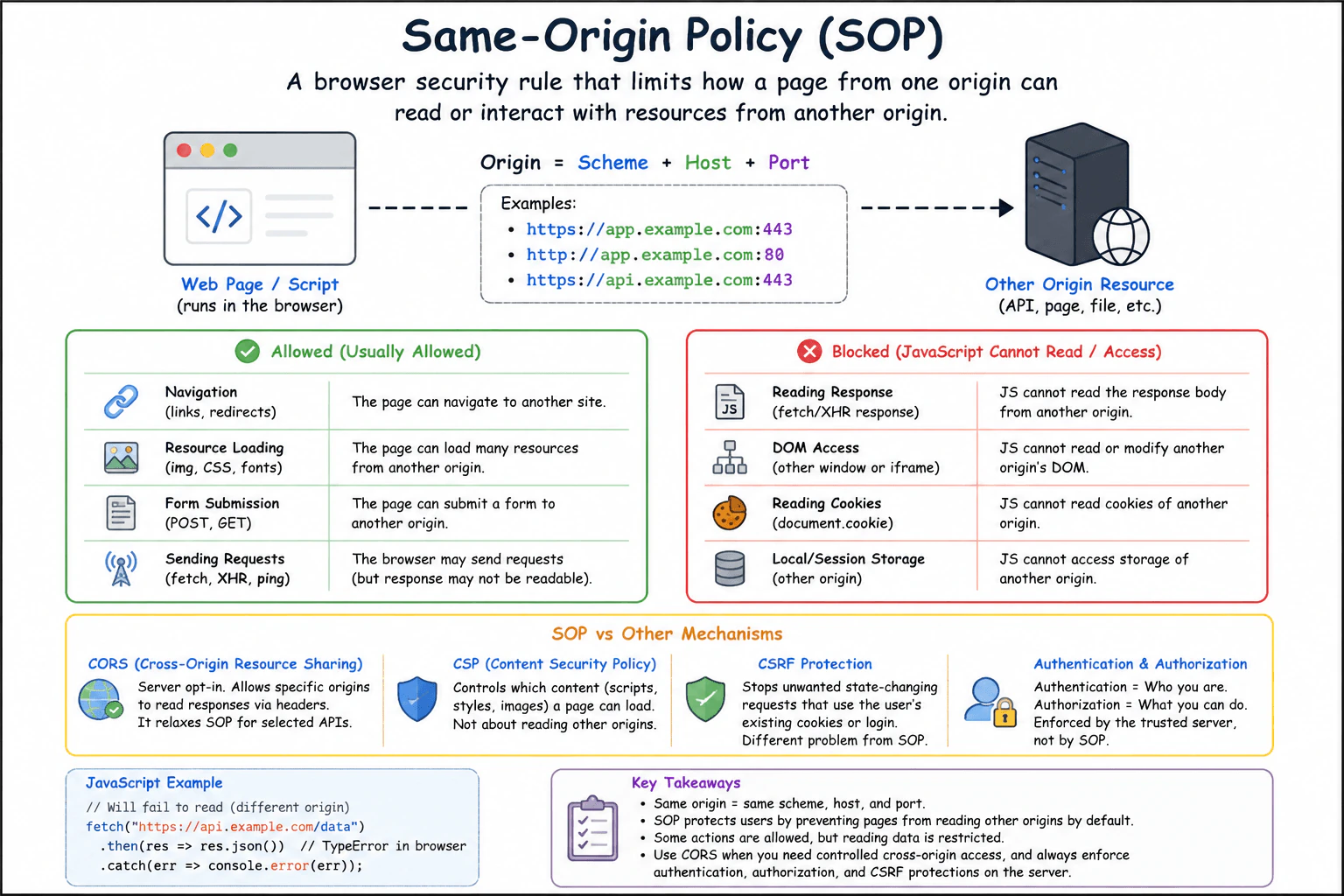
Define the same-origin policy as a browser security rule that limits how a document or script from one origin can read or interact with resources from another origin. Define an origin by scheme, host, and port; explain common allowed and blocked interactions; and distinguish the policy from CORS, CSP, CSRF protection, and authentication.

Short Interview Answer (30-60 seconds)

The same-origin policy is a browser security rule that limits one origin from reading or manipulating another origin's resources. An origin is the combination of scheme, host, and port. CORS can selectively allow cross-origin reads, but the trusted server must still enforce authentication and authorization.

Detailed Explanation

The practical idea is simple: a page from one website should not normally be able to read private information from another website that you also use. Without this protection, a harmful page could try to inspect information from your email, bank, or another signed-in site. The browser creates a boundary based on where each page came from. Some actions across that boundary are still possible, such as showing an image, following a link, or sending a form. But directly reading protected information from another site is usually stopped unless that site gives permission.

Useful Questions to Ask the Interviewer
  1. Would you like examples of both allowed and blocked cross-origin interactions?
  2. Should I also explain how CORS can permit selected cross-origin reads?
What is the same-origin policy? diagram
How to Explain It in an Interview

The same-origin policy, often called SOP, is a browser security rule that limits how a document or script from one origin can read or interact with resources from another origin.

An origin is defined by three parts:

  1. Scheme, such as https.
  2. Host, such as app.example.com.
  3. Port, such as 443.

Two URLs are same-origin when these three values match, using the effective port for the scheme. For example, https://app.example.com/page and https://app.example.com/profile are same-origin. http://app.example.com, https://api.example.com, and https://app.example.com:8443 are different origins because the scheme, host, or port differs.

The main security purpose is to stop JavaScript running on one origin from automatically reading sensitive information that belongs to another origin. For example, a malicious site should not be able to open a user's banking site in another context and freely inspect its DOM or read authenticated API responses.

The policy does not block every cross-origin action. Browsers intentionally allow several kinds of cross-origin use. A page can commonly navigate to another site, submit an HTML form, load an image, load certain stylesheets, or embed some resources. However, JavaScript is generally prevented from reading a cross-origin document's DOM or reading a cross-origin network response unless an applicable browser mechanism permits it.

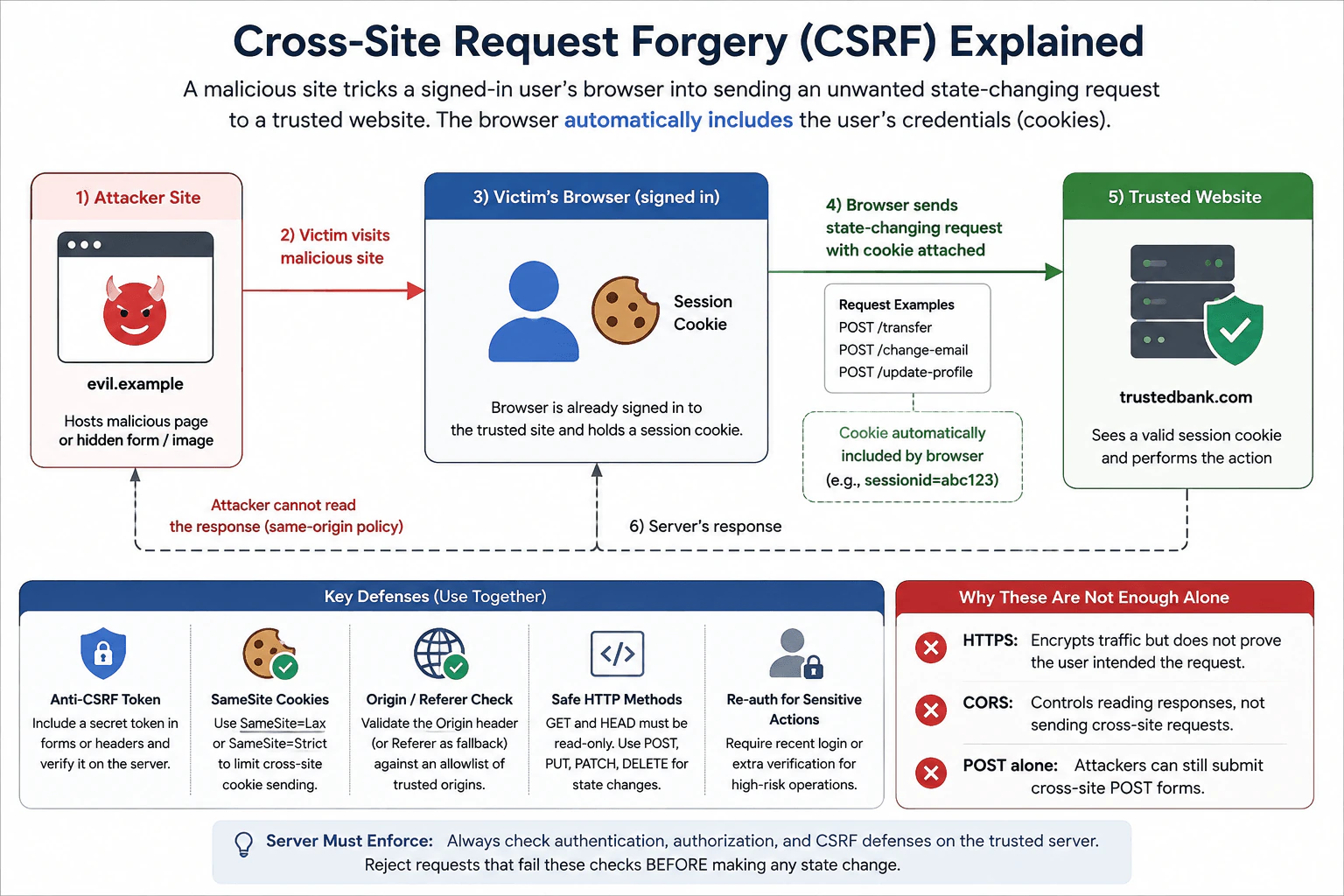
A useful distinction is sending versus reading. A browser may allow a cross-origin request to be sent even when JavaScript is not allowed to read the response. For this reason, a server cannot rely on the same-origin policy to protect state-changing operations. The trusted server must independently enforce authorization and use appropriate CSRF protections when browser credentials can be sent automatically.

CORS, or Cross-Origin Resource Sharing, is different from SOP. SOP is the browser's default isolation rule. CORS is a mechanism in which a server returns HTTP response headers that tell the browser which origins may access a response from JavaScript. Depending on the request, the browser may first send a preflight request to check whether the method and headers are permitted. CORS does not authenticate the caller, does not decide what an authenticated user is authorized to access, and does not stop non-browser clients from sending requests directly to the server.

CSP, or Content Security Policy, is also different. CSP lets a site restrict which sources may provide scripts, styles, images, frames, and other content. It is commonly used to reduce risks such as cross-site scripting. CSP does not define whether two URLs have the same origin and does not replace SOP or server authorization.

CSRF protection solves another problem. Cross-Site Request Forgery occurs when a malicious site causes a user's browser to send an unwanted request to another site using credentials that the browser may include automatically. SOP can often prevent the malicious page from reading the response, but that does not guarantee the request was not sent or processed. Protections can include suitable SameSite cookie settings, CSRF tokens, and server-side Origin or Referer validation when appropriate.

Authentication answers, 'Who is this user or client?' Authorization answers, 'What is this authenticated identity allowed to do?' SOP and CORS answer neither question. The trusted server must enforce authorization for every protected operation and resource.

The main tradeoff is isolation versus legitimate integration. Strong origin isolation protects users, but modern applications often place the frontend and API on different origins. CORS provides a controlled way to permit required browser access. A good production configuration allows only the origins, methods, headers, and credential behavior that the application actually needs instead of granting broad access by default.

Safe failure means that when cross-origin reading is not permitted, frontend code should handle the browser's failure without exposing protected response data or sensitive diagnostic information. Applications should avoid logging cookies, authorization headers, access tokens, session identifiers, or secrets. Frontend code must never contain server secrets or long-lived private credentials.

To verify the control, test the application in a real browser. Use browser developer tools to compare same-origin and cross-origin requests, inspect relevant request and response headers, and confirm that an unapproved origin cannot read protected responses. Also test authenticated endpoints directly on the server to confirm that authorization is enforced independently of browser-origin controls.

Technical Approach
  1. Compare the scheme, host, and effective port of the page and target resource.
  2. If all three match, treat them as the same origin for SOP purposes.
  3. If they differ, identify the interaction type, such as navigation, resource loading, form submission, DOM access, or JavaScript response reading.
  4. Expect cross-origin DOM access and response reading to be restricted unless a specific browser mechanism permits them.
  5. If legitimate cross-origin API access is required, configure narrow server-side CORS rules.
  6. Independently enforce authentication, authorization, and relevant CSRF protections on the trusted server.
  7. Verify the behavior in an actual browser and confirm that unauthorized origins cannot read protected data.
Practical Insights

There is no useful Big-O time or memory complexity to calculate for the same-origin policy because it is a browser security rule, not an application algorithm. The browser performs origin checks as part of normal web security enforcement. The important costs are operational and maintenance costs. Teams must correctly manage frontend origins, API origins, CORS rules, credentials, cookies, development environments, and deployment changes. Rules that are too broad can expose data to unwanted origins, while rules that are too strict can break legitimate browser access. Automated and browser-level tests should cover expected production and development origins.

Why Interviewers Ask This

Interviewers want to know whether the candidate understands one of the browser's main security boundaries. A strong answer should correctly define an origin using scheme, host, and port, explain the difference between sending a cross-origin request and reading its response, give examples of allowed and blocked interactions, and distinguish the same-origin policy from CORS, CSP, CSRF protection, authentication, and server-side authorization.

Common interview mistakes

Common mistakes include saying that SOP blocks every cross-origin request. It often prevents JavaScript from reading data rather than preventing every request from being sent. Another mistake is defining an origin using only the domain and forgetting the scheme and port. Candidates also confuse CORS with authentication or authorization, assume CORS protects a server from direct non-browser clients, or claim SOP prevents CSRF. Another error is relying on browser restrictions instead of enforcing authorization on the trusted server. Finally, broad CORS rules should not be used without understanding exactly which origins need access and whether credentials are involved.

Interview tip

Start with one sentence: SOP prevents one origin from freely reading or manipulating another origin's data. Then define origin as scheme, host, and port. Give one allowed and one blocked example, explain the important difference between sending and reading a request, and finish by separating SOP from CORS, CSP, CSRF protection, authentication, and server-side authorization.

Interviewer may ask next
How is CORS different from the same-origin policy?

The same-origin policy is the browser's default restriction on cross-origin access. CORS is a mechanism that lets a server selectively tell the browser which other origins may read a response through JavaScript. Some CORS requests require a preflight check. CORS does not authenticate users, enforce authorization, or stop non-browser clients from sending requests. The trusted server must still enforce access control.

If the same-origin policy blocks reading a cross-origin response, why is CSRF protection still needed?

Because preventing JavaScript from reading a response does not necessarily prevent the browser from sending the request. A malicious page may be able to trigger a state-changing request while the browser automatically includes the user's credentials. Therefore, sensitive server actions still need appropriate CSRF defenses, such as SameSite cookies, CSRF tokens, or origin validation, together with server-side authorization.

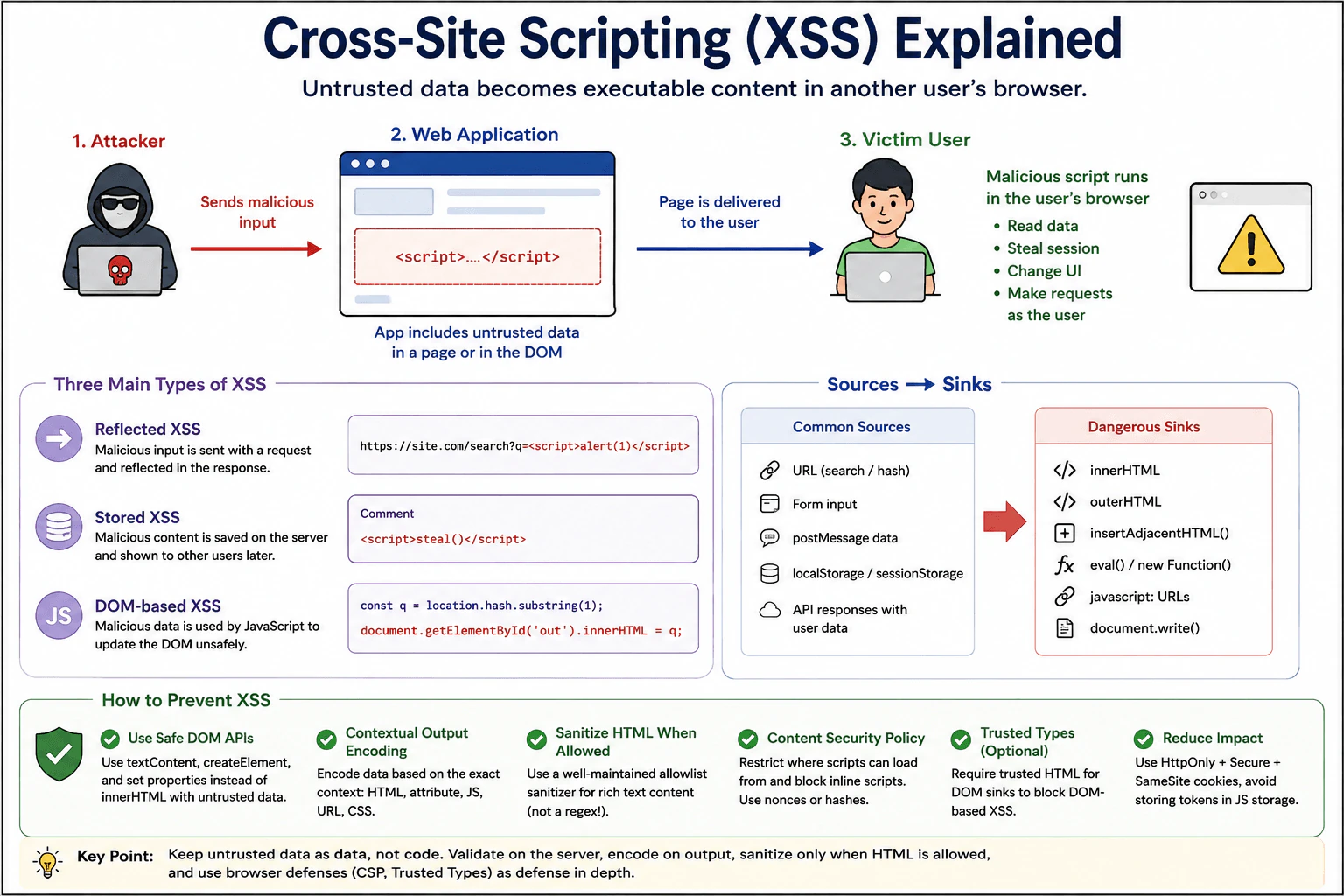
103. What are reflected, stored, and DOM-based cross-site scripting?SecurityEasy

Question Details

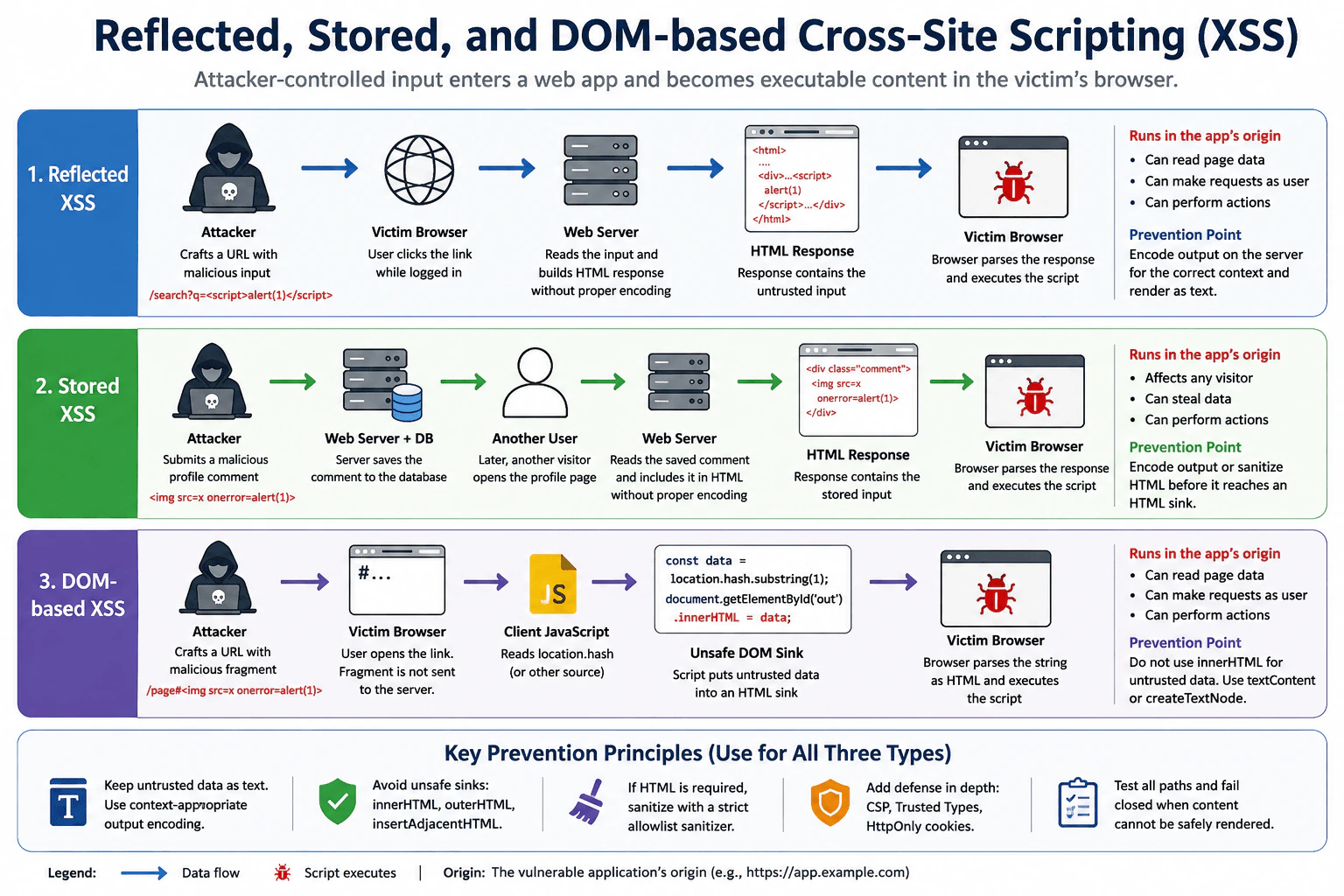
Compare three browser attack paths using an untrusted search query reflected in HTML, a saved profile comment rendered for later visitors, and a URL fragment passed by client JavaScript to an HTML sink. For each case, identify the attacker-controlled input, the origin and user context, the DOM or parsing sink, the protected session or data, and where prevention must occur. Distinguish server response generation from client-side DOM execution.

Short Interview Answer (30-60 seconds)

Reflected XSS puts attacker input into the current server response, stored XSS saves it and later renders it for visitors, and DOM-based XSS is created by client JavaScript. Prevent them by keeping untrusted values as text, encoding for the output context, sanitizing only intentional HTML, and avoiding unsafe DOM sinks.

Detailed Explanation

This question asks how harmful content supplied by an attacker can reach another person's browser in three different ways. In one case, a search value is immediately sent back on the page. In another, a comment is saved and shown to later visitors. In the third, the page itself reads part of the address and inserts it into the page. For each path, explain who supplied the value, whose account is at risk, where the value becomes dangerous, what information or actions could be exposed, and where the application must stop the problem.

Useful Questions to Ask the Interviewer
  1. Should I assume the search query and saved comment are rendered by a trusted server, while the URL fragment is handled only by browser JavaScript?
  2. Should the saved profile comment allow plain text only, or is some user-authored HTML intentionally supported?
  3. Should I include defense-in-depth controls such as Content Security Policy and Trusted Types after explaining the primary prevention for each path?
What are reflected, stored, and DOM-based cross-site scripting? diagram
How to Explain It in an Interview

Cross-site scripting, or XSS, happens when attacker-controlled data is treated as executable browser content instead of ordinary data. The attacker's code then runs in the vulnerable application's origin. That means it can interact with the page using the same browser origin as the legitimate application and may read JavaScript-accessible data or perform actions available to the current user.

1. Reflected XSS

Suppose the application receives a search request such as ?q=.... The attacker controls the q value. A trusted server reads that value and builds an HTML response containing it. If the server places the value into an HTML, attribute, script, URL, or another executable context without the correct context-specific encoding, the browser parser can interpret attacker-controlled data as markup or code.

The attacker-controlled input is the search query. The origin is the vulnerable application's origin. The victim is typically a user who opens an attacker-crafted URL, possibly while authenticated. The parsing sink is the location in the generated response where attacker-controlled data reaches an HTML or related browser parser. Protected assets include private page data, authenticated capabilities, and JavaScript-readable credentials or tokens. A session cookie marked HttpOnly cannot be directly read by injected JavaScript, but XSS can still make same-origin requests or perform actions using the victim's authenticated browser session.

Prevention must occur when the server generates the response. Treat the search query as data and apply contextual output encoding for the exact destination. For normal visible text, render it as text rather than executable HTML. Input validation can reject values that violate business rules, but filtering suspicious characters is not a complete XSS defense.

2. Stored XSS

Suppose an attacker submits a profile comment. The attacker controls the comment. The trusted server saves it in persistent storage. Later, another visitor opens the profile and the stored value is rendered. If that value reaches an executable HTML context or unsafe client-side sink without safe handling, attacker-controlled content can execute in the visitor's browser.

The attacker-controlled input is the saved comment. The origin is the vulnerable application's origin. The victim is any later visitor whose browser renders the unsafe value. The sink may be a server-generated HTML position interpreted by the browser parser or a later client-side DOM operation that turns the stored value into HTML. Protected assets include each visitor's JavaScript-accessible data and authenticated capabilities.

If profile comments should be plain text, render them as text using contextual encoding, textContent, safe DOM APIs, or framework escaping. If the application intentionally supports limited rich HTML, sanitize that HTML with a well-maintained allowlist-based sanitizer before it reaches an HTML-capable sink. Sanitization is appropriate when HTML is intentionally allowed; it is not a universal replacement for context-specific output encoding.

Stored XSS describes persistence, not necessarily the final execution mechanism. For example, the server could safely return a stored comment in JSON, but client JavaScript could later introduce XSS by assigning that comment to innerHTML.

3. DOM-based XSS

Suppose the page reads location.hash, which contains the URL fragment after #. The attacker controls the fragment. URL fragments are normally handled in the browser and are not included in the HTTP request sent to the server. Client JavaScript reads the fragment and passes it to an unsafe sink such as innerHTML. The browser then parses that string as HTML, which can create attacker-controlled executable content.

The attacker-controlled input is the URL fragment. The origin is the vulnerable page's origin. The victim is the user who opens the crafted URL. The source is the browser-side value read from location.hash. The sink is the client-side DOM or HTML-parsing API that interprets the value as markup. Protected assets include page data, JavaScript-readable tokens, and authenticated actions available from that origin.

Prevention must occur in the client-side data flow. If the fragment is supposed to be displayed as text, use textContent, createTextNode, safe DOM APIs, or framework rendering that escapes text by default. Do not pass untrusted strings to innerHTML, outerHTML, insertAdjacentHTML, or similar HTML-parsing sinks. If application functionality genuinely requires HTML, sanitize the content with an appropriate HTML sanitizer before using the required HTML sink.

Server response generation versus client-side DOM execution

The important distinction is where attacker-controlled data becomes executable browser content. With reflected XSS, the server commonly puts unsafe attacker-controlled data directly into the current response. With stored XSS, attacker-controlled data is first persisted and later becomes unsafe when a server or client rendering path interprets it as executable content. With DOM-based XSS, client JavaScript itself reads an untrusted source and sends it into an unsafe DOM sink, so the original server response can be completely safe.

This is why the best analysis follows data from source to sink. The storage location alone does not determine the final execution mechanism. A stored value can later cause DOM-based XSS if browser JavaScript handles it unsafely.

Primary defenses

For plain text, keep untrusted values as text. On the server, use output encoding appropriate to the exact context. In browser JavaScript, prefer textContent, createTextNode, safe attribute APIs, and framework rendering that escapes values by default.

Avoid APIs that interpret untrusted strings as HTML. innerHTML, outerHTML, insertAdjacentHTML, and similar sinks should not receive untrusted content. Framework escape-bypass features require the same caution because they deliberately disable normal escaping.

When the product intentionally supports user-authored HTML, use a well-maintained sanitizer with a strict allowlist of permitted elements, attributes, and URL forms. Do not try to create a complete XSS defense by manually removing suspicious strings such as <script> because dangerous browser parsing behavior is broader than one tag or pattern.

Defense in depth

Content Security Policy, or CSP, can reduce the impact of an XSS mistake by restricting which scripts may execute. A strong nonce- or hash-based CSP is valuable, but CSP does not replace safe source-to-sink handling.

Trusted Types can add another browser-side protection layer by restricting selected dangerous DOM sinks so that ordinary strings cannot be passed to them without going through approved policies. Trusted Types is defense in depth and still requires correct application logic and carefully designed policies.

Sensitive session cookies should normally use HttpOnly, Secure, and an appropriate SameSite setting. HttpOnly prevents injected JavaScript from directly reading the cookie value. It does not make XSS harmless because malicious same-origin code may still perform authenticated actions from the victim's page.

CSRF is a different security problem. CSRF tricks a browser into making an unwanted authenticated request, while XSS executes attacker-controlled content in the application's origin. XSS can frequently defeat normal CSRF assumptions because the injected script is already running within the trusted origin.

CORS and the same-origin policy are also not primary XSS defenses. The same-origin policy limits cross-origin access, but successful XSS runs with the vulnerable application's own origin privileges. CORS controls whether selected cross-origin responses can be read by requesting origins; it does not make unsafe same-origin rendering safe.

The frontend must never contain server secrets or long-lived privileged credentials. Browser storage such as localStorage is readable by JavaScript running in the same origin, so successful XSS can expose sensitive values stored there. Prefer designs that minimize sensitive credentials available to frontend JavaScript.

Third-party scripts and dependencies can also increase XSS and supply-chain risk because scripts running in the page can receive significant application privileges. Minimize unnecessary third-party code, review dependencies, keep them updated, and use controls such as CSP and Subresource Integrity where appropriate. These controls support the primary XSS defenses rather than replacing them.

Clickjacking is separate from XSS and is not central to these three attack paths. If relevant to the application's broader security design, prevent unwanted framing with CSP frame-ancestors or equivalent framing protections.

Safe failure and verification

If untrusted content cannot be safely rendered, fail closed by displaying it as inert text or rejecting the unsupported rich-content operation rather than falling back to raw HTML. Security logging should record enough information to diagnose failed validation, sanitization, CSP violations, or unsafe rendering attempts, but it must not record session tokens, secrets, or unnecessary personal data.

Verify each control with automated and manual tests. Use harmless test strings containing HTML-significant characters and markup-like content, then confirm that they appear as inert data instead of being interpreted as executable content. Test the reflected search-query path, the stored-comment path for later visitors, and the client-side URL-fragment path separately. Review server templates for correct context-specific encoding, search frontend code for unsafe DOM sinks, test sanitizer configurations when HTML is intentionally allowed, and monitor CSP or Trusted Types reports during development and controlled rollout.

Technical Approach
  1. Identify each attacker-controlled source: the search query, stored profile comment, and URL fragment.
  2. Identify the origin and victim context for each path.
  3. Trace each value across server and browser trust boundaries to its final parsing or DOM sink.
  4. Decide whether the destination requires plain text or intentionally supported HTML.
  5. For plain text, use context-appropriate output encoding, textContent, safe DOM APIs, or framework escaping.
  6. For intentionally supported HTML, sanitize with a strict allowlist before the HTML sink.
  7. Remove unnecessary unsafe sinks such as innerHTML.
  8. Add defense-in-depth controls such as CSP, Trusted Types, secure cookies, and dependency controls where relevant.
  9. Define safe failure behavior so unsafe content becomes inert text or is rejected rather than rendered as raw HTML.
  10. Verify every source-to-sink path with tests and log failures without secrets.
Practical Insights

The normal runtime cost is small. Rendering a plain string safely takes work roughly proportional to the length of that string. HTML sanitization costs more because the sanitizer must parse and inspect the supplied markup, but user-generated comments are usually small enough for this to be practical. CSP and Trusted Types usually add little runtime cost, although their policies require configuration and testing. Memory usage for these defenses is normally proportional to the content being processed. The larger production cost is maintenance: developers must understand output contexts, avoid dangerous sinks, keep sanitizers and dependencies updated, and test new rendering paths.

Why Interviewers Ask This

This question tests whether the candidate can trace attacker-controlled data across server and browser trust boundaries, distinguish reflected, stored, and DOM-based XSS, identify the source and sink for each attack path, understand the victim's origin and session context, choose prevention at the correct layer, and explain defense in depth without treating input filtering as a complete solution.

Common interview mistakes

Common mistakes include saying all three XSS types are solved by validating input; treating stored XSS as dangerous only when the value is saved rather than when it reaches an executable sink; assuming DOM-based XSS must involve a server response; using innerHTML for data that should be text; using one generic escaping rule for HTML text, attributes, JavaScript, CSS, and URLs even though output handling is context-specific; sanitizing ordinary text when safe text rendering is simpler; using framework escape-bypass APIs without reviewing the trust boundary; assuming CSP alone fixes XSS; believing HttpOnly cookies make XSS harmless; confusing XSS with CSRF, CORS, or the same-origin policy; keeping long-lived sensitive tokens in JavaScript-readable browser storage without considering XSS exposure; and logging payloads together with secrets or session data.

Interview tip

Explain every case using the same pattern: attacker-controlled source, origin and victim context, sink, protected data or capability, and prevention point. Emphasize that reflected XSS commonly becomes unsafe during current server-response generation, stored XSS persists before later unsafe rendering, and DOM-based XSS becomes unsafe in client JavaScript. Finish with safe text rendering first, sanitization only for intentional HTML, and CSP plus Trusted Types as defense in depth.

Interviewer may ask next
Why is using textContent safer than innerHTML for an untrusted URL fragment?

textContent treats the supplied value as text. Characters such as < and > are displayed rather than parsed as markup. innerHTML asks the browser to parse a string as HTML, so attacker-controlled content can create dangerous elements or executable behavior. When the application only needs to display text, textContent removes the HTML-parsing sink and is the safer choice.

If a product intentionally allows formatted profile comments, how should stored XSS be prevented?

Do not rely on simple character filtering. Define the HTML elements, attributes, and URL forms the product actually needs, sanitize user-authored HTML with a well-maintained allowlist-based sanitizer, and allow only the sanitized result to reach the required HTML sink. Test sanitizer bypass cases and use CSP and Trusted Types as additional protection. If formatting is not actually required, use plain-text rendering instead.

104. What is cross-site scripting (XSS)?SecurityEasy

Question Details

Define cross-site scripting as a vulnerability in which untrusted data is interpreted as executable browser content in another user context. Explain reflected, stored, and DOM-based forms; sources and dangerous sinks; session and data impact; contextual output encoding; safe DOM APIs; sanitization for allowed HTML; and Content Security Policy as defense in depth.

Short Interview Answer (30-60 seconds)

XSS is a vulnerability where untrusted data becomes executable content in another user's browser context. It may be reflected, stored, or DOM-based. Prevent it with safe DOM APIs, contextual output encoding, careful sanitization when HTML is intentionally allowed, plus CSP and Trusted Types as additional defenses.

Detailed Explanation

Cross-site scripting happens when a website receives information from somewhere it should not fully trust and accidentally lets that information act like instructions. An attacker can prepare harmful content that runs when another person opens a page. The harmful content may then act as that person on the affected website. It could read information shown on the page, change what the person sees, or perform actions available to that person. The main goal is simple: outside information should stay ordinary information unless the site deliberately allows carefully cleaned rich content.

Useful Questions to Ask the Interviewer
  1. Do you want me to explain reflected, stored, and DOM-based XSS separately?
  2. Should I also cover browser defenses such as Content Security Policy and Trusted Types?
  3. Is intentionally allowed user HTML, such as rich-text content, part of the scenario?
What is cross-site scripting (XSS)? diagram
How to Explain It in an Interview

Cross-site scripting, or XSS, is a vulnerability in which untrusted data is interpreted as executable browser content in another user's security context instead of remaining harmless data. The practical security decision is to preserve the boundary between data and code.

Reflected XSS occurs when attacker-controlled input is included in content that is returned or rendered for a request and is then interpreted as active browser content. A common example is unsafe use of a query-string value in generated page content. Stored XSS occurs when attacker-controlled content is saved, such as in a comment or profile field, and later delivered to users. DOM-based XSS describes XSS caused by unsafe client-side DOM processing: JavaScript reads attacker-controlled data and passes it to a sink that interprets it as active content. DOM-based XSS describes where the unsafe processing occurs and can overlap with reflected or stored delivery patterns.

A useful way to reason about XSS is with sources and sinks. A source is where potentially untrusted data enters frontend logic. Examples include location.search, location.hash, form values, postMessage data, browser storage, and API responses containing user-controlled values. A sink is an API or operation that can interpret a value as HTML, JavaScript, a URL, CSS, or another active browser context. A classic dangerous HTML sink is innerHTML when it receives untrusted content.

For ordinary text, prefer APIs that preserve the value as text. For example, use textContent, document.createElement, append, or other DOM operations that do not parse an untrusted string as HTML. Modern frameworks normally escape interpolated text by default, so keep that protection enabled and treat raw-HTML escape hatches as security-sensitive operations.

When output encoding is required, it must match the destination context. HTML text, HTML attributes, JavaScript strings, CSS, and URLs have different parsing rules, so one generic encoding function is not safe for every destination. In frontend code, avoiding string-built executable markup and using safe DOM or framework APIs is usually easier to reason about than manually encoding complex output.

If the product intentionally allows user-authored HTML, such as rich-text formatting, normal text encoding would remove the intended markup. In that case, use a well-maintained HTML sanitizer with a strict allowlist appropriate to the application's needs. The sanitizer should remove or neutralize dangerous elements, attributes, URL schemes, and other executable content. Do not treat regular-expression filtering, simple character removal, or input validation alone as complete XSS protection.

XSS can compromise information and actions available to the affected page. An injected script may read sensitive DOM content, read JavaScript-accessible browser storage, modify the interface, send data elsewhere where browser policy permits, or make requests using the victim's authenticated browser context. If an authentication cookie is HttpOnly, injected JavaScript cannot directly read that cookie, which reduces cookie theft. However, the script may still issue same-origin requests that automatically include the cookie, so HttpOnly reduces impact but does not solve XSS.

Authentication and authorization are separate concerns. Authentication establishes who the user is. Authorization determines what that user is permitted to do. XSS may cause requests to be made as the authenticated user, but the trusted server must still enforce authorization for every protected operation. Frontend checks are useful for user experience but are not a trusted authorization boundary.

Content Security Policy, or CSP, is defense in depth. A strong policy can restrict the scripts and other resources a page may execute or load and can reduce the impact of some injection mistakes. It does not replace correct output handling because policies can contain gaps and XSS defenses should not depend on CSP alone. Where practical, prefer nonce- or hash-based script policies and avoid broad allowances such as unsafe-inline.

Trusted Types is another defense for DOM XSS. When enforced, it can restrict assignments to supported dangerous DOM injection sinks so that arbitrary strings cannot be assigned directly. Values for those sinks must instead come through approved Trusted Types policies. This makes dangerous DOM operations easier to control and detect. Trusted Types complements safe DOM construction, contextual encoding, and sanitization; it does not replace them.

Other browser security controls address related but different threats. The same-origin policy limits interactions between different origins. CORS determines when frontend JavaScript may read certain cross-origin responses; it is not an XSS defense. CSRF protections address unwanted authenticated requests initiated from another site; they do not neutralize script already running inside the trusted origin. Frame-ancestors in CSP or X-Frame-Options can reduce clickjacking. These controls are useful, but none substitutes for preventing XSS.

Cookies that carry sessions should use appropriate security attributes such as HttpOnly, Secure, and a suitable SameSite policy. Avoid storing long-lived bearer tokens in JavaScript-readable storage when a safer architecture is available because XSS can read values exposed to page JavaScript. Browser storage is not a place for server secrets. Never put server secrets, private signing keys, database credentials, or other long-lived server credentials into frontend code because anything delivered to the browser must be treated as accessible to the user and to code running in that page.

Third-party scripts and dependencies also affect the XSS threat model. A third-party script loaded into the page generally runs with significant access to the page's JavaScript environment and DOM. Minimize unnecessary third-party scripts, review what is loaded, keep dependencies maintained, use lockfiles and appropriate dependency-review practices, and apply CSP or related controls where practical. Supply-chain compromise is not the same vulnerability as XSS, but malicious JavaScript running in the origin can create similar consequences for users.

File previews also need careful handling when user-controlled files can contain active content. Do not assume every uploaded file is passive. Render untrusted formats using an approach appropriate to the file type, content type, and isolation requirements rather than injecting file contents directly into the application's DOM as HTML.

Privacy matters during both prevention and investigation. Security logging can record useful events such as blocked policy violations, sanitizer rejections, or dangerous-sink detections, but logs should avoid session tokens, credentials, sensitive page contents, or unnecessary personal data. Safe failure means that if content cannot be safely rendered, the application should display it as harmless text, omit it, or reject it rather than falling back to an unsafe rendering path.

To verify the protection, trace untrusted data from each source to its eventual sink. Test suspicious paths with harmless payloads that reveal whether markup or script would be interpreted without causing damage. Review raw-HTML framework features, dangerous DOM sinks, sanitizer configuration, and contextual encoding. Where enabled, inspect CSP and Trusted Types violation reports. Automated security tests can help, but manual review of trust boundaries remains important because XSS depends heavily on how data moves through the application.

Technical Approach
  1. Identify trust boundaries and list sources of untrusted data, including URLs, forms, messages, browser storage, uploaded content, third-party data, and API responses containing user-controlled values.
  2. Trace that data to sinks that can interpret HTML, JavaScript, URLs, CSS, or other active content.
  3. Prefer textContent, createElement, safe DOM operations, or normal framework escaping instead of parsing untrusted strings as HTML.
  4. When encoding is necessary, use output encoding specific to the exact destination context.
  5. If the product intentionally permits HTML, sanitize it with a maintained allowlist-based sanitizer and keep the HTML-capable rendering path narrow.
  6. Add CSP and, where practical, Trusted Types as defense in depth.
  7. Reduce impact with secure cookie settings, careful token handling, server-side authorization, and minimal third-party script privileges.
  8. Verify controls by reviewing dangerous sinks, testing trust boundaries with harmless security payloads, inspecting policy violations, and confirming that rejected content fails safely.
Practical Insights

Safe DOM APIs and normal framework escaping usually add almost no meaningful performance cost. Contextual output encoding also has small CPU and memory cost because it transforms strings before output. HTML sanitization costs more because the sanitizer must parse and inspect the supplied markup, and its cost generally grows with the amount and complexity of content being sanitized. CSP and Trusted Types have little direct runtime cost compared with normal page work, but they add configuration, testing, rollout, and maintenance effort. The main operational cost is ongoing engineering discipline: tracking trust boundaries, reviewing dangerous sinks, testing changes, maintaining sanitizer rules, and controlling third-party code and dependencies.

Why Interviewers Ask This

Interviewers want to know whether you understand how untrusted data can cross a browser trust boundary and become executable content. They also evaluate whether you can distinguish reflected, stored, and DOM-based XSS, identify dangerous sources and sinks, choose context-appropriate defenses, protect sessions and user data, and verify that browser-side controls are effective without treating input filtering, sanitization, or CSP as a complete standalone solution.

Common interview mistakes

Common mistakes include using innerHTML with untrusted strings; assuming input validation or character filtering alone prevents XSS; using one generic encoding method for HTML, attributes, URLs, JavaScript, and CSS; disabling framework escaping to render raw HTML without a justified and sanitized path; writing homemade sanitizers with regular expressions; assuming HttpOnly cookies make XSS harmless; relying on CSP as the primary fix; forgetting DOM-based sources such as location, postMessage, storage, or user-controlled API data; trusting data merely because it came from the application's own server; confusing CORS, CSRF protection, or the same-origin policy with XSS prevention; putting long-lived tokens or secrets in frontend-accessible locations; granting unnecessary trust to third-party scripts; failing to consider active content in file previews; logging secrets while investigating security events; and falling back to unsafe rendering when validation or sanitization fails.

Interview tip

Start with the trust boundary: untrusted data must remain data instead of becoming executable browser content. Then explain reflected, stored, and DOM-based XSS, identify sources and dangerous sinks, and give the defense order: safe DOM APIs or framework escaping first, contextual output encoding when required, sanitization only for intentionally allowed HTML, then CSP and Trusted Types as defense in depth. Mention that the trusted server still enforces authorization.

Interviewer may ask next
What is the difference between reflected, stored, and DOM-based XSS?

Reflected XSS commonly occurs when attacker-controlled input is included in a response or client-rendered result for a request and becomes executable content. Stored XSS occurs when attacker-controlled content is persisted and later rendered to users. DOM-based XSS means the unsafe transformation happens in client-side DOM logic: JavaScript reads untrusted data and sends it to an execution-capable sink. DOM-based describes where the vulnerability occurs, so a DOM-based flow may still receive its malicious value through a reflected or stored delivery path.

When should you sanitize HTML instead of output-encoding it?

Use safe text APIs or contextual output encoding when the value should not contain active markup. Use HTML sanitization only when the product intentionally allows a limited subset of HTML, such as rich-text formatting. A maintained allowlist-based sanitizer can preserve approved markup while removing or neutralizing dangerous elements, attributes, and URL schemes. Sanitization should be applied close to the HTML trust boundary, and the application should still use CSP or Trusted Types as additional defenses where appropriate rather than treating them as substitutes for safe rendering.

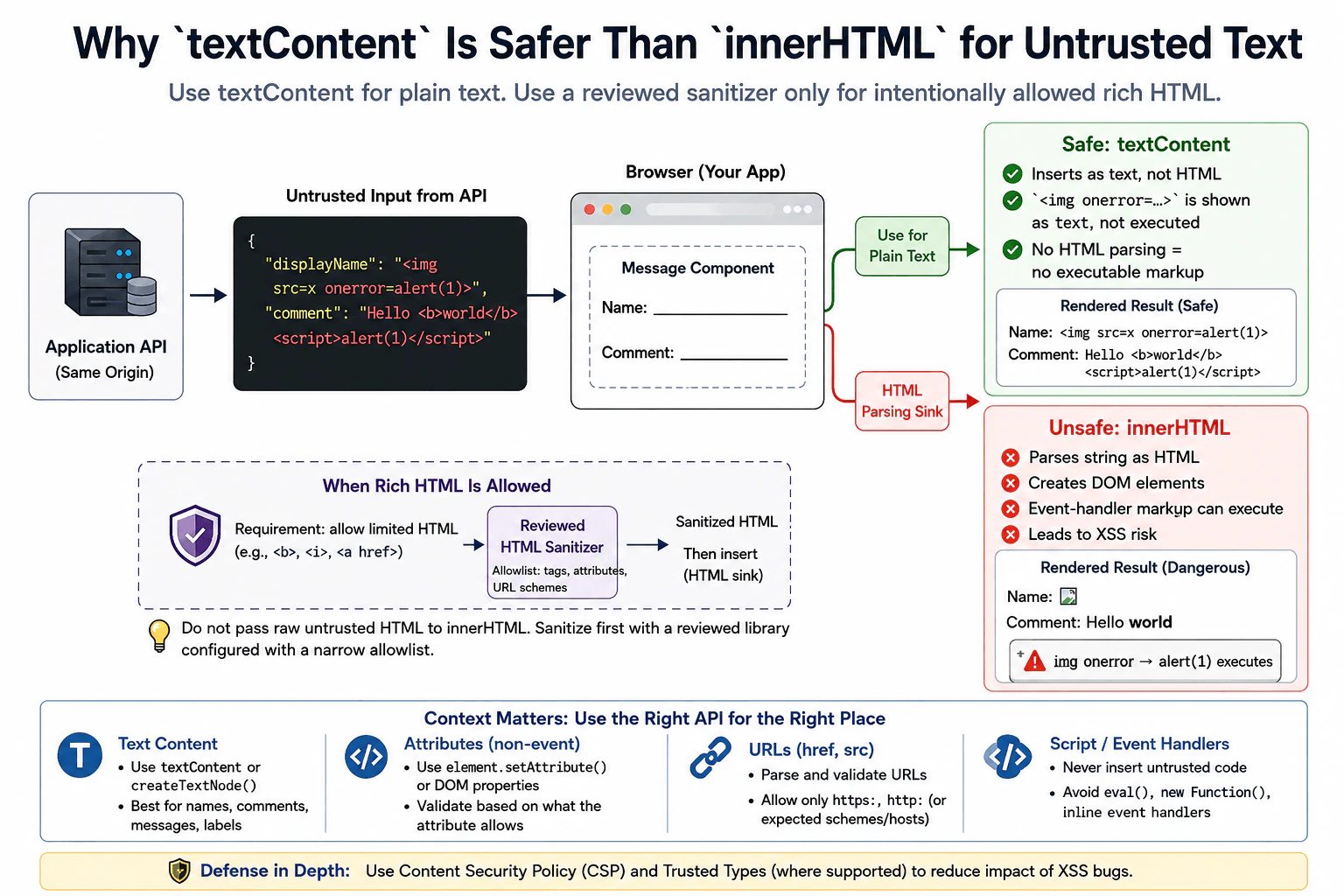
105. Why is `textContent` generally safer than `innerHTML` for untrusted text?SecurityEasy

Question Details

A message component receives a display name and comment from an API under the application's origin. Explain how assigning those strings to textContent differs from parsing them through innerHTML, which DOM sink creates executable markup risk, and when a reviewed sanitizer is required for intentionally allowed rich text. Include attribute, URL, and script-context boundaries rather than claiming one encoding works everywhere.

Short Interview Answer (30-60 seconds)

textContent treats untrusted input as plain text, so HTML-looking characters are displayed instead of parsed into elements. innerHTML parses strings as HTML and can create XSS risk. Use a reviewed sanitizer only when the application intentionally allows rich HTML.

Detailed Explanation

See the Code while reading this explanation.

The safest choice depends on what the page is supposed to show. If a name or comment should appear only as ordinary text, the browser should display those characters exactly as data instead of treating them as page instructions. Data coming from your own application service can still contain unexpected or harmful values, so its source alone does not make it safe. If users are intentionally allowed to submit formatted content, the application needs a carefully reviewed cleaning step before showing that formatting. Different places on a page also need different safety rules.

Useful Questions to Ask the Interviewer
  1. Should the display name and comment be plain text only, or is any rich HTML intentionally allowed?
  2. If rich text is allowed, which HTML elements, attributes, and URL schemes are permitted?
  3. Does the application already use a reviewed HTML sanitizer or a Trusted Types policy?
Why is `textContent` generally safer than `innerHTML` for untrusted text? diagram
How to Explain It in an Interview

I would start with the required output type. If the API values are only a display name and comment, I would assign them with textContent or create text nodes. textContent is a safe DOM construction choice for this case because the browser treats the value as text. For example, the string <img src=x onerror=alert(1)> appears as visible text instead of becoming an image element with an event handler.

innerHTML is different. It is an HTML-parsing DOM sink: assigning a string to it asks the browser's HTML parser to create DOM nodes from that string. If attacker-controlled or otherwise untrusted data reaches that sink, dangerous markup can become part of the document and may lead to cross-site scripting, or XSS. The important trust-boundary point is that data from an API under the application's own origin is not automatically safe. Stored user content, compromised backend data, or incorrectly validated data can still reach the frontend.

For plain text, I would therefore prefer textContent, document.createTextNode(), or framework rendering that escapes text by default. I would not use innerHTML merely because the data came from my own server.

If the product intentionally supports rich text, such as a limited set of links, emphasis, and lists, then textContent is not enough because it would display the markup literally. In that case, I would use a well-reviewed HTML sanitizer configured with a narrow allowlist and insert only the sanitizer's approved output. Sanitization is appropriate because some HTML is intentionally being preserved. Simple input filtering or a few regular expressions are not complete XSS defenses.

Safety is contextual. textContent solves the text-node case, but one encoding rule does not work everywhere. For normal non-event attributes, prefer specific DOM properties or carefully chosen DOM APIs and validate values according to what that attribute permits. Never place untrusted strings into inline event-handler attributes such as onclick. URL-bearing properties such as href and src need URL parsing plus allowed-scheme and, when required, allowed-destination checks because a URL can be dangerous even when it contains no HTML tags. Untrusted strings should not be turned into JavaScript code at all; avoid eval(), new Function(), inline script construction, and string-based event handlers.

Defense in depth can further reduce impact. A restrictive Content Security Policy can limit which scripts may execute if an XSS bug remains. Trusted Types, where supported and deployed, can restrict dangerous DOM injection sinks so arbitrary strings cannot casually reach them. If a site enforces Trusted Types for script-related sinks, rich HTML insertion must also follow the site's Trusted Types policy rather than assigning an ordinary string directly. CSP and Trusted Types support safe DOM construction; they do not make unsafe innerHTML assignments acceptable.

The safe failure behavior is simple: if rich content cannot be sanitized according to the approved policy, render it as plain text or reject that rich rendering instead of falling back to raw HTML. Security logging can record that sanitization or validation failed, but it should avoid storing secrets, authentication tokens, or unnecessary private content.

I would verify the control with tests containing HTML tags, event-handler attributes, malformed markup, suspicious URL schemes, and ordinary special characters. For plain-text fields, the test should confirm that attacker-controlled input produces only text and does not create attacker-controlled elements, event handlers, or executable code.

Key Insight / Why This Solution Works
  1. Decide whether the value is supposed to be plain text or intentionally allowed rich HTML.
  2. Treat API-provided user-controlled strings as untrusted even when the API uses the application's origin.
  3. For plain text, use textContent, text nodes, or framework text rendering instead of HTML-parsing sinks.
  4. For intentional rich HTML, pass the value through a reviewed sanitizer with a narrow allowlist before any HTML insertion.
  5. Handle normal attributes, URLs, event handlers, and script-related contexts with context-specific APIs and validation rather than reusing HTML encoding.
  6. Never turn untrusted strings into JavaScript code.
  7. Add defense-in-depth controls such as CSP and Trusted Types where appropriate.
  8. Fail safely by rendering plain text or rejecting unsafe rich content.
  9. Test with malicious markup, event handlers, suspicious URLs, malformed input, and normal special characters.
Code
function renderMessage(container, apiMessage) {
  // Values received from the API cross a trust boundary even when the API
  // uses this application's origin; stored user content may still be hostile.
  const wrapper = document.createElement('article');
  const name = document.createElement('strong');
  const comment = document.createElement('p');

  // These fields are defined as plain text, so textContent is the correct sink.
  // HTML-looking input stays data and is not parsed into executable markup.
  name.textContent = String(apiMessage.displayName ?? '');
  comment.textContent = String(apiMessage.comment ?? '');

  // Replace the old rendered message only with DOM nodes we constructed safely.
  container.replaceChildren(wrapper);
  wrapper.append(name, comment);
}

function setProfileLink(anchor, rawUrl) {
  // URLs need URL-specific validation; HTML escaping does not make a URL safe.
  let url;
  try {
    url = new URL(String(rawUrl), location.origin);
  } catch {
    // Fail safely by removing navigation when the value is not a valid URL.
    anchor.removeAttribute('href');
    return false;
  }

  // Allow only the web protocols required by this example and reject other schemes.
  // A real product may also need an allowlist of permitted hosts or destinations.
  if (url.protocol !== 'https:' && url.protocol !== 'http:') {
    anchor.removeAttribute('href');
    return false;
  }

  // Assign the validated URL through the URL property rather than building HTML text.
  anchor.href = url.href;
  return true;
}

function renderReviewedRichText(container, untrustedHtml, sanitizeHtml) {
  // Rich HTML is allowed only because this function represents an explicit product requirement.
  // sanitizeHtml must be a reviewed sanitizer or Trusted Types-aware policy owned by the application.
  if (typeof sanitizeHtml !== 'function') {
    // Fail closed: display the value as text instead of falling back to raw HTML.
    container.textContent = String(untrustedHtml ?? '');
    return false;
  }

  const sanitizedHtml = sanitizeHtml(String(untrustedHtml ?? ''));

  // Only reviewed sanitizer output may reach this HTML-parsing sink.
  // When Trusted Types enforcement is enabled, this value must satisfy that policy.
  container.innerHTML = sanitizedHtml;
  return true;
}
Why Interviewers Ask This

The interviewer is checking whether the candidate understands DOM-based XSS risk, the difference between inserting text and parsing HTML, trust boundaries around API data, contextual output handling, and when sanitization is appropriate. They also want to see whether the candidate avoids broad claims such as treating same-origin API data as automatically trusted or assuming one encoding method is safe in every browser context.

Common interview mistakes

Common mistakes include saying that same-origin API data is automatically trusted, using innerHTML for plain text because it is convenient, escaping only < and > and calling the result safe, writing a home-grown regular-expression sanitizer, or claiming one HTML encoding method protects every context. Another mistake is using HTML escaping for URLs without validating schemes or required destinations. Using setAttribute() with attacker-controlled inline event-handler attributes is also unsafe. Candidates should not claim CSP or Trusted Types replaces safe DOM construction. For rich HTML, failing open to raw innerHTML when sanitization fails is unsafe. Tests should verify that dangerous input creates no executable DOM behavior.

Interview tip

Lead with the decision: plain text goes to textContent; intentional rich HTML requires reviewed sanitization before an HTML-parsing sink. Then explain why API origin does not equal trust, and finish by noting that attributes, URLs, event handlers, and script contexts need their own safe handling.

Interviewer may ask next
If the application intentionally allows users to enter bold text and links, can we still use `textContent`?

textContent would safely display the markup as literal characters, so it cannot preserve intended formatting. If rich HTML is a real requirement, use a reviewed sanitizer with a narrow allowlist for permitted elements, attributes, and URL schemes, then insert only the sanitizer's approved output. If Trusted Types is enforced, follow the application's Trusted Types policy for the sink. Do not build a sanitizer with regular expressions, and fail safely to plain text or rejection if sanitization is unavailable.

Does HTML escaping make an untrusted value safe to use in an `href` attribute or JavaScript context?

No. Safety depends on the output context. For an href, parse and validate the URL and allow only expected schemes and, when necessary, expected destinations before assigning the DOM property. For JavaScript contexts, do not construct executable code from untrusted strings; avoid eval(), new Function(), inline script construction, and string-based event handlers. Text-node or HTML escaping rules cannot be reused as a universal security control.

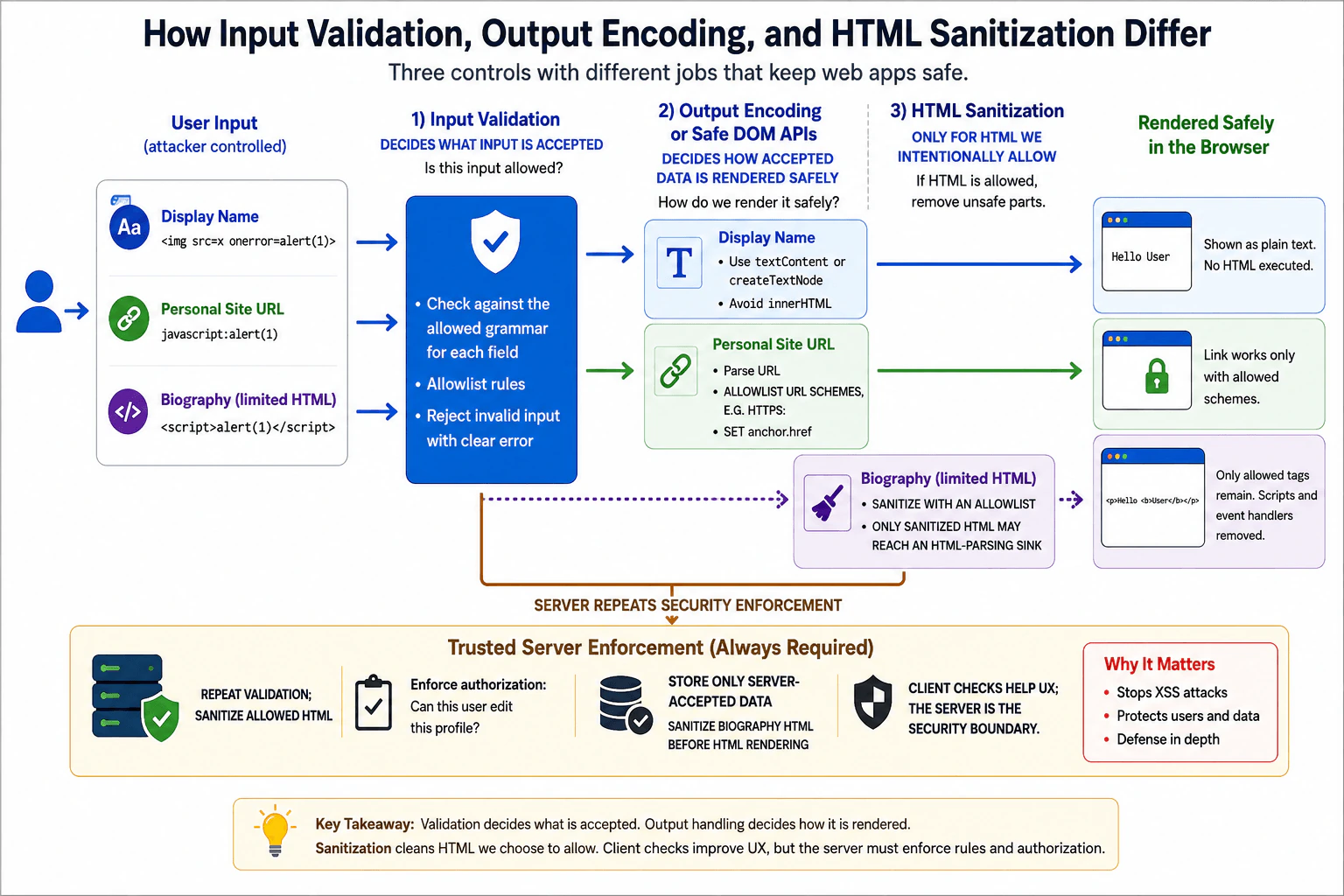
106. How do input validation, output encoding, and HTML sanitization differ?SecurityEasy

Question Details

A profile editor accepts a plain-text display name, a URL for a personal site, and limited rich-text biography markup. For each field, define the attacker input, expected grammar, rendering context, protected asset, and the roles of allowlist validation, context-appropriate encoding or safe DOM APIs, and sanitization. Explain why client checks improve user experience but cannot replace server enforcement.

Short Interview Answer (30-60 seconds)

Validation checks whether input matches a field's allowed grammar. Encoding or safe DOM APIs make accepted data safe for its output context. Sanitization is only for intentionally allowed HTML and removes unsafe markup. Client checks improve feedback, but the trusted server must enforce security rules.

Detailed Explanation

A profile page accepts three different kinds of information: a name, a website address, and a biography that can contain a small amount of formatting. Each needs a different safety rule. First decide what values the field should accept. Then make sure accepted values cannot change the page in an unintended way when shown. If formatting is deliberately allowed, remove anything outside that approved formatting set. Browser checks can give fast feedback to the user, but they cannot be trusted for protection because someone can bypass the page and send requests directly.

Useful Questions to Ask the Interviewer
  1. Which HTML elements and attributes are intentionally allowed in the biography?
  2. Which URL schemes should the personal-site field allow, such as only HTTPS or both HTTP and HTTPS?
  3. Will any of these values be rendered in more than one context, such as visible text, an HTML attribute, or a link destination?
How do input validation, output encoding, and HTML sanitization differ? diagram
How to Explain It in an Interview

The practical difference is purpose.

Input validation asks: "Is this value allowed for this field?" It checks input against the expected grammar or business rules before accepting it.

Output encoding or safe DOM construction asks: "How do I place this accepted value into this particular output context without letting it become code or markup?" In frontend JavaScript, safe DOM APIs often avoid the need for manual encoding because they keep data separate from HTML markup.

HTML sanitization asks: "If HTML is intentionally allowed, which parts of that HTML may remain?" A sanitizer parses HTML and removes or neutralizes elements, attributes, and URL values that are outside an explicit safety policy.

For the plain-text display name, an attacker might submit a value such as <img src=x onerror=alert(1)>. The expected grammar is plain text with whatever length and character rules the product actually requires. The rendering context is normal text in the DOM. The protected assets include the integrity of the page, the user's session, and information or actions accessible to JavaScript running in the application's origin.

Use allowlist validation only for genuine field rules, such as a maximum length or a defined set of accepted characters when the product requires that restriction. Validation alone does not make the value safe to render. Display it with textContent, createTextNode, or normal framework text interpolation that escapes text by default. Do not pass the untrusted name to innerHTML. HTML sanitization is unnecessary because this field is not supposed to contain HTML.

For the personal-site URL, an attacker might submit javascript:alert(1) or another URL outside the application's permitted scheme policy. The expected grammar is a valid URL whose scheme and other required properties satisfy the product's policy. The rendering context is usually the destination of an anchor element. The protected asset is the user's browsing context and the trust the user places in links presented by the application.

Parse the URL rather than searching the string for suspicious text. Apply an allowlist policy to the parsed scheme, commonly https: and, only if the product requires it, http:. If relative URLs are not intended, require an absolute URL as part of the grammar. After validation, assign the accepted URL through a DOM property such as an anchor's href rather than building an HTML string. HTML sanitization is not the correct control because this field contains a URL, not rich HTML.

For the limited rich-text biography, an attacker might submit <script> elements, event-handler attributes such as onclick, dangerous URL schemes, or other markup outside the supported formatting set. The expected grammar is deliberately restricted HTML, for example paragraphs, emphasis, strong text, and links if those features are required. The rendering context is HTML because the product intentionally supports markup. The protected assets again include the DOM, the user's session, and any information or actions available to scripts running in the application's origin.

Length validation and other business checks can still apply, but ordinary input validation cannot safely transform arbitrary HTML into trusted HTML. Process the biography with a well-maintained HTML sanitizer configured with an explicit allowlist of permitted elements, attributes, and URL schemes. Only sanitized output should reach an HTML-parsing sink. Do not attempt HTML sanitization with regular expressions or a home-grown blacklist.

Trusted Types can provide additional protection in supporting browsers by restricting certain dangerous DOM sinks so that approved code paths must create trusted values. A Content Security Policy can also reduce the impact of some XSS mistakes. Both are defense-in-depth controls; neither replaces correct validation, safe DOM construction, contextual output handling, or sanitization.

The important distinction is that these controls are not interchangeable. Validation decides whether the application should accept a value. Contextual output encoding or safe DOM APIs determine how that value can safely be represented at a specific destination. Sanitization is a transformation for content where HTML is intentionally part of the allowed data model.

The output context matters. A value that is harmless when inserted as text is not automatically safe in an HTML attribute, URL, CSS value, or JavaScript source. Prefer APIs that keep data separate from markup, such as textContent, DOM properties, and framework rendering that escapes text by default. Avoid constructing HTML strings from untrusted data whenever HTML parsing is unnecessary.

Client-side validation improves user experience because it can catch mistakes immediately and avoid unnecessary requests. It cannot provide authoritative security enforcement. An attacker can disable JavaScript, modify frontend code, send an HTTP request directly, or use another client entirely. The trusted server must independently enforce all security-relevant validation before storing or acting on data.

The server must also enforce authorization when a profile is modified. Authentication answers who the user is. Authorization answers whether that authenticated user is allowed to modify the particular profile or resource. Client-side controls cannot enforce authorization because requests can bypass the frontend.

Safe failure behavior should reject values that violate the policy instead of trying to guess a safe interpretation. The application should return a clear field-level error and, where appropriate, preserve the previously accepted value. Rejected attacker-controlled data should not be reflected through an unsafe rendering context. Security logging may record enough information to investigate repeated failures, but it should avoid secrets, session tokens, credentials, or unnecessary personal information.

To verify the controls, test each field with both valid and malicious values. Confirm that attack-like display names appear only as literal text, disallowed URL schemes are rejected, valid URLs still work, unsafe biography elements and attributes are removed, approved formatting remains, and no XSS payload executes. Also bypass the browser and send equivalent requests directly to the server to confirm that server-side validation and authorization still reject invalid or unauthorized changes.

Technical Approach
  1. Define the expected grammar, attacker-controlled input, rendering context, and protected asset for each field.
  2. For the display name, enforce genuine field rules and render accepted data as text using textContent, createTextNode, or normal framework escaping.
  3. For the personal-site URL, parse the URL, allowlist permitted schemes and other required URL properties, and assign the accepted value through a safe DOM property.
  4. For the biography, enforce relevant size or business limits and sanitize intentionally allowed HTML with a maintained sanitizer configured with a narrow allowlist.
  5. Keep untrusted data away from HTML-parsing sinks unless sanitized HTML is intentionally required.
  6. Repeat all security-relevant validation on the trusted server and enforce authorization there.
  7. Fail safely, log without exposing secrets, and verify the controls with valid inputs, malicious payloads, sanitizer edge cases, and direct requests that bypass client checks.
Practical Insights

Validation for a display name or URL normally examines the input once, so its time grows roughly with the size of the value and it needs little extra memory. HTML sanitization costs more because the sanitizer must parse and inspect the biography markup, but profile biographies are normally small, so this is usually inexpensive. The more important production cost is maintenance: validation rules, URL policies, sanitizer configuration, and sanitizer dependencies must remain explicit, tested, and updated as requirements or browser behavior change.

Why Interviewers Ask This

Interviewers want to know whether the candidate understands that input validation, contextual output handling, and HTML sanitization protect different trust boundaries. They are testing whether the candidate can define each field's expected grammar, identify its rendering context, prevent XSS with safe DOM construction, safely support intentionally allowed HTML, enforce security rules on the trusted server, and explain why browser-side checks are useful for user experience but are not a security boundary.

Common interview mistakes

Common mistakes include treating validation, output encoding, and sanitization as interchangeable; trusting client-side validation as a security boundary; blocking a few suspicious strings instead of defining an allowed grammar; using innerHTML for plain text; accepting dangerous URL schemes; treating URL validation as simple substring matching; trying to sanitize HTML with regular expressions or a homemade blacklist; sanitizing HTML when the product does not need HTML at all; assuming data safe in one output context is safe in every context; bypassing normal framework escaping without a justified sanitization step; forgetting trusted-server authorization; logging secrets or tokens with validation failures; and treating CSP or Trusted Types as substitutes for correct data handling.

Interview tip

Structure the answer around the three profile fields. For each one, state the attacker input, expected grammar, rendering context, protected asset, and correct control. Finish by emphasizing that validation controls acceptance, safe output handling controls interpretation, sanitization is only for intentionally allowed HTML, and the trusted server must independently enforce security rules and authorization.

Interviewer may ask next
Why is safe output handling still necessary if input has already passed validation?

Validation and output handling protect different boundaries. Validation checks whether a value belongs in a field, but accepted characters may still have special meaning in the context where the value is later rendered. Safe DOM APIs or context-appropriate encoding keep the value as data instead of executable markup. For example, an accepted display name should still be rendered with textContent or normal framework escaping rather than inserted into an HTML string.

When should HTML sanitization be used instead of escaping all markup?

Use HTML sanitization when HTML formatting is an intentional product feature and approved markup must remain functional. A maintained sanitizer should parse the content and apply a narrow policy for allowed elements, attributes, and URL schemes before the result reaches an HTML-parsing sink. If HTML is not required, do not sanitize and render it as HTML; keep the value as plain text and use textContent or normal framework escaping instead.

107. What is cross-site request forgery (CSRF)?SecurityEasy

Question Details

Define CSRF as tricking a browser into sending an unwanted state-changing request with credentials that the browser includes automatically. Explain the conditions needed for the attack, anti-CSRF tokens, SameSite cookies, origin checks, safe HTTP methods, and re-authentication for sensitive actions. Clarify why HTTPS, CORS, or using POST alone is not sufficient protection.

Short Interview Answer (30-60 seconds)

CSRF tricks a signed-in browser into sending an unwanted state-changing request with credentials the browser includes automatically, usually cookies. Defend with anti-CSRF tokens, SameSite cookies, Origin checks, safe HTTP methods, and re-authentication for sensitive actions. HTTPS, CORS, and POST alone are not sufficient.

Detailed Explanation

Cross-site request forgery happens when a harmful website causes your browser to perform an action on another website where you are already signed in. Your browser may automatically include the information that proves you are signed in, so the second website may think the request came from you. The attacker usually cannot read the private response, but they may still cause an unwanted change, such as changing account settings. Protection means making sure an important request was intentionally started through a flow the trusted website allows.

Useful Questions to Ask the Interviewer
  1. Is the application using cookie-based sessions or another credential that the browser sends automatically?
  2. Which state-changing operations are especially sensitive and should require re-authentication?
  3. Does the application need any legitimate cross-site flows that affect SameSite or Origin-checking rules?
What is cross-site request forgery (CSRF)? diagram
How to Explain It in an Interview

CSRF, or cross-site request forgery, is an attack where another site causes a user's browser to send an unwanted request to a trusted application. The important condition is that the browser automatically includes authentication credentials, most commonly session cookies.

For example, suppose a user is signed in to a banking site. If the bank accepts a state-changing request based only on the session cookie, a malicious page could cause the browser to submit a transfer request. The browser may attach the bank's session cookie automatically. Unless the bank performs additional checks, the server may see a valid authenticated session even though the user did not intentionally request the transfer.

Several conditions normally need to be true for a CSRF attack. First, the target endpoint must perform a meaningful state change. Second, the victim must have valid credentials that the browser will attach automatically. Third, the attacker must be able to construct a request the browser is allowed to send. Finally, the server must lack sufficient protection that proves the request came through an intended application flow.

Authentication and authorization are different. Authentication tells the server which user is signed in. Authorization decides whether that user is allowed to perform the requested action. The trusted server must always enforce authorization. CSRF protection adds another check: even if the user is authenticated and authorized, was this state-changing request submitted through a trusted flow?

A common defense is an anti-CSRF token. The trusted server creates an unpredictable token associated with the user's session or request context. The legitimate application sends that token with state-changing requests, for example in a hidden form field or a request header. The server verifies the token before making the change. A malicious cross-origin page generally cannot read the legitimate application's token because of the browser's same-origin policy. If the token is missing or invalid, the server must reject the request without changing state.

SameSite cookies provide an additional browser-level defense. SameSite=Strict prevents the cookie from being sent in most cross-site contexts. SameSite=Lax also blocks many cross-site uses, although cookies can still be sent in some top-level navigation cases, especially for safe methods such as GET. This is one reason GET and HEAD must never perform state-changing actions. SameSite=None allows cross-site cookie sending and requires Secure, so applications that need it must rely carefully on other CSRF controls as well. SameSite is strong defense in depth, but its setting must match legitimate application behavior.

The server can also validate the Origin header on state-changing requests. It should compare the header against an explicit allowlist of trusted origins, not perform a loose substring check. Referer may be used as a carefully considered fallback in some designs when Origin is unavailable. Applications must define safe behavior for missing headers because blindly accepting a missing Origin would weaken the control, while blindly rejecting it may break legitimate clients. Browser-based applications can usually use a strict policy for protected state-changing routes.

HTTP methods should follow their intended meaning. GET and HEAD should be safe and should not change server state. Creating, updating, or deleting data should use state-changing methods such as POST, PUT, PATCH, or DELETE. However, POST alone does not prevent CSRF. A malicious site can often submit a normal HTML form with a cross-site POST request, and the browser may still attach cookies automatically.

For especially sensitive operations, such as changing a password, changing a recovery method, adding a payment destination, or authorizing a financial transaction, the application can require recent re-authentication or another strong user-verification step. This limits the effect of both CSRF and a stolen authenticated session.

HTTPS is essential because it protects traffic against network interception and modification, but it does not prove that the user intended a request. A malicious HTTPS page can still cause a browser to send a request to another HTTPS site, so HTTPS alone does not stop CSRF.

CORS is also not a complete CSRF defense. CORS mainly controls whether JavaScript from another origin can read responses and whether certain non-simple cross-origin requests are allowed. Browsers can still send some cross-origin requests, including ordinary HTML form submissions, without the attacker receiving CORS permission to read the response. Therefore, blocking response access is not the same as preventing the state-changing request.

The same-origin policy has a similar limitation. It prevents many cross-origin reads, but it does not prevent every cross-origin request from being sent. CSRF specifically takes advantage of this difference between sending a request and reading its response.

CSRF risk is different when authentication uses a credential that an attacker-controlled page cannot make the browser attach automatically, such as a bearer token that the legitimate JavaScript application explicitly places in an Authorization header. That design can reduce classic CSRF exposure, although it introduces other concerns such as protecting the token from XSS and accidental exposure. The trusted server must still perform authentication and authorization correctly.

A secure design therefore combines controls based on the application's authentication model: keep state changes off safe methods, configure SameSite cookies appropriately, verify anti-CSRF tokens where required, validate trusted origins, enforce server-side authorization, and require re-authentication for especially sensitive actions. Failed validation must stop the operation before any state change occurs. Security logs may record useful request metadata and the reason for rejection, but they must not log session cookies, CSRF tokens, passwords, authorization credentials, or other secrets.

To verify the defenses, test protected state-changing endpoints from an unrelated origin. Confirm that requests with a missing or incorrect anti-CSRF token, an untrusted Origin, or another failed required check are rejected and cause no state change. Also test legitimate application flows, including any intentionally supported cross-site flows, so security controls do not break expected behavior.

Technical Approach
  1. Identify every endpoint that changes server-side state.
  2. Determine whether authentication credentials, especially cookies, are attached automatically by the browser.
  3. Ensure safe methods such as GET and HEAD are read-only.
  4. Configure session cookies with an appropriate SameSite policy and use Secure and HttpOnly where appropriate.
  5. Require and verify an unpredictable anti-CSRF token for protected state-changing requests when the authentication model needs it.
  6. Validate Origin against an explicit trusted-origin allowlist and define safe handling for missing headers.
  7. Enforce authentication and authorization independently on the trusted server.
  8. Require recent re-authentication or stronger verification for especially sensitive actions.
  9. Reject failed checks before changing state and log useful diagnostic information without secrets.
  10. Test both legitimate application flows and simulated cross-site attacks to verify the controls.
Practical Insights

CSRF defenses usually add very little processing cost. Token comparison and Origin checking take a small, nearly constant amount of work for each request. SameSite cookie enforcement is mainly handled by the browser. Server-managed token strategies may require a small amount of session data, while some token designs can avoid additional server storage. The main cost is maintenance: every relevant state-changing endpoint must use the correct controls, legitimate cross-site flows must be handled deliberately, and authentication or cookie changes must be security-tested.

Why Interviewers Ask This

Interviewers want to know whether the candidate understands how automatically included browser credentials can create a CSRF risk, which conditions make the attack possible, and which protections belong on the trusted server. They also evaluate whether the candidate can distinguish real CSRF defenses from incomplete measures such as HTTPS, CORS, or simply using POST.

Common interview mistakes

Common mistakes include believing HTTPS prevents CSRF, treating CORS or the same-origin policy as complete CSRF defenses, assuming POST is automatically safe, allowing GET requests to change data, checking authentication without independently enforcing authorization, relying only on SameSite without considering legitimate cross-site requirements, using predictable or unverified CSRF tokens, accepting loosely matched Origin values, or accepting missing validation data without a defined security policy. Another serious mistake is performing part of the state change before CSRF validation finishes instead of failing safely first.

Interview tip

Start with the condition that makes CSRF possible: the browser may send authentication credentials automatically. Then explain anti-CSRF tokens, SameSite cookies, Origin validation, safe HTTP methods, and re-authentication. Clearly state that HTTPS, CORS, and POST alone are insufficient, and emphasize that the trusted server must enforce authorization and fail before changing state.

Interviewer may ask next
Why is using POST instead of GET not enough to prevent CSRF?

POST is appropriate for many state-changing operations, but it is not a CSRF defense by itself. A malicious site can often create a normal HTML form that submits a cross-site POST request. If the browser automatically attaches the victim's session cookie and the server performs no additional CSRF validation, the request may succeed. POST should therefore be combined with controls such as anti-CSRF tokens, SameSite cookies, Origin validation, and server-side authorization.

Can SameSite cookies completely replace anti-CSRF tokens?

Not in every application. SameSite=Lax or SameSite=Strict can block many cross-site cookie uses and provide strong CSRF protection, but legitimate cross-site workflows may require a less restrictive policy. SameSite=None explicitly permits cross-site cookie sending, so additional controls become especially important. For protected state-changing requests, anti-CSRF tokens and Origin validation can provide defense in depth, while highly sensitive operations may also require recent re-authentication.

108. How does cross-site request forgery affect a cookie-authenticated frontend?SecurityEasy

Question Details

A banking page uses an automatically sent session cookie for POST /api/payments. Explain how a malicious site can cause the browser to send a state-changing request, what asset and authorization boundary are at risk, and how SameSite cookies, anti-CSRF tokens, origin checks, and request design reduce the attack. Distinguish CSRF from reading a cross-origin response through JavaScript.

Short Interview Answer (30-60 seconds)

CSRF abuses the browser's automatic cookie behavior. A malicious site can trigger a payment request that carries the victim's bank session cookie even though it normally cannot read the response. Use SameSite cookies, anti-CSRF tokens, Origin checks, safe request design, and server-side authorization.

Detailed Explanation

This question asks how another website can make your browser perform an action on a banking website while you are already signed in. The danger is not that the bad website can see your bank page. The danger is that your browser may automatically include proof that you are signed in when it sends a request. If the bank accepts that request without checking where it came from or whether it belongs to an expected user action, money could be moved or account information could be changed. The answer should explain how the bank recognizes and rejects these unwanted actions.

Useful Questions to Ask the Interviewer
  1. Can I assume the banking application uses a server-managed session stored in a cookie that the browser automatically sends when the cookie rules allow it?
  2. Should I focus on browser-based CSRF defenses for a same-site frontend calling the bank API?
  3. Can I assume POST /api/payments changes server state and therefore requires both authentication and server-side authorization?
How does cross-site request forgery affect a cookie-authenticated frontend? diagram
How to Explain It in an Interview
1. Start with the threat

Assume the user signs in to bank.example and receives a session cookie. The browser stores that cookie and may automatically attach it to later requests to the bank when the cookie's domain, path, security, and SameSite rules allow it.

Now the user visits evil.example. The malicious page tries to cause the browser to send a request to https://bank.example/api/payments. If the browser includes the bank's session cookie and the bank accepts the request without an additional CSRF check, the server may treat the request as belonging to the authenticated user even though the user did not intentionally create that payment from the bank application.

That is cross-site request forgery, or CSRF: another site causes the victim's browser to send an authenticated state-changing request.

2. Identify the asset and authorization boundary

The asset at risk is the user's authenticated authority to perform sensitive banking actions, such as creating a payment.

The trusted authorization boundary is the bank server. The session cookie can identify an authenticated session, but authentication answers only who the session belongs to. It does not prove that the user intended this payment. The server must separately authorize the payment, for example by checking that the authenticated account is permitted to perform the operation, and must reject requests that fail its CSRF defenses.

Frontend JavaScript is not the final authorization boundary because requests can reach the server without using the legitimate frontend code.

3. CSRF does not require reading the response

The browser's same-origin policy normally prevents JavaScript running on evil.example from reading protected response data from bank.example unless cross-origin access is explicitly permitted.

That does not mean the browser cannot send any cross-origin requests. Normal browser features such as form submission can cause cross-origin requests. If such a request includes an authenticated cookie and the server accepts it, state may change even though the malicious site's JavaScript cannot inspect the response.

CORS is therefore not the primary CSRF defense. CORS controls whether JavaScript is allowed to access certain cross-origin responses and whether some non-simple cross-origin requests are permitted after a preflight. It does not turn all cross-origin requests into blocked requests.

4. SameSite cookies reduce automatic cross-site cookie sending

The session cookie should normally use Secure, HttpOnly, and an appropriate SameSite value.

Secure means the cookie is sent only over HTTPS. HttpOnly prevents normal JavaScript from reading the cookie, which helps limit cookie theft through script access, although it does not itself stop CSRF.

SameSite=Strict generally prevents the cookie from being sent with cross-site requests. It gives strong CSRF protection but can interfere with legitimate flows that enter the site from another site.

SameSite=Lax is more permissive. It generally withholds the cookie on cross-site subresource requests and cross-site POST requests, while allowing it on some top-level cross-site navigations that use safe methods such as GET. Because state-changing actions must not be performed with GET, Lax provides useful protection for many applications.

SameSite=None allows the cookie to be sent in cross-site contexts and requires Secure. Applications that genuinely need cross-site cookies need strong explicit CSRF defenses.

SameSite is valuable defense in depth, but sensitive applications should still design their state-changing endpoints so that a browser cookie alone is not enough to authorize an unintended request.

5. Anti-CSRF tokens prove knowledge a malicious origin should not have

For cookie-authenticated state-changing requests, the server can require an unpredictable anti-CSRF token in addition to the session cookie. The trusted application obtains the token and sends it with the state-changing request, commonly in a custom request header or protected form field.

A malicious cross-origin page normally cannot read a properly protected token from the bank because of the same-origin policy. The server validates the submitted token using its chosen CSRF-token design and rejects the request before changing state if the token is absent or invalid.

The token must have enough entropy to resist guessing, must be associated correctly with the application's authenticated request model, and must not be exposed through URLs, logs, or other unsafe channels.

Using a custom request header can add another useful property: ordinary cross-origin HTML forms cannot set arbitrary custom headers. Cross-origin JavaScript attempting to send such a non-simple header is subject to CORS preflight rules, which the bank should not authorize for untrusted origins.

6. Origin checks add another server-side control

For sensitive state-changing endpoints, the server can inspect the Origin header and compare it with an explicit allowlist such as https://bank.example.

If a request is expected to come only from the bank's own origin and its Origin value is untrusted, the server should reject it before changing state. Where an application needs a fallback for requests without Origin, a carefully validated Referer policy may be used according to the server's documented request model.

Origin matching must compare parsed origins exactly. Weak substring or suffix checks can accidentally trust attacker-controlled domains.

7. Request design can make CSRF harder

State-changing operations must not use GET. A URL that can be activated by a link, image, preload, or navigation must never create a payment merely because it was requested.

Use an explicit state-changing method such as POST for payment creation. Require the expected content type and CSRF proof, and reject malformed or unexpected request shapes before changing state.

A JSON API that requires an anti-CSRF custom header can be harder to invoke from ordinary attacker-controlled HTML because HTML forms cannot add arbitrary headers and cannot directly submit application/json. This is useful defense in depth, but the server should still enforce explicit CSRF and authorization controls rather than assuming a content type alone is sufficient protection.

For high-impact transactions, an application may also require transaction-specific confirmation or stronger user verification. Those controls complement rather than replace authorization and CSRF protection.

8. Authentication, authorization, and CSRF protection answer different questions

Authentication asks, 'Which authenticated session sent this request?'

Authorization asks, 'Is this authenticated user allowed to perform this payment?'

CSRF protection asks, 'Does this browser request satisfy the evidence required for an expected request from the trusted application flow?'

The trusted server must enforce every required check before creating the payment. A successful session-cookie check alone must not be treated as sufficient evidence of user intent.

9. Safe failure, logging, and verification

If the anti-CSRF token is missing or invalid, or a required Origin check fails, the server should reject the request before creating the payment. Authorization failures must also fail before state changes occur.

Security logs can record information such as the endpoint, rejection reason, timestamp, and a safe correlation identifier. They should not record session-cookie values, anti-CSRF token values, credentials, or sensitive payment secrets.

Verification should include a legitimate request that is expected to succeed and negative tests that must fail. Test a cross-site request with no CSRF token, an incorrect token, an untrusted Origin, unexpected methods or content types, and the relevant SameSite cookie contexts. Confirm after each rejected request that no payment or other protected state change occurred.

Technical Approach
  1. Identify whether authentication uses cookies that the browser sends automatically.
  2. Identify every state-changing endpoint, such as POST /api/payments.
  3. Confirm that the trusted server authenticates the session and separately authorizes the requested action.
  4. Configure the session cookie with Secure, HttpOnly, and the strongest practical SameSite policy.
  5. Require and validate an unpredictable anti-CSRF token for protected state-changing requests.
  6. Validate the request Origin against an exact trusted-origin allowlist when the application flow supports it.
  7. Keep state changes off GET endpoints and require expected methods, headers, content types, and request shapes.
  8. Reject failed CSRF, authentication, or authorization checks before changing state.
  9. Log rejection metadata without secrets.
  10. Verify the controls with legitimate requests and simulated cross-site attacks.
Practical Insights

These protections add very little computation compared with normal request processing. SameSite enforcement is performed by the browser. Checking an Origin or validating a token usually requires only small comparisons or lookups for each request, with a small amount of extra request or session data. The larger cost is maintenance: choosing cookie behavior that does not break legitimate flows, implementing the token design consistently, maintaining trusted-origin rules, testing browser behavior, and ensuring every sensitive endpoint applies the required protections.

Why Interviewers Ask This

Interviewers want to know whether the candidate understands the browser trust boundary created by automatically sent cookies, the difference between authentication and authorization, why the same-origin policy and CORS do not by themselves prevent CSRF, and how layered controls such as SameSite cookies, anti-CSRF tokens, Origin validation, and safer request design reduce the risk.

Common interview mistakes

Common mistakes are saying that the same-origin policy or CORS automatically prevents CSRF; treating a valid session cookie as proof that the user intended the action; assuming POST alone prevents forgery; performing state changes with GET; relying only on frontend JavaScript checks; treating HttpOnly as a CSRF defense; relying only on SameSite without considering application requirements; accepting missing or invalid anti-CSRF tokens; using weak Origin matching; forgetting server-side authorization; logging session cookies or CSRF tokens; and confusing CSRF with XSS. XSS means attacker-controlled script executes in the trusted application's origin and can often perform actions with the same privileges as legitimate frontend code, while classic CSRF normally causes authenticated requests without needing to read the protected cross-origin response.

Interview tip

Explain CSRF as a browser trust-boundary problem: the browser may automatically attach authentication, but the trusted server still needs authorization and evidence that a sensitive request satisfies the application's CSRF policy. Clearly separate authentication, authorization, SameSite, anti-CSRF tokens, same-origin policy, CORS, and Origin checks, then finish with safe rejection and verification.

Interviewer may ask next
If the same-origin policy prevents a malicious site from reading the bank's response, why is CSRF still possible?

The same-origin policy mainly prevents one origin's JavaScript from reading protected data from another origin. It does not prevent every cross-origin request from being sent. For example, an HTML form can submit to another origin. If the browser includes an authenticated cookie and the bank accepts the request without adequate CSRF validation, server state can change even though the malicious site cannot read the bank's response.

Is SameSite=Lax enough to protect a cookie-authenticated payment endpoint from CSRF?

It blocks the session cookie in many common cross-site request contexts, including typical cross-site POST submissions, so it is a strong mitigation. For a sensitive payment endpoint, I would still use layered controls: server-side authorization, an appropriate anti-CSRF token or equivalent explicit CSRF proof, exact Origin validation where practical, and safe request design. This also makes the protection less dependent on one browser cookie setting and supports applications that may later require different cross-site behavior.

109. What security properties do `HttpOnly`, `Secure`, and `SameSite` cookie attributes provide?SecurityEasy

Question Details

For an authentication cookie issued to app.example, explain what each attribute restricts: JavaScript access, transport, and cross-site sending. Include the effects of host/domain scope, path scope, expiration, and a cross-site sign-in redirect. Identify which attacks each attribute can reduce and which, such as an already executing same-origin script, it does not fully solve.

Short Interview Answer (30-60 seconds)

HttpOnly prevents JavaScript from reading the cookie, Secure restricts it to secure transport, and SameSite limits cross-site sending. For authentication cookies, also use narrow host and path scope, sensible expiration, and server-side authorization. These controls reduce risk but do not completely prevent XSS or CSRF.

Detailed Explanation

These settings tell the browser how carefully it should handle a sign-in cookie. One setting stops page scripts from reading its value. Another makes sure the browser sends it only through a protected connection. A third decides whether the browser may send it when the user arrives or sends a request from another website. Other settings decide which website names and page areas can receive it and how long it lasts. Together, these limits reduce several common ways a sign-in cookie can be stolen or misused, but they cannot stop every attack by themselves.

Useful Questions to Ask the Interviewer
  1. Does the application need authentication to work through a cross-site sign-in redirect from an identity provider?
  2. Is the authentication cookie intended only for app.example, or must sibling subdomains also receive it?
  3. Does the application have any legitimate cross-site requests or embedded scenarios that require the authentication cookie?
What security properties do `HttpOnly`, `Secure`, and `SameSite` cookie attributes provide? diagram
How to Explain It in an Interview

For an authentication cookie, think about three separate browser restrictions: who can read the cookie value, how it can travel over the network, and whether it can be sent in a cross-site context.

HttpOnly restricts JavaScript access. If the trusted server sets an authentication cookie with HttpOnly, JavaScript cannot read that cookie through document.cookie. This reduces the chance that an XSS payload can directly steal and send the raw session cookie to an attacker. However, HttpOnly does not stop malicious JavaScript that is already executing in the application's origin from making requests as the user. The browser can still automatically attach the cookie to eligible requests. Therefore, HttpOnly reduces credential theft from XSS, but it is not an XSS defense by itself. The application still needs safe DOM construction, framework escaping, contextual output encoding, sanitization when intentionally allowing HTML, and controls such as CSP and Trusted Types where appropriate.

Secure restricts transport. A cookie marked Secure is sent only over secure connections such as HTTPS, subject to browser rules. This reduces accidental exposure of the cookie over plaintext HTTP. It does not encrypt the cookie value itself, does not protect the cookie after the server receives it, and does not stop JavaScript from reading it unless HttpOnly is also present.

SameSite controls cross-site sending. SameSite=Strict is the most restrictive mode: the browser generally withholds the cookie when a request is initiated from another site. This can interfere with flows where a user leaves the application for authentication and then returns from an external identity provider. SameSite=Lax is less restrictive. It generally allows the cookie on qualifying top-level cross-site navigations that use safe methods such as GET, while withholding it from many cross-site subrequests and state-changing requests. SameSite=None explicitly permits cross-site sending and must be paired with Secure in modern browsers.

For a cross-site sign-in redirect, SameSite=Strict can prevent an existing application cookie from being sent on the return navigation. SameSite=Lax commonly works when the identity provider redirects the browser back with a top-level GET. A sign-in flow that returns with a cross-site POST, or otherwise requires cross-site cookie delivery, may need a different design or SameSite=None; Secure. If cross-site cookies are required, the application must not rely on SameSite as its only CSRF defense and should use explicit protections such as unpredictable CSRF tokens or protocol-specific state validation where applicable.

Cookie host and domain scope are separate from these three attributes. If the server does not set a Domain attribute, the cookie is host-only. A host-only cookie issued by app.example is sent only to that host and not automatically to sibling hosts such as api.example. Setting an appropriate broader Domain allows the cookie to be sent to matching subdomains, which expands the trust boundary. For a sensitive authentication cookie, prefer host-only scope unless sharing across subdomains is genuinely required.

Path narrows the request paths for which a cookie is normally sent. For example, Path=/account makes the cookie eligible for matching paths under /account. However, Path is a cookie-routing rule, not a strong security boundary between applications on the same host, so it must not be treated as protection from malicious same-origin code.

Expiration controls cookie lifetime. A cookie without Expires or Max-Age is normally treated as a session cookie, although exact session restoration behavior can vary by browser. Max-Age or Expires can make the cookie persistent for a defined period. Authentication cookies should have the shortest practical lifetime. The trusted server should also support session expiration and revocation because removing or expiring the browser cookie does not by itself guarantee that a server-side session or credential has been invalidated.

The attack mapping is important. HttpOnly reduces direct theft of the cookie value by JavaScript. Secure reduces cookie exposure over plaintext transport. SameSite reduces many CSRF opportunities by preventing the browser from attaching cookies in disallowed cross-site contexts. None of these controls replaces authorization. Authentication establishes which user or session is making a request; authorization decides whether that authenticated identity is allowed to perform the requested action. The trusted server must enforce authorization on every protected operation.

For an authentication cookie, a strong default when the application's requirements allow it is similar to Set-Cookie: session=<opaque-value>; HttpOnly; Secure; SameSite=Lax; Path=/, with no Domain attribute so the cookie remains host-only. Some applications can use SameSite=Strict; others legitimately require SameSite=None; Secure. The correct choice depends on required cross-site behavior. The server should use HTTPS, rotate or invalidate sessions appropriately, avoid logging cookie values or other secrets, and fail authentication safely when a session is missing or invalid.

Verification should include checking the cookie attributes in browser developer tools and testing behavior rather than assuming the configuration works. Confirm that JavaScript cannot read an HttpOnly cookie, that the authentication cookie is not sent over insecure transport, that expected same-site and cross-site requests behave correctly, that the sign-in redirect still works, that expiration and logout invalidate access as intended, and that protected server endpoints reject unauthorized requests even if a client attempts to bypass frontend checks.

Technical Approach
  1. Decide whether frontend JavaScript ever needs to read the authentication credential. If not, make the cookie HttpOnly.
  2. Serve authentication over HTTPS and mark the cookie Secure.
  3. Choose the narrowest SameSite mode compatible with the required application flow: use Strict when possible, commonly Lax for applications that need top-level cross-site GET navigation, and None; Secure only when genuine cross-site cookie sending is required.
  4. Keep the cookie host-only by omitting Domain unless multiple trusted subdomains genuinely need it.
  5. Use the narrowest practical Path, while remembering that Path is not a strong same-origin security boundary.
  6. Set an appropriate lifetime with session behavior, Max-Age, or Expires, and support trusted server-side session expiration and revocation.
  7. Use explicit CSRF protection when the application's request model requires it instead of assuming SameSite covers every case.
  8. Prevent XSS independently because HttpOnly does not stop an already executing same-origin script from acting through the user's authenticated browser.
  9. Enforce authentication and authorization on the trusted server independently of browser cookie attributes.
  10. Verify JavaScript access, HTTPS transport, same-site and cross-site behavior, sign-in redirects, expiration, logout, and unauthorized-request rejection.
Practical Insights

The browser checks these cookie rules automatically, so they add no meaningful application-level time or memory complexity. The main cost is operational and maintenance work: developers must design and test HTTPS behavior, login redirects, subdomain sharing, expiration, logout, and cross-site requests. Stricter settings can break legitimate authentication flows, while broader Domain scope or SameSite=None increases the situations in which a cookie can be sent. The maintenance cost remains small when the application documents one clear cookie policy and tests it whenever authentication behavior changes.

Why Interviewers Ask This

Interviewers want to know whether the candidate understands that cookie security consists of several independent browser controls. A strong answer distinguishes protection from JavaScript access, network transport, and cross-site request behavior while also recognizing that Domain, Path, expiration, XSS, CSRF, and trusted server-side authorization remain separate concerns.

Common interview mistakes

Common mistakes are saying that HttpOnly prevents XSS, that Secure encrypts the cookie, or that SameSite completely eliminates CSRF. Another mistake is choosing SameSite=Strict without testing a cross-site sign-in redirect, or assuming Lax supports every redirect method. Setting a broad Domain unnecessarily expands which matching subdomains can receive the cookie. Treating Path as a strong security boundary is also incorrect. Developers may also forget that SameSite=None requires Secure in modern browsers, keep authentication cookies alive longer than necessary, expose session credentials to JavaScript without a real need, log sensitive cookie values, or assume cookie attributes replace trusted server-side authorization.

Interview tip

Explain the attributes as three independent controls: HttpOnly limits JavaScript access, Secure limits network transport to secure connections, and SameSite limits cross-site sending. Then mention host/domain scope, Path, lifetime, redirect compatibility, and the key limitation: these browser controls reduce risk, but the application must still prevent XSS and CSRF where relevant, while the trusted server enforces authorization.

Interviewer may ask next
Why might SameSite=Strict cause problems with a cross-site authentication redirect?

With SameSite=Strict, the browser generally withholds the cookie when the request follows a cross-site context. If the user authenticates at an external identity provider and navigates back to app.example, an existing application cookie may therefore be absent on that return request. SameSite=Lax commonly works better for a top-level return navigation using GET. A cross-site POST callback may not receive a Lax cookie, so the exact authentication protocol and redirect method must be tested rather than weakening SameSite automatically.

If an authentication cookie is HttpOnly, can an XSS attacker still act as the logged-in user?

Yes. HttpOnly prevents injected JavaScript from directly reading the cookie value through document.cookie, which makes stealing that credential harder. But malicious code already executing in the application's origin can often send requests to application endpoints, and the browser can attach eligible cookies automatically. That is why HttpOnly reduces credential theft but does not replace XSS prevention, CSRF defenses where relevant, or trusted server-side authorization checks.

110. How would you protect a cookie-authenticated money-transfer form from CSRF?SecurityMedium

Question Details

The form posts JSON to https://bank.example/api/transfers; the session cookie is sent automatically, and a separate marketing site must not initiate transfers. Define the authentication and origin boundaries, anti-CSRF token lifecycle and binding, SameSite setting, Origin or Referer validation, CORS behavior, content-type expectations, and failure response. Explain how the frontend obtains and submits the token without exposing it to unrelated origins, and how you would test a legitimate cross-site sign-in return separately.

Short Interview Answer (30-60 seconds)

I would require a session-bound CSRF token in a custom header, validate Origin, accept only JSON, use a Secure HttpOnly SameSite cookie, and deny the marketing origin through CORS. Any failed CSRF check returns 403 with no transfer. The server must also authorize the requested transfer.

Detailed Explanation

See the Code while reading this explanation.

A bank form moves money using a browser login that is sent automatically with each request. That creates a danger: another website might try to make the browser send a transfer without the customer intending it. The goal is to make the bank accept transfers only when the request really came from its own trusted page and from the signed-in customer. Several independent checks should agree before money moves. A failed check must stop the transfer safely, while a normal return from an outside sign-in page should still work through a separate path.

Useful Questions to Ask the Interviewer
  1. Does the sign-in provider return to the bank with a top-level GET redirect, or does it require a cross-site POST callback?
  2. Are the frontend and transfer API both under https://bank.example, or are there other trusted bank-controlled origins that must call the API?
  3. Can the backend keep CSRF state in the authenticated server session?
How would you protect a cookie-authenticated money-transfer form from CSRF? diagram
How to Explain It in an Interview

I would start by defining the trust boundaries. https://bank.example is trusted to initiate transfers. The separate marketing origin is not trusted to initiate them. The browser automatically attaching a valid session cookie proves that the request is associated with an authenticated session, but it does not prove that the user intentionally initiated the request from the bank application. The trusted backend must also perform authorization: after identifying the user, it must verify that this user may transfer from the requested source account and that the operation satisfies the bank's normal rules.

For the authentication cookie, I would use Secure and HttpOnly, with an appropriate SameSite value. Secure limits transmission to HTTPS. HttpOnly prevents normal frontend JavaScript from reading the session cookie. I would normally prefer SameSite=Lax when the application needs a normal top-level cross-site GET return from an identity provider. If the application's required navigation flows work with SameSite=Strict, that provides a tighter cross-site boundary. SameSite is defense in depth, not the only CSRF defense for a money-transfer endpoint.

The server would generate a cryptographically random anti-CSRF token and bind it to the authenticated session. The token should be issued after authentication or when CSRF state is initialized, replaced when the security-sensitive session context changes, and invalidated when the session ends. A token from one authenticated session must not validate for another session.

The frontend can obtain the token from a same-origin authenticated endpoint such as /api/csrf-token, or receive it in trusted same-origin server-rendered application data. Because the same-origin policy prevents an unrelated origin from reading same-origin responses unless the bank explicitly grants CORS access, the marketing site must not be allowed to read this token. I would keep the token in JavaScript memory when practical rather than placing it in a URL or unnecessarily persisting it in long-lived browser storage. The frontend then sends it in a custom header such as X-CSRF-Token with the transfer request.

The server must compare the submitted token with the value expected for the current authenticated session and reject a missing, malformed, expired, or wrong-session token. The token is not a substitute for authorization, and the frontend must never contain a server secret or long-lived privileged credential.

I would also validate the browser-provided Origin header. For this endpoint, the expected initiating origin is the exact trusted bank origin, for example https://bank.example. The comparison must be an exact origin comparison of scheme, host, and port rather than substring matching. If Origin is legitimately absent for a supported client, the server can validate the origin portion of Referer as a fallback. For a high-risk browser money-transfer endpoint, I would fail closed when the required origin evidence is unavailable or untrusted rather than silently accepting the request.

The transfer route should accept only the intended method and JSON media type. For example, it can require POST with an application/json media type, allowing only explicitly supported parameters such as an optional charset if the server stack permits them. It should not also accept application/x-www-form-urlencoded, multipart/form-data, or text/plain merely for convenience. JSON alone is not a complete CSRF defense, but requiring JSON together with a non-simple custom CSRF header prevents an ordinary cross-site HTML form from matching the accepted request shape.

CORS should not authorize the marketing origin to call the transfer API. If the transfer API needs no cross-origin browser callers, it should grant no cross-origin CORS access. If specific bank-controlled origins legitimately need access, the server should use an explicit allowlist, permit credentials only for those origins, and permit only the required methods and request headers. It must not reflect arbitrary origins. It also cannot combine credentialed requests with Access-Control-Allow-Origin: *.

A cross-origin JavaScript request using JSON plus X-CSRF-Token normally requires a browser CORS preflight. The marketing origin should receive no permission to continue that credentialed request. However, CORS is a browser access-control mechanism, not the server's primary CSRF validation. The server must still independently validate the CSRF token and request origin because those checks directly protect the state-changing operation.

The server-side processing order should fail safely. First authenticate the session. Then verify the allowed HTTP method and content type, validate Origin or the permitted Referer fallback, and validate the CSRF token bound to that session. Next validate the transfer fields and authorize the requested operation. Only after every required check succeeds should the server create the transfer.

If the CSRF token or origin check fails, I would return 403 Forbidden and perform no transfer or other partial state change. The response should not reveal token values or detailed information that helps an attacker distinguish token guesses. Security logs may record a safe correlation identifier, time, rejected origin, authenticated account identifier when appropriate, and a general failure category, but they should never log session cookies, CSRF tokens, credentials, or unnecessary sensitive transfer information.

I would also treat same-origin XSS as a separate but important threat because JavaScript executing inside the trusted bank origin could make authenticated requests and potentially obtain the CSRF token. CSRF tokens do not protect against arbitrary same-origin script execution. The application should therefore avoid innerHTML with untrusted content, use textContent, safe DOM APIs, or normal framework escaping, sanitize only where intentionally allowing HTML, and use defenses such as a restrictive CSP and Trusted Types where practical. Third-party scripts running with the bank page's privileges should be minimized and tightly controlled.

I would verify the CSRF design from a separate attacker-style origin. A normal cross-site HTML form should not be able to produce an accepted request because the transfer route does not accept simple form content types. Cross-origin JavaScript from the marketing origin should not be granted CORS permission and should not be able to read the same-origin CSRF-token response. Direct requests with a missing token, modified token, expired token, or token from a different session should return 403. Requests with an untrusted Origin, or without required trustworthy origin evidence, should fail. A legitimate same-origin request with the valid session, correct session-bound token, trusted origin, supported JSON request shape, valid data, and successful authorization should succeed.

I would test a legitimate cross-site sign-in return separately because it has a different security purpose from /api/transfers. For an OAuth 2.0 or OpenID Connect authorization flow, the application should validate the callback's dedicated state value and use PKCE where applicable; OpenID Connect flows may also use and validate a nonce. A top-level GET return commonly works with SameSite=Lax. If an identity provider genuinely requires a cross-site POST response, I would narrowly design the authentication callback and any temporary state or cookie needed for that flow. I would not weaken the transfer endpoint's SameSite, origin, CSRF-token, content-type, or authorization requirements merely to make the sign-in callback work.

Key Insight / Why This Solution Works
  1. Define https://bank.example as the trusted transfer-initiating origin and keep the marketing origin outside that boundary.
  2. Authenticate the request using the secure session cookie.
  3. Require the intended HTTP method and supported application/json media type.
  4. Validate Origin against the exact trusted bank origin, using an exact-origin Referer fallback only where that fallback is intentionally supported.
  5. Require a cryptographically random CSRF token in a custom header and verify that it is bound to the current authenticated session.
  6. Validate the JSON transfer fields.
  7. Authorize the authenticated user to perform the exact requested transfer.
  8. Perform the transfer only after every required check succeeds.
  9. On a CSRF or origin failure, make no state change, return a generic 403, and log only safe diagnostic metadata.
  10. Test cross-site authentication callbacks independently with their own anti-forgery state instead of weakening /api/transfers.
Code
let csrfToken = null;

async function getCsrfToken() {
  if (csrfToken) return csrfToken;

  // Read CSRF state only from the trusted same-origin bank endpoint.
  // The browser may send the HttpOnly authentication cookie, but JavaScript cannot read that cookie.
  const response = await fetch('/api/csrf-token', {
    method: 'GET',
    credentials: 'same-origin',
    headers: {
      Accept: 'application/json',
    },
  });

  // Fail closed if the server cannot establish valid CSRF state for the authenticated session.
  if (!response.ok) {
    throw new Error('Unable to initialize secure transfer request.');
  }

  const data = await response.json();

  // A missing token means the security precondition was not established, so no transfer is attempted.
  if (typeof data.csrfToken !== 'string' || data.csrfToken.length === 0) {
    throw new Error('Unable to initialize secure transfer request.');
  }

  // Keep the token in memory instead of exposing it in a URL or unnecessarily persisting it.
  // Same-origin policy and restrictive CORS must prevent unrelated origins from reading this response.
  csrfToken = data.csrfToken;
  return csrfToken;
}

async function createTransfer({ fromAccountId, toAccountId, amount }) {
  const token = await getCsrfToken();

  // The custom header supplies the anti-CSRF value that the server binds to this authenticated session.
  // The server must independently validate Origin, content type, input, and authorization before moving money.
  const response = await fetch('/api/transfers', {
    method: 'POST',
    credentials: 'same-origin',
    headers: {
      'Content-Type': 'application/json',
      Accept: 'application/json',
      'X-CSRF-Token': token,
    },
    body: JSON.stringify({ fromAccountId, toAccountId, amount }),
  });

  // Do not weaken or bypass security controls after a rejection.
  // A CSRF or origin failure should produce no state change on the trusted server.
  if (!response.ok) {
    if (response.status === 403) {
      // Drop cached CSRF state so a later legitimate attempt can obtain fresh session-bound state.
      // The server remains authoritative about whether the session itself is still valid.
      csrfToken = null;
    }

    throw new Error('Transfer was not accepted.');
  }

  return response.json();
}
Why Interviewers Ask This

This tests whether the candidate understands why automatically sent cookies create CSRF risk and can combine browser and server controls correctly. A strong answer distinguishes authentication from authorization, defines trusted and untrusted origins, explains the CSRF token lifecycle and binding, uses SameSite and CORS as defense in depth instead of substitutes for server validation, specifies safe failure behavior, and handles a legitimate cross-site sign-in return separately.

Common interview mistakes

Common mistakes are relying on SameSite alone; treating CORS as the primary CSRF defense; accepting a CSRF token that is not bound to the authenticated session; exposing the token in a URL or unnecessarily persistent browser storage; allowing the marketing origin to read the token endpoint; using substring or suffix matching for Origin; reflecting arbitrary CORS origins; accepting form-encoded or text/plain requests on a JSON-only transfer endpoint; assuming a JSON content type alone prevents CSRF; logging cookies or CSRF tokens; returning detailed token-validation information; confusing authentication with authorization; assuming CSRF protection also stops same-origin XSS; and weakening the sensitive transfer endpoint merely to support an unrelated cross-site sign-in callback.

Interview tip

Explain the protection as independent layers with clear jobs: the cookie authenticates the session, server authorization decides whether the transfer is allowed, the session-bound token and exact Origin check prove acceptable browser request context, the JSON/custom-header contract narrows request shape, SameSite and CORS add browser defenses, and the sign-in callback gets its own dedicated anti-forgery validation.

Interviewer may ask next
Is SameSite=Lax enough by itself to protect the transfer endpoint from CSRF?

No. SameSite=Lax is useful defense in depth because it prevents cookies from being sent with many cross-site requests while still supporting common top-level GET navigations. But I would not use it as the only control for a money-transfer endpoint. I would still require a CSRF token bound to the authenticated session, validate the exact trusted Origin or an intentionally supported Referer fallback, restrict the accepted request shape, and authorize the transfer on the server.

What would you do if the identity provider requires a cross-site POST back to the bank?

I would isolate that authentication callback from the money-transfer endpoint. The callback would use its own narrowly scoped anti-forgery state, such as a validated OAuth or OpenID Connect state value, with PKCE where applicable and an OpenID Connect nonce where applicable. Any cookie or temporary state needed for that callback should have the minimum scope and lifetime required. I would not make /api/transfers accept cross-site POSTs or remove its CSRF, origin, content-type, or authorization checks.

More questions load as you scroll

Disclaimer: This interview guide is for educational and informational purposes only. It is designed to help readers prepare, but it does not guarantee any interview result, hiring decision, offer, or outcome. Interview questions, hiring criteria, and preferred answers can vary by employer, interviewer, industry, location, and time. The examples and explanations reflect the authors' research and judgment, are provided without warranties of any kind, and should not be treated as the only correct approach. Diagrams are simplified illustrations intended to highlight the main components and their interactions; actual systems and implementations may be more complex. Alternative approaches may be equally valid or better suited to a particular question, context, or interviewer. To the fullest extent permitted by applicable law, the author, contributors, and publisher are not liable for decisions made, actions taken, or losses incurred based on this guide.

Content Accuracy and Verification: To the fullest extent permitted by applicable law, we do not represent or warrant that interview guides, questions, answers, examples, or diagrams are accurate, complete, current, error-free, or suitable for any particular purpose. You are responsible for independently reviewing and verifying the information before relying on it.