277 JavaScript Frontend Developer Interview Questions & Answers

133 top • 30 Amazon • 15 Apple • 29 Google • 18 Meta • 21 Microsoft • 20 Netflix • 11 NVIDIA

JavaScript Frontend Developer icon

Questions with Detailed ExplanationsWith Detailed Explanations

(Last Updated: September 1, 2026)

121. What is a web API?API DesignEasy

Question Details

Define a web API as a documented interface through which software exchanges requests, responses, or events over web protocols. Explain endpoints, methods, headers, bodies, status codes, schemas, errors, authentication, versioning, and compatibility. Distinguish a remote HTTP API from browser-provided Web APIs such as the DOM and Fetch.

Short Interview Answer (30-60 seconds)

I would define a web API as a documented interface that lets software exchange requests, responses, or events over web protocols. In this design, a JavaScript client sends an HTTP request to a remote Web API. The example uses GET /users/123, and the Fetch example calls /v1/users/${id}. Requests can include headers such as Accept and Authorization. The API returns a status code, headers, and usually JSON data. The client checks the HTTP result before using the response. Authentication identifies the caller, while trusted server-side logic controls access. Versioning such as /v1 helps preserve compatibility. This remote API is different from browser Web APIs such as DOM, Fetch, and LocalStorage.

Detailed Explanation

A web API is a documented way for software systems to communicate. A JavaScript app sends a request to a remote API and receives a response. The API contract explains the endpoint, HTTP method, headers, body, data shape, status codes, and errors. In this diagram, the client calls a Web API server. The API can interact with a database or external service. It then sends the response back to the client. The browser checks that response before using its JSON data. The same contract also explains authentication, versioning, and compatibility.

Useful Questions to Ask the Interviewer
  • What request and response shape should the client expect?
  • Which authentication mechanism should the browser use?
  • Which status codes and error shapes are part of the contract?
  • How should API versions remain compatible with older clients?
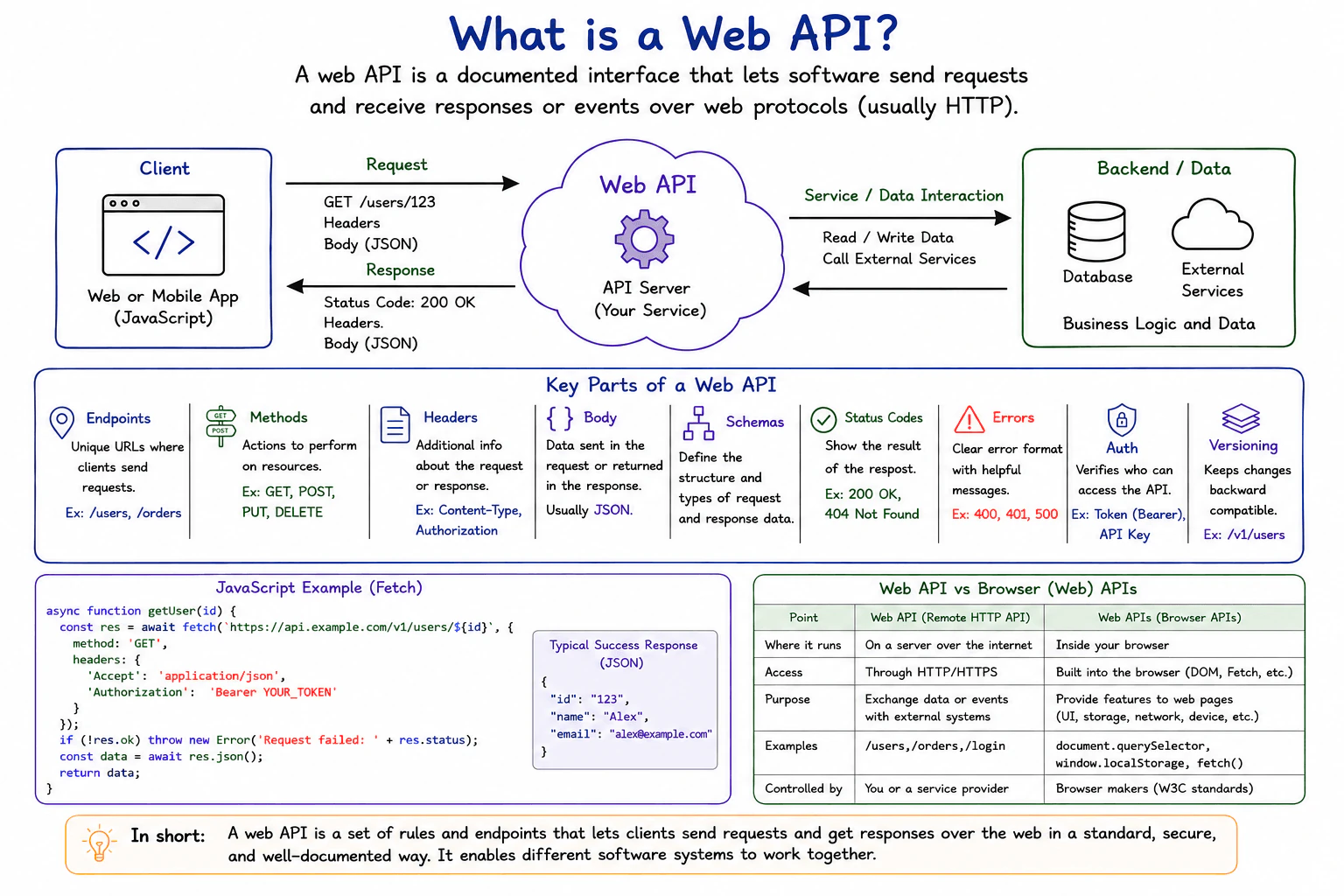
What is a web API? diagram
How to Explain It in an Interview
1. Define the API contract

An endpoint is a URL for a resource or action. The diagram shows examples such as /users and /orders. Its main request example is GET /users/123. The JavaScript Fetch example uses the versioned path /v1/users/${id}.

The HTTP method tells the API which action is requested. The diagram lists GET, POST, PUT, and DELETE. GET reads data. POST creates data. PUT updates data. DELETE removes data.

Headers carry extra information about a request or response. The Fetch example sends Accept: application/json. It also sends Authorization: Bearer YOUR_TOKEN. The Authorization header carries a bearer credential used for authentication.

A body carries data sent in a request or returned in a response. The diagram says JSON is commonly used for this data. The shown GET Fetch request has no request body. Its successful response contains JSON with id, name, and email.

A schema defines the expected structure and types of request and response data. It gives the client and API a shared data contract.

2. Follow the request and response flow

The JavaScript client starts the HTTP request. The request arrow moves from the client to the Web API server.

The remote API is a separate network boundary. It can interact with its database or external services. The diagram shows this as a separate bidirectional service and data interaction.

That backend interaction is not the browser response. After the API finishes the operation, the response travels from the Web API back to the client.

The shown successful response contains 200 OK, headers, and a JSON body. The Fetch example checks res.ok before parsing the expected success data with res.json().

Fetch normally resolves when an HTTP response arrives, including many HTTP error responses. Therefore, the client must check the HTTP result. A network failure is different because Fetch can reject before a usable HTTP response is received.

3. Handle status codes and errors

A status code tells the client how the HTTP request finished. The diagram shows 200 OK as the normal success result. It also shows 404 Not Found as another possible result.

The error section includes 400, 401, and 500. A 400 response means the request was not accepted as valid. A 401 response means authentication is required or was not accepted. A 500 response means the remote API encountered a server-side failure.

The diagram says errors should use a clear format with helpful messages. The browser should not treat every response as successful data. It should check the HTTP result before parsing the body expected for success.

Authentication and authorization are different ideas. Authentication establishes who the caller is. Authorization decides what that caller may access. The browser may send a bearer token, but trusted server-side logic must enforce access decisions.

4. Use versioning and compatibility

Versioning allows an API contract to evolve over time. The diagram uses /v1/users as its example.

A client written for version 1 should continue receiving the version 1 behavior it expects. This is backward compatibility. It helps older clients continue working when newer API behavior is introduced.

The main trade-off is maintenance. Keeping an older contract available reduces client breakage. However, supporting more versions can increase development, testing, and documentation work.

5. Distinguish remote Web APIs from browser Web APIs

The Web API in the main flow is a remote HTTP API. The JavaScript application reaches it across the network using HTTP or HTTPS.

Browser Web APIs are different. They are capabilities provided by the browser environment. The diagram gives DOM, Fetch, and LocalStorage as examples.

The DOM API lets JavaScript read or change page content. Fetch provides the browser interface for making network requests. LocalStorage stores data in the browser.

Fetch is therefore a browser Web API used to call the remote Web API. The remote service and the browser capability are not the same thing.

Practical Complexity & Trade-offs

The main frontend concerns are request count, response size, parsing work, error handling, security, and API maintenance. Larger JSON responses use more network data and browser processing. More requests can increase waiting time. Clear schemas make integration safer because both sides know the expected data shape. Error handling adds frontend code, but it stops failed responses from being treated as valid data. Authentication also creates an important security boundary. The browser can send a bearer token, but trusted server-side logic must enforce authorization. Versioning such as /v1 improves backward compatibility, but supporting older versions adds maintenance and testing work. Keeping remote HTTP APIs separate from browser Web APIs also makes responsibilities easier to understand.

Why Interviewers Ask This

Interviewers ask this question to check whether a candidate understands the boundary between a frontend application and a remote API. They want correct reasoning about endpoints, HTTP methods, headers, bodies, status codes, schemas, errors, and authentication. They also look for sound judgment about versioning and backward compatibility. For frontend developers, an important signal is knowing that Fetch and the DOM are browser Web APIs, while the remote HTTP API is a separate network service.
Interviewer may ask next
What should the JavaScript client do if the API returns 401 or 500 instead of 200?

The client should handle those responses as failures instead of treating them as normal success data. The affected flow is the same request from the JavaScript client to the Web API. Fetch can still resolve when the server returns an HTTP error, so the client should check res.ok or the returned status before parsing the expected success body.

For 401, authentication is required or the supplied credential was not accepted. The frontend should show an appropriate error state instead of pretending the request succeeded. Trusted server-side logic still owns authorization decisions.

For 500, the remote API encountered a server-side failure. The client should show an error rather than use the response as normal user data. A clear API error format can also provide a useful message or code.

The endpoint, request direction, bearer-token boundary, versioning, and backend interaction stay unchanged. The downside is additional frontend error-handling code, but that work keeps failed responses separate from valid data.

How would you change the API without breaking JavaScript clients that already use /v1/users?

I would keep the existing /v1/users contract stable when making changes that older clients must continue to understand. The affected part is the versioned endpoint shown in the JavaScript Fetch example. Existing clients can keep calling version 1 while the API evolves carefully.

Backward-compatible changes should preserve the fields and meanings that version 1 clients depend on. If a future change cannot remain compatible, a separate newer version can provide that different contract while /v1 remains available for supported older clients.

The rest of the design stays the same. The browser still sends an HTTP request to the remote Web API. The API still returns a documented status code, headers, and response body. Authentication remains at the same boundary, and trusted server-side logic continues enforcing access.

The main downside is maintenance cost. Supporting more than one contract can increase implementation, testing, and documentation work. The benefit is predictable change without suddenly breaking clients that still depend on the older API version.

122. What is HTTP?API DesignEasy

Question Details

Define HTTP as an application-layer request and response protocol used to transfer representations and control interactions on the web. Explain URLs, methods, headers, bodies, status codes, caching, cookies, intermediaries, HTTPS, and stateless request semantics. Walk through one browser GET request and distinguish HTTP from JSON, REST, and TCP.

Short Interview Answer (30-60 seconds)

I would explain HTTP as the web's application-layer request-and-response protocol. A browser can request a URL such as https://example.com/index.html with GET, and the server returns an HTTP response such as 200 OK with headers and an HTML body. HTTP is stateless, so each request is independent. Cookies can carry client state, caching can reduce repeated network work, and HTTPS protects HTTP with TLS. The trade-off is that caching improves speed but can return older content until the cache policy requires fresh data.

Detailed Explanation

HTTP is the basic way a browser and a web server exchange requests and responses. The browser asks for a resource identified by a URL. The request has a method, headers, and sometimes a body. The response has a status code, headers, and usually a body. HTTP itself is stateless, so each request is independent. Cookies can carry client state. Caching can reduce repeated network work. HTTPS protects HTTP with TLS.

Useful Questions to Ask the Interviewer
  • How deep should I go into caching behavior beyond the headers shown in the diagram?
  • Should I keep the explanation at the HTTP protocol level, or also discuss how browser code consumes HTTP responses?
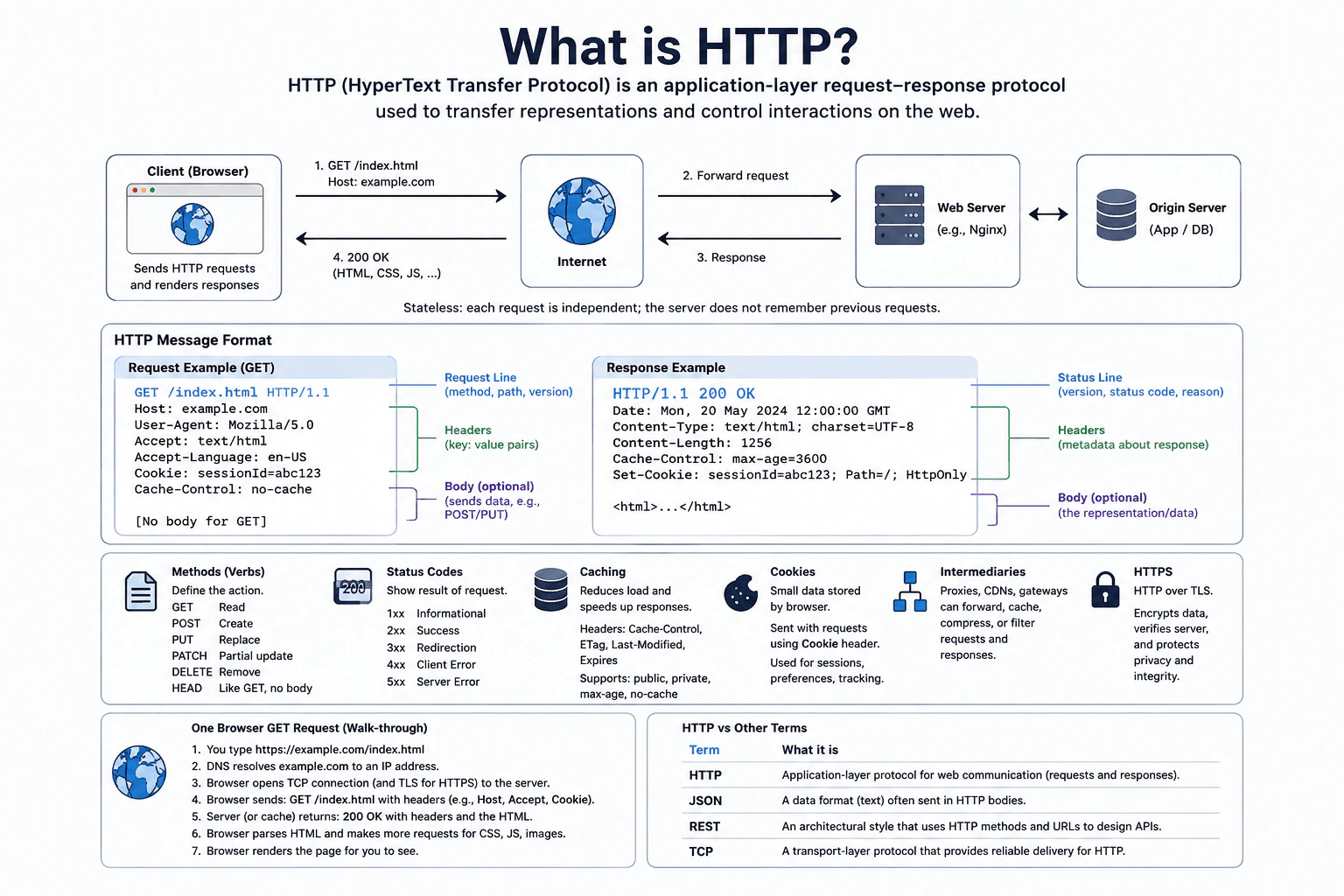
What is HTTP? diagram
How to Explain It in an Interview
1. Start with the browser request

The user enters https://example.com/index.html.

DNS resolves example.com to an IP address.

The browser opens a TCP connection to the server.

Because the URL uses HTTPS, TLS protects the HTTP traffic.

The browser sends GET /index.html HTTP/1.1.

The Host header identifies example.com.

The request also shows User-Agent, Accept, Accept-Language, Cookie, and Cache-Control headers.

This GET example has no request body.

2. Understand the HTTP message

The request line contains the method, path, and HTTP version.

Headers are key-value metadata about the request.

A body is optional and carries request data when the API uses one.

The response starts with a status line.

The example is HTTP/1.1 200 OK.

The response headers include Content-Type, Content-Length, Cache-Control, and Set-Cookie.

The response body contains the returned representation.

In the diagram, that representation is HTML.

3. Follow the request and response path

The browser sends the request through the Internet.

The request reaches a web server, such as Nginx.

The web server communicates with the origin server shown as the application and database boundary.

The response travels back toward the browser.

The browser receives 200 OK with headers and HTML.

It can then make more requests for CSS, JavaScript, and images.

Finally, the browser renders the page.

HTTP is stateless during this flow.

That means each request is independent of earlier requests.

4. Explain common HTTP methods and status codes

Methods describe the requested action.

The diagram shows GET for read, POST for create, PUT for replace, PATCH for partial update, and DELETE for remove.

It also shows HEAD, which is like GET but without a response body.

Status codes describe the result.

1xx is informational.

2xx is success.

3xx is redirection.

4xx is a client error.

5xx is a server error.

The walkthrough uses 200 OK as its success response.

5. Explain caching, cookies, intermediaries, and HTTPS

Caching can reduce load and make repeated responses faster.

The diagram names Cache-Control, ETag, Last-Modified, and Expires as caching-related headers.

Cookies are small data items stored by the browser.

The browser can send a cookie with a request.

The response can set a cookie with Set-Cookie.

Intermediaries can sit between the browser and origin.

The diagram lists proxies, CDNs, and gateways.

They can forward, cache, compress, or filter requests and responses.

HTTPS means HTTP over TLS.

TLS encrypts data, verifies the server, and protects privacy and integrity in transit.

6. Distinguish HTTP from JSON, REST, and TCP

HTTP is the application-layer protocol for web requests and responses.

JSON is a text data format that can be carried in an HTTP body.

REST is an architectural style that commonly uses HTTP methods and URLs to design APIs.

Using HTTP does not automatically make an API RESTful.

TCP is a transport-layer protocol that provides reliable delivery for HTTP.

For HTTPS in this diagram, HTTP runs over TLS, with TCP underneath.

Practical Complexity & Trade-offs

HTTP design choices mainly affect network work, freshness, state, and security. Caching can make repeated loads faster and reduce traffic, but cached content can become old. Cookies can carry browser state, but they add state to later requests. Intermediaries such as proxies, CDNs, and gateways can improve delivery, but they add more components to the path. HTTPS adds TLS protection for data in transit. The browser still needs to understand status codes and response headers before deciding what the response means.

Why Interviewers Ask This

Interviewers ask this to check whether you understand how browsers and servers communicate, not just HTTP vocabulary. They want clear reasoning about URLs, methods, headers, bodies, status codes, caching, cookies, intermediaries, HTTPS, and stateless requests. They also want you to separate protocol layers correctly. A strong answer explains why HTTP is different from JSON, REST, and TCP, while keeping the request and response flow easy to follow.

Interviewer may ask next
What changes when the browser can use HTTP caching for a repeated request?

The main change is that the browser may avoid downloading the full representation again. The affected flow is the repeated browser request for the same resource, such as /index.html. The browser follows the caching information supplied with the HTTP response. The diagram shows caching-related headers such as Cache-Control, ETag, Last-Modified, and Expires. These headers help define whether cached content can be reused or checked again. If the browser can reuse a stored response, the page may load faster and the network carries less data. If it must contact the server again, the normal HTTP request path still applies. HTTPS still protects traffic that crosses the network. Cookies and the rest of the request format stay unchanged. The main downside is freshness. A cached representation may be older than the newest server version while reuse is still allowed. So caching trades some freshness for lower network cost and faster repeated access.

How are HTTP, JSON, REST, and TCP different in this browser flow?

They describe different layers and should not be treated as the same thing. The affected flow is still the browser request and response shown in the diagram. HTTP is the application-layer protocol that defines requests and responses. JSON is a text data format that can be carried inside an HTTP body. REST is an architectural style that commonly uses HTTP methods and URLs to design APIs. TCP is the lower transport-layer protocol that provides reliable delivery for HTTP. For HTTPS, the diagram shows HTTP protected by TLS, with TCP underneath. Correctness comes from keeping these responsibilities separate. Changing the body format to JSON does not change HTTP into REST. Using HTTP also does not automatically make an API RESTful. The browser still sends an HTTP request and receives an HTTP response. The main downside of mixing these terms is design confusion, because the team may treat a format, an architectural style, and transport behavior as one layer.

123. What is a REST API?API DesignEasy

Question Details

Define a REST API in practical browser and HTTP terms using resources, URLs, methods, representations, status codes, and stateless requests. Explain safe and idempotent operations, validation, consistent errors, pagination, authentication, and caching. Use one frontend request example and clarify that REST is an architectural style rather than a JavaScript library.

Short Interview Answer (30-60 seconds)

I would explain REST as an architectural style for web APIs. A browser works with resources through URLs and standard HTTP methods. For example, it can send GET /api/users?page=2&limit=10 and receive JSON with a 200 OK response. Each request is stateless, so it carries the information needed for that request, such as authentication data. I check status codes before using the response, handle validation and errors consistently, and use pagination and HTTP caching when needed. REST is not a JavaScript library. JavaScript tools such as fetch are only clients used to call the API.

Detailed Explanation

A REST API is a way for a browser and a remote API to communicate over HTTP. The browser works with resources, such as users, through URLs. It chooses an HTTP method to describe the action. The API returns a representation of the resource, usually JSON, with a status code. Each request is stateless, so the server does not keep client session state between requests. A useful REST design also gives the browser clear validation, consistent errors, pagination, authentication, and caching rules.

Useful Questions to Ask the Interviewer
  • Should the browser authenticate with the shown bearer token or a secure HttpOnly cookie?
  • What pagination metadata should the response include?
  • Which HTTP caching rules, such as Cache-Control, ETag, or Last-Modified, are supported?
  • What fields should every error response contain?
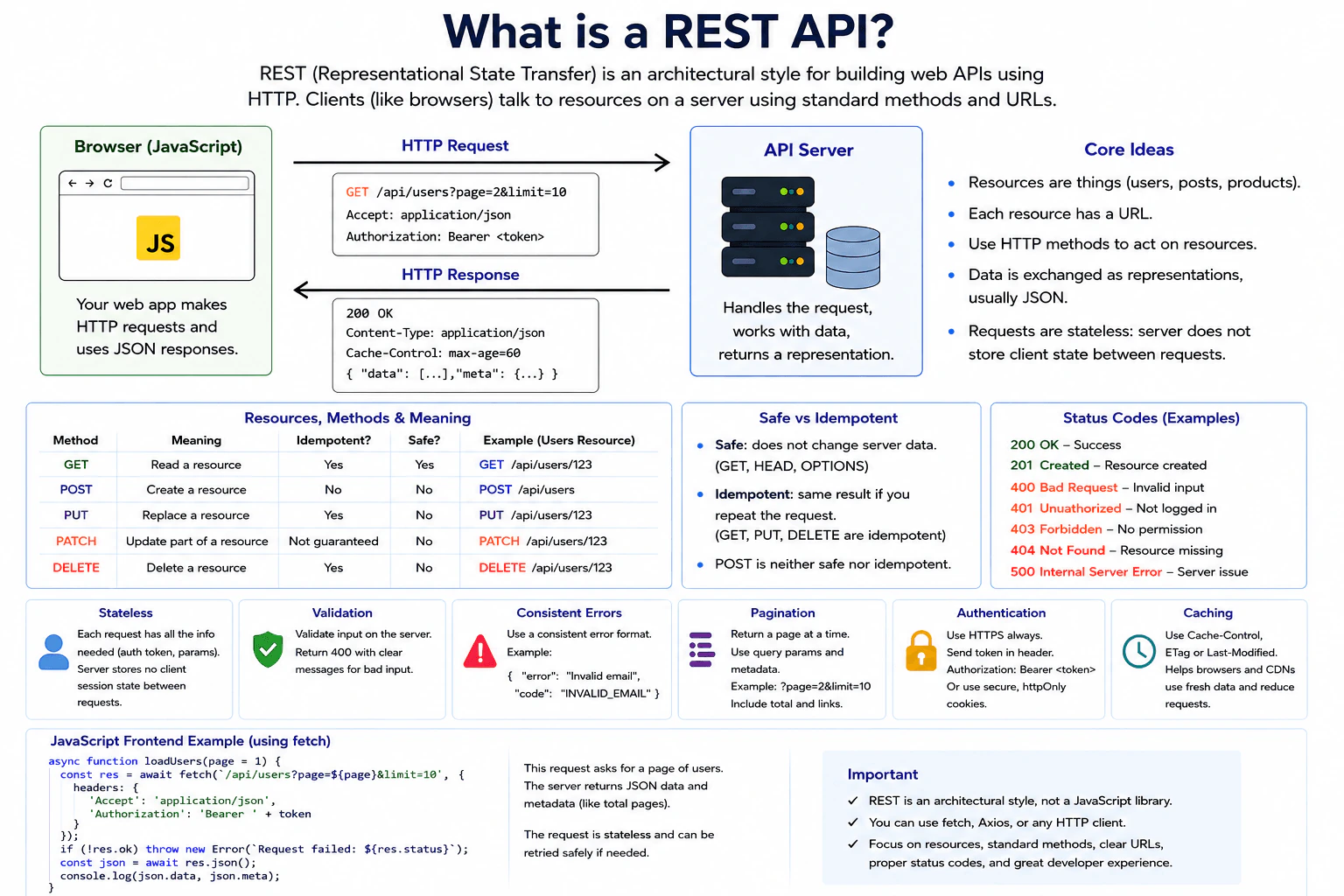
What is a REST API? diagram
How to Explain It in an Interview
1. Define the browser contract

The browser is the client. The REST API is the remote boundary.

For the diagram's list request, the browser sends:

GET /api/users?page=2&limit=10

The request says it accepts application/json. The diagram also shows an Authorization header containing a bearer token.

The API sends a response back to the browser. The successful example uses 200 OK and application/json. Its JSON contains data and meta fields.

The resource is users. The URL identifies that resource. The page and limit query parameters choose one page of users.

HTTP methods describe the requested operation. GET reads a resource. POST creates a resource. PUT replaces a resource. PATCH updates part of a resource. DELETE removes a resource.

GET is safe because its intended action does not change the resource. GET, PUT, and DELETE are idempotent in the shown design. Idempotent means repeating the same operation has the same intended effect as doing it once. POST is not safe or idempotent. The diagram correctly marks PATCH as not guaranteed to be idempotent.

2. Send the HTTP request

A frontend can use the browser's fetch API to send the request.

A technically valid example matching the diagram is:

const res = await fetch('/api/users?page=2&limit=10', { headers: { 'Accept': 'application/json', 'Authorization': 'Bearer ' + token } });

The request travels from the browser to the API server. The API handles the request and returns a representation to the browser.

The request is stateless. It carries the information needed for that request, such as parameters and authentication data. The server does not depend on stored client session state from an earlier request.

3. Validate the response

The frontend should check the HTTP result before using the expected JSON.

The diagram's JavaScript checks res.ok. If res.ok is false, it creates an error containing the response status. If the response succeeds, the browser parses the body with res.json().

The server also validates input. The diagram shows 400 Bad Request for invalid input and recommends clear validation messages.

The shown status codes are:

  • 200 OK for success.
  • 201 Created when a resource is created.
  • 400 Bad Request for invalid input.
  • 401 Unauthorized when authentication is missing or fails.
  • 403 Forbidden when the caller does not have permission.
  • 404 Not Found when the resource is missing.
  • 500 Internal Server Error for a server error.
4. Handle success and errors consistently

On success, the frontend parses the JSON representation. The example then uses json.data and json.meta.

The meta value can carry pagination information. This lets the frontend understand the current result page without downloading every user.

Errors should have one consistent shape. The diagram shows an example containing an error message and a code such as INVALID_EMAIL.

Consistent errors make frontend behavior easier to predict. The client can recognize known problems instead of guessing from unrelated response formats.

A GET request can be repeated when needed because GET is safe and idempotent. That does not mean every HTTP request should be retried. POST and non-idempotent PATCH requests must not be blindly repeated.

5. Use pagination, authentication, and caching

Pagination keeps list responses manageable. The diagram uses page and limit query parameters and recommends returning pagination metadata.

Authentication identifies the caller. The request example sends a bearer token in the Authorization header. The diagram also notes secure HttpOnly cookies as another possible authentication mechanism. HTTPS protects the request while it travels across the network.

Authentication and authorization are different. Authentication establishes who the caller is. Authorization decides what that caller may do. The trusted server must enforce permission checks.

HTTP caching can reduce repeated transfers. The diagram shows Cache-Control, ETag, and Last-Modified. These HTTP mechanisms let browsers and CDNs reuse fresh responses or check whether cached data changed.

REST itself is not a JavaScript package or framework. It is an architectural style. fetch, Axios, or another HTTP client can be used to call a REST API.

Practical Complexity & Trade-offs

The main trade-offs are easy to explain. Pagination keeps responses smaller, but the frontend must track the current page and pagination metadata. HTTP caching can make reads faster and reduce requests, but the client must follow freshness rules correctly. Authentication improves security, but bearer tokens or cookies need careful handling. Consistent status codes and error objects require some design work, but they make frontend behavior predictable. Retry safety also depends on the HTTP operation. GET can be repeated safely, while POST and a PATCH that is not idempotent should not be retried blindly.

Why Interviewers Ask This

Interviewers ask this question to check whether you understand REST as an HTTP architectural style instead of a JavaScript library. They want to see clear thinking about resources, URLs, methods, representations, status codes, stateless requests, validation, authentication, pagination, caching, and consistent errors. They also test whether you understand safe and idempotent operations and can explain the browser-to-API boundary without confusing client responsibilities with server responsibilities.

Interviewer may ask next
What would you change if the users list became very large?

I would keep the same GET /api/users flow and rely on the pagination already shown in the design. The browser would request one page at a time with page and limit instead of downloading the complete users collection. The API response would keep returning JSON data plus pagination metadata, so the frontend could move between pages correctly.

The request direction would not change. The browser would still send GET to the same remote API, check the status, and parse the JSON response. Authentication, validation, and consistent error handling would also stay the same.

I would also use the HTTP caching rules shown in the design. Cache-Control can tell the browser how long a response remains fresh. ETag or Last-Modified can help avoid transferring unchanged data again.

The main downside is more client state. The frontend must track the current page and metadata. It must also make sure the visible page matches the response the user requested.

How would you handle retries without accidentally repeating a write?

I would choose retry behavior from the HTTP operation instead of retrying every failed request. In this design, GET is safe and idempotent. Repeating GET /api/users?page=2&limit=10 does not intentionally change server data, so a read can be repeated when needed.

I would not blindly retry POST. POST creates a resource and is shown as neither safe nor idempotent. Repeating it could repeat the creation operation. PATCH is also marked as not guaranteed to be idempotent, so the frontend should not assume it can be repeated safely.

PUT and DELETE are idempotent in the shown method table. Repeating the same operation has the same intended effect, although the frontend must still inspect the returned status.

The rest of the flow stays unchanged. Authentication information is still sent correctly. The server still validates input and returns consistent errors. The browser still checks the response before using JSON.

The main downside is extra retry logic. Incorrect rules can cause duplicate writes or unnecessary network traffic.

124. What is frontend system design?System DesignEasy

Question Details

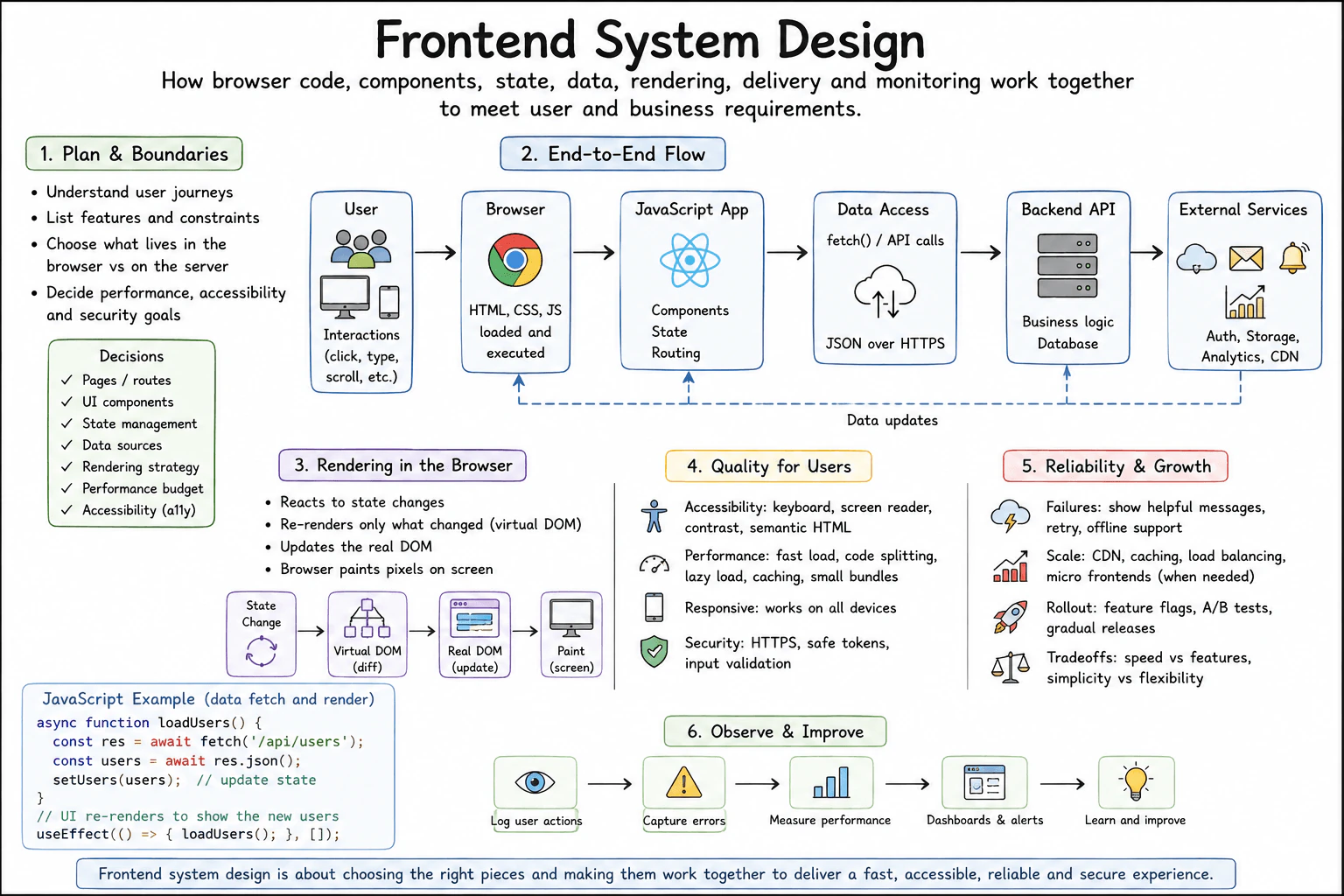
Define frontend system design as deciding how browser code, UI components, state, data access, rendering, delivery, and monitoring work together to meet user and business requirements. Explain a beginner interview flow: clarify journeys and constraints, choose boundaries, describe data flow and rendering, address accessibility and performance, and then discuss failures, security, scale, rollout, and tradeoffs.

Short Interview Answer (30-60 seconds)

Frontend system design is about making the browser experience work well from user action to visible result. The main challenge is choosing clear boundaries for browser code, UI components, state, data access, rendering, and delivery. In this design, the JavaScript app manages components, state, routing, and client-side rendering. It fetches JSON over HTTPS from a backend API. I would also plan for accessibility, performance, failures, monitoring, and gradual rollout while balancing speed, features, simplicity, and flexibility.

Detailed Explanation

Frontend system design means deciding how the browser application works as one complete user experience. A user clicks, types, or scrolls in the browser. The JavaScript app responds, updates state, renders the UI, and gets remote data when needed. The main challenge is keeping this flow fast, accessible, secure, and reliable. I would explain the design in the same order as the diagram: first boundaries, then data flow, browser rendering, user quality, reliability, and finally monitoring and improvement.

Useful Questions to Ask the Interviewer
  • What are the main user journeys?
  • Which devices and browsers matter most?
  • What performance budget should the frontend meet?
  • What accessibility level is required?
  • How important is offline behavior?
  • How should risky features be released?
What is frontend system design? diagram
How to Explain It in an Interview
1. Start with the user journey and boundaries

The user interacts with the browser through clicks, typing, and scrolling. I first list the required pages, routes, UI components, state, data sources, and rendering strategy. I also define goals for performance, accessibility, and security.

The browser loads and runs HTML, CSS, and JavaScript. The JavaScript app contains the components, state, and routing. The backend API and external services remain outside the frontend boundary.

2. Explain the end-to-end data flow

When the UI needs remote data, the Data Access layer makes a fetch() API call. The request goes to the Backend API over HTTPS. The response comes back as JSON and can update application state.

The diagram also shows external services for authentication, storage, analytics, and CDN use. These are external boundaries rather than frontend internals. The frontend should depend only on the browser-facing contracts it needs.

3. Explain rendering in the browser

A state change causes the UI to render again. In the React-style flow shown in the diagram, the app compares the new virtual DOM with the previous one. It updates the needed parts of the real DOM, and the browser then paints the result on the screen.

The JavaScript example follows the same path. loadUsers() calls /api/users, reads JSON, and passes the result to setUsers(users). Updating state causes the UI to show the new users.

4. Design for accessibility, performance, and security

Accessibility includes keyboard support, screen-reader support, good contrast, and semantic HTML. Responsive design keeps the experience usable across device sizes.

For performance, I would use small bundles, code splitting, lazy loading, and caching. Code splitting means loading only the JavaScript needed for the current part of the app. HTTPS, safe token handling, and input validation support browser-side security, while trusted authorization remains a remote-system responsibility.

5. Handle failures, growth, and rollout

When a request fails, the UI should show a helpful message and offer retry when useful. Offline support can make the application more resilient, but it adds states and testing work.

The diagram also considers CDN delivery, caching, load balancing, and micro frontends when needed for growth. Risky changes can use feature flags, A/B tests, and gradual releases. The tradeoff is speed versus features, and simplicity versus flexibility.

6. Observe and improve

The frontend logs useful user actions, captures errors, and measures performance. Dashboards and alerts help the team notice problems. The team then uses those signals to improve the user experience.

Engineering Considerations / Design Trade-offs

The benefit is that each part has a clear job. Components build the UI, state keeps changing values, Data Access gets remote data, and the browser renders the result. The downside is that extra frontend features add work. Code splitting, caching, offline support, micro frontends, and feature flags can help, but they also create more cases to test. Another tradeoff is speed versus features. Smaller bundles usually load faster. More features may increase JavaScript size. Simplicity is a good default until the product truly needs more flexibility.

Why Interviewers Ask This

Interviewers ask this question to see how you turn a user experience into a clear frontend design. They want to know whether you can choose sensible boundaries, explain data and rendering flow, and think about accessibility, performance, failures, security, monitoring, and rollout. They are testing judgment, not memorization. A strong answer also explains why one choice may be better than another.

Interviewer may ask next
How would you change this design if many users had slow or unreliable network connections?

I would keep the same main architecture, but I would make the browser experience more tolerant of slow requests. The User, Browser, JavaScript App, Data Access, and Backend API path would stay unchanged.

I would reduce the amount of JavaScript needed early by using smaller bundles, code splitting, and lazy loading. I would cache safe static files so repeat visits need less network work. While fetch() is waiting, the UI should show a clear loading state. If the request fails, it should show a useful error and offer retry when retry is safe.

For offline cases, I would clearly tell the user that fresh remote data is unavailable. I would also use the Observe & Improve flow to measure loading time and request failures.

The main downside is complexity. More caching and offline behavior create more states that developers must test and maintain.

How would you release a risky frontend feature without exposing every user at once?

I would keep the same design and change only the rollout process. The main affected area is Reliability & Growth, where the diagram already shows feature flags, A/B tests, and gradual releases.

I would place the risky behavior behind a feature flag. A feature flag is a switch that controls whether users receive the new behavior. I would first enable it for a small group. Then I would watch captured errors, performance measurements, and other useful signals through the Observe & Improve flow.

If the results stay healthy, I would increase the rollout gradually. If problems appear, I would turn the flag off and return users to the previous behavior. The JavaScript App and normal Data Access path remain the same unless the feature needs a changed API contract.

The main downside is extra release logic. Old feature flags also need cleanup after rollout.

125. What is client-side rendering?System DesignEasy

Question Details

Define client-side rendering as producing most application UI in the browser after JavaScript and data arrive. Explain the request and rendering path, routing, state, loading and error states, caching, code delivery, initial-load and SEO tradeoffs, accessibility, and failure when scripts do not load. Compare it with server-side rendering without treating either choice as universally better.

Short Interview Answer (30-60 seconds)

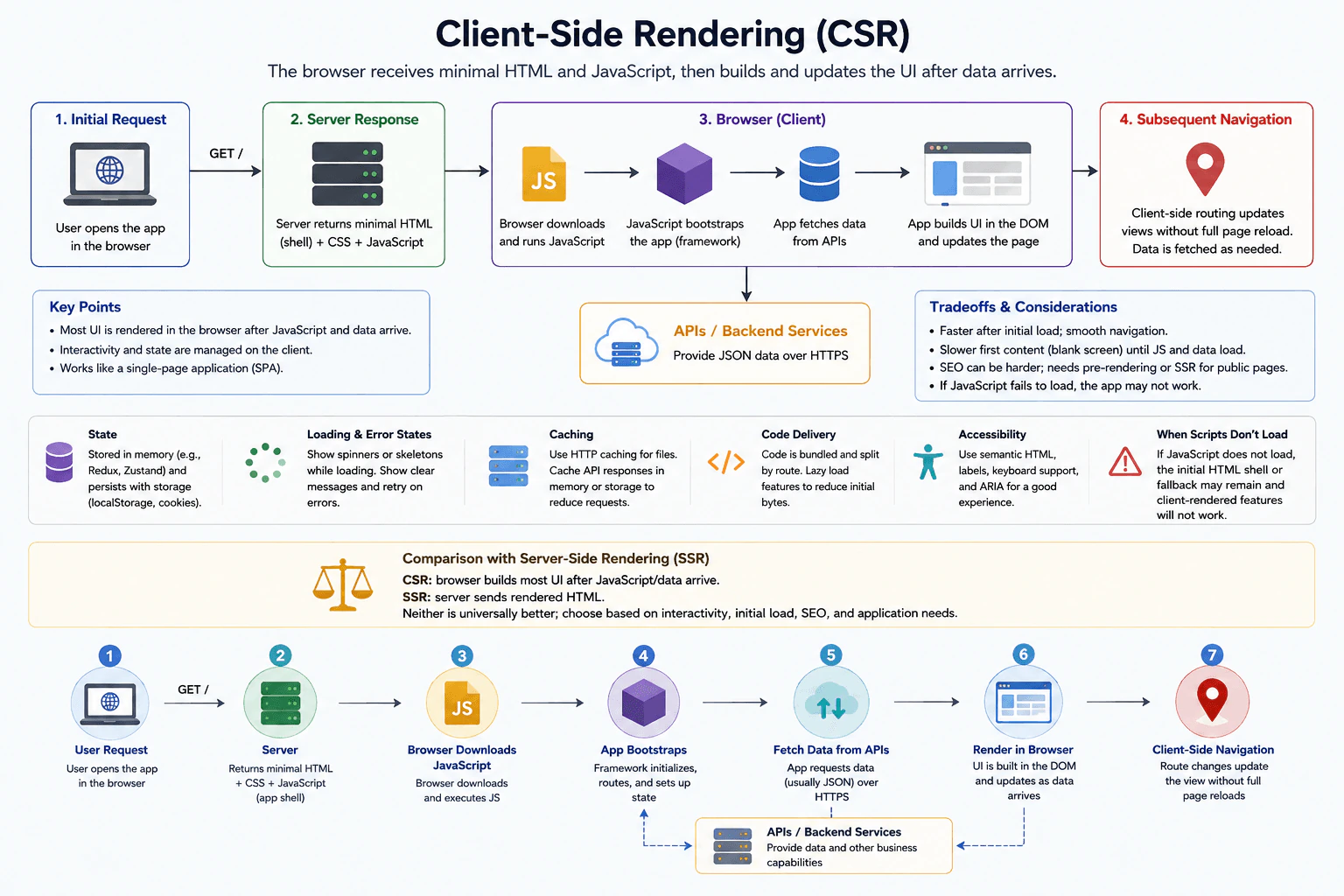
At a high level, client-side rendering means the browser builds most of the application UI. The server first sends a minimal HTML shell, CSS, and JavaScript. The browser runs JavaScript, starts the app, fetches JSON data from APIs, updates client state, and renders the DOM. Later route changes update the view without a full page reload. This gives smooth navigation after loading, but the first content can be slower, SEO can be harder, and client features depend on JavaScript.

Detailed Explanation

Client-side rendering, or CSR, means most application UI is created inside the browser. The user first requests the application. The server returns a minimal HTML shell, CSS, and JavaScript. The browser then runs JavaScript, starts the frontend application, fetches remote data, and renders the visible UI. The main challenge is balancing rich interaction with first-load speed, SEO, accessibility, caching, and JavaScript failure cases.

Useful Questions to Ask the Interviewer
  • Is this mainly an interactive application or a public content site?
  • How important is SEO for the first page?
  • Do many users have slow networks or older devices?
  • Should important content remain useful if JavaScript fails?
  • What accessibility level should the application support?
What is client-side rendering? diagram
How to Explain It in an Interview
1. Start with the initial request

The user opens the application in the browser. The browser sends a GET request to the server.

The server returns a minimal HTML shell, CSS, and JavaScript. The HTML gives the browser a basic page shell. JavaScript contains the application behavior needed to start the frontend.

2. Start the application in the browser

The browser downloads and runs JavaScript. The frontend framework starts the application, sets up routes, and creates client state.

Most UI is produced after JavaScript and application data arrive. That is the main idea behind client-side rendering.

3. Fetch data and render the UI

The application requests data from external APIs or backend services. These remote systems return data, usually as JSON over HTTPS.

While data is loading, the UI should show a spinner or skeleton. If a request fails, the UI should show a clear message and allow a retry.

When data arrives, the application updates client state. The browser then updates the DOM, which is the page structure shown to the user.

4. Handle routing, state, and caching

Later navigation happens in the browser. Client-side routing changes the visible view without a full page reload. The application fetches more data when needed.

State can stay in memory during the session. Selected state may also be saved in browser storage when persistence is useful.

Static files such as JavaScript and CSS can use HTTP caching. API responses can also be cached in memory or browser storage when the data rules allow it.

5. Reduce the first download

JavaScript can be bundled and split by route. Code splitting means loading only the code needed for the current route or feature.

This reduces the initial download. Other code can load later when the user visits another part of the application.

6. Explain the tradeoffs and failure case

CSR often feels fast after the first load because navigation stays inside the browser. The downside is slower first content because JavaScript must download, parse, and run.

SEO can be harder because important content is created in the browser. Public pages may use pre-rendering or server-side rendering when search visibility is important.

Accessibility still needs semantic HTML, labels, keyboard support, and ARIA where needed. If JavaScript does not load, the initial HTML shell or fallback may remain, but client-rendered features will not work.

CSR and server-side rendering make different tradeoffs. CSR builds most UI in the browser after JavaScript and data arrive. SSR sends rendered HTML from the server. Neither is universally better. The choice depends on interactivity, initial load, SEO, and application needs.

Engineering Considerations / Design Trade-offs

The benefit is that CSR can make an application feel smooth after it loads. Route changes can happen without full page reloads, and the browser can keep interactive state. The downside is the first load. JavaScript must download, parse, and run before much of the UI appears. SEO can also be harder for public pages. HTTP caching and code splitting can reduce some loading cost. If JavaScript fails, the HTML shell or fallback may remain, but client-rendered features will not work. SSR can improve the first HTML response, but it has different costs.

Why Interviewers Ask This

The interviewer wants to know whether you understand what the browser and server each do. They also want to see whether you can explain the complete user flow, not only define CSR. A strong answer covers data fetching, routing, state, loading failures, caching, accessibility, and code delivery. Most importantly, the interviewer wants balanced judgment about when CSR fits and when another rendering approach may fit better.

Interviewer may ask next
What would you change if the first page must rank well in search engines?

I would keep the same browser application, but I would change how the first public page is delivered. For that page, I would use server-side rendering or pre-rendering so useful HTML is available before client JavaScript finishes running.

The API and backend boundaries would stay the same. After the first page loads, JavaScript can still start the frontend application, manage client state, fetch later data, and handle client-side navigation.

This improves the chance that important public content is available early to users and search engines. I would still keep HTTP caching and code splitting so the browser does not download more JavaScript than needed.

The design stays correct because only the first rendering step changes. The existing browser, routing, state, and API flow can continue afterward. The main downside is extra complexity because the team must keep server-rendered HTML and browser behavior consistent.

What would you change if many users have slow networks and the JavaScript bundle becomes large?

I would keep the same CSR architecture, but I would reduce how much JavaScript must load at the beginning. The main change would be stronger code splitting by route and feature.

The server would still return the minimal HTML shell, CSS, and JavaScript. The browser would download only the code needed for the first route. Other route code would load later when the user needs it.

I would also keep HTTP caching for JavaScript, CSS, and other static files. API data could be cached in memory or browser storage when the data rules allow it. Loading states should remain visible while code or data is still arriving.

This keeps the same browser, API, state, and client-side navigation flow shown in the diagram. The main downside is added bundle-management complexity. Lazy-loaded routes can also introduce a small delay the first time a user opens them.

126. What is server-side rendering?System DesignEasy

Question Details

Define server-side rendering as generating HTML for a route on a server and sending that HTML to the browser. Explain first display, data fetching, caching, hydration, navigation after load, server cost, personalization, failures, and the risk of mismatched server and client output. Compare SSR with static generation and client-side rendering using one page request.

Short Interview Answer (30-60 seconds)

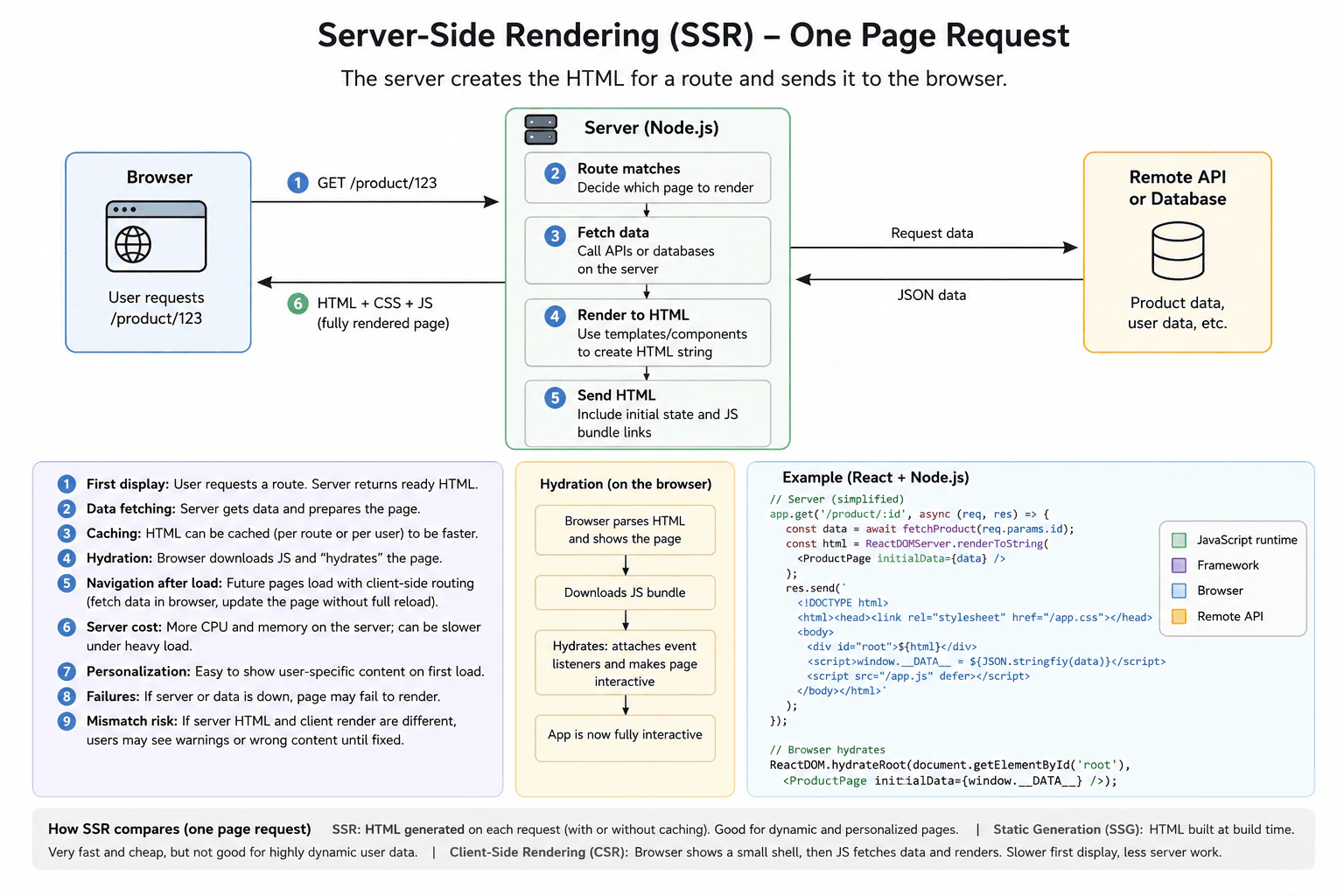
Server-side rendering, or SSR, means the server creates HTML for the requested route before sending it to the browser. For /product/123, the Node.js server matches the route, fetches the needed data, renders the HTML, and returns it. The browser can show useful content quickly. It then downloads JavaScript and hydrates the page by attaching interactivity. Later navigation can use client-side routing. The tradeoff is more server work in exchange for a faster first display and easier personalization.

Detailed Explanation

Server-side rendering helps the user see useful content early. The main challenge is deciding where the first page should be created. In this design, the browser requests /product/123. The Node.js server matches the route, fetches the required data from a remote API or database, and creates the HTML. It returns that HTML with initial data and links to the JavaScript bundle. The browser shows the HTML first. JavaScript then hydrates the page, which means attaching browser behavior to the HTML that already exists. After hydration, later navigation can use client-side routing.

Useful Questions to Ask the Interviewer
  • Does the first page need strong SEO or a fast first display?
  • How fresh must the product or user data be?
  • Can rendered HTML be cached for a route or user?
  • How much personalization is needed on the first request?
  • What should the user see if the server or data source fails?
What is server-side rendering? diagram
How to Explain It in an Interview
1. Start with one page request

The browser sends GET /product/123 to the Node.js server. The server matches the route and decides which page to render. Unlike pure client-side rendering, the useful HTML is created before the response reaches the browser.

2. Fetch data and create the HTML

The server fetches the data needed for the page. The diagram shows a remote API or database as the external data source. The server then renders the page into an HTML string.

The response can include initial data for the browser. It also contains links to the JavaScript bundle and page styles. This lets the browser display the page before JavaScript finishes making it interactive.

Rendered HTML can be cached when it is safe. A shared route may reuse cached HTML. Personalized pages need more careful cache separation because different users may receive different content.

3. Display first, then hydrate

The browser parses the returned HTML and shows the page. This improves the first display because the browser does not build everything from an empty page.

Next, the browser downloads JavaScript. The frontend framework hydrates the page. Hydration means attaching event listeners and application behavior to the existing server-rendered HTML. After that step, the application is fully interactive.

4. Navigate after the first load

Later navigation can use client-side routing. The browser can fetch data through APIs and update the current page without doing a full page reload.

This gives SSR a useful balance. The first request uses server-rendered HTML. Later interactions can behave like a client-side application.

5. Handle cost, failures, and mismatches

SSR uses more server CPU and memory because the server may render HTML for each request. Caching can reduce this work.

If the server or remote data source fails, the page may fail to render. Another risk is a hydration mismatch. This happens when the server HTML and the browser's first render are different. It can cause warnings or incorrect UI.

6. Compare SSR, SSG, and CSR

SSR creates HTML on the server for each request, with caching when appropriate. It fits dynamic or personalized pages.

Static generation, or SSG, creates HTML at build time. It is fast and cheap to serve, but its data may become stale.

Client-side rendering, or CSR, creates the main page in the browser after JavaScript runs and data is fetched. It needs less server rendering work, but the first useful display can be slower.

Engineering Considerations / Design Trade-offs

The benefit is a faster first display because the browser receives useful HTML. SSR also works well when the first page needs fresh or personalized data. Caching can make repeated requests faster and reduce server work. The downside is that rendering uses server CPU and memory. A slow data source can delay the first response. If the server or data source fails, the page may not render. Hydration also adds browser work. The server HTML and browser output must match, or the user may see warnings or broken UI.

Why Interviewers Ask This

The interviewer wants to see whether you understand where a web page is created and what happens during one request. They also want to hear how you think about first display speed, data fetching, caching, hydration, failures, and server cost. The goal is to test your judgment and your ability to explain SSR, SSG, and CSR clearly.

Interviewer may ask next
What would you change if the product page became heavily personalized for every signed-in user?

I would keep the same SSR flow, but I would change how caching is used. The browser would still request /product/123. The Node.js server would still match the route, fetch data, create HTML, and send it back.

The important change is that the HTML now depends on the current user. I would not reuse one shared cached page for everyone because that could show one user's content to another user. If caching is used, the cache must safely separate the required user or request context. For highly personalized pages, it may be simpler to render the HTML for each request instead of caching the full page.

Hydration would stay the same. The browser would display the HTML, download JavaScript, and attach interactivity. Later navigation could still use client-side routing.

The main downside is higher server cost because less rendered work can be shared between users.

What happens if the remote API is slow or unavailable during server-side rendering?

I would keep the same architecture, but I would treat the data-fetch step as an important failure point. The Node.js server needs the required data before it can create the correct HTML.

If the remote API is slow, the first HTML response can also become slow. If safe cached HTML or cached data already exists, the server can use it when slightly older data is acceptable. Otherwise, the request should return a clear error result instead of inventing missing product data.

If the API is unavailable, the server may not be able to render the requested page. The browser should receive a clear failure state. After a successful request, the normal hydration and client-side navigation flow remains unchanged.

The main downside is that SSR puts remote data-fetch time directly on the user's first page request.

127. What is hydration in a frontend application?System DesignEasy

Question Details

Define hydration as attaching client-side behavior and state to HTML that was already rendered by a server or build process. Explain the server HTML, downloaded JavaScript, event-handler attachment, state agreement, hydration mismatches, execution cost, progressive or partial hydration, and why visible HTML may appear before it becomes fully interactive.

Short Interview Answer (30-60 seconds)

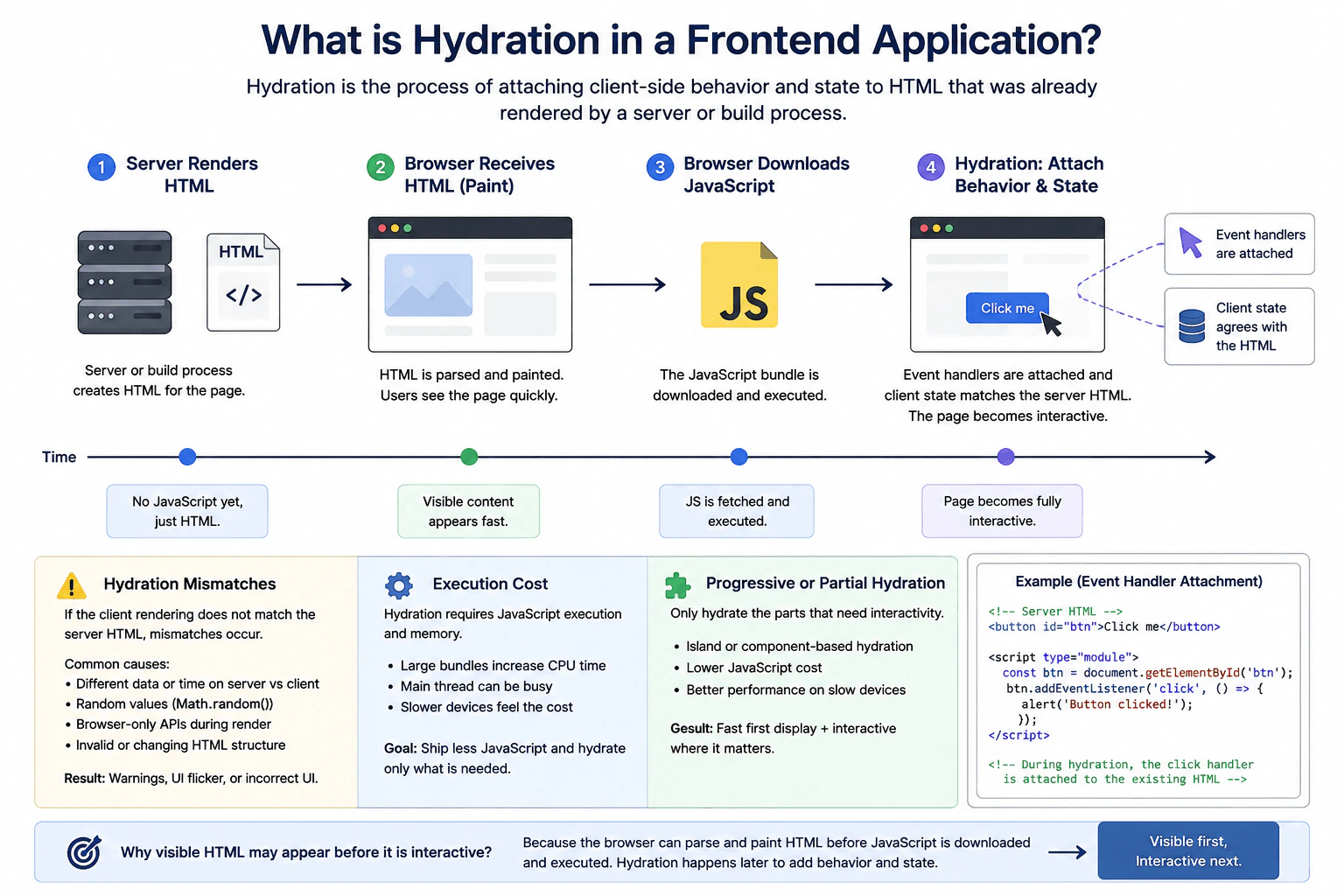
At a high level, hydration turns already visible HTML into an interactive page. A server or build process creates the HTML first, so the browser can paint useful content quickly. The browser then downloads JavaScript, which attaches event handlers and connects client state to the existing HTML. For larger pages, I can hydrate only important interactive parts first. The trade-off is faster visible content versus the CPU, memory, and JavaScript execution cost needed for interactivity.

Detailed Explanation

Hydration solves a common frontend problem. We want users to see useful HTML quickly, but that HTML still needs browser behavior. In this design, a server or build process creates the initial HTML. The browser receives, parses, and paints it first. JavaScript is downloaded and executed afterward. Hydration then attaches event handlers and connects client state to the existing HTML. The key concerns are state agreement, hydration mismatches, JavaScript execution cost, and deciding whether the whole page or only important parts should hydrate.

Useful Questions to Ask the Interviewer
  • Is the initial HTML produced by a server, a build process, or either one?
  • How important is fast first paint on slower devices?
  • Can some visible parts remain non-interactive until needed?
  • How important is reducing JavaScript execution on the main thread?
What is hydration in a frontend application? diagram
How to Explain It in an Interview
1. Start with the initial HTML

The server or build process creates HTML for the page. The browser receives that HTML, parses it, and paints visible content. At this point, users can already see the page. However, JavaScript behavior may not be ready yet. A button can therefore appear before its click behavior works.

2. Download and execute JavaScript

The browser then downloads the JavaScript needed for the page. That JavaScript must be parsed and executed. This work uses CPU time and memory. Large JavaScript bundles can keep the browser main thread busy, especially on slower devices.

3. Attach behavior and connect state

Hydration attaches client-side behavior to the HTML that already exists. In the diagram's simple example, JavaScript finds an existing button and adds a click event handler. Hydration also connects client state to the rendered page. After this work finishes, the page becomes fully interactive.

The initial client state must agree with what the server HTML represents. In simple words, the first client render should produce the same visible UI that the browser already received.

4. Handle hydration mismatches

A hydration mismatch happens when the client expects different rendered content from the server HTML. Common causes include different data, different time values, Math.random(), browser-only APIs used during rendering, or changing HTML structure.

These mismatches can cause warnings, flicker, or incorrect UI. The safest approach is to make the first render predictable. The same initial inputs should produce the same initial UI on both sides.

5. Reduce unnecessary hydration work

Hydrating everything can be expensive. Progressive or partial hydration reduces that cost by hydrating only parts that need interaction. An island or component can become interactive without forcing every visible part to do the same work immediately.

The benefit is less JavaScript work and better performance on slower devices. The downside is more complexity because different parts of the page can become interactive at different times.

Engineering Considerations / Design Trade-offs

The benefit is that users can see useful HTML quickly. The browser does not need to wait for all JavaScript before painting the page. The downside is that visible content may appear before it can respond to clicks. Hydration also uses CPU time and memory because JavaScript must run and attach behavior. Large bundles make this worse on slow devices. Partial hydration can reduce the work by making only important parts interactive first. The downside is extra complexity because different parts may become interactive at different times.

Why Interviewers Ask This

The interviewer wants to know whether you understand the difference between visible HTML and an interactive page. They also want to see whether you can explain state agreement, hydration mismatches, and JavaScript execution cost clearly. A strong answer shows good frontend judgment by connecting browser behavior, user experience, performance, and the trade-off behind partial hydration.

Interviewer may ask next
What would you change if the JavaScript bundle became large and hydration felt slow on mobile devices?

I would keep the same basic flow, but reduce how much JavaScript hydrates at once. The server or build process would still create the initial HTML, and the browser would still paint that HTML first.

The main change would be the hydration step. I would use progressive or partial hydration so only important interactive parts hydrate early. For example, a main form or button could become interactive first. Less important components could hydrate later when they are needed.

Correctness still depends on state agreement. Every hydrated component must begin with state that produces the same initial UI as its server-rendered HTML. Otherwise, hydration mismatches can still happen.

The benefit is less JavaScript execution, lower CPU cost, and less main-thread work on slower phones. The downside is more complexity because different parts of the page may become interactive at different times.

What would you do if hydration mismatches started appearing after the page was deployed?

I would keep the same architecture and first find why the initial client output differs from the server HTML. The affected part is the state agreement step during hydration.

I would check for changing values such as current time, random values, different data, browser-only APIs, or HTML structure that changes between the server render and the first client render. I would then make the initial render predictable so the same inputs produce the same visible UI.

I would also avoid changing the existing DOM before hydration finishes. Event handlers can still be attached during hydration, but the starting content and client state should agree with the HTML already on the page.

This keeps the design correct and reduces warnings, flicker, and incorrect UI. The downside is that some browser-only or changing values may need to appear after hydration instead of during the first render.

128. Tell me about a frontend project you are proud of.BehavioralEasy

Question Details

Choose a real interface, component, or browser application that you personally helped deliver. Explain the user or business goal, the constraints, your specific responsibilities, one important technical decision, how you collaborated, and the measurable or observable result. Be clear about what you built yourself and what was owned by others.

Interview tip:

Use STAR to structure your answer: briefly explain the Situation and Task, make Action the most detailed part, and finish with the Result. For example, describe a real frontend interface you helped deliver, the user problem it solved, your specific responsibility, an important technical decision you made, how you worked with other team members, and the observable result. Make it clear which parts you built yourself and which parts were owned by the wider team.

Situation

In my last role, I worked on a browser based account dashboard that had become difficult for users to navigate. Important information was spread across several screens, and parts of the interface became slow when a user had a large amount of account data. The team wanted to make the dashboard easier to use while keeping the existing backend services.

Task

I was responsible for the main frontend work for the new dashboard experience. My goal was to build the reusable JavaScript components, improve how data was loaded and displayed, and make sure the interface worked well on different screen sizes. The product designer owned the visual design, and the backend developers owned the APIs. I owned the frontend implementation and worked with both groups to make the pieces fit together.

Action

I first reviewed the existing user flow with the designer and identified which information users needed first. I then broke the interface into small reusable components so each part had one clear responsibility. One important technical decision was to avoid loading every section of the dashboard at the same time. Instead, I loaded the most important data first and requested less important data only when it was needed. This made the initial screen feel faster and also reduced unnecessary browser work. I added clear loading and error states because I did not want a slow or failed request to leave the user looking at an empty section. I also reused shared components for repeated controls so behavior stayed consistent across the dashboard. During development, I worked with the backend developers to confirm the API response shapes and discussed edge cases such as missing data and failed requests. I reviewed the finished interface with the designer, fixed accessibility and responsive layout issues, and tested the main flows before release.

Result

The new dashboard was easier to navigate and felt more responsive because users could see the most important information sooner. The shared components also made later frontend changes easier for the team because common behavior was kept in one place. I was proud of the project because I contributed more than code. I helped connect user needs, frontend decisions, design details, and backend constraints into one reliable experience. I also learned that a good frontend decision should improve both the user experience and the maintainability of the code.

Why Interviewers Ask This

Interviewers ask this question to understand what kind of frontend work the candidate values and how they contribute to a real project. A strong answer shows clear ownership, practical technical judgment, collaboration, awareness of user needs, and the ability to explain why a project was successful without taking credit for work owned by other people.

Interviewer may ask next
Why did you choose to load some dashboard data only when it was needed?

I chose that approach because the user did not need every section immediately. Loading the most important information first reduced unnecessary browser work and helped the useful part of the page appear sooner. I also kept clear loading and error states for the sections that loaded later so the behavior remained understandable.

What would you do differently if you built the same project again?

I would involve accessibility testing earlier in the implementation instead of doing most of that review near the end. We fixed the issues before release, but checking keyboard use, focus behavior, and screen reader structure while each component was being built would have reduced later changes and made accessibility part of the normal development process.

129. Tell me about a disagreement over a frontend architecture decision.BehavioralMedium

Question Details

Describe a real disagreement about component boundaries, state ownership, rendering, data flow, dependencies, or another frontend design choice. Explain the competing options and constraints, how you gathered evidence and listened to other views, how the decision was made, your behavior after the decision, and what the outcome taught you.

Interview tip:

Use STAR to structure your answer: briefly explain the Situation and Task, make Action the most detailed part, and finish with the Result. For example, describe a frontend project where you disagreed about component boundaries or state ownership, explain the competing options and constraints, show how you listened to the other view and gathered evidence, explain how the team reached a decision, and describe how you supported the decision and what you learned from the outcome.

Situation

In my last role, our team was building a frontend feature with several screens that shared related data. We disagreed about where that state should live. One view was to place most of the state in a shared global store so every component could access it. I preferred keeping most state close to the components that owned it and sharing only the data that truly needed to be global. Both approaches could work, so the disagreement was mainly about simplicity, future maintenance, and how much coupling we wanted between parts of the application.

Task

I was responsible for helping define the frontend structure and implementing part of the feature. My goal was not simply to prove that my option was better. I needed to help the team choose an approach that met the current requirements, remained easy to understand, and would not make later changes harder.

Action

I first asked the other developer to explain the reasons for using the global store. I wanted to understand the concern before arguing for another design. The main reason was convenience. Several components needed related data, and a shared store would make that data easy to access. I agreed that some state belonged there, but I was concerned that putting all feature state into the store would make unrelated components depend on the same structure. I then reviewed which pieces of data were actually shared across screens and which pieces were temporary state used by only one component or one part of the feature. I wrote out the two options and walked through common user flows with the team. I showed that a smaller shared state could hold data needed across the feature, while local component state could handle temporary values such as open sections, form input, and display choices. This kept ownership clearer and reduced unnecessary dependencies. I also listened to concerns about passing data through too many component levels. Where that was a real problem, we discussed using a focused context for that part of the component tree instead of moving everything into the global store. We agreed on a mixed approach after reviewing the tradeoffs together. Once the decision was made, I documented the state ownership rules in the code review and followed the same approach in my own implementation. I also supported the other developer during integration instead of continuing the disagreement after the team had decided.

Result

The feature was completed with clearer state ownership and fewer unnecessary connections between components. During later changes, it was easier to see where a value came from and which part of the frontend was responsible for updating it. The experience taught me that architecture disagreements are more productive when I separate personal preference from actual constraints, listen carefully to the other view, and use concrete examples from the application to reach a shared decision.

Why Interviewers Ask This

Interviewers ask this question to understand how a frontend developer handles technical disagreement without making it personal. A strong answer shows that the candidate can compare architecture options, listen to other viewpoints, use evidence and practical constraints, communicate tradeoffs clearly, support a team decision, and continue working well with others afterward.

Interviewer may ask next
How did you respond when the other developer still preferred putting all of the state in the global store?

I focused on the specific state instead of arguing about one rule for the whole application. I asked which values truly needed to be shared and which were only temporary component state. That made the discussion more concrete. I also acknowledged that the global store was useful for genuinely shared data, which helped us move from defending two fixed positions to finding a mixed approach that addressed both concerns.

What would you do differently if you had a similar architecture disagreement today?

I would make the competing options and decision criteria clear even earlier. I would list the important constraints, such as state lifetime, number of consumers, ownership, testing, and future change, before discussing a preferred solution. That would help the team compare the options using the same criteria and could make the decision faster while still giving everyone a chance to explain their concerns.

130. Tell me about a time you influenced a frontend decision without formal authority.BehavioralHard

Question Details

Describe a real situation where another team or senior stakeholder controlled the decision. Explain the user or engineering problem, the evidence and relationships you used, how you adapted your message to different concerns, where you compromised, what decision resulted, and how you maintained trust even if your preferred option was not fully adopted.

Interview tip:

Use STAR to structure your answer: briefly explain the Situation and Task, make Action the most detailed part, and finish with the Result. For example, describe a frontend decision where another team or senior stakeholder had final control, explain the user or engineering problem, show the evidence and relationships you used to influence the decision, explain how you adjusted your message for different concerns, describe where you compromised, and show how you maintained trust while helping the group reach a practical result.

Situation

In my last role, our team was building a new workflow in a JavaScript application. A senior stakeholder and another team preferred adding several interactions to one large page because they believed it would make the process feel faster. I was concerned that the page would become difficult to understand, harder to maintain, and more likely to create accessibility problems. I did not own the final product decision, so I needed to influence the direction through evidence and collaboration rather than authority.

Task

My responsibility was to represent the frontend engineering concerns while still respecting the business goal. I wanted to help the group choose an approach that was clear for users, practical for the delivery timeline, and easier for the team to support after release. I also wanted to avoid turning the discussion into a disagreement between engineering and product.

Action

I first built a small working example of the proposed page and another version that separated the most important steps more clearly. This gave us something concrete to discuss instead of debating personal preferences. I reviewed both versions with the designer and tested common keyboard and screen reader paths so I could explain the accessibility impact in simple terms. I also looked at the amount of frontend state each approach required. The larger page needed more conditions to control validation, loading states, and which sections were visible. I explained that this extra state would make future changes more difficult and could create more chances for inconsistent behavior. When I spoke with the senior stakeholder, I focused on the user flow and delivery risk instead of leading with technical details. With the engineering team, I explained the state management and maintenance concerns in more depth. I asked questions about why the larger page mattered to the stakeholder and learned that their main concern was avoiding unnecessary navigation. Based on that, I suggested a compromise. We could keep the experience inside one overall workflow while breaking the content into clear steps and preserving state between those steps. This kept the experience smooth without putting every interaction on the screen at once. I made it clear that I was not asking the group to accept my original idea exactly. My goal was to protect the important user and engineering needs while respecting the stakeholder's concern. After the group chose the compromise, I supported the decision fully and worked closely with the other team during implementation.

Result

The group adopted the stepped workflow rather than the original large page. It gave users a clearer path while still avoiding the navigation concern that had started the discussion. The frontend logic was also easier to reason about because each step had a smaller set of states and validation rules. More importantly, the discussion stayed collaborative. I learned that influencing without authority works best when I understand what each person is trying to protect, bring concrete evidence, adapt the message to the audience, and stay open to a solution that is better for the group even when it is not exactly my first choice.

Why Interviewers Ask This

Interviewers ask this question to understand whether a frontend developer can influence important technical and product decisions without relying on title or authority. A strong answer shows that the candidate can build trust, use evidence, understand different priorities, adapt communication for technical and nontechnical people, compromise when appropriate, and support the final decision professionally.

Interviewer may ask next
How did you handle resistance from the senior stakeholder when they preferred the original approach?

I avoided treating the discussion as a debate that I needed to win. I asked what problem the original approach was meant to solve and learned that the main concern was avoiding unnecessary navigation. Once I understood that, I could suggest a stepped workflow that protected that goal while also reducing complexity. Showing a working example helped because we could compare real behavior instead of arguing about opinions.

What would you do differently if you faced a similar situation now?

I would involve the stakeholder and designer even earlier, before the team became attached to one solution. I would still use a small prototype, but I would use it earlier to make the tradeoffs visible while the options were still open. That would make the conversation easier and reduce the chance that anyone feels that engineering is challenging a decision after it has already been made.

More questions load as you scroll

Disclaimer: This interview guide is for educational and informational purposes only. It is designed to help readers prepare, but it does not guarantee any interview result, hiring decision, offer, or outcome. Interview questions, hiring criteria, and preferred answers can vary by employer, interviewer, industry, location, and time. The examples and explanations reflect the authors' research and judgment, are provided without warranties of any kind, and should not be treated as the only correct approach. Diagrams are simplified illustrations intended to highlight the main components and their interactions; actual systems and implementations may be more complex. Alternative approaches may be equally valid or better suited to a particular question, context, or interviewer. To the fullest extent permitted by applicable law, the author, contributors, and publisher are not liable for decisions made, actions taken, or losses incurred based on this guide.

Content Accuracy and Verification: To the fullest extent permitted by applicable law, we do not represent or warrant that interview guides, questions, answers, examples, or diagrams are accurate, complete, current, error-free, or suitable for any particular purpose. You are responsible for independently reviewing and verifying the information before relying on it.