This interview guide is for educational and informational purposes only. It is designed to help readers prepare, but it does not guarantee any interview result, hiring decision, offer, or outcome. Interview questions, hiring criteria, and preferred answers can vary by employer, interviewer, industry, location, and time. All answers, examples, and explanations in this guide are suggested examples for interview preparation, not definitive answers or instructions for professional practice. They are based on research and judgment, are provided without warranties of any kind, and should be adapted to the question, role, and applicable laws and professional requirements. Diagrams are simplified illustrations intended to highlight the main concepts and their relationships; actual situations, systems, and practices may be more complex. Alternative approaches may be equally valid or better suited to a particular question, context, or interviewer. To the fullest extent permitted by applicable law, the contributors and publisher are not liable for decisions made, actions taken, or losses incurred based on this guide.
State Laws and Professional Responsibilities
Laws and requirements governing an occupation vary by state and jurisdiction. You are responsible for checking the current laws, licensing requirements, and scope-of-practice rules that apply to your location and role, and for ensuring that your answers and actions comply with them. Adapt examples in this guide to those requirements. This guide is not legal advice.
Identity, Image, and Privacy Notice
To respect individual privacy, some names, profile photographs, avatars, biographical details, and other identifying information displayed in this guide may be replaced with pseudonyms, licensed stock images, illustrative avatars, composite images, or representative descriptions. Unless a person is expressly identified as an actual contributor, a displayed name, image, or profile should not be understood as depicting or identifying a specific candidate, interviewer, employee, or other real individual. These representations are provided for editorial and illustrative purposes only and do not imply endorsement, employment, participation, or affiliation with this guide or any company mentioned in it. Any resemblance to an actual person is coincidental.
Company Notice
This guide is an independent educational resource and is not affiliated with, endorsed by, sponsored by, or approved by the company named in this guide. Company names identify reported interview experiences or the employer context of clearly labeled original practice exercises. Interview practices can change without notice, and inclusion of company-specific content does not mean these questions are official, complete, or guaranteed to be asked. To the fullest extent permitted by law, the author, contributors, and publisher are not responsible for outcomes related to use of this material.
Content Accuracy and Verification
To the fullest extent permitted by applicable law, we do not represent or warrant that interview guides, questions, answers, examples, or diagrams are accurate, complete, current, error-free, or suitable for any particular purpose. You are responsible for independently reviewing and verifying the information before relying on it.
Questions or comments?
Contact us for general questions, or share feedback, technical corrections, and comments with the community.
31. What is the JavaScript event loop?Language SpecificEasy
i Question Details
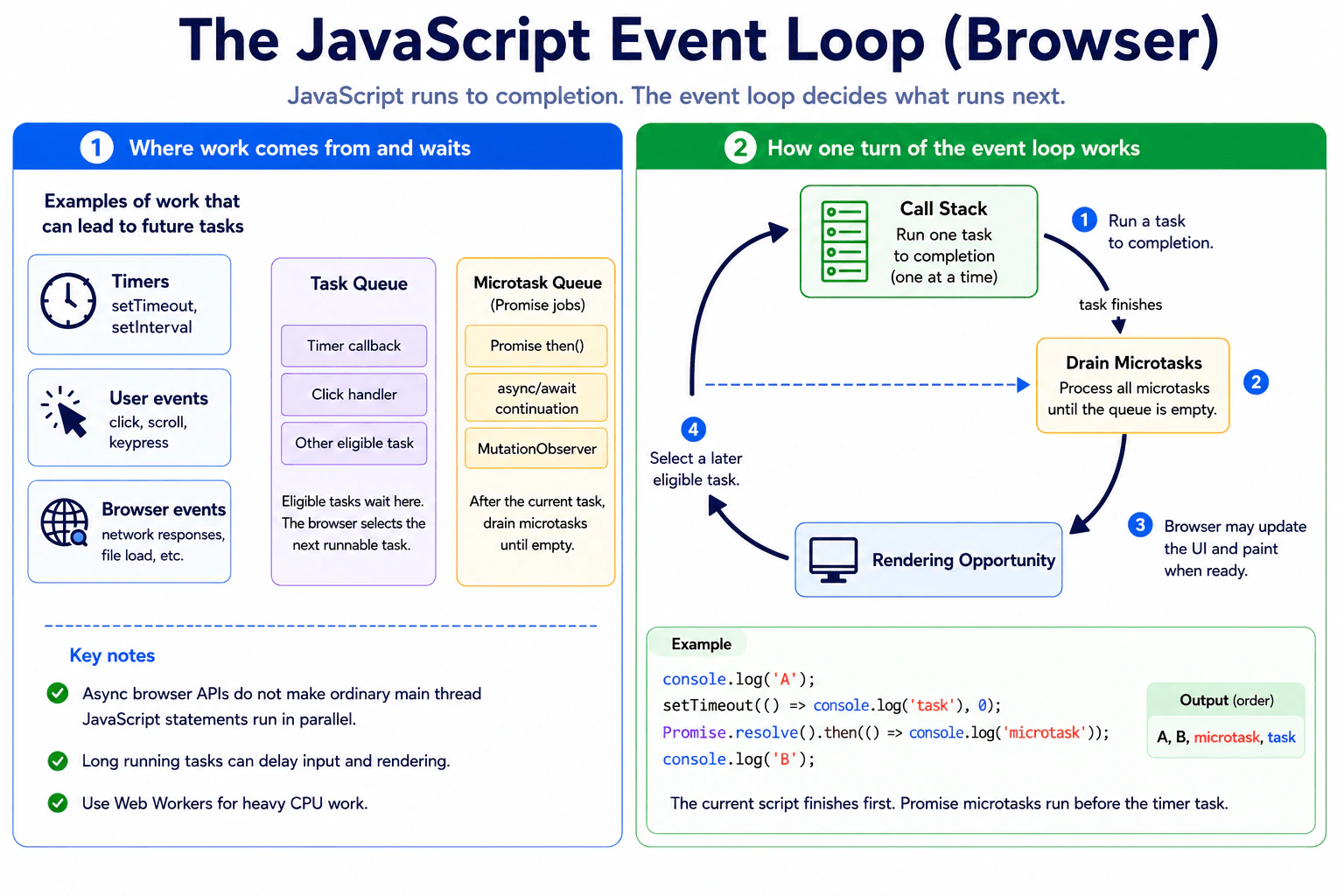
Define the browser event loop as the coordination mechanism that lets tasks run, microtasks drain, and rendering opportunities occur while JavaScript execution remains run-to-completion on an agent. Explain the call stack, task queue, promise microtasks, timers, user events, long-running work, and why asynchronous APIs do not make ordinary JavaScript statements run in parallel.
Short Interview Answer (30-60 seconds)
The JavaScript event loop coordinates when queued work can run after the current JavaScript work finishes. Code on the call stack runs to completion first. After a task finishes, Promise microtasks are drained before the browser takes another task, with rendering opportunities occurring when the browser is ready to render. Timers and user events schedule future tasks, but they do not make ordinary JavaScript statements run in parallel. Long running JavaScript can still block the page.
Detailed Explanation
The event loop is the browser's way of deciding when different pieces of work get a turn. The work happening now must finish before another piece can start. Other browser features can wait for a timer, a click, or a network result without stopping everything. When waiting work becomes ready, its related action is placed in line for later. This matters because one slow piece of work can delay clicks, screen updates, and other ready work, making a page feel slow or frozen.
Useful Questions to Ask the Interviewer
Should I focus on how the event loop works in a web browser?
Would you like me to compare Promise callbacks with timer callbacks?
How to Explain It in an Interview
The practical rule is that JavaScript finishes the current task before another task starts on the same agent. The call stack shows the JavaScript functions that are currently executing. A task can come from sources such as initial script execution, a timer becoming ready, or a user event such as a click.
Browser Web APIs can wait for outside events while the current JavaScript continues. For example, a timer can count down without interrupting code that is already running. When the timer becomes eligible, its callback can be queued as a future task. A zero delay timer is therefore not an instruction to run immediately.
Promises use microtasks. When a Promise reaction becomes ready, its callback is queued as a microtask. After the current task finishes and the call stack is empty, the browser performs a microtask checkpoint. It keeps processing queued microtasks until the queue is empty, including new microtasks added while that checkpoint is running.
After this work, the browser may have an opportunity to render before taking later tasks. Rendering is controlled by browser scheduling, so it is not guaranteed after every task. The browser cannot paint in the middle of ordinary JavaScript that is still running.
This explains why a long calculation can freeze input and visual updates. Async APIs improve coordination, but async and await do not move CPU work to another thread. For expensive computation, a Web Worker can run JavaScript in a separate execution context. In production, keep main thread work short and avoid creating an unbounded chain of microtasks.
Where it is used
The event loop matters whenever frontend code uses timers, DOM events, Promises, async functions, network requests, animation, or other browser APIs. Developers use this knowledge to predict callback order, keep the user interface responsive, understand why a zero delay timer still waits, avoid excessive microtask chains, and decide when expensive CPU work should move to a Web Worker.
Why Interviewers Ask This
Interviewers ask this to check whether a candidate understands how browser JavaScript coordinates current work with delayed work, user actions, Promise callbacks, and rendering. They also want to see whether the candidate understands that ordinary JavaScript code runs to completion on its current execution thread. This knowledge helps a frontend developer reason about callback order, blocked pages, incorrect timing assumptions, and responsive user interfaces.
Common interview mistakes
A common mistake is saying that asynchronous JavaScript makes ordinary main thread statements run in parallel. Another mistake is saying that a zero delay timer runs immediately. Its callback still has to wait until it is eligible and the current task has finished. Candidates also sometimes treat Promise callbacks and timer callbacks as the same kind of queued work. Promise reactions use microtasks, which are drained at a microtask checkpoint before another task is selected. Another mistake is assuming the browser can render while a long JavaScript function is still executing.
Interview tip
Start with the execution order. Say that the current task finishes first, then Promise microtasks are drained, and later tasks such as timer callbacks or user events can run. Mention that rendering happens only when the browser gets an opportunity to render. Finish by explaining that asynchronous APIs do not make ordinary main thread JavaScript run in parallel and that long tasks can block the page.
Interviewer may ask next
What happens if a Promise callback keeps adding new Promise microtasks?
The browser keeps processing those microtasks during the same microtask checkpoint until the microtask queue becomes empty. New microtasks added while the checkpoint is running can therefore keep extending that checkpoint. This matters because a very long or unbounded microtask chain can delay later tasks and delay a rendering opportunity. The tradeoff is that microtasks provide very prompt follow up work, but excessive use can hurt responsiveness.
What should you do if a calculation takes a long time and blocks the event loop?
Move suitable CPU heavy work to a Web Worker, or divide the calculation into smaller pieces that regularly return control to the browser. A Web Worker runs JavaScript in a separate execution context, so the main thread can remain available for input and rendering. This matters for responsive interfaces. The main tradeoff is added communication cost and more complex data exchange between the main thread and the worker.
32. Where can browser rendering occur relative to tasks and microtasks?Language SpecificHard
i Question Details
Analyze a page that changes the DOM, queues several promise callbacks, schedules requestAnimationFrame, and sets a zero-delay timer. Explain the event-loop checkpoints at which microtasks drain, when a rendering opportunity may occur, why rendering is not guaranteed after every task, and how the frame callback relates to painting.
Short Interview Answer (30-60 seconds)
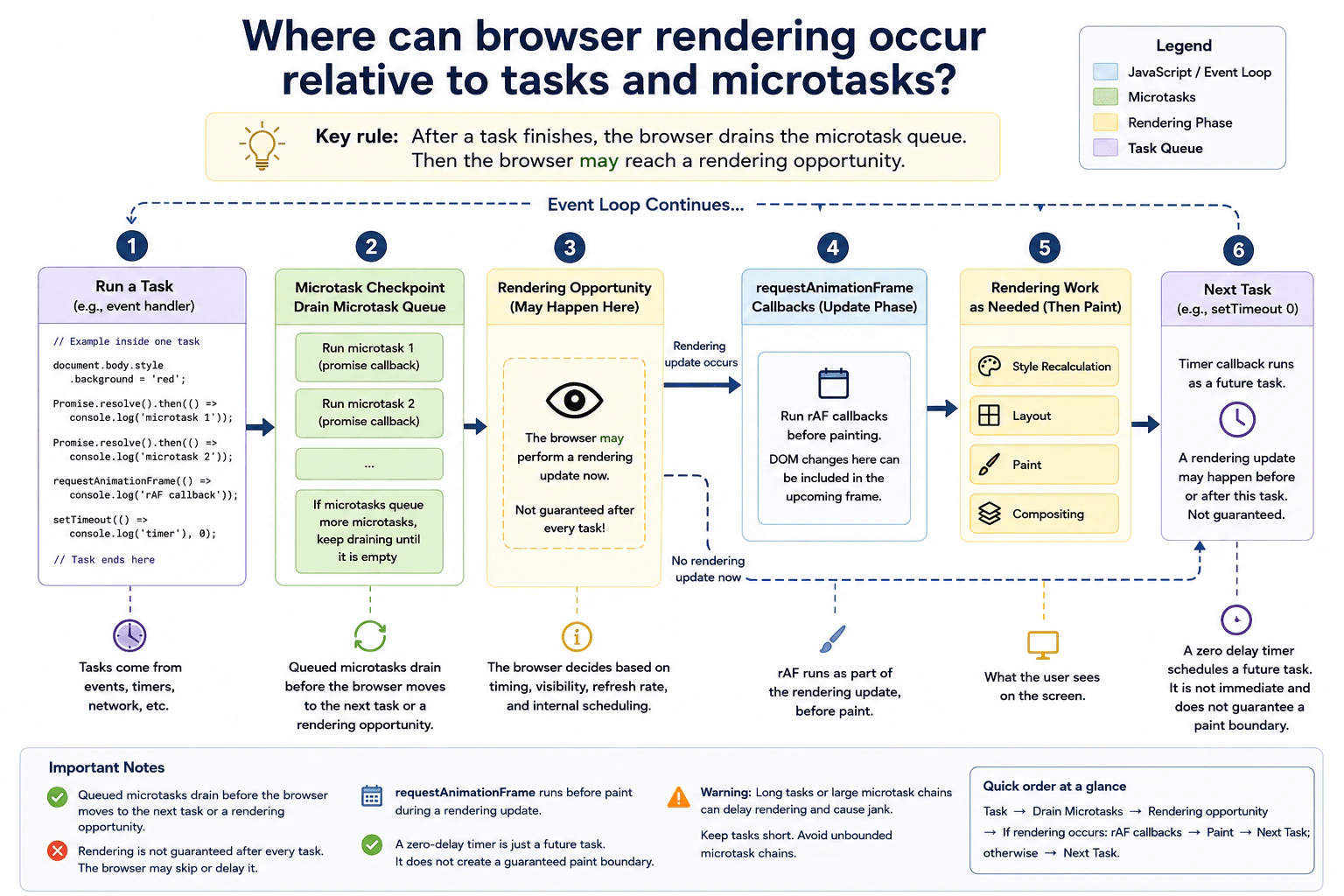
Rendering can occur after a task finishes and after the browser drains the microtask queue, when the browser reaches a rendering opportunity. It is not guaranteed to render after every task. A requestAnimationFrame callback runs during the rendering update before painting, so DOM changes made there can affect that frame. A zero delay timer creates a later task, while promise callbacks run as microtasks before the browser can move on from the current task checkpoint.
Detailed Explanation
A browser does not redraw the page immediately every time something on the page changes. It first finishes the current piece of work. It also finishes smaller pieces of waiting work that must run before it moves on. Only then does the browser get a chance to update what the user sees. It may use that chance, or it may wait until a later moment. Because of this, changing the page does not mean the new result appears on the screen immediately, and two scheduled actions do not create a guaranteed screen update between them.
Useful Questions to Ask the Interviewer
Should I assume a normal visible page running on the browser main thread?
Should I explain the ordering conceptually without assuming a guaranteed paint between the timer and frame callback?
How to Explain It in an Interview
The practical rule is: finish the current task, perform the microtask checkpoint, and then the browser may reach a rendering opportunity.
A task can be an event callback or a timer callback. JavaScript runs that task until its synchronous work finishes. The browser then performs a microtask checkpoint. Promise reaction callbacks are microtasks. If those callbacks queue more microtasks, the browser continues processing them until the microtask queue is empty.
After that checkpoint, the browser may have a rendering opportunity. This is a chance to update what is shown on the screen. It is not a promise that rendering happens after every task. The browser considers its rendering schedule and page state. For example, a frame may not yet be due, or the page may not currently need a visible update.
requestAnimationFrame is connected to the rendering process. When the browser performs the relevant rendering update, the frame callback runs before painting. DOM changes made in that callback can therefore affect the upcoming frame. The callback itself is not painting. The browser can still perform style calculation, layout, paint, and compositing work afterward as needed.
A zero delay timer works differently. It schedules a future task. It does not run immediately, and it does not create a guaranteed rendering boundary. Promise microtasks queued by the current task are processed before the browser moves beyond that task checkpoint. Depending on whether a rendering opportunity is due, the browser may perform a rendering update before a later timer task, or the timer task may run before the next rendering update.
This matters in production because long tasks and large microtask chains can keep the browser busy and delay visible frames.
Where it is used
This behavior matters in animations, loading indicators, progress updates, DOM measurement, visual transitions, and interfaces that combine promises, timers, and requestAnimationFrame. It is useful when debugging why a DOM change exists but has not appeared on screen yet. It also matters when investigating missed frames or input delays caused by long tasks or large microtask chains that postpone the browser reaching its next rendering opportunity.
Why Interviewers Ask This
Interviewers ask this to check whether a candidate understands browser scheduling beyond simple queue ordering. A strong answer separates tasks, microtasks, rendering opportunities, frame callbacks, and painting. It also shows practical judgment about why long work or a large chain of promise callbacks can delay visible updates even after page content has changed.
Common interview mistakes
A common mistake is saying that the browser paints after every task. That is not guaranteed. Another mistake is treating promise reactions as normal tasks. They are microtasks and are processed at microtask checkpoints. Candidates also sometimes say requestAnimationFrame performs the paint. It does not. Its callback runs during a rendering update before painting. Another mistake is assuming a zero delay timer has a fixed order relative to the next paint. It only schedules a future task, so whether rendering occurs before that task depends on when the browser has a rendering opportunity. Finally, repeatedly creating more microtasks can delay rendering because the checkpoint must keep processing queued microtasks.
Interview tip
Give the ordering first: a task finishes, microtasks drain, and then rendering may occur. Emphasize the word may. Then explain that requestAnimationFrame runs before paint during a rendering update, while a zero delay timer is only a later task and does not create a guaranteed paint boundary.
Interviewer may ask next
What happens if each promise callback keeps queuing another promise callback?
Rendering can be delayed because the microtask checkpoint keeps processing newly queued microtasks until the queue becomes empty. If every promise callback adds another one, the browser may spend a long time processing microtasks before it can move on to a rendering opportunity. This matters because DOM changes can already exist while the user still sees an older frame. The production tradeoff is responsiveness, so code should avoid unbounded or excessively large microtask chains.
Why use requestAnimationFrame instead of a zero delay timer for visual updates?
requestAnimationFrame is usually better for work that should align with a browser rendering update. Its callback runs before painting during the relevant rendering update, so visual changes can target the upcoming frame. A zero delay timer only creates a future task and is not synchronized with the display refresh. The tradeoff is that requestAnimationFrame is intended for visual work and its execution can be reduced when the page is not visible, while timers are more appropriate for general delayed work that does not need frame timing.
33. What is a JavaScript promise?Language SpecificEasy
i Question Details
Define a Promise as an object representing the eventual completion or failure of an asynchronous operation. Explain pending, fulfilled, and rejected states; then, catch, and finally; value and error propagation; chaining; promise microtasks; and how async and await consume promises. Clarify that creating a Promise does not automatically move CPU work to another thread.
Short Interview Answer (30-60 seconds)
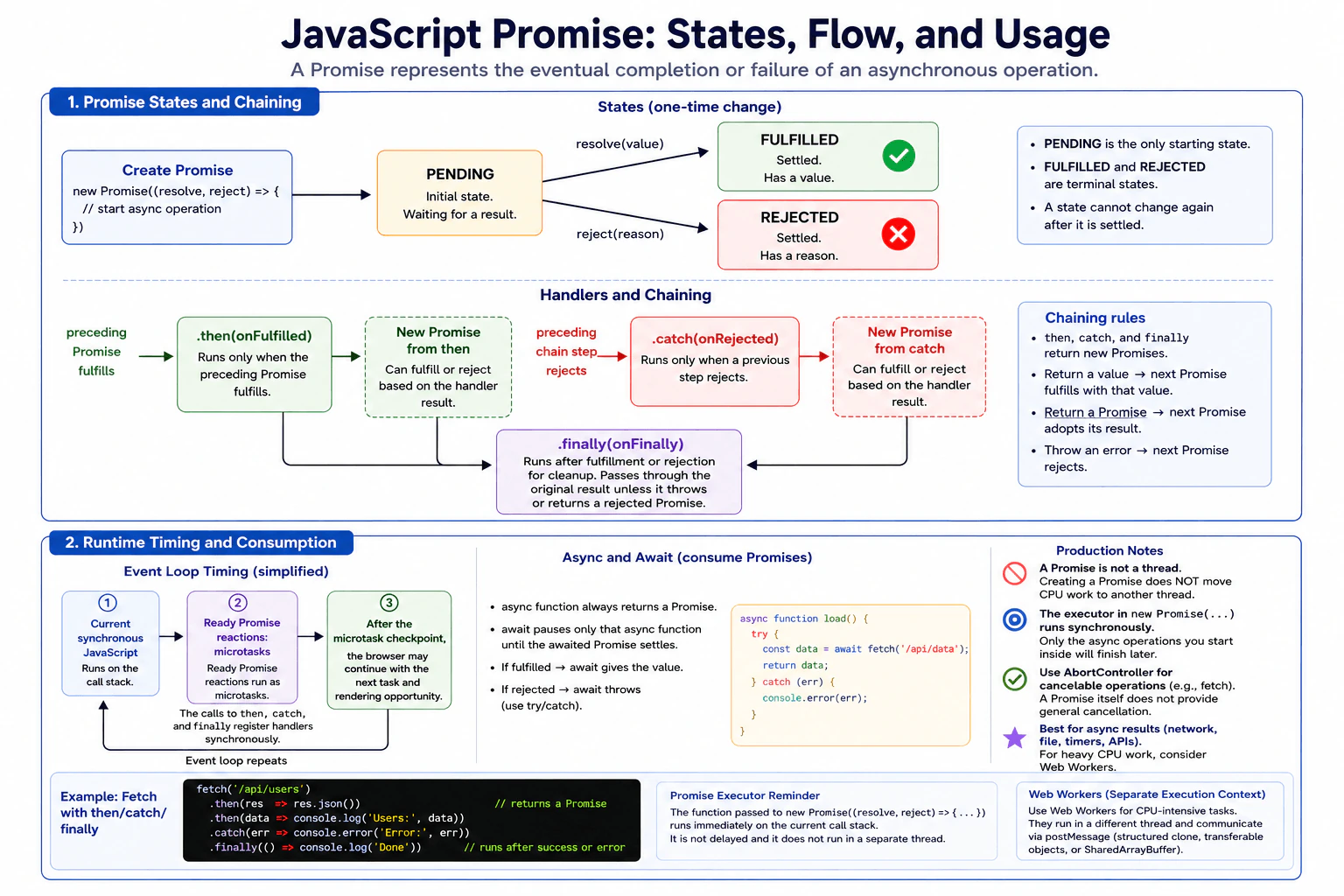
A JavaScript Promise is an object that represents a result that may become available later. It starts pending and then becomes either fulfilled with a value or rejected with a reason. I use then for successful results, catch for errors, and finally for cleanup that should run either way. Promise reactions run as microtasks after the current synchronous work finishes. Async and await provide cleaner syntax for consuming Promises. Creating a Promise does not move CPU work to another thread.
A Promise is a JavaScript object used when a result may arrive later. For example, a page may request user data from a server. The request does not finish immediately, so the Promise represents the future result. It can still be waiting, finish successfully, or fail. Code can react when the result becomes ready, handle a failure, and run cleanup afterward. This helps developers organize work that happens over time without blocking the normal flow of the page.
Useful Questions to Ask the Interviewer
Would you like me to explain Promise scheduling with the browser event loop and microtask queue?
Would you like an example showing then, catch, finally, and async and await?
How to Explain It in an Interview
A Promise represents the eventual completion or failure of an asynchronous operation. A new Promise begins in the pending state. It can later become fulfilled with a value or rejected with a reason, often an Error object. Once a Promise is fulfilled or rejected, it is settled and its state cannot change again.
The function passed to the Promise constructor runs synchronously when the Promise is created. Calling resolve or reject settles the Promise according to the Promise resolution rules. Creating a Promise by itself does not make its executor run in the background.
The then method registers reactions for a Promise and returns a new Promise. This makes chaining possible. If a then callback returns a normal value, the Promise returned by then is fulfilled with that value. If it returns another Promise or compatible thenable, the returned Promise adopts that result. If the callback throws, the returned Promise becomes rejected.
The catch method handles rejection and is equivalent to calling then with only a rejection handler. A rejection moves through later chain steps until a rejection handler handles it. The finally method is mainly for cleanup. Its callback receives neither the fulfilled value nor the rejection reason as an argument. If finally completes normally, the original result continues through the chain. If it throws or returns a rejected Promise, that new failure becomes the result.
Promise reactions do not run immediately when they are registered. When a reaction becomes ready, JavaScript schedules it as a microtask. After the current call stack becomes empty, the runtime processes ready microtasks before moving to a later task such as another timer or event. This ordering is important when reasoning about output order and user interface responsiveness.
An async function always returns a Promise. Inside an async function, await consumes a Promise or other value. If the awaited Promise fulfills, await produces its value. If it rejects, await throws that rejection inside the async function, where try and catch can handle it. Await pauses only that async function. It does not block the whole JavaScript runtime.
Promises are useful for asynchronous results such as network requests. They are not threads. Creating or awaiting a Promise does not move CPU intensive JavaScript away from the browser main thread. For suitable CPU intensive browser work, a Web Worker may be used instead.
Example
This example starts an operation that completes later and resolves with a user name. The first then receives that value and transforms it. The next then receives the transformed value. Catch handles a rejection or thrown error from earlier in the chain. Finally runs after fulfillment or rejection for cleanup. The async function shows another way to consume the same Promise with await and try and catch. Both forms use the same Promise behavior. Neither form creates another thread.
Code
functionloadUserName() {
returnnewPromise((resolve) => {
// The timer represents work whose result becomes available later.setTimeout(() => {
// Resolving settles this Promise successfully with one value.resolve('Maya');
}, 100);
});
}
loadUserName()
.then((name) => {
// Returning a normal value fulfills the next Promise in the chain.return name.toUpperCase();
})
.then((name) => {
// This reaction receives the value produced by the previous step.console.log('Promise chain:', name);
})
.catch((error) => {
// A rejection or thrown error from an earlier step reaches this handler.console.error('Promise error:', error);
})
.finally(() => {
// Cleanup runs after either fulfillment or rejection.console.log('Promise finished');
});
asyncfunctionshowUserName() {
try {
// Await consumes the Promise and pauses only this async function.const name = awaitloadUserName();
console.log('Async function:', name.toUpperCase());
} catch (error) {
// A rejected awaited Promise is handled like a thrown error here.console.error('Async error:', error);
}
}
showUserName();
Where it is used
Promises are common in frontend code that waits for asynchronous results. Fetch returns a Promise, so applications use Promises when loading API data. Promises are also used by many browser and application APIs that expose results which complete later. In production code, they help coordinate loading states, dependent asynchronous steps, error handling, and cleanup. Async and await are often used because they make Promise based control flow easier to read. When an operation supports cancellation, such as fetch, AbortController can request cancellation of that operation. A Promise itself does not provide general cancellation.
Why Interviewers Ask This
Interviewers ask this to check whether a candidate understands asynchronous JavaScript, Promise states, value and error propagation, chaining, microtask scheduling, and how async and await consume Promises. They also want to see whether the candidate knows that a Promise represents a future result but does not create another thread or move heavy CPU work away from the main JavaScript execution context.
Common interview mistakes
A common mistake is thinking that a Promise starts another thread. It does not. The Promise constructor executor runs synchronously when the Promise is created, although asynchronous operations started inside it may finish later. Another mistake is forgetting to return a Promise or value from a then callback when the next step depends on that result. Developers may also forget to handle rejection, which can lead to unhandled Promise rejection reports. Another mistake is assuming finally receives the fulfilled value or rejection reason. Its callback is mainly for cleanup and does not receive those values as normal arguments. Developers should also remember that await pauses only the current async function, not the entire JavaScript runtime.
Interview tip
Start by saying that a Promise represents a future result and has pending, fulfilled, and rejected states. Then explain then, catch, and finally, followed by value and error propagation through chaining. Mention that Promise reactions run as microtasks. Finish by explaining that async and await consume Promises and that Promises do not create threads. This order gives the interviewer the main idea first and then shows that you understand the runtime behavior.
Interviewer may ask next
When does a then callback run if a Promise is already fulfilled?
It still does not run immediately inside the current synchronous code. Calling then on an already fulfilled Promise schedules its reaction as a microtask. That microtask runs after the current call stack becomes empty. This matters because Promise reactions keep predictable asynchronous ordering even when the Promise already has a result. A large amount of work placed into continuously scheduled microtasks can delay later tasks such as timers, events, and rendering opportunities.
Should a Promise be used to move heavy CPU work away from the browser main thread?
No. Creating or awaiting a Promise does not move CPU intensive JavaScript to another thread. The code still runs in its current JavaScript execution context unless another browser mechanism performs work elsewhere. This matters because heavy CPU work on the main thread can delay input handling and rendering. For suitable CPU intensive browser work, a Web Worker can provide a separate execution context. The tradeoff is extra communication, data transfer, and coordination complexity.
34. What is a JavaScript module?Language SpecificEasy
i Question Details
Define a JavaScript module as a file with its own module scope that can explicitly export and import bindings. Explain named and default exports, static dependency analysis, strict mode, deferred browser execution, module URLs, live bindings, and dynamic import. Distinguish an ES module from a classic script, a package, and a bundler output chunk.
Short Interview Answer (30-60 seconds)
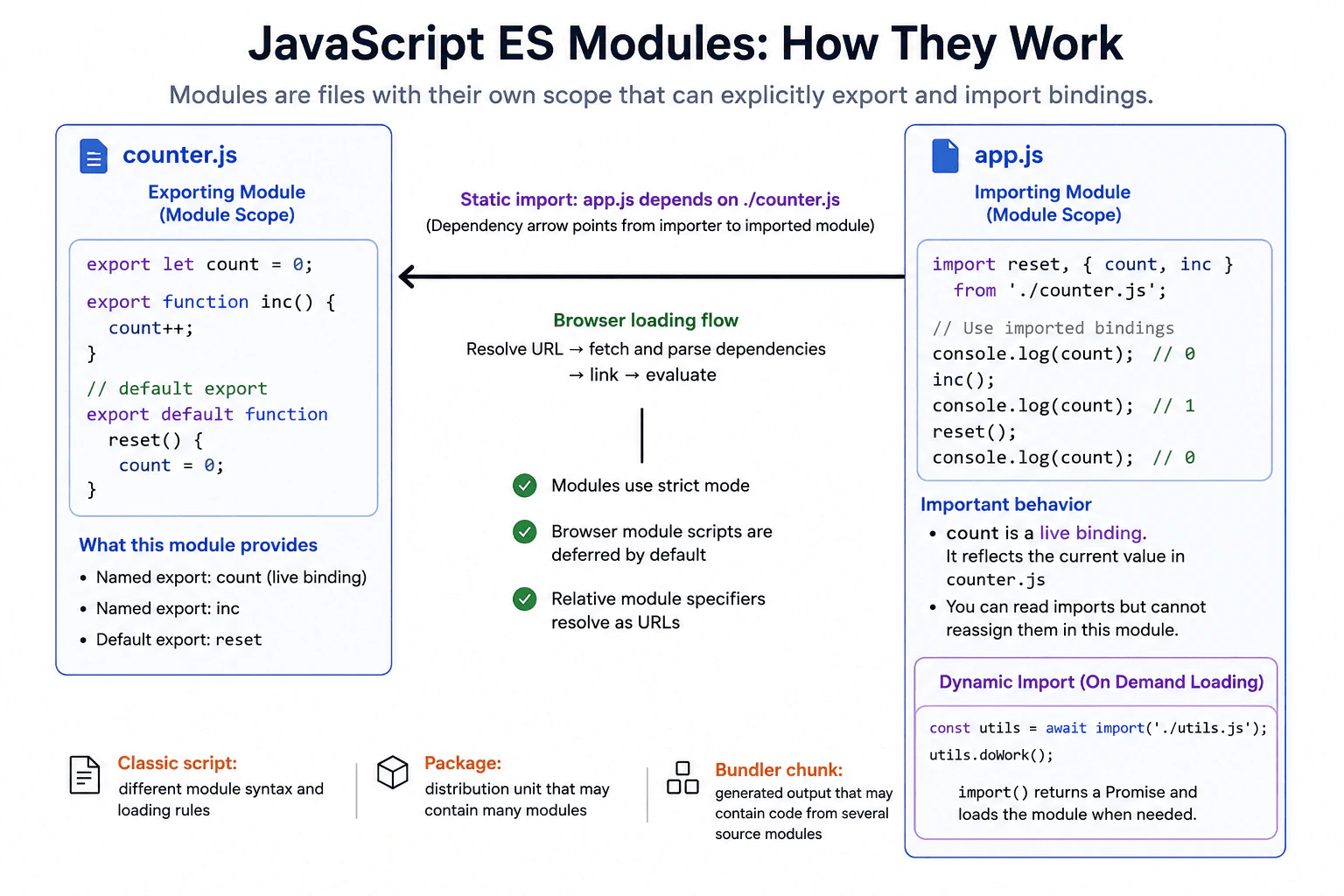
A JavaScript module is a file with its own module scope that can explicitly export bindings and import bindings from other modules. I use modules to split an application into clear reusable parts. ES modules support named exports, a default export, static imports, live imported bindings, and dynamic import. In browsers, module code always uses strict mode, and normal module scripts are deferred automatically.
Detailed Explanation
A JavaScript module is a way to divide a program into smaller files with clear boundaries. Each file can decide what it shares and what remains private. One file can provide values or functions, and another file can use them. This makes larger applications easier to organize, test, change, and reuse. Modern browsers understand this module system directly. They can discover normal module dependencies before running the code, load the required files, and then evaluate them in dependency order. Modules also avoid placing ordinary top level declarations into the shared global scope.
Useful Questions to Ask the Interviewer
Should I focus on browser ES modules or also compare them with bundler generated files?
Would you like me to explain both static import and dynamic import?
How to Explain It in an Interview
An ES module is a JavaScript file that has its own module scope and can use import and export syntax. Ordinary variables declared inside one module do not automatically become global variables.
A named export exposes a binding under a specific name. A module can have several named exports. Another module imports those names explicitly. A module can also provide one default export, which the importing module may give any local name.
Static import declarations describe dependencies before module evaluation. This lets the module system build a dependency graph before running module code. Static import declarations are only valid in module code and appear at the top level of that module.
Imported bindings are read only from the importing module and are live. For example, if module A exports a variable as a binding and later changes that variable, module B sees the current value when it reads its import. Module B cannot directly assign a new value to that imported binding.
ES module code always runs in strict mode. In a browser, a script element whose type is module behaves as deferred by default. It waits until document parsing is complete before normal evaluation. Module dependencies are fetched before the module can run.
Browser module specifiers are resolved using URLs. A relative reference normally needs an explicit form such as ./utils.js. The resolved module URL identifies the module resource used by the browser module loader.
Dynamic import uses import() and returns a Promise that fulfills with a module namespace object after the requested module is loaded and evaluated. It is useful for optional or later needed features.
An ES module is different from a classic script. Classic scripts have different scope, loading, and syntax rules and cannot use static import declarations or export declarations. A module is also different from a package. A package is a distribution unit that can contain many modules and metadata. A bundler output chunk is a generated delivery file. A chunk can contain transformed code from several source modules, so a source module and an output chunk are not the same concept.
Where it is used
ES modules are used throughout modern frontend applications. Teams use them to separate user interface code, data access code, utilities, configuration, and feature logic into focused files. Browsers can load ES modules directly. Build tools can also analyze static import relationships to combine and optimize application code for production. Dynamic import is useful when a large or optional feature should be loaded only after the user needs it.
Why Interviewers Ask This
Interviewers ask this to check whether a candidate understands how modern JavaScript code is divided into files, how those files share bindings, and how browsers load and evaluate module code. They also want to see whether the candidate understands scope, dependency loading, live bindings, dynamic loading, and the difference between language modules, packages, and generated bundler files.
Common interview mistakes
A common mistake is thinking every imported value is an independent copied value. Imports are bindings, and an import connected to an exported binding observes that binding as it changes. The importing module cannot directly reassign the imported binding. Another mistake is treating a module, package, and bundler chunk as the same thing. They are different concepts. Developers may also forget that module code always uses strict mode, that normal browser module scripts are deferred automatically, that browser module references use URL based resolution, and that import() is asynchronous and returns a Promise.
Interview tip
Start by saying that a module is a file with its own scope that explicitly imports and exports bindings. Then explain named and default exports, static dependency discovery, live bindings, strict mode, browser loading behavior, module URLs, and dynamic import. Finish by clearly separating an ES module from a classic script, a package, and a bundler output chunk.
Interviewer may ask next
If an exported variable changes after another module imports it, does the importing module see the new value?
Yes. If the export refers to a binding that later changes, the importing module observes the current value through its live imported binding. This matters because the import is not an independent snapshot of that binding. The importing module can read the updated value, but it cannot directly assign a replacement value to the imported binding.
When would you use dynamic import instead of a static import?
I would use dynamic import when a module should be loaded only when it is needed. import() returns a Promise that fulfills with the module namespace object after loading and evaluation succeed. This is useful for optional features or code that is not needed during initial startup. The tradeoff is that the dependency becomes available asynchronously, loading can fail at runtime, and the application must handle both the waiting state and possible errors.
35. How can a circular ES module graph trigger a temporal-dead-zone error?Language SpecificHard
i Question Details
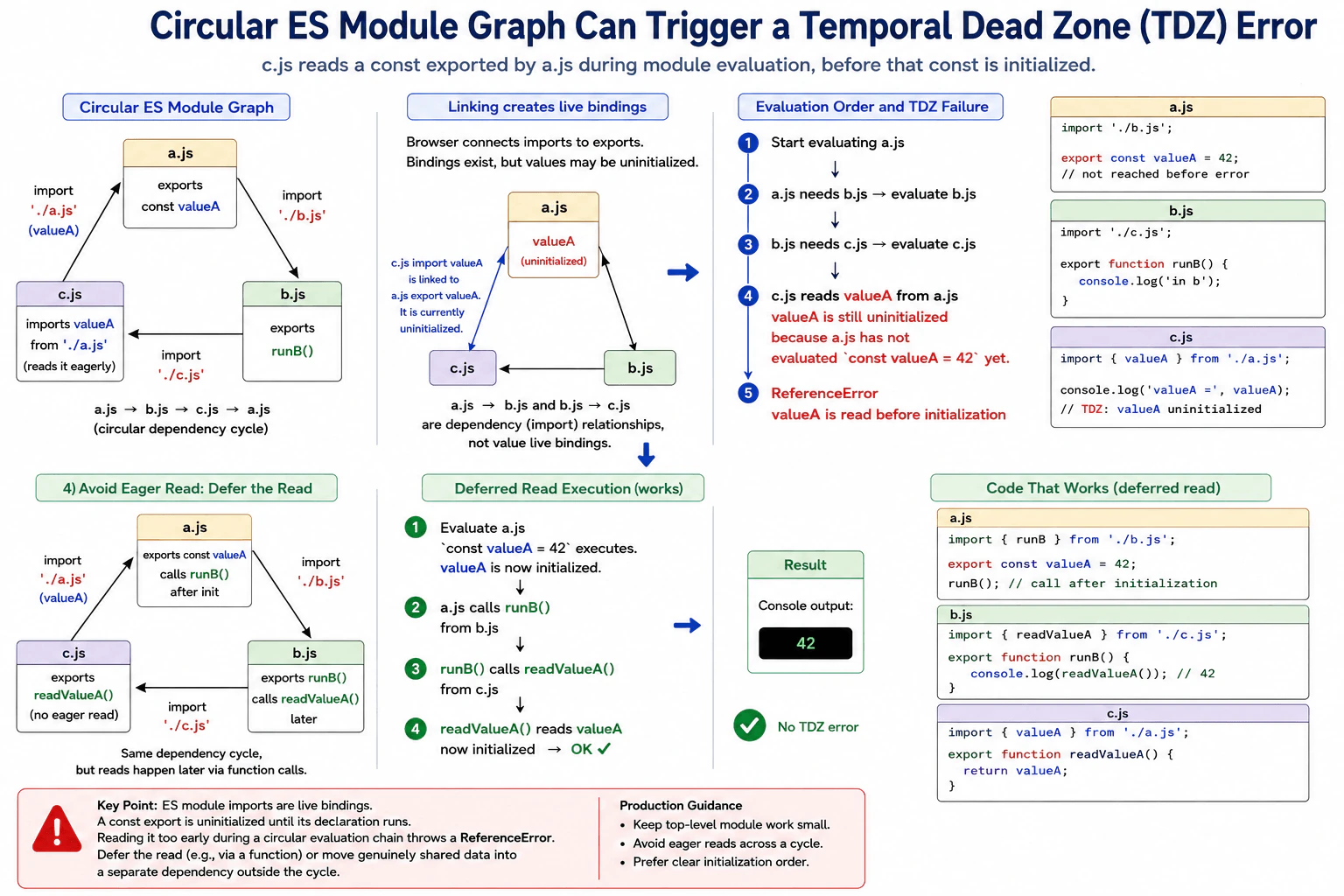
Create three browser modules where a.js imports b.js, b.js imports c.js, and c.js reads a const exported by a.js during module evaluation. Trace linking and evaluation enough to identify the uninitialized live binding, then describe restructuring options that avoid eager reads without merging module roles.
Short Interview Answer (30-60 seconds)
A circular ES module graph can throw a ReferenceError when one module reads an imported const before the module that declares it has evaluated that declaration. The import is already connected to the real exported binding because ES module imports are live bindings, but that binding is still uninitialized. I would avoid reading it during module evaluation and instead read it from a function that runs after initialization, or move truly shared data into a separate dependency.
Three files can depend on each other in a circle. File a loads file b, file b loads file c, and file c tries to read a value from file a immediately. The browser first connects the files and the names they share. It then runs their code in dependency order. The key problem is timing. File c can reach the shared value before file a has run the line that gives the value its value. JavaScript does not return undefined in this case. The value is not ready to be read, so JavaScript throws an error.
Useful Questions to Ask the Interviewer
Should c.js read the exported value immediately while the modules are being evaluated?
Should the three module responsibilities remain separate when the cycle is restructured?
How to Explain It in an Interview
ES module imports are live bindings. This means an imported name stays connected to the exported binding in the module that owns it. JavaScript does not copy the exported value when modules are linked.
Imagine that a.js imports b.js, b.js imports c.js, and c.js imports valueA from a.js. During linking, JavaScript creates the module bindings and connects the imports to the matching exports. This makes the binding known, but it does not mean the const declaration has already run.
Evaluation then follows the dependency graph. Starting from a.js, JavaScript must evaluate b.js. b.js depends on c.js, so c.js must also be evaluated. If c.js immediately reads valueA at its top level, a.js has not yet executed const valueA = 42. The binding exists, but it is still uninitialized. Reading a lexical binding such as const while it is uninitialized is a temporal dead zone access, so JavaScript throws a ReferenceError.
A circular import is therefore not automatically an error. The important question is whether code reads an uninitialized binding during evaluation.
A practical fix is to remove the eager read. c.js can export a function that reads valueA only when that function is called later. Then a.js can initialize valueA before calling through b.js. Another option is to move genuinely shared data into a separate module that is outside the cycle. Both choices can preserve clear module responsibilities. In production, keeping top level module work small and avoiding initialization that depends on partially evaluated modules makes dependency graphs easier to reason about.
Example
The example keeps three separate modules and the same circular dependency shape. a.js imports runB from b.js. b.js imports readValueA from c.js. c.js imports the live valueA binding from a.js. The important change is that c.js does not read valueA while c.js is being evaluated. It only defines readValueA. After the dependencies finish evaluating, a.js initializes valueA and then calls runB. runB calls readValueA, so the live binding is read only after valueA has been initialized. The program therefore prints 42 instead of throwing a ReferenceError.
Code
// a.jsimport { runB } from'./b.js';
// The binding was connected during module linking, but this declaration initializes its value.exportconst valueA = 42;
// Call into the cycle only after valueA has been initialized.runB();
// b.jsimport { readValueA } from'./c.js';
exportfunctionrunB() {
// This call happens after a.js has initialized valueA.console.log(readValueA());
}
// c.jsimport { valueA } from'./a.js';
exportfunctionreadValueA() {
// Read the live imported binding when this function runs, not during initial evaluation of c.js.return valueA;
}
// Load a.js from an HTML document as a module entry point.// Example: <script type="module" src="./a.js"></script>// Expected console output: 42
Where it is used
This behavior matters in frontend applications that have many ES modules, especially service modules, configuration modules, registries, state modules, and feature modules that depend on each other. A circular dependency may appear harmless until one module reads an imported lexical binding during top level evaluation. Production code is easier to maintain when module initialization has few side effects and values involved in a cycle are read only after the required declarations have been initialized.
Why Interviewers Ask This
Interviewers ask this to check whether the candidate understands ES module live bindings, module linking, module evaluation, and the temporal dead zone. It tests whether the candidate can trace a circular dependency far enough to find the exact read of an uninitialized const binding. It also tests practical judgment about restructuring modules so that separate responsibilities remain while eager reads are avoided.
Common interview mistakes
A common mistake is saying that every circular ES module dependency throws an error. A cycle alone is legal. The failure depends on when a binding is read. Another mistake is expecting an imported const to contain undefined before its declaration runs. A const binding is uninitialized during its temporal dead zone, so reading it throws a ReferenceError. Another mistake is treating linking and evaluation as the same step. Linking connects imports and exports, while evaluation executes module code and initializes declarations. Developers may also hide the problem by merging unrelated modules instead of removing the eager read or extracting a genuinely shared dependency.
Interview tip
Explain the problem in two stages. First say that linking connects the live bindings without necessarily initializing their values. Then trace evaluation from a.js to b.js to c.js and identify the exact read of valueA before the const declaration in a.js has executed. Finish by showing that delaying the read until a later function call keeps the module responsibilities separate and avoids the ReferenceError.
Interviewer may ask next
Would the same circular graph throw if c.js imports valueA but does not read it during module evaluation?
No. Importing the binding by itself does not cause the temporal dead zone error. The error happens only if code reads valueA while its binding is still uninitialized. If c.js only defines a function that reads valueA later, and that function runs after a.js has evaluated the const declaration, the read succeeds. This matters because circular ES module graphs can work correctly when their evaluation does not eagerly access uninitialized bindings.
What is the main tradeoff between delaying the read and moving shared data into a separate module?
Delaying the read is usually the smaller structural change because the three existing module responsibilities can stay in place, but the circular dependency still exists and developers must understand its initialization timing. Moving genuinely shared data into a separate module can remove the cycle and make dependencies easier to understand, but it changes the module structure and adds another dependency boundary. I would extract the shared data when it naturally has an independent responsibility. Otherwise, delaying the read can be a reasonable solution.
36. What risks arise from top-level `await` in a cyclic module graph?Language SpecificHard
i Question Details
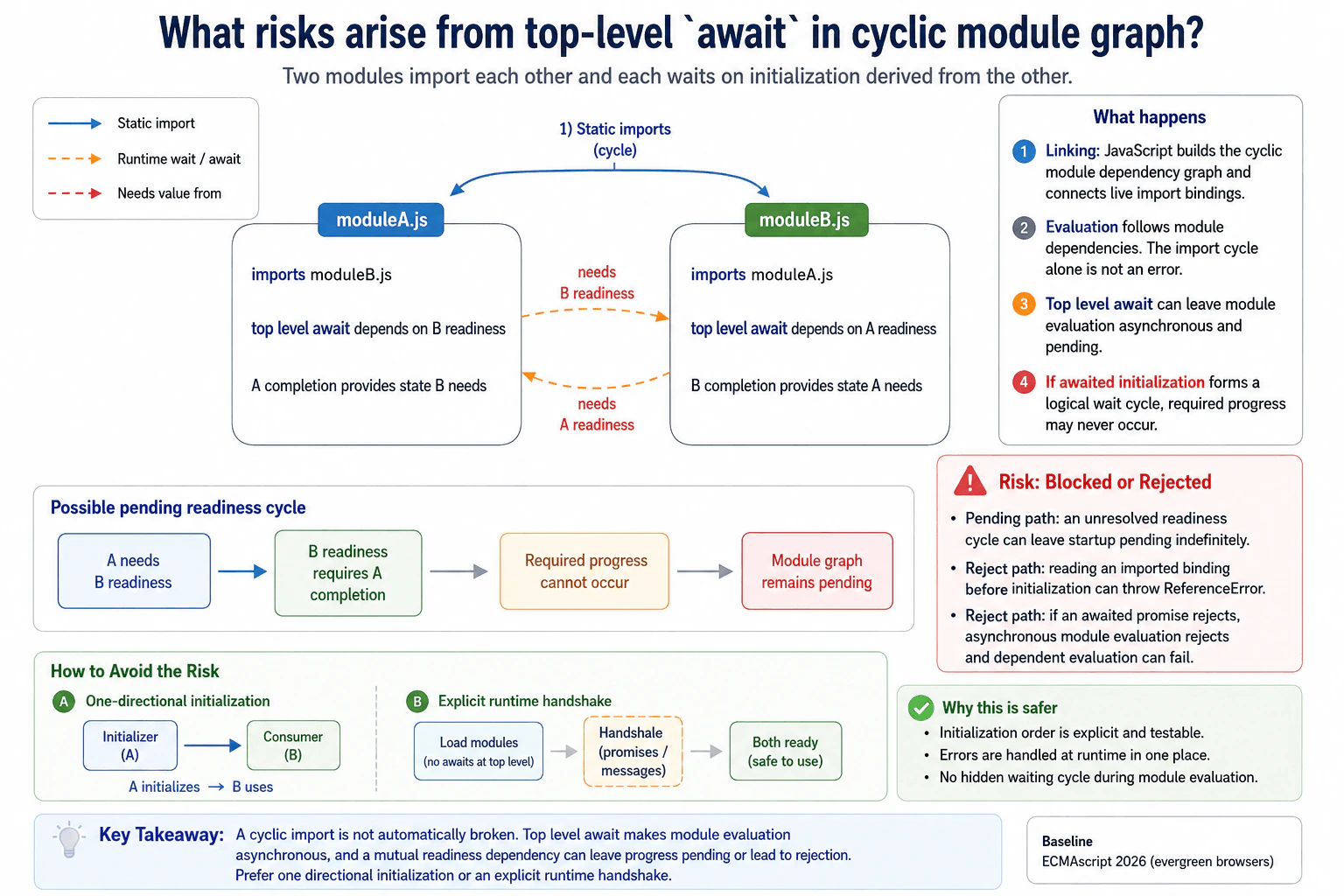
Describe two modules that import each other and each wait on initialization derived from the other. Explain dependency evaluation, asynchronous module status, how a cycle can leave progress blocked or reject, and why initialization protocols should use one directional dependency or an explicit runtime handshake.
Short Interview Answer (30-60 seconds)
The main risk is blocked or failed module initialization. With top level await, importing a module can pause its evaluation until the awaited work finishes. If two modules form a cycle and each needs initialization produced by the other before its own await can finish, progress can remain pending. Depending on exactly when imported bindings are read and how the awaited promises behave, evaluation can also reject. I would avoid this design by making initialization flow in one direction or by using an explicit runtime handshake after the modules are loaded.
Detailed Explanation
The danger appears when two files depend on each other during startup, and both files also stop and wait for some work to finish. Imagine file A needs information from file B before A can finish getting ready. At the same time, file B needs information from file A before B can finish getting ready. Each side can end up waiting for progress that the other side cannot make yet. This can stop startup from completing or cause startup to fail. The safer design is to make readiness flow in one direction or coordinate it later.
Useful Questions to Ask the Interviewer
Should I assume both modules use top level await during initialization?
Should I focus on native ES module behavior in modern browsers?
Do you want the safer initialization design as well as the failure explanation?
How to Explain It in an Interview
ES modules are linked before their code is evaluated. JavaScript first discovers the imports and exports and builds the dependency graph. A cycle in that graph is not automatically an error. Cyclic ES modules can work because imports are live bindings to exports from another module.
Top level await changes module evaluation because a module can become asynchronous. When evaluation reaches an await, that module may stay pending until the awaited promise settles. Modules whose evaluation depends on it may also need to wait.
Now consider module A importing module B and module B importing module A. Suppose A cannot complete its awaited initialization until B becomes ready, while B cannot complete its awaited initialization until A becomes ready. If the promises involved depend on progress that cannot occur until the other side finishes, the cycle can remain pending indefinitely. The module graph has no useful progress to make.
A related failure can happen when evaluation tries to read an imported binding before the exporting module has initialized that binding. That access can throw a ReferenceError. An awaited operation can also reject for its own reason. In either case, asynchronous module evaluation rejects, and dependent module evaluation can fail too.
This matters during frontend startup because application code may depend on those modules finishing evaluation. A pending cycle can prevent startup from completing. A rejection can send startup into its error path.
The safer design is directional initialization. One module owns initialization and another consumes its completed result. If both modules must coordinate, load them first and use explicit functions, promises, or messages as a runtime handshake. This makes readiness and failure handling visible and easier to test.
Where it is used
Top level await can be useful when a module must finish essential asynchronous setup before dependent modules use its exports. Examples include loading required configuration or completing startup data loading. The risky case is when several modules perform this setup while also depending on each other for readiness. In production, keep startup ownership clear, avoid mutual readiness dependencies, handle rejected initialization explicitly, and prefer a separate initialization function or readiness promise when coordination is complex.
Why Interviewers Ask This
Interviewers ask this to check whether the candidate understands ES module evaluation, asynchronous module initialization, dependency cycles, and the production risk of making module startup depend on values that cannot become ready yet. It also tests whether the candidate can choose a safer initialization design instead of relying on a fragile cycle.
Common interview mistakes
A common mistake is saying that every cyclic ES module import causes a deadlock. That is not correct. Cyclic imports can work when evaluation does not create a waiting cycle. Another mistake is treating top level await like a separate thread. It does not move JavaScript work to another thread. It pauses asynchronous module evaluation until the awaited promise settles. Another mistake is assuming every bad cycle must stay pending. A cycle can instead reject, such as when code reads an imported binding before that binding has been initialized or when an awaited promise rejects. Candidates also sometimes assume imported values are copied snapshots, but ES module imports are live bindings. The production mistake is making two modules responsible for each other's readiness, which creates fragile startup ordering and failure behavior.
Interview tip
Start with the practical risk: asynchronous module initialization can remain pending or fail when a module cycle also becomes a readiness cycle. Then explain that ordinary cyclic imports are not automatically broken. The danger comes from mutual asynchronous initialization and from reading bindings before initialization. Finish with the design rule: keep initialization directional or coordinate explicitly after loading.
Interviewer may ask next
Does every cyclic ES module graph that uses top level await become blocked?
No. A cyclic graph does not automatically become blocked. The problem occurs when asynchronous evaluation creates a real waiting cycle where progress required by one side depends on progress that only the other side can make. Some cyclic graphs evaluate successfully. Other cases can reject instead, such as when an imported binding is read before initialization or when an awaited promise rejects. This matters because the import cycle alone is not the failure condition. The exact initialization dependency and evaluation behavior determine the result.
What is a safer production alternative when two modules need asynchronous coordination?
Use an explicit runtime handshake after the modules are loaded, or give one module ownership of initialization. For example, one module can expose an initialization function or readiness promise that another module consumes without creating mutual startup ownership. This changes the design from hidden module evaluation dependencies to visible runtime coordination. It matters because startup order, errors, retries, and readiness become easier to understand and test. The tradeoff is a little more explicit application code, but the initialization flow becomes safer and easier to maintain.
37. When should `===` be preferred over `==`, and what coercion can `==` perform?Language SpecificEasy
i Question Details
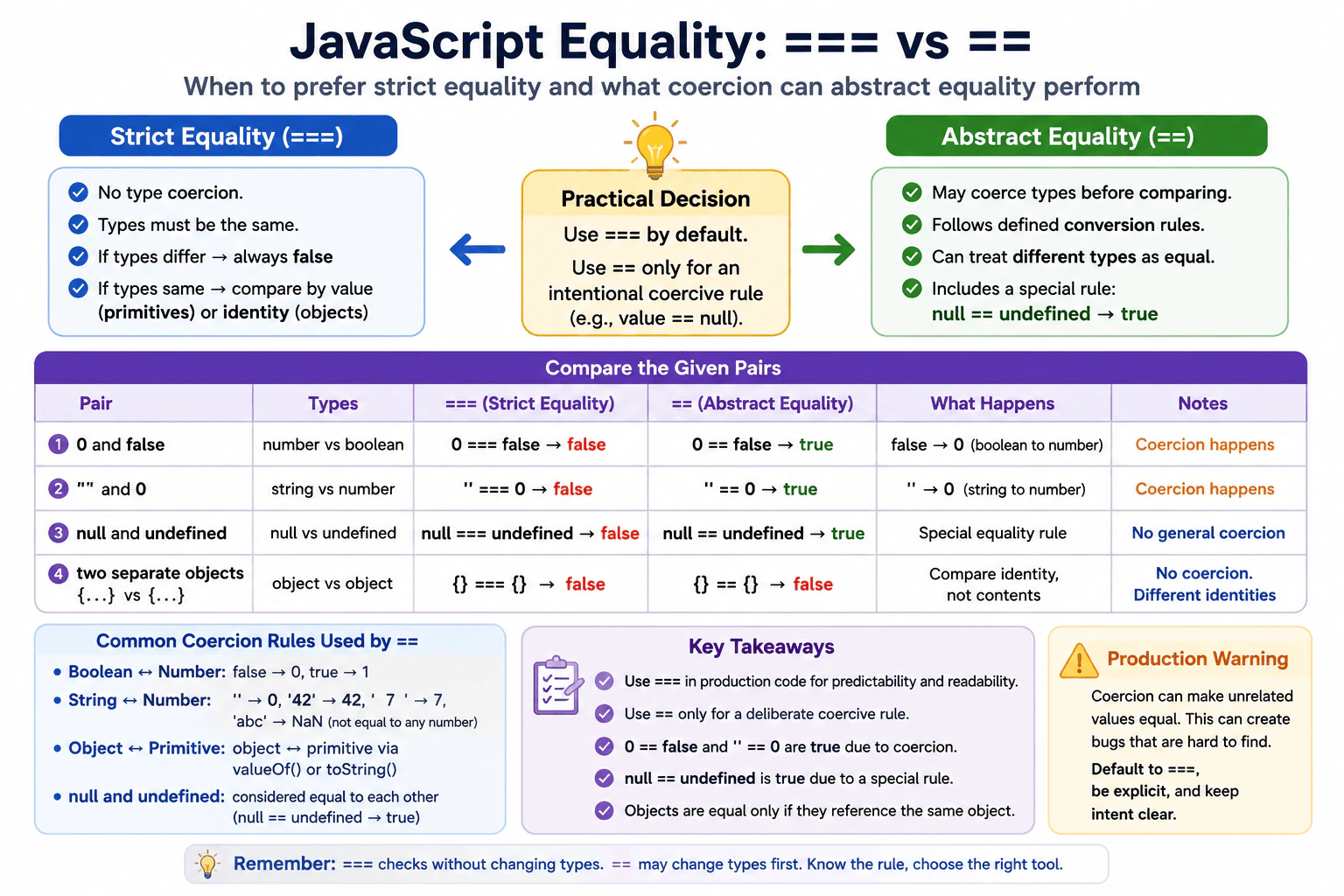
Compare strict and abstract equality using the pairs 0 and false, '' and 0, null and undefined, and two separately created objects. State which comparisons coerce types, which compare object identity, and why production frontend code normally uses strict equality unless a deliberate coercive rule is required.
Short Interview Answer (30-60 seconds)
I normally prefer === because it compares without converting different types. With ==, JavaScript can perform coercion before comparing. For example, 0 == false and '' == 0 are true. Also, null == undefined is true because of a special equality rule. For two objects, both operators compare identity, so separately created objects are not equal even when their contents look the same. I use == only when I deliberately want its defined coercive behavior.
In normal frontend code, I would choose the comparison that gives the most predictable result. One form compares values without changing different kinds into matching kinds first. The other form may change one side before checking equality. This matters because values that look unrelated can sometimes be treated as equal. Zero, false, empty text, missing values, and separate objects show the difference clearly. Understanding these examples helps a developer write conditions that behave as expected and helps another developer understand the intention without memorizing surprising conversion rules.
Useful Questions to Ask the Interviewer
Should I explain the exact result for each of the four example pairs?
Should I also mention when deliberate coercive equality can be useful in production code?
How to Explain It in an Interview
Prefer === for normal production code because strict equality does not coerce different types before comparing them. If the operands have different types, strict equality returns false. If they have the same type, JavaScript compares them according to that type's strict equality rules.
The == operator uses abstract equality. Its rules can convert values before comparing them. For example, 0 == false is true because the Boolean value false is converted to the number 0. Also, '' == 0 is true because the empty string is converted to the number 0 for this comparison. More generally, abstract equality can perform conversions such as Boolean to number, string to number in relevant comparisons, and object to primitive when an object is compared with a primitive.
null == undefined is true because abstract equality has a special rule that treats these two values as equal to each other. It is not the result of converting both into one ordinary value. With strict equality, null === undefined is false because they are different types.
Objects use identity when both operands are objects. If I create two separate objects with the same properties, both strict and abstract equality return false because the references point to different objects. If two variables refer to the same object, the comparison returns true.
In production frontend code, I use === by default because its behavior is easier to predict and review. I use == only when I intentionally want a defined coercive rule, such as value == null to match either null or undefined.
Example
The example uses the four pairs from the question. It shows that strict equality does not coerce different primitive types, while abstract equality can apply its defined conversion rules. It also shows the special relationship between null and undefined and demonstrates that separately created objects are unequal because equality compares object identity when both operands are objects.
Code
const firstObject = { value: 1 };
const secondObject = { value: 1 };
// Compare zero and false with both equality rules.console.log(0 === false); // falseconsole.log(0 == false); // true// Abstract equality converts the empty string to zero for this comparison.console.log('' === 0); // falseconsole.log('' == 0); // true// Abstract equality has a special rule for null and undefined.console.log(null === undefined); // falseconsole.log(null == undefined); // true// Separate objects have different identities even when their properties match.console.log(firstObject === secondObject); // falseconsole.log(firstObject == secondObject); // false// The same object reference has the same identity.console.log(firstObject === firstObject); // true
Where it is used
Strict equality is common in frontend conditions, form validation, state checks, event handling, configuration checks, and API response logic when the expected type is known. Abstract equality can be useful in a deliberate check such as value == null when both null and undefined should mean that a value is missing. In most production code, strict equality makes the intended comparison clearer and reduces accidental coercion.
Why Interviewers Ask This
Interviewers ask this to check whether a candidate understands strict equality, abstract equality, automatic type conversion, and object identity in JavaScript. It also tests whether the candidate can choose predictable comparison rules for production frontend code and recognize the few cases where deliberate coercive equality can be useful.
Common interview mistakes
A common mistake is saying that == simply ignores types. It actually follows defined abstract equality rules and performs specific conversions only when those rules require them. Another mistake is saying that null == undefined is true because both values are converted into the same normal value. Their equality comes from a special rule. Developers also sometimes expect two objects with identical properties to compare as equal. When both operands are objects, equality compares identity, not their property contents. Another mistake is using == without a deliberate reason, which can make conditions harder to understand.
Interview tip
Start by saying that === is the normal production choice because it avoids coercion between different types. Then explain the four requested pairs in order. Clearly separate primitive coercion, the special null and undefined rule, and object identity. Mention value == null only as an intentional production exception.
Interviewer may ask next
Why is null == undefined true while null === undefined is false?
null == undefined is true because abstract equality contains a specific rule that treats these two values as equal to each other. Strict equality does not apply that rule and does not coerce different types, so null === undefined is false because null and undefined have different types. This matters when code intentionally wants one condition that recognizes either form of a missing value.
Is there a reasonable production case for intentionally using == instead of ===?
Yes. A deliberate value == null check can be useful when both null and undefined should be treated as missing. The exact behavior is that this comparison matches either value while values such as 0, false, and an empty string do not match. The tradeoff is readability because coercive equality has more rules to understand, so the intention should be clear to the team.
38. What is the iterator protocol?Language SpecificMedium
i Question Details
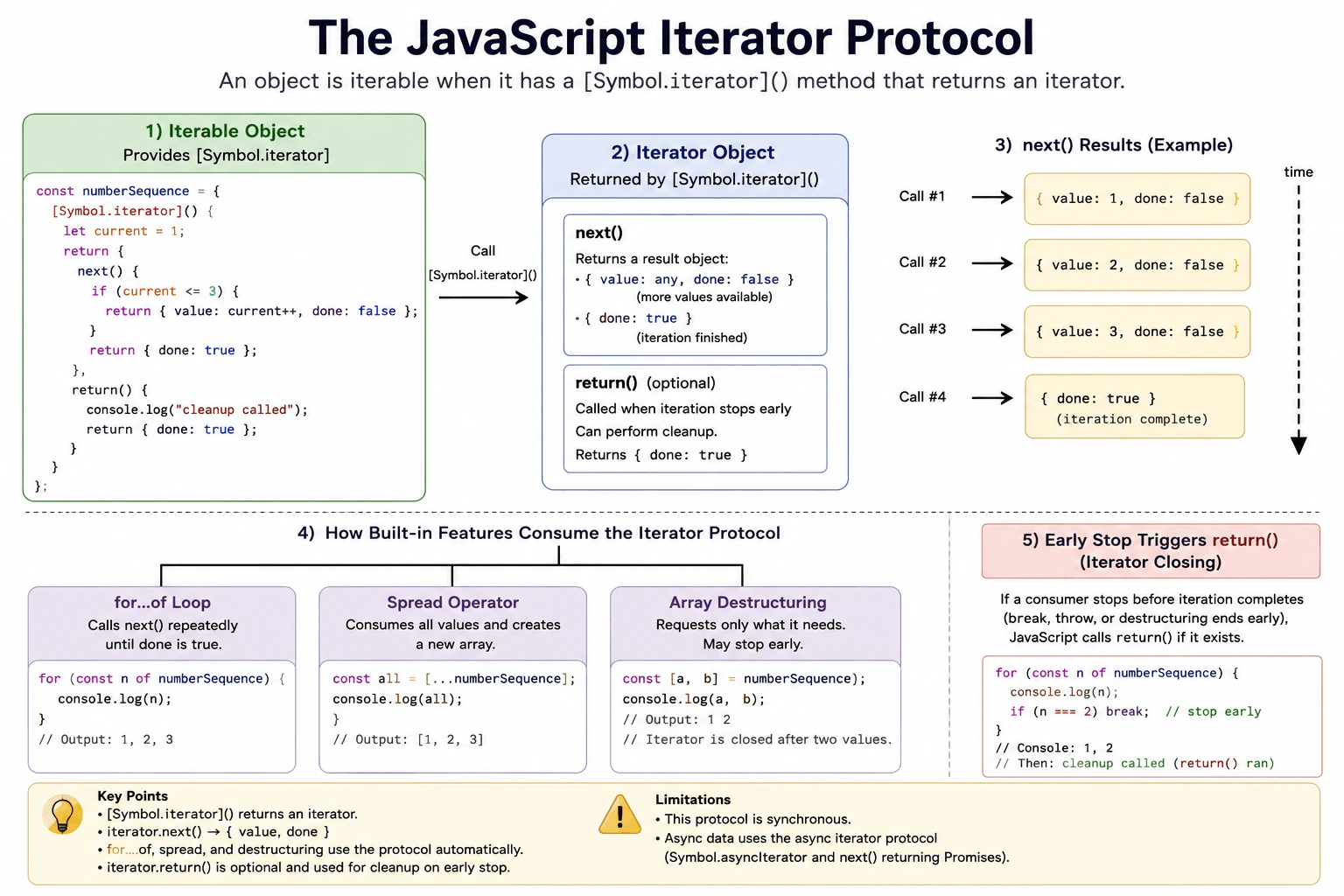
Build an object whose [Symbol.iterator]() method returns an iterator with next() results. Explain the shape of {value, done}, how for...of, spread, and array destructuring consume the protocol, and what optional return() cleanup may be triggered when iteration stops early.
Short Interview Answer (30-60 seconds)
The iterator protocol is the standard rule JavaScript uses to read values one at a time. An iterable provides a Symbol.iterator method that returns an iterator. The iterator has a next method that returns an object with value and done. Features such as for...of, spread, and array destructuring call these methods automatically. An iterator can also provide return so it can clean up resources when a consumer stops early.
The main idea is that an object can provide its items one at a time instead of creating every item first. Each request gives the next item or says that there are no more items. This lets common language features read the same object in a predictable way. We can build an object that produces the numbers 1, 2, and 3. We should also understand what happens when reading reaches the end and what may happen when the reader stops before all three values have been read.
Useful Questions to Ask the Interviewer
Should I show a custom object that produces a fixed sequence of values?
Should I also demonstrate cleanup when a loop stops early?
How to Explain It in an Interview
An object is iterable when it has a method stored at Symbol.iterator. JavaScript calls that method to get an iterator. The iterator must have a next method.
Each call to next returns an object. While a value is available, it can return { value: 1, done: false }. When the sequence has finished, it can return { done: true }. The value property is optional when done is true.
In this example, Symbol.iterator creates fresh iteration state by starting a counter at 1. This matters because separate consumers should normally be able to iterate independently. The next method returns 1, then 2, then 3, and then reports completion.
A for...of loop gets the iterator and repeatedly calls next until done becomes true. Spread also consumes the iterator until completion and puts the produced values into a new array. Array destructuring requests only the values it needs. If destructuring stops before the iterator is finished, JavaScript closes the iterator and calls its return method when that method exists and is callable.
A break from for...of also closes an unfinished iterator. This lets an optional return method perform cleanup. Normal completion does not call return just because iteration reached done.
Custom iterables are useful when an object naturally represents a sequence. They can produce values only when requested, so a complete result array does not have to exist first. However, spread still creates a new array containing every produced value. The iterator protocol here is synchronous. Asynchronous sequences use the async iterator protocol instead.
Example
The example creates an iterable object whose Symbol.iterator method creates fresh state for each consumer. The iterator keeps a current number. next returns 1, 2, and 3 with done set to false, then returns done set to true. The optional return method records that early cleanup happened and returns done set to true. Spread demonstrates normal full consumption. The for...of loop demonstrates early termination with break, which closes the unfinished iterator and calls its return method.
Code
const numberSequence = {
[Symbol.iterator]() {
// Give each consumer its own position so separate iterations do not share progress.let current = 1;
let closedEarly = false;
return {
next() {
// Produce the next number while the sequence still has a value available.if (current <= 3) {
return { value: current++, done: false };
}
// Report normal completion after all three numbers have been produced.return { done: true };
},
return() {
// Record cleanup when a consumer closes this iterator before normal completion.
closedEarly = true;
console.log('cleanup called', closedEarly);
return { done: true };
},
};
},
};
// Spread consumes the iterable until next reports completion.console.log([...numberSequence]);
// Breaking before completion closes the iterator and calls its return method.for (const value of numberSequence) {
console.log(value);
if (value === 2) {
break;
}
}
Where it is used
Custom iterables are useful for data structures that should expose values in a controlled order, sequences that produce values only when requested, and wrappers around resources that need cleanup when reading stops early. They also let application objects work naturally with for...of, spread, and destructuring. Producing values on demand can avoid allocating a complete result array before iteration begins, although consumers such as spread still allocate their own result array.
Why Interviewers Ask This
Interviewers ask this to check whether a candidate understands the rules JavaScript uses to produce values one at a time. They want to see whether the candidate can create a custom iterable, explain how built in language features consume it, and handle cleanup when a consumer stops before all values are produced.
Common interview mistakes
A common mistake is returning an object from Symbol.iterator that does not provide the required next method. Another mistake is returning raw values from next instead of result objects containing value and done. Developers may also keep one shared position on the iterable itself, which can make separate consumers interfere with each other. Another misunderstanding is assuming return runs after every successful iteration. It is used during iterator closing when consumption stops before normal completion, not simply because next eventually returned done.
Interview tip
Start with the contract: Symbol.iterator returns an iterator, and next returns an object with value and done. Then explain one concrete sequence such as 1, 2, and 3. Finally mention that for...of, spread, and destructuring consume the protocol automatically, and that return can support cleanup when consumption stops early.
Interviewer may ask next
What happens to the iterator if a for...of loop uses break before iteration is complete?
JavaScript closes the unfinished iterator. If the iterator has a callable return method, JavaScript calls it before leaving the loop. This matters because return gives the iterator a place to release resources or perform other cleanup after the consumer stops requesting values.
When would you use a custom iterable instead of first building an array?
I would use a custom iterable when values can be produced one at a time and creating the complete array first is unnecessary. The iterable can delay work and avoid allocating one full result array before consumption begins. The tradeoff is more implementation code, and consumers such as spread still create a new array containing all produced values.
39. How does JavaScript convert an object to a primitive value?Language SpecificMedium
i Question Details
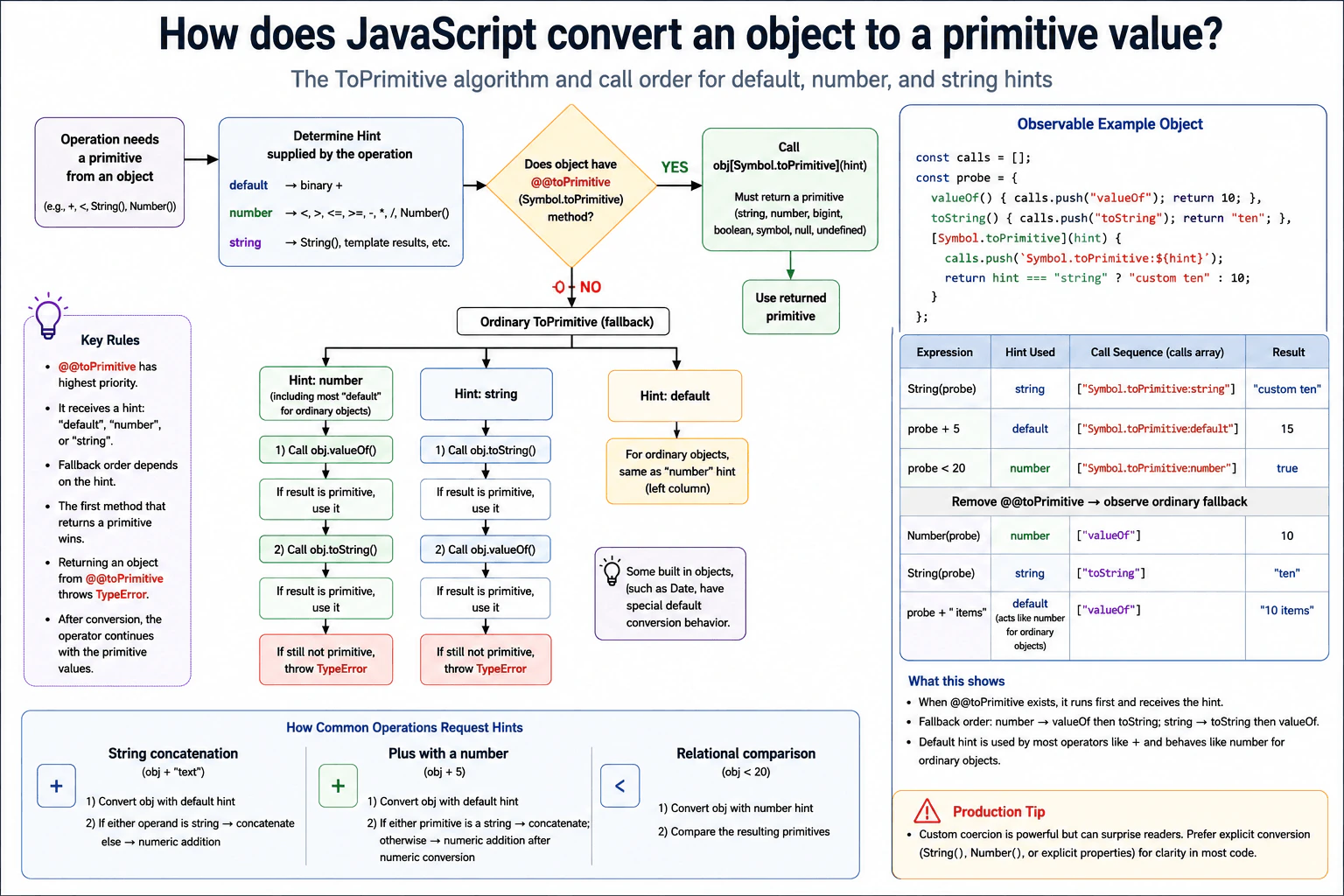
Trace abstract conversion for an object used with string concatenation, numeric addition, and a relational comparison. Cover Symbol.toPrimitive, valueOf, and toString lookup order for number and string hints. Include a small object with observable methods so the call sequence is unambiguous.
Short Interview Answer (30-60 seconds)
JavaScript first tries Symbol.toPrimitive when an object must become a primitive. It passes a hint such as default, number, or string. If that method is absent, ordinary conversion tries valueOf before toString for a number hint, and toString before valueOf for a string hint. The plus operator normally starts with a default hint, while relational comparison uses a number hint. After primitive conversion, the operator continues with the primitive values it received.
JavaScript sometimes needs a simple value from an object before it can perform an operation. For example, an object may appear beside text, beside a number, or inside a comparison. JavaScript then asks the object for a simpler value. The object can control what value it gives back. The exact method that runs depends on the kind of conversion JavaScript needs. This is why the same object can behave differently in different expressions. Understanding the order helps you predict results and avoid surprising behavior in real code.
Useful Questions to Ask the Interviewer
Should I explain both Symbol.toPrimitive and the valueOf and toString fallback behavior?
Would you like me to trace the exact calls for plus and relational comparison?
How to Explain It in an Interview
JavaScript uses the abstract ToPrimitive operation when an object must become a primitive value.
First, JavaScript looks for object[Symbol.toPrimitive]. If that property exists and is callable, JavaScript calls it with a hint. The hint is "default", "number", or "string". The method must return a primitive value. If it returns an object, JavaScript throws a TypeError.
If Symbol.toPrimitive is absent, JavaScript uses ordinary conversion. With a number hint, it tries valueOf first and then toString. With a string hint, it tries toString first and then valueOf. JavaScript stops as soon as one of those methods returns a primitive.
For most ordinary objects, a default hint is handled like a number hint during this fallback. Some built in objects can have special default behavior, so it is safer to describe the default hint separately from the number hint.
The plus operator asks object operands for primitives using the default hint. After that conversion, if either primitive is a string, plus performs string concatenation. Otherwise it performs numeric addition after numeric conversion. So an expression such as object + " items" does not request a string hint merely because the other operand is a string.
A relational comparison such as object < 20 requests primitive conversion with a number hint before comparing the resulting values.
In production code, custom coercion should be used carefully. Symbol.toPrimitive is useful when a value object intentionally needs controlled conversion behavior. Explicit conversion is often easier to read because another developer can see the intended type directly.
Example
The example uses one observable object so every conversion method records when it runs. While Symbol.toPrimitive exists, JavaScript calls it before valueOf or toString. String(probe) passes the string hint. probe + 5 passes the default hint because plus requests default primitive conversion. probe < 20 passes the number hint. The example then removes Symbol.toPrimitive to expose ordinary fallback behavior. Number(probe) uses the number hint, so valueOf runs first. String(probe) uses the string hint, so toString runs first. Finally, probe + " items" uses the default hint. For this ordinary object, fallback treats that default like a number hint, so valueOf returns 10 and the final operation produces the string "10 items".
Code
const calls = [];
const probe = {
// Record number oriented fallback and return a primitive number.valueOf() {
calls.push('valueOf');
return10;
},
// Record string oriented fallback and return a primitive string.toString() {
calls.push('toString');
return'ten';
},
// Record the exact hint supplied by JavaScript before fallback is considered.
[Symbol.toPrimitive](hint) {
calls.push(`Symbol.toPrimitive:${hint}`);
// Return a string only for an explicit string hint so each case is easy to observe.if (hint === 'string') {
return'custom ten';
}
// Return a number for default and number hints.return10;
},
};
// Explicit String conversion supplies the string hint.console.log(String(probe));
console.log(calls.splice(0));
// Plus supplies the default hint before deciding between concatenation and numeric addition.console.log(probe + 5);
console.log(calls.splice(0));
// Relational comparison supplies the number hint for object primitive conversion.console.log(probe < 20);
console.log(calls.splice(0));
// Remove the custom primitive hook so the ordinary fallback order can be observed.delete probe[Symbol.toPrimitive];
// Explicit Number conversion uses the number hint, so valueOf is tried first.console.log(Number(probe));
console.log(calls.splice(0));
// Explicit String conversion uses the string hint, so toString is tried first.console.log(String(probe));
console.log(calls.splice(0));
// Plus still supplies the default hint. For this ordinary object, fallback tries valueOf first.console.log(probe + ' items');
console.log(calls.splice(0));
Where it is used
This behavior appears when objects are used with operators, comparisons, explicit String or Number conversion, and custom value objects. A class representing money, a measurement, or another domain value may define Symbol.toPrimitive so conversion has deliberate behavior. It can also appear accidentally when application objects reach expressions that trigger coercion. In most production code, explicit property access or explicit conversion is easier to understand and maintain because the intended value is visible.
Why Interviewers Ask This
Interviewers ask this to check whether a candidate understands JavaScript coercion beyond simple primitive conversions. A strong answer shows that the candidate knows how an object becomes a primitive, understands conversion hints, knows the priority of Symbol.toPrimitive, and can predict whether valueOf or toString runs. This knowledge matters when debugging operators, comparisons, formatting, custom value objects, and unexpected coercion in frontend code.
Common interview mistakes
A common mistake is saying that plus asks an object for a string whenever the other operand is a string. It does not. Plus first requests primitive conversion with the default hint, then decides whether to concatenate after it has primitive values. Another mistake is saying valueOf always runs before toString. A number hint tries valueOf first, while a string hint tries toString first. Candidates also sometimes forget that Symbol.toPrimitive has priority over both fallback methods. Another important mistake is returning an object from Symbol.toPrimitive. That method must return a primitive, or JavaScript throws a TypeError.
Interview tip
Start with Symbol.toPrimitive because it has first priority. Then state the fallback orders clearly. A number hint tries valueOf and then toString. A string hint tries toString and then valueOf. Next, explain that plus uses the default hint and relational comparison uses the number hint. Finish with one observable example so the interviewer can see that you understand the exact call sequence.
Interviewer may ask next
What happens if Symbol.toPrimitive returns another object instead of a primitive?
JavaScript throws a TypeError. Symbol.toPrimitive is required to return a primitive value such as a string, number, bigint, boolean, symbol, null, or undefined. JavaScript does not continue to valueOf or toString after Symbol.toPrimitive returns an object. This matters because the custom conversion hook has a strict result requirement, and violating it makes the whole conversion fail.
Should production code rely on implicit object conversion or use explicit conversion?
Explicit conversion is usually clearer in production code. Implicit conversion can be useful when an object intentionally defines stable value semantics, and Symbol.toPrimitive gives precise control over that behavior. The tradeoff is readability. An implicit expression can be shorter, but String, Number, or explicit property access usually makes the intended value easier for another developer to understand and reduces surprises during maintenance.
40. What property order do JavaScript reflection and enumeration APIs use?Language SpecificMedium
i Question Details
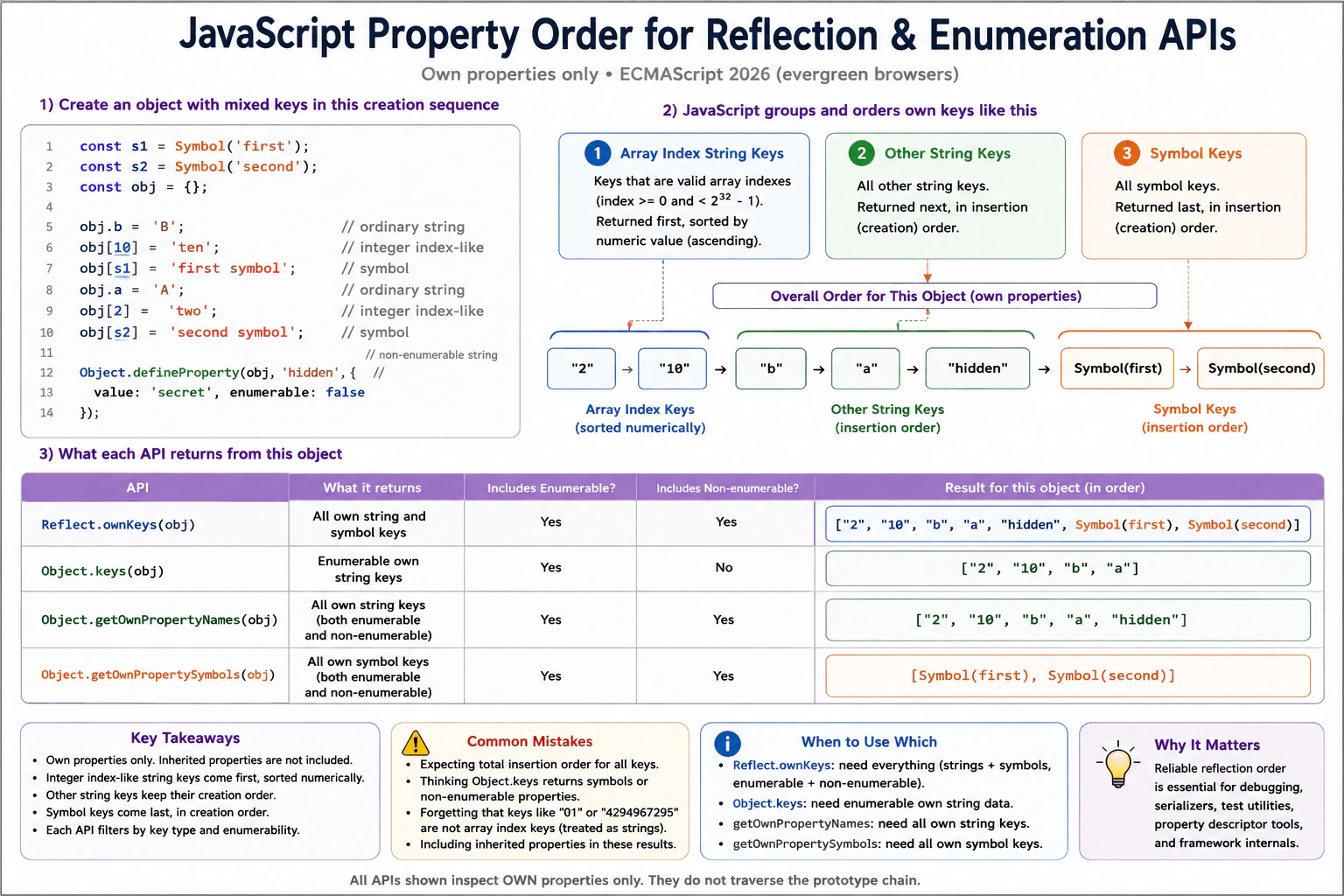
Create an object with integer-index-like string keys, ordinary string keys, and symbol keys added in a known sequence. State the order produced by Reflect.ownKeys, Object.keys, Object.getOwnPropertyNames, and Object.getOwnPropertySymbols, including the distinction between own, enumerable, string, and symbol properties.
Short Interview Answer (30-60 seconds)
JavaScript uses a defined order for these own property APIs. Array index string keys come first in ascending numeric order. Other string keys come next in creation order. Symbol keys come last in creation order. Reflect.ownKeys returns all own string and symbol keys. Object.keys returns enumerable own string keys. Object.getOwnPropertyNames returns all own string keys. Object.getOwnPropertySymbols returns all own symbol keys.
A JavaScript object can hold names that look like whole number positions, normal text names, and special symbol names. When JavaScript lists those names, it follows a defined order instead of simply returning every name in the order it was added. Whole number position names that qualify for the special first group are sorted from smallest to largest. Other text names keep the order in which they were created. Symbol names also keep their creation order. Each inspection method then chooses which groups and which visible or hidden names it returns.
Useful Questions to Ask the Interviewer
Should I include a nonenumerable own property in the example?
Should I explain inherited properties, or only the own property APIs named in the question?
How to Explain It in an Interview
Use one object so every API can be compared with the same properties. Suppose we add the string key b, the array index string key 10, a symbol, the string key a, the array index string key 2, another symbol, and finally a nonenumerable string key called hidden.
For an ordinary object, JavaScript first returns own string keys that are array indexes. Those keys are sorted by numeric value, so 2 comes before 10 even though 10 was created earlier. Next come the other own string keys in creation order. In this example they are b, a, and hidden. Finally come the own symbol keys in creation order.
Reflect.ownKeys returns every own key. It includes enumerable and nonenumerable string keys and all symbol keys. Its order here is 2, 10, b, a, hidden, first symbol, second symbol.
Object.keys returns only enumerable own string keys. It skips hidden because hidden is nonenumerable. It also skips both symbols. Its result is 2, 10, b, a.
Object.getOwnPropertyNames returns all own string keys, including nonenumerable ones. Its result is 2, 10, b, a, hidden.
Object.getOwnPropertySymbols returns all own symbol keys, whether enumerable or nonenumerable, in symbol creation order.
All four APIs discussed here ignore inherited properties. This behavior matters in reflection, debugging, property descriptor utilities, and serializers. If insertion ordered entries are the main data model, Map is usually clearer because object keys have the special array index ordering rule.
Example
The example creates one object with every important property category. The ordinary string key b is created first. The array index string key 10 is created next. A symbol follows. Then the ordinary string key a, the array index string key 2, and a second symbol are added. Finally, hidden is defined as a nonenumerable string property. The results show that array index string keys come first in ascending numeric order, other string keys follow in creation order, and symbols follow in creation order. Each API then filters those own keys according to whether it returns strings, symbols, enumerable properties, or nonenumerable properties.
Code
const firstSymbol = Symbol('first');
const secondSymbol = Symbol('second');
const value = {};
// Add several kinds of own keys in a deliberately mixed creation order.
value.b = 'B';
value[10] = 'ten';
value[firstSymbol] = 'first symbol';
value.a = 'A';
value[2] = 'two';
value[secondSymbol] = 'second symbol';
// Create an own string property that Object.keys must skip.Object.defineProperty(value, 'hidden', {
value: 'secret',
enumerable: false,
});
// Convert symbols to readable labels so the printed order is easy to compare.constshowKeys = (keys) =>
keys.map((key) => (typeof key === 'symbol' ? `Symbol(${key.description})` : key));
// Reflect.ownKeys returns every own string and symbol key.console.log(showKeys(Reflect.ownKeys(value)));
// ["2", "10", "b", "a", "hidden", "Symbol(first)", "Symbol(second)"]// Object.keys returns only enumerable own string keys.console.log(Object.keys(value));
// ["2", "10", "b", "a"]// Object.getOwnPropertyNames returns every own string key.console.log(Object.getOwnPropertyNames(value));
// ["2", "10", "b", "a", "hidden"]// Object.getOwnPropertySymbols returns every own symbol key.console.log(showKeys(Object.getOwnPropertySymbols(value)));
// ["Symbol(first)", "Symbol(second)"]
Where it is used
This behavior is useful in object inspection tools, debugging utilities, property descriptor helpers, metadata processing, serializers, test helpers, and framework internals. Reflect.ownKeys is useful when code must inspect every own key, including symbols and nonenumerable properties. Object.keys is useful when code wants the enumerable own string properties normally treated as public object data. The ordering rule also matters when tests compare arrays of returned property keys.
Why Interviewers Ask This
Interviewers ask this to check whether a candidate understands the defined order of JavaScript own property keys and can distinguish array index string keys, other string keys, and symbol keys. It also tests whether the candidate understands which APIs include nonenumerable properties and which APIs include symbols. This knowledge matters when inspecting objects, working with property descriptors, writing utilities, and debugging frontend code.
Common interview mistakes
A common mistake is saying that every object key always follows insertion order. Array index string keys are placed before other strings and are sorted by numeric value. Another mistake is saying that any string containing digits belongs to that first group. For example, 01 and 4294967295 are not array index keys and therefore behave as ordinary string keys for this ordering rule. Candidates also sometimes say that Object.keys returns symbols or nonenumerable properties. It returns neither. Another mistake is including inherited properties, because all four APIs in this question inspect own properties only.
Interview tip
Explain the rule as three ordered groups: array index string keys first, other string keys second, and symbols third. Then explain how each API filters those own keys. Call out enumerable and nonenumerable properties explicitly because that distinction separates Object.keys from Object.getOwnPropertyNames and Reflect.ownKeys.
Interviewer may ask next
What happens to numeric looking string keys such as 01 or 4294967295?
They are treated as ordinary string keys for this ordering rule because they are not valid array index keys. They therefore appear with the other string keys in creation order instead of being sorted into the first numeric group. This matters because a key can look numeric to a person without meeting JavaScript's exact array index key rule.
Should application code use object property order when ordered entries are an important requirement?
It can rely on the defined object property order when object reflection is the behavior the code actually needs, but Map is usually clearer when insertion ordered entries are the main data model. Object keys apply the special array index ordering rule, while Map keeps entries in insertion order. The tradeoff is that objects work naturally with property access and many JavaScript APIs, while Map expresses an ordered collection of key value entries more directly.
More questions load as you scroll
Disclaimer: This interview guide is for educational and informational purposes only. It is designed to help readers prepare, but it does not guarantee any interview result, hiring decision, offer, or outcome. Interview questions, hiring criteria, and preferred answers can vary by employer, interviewer, industry, location, and time. All answers, examples, and explanations in this guide are suggested examples for interview preparation, not definitive answers or instructions for professional practice. They are based on research and judgment, are provided without warranties of any kind, and should be adapted to the question, role, and applicable laws and professional requirements. Diagrams are simplified illustrations intended to highlight the main concepts and their relationships; actual situations, systems, and practices may be more complex. Alternative approaches may be equally valid or better suited to a particular question, context, or interviewer. To the fullest extent permitted by applicable law, the contributors and publisher are not liable for decisions made, actions taken, or losses incurred based on this guide.
State Laws and Professional Responsibilities: Laws and requirements governing an occupation vary by state and jurisdiction. You are responsible for checking the current laws, licensing requirements, and scope-of-practice rules that apply to your location and role, and for ensuring that your answers and actions comply with them. Adapt examples in this guide to those requirements. This guide is not legal advice.
Content Accuracy and Verification: To the fullest extent permitted by applicable law, we do not represent or warrant that interview guides, questions, answers, examples, or diagrams are accurate, complete, current, error-free, or suitable for any particular purpose. You are responsible for independently reviewing and verifying the information before relying on it.