277 JavaScript Frontend Developer Interview Questions & Answers

133 top • 30 Amazon • 15 Apple • 29 Google • 18 Meta • 21 Microsoft • 20 Netflix • 11 NVIDIA

JavaScript Frontend Developer icon

Questions with Detailed ExplanationsWith Detailed Explanations

(Last Updated: September 1, 2026)

111. What is CORS?SecurityEasy

Question Details

Define Cross-Origin Resource Sharing as an HTTP-header mechanism through which a server can permit selected cross-origin browser reads that the same-origin policy would otherwise restrict. Explain simple requests, preflight requests, allowed origins, methods, headers, credentials, caching, and why CORS is neither authentication nor a way to stop non-browser clients from sending requests.

Short Interview Answer (30-60 seconds)

CORS is an HTTP-header mechanism that lets a server permit selected cross-origin browser reads that the same-origin policy would otherwise restrict. It controls allowed origins, methods, headers, and credentials. It is not authentication or authorization, and non-browser clients are not stopped by CORS.

Detailed Explanation

CORS is a browser rule that controls when a website opened from one place can read information returned by a different website or service. Browsers normally keep different places separated so one website cannot freely read another website's replies. The service receiving the request can choose which websites are allowed to read its reply. Some requests can be sent immediately, while others need an extra permission check first. The service can also decide whether requests using cookies or similar account information are allowed. This browser rule does not prove who a user is or decide what that user may access.

Useful Questions to Ask the Interviewer
  1. Should I explain both simple requests and preflighted requests?
  2. Should I include credentialed requests such as requests using cookies or HTTP authentication?
  3. Should I also explain what security checks must still happen on the server?
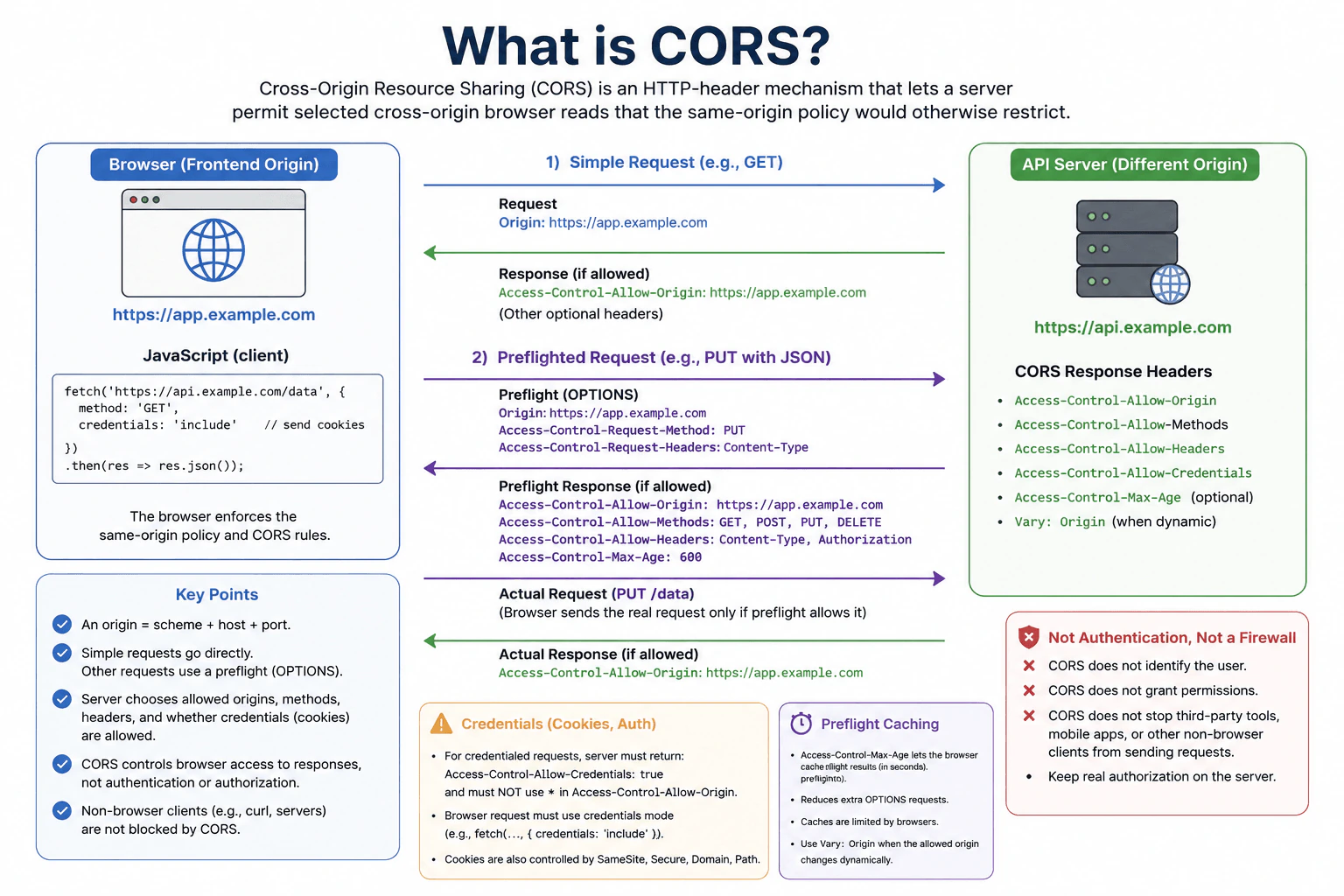
What is CORS? diagram
How to Explain It in an Interview

CORS stands for Cross-Origin Resource Sharing. It is an HTTP-header mechanism through which a server tells a browser which cross-origin responses browser JavaScript is allowed to read.

An origin is the combination of scheme, host, and port. For example, https://app.example.com and https://api.example.com are different origins because their hosts differ. Browsers normally enforce the same-origin policy, which restricts JavaScript from reading responses from another origin. CORS gives the server a controlled way to relax that restriction for selected origins.

For a cross-origin request that qualifies as a CORS simple request, the browser can send the request without a preflight. It includes an Origin header, for example Origin: https://app.example.com. If the server wants that origin to be able to read the response, it can return Access-Control-Allow-Origin: https://app.example.com. The browser checks the CORS response headers before exposing the response to JavaScript.

A request qualifies as simple only when it satisfies specific CORS safelist rules. Its method must be GET, HEAD, or POST, and any manually set request headers and, for POST, the Content-Type must meet the CORS safelist requirements. For example, a POST using application/json is not a simple request and normally requires preflight.

When a request requires preflight, the browser first sends an OPTIONS request. That preflight asks whether the server permits the intended cross-origin operation. It contains Origin and Access-Control-Request-Method, and it can also contain Access-Control-Request-Headers when the real request plans to use non-safelisted headers.

The server can answer with headers including Access-Control-Allow-Origin, Access-Control-Allow-Methods, and Access-Control-Allow-Headers. The browser evaluates that response. If the preflight does not grant the required permission, the browser does not send the actual preflighted request.

Allowed origins should be configured deliberately. Access-Control-Allow-Origin: * allows any origin to access a CORS response when credentials mode is not include. For sensitive browser APIs, the server should normally allow only the origins that genuinely need access. If the server dynamically chooses an allowed origin from the request's Origin header, it must validate that value against a trusted allowlist. Blindly reflecting every supplied Origin defeats the purpose of restricting origins.

CORS can also govern methods and request headers. During preflight, Access-Control-Allow-Methods tells the browser which methods the server permits for the cross-origin request, and Access-Control-Allow-Headers tells it which requested non-safelisted headers are permitted. These are browser CORS permissions. They do not replace server-side authentication, authorization, input validation, or business rules.

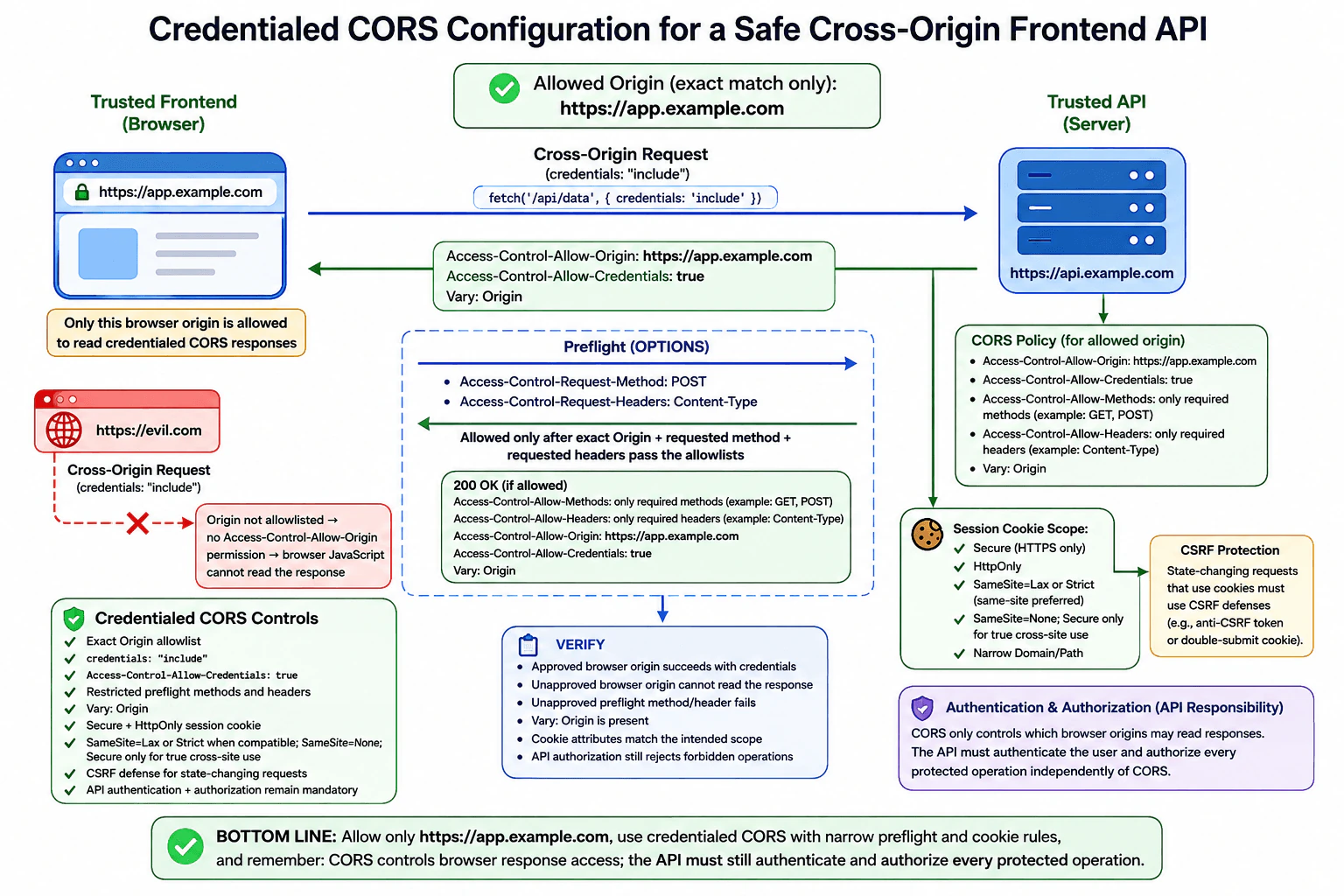
Credentials need special care. For Fetch, credentials include cookies, TLS client certificates, and HTTP authentication credentials. A cross-origin Fetch request that needs credentials such as cookies commonly uses credentials: "include". For the browser to expose a credentialed cross-origin response, the server must return Access-Control-Allow-Credentials: true and must return a specific permitted origin in Access-Control-Allow-Origin; it cannot use * for that credentialed response.

CORS does not override cookie policy. Cookies are separately controlled by attributes such as Secure, HttpOnly, SameSite, Domain, and Path. Whether a cookie is actually sent therefore depends on cookie rules as well as the Fetch credentials mode. For cross-site cookie use, the cookie's SameSite policy is especially important.

Preflight permissions can be cached. A server may send Access-Control-Max-Age to tell the browser how long a successful preflight result may be reused, subject to browser-specific limits. This can reduce repeated OPTIONS requests and their extra latency. A long cache period can also delay the effect of a changed CORS policy until the cached permission expires.

When a server returns different Access-Control-Allow-Origin values depending on the request's Origin, it should send Vary: Origin. This tells HTTP caches that the response can vary according to the Origin request header and helps prevent cached CORS metadata for one origin from being incorrectly reused for another.

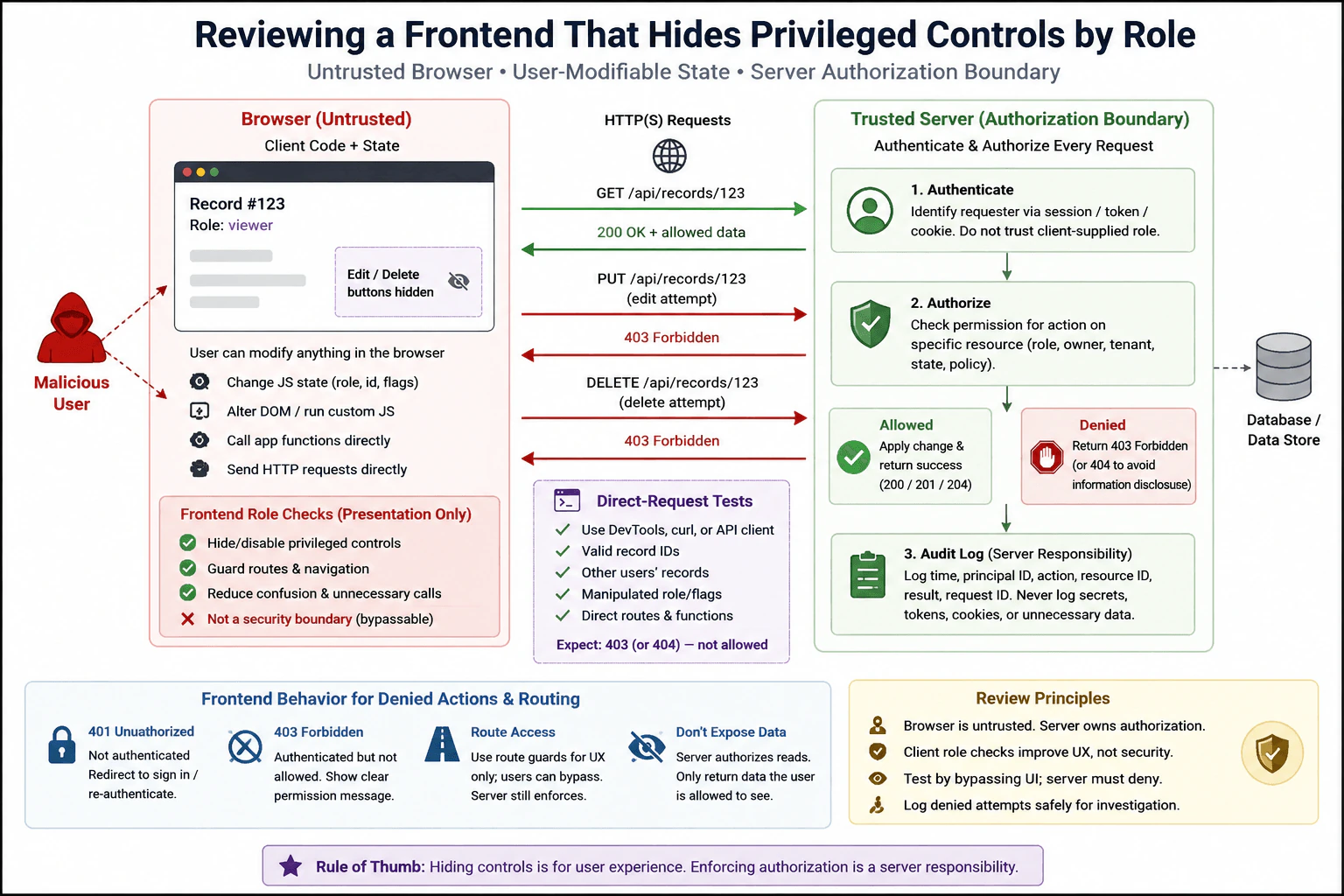
The most important security point is that CORS is not authentication. It does not prove who the user is. It is also not authorization. The trusted server must authenticate requests where required and enforce authorization for every protected resource and operation. A request coming from an allowed origin must not automatically be trusted.

CORS is also not a firewall. It does not generally prevent HTTP requests from reaching a server. CORS enforcement is mainly performed by browsers when scripts make cross-origin requests and try to access the results. Tools such as curl, backend services, native applications, and other non-browser clients do not become unable to call an API simply because its CORS policy would reject a browser origin. The server must therefore protect sensitive endpoints with real server-side security controls.

CORS should also not be confused with CSRF. CORS primarily governs cross-origin browser access to responses and introduces preflight checks for certain cross-origin requests. CSRF is an attack in which a victim's browser is induced to perform an unwanted authenticated action. Appropriate CSRF defenses can include SameSite cookies, anti-CSRF tokens, and server-side Origin or Referer validation where suitable. CORS alone is not a complete CSRF defense.

The practical rule is: allow only the browser origins that need cross-origin access, allow only necessary methods and headers, enable credentials only when needed, cache preflight results carefully, and keep authentication and authorization on the trusted server. Then verify the policy from both permitted and unpermitted origins.

Technical Approach
  1. Identify the frontend origin and API origin. If their scheme, host, or port differs, the browser request is cross-origin.
  2. Decide exactly which browser origins need access and maintain a strict server-side allowlist.
  3. Determine whether each request qualifies as a simple request or requires preflight because of its method, headers, or Content-Type.
  4. Return only the required CORS response headers for approved origins, methods, and headers.
  5. Enable credentialed cross-origin access only when necessary, use a specific allowed origin rather than *, and configure credentials consistently on the browser and server.
  6. Keep authentication, authorization, validation, and CSRF protections independent of CORS.
  7. Configure preflight caching carefully and send Vary: Origin when the response's allowed origin varies by request Origin.
  8. Test permitted and unpermitted origins, simple requests, preflighted requests, credentialed requests, and authorization failures.
Practical Insights

CORS itself usually adds little application CPU or memory work. A simple cross-origin request does not require an extra preflight network round trip. A preflighted request can add an OPTIONS request before the real request, increasing latency and server traffic. Successful preflight results can be cached to reduce that cost. The main operational cost is maintaining correct origin, method, header, credential, and cache policies across environments. CORS configuration also needs testing because a policy that is too strict can break legitimate browser clients, while a policy that is too broad can expose responses to unintended browser origins.

Why Interviewers Ask This

Interviewers want to know whether you understand the browser same-origin policy, how a server selectively relaxes it with CORS response headers, when preflight requests occur, how credentials and preflight caching affect the policy, and where the real security boundary exists. A strong answer also makes clear that CORS does not authenticate users, does not replace server-side authorization, and does not prevent non-browser HTTP clients from contacting an API.

Common interview mistakes

Common mistakes include saying CORS blocks all cross-origin network requests; confusing the same-origin policy with a rule that prevents all requests from being sent; treating Access-Control-Allow-Origin: * as appropriate for every API; blindly reflecting any Origin value; attempting to use wildcard Access-Control-Allow-Origin with credentialed requests whose credentials mode is include; forgetting that cookies have separate SameSite, Secure, HttpOnly, Domain, and Path rules; forgetting Vary: Origin when the allowed origin is selected dynamically; assuming a successful preflight authenticates or authorizes a user; treating CORS as a complete CSRF defense; and assuming CORS prevents curl, backend services, native applications, or other non-browser clients from contacting the API.

Interview tip

Start with the same-origin policy, then define CORS as the server-controlled HTTP-header mechanism that selectively permits cross-origin browser reads. Explain simple requests and preflight, then cover origins, methods, headers, credentials, and preflight caching. Finish by stating clearly that CORS is neither authentication nor authorization and that the trusted server must enforce access control.
Interviewer may ask next
What is a CORS preflight request, and when does the browser send one?

A CORS preflight is an OPTIONS request that the browser sends before a cross-origin request that does not qualify as a simple request. The preflight includes the request Origin and intended method and can list the non-safelisted headers the real request wants to send. The server replies with CORS headers describing what it permits. If the required permission is not granted, the browser does not send the actual preflighted request. Successful preflight results may be cached using Access-Control-Max-Age, subject to browser limits.

Why does allowing an origin with CORS not mean that users from that origin are authorized?

CORS and authorization solve different problems. CORS tells a browser whether JavaScript from an origin may access a cross-origin response. Authorization tells the trusted server whether a particular authenticated user or client is allowed to perform an operation on a resource. An allowed origin can serve many users with different permissions and can also contain compromised or third-party code. The server must therefore authenticate where required and enforce authorization on every protected operation regardless of the CORS result. Non-browser clients can also contact the server without browser CORS enforcement.

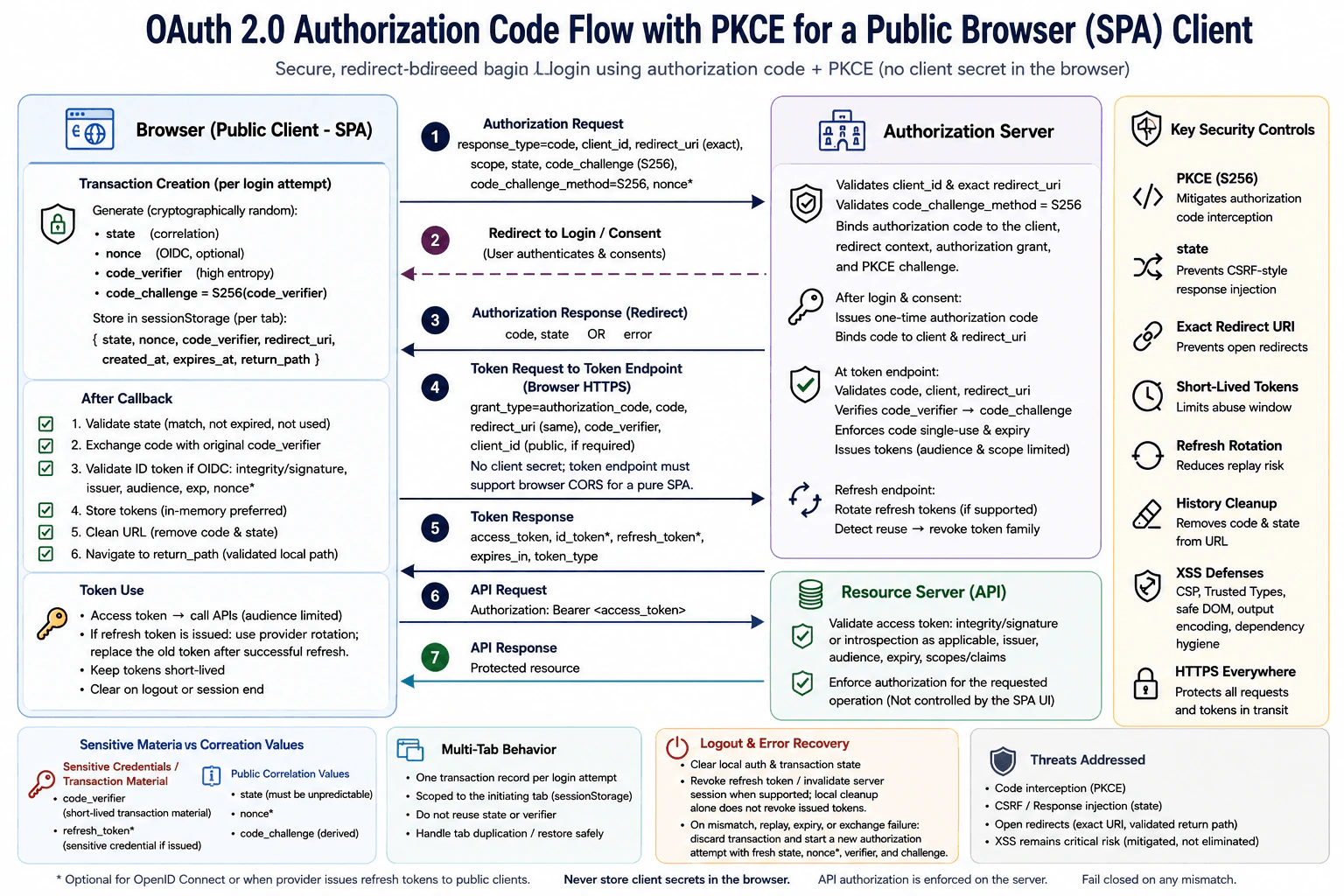
112. How would you choose a session design for a browser application using bearer tokens?SecurityMedium

Question Details

The application currently stores a long-lived access token in localStorage, attaches it to API requests, and refreshes it with another JavaScript-readable token. Compare the threat from XSS, token exfiltration, CSRF, tab persistence, refresh replay, and logout. Propose a browser/server trust boundary using short lifetimes, rotation or secure cookies as appropriate, in-memory state, and server-side revocation. Include page refresh, multiple tabs, and failure behavior without claiming any storage option eliminates XSS.

Short Interview Answer (30-60 seconds)

I would keep short-lived access tokens in memory and use a Secure, HttpOnly, SameSite cookie for a rotating refresh credential. The server handles authorization, replay detection, revocation, and logout. This reduces token theft and persistence, but strong XSS defenses are still required.

Detailed Explanation

The application needs a safer way to remember that a person has signed in. Right now, important login credentials stay in browser storage for a long time, where harmful code running on the page could copy them. I would reduce how long those credentials remain useful, avoid keeping the most valuable credential where page code can read it, and let the server control renewal and logout. The design must also work after a page reload, across several open tabs, and when renewal fails, without pretending that any browser storage choice makes harmful page code harmless.

Useful Questions to Ask the Interviewer
  1. Is the browser application and API on the same site, or must they work across different sites or subdomains?
  2. Must users remain signed in after closing and reopening the browser, or only during the current browser session?
  3. Do we need immediate server-side logout and session revocation, for example after account compromise or a password change?
  4. Can the backend own a refresh-session endpoint and store refresh-session state for rotation and replay detection?
  5. Are multiple tabs expected to share one signed-in session?
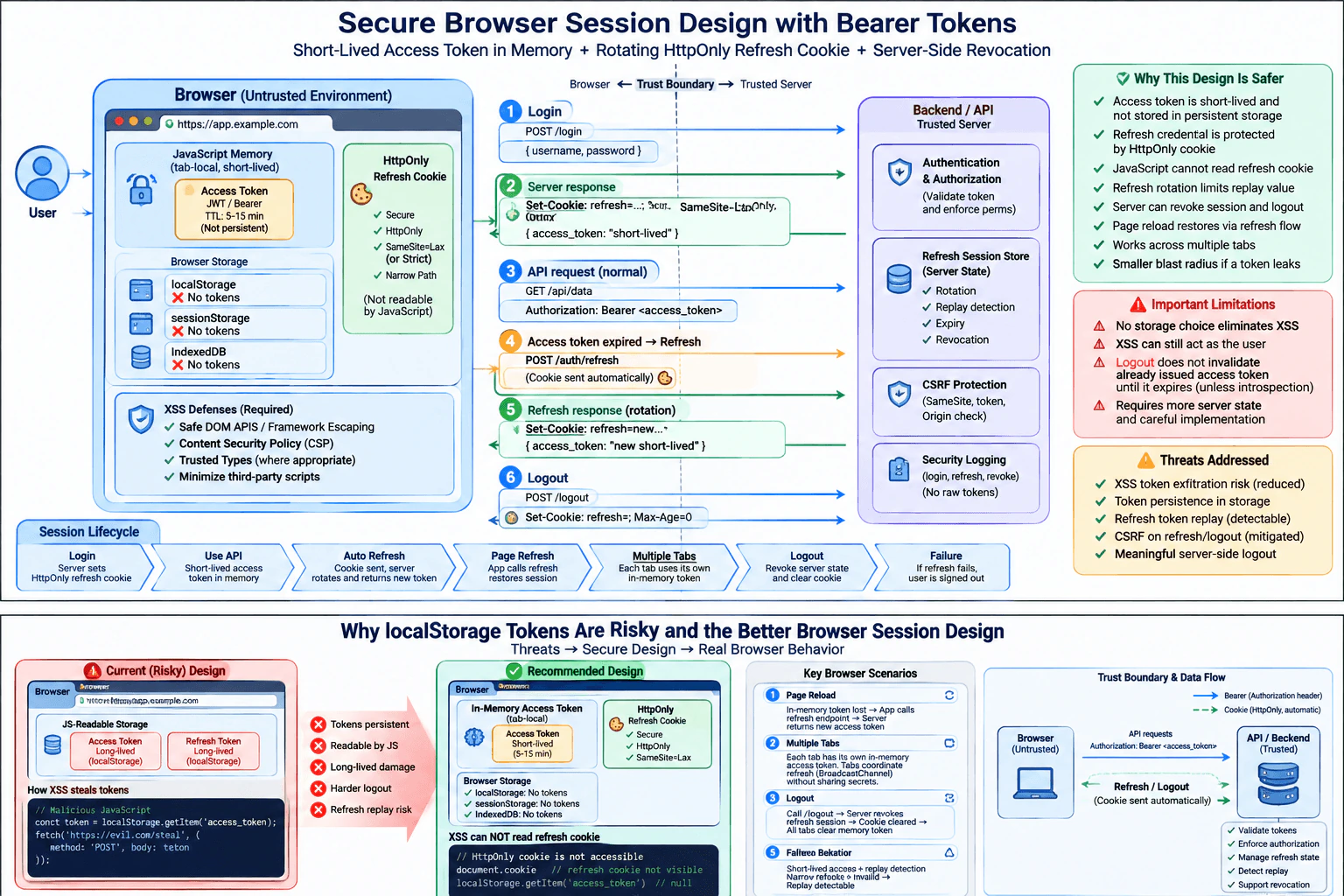
How would you choose a session design for a browser application using bearer tokens? diagram
How to Explain It in an Interview

I would start by separating authentication from authorization. Authentication establishes who the user is. Authorization decides whether that user may perform a specific action. The browser can present credentials, but the trusted server must validate them and enforce authorization for every protected operation. Possessing a valid bearer token must not be treated as permission to perform arbitrary actions.

The current design has two important weaknesses. First, the long-lived access token is stored in localStorage. JavaScript executing in the same origin can read localStorage, so an XSS vulnerability or compromised same-origin script could exfiltrate that token. Second, the refresh token is also JavaScript-readable. If an attacker steals it, the attacker may be able to obtain new access tokens for much longer than the original access token's lifetime.

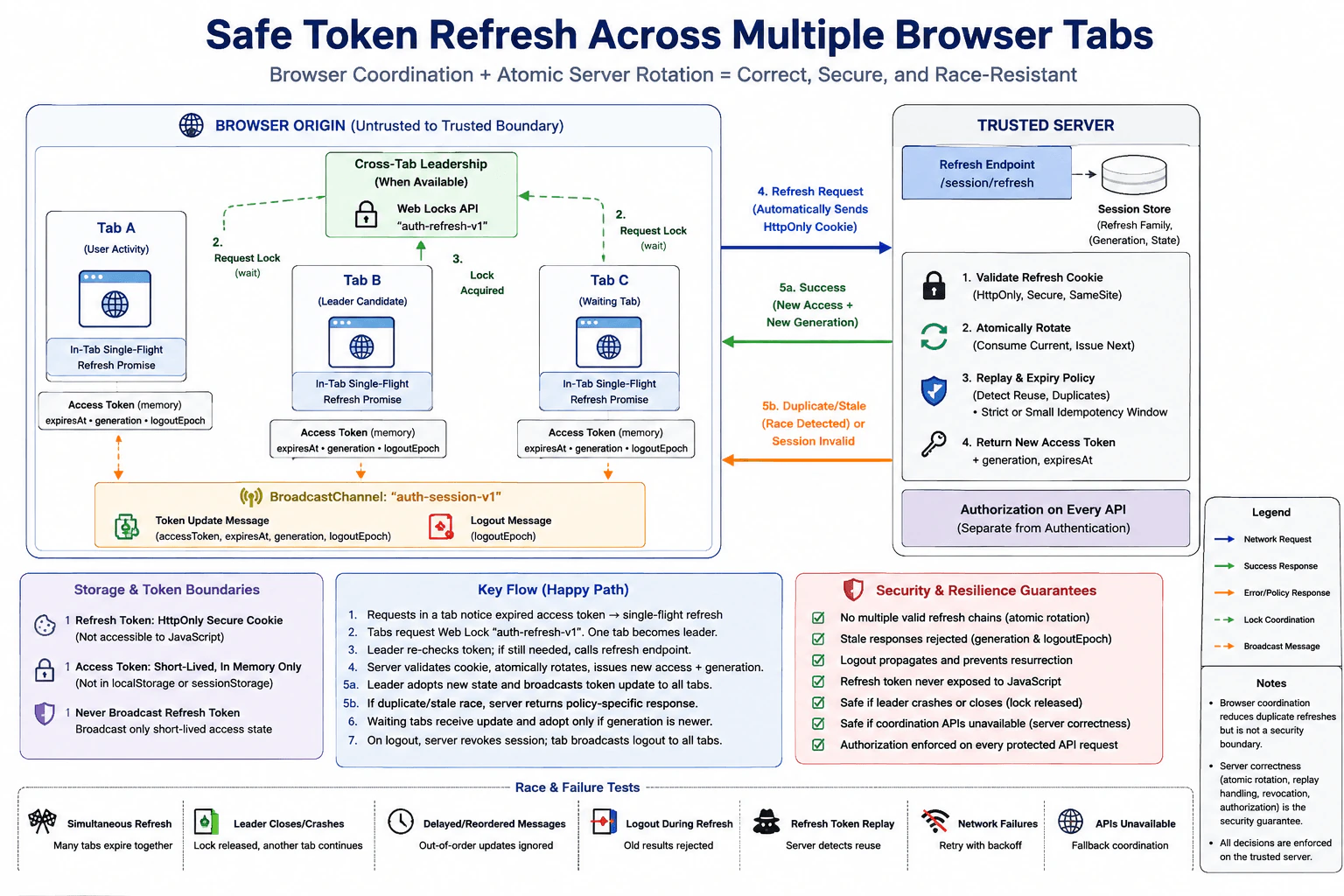
My preferred design is a short-lived access token held only in JavaScript memory, combined with a server-managed refresh credential in a Secure, HttpOnly cookie. The access token would normally live for only a few minutes. JavaScript attaches it to API requests with an Authorization: Bearer header. Because it is held only in memory, a normal page reload removes that tab's copy, and closing the browser does not persist the access token itself.

The refresh credential is different. I would put it in a cookie configured with Secure so it is sent only over HTTPS and HttpOnly so normal JavaScript cannot directly read the cookie value. I would also choose an appropriate SameSite policy. SameSite=Lax or SameSite=Strict can substantially reduce cross-site request forgery when the application flow permits those settings. If genuine cross-site cookie use requires SameSite=None, the cookie must also be Secure, and explicit CSRF protection becomes especially important.

I would scope the cookie as narrowly as practical. I would avoid an unnecessarily broad Domain attribute and use an appropriate Path. If the deployment allows it, limiting the refresh cookie to the refresh-session path reduces where the browser sends it. The server must never expose the refresh credential back to JavaScript.

On initial login, the server authenticates the user, creates server-side refresh-session state, sends the protected refresh cookie, and returns a short-lived access token to the frontend. The frontend keeps that access token only in memory.

For normal API requests, the frontend sends the short-lived access token in the Authorization header. Browsers do not automatically add an application's bearer Authorization header to an attacker-controlled cross-site form submission, so this part is generally less exposed to classic CSRF than cookie-authenticated state-changing requests. However, CORS is not authentication or authorization. The API must still validate the access token, including its integrity, expiry, issuer and audience where applicable, and then enforce authorization for the requested resource and action.

When the access token expires, the frontend calls the refresh endpoint. The browser automatically includes the HttpOnly refresh cookie. The server validates the refresh session, verifies that it is active and not revoked, rotates the refresh credential, invalidates the previous refresh credential, updates the protected cookie, and returns a new short-lived access token. Rotation means a successfully used refresh credential should not remain indefinitely reusable.

Refresh replay needs explicit handling. The server should keep enough state to recognize reuse of an already-rotated credential. A common design stores a hash or other non-secret verifier for the current refresh credential together with a session or token-family identifier, expiry, and revocation state. If a credential that should already be invalid appears again outside an accepted concurrency window, the server should reject it and can revoke the affected session or token family according to the application's risk policy.

The refresh endpoint is cookie-authenticated, so I would analyze CSRF separately. SameSite is useful but should not be described as universal protection. Depending on the deployment, the server can also require a CSRF token or another explicit request-verification mechanism for cookie-authenticated state-changing operations. Validating Origin for HTTPS browser requests can provide an additional check when appropriate. CORS must not be described as a complete CSRF defense because it mainly governs whether cross-origin JavaScript may read responses and use certain request patterns; it is not a substitute for authentication, authorization, or CSRF validation.

A page refresh intentionally removes the in-memory access token. When the application starts again, it enters an authentication-loading state and calls the protected refresh endpoint. If the refresh session is still valid, the server safely renews or rotates the refresh credential and returns a fresh access token. Only after that succeeds should the client consider the authenticated session restored. If it fails, the application should become signed out rather than trusting stale client-side state.

Multiple tabs need special handling because each tab has its own JavaScript memory while cookies are shared by the relevant browser context. I would not solve this by putting a long-lived bearer token back into localStorage. Each tab can bootstrap its own short-lived in-memory access token through the protected refresh flow. However, two tabs may attempt refresh at nearly the same time and both initially send the same cookie value before rotation completes. The server must have a defined concurrency policy, such as a very small grace mechanism tied to the same session, or the tabs can coordinate refresh activity using a non-secret mechanism such as BroadcastChannel. The design must distinguish expected near-simultaneous use from true replay.

If tabs coordinate, I would share only non-secret events such as 'session refreshed' or 'logged out' unless there is a carefully justified reason to share an access token. I would never broadcast the refresh credential. Sharing bearer access tokens between tabs increases JavaScript exposure and weakens the benefit of keeping credentials isolated in tab memory.

Logout must be meaningful on the server, not just local cleanup. The frontend should call a logout endpoint that revokes the server-side refresh session or token family and expires the refresh cookie. It then removes its in-memory access token and clears user-specific client state. Other tabs can be notified through BroadcastChannel or another non-secret coordination mechanism so that they also clear authenticated state.

A previously issued self-contained access token may remain usable until its short expiry unless the application also checks access-token revocation, performs introspection, or uses another server-side mechanism that can invalidate it immediately. This is an important tradeoff. Very short access-token lifetimes limit that window, while server-side refresh-session revocation prevents the attacker or logged-out browser from obtaining further access tokens.

Server-side revocation is useful for explicit logout, password changes, administrator action, suspicious refresh replay, account compromise, or other security events. The server can store a session identifier, a hash or verifier for the current refresh credential, token-family state, expiry, and revocation status. Raw bearer credentials should not be kept in logs, and refresh credentials should preferably be stored in a form that does not expose the original secret when only comparison is required.

This architecture improves token exposure, but it does not eliminate XSS. An HttpOnly cookie prevents normal JavaScript from directly reading the refresh cookie value, but malicious JavaScript running in the application's origin can still act as the user while the page is open. It may call authenticated endpoints, read sensitive data available to the application, steal an access token already present in memory, or invoke the refresh endpoint and potentially observe the newly returned access token. Therefore the cookie changes what an XSS attacker can directly exfiltrate; it does not make XSS harmless.

For XSS prevention, I would prefer textContent, safe DOM APIs, and normal framework escaping when displaying untrusted text. I would not put untrusted values into innerHTML. If the product intentionally accepts HTML, I would sanitize it with a well-maintained HTML sanitizer and still use the correct output handling for the destination context. Input filtering alone is not sufficient protection.

I would also use a restrictive Content Security Policy to reduce opportunities for unauthorized script execution and use Trusted Types where appropriate to make dangerous DOM injection sinks harder to reach accidentally. These are defense-in-depth controls, not replacements for safe DOM construction and correct framework use.

Third-party scripts require special attention because scripts intentionally allowed to execute in the application's origin usually have powerful access to the page. I would minimize them, restrict allowed script sources with CSP, review why they are required, and manage package and supply-chain risk. Dependency scanning helps discover known vulnerable packages, but it does not eliminate XSS or malicious third-party-script risk.

Clickjacking is relevant when an attacker could frame authenticated UI and trick the user into interacting with it. I would prevent unauthorized framing with CSP frame-ancestors and use X-Frame-Options where compatibility requirements justify it.

I would never place session secrets in URLs. URLs can appear in browser history, server logs, analytics systems, screenshots, copied links, and referrer information. I would also never put server secrets, signing keys, private API credentials, or database credentials into frontend JavaScript because anything delivered to the browser must be treated as discoverable.

Browser storage choices also affect persistence and exposure. localStorage survives normal page reloads and commonly survives browser restarts until it is cleared, and it is readable by same-origin JavaScript. sessionStorage has a different lifetime and is scoped to a browsing context, but it is still JavaScript-readable. IndexedDB is also JavaScript-readable. Moving a bearer credential among these stores changes persistence and sharing behavior but does not remove XSS exposure.

Failure behavior should be predictable and fail closed. If refresh fails because the refresh session is expired, revoked, replayed, malformed, or otherwise invalid, the application should clear its in-memory authentication state, stop treating the user as authenticated, avoid indefinitely retrying protected requests, and return to a signed-out state. It may preserve non-sensitive unsaved UI state when appropriate, but it should not keep showing stale privileged information as though authentication were still valid.

I would also prevent refresh storms. Several API requests can discover an expired access token at almost the same time. Within one tab, the frontend can collapse those events into one in-flight refresh operation. Waiting requests depend on that result. If refresh succeeds, eligible requests can retry once with the new access token. If refresh fails, all waiting requests fail safely instead of creating an infinite refresh loop.

Security logging belongs mainly on the trusted server. I would log security-relevant events such as login, logout, refresh failure, replay detection, revocation, and unusual session behavior using non-secret session identifiers or other safe references. I would not log passwords, raw access tokens, refresh credentials, complete Authorization headers, or other reusable secrets.

Finally, I would verify the design. I would check that localStorage, sessionStorage, and IndexedDB do not contain long-lived bearer credentials; JavaScript cannot read the HttpOnly refresh cookie; the cookie has the intended Secure, SameSite, Domain, and Path behavior; expired access tokens are rejected; refresh rotation invalidates old credentials; replay triggers the intended response; CSRF attempts against cookie-authenticated endpoints fail; logout revokes server state; page refresh restores a valid session correctly; concurrent tabs behave according to the documented policy; failed refresh signs the user out safely; raw credentials never appear in logs; and CSP or Trusted Types violations can be observed during testing.

The central tradeoff is complexity. This design requires more server state and more careful handling than storing two long-lived tokens in localStorage. The backend must support rotation, revocation, concurrency rules, cookie configuration, and replay detection. The frontend must manage temporary in-memory state, page bootstrap, refresh deduplication, and tab behavior. In return, long-lived credentials are no longer directly available through JavaScript-readable persistent storage, stolen access tokens have shorter value, refresh replay becomes detectable, and the trusted server has much stronger control over session termination.

Technical Approach
  1. Identify which credentials JavaScript can currently read, where they persist, and how long each remains useful.
  2. Make the trusted server authoritative for authentication state, authorization, refresh-session validity, rotation, replay detection, and revocation.
  3. Replace the long-lived localStorage access token with a short-lived access token held only in memory.
  4. Store the refresh credential in a Secure, HttpOnly cookie with the narrowest practical Domain and Path and an appropriate SameSite policy.
  5. Protect cookie-authenticated refresh and logout endpoints against CSRF according to the actual same-site or cross-site deployment model.
  6. Rotate refresh credentials after successful use and maintain server-side state sufficient to detect invalid reuse.
  7. Define a concurrency policy so legitimate near-simultaneous refreshes from multiple tabs are not confused with true replay.
  8. On page load, restore authentication through the protected refresh flow rather than persistent JavaScript-readable bearer storage.
  9. Keep access tokens tab-local when practical and coordinate only non-secret session events across tabs.
  10. Make logout revoke the server-side refresh session and expire the cookie, then clear client memory and notify other tabs without transmitting secrets.
  11. Fail closed when refresh is expired, revoked, replayed, or invalid, and prevent infinite retries and refresh storms.
  12. Reduce XSS risk with safe DOM construction, framework escaping, contextual output handling, sanitization only for intentionally allowed HTML, CSP, Trusted Types where appropriate, and careful control of third-party scripts and dependencies.
  13. Verify token lifetime, cookie flags, rotation, replay detection, authorization, CSRF behavior, logout, page refresh, multi-tab behavior, failure handling, and secret-free logging.
Practical Insights

Normal browser work is small. Attaching an access token to a request or checking whether one refresh is already running is constant-time application work, and each tab keeps only a small amount of session data in memory. The larger cost is operational. The server must track refresh-session state, rotation, expiry, replay, and revocation, which adds database or cache reads and writes around refresh and logout. Multi-tab concurrency also adds design and test cases. Maintenance includes cookie policy, CSRF protection, XSS defenses, CSP, dependency review, monitoring, and incident response. This costs more engineering effort than a localStorage-only design but provides stronger control over credential lifetime, replay, and logout.

Why Interviewers Ask This

The interviewer wants to see whether the candidate can choose a browser session architecture by comparing real threats instead of treating localStorage, cookies, or bearer tokens as automatically secure or insecure. The candidate should understand XSS-driven token theft, CSRF, token lifetime, refresh-token rotation, replay detection, multiple-tab behavior, page reloads, logout, server-side revocation, browser trust boundaries, and the difference between authentication and authorization. The interviewer is also testing whether the candidate understands that no browser storage choice eliminates XSS and that the trusted server must enforce authorization.

Common interview mistakes

A common mistake is saying HttpOnly cookies eliminate XSS. They prevent normal JavaScript from directly reading the cookie value, but malicious same-origin JavaScript can still act as the user, call endpoints, read accessible data, and potentially obtain a newly returned access token. Another mistake is moving a long-lived bearer token from localStorage to sessionStorage or IndexedDB and calling the problem solved even though those stores remain JavaScript-readable. Candidates also confuse CORS with CSRF protection, forget that cookie-authenticated refresh and logout endpoints may need CSRF defenses, reuse refresh credentials without rotation or replay detection, treat legitimate multi-tab refresh races as definite theft, implement logout only by clearing frontend state, ignore still-valid access tokens after logout, broadcast secrets between tabs, treat authentication as authorization, log raw credentials, use unnecessarily broad cookie scope, create infinite refresh loops, put server secrets in frontend code, rely on input filtering as the complete XSS defense, or insert untrusted content with innerHTML.

Interview tip

Lead with the trust boundary and threat tradeoff: keep the access token short-lived and in memory, protect and rotate the refresh credential with an HttpOnly cookie, and make the server authoritative for authorization, revocation, and replay detection. Then cover page refresh, multiple tabs, logout, CSRF, XSS, and failure behavior. Explicitly say that no storage choice eliminates XSS.

Interviewer may ask next
Why not store both the access token and refresh token in localStorage if CSP is enabled?

Because localStorage is readable by JavaScript executing in the application's origin. CSP can reduce some ways unauthorized scripts execute, but it does not guarantee that XSS, a compromised allowed script, or malicious supply-chain code can never run. If such code executes, it can read and exfiltrate both localStorage tokens. A stolen long-lived refresh token is especially valuable because it can extend access. Keeping the access token short-lived and in memory reduces persistence, while putting the refresh credential in a Secure, HttpOnly cookie prevents normal JavaScript from directly reading that credential. The application still needs CSP, safe DOM construction, Trusted Types where appropriate, framework escaping, and third-party dependency controls because an XSS attacker can still act as the user.

How would you handle two tabs refreshing at the same time when refresh tokens rotate after every use?

I would define concurrency behavior as part of the refresh protocol. Two tabs may send the same current cookie value almost simultaneously before either response updates the shared cookie, so a second request is not automatically proof of theft. The server can support a tightly bounded concurrency or grace policy associated with the same session, or the tabs can coordinate refresh activity with a non-secret mechanism such as BroadcastChannel so only one refresh is normally in flight. The refresh credential itself is never broadcast. Reuse outside the documented concurrency behavior should be rejected as replay and can revoke the affected session or token family. If refresh ultimately fails, every affected tab should clear authenticated state and fail safely rather than retry indefinitely.

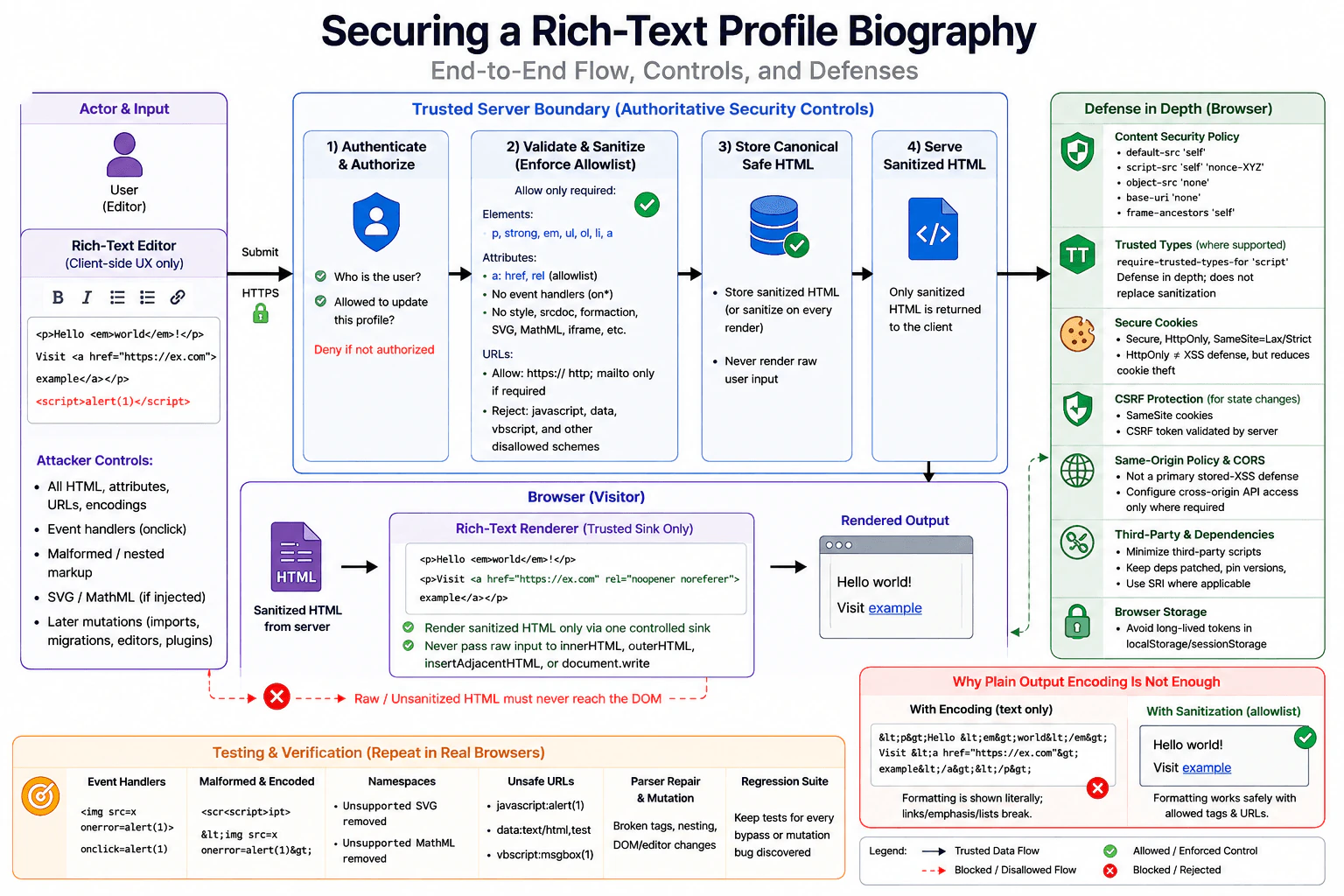
113. Design a Trusted Types rollout for a legacy frontend with many HTML sinks.SecurityHard

Question Details

The application has hundreds of innerHTML and insertAdjacentHTML calls, a reviewed rich-text sanitizer, third-party widgets, and a report-only CSP. Design an inventory and migration that introduces named Trusted Types policies, limits policy creation, replaces plain-text sinks with safe DOM APIs, and routes intentional HTML through one audited sanitizer. Cover framework escape hatches, browser support and fallback, violation reporting, test payloads, ownership, staged enforcement, and the risk of a permissive default policy hiding unresolved injection paths.

Short Interview Answer (30-60 seconds)

I would inventory HTML sinks, replace text-only cases with safe DOM APIs, and route intentional HTML through one audited sanitizer and narrowly named Trusted Types policies. I would restrict policy creation with CSP, monitor report-only violations, assign owners, test XSS payloads, and enforce gradually without a permissive default policy.

Detailed Explanation

This question asks how to make an old web application safer when many parts of it can place generated content directly onto the page. The goal is not to change everything at once. First, find every risky place and decide whether it really needs formatted content. Simple text should use safer methods. Content that truly needs formatting should pass through one carefully reviewed cleaning path. Changes should be introduced gradually, measured for breakage, assigned to clear owners, and tested before stronger protection is turned on. Shortcuts that silently allow old unsafe behavior should be avoided.

Useful Questions to Ask the Interviewer
  1. Which browsers must the application support, and can Trusted Types enforcement initially target browsers that support it?
  2. Which rich-text sanitizer has already been reviewed, and what elements, attributes, and URL schemes is it intentionally allowed to preserve?
  3. Which third-party widgets and framework escape hatches currently write raw HTML, and which of those integrations can be changed or upgraded?
  4. Is there already a CSP reporting endpoint and an ownership process for assigning violations to teams?
  5. Can enforcement be rolled out by route, application area, or deployment cohort instead of enabling it everywhere at once?
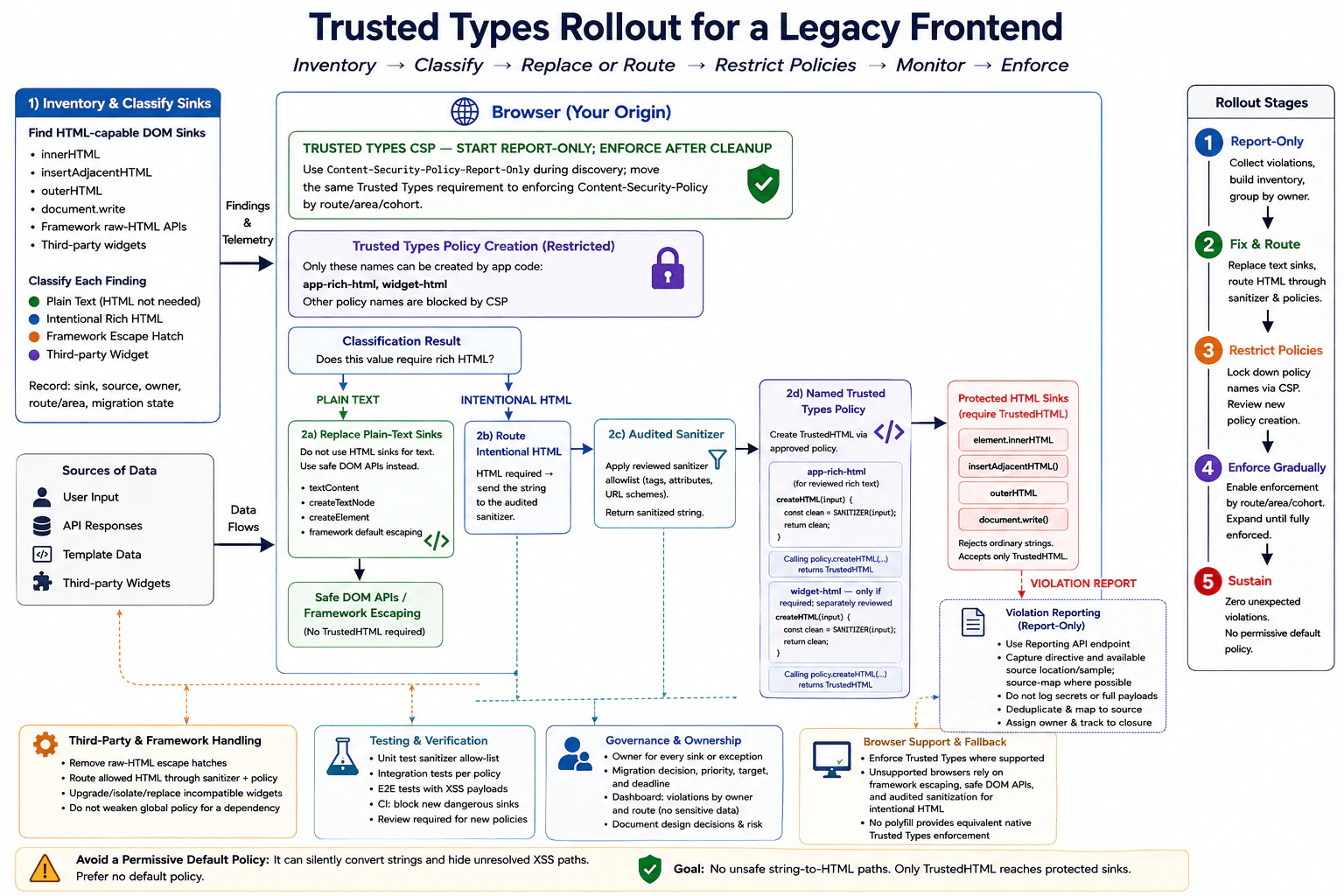
Design a Trusted Types rollout for a legacy frontend with many HTML sinks. diagram
How to Explain It in an Interview

The main threat is cross-site scripting, especially DOM-based XSS, where attacker-controlled data reaches an HTML-capable browser sink. Trusted Types adds a browser-enforced type boundary around supported injection sinks. When require-trusted-types-for 'script' is enforced, those sinks cannot normally accept arbitrary strings. Trusted Types does not sanitize content by itself. The important trust boundary is the small amount of reviewed code allowed to create trusted values such as TrustedHTML.

I would start with an inventory. Static analysis should find direct HTML-writing APIs such as innerHTML, outerHTML, insertAdjacentHTML, and document.write, plus framework APIs that intentionally bypass normal escaping. I would combine that with Trusted Types violations collected through the existing report-only CSP because runtime reports can reveal dynamically executed paths, lazy-loaded features, and third-party code that static searches miss.

Every finding should record the sink, the source of its value, its owning team, whether HTML is truly required, and its migration state. I would classify sinks into four useful groups: plain text, intentional rich HTML, framework escape hatches, and third-party code. That classification determines the fix instead of blindly wrapping every sink in a Trusted Types policy.

For plain text, I would remove the HTML sink. Use textContent, createTextNode, normal DOM element creation, or the framework's ordinary escaped rendering. Attribute and URL values need their own context-specific handling. For example, using a non-event attribute API does not make an unsafe URL trustworthy; URL-bearing attributes still require an allowed destination and scheme. HTML sanitization is not a universal replacement for contextual output encoding or validation.

For content that intentionally needs rich HTML, I would create one audited sanitization path around the application's existing reviewed sanitizer. The sanitizer should use an explicit policy for the HTML that the product intentionally allows, including appropriate handling of elements, attributes, and URL schemes. Only the sanitized result should be converted to TrustedHTML. Application features should call this reviewed boundary rather than directly creating trusted values themselves.

I would keep the number of Trusted Types policies small. Named policies should represent genuine trust boundaries, not individual components. For example, the application might have one named policy for reviewed rich-text HTML and, only when unavoidable, a separately reviewed policy for a specific integration with different requirements. The CSP trusted-types directive should list the permitted policy names so unrelated code cannot create arbitrary named policies.

I would be especially careful with the default policy. When a Trusted Types default policy exists, the browser can invoke it when a string is passed to a protected sink. A permissive default policy that returns strings unchanged or performs weak transformation can make legacy code appear compatible while unresolved injection paths remain. That hides migration work and weakens the security boundary. I would therefore avoid a permissive default policy. If a temporary default policy is used only as a migration aid, it should not blindly trust input, should be tightly reviewed and observable, and should have an explicit removal plan.

The rollout should begin with report-only behavior rather than immediate enforcement. Add the Trusted Types requirement to the report-only CSP and collect violations centrally. Reports should contain enough information to identify the sink and source location but should avoid unnecessarily recording secrets, tokens, personal information, or complete attacker-controlled values. Reports should be deduplicated, correlated with source maps where available, grouped by component or owner, and tracked until each production path is fixed or explicitly reviewed.

Framework escape hatches need explicit migration. Normal framework templates usually escape text, while raw-HTML APIs deliberately bypass that protection. Each raw-HTML path should be removed when HTML is unnecessary or changed so its value comes from the same audited sanitization and TrustedHTML boundary. A framework API that says a value is intentionally raw HTML is not proof that the value is actually safe.

Third-party widgets require their own compatibility review because they may assign strings to protected sinks internally. First, upgrade or configure the widget if its current version supports Trusted Types. If application code controls the integration, route only the necessary HTML through a narrowly reviewed boundary. If the widget cannot be made compatible, isolate it where practical or replace it. I would not add a broad default policy or weaken the application's global Trusted Types restrictions merely to keep one widget working. Third-party scripts remain a supply-chain risk because code executing in the application's origin may be able to use any Trusted Types policy creation paths that CSP and application code expose.

Browser support is a defense-in-depth issue. Browsers that implement Trusted Types can enforce the sink restriction. Browsers without that enforcement must still remain safe because the underlying application uses framework escaping, safe DOM construction, contextual handling, and sanitization when HTML is intentionally allowed. A compatibility layer cannot provide the same browser-enforced security boundary in a browser that does not implement Trusted Types, so the fallback is the secure rendering design itself rather than reliance on a polyfill for equivalent protection.

Testing should verify both security and product behavior. Unit-test the sanitizer against the HTML that must remain allowed. Add integration tests around each trusted rendering boundary and end-to-end tests with representative XSS payloads. Useful cases include script elements, inline event handlers, dangerous URL schemes, malformed markup, parser edge cases, and SVG-related payloads when SVG is within the sanitizer's supported content. The tests should prove that dangerous behavior cannot execute while expected rich-text formatting still renders correctly.

Ownership prevents report-only mode from becoming permanent. Every violation should have a component or team owner, migration decision, priority, and target state. CI should detect newly introduced dangerous sinks through linting or static analysis. Creation of new Trusted Types policies should require review because every policy expands the trusted code surface. A migration dashboard can track unresolved violations by owner and application area without exposing sensitive payload data.

Enforcement should be staged. First establish the inventory and reporting. Next remove unnecessary HTML sinks and centralize intentional HTML through the sanitizer. Then restrict policy creation to the reviewed named policies. Once a route, application area, or deployment cohort produces no unexpected violations, enable require-trusted-types-for 'script' there with an enforcing CSP. Expand coverage gradually until the application is fully enforced. If deployment must be rolled back, roll back or narrow that enforcement stage instead of introducing a policy that accepts arbitrary strings.

CSP and Trusted Types complement each other. CSP controls such as script restrictions reduce which code can execute, while Trusted Types reduces the chance that strings reaching supported injection sinks become executable markup. Neither mechanism replaces the trusted server's authorization checks. Authentication establishes who a user is; authorization decides what that user may do, and the server must enforce it. CSRF protection, secure cookies, CORS, the same-origin policy, clickjacking controls, browser storage rules, dependency controls, privacy protections, and secret handling remain important at their own boundaries when relevant, but they do not replace the sink migration described here. Server secrets and long-lived credentials must never be placed in frontend code.

The rollout succeeds when normal features still work, expected rich text survives the audited sanitizer, representative attack payloads cannot execute, production Trusted Types violations reach zero or a small explicitly reviewed exception set, unauthorized policy creation is blocked, and enforcing CSP can remain enabled without depending on a permissive default policy. Logs and reports should support investigation without recording secrets or unnecessary sensitive data.

Technical Approach
  1. Inventory Trusted Types-relevant DOM sinks with static analysis and report-only runtime telemetry.
  2. Classify each finding as plain text, intentional HTML, framework escape hatch, or third-party code, and assign an owner.
  3. Replace plain-text HTML writes with textContent, DOM construction, or normal framework escaping.
  4. Route intentional HTML through the single reviewed sanitizer and convert only its sanitized output to TrustedHTML.
  5. Keep the Trusted Types policy set small and use descriptive names for genuine trust boundaries.
  6. Restrict allowed policy names with the CSP trusted-types directive.
  7. Upgrade, adapt, isolate, or replace incompatible framework escape hatches and third-party widgets instead of weakening the global policy.
  8. Collect and triage violations through report-only CSP without logging secrets or unnecessary sensitive values.
  9. Add sanitizer tests, representative XSS tests, integration tests, CI checks for new dangerous sinks, and review requirements for new policy creation.
  10. Enable require-trusted-types-for 'script' gradually for clean routes or cohorts and expand enforcement until the application no longer depends on unsafe string-to-HTML paths or a permissive default policy.
Practical Insights

The browser cost of replacing text-only HTML writes with safe DOM APIs is usually small. Sanitizing intentional HTML takes work roughly related to the size and structure of the markup, so very large rich-text values should not be sanitized repeatedly without need. The biggest cost is operational: hundreds of sinks must be found, classified, assigned, changed, tested, and monitored. Centralizing sanitization and keeping only a few named policies creates migration work at first but reduces long-term security review and maintenance. Violation reporting also needs storage, deduplication, source-location mapping, privacy controls, and an ownership workflow.

Why Interviewers Ask This

This question tests whether the candidate can migrate a large legacy frontend toward stronger XSS prevention without breaking the application. It evaluates understanding of dangerous DOM sinks, Trusted Types, CSP policy restrictions, sanitization boundaries, framework escape hatches, third-party compatibility, browser support, violation reporting, testing, ownership, staged enforcement, and the security risk of using a permissive default policy as a compatibility shortcut.

Common interview mistakes

Common mistakes include enabling enforcement before building an inventory; wrapping every old sink in a Trusted Types policy instead of removing unnecessary HTML writes; creating many policies that unnecessarily enlarge the trusted code surface; duplicating sanitization rules across policies; assuming Trusted Types sanitizes content automatically; treating a framework raw-HTML escape hatch as proof that content is safe; assuming setAttribute makes every attribute value safe regardless of context; treating a polyfill as equivalent to native browser enforcement; weakening the global policy for an incompatible third-party widget; logging complete attacker-controlled or sensitive values in violation reports; failing to assign owners and deadlines; testing only successful rendering; and keeping a permissive default policy that silently converts unresolved strings and hides remaining injection paths.

Interview tip

Present this as a migration of trust boundaries, not as simply turning on a CSP directive. Walk through inventory, classification, safe sink replacement, one audited sanitizer, restricted named policies, framework and third-party migration, reporting, ownership, testing, browser fallback, and staged enforcement. Explicitly explain why a permissive default policy can hide unresolved XSS paths.

Interviewer may ask next
Why is a permissive default Trusted Types policy dangerous during migration?

A default policy can be called when an ordinary string is passed to a Trusted Types-protected sink. If that policy simply returns the string or performs weak transformation, legacy injection paths keep working and their failures may disappear from the migration signal. That creates a compatibility bypass rather than a meaningful trust boundary. Prefer fixing each sink and using explicit named policies. If a temporary default policy is used for migration support, it should not blindly trust input, should be observable and tightly reviewed, and should have a firm removal plan.

How would you handle a third-party widget that still assigns strings to innerHTML after the rest of the application is ready for enforcement?

First check whether a current widget version or supported configuration works with Trusted Types. If application code controls the integration, adapt the smallest possible boundary so intentional HTML goes through the reviewed sanitizer and an approved named policy. If the widget cannot be made compatible, isolate it where practical or replace it. I would not add a broad default policy or globally weaken policy restrictions for that dependency. Any temporary exception should have a clear owner, narrow scope, monitoring, tests, and a removal plan.

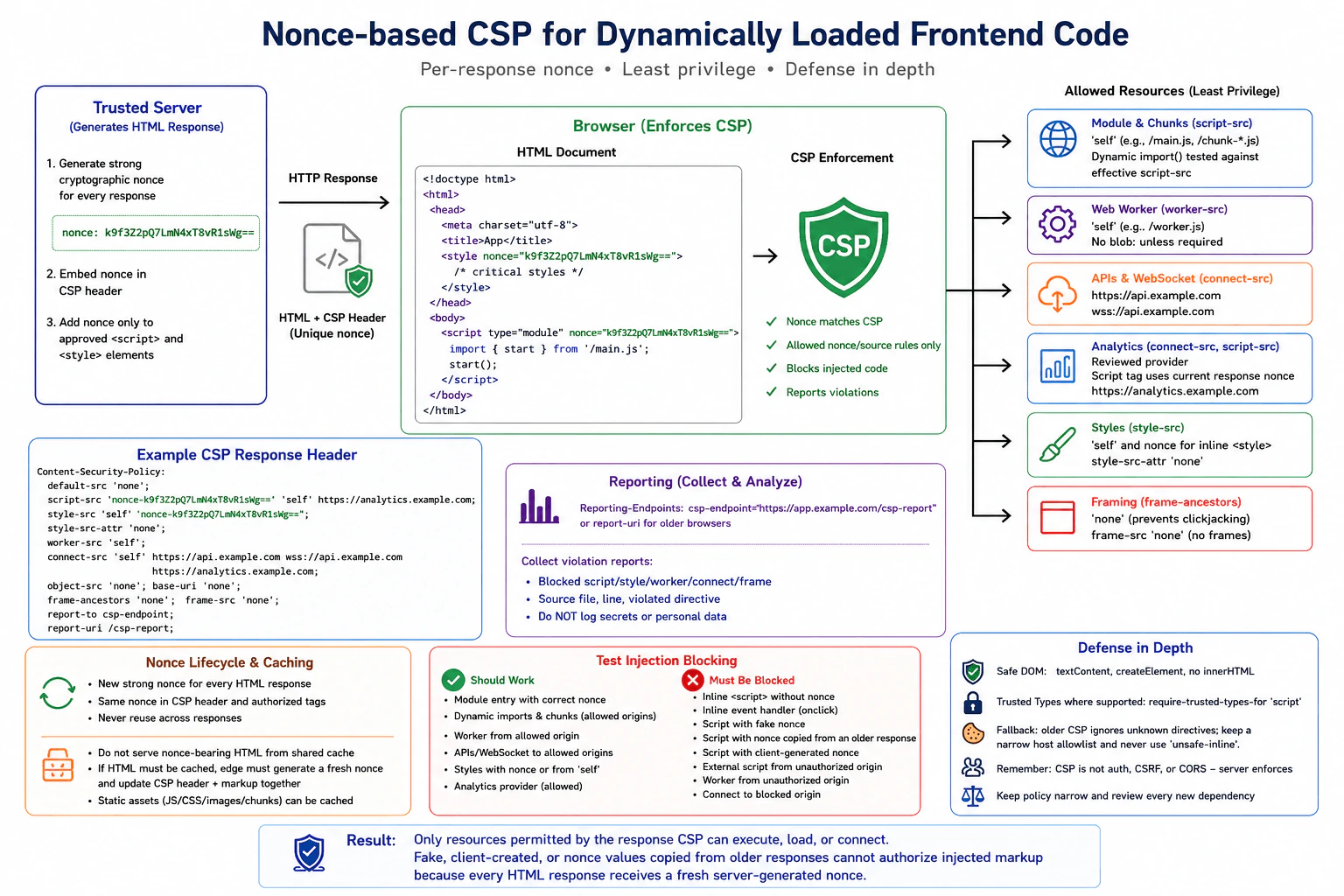
114. Design a nonce-based CSP for dynamically loaded frontend code.SecurityHard

Question Details

The application serves server-generated HTML, loads ES modules and dynamic imports, starts a worker, applies styles, connects to APIs, and includes one reviewed analytics provider. Define the response-generated nonce lifecycle, relevant CSP directives, module and chunk loading behavior, worker and connection origins, style strategy, frame restrictions, reporting, caching constraints, and fallback for unsupported features. Explain how to test injection blocking while ensuring that a reusable or client-generated nonce cannot authorize attacker markup.

Short Interview Answer (30-60 seconds)

I generate one strong nonce on the server for each HTML response and put it in both the CSP header and approved tags. I then restrict modules, workers, styles, APIs, framing, and analytics, prevent nonce-bearing HTML reuse, and test that fake, old, or client-created nonce values cannot authorize injected code.

Detailed Explanation

This question asks how to give each page response a fresh approval value that lets the browser run only code and styling approved by the trusted server. The page must still load extra program files, start background work, contact approved services, and use one reviewed measurement provider. The design must also stop harmful injected page content, control which outside locations may be contacted, prevent another response from reusing the same approval value through caching, record blocked attempts safely, and provide a reasonable fallback when a browser does not understand newer protection features.

Useful Questions to Ask the Interviewer
  1. Are all application modules and dynamically imported chunks served from the same origin, or is there a separate asset origin?
  2. What exact origins are required for API calls, WebSockets, workers, styles, and the reviewed analytics provider?
  3. Does the page require any inline scripts or inline style blocks, or can most code and CSS be external?
  4. Must the application be embedded by another site, or can all framing be denied?
  5. Is the server-generated HTML cached by a CDN or reverse proxy, and can that layer preserve a fresh per-response nonce safely?
  6. Must we support older browsers that understand only earlier CSP versions, or only current evergreen browsers?
Design a nonce-based CSP for dynamically loaded frontend code. diagram
How to Explain It in an Interview

I would make the trusted server own the nonce lifecycle. For every generated HTML response, the server creates a cryptographically strong, unpredictable nonce, preferably with at least 128 bits of randomness. It puts that nonce into the Content-Security-Policy response header and copies the same value only onto server-approved <script nonce="..."> elements and, when required, approved <style nonce="..."> elements. The next HTML response gets a new nonce. The important security property is unpredictability before the response is created and non-reuse across responses.

I would not describe the nonce as a secret that must remain permanently hidden from browser JavaScript. The browser necessarily receives it as part of the document. The security boundary is that attacker-supplied markup cannot choose what nonce the trusted HTTP response header authorizes. If an attacker injects <script nonce="made-up-value">, that script is blocked because its value does not match a nonce source already present in the CSP header. A random value generated later by client JavaScript is equally useless unless that value was already authorized by the delivered policy. Reusing a nonce across responses is dangerous because a previously observed value could then become useful in a later injection.

I would begin the policy from a deny-by-default position such as default-src 'none', then open only the resource types the application actually needs. A representative policy might conceptually include a nonce in script-src, tightly scoped compatibility host sources where required, script-src-attr 'none', a narrow style-src, explicit worker-src, explicit connect-src, object-src 'none', a restrictive base-uri, and frame-ancestors 'none' unless legitimate embedding is required. I would also define other directives, such as image or font sources, only when the actual application needs them rather than allowing them broadly.

For the initial ES module, the server-rendered <script type="module" nonce="..."> element receives the response nonce. Dynamic import() requests and module dependencies still need to resolve to locations permitted by the effective CSP rules in the target browsers. I would therefore inventory the actual production module graph and chunk URLs and explicitly test the built application. I would prefer same-origin chunks, or one narrowly defined asset origin if deployment requires it. I would not add wildcard hosts, broad schemes, or unrelated CDNs simply because a chunk failed to load.

I would consider 'strict-dynamic' only when its trust-propagation model is useful for the application's script-loading pattern. In CSP3-capable browsers, 'strict-dynamic' changes how script-src source expressions are interpreted and can allow scripts trusted by a nonce or hash to load additional scripts through supported script-loading mechanisms. It also causes host and scheme allowlists in that directive to be ignored by supporting browsers. I would not claim that it automatically authorizes every ES-module dependency or dynamic import in every browser. I would test the real module-loader behavior and keep required module origins compatible with the deployed browser baseline.

That distinction matters for the analytics provider. A reviewed third-party script is still a supply-chain trust boundary. I would give it only the permissions it needs and avoid making it a general-purpose loader. If 'strict-dynamic' is part of the design, I would verify whether the analytics integration can indirectly introduce more executable code and decide whether that enlarged trust is acceptable. Its network destinations should also be restricted separately through connect-src or another applicable directive.

Workers have their own source control. I would set worker-src to only the required worker location, normally 'self' when the worker file is hosted with the application. I would not rely on script-src as the intended worker control when worker-src is available. If the implementation wants blob-based workers, I would add blob: only after deciding that the feature is genuinely required, because allowing blob worker URLs broadens the worker source policy.

For API and analytics traffic, connect-src should contain only the origins required by fetch, XMLHttpRequest, WebSocket, EventSource, beacon-style reporting where applicable, and the analytics integration. CSP does not authenticate users and does not authorize protected API operations. The trusted server must still authenticate requests when needed and enforce authorization for every protected resource or action. The same-origin policy and CORS still govern cross-origin browser reads, and CSRF protection is still required for applicable cookie-authenticated state-changing requests. connect-src is an additional browser restriction, not a replacement for those controls.

For styles, I would prefer external same-origin CSS with style-src 'self'. If server-rendered inline <style> blocks are necessary, I would authorize only those blocks with the same per-response nonce and include the corresponding nonce source in style-src. I would use style-src-attr 'none' if the application does not need inline style attributes. I would avoid 'unsafe-inline' because enabling it broadly weakens the protection that the nonce-based style policy is intended to provide.

For framing, I would use frame-ancestors 'none' when the application must never be embedded. If legitimate embedding is required, I would replace it with the smallest explicit ancestor allowlist. This is the CSP control used to reduce clickjacking risk. If the application itself never loads frames, I would also keep frame-src closed rather than opening arbitrary frame destinations.

I would normally set object-src 'none' because legacy plugin content is unnecessary for a modern frontend. I would also use a restrictive base-uri, commonly base-uri 'none' when the page does not need a <base> element. This prevents injected markup from changing how relative URLs are resolved through an attacker-controlled base URL.

CSP is defense in depth for XSS, not permission to create unsafe DOM content. Untrusted strings should normally be rendered with textContent, safe DOM construction APIs, or framework escaping. I would not assign untrusted content to innerHTML. If the product intentionally accepts HTML, I would use a reviewed sanitizer designed for that context before inserting it into an HTML sink. Contextual output encoding is still necessary where data is rendered into HTML, attributes, URLs, JavaScript, or CSS contexts.

Where supported, I would also consider Trusted Types with require-trusted-types-for 'script' and a small set of reviewed Trusted Types policies. Trusted Types can make dangerous DOM injection sinks harder to reach accidentally, but it does not replace CSP, safe rendering, contextual encoding, or sanitization. A browser that does not support Trusted Types will ignore that protection, so the underlying application must still be safe without it.

I would keep secrets out of frontend code. CSP source rules, analytics identifiers, public API identifiers, and the nonce are not substitutes for server credentials. Server secrets, signing keys, private tokens, and long-lived privileged credentials belong on trusted servers. If authentication uses cookies, I would prefer appropriate Secure, HttpOnly, and SameSite settings where the architecture allows them so JavaScript exposure and cross-site request risk are reduced.

For CSP reporting, I would first test the proposed policy in Content-Security-Policy-Report-Only so legitimate application behavior can be discovered without immediately breaking the page. After fixing expected violations, I would enforce the policy. For modern reporting, I would configure a Reporting API endpoint using Reporting-Endpoints with CSP's report-to mechanism where supported. During a compatibility period, report-uri can also be retained when older CSP reporting support matters. The report collector should validate, rate-limit, and sanitize incoming reports, and logs should avoid authentication tokens, secrets, sensitive URLs, or unnecessary personal data.

Caching is one of the most important nonce design constraints. A shared cache must not serve a nonce-bearing HTML body in a way that makes the same nonce reusable across unrelated responses. One straightforward design is to prevent shared caching of dynamic nonce-bearing HTML while continuing to cache immutable JavaScript, CSS, images, and module chunks normally. If HTML caching is required, the serving layer must ensure that each delivered HTML response receives a fresh nonce and that the CSP header and every authorized nonce-bearing element are rewritten consistently as one operation. I would test this behavior at the real CDN or reverse-proxy boundary, not only at the origin server.

For older-feature fallback, I would use CSP's backward-compatible parsing behavior rather than weaken the modern policy. For example, a script-src can contain a nonce, 'strict-dynamic', and carefully selected host source expressions. A browser that supports CSP3 and 'strict-dynamic' applies the modern trust model, while an older browser that does not recognize 'strict-dynamic' can still use source expressions it understands. The exact fallback source list must remain narrow. I would not add 'unsafe-inline' simply to make old browsers execute inline code. Unsupported Trusted Types directives are ignored, so safe DOM construction remains necessary regardless of browser support.

I would verify the policy with positive and negative tests. Positive tests confirm that the real module entry point, static dependencies, dynamic imports, worker, required styles, APIs, WebSockets if present, and analytics integration all work. Negative tests inject an inline <script> without a nonce, an inline event handler such as onclick, a script with a fake nonce, a script with a nonce generated by client code, a nonce copied from an older HTML response, and an external script from an unauthorized origin. Every unauthorized case must remain blocked.

I would also test an unauthorized worker source, blocked API origin, prohibited frame ancestor, unsafe DOM insertion attempt, and unauthorized inline style when style restrictions are enabled. I would inspect browser developer tools and collected CSP reports to confirm which directive blocked each attempt. I would request multiple HTML responses and verify that each response contains a different nonce while the CSP header and authorized elements within one response use the same value.

The safe failure behavior is to block the unauthorized resource rather than silently relax the policy. A production monitoring system can record useful CSP violation metadata, but it should not log secrets or sensitive user data. If a legitimate deployment change starts failing, I would update the explicit resource inventory and policy only after reviewing why the new origin or behavior is necessary instead of weakening the policy globally.

Technical Approach
  1. Inventory every script, module, dynamic chunk, worker, connection, style, frame, and third-party resource the page genuinely needs.
  2. Generate a cryptographically strong nonce on the trusted server for every generated HTML response.
  3. Put the nonce in the CSP response header and apply the same value only to server-approved script and required style elements.
  4. Start from default-src 'none' and open only the exact resource types and origins required.
  5. Authorize the ES-module entry point with the nonce and test the real static and dynamic module graph instead of assuming every dependency inherits trust.
  6. Decide deliberately whether 'strict-dynamic' fits the loader design and test its behavior in the supported browser set.
  7. Restrict workers through worker-src, network destinations through connect-src, styles through style-src, and framing through frame-ancestors.
  8. Treat the analytics provider as a separate third-party trust boundary and minimize its executable and network permissions.
  9. Keep safe DOM construction, contextual encoding, sanitization where intentional HTML is allowed, and Trusted Types where supported.
  10. Prevent shared reuse of nonce-bearing HTML, or safely regenerate the CSP header and markup nonce together at the serving edge.
  11. Deploy reporting in report-only mode first, then enforce the validated policy.
  12. Run positive application tests and negative injection tests, including missing, fake, reused, old, and client-generated nonce values.
Practical Insights

The browser's CSP checks add very little application-level time or memory cost. Generating one cryptographically strong nonce per HTML response is also inexpensive. The larger cost is operational and maintenance work: templates must use the nonce correctly, the CSP header must stay synchronized with the page, the module and worker origins must be known, and every new third-party script, API, asset host, or runtime loader may need review. Static JavaScript, CSS, and chunks can still be cached aggressively. The main caching complication applies to the server-generated HTML that contains the per-response nonce.

Why Interviewers Ask This

This tests whether the candidate understands that a CSP nonce is a per-response authorization value controlled by the trusted server, not merely a random HTML attribute. It also evaluates practical knowledge of CSP directives, ES modules and dynamic imports, workers, styles, third-party scripts, browser compatibility, shared caching, DOM XSS defenses, reporting, and how to verify that attacker-controlled markup cannot become executable by inventing or reusing a nonce.

Common interview mistakes

Common mistakes are generating the nonce only in browser JavaScript; reusing the same nonce across responses; putting a nonce attribute in markup without a matching nonce source in the CSP header; treating the nonce as a permanent secret instead of a per-response authorization value; assuming 'strict-dynamic' automatically authorizes every ES-module dependency; assuming a nonce on the module entry point removes the need to test dynamic-import and chunk origins; serving cached nonce-bearing HTML to unrelated requests; adding 'unsafe-inline', *, broad schemes, or unnecessary hosts when something breaks; forgetting worker-src, connect-src, style restrictions, frame-ancestors, object-src, or base-uri; giving an analytics provider more script-loading authority than necessary; assuming CSP replaces server authorization, CSRF protection, CORS, safe DOM APIs, output encoding, or sanitization; using innerHTML with untrusted content; putting server secrets in frontend code; collecting sensitive information in CSP reports; and testing only successful application behavior instead of proving attacker-controlled markup is blocked.

Interview tip

Present the nonce as a fresh server-issued authorization value for one HTML response, not as a random frontend attribute or permanent secret. Then walk through scripts and modules, workers, connections, styles, framing, third parties, reporting, caching, fallback, and negative tests. Explicitly mention that a fake or client-created nonce cannot change the CSP header that the browser already received.

Interviewer may ask next
Why is a client-generated nonce not a valid way to authorize a CSP-blocked script?

Because script authorization is determined by the CSP policy that the browser received in the trusted HTTP response. If JavaScript later generates a random value and places it on a new script element, that value does not match any nonce source authorized by the existing policy unless the server had already chosen the same value. The client cannot update the response header retroactively. The nonce therefore must be generated by the trusted response-producing side, used consistently in that response, and not reused across later responses.

How would you keep nonce-based CSP safe when server-generated HTML is delivered through a CDN?

The CDN must not cause the same nonce-bearing HTML response to be reused across unrelated deliveries. The simplest design is to prevent shared caching of that dynamic HTML while continuing to cache static JavaScript, CSS, images, and chunks normally. If HTML caching is required, the edge must generate a fresh nonce for each delivered response and update both the CSP header and every authorized nonce-bearing element consistently. I would test the actual CDN path repeatedly, verify that separate HTML responses have different nonces, and confirm that an old nonce cannot authorize injected markup in a new response.

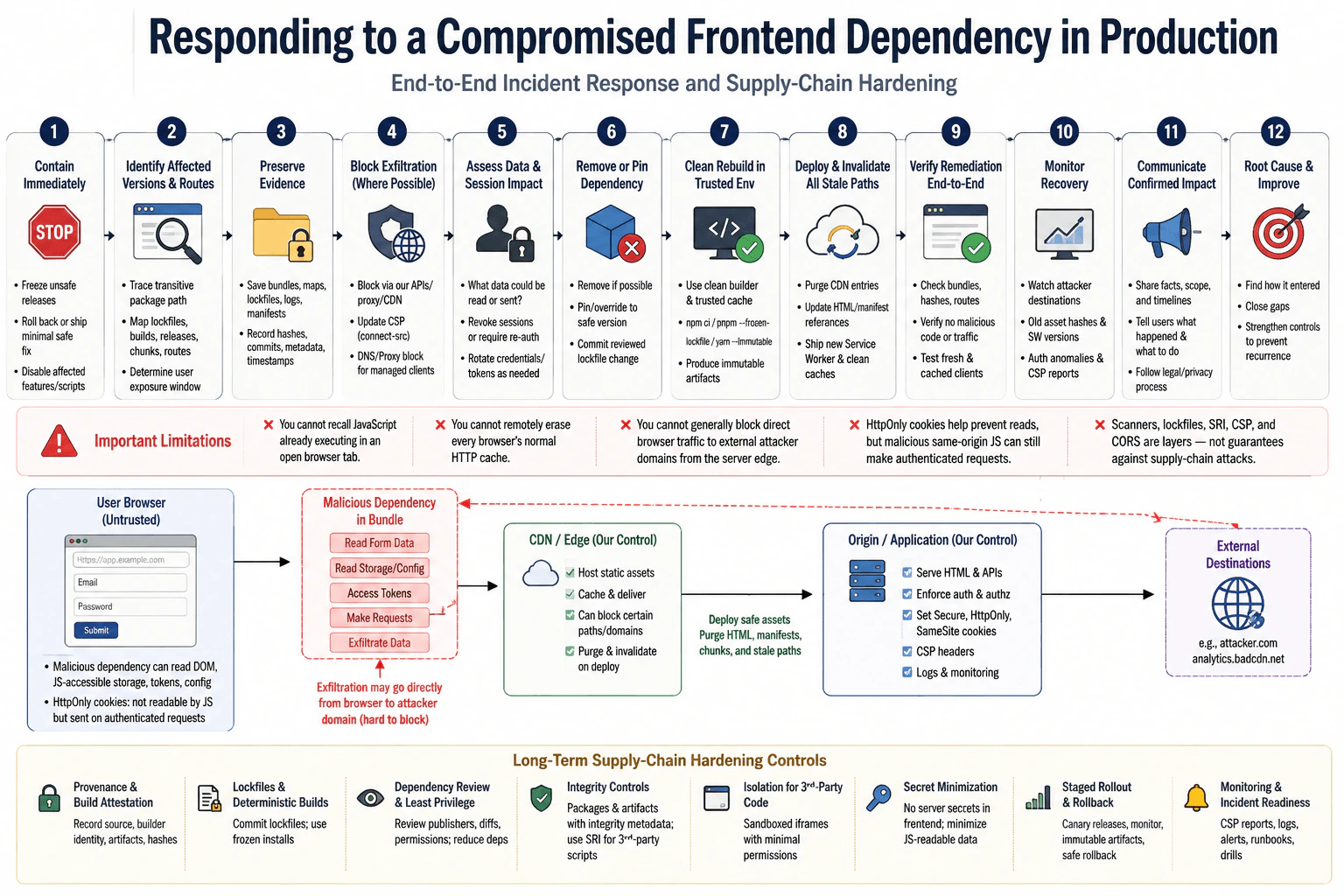
115. How would you respond to a compromised frontend dependency in production?SecurityHard

Question Details

A transitive package in the build has been confirmed to exfiltrate form data from released bundles. Define containment, affected-version and route identification, build and artifact verification, traffic blocking, credential and session response, removal or pinning, clean rebuild, cache and service-worker invalidation, monitoring, user communication, and forensic preservation. Then design provenance, lockfile, review, integrity, sandboxing, secret-minimization, and rollout controls that reduce recurrence without claiming scanners alone prevent supply-chain attacks.

Short Interview Answer (30-60 seconds)

I would treat it as an active incident: contain exposure, identify every affected release and route, preserve evidence, restrict exfiltration where possible, protect credentials and sessions, remove the package, rebuild from trusted inputs, invalidate stale delivery paths, verify artifacts, monitor recovery, communicate appropriately, and strengthen supply-chain controls.

Detailed Explanation

A harmful piece of software used by the website has already reached users and is secretly sending information away. The job is to stop further harm quickly, find every website version and page that contains it, protect people whose information may have been exposed, replace the bad software safely, and make sure old copies cannot keep running. I would also keep evidence so the cause can be investigated. Finally, I would improve how outside software is selected, checked, released, and monitored so a similar problem is less likely to reach users again.

Useful Questions to Ask the Interviewer
  1. Which production releases, deployment regions, routes, and asset versions are currently suspected or confirmed to contain the compromised package?
  2. What data was the malicious package observed collecting, and which external destinations or domains received it?
  3. Do we have immutable build records, lockfiles, source commits, artifact hashes, dependency manifests, CDN logs, and deployment history for the affected releases?
  4. Does the application use service workers, long-lived CDN caching, or offline assets that could continue serving the compromised bundle after a normal deployment?
  5. Which credentials, sessions, tokens, or user actions could have been exposed through the affected forms?
  6. What incident-response, legal, privacy, and customer-notification processes already exist?
How would you respond to a compromised frontend dependency in production? diagram
How to Explain It in an Interview

I would treat the confirmed dependency compromise as an active supply-chain incident. Released JavaScript executes in the user's browser with the capabilities available to the application origin, so malicious code that is already exfiltrating form data requires immediate containment before a complete root-cause investigation.

1. Contain the incident immediately

I would stop deploying builds that contain the dependency and freeze unrelated production changes so the response remains traceable. If a known-safe prior release exists, I would consider an emergency rollback. Otherwise, I would prepare the smallest safe replacement deployment that removes the malicious code.

I would disable an affected feature or separately loaded third-party script immediately when that can reduce exposure safely. If the package has already been bundled into first-party JavaScript, however, disabling a package registry version does not remove code from bundles users already downloaded. Those deployed assets must be replaced.

For traffic blocking, I would distinguish controls we actually have. If exfiltration goes through our own API, proxy, CDN, or other infrastructure, I can block the corresponding requests there. If the malicious JavaScript sends directly from users' browsers to an external attacker-controlled domain, our normal server edge cannot generally intercept that outbound browser traffic. I can remove the malicious code and send a stricter Content Security Policy, such as a restricted connect-src directive, on subsequent document loads. Corporate DNS or network-proxy blocking is useful only when we control the clients' network. I would not claim any of these controls can recall JavaScript that is already executing in an open tab.

2. Identify every affected version, bundle, and route

I would map the compromised transitive package version to exact lockfile entries, build records, source commits, release IDs, chunk hashes, and deployment timestamps. Because it is transitive, I would also identify the direct dependency that introduced it and the complete dependency path.

Then I would determine which production routes actually load affected chunks. Route-level code splitting means one compromised package can appear only on certain pages or interactions. I would use build manifests, securely retained source maps if available, asset manifests, CDN logs, release metadata, and application telemetry to establish which users and routes could have executed the code.

I would not use today's local node_modules tree as evidence for an older release. Historical production artifacts must be traced from their own build records.

3. Preserve forensic evidence before cleanup

Before replacing evidence, I would preserve affected bundles, lockfiles, package metadata, package tarball identifiers where available, build logs, CI logs, dependency manifests, source commits, artifact hashes, deployment metadata, relevant CSP reports, CDN records, and network or application logs.

I would record timestamps and chain-of-custody information according to the organization's incident process. Logs should contain useful release IDs, route identifiers, asset hashes, and security-event metadata without storing passwords, authorization tokens, full session identifiers, or sensitive form contents.

Preserving evidence matters because immediately deleting workspaces, caches, or build artifacts can destroy information needed to establish how the compromise entered production.

4. Verify released artifacts

I would calculate cryptographic hashes of affected production assets and compare them with trusted build records or previously recorded artifact hashes where such records exist. This helps distinguish a malicious dependency that entered during the normal build from a later unauthorized artifact modification.

I would also inspect the generated bundles or dependency metadata to verify that the malicious package code is actually present in the releases we classify as affected. Package-manager state alone does not prove which code was shipped to users.

5. Determine data, credential, and session exposure

I would identify what the malicious JavaScript could read or cause the browser to send. It may access form fields, DOM data, JavaScript-readable storage, client configuration, and tokens deliberately exposed to JavaScript.

HttpOnly cookies are different: JavaScript cannot directly read their values. However, malicious same-origin JavaScript may still issue authenticated requests because the browser can attach eligible cookies automatically. Therefore, HttpOnly reduces token theft but does not make an authenticated session harmless after arbitrary first-party script execution.

If passwords, reusable tokens, API credentials, payment information, or other sensitive data were exposed, I would coordinate appropriate reset or rotation. If an attacker could abuse affected authenticated sessions, I would revoke those sessions or require reauthentication according to the demonstrated exposure and business risk.

Authentication and authorization are separate. Authentication establishes identity. Authorization decides what that identity may do. The trusted server must enforce authorization for every protected operation; frontend state must never be treated as an authorization boundary.

6. Remove or pin the compromised dependency

I would remove the dependency if the application can function safely without it. If it is required, I would move to a version independently confirmed to be safe.

For a transitive package, a package-manager override or resolution mechanism may be an appropriate emergency mitigation to force a reviewed safe version. I would make that change explicit, code-reviewed, tested, and documented rather than silently altering dependency resolution.

I would commit the corrected lockfile and review the dependency diff. A lockfile improves deterministic dependency resolution, but it does not prove that the locked package is trustworthy. A malicious release can be locked perfectly.

7. Rebuild in a clean, trusted environment

I would avoid rebuilding from an existing developer workspace, dependency directory, package cache, or CI worker that might itself contain compromised material unless that environment has been investigated and cleared.

I would use a clean trusted builder, the reviewed source commit, the corrected lockfile, and trusted package inputs. Where the package manager supports strict lockfile installation, I would use it so dependency resolution cannot drift silently during the emergency rebuild.

The build should produce immutable artifacts. I would record the source commit, dependency metadata, builder identity or attestation where supported, artifact hashes, and provenance information so we can show what inputs produced the replacement release.

Where reproducible builds are practical, reproducing the output independently provides additional confidence. I would not assume every frontend toolchain is perfectly reproducible without testing that property.

8. Invalidate stale CDN, HTML, and service-worker delivery paths

Deploying a safe bundle is not sufficient if old content still points users to compromised assets.

I would purge affected CDN entries that we control, especially HTML documents, manifests, bootstrap files, or non-content-hashed assets that can reference compromised chunks. With content-hashed filenames, the safe rebuild should normally produce new asset URLs, but stale HTML can still reference an old compromised URL.

A normal web application cannot directly erase every browser's ordinary HTTP cache on command. Instead, I would ensure new documents reference safe content-hashed assets and use appropriate cache policies for mutable entry documents so clients receive the corrected references.

If a service worker cached the compromised assets, I would release a known-safe service-worker version that updates its cache names or manifest, removes obsolete compromised entries during activation where appropriate, and serves only approved assets. In a severe incident, an emergency service-worker strategy may use skipWaiting and clients.claim when the resulting lifecycle behavior has been reviewed carefully. Those APIs accelerate activation but can also change running pages underneath existing clients, so they are a tradeoff rather than a universal default.

I would test both a fresh browser and an existing profile already controlled by the old service worker. Offline clients that do not reconnect cannot receive remediation until they reconnect, so monitoring must account for that limitation.

9. Verify the remediation before declaring recovery

I would verify that production HTML, manifests, and route chunks reference approved assets only. I would compare deployed artifact hashes with the trusted clean build and confirm that the compromised package or code is absent from the replacement dependency graph and bundles.

I would exercise every affected route and interaction and inspect browser network activity to confirm the observed exfiltration behavior has stopped. I would verify the replacement service worker, CDN behavior, session flows, CSP behavior, and functionality previously supplied by the removed package.

Safe failure matters. If a risky third-party capability cannot be restored safely, I would disable that feature rather than silently loading an unverified fallback.

10. Monitor after deployment

I would monitor for requests to confirmed attacker-controlled destinations where telemetry can observe them, continued requests for old compromised asset hashes, stale service-worker versions, unexpected network destinations visible through CSP reporting or application telemetry, suspicious authenticated behavior, and API patterns associated with the compromise.

I would keep monitoring through the period in which stale clients can reasonably remain active. A deployment completing successfully does not mean every browser instantly stops running previously downloaded code.

I would avoid collecting sensitive form values merely to prove that exfiltration stopped. Monitoring should use metadata and controlled test accounts where possible.

11. Communicate confirmed impact

I would maintain an incident timeline that separates confirmed facts from assumptions. Engineering, security, incident response, privacy, legal, product, and support teams should share a consistent understanding of affected releases, exposure windows, mitigations, user impact, and remaining uncertainty.

If affected users need to reset passwords, reauthenticate, monitor accounts, or take another protective action, the communication should clearly explain what is known, who is affected when that can be determined, what has been fixed, and what users should do next. I would follow the organization's legal and regulatory notification process rather than inventing notification thresholds myself.

12. Complete root-cause analysis

After containment, I would determine how the malicious package reached the build. Investigation areas might include a compromised upstream maintainer, malicious package release, dependency confusion, registry-account compromise, unsafe installation scripts, CI compromise, unauthorized lockfile changes, or another supply-chain path.

Those are hypotheses, not conclusions. I would name the cause only when the evidence supports it.

The investigation should establish the first malicious package version, dependency path, first affected build, first affected deployment, affected routes, data-access behavior, exfiltration destination, exposure period, and why existing controls did not prevent or detect the incident earlier.

13. Strengthen provenance controls

Provenance means evidence showing where software came from and how it was built. Where ecosystem support exists, I would prefer packages and internal artifacts with verifiable publishing or build provenance.

For our own releases, I would retain the source commit, lockfile, dependency manifest, builder identity or attestation, artifact hashes, and deployment identity. Cryptographically verifiable provenance can make unauthorized substitutions easier to detect and gives incident responders stronger evidence about artifact origin.

Provenance does not prove that source code is safe. A legitimately published package can still contain malicious code.

14. Make dependency changes deterministic and reviewable

I would keep lockfiles committed and require dependency and lockfile changes to go through review. Automated update tools are useful for producing small, visible upgrades, but high-risk dependency changes should still receive human judgment.

For important dependencies, I would review publisher or ownership changes, unexpected new install scripts, unusual release activity, new transitive packages, significant permission or capability changes, and large unexplained code differences where practical.

I would reduce unnecessary dependencies because every dependency adds maintenance and supply-chain exposure. I would not blindly rewrite mature libraries merely to reduce package count, because a poorly implemented replacement can introduce different vulnerabilities.

15. Use integrity controls for the threats they actually address

For separately hosted third-party scripts, Subresource Integrity can allow the browser to verify that a fetched script or stylesheet matches an expected cryptographic hash. For cross-origin resources, the resource must also satisfy the browser's CORS requirements for SRI validation.

SRI does not protect an application bundle that already incorporated malicious dependency code during the build. It also does not tell us whether the expected bytes themselves are benign.

Package-manager lockfiles can contain integrity metadata that helps verify downloaded package bytes against the recorded package artifact. Again, matching expected bytes is an integrity property, not a malware guarantee.

16. Isolate risky third-party browser code where possible

If a third-party capability does not require direct access to the main application's DOM or JavaScript context, I would consider placing it in a sandboxed iframe with only the minimum sandbox permissions necessary.

The exact sandbox flags matter. For example, combining powerful permissions carelessly can undermine the intended isolation, especially for same-origin content. I would design the iframe's origin and permissions deliberately and expose only a narrow validated message interface when cross-context communication is required.

This approach cannot isolate ordinary npm libraries that must execute directly inside the application bundle, so sandboxing is useful only for suitable features rather than being a universal dependency defense.

17. Minimize secrets and sensitive data in frontend code

I would never ship server secrets, private signing keys, database credentials, or long-lived privileged credentials in frontend JavaScript. Anything delivered to a browser should be treated as observable and potentially reachable by compromised first-party JavaScript.

For cookie-based sessions, Secure, HttpOnly, and an appropriate SameSite policy provide useful protections. HttpOnly prevents direct JavaScript reads, Secure restricts cookie transmission to secure transport, and SameSite can reduce some cross-site request risks. None of these makes arbitrary malicious same-origin JavaScript safe.

I would minimize sensitive values placed in the DOM, JavaScript-accessible browser storage, client configuration, and logs. Data that the browser does not need should remain on the trusted server.

18. Use browser security controls as layers, not guarantees

A restrictive CSP can limit script sources and network destinations. Trusted Types can reduce dangerous DOM-based injection paths by requiring trusted values for supported DOM sinks. For untrusted text, I would prefer textContent, createTextNode, safe DOM APIs, or normal framework escaping instead of innerHTML. If the product intentionally accepts HTML, I would use a well-maintained sanitizer appropriate for that HTML context rather than treating generic input filtering as complete protection.

These controls are valuable for XSS and limiting some consequences of injected or third-party code, but they do not make a malicious first-party dependency trustworthy. Code legitimately executing in the application's own bundle can often use capabilities the application itself requires.

The same distinction applies to other browser controls. Same-origin policy and CORS primarily restrict cross-origin access; they do not protect data from malicious JavaScript already executing within the application's origin. CSRF defenses address cross-site request forgery and generally cannot be relied upon to stop arbitrary JavaScript already executing in the trusted page, because that script may access the same tokens and application APIs available to legitimate code.

Clickjacking defenses such as frame-ancestors or X-Frame-Options may still be appropriate for the application, but they do not directly solve this dependency compromise. I would keep the response focused on controls that change the supply-chain incident's risk.

19. Improve rollout and rollback controls

For dependency changes whose risk justifies it, I would use staged or canary rollout instead of immediately exposing every user. I would observe functional failures, unexpected asset behavior, security telemetry, CSP reports, and new network destinations before widening the release.

Promotion should use immutable artifacts so the exact artifact validated in an earlier stage is the one promoted to a larger population rather than rebuilding it differently for each environment.

I would maintain a fast rollback mechanism, but a rollback artifact must be independently known to be safe. Rolling back to an older release that contains the same compromised transitive dependency merely reintroduces the incident.

20. Do not claim scanners prevent supply-chain attacks

Dependency scanners are useful for known vulnerabilities, known malicious packages, suspicious package metadata, and other detectable signals. They should run continuously and their findings should be reviewed according to risk.

But scanners cannot guarantee detection of a newly compromised maintainer, a previously unknown malicious release, a poisoned build process, a malicious package that has not yet been classified, or an authorized package version containing intentionally harmful behavior.

I would therefore use scanners as one layer among provenance, deterministic dependency resolution, dependency review, trusted clean builds, artifact verification, least privilege, appropriate isolation, secret minimization, browser defenses, staged rollout, monitoring, and incident-response readiness.

The practical sequence is: contain exposure, scope the exact released artifacts and routes, preserve evidence, protect affected users, remove the malicious dependency, rebuild from trusted inputs, eliminate stale delivery paths, verify production behavior, monitor recovery, communicate confirmed impact, complete root-cause analysis, and strengthen controls so the next dependency compromise is harder to ship and easier to detect.

Technical Approach
  1. Declare an active security incident and freeze unsafe releases.
  2. Stop or reduce exposure by disabling affected functionality, replacing affected assets, or rolling back only to a release proven safe.
  3. Restrict confirmed exfiltration paths using controls that actually apply: block requests in infrastructure we control, update CSP for new document loads, and use DNS or proxy blocking only for managed client networks.
  4. Trace the transitive package to exact lockfiles, builds, releases, chunks, routes, and exposure timestamps.
  5. Preserve compromised bundles, package metadata, hashes, logs, and deployment records before cleanup.
  6. Determine which user data, credentials, tokens, sessions, or authenticated actions were exposed and apply proportionate resets, rotations, or revocation.
  7. Remove the dependency or pin or override it to an independently verified safe version.
  8. Rebuild in a clean trusted environment using reviewed source and dependency inputs.
  9. Record and verify artifact hashes and provenance.
  10. Deploy new approved assets and invalidate stale CDN, HTML, manifest, and service-worker delivery paths.
  11. Test both fresh and previously cached browser states across every affected route.
  12. Monitor old asset hashes, stale service workers, attacker destinations, suspicious sessions, and related API behavior.
  13. Communicate confirmed impact and required user actions.
  14. Complete root-cause analysis.
  15. Strengthen provenance, lockfile review, dependency review, integrity controls, isolation, secret minimization, staged rollout, and safe rollback.
Practical Insights

The main cost is operational rather than algorithmic. Engineers may need to inspect many dependency trees, historical builds, bundles, routes, environments, caches, service workers, user sessions, and logs. Work grows with the number of releases and users that could be affected. Clean rebuilds, cache purges, session revocation, and staged releases can temporarily slow delivery or inconvenience users. Stronger provenance, review, integrity checks, immutable artifacts, and canary rollouts add ongoing CI and maintenance work, but they reduce uncertainty and make future compromises easier to contain, verify, and investigate. Browser memory usage is not the important cost in this incident; operational investigation and safe deployment dominate.

Why Interviewers Ask This

This question tests whether the candidate can manage a real frontend supply-chain compromise instead of treating dependency security as only a scanner problem. The interviewer is evaluating containment, release and artifact tracing, browser-specific cache behavior, credential and session response, trusted rebuild practices, forensic preservation, monitoring, user communication, and long-term controls such as provenance, lockfiles, integrity verification, sandboxing, secret minimization, and safe rollout.

Common interview mistakes

Common mistakes are treating the incident as solved after changing package.json; checking only the current dependency tree instead of historical released artifacts; assuming a package-registry takedown removes code already bundled into production; claiming the application's server edge can generally block direct browser traffic to an external attacker domain; deleting evidence before preserving it; rebuilding on a potentially contaminated workspace or CI worker; forgetting stale HTML, lazy-loaded chunks, CDN entries, and service-worker caches; claiming every browser cache can be remotely erased; assuming HttpOnly cookies make authenticated sessions completely safe; rotating credentials without considering actual exposure; relying only on CSP, CORS, SRI, lockfiles, or dependency scanners; treating provenance as proof that source code is benign; rolling back to another affected release; logging sensitive form data or tokens during investigation; and failing to test browsers that already contain old cached assets or service workers.

Interview tip

Present the response in incident order: contain, scope, preserve evidence, protect users, remove the dependency, rebuild cleanly, invalidate every stale delivery path you control, verify, monitor, communicate, and then prevent recurrence. Be precise about browser limitations: you cannot recall JavaScript already executing in an open tab, remotely erase every normal browser cache, or rely on scanners and lockfiles to prove a dependency is safe.

Interviewer may ask next
How would you handle users whose browsers may still be controlled by an old service worker containing the compromised bundle?

I would ship a known-safe service-worker version that stops serving the compromised assets, uses reviewed cache-versioning logic, and deletes obsolete affected caches when the new worker activates. If the incident severity justifies faster takeover, skipWaiting and clients.claim can be considered, but I would review the lifecycle tradeoff because they can cause a new worker to control pages that were loaded under an older version. I would also purge stale HTML and CDN references so clients cannot reacquire compromised assets. Then I would test fresh browsers and browsers already controlled by the old worker, and monitor continued requests for old asset hashes or old worker versions. Offline clients cannot receive the fix until they reconnect.

Why are lockfiles, integrity checks, provenance, and vulnerability scanners not enough to prevent this type of supply-chain attack?

Each control answers a different question. A lockfile makes dependency resolution repeatable, but it can repeatedly install a malicious version. Integrity hashes show that bytes match the expected artifact, but the expected artifact itself can be malicious. Provenance can provide evidence about who published or built an artifact and from which source or workflow, but authorized source can still contain harmful code. Vulnerability and malware scanners find known issues and some suspicious signals, but a new compromise may have no signature or advisory. I would combine these controls with dependency review, trusted clean builds, immutable artifacts, minimized privileges and secrets, appropriate isolation, browser defenses, staged rollout, monitoring, and tested incident response.

116. Design an OAuth authorization-code flow with PKCE for a public browser client.SecurityHard

Question Details

A single-page application redirects to an authorization server and receives an authorization code at its callback. Define generation and storage lifetime of state, nonce where applicable, code verifier and challenge, exact redirect URI, code exchange boundary, token audience and lifetime, refresh strategy, browser history cleanup, multi-tab behavior, logout, and error recovery. Identify which values are secrets versus public correlation values and how XSS, code interception, CSRF, and open redirects are addressed.

Short Interview Answer (30-60 seconds)

I would use authorization code with PKCE, fresh state per attempt, an exact registered redirect URI, and no browser client secret. I would validate state before exchanging the code, use the original verifier, keep tokens short-lived and audience-restricted, isolate tab transactions, clean callback history, and treat XSS as a critical remaining risk.

Detailed Explanation

This design lets a website send a person to a trusted sign-in service and safely bring them back after sign-in. The browser receives a short-lived one-time value instead of receiving the final permission immediately. Before leaving, the website creates random values that help prove the returning response belongs to the same sign-in attempt. When the person returns, the website checks those values before continuing. The design must also handle several browser tabs, failed sign-ins, signing out, removing temporary information from the address bar, and preventing malicious pages or scripts from stealing or misusing the sign-in result.

Useful Questions to Ask the Interviewer
  1. Is this a pure SPA that exchanges the code directly with the authorization server, or can we use a backend-for-frontend to keep OAuth tokens on a trusted server?
  2. Is OpenID Connect also being used for authentication, so an ID token and nonce are part of the flow?
  3. Does the authorization server support refresh tokens for public browser clients, refresh-token rotation, and revocation?
  4. Must the application support multiple simultaneous login attempts across different tabs or windows?
  5. What logout behavior is required: local application logout, authorization-server logout, refresh-token revocation, or all of them?
Design an OAuth authorization-code flow with PKCE for a public browser client. diagram
How to Explain It in an Interview
1. Define the trust boundary

A browser SPA is a public OAuth client. JavaScript delivered to a browser cannot securely keep a client secret because users can inspect the application and malicious script running in the page can access browser-visible data. Therefore, I use Authorization Code with PKCE and never embed a client secret or long-lived server credential in frontend code.

OAuth primarily delegates authorization to protected resources. If the application also needs user authentication, I use OpenID Connect on top of OAuth and validate its ID token according to the provider and protocol requirements. Authorization for API operations must always be enforced by the resource server or another trusted server. Hiding a button in the SPA is not authorization.

2. Create a fresh transaction for every authorization attempt

For each login attempt, generate independent cryptographically random values:

  • state: an unpredictable correlation value that binds the authorization response to the request and protects against CSRF-style authorization-response injection and related transaction mix-ups.
  • code_verifier: a high-entropy PKCE value retained only for the short authorization transaction.
  • nonce: when OpenID Connect is used, an unpredictable value placed in the authentication request and later validated against the ID token to reduce replay or token-substitution risks.

The code verifier is sensitive short-lived transaction material because someone who obtains both the authorization code and verifier can attempt redemption during the code's validity window. It is not a permanent application secret. state, nonce, and code_challenge are not client secrets, but state and nonce must still be unpredictable and correctly correlated.

Generate random bytes with the Web Crypto API, not Math.random(), timestamps, counters, or predictable identifiers. Create the PKCE challenge as the base64url-encoded SHA-256 digest of the verifier and send code_challenge_method=S256.

Give each transaction an explicit short expiration, normally only long enough for a user to complete sign-in. Remove it after success, terminal failure, cancellation, or expiry. Do not reuse state, nonce, or a verifier.

3. Handle storage lifetime and multiple tabs

Do not keep one global state and verifier under fixed storage keys. If two tabs start login, one attempt could overwrite the other.

Store one transaction record per authorization attempt. The record can contain the state, verifier, nonce when applicable, creation time, expiry time, expected redirect URI, and a validated local post-login route.

For a pure SPA, tab-scoped sessionStorage can be useful because it naturally separates most independent tab transactions and does not persist like localStorage. However, sessionStorage, localStorage, and ordinary in-memory JavaScript are all reachable by script that successfully executes in the same application origin. They are not protection against XSS.

A browser may also duplicate or restore tabs in ways that affect storage behavior, so the implementation must key and consume transactions uniquely rather than assuming there can be only one active login. If a callback can intentionally arrive in a different browsing context, design an explicit secure correlation mechanism instead of falling back to one shared long-lived credential store.

If a backend-for-frontend is allowed, I prefer keeping the OAuth transaction and tokens on that trusted server and giving the browser only an application session cookie. That reduces direct exposure of OAuth tokens to frontend JavaScript.

4. Build the authorization request

Redirect the browser to the authorization endpoint with the appropriate parameters, including:

  • response_type=code
  • the public client_id
  • the exact registered redirect_uri
  • code_challenge
  • code_challenge_method=S256
  • state
  • required scopes
  • nonce when OpenID Connect requires it

The OAuth redirect URI must be pre-registered and matched according to the authorization server's rules. For this design, use a fixed exact callback URI rather than accepting an arbitrary redirect target from user input.

If the SPA wants to return a user to a particular page after login, keep that destination separately in the transaction. Allow only a validated application-local path or another explicitly allowed destination. Never take an arbitrary returnUrl and redirect to it, because that can create an open redirect.

5. Process the callback defensively

Treat every callback parameter as untrusted input. The callback may contain an authorization code and state or OAuth error parameters.

If an authorization error is returned, handle it as an unauthenticated failure. Show a safe user message and log only useful non-sensitive metadata. Do not log authorization codes, PKCE verifiers, access tokens, refresh tokens, ID tokens, or complete URLs containing sensitive authorization parameters.

For a callback containing a code:

  1. Read the returned state.
  2. Locate exactly one live transaction that matches it.
  3. Reject missing, unknown, expired, consumed, or mismatched state.
  4. Recover the original verifier, expected redirect URI, and nonce if applicable from the stored transaction.
  5. Consume the transaction so that the response cannot be successfully processed twice.
  6. Exchange the authorization code using the original verifier.

Do not exchange the code first and validate state afterward. A state validation failure must stop the flow.

6. Keep the code-exchange boundary clear

For a pure public SPA, the browser can exchange the authorization code at an authorization server token endpoint that supports the required browser access, including the appropriate CORS behavior. The request sends the authorization code, the original code_verifier, the public client identifier where required, the correct grant type, and the same redirect URI used for the authorization request when required by the server. It does not send a client secret.

The authorization server checks that the supplied verifier produces the previously supplied challenge. The authorization code should also be short-lived, single-use, and bound by the authorization server to the appropriate client and redirect context. An attacker who steals only the authorization code should therefore be unable to redeem it without the verifier.

If a backend-for-frontend is available, the browser can instead send the callback result through that trusted application boundary and let the server perform the OAuth token exchange and hold the resulting tokens. That reduces token exposure in browser JavaScript.

7. Use tokens only for their intended purpose

An access token is intended for a particular protected resource or audience. The SPA must not assume that a token accepted by API A is valid for API B. The resource server must validate the token according to its format and deployment, including issuer, intended audience or resource, expiration, integrity, scopes or claims, and the authorization required for the requested operation.

Keep browser-visible access tokens short-lived. The exact lifetime is a deployment decision, so I would not invent one universal number. Shorter lifetimes reduce the useful window after theft but may increase refresh activity and operational complexity.

If OpenID Connect is used, an ID token represents authentication information for the client. It is not a general-purpose API access token. Validate its signature or other integrity mechanism, issuer, audience, expiration, nonce where required, and other protocol-required claims.

8. Refresh carefully

A browser client should not be given an indefinitely reusable credential. If refresh tokens are issued to the public browser client, use the authorization server's recommended public-client protections, including refresh-token rotation where supported. Rotation replaces the previous refresh token, and detected reuse of an invalidated token should trigger the provider's replay response, which may invalidate the token family or require new authorization.

Do not put refresh tokens in source code, URLs, analytics, logs, or unrelated persistent storage. Storing them in localStorage increases exposure to XSS because injected script can read them directly.

If a backend-for-frontend is available, keep OAuth refresh credentials on the trusted server and use a Secure, HttpOnly, appropriately configured SameSite application session cookie in the browser. An HttpOnly cookie prevents normal JavaScript from reading the cookie value, but authenticated requests can still be made by the browser, so the application must apply the appropriate CSRF and origin protections to state-changing operations.

9. Clean browser history

After the callback values have been copied and the transaction has been safely validated or failed, remove OAuth callback parameters from the visible URL with history.replaceState() or equivalent routing behavior.

The authorization code is short-lived and single-use, but leaving it and state values in browser history is unnecessary exposure. URLs can appear in browser history, screenshots, copied links, diagnostics, extensions, and surrounding logging systems.

Never place access tokens or refresh tokens in application query strings or URL fragments as part of this authorization-code design.

10. Address the major threats explicitly
Authorization-code interception

PKCE protects code redemption. The client keeps the verifier and sends only its derived SHA-256 challenge in the authorization request. The original verifier is required when redeeming the authorization code. Stealing the code alone should therefore not be enough.

CSRF and authorization-response injection

Use a fresh unpredictable state value for every attempt. Correlate the callback with the exact outstanding transaction and consume it once. Reject missing, stale, unexpected, or reused state.

The browser same-origin policy and CORS do not replace state. The same-origin policy limits how documents and scripts from different origins interact. CORS allows a server to relax selected cross-origin response-reading restrictions. Neither is the authorization check for the OAuth callback transaction.

Open redirects

Use the exact registered OAuth callback and do not derive it from attacker-controlled data. Treat post-login navigation separately and accept only validated local paths or explicitly allowed destinations.

XSS

XSS remains one of the most serious risks for a browser OAuth client. Malicious script running in the application's origin may read JavaScript-accessible state, verifiers, and tokens, or make authenticated requests using the user's active session.

Use textContent, safe DOM construction, or normal framework escaping when displaying untrusted strings. Do not insert untrusted data with innerHTML. If the product intentionally accepts HTML, sanitize it with a mature allowlist-based HTML sanitizer before using an HTML-rendering sink. Apply output encoding appropriate to the actual context rather than treating generic input filtering as complete XSS protection.

Use a restrictive Content Security Policy as defense in depth. Minimize permitted script sources and prefer nonce- or hash-based script authorization where practical. Trusted Types can further restrict dangerous DOM sinks in browsers that support the policy. Reduce unnecessary third-party scripts because script allowed to execute in the application's origin participates in the same security boundary. Review, update, and protect dependencies and the frontend build supply chain.

11. Apply other browser controls only where relevant

Use HTTPS for authorization, token exchange, APIs, and application sessions.

When using a backend session cookie, configure Secure, HttpOnly, and an appropriate SameSite value. Cookie attributes reduce particular browser risks but do not replace server-side authorization or all CSRF defenses.

Use CSP frame-ancestors when the application should not be embedded by untrusted sites. This reduces clickjacking risk for login-related and sensitive application actions.

Do not treat CORS as authentication or authorization. A resource server must authenticate and authorize requests regardless of whether a browser would allow another origin's JavaScript to read its response.

If the application previews user-uploaded files, avoid executing attacker-controlled active content in the privileged application origin. Depending on the file type, use downloads, sandboxing, validated safe formats, or a separate isolated origin.

Request only necessary scopes and claims. Do not unnecessarily copy identity attributes or token data into analytics, crash reports, local storage, monitoring events, or URLs.

12. Logout correctly

Logout can have several layers.

For local logout, remove application authentication state and outstanding OAuth transaction data. If the browser holds refresh tokens and the provider supports revocation, revoke them when required by the application's security model. If OpenID Connect or the authorization server provides a logout endpoint and single-sign-out behavior is required, follow that provider's defined logout flow and strictly validate or pre-register any post-logout redirect destination.

With a backend-for-frontend, invalidate the server-side application session and expire its browser session cookie. Clearing a JavaScript variable or deleting local storage does not itself revoke an access or refresh token that has already been issued.

13. Recover from errors safely

A failed flow should end in a known unauthenticated state. Delete the failed or expired transaction, clean authorization parameters from the URL when appropriate, and let the user begin a new authorization attempt with fresh state, nonce, verifier, and challenge.

Do not reuse a transaction after timeout, cancellation, token-exchange failure, replay detection, or state mismatch. Prevent redirect loops by distinguishing a normal unauthenticated page from an authorization attempt already in progress.

If token exchange fails after the transaction was consumed, start a new authorization transaction rather than replaying the same authorization code or verifier combination.

14. Verify the controls

I would test the design directly:

  • Change or remove state and verify that the callback is rejected before token exchange.
  • Replay an already consumed callback and verify that it fails.
  • Exchange a valid code with the wrong verifier and verify that the authorization server rejects it.
  • Start simultaneous login attempts in multiple tabs and verify that their transaction data does not overwrite or incorrectly satisfy another attempt.
  • Use expired transaction data and verify safe failure.
  • Attempt an unregistered redirect URI and verify authorization-server rejection.
  • Supply an external post-login return URL and verify that the application refuses it.
  • Verify that authorization codes, verifiers, access tokens, refresh tokens, and ID tokens do not appear in logs or analytics.
  • Verify that callback parameters are removed from browser history after processing.
  • Test common DOM-XSS sinks and verify framework escaping, sanitization where intentional HTML is allowed, CSP, and Trusted Types where deployed.
  • Verify that API authorization succeeds or fails independently of what the SPA UI displays.
  • Verify refresh-token rotation and replay handling when refresh tokens are used.
  • Verify logout invalidates the intended application session or refresh capability rather than only clearing UI state.

The important separation is: PKCE protects authorization-code redemption, state correlates and protects the authorization response transaction, exact redirect handling prevents redirect abuse, token audience and lifetime limit credential misuse, and trusted resource servers enforce authorization. None of these controls make XSS harmless, so minimizing browser-held credentials and preventing script injection remain central parts of the design.

Technical Approach
  1. Generate cryptographically random state, a PKCE verifier, and an OpenID Connect nonce when applicable.
  2. Derive the S256 PKCE challenge from the verifier.
  3. Store a short-lived per-attempt transaction containing the state, verifier, nonce when applicable, expiry, expected redirect URI, and validated local return path.
  4. Redirect to the authorization server with the challenge, state, exact redirect URI, requested scopes, and nonce when applicable.
  5. At callback, handle provider errors safely and validate state against exactly one unexpired, unconsumed transaction before exchanging any code.
  6. Consume the transaction and exchange the one-time authorization code with the original verifier and matching redirect URI.
  7. Validate OpenID Connect token properties when authentication is used and use access tokens only with their intended API audience.
  8. Keep browser-visible access tokens short-lived and use hardened refresh behavior such as rotation when refresh tokens are supported.
  9. Prefer a backend-for-frontend when stronger token isolation is available.
  10. Remove OAuth callback parameters from browser history.
  11. Keep concurrent tab transactions isolated.
  12. On logout, clear local transaction state and revoke or invalidate refresh credentials or server sessions when required.
  13. On failure, discard the transaction and create an entirely new authorization attempt.
  14. Test state mismatch, replay, wrong verifier, expiry, redirects, multi-tab behavior, token leakage, XSS defenses, refresh replay, and server-side authorization.
Practical Insights

The computational cost is very small. Each authorization attempt creates a few random values, performs one SHA-256 digest for PKCE, and reads or removes one small transaction record. For a properly keyed transaction store, these operations are effectively constant time for normal application use. Memory use is also small because only a few short-lived records are needed for active authorization attempts. The important cost is operational complexity: exact redirect registration, token and transaction lifetimes, refresh rotation, logout semantics, CSP, logging rules, multi-tab behavior, provider compatibility, and test coverage. A backend-for-frontend adds server infrastructure and session management, but it can materially reduce OAuth credential exposure to browser JavaScript.

Why Interviewers Ask This

This question tests whether the candidate understands OAuth trust boundaries rather than only memorizing redirect steps. The interviewer is evaluating PKCE generation, transaction correlation, callback validation, token handling, refresh behavior, multi-tab safety, logout, failure recovery, browser storage, XSS, CSRF, authorization-code interception, redirect attacks, token audience, and the important fact that a public browser client cannot safely keep a client secret.

Common interview mistakes

Common mistakes include putting a client secret in the SPA; using predictable state, nonce, or PKCE values; using Math.random() for security values; using PKCE plain instead of S256; reusing a verifier or state; keeping one global transaction that concurrent tabs overwrite; validating state only after exchanging the code; accepting expired or already consumed state; forgetting nonce validation when OpenID Connect requires it; using an inconsistent redirect URI during the exchange; accepting attacker-controlled callback or post-login URLs; putting access or refresh tokens in URLs; storing long-lived refresh credentials in localStorage without addressing XSS exposure; assuming sessionStorage protects against XSS; treating CORS as CSRF protection or authorization; relying on frontend UI checks as API authorization; using an access token for the wrong audience; treating an ID token as an API access token; logging codes, verifiers, or tokens; leaving callback parameters in browser history; replaying failed transactions; assuming local UI logout revokes already issued credentials; and believing PKCE solves XSS. Another major mistake is inserting untrusted values with innerHTML or relying only on input filtering instead of safe DOM construction, context-appropriate output handling, sanitization only when HTML is intentionally allowed, CSP, Trusted Types where appropriate, and careful third-party dependency control.

Interview tip

Explain the design in trust-boundary order: public browser, authorization server, callback validation, token exchange, and protected API. State what state, nonce, verifier, and challenge each do. Then cover token audience and lifetime, refresh handling, browser storage, multiple tabs, URL cleanup, logout, safe failure, and verification. Explicitly say that PKCE does not solve XSS and that authorization must be enforced by the trusted resource server.

Interviewer may ask next
Why is PKCE still needed if the application already validates state?

They protect different parts of the flow. State correlates the authorization response with the browser's original authorization transaction and helps stop CSRF-style response injection and transaction mix-ups. PKCE protects authorization-code redemption by requiring the original verifier. If an attacker obtains only the authorization code, the attacker should not be able to redeem it without that verifier. A secure public-client authorization-code flow therefore normally uses both.

Would you store OAuth tokens in localStorage for this SPA?

I would avoid long-lived OAuth credentials in localStorage when possible because successful XSS in the application origin can read them directly. If a pure SPA must hold an access token, I would minimize its lifetime, scope, persistence, and exposure. When architecture allows, I prefer a backend-for-frontend that keeps OAuth access and refresh tokens on the trusted server and gives the browser a Secure, HttpOnly, appropriately SameSite application session cookie. That reduces direct token theft through JavaScript, although the cookie-based session still needs correct CSRF, origin, logout, and server-side authorization controls.

117. How would you secure a rich-text profile biography?SecurityMedium

Question Details

Users may enter links, emphasis, lists, and paragraphs, and the saved HTML is rendered to every visitor under the application's origin. Define the attacker-controlled input, allowed markup and URL schemes, DOM sink, protected sessions and data, and where validation and sanitization occur. Describe testing for event attributes, malformed markup, encoded payloads, SVG or MathML if unsupported, and later mutation. Include a CSP defense-in-depth plan and explain why plain output encoding would remove the required formatting.

Short Interview Answer (30-60 seconds)

I would treat the biography as hostile HTML, allow only required tags, attributes, and URL schemes, sanitize it at the trusted server boundary, and render only sanitized output. I would add CSP and Trusted Types where supported, protect profile updates, and test stored-XSS bypasses and later mutation.

Detailed Explanation

A profile biography is written by one person but shown to many other people. The main danger is that someone may hide harmful instructions inside the saved biography so they run when another visitor opens the profile. I would clearly decide which formatting people may use, remove everything else, and make unsafe links fail closed. I would protect account actions and private information if a bad biography is ever displayed. I would also test unusual, broken, disguised, and changed input because harmful content can sometimes appear after saving or later editing.

Useful Questions to Ask the Interviewer
  1. Which formatting must biographies support: links, emphasis, lists, paragraphs, and anything else?
  2. Are images, SVG, MathML, embedded media, custom attributes, or style attributes intentionally supported?
  3. Should links allow only HTTP and HTTPS, or are schemes such as mailto required?
  4. Is sanitized HTML stored, or is raw user input retained and sanitized each time it is rendered?
  5. Can biographies be modified later by migrations, editors, plugins, imports, or other services after sanitization?
How would you secure a rich-text profile biography? diagram
How to Explain It in an Interview

I would start by defining the trust boundary. The entire biography supplied by the user is attacker-controlled input. That includes element names, attributes, attribute values, URLs, character references, malformed markup, and any content reconstructed later by an editor, import, migration, or other transformation. Because the application intentionally supports rich text, I cannot safely treat the biography as ordinary plain text.

First, I would define a small allowlist based only on the required formatting. If the product needs paragraphs, emphasis, lists, and links, I might allow elements such as p, strong, em, ul, ol, li, and a. Unsupported elements should be removed or rejected. I would not try to maintain a blacklist of known dangerous tags because HTML has too many parser behaviors and execution paths for that to be reliable. I would keep script, iframe, object, embed, style, SVG, and MathML out unless there is an explicit requirement and a separately reviewed policy for them.

Attributes need their own allowlist. Most of these formatting elements need no attributes. For links, I would allow only the minimum attributes the product requires, such as href and perhaps a tightly controlled rel value. Event attributes such as onclick, onerror, onload, and other on* attributes must not survive sanitization. I would also avoid arbitrary style, srcdoc, formaction, and other unnecessary active-content attributes.

URLs require separate validation even when the a element itself is allowed. I would parse each URL instead of relying on string-prefix checks. I would allow only schemes required by the product, normally HTTP and HTTPS, with mailto only if explicitly needed. If relative links are supported, I would resolve them against an expected application base URL before checking the resulting protocol and destination rules. Schemes such as javascript and data should be rejected unless there is an exceptional, separately reviewed requirement. Invalid, ambiguous, or disallowed URLs should fail closed.

Client-side validation can improve the editing experience by checking length, required formatting, or clearly unsupported content before submission, but it is not the security boundary. An attacker can bypass frontend JavaScript and send requests directly. The trusted server must therefore repeat all security-relevant validation and apply the canonical sanitization policy before content becomes trusted renderable HTML.

The server must also enforce authorization. Authentication answers who the user is. Authorization answers whether that authenticated user is allowed to change this specific profile. The frontend may hide editing controls for usability, but the trusted server must enforce the authorization decision on every update request.

For storage, one practical design is to store the sanitized representation that is approved for rendering. Raw source may also be retained if the product truly needs it for editing or auditing, but that raw value must remain explicitly untrusted and must never be rendered as HTML. Another valid design is to retain raw input and sanitize at every rendering boundary. Whichever design is chosen, the invariant is the same: every value that reaches an HTML-rendering sink must have passed the current sanitization policy after its most recent untrusted transformation.

That last point matters because sanitization is not permanent if later code mutates the result. Database migrations, rich-text editors, template transformations, imports, plugins, or other services can change previously safe markup. If later processing can invalidate the original guarantee, I would sanitize again at that new trusted boundary or immediately before the controlled rendering sink.

In the browser, I would keep the HTML sink extremely narrow. Raw biography input must never be assigned to innerHTML, outerHTML, insertAdjacentHTML, document.write, or equivalent framework escape hatches. Normal text fields should continue to use textContent, safe DOM APIs, or the framework's default escaping. Only the dedicated rich-text component should accept the already sanitized HTML representation.

Where the browser supports Trusted Types, I would use them as another enforcement layer around DOM XSS sinks. A policy should create TrustedHTML only from content that has passed the approved sanitization path, and a CSP directive such as require-trusted-types-for 'script' can help prevent ordinary strings from reaching covered injection sinks. Trusted Types are defense in depth and do not replace sanitization, especially because support is not uniform across all browsers.

Plain output encoding is not enough for this feature. Encoding characters such as <, >, &, quotes, and other context-sensitive characters is the correct approach when user input should be displayed only as text. Here, however, formatting is a product requirement. Encoding the entire biography would display allowed markup literally or otherwise remove its HTML meaning, so links, emphasis, lists, and paragraphs would stop working. Because some HTML is intentionally allowed, the correct primary control is strict HTML sanitization combined with a controlled rendering sink.

I would protect the visitor's session because successful stored XSS would execute under the application's origin. Session cookies should normally use Secure, HttpOnly, and an appropriate SameSite setting. HttpOnly helps prevent JavaScript from directly reading the cookie, but it does not stop injected code from making same-origin requests as the logged-in user, so it is not an XSS defense by itself.

If profile updates use cookie-based authentication, I would also use appropriate CSRF defenses for state-changing requests, such as SameSite cookies plus a server-validated CSRF token when the application's threat model requires it. CSRF and XSS are different problems: CSRF tricks a browser into sending an authenticated request, while XSS executes attacker-controlled content in the application's origin. An XSS vulnerability can often bypass normal CSRF protections, which is another reason sanitization remains essential.

The browser's same-origin policy and CORS are not primary defenses against this stored-XSS problem. If malicious code is already executing under the application's own origin, it is same-origin with the application's pages and APIs. CORS should still be configured narrowly for APIs that genuinely require cross-origin access, but changing CORS does not make unsafe biography HTML safe.

I would add a restrictive Content Security Policy as defense in depth. I would avoid unsafe-inline and unsafe-eval where practical, authorize application scripts using nonces or hashes, restrict script-src to required sources, use object-src 'none' when object content is unnecessary, and use base-uri 'none' or another strict value to prevent base-URL manipulation. A suitable frame-ancestors directive can also prevent unauthorized framing and reduce clickjacking risk. CSP should be tested and monitored, but it is not a substitute for removing the stored-XSS path.

Third-party scripts and dependencies are also relevant because any script intentionally allowed to run under the application's origin receives substantial access to the page and user session. I would minimize third-party JavaScript, keep the sanitizer and rich-text dependencies patched, review security advisories, pin dependency versions through the project's normal lockfile process, and remove packages that are no longer needed. For externally hosted resources, I would limit CSP sources and use Subresource Integrity where it is applicable and operationally appropriate.

I would avoid exposing sensitive credentials through frontend code or storage. Server secrets and long-lived credentials must never be embedded in JavaScript bundles. I would also avoid storing sensitive long-lived authentication tokens in localStorage simply for convenience because successful XSS can read browser-accessible storage. The exact session mechanism depends on the application architecture, but the biography feature must not introduce additional token exposure.

Testing is critical because HTML sanitization depends on parsing behavior, not just simple string matching. I would test every class of event-handler attribute, mixed-case variants, encoded characters, HTML character references, malformed and nested markup, broken quoting, control characters, unsafe URL schemes, unexpected namespace behavior, and parser-differential cases. I would verify the behavior in the actual browser rendering path rather than relying only on string-level unit tests.

If SVG and MathML are unsupported, tests should prove that they are completely removed or rendered harmless according to the chosen sanitizer policy. I would not merely test a few well-known payload strings. I would include nested and malformed namespace combinations because browsers can repair or reinterpret markup in ways a naive filter does not expect.

I would also test post-sanitization mutation. A payload might be harmless immediately after sanitization but become dangerous after the DOM parser, a rich-text editor, template code, or later application logic restructures it. Tests should render sanitized output through the real component and verify that later DOM mutations do not create executable attributes, URLs, or elements. Sanitized HTML must never be concatenated with new untrusted HTML fragments after the sanitization boundary.

Safe failure behavior should be explicit. If sanitization or URL validation cannot confidently produce acceptable output, the application should reject the update or remove unsupported markup while preserving harmless text according to the product contract. It must never fall back to rendering the original unsanitized HTML because the sanitizer failed.

Security logging should record useful facts such as a rejected element category, disallowed URL scheme, policy failure, or CSP violation without recording passwords, session tokens, authorization headers, server secrets, or unnecessary private biography content. Logs themselves should not become a new location for sensitive-data exposure.

Finally, I would verify the complete control with sanitizer unit tests, browser-level stored-XSS regression tests, authorization tests, CSRF tests where applicable, CSP reporting during deployment, and tests for every sanitizer bypass or mutation bug that is discovered. The design is layered: allowlisting and sanitization handle intentionally supported HTML, the controlled sink prevents raw-input rendering, Trusted Types can enforce safer sink usage in supporting browsers, the trusted server protects state changes, secure session controls reduce credential exposure, and CSP limits impact if another layer fails.

Key Insight / Why This Solution Works
  1. Mark the entire submitted biography and all later untrusted transformations as attacker-controlled.
  2. Define the exact allowed HTML elements from the formatting requirements.
  3. Define allowed attributes separately and remove event handlers and unnecessary active-content attributes.
  4. Parse and validate link URLs against the small set of schemes and relative-URL behavior the product intentionally supports.
  5. Use client-side validation only for user experience; repeat all security-relevant validation on the trusted server.
  6. Apply the canonical sanitizer at a trusted boundary before HTML becomes renderable or trusted for storage.
  7. Enforce authentication and server-side authorization for every profile update.
  8. Add CSRF defenses when cookie-based state-changing requests require them.
  9. Render only the sanitized representation through one controlled rich-text sink; never send raw user input to innerHTML or equivalent APIs.
  10. Use Trusted Types where supported to reduce accidental unsafe sink usage.
  11. Add a restrictive CSP and appropriate frame-ancestors policy as defense in depth.
  12. Re-sanitize after any migration, import, editor transformation, plugin, or other later mutation that can invalidate the original guarantee.
  13. Test event attributes, malformed HTML, encoded payloads, unsafe URLs, unsupported SVG and MathML, browser parser repair, and post-sanitization mutation.
  14. Fail closed, log security-relevant failures without secrets, and keep regression tests for discovered bypasses.
Why Interviewers Ask This

This question tests whether the candidate can reason about stored XSS across the full lifecycle of user-controlled rich text instead of relying on one filter. It evaluates trust-boundary identification, HTML and URL allowlisting, safe DOM rendering, trusted server enforcement, browser defenses such as CSP and Trusted Types, protected-session reasoning, mutation risks, and practical verification. It also checks whether the candidate understands why ordinary output encoding is correct for plain text but cannot preserve intentionally supported links, emphasis, lists, and paragraphs.

Common interview mistakes

Common mistakes are sanitizing only in frontend JavaScript; using a blacklist of known bad tags instead of a small allowlist; allowing an a element without validating its URL; trusting string-prefix URL checks; stripping script tags while leaving event attributes or dangerous namespaces; allowing unnecessary style, SVG, or MathML content; trusting stored HTML forever even after later mutation; passing raw content to innerHTML or a framework raw-HTML escape hatch; assuming HttpOnly cookies prevent authenticated XSS actions; treating CORS or the same-origin policy as an XSS defense; relying on CSP instead of fixing the unsafe HTML path; using unsafe-inline broadly; treating Trusted Types as a sanitizer; ignoring browser parser repair and mutation after sanitization; relying only on plain output encoding even though rich formatting is required; storing long-lived credentials in browser-accessible storage; logging sensitive tokens or private content; or failing open by rendering the original HTML when sanitization fails.

Interview tip

Start with the trust boundary and trace one biography from input to storage to rendering. Say clearly that rich text requires strict sanitization rather than encoding the whole value as text. Then explain server-side authorization, the controlled DOM sink, URL validation, mutation testing, and defense-in-depth controls such as CSP and Trusted Types.

Interviewer may ask next
Would you sanitize the biography when it is saved or every time it is rendered?

I would enforce sanitization at a trusted server boundary before the biography becomes trusted renderable HTML. Storing that sanitized representation can avoid repeated work, while raw source may be retained separately only if it remains explicitly untrusted. I would not assume the sanitized value remains safe forever. If migrations, imports, editors, plugins, or other systems can modify it later, I would re-sanitize after that untrusted transformation or before rendering. The key invariant is that every value reaching the HTML sink satisfies the current sanitizer and URL policy.

Why are CSP, Trusted Types, and HttpOnly cookies not enough if the biography still contains an XSS payload?

They are additional layers, not replacements for sanitization. CSP can block many execution paths, but a weak policy, allowed script gadget, browser difference, or future configuration error may reduce its protection. Trusted Types can restrict covered DOM sinks in supporting browsers, but the application still needs a policy that creates safe HTML and support is not universal. HttpOnly stops JavaScript from directly reading the session cookie, but injected same-origin code can still make authenticated requests. The primary control is therefore preventing dangerous markup from reaching an executable DOM sink.

118. How would you configure a credentialed cross-origin frontend API safely?SecurityMedium

Question Details

The application runs at https://app.example.com and calls https://api.example.com with a session cookie; no other origins should read responses. Specify allowed origins, credential headers, preflight handling, methods and headers, cache variation, cookie scope and SameSite behavior, and error handling. Identify why Access-Control-Allow-Origin: * cannot be combined safely with credentials and why CORS still does not replace API authorization.

Short Interview Answer (30-60 seconds)

I would allow only https://app.example.com, return that exact origin with Access-Control-Allow-Credentials: true, restrict preflight methods and headers, add Vary: Origin, and scope the cookie safely. The frontend uses credentials: "include", while the API still enforces authentication, authorization, and appropriate CSRF protection.

Detailed Explanation

This question asks how to let one trusted website use a person's signed-in session when talking to a separate service, while stopping other websites from reading the replies. The service should recognize only the approved website, accept only the actions and request information it really needs, and reject everything else. The person's sign-in information should be protected and limited in where it is sent. Stored copies of replies must not mix rules for different websites. Most importantly, permission for a website to read a reply does not decide what the signed-in person is allowed to do.

Useful Questions to Ask the Interviewer
  1. Are app.example.com and api.example.com the only production origins, or must development and staging origins also be supported?
  2. Which HTTP methods and request headers does the frontend actually need?
  3. Is the session cookie intended only for these same-site HTTPS subdomains, or must it also work in a truly cross-site context?
  4. What CSRF protection is expected for state-changing cookie-authenticated requests?
How would you configure a credentialed cross-origin frontend API safely? diagram
How to Explain It in an Interview

The first decision is an exact server-side origin allowlist. For the stated production requirement, the allowed origin is only https://app.example.com. When the API receives a cross-origin request, it checks the Origin header against that allowlist using an exact comparison. If the origin is approved, the API can return Access-Control-Allow-Origin: https://app.example.com and Access-Control-Allow-Credentials: true. It must never blindly copy an arbitrary Origin value into the response.

For an origin that is not approved, the API must not return an Access-Control-Allow-Origin value that grants that origin access. For a failed preflight, it should reject the request or return a response without CORS permission. Protected API endpoints must still apply their normal authentication and authorization rules regardless of the CORS result. CORS is enforced mainly by browsers; it is not a security boundary against direct HTTP clients.

Access-Control-Allow-Origin: * cannot be combined with credentialed CORS. When the credentials flag is true, browsers require a specific permitted origin rather than the wildcard. The wildcard also contradicts the requirement that only https://app.example.com may read these credentialed responses.

On the frontend, a cross-origin fetch that needs the session cookie uses credentials: "include". The API opts into credentialed CORS with Access-Control-Allow-Credentials: true. Both sides are needed: the frontend controls whether credentials are included in the cross-origin fetch, while the server controls whether the browser may expose the credentialed cross-origin response to that origin.

For requests that require a CORS preflight, the browser first sends an OPTIONS request. It includes the intended method in Access-Control-Request-Method and, when needed, proposed request header names in Access-Control-Request-Headers. The API should validate the request origin, requested method, and requested headers against explicit allowlists. A successful preflight returns the exact allowed origin, Access-Control-Allow-Credentials: true, only the necessary Access-Control-Allow-Methods, and only the necessary Access-Control-Allow-Headers.

For example, if this application only needs GET and POST, do not advertise PUT, PATCH, or DELETE. If JSON POST requests use Content-Type: application/json, permit Content-Type when requested. Do not use Access-Control-Allow-Headers: * as a substitute for deciding which non-simple request headers the application actually needs. A reasonable Access-Control-Max-Age can reduce repeated preflights, but a very long value makes policy changes slower to take effect in clients.

Because the response's CORS policy depends on the request origin, include Vary: Origin. This tells shared HTTP caches that responses selected for different Origin values can require separate cache variants. Without appropriate cache variation, an intermediary could reuse origin-dependent response headers incorrectly. Normal cache rules for authentication and private user data must also be configured independently; Vary: Origin does not by itself make sensitive responses safe to cache publicly.

The session cookie should be created by the trusted server over HTTPS with Secure and normally HttpOnly. Secure restricts transmission to secure connections. HttpOnly prevents frontend JavaScript from reading the cookie value directly, which reduces session-token exposure if script execution is compromised. Prefer a host-only cookie by omitting the Domain attribute when broader subdomain sharing is unnecessary, and use the narrowest practical Path.

https://app.example.com and https://api.example.com are different origins because their host names differ, so browser CORS rules apply. However, they are normally same-site because both use HTTPS and share the same registrable domain, example.com. Therefore SameSite=None is not automatically required merely because the request is cross-origin. Choose Strict or Lax when the required application flow works with it. Use SameSite=None; Secure only when the cookie genuinely must be sent in a cross-site context.

Cookie-based authentication also requires attention to CSRF for state-changing operations. SameSite cookies reduce some CSRF exposure, but the application should use an explicit CSRF defense when its threat model requires one, such as a server-validated anti-CSRF token. CORS should not be presented as the authorization system or as the only CSRF control. Some cross-origin requests can be transmitted even when browser JavaScript is not allowed to read their responses.

Authentication and authorization are separate. A valid session cookie can authenticate who the user is. The trusted API must then authorize each protected operation by checking whether that authenticated user may access the requested resource or perform the requested action. CORS only controls whether browser code from a particular origin may access a cross-origin response. It does not give the user permission to read or modify API resources.

The system should fail closed. An unexpected origin must not receive permissive CORS headers. An invalid preflight must not broaden the method or header policy. Invalid sessions should receive the normal authentication failure, and authenticated users without permission should receive the application's normal authorization failure. Logs may include the rejected origin, route, method, status, and a request identifier, but they should not contain session cookies, access tokens, CSRF tokens, or other secrets.

I would verify the configuration with browser and server tests. A credentialed request from https://app.example.com should succeed. A request from an unapproved browser origin must not receive CORS permission to expose the response. A preflight asking for an unapproved method or header should fail. Responses should contain the intended Vary: Origin behavior. The cookie should have the expected Secure, HttpOnly, Domain or host-only, Path, and SameSite attributes. Finally, direct API tests should prove that authentication and resource-level authorization still work correctly even when CORS is irrelevant.

Technical Approach
  1. Define an exact server-side origin allowlist containing https://app.example.com and only separately approved development or staging origins if required.
  2. For a CORS request, compare the supplied Origin exactly with the allowlist. Do not use substring matching, unsafe suffix matching, or blind reflection.
  3. For an approved origin, return that exact value in Access-Control-Allow-Origin and return Access-Control-Allow-Credentials: true.
  4. Include Vary: Origin when the response's CORS headers vary according to Origin.
  5. Handle OPTIONS preflights by validating the origin, Access-Control-Request-Method, and requested header names against explicit allowlists.
  6. Return only the HTTP methods and request headers the frontend actually needs.
  7. Optionally use a reasonable Access-Control-Max-Age when the operational tradeoff is acceptable.
  8. Set the session cookie from the trusted server with Secure, normally HttpOnly, the narrowest practical Path, and preferably host-only scope unless a Domain attribute is truly required.
  9. Choose the least permissive SameSite value that supports the required site relationship; do not assume cross-origin means cross-site.
  10. Use credentials: "include" on frontend fetch requests that require the session cookie.
  11. Apply appropriate CSRF protection to state-changing cookie-authenticated operations.
  12. Enforce authentication and resource-level or action-level authorization on the API independently of CORS.
  13. Fail closed for unknown origins and invalid preflights, and log diagnostic information without credentials or secrets.
  14. Test approved and rejected origins, method and header restrictions, preflight behavior, cache variation, cookie attributes, CSRF controls, authentication, and authorization.
Practical Insights

The origin, method, and header checks are tiny compared with normal API work. With a small allowlist, their CPU and memory cost is effectively constant for each request. Some requests need an extra OPTIONS preflight, which adds one network round trip until the browser can reuse a cached preflight. Vary: Origin can create more cache variants, and authenticated responses may need stricter private or no-store caching anyway. The main long-term cost is maintenance: allowed origins, methods, headers, cookie settings, CSRF defenses, and authorization tests must stay synchronized as the application changes.

Why Interviewers Ask This

This question tests whether the candidate understands the boundary between browser CORS enforcement and trusted server security. A strong answer should correctly configure one permitted frontend origin, credentialed requests, preflights, methods, headers, cache variation, cookies, and safe failure behavior. It also tests whether the candidate can distinguish authentication from authorization, understands why a wildcard origin cannot be used with credentialed CORS, and knows that CORS is not an API authorization mechanism.

Common interview mistakes

Common mistakes include combining Access-Control-Allow-Origin: * with credentialed requests; reflecting any incoming Origin without validating it; forgetting Access-Control-Allow-Credentials: true; forgetting credentials: "include" on the frontend; allowing unnecessary methods or request headers; accepting any requested preflight method or header; mishandling OPTIONS; omitting Vary: Origin on origin-dependent CORS responses; assuming Vary: Origin makes authenticated data safe for public caching; assuming every cross-origin request requires SameSite=None; setting an unnecessarily broad cookie Domain or Path; exposing a session token to JavaScript when an HttpOnly cookie can be used; treating SameSite or CORS as complete CSRF protection; treating CORS as authentication or authorization; and logging cookies, tokens, or other secrets. Another serious mistake is checking origins with weak string matching such as endsWith("example.com"), which can accidentally trust attacker-controlled domains.

Interview tip

Start with the trust boundary: only https://app.example.com may receive CORS permission for credentialed browser responses. Then explain exact origin matching, credentials, narrow preflight rules, Vary: Origin, secure cookie scope and SameSite behavior, CSRF, and fail-closed errors. Finish by saying that CORS is a browser response-access policy, while the trusted API must independently enforce authentication and authorization.

Interviewer may ask next
Why is `SameSite=None` not automatically required when app.example.com calls api.example.com?

app.example.com and api.example.com are different origins, so CORS applies, but with HTTPS on both hosts they are normally same-site because they share the registrable domain example.com. SameSite is based on the site relationship rather than the origin relationship. Therefore Lax or Strict may work depending on the required flow. SameSite=None; Secure is needed when the cookie must be sent in a genuinely cross-site context. The safest choice is the least permissive SameSite value that still supports the application's required behavior.

If CORS blocks an attacker from reading the response, why does the API still need CSRF protection and authorization?

CORS mainly controls whether browser JavaScript from another origin may access a cross-origin response. It does not guarantee that every unwanted cross-origin request cannot be transmitted, so cookie-authenticated state-changing operations can still require CSRF protection. CORS also says nothing about whether an authenticated user may access a particular resource or perform an action. The trusted server must authenticate the session, validate appropriate CSRF defenses for state-changing requests, and authorize every protected operation independently of CORS.

119. How would you review a frontend that hides privileged controls by role?SecurityMedium

Question Details

The UI receives { id, role: 'viewer' }, removes edit and delete buttons, but still ships code that can call the mutation endpoints. Map the untrusted browser, user-modifiable state, protected records, and server authorization boundary. Define frontend behavior for denied actions, API response handling, route access, direct-request tests, and audit logging expectations. Explain which role checks remain useful for presentation and which security decisions must be enforced outside the client.

Short Interview Answer (30-60 seconds)

I would use role checks in the frontend only to improve the user experience. The browser is untrusted, so hidden buttons and protected routes are not authorization. Every protected mutation must be authorized by the trusted server, with safe denial handling, direct-request tests, and security logging.

Detailed Explanation

This question asks whether hiding buttons is enough to protect important actions. It is not. Anything sent to a person's browser can be changed by that person. They can make hidden controls appear, change saved values, or send requests without using the page at all. The important records therefore need protection somewhere the user cannot control. The page should still make the experience clear by hiding actions that are unavailable and explaining when an action is refused. The review should also check that refused attempts are tested and recorded safely so unusual activity can be investigated later.

Useful Questions to Ask the Interviewer
  1. Does the server already authenticate users and enforce permissions for every mutation endpoint?
  2. Are permissions based only on a global role, or can access also depend on the specific record, owner, tenant, or resource state?
  3. What response convention does the API use for unauthenticated and unauthorized requests, such as 401 and 403?
  4. Should unauthorized users be prevented from viewing protected data as well as editing or deleting it?
  5. What security events must be recorded when an authorization check fails?
How would you review a frontend that hides privileged controls by role? diagram
How to Explain It in an Interview

I would start by drawing the trust boundary around the server, not the browser. The browser receives { id, role: 'viewer' }, but that object is user-modifiable state. A user can change role in DevTools, modify JavaScript, call application functions directly, or ignore the frontend completely and send an HTTP request to the mutation endpoint. Because of that, the browser must never be the authority that decides whether a protected record may be changed.

Authentication and authorization are different. Authentication answers, "Who is making this request?" Authorization answers, "Is this authenticated identity allowed to perform this action on this specific resource?" The trusted server must enforce the security decision. For every edit or delete request, the server should identify the requester from a trusted authentication mechanism, identify or load the target resource, evaluate the applicable permission policy, and reject the operation when permission is missing. It must not trust a role, user ID, owner ID, tenant ID, or permission flag supplied by the frontend as proof of access.

Frontend role checks are still useful for presentation. If the current user's session information says the user is a viewer, the interface can omit edit and delete buttons, disable irrelevant menu choices, avoid showing forms that cannot succeed, and redirect normal navigation away from editing screens. This reduces confusion and unnecessary requests. However, those checks provide user experience, not security. A client-side route guard is also only a navigation convenience because users can bypass it or call the API directly.

The frontend should fail safely when the server denies an action. A 401 response normally means the request is not authenticated or no longer has valid authentication, so the application can move the user into the appropriate sign-in or session-recovery flow. A 403 response normally means the server recognizes the requester but does not permit that action, so the application should keep the protected operation failed and show a clear permission message. The UI must not assume that hiding a button makes a later denial impossible. It should handle denial wherever a protected API call can occur.

I would also review whether sensitive record data is being returned unnecessarily. Preventing mutation is not enough if a viewer receives data that they are not permitted to read. The server should authorize reads as well as writes and return only the information that the requester is permitted to access. Frontend code cannot make already-delivered confidential data secret.

For verification, I would test the authorization boundary without relying on the UI. I would authenticate as a viewer using the normal application flow and then send the edit and delete requests directly using browser developer tools or an API test client. I would try the normal target record, other protected records when record-level permissions apply, manipulated client role values, and direct navigation to privileged routes. The important result is that the server rejects every unauthorized mutation even when the frontend checks are completely bypassed. I would also test that an authorized identity can perform the allowed operation so the policy is not accidentally blocking legitimate users.

I would review audit logging as a trusted server responsibility. Authorization failures should record enough information for investigation, such as the time, authenticated principal identifier, attempted action, target resource identifier when appropriate, request or correlation identifier, and authorization outcome. Logs should not contain passwords, session cookies, bearer tokens, secrets, or unnecessary sensitive record contents. Logging should support detection and auditing without creating another source of sensitive-data exposure.

I would also verify that browser-side convenience controls do not accidentally create new security problems. Privileged URLs or mutation functions may exist in shipped JavaScript, and that is acceptable only because knowing an endpoint or function must not grant permission. No server secrets or long-lived credentials should be embedded in frontend code. If authentication uses cookies, normal protections such as Secure, HttpOnly where appropriate, SameSite behavior, and any required CSRF defense should be reviewed separately, but they do not replace authorization. Likewise, CORS and the browser same-origin policy can restrict browser behavior but are not authorization controls because direct HTTP requests can still be made outside the normal UI.

The main tradeoff is deliberate duplication. The frontend may contain role or capability checks to provide a clean experience, while the server independently performs the real authorization check. That duplication is acceptable because the two checks have different purposes. Client checks improve presentation and reduce failed actions. Server checks protect the records even when the client is modified or bypassed.

Technical Approach
  1. Identify the protected assets: the records and mutation operations that unauthorized users must not be allowed to change.
  2. Mark the entire browser as untrusted, including the received role, JavaScript state, hidden controls, route state, browser storage, and shipped mutation code.
  3. Separate authentication from authorization and confirm that the trusted server determines the requester identity and permission for the specific requested action and resource.
  4. Review every protected mutation endpoint and verify that authorization occurs server-side before protected state changes.
  5. Review protected read endpoints as well so unauthorized users are not sent sensitive data that the UI merely hides.
  6. Keep frontend role checks only for presentation, such as hiding unavailable controls and guiding normal route navigation.
  7. Define consistent handling for authentication and authorization failures, especially 401 and 403 responses, without pretending the action succeeded.
  8. Test the security boundary by bypassing the UI and sending direct edit and delete requests as an unauthorized user.
  9. Test manipulated client state, direct privileged routes, valid but unauthorized resource identifiers when applicable, and normal authorized requests.
  10. Confirm denied attempts are logged on the trusted side with useful identifiers and outcomes but without credentials, tokens, secrets, or unnecessary sensitive data.
Practical Insights

The browser checks are cheap because they are simple presentation decisions, but they must not replace server checks. The server performs an authorization decision for every protected request, so the operational cost depends on how permissions are stored and evaluated. A simple role check may be very small, while record-level or tenant-level permissions can require a database or policy lookup. Direct authorization tests add test cases but prevent serious access-control regressions. Maintaining both frontend presentation rules and server authorization rules creates some duplication, so teams should keep permission meanings consistent while treating the server policy as the security source of truth. This approach does not require meaningful extra browser memory beyond ordinary UI state.

Why Interviewers Ask This

This question tests whether the candidate understands that browser code, role values, hidden buttons, routes, and client-side state are controlled by the user and therefore cannot enforce authorization. It also evaluates whether the candidate can separate authentication from authorization, place the real security boundary on the trusted server, design safe frontend behavior for denied actions, verify controls by bypassing the UI, and define useful security logging without exposing secrets or sensitive information.

Common interview mistakes

A common mistake is treating a hidden or disabled button as access control. Another is trusting role, userId, ownerId, tenantId, or an isAdmin value supplied by the browser when deciding whether a mutation is allowed. Client-side route guards are also sometimes mistaken for security even though direct API requests bypass them. Other mistakes include checking only whether a user is authenticated instead of authorizing the requested action on the specific resource, returning sensitive records to unauthorized users and merely hiding them in the UI, treating CORS or the same-origin policy as authorization, handling every 401 or 403 as a generic application error, failing to test endpoints directly, and logging tokens, cookies, secrets, or sensitive record contents when authorization fails.

Interview tip

State the trust boundary first: the browser is untrusted and the server owns authorization. Then explain that frontend role checks are still valuable for user experience, walk through 401 and 403 behavior, and finish with direct-request tests and safe audit logging. This makes both the security decision and the verification method clear.

Interviewer may ask next
If the frontend removes the edit button and also blocks the edit route, is that enough if the user cannot reach the form normally?

No. Both controls run in the untrusted browser. A user can alter the JavaScript, manually enter a route, call the mutation function from developer tools, or send the HTTP request directly. The trusted server must independently authenticate the requester and authorize the requested edit against the target resource before changing any protected state. The route guard and hidden button should remain as user-experience controls only.

Should the API return 401, 403, or 404 when a viewer tries to modify a record they cannot access?

Use the API's documented security policy consistently. A 401 normally means the request lacks valid authentication, while 403 normally means an authenticated requester is not authorized for the action. Some systems intentionally return 404 for resources whose existence should not be disclosed to unauthorized users. That is a server-side information-disclosure decision. Regardless of the chosen response, the mutation must not occur, the frontend must fail safely, and logs should record the denied attempt without credentials or unnecessary sensitive data.

120. How would you make token refresh safe across multiple browser tabs?SecurityHard

Question Details

Several tabs share an authenticated session. When the access token expires, simultaneous requests can trigger multiple refresh attempts; token rotation invalidates older refresh material. Design coordination, single-flight behavior, result distribution, tab closure, failure and logout propagation, stale response rejection, storage or cookie boundaries, and protection from untrusted same-origin script. Include race tests, server-side rotation and revocation assumptions, and a fallback when cross-tab coordination APIs are unavailable.

Short Interview Answer (30-60 seconds)

I would single-flight refreshes inside each tab, use Web Locks for one cross-tab leader when available, and distribute new short-lived access state with BroadcastChannel. The refresh token stays in an HttpOnly cookie. The server atomically rotates credentials, handles duplicate refreshes safely, rejects stale state, and enforces authorization.

Detailed Explanation

See the Code while reading this explanation.

Several open pages may notice at almost the same time that a person's sign-in needs renewing. If every page tries to renew it separately, one renewal can make another renewal invalid. That can cause failed requests, accidental sign-outs, or an older result replacing a newer one. I would make the pages cooperate so normally only one performs the renewal while the others wait. I would also make the server safe when that cooperation fails, a page closes, messages arrive late, the network fails, or harmful page code is running.

Useful Questions to Ask the Interviewer
  1. Is the refresh credential already stored in an HttpOnly Secure cookie, or is JavaScript expected to hold it?
  2. Does the server use rotating refresh tokens, and does it expose a session generation, version, or equivalent freshness value?
  3. What replay policy should apply if two refresh requests present the same rotating credential at nearly the same time?
  4. Must all tabs share the same access token, or may they use separate short-lived access tokens for the same authenticated session?
  5. Which browser versions must be supported, especially for Web Locks and BroadcastChannel?
  6. What server response distinguishes an expired or revoked session from an expected duplicate refresh race or a temporary failure?
How would you make token refresh safe across multiple browser tabs? diagram
How to Explain It in an Interview

I would separate the design into two layers: browser coordination and trusted-server correctness.

Inside one tab, I would use a single-flight promise. Single-flight means that if several requests notice an expired access token together, they all wait for the same refresh operation instead of starting several refreshes.

Across tabs, I would prefer the Web Locks API. Every tab requests the same application-scoped refresh lock. Only the tab that acquires the lock may call the refresh endpoint. After acquiring the lock, it must check the current access-token state again because another tab may have refreshed while this tab was waiting. If the leader tab closes or crashes, the browser releases its lock, allowing another tab to continue.

After a successful refresh, the leader can publish the new short-lived access state through BroadcastChannel. I would include only information needed for coordination, such as the access token if the architecture requires sharing it, its expiry time, and a monotonically increasing server-issued generation or version. I would never broadcast the refresh token.

Every tab accepts only state newer than what it already has. This protects against delayed messages and out-of-order network responses. For example, if generation 42 has already been accepted, a delayed generation 41 result must be ignored. Client generation checks are defensive coordination logic; the server remains the authority for whether a token is valid.

The refresh credential should normally be unavailable to JavaScript. I would store it in an HttpOnly, Secure cookie with an appropriate SameSite policy and the narrowest practical Path and Domain. JavaScript can call the refresh endpoint with credentials, but it cannot directly read the cookie value. The access token should be short-lived and preferably kept in memory rather than persistent browser storage such as localStorage.

The server is the real security boundary. Refresh-token rotation must be atomic. A successful refresh consumes the currently valid refresh credential and produces the next valid state as one indivisible server-side operation. Two concurrent requests must never create two independent valid successor chains.

The exact duplicate-request policy must be designed deliberately. A strict server may accept the first refresh, reject later use of the consumed credential, and revoke the token family if reuse indicates likely theft. Another design may provide a very small, carefully implemented idempotency or retry window so an expected duplicate request can obtain the already-created successor state without creating a second chain. The browser must not guess which condition occurred from a generic status code.

That distinction matters for multi-tab races. If one tab successfully rotates the token and another nearly simultaneous request receives a duplicate or stale-refresh response, the second tab should not automatically broadcast logout unless the server says the session itself is invalid or revoked. Otherwise a harmless duplicate could destroy a valid session that another tab just refreshed.

Logout must also be coordinated. The trusted server revokes the session or refresh-token family. The initiating tab clears its in-memory access token and broadcasts a logout event. Other tabs clear their in-memory state and advance a local logout epoch or equivalent version. Any refresh operation that started before that logout must be rejected when it later completes, so an old in-flight response cannot silently sign the user back in.

Authentication and authorization are different responsibilities. Refresh establishes or renews authenticated session state. It does not decide what the user is allowed to do. Every protected API must enforce authorization on the trusted server for each operation.

Browser coordination APIs are not security boundaries. Web Locks, BroadcastChannel, localStorage, and JavaScript state all live within the origin. If an attacker gains same-origin script execution through XSS, that script can participate in those APIs and can make requests as the user. The design therefore has to remain safe even if a malicious script ignores the frontend lock entirely and sends refresh requests directly.

For that reason, I would reduce XSS impact separately. I would keep long-lived refresh material in an HttpOnly cookie, use short-lived access tokens, construct untrusted text with textContent or safe DOM APIs, rely on framework escaping where appropriate, never send untrusted data to innerHTML, sanitize only when the product intentionally permits HTML, use a restrictive Content Security Policy, enable Trusted Types where practical, tightly control third-party scripts, and review dependency and supply-chain risk.

If the refresh endpoint uses cookies, I would also design for CSRF. SameSite cookies are useful but may not be sufficient for every deployment. Depending on the application's cross-site requirements, the server can require an anti-CSRF token or another intentional CSRF defense for state-changing cookie-authenticated requests. CORS is not a substitute for CSRF protection, and the same-origin policy does not prevent every cross-site request from being sent.

If Web Locks is unavailable, I would degrade coordination rather than security. BroadcastChannel can still be used to announce refresh completion and logout, but simultaneous leaders remain possible. A storage event with a short-lived localStorage coordination record can be a further compatibility fallback. That record is only an advisory hint. It must contain no refresh token, server secret, long-lived credential, or authorization decision because any same-origin script can read or modify it.

If no usable cross-tab coordination API exists, each tab may independently attempt refresh. The server's atomic rotation, replay handling, revocation, expiry checks, and authorization must still keep the session correct. The fallback may cause extra requests or one tab to retry, but it must not create a security failure.

Failure handling should distinguish three cases. First, a definitive expired, revoked, or invalid session should fail closed: clear local authentication state, propagate logout, stop refresh loops, and require authentication again. Second, a server-defined duplicate or stale-refresh race should reconcile with the valid newer state rather than automatically logging out. Third, temporary network failures or 5xx responses should use bounded retry and backoff without erasing an otherwise valid server session unnecessarily.

Logging must never include access tokens, refresh tokens, cookies, authorization headers, or other secrets. Useful diagnostic fields include a correlation ID, a non-secret session-family identifier, refresh generation, result category, replay decision, and timing.

I would verify the design with race tests rather than only testing the happy path. I would start simultaneous protected requests from several tabs after access-token expiry and verify that normally only one browser refresh occurs when Web Locks works. Then I would deliberately bypass coordination and send two refreshes at the same time to prove that the server remains correct. I would close the leader while it holds the lock, delay BroadcastChannel messages, reorder refresh responses, deliver a stale generation after a newer generation, log out while refresh is in flight, simulate refresh-token replay, remove Web Locks and BroadcastChannel, and inject temporary network failures. The expected properties are no duplicate valid refresh chains, no stale-state overwrite, no resurrection after logout, no long-lived token exposure to JavaScript, deterministic handling of duplicate races, and server-enforced authorization throughout.

Key Insight / Why This Solution Works
  1. Keep the rotating refresh credential in an HttpOnly Secure cookie and keep short-lived access state in memory when practical.
  2. Deduplicate refresh calls inside each tab with one shared in-flight promise.
  3. When Web Locks exists, acquire one shared refresh lock across tabs.
  4. After acquiring the lock, re-check whether another tab already supplied a fresh access token.
  5. Call the trusted refresh endpoint only if refresh is still required.
  6. Have the server atomically validate, consume, rotate, expire, and revoke refresh state according to its replay policy.
  7. Return a server-issued freshness value such as a generation or session version with the new access state.
  8. Accept only a result newer than the current local generation and newer than the current logout epoch.
  9. Broadcast successful short-lived access state through BroadcastChannel without exposing the refresh token.
  10. On server-confirmed session revocation or expiry, clear local authentication state and propagate logout to every tab.
  11. Do not treat an expected duplicate-refresh race as logout unless the server explicitly says the session is invalid.
  12. Fall back to best-effort BroadcastChannel or storage-event coordination when Web Locks is missing, while relying on server-side atomic rotation for safety.
  13. Test simultaneous refresh, leader closure, delayed messages, stale responses, replay, logout races, network failures, and complete loss of cross-tab coordination.
Code
const authChannel =
  'BroadcastChannel' in globalThis ? new BroadcastChannel('auth-session-v1') : null;

let accessToken = null;
let expiresAt = 0;
let generation = 0;
let logoutEpoch = 0;
let refreshInFlight = null;

function tokenIsUsable() {
  // Keep a small expiry margin so a request is not started with a token that
  // is likely to expire while it is travelling to the trusted API.
  return Boolean(accessToken) && Date.now() + 10_000 < expiresAt;
}

function isValidTokenState(state) {
  // Data from the network or another same-origin tab is input, not an
  // authorization decision. Validate its shape before using it locally.
  return (
    Boolean(state) &&
    typeof state === 'object' &&
    typeof state.accessToken === 'string' &&
    Number.isFinite(state.expiresAt) &&
    Number.isInteger(state.generation) &&
    Number.isInteger(state.logoutEpoch)
  );
}

function adoptTokenState(state) {
  if (!isValidTokenState(state)) return false;

  // Never allow a refresh that began before the latest logout to restore the
  // session after logout has already propagated to this tab.
  if (state.logoutEpoch < logoutEpoch) return false;

  // Reject delayed or reordered results. Only a strictly newer server-issued
  // generation may replace the current access state.
  if (state.generation <= generation) return false;

  accessToken = state.accessToken;
  expiresAt = state.expiresAt;
  generation = state.generation;
  logoutEpoch = state.logoutEpoch;
  return true;
}

function clearLocalAuthentication(nextLogoutEpoch = logoutEpoch) {
  // Long-lived refresh material is not stored here. It is assumed to live in
  // an HttpOnly Secure cookie that JavaScript cannot directly read or copy.
  accessToken = null;
  expiresAt = 0;
  generation = 0;
  logoutEpoch = Math.max(logoutEpoch, nextLogoutEpoch);
}

authChannel?.addEventListener('message', (event) => {
  // BroadcastChannel is not a trust boundary. Compromised same-origin script
  // can send messages too, so these messages only coordinate local state.
  const message = event.data;
  if (!message || typeof message !== 'object') return;

  if (message.type === 'token') {
    adoptTokenState(message.state);
    return;
  }

  if (
    message.type === 'logout' &&
    Number.isInteger(message.logoutEpoch) &&
    message.logoutEpoch >= logoutEpoch
  ) {
    // Advance the logout epoch so older in-flight refresh results cannot
    // restore credentials after logout.
    clearLocalAuthentication(message.logoutEpoch);
  }
});

async function callRefreshEndpoint() {
  // The browser sends the HttpOnly refresh cookie automatically. JavaScript
  // never reads, logs, stores, or broadcasts the rotating refresh credential.
  const response = await fetch('/auth/refresh', {
    method: 'POST',
    credentials: 'same-origin',
    headers: {
      Accept: 'application/json',
    },
  });

  let body = null;
  if (response.headers.get('content-type')?.includes('application/json')) {
    body = await response.json();
  }

  if (!response.ok) {
    // The trusted server must distinguish a true invalid session from an
    // expected duplicate refresh race. A generic 401 alone is not enough for
    // the client to decide that every tab should be logged out.
    if (body?.code === 'SESSION_INVALID' || body?.code === 'SESSION_REVOKED') {
      return { kind: 'session-invalid' };
    }

    if (body?.code === 'REFRESH_DUPLICATE' || body?.code === 'REFRESH_STALE') {
      return { kind: 'duplicate' };
    }

    // Temporary failures fail safely without exposing secrets or entering an
    // unlimited retry loop. The caller may apply bounded backoff.
    throw new Error(`Temporary refresh failure: ${response.status}`);
  }

  // Validate the remote API boundary before accepting authentication state.
  // Authorization is still enforced independently by protected server APIs.
  if (
    !body ||
    typeof body.accessToken !== 'string' ||
    !Number.isFinite(body.expiresAt) ||
    !Number.isInteger(body.generation)
  ) {
    throw new Error('Invalid refresh response');
  }

  return {
    kind: 'success',
    state: {
      accessToken: body.accessToken,
      expiresAt: body.expiresAt,
      generation: body.generation,
      logoutEpoch,
    },
  };
}

async function refreshAsLeader() {
  // A waiting tab must re-check state after it becomes leader because another
  // tab may have completed refresh while this tab waited for the lock.
  if (tokenIsUsable()) return accessToken;

  const requestLogoutEpoch = logoutEpoch;
  const result = await callRefreshEndpoint();

  if (result.kind === 'session-invalid') {
    // Only a server-confirmed expired or revoked session triggers global
    // logout. This avoids turning a harmless duplicate refresh race into an
    // unnecessary sign-out of every tab.
    const nextEpoch = logoutEpoch + 1;
    clearLocalAuthentication(nextEpoch);
    authChannel?.postMessage({ type: 'logout', logoutEpoch: nextEpoch });
    throw new Error('Session is no longer valid');
  }

  if (result.kind === 'duplicate') {
    // Another tab may have won the rotation race. Do not manufacture new auth
    // state or log out automatically; wait for its broadcast when available.
    if (tokenIsUsable()) return accessToken;
    throw new Error('Refresh was superseded by another refresh');
  }

  // If logout happened while the refresh request was in flight, discard the
  // result even when its generation is otherwise newer.
  if (requestLogoutEpoch !== logoutEpoch) {
    throw new Error('Refresh result became stale after logout');
  }

  if (!adoptTokenState(result.state)) {
    // Safe failure is better than overwriting newer authentication state with
    // a delayed response.
    if (tokenIsUsable()) return accessToken;
    throw new Error('Stale refresh result rejected');
  }

  // Only short-lived access state is distributed. The rotating refresh token
  // remains inside the HttpOnly cookie and never crosses this JS channel.
  authChannel?.postMessage({ type: 'token', state: result.state });
  return accessToken;
}

async function coordinatedRefresh() {
  if (tokenIsUsable()) return accessToken;

  // Single-flight inside this tab makes concurrent local callers share one
  // refresh operation instead of creating their own races.
  if (refreshInFlight) return refreshInFlight;

  refreshInFlight = (async () => {
    try {
      if (navigator.locks?.request) {
        // Web Locks provides best-effort leadership across tabs. It reduces
        // duplicate work but is not trusted for security; the server must still
        // be correct if another script or browser context ignores the lock.
        return await navigator.locks.request('auth-refresh-v1', async () => {
          if (tokenIsUsable()) return accessToken;
          return refreshAsLeader();
        });
      }

      // Without Web Locks, duplicate refreshes are possible. Security therefore
      // depends on atomic server rotation and a defined duplicate/replay policy,
      // not on browser synchronization.
      return await refreshAsLeader();
    } finally {
      refreshInFlight = null;
    }
  })();

  return refreshInFlight;
}

async function logout() {
  // Server revocation is authoritative. Clearing browser memory alone does not
  // revoke refresh material that may exist on another tab or device.
  try {
    await fetch('/auth/logout', {
      method: 'POST',
      credentials: 'same-origin',
    });
  } finally {
    const nextEpoch = logoutEpoch + 1;
    clearLocalAuthentication(nextEpoch);
    authChannel?.postMessage({ type: 'logout', logoutEpoch: nextEpoch });
  }
}

export { coordinatedRefresh, logout };
Why Interviewers Ask This

This tests whether the candidate understands authentication races across browser tabs and knows that frontend coordination cannot be the security boundary. A strong answer combines browser concurrency control, short-lived token handling, stale-response rejection, logout propagation, XSS exposure limits, server-side atomic refresh-token rotation and revocation, safe failure behavior, and race-condition testing.

Common interview mistakes

Common mistakes are storing a long-lived refresh token in localStorage; allowing every tab to refresh independently without a defined server race policy; assuming Web Locks, BroadcastChannel, or localStorage are security boundaries; rotating refresh tokens only in frontend logic instead of atomically on the server; broadcasting the refresh token; accepting whichever response arrives last without a generation check; allowing an in-flight refresh to restore authentication after logout; treating every duplicate refresh failure as proof that the whole session is revoked; retrying indefinitely after permanent failure; treating authentication as authorization; logging tokens or cookies; assuming CORS prevents CSRF; and claiming cross-tab coordination protects against XSS. Another major mistake is testing only normal refresh and never testing leader closure, replay, delayed messages, reordered responses, logout races, temporary failures, or unavailable coordination APIs.

Interview tip

Explain the design in two layers: browser coordination reduces duplicate refreshes, while atomic server rotation, revocation, replay handling, and authorization provide security. Call out the hardest race explicitly: a losing duplicate refresh must not incorrectly log out a session that another tab just refreshed.

Interviewer may ask next
What happens if two tabs still send the same rotating refresh token to the server at exactly the same time?

The trusted server must resolve the race atomically. Only one request may consume the current refresh credential and establish the next valid state. The other request must receive a deterministic result under the server's replay policy. A strict design may reject reuse and revoke the token family when reuse is suspicious. A different design may use a tiny idempotency or duplicate-request window that returns the already-created successor state without creating another refresh chain. In either case, two valid independent successor chains must never be created, and the frontend must not assume that every losing duplicate means the whole session should be logged out.

How would you handle browsers where Web Locks or BroadcastChannel are unavailable?

I would degrade coordination without degrading security. Without Web Locks, BroadcastChannel can still announce refresh completion and logout, although two tabs may start refresh concurrently. Without BroadcastChannel, the storage event can carry a short-lived advisory coordination record, but that record must contain no refresh token, secret, or authorization decision because same-origin JavaScript can read or change it. If neither mechanism is usable, tabs may refresh independently. Atomic server rotation, explicit duplicate and replay handling, generation checks, expiry, revocation, and server-side authorization must still keep the session safe.

More questions load as you scroll

Disclaimer: This interview guide is for educational and informational purposes only. It is designed to help readers prepare, but it does not guarantee any interview result, hiring decision, offer, or outcome. Interview questions, hiring criteria, and preferred answers can vary by employer, interviewer, industry, location, and time. The examples and explanations reflect the authors' research and judgment, are provided without warranties of any kind, and should not be treated as the only correct approach. Diagrams are simplified illustrations intended to highlight the main components and their interactions; actual systems and implementations may be more complex. Alternative approaches may be equally valid or better suited to a particular question, context, or interviewer. To the fullest extent permitted by applicable law, the author, contributors, and publisher are not liable for decisions made, actions taken, or losses incurred based on this guide.

Content Accuracy and Verification: To the fullest extent permitted by applicable law, we do not represent or warrant that interview guides, questions, answers, examples, or diagrams are accurate, complete, current, error-free, or suitable for any particular purpose. You are responsible for independently reviewing and verifying the information before relying on it.