This interview guide is for educational and informational purposes only. It is designed to help readers prepare, but it does not guarantee any interview result, hiring decision, offer, or outcome. Interview questions, hiring criteria, and preferred answers can vary by employer, interviewer, industry, location, and time. All answers, examples, and explanations in this guide are suggested examples for interview preparation, not definitive answers or instructions for professional practice. They are based on research and judgment, are provided without warranties of any kind, and should be adapted to the question, role, and applicable laws and professional requirements. Diagrams are simplified illustrations intended to highlight the main concepts and their relationships; actual situations, systems, and practices may be more complex. Alternative approaches may be equally valid or better suited to a particular question, context, or interviewer. To the fullest extent permitted by applicable law, the contributors and publisher are not liable for decisions made, actions taken, or losses incurred based on this guide.
State Laws and Professional Responsibilities
Laws and requirements governing an occupation vary by state and jurisdiction. You are responsible for checking the current laws, licensing requirements, and scope-of-practice rules that apply to your location and role, and for ensuring that your answers and actions comply with them. Adapt examples in this guide to those requirements. This guide is not legal advice.
Identity, Image, and Privacy Notice
To respect individual privacy, some names, profile photographs, avatars, biographical details, and other identifying information displayed in this guide may be replaced with pseudonyms, licensed stock images, illustrative avatars, composite images, or representative descriptions. Unless a person is expressly identified as an actual contributor, a displayed name, image, or profile should not be understood as depicting or identifying a specific candidate, interviewer, employee, or other real individual. These representations are provided for editorial and illustrative purposes only and do not imply endorsement, employment, participation, or affiliation with this guide or any company mentioned in it. Any resemblance to an actual person is coincidental.
Company Notice
This guide is an independent educational resource and is not affiliated with, endorsed by, sponsored by, or approved by the company named in this guide. Company names identify reported interview experiences or the employer context of clearly labeled original practice exercises. Interview practices can change without notice, and inclusion of company-specific content does not mean these questions are official, complete, or guaranteed to be asked. To the fullest extent permitted by law, the author, contributors, and publisher are not responsible for outcomes related to use of this material.
Content Accuracy and Verification
To the fullest extent permitted by applicable law, we do not represent or warrant that interview guides, questions, answers, examples, or diagrams are accurate, complete, current, error-free, or suitable for any particular purpose. You are responsible for independently reviewing and verifying the information before relying on it.
Questions or comments?
Contact us for general questions, or share feedback, technical corrections, and comments with the community.
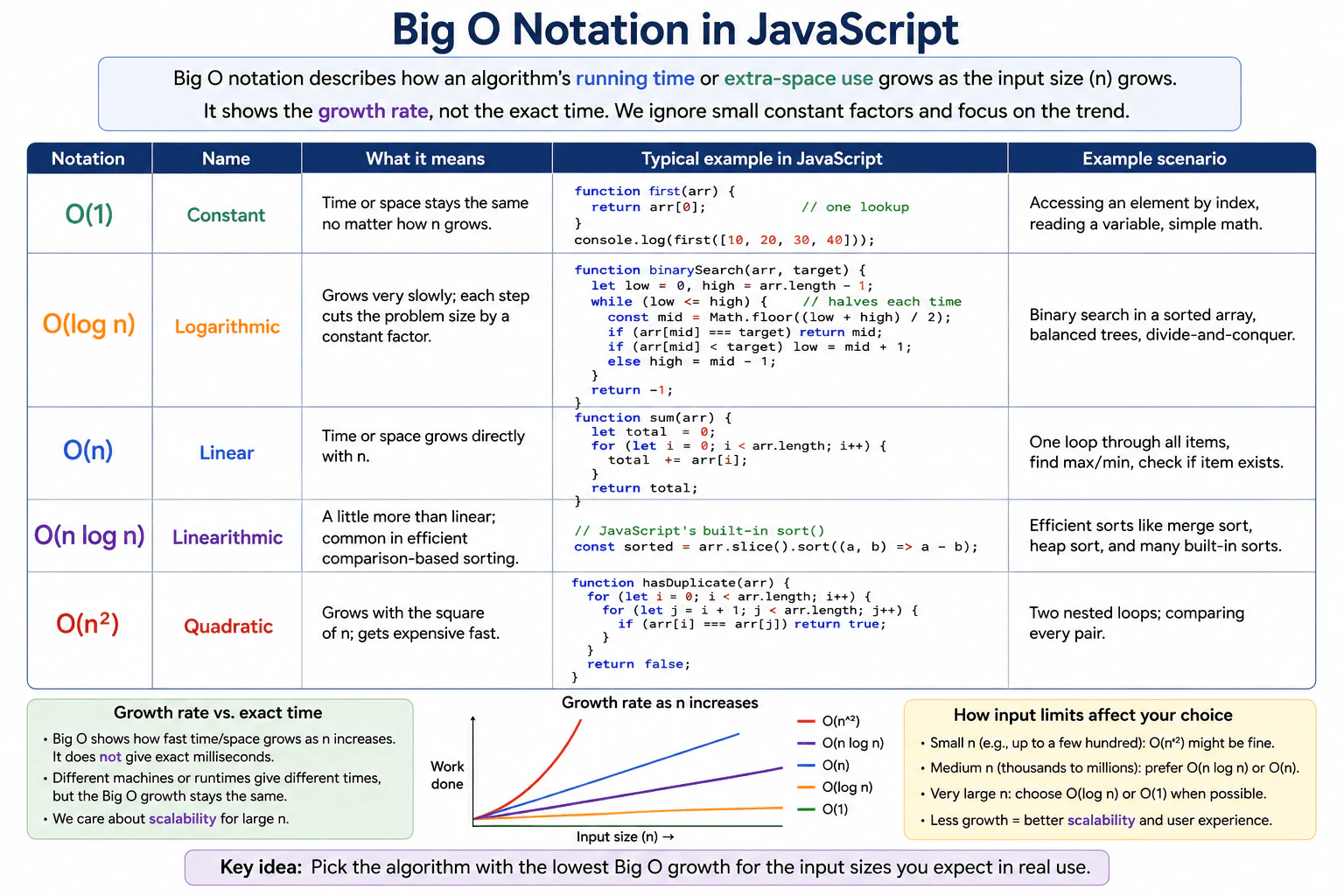
Define Big O notation as a way to describe how an algorithm running time or extra-space use grows as the input size grows. Explain O(1), O(log n), O(n), O(n log n), and O(n squared) with small JavaScript examples. Distinguish growth rate from exact elapsed time and connect input limits to a practical solution choice.
Short Interview Answer (30-60 seconds)
Big O notation describes how an algorithm’s running time or extra-space use grows as the input size n grows. It describes growth, not exact milliseconds. Common rates are O(1), O(log n), O(n), O(n log n), and O(n²). In JavaScript, examples include direct array access, binary search, one full loop, efficient comparison-style sorting, and nested pair comparisons. I use the expected input size to decide which growth rate is practical for the problem.
Big O helps us understand what happens when an input becomes larger. We can use it for running time or for extra memory. It does not tell us exactly how many milliseconds a program will take. Different computers and browsers can have different measured times. Big O focuses on how the amount of work grows as n grows. The diagram compares five common growth rates using small JavaScript examples. This helps us choose a solution that will still be practical for the expected input size.
Useful Questions to Ask the Interviewer
Are we analyzing running time, extra-space use, or both?
What input size should the solution handle?
Do you want the worst-case growth rate, the typical growth rate, or both?
How to Explain It in an Interview
1. Explain what Big O measures
Let n mean the input size. Big O describes how running time or extra-space use grows as n grows. It focuses on the growth pattern rather than exact elapsed time. Constant factors and smaller-order terms normally do not change the Big O class.
2. Explain O(1): constant growth
The diagram uses direct array access. The function first(arr) returns arr[0]. This performs one direct lookup regardless of how many items are in the array. That is why this example represents O(1) time. For a normal dense JavaScript array, indexed element access is constant-time in the usual case. The function also uses O(1) auxiliary space.
3. Explain O(log n): logarithmic growth
The diagram uses binary search on a sorted array. The search starts with low at the first index and high at the last index. It calculates the middle position. If the middle value is the target, it returns that index. If the target is larger, low moves to mid + 1. Otherwise, high moves to mid - 1. Each step removes about half of the remaining search range. That gives O(log n) time and O(1) auxiliary space for this iterative version.
4. Explain O(n): linear growth
The diagram uses a sum function. It starts total at 0 and visits every array element once. Each value is added to total. If n roughly doubles, the amount of loop work also roughly doubles. That is O(n) time. The function stores only total and the loop index, so its auxiliary space is O(1).
5. Explain O(n log n): linearithmic growth
The diagram connects O(n log n) with efficient comparison sorting and shows arr.slice().sort((a, b) => a - b) as its JavaScript example. O(n log n) grows faster than O(n) but much slower than O(n²). Merge sort and heap sort are standard examples of algorithms with O(n log n) running time. JavaScript Array.prototype.sort() itself does not have one universal Big O guarantee in ECMAScript because the specification does not require one particular sorting algorithm. Also, arr.slice() creates a copy that uses O(n) additional space.
6. Explain O(n²): quadratic growth
The diagram uses hasDuplicate(arr) with two nested loops. For each index i, the inner loop checks the later indices starting at i + 1. It returns true as soon as two equal values are found. If no duplicate is found, many pairs are compared. In the worst case, the number of comparisons grows proportionally to n². That gives O(n²) worst-case time and O(1) auxiliary space.
7. Connect input limits to the solution choice
For a small input, an O(n²) solution may still be fast enough. For larger inputs, O(n) or O(n log n) is usually more practical when the problem allows it. O(log n) and O(1) scale even better. The goal is not to choose the smallest Big O symbol without context. The goal is to choose the lowest-growth correct solution that fits the real input size, time limit, and memory limit.
Key Insight / Why This Solution Works
The key idea is to compare how different kinds of work grow as n becomes larger. O(1) stays constant. O(log n) grows slowly because each step removes a constant fraction of the remaining problem. O(n) grows directly with the number of items. O(n log n) commonly appears in efficient comparison-based sorting. O(n²) often appears when each item can be compared with many other items. The central rule is that Big O describes the growth rate of time or space, not an exact elapsed time. This makes it useful for choosing an approach that fits the expected input limits.
Code
// O(1): one direct array lookup.functionfirst(arr) {
// Return the first element. The amount of work does not grow with n.return arr[0];
}
console.log(first([10, 20, 30, 40])); // 10// O(log n): binary search on a sorted array.functionbinarySearch(arr, target) {
// low and high mark the part of the sorted array that can still contain target.let low = 0;
let high = arr.length - 1;
// Continue while the search interval is valid.while (low <= high) {
// Check the middle position of the remaining interval.const mid = Math.floor((low + high) / 2);
// Stop immediately when the target is found.if (arr[mid] === target) {
return mid;
}
if (arr[mid] < target) {
// The target must be to the right, so remove the left half.
low = mid + 1;
} else {
// The target must be to the left, so remove the right half.
high = mid - 1;
}
}
// The target was not found.return -1;
}
console.log(binarySearch([10, 20, 30, 40], 30)); // 2// O(n): visit every item once.functionsum(arr) {
// total stores the running sum.let total = 0;
for (let i = 0; i < arr.length; i += 1) {
// Add the current value before moving to the next item.
total += arr[i];
}
return total;
}
console.log(sum([10, 20, 30, 40])); // 100// O(n log n) category shown in the diagram.// The slice creates a copy so the original array is not changed.// Efficient comparison sorts commonly have O(n log n) time, but ECMAScript// does not require Array.prototype.sort() to use one specific algorithm.const values = [40, 10, 30, 20];
const sorted = values.slice().sort((a, b) => a - b);
console.log(sorted); // [10, 20, 30, 40]// O(n²): compare each item with every later item.functionhasDuplicate(arr) {
for (let i = 0; i < arr.length; i += 1) {
// Start at i + 1 so an element is not compared with itself.for (let j = i + 1; j < arr.length; j += 1) {
// Stop as soon as an equal pair is found.if (arr[i] === arr[j]) {
returntrue;
}
}
}
// No duplicate pair was found.returnfalse;
}
console.log(hasDuplicate([10, 20, 30, 20])); // true
Time & Space Complexity
This question compares several complexity classes rather than giving one complexity for one algorithm. O(1) means the work stays constant as n grows. O(log n) means the work grows slowly because the remaining problem is repeatedly reduced, as in binary search. O(n) means the work grows roughly in direct proportion to n. O(n log n) grows more than linear but much less than quadratic. O(n²) grows quickly because the work can be proportional to n times n. The diagram's direct-access, iterative binary-search, sum-loop, and nested-loop examples use O(1) auxiliary space. The arr.slice() operation in the sorting example creates an O(n) copy, and the sorting implementation may use additional memory depending on the JavaScript engine.
Where it is used
Big O is useful whenever software must handle inputs that can grow. A frontend developer may use it when searching, filtering, sorting, transforming, or comparing large arrays of data. Code that feels fast with 20 items may behave very differently with 100,000 items. Big O gives a simple way to compare how well different approaches scale before relying on exact benchmark times.
Why Interviewers Ask This
Interviewers ask this to check whether a candidate can reason about scalability instead of only checking whether code works. They want to see whether the candidate understands common growth classes, can explain why binary search is logarithmic, can distinguish one pass from pairwise nested work, and can discuss running time separately from extra memory. They also want the candidate to understand that Big O is not an exact benchmark and that input limits matter when choosing a practical solution.
Common interview mistakes
Saying Big O gives an exact runtime in milliseconds. It describes a growth rate instead.
Looking only at the Big O label and ignoring the expected input size. O(n²) can still be acceptable when n is small.
Saying binary search is O(log n) without mentioning that its input must be sorted.
Assuming every pair of nested loops is automatically O(n²). The actual number of iterations determines the complexity.
Saying JavaScript Array.prototype.sort() has a guaranteed O(n log n) complexity. ECMAScript does not require one specific sorting algorithm or one universal complexity bound.
Ignoring extra memory. For example, arr.slice() creates a new array whose size grows with n.
Interview tip
Explain the growth rates in order from O(1) through O(n²), connect each one to the matching JavaScript example, and then finish by explaining how the expected input size affects which complexity is practical.
Interviewer may ask next
Why can an O(n²) solution still be acceptable for a small input?
Big O describes how work grows as n increases. It does not mean every O(n²) program is immediately slow. If n is only a few dozen or a few hundred, the total number of operations may still be small enough. A quadratic solution can also be simpler. As n becomes much larger, its growth becomes expensive, so O(n) or O(n log n) is usually more practical when the problem allows it.
Does JavaScript Array.prototype.sort() always run in O(n log n) time?
No. ECMAScript defines the required sorting behavior, but it does not require every JavaScript engine to use one specific sorting algorithm or guarantee one universal Big O bound. The diagram uses sorting to represent the O(n log n) growth class because efficient comparison algorithms such as merge sort and heap sort have that complexity. If a strict bound matters, analyze the specific sorting algorithm or implementation instead of assuming it from Array.prototype.sort().
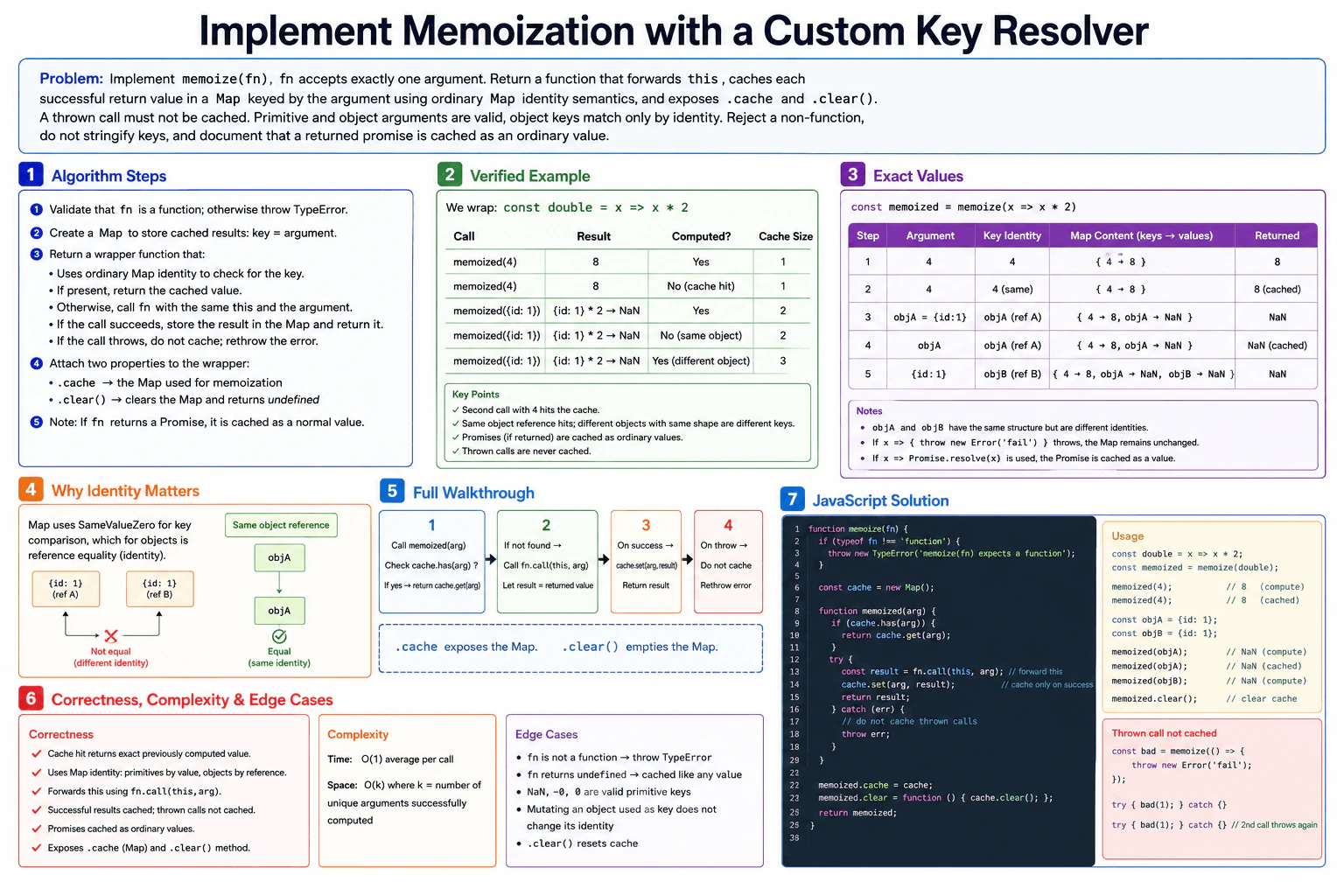
52. Implement a reusable counter factory.CodingEasy
i Question Details
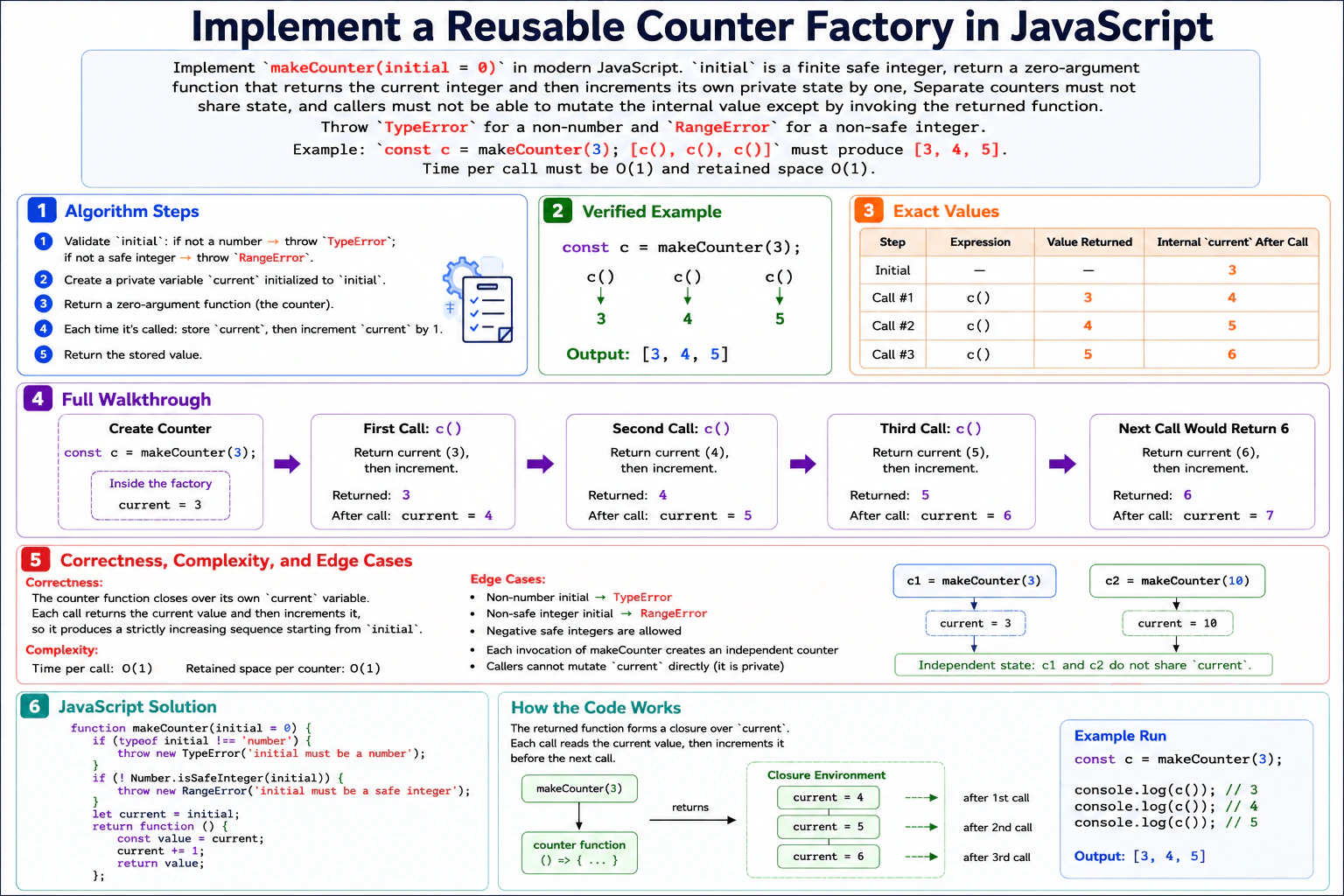
Implement makeCounter(initial = 0) in modern JavaScript. initial is a finite safe integer; return a zero-argument function that returns the current integer and then increments its own private state by one. Separate counters must not share state, and callers must not be able to mutate the internal value except by invoking the returned function. Do not use globals, class fields, timers, or external libraries. Throw TypeError for a non-number and RangeError for a non-safe integer. Example: const c = makeCounter(3); [c(), c(), c()] must produce [3, 4, 5]. Time per call must be O(1) and retained space O(1).
Short Interview Answer (30-60 seconds)
I would keep the counter value inside the factory so each returned function has its own private state. First, I validate that initial is a number and a safe integer. Then I store it in current. On each call, I save the current value, increment current by one, and return the saved value. This makes separate counters independent and prevents direct state mutation. Each call takes O(1) time, and each counter keeps O(1) retained space.
The task is to create a function that makes an independent counter. The caller gives a starting whole number, or 0 is used by default. The returned function takes no arguments. Each time it is called, it gives back its current number and then moves to the next number. Different counters must remember different values. Outside code must not be able to directly change the remembered number. Invalid input must throw the required error. For the given example, starting at 3 makes three calls return 3, 4, and 5.
Useful Questions to Ask the Interviewer
If the counter eventually moves beyond JavaScript's safe-integer range, should it continue using normal number behavior, or should that later state be rejected?
Are only the required error types important, or do you also want specific error messages?
How to Explain It in an Interview
1. Understand the input and output
makeCounter(initial = 0) receives one starting value. The starting value must be a JavaScript number and must pass Number.isSafeInteger. The function returns another function that takes no arguments. Each time that returned function runs, it returns the current stored value and then increases the stored value by one.
2. Use a closure for private state
The solution uses a closure. A closure means the returned function keeps access to variables created inside makeCounter even after makeCounter has finished. We store the private counter value in current. Outside code cannot directly access that local variable. Every call to makeCounter creates a different current, so separate counters do not share state.
3. Validate and initialize the state
First, check typeof initial !== 'number'. If that condition is true, throw TypeError. Next, check Number.isSafeInteger(initial). If that condition is false, throw RangeError. After validation, set current = initial. In the diagram example, current starts at 3.
4. Walk through the example
Create const c = makeCounter(3). The private state is now current = 3. On the first call, save 3, change current to 4, and return 3. On the second call, save 4, change current to 5, and return 4. On the third call, save 5, change current to 6, and return 5. Therefore [c(), c(), c()] produces [3, 4, 5]. If we called it again, it would return 6 and then change current to 7.
5. Explain why the result is correct
The main invariant is that before each call, current is exactly the value that the next call must return. The function saves that value before changing the state. It then increments current by one. This means every call returns the correct current value, and the following call sees the next integer. Each factory call creates its own closure, so different counters stay independent.
6. Explain the JavaScript implementation
The outer function validates the starting value and creates the private current variable. The returned zero-argument function reads current into value, increments current, and returns value. The code uses no globals, class fields, timers, or external libraries. Because current is local to the factory and only the returned function closes over it, callers cannot directly mutate it.
7. Explain complexity and edge cases
Each counter call performs a fixed amount of work: read one value, increment once, and return one value. That is O(1) time per call. Each counter keeps one private numeric state value, so retained space is O(1). A non-number input throws TypeError. A numeric value that is not a safe integer, such as 1.5, NaN, or Infinity, throws RangeError. Negative safe integers and zero are valid starting values.
Key Insight / Why This Solution Works
Use a closure to store one private variable named current. Validate the starting value before creating the counter. The central invariant is: before every invocation, current is the exact value that the next call must return. The returned function first copies current into a local variable, then increments current, then returns the saved value. Saving before incrementing is required because the contract says to return the current value first. Every call to makeCounter creates a new closure, so separate counters keep separate state.
Code
functionmakeCounter(initial = 0) {
// Reject values that are not JavaScript numbers.if (typeof initial !== 'number') {
thrownewTypeError('initial must be a number');
}
// The starting value must be an integer JavaScript can represent safely.if (!Number.isSafeInteger(initial)) {
thrownewRangeError('initial must be a safe integer');
}
// This private state belongs only to this counter instance.let current = initial;
// The returned function closes over current and remembers it between calls.returnfunction () {
// Save the value for this call before changing the private state.const value = current;
// Advance the private state so the next call gets the next integer.
current += 1;
// Return the value that belonged to this invocation.return value;
};
}
// Run the exact example shown in the diagram.const c = makeCounter(3);
console.log([c(), c(), c()]); // [3, 4, 5]
Time & Space Complexity
Each call to the returned counter does a fixed amount of work. It reads the current number, saves it, adds one to the private state, and returns the saved number. Therefore each call takes O(1) time. Each counter keeps only one private current value between calls. The amount of retained memory does not grow as the counter is used, so retained space per counter is O(1).
Where it is used
This closure pattern is useful when a small piece of changing state should belong to one function instance instead of being global. Examples include local sequence counters, component-specific counters, test helpers, and small stateful utilities where callers should use a controlled function instead of changing the stored value directly.
Why Interviewers Ask This
This problem checks whether you understand JavaScript closures and lexical scope, not just how to increment a number. The interviewer can see whether you can keep state private without globals or classes, create independent state for separate factory calls, validate JavaScript numeric input correctly, preserve the required return-before-increment order, and explain why both execution time and retained memory stay O(1). It also checks whether your code and explanation describe the same behavior.
Common interview mistakes
A common mistake is incrementing current before saving it. That would make a counter starting at 3 return 4 first. Another mistake is storing the counter value in a global variable, which would make different counters share state. Candidates may also throw the wrong error type by treating every invalid value the same. Another mistake is exposing current through an object or property, which would let callers mutate it directly. It is also incorrect to claim that retained space grows with the number of calls.
Interview tip
State the invariant before writing the returned function: current is always the value that the next call should return. Then implement the operation in the same order as the diagram: save current, increment the private state, and return the saved value.
Interviewer may ask next
Why do two counters created with makeCounter not share their values?
Each call to makeCounter creates a new execution environment with its own current variable. The returned function closes over that specific variable. For example, const a = makeCounter(3) and const b = makeCounter(10) keep different private states. Calling a() changes only the state captured by a. It does not change b. The work per call remains O(1), and each counter retains O(1) space.
How would you change the counter if every returned value also had to remain a safe integer?
The current problem validates only the starting value. If every later returned value also had to be safe, I would check Number.isSafeInteger(current) before returning it. If it is no longer safe, I would throw RangeError. The closure design would stay the same. The invariant would become: current is the next value to return only while it is a safe integer. Each call would still take O(1) time and each counter would still retain O(1) space. The tradeoff is one extra constant-time validation on every call.
53. Implement a function that calculates the arithmetic mean of an array.CodingEasy
i Question Details
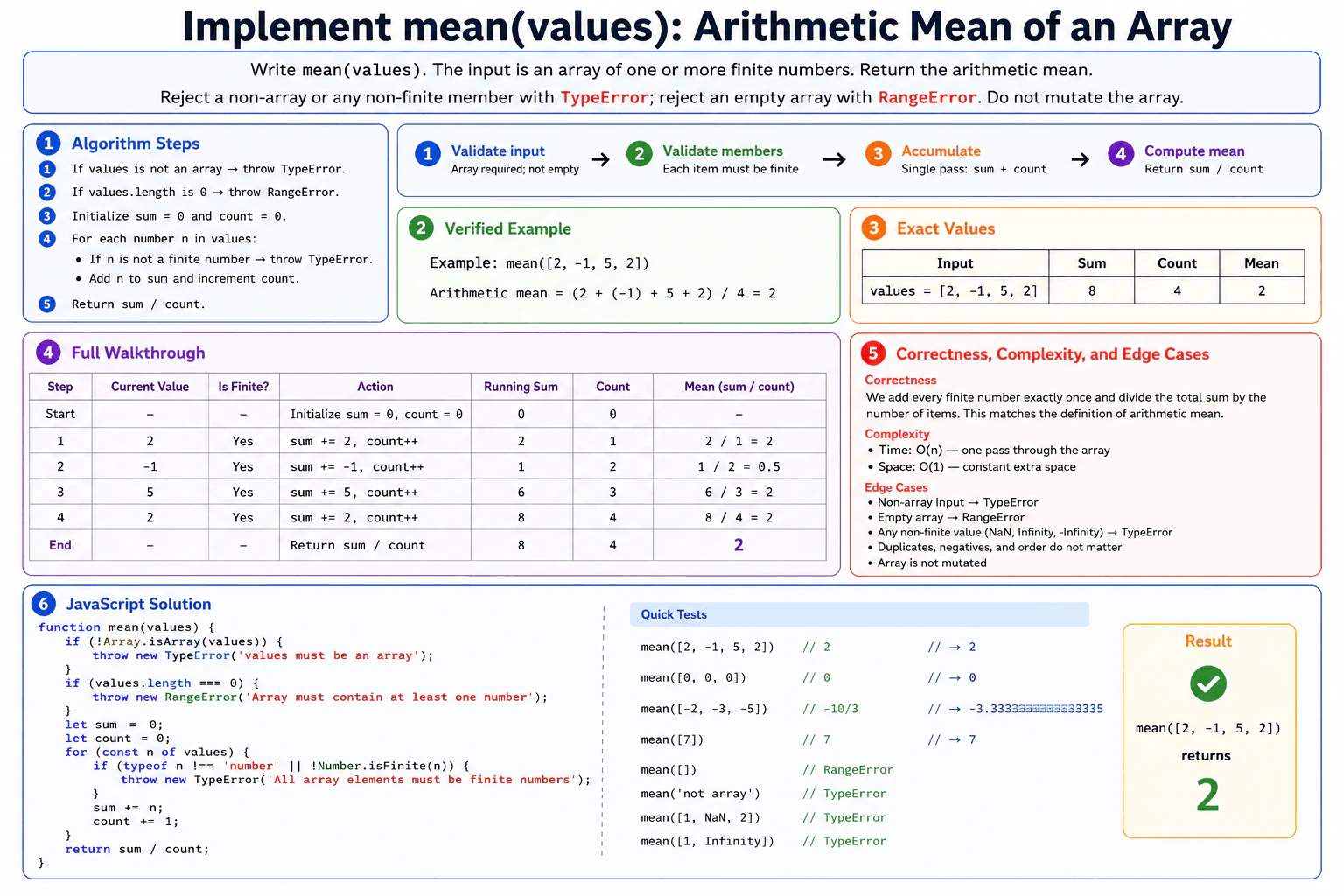
Write mean(values). The input is an owned JavaScript array of one or more finite numbers; duplicates and negative values are allowed, order is irrelevant, and the function must not mutate the array. Return the numeric arithmetic mean. Reject a non-array or any non-finite member with TypeError; reject an empty array with RangeError. Use only standard ECMAScript features and do not call an external statistics library. Example: mean([2, -1, 5, 2]) must return 2. A single pass is required, with O(n) time and O(1) auxiliary space.
Short Interview Answer (30-60 seconds)
I would first validate that the input is a non-empty array. Then I make one pass through it while keeping a running sum and count. For each number, I verify that it is finite before adding it to the sum and increasing the count. At the end, I return sum divided by count. This works because every valid number contributes exactly once. The time complexity is O(n), and the auxiliary space complexity is O(1).
The function receives an array containing one or more finite numbers and returns their arithmetic mean. The mean is the total of all numbers divided by how many numbers there are. Duplicate and negative values are allowed. The function must not change the array. It must reject a non-array or any non-finite member with TypeError and reject an empty array with RangeError. A single pass with a running sum and count satisfies these requirements.
Useful Questions to Ask the Interviewer
Should a non-array input throw TypeError?
Should an empty array throw RangeError?
Should NaN, Infinity, -Infinity, or other non-finite members throw TypeError?
Must the original array remain unchanged?
How to Explain It in an Interview
1. Validate the input
First, I check Array.isArray(values). If values is not an array, I throw TypeError. Next, I check values.length === 0. If the array is empty, I throw RangeError. These checks happen before calculating the mean.
2. Initialize the running state
I set sum = 0 and count = 0. The variable sum stores the total of all valid numbers processed so far. The variable count stores how many numbers have been processed. Before the loop starts, no numbers have been processed, so both values are 0.
3. Validate each member and accumulate
I process the array from left to right with one for...of loop. For each number n, I check typeof n !== 'number' or !Number.isFinite(n). If either condition is true, I throw TypeError. Otherwise, I add n to sum and increase count by 1. The array itself is never changed.
4. Walk through the exact example
For mean([2, -1, 5, 2]), the starting state is sum = 0 and count = 0.
Step 1: n = 2. It is finite. I add 2, so sum becomes 2 and count becomes 1. At this point, sum / count is 2 / 1 = 2.
Step 2: n = -1. It is finite. I add -1, so sum becomes 1 and count becomes 2. At this point, sum / count is 1 / 2 = 0.5.
Step 3: n = 5. It is finite. I add 5, so sum becomes 6 and count becomes 3. At this point, sum / count is 6 / 3 = 2.
Step 4: n = 2. It is finite. I add 2, so sum becomes 8 and count becomes 4. At this point, sum / count is 8 / 4 = 2.
After the loop, the function returns sum / count, which is 8 / 4 = 2.
5. Explain why the result is correct
After every completed iteration, sum equals the total of all array members processed so far, and count equals the number of members processed so far. Each valid number is added exactly once. Therefore, when the loop finishes, sum is the total of the whole array and count is its length. Dividing sum by count gives the arithmetic mean.
6. Explain the JavaScript implementation
The implementation performs the array and empty-array checks first. It then initializes sum and count. The for...of loop processes each member once. Each member is checked with typeof and Number.isFinite before it affects the running state. Valid values update sum and count. Finally, the function returns sum / count.
7. Explain complexity and edge cases
The loop processes n array elements once, so the time complexity is O(n). Only a fixed number of variables are used, so the auxiliary space complexity is O(1). Non-array input causes TypeError. An empty array causes RangeError. NaN, Infinity, -Infinity, and any other non-finite member cause TypeError. Duplicates, negative values, zero, and a one-element array work correctly. The function does not mutate the input array.
Key Insight / Why This Solution Works
Use a single-pass running-sum algorithm. First validate that values is an array and that it is not empty. Initialize sum = 0 and count = 0. Then process each number n in order. Before using n, verify that it is a number and that Number.isFinite(n) is true. Add each valid n to sum and increment count. Finally, return sum / count. The central invariant is that after each completed iteration, sum is the total of exactly the values processed so far and count is exactly how many values have been processed.
Code
functionmean(values) {
// Reject anything that is not an actual JavaScript array.if (!Array.isArray(values)) {
thrownewTypeError('values must be an array');
}
// The problem requires at least one number.if (values.length === 0) {
thrownewRangeError('Array must contain at least one number');
}
// sum is the total of processed values.// count is the number of processed values.let sum = 0;
let count = 0;
// Process each array member once without changing the array.for (const n of values) {
// Reject non-number values, NaN, Infinity, and -Infinity.if (typeof n !== 'number' || !Number.isFinite(n)) {
thrownewTypeError('All array elements must be finite numbers');
}
// Update the running total and processed-item count.
sum += n;
count += 1;
}
// Arithmetic mean = total sum / number of values.return sum / count;
}
// Run the exact example from the diagram.console.log(mean([2, -1, 5, 2])); // 2
Time & Space Complexity
Let n be the array length. The function visits each member once, so the time complexity is O(n). It does not create another array or any collection that grows with the input. It only keeps sum, count, and the current loop value, so the auxiliary space complexity is O(1). The original input array is only read and is not modified.
Where it is used
This running-sum pattern is useful when software needs a simple average, such as average response time, temperature, score, latency, or sensor reading. The same idea also works well when values are processed one at a time because the program only needs to keep a running total and count.
Why Interviewers Ask This
This question checks whether a candidate can turn a simple mathematical rule into careful JavaScript. The interviewer can evaluate input validation, handling of NaN and Infinity, correct exception types, non-mutation of the input, a clean single-pass loop, and accurate complexity analysis. It also shows whether the candidate can explain a simple invariant and keep the implementation consistent with the stated contract.
Common interview mistakes
A common mistake is checking only typeof n === 'number'. NaN and Infinity also have the JavaScript type number, so Number.isFinite is needed. Another mistake is forgetting the empty-array check, which would make the calculation invalid. Candidates may also divide by the wrong count, mutate the input unnecessarily, or make an extra copy of the array. Another mistake is giving the wrong complexity. This solution is O(n) time and O(1) auxiliary space.
Interview tip
Explain the invariant while you code: after every iteration, sum is the total of all values processed so far and count is the number of values processed so far. Then the final return sum / count follows directly.
Interviewer may ask next
How would the solution change if the numbers arrived one at a time instead of being stored in an array?
Keep the same running sum and count as persistent state. For every new finite number, add it to sum and increase count. The current mean is sum / count. The invariant stays the same, so correctness is preserved. Processing n received values takes O(n) total time, or O(1) work per new value, and O(1) auxiliary space. The tradeoff is that the running state must remain available between arrivals.
Can the auxiliary space be reduced below O(1)?
No meaningful asymptotic reduction is possible because O(1) already means the extra memory does not grow with the input size. The algorithm needs only a small fixed amount of state, mainly sum and count. It still runs in O(n) time and O(1) auxiliary space, without creating another collection.
54. Flatten a nested object into dot-delimited paths.CodingMedium
i Question Details
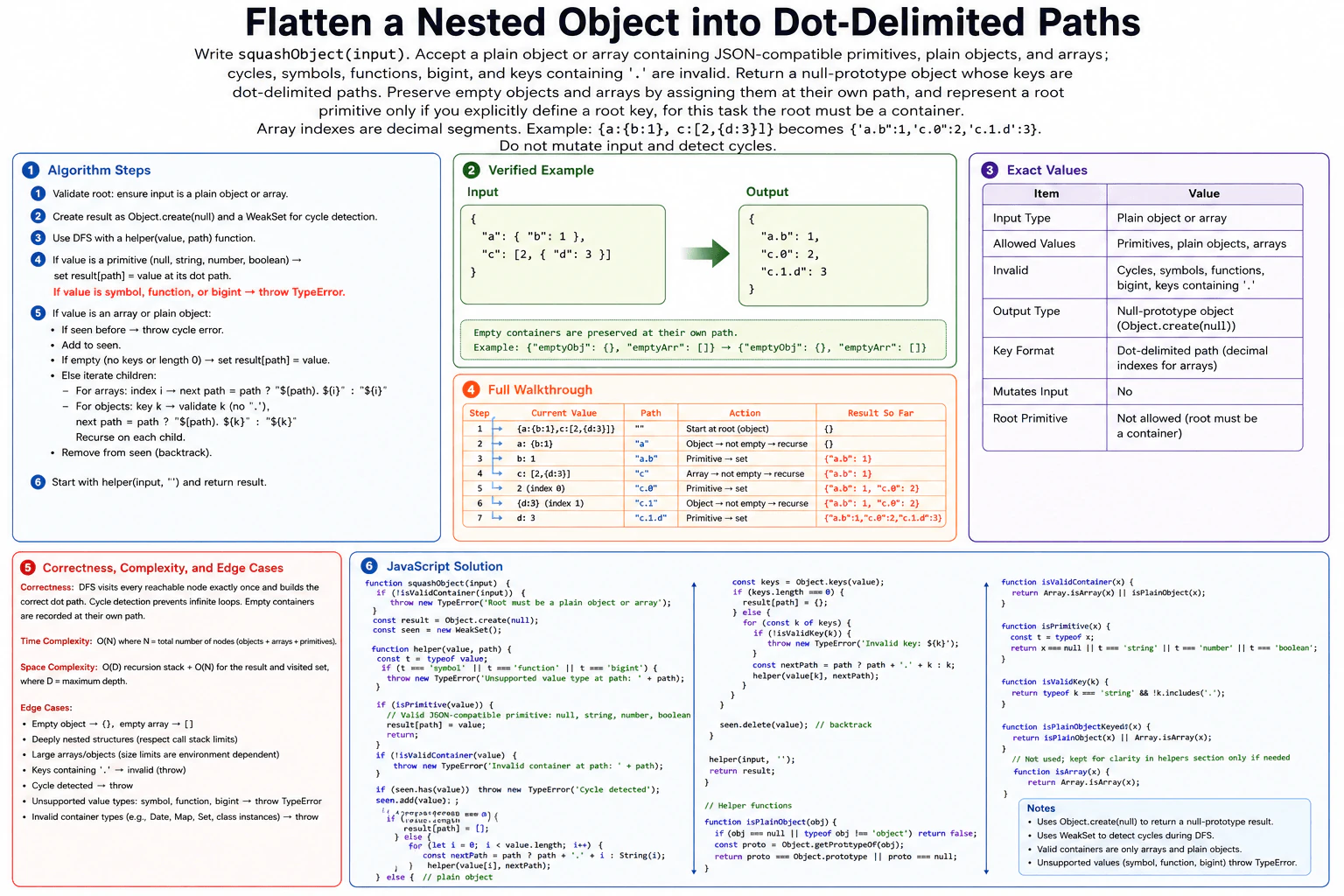
Write squashObject(input). Accept a plain object or array containing JSON-compatible primitives, plain objects, and arrays; cycles, symbols, functions, bigint, and keys containing . are invalid. Return a null-prototype object whose keys are dot-delimited paths. Preserve empty objects and arrays by assigning them at their own path, and represent a root primitive only if you explicitly define a root key; for this task the root must be a container. Array indexes are decimal segments. Example: {a:{b:1}, c:[2,{d:3}]} becomes {'a.b':1,'c.0':2,'c.1.d':3}. Do not mutate input and detect cycles.
Short Interview Answer (30-60 seconds)
I would use depth-first search to walk through the nested object or array. Each recursive call carries the current dot-delimited path. When I reach a valid primitive, I store it in a null-prototype result object. Empty objects and arrays are stored at their own path. A WeakSet tracks containers on the active recursion path so cycles are detected. I also reject dotted keys and unsupported values. The traversal is O(N) time, with O(D) recursion depth and O(N) storage including the result.
The input is one plain object or array that can contain simple values, more plain objects, and arrays. The goal is to replace the nested shape with path-value entries. Object keys become path parts. Array positions become decimal path parts. Empty containers must still appear in the result. The original input must not be changed. The solution walks through the structure with depth-first search and builds the correct path while it moves deeper.
Useful Questions to Ask the Interviewer
Should empty objects and arrays be kept in the flattened result? Yes, the question requires this.
Should array indexes be written as decimal path segments such as "c.0" and "c.1"? Yes.
Should cycles, unsupported values, invalid container types, and object keys containing "." cause an error? Yes.
How to Explain It in an Interview
1. Understand the input and required output
The root must be a plain object or an array. Valid leaf values are null, strings, numbers, and booleans. Plain objects and arrays can appear at any depth. Symbols, functions, bigint values, cycles, and object keys containing "." are invalid. Other object types such as Date, Map, Set, and class instances are also rejected because they are not plain objects. The function returns an object created with Object.create(null). Its keys are paths such as "a.b" and "c.1.d".
2. Choose DFS and track the current path
I use recursive depth-first search. Each recursive call receives the current value and the path to that value. If the value is a valid primitive, I write it to the result. If it is an array or plain object, I visit its children. The main invariant is simple: every helper call receives the exact path of its current value from the root.
A WeakSet named seen tracks only containers on the active recursion path. Before entering a container, I check whether it is already in seen. If it is, there is a cycle. After finishing that container, I remove it from seen. This backtracking means the same object may appear again through a different non-cyclic branch without being mistaken for a cycle.
3. Initialize the state
The result starts as Object.create(null). This creates an object with no Object.prototype inheritance. The seen WeakSet starts empty. The first recursive call is helper(input, ""), so traversal begins at the root with an empty path.
4. Walk through the verified example
The example input is {a:{b:1}, c:[2,{d:3}]}.
Step 1 starts at the root. The root is a non-empty plain object, so DFS visits its keys.
Step 2 visits a at path "a". Its value is {b:1}. This object is not empty, so DFS continues inside it.
Step 3 visits b with value 1 at path "a.b". The value is a primitive, so the algorithm stores result["a.b"] = 1. The result is now {"a.b":1}.
Step 4 returns to the root and visits c at path "c". Its value is [2,{d:3}]. The array is not empty, so DFS visits its indexes.
Step 5 visits index 0. The value is 2 and the path is "c.0". The algorithm stores result["c.0"] = 2. The result is now {"a.b":1,"c.0":2}.
Step 6 visits index 1. The value is {d:3} and the path is "c.1". It is a non-empty plain object, so DFS continues inside it.
Step 7 visits d with value 3 at path "c.1.d". The algorithm stores result["c.1.d"] = 3. The final result is {"a.b":1,"c.0":2,"c.1.d":3}.
5. Explain why the result is correct
Every recursive call carries the exact location of its value. Object keys add one key segment. Array positions add one decimal index segment. Therefore, every primitive is stored under the path that identifies its original position. Empty objects and arrays are written at their own path instead of disappearing. The WeakSet prevents infinite recursion because revisiting a container that is still on the active DFS path means a cycle exists.
6. Explain the JavaScript implementation
The function first checks that the root is an array or plain object. It creates the null-prototype result and the WeakSet. The helper rejects symbol, function, and bigint values before doing anything else. It stores valid primitives immediately. Any remaining value must be an array or plain object. The helper checks for a cycle before descending. Arrays are processed from index 0 upward. Plain objects are processed with Object.keys. Every object key is checked for a dot before recursion. Empty containers are stored directly at their current path. After a container is finished, it is removed from seen.
7. Explain complexity and edge cases
The diagram gives O(N) time, where N is the total number of visited objects, arrays, and primitive values. The recursion depth is O(D), where D is the maximum nesting depth. The returned result and cycle-tracking state can grow with the input, so the diagram summarizes storage as O(N), plus the O(D) recursion stack. Important cases are empty objects, empty arrays, deep nesting, dotted keys, cycles, unsupported primitive types, and non-plain object containers.
Key Insight / Why This Solution Works
Use recursive depth-first search. The helper receives the current value and its dot-delimited path. A valid primitive becomes one result entry. An empty object or array also becomes one result entry at its current path. For a non-empty array, recurse through indexes in order. For a non-empty plain object, recurse through Object.keys in order after rejecting keys containing a dot. A WeakSet tracks containers on the active recursion path. The central invariant is that every helper call receives the exact path of its value in the original input. Removing a container from the WeakSet after processing its children restores the path-local state.
Code
functionsquashObject(input) {
// The root must be one of the two supported container types.if (!isValidContainer(input)) {
thrownewTypeError('Root must be a plain object or array');
}
// A null-prototype object avoids inherited Object.prototype properties.const result = Object.create(null);
// Track containers on the active DFS path so cycles can be detected.const seen = newWeakSet();
functionhelper(value, path) {
const type = typeof value;
// These value types are explicitly invalid for this problem.if (type === 'symbol' || type === 'function' || type === 'bigint') {
thrownewTypeError('Unsupported value type at path: ' + path);
}
// A valid primitive is a leaf, so record it at its exact dot path.if (isPrimitive(value)) {
result[path] = value;
return;
}
// Every remaining value must be an array or a plain object.if (!isValidContainer(value)) {
thrownewTypeError('Invalid container at path: ' + path);
}
// Reaching the same active container again means there is a cycle.if (seen.has(value)) {
thrownewTypeError('Cycle detected');
}
seen.add(value);
if (Array.isArray(value)) {
// Empty arrays must remain visible in the flattened result.if (value.length === 0) {
result[path] = [];
} else {
// Array indexes become decimal path segments such as c.0 and c.1.for (let index = 0; index < value.length; index++) {
const nextPath = path ? path + '.' + index : String(index);
helper(value[index], nextPath);
}
}
} else {
const keys = Object.keys(value);
// Empty plain objects must remain visible in the flattened result.if (keys.length === 0) {
result[path] = {};
} else {
for (const key of keys) {
// A source key containing a dot would make the flattened path ambiguous.if (!isValidKey(key)) {
thrownewTypeError('Invalid key: ' + key);
}
// Extend the current path with this object key and recurse.const nextPath = path ? path + '.' + key : key;
helper(value[key], nextPath);
}
}
}
// Backtrack so seen contains only containers on the current DFS path.
seen.delete(value);
}
// Start traversal at the root, which has no path segment of its own.helper(input, '');
return result;
}
functionisPlainObject(value) {
// Only ordinary objects or null-prototype objects count as plain objects.if (value === null || typeof value !== 'object') {
returnfalse;
}
const prototype = Object.getPrototypeOf(value);
return prototype === Object.prototype || prototype === null;
}
functionisValidContainer(value) {
// Arrays and plain objects are the only supported container types.returnArray.isArray(value) || isPlainObject(value);
}
functionisPrimitive(value) {
// These are the JSON-compatible primitive categories used by the diagram.const type = typeof value;
return value === null || type === 'string' || type === 'number' || type === 'boolean';
}
functionisValidKey(key) {
// The problem rejects object keys that contain a dot.returntypeof key === 'string' && !key.includes('.');
}
// Run the same verified example shown in the diagram.const input = { a: { b: 1 }, c: [2, { d: 3 }] };
const output = squashObject(input);
console.log(output);
// Null-prototype object containing:// { 'a.b': 1, 'c.0': 2, 'c.1.d': 3 }
Time & Space Complexity
The diagram gives O(N) time, where N is the total number of visited objects, arrays, and primitive values. Each reachable value is handled once by the DFS traversal. The maximum recursion depth is O(D), where D is the deepest nesting level. The flattened result grows with the input, and the cycle-detection state also uses memory. Following the diagram, total stored output and traversal bookkeeping are O(N), with an additional O(D) recursion stack.
Where it is used
This pattern is useful when nested configuration data, form data, application state, or JSON-like data must be turned into path-value entries. Dot paths can make nested values easier to index, compare, display, or send to systems that work with flat key-value records. The same DFS pattern is also useful whenever JavaScript code must walk nested data while remembering the path to each value.
Why Interviewers Ask This
This problem checks whether a candidate can traverse recursive JavaScript data without losing structural information. It tests path construction, arrays versus plain objects, recursion state, cycle detection, input validation, and non-mutation. It also shows whether the candidate notices less obvious requirements such as preserving empty containers and returning a null-prototype object. A strong answer keeps the code, traversal order, edge cases, and complexity explanation consistent.
Common interview mistakes
A common mistake is to recurse into every JavaScript object. That would incorrectly accept Date, Map, Set, or class instances instead of only arrays and plain objects. Another mistake is forgetting to preserve empty objects and arrays, which makes them disappear from the output. Candidates may also forget to reject object keys containing a dot, build array paths incorrectly, or mutate the original input. Cycle detection must be path-local. If a container is never removed from seen after recursion, a shared reference can be incorrectly reported as a cycle.
Interview tip
Explain the invariant before writing the recursion: every helper call receives the exact flattened path of its current value. Then show how one object key or array index extends that path. This makes the primitive case, empty-container case, cycle check, and final output much easier to explain.
Interviewer may ask next
How would you handle a very deeply nested input that may exceed the JavaScript call stack?
I would keep the same depth-first traversal rules but replace recursive calls with an explicit stack. Each stack entry would store the current value, its path, and the traversal state needed to preserve the same child order and path-local cycle tracking. This avoids depending on the JavaScript call stack. The traversal remains O(N) time under the diagram's model. Extra memory is O(N) in the worst case for the explicit traversal state, result, and cycle bookkeeping. The tradeoff is more implementation complexity.
What happens if the same object is referenced from two different branches but there is no cycle?
The shown solution allows that case. The WeakSet represents only the active recursion path. A container is added before its children are processed and removed when that recursive call finishes. If the same object is reached later through another completed branch, it is no longer in seen, so it can be processed again under the new path. If it is reached while still active, that is a real cycle and the function throws. The traversal and memory bounds stay consistent with the diagram.
55. Implement a dynamically queued asynchronous task runner with a concurrency limit.CodingHard
i Question Details
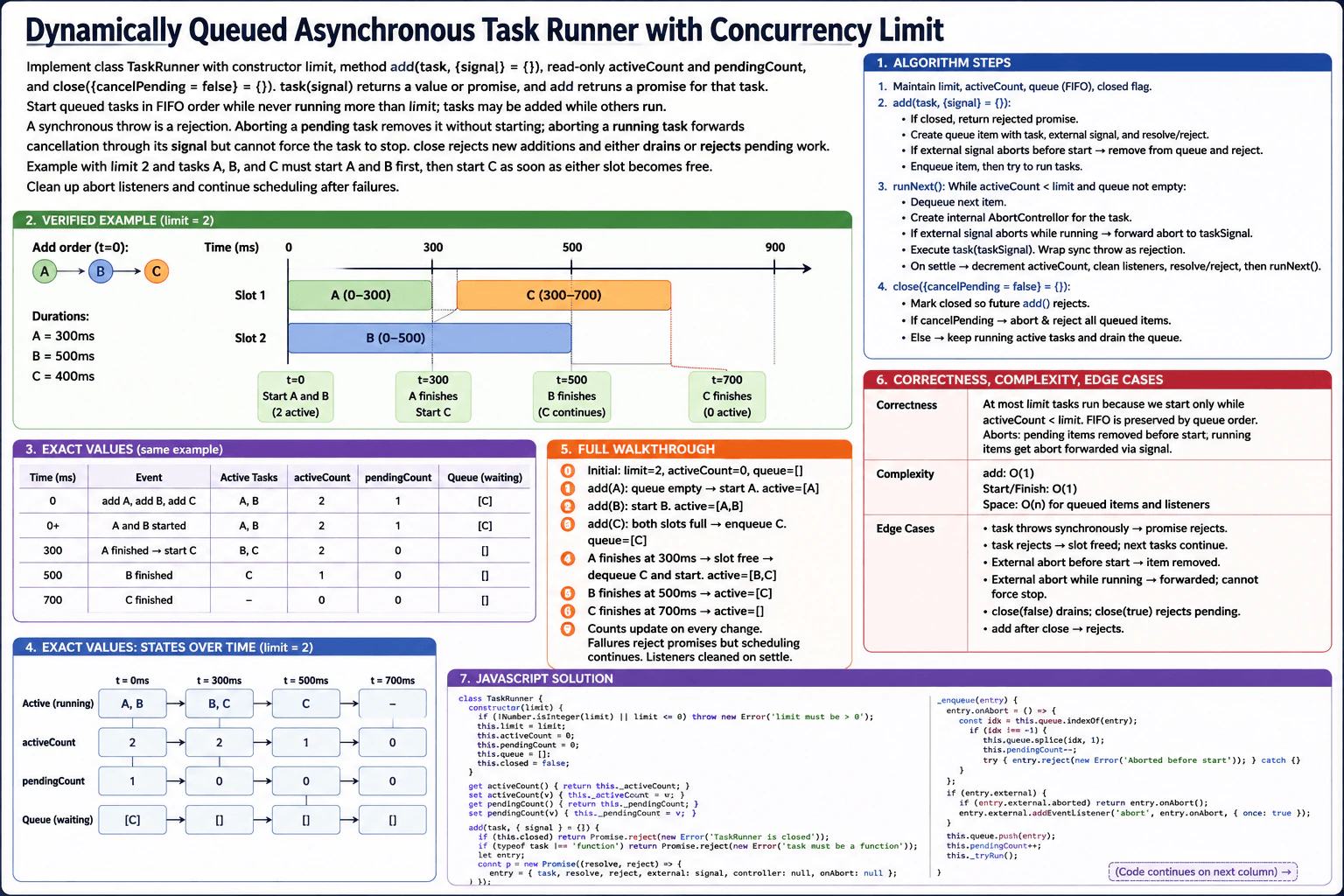
Implement class TaskRunner with constructor limit, method add(task, {signal} = {}), read-only activeCount and pendingCount, and close({cancelPending = false} = {}). task(signal) returns a value or promise, and add returns a promise for that task. Start queued tasks in FIFO order while never running more than limit; tasks may be added while others run. A synchronous throw is a rejection. Aborting a pending task removes it without starting; aborting a running task forwards cancellation through its signal but cannot force the task to stop. close rejects new additions and either drains or rejects pending work. Example with limit 2 and tasks A, B, and C must start A and B first, then start C as soon as either slot becomes free. Clean up abort listeners and continue scheduling after failures.
Short Interview Answer (30-60 seconds)
I would keep pending tasks in a FIFO queue and track the number of running tasks. I start work only while activeCount is below the concurrency limit. Each running task gets its own AbortController. A pending abort removes and rejects that task before it starts. A running abort only forwards cancellation through its signal. When any task settles, I free its slot and schedule the next queued task. Queue operations are O(1) amortized, with O(n) auxiliary space.
This class controls how many asynchronous tasks may run at the same time. Each call to add returns a promise for that task. Extra tasks wait in the order they were added. When a running task finishes or fails, the oldest waiting task starts. A waiting task may be cancelled before it starts. A running task receives an abort signal, but the runner cannot force it to stop. close stops new additions and either lets waiting work drain or rejects it.
Useful Questions to Ask the Interviewer
Should close() return a promise that resolves after all already accepted work has finished?
With cancelPending = true, should already running tasks continue? The approved design keeps them running and rejects only pending work.
For a running task, is cooperative cancellation through AbortSignal sufficient? The approved design assumes yes because the runner cannot forcibly stop arbitrary asynchronous JavaScript.
How to Explain It in an Interview
1. Understand the input and required output
The constructor receives limit, which is the maximum number of tasks allowed to run together. add(task, { signal }) accepts a function. The runner calls that function with an internal AbortSignal. The function may return a normal value or a promise. add returns a promise for that result. activeCount is the number of running tasks. pendingCount is the number waiting in the FIFO queue. close rejects future additions. It either drains pending work or rejects pending work depending on cancelPending.
2. Use a bounded FIFO scheduler
The main data structure is a FIFO queue. New pending tasks go to the back. The scheduler takes tasks from the front. The central invariant is that activeCount never becomes greater than limit. FIFO order is preserved because an older pending task is always selected before a newer pending task. Tasks may be added while other tasks are running.
3. Start tasks and handle completion
Whenever capacity is available, the scheduler removes the oldest pending task and starts it. Starting a task increments activeCount and creates an AbortController for that task. The task call is placed inside a promise chain. This converts a synchronous throw into a rejected promise. When the task resolves or rejects, its add promise receives the same result. Cleanup then decreases activeCount and immediately runs the scheduler again. A failure therefore does not block later tasks.
4. Walk through the verified example
The diagram uses limit = 2. Task A takes 300 ms. Task B takes 500 ms. Task C takes 400 ms. A, B, and C are added at time 0.
At t = 0 ms, A starts and activeCount becomes
B then starts and activeCount becomes
C cannot start because both slots are occupied, so C waits in the FIFO queue. pendingCount is 1.
At t = 300 ms, A finishes. Its slot becomes free. C is the oldest pending task, so C starts immediately. B and C are now running. activeCount stays 2 and pendingCount becomes 0.
At t = 500 ms, B finishes. C continues running. activeCount becomes 1.
At t = 700 ms, C finishes. activeCount becomes 0. The queue is empty and all three tasks are complete.
This gives the exact execution order shown in the diagram: A and B start first, then C starts as soon as A frees a slot.
5. Handle aborts and close
If an external signal aborts while a task is still pending, the runner removes that task from the queue and rejects its add promise. The task is never called. If the signal aborts after the task has started, the runner aborts the task's internal AbortController. The task receives signal.aborted and may stop cooperatively. The runner cannot force it to stop.
close({ cancelPending: false }) marks the runner closed, so later add calls reject. Already accepted work continues and the queue drains normally. close({ cancelPending: true }) instead rejects all tasks that are still pending. Running tasks are not forcibly stopped. The close promise resolves after no running or pending work remains.
6. Explain why it is correct
The scheduler checks capacity before every start, so activeCount cannot exceed limit. The queue always removes the oldest pending entry, so pending tasks start in FIFO order. Every running task releases exactly one slot when it settles. Cleanup schedules more work even after rejection, so failures cannot stall the runner. Pending aborts remove work before execution. Running aborts only forward the signal. These rules match every transition in the diagram.
7. Explain complexity and important edge cases
Adding a task, taking the oldest task, removing a known pending task, starting a task, and handling one task settlement use O(1) queue bookkeeping in the implementation below. Rejecting all pending work during close({ cancelPending: true }) takes O(p), where p is the number of pending tasks. The runner stores pending entries and cancellation bookkeeping, so auxiliary space is O(n). Important cases are synchronous throws, rejected promises, abort before start, abort while running, adding after close, and repeated close calls.
Key Insight / Why This Solution Works
Use a bounded FIFO scheduler. Each pending task is a queue entry containing the task, its promise callbacks, its external AbortSignal, and queue links. The scheduler repeatedly starts the oldest pending entry while activeCount is less than limit. The central invariant is activeCount <= limit. FIFO is preserved because entries are added at the tail and removed from the head. Each settlement releases one slot and triggers scheduling again, so failures cannot stop the queue. A pending abort removes the entry before execution. A running abort is forwarded through that task's internal AbortController.
Code
classTaskRunner {
constructor(limit) {
// A positive integer gives us a clear number of concurrent slots.if (!Number.isInteger(limit) || limit <= 0) {
thrownewRangeError('limit must be a positive integer');
}
this.limit = limit;
// A doubly linked FIFO queue gives O(1) head removal and O(1)// removal of a known pending entry during cancellation.this._head = null;
this._tail = null;
this._activeCount = 0;
this._pendingCount = 0;
this._closed = false;
this._closeResolve = null;
this._closePromise = newPromise((resolve) => {
this._closeResolve = resolve;
});
}
// Read-only public count of tasks currently running.getactiveCount() {
returnthis._activeCount;
}
// Read-only public count of tasks waiting to start.getpendingCount() {
returnthis._pendingCount;
}
add(task, { signal } = {}) {
// close() permanently rejects later additions.if (this._closed) {
returnPromise.reject(newError('TaskRunner is closed'));
}
if (typeof task !== 'function') {
returnPromise.reject(newTypeError('task must be a function'));
}
returnnewPromise((resolve, reject) => {
const entry = {
task,
resolve,
reject,
externalSignal: signal,
controller: null,
onAbort: null,
state: 'pending',
prev: null,
next: null,
};
// If cancellation happened before add(), do not queue or start the task.if (signal?.aborted) {
reject(newDOMException('Aborted before start', 'AbortError'));
return;
}
entry.onAbort = () => {
if (entry.state === 'pending') {
// Pending abort: remove the task so it can never start.this._removePending(entry);
entry.state = 'settled';
reject(newDOMException('Aborted before start', 'AbortError'));
this._resolveCloseIfDone();
return;
}
if (entry.state === 'running') {
// Running abort: only forward cancellation to the task.// The task must cooperate with its AbortSignal.
entry.controller.abort();
}
};
if (signal) {
signal.addEventListener('abort', entry.onAbort, { once: true });
}
// New tasks join the back of the FIFO queue.this._enqueue(entry);
// Start as much queued work as the limit allows.this._tryRun();
});
}
_enqueue(entry) {
// Link the entry after the current tail.
entry.prev = this._tail;
entry.next = null;
if (this._tail) {
this._tail.next = entry;
} else {
this._head = entry;
}
this._tail = entry;
this._pendingCount++;
}
_removePending(entry) {
// Unlink one known pending entry in O(1) time.if (entry.prev) {
entry.prev.next = entry.next;
} else {
this._head = entry.next;
}
if (entry.next) {
entry.next.prev = entry.prev;
} else {
this._tail = entry.prev;
}
entry.prev = null;
entry.next = null;
this._pendingCount--;
}
_dequeue() {
// FIFO means the oldest pending entry is always at the head.const entry = this._head;
if (!entry) {
returnnull;
}
this._removePending(entry);
return entry;
}
_tryRun() {
// Never start more than limit tasks at the same time.while (this._activeCount < this.limit && this._pendingCount > 0) {
const entry = this._dequeue();
entry.state = 'running';
entry.controller = newAbortController();
this._activeCount++;
// Run the task through a promise chain.// A synchronous throw therefore becomes a rejection.Promise.resolve()
.then(() => entry.task(entry.controller.signal))
.then(
(value) => entry.resolve(value),
(error) => entry.reject(error)
)
.finally(() => {
entry.state = 'settled';
// The task no longer occupies a concurrency slot.this._activeCount--;
// Remove the caller's abort listener after settlement.if (entry.externalSignal && entry.onAbort) {
entry.externalSignal.removeEventListener('abort', entry.onAbort);
}
// Success and failure both free a slot for the next FIFO task.this._tryRun();
// A graceful close resolves after accepted work is finished.this._resolveCloseIfDone();
});
}
}
close({ cancelPending = false } = {}) {
// Make close idempotent. The first close call defines the shutdown mode.if (this._closed) {
returnthis._closePromise;
}
// From this point on, add() rejects new work.this._closed = true;
if (cancelPending) {
// Reject every task that has not started yet.while (this._pendingCount > 0) {
const entry = this._dequeue();
entry.state = 'settled';
if (entry.externalSignal && entry.onAbort) {
entry.externalSignal.removeEventListener('abort', entry.onAbort);
}
entry.reject(newError('TaskRunner closed before task started'));
}
} else {
// Already accepted work continues to drain normally.this._tryRun();
}
this._resolveCloseIfDone();
returnthis._closePromise;
}
_resolveCloseIfDone() {
// close() finishes only when no accepted task is running or pending.if (this._closed && this._activeCount === 0 && this._pendingCount === 0) {
this._closeResolve();
}
}
}
// Verified diagram example: limit = 2.// A runs for 300 ms, B for 500 ms, and C for 400 ms.
(async () => {
const runner = newTaskRunner(2);
const startedAt = performance.now();
constmakeTask = (name, ms) => (signal) =>newPromise((resolve, reject) => {
console.log(`${name} starts at about ${Math.round(performance.now() - startedAt)} ms`);
const timer = setTimeout(() => {
signal.removeEventListener('abort', onAbort);
console.log(`${name} finishes at about ${Math.round(performance.now() - startedAt)} ms`);
resolve(name);
}, ms);
// This example task cooperates when its internal signal is aborted.constonAbort = () => {
clearTimeout(timer);
signal.removeEventListener('abort', onAbort);
reject(newDOMException('Aborted', 'AbortError'));
};
signal.addEventListener('abort', onAbort, { once: true });
});
// A and B start immediately. C waits because limit = 2.const a = runner.add(makeTask('A', 300));
const b = runner.add(makeTask('B', 500));
const c = runner.add(makeTask('C', 400));
console.log('After adding A, B, C:', {
activeCount: runner.activeCount,
pendingCount: runner.pendingCount,
});
// Expected scheduling:// t≈0: A and B start, C waits.// t≈300: A finishes and C starts.// t≈500: B finishes.// t≈700: C finishes.console.log('Results:', awaitPromise.all([a, b, c]));
// No new work is accepted after close().await runner.close();
})();
Time & Space Complexity
The queue implementation keeps direct previous and next links, so enqueue, dequeue, and removal of a known pending entry take O(1) time. Starting a task and handling one task settlement also use O(1) runner bookkeeping. close({ cancelPending: true }) must visit every pending task that it rejects, so that call takes O(p), where p is the number of pending tasks. The actual tasks may take any amount of time because their work is outside the scheduler. Auxiliary space is O(n) for queued entries, signals, listeners, and bookkeeping.
Where it is used
This pattern is useful when a frontend must limit parallel asynchronous work. Examples include API requests, file uploads, image processing, data prefetching, and background jobs. The concurrency limit prevents too much work from running at once. FIFO order gives predictable scheduling. AbortSignal support is useful when a user cancels an action, leaves a page, or no longer needs queued work.
Why Interviewers Ask This
This problem checks whether you can coordinate asynchronous work while protecting shared state. The interviewer is looking for correct FIFO scheduling, a clear concurrency invariant, promise handling, and safe state transitions. It also tests whether you understand the difference between cancelling pending work and forwarding cancellation to running work. Strong solutions handle synchronous throws, rejected promises, dynamic additions, listener cleanup, shutdown behavior, and failures without allowing the queue to stall.
Common interview mistakes
One mistake is starting every task immediately instead of checking activeCount against limit. Another is breaking FIFO order by taking a newer pending task first. A candidate may treat aborting a running task as forced termination, even though the runner can only forward an AbortSignal. It is also easy to forget that a synchronous throw must reject the promise returned by add. Another common bug is scheduling the next task only after success, which makes one rejection stall the queue. Finally, abort listeners should be removed when they are no longer needed.
Interview tip
State the two invariants before coding: activeCount never exceeds limit, and pending tasks start in FIFO order. Then show that every success, rejection, or synchronous throw reaches the same cleanup path, which releases one slot and schedules the next task.
Interviewer may ask next
How would you change the runner if close() should also request cancellation of tasks that are already running?
I would keep a collection of the AbortController objects for currently running entries. When close is called with an option such as cancelRunning, I would call abort() on each controller. Pending work could still be rejected according to cancelPending. The runner still cannot force a task to stop, so a task that ignores its signal may continue. Visiting the running controllers takes O(limit) time and storing them takes O(limit) extra space. The concurrency and FIFO invariants do not change.
What changes if tasks need priorities instead of strict FIFO order?
The concurrency-limit logic can stay the same, but the pending data structure must change because the next task is no longer simply the oldest one. A priority queue could choose the highest-priority pending task whenever a slot becomes free. Correctness would then mean respecting the priority rule rather than FIFO order. Enqueue and removal would usually become O(log n) with a heap, and auxiliary space would remain O(n). The tradeoff is more complex scheduling and the possibility that low-priority tasks wait much longer.
56. Render a constrained virtual-DOM tree into real DOM nodes.CodingHard
i Question Details
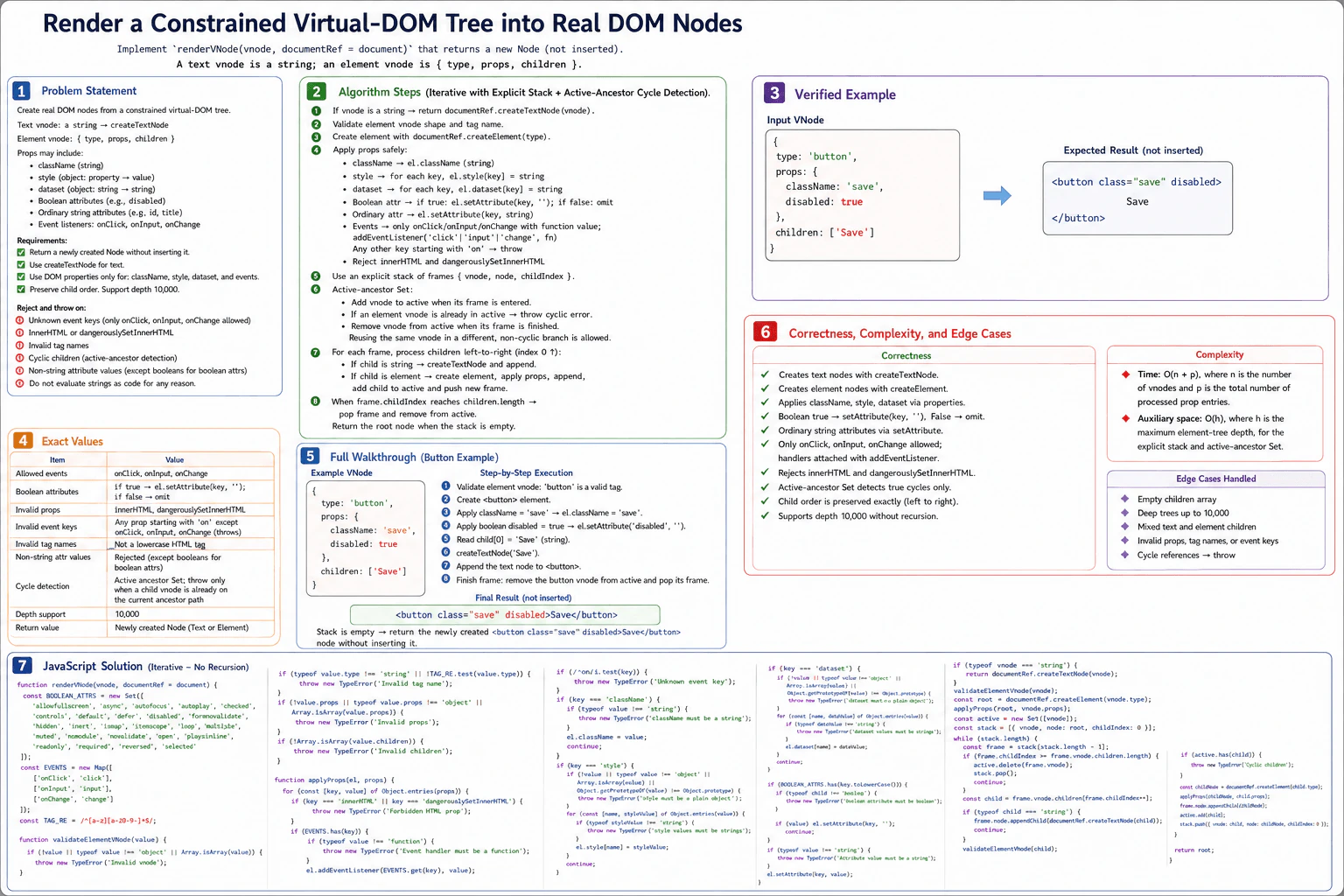
Implement renderVNode(vnode, documentRef = document). A text vnode is a string; an element vnode is {type, props, children}, where type is a lowercase HTML tag name, props may contain className, style as a plain property-value object, dataset as string values, Boolean attributes, ordinary string attributes, and event listeners named onClick, onInput, or onChange; children is an array of vnodes. Return a newly created Node without inserting it. Reject unknown event keys, innerHTML, dangerouslySetInnerHTML, invalid tag names, cyclic children, and non-string attribute values. Create text with createTextNode, use DOM properties only where specified, and attach listeners without evaluating strings. Example: {type:'button',props:{className:'save',disabled:true},children:['Save']} must produce a disabled <button class="save">Save</button> node. Preserve child order and support depth 10,000 without recursive stack overflow.
Short Interview Answer (30-60 seconds)
I would render the vnode tree with an explicit depth-first stack instead of recursion. Strings become text nodes with createTextNode. Element vnodes are validated, created with createElement, and their allowed props are applied safely. I keep an active-ancestor Set to detect only real cycles, then process each parent’s children from left to right. This preserves order and supports depth 10,000. The expected time is O(n + p), and auxiliary space is O(h).
This problem asks us to turn a small tree-shaped description into real browser nodes. A string becomes text. An object describes an HTML element, its settings, and its children. We must build one new node and return it without placing it on the page. We must reject unsafe or invalid input, keep children in the same order, and support very deep trees. The main idea is to build the tree with our own explicit stack, so depth 10,000 does not depend on JavaScript recursion.
Useful Questions to Ask the Interviewer
Should props and children always be present on every element vnode?
Should Boolean attributes be accepted only from the supported HTML Boolean-attribute set shown in the solution?
If the same vnode object is reused in two separate branches without forming a cycle, should that be allowed?
How to Explain It in an Interview
1. Understand the input and output
A text vnode is a string. An element vnode is an object with type, props, and children. The function returns one newly created DOM Node. It does not insert that node into the document. Text must use createTextNode. Elements must use createElement. The function rejects invalid tags, cyclic children, unsafe HTML props, unknown event keys, and invalid attribute values.
2. Choose the algorithm and data structures
The solution uses iterative depth-first traversal. A stack frame stores { vnode, node, childIndex }. This tells us which virtual node we are processing, which real DOM node belongs to it, and which child comes next. An active Set stores only element vnodes on the current ancestor path. That catches a real cycle but still allows the same vnode object to be reused later in a different non-cyclic branch. The explicit stack replaces recursion and avoids recursive stack overflow.
3. Apply props safely
className, style, and dataset use the specified DOM properties. Boolean attributes use presence or absence: true calls setAttribute(key, ''), while false leaves the attribute out. Ordinary attributes must contain strings and use setAttribute. Only onClick, onInput, and onChange are allowed event keys, and their values must be functions. innerHTML, dangerouslySetInnerHTML, and every other on... key are rejected. No string is evaluated as code.
4. Walk through the button example
The example vnode has type button, className save, disabled set to true, and one child string, Save. First, the tag name is validated. Then the code creates a <button> element. It sets className to save. Because disabled is true, it adds the disabled attribute. The next child is the string Save, so the code creates a text node and appends it. The button frame then finishes, leaves the active Set, and is popped.
5. Explain the stopping condition and result
A frame is finished when childIndex reaches children.length. At that point, its vnode is removed from active and the frame is popped. Processing continues until the stack is empty. The final returned node is the newly created <button class="save" disabled>Save</button> node. It has not been inserted into the document.
6. Explain why it is correct
Children are read from index 0 upward, so each parent’s DOM children are appended in the same order as the vnode children. Every string uses createTextNode, and every element uses createElement. The active Set contains exactly the element vnodes on the current path, so an object found there would create a cycle. Removing a vnode when its frame finishes allows safe reuse in a different branch.
7. Explain complexity and edge cases
Let n be the number of vnodes and p be the total number of property entries processed, including entries inside style and dataset. With average O(1) Set and Map operations, the expected time is O(n + p). Let h be the maximum element-tree depth. The explicit stack and active-ancestor Set both grow with the current path, so auxiliary space is O(h), excluding the returned DOM tree. Important cases are empty children, mixed text and element children, depth up to 10,000, invalid props or tag names, unknown event keys, and cyclic child references.
Key Insight / Why This Solution Works
The key idea is to simulate recursive depth-first rendering with an explicit stack. Each frame stores the current vnode, its real DOM node, and the next child index. The central invariant is that active contains exactly the element vnodes on the current ancestor path. Children are processed from index 0 upward and appended immediately, so DOM child order matches vnode child order. When a frame finishes, its vnode leaves active, so repeated vnode objects in separate non-cyclic branches are allowed. This explicit stack avoids recursive call-stack overflow.
Code
functionrenderVNode(vnode, documentRef = document) {
// Fixed supported Boolean attributes. Presence means true; absence means false.constBOOLEAN_ATTRS = newSet([
'allowfullscreen',
'async',
'autofocus',
'autoplay',
'checked',
'controls',
'default',
'defer',
'disabled',
'formnovalidate',
'hidden',
'inert',
'ismap',
'itemscope',
'loop',
'multiple',
'muted',
'nomodule',
'novalidate',
'open',
'playsinline',
'readonly',
'required',
'reversed',
'selected',
]);
// Only these event prop names are accepted, and their values must be functions.constEVENTS = newMap([
['onClick', 'click'],
['onInput', 'input'],
['onChange', 'change'],
]);
// Element types must be lowercase names made from letters, digits, and hyphens.constTAG_RE = /^[a-z][a-z0-9-]*$/;
functionvalidateElementVNode(value) {
// An element vnode must be a non-null object, not an array.if (!value || typeof value !== 'object' || Array.isArray(value)) {
thrownewTypeError('Invalid vnode');
}
// Validate the tag before calling createElement.if (typeof value.type !== 'string' || !TAG_RE.test(value.type)) {
thrownewTypeError('Invalid tag name');
}
// The constrained element shape requires an object props field and an array children field.if (!value.props || typeof value.props !== 'object' || Array.isArray(value.props)) {
thrownewTypeError('Invalid props');
}
if (!Array.isArray(value.children)) {
thrownewTypeError('Invalid children');
}
}
functionapplyProps(el, props) {
// Process every prop and send it only to an allowed DOM API.for (const [key, value] ofObject.entries(props)) {
// Raw HTML injection paths are always forbidden.if (key === 'innerHTML' || key === 'dangerouslySetInnerHTML') {
thrownewTypeError('Forbidden HTML prop');
}
// Allowed events must receive callable handlers. Strings are never evaluated.if (EVENTS.has(key)) {
if (typeof value !== 'function') {
thrownewTypeError('Event handler must be a function');
}
el.addEventListener(EVENTS.get(key), value);
continue;
}
// Reject every other event-looking prop.if (/^on/i.test(key)) {
thrownewTypeError('Unknown event key');
}
// className is one of the explicitly allowed DOM properties.if (key === 'className') {
if (typeof value !== 'string') {
thrownewTypeError('className must be a string');
}
el.className = value;
continue;
}
// style must be a plain object, and every style value must be a string.if (key === 'style') {
if (
!value ||
typeof value !== 'object' ||
Array.isArray(value) ||
Object.getPrototypeOf(value) !== Object.prototype
) {
thrownewTypeError('style must be a plain object');
}
for (const [name, styleValue] ofObject.entries(value)) {
if (typeof styleValue !== 'string') {
thrownewTypeError('style values must be strings');
}
el.style[name] = styleValue;
}
continue;
}
// dataset must be a plain object, and every dataset value must be a string.if (key === 'dataset') {
if (
!value ||
typeof value !== 'object' ||
Array.isArray(value) ||
Object.getPrototypeOf(value) !== Object.prototype
) {
thrownewTypeError('dataset must be a plain object');
}
for (const [name, dataValue] ofObject.entries(value)) {
if (typeof dataValue !== 'string') {
thrownewTypeError('dataset values must be strings');
}
el.dataset[name] = dataValue;
}
continue;
}
// A true Boolean attribute is present; false means it is omitted.if (BOOLEAN_ATTRS.has(key.toLowerCase())) {
if (typeof value !== 'boolean') {
thrownewTypeError('Boolean attribute must be boolean');
}
if (value) {
el.setAttribute(key, '');
}
continue;
}
// Ordinary attributes must have string values.if (typeof value !== 'string') {
thrownewTypeError('Attribute value must be a string');
}
el.setAttribute(key, value);
}
}
// A text vnode becomes a new text node immediately.if (typeof vnode === 'string') {
return documentRef.createTextNode(vnode);
}
// Validate the root before creating its DOM element.validateElementVNode(vnode);
// Create the detached root element and apply its props.const root = documentRef.createElement(vnode.type);
applyProps(root, vnode.props);
// active stores only vnodes on the current ancestor path.// This detects real cycles while allowing reuse in separate branches.const active = newSet([vnode]);
// Each frame tracks the vnode, its real node, and the next child to process.const stack = [{ vnode, node: root, childIndex: 0 }];
// Use iterative DFS so deep trees do not consume the JavaScript call stack.while (stack.length) {
const frame = stack[stack.length - 1];
// A finished frame leaves the active path and is removed from the stack.if (frame.childIndex >= frame.vnode.children.length) {
active.delete(frame.vnode);
stack.pop();
continue;
}
// Read children from left to right so append order is preserved.const child = frame.vnode.children[frame.childIndex++];
// Text children are created safely and appended immediately.if (typeof child === 'string') {
frame.node.appendChild(documentRef.createTextNode(child));
continue;
}
// Element children must satisfy the same vnode validation rules.validateElementVNode(child);
// A vnode already on the current ancestor path would create a cycle.if (active.has(child)) {
thrownewTypeError('Cyclic children');
}
// Create, configure, and append the child before entering its frame.const childNode = documentRef.createElement(child.type);
applyProps(childNode, child.props);
frame.node.appendChild(childNode);
// Enter the child path, then finish that subtree before the next sibling.
active.add(child);
stack.push({ vnode: child, node: childNode, childIndex: 0 });
}
// The complete root is returned without inserting it into the document.return root;
}
// Run the exact example from the diagram.const exampleVNode = {
type: 'button',
props: {
className: 'save',
disabled: true,
},
children: ['Save'],
};
const exampleNode = renderVNode(exampleVNode);
console.log(exampleNode.outerHTML);
console.log(exampleNode.disabled);
Time & Space Complexity
Let n be the number of vnodes and p be the total number of property entries processed, including entries inside style and dataset. With average O(1) Set and Map operations, the expected time is O(n + p). Let h be the maximum element-tree depth. The explicit stack and the active-ancestor Set contain only the current path, so auxiliary space is O(h), excluding the returned DOM tree. This avoids using the JavaScript call stack, which is why depth 10,000 can be supported.
Where it is used
This pattern is useful in UI renderers, template engines, test utilities, and small virtual-DOM systems that turn a safe tree description into real DOM nodes. The explicit-stack technique is also useful whenever a tree can be very deep and normal recursive traversal could overflow the JavaScript call stack.
Why Interviewers Ask This
This problem checks whether you understand DOM creation APIs, safe attribute and event handling, iterative tree traversal, cycle detection, and stack-depth limits in JavaScript. It also tests whether you can preserve child order while building a real tree from a virtual one. A strong answer clearly separates DOM properties from attributes, rejects unsafe HTML paths, uses functions for listeners, and explains the explicit stack and active-path invariant accurately.
Common interview mistakes
Using recursion, which can overflow the JavaScript call stack at depth 10,000.
Using one global visited Set, which wrongly rejects a vnode reused in a different non-cyclic branch.
Processing children in the wrong order or forgetting to remove a finished vnode from the active-ancestor Set.
Using innerHTML, accepting unknown on... event keys, or evaluating strings instead of requiring event-handler functions.
Treating ordinary attributes as arbitrary values instead of requiring strings, or handling false Boolean attributes as present instead of omitted.
Interview tip
Explain the active Set carefully. Say that it tracks only the current ancestor path, not every vnode ever seen. That one detail shows why real cycles are rejected while safe reuse in another branch still works.
Interviewer may ask next
How would the solution change if the same vnode object must never be reused anywhere in the tree, even in separate branches?
Keep the current active Set for cycle detection and add a second global seen Set. Add each element vnode to seen the first time it is accepted. If an element vnode is already in seen, reject it even when it is not on the current ancestor path. The traversal order and DOM construction stay the same. Expected time remains O(n + p) with average O(1) Set operations. Auxiliary space becomes O(n) because seen can hold every element vnode.
How would you support a new allowed event such as onKeyDown?
Add one entry to the event map, such as ['onKeyDown', 'keydown']. The existing event branch already requires the value to be a function and uses addEventListener, so the same safety rule still applies. Unknown on... keys remain rejected. The traversal does not change. Expected time remains O(n + p), and auxiliary traversal space remains O(h).
57. Implement a configurable debounce utility.CodingMedium
i Question Details
Implement debounce(fn, wait). Return a normal function that forwards its latest call-time this and arguments, invokes fn only after wait milliseconds have elapsed without another call, and exposes cancel() and flush() methods. cancel() must prevent the pending invocation and release retained references; flush() must immediately run a pending invocation and return its result, or return the most recent completed result when nothing is pending. Reject a non-function or a negative or non-finite wait, use browser timers, and do not use a library. With a deterministic fake clock, calls at 0, 20, and 40 ms with wait = 50 must invoke once at 90 ms with the third call's arguments.
Short Interview Answer (30-60 seconds)
I would use one browser timer and keep the latest call state inside a closure. Each call saves the newest this and arguments, clears the previous timer, and starts a fresh timer for wait milliseconds. When the timer finally fires, I call fn with that latest state and save its result. cancel() removes pending work. flush() runs pending work immediately or returns the last completed result. Each operation is O(1) time with O(1) auxiliary space.
The goal is to delay a function until calls have stopped for the requested amount of time. Every new call replaces the earlier pending call. We remember only the newest this value and arguments, plus the result from the most recent completed invocation. One browser timeout tracks the pending work. The returned function also has cancel() to discard pending work and release references, and flush() to run pending work immediately. This design matches the required trailing-edge debounce behavior with a small, fixed amount of state.
Useful Questions to Ask the Interviewer
Should flush() return the most recent completed result when there is no pending call? Yes, that is required here.
Should cancel() keep the most recent completed result? Yes. It clears pending state but leaves the completed result available to flush().
How to Explain It in an Interview
1. Understand the required behavior
debounce(fn, wait) receives a function and a delay. It returns a normal function. That returned function must forward the latest call-time this and arguments. The original fn runs only after there have been no new calls for wait milliseconds.
The returned function also exposes cancel() and flush(). cancel() prevents pending work from running and releases retained references. flush() immediately runs pending work and returns its result. If nothing is pending, flush() returns the most recent completed result.
The input is validated first. fn must be a function. wait must be a finite number and cannot be negative.
2. Keep the internal state
The closure stores timerId, lastArgs, lastThis, lastResult, and hasPending. timerId identifies the active browser timeout. lastArgs and lastThis belong to the newest call. lastResult stores the most recent completed result. hasPending tells us whether a call is waiting to run.
The main invariant is that while work is pending, lastArgs and lastThis always belong to the newest call.
3. Handle each call
When the returned function is called, it saves the current this and arguments. It marks the call as pending. If an earlier timeout exists, that timeout is cleared. A new timeout is then created for wait milliseconds.
This reset is the key debounce behavior. Every new call starts the quiet period again.
4. Walk through the verified example
At 0 ms, the wrapper is called with A. It saves A and starts a timer that would fire at 50 ms.
At 20 ms, the wrapper is called with B. The first timer is cleared. B becomes the newest saved call, and a new timer is scheduled for 70 ms.
At 40 ms, the wrapper is called with C. The second timer is cleared. C becomes the newest saved call, and a new timer is scheduled for 90 ms.
There are no more calls. At 90 ms, 50 ms have passed since the call at 40 ms. fn runs exactly once with the third call's this and arguments. Its return value becomes lastResult. The pending references are then released.
5. Explain cancel() and flush()
cancel() clears the active timeout when one exists. It also clears the saved this and arguments and marks the operation as not pending. It does not call fn. The previously completed lastResult is kept.
flush() first checks whether work is pending. If nothing is pending, it returns lastResult. If work is pending, it prevents the scheduled timeout from firing later, invokes fn immediately with the newest saved context and arguments, stores that result, clears the pending references, and returns the result.
6. Explain correctness and complexity
Only the newest call's context and arguments are retained. Every new call resets the timeout, so fn can run only after a full wait interval with no later call. cancel() removes pending work before it can run. flush() executes exactly the newest pending call immediately and prevents the timer from executing that call again.
Each normal call, cancel(), and flush() performs a constant amount of state and timer work. Each operation is O(1) time. The closure stores a fixed number of variables, so auxiliary space is O(1).
Key Insight / Why This Solution Works
Use a trailing-edge debounce with one browser timeout and a fixed set of closure variables. On every wrapper call, replace the saved this and arguments with the newest values, clear the previous timeout, and create a fresh timeout for wait milliseconds. The central invariant is that pending state always represents the most recent call. When that timeout finally completes, invoke fn with the saved context and arguments, store its returned value, and release the pending references. cancel() discards pending work, while flush() executes pending work immediately or returns the latest completed result.
Code
functiondebounce(fn, wait) {
// The wrapped value must be callable.if (typeof fn !== 'function') {
thrownewTypeError('fn must be a function');
}
// The delay must be a finite, non-negative number.if (typeof wait !== 'number' || !Number.isFinite(wait) || wait < 0) {
thrownewRangeError('wait must be a finite non-negative number');
}
// Keep one pending timer and the state from the newest call.let timerId = null;
let lastArgs = null;
let lastThis = null;
let lastResult;
let hasPending = false;
functioninvoke() {
// A flush may call invoke() before the browser timer fires.// Cancel that timer so the same pending call cannot run twice.if (timerId !== null) {
clearTimeout(timerId);
timerId = null;
}
// Copy the newest call state before releasing retained references.const args = lastArgs;
const thisArg = lastThis;
// The pending call is now being consumed.
lastArgs = null;
lastThis = null;
hasPending = false;
// Forward the newest call-time this value and arguments.const result = fn.apply(thisArg, args);
// Keep the latest completed result for future flush() calls.
lastResult = result;
return result;
}
functiondebounced(...args) {
// Every new call replaces the previous pending call state.
lastThis = this;
lastArgs = args;
hasPending = true;
// Restart the quiet period when another call arrives.if (timerId !== null) {
clearTimeout(timerId);
}
// Browser setTimeout schedules the trailing invocation.
timerId = setTimeout(invoke, wait);
// Before the first completed invocation this is undefined.// Later calls return the most recent completed result.return lastResult;
}
debounced.cancel = functioncancel() {
// Prevent any pending browser timeout from invoking fn.if (timerId !== null) {
clearTimeout(timerId);
}
// Release all references belonging to the pending call.
timerId = null;
lastArgs = null;
lastThis = null;
hasPending = false;
};
debounced.flush = functionflush() {
// With no pending work, return the latest completed result.if (!hasPending) {
return lastResult;
}
// Run the newest pending call immediately.returninvoke();
};
return debounced;
}
// Example matching the diagram.// Calls happen at about 0 ms, 20 ms, and 40 ms with wait = 50 ms.// With a deterministic fake clock, fn runs exactly once at 90 ms with "C".const startTime = performance.now();
const debounced = debounce(function (value) {
const elapsed = Math.round(performance.now() - startTime);
console.log(`fn invoked with ${value} at about ${elapsed} ms`);
return value;
}, 50);
debounced('A');
setTimeout(() =>debounced('B'), 20);
setTimeout(() =>debounced('C'), 40);
Time & Space Complexity
Each call to the debounced function does a fixed amount of work. It saves a few values, may clear one timeout, and creates one timeout. cancel() and flush() also do a fixed amount of work. Therefore each operation is O(1) time. The closure stores only one timer identifier, the latest arguments, the latest this, the latest completed result, and one pending flag. That storage does not grow as more calls arrive, so auxiliary space is O(1).
Where it is used
Debouncing is useful when an event can happen many times quickly but expensive work should happen only after activity stops. Frontend examples include search input requests, form validation, resize handling, autosaving after typing pauses, and delaying other work until the user stops changing an input.
Why Interviewers Ask This
This problem tests closures, browser timers, dynamic this, argument forwarding, and careful state management. It also checks whether a candidate can design a small API with precise cancel() and flush() behavior. A strong solution must reset the timer correctly, retain only the newest call, release pending references, prevent a flushed call from running twice, validate inputs, and explain the O(1) per-operation time and O(1) auxiliary space accurately.
Common interview mistakes
One common mistake is starting a new timeout without clearing the previous one, which can invoke fn several times. Another is returning an arrow function and accidentally losing the caller's dynamic this. Candidates may also forget to replace the saved arguments on every call, fail to release pending references in cancel(), or let flush() invoke the pending call without cancelling its scheduled timeout. Another mistake is returning undefined from flush() when nothing is pending instead of returning the most recent completed result. Invalid waits such as negative numbers, NaN, and Infinity must also be rejected.
Interview tip
State the invariant before writing the methods: while work is pending, the saved this and arguments always belong to the newest call. Then show that every new call resets the single timer. This makes the behavior of cancel() and flush() easy to reason about.
Interviewer may ask next
What happens if `flush()` is called several times while one invocation is pending?
The first flush() cancels the scheduled timeout and immediately invokes fn with the newest saved this and arguments. That invocation clears the pending state and stores its result in lastResult. Later flush() calls see that nothing is pending, so they return the same lastResult without invoking fn again. Each call remains O(1) time and O(1) auxiliary space.
How would the design change if we also wanted a leading invocation?
We would add configuration for a leading call and track whether the current debounce cycle has already invoked on its leading edge. The first call in a quiet cycle could run immediately. Later calls would still reset the trailing timer and replace the saved pending state. Correctness would require at most one leading invocation per cycle while still keeping the newest state for any trailing invocation. Each operation would remain O(1) time and O(1) auxiliary space, but the state transitions would become more complex.
58. Implement a throttled function with leading and trailing control.CodingMedium
i Question Details
Write throttle(fn, wait, { leading = true, trailing = true } = {}). Limit execution to at most once per wait-millisecond window while preserving the latest pending this and arguments for an optional trailing call. Expose cancel() and flush(), use a monotonic time source when available, and handle system-clock changes safely. If both options are false, never invoke. Example under a fake clock: calls at 0, 20, 40, and 80 ms with wait=50 and both options true must invoke at 0, 50 using the 40-ms arguments, and 100 using the 80-ms arguments. Release timers and references after completion.
Short Interview Answer (30-60 seconds)
I keep one throttle-window start time, one timer, and the latest pending this and arguments. A leading call can run immediately at the start of a window. Calls inside that window only replace the pending values. If trailing is enabled, one timer runs the latest pending call at the window end. cancel() clears all state, and flush() runs a pending trailing call immediately. The throttle bookkeeping uses O(1) time per call and O(1) auxiliary space.
The goal is to control how often a function can run. During each wait-millisecond window, the wrapped function can run at most once. Leading mode can run it at the window start. Trailing mode can run the newest pending call later. If more calls arrive while waiting, we keep only their latest this and arguments. We also need cancel() and flush(), safe elapsed-time measurement, and cleanup of timers and saved references.
Useful Questions to Ask the Interviewer
When leading is false, should the first call wait one full wait interval before a trailing invocation?
Should flush() return the latest function result when there is no pending trailing call?
Should cancel() fully reset the throttle so the next call behaves like a new first call?
How to Explain It in an Interview
1. Understand the required behavior
The inputs are fn, wait, and the leading and trailing options. The returned function controls when fn is allowed to run. It also exposes cancel() and flush().
If both options are false, fn is never invoked.
For the verified example, wait = 50, leading = true, and trailing = true. Calls happen at 0, 20, 40, and 80 ms. Invocations happen at 0, 50, and 100 ms. The invocation at 50 uses the arguments from the 40-ms call. The invocation at 100 uses the arguments from the 80-ms call.
2. Keep the throttle state
The implementation stores windowStart, timerId, lastArgs, lastThis, and result.
windowStart anchors the current throttle window. timerId tells us whether one trailing timer already exists. lastArgs and lastThis contain only the newest pending call. result keeps the latest return value from fn.
The central invariant is that at most one timer is active, and a trailing invocation uses only the newest pending this and arguments.
3. Handle the first call and later calls
Every accepted call saves its latest arguments and this.
If windowStart is undefined, the call starts a new window. We set windowStart to the current time. If leading is true, we invoke immediately. Otherwise, if trailing is true, we schedule one timer for the full wait interval.
For a later call, we calculate elapsed = time - windowStart. Inside the active window, the call does not invoke immediately. It replaces lastArgs and lastThis. If trailing is enabled and no timer exists, we schedule one timer for wait - elapsed.
4. Walk through the verified example
At 0 ms, there is no active window. We set windowStart = 0. Leading is enabled, so fn runs immediately with args@0.
At 20 ms, elapsed = 20. The call is inside the 50-ms window. We save args@20. Because trailing is enabled and no timer exists, we schedule one for 30 ms later, at 50 ms.
At 40 ms, elapsed = 40. The timer already exists. We do not create another one. We replace the pending arguments with args@40.
At 50 ms, the timer fires. A trailing call is pending, so fn runs with args@40. windowStart becomes 50, the timer reference is cleared, and the saved this and arguments are released.
At 80 ms, elapsed = 80 - 50 = 30. The remaining delay is 50 - 30 = 20 ms. We save args@80 and schedule a timer for 100 ms.
At 100 ms, that timer fires and invokes with args@80. windowStart becomes 100. The final invocation times are exactly 0, 50, and 100 ms.
5. Handle expired windows and clock rollback
If elapsed >= wait, the previous window is expired. We clear any active timer and start a new window at the current time. A leading call can run immediately. If leading is disabled but trailing is enabled, we schedule one full wait interval instead.
The implementation prefers performance.now() because it is monotonic. This means elapsed time does not move backward when the system wall clock changes. If Date.now() is used as the fallback and elapsed < 0, we treat the previous window as expired. This prevents a backward wall-clock change from blocking execution indefinitely.
6. Explain cancel(), flush(), and cleanup
cancel() clears an active timer, resets windowStart, clears pending this and arguments, and releases the saved result. The next call behaves like a new first call.
flush() checks for a pending trailing call. If one exists, it clears the timer and invokes immediately with the newest saved this and arguments. If there is no pending trailing call, it returns the latest result.
After an invocation, pending argument and this references are cleared. Timer references are cleared after firing or cancellation.
7. Explain complexity and edge cases
The throttle bookkeeping takes O(1) time per incoming call. The runtime of fn itself is separate. The throttle keeps only a fixed amount of state and at most one timer, so its auxiliary space is O(1).
Important cases are leading=true, trailing=false, leading=false, trailing=true, both options false, many calls inside one window, cancel(), flush(), and a backward wall-clock change when the fallback clock is used.
Key Insight / Why This Solution Works
The key idea is to represent the current throttle window with windowStart and allow at most one active trailing timer. Every incoming call replaces lastArgs and lastThis, so a future trailing invocation always represents the newest pending call. A new window may invoke immediately when leading is enabled. Inside an active window, calls only update the pending data, and one timer covers the remaining delay. The invariant is that at most one timer is active and any trailing invocation uses the latest pending this and arguments.
Code
functionthrottle(fn, wait, { leading = true, trailing = true } = {}) {
// Validate the callback once so the rest of the code can safely call it.if (typeof fn !== 'function') {
thrownewTypeError('fn must be a function');
}
// Prefer a monotonic clock for measuring elapsed time.// Date.now() is the fallback when performance.now() is unavailable.constnow = () =>
typeof performance !== 'undefined' && typeof performance.now === 'function'
? performance.now()
: Date.now();
// windowStart anchors the current throttle window.// Only one trailing timer is kept at a time.let windowStart;
let timerId = null;
let lastArgs;
let lastThis;
let result;
// Release references to a pending call when they are no longer needed.constclearPending = () => {
lastArgs = undefined;
lastThis = undefined;
};
// Invoke fn with the newest saved this/arguments.// The invocation time becomes the start of the next throttle window.constinvoke = (time) => {
windowStart = time;
const args = lastArgs;
const thisArg = lastThis;
// Clear stored references before running user code.clearPending();
result = fn.apply(thisArg, args);
return result;
};
// Handle the single trailing timer when it reaches the window boundary.consttimerExpired = () => {
// The timer has fired, so there is no active timer now.
timerId = null;
if (trailing && lastArgs) {
// A pending trailing call uses only the newest saved call data.invoke(now());
} else {
// Nothing will run, so release pending references.clearPending();
}
};
// Centralize timer creation so only one timer needs to be tracked.constschedule = (delay) => {
timerId = setTimeout(timerExpired, delay);
};
functionthrottled(...args) {
// When both controls are disabled, fn must never be invoked.if (!leading && !trailing) return result;
const time = now();
// Keep the newest call for a possible trailing invocation.
lastArgs = args;
lastThis = this;
// No window means this is the first call after creation or cancel().if (windowStart === undefined) {
windowStart = time;
if (leading) {
// Leading mode invokes immediately at the new window start.returninvoke(time);
}
if (trailing) {
// Trailing-only mode waits one complete window before invoking.schedule(wait);
}
return result;
}
// Measure the time passed since the current window started.const elapsed = time - windowStart;
// elapsed >= wait means the old window expired normally.// elapsed < 0 safely handles a backward Date.now() clock change.if (elapsed < 0 || elapsed >= wait) {
if (timerId !== null) {
// Remove a stale timer before opening the next window.clearTimeout(timerId);
timerId = null;
}
windowStart = time;
if (leading) {
// A new leading-enabled window may invoke immediately.returninvoke(time);
}
if (trailing) {
// Without a leading invocation, wait one full new window.schedule(wait);
}
return result;
}
if (trailing && timerId === null) {
// Schedule one trailing invocation for the remaining window time.schedule(wait - elapsed);
} elseif (!trailing) {
// Ignored in-window calls should not keep unnecessary references alive.clearPending();
}
return result;
}
throttled.cancel = () => {
// Prevent any pending trailing invocation.if (timerId !== null) {
clearTimeout(timerId);
}
// Reset the complete throttle state.
timerId = null;
windowStart = undefined;
clearPending();
result = undefined;
};
throttled.flush = () => {
if (timerId !== null && trailing && lastArgs) {
// A trailing call is pending. Cancel its timer and run it now.clearTimeout(timerId);
timerId = null;
returninvoke(now());
}
// If nothing is pending, return the latest known result.return result;
};
return throttled;
}
// Runnable example using the same calls as the diagram.const start = performance.now();
const invocations = [];
const throttled = throttle(
function (label) {
// Record the actual invocation time relative to the example start.
invocations.push({
time: Math.round(performance.now() - start),
argument: label,
});
},
50,
{ leading: true, trailing: true }
);
// Leading invocation at about 0 ms.throttled('args@0');
// These calls update the pending trailing arguments.setTimeout(() =>throttled('args@20'), 20);
setTimeout(() =>throttled('args@40'), 40);
// The 50-ms trailing invocation uses args@40.setTimeout(() =>throttled('args@80'), 80);
// Print after the 100-ms trailing invocation has had time to run.setTimeout(() => {
console.log(invocations);
// Expected timing pattern, allowing normal browser timer jitter:// about 0 ms -> args@0// about 50 ms -> args@40// about 100 ms -> args@80
}, 130);
Time & Space Complexity
The throttle bookkeeping takes O(1) time for each incoming call because it performs a fixed number of comparisons, assignments, and timer operations. The runtime of the wrapped function fn is separate. Auxiliary space is O(1) because the throttle keeps a fixed set of state variables, one pending argument collection, one pending this reference, and at most one timer. The throttle state does not grow with the number of calls.
Where it is used
Throttling is useful when browser events can happen much faster than the application should process them. Common examples are scroll handlers, resize handlers, pointer movement, drag updates, and other frequent UI events. Leading execution gives a quick first response. Trailing execution makes sure the newest pending update can still run at the end of the window.
Why Interviewers Ask This
This problem tests whether a candidate can manage state across asynchronous calls without creating duplicate timers or losing the newest input. It also checks understanding of JavaScript this, argument preservation, leading and trailing behavior, timer cleanup, cancel() and flush() API design, and accurate complexity reasoning. The clock requirement adds another useful signal because it tests whether the candidate understands why a monotonic time source is safer for measuring elapsed durations.
Common interview mistakes
A common mistake is creating a new timer for every call inside one window. Only one trailing timer should exist. Another mistake is keeping the first pending arguments instead of replacing them with the newest ones. Candidates also forget to preserve this, which can change method behavior. Another error is assuming Date.now() can never move backward. Finally, cancel() and flush() are often implemented without clearing the timer or releasing saved call references.
Interview tip
Draw the timeline at 0, 20, 40, 50, 80, and 100 ms before writing code. Explain that the 20-ms and 40-ms calls share one timer and that the 40-ms arguments replace the 20-ms arguments. Then show that the 80-ms call has 20 ms remaining until the next trailing invocation. This makes the one-timer invariant easy to verify.
Interviewer may ask next
How does the behavior change when leading is false and trailing is true?
The first call does not invoke immediately. It starts a window and schedules one timer for the full wait interval. Calls that arrive before the timer fires only replace lastArgs and lastThis. When the timer fires, fn runs once with the newest pending call. The throttle bookkeeping remains O(1) time per call and O(1) auxiliary space. The tradeoff is that the first visible result is delayed, but the newest call in the window is preserved.
Why does the implementation check elapsed < 0?
performance.now() is preferred because it is monotonic. The fallback Date.now() follows the wall clock, which can be adjusted backward. That can make time - windowStart negative. The implementation treats a negative elapsed value like an expired window, clears a stale timer, and starts a new window. This prevents a backward system-clock change from blocking execution for an unexpectedly long time. The throttle bookkeeping still uses O(1) time and O(1) auxiliary space.
59. Implement memoization with a custom key resolver.CodingMedium
i Question Details
Implement memoize(fn). fn accepts exactly one argument. Return a normal function that forwards its call-time this, caches each successful return value in a Map keyed by the argument using ordinary Map identity semantics, and exposes .cache and .clear(). A thrown call must not be cached. Primitive and object arguments are valid; object keys match only by identity. Example: wrapping x => x * 2 and calling the result twice with 4 must compute once and return 8 both times, while two distinct {id: 1} objects are separate keys. Reject a non-function, do not stringify keys, and document that a returned promise is cached as an ordinary value.
Short Interview Answer (30-60 seconds)
I would keep a Map inside memoize and use the single argument itself as the key. The returned normal function first checks cache.has(arg). On a hit, it returns the stored value. On a miss, it calls fn with the same call-time this, stores the result only after the call succeeds, and returns it. Map preserves the required key semantics, including object identity. The memoization overhead is O(1) on average per call, with O(k) auxiliary space for k cached keys.
The task is to wrap a function that takes exactly one argument. The wrapper remembers successful results so it does not repeat the same work for a cached key. It must also pass along the caller's this value. A Map stores each argument and its returned value. The argument itself is the key. This means two different objects with the same contents are still different keys. If the original function throws, that failed call must not be stored. The wrapper also exposes its Map through .cache and provides .clear() to empty it.
Useful Questions to Ask the Interviewer
Should object arguments match only when they are the same object reference? Yes. The required behavior is ordinary JavaScript Map key semantics.
If fn returns a Promise, should I cache that Promise immediately? Yes. The returned Promise is cached as an ordinary value.
How to Explain It in an Interview
1. Understand the input and required output
The input is fn, which must be a function that accepts exactly one argument. If fn is not a function, memoize throws a TypeError. The output is a normal function named memoized. It forwards its call-time this value, caches successful return values in a Map, exposes that Map through memoized.cache, and provides memoized.clear() to empty the Map.
2. Choose the Map and define what it stores
Create one Map named cache. Each key is the exact argument passed to memoized. Each value is the successful result returned by fn for that key. We do not stringify the argument. Primitive keys follow ordinary Map semantics. Object keys match only by reference identity. JavaScript Map uses SameValueZero key comparison, so NaN matches NaN and +0 and -0 are treated as the same key.
3. Process each memoized call
When memoized(arg) runs, first check cache.has(arg). If the key exists, return cache.get(arg) immediately. If the key does not exist, call fn.call(this, arg). Using call forwards the wrapper's current this value to fn. If fn returns successfully, store the result with cache.set(arg, result) and return it. If fn throws, rethrow the error and leave the Map unchanged.
4. Walk through the verified example
The diagram wraps const double = x => x * 2. The first memoized(4) sees an empty cache, so it computes 4 * 2 = 8, stores 4 → 8, and returns 8. The second memoized(4) finds key 4 and returns the cached 8 without recomputing. The diagram then uses objA = {id: 1} and objB = {id: 1}. With the same numeric doubling function, each distinct object coerces during multiplication and produces NaN. The first objA call stores objA → NaN. A second call with that same objA reference returns the cached NaN. objB is a different reference, so it is a different Map key and causes a new computation.
5. Explain why the result is correct
The central invariant is that every entry in cache maps one argument key to the result of a previous successful call for that key. We always check the cache before computing. Therefore, a cached key returns exactly its previous successful result. We store only after fn returns successfully. Therefore, a thrown call cannot add an entry. Using the original argument directly as the key preserves the required Map identity behavior.
6. Explain the JavaScript implementation
memoize first validates fn. It then creates one private Map. The returned normal function checks for a cached key. On a miss, it calls fn with fn.call(this, arg), stores the successful result, and returns it. A catch block simply rethrows an error so a failed call is not cached. After the wrapper is created, memoized.cache points to the same Map and memoized.clear calls cache.clear(). If fn returns a Promise, that Promise object is stored immediately just like any other returned value.
7. Explain complexity and edge cases
The Map lookup and insertion operations are O(1) on average. Therefore, the memoization bookkeeping adds O(1) expected time per call, excluding the time needed to execute fn on a cache miss. The cache uses O(k) auxiliary space, where k is the number of distinct successfully cached keys. Important cases are a non-function input, repeated primitive keys, the same object reference, distinct objects with the same contents, NaN, +0 and -0, thrown calls, returned Promises, and clearing the cache.
Key Insight / Why This Solution Works
Use one Map whose key is the exact argument and whose value is the successful result returned for that argument. The key insight is that Map already provides the required key semantics, so the argument should not be stringified or transformed. The invariant is: every cache entry represents a successful earlier call for that exact Map key. Check cache.has(arg) before calling fn. On a hit, return the stored value. On a miss, call fn with the current this value, store the result only after success, and return it. If fn throws, the cache remains unchanged.
Code
functionmemoize(fn) {
// Reject invalid input before creating any memoized wrapper.if (typeof fn !== 'function') {
thrownewTypeError('memoize(fn) expects a function');
}
// Map each exact argument key to its successful returned value.const cache = newMap();
// Use a normal function so call-time this can be forwarded.functionmemoized(arg) {
// A cached value may be undefined, so use has() to test membership.if (cache.has(arg)) {
return cache.get(arg);
}
try {
// Forward both the current this value and the single argument.const result = fn.call(this, arg);
// Cache only after fn returns successfully.// A returned Promise is stored here like any other value.
cache.set(arg, result);
return result;
} catch (err) {
// Do not cache a call that throws. Re-throw the original error.throw err;
}
}
// Expose the actual Map used for memoization.
memoized.cache = cache;
// Empty that same Map. Map.prototype.clear() returns undefined.
memoized.clear = function () {
cache.clear();
};
return memoized;
}
// Verified example from the diagram.constdouble = (x) => x * 2;
const memoized = memoize(double);
console.log(memoized(4)); // 8: computed and cachedconsole.log(memoized(4)); // 8: cache hit// These objects have the same contents but different identities.const objA = { id: 1 };
const objB = { id: 1 };
console.log(memoized(objA)); // NaN: computed and cached for objAconsole.log(memoized(objA)); // NaN: cache hit for the same objAconsole.log(memoized(objB)); // NaN: computed because objB is a different keyconsole.log(memoized.cache.size); // 3// Clear all cached entries.
memoized.clear();
console.log(memoized.cache.size); // 0// A thrown call is never cached.const bad = memoize(() => {
thrownewError('fail');
});
try {
bad(1);
} catch (err) {
console.log(err.message); // fail
}
try {
bad(1);
} catch (err) {
console.log(err.message); // fail again because the first call was not cached
}
Time & Space Complexity
A cache lookup, read, or insertion in a JavaScript Map is O(1) on average. Therefore, the memoization work adds O(1) expected time per call. On a cache miss, the total call also includes whatever time fn itself needs. The cache uses O(k) auxiliary space, where k is the number of distinct argument keys that have completed successfully and are still stored. These Map operation costs are average-case expectations, not guaranteed worst-case bounds.
Where it is used
Memoization is useful when a function may receive the same key many times and computing the result is more expensive than looking it up. Examples include repeated UI calculations, parsing or formatting data, deriving values from application state, and caching work for specific object instances when object identity is the correct key.
Why Interviewers Ask This
This problem tests several JavaScript fundamentals at once. The interviewer can check whether you understand closures, Map key semantics, object identity, and call-time this. It also tests whether you distinguish cache.has from cache.get, preserve exceptions correctly, and design a small API with .cache and .clear(). Finally, it checks whether you can describe average Map operation cost accurately and reason about Promises as ordinary returned values.
Common interview mistakes
One mistake is stringifying the argument before using it as a key. That breaks the required object identity behavior. Another is returning an arrow function as the wrapper and expecting it to receive a new call-time this value. A third mistake is using cache.get(arg) alone to decide whether a key exists, because a valid cached result can be undefined. Candidates may also store a value before the wrapped call has completed successfully, which can break the thrown-call rule. Finally, two different objects with identical properties must not be treated as the same key.
Interview tip
Explain the order in one sentence: check the Map first, call fn only on a miss, and write to the Map only after fn returns successfully. Then mention that using the original argument as the key is what preserves JavaScript Map identity semantics.
Interviewer may ask next
What happens if the wrapped function returns a Promise?
The Promise object is cached immediately as the returned value. A second call with the same Map key receives that same Promise. This implementation does not wait to see whether the Promise fulfills or rejects. A rejected Promise is still a returned value, which is different from fn throwing synchronously before returning. The Map overhead remains O(1) on average per access, and the cache uses O(k) auxiliary space.
What would change if two different objects with the same contents had to share one cache entry?
The key strategy would have to change because the current solution intentionally uses ordinary Map identity semantics. A content-based resolver would need to produce the same stable key for equivalent objects. Correctness would depend on that resolver including every relevant part of the object without unwanted collisions. Its computation and storage costs would also become part of the time and space complexity. That is a different contract from the identity-based solution shown here.
60. Convert an error-first callback API into a promise API.CodingMedium
i Question Details
Implement promisify(fn). The returned function forwards its this and arguments, appends a callback of shape (error, value), and returns a promise. Reject when error is not nullish; otherwise fulfill with value. Ignore repeated callback invocations after the first settlement, and convert a synchronous throw from fn into rejection. Do not rely on host-specific globals or multiple success values. Example: promisifying (x, cb) => setTimeout(() => cb(null, x * 2), 0) and calling it with 4 must fulfill with 8. Reject a non-function and avoid retaining arguments after settlement.
Short Interview Answer (30-60 seconds)
I would wrap the callback API in a function that returns a Promise. The wrapper forwards the original this value and arguments, then appends one error-first callback. I use a called flag so only the first settlement attempt matters. A non-nullish error rejects the Promise. Otherwise, the value fulfills it. I also convert synchronous throws into rejection and clear stored argument and context references after settlement. The control logic uses O(1) extra state besides the forwarded arguments.
The goal is to turn a function that reports its result through a callback into one that returns a Promise. The new function must pass along the same this value and arguments. It adds one callback that receives an error and one value. The first settlement attempt decides the result. A real error rejects the Promise. A null or undefined error fulfills it. A synchronous throw also becomes a rejection. After settlement, the wrapper clears its stored argument and context references. In the given example, calling the promisified function with 4 must fulfill with 8.
Useful Questions to Ask the Interviewer
Should a non-function produce a rejected Promise when the returned wrapper is called?
Should only the first callback invocation affect the Promise?
Should both null and undefined mean that no error occurred?
How to Explain It in an Interview
1. Understand the input and required output
The input to promisify is fn, an error-first callback function. promisify returns another function. When that returned function is called, it must return a Promise. It forwards the same this value and original arguments to fn. It also appends a callback with the shape (error, value).
If error is not nullish, the Promise rejects with that error. Nullish means null or undefined. Otherwise, the Promise fulfills with value. Only the first settlement attempt is allowed to affect the Promise.
2. Create the wrapper and Promise
The returned wrapper receives ...args and saves its current this value in context. It then creates and returns a Promise.
Inside the Promise, the code checks whether fn is a function. If it is not, the wrapper clears args and context, rejects the Promise with TypeError, and returns.
For a valid function, called starts as false. This flag tells us whether the Promise has already been settled by the callback or by a caught synchronous throw.
3. Handle the callback exactly once
The appended callback receives error and value. It first checks called. If called is already true, it returns immediately. This ignores repeated callback calls.
On the first callback call, it changes called to true. It then clears args and context so those wrapper-held references do not remain after settlement.
Next, it checks error. If error != null, it rejects with error. Otherwise, it resolves with value.
4. Call the original function and handle synchronous throws
The wrapper invokes the original function with fn.apply(context, [...args, callback]). This forwards the captured this value. It forwards every original argument and places the new callback last.
The call is inside try/catch. If fn throws before anything has settled, the catch block sets called to true, clears args and context, and rejects with the thrown error. If a synchronous callback already settled first and fn then throws, the catch block sees that called is true and returns without changing the Promise result.
5. Walk through the verified example
The example function is (x, cb) => setTimeout(() => cb(null, x * 2), 0). We create doubleAsyncP = promisify(doubleAsync), then call doubleAsyncP(4).
The wrapper captures its this value and the argument 4. It creates a Promise and calls doubleAsync with 4 and the appended callback. Later, doubleAsync calls that callback with null and 8.
called is false, so this is the first settlement. The wrapper sets called to true, clears args and context, sees that error is null, and resolves with 8. The returned Promise therefore fulfills with 8.
6. Explain why the solution is correct
The central invariant is that called is false before the first settlement and true after it. Every later callback call or caught synchronous throw checks this state before trying to settle again. Therefore, only the first settlement attempt can affect the result.
The error test also matches the required contract. Null and undefined follow the success path. Any other error value follows the rejection path.
7. Explain complexity and edge cases
The wrapper uses a fixed amount of bookkeeping state: context, called, and the callback. The diagram describes this control overhead as O(1) extra state besides the forwarded arguments. Forwarding a arguments requires handling those a supplied values, and the spread used for invocation materializes an argument list proportional to a.
Important edge cases are a non-function fn, repeated callback calls, null or undefined errors, a synchronous throw, and a throw that happens after a synchronous callback already settled the Promise.
Key Insight / Why This Solution Works
The key idea is to place the callback-style API behind a Promise wrapper and use one boolean, called, as the settlement invariant. Before settlement, called is false. The first callback or synchronous throw changes the state to settled. Every later settlement attempt returns without changing the result. The callback rejects when error != null and otherwise resolves with value. apply preserves the original this value, the original arguments are forwarded, and the callback is appended last. The wrapper clears its stored args and context references when the operation settles.
Code
functionpromisify(fn) {
// Return a wrapper that captures the caller's arguments and this value.returnfunction (...args) {
let context = this;
// Every call to the wrapper returns a Promise.returnnewPromise((resolve, reject) => {
// Report an invalid fn through the returned Promise.if (typeof fn !== 'function') {
// Release wrapper-held references before rejecting.
args = null;
context = null;
reject(newTypeError('promisify(fn): fn must be a function'));
return;
}
// This flag allows only the first settlement attempt to have an effect.let called = false;
functioncallback(error, value) {
// Ignore callback calls after the first settlement.if (called) return;
// Mark the operation settled before resolving or rejecting.
called = true;
// Release the stored arguments and context after settlement.
args = null;
context = null;
// Null and undefined mean success. Any other error means failure.if (error != null) {
reject(error);
} else {
resolve(value);
}
}
try {
// Preserve this, forward the original arguments, and append callback.
fn.apply(context, [...args, callback]);
} catch (error) {
// A callback may have settled synchronously before fn threw.if (called) return;
// Otherwise, this synchronous throw is the first settlement.
called = true;
// Release wrapper-held references on the rejection path.
args = null;
context = null;
reject(error);
}
});
};
}
// Verified example from the diagram.constdoubleAsync = (x, cb) => {
setTimeout(() =>cb(null, x * 2), 0);
};
// Convert the callback API into a Promise API.const doubleAsyncP = promisify(doubleAsync);
// Calling with 4 fulfills with 8.doubleAsyncP(4)
.then((value) =>console.log(value))
.catch((error) =>console.error(error));
Time & Space Complexity
The diagram shows O(1) wrapper control overhead and O(1) bookkeeping state besides the forwarded arguments. The wrapper itself keeps only a fixed number of control values such as context and called. If a is the number of supplied arguments, JavaScript must also represent those a arguments, and [...args, callback] creates an invocation array proportional to a. So the fixed control work is O(1), while materializing and forwarding the argument list takes O(a) time and temporary O(a) storage. After settlement, the wrapper clears its stored args and context references.
Where it is used
This pattern is useful when older browser code or a library exposes an error-first callback API but newer application code uses Promises or async/await. The wrapper creates a Promise-friendly boundary without changing the original function. It is useful during gradual migrations from callback-based asynchronous code to Promise-based code.
Why Interviewers Ask This
This question checks whether you understand callback and Promise control flow. It tests whether you preserve this and arguments, interpret nullish errors correctly, convert synchronous exceptions into Promise rejection, and stop repeated callbacks from changing the result. It also tests careful reasoning about settlement order and closure-held references. The interviewer can also see whether you write browser-side JavaScript precisely and explain the difference between the fixed control state and the supplied argument storage.
Common interview mistakes
One mistake is allowing every callback invocation to try to settle the Promise instead of guarding settlement with called. Another is checking only error === null, which incorrectly treats undefined as failure. Candidates may also lose the original this value by calling fn without the saved context. Another mistake is forgetting to catch a synchronous throw from fn. It is also easy to forget the case where the callback settles synchronously and fn throws afterward. Finally, the wrapper should clear its stored args and context references after settlement.
Interview tip
Explain the called flag as the single-settlement invariant before writing the callback. Then show that both the callback path and the synchronous-throw path obey that same flag. This makes the repeated-callback case and the callback-then-throw case easy to justify.
Interviewer may ask next
What would change if the callback could return multiple success values?
The current contract intentionally accepts only one success value. If the API instead used callback(error, ...values), I would change the wrapper contract so the callback gathers those values and resolves with one container such as an array. The called guard, nullish-error check, this forwarding, synchronous-throw handling, and cleanup logic would stay the same. Collecting k success values would require O(k) result space.
What happens if fn calls the callback successfully and then throws synchronously?
The callback runs first, sees called is false, sets it to true, clears args and context, and resolves the Promise. If fn then throws before returning, the catch block receives that error. The catch checks called and immediately returns because settlement already happened. The later throw therefore does not replace the successful result. This keeps the first-settlement rule intact.
More questions load as you scroll
Disclaimer: This interview guide is for educational and informational purposes only. It is designed to help readers prepare, but it does not guarantee any interview result, hiring decision, offer, or outcome. Interview questions, hiring criteria, and preferred answers can vary by employer, interviewer, industry, location, and time. All answers, examples, and explanations in this guide are suggested examples for interview preparation, not definitive answers or instructions for professional practice. They are based on research and judgment, are provided without warranties of any kind, and should be adapted to the question, role, and applicable laws and professional requirements. Diagrams are simplified illustrations intended to highlight the main concepts and their relationships; actual situations, systems, and practices may be more complex. Alternative approaches may be equally valid or better suited to a particular question, context, or interviewer. To the fullest extent permitted by applicable law, the contributors and publisher are not liable for decisions made, actions taken, or losses incurred based on this guide.
State Laws and Professional Responsibilities: Laws and requirements governing an occupation vary by state and jurisdiction. You are responsible for checking the current laws, licensing requirements, and scope-of-practice rules that apply to your location and role, and for ensuring that your answers and actions comply with them. Adapt examples in this guide to those requirements. This guide is not legal advice.
Content Accuracy and Verification: To the fullest extent permitted by applicable law, we do not represent or warrant that interview guides, questions, answers, examples, or diagrams are accurate, complete, current, error-free, or suitable for any particular purpose. You are responsible for independently reviewing and verifying the information before relying on it.