This interview guide is for educational and informational purposes only. It is designed to help readers prepare, but it does not guarantee any interview result, hiring decision, offer, or outcome. Interview questions, hiring criteria, and preferred answers can vary by employer, interviewer, industry, location, and time. All answers, examples, and explanations in this guide are suggested examples for interview preparation, not definitive answers or instructions for professional practice. They are based on research and judgment, are provided without warranties of any kind, and should be adapted to the question, role, and applicable laws and professional requirements. Diagrams are simplified illustrations intended to highlight the main concepts and their relationships; actual situations, systems, and practices may be more complex. Alternative approaches may be equally valid or better suited to a particular question, context, or interviewer. To the fullest extent permitted by applicable law, the contributors and publisher are not liable for decisions made, actions taken, or losses incurred based on this guide.
State Laws and Professional Responsibilities
Laws and requirements governing an occupation vary by state and jurisdiction. You are responsible for checking the current laws, licensing requirements, and scope-of-practice rules that apply to your location and role, and for ensuring that your answers and actions comply with them. Adapt examples in this guide to those requirements. This guide is not legal advice.
Identity, Image, and Privacy Notice
To respect individual privacy, some names, profile photographs, avatars, biographical details, and other identifying information displayed in this guide may be replaced with pseudonyms, licensed stock images, illustrative avatars, composite images, or representative descriptions. Unless a person is expressly identified as an actual contributor, a displayed name, image, or profile should not be understood as depicting or identifying a specific candidate, interviewer, employee, or other real individual. These representations are provided for editorial and illustrative purposes only and do not imply endorsement, employment, participation, or affiliation with this guide or any company mentioned in it. Any resemblance to an actual person is coincidental.
Company Notice
This guide is an independent educational resource and is not affiliated with, endorsed by, sponsored by, or approved by the company named in this guide. Company names identify reported interview experiences or the employer context of clearly labeled original practice exercises. Interview practices can change without notice, and inclusion of company-specific content does not mean these questions are official, complete, or guaranteed to be asked. To the fullest extent permitted by law, the author, contributors, and publisher are not responsible for outcomes related to use of this material.
Content Accuracy and Verification
To the fullest extent permitted by applicable law, we do not represent or warrant that interview guides, questions, answers, examples, or diagrams are accurate, complete, current, error-free, or suitable for any particular purpose. You are responsible for independently reviewing and verifying the information before relying on it.
Questions or comments?
Contact us for general questions, or share feedback, technical corrections, and comments with the community.
21. What is a closure, and why is it useful in frontend code?Language SpecificEasy
i Question Details
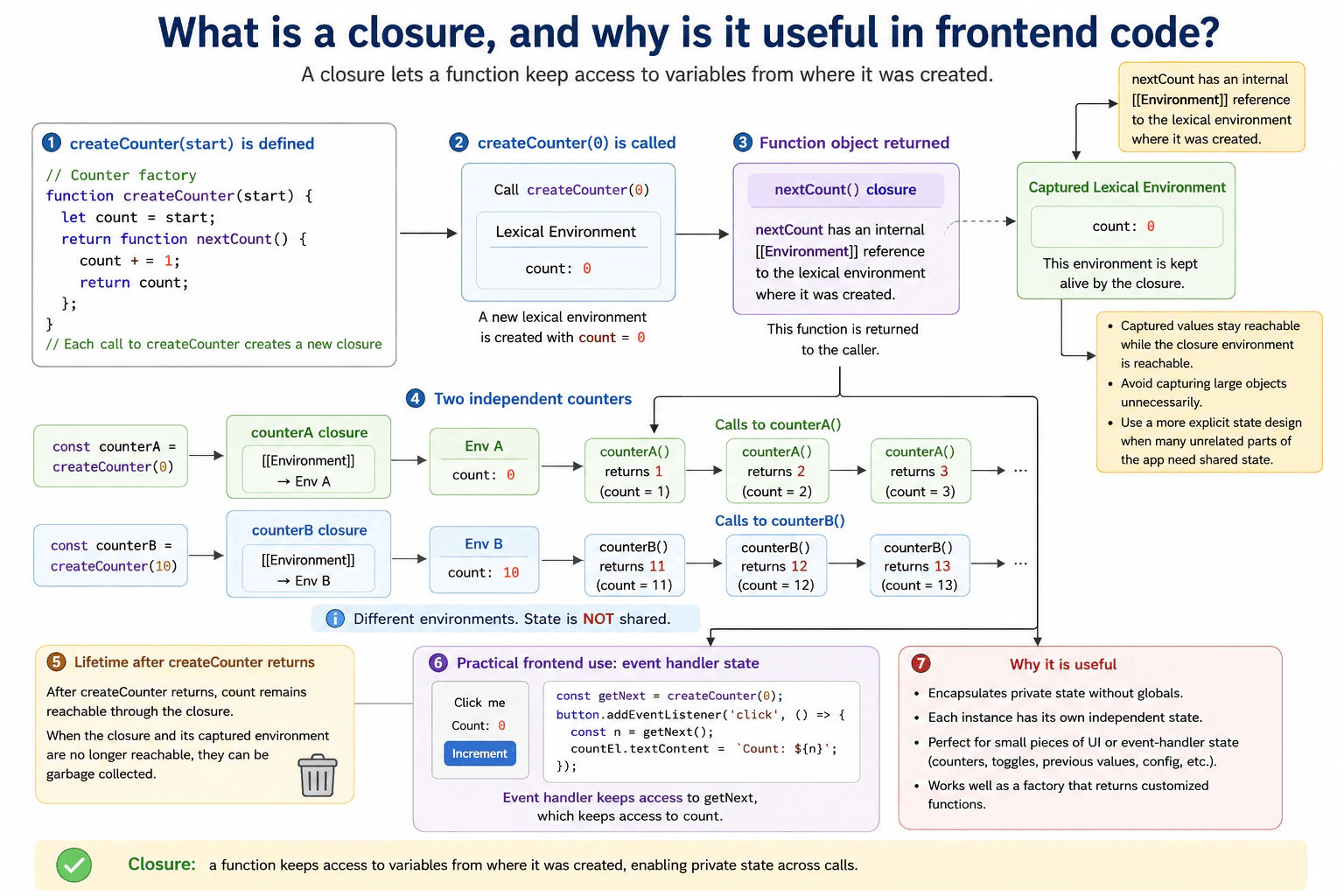
Build a small createCounter(start) example whose returned function keeps private state between calls. Explain lexical capture, lifetime after the outer function returns, independent state for two counters, and one practical frontend use such as encapsulating component or event-handler state.
Short Interview Answer (30-60 seconds)
A closure lets a function keep access to variables from the scope where that function was created. For example, createCounter can create a private count and return a function that changes it. The count stays available between calls even after createCounter has returned. Each call to createCounter creates separate state, so two counters do not share the same count. This is useful for small pieces of private frontend state, such as state used by an event handler.
A closure lets a function remember information from the place where it was created. This is useful when one part of a program needs to keep a value between calls without exposing that value directly to other code. A counter is a simple example. You give it a starting number, and each later call increases the remembered number. If you create two counters, each one remembers its own number. This pattern can help keep small pieces of page behavior separate, private, and easier to control.
Useful Questions to Ask the Interviewer
Should the counter return the new value after each call?
Should I show that two counters keep separate state?
Would you like a frontend example using an event handler?
How to Explain It in an Interview
In JavaScript, a closure happens when a function keeps access to variables from the lexical scope where that function was created. Lexical scope means that which variables a function can use is determined by where the function is written in the source code.
For example, createCounter creates a local variable named count. It then returns another function. That returned function reads count, increases it, and returns the new value. After createCounter returns, its normal execution has finished. However, the returned function still refers to count. Because that variable is still reachable through the returned function, JavaScript keeps the required lexical environment available.
If createCounter is called twice, each call creates a separate count binding. Each returned function closes over the count from its own call. Calling the first counter does not change the second counter.
This is useful when a small function needs private state. A frontend event handler can capture information that it needs between events without putting that information in a global variable. Outside code cannot directly access the local count variable through the counter function.
Closures are not always the best choice for shared application state. If many unrelated parts of an application need to read or update the same state, a more explicit state design can be clearer. Closures also keep captured values reachable while something reachable still refers to the closure. Capturing large objects unnecessarily can therefore keep more memory in use than needed. When the closure and its captured environment are no longer reachable, that memory can become eligible for garbage collection.
Example
The example calls createCounter with a starting value. Each call creates its own count binding and returns a function that captures that binding. Calling counterA increases only the count created for counterA. Calling counterB changes a different count created for counterB. The output shows that the captured state remains available after createCounter returns and that the two closures keep independent state.
Code
functioncreateCounter(start) {
// Create private state for this specific createCounter call.let count = start;
returnfunctionnextCount() {
// Update the captured state and return its current value.
count += 1;
return count;
};
}
// Each call creates a different count binding.const counterA = createCounter(0);
const counterB = createCounter(10);
// counterA keeps its own state between calls.console.log(counterA()); // 1console.log(counterA()); // 2// counterB uses separate captured state.console.log(counterB()); // 11// counterA still has the value from its previous calls.console.log(counterA()); // 3
Where it is used
Closures are useful for small private pieces of frontend state. An event handler can remember a count, configuration value, or previous value between events. They are also common in factory functions that create functions with their own settings and in callbacks that need values from the surrounding scope. They work best when the captured state has a clear owner and lifetime.
Why Interviewers Ask This
Interviewers ask this to check whether the candidate understands lexical scope, how a function keeps access to variables from the scope where it was created, and why those variables can remain available after the outer function returns. They also want to see whether the candidate can use closures for small private pieces of frontend state without accidentally sharing state or keeping unnecessary data reachable in memory.
Common interview mistakes
A common mistake is saying that a closure copies the captured variable. In this example, the returned function keeps access to the count binding created by its own call to createCounter. Another mistake is thinking all counters share one count. Each call to createCounter creates a separate count binding. It is also incorrect to say that count disappears as soon as the outer function returns. The required lexical environment remains reachable through the closure. Finally, capturing large objects without a need can keep those objects reachable longer than expected.
Interview tip
Start with the practical idea that a closure lets a function remember variables from where it was created. Then show createCounter, explain why count remains available after createCounter returns, and prove that two counters have separate state. Finish with one frontend use and one memory consideration.
Interviewer may ask next
What happens to the captured count when the returned counter function is no longer reachable?
The captured count can become eligible for garbage collection when the returned function and anything else that can reach its captured environment are no longer reachable. A closure does not make captured state permanent. It keeps that state reachable only while something reachable still needs the closure environment. This matters because unnecessarily captured large objects can remain in memory longer than intended.
When would you avoid using a closure for frontend state?
I would avoid using a closure when the state needs to be shared, observed, or updated by many unrelated parts of the application. The createCounter design works well because one returned function owns one private count. For broader application state, hiding the value inside one closure can make coordination and debugging harder. The main tradeoff is that closures give simple private state, while shared state often benefits from a more explicit state design.
22. What is scope in JavaScript?Language SpecificEasy
i Question Details
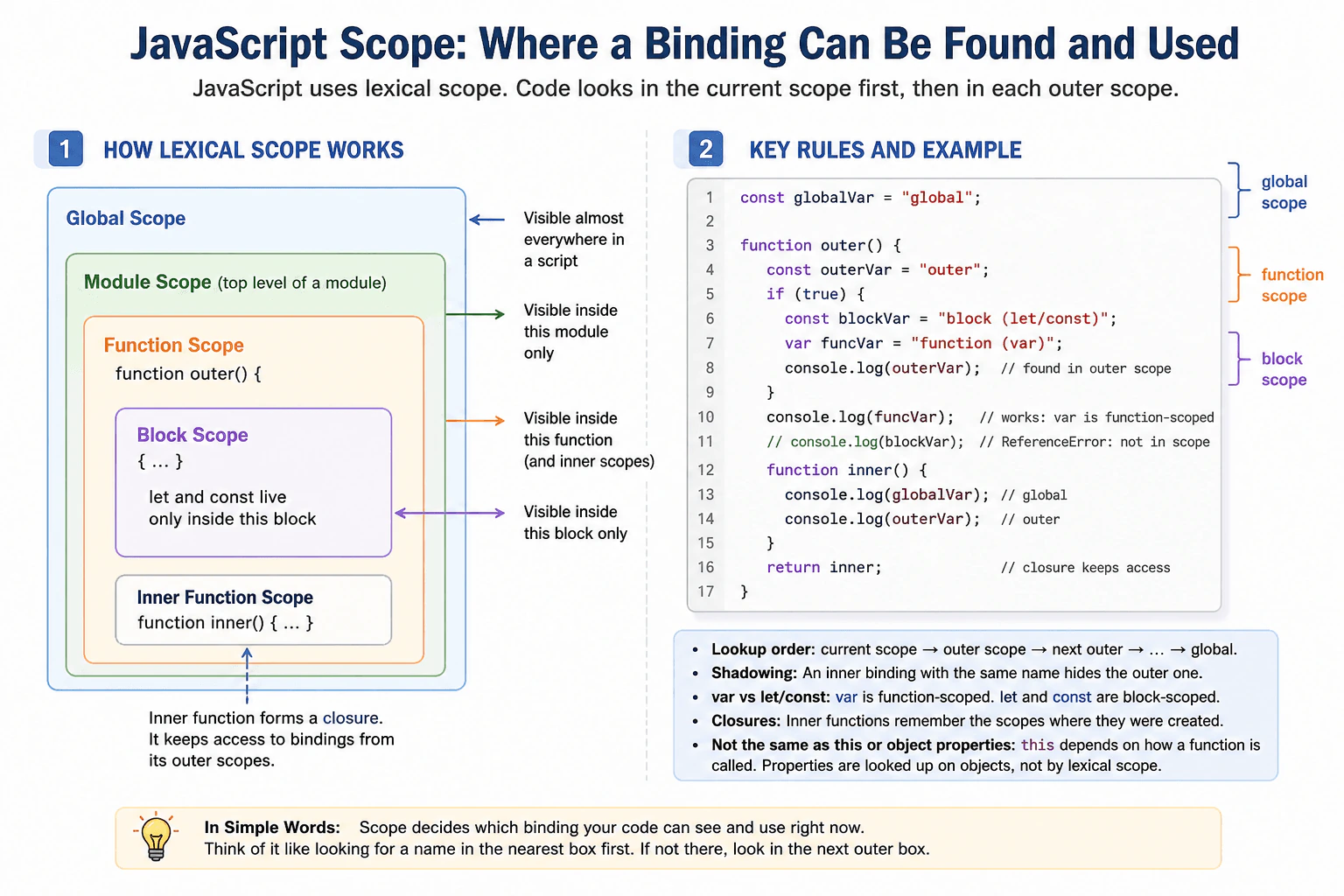
Define scope as the region of a program in which a binding can be found and used. Explain global, module, function, and block scope; lexical lookup through outer scopes; shadowing; and how var differs from let and const. Connect scope to closures while distinguishing scope from object properties and the value of this.
Short Interview Answer (30-60 seconds)
Scope tells JavaScript where a binding can be found and used. JavaScript uses lexical scope, so it looks in the current scope first and then in surrounding scopes. Common kinds are global, module, function, and block scope. let and const follow block scope, while var follows function scope inside a function. Closures can keep access to bindings from outer scopes even after an outer function has returned.
Scope is about where a name is available in a program. Imagine putting labels inside boxes. A label inside one box may be visible only there, while a label outside may also be visible inside smaller boxes. JavaScript uses the way the code is written to decide which name is found. This matters because two places can use the same name without referring to the same value. Understanding these boundaries helps developers avoid reading or changing the wrong value and makes larger programs easier to understand.
Useful Questions to Ask the Interviewer
Would you like me to show the difference between var, let, and const with an example?
Should I also explain how closures keep access to outer bindings?
How to Explain It in an Interview
Scope is the region of a JavaScript program where a binding can be found and used. A binding connects a name, such as count, with a value.
JavaScript has several important kinds of scope. Code running as a classic script can use global scope. An ES module has its own module scope, so its top level declarations do not automatically become properties of the global object. A function creates function scope. A block, such as an if body or loop body, creates block scope for let, const, class, and some other declarations.
JavaScript uses lexical scope. This means scope relationships are determined by where code is written. When JavaScript needs a name, it checks the current scope first. If the binding is not there, it checks each surrounding lexical scope until it finds the binding or reaches the outer end. If no binding exists, reading that name normally causes a ReferenceError.
An inner scope can declare a name that is also declared outside. The inner binding then hides the outer binding while code is inside that scope. This is called shadowing.
var behaves differently from let and const. Inside a function, var belongs to the containing function rather than to an ordinary block. let and const belong to their containing block. let and const also cannot be accessed before their declarations have been initialized.
Closures are closely connected to lexical scope. A function keeps access to the lexical environment where it was created. An inner function can therefore keep using an outer binding after the outer function returns. This is useful for callbacks and private state, but retained bindings can also keep referenced data in memory for as long as the closure remains reachable.
Scope is different from object property lookup and from this. A property is found through an object and possibly its prototype chain. The value of this follows function call rules, while an arrow function gets this from its surrounding context. Neither behavior is lexical variable lookup.
Example
The example starts with an outer message binding. A nested block declares another message binding, so the inner binding shadows the outer one only inside that block. The example also shows that var declared inside an if block is still available throughout its containing function, while let is limited to the block. Finally, makeCounter returns a function that forms a closure and keeps access to the count binding created by makeCounter.
Code
const message = 'outer';
{
// This binding belongs only to this block and shadows the outer binding.const message = 'inner';
console.log(message);
}
// The outer binding is visible again after the block ends.console.log(message);
functionshowVarAndLet() {
if (true) {
// var belongs to the containing function rather than this block.var functionValue = 'available in the function';
// let belongs only to this block.let blockValue = 'available only in the block';
console.log(blockValue);
}
// This works because functionValue is in the function scope.console.log(functionValue);
}
functionmakeCounter() {
let count = 0;
// The returned function keeps access to count through lexical scope.returnfunctionincrement() {
// Updating count changes the same binding kept by the closure.
count += 1;
return count;
};
}
showVarAndLet();
const counter = makeCounter();
console.log(counter());
console.log(counter());
Where it is used
Scope is used throughout production frontend JavaScript. Block scope keeps temporary bindings inside loops, conditions, and small sections of code. Function scope keeps local work inside functions. Module scope keeps declarations inside a module unless they are explicitly exported. Closures use outer bindings in callbacks, event handlers, factory functions, and private state patterns. Clear scope boundaries also reduce accidental global state and make code easier to maintain.
Why Interviewers Ask This
Interviewers ask this to check whether a candidate understands where JavaScript bindings can be found and used. They also want to see whether the candidate understands lexical lookup, shadowing, closures, and the different scope rules of var, let, and const. This knowledge helps prevent bugs caused by reading or changing the wrong binding.
Common interview mistakes
A common mistake is thinking var has block scope like let and const. Another is assuming an inner declaration changes an outer binding when it actually shadows it. Developers may also confuse lexical scope with object property lookup or with the value of this. Another mistake is believing a closure copies an outer value once. A closure keeps access to the relevant outer binding, so later changes to that binding can be observed. It is also incorrect to assume every top level declaration becomes a property of the browser global object, especially inside ES modules.
Interview tip
Start by saying that scope controls where a binding can be found. Then explain lexical lookup from the current scope through surrounding scopes. Name global, module, function, and block scope. Finish with shadowing, the var versus let and const difference, and the connection between lexical scope and closures.
Interviewer may ask next
What happens when an inner scope declares a binding with the same name as one in an outer scope?
The inner binding shadows the outer binding while code is inside that inner scope. JavaScript lexical lookup finds the nearest matching binding first. The outer binding still exists and becomes directly visible again after code leaves the inner scope. This matters because reusing names can make code harder to understand even when the behavior is valid.
Why would you usually prefer let or const over var in production code?
I would usually prefer let or const because their block scope gives a smaller and clearer region where a binding can be used. This reduces accidental access outside a loop, condition, or block. const is useful when the binding will not be reassigned, while let is appropriate when reassignment is needed. var can still be valid, but its function scope and declaration behavior can make modern code easier to misuse. This choice normally has no meaningful performance benefit by itself, so clarity and correct scope are the main reasons.
23. How does lexical scope determine which binding a function reads?Language SpecificEasy
i Question Details
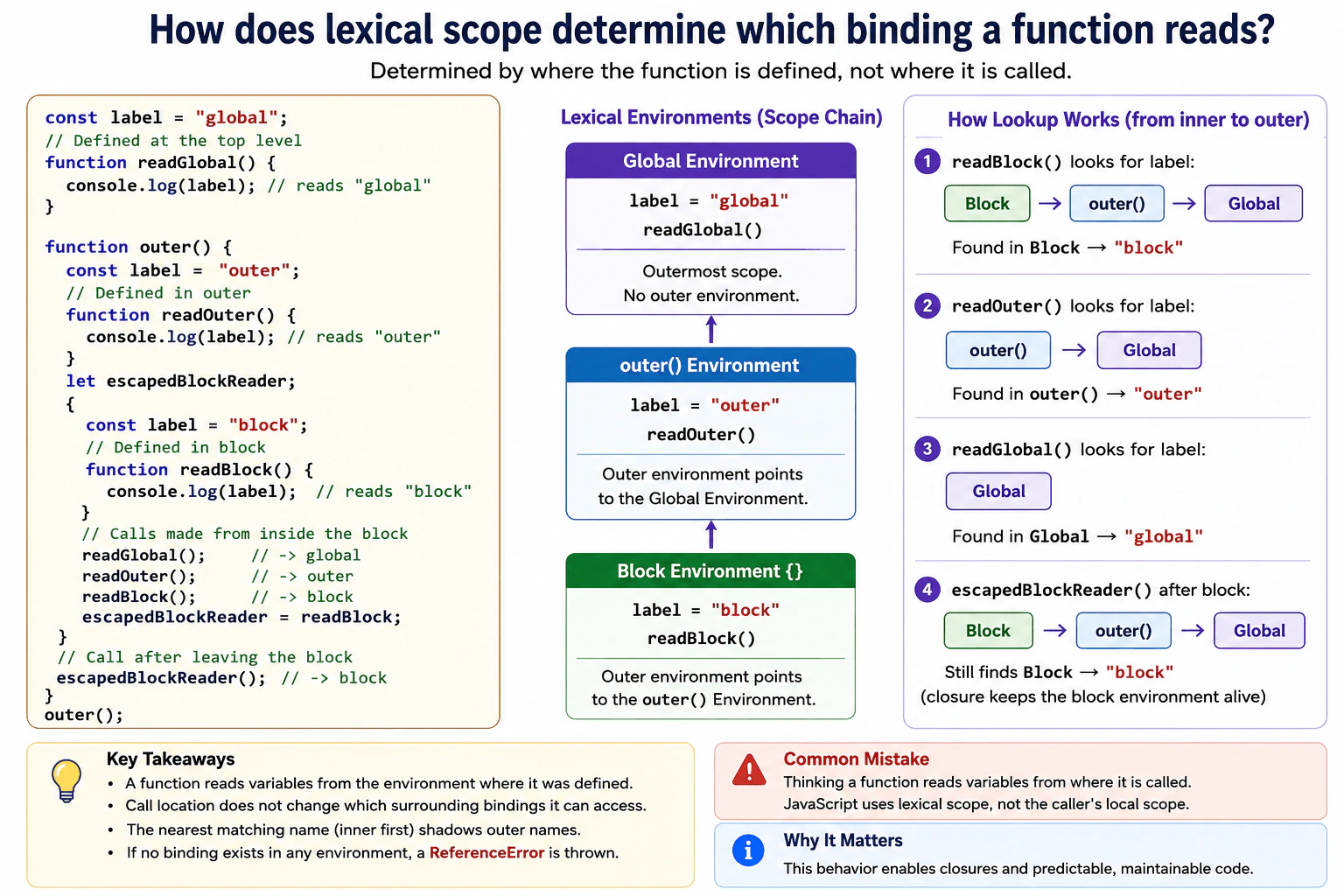
Create nested functions with a global label, an outer label, and a block-local label. Ask which binding each function can access based on where it was defined rather than where it was called. Include shadowing and explain the scope-chain lookup from inner to outer environments.
Short Interview Answer (30-60 seconds)
JavaScript decides which binding a function reads from where that function was defined, not from where it is called. It first checks the function's own environment, then moves outward through the environments around its definition. If a nearer environment has the same variable name, that binding shadows the outer one. This makes variable lookup predictable even when the function is called from another scope.
JavaScript remembers the surroundings where each function was created. Those surroundings decide which names the function can read later. Calling the function from another place does not give it access to the caller's local names. If several surrounding places contain the same name, the closest matching name to the function's definition is used. This matters when functions are inside other functions or blocks. Understanding this rule helps you predict which value a function will print and prevents mistakes when the same variable name appears in several nested places.
Useful Questions to Ask the Interviewer
Should I show the difference between where a function is defined and where it is called?
Should I include a block with another binding using the same variable name?
How to Explain It in an Interview
Lexical scope means JavaScript decides a function's surrounding environments from the place where the function is defined.
Suppose the top level has label with the value global. An outer function creates another label with the value outer. Inside a block, another label has the value block.
A function defined at the top level reads the top level label, even if we call it from inside the outer function or the block. Its lexical environment was fixed when the function was created, so local bindings belonging only to the caller are not added to its lookup path.
A function defined directly inside the outer function reads the outer label. If we call that function from inside the block, it still reads outer. The block is only the call location. It is not one of the lexical environments surrounding that function's definition.
A function defined inside the block reads the block label. That binding shadows the outer and top level bindings because it is the nearest matching binding in the function's scope chain.
For an identifier read, JavaScript starts with the current lexical environment and follows outer lexical environments until it finds a matching binding. If no matching binding exists anywhere in that chain, reading the undeclared identifier throws a ReferenceError.
This behavior also enables closures. A function can keep access to a binding from the environment where it was created after execution has left that environment. In production code, lexical scope is useful and predictable, but excessive shadowing can make code harder to understand.
Example
The example uses a top level label, an outer function binding also named label, and a block binding with the same name. readGlobal is defined at the top level, so it reads global even when called inside the block. readOuter is defined inside outer, outside the nested block, so it reads outer even when called from the block. readBlock is defined inside the block and then stored in escapedBlockReader. When it is called after execution leaves the block, it still reads block because the closure keeps access to the lexical environment where it was created.
Code
const label = 'global';
// This function is created at the top level, so its lexical lookup starts there.functionreadGlobal() {
console.log(label);
}
functionouter() {
const label = 'outer';
// This function is created inside outer, so the outer binding is the nearest matching name.functionreadOuter() {
console.log(label);
}
let escapedBlockReader;
{
const label = 'block';
// This function is created inside the block, so the block binding shadows the outer binding.functionreadBlock() {
console.log(label);
}
// Calling these functions here does not change the lexical environments chosen when they were created.readGlobal();
readOuter();
readBlock();
// Keep the block function so it can be called after execution leaves this block.
escapedBlockReader = readBlock;
}
// The closure still reads the block binding because that required lexical environment remains reachable.escapedBlockReader();
}
outer();
Where it is used
Lexical scope is used throughout frontend JavaScript with nested functions, callbacks, event handlers, module functions, and closures. A callback can read configuration or state from the environment where it was created. Block scope with let and const is also common inside conditions and loops. Shadowing is valid JavaScript, but repeatedly using the same variable name in deeply nested scopes can make production code harder to read and maintain.
Why Interviewers Ask This
Interviewers ask this to check whether a candidate understands how JavaScript chooses a variable based on where a function was defined. It also tests whether the candidate understands nested lexical environments, shadowing, closures, and why calling the same function from a different place does not change which surrounding binding it reads.
Common interview mistakes
A common mistake is thinking a function reads local variables from the place where it is called. JavaScript does not use the caller's local lexical environment for that lookup. Another mistake is assuming an outer function can read a variable declared only inside a nested block. It cannot. Candidates also sometimes forget that the nearest binding with the same name shadows bindings farther out. Finally, lexical scope should not be confused with this, because ordinary function calls use different rules to determine this.
Interview tip
Start with the main rule: a function reads surrounding bindings based on where it was defined. Then trace the lookup from the function's own environment outward. Use the three label values to show shadowing, and call the functions from inside the block to prove that the call location does not change lexical scope.
Interviewer may ask next
What happens if none of the lexical environments contains the requested identifier?
Reading an undeclared identifier throws a ReferenceError. JavaScript checks the current lexical environment and then follows each outer lexical environment. If it reaches the outermost environment without finding a matching binding, the lookup fails. This matters because calling the function from a scope that happens to contain the same variable name does not rescue the lookup. The caller's local environment is not inserted into the function's lexical scope chain.
Does keeping the block function after the block finishes have a memory cost?
Yes. The escaped readBlock function keeps access to the block binding that it uses, so the required lexical environment can remain reachable after execution leaves the block. This is closure behavior. It is useful for preserving private state, but a long lived closure can also keep referenced data alive longer than necessary. In production code, the main tradeoff is between convenient retained state and avoiding unnecessary memory retention.
24. Why is `this` often lost when a method is passed as a callback?Language SpecificMedium
i Question Details
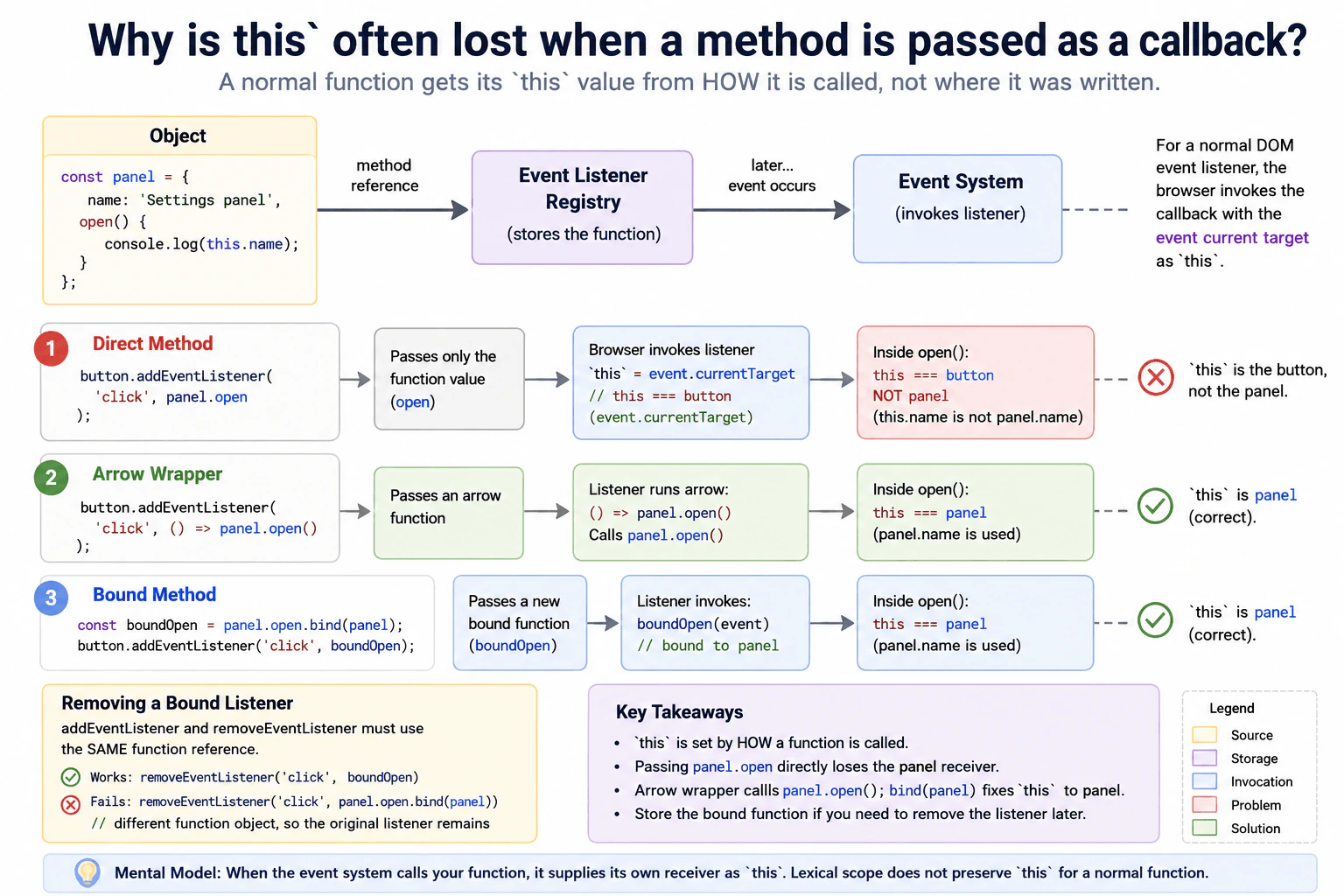
Pass panel.open directly to an event listener and compare it with an arrow wrapper and a bound method. Explain how the callback invocation supplies its own receiver, why lexical scope does not preserve a normal method's this, and how removal of a bound listener requires retaining the same function reference.
Short Interview Answer (30-60 seconds)
A normal method does not permanently remember its object as this. If I pass panel.open directly to an event listener, the browser later calls that function as the listener, so this comes from that callback invocation and is not the panel object. I can use an arrow wrapper that calls panel.open() or use panel.open.bind(panel). If I use bind, I keep the returned function so I can pass that exact same reference to removeEventListener.
Passing a method by itself means we give another part of the program the function, but not the object that normally calls it. Later, the event system calls that function in its own way. Because of this, the method may see a different object when it tries to use this. Two common fixes are to put the method call inside an arrow function or to create a bound function that always uses the intended object. A bound function should be saved because removing an event listener requires the same function value that was originally added.
Useful Questions to Ask the Interviewer
Should I compare direct method passing, an arrow wrapper, and bind using a browser event listener?
Should I also explain how to correctly remove the bound listener?
How to Explain It in an Interview
The key rule is that a normal JavaScript function gets its this value from the way it is called. Lexical scope does not preserve this for a normal function. The place where the function was written does not permanently attach a this value to it.
Suppose panel.open() reads this.name. When we call panel.open(), the call has panel before the dot, so this is panel.
If we instead pass panel.open to addEventListener, we pass only the function value. When the browser later invokes a normal event listener, it calls the listener with the event current target as this. In this example, that is the button, not panel.
An arrow wrapper such as () => panel.open() fixes the problem because the wrapper explicitly performs panel.open(). That method call makes panel the receiver. Arrow functions have lexical this, meaning they do not create their own dynamic this, but this example does not depend on the wrapper's this. It works because the wrapper calls open through panel.
Another option is panel.open.bind(panel). bind creates a new function whose this value is fixed to panel when that function runs.
The important production detail is function identity. Every call to bind creates a different function object. Calling removeEventListener with a newly created bound function will therefore not remove the original listener. Store the bound function and reuse the same reference. The same rule applies to an arrow wrapper if that listener must later be removed.
Example
The example creates one panel object and three buttons. The direct listener receives panel.open by itself, so the browser invokes that normal listener with the button as this. The arrow listener explicitly calls panel.open(), so the method receives panel as this. The bound listener uses a function created once with panel.open.bind(panel), which fixes this to panel. The bound function is stored and the exact same reference is later passed to removeEventListener. A new call to bind would create a different function and would not remove the original listener.
Code
const panel = {
name: 'Settings panel',
open() {
// Show which object JavaScript supplied as this for this call.console.log(this === panel ? this.name : `different receiver: ${this.tagName}`);
},
};
const directButton = document.createElement('button');
directButton.textContent = 'Direct method';
const arrowButton = document.createElement('button');
arrowButton.textContent = 'Arrow wrapper';
const boundButton = document.createElement('button');
boundButton.textContent = 'Bound method';
document.body.append(directButton, arrowButton, boundButton);
// Passing only the method removes the panel receiver from the later callback invocation.
directButton.addEventListener('click', panel.open);
// Store the wrapper so the exact same callback can be used for cleanup later.constarrowListener = () => {
// Calling through panel makes panel the receiver of open.
panel.open();
};
arrowButton.addEventListener('click', arrowListener);
// bind creates a new function whose this value is fixed to panel.const boundOpen = panel.open.bind(panel);
boundButton.addEventListener('click', boundOpen);
// Trigger each listener so the example runs without manual clicks.
directButton.dispatchEvent(newEvent('click'));
arrowButton.dispatchEvent(newEvent('click'));
boundButton.dispatchEvent(newEvent('click'));
// Removal succeeds because this is the exact callback reference that was added.
boundButton.removeEventListener('click', boundOpen);
Where it is used
This behavior appears often in frontend code when object methods are used as DOM event listeners, timers, subscription callbacks, or callbacks passed into other APIs. In browser interfaces, developers often store an arrow wrapper or a bound method when a component starts, then reuse the same function reference when the component is cleaned up. This keeps the intended receiver clear and allows listener cleanup to use the correct callback reference.
Why Interviewers Ask This
Interviewers ask this to check whether the candidate understands that a normal function gets this from how the function is called, not from where the function was written. They also want to see whether the candidate can choose a safe callback pattern and correctly add and remove browser event listeners.
Common interview mistakes
A common mistake is thinking that panel.open remembers panel because the method was defined on that object. A normal function does not work that way. Another mistake is saying that lexical scope preserves the this value of a normal method. Lexical scope preserves normal variable bindings, while a normal function's this depends on how the function is invoked. Another common bug is adding panel.open.bind(panel) and later trying to remove it with another panel.open.bind(panel). Those are different function objects, so the listener remains registered. Inline arrow wrappers have the same reference problem when cleanup is required.
Interview tip
Start with the call site rule: a normal function gets this from how it is called. Then compare panel.open, () => panel.open(), and panel.open.bind(panel). Finish by mentioning that bind creates a new function, so the same stored reference must be used for listener removal.
Interviewer may ask next
What happens if I call `removeEventListener("click", panel.open.bind(panel))` after adding another bound version of the method?
It does not remove the original listener. Each call to bind creates a new function object, so the callback passed to removeEventListener has a different identity from the callback that was added. For listener removal, the browser must match the event type, the callback reference, and the capture setting. Other options such as once and passive do not change that matching rule. This matters because repeatedly creating bound functions can leave old listeners attached. Store the original bound function and reuse that exact reference.
Should I prefer an arrow wrapper or `bind` for this kind of event listener?
Either can be correct, and the choice depends on what the callback needs to do. An arrow wrapper such as () => panel.open() is simple when I want to call a method and possibly add extra logic or arguments. bind is useful when I want a reusable function whose this is fixed to panel. Both approaches create a function object that should be stored when later removal is required. The main production concern is keeping a stable callback reference and making the intended receiver clear.
25. How do bound functions behave with arguments, `this`, and construction?Language SpecificMedium
i Question Details
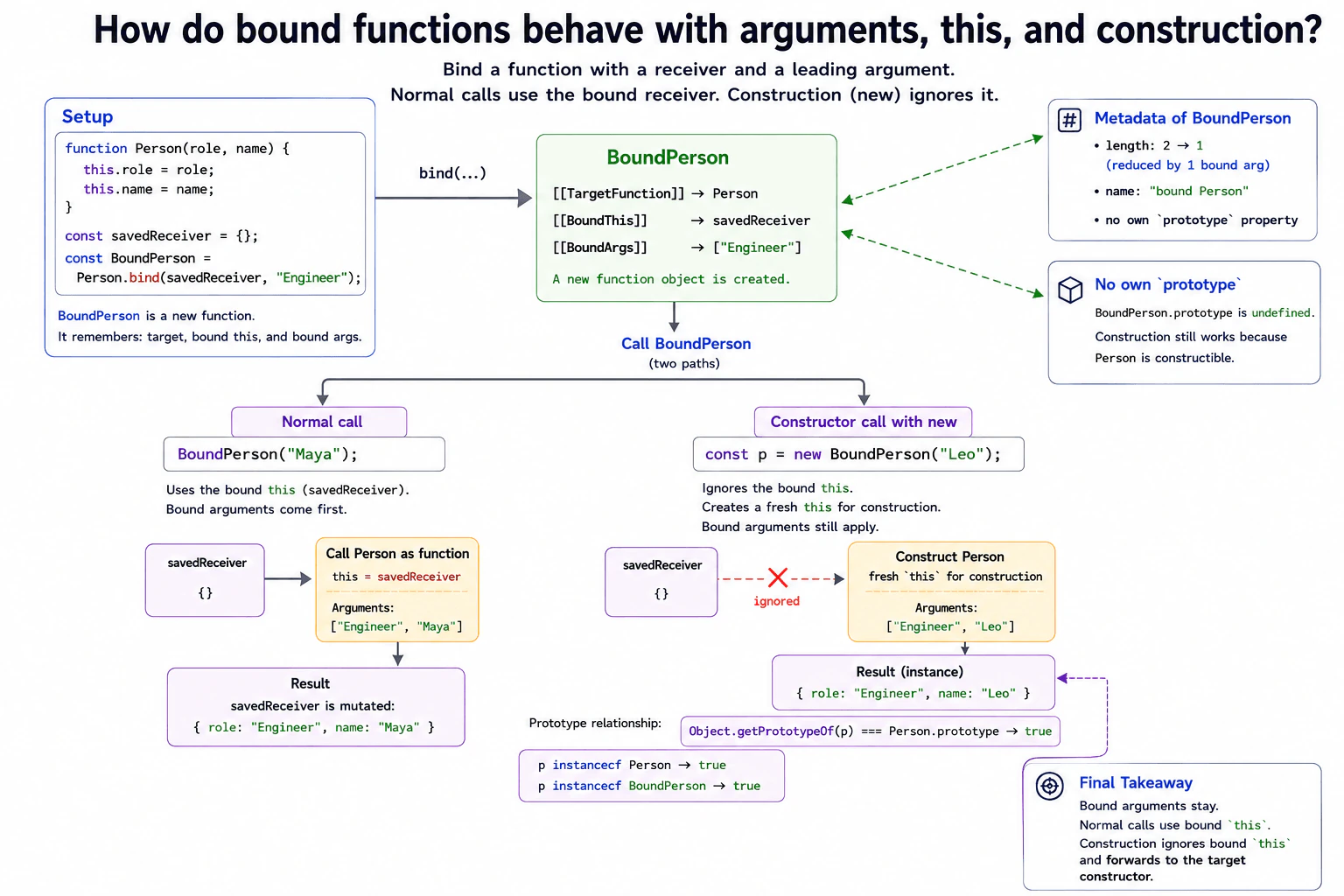
Bind a function with a receiver and one leading argument, then call it normally and with new. Explain partial application, the ignored bound receiver during construction, the resulting instance's prototype relationship, length and name changes at a high level, and why a bound function has no useful own prototype property.
Short Interview Answer (30-60 seconds)
A bound function remembers leading arguments and normally uses its bound this value. The bound arguments come first, before arguments supplied later. If I call the bound function with new, JavaScript ignores the bound receiver and creates a fresh this for construction. The bound arguments still apply. Construction is forwarded to the original target, so in the normal case the new instance inherits from the target prototype. A bound function also gets an adjusted length and name, and it normally has no own prototype property.
A bound function is a new function that remembers another function, a value for this, and any arguments supplied to bind. During a normal call, JavaScript uses the remembered this value and puts the remembered arguments before later arguments. Construction works differently. If the bound function is called with new, JavaScript creates a fresh value for this and ignores the remembered receiver. The remembered arguments still come first. Construction is forwarded to the original function. JavaScript also gives the bound function its own reported argument count and name, but normally no own prototype property.
Useful Questions to Ask the Interviewer
Should I show both a normal call and a constructor call with the same bound function?
Do you want me to cover length, name, instanceof, and the missing own prototype property?
How to Explain It in an Interview
Suppose Person receives role and name. If I run Person.bind(savedReceiver, "Engineer"), JavaScript creates a bound function. It remembers savedReceiver and the leading argument "Engineer".
For a normal call such as BoundPerson("Maya"), the original Person function receives "Engineer" first and "Maya" second. Its this value is savedReceiver. Trying to call that bound function with another receiver through call or apply does not replace the original bound receiver.
Construction is different. With new BoundPerson("Leo"), JavaScript forwards construction to Person. The saved receiver is ignored because construction needs a fresh this. The saved argument remains, so Person receives "Engineer" and "Leo". In this example, Person does not return a replacement object, so the result inherits from Person.prototype. It is an instance of Person. It also passes instanceof BoundPerson because the bound function delegates that check to its target.
A bound function normally has no own prototype property. Therefore BoundPerson.prototype is undefined, even though new BoundPerson() works when Person itself can be constructed. This also means a bound function cannot normally be used directly as the parent in a class declaration.
Its length is generally the target length reduced by the number of bound arguments, with zero as the lower limit. Its name is formed from the target name with "bound " in front. Each call to bind creates a new function object, so repeated binding creates extra allocations and can cause callback identity problems.
Example
The example binds Person to savedReceiver and also binds the first argument, "Engineer". A normal call uses savedReceiver as this and places the bound argument before the later argument. A constructor call with new ignores savedReceiver, creates a fresh instance, and still places "Engineer" before "Leo". Because Person does not return a replacement object, the created result inherits from Person.prototype. The example also shows that both instanceof Person and instanceof BoundPerson succeed, that length is reduced, that name gains the "bound " prefix, and that the bound function has no own prototype property.
Code
functionPerson(role, name) {
// Save both arguments on the object currently used as this.this.role = role;
this.name = name;
}
const savedReceiver = {};
// Bind the receiver and prefill the first argument.constBoundPerson = Person.bind(savedReceiver, 'Engineer');
// A normal call uses the bound receiver and places the bound argument first.BoundPerson('Maya');
console.log(savedReceiver); // { role: "Engineer", name: "Maya" }// Construction ignores the bound receiver but keeps the bound argument.const person = newBoundPerson('Leo');
console.log(person.role, person.name); // Engineer Leo// Person does not return a replacement object, so the result uses Person.prototype.console.log(Object.getPrototypeOf(person) === Person.prototype); // true// The instance check works for both the target and its bound function.console.log(person instanceofPerson); // trueconsole.log(person instanceofBoundPerson); // true// One leading argument was bound, so the reported remaining parameter count is one.console.log(BoundPerson.length); // 1// The bound function name contains the target name with the bound prefix.console.log(BoundPerson.name); // bound Person// A bound function normally has no own prototype property.console.log(Object.hasOwn(BoundPerson, 'prototype')); // falseconsole.log(BoundPerson.prototype); // undefined
Where it is used
In frontend code, bind is useful when a callback must keep a specific receiver or when some leading arguments should be filled in ahead of time. A common example is passing an object method to another API while keeping that object as this. Bind can also create small partially applied callbacks. In production code, keep the bound function when its identity matters. Creating a fresh bound function for event registration and then creating another one for event removal will not match the original callback. Repeated binding also creates additional function objects, so stable callbacks are usually clearer when the same function is reused many times.
Why Interviewers Ask This
Interviewers ask this to check whether you understand that bind affects normal calls and constructor calls in different ways. They want to see whether you understand bound arguments, bound this, construction, prototype lookup, function metadata, function identity, and practical callback use.
Common interview mistakes
A common mistake is thinking the bound receiver is always used. It is ignored when the bound function is constructed with new. Another mistake is thinking bound arguments disappear during construction. They still come first. Some candidates expect BoundPerson.prototype to equal Person.prototype, but the bound function normally has no own prototype property. Another mistake is assuming the constructor result must always inherit from the target prototype. A constructor can explicitly return another object, and that object can become the result instead. Candidates also sometimes call bind again and expect the second receiver to replace the first one. Rebinding cannot replace the original bound this, although it can add more bound arguments.
Interview tip
Start with the contrast between a normal call and a call with new. Say that bound arguments stay in both cases, while the bound receiver is ignored during construction. Then explain the target prototype relationship, the constructor return edge case, instanceof, length, name, and the missing own prototype property.
Interviewer may ask next
What happens if the original target cannot be used as a constructor and I call its bound function with `new`?
It throws a TypeError. Binding does not make a target constructible. For example, an arrow function cannot be constructed, so a bound version of that arrow function also cannot be constructed. This matters because bind preserves the target's construction capability rather than adding one.
What is the tradeoff between `bind` and an arrow wrapper for a frontend callback?
Both can create a callback with the behavior you need, but they express it differently. bind fixes a receiver and can prefill leading arguments. An arrow wrapper uses lexical this and can map arguments explicitly. Creating either callback produces a new function object, so recreating it repeatedly can cause identity problems for event removal, memoization, or caching. Use a stable bound function when fixed receiver behavior is important. Use a stable arrow wrapper when explicit argument handling is easier to read.
26. What is the difference between spread syntax and rest syntax?Language SpecificEasy
i Question Details
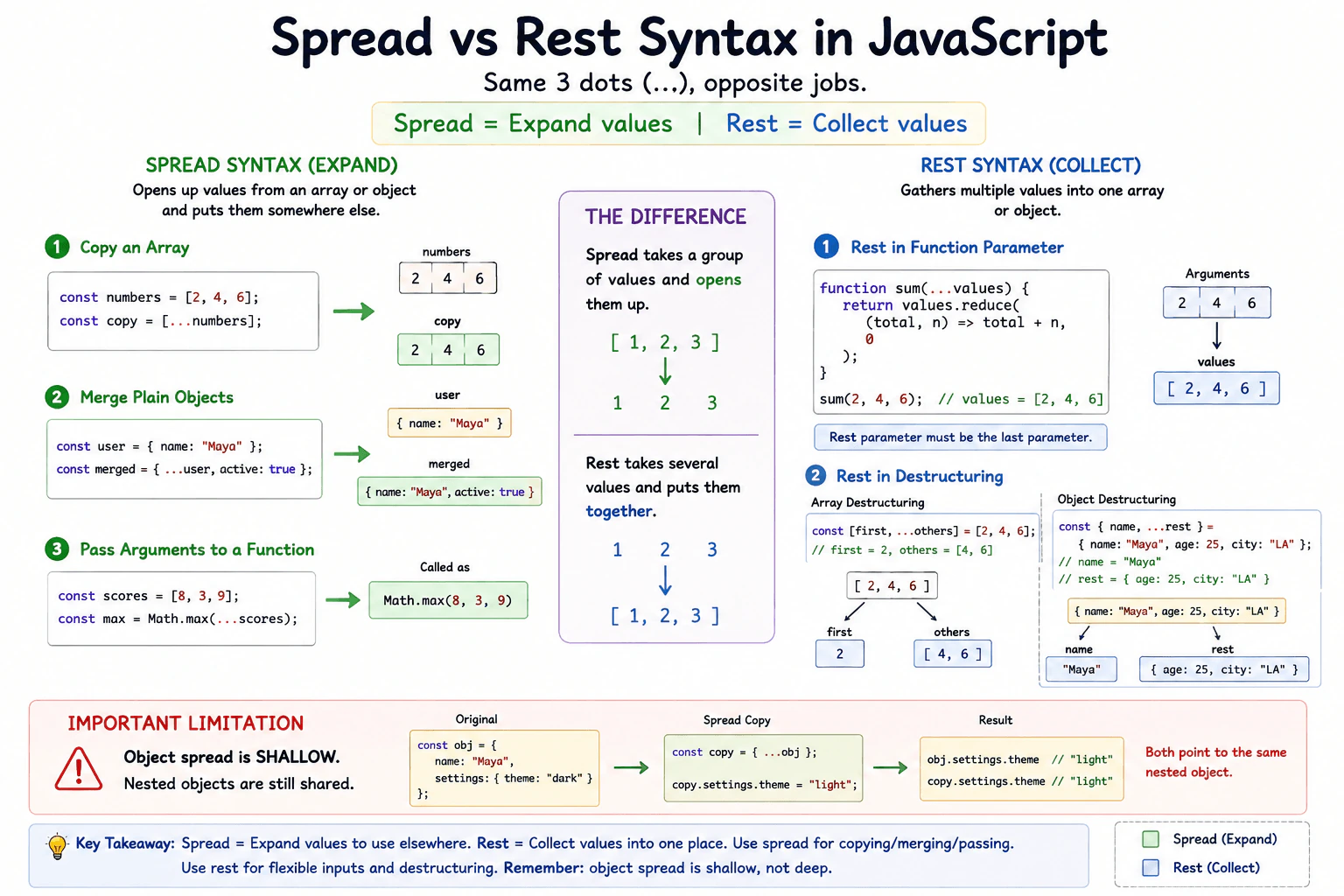
Show spread syntax when copying an array, merging plain objects, and passing arguments to a function. Then show rest syntax in a function parameter and a destructuring pattern. Explain that both use ... but perform opposite collection and expansion roles, and note that object spread creates only a shallow copy.
Short Interview Answer (30-60 seconds)
Spread and rest both use three dots, but they do opposite jobs. Spread expands values from an array or object into another place. Rest collects several values into one array or object. I use spread for tasks such as copying an array, merging plain objects, or passing array values as function arguments. I use rest for collecting function arguments or remaining values during destructuring. One important point is that object spread creates only a shallow copy, so nested objects are still shared.
Spread and rest use the same three dots, but the job changes based on where the dots appear. Spread opens a group of values so they can be placed somewhere else. Rest does the opposite. It gathers several values and keeps them together. This matters when copying lists, combining simple objects, sending several values into a function, receiving many function inputs, or taking some values while keeping the remaining ones. A key detail is that copying an object this way does not make new copies of objects stored inside it.
Useful Questions to Ask the Interviewer
Would you like examples for both arrays and plain objects?
Should I also explain what happens when the data contains nested objects?
How to Explain It in an Interview
Spread syntax expands values. For an array, [...numbers] creates a new array and places each value from numbers into it. This is useful when you want a new outer array without changing the original array.
Spread also works with plain objects. {...user, active: true} copies the own enumerable properties from user into a new object and then sets active. If the same property appears more than once, the later value wins.
Spread can also pass values from an iterable as separate function arguments. For example, Math.max(...scores) passes each score as its own argument.
Rest syntax collects values instead of expanding them. In a function parameter such as function sum(...values), the remaining arguments are collected into a real array named values. A rest parameter must be the last parameter.
Rest also works in destructuring. With const [first, ...others] = numbers, first receives the first value and others becomes a new array containing the remaining values. With object destructuring, rest collects the remaining own enumerable properties into a new object.
The main limitation is shallow copying. If an object contains another object, spread copies the reference to that nested object. Changing the nested object through the copy can therefore also be visible through the original. Spread is convenient for normal frontend state updates and data transformation, but it is not a deep cloning tool.
Example
The example shows the opposite roles clearly. Array spread copies array elements into a new array. Object spread merges plain objects into a new object, with later properties replacing earlier properties that use the same key. Function call spread expands array values into separate arguments. A rest parameter collects separate arguments into one array. Array destructuring rest collects the remaining array values. The nested object example shows the shallow copy limitation because both outer objects still refer to the same nested object.
Code
const numbers = [2, 4, 6];
// Spread copies the array elements into a new outer array.const copiedNumbers = [...numbers];
console.log(copiedNumbers);
const baseUser = {
name: 'Maya',
settings: { theme: 'dark' },
};
// Spread copies properties from both plain objects into a new outer object.// The later active property becomes part of the merged result.const mergedUser = { ...baseUser, active: true };
console.log(mergedUser);
// Spread expands the array values into separate function arguments.const largest = Math.max(...numbers);
console.log(largest);
// Rest collects all received arguments into one real array.functionsum(...values) {
return values.reduce((total, value) => total + value, 0);
}
console.log(sum(2, 4, 6));
// Rest in array destructuring collects the values that remain.const [first, ...others] = numbers;
console.log(first);
console.log(others);
// Object spread is shallow, so the nested settings object is still shared.const copiedUser = { ...baseUser };
copiedUser.settings.theme = 'light';
console.log(baseUser.settings.theme);
Where it is used
Spread is commonly used when creating updated arrays or plain objects without changing the original outer container, combining configuration objects, adding properties to frontend state, and passing values from an iterable into a function. Rest is commonly used for functions that accept a flexible number of arguments and for destructuring when code needs a few named values plus the remaining values. In production code, object spread is useful for shallow updates, but nested data must be handled carefully because nested object references are still shared.
Why Interviewers Ask This
Interviewers ask this to check whether the candidate understands that the same three dot syntax can perform two opposite jobs depending on where it appears. They also want to see whether the candidate understands copying, function arguments, destructuring, and the important fact that object spread makes only a shallow copy.
Common interview mistakes
A common mistake is thinking spread and rest are different operators. They use the same three dot syntax, and the surrounding syntax decides whether values are expanded or collected. Another mistake is assuming object spread performs a deep copy. It copies the outer object, but nested objects keep the same references. Candidates also sometimes place a rest parameter before another parameter, but a rest parameter must be last. Another mistake is expecting object spread to merge nested objects recursively. If two objects contain the same property, the later property replaces the earlier value rather than deeply combining it.
Interview tip
Start with the simplest contrast: spread expands and rest collects. Then show one short example of each. Mention array copying, object merging, function call spread, function parameter rest, and destructuring rest. Finish by stating that object spread creates only a shallow copy. That final point shows practical JavaScript understanding.
Interviewer may ask next
What happens if you use object spread to copy an object that contains nested objects?
The outer object is new, but nested objects are still shared because object spread makes a shallow copy. The nested property value is a reference to the same nested object. If code changes that nested object through the copy, the change can also be observed through the original object. This matters when updating nested frontend state because spread alone does not isolate every nested level.
When should you avoid using spread for copying or passing very large collections?
You should be careful when spread would create unnecessary copies or expand a very large iterable into function arguments. Array and object spread allocate a new outer container, so repeated copying can increase memory use and work. Function call spread also turns iterable values into separate arguments, and JavaScript engines can impose practical limits on how many arguments a call can receive. In production code, use spread when it keeps the code clear and the collection size is reasonable, but avoid unnecessary copying in performance sensitive paths.
27. How do template literals support interpolation and multiline strings?Language SpecificEasy
i Question Details
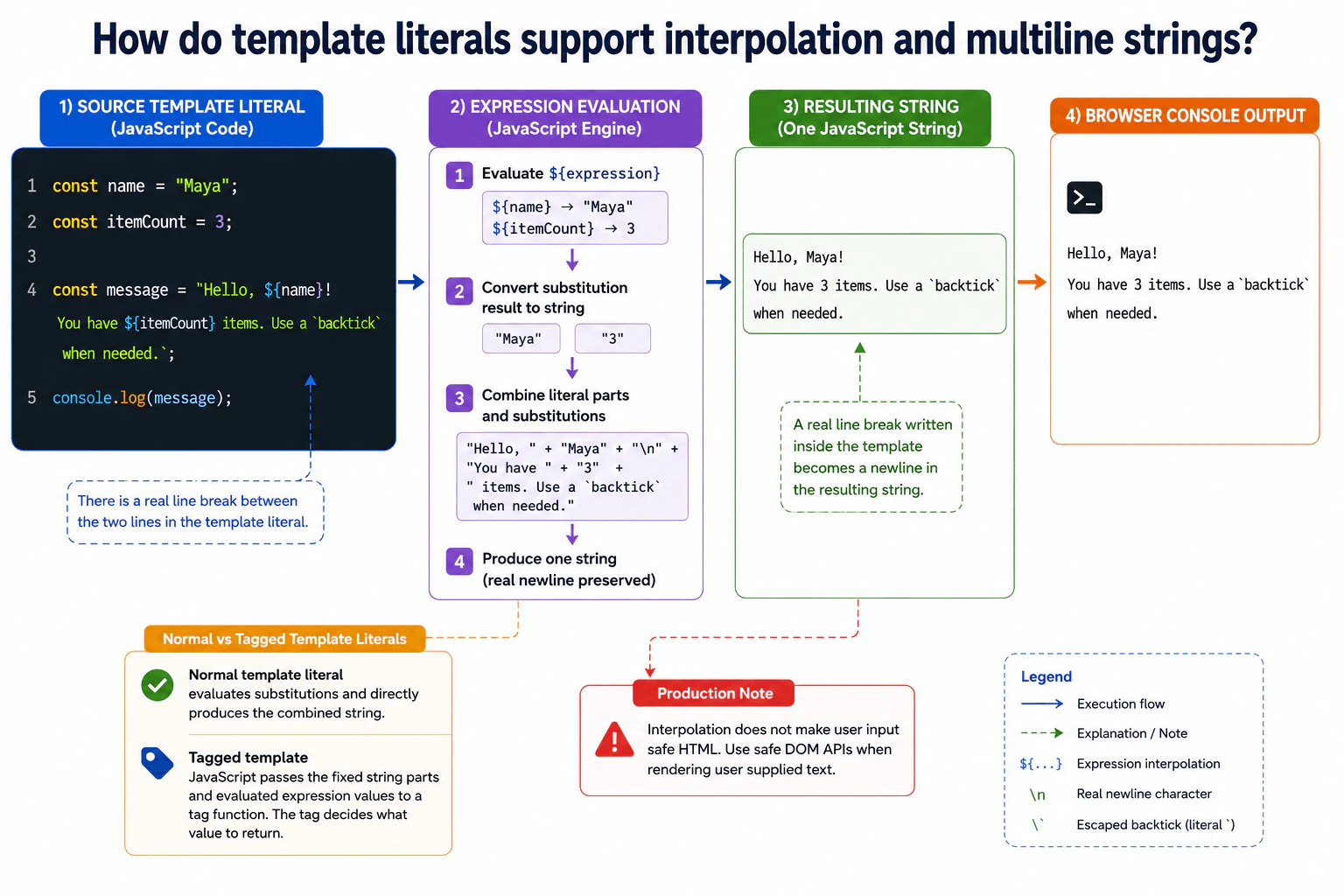
Create a browser JavaScript example that formats a user's name and item count into a two-line message. Explain expression interpolation, embedded newlines, escaping a backtick, and the difference between a normal template literal and a tagged template without requiring implementation of a tag.
Short Interview Answer (30-60 seconds)
Template literals use backticks instead of normal quotes. I can place an expression inside ${} and JavaScript converts its result into text at that position. I can also put a real line break inside the literal, so multiline text is easy to read. If I need an actual backtick inside the text, I escape it with a backslash. A tagged template is different because JavaScript passes the template parts and expression values to a tag function instead of directly producing the normal string.
Template literals make it easier to build text that contains changing values or several lines. For example, a page can show a person's name and the number of items in one readable message. JavaScript places each requested value into the correct position. A line break written inside the text also stays as a line break in the result. This is useful for messages, labels, generated content, and other text where joining many small pieces would be harder to read. A special form can also send the text pieces and values to another function for custom handling.
Useful Questions to Ask the Interviewer
Should the example preserve the line break exactly as written in the source?
Do you want me to explain tagged templates conceptually without implementing a tag?
How to Explain It in an Interview
A normal template literal is written between backticks. Expression interpolation uses ${expression}. JavaScript evaluates the expression, converts its result to a string for the substitution, and inserts that text at the expression position.
For example, if name is "Maya" and itemCount is 3, the template can produce two lines. The first line contains the name. The second line contains the item count. A real newline between those lines in the source becomes a newline in the resulting string.
A backtick normally closes the template literal. To include a literal backtick in its text, write it as \` so JavaScript treats it as content instead of the closing delimiter.
Template literals are useful when a frontend message combines fixed text with dynamic values or needs readable multiline text. They still create strings, so large repeated string construction can allocate new string data. They also do not make interpolated values safe for HTML. User supplied text should be inserted with safe DOM APIs when it is rendered on a page.
A tagged template changes the evaluation process. A tag function receives the fixed string parts and the evaluated expression values. The tag decides what value to return. A normal template literal directly produces the combined string. Tagged templates are useful when custom processing is needed, but they are unnecessary for ordinary interpolation.
Example
The example stores a user name and item count, then creates one normal template literal. It interpolates both values and keeps a real newline between the two message lines. It also escapes a backtick so that character becomes part of the final string. The example then prints the result. A tagged template is only explained because the question does not require implementing a tag.
Code
const name = 'Maya';
const itemCount = 3;
// Build one readable message with two interpolated values and a real newline.const message = `Hello, ${name}!
You have ${itemCount} items. Use a \`backtick\` when needed.`;
// Print the exact two line result so the newline behavior is visible.console.log(message);
Where it is used
Template literals are commonly used for frontend messages, logging text, generated labels, URLs, small HTML related strings, test descriptions, and other text that combines fixed words with changing values. Multiline literals are useful when the source should visually match the final text. For actual page rendering, user supplied values should still be inserted with safe DOM APIs rather than treating an interpolated string as trusted HTML.
Why Interviewers Ask This
Interviewers ask this to check whether I understand how template literals build strings, how values are inserted with expressions, how line breaks are preserved, and when tagged templates behave differently from normal template literals. It also tests whether I can use the syntax safely in real frontend code.
Common interview mistakes
A common mistake is using normal single or double quotes and expecting ${} to interpolate a value. Another mistake is forgetting that an unescaped backtick closes the template literal. Developers may also expect indentation inside a multiline template to disappear, but spaces and line breaks written inside the template become part of the string. Another mistake is assuming a tagged template is only another spelling for interpolation. A tag receives the template parts and values and can return something other than the normal combined string. Interpolating user input also does not automatically make HTML output safe.
Interview tip
Start by saying that backticks enable both ${} interpolation and literal line breaks. Then show one small two line example. Mention how to escape a backtick, and finish by explaining that a normal template produces the combined string while a tagged template gives the parts and values to a tag function.
Interviewer may ask next
What happens to spaces and line breaks that are written inside a multiline template literal?
They become part of the resulting string. JavaScript preserves the characters written inside the template, including newline characters and indentation spaces. This matters because formatting added only to make source code look neat can also appear in displayed or logged text. If exact output matters, I should place the template carefully or process the resulting string deliberately.
When would you use a tagged template instead of a normal template literal?
I would use a tagged template when custom processing of the fixed text and expression values is required. JavaScript passes those parts to the tag function, and the tag controls the returned value. This can support library features such as specialized formatting or transformation. For an ordinary message like the name and item count example, a normal template literal is simpler and clearer because no custom processing is needed.
28. How do array and object destructuring assignments work?Language SpecificEasy
i Question Details
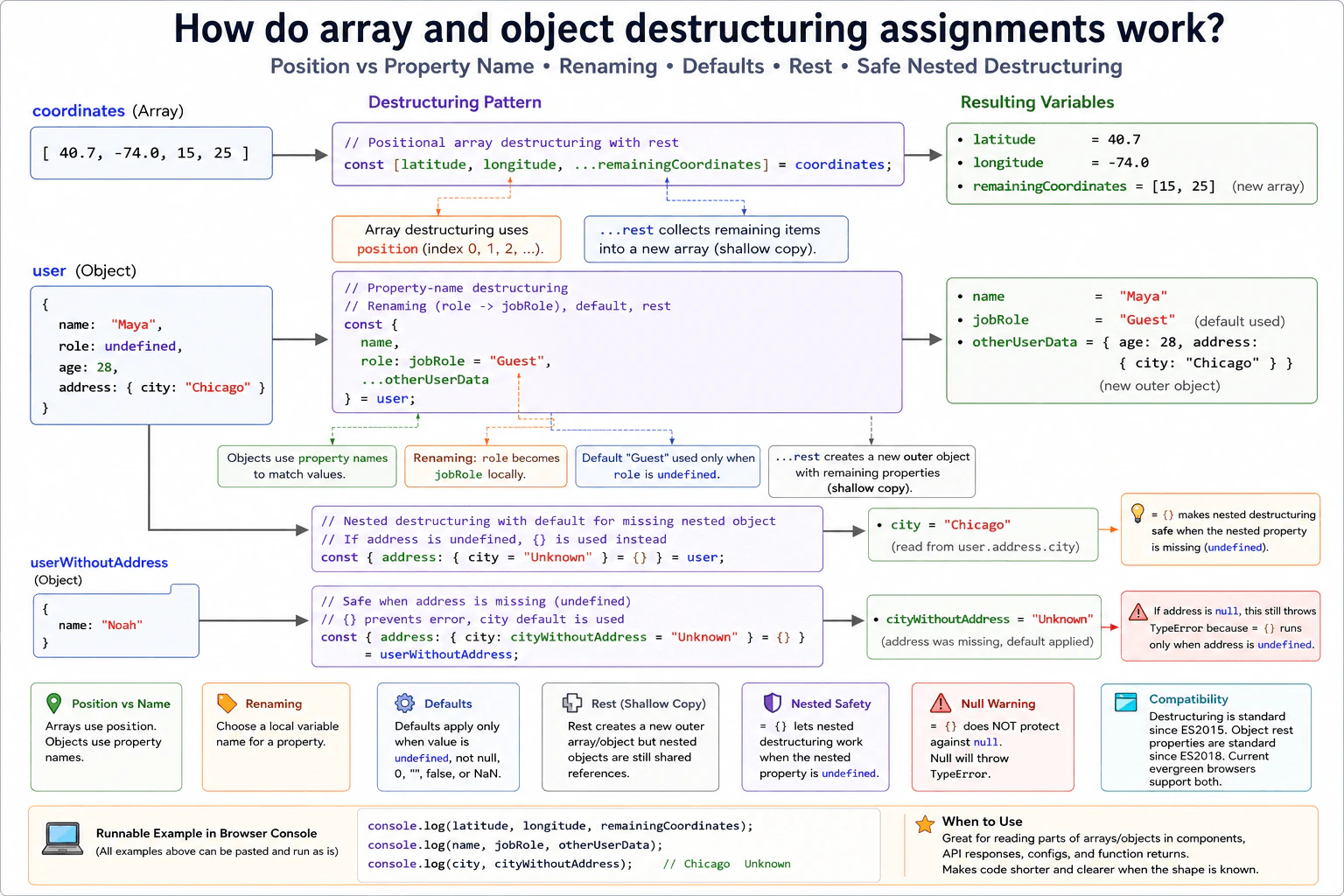
Given a coordinate array and a user object with a nested address, demonstrate positional array destructuring, property-name object destructuring, renaming, default values, rest collection, and safely handling a missing nested object. Keep the example runnable in a modern browser script.
Short Interview Answer (30-60 seconds)
Destructuring lets me take values from arrays or objects and assign them to variables in one statement. Array destructuring uses position, while object destructuring uses property names. I can also rename object properties, provide defaults for undefined values, collect remaining values with rest syntax, and use a default empty object when a nested object may be missing.
Destructuring is a short way to take useful pieces from a group of values and give those pieces clear names. For a list, the first name receives the first value, the second name receives the second value, and so on. For a named group, each name looks for a matching property. You can also choose a different local name, provide a fallback when a value is missing, gather the remaining values, and avoid an error when a deeper group does not exist. This keeps common data reading code shorter and easier to follow.
Useful Questions to Ask the Interviewer
Should the example show both a present address and a missing address case?
Should the remaining user properties be collected into another object?
How to Explain It in an Interview
Array destructuring reads values by position. With const [x, y, ...remainingCoordinates] = coordinates, x receives the first array element, y receives the second, and the rest syntax creates a new array containing any remaining elements.
Object destructuring reads properties by property name. With const { name, role: jobRole = "Guest", ...otherUserData } = user, JavaScript reads name, reads role into a local variable named jobRole, uses "Guest" only when role is undefined, and creates a new object containing the remaining own enumerable properties that were not already selected.
Nested destructuring can fail if the value being unpacked is undefined or null. A safe pattern is const { address: { city = "Unknown" } = {} } = user. If address is undefined, JavaScript uses the empty object for the nested pattern, so reading city is safe. This default does not help if address is explicitly null.
Destructuring does not deep copy nested objects. If an extracted value is an object, the new variable still contains a reference to that same object. Rest collection creates a new outer array or object, but nested objects remain shared references.
Rest collection also has a cost. JavaScript must create a new array or object and copy the remaining values or properties into it. The work and extra memory grow with the amount collected. Simple destructuring without rest does not create a copy of the whole source collection.
In production frontend code, destructuring is useful for component data, function results, configuration objects, and validated server data. It works best when the expected shape is clear. Avoid deeply nested patterns when they make code difficult to read or when incoming data has not been validated.
Example
The example uses one coordinate array and one user object. The coordinate array demonstrates positional destructuring and rest collection. The user object demonstrates property name matching, renaming, a default value, object rest collection, and nested destructuring. A second user value has no address property and shows how = {} makes the missing nested object safe. The fallback for the nested object applies when address is undefined. It does not protect against an explicit null address. The rest variables create new outer collections, while nested object values remain shared references.
Code
const coordinates = [40.7, -74.0, 15, 25];
// Array destructuring reads values by position.// The rest variable receives a new array with the remaining elements.const [latitude, longitude, ...remainingCoordinates] = coordinates;
const user = {
name: 'Maya',
role: undefined,
age: 28,
address: {
city: 'Chicago',
},
};
// Object destructuring reads by property name.// role is renamed to jobRole, and the default is used because role is undefined.// otherUserData receives a new outer object containing the remaining properties.const { name, role: jobRole = 'Guest', ...otherUserData } = user;
// The nested pattern reads city from address.// The empty object default makes the pattern safe when address is undefined.const { address: { city = 'Unknown' } = {} } = user;
const userWithoutAddress = {
name: 'Noah',
};
// Because address is missing, JavaScript uses the empty object before reading city.// cityWithoutAddress then uses its own default value.const { address: { city: cityWithoutAddress = 'Unknown' } = {} } = userWithoutAddress;
console.log(latitude, longitude);
console.log(remainingCoordinates);
console.log(name, jobRole);
console.log(otherUserData);
console.log(city);
console.log(cityWithoutAddress);
Where it is used
Destructuring is common when reading component properties, configuration values, function return values, browser API results, and validated server response objects. It is especially useful when only a few values are needed from a larger object or array. Defaults help with optional values. Rest collection is useful when some properties are handled directly and the remaining properties must be passed or processed together.
Why Interviewers Ask This
Interviewers ask this to check whether a candidate understands how JavaScript reads values from arrays and objects, how position differs from property name, and how renaming, defaults, rest collection, and missing nested data behave. It also shows whether the candidate can write concise code without making unsafe assumptions about incoming frontend data.
Common interview mistakes
A common mistake is thinking array destructuring uses property names. It uses position. Another mistake is thinking an object default runs for every false like value. A destructuring default runs only when the extracted value is undefined. Developers also sometimes expect = {} to protect nested destructuring from null, but it does not. Another mistake is assuming object or array rest creates a deep copy. The new outer collection is separate, but nested object references are still shared.
Interview tip
Explain the rule in this order: arrays use position, objects use property names, renaming changes only the local variable name, defaults apply to undefined, rest collects what remains, and a default empty object can protect a nested pattern when the nested property is missing.
Interviewer may ask next
What happens if the nested address property is null instead of undefined?
The nested destructuring pattern throws an error because the = {} default is used only when address is undefined. An explicit null value remains null, and JavaScript cannot destructure city from null. This matters when incoming data can contain explicit null values. In production code, validate or normalize that value before nested destructuring.
Does rest destructuring make a deep copy of the remaining values?
No. Rest destructuring creates a new outer array or object, but nested object values are not deeply copied. If a collected value is an object, the new collection contains a reference to that same object. This matters because later mutation of that nested object can also be observed through the original source. Rest collection also requires time and memory to create and fill the new outer collection.
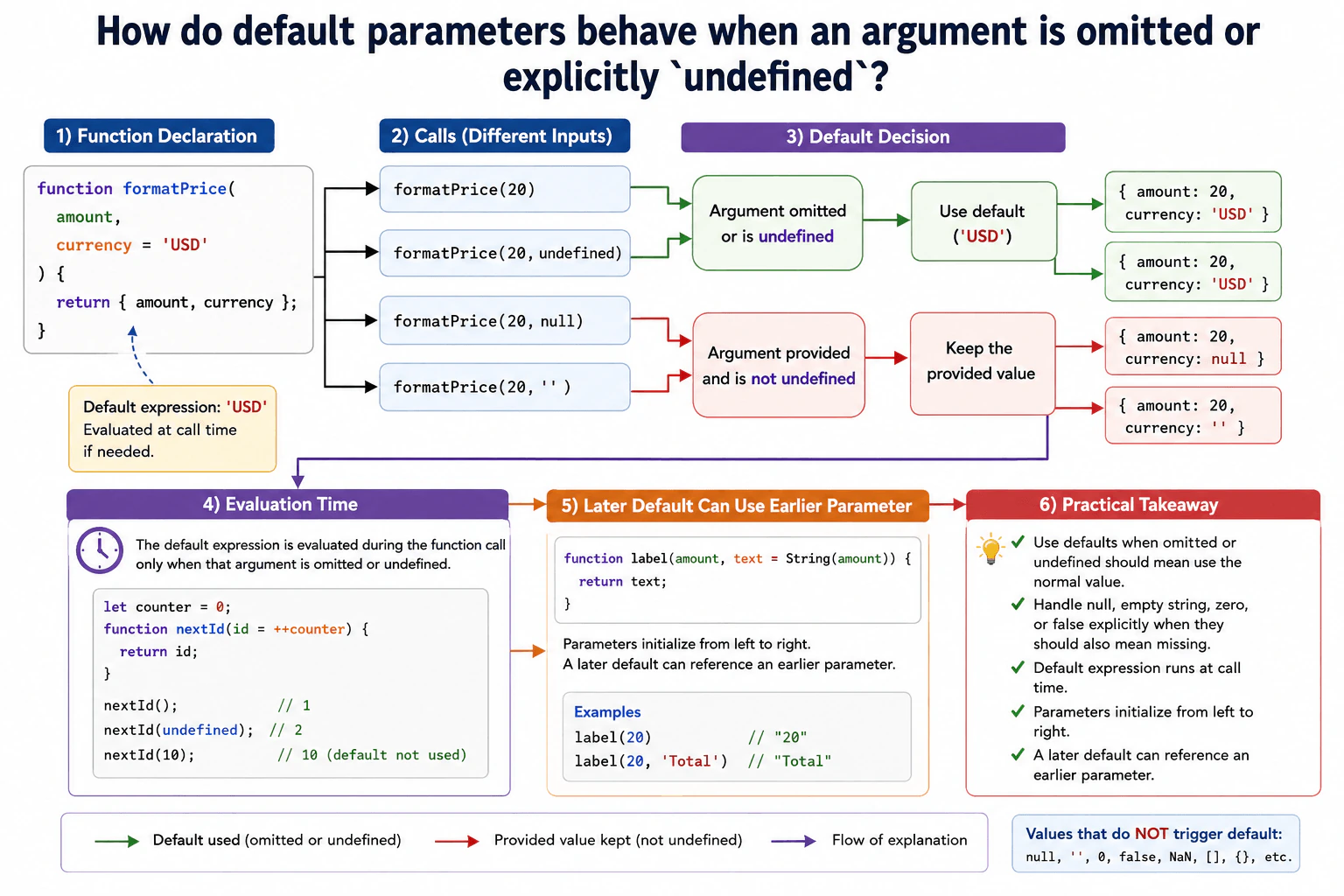
29. How do default parameters behave when an argument is omitted or explicitly `undefined`?Language SpecificEasy
i Question Details
Use a function formatPrice(amount, currency = 'USD') and compare calls with one argument, undefined, null, and an empty string. Explain when the default expression runs, its evaluation time, and how earlier parameters can be referenced by later default expressions.
Short Interview Answer (30-60 seconds)
JavaScript uses a default parameter when the argument is omitted or its value is explicitly undefined. It does not use the default for null, an empty string, zero, or false. The default expression is evaluated when the function is called and only when that parameter needs the default. A later default parameter can also reference an earlier parameter because parameters are initialized from left to right.
A default parameter gives a function a value to use when the caller does not provide that argument. JavaScript also uses the default when the caller explicitly provides undefined. Other supplied values stay unchanged. For example, null stays null, and an empty string stays an empty string. The default value is worked out when the function is called, not once when the function is created. This makes default parameters useful when a function has a normal value that most callers should not need to provide.
Useful Questions to Ask the Interviewer
Should I explain how null and an empty string differ from undefined?
Should I also show how an earlier parameter can be used by a later default expression?
How to Explain It in an Interview
With formatPrice(amount, currency = 'USD'), calling formatPrice(20) makes currency equal to USD because the second argument is omitted. Calling formatPrice(20, undefined) gives the same result because an explicit undefined also activates the default.
Calling formatPrice(20, null) is different. JavaScript keeps null, so the default expression does not run. Calling formatPrice(20, '') also keeps the empty string. The rule is specific: only an omitted argument or a value of undefined activates the parameter default.
A default expression is evaluated during the function call when that parameter needs a default. It is not calculated once when the function is defined. This matters if the expression calls another function, reads changing state, or creates a new object. The expression can therefore produce a new result on each call that needs it.
Parameters are initialized from left to right. A later default expression can use an earlier parameter. For example, function createLabel(amount, text = String(amount)) can use amount while creating the default value for text. The reverse is not safe. Trying to read a later parameter before that later parameter has been initialized causes a ReferenceError.
Default parameters are useful for optional settings with a sensible normal value. In production code, do not rely on them when null, an empty string, zero, or false should also mean missing. Handle those cases explicitly inside the function.
Example
The example uses formatPrice(amount, currency = 'USD'). Omitting the second argument and passing undefined both make currency use USD. Passing null keeps null. Passing an empty string keeps the empty string. The second function shows initialization order by letting a later default expression read an earlier parameter. Default expressions are evaluated during each function call only when the corresponding parameter receives no argument or receives undefined.
Code
functionformatPrice(amount, currency = 'USD') {
// Return both values so the default parameter behavior is easy to inspect.return { amount, currency };
}
console.log(formatPrice(20));
console.log(formatPrice(20, undefined));
console.log(formatPrice(20, null));
console.log(formatPrice(20, ''));
functioncreateLabel(amount, text = String(amount)) {
// The later default can read amount because amount is initialized first.return text;
}
console.log(createLabel(20));
Where it is used
Default parameters are useful when a frontend function has optional settings with a normal fallback value. Common examples include a default currency, locale, page size, display mode, or configuration option. They work well when an omitted argument and undefined should mean use the normal value, while null, an empty string, zero, and false must remain meaningful values supplied by the caller.
Why Interviewers Ask This
Interviewers ask this to check whether a candidate understands exactly when JavaScript uses a default parameter value. It also tests whether the candidate can distinguish an omitted argument and undefined from values such as null and an empty string. A strong answer also shows understanding of when default expressions are evaluated and how parameter initialization order affects references between parameters.
Common interview mistakes
A common mistake is thinking every falsy value activates a default parameter. That is incorrect. Null, an empty string, zero, and false are preserved. Another mistake is thinking the default expression is calculated when the function is defined. It is evaluated during a function call when that parameter needs the default. Candidates may also forget that parameters are initialized from left to right. A later default can use an earlier parameter, but trying to read a later parameter before it has been initialized causes a ReferenceError.
Interview tip
State the main rule first: an omitted argument and undefined use the default, while null and other supplied values do not. Then compare the four formatPrice calls. Finish by explaining that default expressions run during the call and that a later default expression can reference an earlier parameter.
Interviewer may ask next
What happens if the caller passes null, zero, false, or an empty string to a parameter with a default value?
The supplied value is kept, so the default does not run. JavaScript activates a default parameter only when the argument is omitted or its value is undefined. This matters because null, zero, false, and an empty string may carry real meaning in an application. If any of those values should also mean missing, the function needs an explicit check for that behavior.
Can a default expression use another parameter, and when is that expression evaluated?
Yes. A later default expression can reference an earlier parameter because parameters are initialized from left to right. For example, function createLabel(amount, text = String(amount)) can use amount while initializing text. The expression is evaluated during each function call only when the argument is omitted or undefined. Trying to read a later parameter before it has been initialized instead causes a ReferenceError. This initialization order matters when defaults depend on other arguments.
30. What is a browser event?Language SpecificEasy
i Question Details
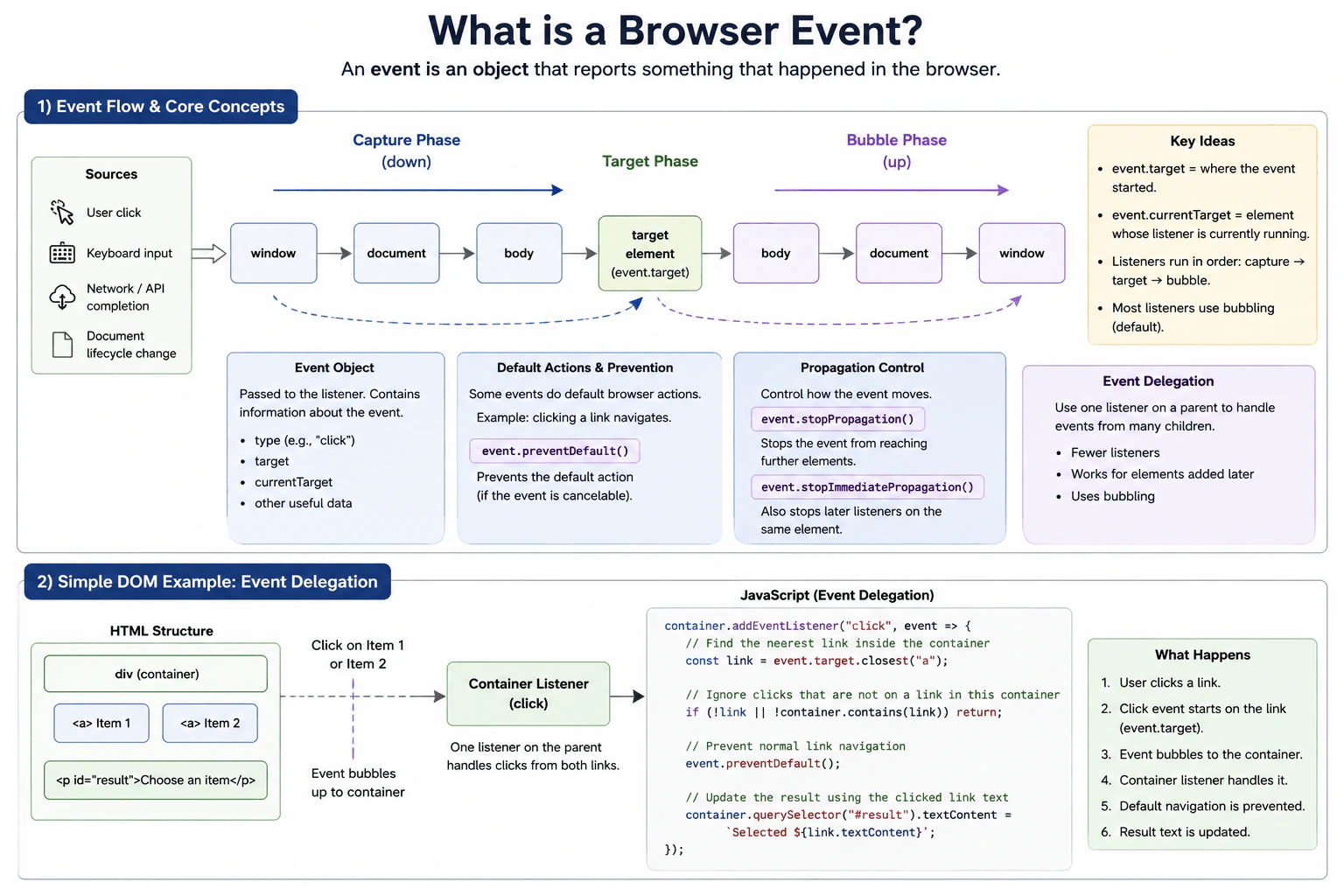
Define a browser event as an object that reports something that happened, such as a user click, keyboard input, network completion, or document lifecycle change. Explain event targets, listeners, event objects, capture, target and bubble phases, default actions, preventDefault, propagation control, and event delegation with one simple DOM example.
Short Interview Answer (30-60 seconds)
A browser event is an object that reports something that happened in the browser, such as a click, keyboard input, a document lifecycle change, or completion reported by a browser API. JavaScript can register a listener and receive the event object when the event is dispatched. For DOM events, the browser can process the event through capture, target, and bubble phases. Bubbling also makes event delegation possible, where one parent listener can handle events from many child elements.
A browser event is an object that tells JavaScript that something happened. A person may click a button, press a key, or use a form. The browser can also report page lifecycle changes, and some browser APIs report completed work with events. JavaScript can listen for an event and run a function when it happens. The event object gives useful information about what happened and where it started. This lets a page react when something occurs instead of repeatedly checking whether something has changed.
Useful Questions to Ask the Interviewer
Should I focus mainly on DOM events and event propagation?
Would you like me to include event delegation in the example?
How to Explain It in an Interview
A browser event is an object that describes something that happened. For a DOM event, the object referenced by event.target is where the event was dispatched. JavaScript can register a listener with addEventListener so a function runs when that event reaches the listener.
A DOM event can travel through three phases when propagation applies. During capture, it travels through ancestors toward the target. At the target phase, listeners on the target can run. If the event bubbles, it then travels back through ancestors during the bubble phase. Most listeners registered with addEventListener use the bubble behavior unless capture is requested.
The event object contains information about the event. event.target identifies the original target. event.currentTarget identifies the object whose listener is currently running. These values can be different when a child event reaches a parent listener.
Some events have a default browser action. For example, clicking a normal link usually starts navigation. Calling preventDefault prevents that action when the event is cancelable. Calling stopPropagation prevents the event from continuing to later objects in its propagation path. Calling stopImmediatePropagation also prevents later listeners on the same object from running. These methods do not mean the same thing as preventDefault.
Event delegation uses propagation, usually bubbling. Instead of adding a listener to every child, a parent can have one listener and inspect event.target to identify the child involved. This is useful for lists whose items can change over time. It can reduce listener registrations, but the handler must carefully validate the target.
Example
The example creates one container with two links and registers one click listener on the container. A click on either link bubbles to the container. The listener checks that the original target is an Element, uses closest to find the relevant link, confirms that the link belongs to the container, and calls preventDefault so the browser does not perform normal link navigation. It then displays the selected link text. One parent listener therefore handles both links and demonstrates event delegation.
Code
const container = document.createElement('div');
// Create two links so one parent listener can handle both current children.
container.innerHTML = `
<a href="https://example.com/one">Item 1</a>
<a href="https://example.com/two">Item 2</a>
<p id="result">Choose an item</p>
`;
document.body.append(container);
// Listen on the parent and use bubbling to handle clicks from its children.
container.addEventListener('click', (event) => {
// EventTarget is broader than Element, so check before calling Element methods.if (!(event.targetinstanceofElement)) {
return;
}
// Find the nearest link because the original target could be inside a link.const link = event.target.closest('a');
// Ignore clicks that are not on a link contained by this container.if (!link || !container.contains(link)) {
return;
}
// Prevent the normal link navigation because this example handles the click locally.
event.preventDefault();
// Update the page using information from the delegated event target.
container.querySelector('#result').textContent = `Selected ${link.textContent}`;
});
Where it is used
Browser events are used for buttons, menus, forms, keyboard controls, links, dialogs, pointer interactions, document lifecycle handling, and events exposed by browser APIs. Event delegation is especially useful for lists, tables, menus, and other containers with many similar child elements or children that may be added later.
Why Interviewers Ask This
Interviewers ask this to check whether a frontend developer understands how browser activity reaches JavaScript code through browser Web APIs. They want to see whether the candidate understands event targets, listeners, event objects, event phases, default browser actions, propagation control, and event delegation. These ideas are important for building interactive pages with predictable behavior and sensible listener management.
Common interview mistakes
A common mistake is thinking event.target and event.currentTarget always refer to the same object. They can differ when an event reaches a listener on an ancestor. Another mistake is assuming preventDefault stops propagation. It only prevents a default browser action when the event is cancelable. Developers also sometimes use stopPropagation without a clear need, which can prevent other listeners from receiving the event. With delegation, another mistake is assuming every event bubbles or failing to verify that the discovered child actually belongs to the intended container.
Interview tip
Start by defining an event as an object that reports something that happened. Then explain the target and listener, describe capture, target, and bubble in that order, and clearly separate preventDefault from propagation control. Finish with a small event delegation example because it shows why bubbling is useful in real frontend code.
Interviewer may ask next
What happens if an event does not bubble?
A parent listener that relies on the bubble phase will not receive that event through bubbling. This matters because normal event delegation depends on the event reaching an ancestor. Depending on the specific event, the code may need a listener on the relevant element, a different event that bubbles, or a capture listener when capture provides the required behavior.
Why use event delegation instead of adding a listener to every child?
Event delegation can use one parent listener to handle events from many children. It is useful when a container has many similar elements or when children can be added later. The main benefit is fewer listener registrations and simpler handling of changing child elements. The tradeoff is that the parent handler must inspect and validate the event target carefully, and delegation only works when the chosen event propagation behavior supports the design.
More questions load as you scroll
Disclaimer: This interview guide is for educational and informational purposes only. It is designed to help readers prepare, but it does not guarantee any interview result, hiring decision, offer, or outcome. Interview questions, hiring criteria, and preferred answers can vary by employer, interviewer, industry, location, and time. All answers, examples, and explanations in this guide are suggested examples for interview preparation, not definitive answers or instructions for professional practice. They are based on research and judgment, are provided without warranties of any kind, and should be adapted to the question, role, and applicable laws and professional requirements. Diagrams are simplified illustrations intended to highlight the main concepts and their relationships; actual situations, systems, and practices may be more complex. Alternative approaches may be equally valid or better suited to a particular question, context, or interviewer. To the fullest extent permitted by applicable law, the contributors and publisher are not liable for decisions made, actions taken, or losses incurred based on this guide.
State Laws and Professional Responsibilities: Laws and requirements governing an occupation vary by state and jurisdiction. You are responsible for checking the current laws, licensing requirements, and scope-of-practice rules that apply to your location and role, and for ensuring that your answers and actions comply with them. Adapt examples in this guide to those requirements. This guide is not legal advice.
Content Accuracy and Verification: To the fullest extent permitted by applicable law, we do not represent or warrant that interview guides, questions, answers, examples, or diagrams are accurate, complete, current, error-free, or suitable for any particular purpose. You are responsible for independently reviewing and verifying the information before relying on it.