This interview guide is for educational and informational purposes only. It is designed to help readers prepare, but it does not guarantee any interview result, hiring decision, offer, or outcome. Interview questions, hiring criteria, and preferred answers can vary by employer, interviewer, industry, location, and time. All answers, examples, and explanations in this guide are suggested examples for interview preparation, not definitive answers or instructions for professional practice. They are based on research and judgment, are provided without warranties of any kind, and should be adapted to the question, role, and applicable laws and professional requirements. Diagrams are simplified illustrations intended to highlight the main concepts and their relationships; actual situations, systems, and practices may be more complex. Alternative approaches may be equally valid or better suited to a particular question, context, or interviewer. To the fullest extent permitted by applicable law, the contributors and publisher are not liable for decisions made, actions taken, or losses incurred based on this guide.
State Laws and Professional Responsibilities
Laws and requirements governing an occupation vary by state and jurisdiction. You are responsible for checking the current laws, licensing requirements, and scope-of-practice rules that apply to your location and role, and for ensuring that your answers and actions comply with them. Adapt examples in this guide to those requirements. This guide is not legal advice.
Identity, Image, and Privacy Notice
To respect individual privacy, some names, profile photographs, avatars, biographical details, and other identifying information displayed in this guide may be replaced with pseudonyms, licensed stock images, illustrative avatars, composite images, or representative descriptions. Unless a person is expressly identified as an actual contributor, a displayed name, image, or profile should not be understood as depicting or identifying a specific candidate, interviewer, employee, or other real individual. These representations are provided for editorial and illustrative purposes only and do not imply endorsement, employment, participation, or affiliation with this guide or any company mentioned in it. Any resemblance to an actual person is coincidental.
Company Notice
This guide is an independent educational resource and is not affiliated with, endorsed by, sponsored by, or approved by the company named in this guide. Company names identify reported interview experiences or the employer context of clearly labeled original practice exercises. Interview practices can change without notice, and inclusion of company-specific content does not mean these questions are official, complete, or guaranteed to be asked. To the fullest extent permitted by law, the author, contributors, and publisher are not responsible for outcomes related to use of this material.
Content Accuracy and Verification
To the fullest extent permitted by applicable law, we do not represent or warrant that interview guides, questions, answers, examples, or diagrams are accurate, complete, current, error-free, or suitable for any particular purpose. You are responsible for independently reviewing and verifying the information before relying on it.
Questions or comments?
Contact us for general questions, or share feedback, technical corrections, and comments with the community.
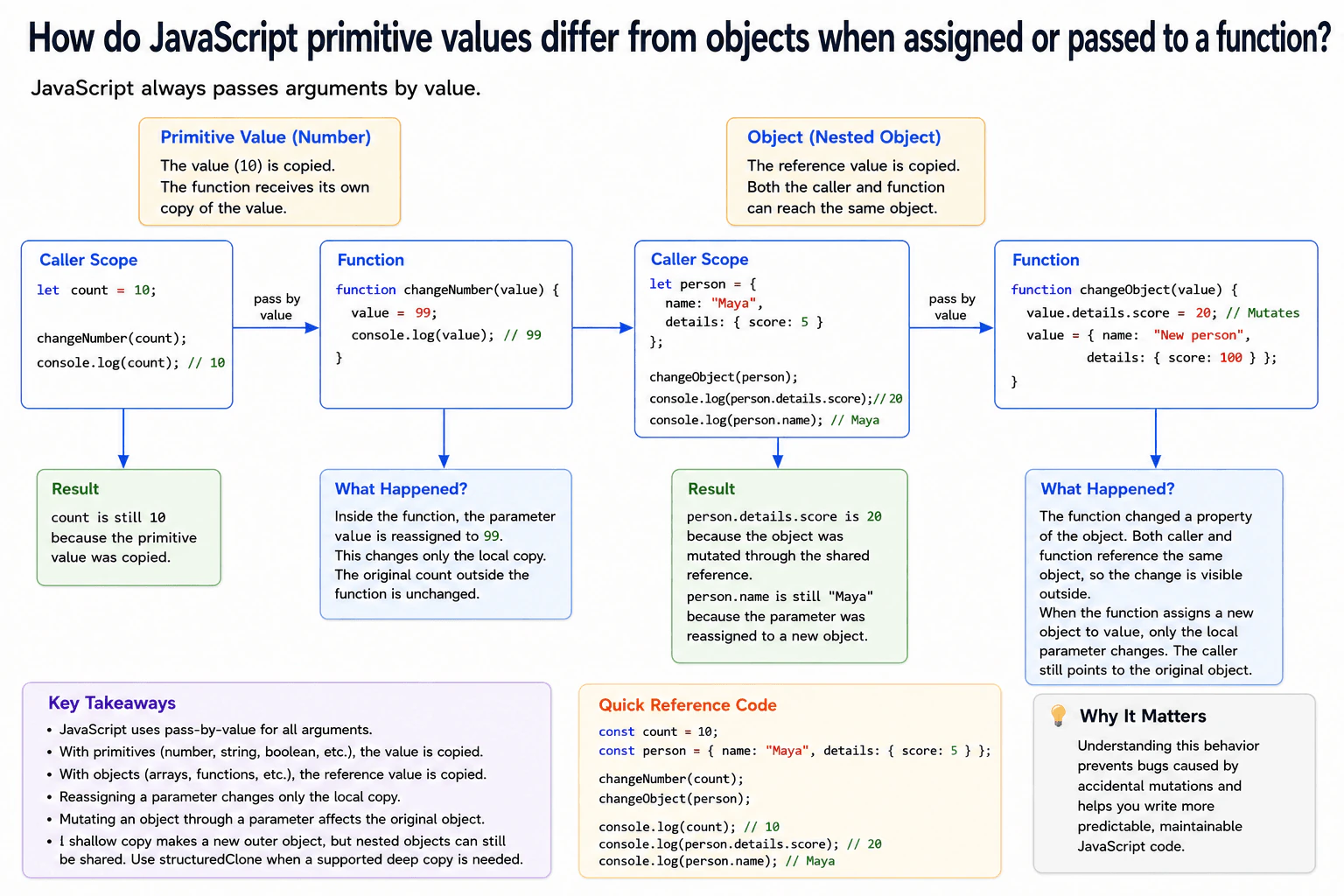
11. How do JavaScript primitive values differ from objects when assigned or passed to a function?Language SpecificEasy
i Question Details
Use a browser JavaScript example with one number and one nested object. Show what happens when a function reassigns the parameter and when it mutates an object property. Distinguish copying a primitive value from copying an object reference, and clarify that JavaScript uses pass-by-value for both kinds of arguments.
Short Interview Answer (30-60 seconds)
JavaScript passes every argument by value. With a primitive such as a number, JavaScript copies the primitive value, so changing the parameter does not change the original variable. With an object, JavaScript copies the reference value. Both references can point to the same object, so mutating a property through the parameter can change that shared object. Reassigning the parameter to another object still does not change the caller variable.
The practical rule is simple. A number gives a function its own copied value. Changing that local value does not change the number outside the function. An object works differently because the copied value tells JavaScript where the same object is stored. This means the function can change something inside that shared object. However, if the function makes its local name point somewhere else, the outside name stays unchanged. This difference matters because object changes can be visible in other parts of an application that use the same object.
Useful Questions to Ask the Interviewer
Should I show both changing the parameter itself and changing a property inside the object?
Should I include a nested property to demonstrate that the same object is shared?
How to Explain It in an Interview
JavaScript always passes function arguments by value. The important detail is what that value contains.
For a primitive such as a number, the value itself is copied. If count is 10 and we call a function with count, the function receives its own value of 10. If the function later assigns 99 to its parameter, only that local parameter changes. The original count remains 10.
For an object, the value being copied is a reference to the object. A reference is a value that lets JavaScript reach the object. The caller variable and the function parameter therefore contain separate copies of a reference that points to the same object.
This explains two different behaviors. If the function changes person.details.score, it changes the shared object, so the caller can see the new score. If the function instead assigns a completely new object to its parameter, only the local parameter receives the new reference. The caller variable still points to the original object.
The same rule applies during normal assignment. Assigning one primitive variable to another copies the primitive value. Assigning one object variable to another copies the reference value, not the whole object.
This matters in frontend code because shared objects are common in application state, configuration, and data passed between functions. Accidental mutation can create unexpected changes. A shallow copy such as object spread creates a new outer object, but nested objects can still be shared. A deep copy requires a separate operation such as structuredClone when the data is supported. JavaScript is not pass by reference. It is pass by value in both cases.
Example
The example uses one number and one object with a nested details object. The number parameter is reassigned, but the original number stays unchanged because the primitive value was copied. The object parameter is also reassigned, and that reassignment does not change the caller variable because only the local copied reference changes. Before that reassignment, the function changes details.score. That mutation is visible outside the function because the copied reference and the caller reference point to the same object.
Code
const count = 10;
const person = {
name: 'Maya',
details: {
score: 5,
},
};
functionchangeNumber(value) {
// Reassign only the local copy of the primitive value.
value = 99;
console.log('Inside changeNumber:', value);
}
functionchangeObject(value) {
// Mutate the shared object reached through the copied reference.
value.details.score = 20;
// Replace only the local copy of the reference with a new reference.
value = {
name: 'New person',
details: {
score: 100,
},
};
console.log('Inside changeObject:', value);
}
changeNumber(count);
changeObject(person);
// The original primitive is still 10 because only its copied value changed.console.log('Outside count:', count);
// The nested score is 20 because the function mutated the shared object.// The name is still Maya because reassigning the parameter did not replace person.console.log('Outside person:', person);
Where it is used
This behavior appears whenever frontend code passes values into helper functions, event handlers, state utilities, data transformation functions, and browser application logic. It is especially important when several parts of the code share the same object. Understanding the rule helps developers decide whether a function should intentionally mutate an object or create a separate copy before changing data.
Why Interviewers Ask This
Interviewers ask this to check whether a candidate understands what JavaScript actually copies during assignment and function calls. They want to see whether the candidate can separate parameter reassignment from object mutation and can explain why changing a nested object property may affect the original object.
Common interview mistakes
A common mistake is saying that objects are passed by reference. JavaScript passes the reference value by value. Another mistake is assuming that assigning a new object to a function parameter replaces the caller variable. It does not. Developers also sometimes think an object spread automatically copies every nested object. It makes a shallow copy, so nested objects may still be shared.
Interview tip
Start with the sentence that JavaScript always passes arguments by value. Then explain that a primitive value is copied directly, while an object reference value is copied. Use one example to separate parameter reassignment from object mutation. That distinction is the key point the interviewer is testing.
Interviewer may ask next
What happens if the function reassigns the object parameter before it mutates a property?
The caller object will not be affected by mutations made after that reassignment. Reassigning the parameter replaces only the local copied reference. After that point, the parameter points to a different object, so mutations through that parameter affect the new object rather than the original caller object. This matters because reassignment changes which object the local parameter can reach, but it never changes the caller variable itself.
How can you avoid accidentally changing a shared nested object in production code?
Create an independent copy before making changes when shared mutation is not wanted. A shallow object spread creates a new outer object, but nested objects are still shared unless they are copied too. For supported data, structuredClone can create a deep copy. The tradeoff is extra allocation and copying work, so the copying strategy should match the data size and the level of isolation the application actually needs.
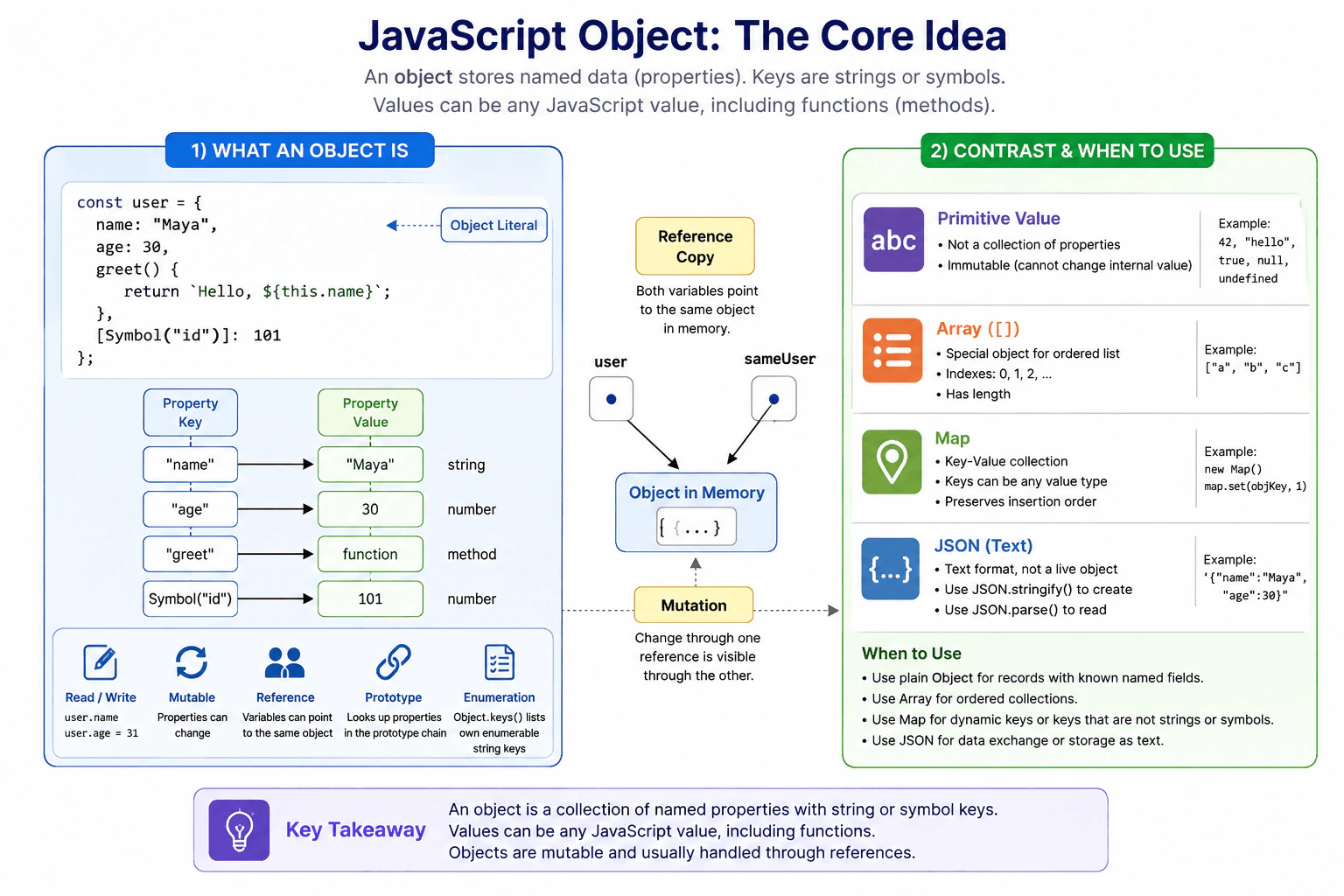
12. What is a JavaScript object?Language SpecificEasy
i Question Details
Define a JavaScript object as a collection of properties keyed by strings or symbols, with values that can include functions. Explain object literals, reading and writing properties, methods, references, mutation, prototypes, property ownership, and enumeration. Contrast an object with a primitive value, an array, a Map, and a JSON text representation.
Short Interview Answer (30-60 seconds)
A JavaScript object is a value that stores properties. Each property has a string or symbol key and a value. A property value can also be a function, which is commonly used as a method. Objects are mutable, and variables can hold references to the same object, so changing that object through one reference can be visible through another. I use plain objects when I want to represent related data with meaningful property names.
A JavaScript object is a way to keep related information together. For example, a user can have a name, an age, and an action that creates a greeting. Each piece of information has a name so the program can find it. The program can read a value, change it, add another value, or remove one. Two variables can also refer to the same object, so a change made through one variable can be seen through the other. Objects work well for records with named information, while other structures are better for ordered lists or specialized key and value storage.
Useful Questions to Ask the Interviewer
Would you like me to compare an object with a primitive value, an array, a Map, and JSON text?
Would you like me to explain references, prototypes, property ownership, and enumeration with a small example?
How to Explain It in an Interview
A JavaScript object stores properties. Every property key is a string or a symbol. If another type is used as a normal object property key, JavaScript converts it to a string unless it is already a symbol. A property value can be any JavaScript value. A function used as a property value can act as a method.
An object literal is a common way to create an object. For example, { name: "Maya", age: 30 } creates two own properties. We can read them with user.name or user["name"]. We can change a property with user.age = 31.
Objects are mutable. This means their properties can change after the object is created. JavaScript always passes values by value. For an object, the value being copied is a reference to the object. If two variables contain references to the same object, mutation through either reference affects that same object. Reassigning one variable does not change the other variable.
Objects can also inherit properties through a prototype chain. If a property is not found directly on an object, JavaScript can look for it on the object's prototype and continue through the chain. Object.hasOwn() checks whether a property belongs directly to the object.
Enumeration means visiting properties. Object.keys() returns own enumerable string keys. It does not include symbol keys or inherited keys. Object.getOwnPropertySymbols() can retrieve own symbol keys.
A primitive value is not a mutable collection of properties. An array is an object with special behavior for indexed elements and its length property. A Map is a dedicated key and value collection that accepts keys of any JavaScript value type. JSON is a text format, not a live JavaScript object. JSON.parse() converts valid JSON text into a JavaScript value.
For records with known named fields, a plain object is usually simple and natural. For dynamic key and value storage, especially when keys are objects or other non string values, Map can be a better choice.
Example
The example creates one object literal with string keyed properties, a symbol keyed property, and a method. It reads and changes properties, then copies the object reference into another variable to show that both variables refer to the same object. It uses Object.hasOwn to distinguish an own property from a property found through the prototype chain. It uses Object.keys to enumerate own enumerable string keys and Object.getOwnPropertySymbols to retrieve the symbol key. It then contrasts the object with an array, a Map, and JSON text.
Code
const internalId = Symbol('internalId');
// Create an object with named data, a symbol property, and a method.const user = {
name: 'Maya',
age: 30,
[internalId]: 101,
greet() {
return`Hello, ${this.name}`;
},
};
// Read own properties with dot notation and bracket notation.console.log(user.name);
console.log(user['age']);
console.log(user.greet());
// Mutate the existing object by changing one property.
user.age = 31;
// Copy the reference value, so both variables refer to the same object.const sameUser = user;
sameUser.name = 'Mina';
console.log(user.name);
// Check whether age belongs directly to this object.console.log(Object.hasOwn(user, 'age'));
// Enumerate own enumerable string keys, then retrieve own symbol keys separately.console.log(Object.keys(user));
console.log(Object.getOwnPropertySymbols(user));
// An array is an object with special behavior for indexed elements and length.const names = ['Mina', 'Noah'];
console.log(Array.isArray(names));
console.log(names.length);
// A Map accepts keys of any JavaScript value type.const objectKey = {};
const roles = newMap();
roles.set(objectKey, 'admin');
console.log(roles.get(objectKey));
// JSON.stringify creates JSON text from supported data in this plain object.const jsonText = JSON.stringify({ name: user.name, age: user.age });
console.log(typeof jsonText);
// JSON.parse creates a new JavaScript value from valid JSON text.const parsedUser = JSON.parse(jsonText);
console.log(parsedUser);
Where it is used
Plain objects are used throughout frontend applications for records such as users, settings, configuration, component data, request options, parsed API data, and grouped application state. They are useful when values have meaningful property names. Arrays are usually a better choice for ordered sequences. Map can be better for dynamic key and value collections, especially when keys are not strings or symbols. JSON is useful when supported data must be represented as text for network transfer or storage.
Why Interviewers Ask This
Interviewers ask this question to check whether the candidate understands one of the main structures used in JavaScript. They want to see whether the candidate understands properties, methods, references, mutation, prototypes, property ownership, and enumeration. They also want to know whether the candidate can choose correctly between an object, a primitive value, an array, a Map, and JSON text in real frontend code.
Common interview mistakes
A common mistake is saying that JavaScript passes objects by reference. JavaScript always passes values by value. For an object, the copied value is a reference to the object. Another mistake is assuming that assigning an object to another variable creates a new object. It only copies the reference value. Developers also sometimes use an object when an array is better for an ordered sequence or when Map is better for dynamic keys. Another mistake is treating JSON text as if it were already a JavaScript object. JSON.parse() is needed to convert valid JSON text into a JavaScript value. It is also incorrect to assume that Object.keys() includes symbol properties or inherited properties.
Interview tip
Start by saying that an object stores properties with string or symbol keys. Give a small object literal example. Then explain mutation, copied reference values, prototypes, ownership, and enumeration. Finish by briefly comparing objects with primitive values, arrays, Map, and JSON text. This shows both JavaScript knowledge and practical judgment.
Interviewer may ask next
What happens when two variables refer to the same object and one variable changes a property?
Both variables still refer to the same object, so the property change is visible through either variable. JavaScript copies the reference value when one variable is assigned to another. It does not automatically copy the object itself. This matters because shared mutation can cause unexpected changes when different parts of an application refer to the same object. Reassigning one variable to a different object changes only the value stored in that variable.
When would you choose Map instead of a plain JavaScript object?
I would choose Map when I need a dedicated key and value collection with dynamic keys, especially when keys can be values other than strings or symbols. A plain object is often simpler for records with known named fields such as a user or configuration object. Map provides operations such as set, get, has, and delete, preserves insertion order for iteration, and has a size property. The main tradeoff is that plain objects fit record shaped JavaScript data naturally, while Map is designed specifically for general key and value storage.
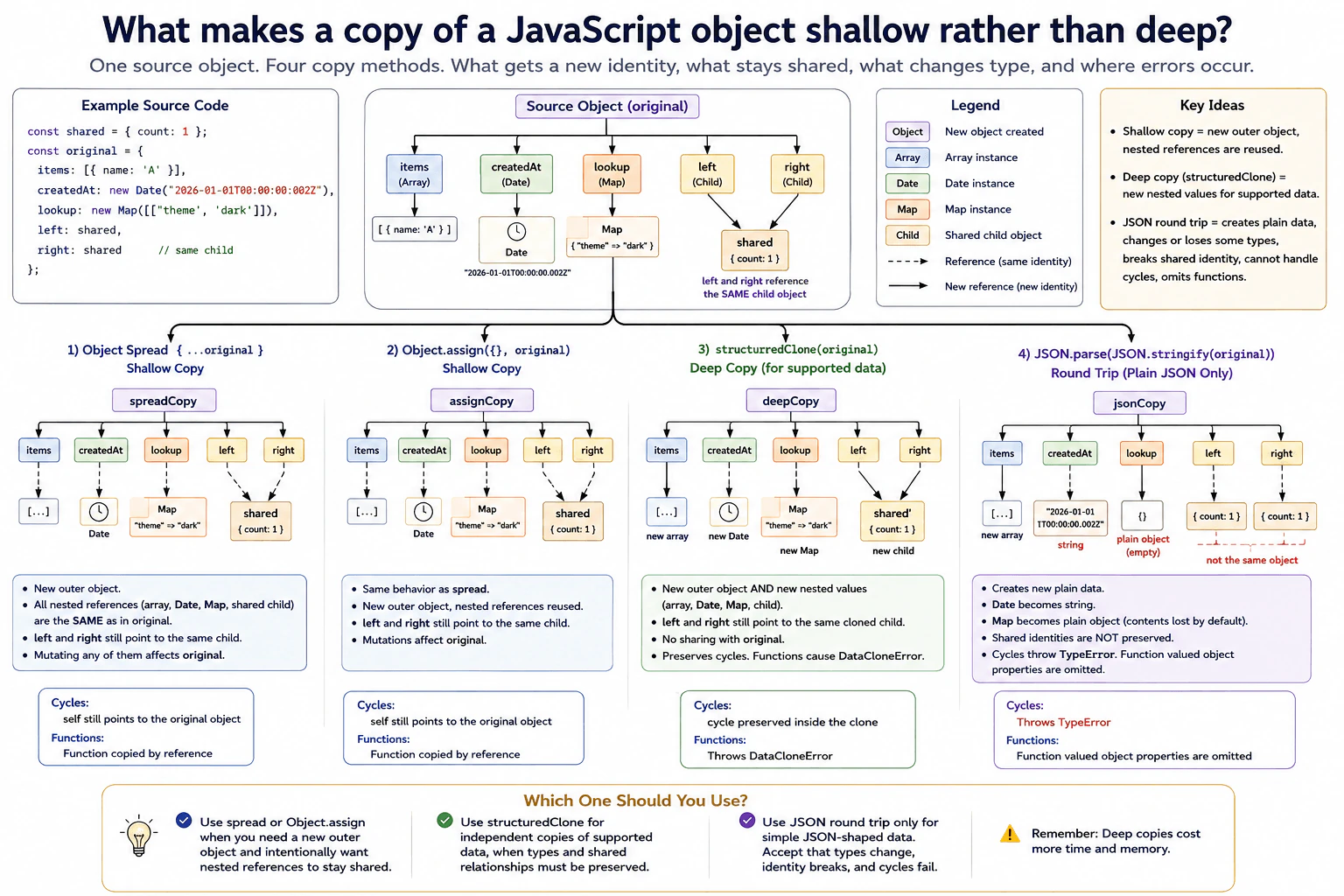
13. What makes a copy of a JavaScript object shallow rather than deep?Language SpecificMedium
i Question Details
Use an object containing nested arrays, a Date, a Map, and a shared child referenced from two properties. Compare object spread, Object.assign, structuredClone, and a JSON round trip. Explain which identities are preserved, which built-in types survive, and how cycles or functions affect each approach.
Short Interview Answer (30-60 seconds)
A copy is shallow when only the outer object is new while nested objects still refer to the same objects as the original. Object spread and Object.assign make shallow copies. structuredClone is a browser API that creates independent nested values for supported data and preserves relationships such as two properties pointing to the same cloned child. A JSON round trip can create independent plain data, but it changes or loses some JavaScript types and cannot handle cycles.
A shallow copy gives you a new outer container, but some values inside it still belong to the original data. If a nested list or child object changes through one copy, the other can see that change too. A deep copy creates separate nested values, so later changes do not affect the original. The choice matters when data contains dates, maps, repeated references, cycles, or functions, because each copying method handles these values differently. The key question is whether nested values keep sharing the same underlying objects or become independent copies.
Useful Questions to Ask the Interviewer
Should the copied value support cycles and shared references?
Do Date and Map values need to keep their original types?
Should functions be copied, rejected, or kept by reference?
How to Explain It in an Interview
Object spread and Object.assign copy the source object's own enumerable properties into a new outer object. Primitive values are copied directly. For an object valued property, the copied value is a reference to the same nested object. That is why the result is shallow.
Suppose the source contains a nested array, a Date, a Map, and one child object referenced by both left and right. After using object spread or Object.assign, the outer object has a new identity, but the nested array, Date, Map, and shared child still have the same identities as in the source. left and right still point to the same child.
In evergreen browsers, structuredClone is a browser API that uses the structured clone algorithm. It creates new nested objects, arrays, Date values, and Map values for supported data. A Date remains a Date. A Map remains a Map. If left and right originally reference the same child, both properties in the clone reference the same new cloned child. The clone does not share that child with the original. Cyclic references are also preserved. Ordinary functions are not supported, so structuredClone throws a DataCloneError when it reaches one.
A JSON round trip using JSON.stringify followed by JSON.parse can create separate nested plain data, but it is not a general deep clone. Date values become strings. Map values normally become empty plain objects unless custom conversion is provided. Repeated references lose their shared identity because each occurrence is serialized separately. Cycles make JSON.stringify throw a TypeError. Function valued object properties are omitted during serialization.
In production, object spread or Object.assign is useful when only the outer level needs to change and nested sharing is intentional. structuredClone is useful when supported nested data must be independent. A deep clone can take more time and memory because it must visit and allocate nested values.
Example
The example creates one source object containing a nested array, a Date, a Map, and one shared child referenced by two properties. Spread and Object.assign create new outer objects but keep the original nested identities. structuredClone creates independent supported nested values while preserving the fact that left and right refer to one shared child inside the clone. The JSON round trip creates separate plain data, converts the Date to a string, turns the Map into an empty plain object with normal serialization, and does not preserve the shared child identity. Separate checks show that structuredClone supports cycles but rejects ordinary functions, while JSON serialization rejects cycles and omits function valued object properties.
Code
const sharedChild = { count: 1 };
const original = {
items: [{ name: 'A' }],
createdAt: newDate('2026-01-01T00:00:00Z'),
lookup: newMap([['theme', 'dark']]),
left: sharedChild,
right: sharedChild,
};
// These methods create a new outer object but keep nested reference identities.const spreadCopy = { ...original };
const assignCopy = Object.assign({}, original);
console.log(spreadCopy !== original);
console.log(spreadCopy.items === original.items);
console.log(assignCopy.lookup === original.lookup);
console.log(spreadCopy.left === spreadCopy.right);
// structuredClone creates independent supported nested values and preserves internal sharing.const deepCopy = structuredClone(original);
console.log(deepCopy !== original);
console.log(deepCopy.items !== original.items);
console.log(deepCopy.createdAtinstanceofDate);
console.log(deepCopy.lookupinstanceofMap);
console.log(deepCopy.left === deepCopy.right);
console.log(deepCopy.left !== original.left);
// JSON serialization recreates data but does not preserve every JavaScript type or identity relationship.const jsonCopy = JSON.parse(JSON.stringify(original));
console.log(typeof jsonCopy.createdAt);
console.log(jsonCopy.lookup);
console.log(jsonCopy.left === jsonCopy.right);
// A cycle is supported by structuredClone but rejected by JSON.stringify.const cyclic = { name: 'cycle' };
cyclic.self = cyclic;
const clonedCycle = structuredClone(cyclic);
console.log(clonedCycle.self === clonedCycle);
try {
JSON.stringify(cyclic);
} catch (error) {
console.log(error.name);
}
// Ordinary functions cannot be cloned by structuredClone.try {
structuredClone({ run() {} });
} catch (error) {
console.log(error.name);
}
// A function valued object property is omitted by JSON serialization.const jsonWithFunction = JSON.stringify({ value: 1, run() {} });
console.log(jsonWithFunction);
Where it is used
Shallow copies are common when updating state objects where only the outer object must be replaced and unchanged nested values may safely be shared. structuredClone is useful for independent snapshots, cached data copies, and editable drafts that contain supported nested values such as arrays, Date values, Maps, Sets, and cycles. Browser features such as worker messaging use the structured clone algorithm to copy supported data between execution contexts. A JSON round trip can be acceptable for simple JSON shaped data, but it should not be treated as a general JavaScript cloning method.
Why Interviewers Ask This
Interviewers ask this to check whether a candidate understands object identity, nested references, copying behavior, and the limits of common copying techniques. They also want to see whether the candidate can choose an appropriate copy method when values include Date, Map, shared references, cycles, or functions.
Common interview mistakes
A common mistake is thinking that a new outer object means every nested value is also new. Another is calling object spread or Object.assign a deep copy. Some developers also use a JSON round trip as a universal clone and forget that Date, Map, shared identity, cycles, undefined values, and functions do not behave like ordinary JSON data. Another mistake is assuming structuredClone is part of the ECMAScript language or that it can clone every JavaScript value. In browsers it is a Web API, and ordinary functions are not supported.
Interview tip
Start by comparing identity. Say that spread and Object.assign create a new outer object but reuse nested object references. Then explain that the browser structuredClone API creates new supported nested values and preserves internal relationships. Finish by explaining why a JSON round trip is only suitable for simple JSON shaped data.
Interviewer may ask next
What happens if the object contains a cycle or a function?
structuredClone preserves cyclic references for supported data, but an ordinary function makes it throw a DataCloneError. JSON.stringify cannot serialize a cycle and throws a TypeError. A function stored as an object property is normally omitted by JSON.stringify. This matters because neither method should be assumed to accept every JavaScript value.
When would you choose a shallow copy instead of structuredClone?
I would choose a shallow copy when I only need a new outer object and intentionally want unchanged nested values to stay shared. Object spread or Object.assign is simpler and avoids allocating copies of the whole nested graph. structuredClone is more appropriate when supported nested data must become independent, but it can use more time and memory because it visits and allocates nested values.
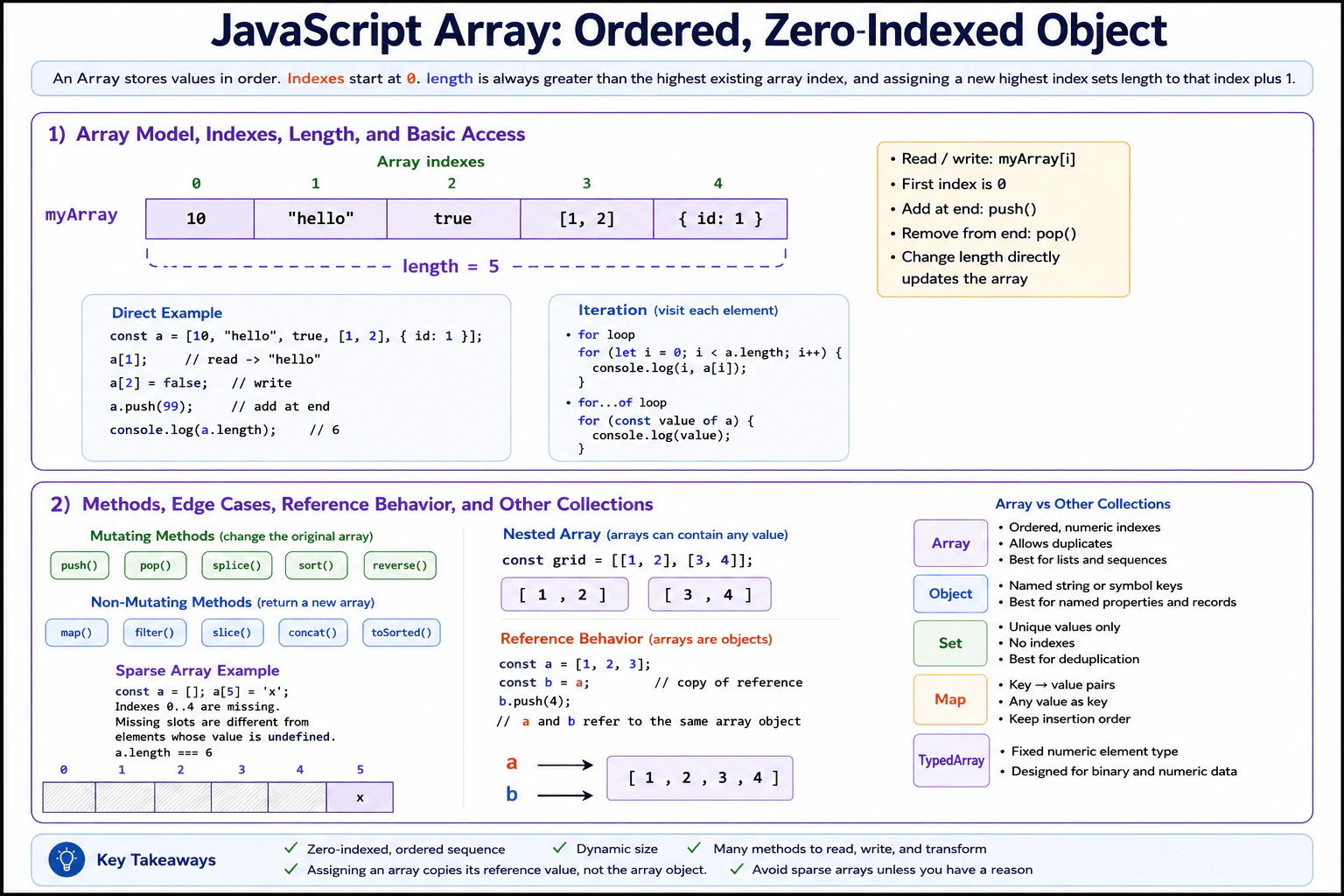
14. What is a JavaScript array?Language SpecificEasy
i Question Details
Define a JavaScript array as an ordered, zero-indexed object designed to hold a sequence of values. Explain length, reading and writing indexes, iteration, common mutating and non-mutating methods, sparse entries, nested arrays, and reference behavior. Contrast an array with a plain object, Set, Map, and typed array.
Short Interview Answer (30-60 seconds)
A JavaScript array is an ordered object designed to hold a sequence of values. Its positions start at index 0, and its length usually tracks one more than the highest index. I can read or replace values by index and use methods such as push, pop, map, filter, and slice. Arrays can contain any JavaScript value, including other arrays. Because an array is an object, assigning it to another variable copies the reference value, so both variables can refer to the same array.
A JavaScript array is useful when I need to keep several values in a clear order. Each value has a numbered place, beginning with 0. I can look up a value, replace it, add new values, remove values, or go through the values one by one. An array can hold numbers, text, records, or other arrays. Some actions change the original collection, while others make a new collection. This matters because changing shared information can also affect another part of an application that uses the same collection.
Useful Questions to Ask the Interviewer
Would you like me to explain common array methods as well as the basic definition?
Should I compare arrays with other JavaScript collection types?
How to Explain It in an Interview
A JavaScript array is an Array object designed for an ordered sequence of values. Its normal array indexes start at 0. An array index can range from 0 through 4294967294. The length property is automatically maintained and is one greater than the highest existing array index when that index determines the end of the array. Setting an element beyond the current end increases length. Reducing length deletes elements whose indexes are no longer inside the new length.
I read or write an element with syntax such as items[0]. Arrays are dynamic, so their length can change. Methods such as push, pop, splice, sort, and reverse mutate the original array. Methods such as map, filter, slice, concat, and toSorted return a new array instead of changing the original array. These new arrays are shallow results. If an element is an object, the new array can still contain a reference to that same object.
Arrays can also be sparse. For example, assigning a value to items[5] on an empty array makes its length 6, but indexes 0 through 4 can remain missing. A missing position is not the same as an existing element whose value is undefined. Some array methods skip missing positions, so sparse arrays can produce surprising behavior and are usually best avoided in application code.
Nested arrays are simply arrays that contain other arrays. They are useful for data such as rows and columns or groups of values.
JavaScript always passes arguments by value. For an array, that copied value is a reference to the array object. Assignment between variables works the same way. Mutating the shared array is visible through every reference to that object, but reassigning one variable does not reassign another variable.
Use an array when order and numeric indexes matter. Use a plain object for named properties, Set for unique values, Map for keyed entries, and a typed array when you need a fixed numeric element type and binary data.
Example
This example creates an ordered array, reads and writes indexes, adds a value, creates a filtered array, demonstrates a nested array, and shows reference behavior. The alias variable receives a copy of the reference value, so pushing through alias changes the same array referenced by scores. The array created with slice is a different outer array. Slice makes only a shallow copy, so if the elements were objects, those object references would still be shared between the two arrays.
Code
const scores = [10, 20, 30];
// Read the value stored at index 0.console.log(scores[0]);
// Replace one existing element in the same array.
scores[1] = 25;
// Add a new value at the end, which also updates length.
scores.push(40);
console.log(scores.length);
// Create a new array containing only values that pass the test.const highScores = scores.filter((value) => value >= 25);
console.log(highScores);
// Store arrays inside another array to demonstrate nesting.const grid = [
[1, 2],
[3, 4],
];
console.log(grid[1][0]);
// Copy the reference value, so both variables refer to the same array object.const alias = scores;
alias.push(50);
console.log(scores);
// Create a different outer array with a shallow copy.const copy = scores.slice();
copy.push(60);
console.log(scores);
console.log(copy);
Where it is used
Arrays are used throughout frontend applications for ordered data such as search results, menu items, table rows, form entries, API response lists, chart points, messages, and component data. They are also useful when transforming lists with map or filter. In production code, methods that return a new array are useful when the original collection should remain unchanged. Mutating methods are reasonable when the array is intentionally owned and updated in one place.
Why Interviewers Ask This
Interviewers ask this question to check whether the candidate understands how JavaScript represents an ordered collection of values. They want to see knowledge of indexes, length, mutation, iteration, sparse entries, references, common methods, and the differences between arrays and other collection types. This also shows whether the candidate can choose an appropriate data structure for normal frontend work.
Common interview mistakes
A common mistake is thinking an array is completely separate from objects. In JavaScript, an array is an object with special indexed behavior and a length property. Another mistake is assuming assignment copies all array elements. Assignment copies the reference value, so both variables can refer to the same array object. Developers also sometimes confuse a missing position in a sparse array with an existing element whose value is undefined. Another mistake is expecting every method to leave the original array unchanged. Methods such as push, splice, sort, and reverse mutate it. Finally, a shallow copy does not deeply copy objects stored inside the array.
Interview tip
Start by saying that an array is an ordered, zero indexed object for a sequence of values. Then explain length, index access, mutation, and reference behavior. Mention one mutating method and one method that returns a new array. Finish by briefly comparing Array with Object, Set, Map, and typed arrays.
Interviewer may ask next
What is the difference between a missing array position and an element whose value is undefined?
They are different states. A sparse array can have a missing element at an index even though that index is below the array length. An explicit undefined value means the indexed property exists and its value is undefined. This matters because some array methods skip missing positions while they process elements that explicitly contain undefined. The in operator can distinguish them because it checks whether the indexed property exists.
When would you choose an array instead of Set, Map, or a typed array?
I would choose an array when I need an ordered sequence with numeric indexes and normal array methods. I would choose Set when uniqueness is the main requirement, Map when I need entries addressed by keys, and a typed array when I need a fixed numeric element type for binary or numeric data. The tradeoff is that each structure provides different operations and storage behavior, so the choice should match how the data will be accessed and updated.
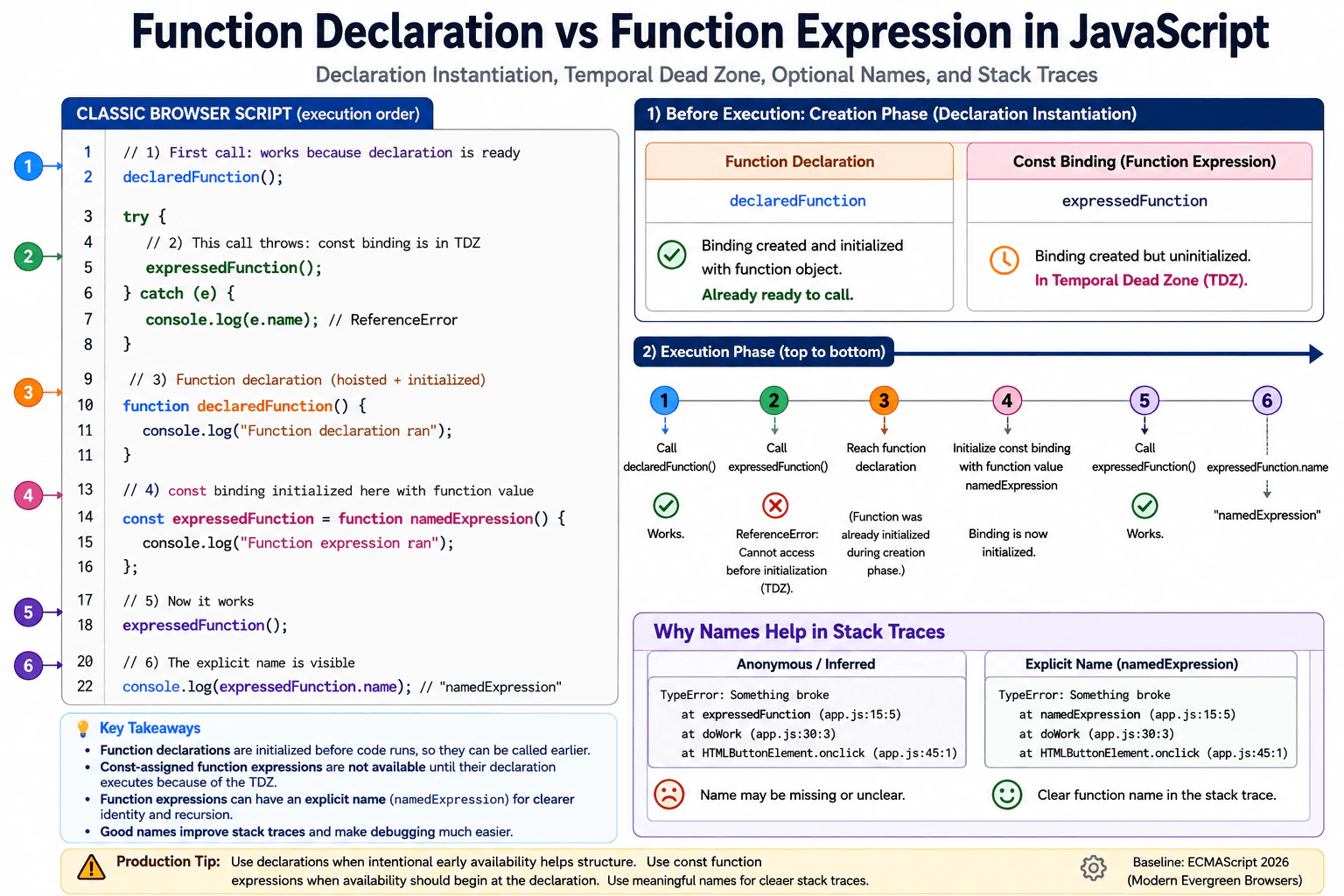
15. What is the difference between a function declaration and a function expression?Language SpecificEasy
i Question Details
Place one function declaration and one const-assigned function expression below their first call in a classic browser script. Explain declaration instantiation, the temporal dead zone of the const binding, optional names on function expressions, and how stack traces benefit from meaningful function names.
Short Interview Answer (30-60 seconds)
A function declaration can normally be called before its source line because JavaScript creates and initializes that function binding before the script starts running its statements. A function expression assigned to const cannot be used before the const declaration runs because that binding is still in its temporal dead zone. Function expressions may also have their own name, which can make stack traces and debugging clearer.
The practical difference is when each function becomes ready to use. With the first form, JavaScript lets you call the function before the line where you write it. With the second form, when the function is stored in a constant variable, you must wait until that line has run. Calling it too early causes an error. The second form can also give the function its own useful name. A clear function name makes error reports easier to read when something goes wrong.
Useful Questions to Ask the Interviewer
Should I explain the behavior in a normal browser script rather than a module?
Should I also explain how function names appear in stack traces?
How to Explain It in an Interview
In a classic browser script, JavaScript prepares declarations before it starts executing statements. A function declaration is created and initialized during this preparation step. Because the function value already exists, code can call it before the declaration appears in the source.
A const declaration is handled differently. JavaScript creates the const binding before execution, but it leaves that binding uninitialized until execution reaches the declaration. The time before initialization is called the temporal dead zone. Reading the binding during that time throws a ReferenceError. The function expression is therefore not available through that const variable before its declaration runs.
For example, calling declaredFunction before its declaration works. Calling expressedFunction before const expressedFunction = function namedExpression() {} throws a ReferenceError. After the const declaration runs, expressedFunction can be called normally.
A function expression can be anonymous or can include its own name. For example, function namedExpression() {} gives the function an explicit name. An anonymous function assigned directly to a const variable will also normally receive an inferred name from that variable in modern JavaScript. Meaningful names are useful because browser stack traces can show them when an error occurs. An explicit name can also be useful inside the function itself.
In production code, choose declarations when calling a function earlier in the file improves organization and the early availability is intentional. Choose const assigned expressions when you want the function to become available only after that declaration runs. Performance and memory differences are usually not useful reasons to choose between these forms.
Example
The example uses a classic browser script. It first calls declaredFunction before the declaration appears. That call succeeds because the function declaration is initialized before statement execution starts. It then tries to call expressedFunction before its const declaration. Accessing that binding throws a ReferenceError because the const binding is still in its temporal dead zone. The error is caught so the rest of the example can continue. After initialization, expressedFunction runs normally. The expression uses the explicit name namedExpression so debugging output and stack traces can show a meaningful function name.
Code
// This call works because the function declaration is initialized before statement execution begins.declaredFunction();
try {
// This access happens while the const binding is still uninitialized.expressedFunction();
} catch (error) {
// Catch the expected ReferenceError so the example can continue running.console.log(error.name);
}
// The declaration is below its first call, but its function value was prepared earlier.functiondeclaredFunction() {
console.log('Function declaration ran');
}
// Execution reaching this line initializes the const binding with the function value.const expressedFunction = functionnamedExpression() {
console.log('Function expression ran');
};
// After initialization, the function expression can be called normally.expressedFunction();
// The explicit expression name is visible through the function value.console.log(expressedFunction.name);
Where it is used
Function declarations are common for reusable helpers where source order should not control whether the function can be called. Const assigned function expressions are common when code should follow normal lexical initialization order or when a function is stored as a value for callbacks and other variables. In frontend applications, understanding the difference prevents ReferenceError failures during script startup. Meaningful function names are also useful when production errors are inspected through browser stack traces and source maps.
Why Interviewers Ask This
Interviewers ask this question to check whether a candidate understands when JavaScript creates and initializes function related bindings. It also tests whether the candidate understands why one function can be called before its source line while a function stored in a const variable cannot. This knowledge helps prevent runtime errors and makes code structure and debugging easier to reason about.
Common interview mistakes
A common mistake is saying both forms are hoisted in the same way. They are not. A function declaration is initialized before statement execution, while a const binding exists but remains uninitialized until its declaration runs. Another mistake is saying the function expression itself causes the temporal dead zone. The temporal dead zone belongs to the const binding. Candidates also sometimes say anonymous function expressions never have useful names. When an anonymous function is assigned directly to a variable, modern JavaScript can infer a name from that variable. An explicit function expression name can still provide a clear identity for debugging and for references from inside the function.
Interview tip
Start with the visible behavior. Say that a function declaration can be called before its source line, while a const assigned function expression cannot. Then explain declaration initialization and the temporal dead zone. Finish by mentioning that meaningful function names help make stack traces easier to understand.
Interviewer may ask next
What exactly happens if you call the const assigned function expression before its declaration?
It throws a ReferenceError before the function call can happen. JavaScript has already created the const binding, but the binding is uninitialized until execution reaches the const declaration. This period is the temporal dead zone. The important point is that the failure comes from accessing the const binding too early, not from executing the function expression.
Should you choose a function declaration or a const assigned function expression for performance reasons?
Usually no. Performance is normally not the meaningful tradeoff between these two forms. The more important difference is initialization behavior and code organization. A function declaration is available before its source line, while a const assigned function expression becomes available only after its declaration executes. In production code, choose the form whose visibility and structure make the program easier to understand, and use meaningful function names when they improve debugging.
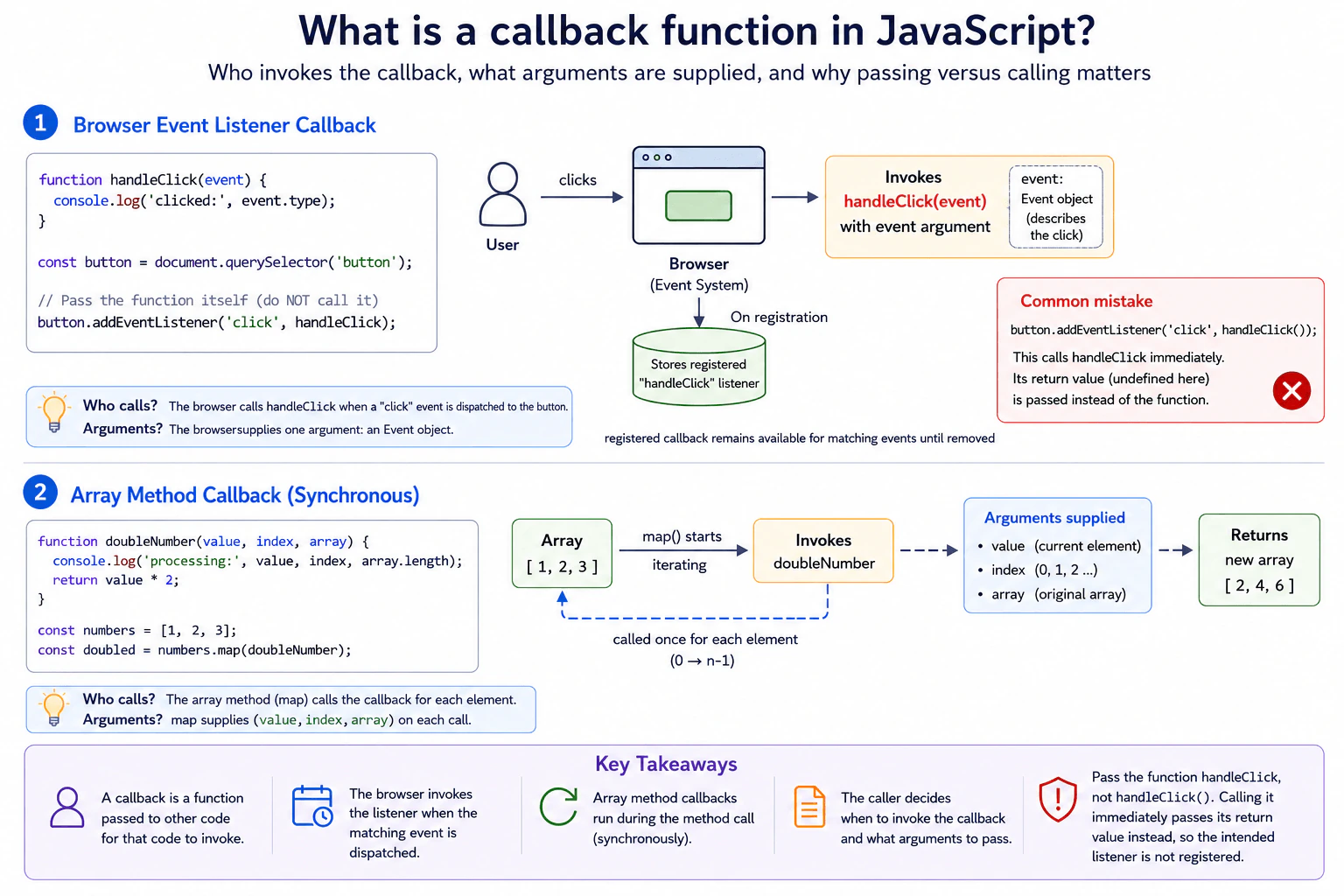
16. What is a callback function in JavaScript?Language SpecificEasy
i Question Details
Describe a browser example where an event listener receives a callback and an array method receives another callback. Identify who invokes each function, which arguments are supplied, and why passing handleClick differs from calling handleClick() while registering the listener.
Short Interview Answer (30-60 seconds)
A callback is a function that I pass to other code so that code can call it when needed. For example, I can pass handleClick to addEventListener, and the browser calls it when the click event is dispatched and supplies an Event object. I can also pass a callback to map, and map calls it once for each array element. Passing handleClick gives the function itself. Writing handleClick() calls it immediately and passes its return value instead.
A callback is a piece of work that you give to something else so it can run that work at the right time. On a web page, I might give one piece of work to a button. The browser runs it when a person clicks the button. I might give another piece of work to a list operation. That operation runs the work once for each item. The important idea is that I give the work itself. I do not run it while I am setting things up.
Useful Questions to Ask the Interviewer
Would you like me to show both a browser event example and an array method example?
Should I explain which arguments each caller gives to the callback?
How to Explain It in an Interview
In JavaScript, functions are values. This means a function can be stored in a variable, passed as an argument, and later called by other code. A function passed for another piece of code to invoke is commonly called a callback.
For a browser example, suppose I define handleClick and pass it to button.addEventListener. I write handleClick, not handleClick(). The browser keeps the listener function. When the click event is dispatched to the button, the browser invokes handleClick and supplies an Event object that describes the event.
An array method works in a similar way, although map normally invokes its callback synchronously. If I call numbers.map(doubleNumber), map invokes doubleNumber once for each array element. On each call, map supplies the current element, its index, and the original array. The callback can ignore arguments it does not need.
Passing handleClick means passing the function value without executing it. Calling handleClick() executes the function immediately. Its return value is then passed as the listener argument. If handleClick returns undefined, no usable callback function is passed, so the intended click handler is not registered. This is different from passing handleClick itself.
Callbacks are common in browser event handling and array operations. A callback can also use values from its surrounding scope. This behavior is called a closure when the function keeps access to that surrounding state. In production code, callbacks should stay focused, use the arguments supplied by their caller correctly, and avoid unnecessary work inside frequently triggered events. A callback is not automatically asynchronous. The caller determines when it is invoked.
Example
The example creates a button and registers handleClick by passing the function itself. The browser invokes handleClick when the click event is dispatched and supplies the Event object. The example also calls map with doubleNumber. The map method invokes doubleNumber once for each number and supplies the current value, index, and original array. The code intentionally does not write handleClick() during registration because that would execute the function immediately and pass its return value instead of passing the callback function.
Code
const button = document.createElement('button');
button.textContent = 'Click me';
document.body.append(button);
functionhandleClick(event) {
// The browser supplies the Event object when it invokes this callback.console.log('Button clicked:', event.type);
}
// Pass the function itself so the browser can invoke it for a click event.
button.addEventListener('click', handleClick);
const numbers = [1, 2, 3];
functiondoubleNumber(value, index, array) {
// map supplies the current value, its index, and the original array.console.log('Processing:', value, index, array.length);
return value * 2;
}
// map invokes the callback once for each element and builds a new array from the returned values.const doubled = numbers.map(doubleNumber);
console.log(doubled);
Where it is used
Callbacks are used throughout frontend JavaScript. Browser event listeners use them for clicks, keyboard input, form events, and many other events. Array methods such as map, filter, find, some, and forEach use callbacks to process elements. Timers also receive callbacks that run after their scheduling condition is reached. Production code often uses named callbacks when the same behavior must be removed later, tested separately, reused, or kept easy to read.
Why Interviewers Ask This
Interviewers ask this to check whether the candidate understands that JavaScript functions can be passed as values and invoked by other code. They also want to see whether the candidate can distinguish passing a function from calling it immediately, and whether they understand who supplies callback arguments in browser events and array methods.
Common interview mistakes
A common mistake is writing handleClick() when registering an event listener. That calls the function immediately instead of passing the function for the browser to invoke. Another mistake is assuming the callback decides which arguments it receives. The code that invokes the callback decides what arguments to supply. Developers also sometimes assume every callback is asynchronous. Array callbacks such as the callback passed to map normally run synchronously during the map call, while an event listener runs when the matching browser event is dispatched.
Interview tip
Start by saying that a callback is a function passed to other code for that code to invoke. Then give one event listener example and one array method example. Clearly name who calls each callback and what arguments it supplies. Finish by explaining that handleClick passes the function, while handleClick() executes it immediately.
Interviewer may ask next
Are all JavaScript callbacks asynchronous?
No. A callback can run synchronously or later. For example, map invokes its callback synchronously while map is executing. A browser event listener is invoked when the matching event is dispatched. This matters because the word callback describes how a function is supplied for another caller to invoke, not whether it must run asynchronously.
Why might you use a named callback instead of an inline function for an event listener?
A named callback is useful when I need to reuse the function, test it separately, or remove the same listener later. removeEventListener needs the same function value that was registered with addEventListener. An inline function can be shorter when the behavior is small and does not need to be referenced again. The main tradeoff is convenient local code versus having a stable function reference for reuse and removal.
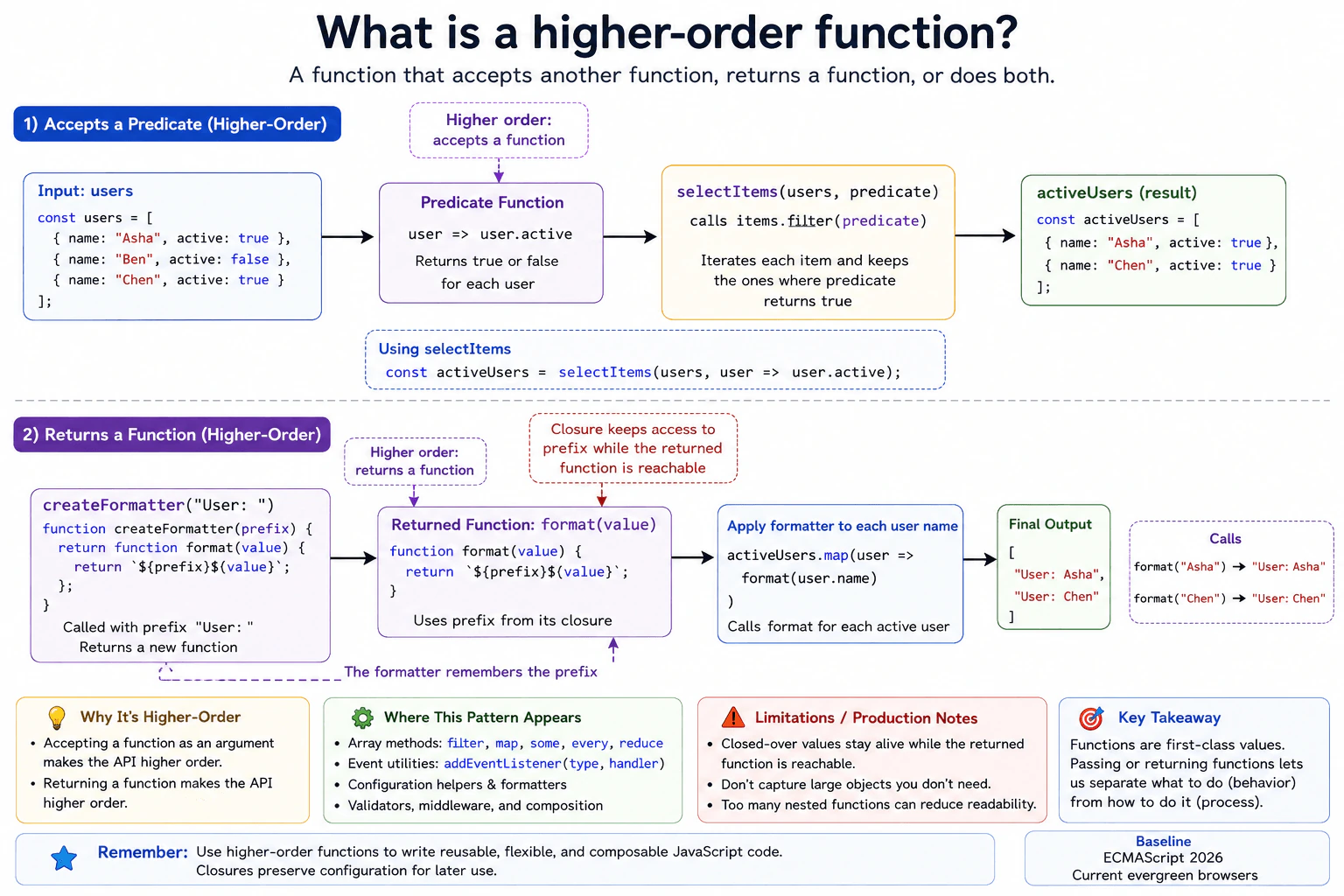
17. What is a higher-order function?Language SpecificEasy
i Question Details
Use one function that accepts a predicate and another that returns a formatter function. Explain why accepting or returning functions makes an API higher order, how closures preserve configuration, and how this pattern appears in array methods and event-handling utilities.
Short Interview Answer (30-60 seconds)
A higher order function is a function that accepts another function, returns a function, or does both. In JavaScript, functions are values, so we can pass them around like other values. This is useful for reusable behavior. For example, a filter helper can accept a predicate function, while a formatter factory can return a function that remembers its configuration through a closure.
A higher order function lets one piece of code receive or create another piece of behavior. Instead of putting every rule inside one function, we can give the function a rule to use. We can also create a new function that remembers a setting for later. This makes code easier to reuse because the main function controls the process while another function controls the changing behavior. JavaScript supports this naturally because functions can be stored in variables, passed to other functions, and returned as results.
Useful Questions to Ask the Interviewer
Would you like me to show both a function that accepts another function and one that returns a function?
Should I also explain how a returned function remembers values from the function that created it?
How to Explain It in an Interview
A higher order function is any function that accepts a function as an argument, returns a function, or does both.
Consider a function called selectItems. It receives an array and a predicate. A predicate is a function that returns true or false for a value. selectItems passes each item to that predicate and keeps the items for which the predicate returns true. selectItems is higher order because it accepts another function.
JavaScript array methods use the same pattern. Methods such as filter, map, and some accept callback functions that define what should happen for each array element.
A function can also be higher order by returning another function. For example, createFormatter can receive a prefix and return a formatter function. The returned function can still access that prefix later. This works because the returned function forms a closure. A closure means the function keeps access to bindings from the lexical scope where it was created, even after the outer function has finished running.
This pattern is useful when the main process stays the same but one part of the behavior needs to change. Frontend event utilities use the same idea when they accept callbacks or create configured event handlers.
The main tradeoff is readability. Too many nested functions can make control flow harder to follow. A closure can also keep captured objects reachable while the returned function remains reachable. In production code, capture only the values that are actually needed and prefer clear named functions when several callback layers would make the code difficult to understand.
Example
The example shows both forms of a higher order function. selectItems accepts a predicate function and uses it to decide which array values to keep. createFormatter returns a new formatter function. That returned function keeps access to the prefix binding from the lexical scope where it was created. The example selects active users and then formats their names with the same saved prefix.
Code
functionselectItems(items, predicate) {
// The caller provides the rule, so this function can reuse the same selection process.return items.filter(predicate);
}
functioncreateFormatter(prefix) {
// The returned function closes over prefix, so that configuration remains available later.returnfunctionformat(value) {
return`${prefix}${value}`;
};
}
const users = [
{ name: 'Asha', active: true },
{ name: 'Ben', active: false },
{ name: 'Chen', active: true },
];
// This predicate defines the changing rule used by the higher order selection function.const activeUsers = selectItems(users, (user) => user.active);
// This higher order function creates one configured formatter that can be reused.const formatName = createFormatter('User: ');
// The formatter still has access to the prefix binding through its closure.const result = activeUsers.map((user) =>formatName(user.name));
console.log(result);
Where it is used
Higher order functions are common in frontend production code. Array methods such as filter, map, and some accept callback functions. Event utilities can accept handlers that run when an event occurs. Configuration helpers can return functions that remember settings through closures. They are also useful for validation rules, formatting functions, and small composition helpers where the overall process stays the same but one part of the behavior changes.
Why Interviewers Ask This
Interviewers ask this to check whether a candidate understands that JavaScript functions are values. They want to see whether the candidate can pass functions as arguments, return functions from other functions, understand closures, and use these patterns in common frontend code such as array processing and event utilities.
Common interview mistakes
A common mistake is thinking a function is higher order only when it returns another function. Accepting a function as an argument also makes it higher order. Another mistake is confusing a closure with a higher order function. A closure describes how a function keeps access to bindings from its surrounding lexical scope. Higher order describes a function accepting or returning functions. Developers can also create deeply nested callbacks when simpler named functions would be easier to read. Another mistake is capturing large objects in closures without needing them, which can keep those objects reachable longer than necessary.
Interview tip
Start with the definition. Then show one function that accepts another function and one function that returns another function. Explain that JavaScript functions are values. Then explain that the returned formatter keeps access to its prefix through a closure. Connect the idea to filter, map, and event handlers to show practical frontend use.
Interviewer may ask next
What happens to the prefix after createFormatter finishes running?
The prefix binding remains accessible to the returned formatter while that formatter is reachable. This happens because the returned function forms a closure over the lexical scope where prefix was created. The outer function has finished, but the captured binding is still needed by the returned function. This matters because closures make configuration easy to preserve. The tradeoff is that captured objects can remain reachable longer than expected if a long lived closure still refers to them.
When would you avoid using a higher order function?
I would avoid it when passing or returning functions makes a simple operation harder to understand. Higher order functions are useful when behavior needs to vary or be reused, but extra callback layers can make control flow less clear. Function calls also have some runtime cost, but that cost should be measured before changing a clear design for performance reasons. The main tradeoff is reusable and composable behavior versus extra abstraction and possible readability cost.
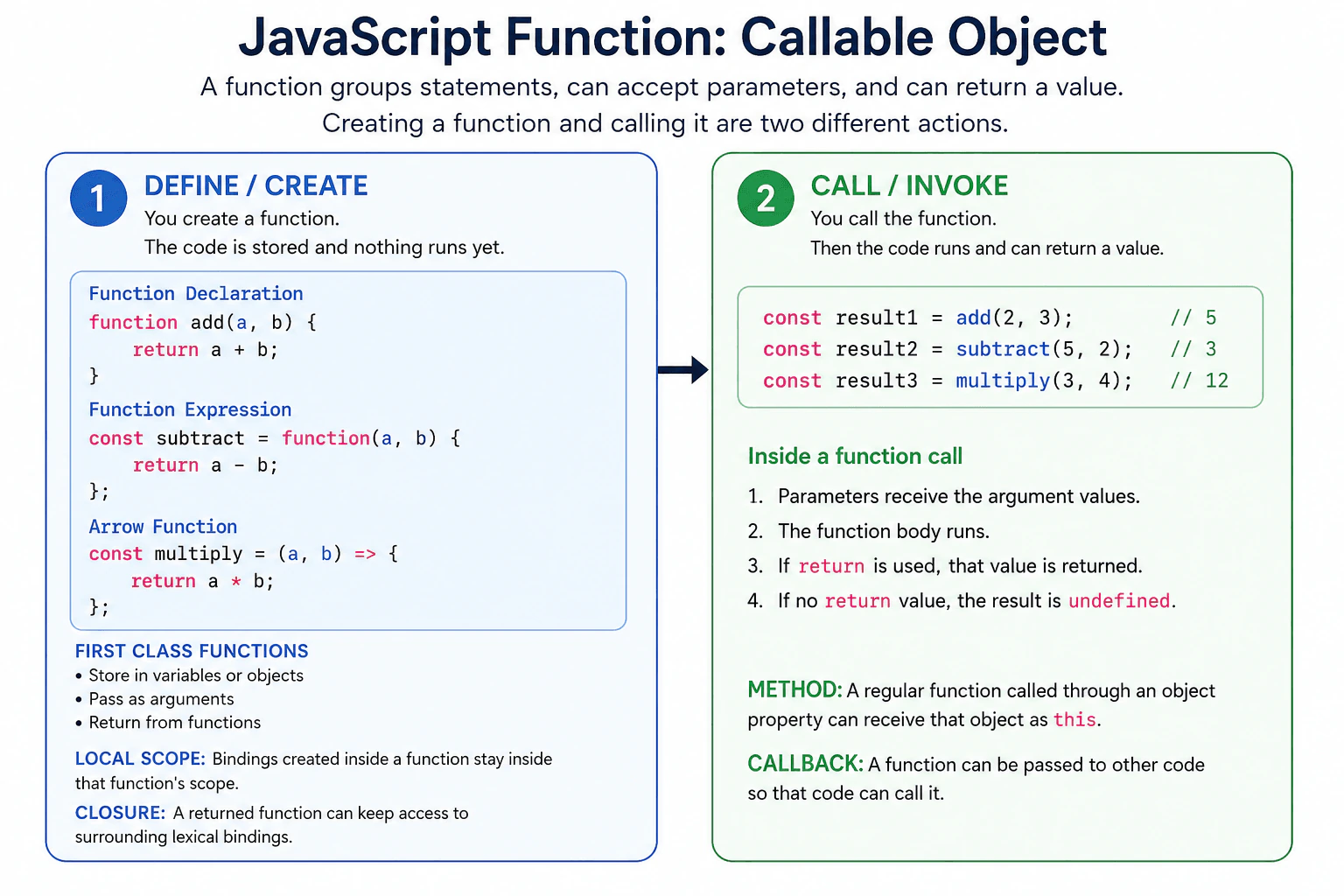
18. What is a JavaScript function?Language SpecificEasy
i Question Details
Define a JavaScript function as a callable object that groups statements and can accept parameters and return a value. Explain declarations, expressions, arrow functions, calls, return values, local scope, closures, methods, callbacks, and first-class function behavior. Clarify that declaring a function and calling that function are separate actions.
Short Interview Answer (30-60 seconds)
A JavaScript function is a callable object that groups statements so I can run them when needed. It can accept parameters and return a value. I can create one with a function declaration, a function expression, or an arrow function. Creating a function does not run its body. I call it separately when I want the code to execute. Functions can also be stored in variables or objects, passed to other functions, returned from functions, and used as callbacks.
A JavaScript function is a reusable piece of work that runs when it is called. You can give it input values, let it do some work, and receive a result back. This helps avoid repeating the same instructions in many places. JavaScript also lets you store a function in a variable or object, give it to other code, or return it as a result. A function can also remember values from the place where it was created. Creating a function and running that function are separate actions.
Useful Questions to Ask the Interviewer
Would you like me to compare function declarations, function expressions, and arrow functions?
Should I also explain closures and callbacks with a small example?
How to Explain It in an Interview
A JavaScript function is a callable object. It contains code that executes when the function is called. A function can receive parameters. Arguments are the actual values supplied during a call. A function can return a value with the return statement. If execution finishes without returning another value, the call produces undefined.
A function declaration uses the function keyword with a name. A function expression creates a function as a value, often stored in a variable. An arrow function is another function form with shorter syntax. An arrow function does not create its own this binding. It uses this from the surrounding lexical scope. Arrow functions also cannot be used as constructors with new.
Creating a function and calling it are different actions. Creating the function makes the callable value available. A call such as add(2, 3) executes its body.
Variables declared inside a function are normally local to that function. A nested function can access bindings from its surrounding lexical scopes. If that nested function is later used elsewhere, it can continue to access those bindings. This behavior is called a closure.
Functions are first class values in JavaScript. They can be assigned to variables, stored in object properties, passed as arguments, and returned from other functions. A function used through an object property can act as a method. A function passed to other code so that code can call it is commonly called a callback.
Functions are used for event handling, calculations, validation, data transformation, reusable logic, and callbacks. Closures are useful for keeping related state. However, a closure can keep referenced data reachable in memory for as long as the closure itself remains reachable.
Example
The example creates addition, subtraction, and multiplication functions using three common function forms. It calls them separately to show that creating a function does not execute its body. The makeCounter function demonstrates a closure because the returned function continues to access the count binding from its surrounding lexical scope. The calculator object shows a function used as a method. The runOperation function demonstrates first class function behavior by receiving another function as a callback and calling it.
Code
// A function declaration creates a callable function value.functionadd(a, b) {
// Return sends the calculated value back to the caller.return a + b;
}
// A function expression stores a function value in a variable.const subtract = function (a, b) {
return a - b;
};
// An arrow function is another way to create a function value.constmultiply = (a, b) => {
return a * b;
};
// Creating these functions did not execute their bodies.// These calls execute the functions and produce return values.console.log(add(2, 3));
console.log(subtract(5, 2));
console.log(multiply(3, 4));
functionmakeCounter() {
// This local binding is captured by the returned function.let count = 0;
returnfunction () {
// The closure keeps access to count between calls.
count += 1;
return count;
};
}
const counter = makeCounter();
console.log(counter());
console.log(counter());
const calculator = {
value: 10,
// Called through calculator, this method receives calculator as this.double() {
returnthis.value * 2;
},
};
console.log(calculator.double());
functionrunOperation(operation, a, b) {
// operation is a function value received as a callback.returnoperation(a, b);
}
console.log(runOperation(add, 4, 6));
Where it is used
Functions are used throughout frontend applications. They handle button clicks and other browser events, calculate values, validate input, transform data, organize reusable logic, and provide callbacks. Functions stored on objects can provide object behavior. Functions can also create closures when some state must remain available between calls. In production code, clear function boundaries can make behavior easier to reuse, test, and maintain.
Why Interviewers Ask This
Interviewers ask this to check whether a candidate understands functions as callable JavaScript objects, not only as reusable blocks of code. They want to see whether the candidate understands parameters, return values, local scope, closures, methods, callbacks, and first class function behavior. They also check whether the candidate can clearly separate creating a function from calling it.
Common interview mistakes
A common mistake is thinking that creating a function also runs it. It does not. Another mistake is forgetting that a function with no explicit returned value produces undefined. Developers may also assume arrow functions create their own this binding, but they use this from the surrounding lexical scope and cannot be called with new. Another mistake is confusing parameters in a function definition with arguments supplied during a call. Closures are sometimes described as copying surrounding values, but they actually retain access to lexical bindings. Passing a function as a callback is also different from calling that function immediately.
Interview tip
Start by saying that a JavaScript function is a callable object that can accept parameters and return a value. Then clearly separate function creation from function calls. Briefly compare declarations, expressions, and arrow functions. Finish by mentioning local scope, closures, methods, callbacks, and first class function behavior.
Interviewer may ask next
What happens if a JavaScript function reaches the end without a return statement?
The function call returns undefined. JavaScript uses undefined as the result when execution finishes without returning another value. A return statement with no value also produces undefined. This matters because callers may expect a useful result, so forgetting to return a value can cause unexpected behavior.
Why would you pass a function as a callback instead of calling it immediately?
You pass the function value when another piece of code should decide when to call it. This uses JavaScript first class function behavior. It matters for browser event handlers, reusable operations, and asynchronous APIs because the receiving code controls the later call. Calling the function immediately would instead evaluate it at once and pass its returned value, which is different behavior.
19. How do arrow functions differ from regular functions?Language SpecificEasy
i Question Details
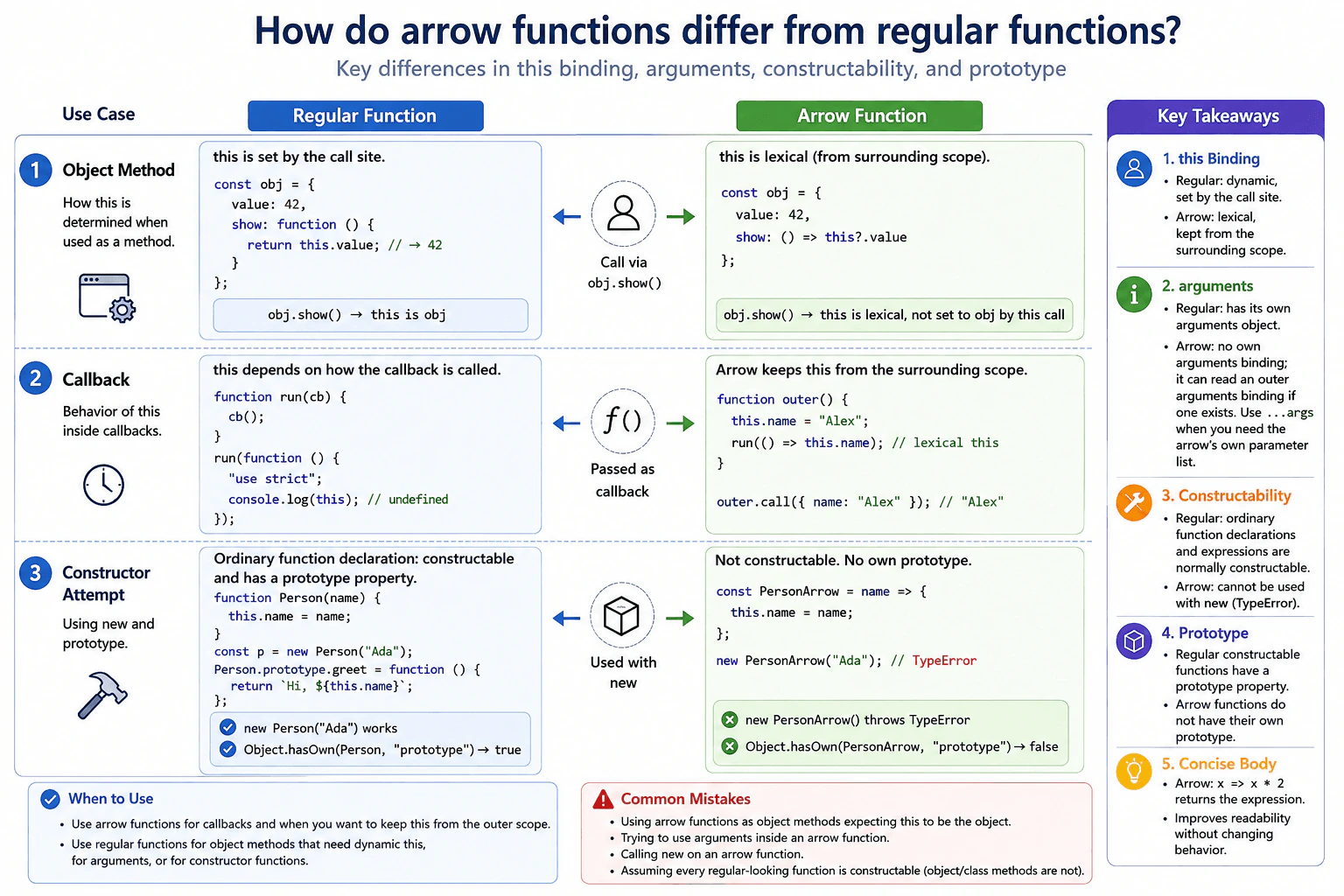
Compare an arrow function and a regular function used as an object method, a callback, and a constructor attempt. Discuss lexical this, the absence of an own arguments object, constructability, prototype presence, and when concise expression bodies improve readability without changing behavior.
Short Interview Answer (30-60 seconds)
I use arrow functions mainly for callbacks and other cases where I want this to come from the surrounding scope. I use regular functions when the caller should determine this or when I need an arguments object or constructor behavior. Arrow functions do not create their own this or arguments binding, cannot be called with new, and do not have a prototype property for constructing instances. Their concise expression body can make a simple callback easier to read without changing the result.
The practical difference is about how each kind of function gets information and how it can be called. One kind can receive its object context from the call itself. The other keeps the context from the place where it was created. This matters when a function is used as an object method, passed as a callback, or used to create an object. The shorter form is often convenient for small callbacks, but it cannot replace the regular form in every case. Choosing the right form prevents unexpected values and invalid constructor calls.
Useful Questions to Ask the Interviewer
Should the object method use the object as its this value?
Should the callback keep this from its surrounding function?
Does the function need to support calls with new?
How to Explain It in an Interview
A regular function gets its this value from how it is called. For example, if obj.show() calls a regular function stored as show, this normally refers to obj. An arrow function does not create its own this binding. It reads this from the surrounding lexical scope. Because of that, an arrow is usually a poor choice for an object method when the method needs this to refer to the object receiving the call.
This same behavior is useful for callbacks. An arrow callback can keep the this value of its surrounding function without bind or a saved variable.
A regular function also receives its own arguments object when it is called. An arrow function does not create an arguments binding. If an enclosing regular function has arguments, the arrow can read that outer binding. In modern code, rest parameters such as (...args) are usually clearer when an arrow needs a list of supplied values.
Arrow functions are never constructable, so calling one with new throws a TypeError. They also do not have their own prototype property. An ordinary function declaration or function expression is normally constructable and has a prototype property. However, not every non arrow function is constructable. For example, method definitions in object literals and classes cannot be called with new and do not have a prototype property for construction.
For a simple expression, an arrow can return the expression without writing return. For example, x => x * 2 returns the calculated value. This changes the syntax, not the result of the calculation. It is useful when the shorter form is easier to read.
Example
The example uses one object to show how this differs, one regular outer function to show an arrow callback keeping the surrounding this value, and constructor checks to show constructability and prototype behavior. The regular object method receives the object as this because it is called through that object. The arrow method does not get a new this binding from the method call. The regular function receives its own arguments object, while the arrow callback uses a rest parameter. An ordinary function declaration can be called with new and has a prototype property. The arrow constructor attempt throws a TypeError and the arrow has no own prototype property.
Code
const example = {
value: 10,
// This regular function receives this from the method call.regularMethod: function () {
console.log('regular method:', this.value);
// A regular function receives its own arguments object.console.log('regular arguments count:', arguments.length);
},
// This arrow keeps this from the surrounding scope instead of this object.arrowMethod: () => {
console.log('arrow method this value:', this?.value);
},
};
example.regularMethod('one', 'two');
example.arrowMethod();
functionrunCallback() {
const outerThis = this;
// The arrow keeps the this binding from runCallback.// A rest parameter gives it an explicit list of supplied values.constcallback = (...args) => {
console.log('callback this matches:', this === outerThis);
console.log('callback rest count:', args.length);
};
callback('a', 'b');
}
runCallback.call({ name: 'frontend' });
functionRegularConstructor(name) {
// When called with new, this is the newly created instance.this.name = name;
}
// An ordinary function declaration is constructable.const regularInstance = newRegularConstructor('Ada');
console.log('regular instance:', regularInstance.name);
console.log('regular prototype exists:', Object.hasOwn(RegularConstructor, 'prototype'));
constArrowConstructor = (name) => ({ name });
// An arrow has no own prototype property and cannot be used with new.console.log('arrow prototype exists:', Object.hasOwn(ArrowConstructor, 'prototype'));
try {
// This attempt is invalid because arrow functions are not constructable.newArrowConstructor('Ada');
} catch (error) {
console.log('arrow constructor error:', error instanceofTypeError);
}
// A concise expression body returns the expression automatically.constdouble = (value) => value * 2;
console.log('concise result:', double(5));
Where it is used
Arrow functions are common in frontend callbacks such as array mapping, filtering, Promise handlers, and helper callbacks that should keep this from an enclosing function. Regular functions are useful for object methods that need this from the call site, functions that need their own arguments object, and ordinary constructor functions that are intentionally called with new. In production code, the choice should follow the required behavior rather than using arrow syntax only because it is shorter. For simple callbacks, the performance and memory difference is usually not a useful reason to choose one form over the other.
Why Interviewers Ask This
Interviewers ask this to check whether a candidate understands that arrow functions are not just shorter regular functions. They want to see whether the candidate understands lexical this, the arguments binding, constructor behavior, prototype presence, and how these differences affect practical frontend code.
Common interview mistakes
A common mistake is thinking an arrow function is only shorter syntax for a regular function. Another mistake is using an arrow as an object method and expecting this to refer to the object that made the call. Developers may also expect an arrow to create its own arguments object, even though it can only read an outer arguments binding if one exists. Another mistake is calling an arrow with new or expecting it to have its own prototype property. It is also incorrect to assume every regular looking function is constructable, because object and class method definitions cannot be called with new.
Interview tip
Start with lexical this because it is the most important practical difference. Then mention arguments, new, and prototype. Also point out that ordinary function declarations can be constructors, while object and class method definitions are not constructable. Finish by explaining that concise arrow bodies are mainly a readability choice.
Interviewer may ask next
What happens if call, apply, or bind is used with an arrow function to change this?
They cannot change the this value used by an arrow function. The arrow gets this lexically from its surrounding scope. call and apply can still provide arguments, and bind can create a new function with preset arguments, but the requested this value does not replace the arrow's lexical this. This matters when code depends on changing this at call time.
Should arrow functions always be preferred for callbacks in production code?
No. Arrow functions are useful when a callback should keep this from the surrounding scope or when concise syntax improves readability. A regular function is better when the callback needs this to be supplied by the caller or needs its own arguments object. Performance is usually not the deciding factor. The main tradeoff is choosing the function semantics that match the required runtime behavior.
20. What are the scope and reassignment differences among `var`, `let`, and `const`?Language SpecificEasy
i Question Details
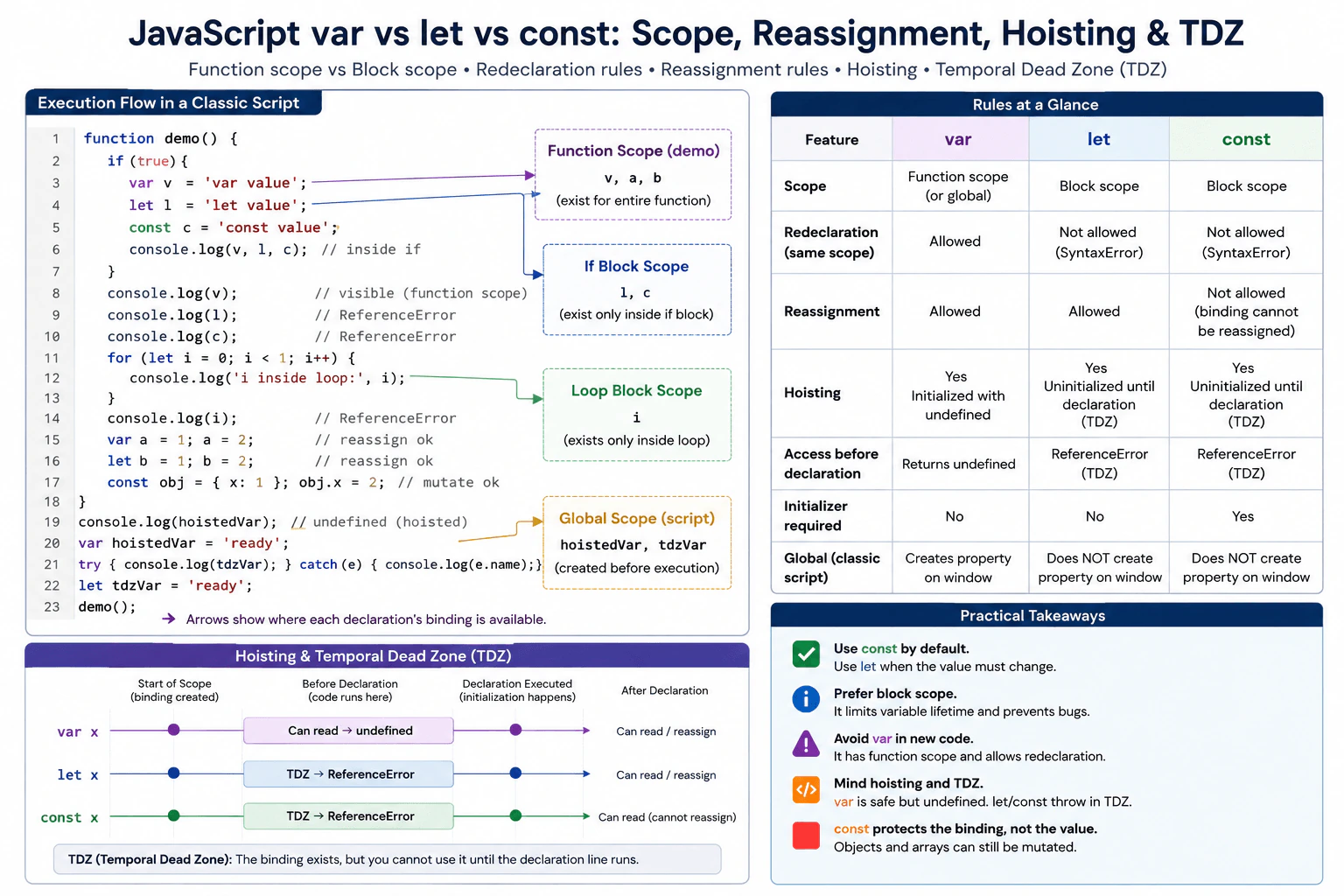
A browser script declares the same logical value inside a function, an if block, and a loop. Explain function scope versus block scope, redeclaration and reassignment rules, hoisting, and the temporal dead zone. Include a minimal classic-script example that demonstrates which bindings are visible at each point without relying on a framework.
Short Interview Answer (30-60 seconds)
I normally use const by default, use let when the binding must be reassigned, and avoid var in modern code. var is scoped to the containing function, while let and const are scoped to the nearest block. var can be redeclared and reassigned. let can be reassigned but cannot be redeclared in the same scope. const can do neither. All three are hoisted, but let and const stay unavailable in the temporal dead zone until their declaration runs.
The main difference is where a name can be used and whether that name can later point to another value. One form can remain visible across a whole function even when it was written inside a smaller section. The other two stay inside the nearest pair of braces. They also have different rules about creating the same name again and changing what the name points to. These differences matter because they can make code easier to understand or cause surprising errors when a name is used in the wrong place or changed unexpectedly.
Useful Questions to Ask the Interviewer
Should I explain the behavior in a normal browser script rather than a module?
Would you like me to include what happens before each declaration is reached?
How to Explain It in an Interview
I would start with the practical rule. Use const by default. Use let when the binding must point to a different value later. Avoid var in new code unless there is a specific reason to work with older patterns.
var has function scope. If it is declared inside an if block or loop inside a function, the binding is still visible throughout that function. At the top level of a classic browser script, a top level var declaration also creates a property on the global object. let and const have block scope. A binding declared inside an if block or loop is only available inside that block.
var allows both redeclaration and reassignment in the same scope. let allows reassignment, but declaring the same name again in the same scope causes a syntax error. const also rejects redeclaration, and its binding cannot be reassigned after initialization. A const declaration must also have an initializer when it is declared.
const does not make an object immutable. It only prevents the binding from pointing to another value. If a const binding holds an object, properties of that object can still be changed unless another technique prevents mutation.
All three declarations are hoisted. This means their bindings are created before normal execution reaches the declaration. The important difference is initialization. A var binding is initialized with undefined, so reading it before its declaration gives undefined. A let or const binding remains unavailable from the start of its scope until execution reaches its declaration. This period is called the temporal dead zone. Reading the binding during that period causes a ReferenceError.
In production code, block scope makes variable lifetime easier to see and reduces accidental reuse. This is why const and let are normally clearer choices than var.
Example
The example uses a classic browser script and one function so the scope rules are easy to see. Inside the function, var is declared inside an if block but remains visible after the block because it has function scope. let and const stay inside that block, so accessing them outside it causes ReferenceError. The loop also shows that a let loop variable is limited to the loop block. The example then shows valid reassignment, object mutation through a const binding, var hoisting, and the temporal dead zone without stopping the rest of the script.
Code
functionshowScopes() {
// Create all three bindings inside one block so their visibility can be compared after the block ends.if (true) {
var functionScoped = 'var value';
let blockScoped = 'let value';
const alsoBlockScoped = 'const value';
console.log(functionScoped);
console.log(blockScoped);
console.log(alsoBlockScoped);
}
// var remains visible because its scope is the whole function.console.log(functionScoped);
// let is no longer visible because its block has ended.try {
console.log(blockScoped);
} catch (error) {
console.log(error.name);
}
// const is also no longer visible because its block has ended.try {
console.log(alsoBlockScoped);
} catch (error) {
console.log(error.name);
}
// A let loop variable belongs to the loop block and is not visible after the loop.for (let i = 0; i < 1; i++) {
console.log(i);
}
try {
console.log(i);
} catch (error) {
console.log(error.name);
}
// var and let bindings can both be reassigned after initialization.var oldValue = 1;
oldValue = 2;
let changingValue = 1;
changingValue = 2;
console.log(oldValue);
console.log(changingValue);
// const prevents binding reassignment, but properties of an object stored in that binding can still change.const settings = { theme: 'light' };
settings.theme = 'dark';
console.log(settings.theme);
}
functionshowVarHoisting() {
// The var binding already exists here and has been initialized with undefined.console.log(hoistedVar);
var hoistedVar = 'ready';
console.log(hoistedVar);
}
functionshowTemporalDeadZone() {
try {
// The let binding exists here, but reading it before initialization causes ReferenceError.console.log(notReadyYet);
} catch (error) {
console.log(error.name);
}
let notReadyYet = 'ready';
console.log(notReadyYet);
}
showScopes();
showVarHoisting();
showTemporalDeadZone();
Where it is used
In modern frontend code, const is useful for bindings that should not be reassigned, such as DOM element references, configuration objects, callback functions, and values prepared for a task. let is useful for counters, temporary state, loop related values, and other bindings that must be reassigned. var is mostly seen in older JavaScript code, legacy libraries, or code that intentionally depends on function scope or classic global script behavior.
Why Interviewers Ask This
Interviewers ask this to check whether a candidate understands how JavaScript decides where a variable can be used, when its binding can change, and what happens before a declaration is reached. It also shows whether the candidate can choose safer declarations in production code and avoid bugs caused by unexpected visibility, redeclaration, reassignment, or access before initialization.
Common interview mistakes
A common mistake is saying that let and const are not hoisted. Their bindings are created before execution reaches the declaration, but they cannot be accessed during the temporal dead zone. Another mistake is saying that const makes an object immutable. It only prevents reassignment of the binding, so an object stored in a const binding can still be mutated. Candidates also sometimes forget that var ignores ordinary block boundaries inside a function, assume that a var declared in a loop is block scoped, or forget that const requires an initializer.
Interview tip
Start with the practical choice: const by default, let when reassignment is needed, and usually avoid var. Then compare scope, redeclaration, reassignment, and access before declaration in that order. Mention that const protects the binding rather than making an object immutable.
Interviewer may ask next
What happens if you read `var`, `let`, or `const` before its declaration in the same scope?
var can be read before its declaration and returns undefined because its binding is created and initialized before normal execution reaches that line. let and const are also hoisted, but their bindings remain uninitialized until their declarations execute. Reading either one during that temporal dead zone causes a ReferenceError. This matters because saying that let and const are simply not hoisted gives the wrong explanation of the runtime behavior.
Why would you prefer `const` and `let` over `var` in production frontend code?
const and let are usually preferred because block scope makes the lifetime and visibility of a binding easier to understand. const also communicates that the binding will not be reassigned, while let clearly signals that reassignment is expected. var has function scope and allows redeclaration, so a declaration inside an if block or loop can affect more code than a reader expects. The main tradeoff is compatibility with old code or intentional legacy behavior, but current evergreen browsers support const and let.
More questions load as you scroll
Disclaimer: This interview guide is for educational and informational purposes only. It is designed to help readers prepare, but it does not guarantee any interview result, hiring decision, offer, or outcome. Interview questions, hiring criteria, and preferred answers can vary by employer, interviewer, industry, location, and time. All answers, examples, and explanations in this guide are suggested examples for interview preparation, not definitive answers or instructions for professional practice. They are based on research and judgment, are provided without warranties of any kind, and should be adapted to the question, role, and applicable laws and professional requirements. Diagrams are simplified illustrations intended to highlight the main concepts and their relationships; actual situations, systems, and practices may be more complex. Alternative approaches may be equally valid or better suited to a particular question, context, or interviewer. To the fullest extent permitted by applicable law, the contributors and publisher are not liable for decisions made, actions taken, or losses incurred based on this guide.
State Laws and Professional Responsibilities: Laws and requirements governing an occupation vary by state and jurisdiction. You are responsible for checking the current laws, licensing requirements, and scope-of-practice rules that apply to your location and role, and for ensuring that your answers and actions comply with them. Adapt examples in this guide to those requirements. This guide is not legal advice.
Content Accuracy and Verification: To the fullest extent permitted by applicable law, we do not represent or warrant that interview guides, questions, answers, examples, or diagrams are accurate, complete, current, error-free, or suitable for any particular purpose. You are responsible for independently reviewing and verifying the information before relying on it.