This interview guide is for educational and informational purposes only. It is designed to help readers prepare, but it does not guarantee any interview result, hiring decision, offer, or outcome. Interview questions, hiring criteria, and preferred answers can vary by employer, interviewer, industry, location, and time. All answers, examples, and explanations in this guide are suggested examples for interview preparation, not definitive answers or instructions for professional practice. They are based on research and judgment, are provided without warranties of any kind, and should be adapted to the question, role, and applicable laws and professional requirements. Diagrams are simplified illustrations intended to highlight the main concepts and their relationships; actual situations, systems, and practices may be more complex. Alternative approaches may be equally valid or better suited to a particular question, context, or interviewer. To the fullest extent permitted by applicable law, the contributors and publisher are not liable for decisions made, actions taken, or losses incurred based on this guide.
State Laws and Professional Responsibilities
Laws and requirements governing an occupation vary by state and jurisdiction. You are responsible for checking the current laws, licensing requirements, and scope-of-practice rules that apply to your location and role, and for ensuring that your answers and actions comply with them. Adapt examples in this guide to those requirements. This guide is not legal advice.
Identity, Image, and Privacy Notice
To respect individual privacy, some names, profile photographs, avatars, biographical details, and other identifying information displayed in this guide may be replaced with pseudonyms, licensed stock images, illustrative avatars, composite images, or representative descriptions. Unless a person is expressly identified as an actual contributor, a displayed name, image, or profile should not be understood as depicting or identifying a specific candidate, interviewer, employee, or other real individual. These representations are provided for editorial and illustrative purposes only and do not imply endorsement, employment, participation, or affiliation with this guide or any company mentioned in it. Any resemblance to an actual person is coincidental.
Company Notice
This guide is an independent educational resource and is not affiliated with, endorsed by, sponsored by, or approved by the company named in this guide. Company names identify reported interview experiences or the employer context of clearly labeled original practice exercises. Interview practices can change without notice, and inclusion of company-specific content does not mean these questions are official, complete, or guaranteed to be asked. To the fullest extent permitted by law, the author, contributors, and publisher are not responsible for outcomes related to use of this material.
Content Accuracy and Verification
To the fullest extent permitted by applicable law, we do not represent or warrant that interview guides, questions, answers, examples, or diagrams are accurate, complete, current, error-free, or suitable for any particular purpose. You are responsible for independently reviewing and verifying the information before relying on it.
Questions or comments?
Contact us for general questions, or share feedback, technical corrections, and comments with the community.
61. What distinguishes a data story from a collection of charts?Data Visualization And StorytellingEasy
i Question Details
Explain how a data story connects context, evidence, and a recommended action.
Short Interview Answer (30-60 seconds)
A collection of charts presents information, while a data story connects that information into a decision-focused narrative. A strong data story explains the context, selects evidence that directly answers the question, interprets what that evidence means, and ends with a justified action or next step. The visuals still need correct aggregation, honest scales, consistent units, and appropriate chart choices. The main difference is the connection: context explains why the audience should care, evidence supports the finding, and the recommendation explains what the evidence suggests should happen next.
Detailed Explanation
A data story is more than several charts placed together. It connects why the audience should care, what the evidence actually shows, and what decision or action should follow. Each visual has a clear job in that reasoning. The analyst selects only evidence that supports the question, removes decoration or charts that do not help the decision, and highlights important changes with clear annotations. Scales, units, aggregation, and comparisons must remain truthful. The recommendation must also match the strength of the evidence, including important uncertainty or missing information when it could affect the conclusion.
Useful Questions to Ask the Interviewer
Who is the audience, and what decision should the story help them make?
What business question or outcome should the presentation focus on?
Which evidence is essential for that decision, and which details can be omitted?
Are there important limitations, missing data, or uncertainty the audience needs to understand?
Does the audience need a high-level executive explanation or more operational detail?
How to Explain It in an Interview
I would explain a data story as a connected reasoning path rather than a sequence of visuals.
First, I define the decision. Before choosing a chart, I ask what the audience needs to understand or decide. This is audience decision mapping: the amount and type of information should follow the audience's decision rather than simply showing everything available.
Second, I establish context. Context explains the question being answered, why it matters, what population or time period is in scope, and what comparison is meaningful. Without context, an accurate chart can still leave the audience unsure why it matters.
Third, I choose evidence that directly supports the question. Chart selection should follow the analytical comparison and data types. For example, comparing categories, showing change over time, examining a distribution, and studying a relationship are different analytical tasks and may require different visuals. I would not use a bar chart, line chart, scatter plot, histogram, or heat map merely because it is available.
Fourth, I preserve the meaning of the data. I check the population, grain, aggregation, units, reporting intervals, axis scales, and baselines. Comparable views should use consistent units and scales when that consistency is needed for a fair comparison. Missing data and uncertainty should be shown or explained when they could materially change the interpretation.
Fifth, I create a clear visual hierarchy. Visual hierarchy means making the most decision-relevant information easiest to notice. I remove decorative elements and secondary charts that do not support the decision. I use annotations for important changes or exceptions rather than labeling every point. Color encoding should have a clear meaning, and important distinctions should not depend only on color when accessibility matters.
Gestalt visual principles can help organize the evidence. Principles such as proximity, similarity, and alignment make related information easier to perceive as a group. They should support understanding rather than add decoration.
Sixth, I separate evidence, interpretation, and recommendation. The evidence is what the data shows. The interpretation explains what that evidence means in context. The recommendation states the action that is reasonable given the evidence, business objective, and remaining uncertainty. I would not treat correlation as causation or make a recommendation stronger than the evidence supports.
Finally, I validate the story. I check that important visual values reconcile to the underlying calculations, filters preserve the intended population, aggregation preserves the intended grain, and units and intervals are correct. I also ask whether every chart supports a specific claim or decision. If removing a chart does not weaken the reasoning, that chart probably does not belong in the story.
A dashboard can contain many useful charts without automatically becoming a data story. A dashboard often supports ongoing monitoring or exploration, while a data story deliberately guides an audience through a specific question toward a decision. An executive audience may need the main finding, limitation, and decision implication first, while an operational audience may need more detailed evidence for investigation. The distinction is therefore not the number of charts. It is whether the visuals create a clear and truthful path from context to evidence to interpretation to action.
Technical Approach
Define the audience and the exact decision the communication should support.
State the necessary context, scope, population, grain, units, time window, and comparison.
Identify the evidence required to answer the question.
Choose each chart from the analytical comparison and relevant data types.
Validate aggregation, scales, baselines, units, intervals, missing data, and uncertainty.
Arrange the evidence using a clear visual hierarchy and remove elements that do not support the decision.
Annotate only changes, exceptions, or evidence that materially help the reasoning.
Separate what the evidence shows from its interpretation and any assumptions.
Recommend an action no stronger than the evidence justifies.
Verify that every major claim traces back to valid evidence and revise the story if the audience or decision changes.
Practical Insights
The main cost is communication complexity rather than algorithmic complexity. More charts can add useful detail, but they also increase cognitive load and can hide the main message. Fewer charts make the story easier to follow, but removing too much can hide important context, limitations, or uncertainty. The analyst should keep enough evidence to support the decision while removing information that does not change the reasoning.
Why Interviewers Ask This
Interviewers want to see whether a Data Analyst can turn accurate visual evidence into a clear decision-oriented explanation. The key judgment is whether the candidate can connect context, evidence, interpretation, uncertainty, and a recommended action instead of simply displaying several charts.
Common interview mistakes
Common mistakes include showing several charts without stating the decision they support; selecting charts because they look impressive instead of matching the analytical comparison; using inconsistent units, aggregation, intervals, or axis scales; highlighting every point instead of the important evidence; hiding missing data or uncertainty; confusing correlation with causation; adding decoration that competes with the message; giving the wrong level of detail for the audience; and making a recommendation stronger than the evidence supports.
Interview tip
Use the simple sequence context → evidence → meaning → action. Then mention how you would validate the evidence and communicate uncertainty. This shows that data storytelling is disciplined analytical communication, not just making attractive charts.
Interviewer may ask next
How would you test whether a chart actually belongs in the data story?
I would identify the specific claim or decision the chart supports and verify that its population, grain, aggregation, units, scale, and comparison are correct. Then I would ask whether removing the chart weakens the reasoning. If the story reaches the same conclusion just as clearly without it, the chart is probably unnecessary. If it supports an important claim, I would keep it and make sure that claim can be traced back to the underlying evidence.
What changes if the same analysis must be presented to executives and operational users?
I would keep the underlying definitions, calculations, and evidence consistent but change the level of detail and visual hierarchy. An executive version should emphasize the decision, main finding, important limitation, and recommended action. An operational version may include more detailed breakdowns needed to investigate or act. I would not change scales, units, aggregation, or calculations simply to make one version look stronger. The communication changes with the audience, but the analytical meaning must remain consistent.
62. How does a treemap differ from a heatmap?Data Visualization And StorytellingEasy
i Question Details
Compare what rectangle size, nesting, and color communicate in treemaps and heatmaps.
Short Interview Answer (30-60 seconds)
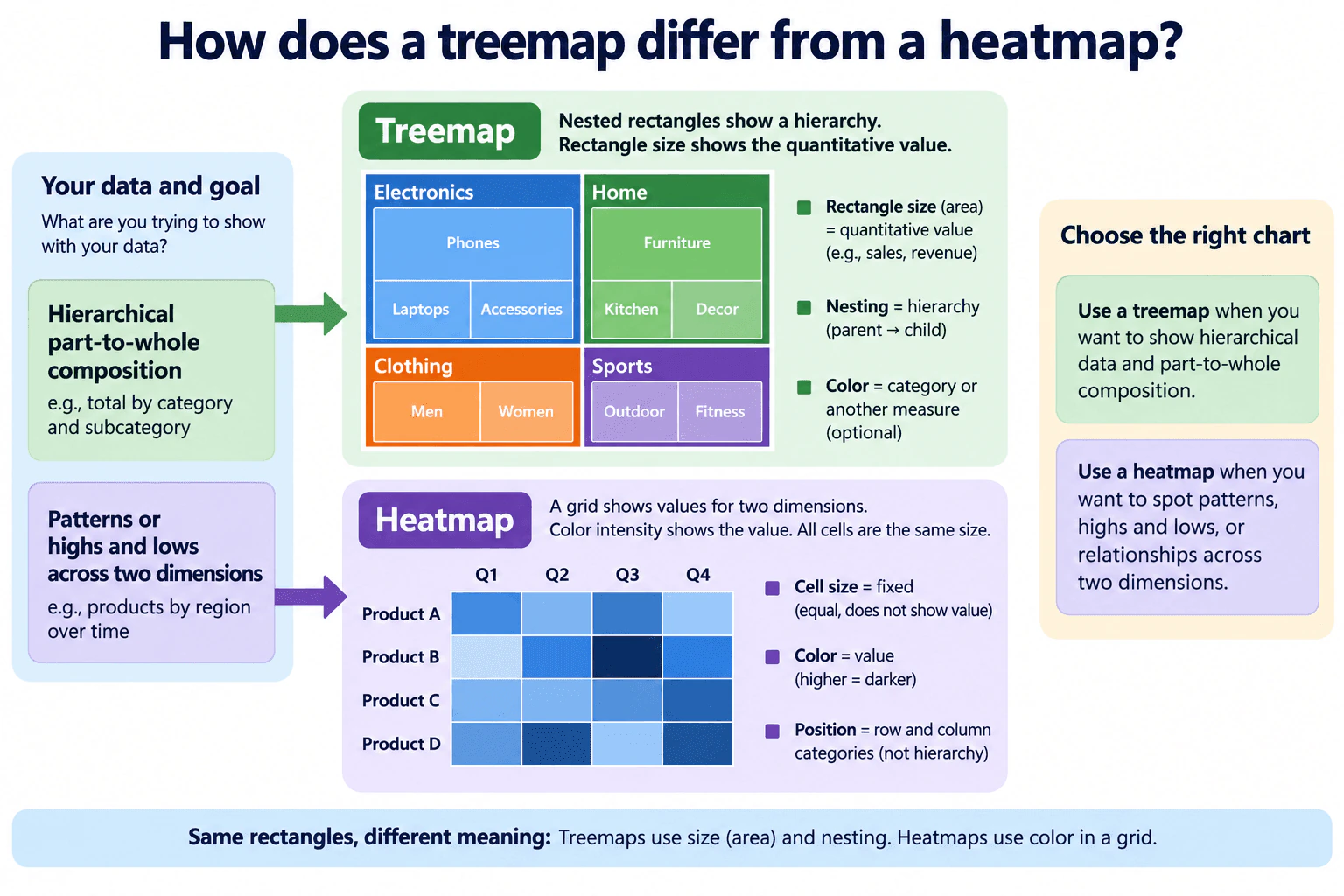
A treemap uses rectangle area to represent a quantitative value and nesting to show hierarchy. Color can identify categories or encode another measure. A heatmap uses a row-and-column grid: in the matrix-style heatmap shown here, the cells have fixed equal size, position identifies the two dimensions, and color intensity represents the value. I would choose a treemap for hierarchical part-to-whole composition and a heatmap for spotting patterns, highs, and lows across two dimensions.
Detailed Explanation
A treemap and a heatmap both use rectangles, but the rectangles communicate different things. In a treemap, rectangle area represents a quantitative value, and nesting shows hierarchy, such as a parent category containing child categories. Color may identify categories or encode another measure. In the matrix-style heatmap shown here, every cell has the same size and fixed row-and-column position. Position identifies two dimensions, while color intensity represents the value. So use a treemap for hierarchical part-to-whole composition and a heatmap for patterns, highs, and lows across two dimensions.
Useful Questions to Ask the Interviewer
Is the main goal hierarchical part-to-whole composition or comparison across two dimensions?
Does the data contain a meaningful parent-child hierarchy?
What should color represent: a category, a numeric value, or another measure?
Does the audience need exact comparisons or mainly a quick view of patterns?
How to Explain It in an Interview
Start with the analytical question because that determines the visual choice.
For a treemap, rectangle area is the main quantitative encoding. A larger rectangle means a larger value. Nesting communicates hierarchy: parent rectangles contain their child rectangles. The attached diagram also shows that color can represent a category or another measure, so color is optional rather than the defining feature of a treemap.
For the matrix-style heatmap in the diagram, the cells form a regular grid. Each cell has the same size, so area does not encode the metric. Instead, row and column position identify the two dimensions, and color intensity represents the value. When the legend explicitly defines darker color as higher, darker cells indicate higher values. This arrangement makes highs, lows, and patterns across the two dimensions easy to scan.
The key distinction is therefore the meaning of the rectangles. A treemap uses area and nesting to communicate magnitude and hierarchy. A heatmap uses grid position and color to communicate the intersection of two dimensions and the value at that intersection.
The choice should match the comparison being made. Use a treemap when the question is about hierarchical parts of a whole. Use a heatmap when the question is about values or patterns across two dimensions.
There are important tradeoffs. Treemaps are compact, but comparing rectangles with similar areas can be difficult. Heatmaps make patterns visually obvious, but exact numeric differences can be harder to judge from color alone. Color also needs an explicit, truthful scale and accessible contrast.
Validate a treemap by confirming that the nesting matches the real hierarchy and that rectangle areas are proportional to the intended measure. Validate a heatmap by confirming row and column categories, aggregation, missing values, and the color scale. Do not rely on color alone when accessibility matters; add readable labels or another redundant cue when needed.
Key Insight / Why This Solution Works
Identify the analytical question.
Check whether the data has a meaningful parent-child hierarchy.
If the goal is hierarchical part-to-whole composition, use a treemap and map the quantitative value to rectangle area.
Use nesting only for real hierarchy and define any optional color encoding.
If the goal is comparing a metric across two dimensions, use a matrix-style heatmap with fixed-size cells, row and column position for the two dimensions, and color intensity for the value.
Define the color scale explicitly.
Validate hierarchy, aggregation, missing values, labels, and every visual encoding before presenting the chart.
Why Interviewers Ask This
The interviewer wants to see whether you understand what visual channels such as rectangle area, nesting, position, and color communicate, and whether you can choose the correct chart for hierarchical composition versus patterns across two dimensions.
Common interview mistakes
Common mistakes include saying that rectangle size represents value in both charts, forgetting that treemap nesting represents hierarchy, ignoring that heatmap position represents row and column dimensions, using color without defining its meaning or scale, assuming darker always means higher without a legend, and choosing a treemap when there is no meaningful hierarchy.
Interview tip
State the encodings first: treemap equals area plus nesting, with optional color; matrix heatmap equals row-column position plus color intensity, with fixed cell size. Then connect each chart to the analytical question it answers.
Interviewer may ask next
What would you do if the data has categories but no meaningful hierarchy?
I would not use nesting just to force the data into a treemap because that could imply a parent-child structure that does not exist. I would choose a chart based on the actual comparison. If I need values across two dimensions, a heatmap can fit; if I need precise comparison among individual categories, another chart such as a bar chart may be clearer.
What is the main tradeoff when using color to encode values in a heatmap?
Color makes patterns, highs, and lows fast to scan, but it is less precise for exact comparisons and can create accessibility problems. I would use a clearly ordered color scale, define the legend, avoid misleading ranges, and add labels or another redundant cue when users need exact values or cannot reliably distinguish the colors.
63. When would you use a scatter plot, and how would you handle overlapping observations?Data Visualization And StorytellingMedium
i Question Details
Explain how a scatter plot should reveal relationships and density despite overlapping observations.
Short Interview Answer (30-60 seconds)
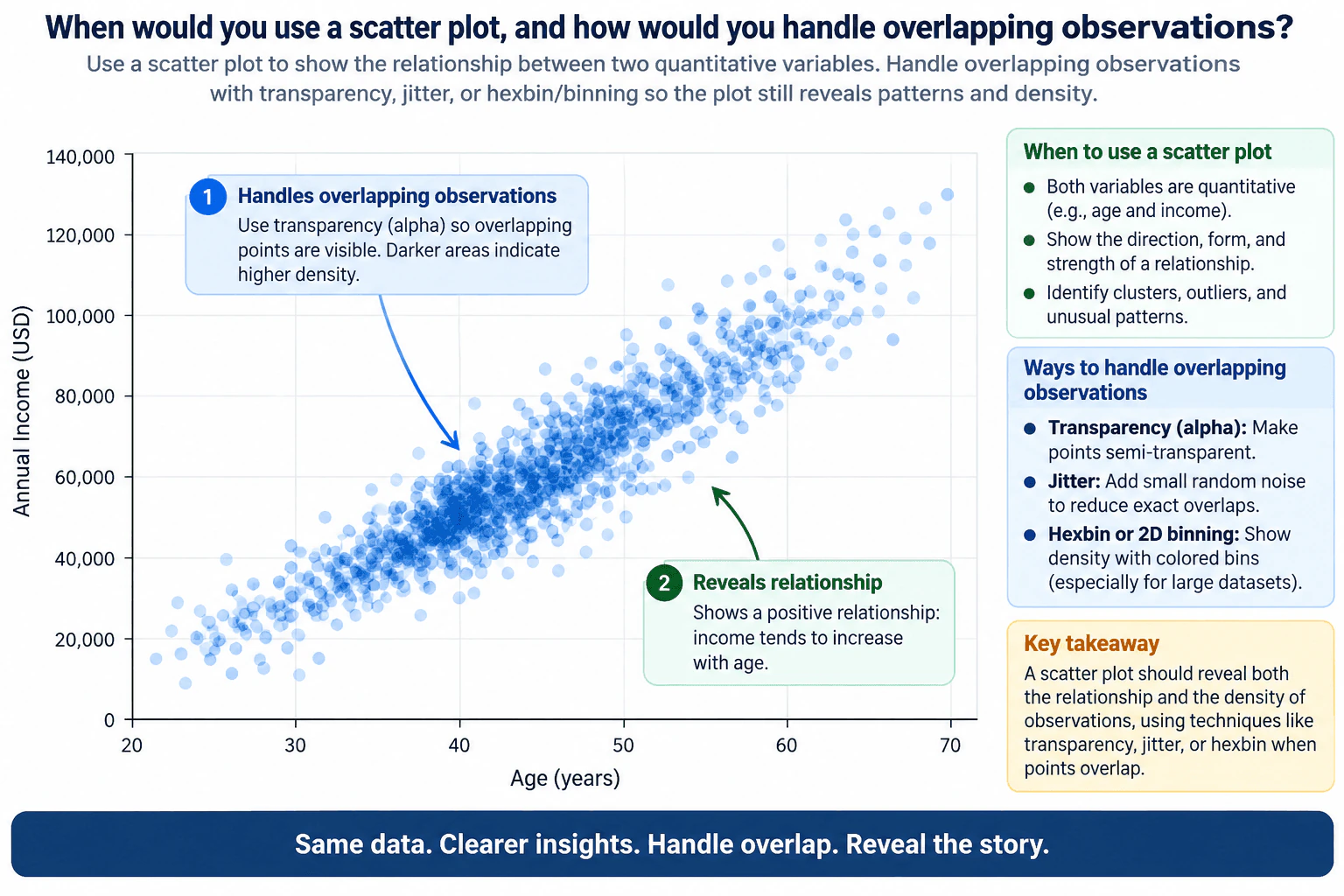
I would use a scatter plot when I want to examine the relationship between two quantitative variables, with each point representing one observation. It can reveal direction, form, strength, clusters, outliers, and spread. If observations overlap, I would first use smaller semi-transparent points so darker areas show greater density. If many observations share exact coordinates, I may add a small amount of jitter. For very dense data, I would use hexbin or 2D binning so groups of observations are summarized into spatial bins. The goal is to show both the relationship and the density clearly.
Detailed Explanation
A scatter plot is appropriate when each observation has two quantitative values and I want to see how those variables relate. Each point represents one observation, so the chart can reveal direction, form, strength, clusters, outliers, and spread. The main risk is overplotting: points can overlap and hide density. I would first use smaller semi-transparent points, because darker areas then indicate more overlap. If exact positions repeat, I may add small jitter. For very dense data, I would switch to hexbin or 2D binning to summarize local density.
Useful Questions to Ask the Interviewer
Are both variables quantitative, and what does one point represent?
Are overlapping points caused mainly by a large number of observations or by repeated or rounded values?
Does the audience need to inspect individual observations, or is the main goal to understand overall relationship and density?
Are there important groups, outliers, missing values, or filters that must remain visible?
How to Explain It in an Interview
I would start by matching the chart to the analytical question. A scatter plot is designed for two quantitative variables. One variable goes on the x-axis and the other on the y-axis, and each observation is drawn as a point. I would use it when I want to understand whether the variables move together and to inspect the direction, form, strength, spread, clusters, and unusual observations in that relationship.
The approved diagram uses age on the x-axis and annual income in USD on the y-axis as an illustrative example. Its points form an upward pattern, so the diagram demonstrates a positive relationship: higher age values in the example tend to appear with higher income values. That visible relationship is an illustration of what a scatter plot can reveal, not evidence of causation.
The main visualization problem is overlapping observations, also called overplotting. If many points occupy the same or nearby positions, fully opaque marks can hide how many observations are present. The chart may still show the general direction, but it can hide the true density of the data.
My first adjustment would usually be transparency, often called alpha. Semi-transparent points allow marks to build visually where observations overlap. Areas with more overlap appear darker, which helps reveal density while still preserving individual observations. Reducing point size can also help when the chart is crowded.
If several observations have exactly the same coordinates because values are discrete, rounded, or repeated, I may add a small amount of jitter. Jitter slightly changes the displayed position of points so identical coordinates do not sit directly on top of one another. I would keep the jitter small because it is only a display technique; too much movement could make the visual position look meaningfully different from the underlying value.
For very dense data, I would consider hexbin or another form of 2D binning. Instead of relying on every point to remain individually visible, the x-y space is divided into bins and each bin represents how many observations fall in that region. Color intensity can then communicate density. This gives up some point-level detail, but it usually makes dense patterns much easier to interpret.
The choice depends on the question and audience. Transparency is useful when individual observations still matter. Jitter is useful when exact overlaps are caused by repeated positions. Hexbin or 2D binning is useful when the number of observations is large enough that individual marks become visually noisy.
I would also validate the visualization before drawing a conclusion. I would confirm that both axes use the intended quantitative fields and correct units, that one point represents the expected observation grain, and that missing values, duplicate rows, filters, and aggregation have been handled deliberately. I would also check whether reasonable changes in point size, transparency, jitter, or bin resolution change the apparent pattern.
Finally, I would communicate the finding no more strongly than the evidence supports. A scatter plot can reveal an association, but it does not establish causation. I would describe the observed direction and structure, explain how overlap was handled, note any important outliers or dense regions, and mention any limitation that could affect interpretation.
Technical Approach
Confirm that the analytical question concerns the relationship between two quantitative variables.
Define what one observation represents and place one variable on the x-axis and the other on the y-axis with correct units.
Inspect direction, form, strength, spread, clusters, and outliers.
Check whether overplotting is hiding observations or density.
Use smaller semi-transparent points when individual observations should remain visible.
Use limited jitter when many observations share exact or rounded coordinates.
Use hexbin or 2D binning when the dataset is too dense for individual points to remain useful.
Validate fields, units, observation grain, missing values, duplicates, filters, and sensitivity to visual settings.
Describe the observed relationship and density without implying causation.
Practical Insights
A standard scatter plot draws one mark for each observation, so both rendering work and visual clutter increase as the number of observations grows. Transparency and jitter still keep one mark per observation. Hexbin or 2D binning summarizes many observations into spatial cells, which can make a very dense dataset easier to read, but the tradeoff is that individual points are no longer directly visible. Bin size also matters: smaller bins preserve more local detail, while larger bins create a simpler density summary.
Why Interviewers Ask This
Interviewers want to see whether you can choose a scatter plot for the right analytical question, recognize when overlapping observations hide density, and select an appropriate technique that keeps the relationship understandable without misleading the audience.
Common interview mistakes
Using a scatter plot when the variables are not both quantitative; using fully opaque large points so overlapping observations hide density; adding too much jitter and visually distorting the real values; using hexbin or 2D binning without explaining that bins summarize multiple observations; choosing a misleading axis scale; ignoring missing values, filters, observation grain, or duplicate rows; assuming a visible association proves causation; and adding unnecessary visual elements that distract from the relationship.
Interview tip
Give the decision rule first: use a scatter plot for two quantitative variables with one point per observation. Then explain overlap handling in a practical order: transparency and smaller points, limited jitter for exact repeated positions, and hexbin or 2D binning for very dense data. Finish by stating that the visualization should reveal both the relationship and the density without implying causation.
Interviewer may ask next
What would you do if many observations have exactly the same coordinates because the values are rounded?
I would first confirm that those repeated coordinates are valid observations rather than duplicate rows created by a data-quality problem. If the repetition is real and comes from rounded or discrete values, I could add a small amount of jitter so coincident marks separate visually. I would keep the jitter small and explain that it changes only the displayed position, not the underlying data. Transparency can also help, and if the repeated observations are extremely dense, 2D binning may communicate the density more clearly.
What would you change if the dataset became so large that individual points were no longer useful?
I would shift from showing every point individually to showing density. Hexbin or another 2D binning method would divide the x-y space into cells and encode how many observations fall within each cell. This makes dense regions easier to see and reduces visual clutter, but it sacrifices individual-point visibility. I would choose a sensible bin resolution, check that the main relationship remains stable across reasonable bin sizes, and clearly explain that the bin encoding represents observation density.
64. How would you recognize and prevent misleading chart encodings?Data Visualization And StorytellingMedium
i Question Details
Consider truncated axes, dual scales, unequal bins, and the difference between bar and line encodings.
Short Interview Answer (30-60 seconds)
I would trace the chart from the claim back to the encoding. For bars, I check whether the baseline starts at zero because bar length represents magnitude. For lines, a non-zero axis can be appropriate when the range is clearly labeled and justified because position and change over time matter more than bar length. I would also be cautious with dual y-axes, verify histogram bin widths, and confirm units, scales, intervals, aggregation, and missing data. Then I would check whether the same conclusion still holds with a more neutral encoding.
Detailed Explanation
A misleading chart can make a true number look more dramatic, hide an important difference, or suggest a relationship that is not really there. I would not judge only by how the chart looks. I would first understand the claim, what is being compared, the units, the time period, and the chart type. Then I would inspect the encoding: the baseline for bars, the axis range for lines, the scales for dual-axis charts, and the widths of histogram bins. Finally, I would verify the source values and check whether the same conclusion holds after using a more neutral, truthful encoding.
Useful Questions to Ask the Interviewer
What comparison or decision is this chart supposed to support?
Are the values discrete categories, measurements over time, or a distribution?
Do the axes use consistent units, scales, aggregation, and time windows?
Are the histogram bins equal width, or should frequency density be used instead of raw frequency height?
Are there missing periods, filters, changed definitions, or aggregation differences that could affect the conclusion?
How to Explain It in an Interview
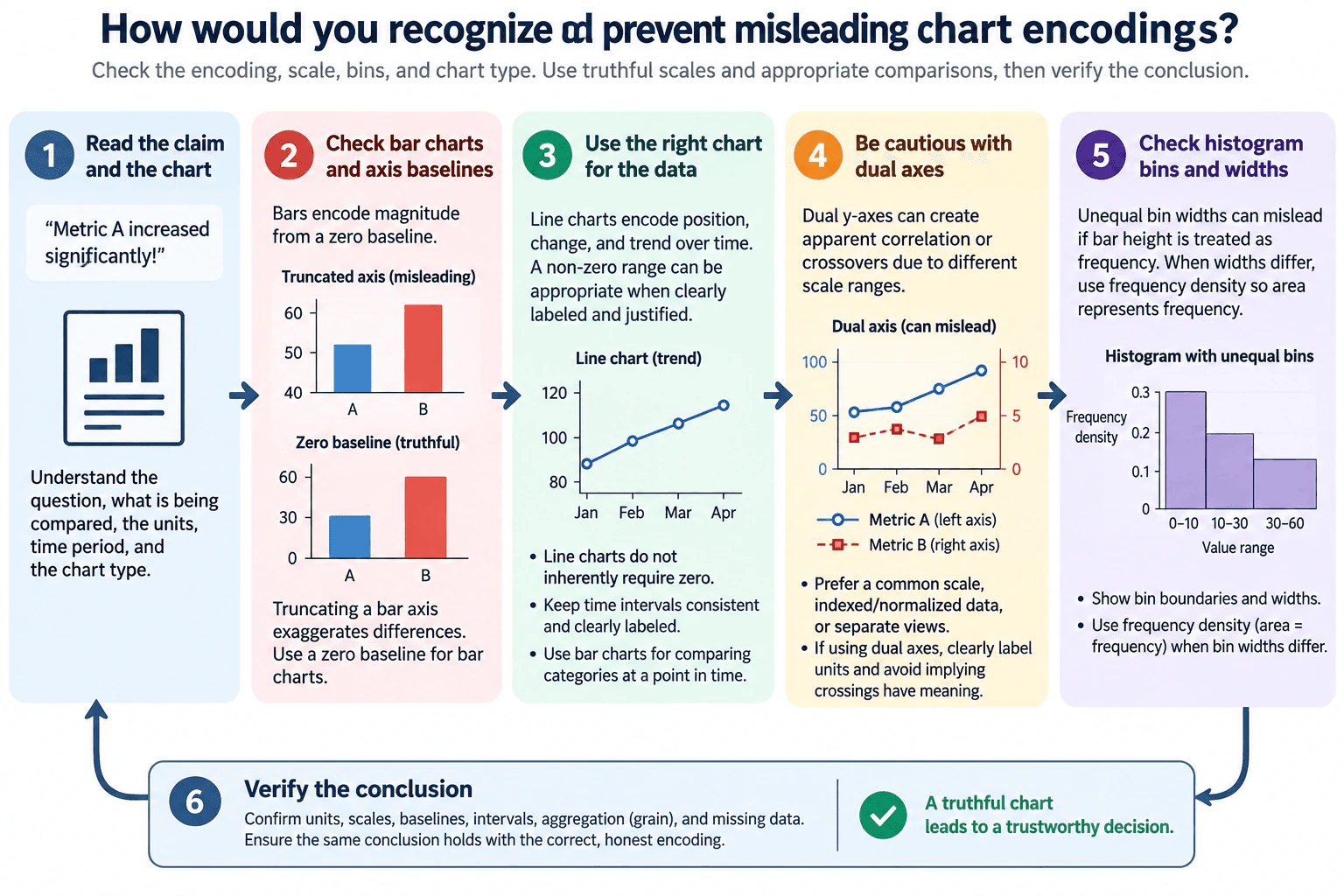
I would use a simple flow: read the claim, inspect the encoding, check the scale and baseline, choose the correct chart form, and verify the conclusion.
First, I identify what the chart is claiming. I confirm what is being compared, the units, the time period, and the chart type. This prevents me from accepting a visual impression before understanding the analytical question.
For a bar chart, I inspect the baseline carefully. Bars encode magnitude through their length, so their visible length should normally be measured from zero. If the y-axis starts above zero, a small numeric difference can look much larger than it really is. To prevent that distortion, I would use a zero baseline for ordinary bar charts.
A line chart is different. A line communicates position, direction, and change across an ordered sequence such as time. It does not inherently require a zero baseline. A non-zero range can be appropriate when it is clearly labeled and justified, especially when the goal is to inspect variation. I would also keep time intervals consistent so equal visual spacing represents equal intervals.
Next, I check dual y-axes. Two series with independently chosen scales can be made to look strongly related or can appear to cross simply because of the axis ranges. I prefer a common scale when the measures are directly comparable. If the units differ, I would consider indexed or normalized data when that transformation answers the question, or use separate views. If a dual-axis chart must remain, I would label both axes and units clearly and avoid treating visual crossings as meaningful unless the scales genuinely support that interpretation.
For histograms, I inspect the bin boundaries and widths. With equal-width bins, comparing bar heights as frequency is straightforward. With unequal-width bins, raw bar height is misleading because wider bins cover more of the numeric range. In that case, I would use frequency density so that bar area, rather than height alone, represents frequency. I would also show the bin boundaries and widths clearly.
I then check whether the chart type matches the data. Bar charts are appropriate for comparing discrete categories because bar length represents magnitude. Line charts are appropriate for ordered or continuous sequences, especially time, because connecting points communicates progression. Using a line for unrelated categories can imply continuity that does not exist.
Finally, I verify the conclusion. I confirm units, scales, baselines, time intervals, aggregation grain, filters, and missing data. I compare the source values with the plotted marks and try a more neutral encoding. If the conclusion disappears after correcting the baseline, replacing the dual scale, using proper histogram density, or choosing the right chart type, then the original visual was driving the conclusion rather than the evidence.
The main tradeoff is between visibility and truthful emphasis. A tighter line-chart range can reveal small changes but can also make those changes appear more important. A dual axis can save space but increases interpretation risk. Unequal histogram bins can be useful but require density rather than raw count height. The goal is to make the pattern easy to see without changing the meaning of the underlying data.
Technical Approach
Read the chart's claim and identify the comparison, units, time period, and chart type.
Determine what the visual marks encode: magnitude, position, trend, or distribution.
For bars, verify a zero baseline so bar length truthfully represents magnitude.
For lines, confirm the axis range is clearly labeled and justified and that time intervals are consistent.
For dual y-axes, inspect both units and scales; prefer a common scale, indexed or normalized data, or separate views when appropriate.
For histograms, inspect bin boundaries and widths; use frequency density when widths differ so area represents frequency.
Match chart type to data: bars for discrete categories and lines for ordered sequences such as time.
Re-encode the same data more neutrally and confirm the conclusion still holds.
Practical Insights
The main cost is review rather than computation. Checking axes, units, bins, intervals, and chart type is usually quick for one chart. Rebuilding alternative views takes more time when the source data or aggregation logic must also be traced. The key tradeoff is clarity versus distortion risk: tighter line scales, dual axes, and unequal bins can sometimes reveal useful structure, but they need careful labeling and validation because they can otherwise influence interpretation more than the data should.
Why Interviewers Ask This
Interviewers want to see whether I can separate a real data pattern from a visual effect created by the chart. The key judgment is choosing an encoding that preserves magnitude, trend, scale, binning, units, intervals, aggregation, and context so the audience reaches a conclusion supported by the data rather than by the presentation.
Common interview mistakes
Common mistakes are treating every non-zero axis as automatically wrong; forgetting that a zero baseline is especially important for bars because bar length encodes magnitude; interpreting crossings on independently scaled dual axes as meaningful; comparing unequal-width histogram bars by raw height instead of frequency density; using lines for unordered categories; ignoring inconsistent time intervals; and checking only the visual appearance without validating units, aggregation, filters, and missing data.
Interview tip
Explain the difference between bar and line encodings explicitly. Say that bars depend on length from a baseline, while lines mainly communicate position and change over an ordered sequence. Then cover dual axes, unequal bins, and the final verification step. That shows both visual judgment and analytical validation.
Interviewer may ask next
Would you reject every line chart whose y-axis does not start at zero?
No. A line chart does not inherently require a zero baseline because it primarily encodes position and change across an ordered sequence rather than magnitude through bar length. A non-zero range can be appropriate when the purpose is to inspect variation, as long as the scale is clearly labeled, the choice is justified, intervals are consistent, and the presentation does not overstate the practical importance of the change. I would also test whether the interpretation remains reasonable under a wider range.
What would you do if stakeholders insist on keeping a dual-axis chart because it fits the dashboard better?
I would first check whether the measures can share a meaningful common scale or whether indexed or normalized values would support the comparison. If the dual axes must remain, I would clearly label both axes and units and avoid claims based on visual crossings or apparent slope similarity. I would also validate the conclusion against the underlying values or a separate supporting view so the chosen axis ranges are not creating the story.
65. How would you display a time series containing both trend and seasonality?Data Visualization And StorytellingMedium
i Question Details
Explain how raw time-series observations and a smoothed view would communicate trend and seasonality.
Short Interview Answer (30-60 seconds)
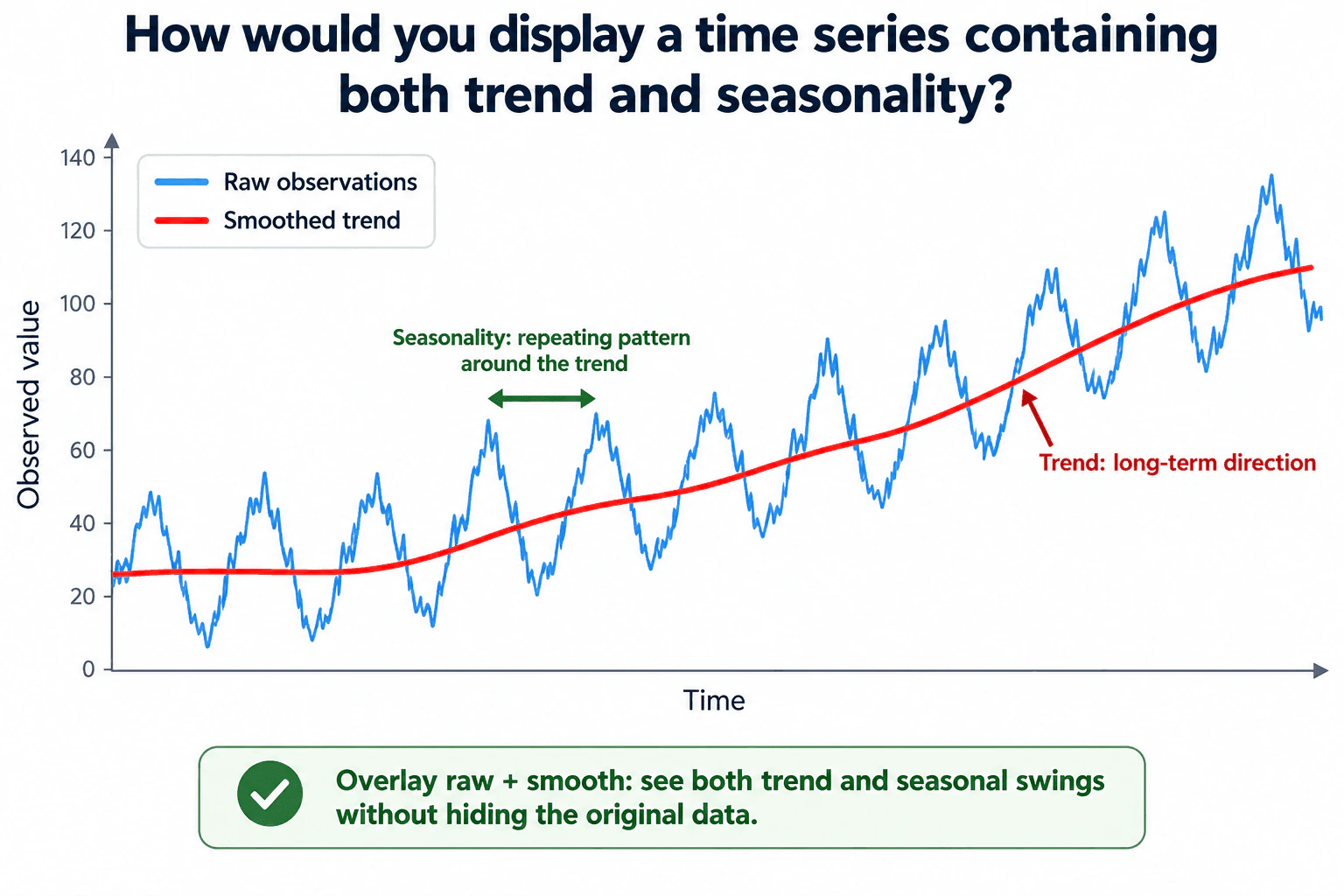
I would use one line chart with time on the x-axis and the observed value on the y-axis. I would keep the raw observations as one line so the recurring peaks and troughs remain visible, then overlay a smoothed line to show the long-term trend. Both lines should use the same time axis, scale, and units. I would label them clearly and add short annotations for the repeating seasonal pattern and the long-term direction. This lets the viewer see trend and seasonality together without hiding the original data.
Detailed Explanation
The goal is to help the viewer see two things at the same time: the long-term direction and the repeating seasonal pattern. I would plot the raw time-series observations as a line because they preserve the actual peaks, troughs, and short-term movement. On the same axes, I would overlay a smoothed line to make the underlying trend easier to see. The raw line stays visible so smoothing does not hide important variation. I would keep time intervals, units, and scale consistent and use short annotations to identify the trend and recurring seasonal swings.
Useful Questions to Ask the Interviewer
What is the time grain of the data, such as daily, weekly, or monthly?
Is the seasonal period already known, or should I determine it from the data?
Is the audience mainly trying to understand the long-term direction, the recurring cycle, or both?
Are there missing periods, irregular timestamps, duplicates, or major outliers that could affect the visual?
Is the smoothed line only for communication, or will it also support forecasting or another decision?
How to Explain It in an Interview
I would choose a line chart because time is ordered, so connecting observations in sequence makes changes and repeated patterns easy to follow. The raw observations are the evidence. They should remain visible because they show the actual peaks, troughs, and short-term variation.
Next, I would overlay a smoothed trend line on the same chart. In the approved diagram, the blue raw-observation line repeatedly rises and falls around the red smoothed line. The blue line communicates seasonality through the recurring swings, while the red line communicates the longer-term upward direction. Keeping both on one chart makes their relationship visible without creating separate panels or hiding the original observations.
The smoothing method should be chosen from the data grain and the expected seasonal behavior rather than from an arbitrary window. Too little smoothing can leave so much short-term variation that the trend is hard to see. Too much smoothing can flatten genuine changes or make the trend respond slowly. The smoother is therefore a descriptive aid, not a replacement for the original series.
Both series represent the same measured quantity, so I would plot them against the same y-axis with consistent units and scale. The x-axis should preserve the true ordering and reporting interval. I would not automatically force a zero baseline for a line chart; instead, I would choose an honest scale that shows the pattern without exaggerating changes.
I would use only a few annotations. One annotation can identify the repeating pattern around the trend, matching the diagram's seasonality callout. Another can identify the long-term direction on the smoothed line. I would avoid labeling every observation because that would add clutter without improving the decision.
Before presenting the visual, I would validate the underlying series. I would confirm that timestamps are ordered, the time grain is consistent, duplicate periods are resolved, missing periods are identified, and both raw and smoothed values use the same units. I would also test reasonable smoothing choices to check that the broad interpretation of the trend is stable.
The main limitation is that a smoother summarizes the series; it does not prove that a particular seasonal model is correct or explain why the pattern occurs. Irregular time spacing, structural changes, missing observations, or large outliers can make both the seasonal pattern and trend misleading. My final message would therefore stay close to what the chart supports: the raw line shows recurring seasonal swings, while the smoothed line shows the overall direction.
Technical Approach
Confirm the time field, observation field, time grain, units, and expected seasonal period if known.
Sort observations chronologically and check for duplicate, missing, or irregular periods.
Plot the raw observations as a line against time.
Choose a defensible smoothing method and window based on the data grain and purpose.
Overlay the smoothed trend on the same axes, scale, and units as the raw series.
Add one short annotation for the recurring seasonal pattern and one for the long-term trend.
Validate that the broad trend remains stable under reasonable smoothing choices and is not being driven by missing data or outliers.
Practical Insights
The display is simple: it draws the original series plus one smoothed series. A basic rolling smoother can be computed efficiently as the number of observations grows. The more important tradeoff is visual interpretation. Less smoothing keeps more short-term detail but may leave the trend hard to see. More smoothing makes the long-term direction clearer but can flatten real changes or introduce lag.
Why Interviewers Ask This
Interviewers want to see whether I can choose a truthful time-series visual, separate long-term movement from recurring seasonal variation, and explain both patterns without hiding the original observations.
Common interview mistakes
Common mistakes include showing only the smoothed line and hiding the raw observations, choosing a smoothing window without considering the time grain, using inconsistent units or scales, ignoring missing or irregular periods, treating random noise as seasonality, and adding so many annotations that the pattern becomes harder to read.
Interview tip
Lead with the visual choice: overlay the raw time-series line and a smoothed trend line on the same axes. Then explain that the raw line preserves recurring seasonal swings while the smoother reveals the long-term direction, and finish by mentioning how you would validate the time grain, missing periods, and smoothing choice.
Interviewer may ask next
What would you do if the seasonal period is unknown?
I would first inspect the raw series for repeating peaks and troughs and confirm the time grain and amount of history available. I would not assume a seasonal period from the picture alone. If the pattern needs formal validation, I could use supporting time-series analysis to test plausible periods. I would then choose a smoothing approach that reveals the broader direction without simply following the suspected seasonal cycle.
What if the smoothed line hides an important sudden change in the series?
I would keep the raw observations visible and treat the smoother only as a summary. I would annotate the sudden change on the raw line and consider a less aggressive smoothing choice if the change is important to the audience. The tradeoff is that stronger smoothing gives a cleaner long-term trend but can flatten or delay genuine shifts, so the amount of smoothing should match the decision being supported.
66. How would you show whether search latency worsened for users in the extreme tail?Data Visualization And StorytellingHard
i Question Details
Compare this week’s and last week’s search-latency distributions and p50, p90, and p99.
Short Interview Answer (30-60 seconds)
I would compare this week and last week using the same search-request population, filters, latency definition, units, and equivalent complete time windows. I would overlay the two latency distributions on the same axes and mark p50, p90, and p99 for each week. If latency spans a wide range, I would use a log-scaled x-axis so both typical and extreme values remain readable. The key signal is whether p90 and especially p99 shift right while p50 stays similar. Before assigning a cause, I would check request mix such as region, device, and query type.
Detailed Explanation
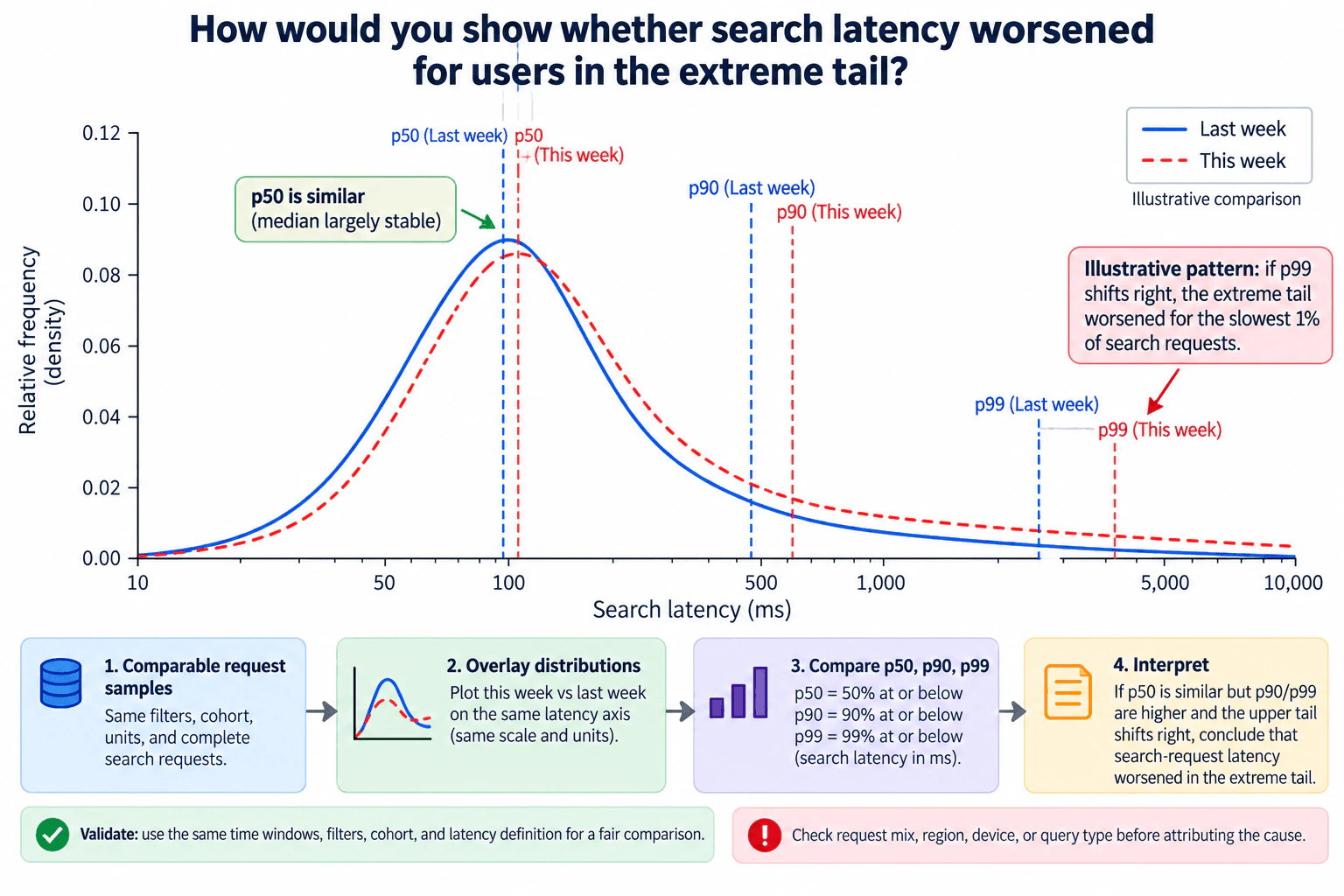
The task is to see whether the slowest search experiences became slower this week, even if normal searches stayed about the same. I would compare the same type of search requests across both weeks, plot their latency distributions on one shared latency axis, and mark p50, p90, and p99. p50 represents typical latency, while p90 and p99 describe progressively slower parts of the distribution. If p99 moves to the right while p50 changes little, that supports the conclusion that extreme-tail request latency worsened. The displayed curves should be treated as an illustrative pattern, not measured results.
Useful Questions to Ask the Interviewer
Are both weeks defined using the same time-zone boundaries and complete time windows?
What exactly counts as a search request for this comparison, including failed, cancelled, or incomplete requests?
Is latency measured end to end from the user's perspective or for a specific service component?
Should the analysis be request-level, as shown in the diagram, or truly user-level using an aggregation per unique user?
Do we need the overall comparison only, or should we also inspect region, device, query type, or another important segment?
How to Explain It in an Interview
I would start by defining comparable samples. For the diagram's request-level analysis, the grain is one search request with one latency measurement in milliseconds. Both weeks should use the same filters, cohort rules, latency definition, units, treatment of incomplete requests, and equivalent complete time windows. Otherwise, a difference in the chart could come from a definition change rather than a real performance change.
For the main visual, I would overlay this week's and last week's search-latency distributions on the same axes. The diagram uses a solid line for last week and a dashed line for this week, so the two weeks are distinguishable by line style as well as color. If latency has a long right tail, a logarithmic x-axis is useful because it can display both common and extreme latency values without compressing the tail into a tiny region. The y-axis is relative frequency or density, so the curves show how request latencies are distributed rather than raw request counts.
Next, I would calculate and mark p50, p90, and p99 for each week using the same request population. p50 is the median, meaning 50% of observed requests have latency at or below that value. p90 means 90% are at or below that value, and p99 means 99% are at or below that value. Requests above the p99 boundary form roughly the slowest 1% of request observations, subject to ties and the percentile method used.
The interpretation is based on horizontal movement along the latency axis. If p50 is similar between weeks but p90 and p99 move to the right, typical performance may be stable while the slower portion of the distribution has degraded. A larger rightward change at p99 is particularly important for the question because it indicates that the extreme tail requires more time to contain 99% of requests. I would describe that as evidence that extreme-tail search-request latency worsened.
I would annotate only the evidence that supports the decision, such as a stable p50 and a right-shifted p99. I would not invent exact millisecond values, percentage changes, or statistical significance because none were supplied. Both weeks must use the same scale and units so the visual comparison remains truthful.
Before attributing the change to the system, I would validate the inputs and traffic mix. I would compare request counts, missing or invalid observations, region, device, and query type. If this week contains a larger share of naturally slower requests, the overall p99 could rise even without a within-segment regression. Segment-level comparisons can help separate composition effects from a broad performance change.
Finally, I would separate the observation from its cause. The overlaid distributions and percentile shifts can show that request-level tail latency worsened, but they do not by themselves explain why. If the business question truly requires a statement about unique users rather than requests, I would first define a user-level latency metric, such as an agreed per-user aggregation, and then repeat the comparison at that grain.
Technical Approach
Define the population and grain: comparable search requests from this week and last week.
Plot both latency distributions on the same axes; use a logarithmic latency axis when the long tail makes it helpful.
Compute and mark p50, p90, and p99 for each week from the same request-level population.
Compare horizontal percentile shifts, focusing especially on whether p90 and p99 move right while p50 remains similar.
Validate request counts, missing or invalid observations, and consistency of the latency definition.
Check region, device, query type, and other request-mix changes before assigning a cause.
Report the observed tail change separately from any root-cause hypothesis.
If the required grain is unique users rather than requests, define the per-user latency metric first and repeat the analysis at user grain.
Practical Insights
Once request-level latency data is available, producing the visual is straightforward. Exact percentile calculation over a very large dataset can be computationally expensive because the system must determine quantile positions across many observations. Approximate quantiles or histogram-based estimates can reduce computation and storage, but they introduce estimation error. The more important analytical cost is validating that both weekly samples are comparable and checking important segments so a shift in traffic composition is not mistaken for a real performance regression.
Why Interviewers Ask This
This tests whether I can choose a truthful distribution comparison, interpret p50, p90, and p99 correctly, distinguish typical latency from tail latency, control for differences between weekly request populations, and communicate a conclusion no stronger than the evidence supports.
Common interview mistakes
Looking only at average latency or p50 and missing a tail regression; comparing weeks with different filters, windows, units, or latency definitions; using different axis scales; interpreting a density curve as raw request counts; saying p99 directly describes the slowest 1% of unique users when the observations are requests; inventing percentile values or significance; relying on color alone to distinguish weeks; and blaming the system before checking request-mix changes such as region, device, or query type.
Interview tip
Lead with the decision and visual: use comparable request samples, overlay both distributions, and mark p50, p90, and p99 on the same scale. Then state the key interpretation: a rightward p99 shift with a stable p50 indicates worse tail latency. Finish with the caveat that traffic-mix checks are needed before claiming a cause.
Interviewer may ask next
What if p99 is higher this week, but the number and mix of requests changed substantially?
I would not immediately call it a system-wide regression. I would first verify identical filters, time-window rules, request-validity rules, and latency definitions. Then I would compare important segments such as region, device, and query type. If the overall p99 increase disappears within comparable segments, composition is a likely explanation. If p99 remains higher across comparable groups, the evidence for a genuine tail-latency regression becomes stronger.
What if exact p99 is expensive to calculate over a very large volume of search requests?
I could use a validated approximate-quantile or histogram-based method if the data platform supports it. The tradeoff is lower computation and storage cost in exchange for estimation error, which matters more in the extreme tail. I would use the same method for both weeks, understand its error around p99, and avoid claiming a change that is smaller than the method can reliably distinguish.
67. How would you replace a stacked-area market-share chart that obscures the required comparisons?Data Visualization And StorytellingHard
i Question Details
The market-share chart covers six products over 24 months; viewers need one product’s trend and every month’s ranking.
Short Interview Answer (30-60 seconds)
I would replace the stacked-area chart with two purpose-built views. First, use a line chart for the selected product's market share across the 24 months, because every point uses the same percentage scale and baseline. Second, use a rank chart for all six products, with rank 1 meaning the highest market share in each month. I would keep the monthly grain consistent, define the market-share denominator and tie rule, handle missing months explicitly, and avoid claiming any trend or winner until the real data is plotted.
Detailed Explanation
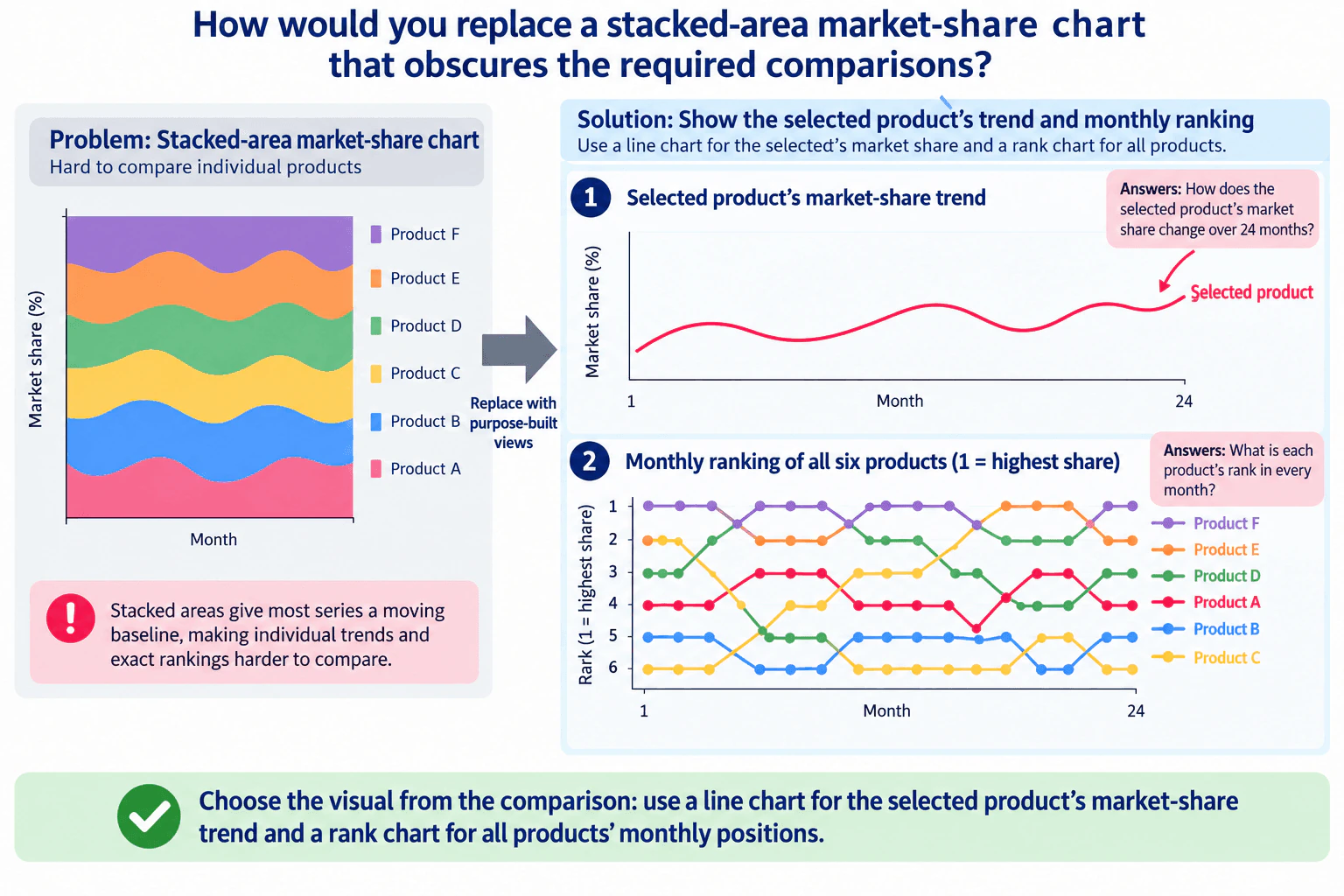
The problem is not that a stacked-area chart is always wrong. It is wrong for these two comparison tasks. Most stacked series sit on moving baselines, so one product's exact trend is harder to judge, and the vertical order does not reliably communicate every month's rank. I would separate the questions. One line chart shows the selected product's market-share percentage across months 1 through 24. A second rank chart shows where all six products stand each month, with rank 1 representing the highest share. The supplied diagram is schematic, so it should not be read as actual performance data.
Useful Questions to Ask the Interviewer
Which product should be emphasized in the trend view?
What is the exact denominator used to calculate market share each month?
Do the six products represent the complete market, or only a subset?
How should ties in monthly market share be ranked?
Are any months or product observations missing, estimated, or restated?
Does the audience need exact values, mainly trend direction, or both?
How to Explain It in an Interview
I would start from the comparison, not from the existing chart type.
The first task is to show how one selected product's market share changes over the 24-month period. A line chart is the clearest fit because time is ordered on the x-axis and market share stays on one consistent percentage scale on the y-axis. Every point for the selected product is measured from the same baseline, so the audience can judge increases, decreases, flat periods, and turning points more directly than in a stacked-area chart, where most series sit on moving baselines.
The second task is different: show each product's rank in every month. I would calculate rank separately within each month using market share in descending order and display the six products in a rank chart. The y-axis should run from rank 1 through rank 6, with rank 1 explicitly defined as the highest share. The x-axis should use the same months 1 through 24 as the trend view.
I would not use the rank chart as a substitute for the market-share line chart. Rank is ordinal. It tells the audience which product is ahead, but not the size of the difference. Two products can exchange positions after a very small market-share change, or keep the same ranks while the percentage gap between them changes substantially. The two charts therefore answer different questions and should remain separate but coordinated, matching the final diagram.
Before creating either chart, I would verify the grain and metric definition. The intended comparison needs one market-share value for each product and month after the required aggregation. I would confirm the denominator used for market share, the six-product scope, and the exact 24 monthly periods. If the six products represent the entire market, I would reconcile their shares to the expected monthly total. If they represent only part of the market, I would not imply that their shares form the whole market.
For the rank calculation, I would define the tie rule before plotting. If equal market-share values should share the same rank, I would use that rule consistently. If the business requires unique positions, I would use an agreed secondary ordering field instead of an arbitrary visual order. That rule should be documented because rank can otherwise change depending on implementation.
Missing data also needs explicit treatment. I would distinguish a missing observation from a true zero share and investigate duplicate product-month rows before calculating rank. I would avoid drawing a continuous line across an unknown period when doing so would imply a measured value. If some market-share values are estimated or revised, that limitation should be communicated because both the quantitative trend and the ranking may change.
The visual hierarchy should follow the audience's questions. The selected-product trend comes first because it answers the magnitude-over-time question. The monthly rank chart comes second because it answers the relative-position question. Product identification should not depend only on color; labels or other redundant cues should support accessibility. I would annotate only important changes that are actually supported by the real data rather than treating the schematic lines in the diagram as measured findings.
Finally, I would validate the result. For selected months, I would independently sort the six underlying market-share values and compare that ordering with the displayed ranks. I would also confirm that the selected product's percentage in the line chart is the same source value used to calculate its rank in the corresponding month. This catches inconsistent filters, denominators, aggregation, missing-value handling, and stale calculations. The final recommendation is therefore the same as the diagram: use a line chart for the selected product's market-share trend and a rank chart for all products' monthly positions.
Key Insight / Why This Solution Works
Confirm the selected product, market-share definition, denominator, six-product scope, and the 24 monthly periods.
Validate the source grain so each product-month has the intended market-share observation after aggregation; investigate duplicates and missing values.
Plot the selected product's market share against month in a line chart using one consistent percentage scale.
Within each month, order all six products by market share from highest to lowest and apply the agreed tie rule.
Plot those positions in a rank chart with rank 1 explicitly defined as the highest share.
Keep the same 24-month window, filters, product scope, and underlying share values across both views.
Add only data-supported annotations and accessible labels or redundant cues.
Validate selected months by independently sorting source values and reconciling the selected product's percentage with its displayed rank.
Why Interviewers Ask This
This tests whether the analyst chooses visuals from the comparison the audience actually needs, preserves the meaning of market share and monthly grain, and separates a quantitative trend question from a ranking question instead of forcing both into one chart.
Common interview mistakes
Common mistakes are keeping the stacked-area chart because it shows composition even though composition is not the main comparison; using only a rank chart and losing the selected product's actual market-share magnitude; treating stack order as monthly rank; using inconsistent filters, denominators, or month definitions between the two views; silently treating missing values as zero; leaving tie behavior undefined; connecting across missing months as if observations existed; relying only on color to identify products; and inventing winners, trends, or annotations that are not supported by the actual data.
Interview tip
Frame the answer around two audience questions: magnitude over time and relative position over time. Explain why each needs a different encoding, then finish with one validation step, such as confirming that the selected product's plotted market share produces the same monthly rank shown in the rank chart.
Interviewer may ask next
What would you do if two products have exactly the same market share in a month?
I would define the tie rule before building the rank chart. If equal market share should mean equal standing, I would give the products the same rank and make the tie clear. If the business requires unique positions, I would use an agreed secondary key rather than inventing an arbitrary order. I would apply the same rule in every month so the ranking remains reproducible.
What would you change if the audience also needed to see the size of the gap between every pair of products, not just their ranks?
A rank chart would no longer be enough because rank hides magnitude differences. I would keep the selected-product line for its trend, but I would add or substitute a view that shows actual market-share percentages for all products on a common quantitative scale, such as aligned multi-series lines if readability remains acceptable. I would avoid returning to a stacked-area chart if its moving baselines again make those gaps difficult to compare.
68. How would you design country filters and drilldowns for a short-video performance dashboard?Data Visualization And StorytellingHard
i Question Details
Use the short-video dashboard’s country filters and drilldowns for executive monitoring and analyst diagnosis without slow interactions or lost context.
Short Interview Answer (30-60 seconds)
I would design one clear path from overview to detail. The executive view would show core short-video KPIs, performance by country, and a trend for the selected metric. A searchable country filter would update all dashboard visuals while keeping the same date range and metric definitions. Analysts could then drill through the geographic hierarchy from Global to Country to Region or State to City, and open a detailed drillthrough view for Videos, Creators, Content Type, and Audience. I would aggregate first and load detail on demand so interactions stay fast, while preserving the date, metric, and geography when users drill and return.
Detailed Explanation
The goal is to let executives monitor global short-video performance quickly while giving analysts a deeper diagnostic path without making the dashboard slow or confusing. I would start with an aggregated executive overview, then add a searchable country filter, a geographic hierarchy from Global to Country to Region or State to City, and a separate analyst drillthrough view. The same date range, selected metric, and geographic context should remain active as the user moves through the dashboard. Detailed video, creator, content-type, and audience information should appear only when requested, so the main overview stays fast and focused.
Useful Questions to Ask the Interviewer
Which short-video metrics are the approved executive KPIs?
What exactly does Country represent: viewer location, creator location, content origin, or another business definition?
Is the valid geographic hierarchy Country -> Region or State -> City for every market?
Should the country filter allow one country or multiple countries at the same time?
Which date range and metric selections must remain active during drilldown and drillthrough?
What response time is considered acceptable for dashboard interactions?
How should missing, unknown, or unavailable geography values be displayed?
How to Explain It in an Interview
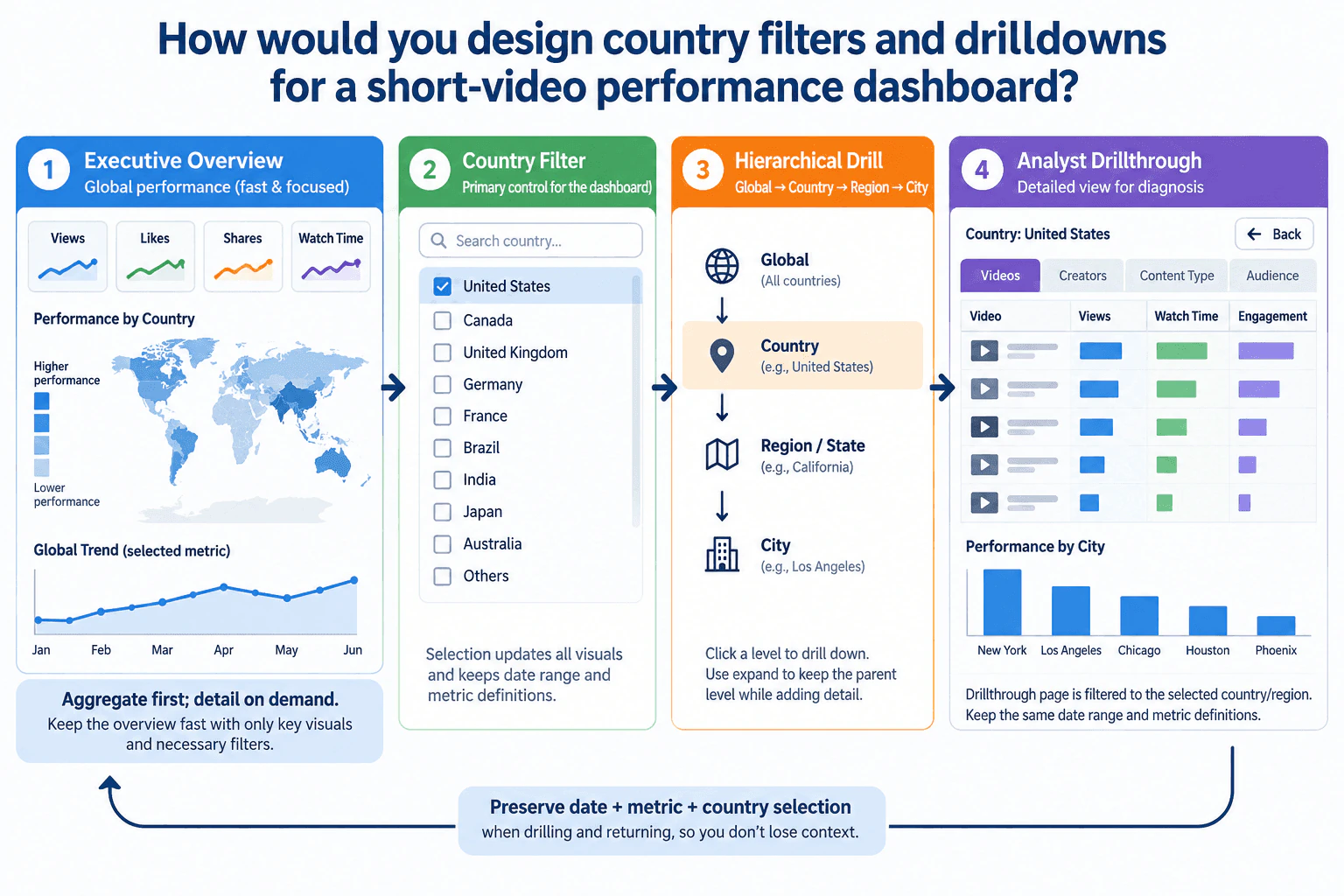
I would explain the design as one continuous flow: Executive Overview -> Country Filter -> Hierarchical Drill -> Analyst Drillthrough -> Back with context preserved.
First, I would define the reporting rules before building visuals. Country must have one approved business meaning, and Region or State and City must belong to a valid geographic hierarchy. I would also define the reporting grain, date window, units, and metric definitions so the same measure means the same thing everywhere in the dashboard.
The Executive Overview should be fast and focused. I would show a small set of KPI cards for the approved short-video measures, a country-level performance view, and a line chart for the selected metric over time. The country view supports geographic scanning, while the line chart answers how the selected metric changes across the reporting period. Scales, units, and time intervals must remain consistent so users do not compare unlike values.
The Country Filter would be the primary dashboard control. Because the list of countries can be long, I would make it searchable. In this design, changing the selected country updates all dashboard visuals and keeps the current date range and metric definitions unchanged. The selected country should remain visually obvious so the user always knows the active context.
For geographic diagnosis, I would use the hierarchy shown in the diagram: Global -> Country -> Region or State -> City. Drilldown moves the analysis to a lower level of geographic detail. When expansion is available, the analyst can keep the parent level visible while adding the next level, which helps preserve context during comparison. The current location in the hierarchy should always be clear.
For deeper investigation, I would use a separate Analyst Drillthrough view. That page is filtered to the selected country or lower geographic context and exposes detailed views for Videos, Creators, Content Type, and Audience. The diagram also shows a detailed video table and a city-level performance bar chart. The table is appropriate for exact record-level comparison, while the bar chart is appropriate for comparing discrete cities.
The most important interaction rule is context preservation. The selected date range, metric, and country or lower-level geography should remain active while drilling. When the analyst uses Back, the dashboard should return to the previous analytical state instead of resetting filters. This prevents lost context and avoids forcing users to rebuild their analysis after every drillthrough.
To keep interactions fast, I would follow the diagram's rule: aggregate first, detail on demand. The executive page should query summarized country and time data rather than loading every video row. More detailed video, creator, content-type, audience, or city information should be loaded only after the user chooses to diagnose a specific geography. This reduces unnecessary work and keeps the overview responsive.
I would also keep the visual hierarchy disciplined. Executives need only the few visuals that support monitoring and prioritization. Analysts need more granular tables and breakdowns, but those belong in the drillthrough view rather than on the executive page. I would remove decorative or unrelated visuals because every additional chart can increase cognitive load and interaction cost.
I would validate the dashboard by checking geographic rollups, filter persistence, and metric consistency. Where the hierarchy is complete, lower-level values should reconcile with the expected parent totals. Unknown or missing geography should remain explicit rather than being silently assigned to a country. I would test countries without Region or State data, countries without City data, duplicate place names, sparse groups, missing reporting periods, and the behavior of the Back action.
The main tradeoff is between speed and detail. Showing all detailed records on the executive page would reduce navigation but make the page heavier and harder to scan. Loading detail only after a drillthrough adds an interaction step but keeps executive monitoring fast. The preferred design is therefore a simple aggregated overview, searchable country selection, progressive geographic drilldown, detailed analyst drillthrough, and persistent context throughout the journey.
For the executive audience, the dashboard should answer where performance deserves attention and how the selected metric is moving. For the analyst audience, the same context should lead naturally to Region or State, City, and then detailed video, creator, content-type, or audience evidence. The dashboard should show observations clearly without claiming causes that the data has not established.
Technical Approach
Define the approved Country, Region or State, and City fields, reporting grain, date window, units, and metric definitions.
Build an aggregated Executive Overview with core KPI cards, country-level performance, and a selected-metric trend.
Add a searchable Country Filter and make the active selection visible.
Configure the country selection to update all dashboard visuals while retaining the same date range and metric definitions.
Implement the hierarchy Global -> Country -> Region or State -> City.
Allow progressive drilldown and, where supported, expansion that keeps the parent level visible while adding detail.
Add an Analyst Drillthrough view filtered to the selected geography with Videos, Creators, Content Type, Audience, detailed rows, and city comparison.
Preserve date, metric, and geographic context during drilldown, drillthrough, and Back navigation.
Keep executive queries aggregated and request high-grain detail only on demand.
The main cost comes from how much data each interaction has to query and render. Country-level summaries and selected-metric trends are relatively lightweight. Detailed video, creator, content-type, audience, and city data can be much heavier, especially when the underlying data has high cardinality. Keeping the executive view aggregated and loading detailed records only after drillthrough reduces unnecessary work. The tradeoff is an extra navigation step, so the dashboard needs clear filters, hierarchy state, and a reliable Back action.
Why Interviewers Ask This
The interviewer wants to see whether I can design a dashboard that gives executives a fast geographic overview while giving analysts a clear path to deeper diagnosis, with correct filter behavior, useful drilldowns, appropriate chart choices, and preserved context during navigation.
Common interview mistakes
Common mistakes are mixing different definitions of Country, using an invalid geographic hierarchy, resetting the date or metric during drillthrough, hiding the active filter state, loading detailed video rows on the executive page, putting analyst-level detail into the executive view, silently dropping unknown geography, showing inconsistent units or time intervals, and returning from drillthrough without restoring the previous analysis context.
Interview tip
Present the answer as one simple journey: aggregate executive overview, searchable country filter, Global-to-City drilldown, detailed analyst drillthrough, and preserved date, metric, and geography when navigating back. Then explain why aggregate-first and detail-on-demand keeps the dashboard fast.
Interviewer may ask next
What would you do if some countries do not have reliable Region or State and City data?
I would not force unavailable levels into the hierarchy. Country would remain usable, but the dashboard would expose Region or State and City only where approved data exists. Missing or unknown lower-level geography would be shown explicitly, unavailable drill actions would be disabled or omitted, and I would validate the visible child totals against the parent while accounting for unknown geography.
What would change if detailed drillthrough queries became too slow as video volume increased?
I would keep the executive overview on aggregated country and time summaries, then reduce drillthrough work by requesting only the selected geography and necessary columns, limiting the initial detailed view to decision-relevant records, and loading additional detail on demand. I would also review the data model and aggregation strategy. The goal is to preserve the same filters and drill path while moving expensive high-grain work away from the executive page.
69. How do dimensions and measures serve different purposes in Tableau?Business Intelligence ToolsEasy
i Question Details
Explain how a numeric Tableau field can serve as either a dimension or a measure.
Short Interview Answer (30-60 seconds)
Dimensions and measures serve different analytical purposes in Tableau. Dimensions group or segment data and affect the level of detail, while measures represent quantitative values that Tableau normally aggregates with functions such as SUM or AVG. A numeric field can be either. For example, Age can be AVG(Age) when I want an average, or it can be a dimension when I want separate age categories. I choose based on whether arithmetic or aggregation is meaningful for the analysis, not simply because the field is numeric. Dimension-versus-measure is also separate from discrete-versus-continuous.
Detailed Explanation
In Tableau, a dimension is used to group or segment data, while a measure is used for values that Tableau can aggregate. A numeric field can play either role. For example, Age can be a measure when you calculate AVG(Age), but it can be a dimension when you want separate age categories or headers. The key decision is not whether the field contains numbers. It is whether arithmetic or aggregation is meaningful for the analysis. Also, dimension versus measure is separate from discrete versus continuous, so either role can appear in different display forms.
Useful Questions to Ask the Interviewer
Are we trying to calculate a numeric summary from the field, or use its values to group the data?
Does each numeric value represent a quantity, or is it really a category or identifier such as an ID or postal code?
What level of detail should the final Tableau view show?
How to Explain It in an Interview
Start with the purpose of each role. A dimension answers a question such as "by what category should I break down the data?" Dimensions group or segment records and affect the level of detail in the view. A measure answers a question such as "what quantitative value should I calculate?" Measures are aggregated by default when they are added to a Tableau view.
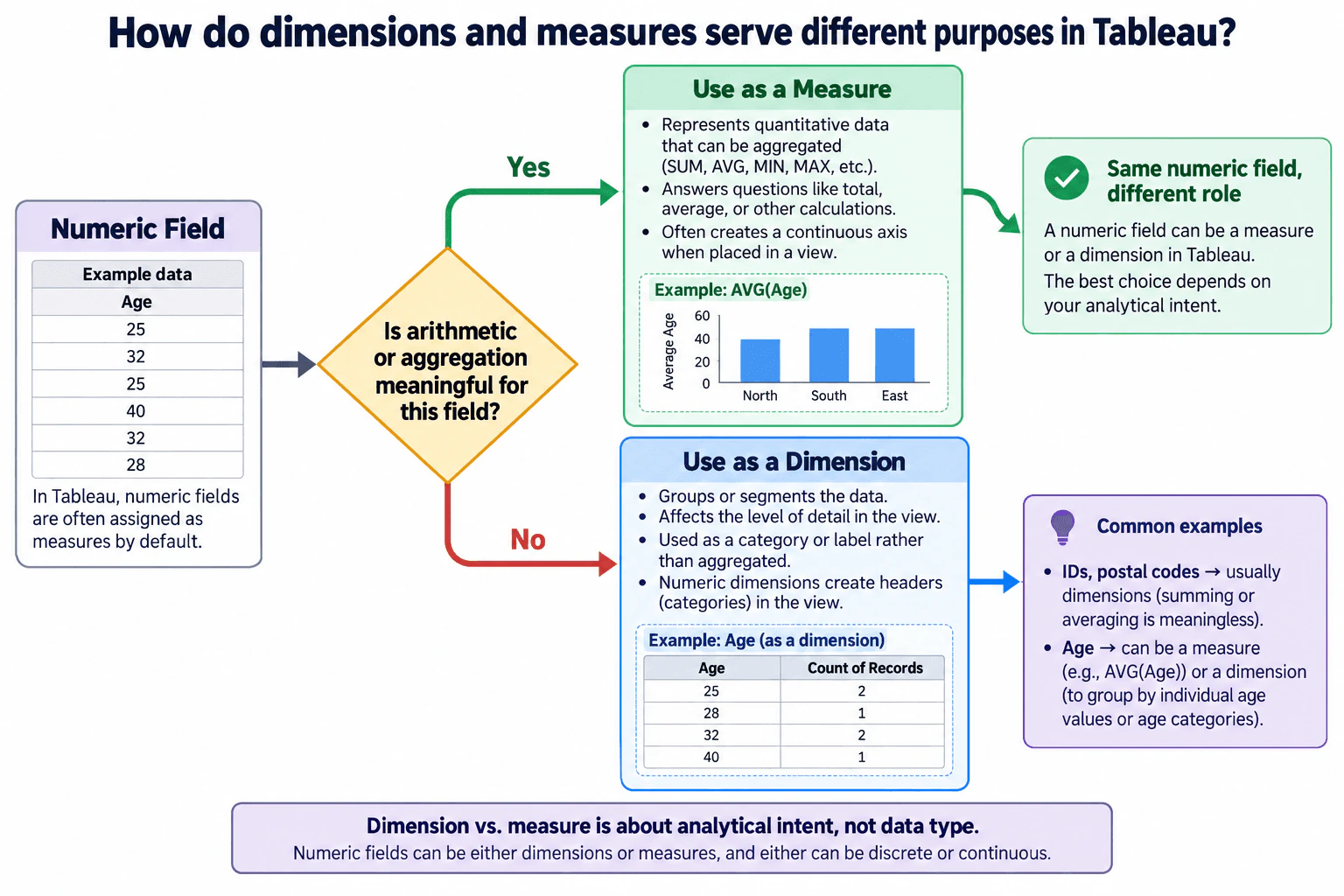
The diagram's Age example shows why data type alone is not enough. Age is numeric, so using it as a measure can be useful when the question requires arithmetic, such as AVG(Age). In that role, Tableau applies an aggregation and returns a quantitative result at the level of detail defined by the dimensions in the view.
The same Age field can instead be used as a dimension. Then individual age values can act as categories or headers. In the diagram, the sample values 25, 32, 25, 40, 32, and 28 become age groups. Ages 25 and 32 each have two records, while 28 and 40 each have one. This is useful when the analyst wants to compare records by age value rather than calculate an average or other aggregate of Age.
A simple decision rule is the one shown in the diagram: ask whether arithmetic or aggregation is meaningful for the field in this analysis. If yes, using it as a measure is usually appropriate. If no, or if the number represents a category, label, identifier, or grouping value, using it as a dimension is usually more meaningful. Numeric IDs and postal codes are common examples because summing or averaging them normally has no useful analytical interpretation.
It is also important not to confuse dimension versus measure with discrete versus continuous. They are separate Tableau properties. Numeric dimensions can be discrete or continuous, and measures can also be discrete or continuous. When placed on Rows or Columns, a discrete field creates headers, while a continuous field creates an axis. Therefore, saying "dimension means discrete" or "measure means continuous" would be incorrect.
The final check is to compare the Tableau result with the intended analytical question. If the field is a measure, confirm that its aggregation, such as SUM, AVG, MIN, or MAX, makes sense. If it is a dimension, confirm that the resulting groups and level of detail are useful. If the view produces a meaningless aggregate, too many categories, or the wrong level of detail, reconsider the field role.
Technical Approach
Identify what the numeric field represents in the analysis.
Ask whether arithmetic or aggregation such as SUM or AVG is meaningful.
Use the field as a measure when the goal is to calculate a quantitative result.
Use the field as a dimension when the goal is to group, segment, label, or categorize records.
Separately decide whether the field should be discrete or continuous based on whether the view needs headers or an axis.
Validate that the resulting aggregation and level of detail answer the intended analytical question.
Practical Insights
This is mainly a modeling and interpretation decision rather than a computational-complexity problem. Using a high-cardinality numeric field as a dimension can create many headers or marks and make the view harder to read or potentially slower to render. Using a field as a measure can produce misleading results if the selected aggregation has no meaningful interpretation. The practical tradeoffs are correctness, readability, level of detail, and view performance rather than Big-O complexity.
Why Interviewers Ask This
Interviewers want to see whether you understand that Tableau field roles describe analytical purpose, not simply data type. You should know when a numeric field should be aggregated as a measure, when it should group or segment the view as a dimension, and that dimension-versus-measure is separate from discrete-versus-continuous behavior.
Common interview mistakes
Common mistakes are assuming every numeric field must remain a measure, summing or averaging identifiers such as IDs or postal codes, treating dimensions and measures as synonyms for discrete and continuous, forgetting that dimensions affect the view's level of detail, and accepting Tableau's default aggregation without checking whether that aggregation answers the analytical question.
Interview tip
Use one numeric field such as Age to explain both roles: AVG(Age) is a measure when you need a quantitative summary, while Age is a dimension when you need groups or headers. Then explicitly state that dimension-versus-measure and discrete-versus-continuous are separate Tableau concepts.
Interviewer may ask next
What would you do if Tableau classified a numeric customer ID as a measure?
I would normally convert it to a dimension because the values identify customers rather than represent quantities that should be summed or averaged. I would then validate that using the ID as a dimension produces the intended customer-level grouping and level of detail.
Can a Tableau measure be discrete or a dimension be continuous?
Yes. Dimension-versus-measure and discrete-versus-continuous are separate properties. Measures can be discrete or continuous, and numeric or date dimensions can also be continuous. When placed on Rows or Columns, discrete fields create headers while continuous fields create axes, so I choose the field role and display behavior separately.
70. Compare a Tableau parameter with a filter.Business Intelligence ToolsEasy
i Question Details
Explain the parameter–filter distinction in Tableau when allowing a viewer to choose a Top-N value.
Short Interview Answer (30-60 seconds)
A Tableau parameter is an input value; a filter is a data restriction. For example, a viewer can set a Top N parameter to 5. The parameter itself does not remove data. A Top filter on a dimension can reference that parameter and keep the top 5 members by a measure such as SUM(Sales). If the viewer changes N, Tableau re-evaluates the filter and updates the view. Filter order also matters because context filters can change the population evaluated by the Top-N filter.
Detailed Explanation
A Tableau parameter is a single user-controlled value, while a filter controls which data or marks are included in a view. For a viewer-selectable Top-N design, the parameter supplies the value N, such as 5, but it does not remove rows by itself. The Top filter on a dimension then uses that parameter as its N value and keeps the top members by a selected measure such as SUM(Sales). When the viewer changes the parameter, Tableau re-evaluates the filter and updates the displayed Top-N marks.
Useful Questions to Ask the Interviewer
Which dimension should be ranked for the Top-N view?
Which measure and aggregation should define "top"?
Should another filter define the population before Tableau calculates Top N?
How to Explain It in an Interview
Start with the distinction: a parameter is an input control, while a filter is a data restriction. A parameter stores one selected value, such as 5, 10, or 20. Changing the parameter alone does not remove data. It affects the view only when a filter, calculated field, set, reference line, or other supported logic references that parameter.
For the Top-N example in the diagram, create an integer parameter such as "Top N" and show its control to the viewer. Then place the dimension being ranked, such as Customer Name, on the Filters shelf. On the Top tab, choose a Top-by-field filter, use the parameter as N, and rank the dimension by the intended measure and aggregation, such as SUM(Sales).
If the parameter is 5, the filter keeps the top five members by that measure. When the viewer changes the parameter, Tableau re-evaluates the Top filter with the new N value and updates the marks in the view. That is the central relationship: the parameter provides N; the filter applies N to restrict the displayed members.
Filter order is an important boundary case. A context filter is evaluated before dependent dimension filters and can define the population from which the Top-N result is calculated. An ordinary dimension filter is normally at the same dimension-filter stage as a Top filter, so it should not automatically be assumed to restrict the Top-N population first. If the business requirement is "Top N within this subset," making the subset filter a context filter can establish that order.
Validate the result by trying several N values and confirming both the number of displayed members and their ranking by the chosen measure. Also test relevant filters to confirm that the population used for Top N matches the intended business rule.
The direct parameter-driven Top filter is simple and easy to maintain. A dynamic set or calculated field can support more complex behavior, but it adds logic and should be used only when the requirement needs it.
Technical Approach
Identify the dimension whose members should be ranked.
Identify the measure and aggregation that define "top."
Create an integer Tableau parameter for the viewer-selected N value.
Configure the dimension's Top filter to reference that parameter and rank members by the chosen aggregated measure.
Show the parameter control so the viewer can change N.
Test multiple N values and confirm that the displayed members and ranking update correctly.
Check Tableau's filter order; use a context filter when another filter must define the population before Top N is evaluated.
Practical Insights
The parameter itself stores only one value, so it is lightweight. The main work occurs when Tableau evaluates the Top filter, aggregates the selected measure, determines the top members, and redraws the view. On large or slow data sources, repeated aggregation and filtering can affect dashboard responsiveness, so the worksheet should be tested with realistic data and filter combinations.
Why Interviewers Ask This
Interviewers want to see whether you understand that a Tableau parameter supplies a user-controlled value, while a filter determines which data or marks are included in the view, and whether you can connect those concepts correctly for a dynamic Top-N analysis.
Common interview mistakes
Common mistakes are treating a parameter as if it directly filters data, hard-coding N instead of referencing the parameter, ranking the wrong dimension or measure, using the wrong aggregation, and ignoring Tableau's order of operations. Another mistake is expecting an ordinary dimension filter to define the Top-N population first; if that ordering is required, the appropriate filter may need to be placed in context.
Interview tip
Lead with one sentence: "A parameter supplies an input value; a filter restricts the data or marks shown." Then trace the Top-N flow from the viewer's N value to the Top filter and finally to the resulting marks. Mention filter order after the core distinction is clear.
Interviewer may ask next
What would you check if changing the Top N parameter from 5 to 10 did not produce the expected view?
I would first confirm that the Top filter actually references the parameter rather than a hard-coded number. Then I would check that the ranked dimension has enough eligible members, that the correct measure and aggregation are used, and that other filters are not changing the visible population. I would test several N values and compare the displayed ranking with the chosen measure.
How would you show the Top 10 customers within one selected region instead of the Top 10 customers overall?
I would make sure the region restriction is evaluated before the customer Top-N filter. In Tableau, a common approach is to make the region filter a context filter. The Top-N customer filter then works on the rows that pass that context filter, so the result becomes the top customers within the selected region rather than the top customers overall.
More questions load as you scroll
Disclaimer: This interview guide is for educational and informational purposes only. It is designed to help readers prepare, but it does not guarantee any interview result, hiring decision, offer, or outcome. Interview questions, hiring criteria, and preferred answers can vary by employer, interviewer, industry, location, and time. All answers, examples, and explanations in this guide are suggested examples for interview preparation, not definitive answers or instructions for professional practice. They are based on research and judgment, are provided without warranties of any kind, and should be adapted to the question, role, and applicable laws and professional requirements. Diagrams are simplified illustrations intended to highlight the main concepts and their relationships; actual situations, systems, and practices may be more complex. Alternative approaches may be equally valid or better suited to a particular question, context, or interviewer. To the fullest extent permitted by applicable law, the contributors and publisher are not liable for decisions made, actions taken, or losses incurred based on this guide.
State Laws and Professional Responsibilities: Laws and requirements governing an occupation vary by state and jurisdiction. You are responsible for checking the current laws, licensing requirements, and scope-of-practice rules that apply to your location and role, and for ensuring that your answers and actions comply with them. Adapt examples in this guide to those requirements. This guide is not legal advice.
Content Accuracy and Verification: To the fullest extent permitted by applicable law, we do not represent or warrant that interview guides, questions, answers, examples, or diagrams are accurate, complete, current, error-free, or suitable for any particular purpose. You are responsible for independently reviewing and verifying the information before relying on it.