156 Data Analyst Interview Questions & Answers

88 top • 10 Accenture • 10 Bank of America • 10 Capital One • 9 Deloitte • 9 JPMorgan Chase • 10 Target • 10 Walmart

Data Analyst icon

Questions with Detailed ExplanationsWith Detailed Explanations

(Last Updated: September 13, 2026)

1. What is SQL, and how do Data Analysts use it?Language SpecificEasy

Question Details

Define SQL as a declarative language for relational data. Explain tables, rows, columns, keys, SELECT, filtering, joins, grouping, window functions, and transactions, then connect them to extracting data, calculating metrics, validating results, and supporting decisions. Distinguish standard SQL from database-specific dialects.

Short Interview Answer (30-60 seconds)

SQL, or Structured Query Language, is a declarative language for working with relational data stored in tables. A table contains rows and columns, and keys can identify records or connect related tables. Data Analysts use SELECT to retrieve data, WHERE to filter rows, JOIN to combine tables, GROUP BY with aggregate functions to calculate metrics, and window functions to compare rows without collapsing detail. SQL is also useful for validating row counts, duplicates, NULLs, and totals. Standard SQL defines common concepts, but database systems have dialect differences, so I always account for the specific database I am using.

Detailed Explanation

SQL stands for Structured Query Language. It is a declarative language used to work with relational data. Relational databases organize data into tables, where columns describe fields and rows represent records at a defined grain. Keys identify records or connect related tables. For a Data Analyst, SQL is mainly used to extract the correct population, combine related data, calculate metrics, validate results, and prepare reliable datasets for reports and decisions. The analyst states the result needed, while the database engine chooses how to execute the query. Correct SQL therefore depends on both syntax and understanding the data model.

Useful Questions to Ask the Interviewer
  1. Which database system and SQL dialect does the team use?
  2. What is the grain of the main tables I would query?
  3. Which columns are expected to be unique keys, and how are tables related?
  4. How are NULL values, duplicate records, and late or missing records represented?
  5. Are analysts expected only to query data, or also to create views, temporary tables, or other database objects?
  6. What validation checks are normally required before analytical results are shared?
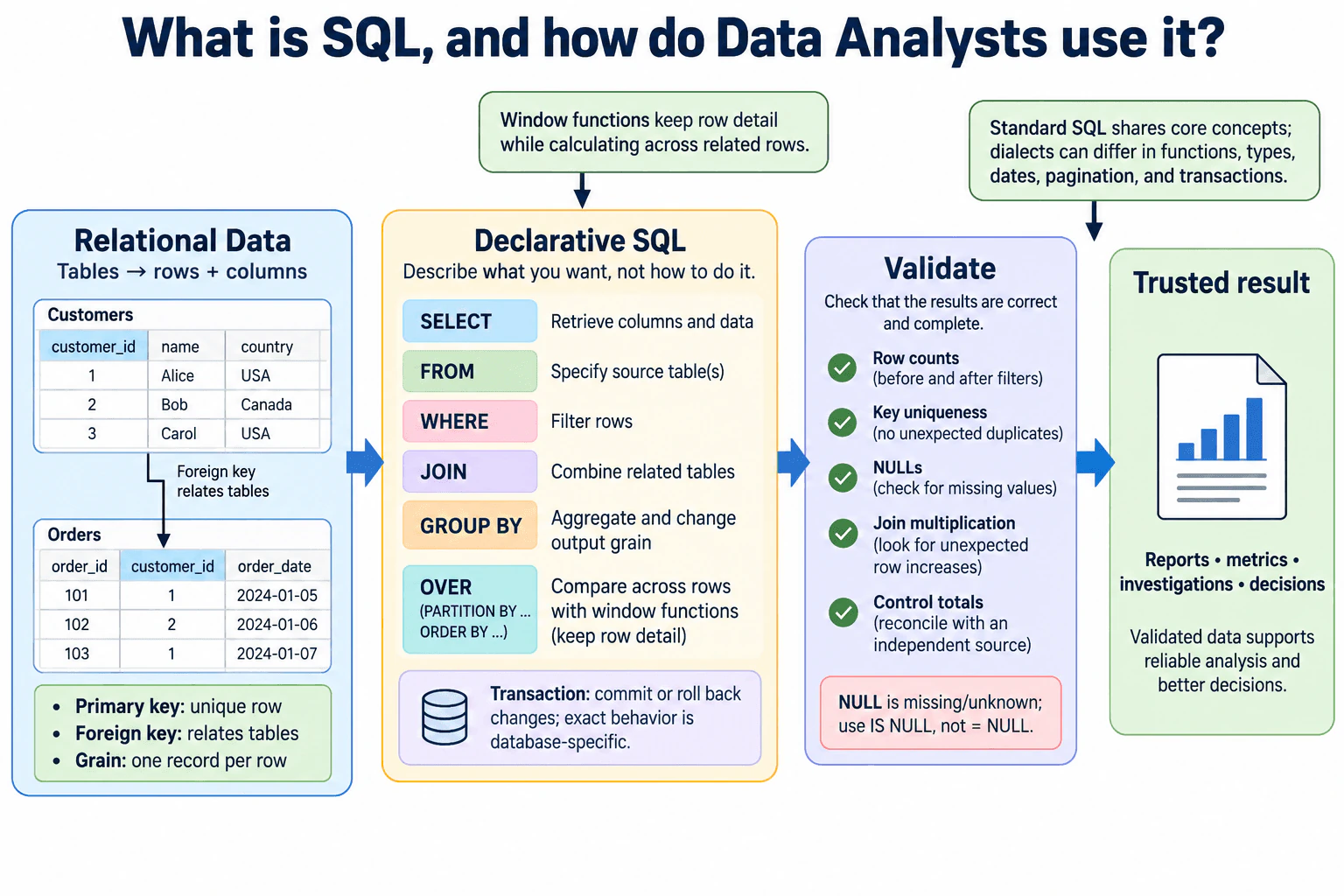
What is SQL, and how do Data Analysts use it? diagram
How to Explain It in an Interview

SQL is declarative. That means I describe the result I want, while the database engine decides the physical execution strategy. I normally focus first on the meaning of the data and the required output rather than trying to control every low-level processing step.

A relational database stores information in tables. A row represents one record at a defined grain, and a column represents one attribute of that record. Grain is important because every calculation depends on what one row means. Before writing a query, I confirm whether a row represents one event, one entity, one transaction, one entity-period, or some other unit. I do not infer the grain only from the table name.

Keys help identify and relate records. A primary key is intended to uniquely identify a row in a table. A foreign key refers to a key in another related table. Analysts use those relationships when joining data, but I still validate uniqueness and cardinality because unexpected one-to-many or many-to-many relationships can multiply rows and distort metrics.

SELECT specifies the columns or expressions returned by a query, and FROM identifies the source. WHERE filters rows before aggregation. These are basic tools for extracting the correct population and required fields directly from the database.

JOIN combines related tables. An INNER JOIN keeps rows that satisfy the join condition on both sides. A LEFT JOIN keeps every row from the left side and adds matching data from the right side when available. The correct join depends on the intended population and relationship. Before trusting a join, I compare row counts, inspect unmatched keys, and test whether either join key contains duplicates or NULLs that could change the result.

GROUP BY changes the output grain by grouping rows before aggregate calculations such as COUNT, SUM, AVG, MIN, or MAX. Analysts use it to calculate metrics by a chosen dimension or reporting period. I make the grouping grain, filters, numerator, denominator, units, and time boundaries explicit because a syntactically valid aggregate can still answer the wrong business question.

Window functions calculate across related rows while generally preserving the row-level detail of the result. Functions such as ROW_NUMBER, RANK, SUM, or AVG can use an OVER clause with PARTITION BY and ORDER BY. Analysts use window functions for ranking, running totals, period comparisons, deduplication rules, and other tasks where GROUP BY would collapse needed detail. If ordering affects the result, I define it deliberately and consider ties rather than relying on an unspecified order.

NULL represents the absence of a known value in SQL. It is not the same as zero or an empty string. Because SQL uses three-valued logic, comparisons involving NULL do not behave like ordinary equality tests. For example, checking for a missing value uses IS NULL rather than = NULL. Aggregate functions also differ in how they treat NULLs, so I verify which rows actually contribute to a metric.

Data types matter because numeric, text, date, timestamp, Boolean, and other values have different comparison and calculation behavior. Implicit or explicit conversions can affect correctness or performance. Numeric precision can change calculations, and date or timestamp analysis can depend on time zones and interval boundaries. I therefore inspect source types before relying on arithmetic, comparisons, joins, or date logic.

SQL also includes transaction concepts. A transaction groups database operations into a logical unit so that changes can be committed together or rolled back when the database and operation support that behavior. Data Analysts often perform read-only queries, but transaction isolation and concurrent updates can still affect which version of changing data a query observes. Exact transaction semantics are database-specific, so I do not assume identical behavior across systems.

Analysts commonly use SQL in four ways. First, extraction: selecting the exact records and fields required. Second, calculation: computing aggregates, conditional logic, rankings, and comparisons. Third, validation: checking row counts, distinct keys, NULLs, duplicates, unmatched joins, and control totals. Fourth, decision support: producing reproducible datasets and metrics that feed reports, dashboards, investigations, and business recommendations.

I also distinguish standard SQL concepts from database-specific dialects. Core ideas such as SELECT, filtering, joins, grouping, and relational tables are broadly shared, but database products can differ in functions, type systems, date arithmetic, identifier rules, pagination syntax, transaction behavior, NULL-related expressions, and supported extensions. A query that is valid in one system is not automatically portable to another.

For validation, I first confirm the source tables and expected grain. I inspect key uniqueness and important NULLs. I compare row counts before and after filters. For joins, I check match rates and unexpected row multiplication. For aggregations, I reconcile totals against an independent control when one exists. I also test a small deterministic slice where I can manually reason through the expected answer. If the query depends on dialect-specific behavior, I document that dependency so another analyst can reproduce it correctly.

The main strength of SQL for analysts is that it works directly with relational data and lets the database perform filtering, joining, grouping, and calculation close to where the data is stored. The main risk is that a short query can still be logically wrong if the grain, join cardinality, NULL behavior, denominator, data type, time boundary, or ordering rule is wrong. Good SQL analysis therefore combines correct syntax with careful validation of the data's meaning.

Technical Approach
  1. Identify the database system and SQL dialect before relying on dialect-specific syntax or functions.
  2. Define the analytical population, output grain, required fields, units, reporting window, and expected comparison.
  3. Inspect the source tables, key relationships, data types, NULL behavior, and expected uniqueness.
  4. Use SELECT and FROM to define the required output and sources.
  5. Apply WHERE filters while checking date boundaries, types, and NULL logic.
  6. Join related tables using validated key relationships and check for unmatched keys or unintended row multiplication.
  7. Use GROUP BY and aggregate functions when the required output has a summarized grain.
  8. Use window functions when calculations need relationships across rows while preserving detail.
  9. Validate row counts, distinct keys, NULLs, duplicates, join match rates, aggregates, and a small deterministic example.
  10. Document material assumptions, dialect-specific behavior, limitations, and validation results before communicating the output.
Time & Space Complexity

The cost of a SQL query depends on how much data the database must read, join, group, sort, and return. Large joins can be expensive, especially when keys are not selective or the relationship unexpectedly multiplies rows. GROUP BY and window functions can require substantial grouping or sorting work. Filtering can reduce unnecessary processing, although the optimizer and physical storage determine the actual execution plan. Analysts should prioritize logical correctness and clear grain first, then use the database's execution plan or query statistics when performance needs investigation. Memory and processing behavior are database-engine concerns and should not be claimed precisely without inspecting the actual plan and system.

Where it is used

Data Analysts use SQL in relational databases, cloud data warehouses, and analytics platforms to extract datasets, investigate trends, calculate recurring metrics, prepare dashboard inputs, reconcile reports, validate pipelines, identify duplicates or missing values, compare periods, segment records, and answer ad hoc business questions. The exact syntax and supported features depend on the SQL dialect of the database being queried.

Why Interviewers Ask This

Interviewers want to know whether the candidate understands SQL as a relational, declarative query language and can connect core SQL concepts to reliable Data Analyst work, including extraction, filtering, joins, aggregation, window functions, validation, data grain, NULL handling, keys, and dialect differences.

Common interview mistakes

Common mistakes include treating SQL only as syntax instead of understanding relational grain; joining on non-unique keys and accidentally multiplying rows; choosing an INNER JOIN when unmatched left-side records must remain; aggregating at the wrong grain; confusing row filtering with post-aggregation filtering; assuming COUNT(column) and COUNT(*) treat NULLs identically; comparing NULL with = instead of using NULL-aware logic; ignoring data types or unsafe conversions; using window functions without deliberate partitioning or ordering; relying on result order without an explicit ORDER BY; overlooking duplicate or unmatched keys; assuming transaction behavior is identical across databases; and treating database-specific syntax as portable standard SQL.

Interview tip

Start with a plain definition of SQL, then connect each major feature to analyst work: SELECT and filtering for extraction, joins for combining related data, grouping for metrics, window functions for row-aware calculations, and validation checks for trustworthy results. Mention grain, keys, NULLs, data types, ordering, and dialect differences to show that you understand correctness rather than only query syntax.
Interviewer may ask next
How would you validate a SQL join if the result contains many more rows than the left table?

I would first confirm the intended relationship and output grain. Then I would test key uniqueness on both sides, count duplicate key values, compare row counts before and after the join, and inspect unmatched and multiply matched keys. A one-to-many relationship can legitimately increase rows, but an unexpected many-to-many relationship can multiply records and inflate metrics. I would inspect a small deterministic set of affected keys and then correct the join condition, pre-aggregate to the required grain, or deduplicate only when there is a justified business rule. I would not remove duplicates blindly because repeated rows may represent valid observations.

What changes if the same analytical query must run on a different database system?

The analytical intent should stay the same, but I would verify the target database's SQL dialect before assuming the query is portable. Functions, date arithmetic, type casting, string operations, identifier rules, pagination syntax, transaction semantics, and supported extensions can differ. I would preserve the same population, grain, join relationships, filters, metric definitions, NULL handling, and validation checks, while adapting only the dialect-dependent syntax and behavior. I would then compare row counts, key checks, aggregates, and deterministic test cases between the two systems to confirm that the translated query still produces the same analytical meaning.

2. What is Python, and how is it used in data analysis?Language SpecificEasy

Question Details

Define Python as a general-purpose programming language. Explain its analyst use for cleaning, reshaping, exploration, statistics, visualization, automation, and reproducible reporting. Cover core types, functions, modules, exceptions, environments, and libraries such as pandas without treating a library as part of the language.

Short Interview Answer (30-60 seconds)

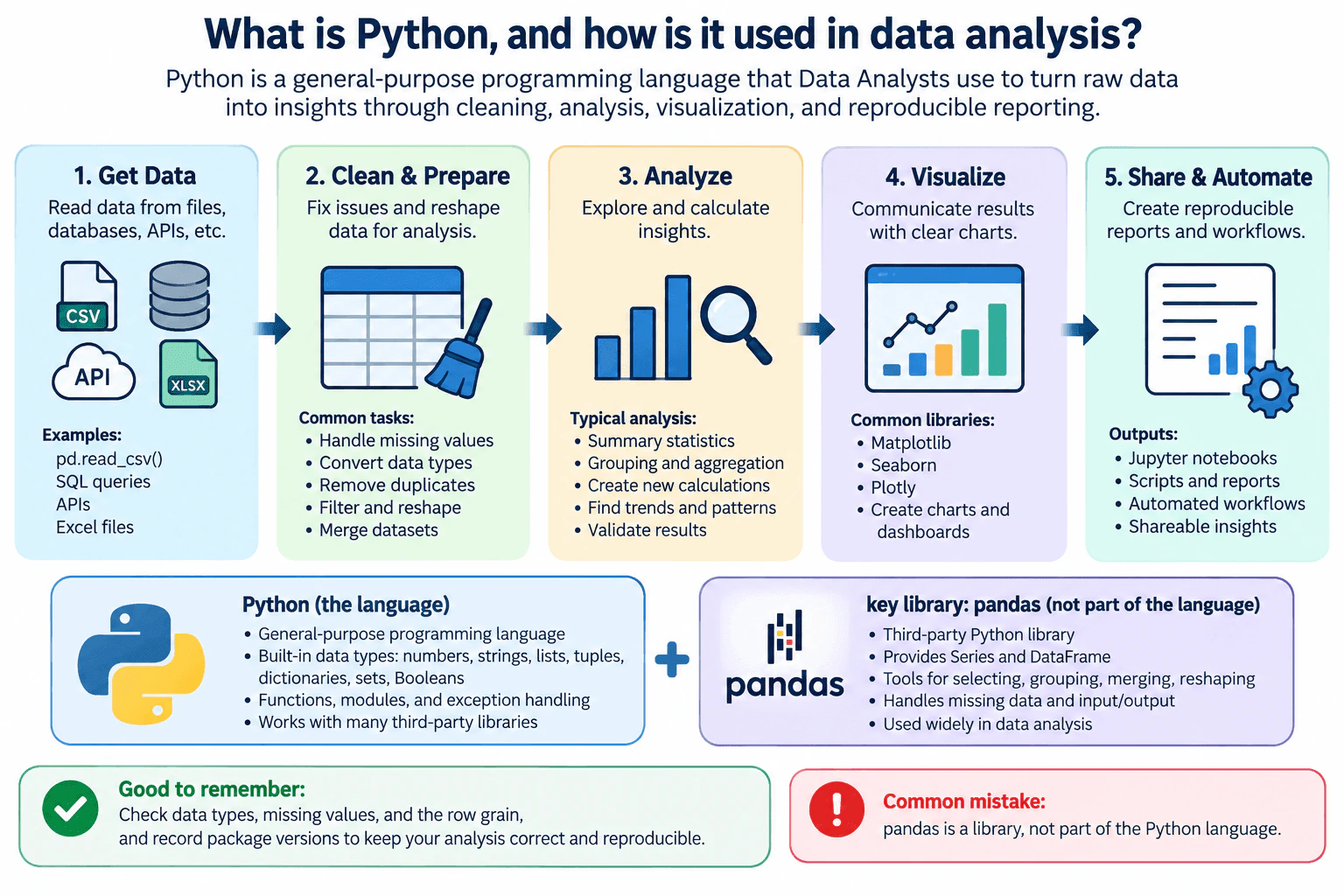
Python is a general-purpose programming language widely used in data analysis because it is readable, flexible, and has a strong ecosystem of analytical libraries. Analysts use it for cleaning and reshaping data, exploratory analysis, statistics, visualization, automation, and reproducible reporting. Python itself provides features such as built-in data types, functions, modules, and exceptions. Libraries such as pandas add tabular-data structures and operations; they are not part of the Python language. In practice, I would also check data types, missing values, row grain, and dependency versions so the analysis remains correct and reproducible.

Detailed Explanation

Python is a general-purpose programming language that analysts use to turn raw data into repeatable analysis. The language and its standard facilities provide core data types, control flow, functions, modules, exceptions, and file handling. Analysts can then add libraries such as pandas for tabular data, statistical packages for analysis, and visualization libraries for charts. A reliable workflow does more than run code: it confirms what each row represents, checks data types and missing values, validates transformations, handles failures deliberately, and records the Python runtime and package dependencies so another analyst can reproduce the work.

Useful Questions to Ask the Interviewer
  1. What kinds of data sources and analytical tasks does the team usually handle with Python?
  2. Which Python libraries and reporting or visualization tools are standard on the team?
  3. How does the team manage Python environments and package versions for reproducible analysis?
  4. Are analysts expected to work mainly with database extracts, APIs, files, or a combination of these?
What is Python, and how is it used in data analysis? diagram
How to Explain It in an Interview

Python is a general-purpose programming language rather than a data-analysis product. Its commonly used built-in types include integers and floating-point numbers, strings, lists, tuples, dictionaries, sets, and Boolean values. These structures can represent individual values and collections, while analytical tables are commonly handled through external libraries.

Functions let an analyst package repeated logic into reusable units. This can reduce duplicated code and make transformations easier to test. Modules organize related functionality, and imports allow a program to use modules from the standard library or installed third-party packages. Exceptions represent errors or unusual conditions. An analyst should catch an exception only when there is a clear recovery or reporting strategy; overly broad exception handling can hide data-quality or programming failures.

In data analysis, Python can support an end-to-end workflow. An analyst may read source data, inspect its structure, clean invalid or inconsistent values, reshape tables, calculate derived fields, summarize groups, perform statistical analysis, create visualizations, automate repeated steps, and generate reproducible reports. Writing these steps as code makes the process easier to rerun and review than a sequence of undocumented manual changes.

It is important to separate Python from its libraries. pandas is a third-party Python library, not part of the Python language. It provides tabular structures such as Series and DataFrame and operations for tasks such as selecting, grouping, merging, reshaping, importing, exporting, and handling missing data. Other statistical or visualization capabilities can similarly come from separate libraries. The distinction matters because their behavior and versions are dependencies of the analysis rather than language guarantees.

Data types matter because operations depend on how values are represented. A column that appears numeric may have been imported as text, and blindly converting it could conceal malformed records. Date and time fields also need deliberate parsing because formats, time zones, and missing values can affect filtering or grouping. I would inspect and validate types before relying on calculations.

Missing data also requires an explicit decision. Python has None, which represents the absence of a value in many contexts, while analytical libraries may provide additional missing-value representations and rules. I would first understand why a value is missing and then decide whether it should remain missing, be excluded, be imputed using a justified method, or trigger a data-quality investigation. Replacing every missing value with zero is unsafe because zero and unknown are not necessarily equivalent.

Data grain means what one row represents. Before joining, reshaping, or aggregating tables, I would confirm the expected grain and relevant key uniqueness. For example, an unintended many-to-many merge can multiply rows and inflate totals even though the code executes successfully. Row counts, uniqueness checks, duplicate checks, and control totals help detect this class of error.

For reproducible analytical scripting, I would keep transformations in a clear order, place reusable logic in functions where helpful, document inputs and assumptions, and validate important intermediate results. Useful checks include expected columns, data types, row counts, key uniqueness, missing-value counts, ranges, and control totals when a meaningful control exists. For critical logic, a small deterministic example with a known expected result is a useful check before applying the same logic to larger data.

The runtime environment is also part of reproducibility. Python's venv module supports creating virtual environments with project-specific packages. Recording the Python version and dependency versions helps another analyst or automated process recreate the environment. Environment isolation does not by itself guarantee identical results, so reproducibility can also depend on input data, configuration, random seeds when applicable, external services, and platform-sensitive behavior.

Python is powerful, but it is not automatically the best tool for every analytical step. SQL may be preferable for filtering, joining, or aggregating data that already resides in a database because the database can process the data before transfer. Python is especially useful when the workflow needs richer transformation logic, statistics, visualization, automation, or integration across multiple sources. The important interview point is that Python should be used with explicit assumptions, validation, and reproducible dependencies rather than simply because many analytical libraries are available.

Technical Approach
  1. Define Python as a general-purpose programming language.
  2. Separate Python language and standard facilities from third-party library features.
  3. Explain analyst-relevant fundamentals such as types, functions, modules, exceptions, and runtime environments.
  4. Connect Python to cleaning, reshaping, exploration, statistics, visualization, automation, and reporting.
  5. Explain pandas as a separate library that provides tabular structures and operations rather than as part of Python itself.
  6. Before analysis, establish the input data's expected grain, types, keys, missing-value meaning, and other relevant assumptions.
  7. Validate transformations with deterministic checks such as row counts, uniqueness checks, type checks, missing-value checks, ranges, and control totals where appropriate.
  8. Preserve reproducibility by recording the Python version, dependencies, inputs, configuration, assumptions, and ordered analytical steps.
Time & Space Complexity

Python does not have one fixed time or memory cost for data analysis because the cost depends on the operation, dataset size, algorithm, and library implementation. Reading a table into memory requires space for the loaded representation, while sorting, joining, grouping, copying, or creating intermediate objects can require additional memory and processing time. Python-level loops can also be slower than operations implemented efficiently by analytical libraries. For large data, an analyst should avoid loading unnecessary columns or rows, push suitable work to a database when appropriate, watch memory usage, and choose methods based on measured behavior rather than assuming one technique is always faster.

Where it is used

Data Analysts use Python for cleaning exported files, reshaping tables, exploratory data analysis, statistical calculations, visualization, combining data from files or APIs, automating recurring analytical tasks, validating datasets, and producing reproducible reports or notebooks. It is especially useful when an analysis needs several programmable and reviewable steps that would be difficult or error-prone to repeat manually.

Why Interviewers Ask This

The interviewer is checking whether the candidate understands what Python itself provides, how analysts apply it in practical workflows, and how Python differs from analytical libraries such as pandas. They also want evidence that the candidate thinks about data types, missing values, data grain, errors, dependencies, validation, and reproducibility rather than treating Python as only a collection of convenient library calls.

Common interview mistakes

Common mistakes include calling pandas part of the Python language; describing Python only through libraries without explaining its own language and standard facilities; ignoring the meaning of missing values; assuming imported fields have correct data types; joining tables without checking row grain or key uniqueness; treating None and every library-specific missing representation as identical; using overly broad exception handling that hides failures; relying on accidental notebook execution order; making unsupported performance claims; and failing to record the runtime and dependency versions required to reproduce the analysis.

Interview tip

Define Python first, then connect it to the analyst workflow. Clearly distinguish Python from pandas and other libraries. Finish by mentioning types, missing values, data grain, validation, and environment versions; that demonstrates analytical correctness as well as familiarity with the language.

Interviewer may ask next
Before using pandas to aggregate a dataset, what would you validate about the data?

I would first confirm the grain, meaning what one row represents, because an aggregation is only meaningful if I understand the level of detail being summarized. I would inspect the grouping and measure columns, their data types, relevant key uniqueness, duplicates, missing values, and units. I would confirm the intended metric and whether missing values should be included, excluded, or handled another way. After aggregation, I would compare useful checks such as row counts, group counts, and control totals where appropriate. This can expose malformed fields, duplicate records, unexpected nulls, or an earlier join that changed the grain.

When might you prefer SQL over Python for part of a data-analysis workflow?

I would often prefer SQL when the required data already lives in a relational database and the task is mainly filtering, joining, or aggregating large tables. Letting the database perform suitable operations can reduce data transfer and avoid loading unnecessary data into Python memory. Python becomes especially useful when I need richer procedural logic, statistical analysis, specialized libraries, visualization, automation, or integration with other sources. The choice is a tradeoff rather than an either-or decision: SQL and Python can be used together, with each handling the part of the workflow it is best suited for.

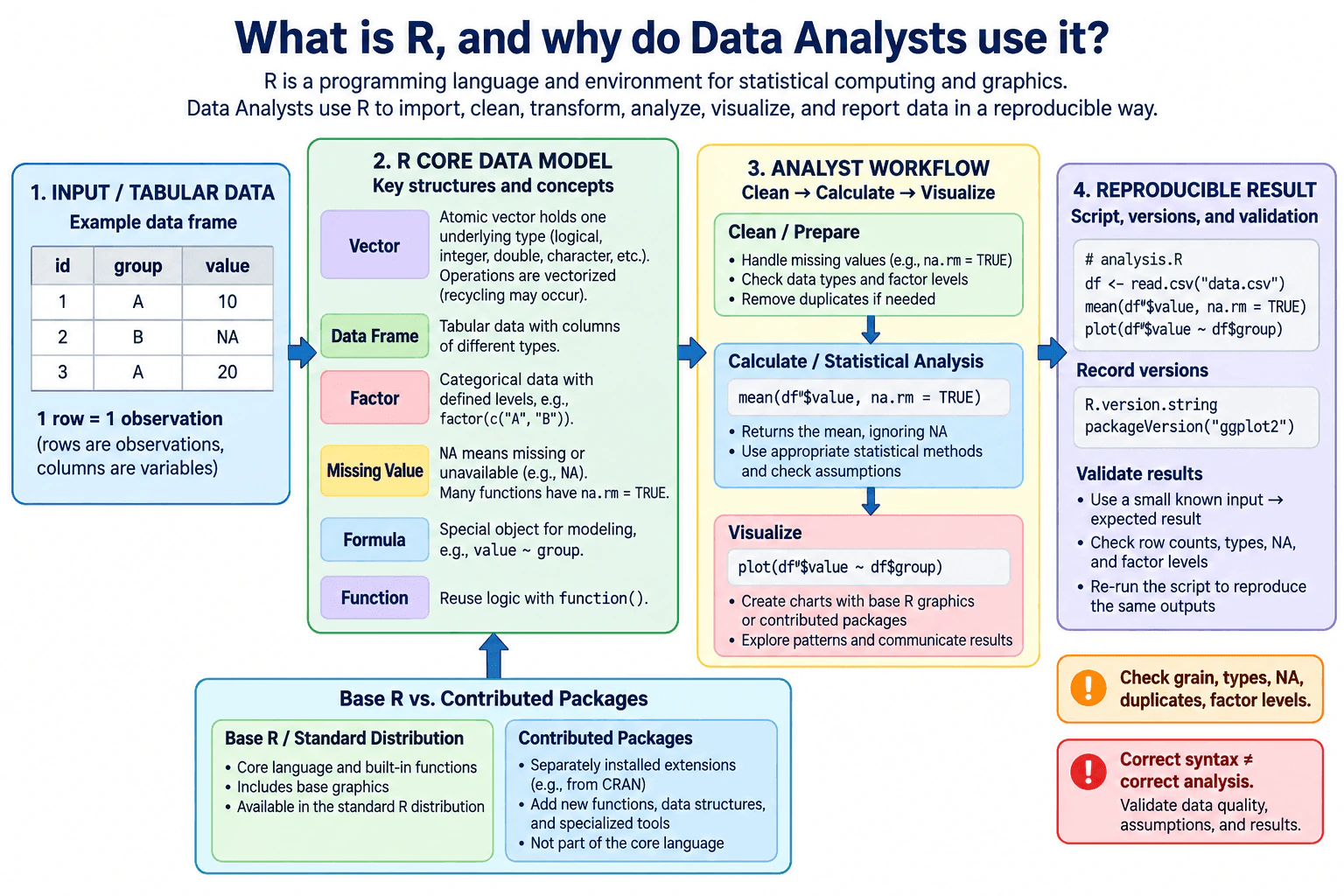
3. What is R, and why do Data Analysts use it?Language SpecificEasy

Question Details

Define R as a language and environment for statistical computing and graphics. Explain vectors, missing values, factors, data frames, functions, packages, formulas, statistical analysis, visualization, and reproducible scripts. Distinguish base R from contributed packages.

Short Interview Answer (30-60 seconds)

R is a programming language and environment designed for statistical computing, data analysis, and graphics. Data Analysts use it because it works naturally with vectors and tabular data, has strong built-in statistical functions, supports missing values such as NA, and makes it easy to create reusable functions and reproducible scripts. Data frames organize variables into columns and observations into rows, while factors represent categorical data with defined levels. R also has a large package ecosystem for specialized analysis and visualization. I would distinguish base R functionality from contributed packages, which are separately installed extensions and can add their own functions and behavior.

Detailed Explanation

R is a programming language and environment designed for statistical computing, data analysis, and graphics. Data Analysts use it to import, clean, transform, summarize, model, visualize, and report data in a reproducible way. Its core ideas include vectors, missing values, factors, data frames, functions, formulas, and statistical methods. R also has an extensive package ecosystem that adds specialized tools. The important distinction is that base R provides the language and built-in functionality, while contributed packages are separately installed extensions that may add their own functions, data structures, and behavior.

Useful Questions to Ask the Interviewer
  1. Are you asking mainly about base R, or should I also discuss commonly used contributed packages?
  2. Would you like me to focus more on R's language fundamentals, statistical capabilities, or how analysts use it in a practical workflow?
  3. Should I compare R with another analytics language, or keep the explanation focused only on R?
What is R, and why do Data Analysts use it? diagram
How to Explain It in an Interview

A clear way to explain R is to start with what it is and then connect its main language features to analyst work.

R is both a programming language and an environment commonly used for statistical computing and graphics. The language provides objects, operators, functions, control flow, data structures, missing-value rules, and statistical capabilities. The environment lets analysts execute code interactively, inspect objects, run scripts, create graphics, and use installed packages.

A fundamental R data structure is the vector. An atomic vector is an ordered collection of values of one underlying type, such as logical, integer, double, complex, character, or raw. Many R operations are vectorized, so an analyst can apply an operation across many values without writing an explicit loop for each element. R also has vector recycling: when compatible vectorized operations use different lengths, the shorter vector may be repeated. If the longer length is not a multiple of the shorter length, R commonly warns, so analysts should verify that recycling is actually intended rather than relying on it accidentally.

Missing data is represented mainly by NA. NA means a value is missing or unavailable, and many calculations propagate NA unless the function provides an explicit way to remove or otherwise handle missing values, such as na.rm = TRUE for many summary functions. R also has typed missing values internally, such as logical, integer, double, complex, and character NA variants. NaN is different: it represents an undefined numeric result, such as an indeterminate mathematical operation, although is.na() also treats NaN as missing. Analysts should not remove missing values automatically because doing so can change the population, denominator, or interpretation of a result.

Factors represent categorical data using a set of levels. Internally, a factor stores integer codes together with level labels. Factors are useful when categories have meaning in summaries, plots, or statistical models. Analysts should inspect both the values and the level definitions because unused levels, level ordering, or an unintended reference level can affect displays and model interpretation. A character vector and a factor are therefore not interchangeable even when they display similar text.

For tabular work, R commonly uses data frames. A data frame is a list-like tabular structure whose columns have equal numbers of rows, while different columns may have different types. In analytical practice, rows usually represent observations and columns represent variables. The analyst must still define the grain explicitly: R cannot determine what one row is supposed to mean from the data alone. Before calculating metrics, I would check row counts, column types, duplicates, missingness, factor levels, and whether each row represents the intended unit of analysis.

Functions make analytical logic reusable. R includes many built-in functions, and analysts can define their own functions with function(). A function can accept arguments, perform calculations, and return a result. This reduces repeated logic and makes validation easier because the same transformation or calculation can be tested once and reused consistently.

R also supports formulas, which are special objects commonly written with syntax such as response ~ predictor. Formula interfaces are widely used by modeling and statistical functions to describe relationships among variables. A formula does not perform a statistical analysis by itself; the function receiving the formula determines how it is interpreted. Analysts therefore need to understand both the formula syntax and the semantics of the function that uses it.

Statistical analysis is one of R's major strengths. Base R and the standard R distribution provide functions for descriptive statistics, probability distributions, hypothesis testing, linear modeling, and other analytical tasks. This lets an analyst move from data preparation into statistical reasoning without changing languages. However, obtaining a numeric result from a statistical function does not prove that the method is appropriate. The analyst still has to validate the population, sample, assumptions, variable definitions, data quality, and interpretation.

Visualization is also central to R. Base R includes graphics functionality for producing plots, while contributed packages can provide additional plotting systems, themes, geoms, interactive graphics, or specialized chart types. This distinction matters in an interview: functionality supplied by an installed package should be described as package functionality rather than as an inherent feature of the R language itself.

The same distinction applies more broadly to packages. Base R refers to the core language and functionality provided by the base installation. The R distribution also ships with standard and recommended packages, but those should not be confused with arbitrary contributed packages. Contributed packages are separately maintained extensions, commonly distributed through repositories such as CRAN or other sources, and can add functions, classes, data structures, statistical methods, import tools, or visualization systems. Their behavior and dependencies can vary by version, so reproducible analysis should record the relevant R version and package versions when those versions matter.

Reproducible scripts are another reason analysts use R. Instead of manually repeating a sequence of spreadsheet steps, an analyst can save imports, cleaning rules, calculations, checks, models, and outputs as code. Someone else can inspect the logic and rerun it with the same inputs and compatible dependencies. Strong reproducibility also requires clear input definitions, explicit assumptions about row grain, documented package dependencies, controlled randomness when applicable, and checks that confirm important outputs have not changed unexpectedly.

A small deterministic example is a good validation technique. If a transformation or summary is supposed to produce a known result, I can create a tiny vector or data frame where the expected answer is obvious, run the R logic, and compare the actual output with that expectation. I would also test boundary cases such as NA values, empty groups, unexpected factor levels, duplicate rows, or incompatible types when those cases are relevant.

The main practical value of R is that it combines data structures, statistical methods, graphics, functions, packages, and scripting in one analytical environment. Its strengths do not remove the need for data-quality and method checks. Before trusting an R result, I would confirm the input types, missing-value treatment, factor levels, row grain, assumptions, dependencies, and important output totals. That separates code that merely runs from analysis that is actually correct and reproducible.

Technical Approach
  1. Define R as a programming language and environment for statistical computing and graphics.
  2. Explain its core data structures and semantics: vectors, types, vectorization, recycling, factors, data frames, and missing values.
  3. Explain how functions and formulas support reusable analytical work and statistical modeling.
  4. Connect R to statistical analysis and visualization.
  5. Distinguish base R and functionality distributed with R from separately maintained contributed packages.
  6. Explain reproducible scripting, dependency and version awareness, and explicit data-grain assumptions.
  7. Validate the reasoning with small deterministic examples and checks for row counts, types, missingness, duplicates, factor levels, assumptions, and expected outputs.
Practical Complexity & Trade-offs

There is no single time or space complexity for R itself because the cost depends on the operation, data structure, algorithm, and package implementation. A simple element-wise operation over n values usually requires work proportional to n and may require memory for a result of similar size, while sorting, joins, statistical models, and package functions can have very different costs. For Data Analysts, the practical tradeoffs are usually execution time, memory use, dataset size, copying of objects, package dependencies, and maintainability. Large in-memory data can become expensive, so analysts should measure the actual operation instead of assuming that every R workflow has the same performance characteristics.

Where it is used

Data Analysts use R for exploratory data analysis, data cleaning, descriptive statistics, hypothesis testing, regression and other statistical models, experimentation, visualization, repeated reporting, research analysis, and reproducible analytical scripts. It is especially useful when statistical reasoning, graphics, or repeatable analysis are important parts of the workflow.

Why Interviewers Ask This

The interviewer is checking whether you understand R as both a programming language and an environment for statistical computing, whether you know its core data structures and missing-value behavior, and whether you can explain why analysts use it for statistical analysis, visualization, and reproducible work without confusing built-in R features with contributed packages.

Common interview mistakes

Common mistakes include describing R only as a statistics tool instead of a programming language, confusing base R with functionality supplied by contributed packages, treating factors as ordinary character vectors, relying on unintended vector recycling, assuming NA is the same as zero or an empty string, confusing NA with NaN, removing missing values without checking the analytical effect, failing to define the row grain of a data frame, assuming that a statistical function guarantees a valid method, and writing scripts without recording important dependencies or validating outputs.

Interview tip

Define R first, then explain vectors, missing values, factors, data frames, functions, formulas, statistics, visualization, and reproducible scripts. Clearly separate base R from contributed packages, and finish by showing that correct R syntax still requires checks for data grain, types, missingness, assumptions, dependencies, and expected results.

Interviewer may ask next
What happens when an R vector contains NA values, and how would you validate an analysis that removes them?

NA represents a missing value, and many R calculations propagate NA unless the function supports and uses an explicit missing-value option such as na.rm = TRUE. I would not remove missing observations automatically. First I would count and inspect where the NAs occur, understand why they are missing, determine whether removal changes the intended population or denominator, compare row counts before and after filtering, and test whether key summaries change materially. I would also verify the behavior on a small deterministic example containing known values and NA. The important point is that handling NA is an analytical decision as well as a syntax decision.

When would you prefer base R functionality over a contributed package, and what tradeoff does that create?

I might prefer base R when its built-in functionality solves the problem clearly because that can reduce external dependencies and make a script easier to run in a standard R environment. I would use a contributed package when it provides a clearer, safer, more specialized, or more maintainable solution. The tradeoff is that packages add capability but also introduce dependency, compatibility, and version-management requirements. For reproducible work, I would record the relevant R and package versions, verify that required packages are available, and validate that the same inputs still produce the expected analytical result in the target environment.

4. What is Julia, and where can it fit in a Data Analyst workflow?Language SpecificEasy

Question Details

Define Julia as a high-level dynamic language for technical computing. Explain multiple dispatch, types, arrays, one-based indexing, missing values, packages, environments, performance, and interoperability, then identify realistic numerical or analytical use cases without claiming it is required for most analyst roles.

Short Interview Answer (30-60 seconds)

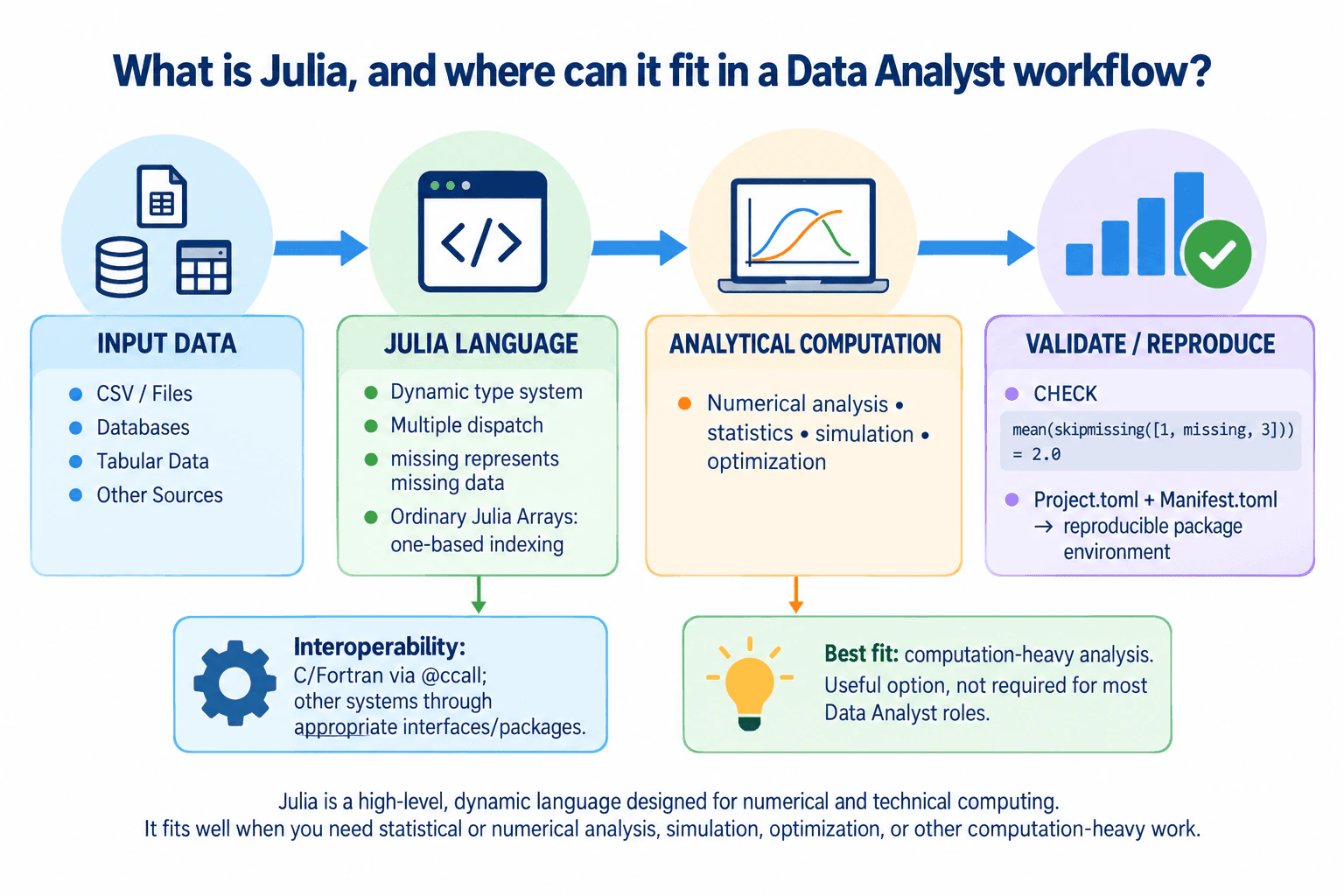
Julia is a high-level, dynamic programming language designed especially for numerical and technical computing. It combines interactive scripting with a rich type system, multiple dispatch, efficient arrays, one-based indexing for ordinary Julia Arrays, explicit missing-value support, and compiled execution. For a Data Analyst, Julia can fit well in numerical analysis, simulation, optimization, statistics, or other computation-heavy work. Packages extend it for tables, visualization, databases, and interoperability. I would treat Julia as a useful specialized option rather than a required analyst language because SQL, spreadsheets, Python, or R remain more common in many analyst workflows.

Detailed Explanation

Julia is a high-level, dynamic language designed for technical and numerical computing. A Data Analyst can use it to transform data, calculate metrics, run statistical or numerical analysis, and automate reproducible workflows. Important Julia concepts include multiple dispatch, a rich type system, arrays, one-based indexing for ordinary Arrays, explicit missing values, packages, and project environments. Julia compiles specialized code and can perform very well on computation-heavy work. However, it should be chosen because it fits the workload and team environment, not because every analyst role requires it.

Useful Questions to Ask the Interviewer
  1. Is the question mainly testing Julia language fundamentals, or should I also discuss common data-analysis packages?
  2. Is the expected workflow mostly tabular reporting, or does it include computation-heavy work such as numerical modeling, optimization, or simulation?
  3. Should I compare Julia with the languages already used by the analytics team?
What is Julia, and where can it fit in a Data Analyst workflow? diagram
How to Explain It in an Interview

Start with the language itself. Julia is dynamically typed, so programmers can write useful code without declaring argument or variable types everywhere. Values still have types, and Julia has a nominative, parametric type system. Explicit type information is useful when defining data representations, expressing invariants, or controlling multiple dispatch, but routine function arguments do not need annotations just to make Julia compile them efficiently.

A central Julia feature is multiple dispatch. A function can have several methods, and Julia selects the most specific applicable method using the types of all arguments involved in dispatch, not only the first argument. This is especially useful in mathematical and analytical software because the same operation can have appropriate implementations for different combinations of numeric or other data types.

Arrays are another important part of Julia. Built-in Array objects include vectors, matrices, and higher-dimensional arrays and integrate naturally with numerical operations. Ordinary Julia Arrays use one-based indexing, so their first element is normally at index 1 rather than index 0. An analyst coming from Python must not mechanically copy zero-based indexing assumptions. For generic Julia code, functions such as eachindex, axes, firstindex, and lastindex are safer than assuming every possible AbstractArray has a particular index range.

Types remain important even though Julia is dynamic. Integers, floating-point values, strings, dates, and values that may be missing should not be treated as interchangeable without understanding their meaning. The analytical data grain is separate from the programming-language type system: before computing a metric, I still need to know what one observation represents and verify that filtering, joining, aggregation, or reshaping does not accidentally change that grain.

Julia represents a statistically unavailable value with missing, whose type is Missing. Many normal operations involving missing propagate missing rather than silently inventing a value. An analyst therefore needs an explicit policy: retain the missing observations, exclude them when analytically justified, impute them using a defensible method, or handle them separately. Missing must not automatically be treated as zero. This missing-value behavior is part of Julia itself, while packages may provide additional table-oriented functions for filtering, transforming, or summarizing data containing missing values.

It is also important to separate Julia language features from package features. Core Julia provides the language, types, functions and methods, dispatch, arrays, modules, control flow, and other fundamentals. Packages add domain-specific capabilities such as richer tabular manipulation, plotting, optimization, statistical modeling, file formats, or integrations. I would not describe a package capability as if every Julia installation provided it directly.

Julia includes the Pkg package-management system and supports project environments. Project.toml identifies a project's direct dependencies and can state compatibility requirements. Manifest.toml, when present, records the resolved dependency graph and specific dependency versions. Keeping the project and manifest information with an analysis makes the software environment much easier to reproduce. Full analytical reproducibility still also depends on the Julia version where relevant, input data, configuration, random seeds where applicable, external services, and any other runtime assumptions.

Performance is one reason Julia is attractive. Julia uses type inference and compilation to generate specialized machine code for method and argument-type combinations. Well-written numerical code can therefore achieve strong performance while remaining high-level. However, performance is not automatic. Compilation latency can affect the first execution of methods, type-unstable or allocation-heavy code can perform poorly, and different algorithms have different complexity. I would benchmark a representative workload rather than claim that code is fast merely because it is Julia.

For a Data Analyst, realistic Julia use cases include numerical transformations, statistical computing, simulation, optimization, scientific or engineering analysis, and analytical workflows with substantial computation. Packages can also support normal tabular analysis, database access, visualization, and file handling. However, if a role is dominated by SQL queries, spreadsheets, standard dashboards, or an established Python or R workflow, introducing Julia may add training, deployment, and maintenance cost without enough benefit.

Interoperability can help when Julia must coexist with an existing stack. Julia has language facilities for calling native C and Fortran code, while packages can provide additional bridges to other languages and systems. I would verify the exact interface or package, supported versions, type and data conversions, memory ownership where relevant, and deployment constraints instead of assuming interoperability is always transparent or cost-free.

To validate a Julia analysis, I would start with a small deterministic input whose expected output can be calculated independently. I would compare values, element or column types, dimensions, row or observation counts, missing-value behavior, and the intended grain. For a larger workflow, I would also test empty inputs, unexpected types, missing observations, duplicate records where relevant, boundary values, and environment recreation. This separates computational performance from analytical correctness: fast code is still wrong if the metric definition, missing-value policy, or data grain is wrong.

My conclusion would be that Julia is a strong technical-computing language and can be valuable when an analyst's work becomes numerical or computation-heavy. Multiple dispatch, its type system, arrays, missing-value support, packages, environments, and compiled execution are meaningful strengths. But choosing Julia should depend on the workload, existing team skills, surrounding systems, reproducibility needs, and maintenance cost. I would not claim that Julia is required for most Data Analyst roles.

Technical Approach
  1. Define Julia as a high-level dynamic language for technical and numerical computing.
  2. Separate core language behavior from functionality supplied by packages.
  3. Explain multiple dispatch and Julia's type system.
  4. Explain arrays and one-based indexing for ordinary Julia Arrays while avoiding unsafe indexing assumptions in generic code.
  5. Explain missing and require an explicit analytical policy for missing observations.
  6. Describe packages and project environments for extending and reproducing analysis.
  7. Explain compiled performance as workload-dependent rather than a universal speed guarantee.
  8. Identify realistic analyst use cases such as numerical analysis, simulation, optimization, and statistical computing.
  9. Discuss interoperability and the cost of introducing another language into an existing stack.
  10. Validate with a deterministic example, checking values, types, dimensions, missing values, counts, and data grain before accepting the result.
Practical Complexity & Trade-offs

Julia itself does not have one time or memory complexity because those costs come from the algorithm and data structures used. For an analyst, practical costs include execution time, compilation latency, allocations, memory used by arrays or tables, package loading, and maintenance of the environment. A computation-heavy numerical routine may benefit substantially from compiled Julia code, while a tiny one-time task may not. When performance matters, benchmark a representative workload and distinguish first-run compilation effects from repeated execution.

Where it is used

Julia can fit into numerical analysis, statistical computing, optimization, simulation, scientific or engineering analytics, repeated mathematical calculations, and other computation-heavy analytical workflows. Packages can extend it to tabular data, visualization, databases, file formats, and interoperability. It is most compelling when those capabilities or numerical performance solve a real workflow need; it is usually unnecessary to introduce Julia solely for routine SQL querying, spreadsheet reporting, or dashboards when the existing stack already handles them effectively.

Why Interviewers Ask This

The interviewer is checking whether you understand what Julia provides as a language, can separate core language features from package features, and can judge where it is useful in analytical work without exaggerating its importance for typical Data Analyst roles.

Common interview mistakes

Common mistakes are describing Julia as merely a faster version of another language; forgetting that ordinary Julia Arrays use one-based indexing; assuming every possible AbstractArray has the same index range; confusing core language features with package features; assuming explicit type annotations are required everywhere for performance; treating missing as zero or silently dropping missing observations; ignoring data grain while focusing on syntax; claiming Julia code is automatically fast without considering compilation, type stability, allocations, and algorithm choice; failing to preserve project dependencies for reproducibility; and presenting Julia as required for most Data Analyst roles when its value depends on the workload and team ecosystem.

Interview tip

Define Julia first, then organize the answer around multiple dispatch and types, arrays and indexing, missing values, packages and environments, performance, interoperability, and realistic analyst use cases. Finish by explaining that Julia is a strong option for computation-heavy analytical work, but language choice should follow the workload and team environment rather than treating Julia as universally required.

Interviewer may ask next
If a Julia array or table column can contain both numbers and missing, what should an analyst check before calculating a summary?

First define what missing means for that field and whether those observations belong in the population being summarized. Then check the element or column type, the number and location of missing observations, the data grain, and the intended denominator. Because missing propagates through many Julia operations, use an explicit missing-value policy rather than accidentally treating absence as zero or silently excluding observations. Finally, test the calculation on a small deterministic example and reconcile counts and results with an independent calculation.

When would you choose not to introduce Julia even if a calculation could run efficiently in it?

I would avoid adding Julia when the existing SQL, spreadsheet, Python, or R workflow already meets the required correctness, runtime, scale, reproducibility, and maintenance needs and the benefit would not justify another language, package environment, deployment path, and skill requirement. I would also consider who must maintain the analysis and how it integrates with reporting or production systems. Julia becomes more attractive when a real numerical, simulation, optimization, or performance requirement outweighs those additional operational and team costs.

5. What is Scala, and when might a Data Analyst encounter it?Language SpecificEasy

Question Details

Define Scala as a statically typed language combining object-oriented and functional programming on the JVM. Explain immutable collections, higher-order functions, pattern matching, Option, Java interoperability, and why an analyst may encounter Scala in Spark-based environments while usually querying or analyzing rather than engineering the platform.

Short Interview Answer (30-60 seconds)

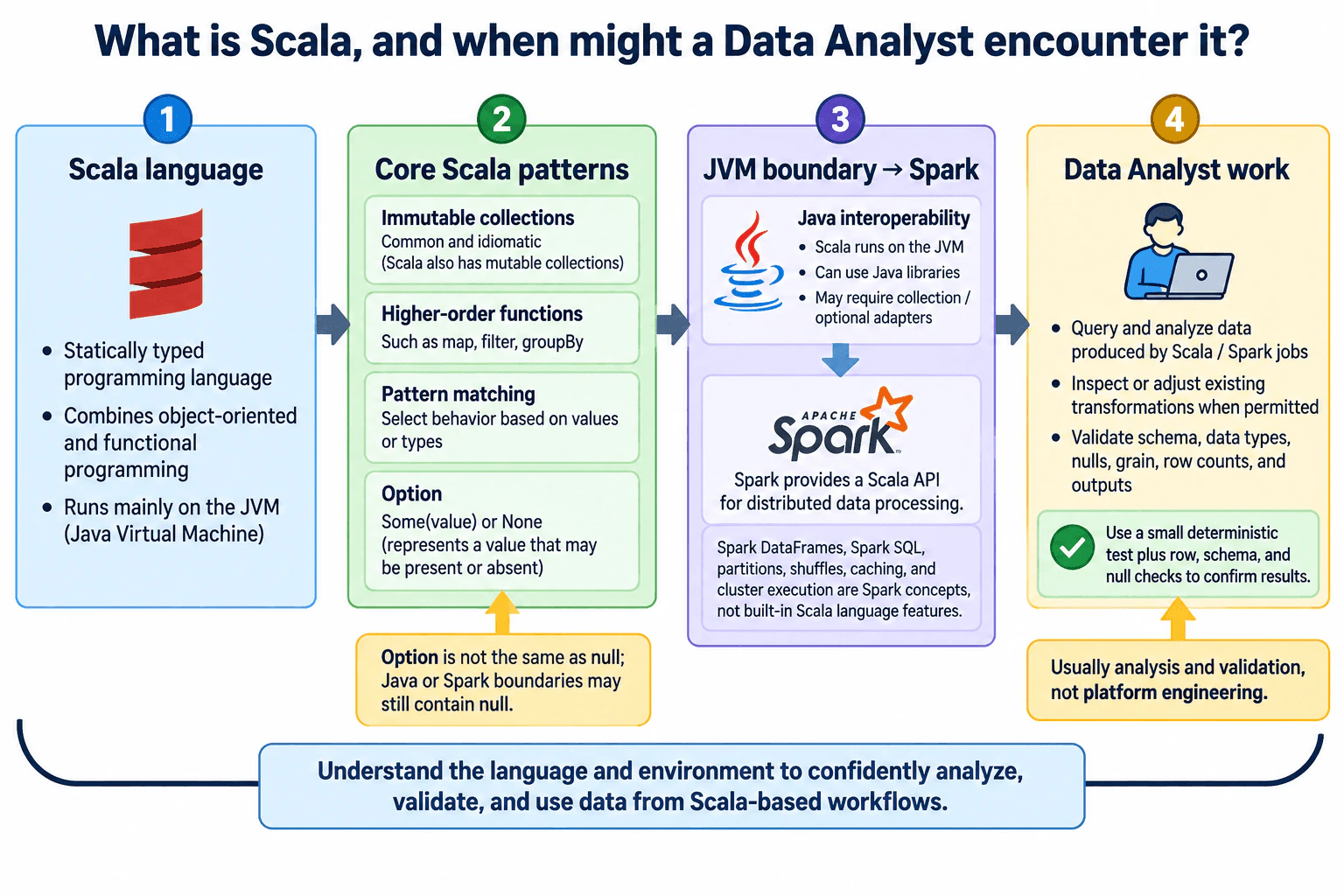
Scala is a statically typed programming language that runs mainly on the JVM and combines object-oriented and functional programming. It supports features such as immutable collections, higher-order functions, pattern matching, and Option for representing a value that may be absent. It also interoperates closely with Java. A Data Analyst may encounter Scala in organizations that use Apache Spark or other JVM-based data systems. The analyst may read Scala transformations, run or adjust existing Spark jobs, or work with outputs produced by them, while usually focusing on querying, validation, and analysis rather than engineering the platform itself.

Detailed Explanation

Scala is a statically typed language that runs mainly on the Java Virtual Machine, or JVM. It combines object-oriented programming with functional programming, so code can use classes and objects while also relying on immutable data and functions as values. A Data Analyst is most likely to encounter Scala in a data platform that uses Apache Spark or other JVM-based tooling. The analyst may need to understand existing Scala code, validate transformations, or work with resulting datasets, but usually does not need to engineer the distributed platform itself.

Useful Questions to Ask the Interviewer
  1. Is Scala used directly by analysts, or mainly inside data engineering and Spark pipelines?
  2. Are analysts expected to write Scala code, review existing jobs, or only understand the outputs they produce?
  3. Is the analytical interface based on Spark DataFrames, SQL, another library, or ordinary Scala collections?
  4. What is the row or record grain of the dataset produced by the Scala or Spark workflow?
  5. How are missing values represented and validated in the environment: Scala Option, nulls from Java-facing APIs, Spark SQL nulls, or another convention?
  6. Which Scala, JVM, Spark, and package versions are required to reproduce the workflow?
What is Scala, and when might a Data Analyst encounter it? diagram
How to Explain It in an Interview

Start with the language itself. Scala is statically typed, meaning expressions and values have types that the compiler can check. Scala supports both object-oriented programming, such as classes, objects, and methods, and functional programming, such as immutable values and functions that can be passed to other functions.

Immutable collections are common in Scala. With an immutable collection, an operation such as map or filter returns another collection rather than modifying the original collection in place. Scala also provides mutable collections, so immutability is an available and commonly preferred style, not a claim that every Scala collection or object is immutable.

Higher-order functions are functions that accept other functions as arguments or return functions. For example, collection operations such as map and filter can take functions that describe how values should be transformed or selected. For an analyst, this resembles expressing a sequence of cleaning, validation, or calculation rules. The analyst should still confirm that every transformation preserves or intentionally changes the expected data grain and types.

Pattern matching lets Scala select behavior based on values, types, or structured cases. It can make validation, parsing, and branching logic easier to read than a long chain of conditions. Analysts may encounter pattern matching when inspecting typed transformation or data-quality code.

Option is Scala's standard type for representing a value that may be present or absent. Some(value) represents a present value, while None represents absence. Using Option can make absence explicit in ordinary Scala code and reduce reliance on unchecked null references. However, Scala runs on the JVM and interoperates with Java, so null can still enter through Java APIs or other boundaries. Spark DataFrame and Spark SQL columns also have their own null semantics. An analyst should therefore identify which representation applies instead of treating Option, JVM null, and Spark SQL null as interchangeable.

Java interoperability matters because Scala targets the JVM and can use Java classes and libraries. Java code can also interact with Scala code, although some Scala-specific types and language features may require adapters or careful API design. This interoperability helps Scala fit into existing JVM-based systems.

For Data Analysts, Apache Spark is a common reason Scala appears in the workflow. Spark exposes a Scala API for distributed data processing. Spark itself is a separate processing engine and library ecosystem: Spark DataFrames, Spark SQL execution, partitions, shuffles, caching, and cluster execution are Spark concepts rather than built-in Scala language features. Keeping that distinction clear avoids incorrectly attributing distributed-processing behavior to Scala itself.

In practice, an analyst may open a Scala notebook or source file, inspect a Spark transformation, modify a straightforward filter or aggregation when the role permits it, validate output counts, or investigate how an analytical table was produced. The analyst should verify the input schema, field types, missing-value representation, record grain, filtering rules, join behavior, aggregation level, and resulting row counts before trusting the output. If a workflow changes data from one row per event to one row per customer, for example, that grain change must be deliberate and validated rather than treated as a property of Scala.

Reproducibility also matters. A Scala workflow can depend on the Scala version, JVM version, Spark version, and external library versions. Those dependencies should be recorded or managed by the project so another person can run the same analytical process in a compatible environment. A useful validation technique is to pass a small deterministic input through a transformation and compare the actual output with manually expected rows or aggregates. For larger workflows, schema checks, row counts, null counts, duplicate checks, control totals, and an independent SQL or aggregate check can provide additional confidence.

The main tradeoff is that Scala offers strong static typing and fits naturally into JVM and Spark environments, but it may be less familiar to analysts whose daily tools are SQL, Python, spreadsheets, or BI products. A Data Analyst normally needs enough Scala knowledge to understand the data path, validate transformations, and communicate with engineering teams. Deeper knowledge of distributed execution, cluster configuration, deployment, and platform internals becomes important when the role explicitly includes data engineering or production-pipeline responsibilities.

Technical Approach
  1. Define Scala as a statically typed JVM language that supports object-oriented and functional programming.
  2. Explain the Scala features most relevant to reading analytical code: immutable collections, higher-order functions, pattern matching, Option, and Java interoperability.
  3. Keep Scala language behavior separate from Spark library and distributed-processing behavior.
  4. Explain where a Data Analyst may encounter Scala, especially in Spark-based environments.
  5. When reviewing Scala-based analytical work, verify input schema, types, missing-value representation, record grain, transformations, and outputs.
  6. Validate the logic with a small deterministic example and appropriate schema, row-count, null, duplicate, or aggregate checks.
  7. Record compatible Scala, JVM, Spark, and library versions for reproducibility.
  8. Distinguish normal analyst responsibilities from production platform engineering unless the role explicitly includes both.
Practical Complexity & Trade-offs

Scala does not have one fixed time or memory cost because performance depends on the specific operation, collection type, evaluation behavior, library, and amount of data. For example, traversing a strict collection with a simple map or filter is commonly proportional to the number of elements visited, but other operations can have different costs. Spark transformations introduce separate distributed-system costs such as shuffling, serialization, partitioning, and network or disk I/O. In an interview, do not describe those Spark costs as properties of the Scala language itself.

Where it is used

A Data Analyst may encounter Scala in organizations that use Apache Spark or other JVM-based data systems. Typical situations include reading Scala notebooks or jobs, understanding how an analytical dataset was transformed, making a small change to existing code when permitted, validating Spark outputs, tracing a data-quality issue, or communicating analytical requirements to data engineers. Analysts commonly remain focused on querying, validation, calculation, and interpretation rather than cluster management or platform engineering.

Why Interviewers Ask This

The interviewer wants to know whether you understand what Scala is, can distinguish Scala language features from Spark features, and recognize why a Data Analyst may encounter Scala in JVM-based data environments without necessarily being responsible for engineering the underlying platform.

Common interview mistakes

Common mistakes include saying Scala and Spark are the same thing, describing Spark DataFrames or distributed execution as built-in Scala features, claiming all Scala collections are immutable, assuming Option prevents every possible null, treating Option and Spark SQL nulls as identical, ignoring Java interoperability, or discussing Scala without checking data types and grain. Another mistake is assuming that encountering Scala means a Data Analyst must be responsible for cluster administration or production platform engineering.

Interview tip

Define Scala first, name a few relevant language features, and then connect it to Spark-based analytical environments. Explicitly distinguish Scala from Spark and explain that an analyst often needs to understand and validate Scala-based transformations without necessarily engineering the distributed platform.

Interviewer may ask next
If a Scala transformation uses Option for some values but the data also comes from Spark DataFrames, how would you validate missing values?

I would first identify where ordinary Scala values end and Spark DataFrame columns begin because they use different missing-value representations. For Scala values modeled with Option, I would test both Some and None cases. For Spark DataFrame columns, I would use Spark's schema and null semantics rather than assuming Option rules apply. I would then check null or missing counts for the relevant fields, confirm the intended record grain, test a small deterministic sample containing present and missing values, and compare the resulting rows or aggregates with the expected result.

What changes if the analyst is expected to maintain production Scala Spark jobs rather than only analyze their outputs?

The role moves closer to data engineering. In addition to understanding Scala syntax and analytical logic, I would need stronger knowledge of Spark execution, partitioning, shuffles, serialization, dependency compatibility, testing, logging, failure handling, deployment, resource use, and production monitoring. I would still validate schemas, types, missing values, grain, and business calculations, but I would also be responsible for operational reliability and performance. That broader scope should be made explicit because it is different from an analyst who mainly reads Scala code or validates its outputs.

6. What is Bash, and how can a Data Analyst use a .sh script safely?Language SpecificEasy

Question Details

Define Bash as a Unix shell and command language. Explain commands, pipelines, variables, quoting, redirection, exit status, functions, and .sh scripts. Connect it to repeatable file and analysis tasks while covering strict error handling, safe paths, validation, secrets, portability, and when Python is more maintainable.

Short Interview Answer (30-60 seconds)

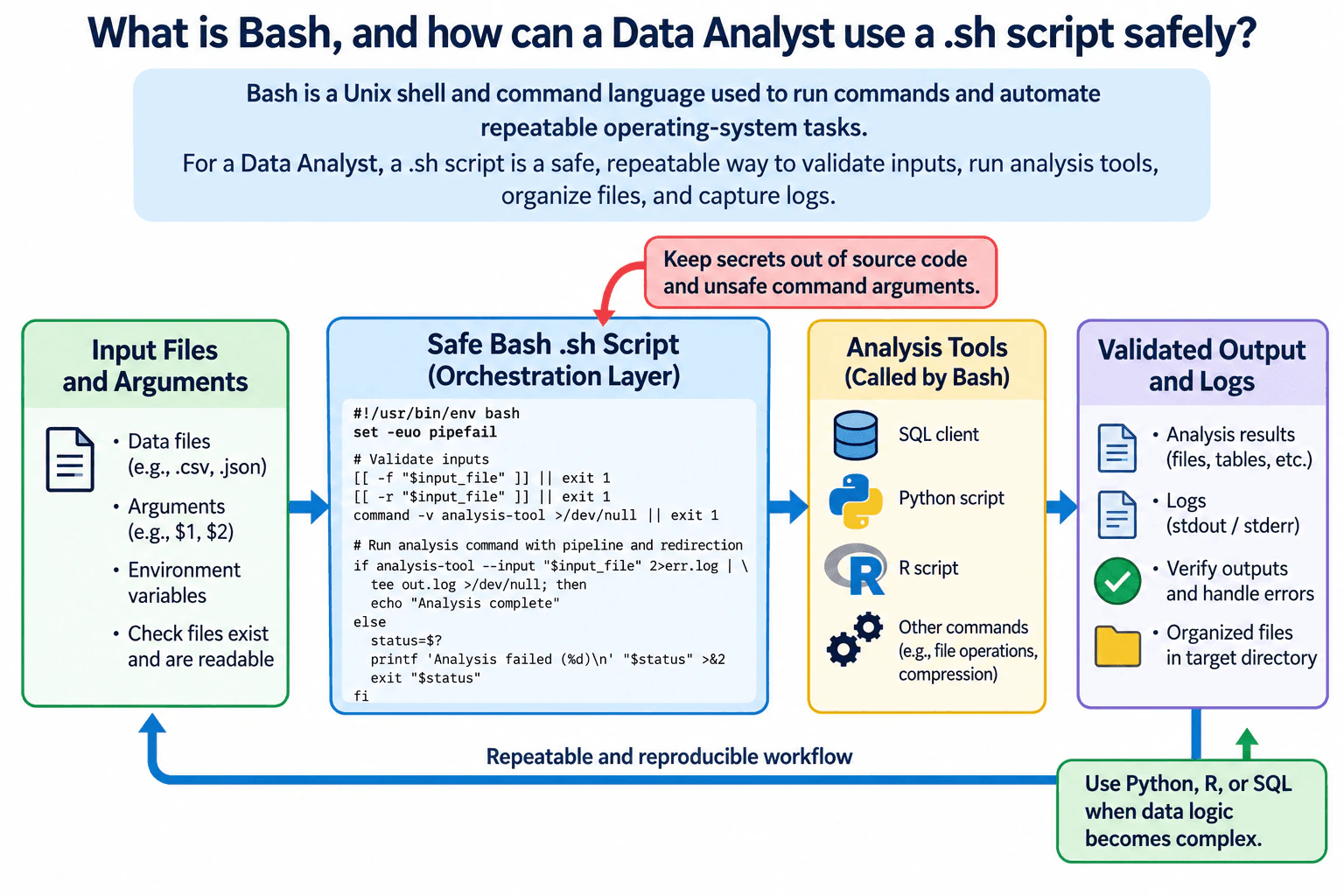
Bash is a Unix shell and command language. A Data Analyst can use a .sh script to automate repeatable tasks such as checking input files, creating output directories, running SQL or analysis programs, moving files, and writing logs. I would make the script safe by quoting variable expansions and paths, validating arguments and files, checking command failures, using strict error handling carefully, and keeping secrets outside the script and unsafe command arguments. Bash is good for orchestration, but if the workflow has complex transformations, data structures, or business logic, I would usually move that part to Python, R, or SQL.

Detailed Explanation

See the Code while reading this explanation.

Bash is a Unix shell and command language that lets you run operating-system commands interactively or save them in a .sh script. For a Data Analyst, its main value is repeatability: the same script can validate files, create directories, call another analysis program, redirect logs, and stop when something fails. Safety matters because shell text is interpreted as commands. Quoting, input validation, careful path handling, exit-status checks, controlled secrets, and guarded destructive operations help prevent accidental data loss or running a command on the wrong file.

Useful Questions to Ask the Interviewer
  1. Which operating systems and Bash versions must the script support?
  2. What files, arguments, environment variables, or external tools are expected as inputs?
  3. Should the script stop immediately on any failure, or are some failed commands acceptable and handled explicitly?
  4. Does the workflow process sensitive paths, credentials, tokens, or confidential data?
  5. Is Bash only coordinating other tools, or is significant data transformation expected inside the script?
What is Bash, and how can a Data Analyst use a .sh script safely? diagram
How to Explain It in an Interview

Bash is both an interactive Unix shell and a command language. The shell reads commands, performs expansions such as variable expansion and pathname expansion, handles redirection and pipelines, starts programs, and reports their exit status. A .sh file is a text file containing shell commands that can be executed repeatedly with Bash. When the file is meant to be executed directly, it commonly starts with a Bash shebang such as #!/usr/bin/env bash.

A simple command runs one program, for example wc -l -- "$input_file". A pipeline connects the standard output of one command to the standard input of another with |, such as printf '%s\n' "$value" | grep -q 'pattern'. Redirection controls standard input, standard output, and standard error. For example, command >output.log 2>error.log sends normal output and error output to different files. Redirection targets should be validated and quoted when they come from variables so the script does not write somewhere unintended.

Variables are assigned without spaces around =, for example input_file=$1. Expansions should normally be quoted as "$input_file". An unquoted parameter expansion may undergo word splitting and pathname expansion. A path containing spaces could become several arguments, while wildcard characters could unexpectedly match files. Double quotes allow parameter expansion while keeping the expanded value together. Single quotes preserve enclosed text literally, so parameter expansion does not occur inside them. Bash arrays are preferable when a command needs a list of separate arguments; building a command as one unquoted string is fragile and can create injection and argument-splitting problems.

Exit status is how shell commands communicate success or failure. By convention, status 0 means success and a nonzero value means failure. Bash exposes the previous command's status through $?, although direct conditionals are usually clearer, such as if command; then ...; else ...; fi. A script itself should return a meaningful nonzero status when it cannot complete its required work.

Pipelines require special care. Without pipefail, the status of a pipeline is normally the status of its last command, so an earlier command can fail while the pipeline still reports success. set -o pipefail changes that behavior so a nonzero status from a pipeline element is not silently hidden by a successful final command. This is useful when one command produces data for another command.

A common safety baseline for a Bash script is set -euo pipefail. -u treats expansion of an unset variable as an error, and pipefail exposes pipeline failures. -e causes the shell to exit after certain unhandled command failures, but it has contextual exceptions and should not be treated as complete error handling. Commands whose failure is expected should be placed in clear conditionals or handled deliberately.

Functions help divide a script into small reusable operations, for example die(), validate_input(), or run_analysis(). Shell functions communicate success or failure through exit status and can write text to stdout or stderr, but Bash does not provide the richer typed return values found in many general-purpose languages. This is one reason Bash works best when functions coordinate commands instead of implementing complicated analytical logic.

For analyst work, Bash is usually most useful around the analysis rather than as the main tabular-analysis language. A script can verify that an expected input file exists and is readable, create a destination directory, invoke a SQL client or analysis program, check whether that program succeeded, and place logs or generated files in predictable locations. The script should preserve the original dataset unless replacement is explicitly intended, and it should not assume that a filename, schema, delimiter, encoding, or row grain is correct without validation by a tool that understands the data format.

Bash variables are primarily strings, with shell arithmetic available for integer-style arithmetic contexts. Bash itself does not define analytical missing-value semantics such as SQL NULL or R NA. Missing fields, null-like values, numeric precision, data types, and row grain inside a CSV, JSON file, database result, or dataframe should be interpreted and validated by the format-aware or analysis tool that owns those semantics.

Path safety is particularly important. Use quoted variable expansions, validate required paths, and avoid constructing destructive targets from unchecked input. Before using commands such as rm, verify that the target variable is set and matches the expected kind of file or directory. Use -- where supported to separate options from path operands that might begin with -. Temporary files should be created safely, for example with mktemp, rather than by guessing a filename that another process might already use.

Input validation should happen before work begins. Check the expected number of arguments, confirm required commands exist with command -v, test required files with conditions such as [[ -f "$input_file" ]], and check readability or writability when needed. Validate structured formats using the program that understands the format instead of assuming that a .csv or .json extension proves valid content. If the analysis expects particular columns, types, null behavior, grain, or encoding, those checks belong in SQL, Python, R, or another data-processing layer that can evaluate them correctly.

Secrets should not be hard-coded into the .sh file or committed to source control. They may be supplied through an approved secret manager, protected configuration, or environment mechanism supported by the execution environment. Environment variables are convenient but are not automatically secure in every environment, so their exposure and logging behavior should be understood. Avoid printing credentials, and avoid passing sensitive values in command arguments when the invoked tool offers a safer credential mechanism because command arguments may be visible to other processes or retained by logs or wrappers.

Portability also matters. A Bash script can use Bash-specific syntax, but then it should explicitly require Bash rather than claim POSIX sh compatibility. Utilities such as sed, date, grep, and find can have option differences between operating systems, so scripts that must run on multiple platforms should use compatible options or document and verify their dependencies. The interpreter and external commands are runtime dependencies just like packages are dependencies in another language.

For reproducibility, I would keep the script in version control, document its required commands and inputs, make paths configurable instead of machine-specific, produce useful but non-sensitive logs, and return a nonzero status when required work fails. I would test it first with a small deterministic fixture or harmless test directory. I would confirm expected files were created, compare row counts or checksums where appropriate, and independently inspect the downstream analysis output rather than assuming that successful shell execution proves the analysis itself is correct.

Bash is a strong choice when the task is mostly command orchestration: file checks, file movement, calling existing programs, scheduling entry points, and connecting tools through stdin and stdout. It becomes harder to maintain when the script contains substantial parsing, nested control flow, complex data structures, extensive business rules, numerical calculations, or sophisticated error recovery. At that point, Python, R, SQL, or another suitable language usually provides clearer data types, libraries, tests, exceptions, and maintainability. I would still use Bash as a thin wrapper when it cleanly launches that more appropriate analysis program.

Technical Approach
  1. Declare the intended Bash interpreter and document required external commands.
  2. Enable deliberate error handling, commonly set -euo pipefail, while explicitly handling commands whose failure is expected.
  3. Parse and validate required arguments before using them.
  4. Store paths in variables and quote expansions such as "$input_file".
  5. Verify required files, directories, permissions, and commands before processing.
  6. Keep secrets outside source code and prevent sensitive values from being printed or passed insecurely.
  7. Use small functions to organize orchestration steps.
  8. Run the required analysis command or pipeline and check its success.
  9. Write outputs only to validated destinations and guard destructive operations carefully.
  10. Validate generated files or downstream analysis using deterministic checks appropriate to their format.
  11. Return a meaningful nonzero exit status on failure.
  12. Move complex parsing or analytical business logic to Python, R, SQL, or another more maintainable language when Bash becomes difficult to reason about.
Practical Complexity & Trade-offs

Bash itself adds little computational overhead when it is only coordinating other programs; most runtime and memory cost comes from the commands it launches and the amount of data those commands process. Pipelines can stream data instead of requiring Bash to hold an entire file in memory. The bigger tradeoff is maintainability: a short orchestration script is easy to understand, while complex parsing, state, calculations, and nested error handling become difficult to test and maintain. Portability also has a cost because Bash versions and external utility options can differ across systems.

Example

A safe illustrative .sh script can demonstrate the important Bash mechanics without assuming a real dataset. This example accepts an input path and output directory, validates them, checks that a required analysis command exists, quotes path expansions, creates the output directory, restricts permissions on newly created files with umask 077, redirects stdout and stderr to separate log files, handles failure explicitly, and avoids embedding credentials. The placeholder analysis-command represents an approved external analytical program; its real interface and data-validation requirements must be defined by the actual workflow.

Code
#!/usr/bin/env bash
set -euo pipefail
umask 077

usage() {
  printf 'Usage: %s INPUT_FILE OUTPUT_DIR\n' "$0" >&2
}

die() {
  printf 'Error: %s\n' "$1" >&2
  exit 1
}

[[ $# -eq 2 ]] || {
  usage
  exit 64
}

input_file=$1
output_dir=$2

[[ -f "$input_file" ]] || die "input file does not exist or is not a regular file"
[[ -r "$input_file" ]] || die "input file is not readable"
command -v analysis-command > /dev/null 2>&1 || die "required command is not available"

mkdir -p -- "$output_dir"
[[ -d "$output_dir" && -w "$output_dir" ]] || die "output directory is not writable"

stdout_log="$output_dir/analysis.stdout.log"
stderr_log="$output_dir/analysis.stderr.log"

if analysis-command --input "$input_file" --output "$output_dir" > "$stdout_log" 2> "$stderr_log"; then
  printf 'Analysis command completed successfully.\n'
else
  status=$?
  printf 'Analysis command failed with exit status %d. See the protected error log.\n' "$status" >&2
  exit "$status"
fi
Where it is used

A Data Analyst can use Bash to validate that expected input files exist, create configurable output directories, invoke SQL clients, Python or R analysis scripts, compress or move generated files, capture stdout and stderr into logs, provide an entry point for scheduled workflows, and fail the workflow when an upstream command does not complete successfully. It is most appropriate as a thin automation and orchestration layer rather than as a replacement for a language designed for tabular analysis.

Why Interviewers Ask This

The interviewer is checking whether the candidate understands Bash as a shell and scripting language, can use it for reproducible analyst automation, and can recognize the safety risks around quoting, expansion, pipelines, exit codes, secrets, destructive commands, portability, and maintainability.

Common interview mistakes

Common mistakes include leaving variable expansions unquoted, assuming filenames never contain spaces or wildcard characters, treating set -e as complete error handling, forgetting pipefail, ignoring nonzero exit codes, using unchecked input in rm or destination paths, hard-coding machine-specific paths, embedding secrets in the script, logging sensitive values, claiming a Bash script is portable sh while using Bash-only syntax, parsing structured analytical data with fragile text commands when a format-aware tool is needed, and keeping large amounts of business logic in Bash when a more maintainable language would be clearer.

Interview tip

Define Bash first, then organize the answer around a safe analyst workflow: validate inputs, quote expansions, check exit status, use set -euo pipefail carefully, protect paths and secrets, validate outputs, and finish by explaining that Bash is best as a thin orchestration layer while complex analysis belongs in a language such as Python, R, or SQL.

Interviewer may ask next
Why is quoting `"$file"` important, and what could happen if a path variable is left unquoted?

An unquoted parameter expansion can undergo word splitting and pathname expansion. If file contains spaces, one intended path can become several command arguments. If it contains wildcard characters, Bash may expand them to matching filenames. Quoting as "$file" preserves the expanded value as one argument and prevents those expansions. Quoting does not by itself make every command safe, so the script should still validate the path and avoid using unchecked input as a destructive target.

When would you replace a Bash analysis script with Python, R, or another language?

I would replace or reduce Bash when the workflow needs complex data structures, structured parsing, substantial transformations, detailed business rules, numerical logic, rich exception handling, reusable libraries, or extensive automated tests. Bash is excellent for coordinating programs and files, but its string-oriented semantics and shell expansion rules become difficult to reason about as logic grows. A maintainable design is often a small Bash wrapper that validates the environment and launches a Python, R, SQL, or other analysis program that owns the analytical logic.

7. What is PowerShell, and how can a Data Analyst use it safely?Language SpecificEasy

Question Details

Define PowerShell as a command shell and scripting language built around structured objects. Explain cmdlets, pipelines, variables, functions, modules, error handling, CSV and JSON handling, and analyst automation. Cover literal paths, validation, execution policy awareness, secrets, and avoiding destructive broad operations.

Short Interview Answer (30-60 seconds)

PowerShell is both a command shell and a scripting language. PowerShell cmdlets normally pass structured objects through pipelines, so I can filter, select, group, validate, and export named properties instead of relying only on text parsing. As a Data Analyst, I can use it for repeatable file checks, CSV and JSON handling, scheduled preparation, and other automation. I would use literal paths where appropriate, validate inputs and outputs, handle errors explicitly, keep secrets out of source code, follow execution-policy requirements, and avoid broad destructive commands unless the exact targets have been reviewed.

Detailed Explanation

See the Code while reading this explanation.

PowerShell is a command shell and scripting language designed around structured objects. Instead of sending only plain text from one command to another, PowerShell cmdlets normally pass objects with named properties and types. For a Data Analyst, this makes it useful for repeatable tasks such as checking files, reading CSV or JSON data, validating inputs, preparing extracts, and coordinating other tools. Safe use matters because automation can affect many files quickly. I would therefore validate paths and data first, control errors, protect secrets, use only necessary permissions, and keep any modifying operation narrowly scoped.

Useful Questions to Ask the Interviewer
  1. Is the analyst workflow expected to run interactively, on a schedule, or in an automated job?
  2. Which inputs and outputs are involved: files, CSV, JSON, APIs, databases, or another command-line tool?
  3. Should the script be read-only, or is it allowed to create, move, overwrite, or delete files?
  4. Are there organizational requirements for script signing, execution policy, approved modules, credentials, or logging?
  5. What validation should determine whether the automation succeeded before its output is used for analysis?
What is PowerShell, and how can a Data Analyst use it safely? diagram
How to Explain It in an Interview
1. Start with what PowerShell is

PowerShell has two closely related roles: it is an interactive command shell, and it is a scripting language for automating repeatable work. A key feature is its object-based pipeline. A cmdlet such as Get-ChildItem produces objects whose properties can be inspected or passed directly to another cmdlet. That is different from a workflow that depends only on parsing formatted console text. External native programs can still produce text or other stream data, so I would not assume that every pipeline source produces rich PowerShell objects.

Cmdlets normally use a Verb-Noun naming style, such as Get-ChildItem, Import-Csv, Where-Object, and Export-Csv. The pipeline operator, |, passes output from one command to the next. When the pipeline contains PowerShell objects, an analyst can select properties explicitly instead of assuming a visual column position in displayed output.

2. Use variables, functions, and modules for maintainable automation

Variables begin with $, for example $InputPath. They can hold strings, numbers, dates, arrays, objects, or other values. Functions let me package repeated logic behind clear parameters. Modules package reusable commands and other PowerShell resources. If a workflow depends on a module, I would treat that module as a dependency: document why it is required, use an approved version where reproducibility matters, and avoid assuming every machine has the same modules installed.

This distinction matters in an interview. Variables, functions, pipelines, and language control flow are PowerShell language or runtime capabilities. A command supplied by a particular module is a dependency of that module and is not automatically available in every PowerShell environment.

3. Handle tabular CSV data carefully

Import-Csv converts CSV records into objects whose headers become property names. The imported field values are string representations, so I should not assume that a column containing numeric-looking or date-looking text already has the intended analytical type. I would validate and convert values explicitly when the analysis requires numbers, dates, Boolean values, or another type.

I would first check the expected schema, decide the intended row grain, and verify row counts or other suitable control checks. Blank fields also need an explicit interpretation. I would not automatically assume that an empty string, $null, an absent value, and a business-defined missing value all mean the same thing.

When exporting with Export-Csv, I would preserve the intended columns and grain and validate the resulting file rather than assuming that successful command execution proves analytical correctness.

4. Treat JSON as structured data, not text to search manually

ConvertFrom-Json converts JSON text into PowerShell objects or, when requested, a hash table that can be accessed by key or property. ConvertTo-Json serializes objects back into JSON text. This is useful for API responses, configuration, and structured metadata.

I still need to validate the expected structure. A property may be absent, $null, have a different type, or contain an array where the script expected one value. When producing nested JSON, I also need to choose a serialization depth that is sufficient for the structure I intend to preserve, because insufficient depth can truncate nested representation.

5. Build pipelines that are easy to inspect

A safe analyst pipeline should make each transformation understandable. For example, I might read rows with Import-Csv, validate required properties, filter with Where-Object, select explicit fields with Select-Object, and only then write a new output file.

I would avoid combining validation and destructive changes into one opaque pipeline. During development, I prefer intermediate checks such as row counts, property names, known test cases, and destination-path validation. That makes it easier to detect whether the script changed the grain, dropped records, or converted values incorrectly.

6. Use literal paths when a path is data

Some PowerShell path parameters interpret wildcard characters such as * and ?. When a supplied path should be treated exactly as written, I prefer a -LiteralPath parameter when the cmdlet supports it. With -LiteralPath, wildcard characters in the path are not interpreted as patterns.

I would also validate a path before acting on it. Test-Path -LiteralPath can confirm whether an expected input exists and whether it is a leaf or container when that distinction matters. For generated outputs, I would construct and inspect the destination explicitly rather than relying on an unintended current directory or broad wildcard.

7. Handle failures intentionally

PowerShell distinguishes terminating and non-terminating errors, so not every error automatically stops an entire script. For an operation that must succeed before dependent work continues, I can request terminating behavior with -ErrorAction Stop when the command supports the common parameter, then handle the failure with try, catch, and optionally finally.

The important analyst principle is to fail safely. If an input cannot be parsed or required validation fails, the script should not quietly create an output that appears trustworthy. I would stop dependent processing, report useful diagnostic context without exposing secrets, and make the failure visible to the calling job or operator.

8. Understand execution policy without treating it as a security boundary

On Windows, PowerShell execution policy controls conditions under which scripts and configuration files can run. I would inspect and follow the organization's effective policy rather than weakening it merely to make a script execute. Execution policy is a safety and defense-in-depth feature, not a security boundary, so an allowed script can still be unsafe.

Execution-policy enforcement is a Windows behavior. On non-Windows PowerShell platforms, I would not assume that execution policy provides the same enforcement. Security still depends on permissions, trusted code, credential handling, validation, and the controls of the surrounding environment.

9. Protect secrets

Passwords, tokens, connection strings, and API keys should not be hard-coded into .ps1 files, committed to source control, printed to logs, or exported with analytical output. I would use the organization's approved credential or secret-management mechanism and give the script only the permissions needed for its task.

Protecting a secret also means considering its full lifecycle: where it comes from, who or what can retrieve it, whether logs or exceptions could expose it, and what permissions the resulting authenticated connection receives. Merely changing how a secret is represented in memory does not solve all of those concerns.

10. Avoid destructive broad operations

Commands that remove, overwrite, rename, or move resources deserve tighter controls than read-only commands. I would avoid patterns such as recursively deleting a broadly matched path when a smaller target set can be computed explicitly.

A safer pattern is to discover candidate targets first, validate that every target belongs to the expected scope, inspect or log the exact target list, and only then perform the modifying operation. When a cmdlet supports -WhatIf or confirmation, those features can help during review, but they do not replace correct path validation, narrow targeting, permissions, backups, or recovery planning.

11. Validate the analytical result separately from script success

A script completing without an error does not prove that its output is analytically correct. I would validate both the automation and the data. Depending on the task, checks could include expected columns, row counts, uniqueness at the required grain, blank or null counts, valid converted types, file counts, control totals, or comparison against a small deterministic input whose expected output is known.

For example, if a script transforms a CSV, I would test it with controlled input that covers normal records and relevant boundary cases. I would then compare the actual records, types, grain, and counts with the expected result before trusting the same workflow on production data.

12. Keep the workflow reproducible

For a repeatable analyst workflow, I would store the script in version control, document the required PowerShell version and modules, use explicit parameters instead of hidden machine-specific paths, separate configuration from processing logic, and record enough execution context to understand which inputs and script version produced an output.

The final goal is not simply to automate a command. It is to create an analyst workflow that another authorized person can run, validate, understand, and reproduce without depending on undocumented manual steps.

Key Insight / Why This Solution Works
  1. Define the exact automation task, input grain, expected output, and whether any operation may modify files or other resources.
  2. Validate exact input paths with literal-path handling where appropriate and verify expected CSV columns, JSON structure, types, missing-value rules, and grain.
  3. Use PowerShell cmdlets and object pipelines to process explicitly named properties instead of relying on displayed text.
  4. Put repeated logic in parameterized functions and document required modules and PowerShell-version assumptions.
  5. Use explicit error behavior so failures that invalidate downstream work stop that work.
  6. Keep credentials outside source code and use the environment's approved secret mechanism with least privilege.
  7. For modifying operations, calculate and inspect the exact target set before making changes; avoid broad wildcard or recursive actions.
  8. Validate outputs with deterministic checks such as row counts, required properties, types, uniqueness, or control totals appropriate to the task.
  9. Log useful execution context without secrets and make failed validation produce a clear failure rather than a misleading analytical output.
Example

A small safe example can show the main practices without assuming any business-specific dataset or field names. The script accepts exact input and output paths plus the required CSV column names as parameters. It verifies that the source exists, checks that the output will not overwrite the source, validates the CSV schema, preserves all rows and requested columns, writes a new file without silently replacing an existing destination, and confirms the output row count. It uses literal paths and converts important failures into a nonzero script exit.

Code
param(
    [Parameter(Mandatory)]
    [string]$InputPath,

    [Parameter(Mandatory)]
    [string]$OutputPath,

    [Parameter(Mandatory)]
    [ValidateNotNullOrEmpty()]
    [string[]]$RequiredColumns
)

$ErrorActionPreference = 'Stop'

try {
    if (-not (Test-Path -LiteralPath $InputPath -PathType Leaf)) {
        throw "Input file does not exist: $InputPath"
    }

    if ([System.IO.Path]::GetExtension($InputPath) -ine '.csv') {
        throw 'Expected a .csv input file.'
    }

    $resolvedInput = (Resolve-Path -LiteralPath $InputPath).Path
    $fullOutput = [System.IO.Path]::GetFullPath($OutputPath)

    if ([System.StringComparer]::OrdinalIgnoreCase.Equals($resolvedInput, $fullOutput)) {
        throw 'InputPath and OutputPath must refer to different files.'
    }

    if (Test-Path -LiteralPath $OutputPath) {
        throw "Output file already exists: $OutputPath"
    }

    $outputDirectory = [System.IO.Path]::GetDirectoryName($fullOutput)
    if ($outputDirectory -and -not (Test-Path -LiteralPath $outputDirectory -PathType Container)) {
        throw "Output directory does not exist: $outputDirectory"
    }

    $rows = @(Import-Csv -LiteralPath $InputPath)

    if ($rows.Count -eq 0) {
        throw 'The CSV contains no data rows.'
    }

    $actualColumns = @($rows[0].PSObject.Properties.Name)
    $missingColumns = @(
        $RequiredColumns | Where-Object { $_ -notin $actualColumns }
    )

    if ($missingColumns.Count -gt 0) {
        throw "Missing required columns: $($missingColumns -join ', ')"
    }

    $validatedRows = @(
        $rows | Select-Object -Property $RequiredColumns
    )

    $validatedRows |
        Export-Csv -LiteralPath $OutputPath -NoTypeInformation -NoClobber

    $writtenRows = @(Import-Csv -LiteralPath $OutputPath)

    if ($writtenRows.Count -ne $validatedRows.Count) {
        throw 'Output row-count validation failed.'
    }

    [pscustomobject]@{
        InputRows  = $rows.Count
        OutputRows = $writtenRows.Count
        OutputPath = $fullOutput
    }
}
catch {
    Write-Error "Data preparation failed: $($_.Exception.Message)"
    exit 1
}
Where it is used

A Data Analyst can use PowerShell to inventory incoming files, validate filenames and paths, automate recurring CSV or JSON preparation, check whether expected extracts arrived, call approved command-line tools, coordinate scheduled reporting steps, process structured metadata, and perform operational checks around analytical pipelines. It is particularly useful when PowerShell is already part of the organization's workstation, server, or Microsoft-oriented automation environment.

Why Interviewers Ask This

The interviewer is checking whether the candidate understands PowerShell as an object-oriented command shell and scripting language, can connect its core features to realistic analyst automation, and can automate safely without confusing successful script execution with correct analytical output or treating execution policy as a complete security boundary.

Common interview mistakes

Common mistakes are treating every PowerShell pipeline as if it contains structured objects even when an external native command may emit text or stream data; assuming CSV values already have the intended numeric or date types; ignoring $null, blank strings, absent JSON properties, or changed row grain; using wildcard paths when an exact filename is intended; relying on an unintended current directory; swallowing errors and still publishing output; hard-coding passwords or tokens; assuming execution policy is a complete security boundary; using unreviewed modules without understanding the dependency; running with unnecessary privileges; using broad recursive remove or overwrite commands; and assuming that a script completing successfully means the analytical result is correct.

Interview tip

Explain PowerShell in this order: object-based shell and scripting language, analyst use cases, then safety. Mention cmdlets and object pipelines, variables, functions and modules, CSV and JSON handling, and finish with literal paths, explicit validation, error handling, protected secrets, execution-policy awareness, least privilege, reproducibility, and narrow destructive scope. That demonstrates both practical automation skill and analytical control.

Interviewer may ask next
If a CSV column is expected to contain numbers but includes blanks and invalid text, would you trust `Import-Csv` to give you a clean numeric field automatically?

No. Import-Csv creates objects from CSV records, but the imported field values are string representations rather than an enforced business schema. I would define the expected numeric type and missing-value rule, convert values explicitly, detect values that fail conversion, and decide whether invalid rows should stop the workflow or be reported for correction. I would also preserve the intended row grain and compare row counts or other control checks so that validation does not silently remove records.

How would your approach change if the automation were allowed to delete old files after producing an extract?

I would add stronger controls because deletion can cause irreversible or costly loss. I would calculate the candidate files first, use literal and fully resolved paths, verify that every target is inside the approved scope, apply an explicit retention rule, exclude anything that fails validation, and record the exact target list. I would test the selection separately and use -WhatIf where the chosen cmdlet supports it during review. Only after the new extract passes its own validation would I perform the narrowly scoped deletion, using only the required permissions and the organization's backup or recovery controls.

8. What is an Excel formula, and how does it differ from a worksheet value?Language SpecificEasy

Question Details

Define an Excel formula as an expression beginning with an equals sign that calculates a result from constants, operators, functions, and references. Explain relative, absolute, and mixed references; ranges; errors; calculation dependencies; structured references; and validation of business logic.

Short Interview Answer (30-60 seconds)

An Excel formula is an expression that starts with an equals sign and tells Excel how to calculate a result. For example, =A2+B2 calculates from two referenced cells, while a worksheet value such as 100 or "North" is entered directly in the cell. Formulas can use constants, operators, functions, ranges, and references. Relative references such as A2 normally change when copied, absolute references such as $A$2 stay fixed, and mixed references lock only the row or column. As an analyst, I also check errors, dependencies, data types, ranges, and the underlying business rule before trusting a formula result.

Detailed Explanation

An Excel worksheet can contain both directly entered values and formulas, but they behave differently. A value is information entered directly into a cell, such as a number, date, or text. A formula is an expression beginning with = that tells Excel to calculate a result. It can combine constants, operators, functions, cell references, and ranges. Because a formula's result can change when its inputs change, an analyst must understand references, dependencies, errors, data types, and the intended business rule before relying on that result in analysis or reporting.

Useful Questions to Ask the Interviewer
  1. Are you asking only about standard A1-style cell references, or should I also explain Excel Tables and structured references?
  2. Should I discuss how formulas behave when they are copied or filled across rows and columns?
  3. Would you like me to include common calculation errors and how I validate formulas in an analyst workbook?
What is an Excel formula, and how does it differ from a worksheet value? diagram
How to Explain It in an Interview

Start with the basic distinction: a worksheet value is entered directly into a cell, while a formula stores calculation logic. If a cell contains 25 as a direct entry, that cell contains the value 25. If it contains =A2+B2, Excel evaluates the expression and displays the calculated result, while the formula remains the calculation definition in that cell.

An Excel formula begins with an equals sign. It can contain constants, arithmetic or comparison operators, functions, references, and ranges. For example, =A2*0.10 uses a cell reference, an operator, and a constant, while =SUM(B2:B10) uses the SUM function over a range. A function such as SUM is one building block; the formula is the complete expression that combines functions, operators, constants, and references.

References determine which cells a formula uses. A relative reference such as A2 normally adjusts when the formula is copied to another position. An absolute reference such as $A$2 keeps both the column and row fixed. A mixed reference locks only one part: $A2 locks the column while allowing the row to change, and A$2 locks the row while allowing the column to change. Choosing the correct reference type matters because a copied formula can otherwise point to the wrong cells without producing an obvious error.

Ranges identify groups of cells, such as B2:B10. Analysts use ranges with functions such as SUM, AVERAGE, COUNT, MIN, and MAX. The selected range must match the intended population and grain. For example, if each row represents one transaction, a total should include the intended transaction rows and should not accidentally include an unrelated row, subtotal, or omitted record.

Excel Tables can also use structured references. Instead of relying only on coordinates such as C2:C100, a table formula can refer to named table columns. Structured references can make formulas easier to read and can adjust as table data expands. The analyst still has to confirm that the referenced table and column represent the correct business field and row context.

Formulas create calculation dependencies. If C2 contains =A2+B2, then C2 depends on A2 and B2. When an input changes, Excel can recalculate dependent formulas according to the workbook's calculation settings. This differs from replacing the formula with its current displayed result as a fixed value. Once only the fixed value remains, that cell no longer recalculates from the original inputs.

Errors are important diagnostic signals. A formula can return #DIV/0! when a calculation divides by zero, #VALUE! when an operation receives an incompatible value, #REF! when a required reference becomes invalid, #NAME? when Excel cannot recognize a function or defined name, or #N/A when an expected value is unavailable, commonly in lookup scenarios. An analyst should investigate the cause before hiding an error because the error may reveal a data, reference, or logic problem.

Blank cells and data types also require care. A blank is not always equivalent to zero for every calculation or business rule, and text that looks like a number may not behave like a true numeric value. Dates also have numeric representations in Excel even though they are commonly displayed as formatted dates. Before trusting a formula, I check the input types and decide what blanks or missing observations mean for the calculation.

Validation is the most important analyst step. I first state the business rule in plain language, identify the required inputs and row grain, and compare the formula with that rule. I test a few small deterministic cases where the expected answer is known. I also check copied formulas for shifted references, inspect first and last relevant rows, verify that ranges cover the intended records, compare important totals with an independent calculation where practical, and investigate unexpected blanks or errors. For important workbooks, tracing precedents and dependents can help verify the calculation path.

The key interview point is that a plausible displayed number is not proof that a workbook is correct. A directly entered value represents stored input, while a formula represents calculation logic that produces a result from inputs. As a Data Analyst, I need to understand both the Excel syntax and the business meaning, then validate that the references, ranges, data types, missing values, dependencies, and expected outputs all agree with the intended rule.

Technical Approach
  1. Identify whether the cell contains a direct value or a formula beginning with =.
  2. If it is a formula, identify its constants, operators, functions, references, and ranges.
  3. Classify each reference as relative, absolute, mixed, or structured where applicable.
  4. Confirm that the input cells have the expected data types and row grain, and decide how blanks or missing values should be treated for the business rule.
  5. Trace the formula's dependencies and confirm that copied or filled formulas point to the intended cells.
  6. Check for Excel errors or unexpected outputs and determine their cause rather than masking them automatically.
  7. Test the formula with a small deterministic example whose expected result is known.
  8. Compare important totals or calculations with an independent check and confirm that the formula matches the stated business rule.
Practical Complexity & Trade-offs

A simple formula is inexpensive to calculate and easy to inspect, but the practical cost grows as a workbook contains more formulas, larger referenced ranges, and longer dependency chains. Complex or frequently recalculated workbooks can also become harder to audit and maintain. Structured references and consistent formula patterns can improve readability, while fixed values are simpler but do not update when inputs change. The main tradeoff for an analyst is balancing automatic calculation with correctness, transparency, maintainability, and ease of validation.

Where it is used

Data Analysts use Excel formulas to calculate totals, percentages, rates, differences, classifications, lookup results, dates, validation checks, and reporting metrics. They use references and ranges to connect raw inputs with summaries and recurring calculations. Formula auditing is especially important in recurring reports, reconciliation workbooks, operational or financial analyses, and spreadsheets where formulas are copied across many rows, columns, or reporting periods.

Why Interviewers Ask This

The interviewer is testing whether the candidate understands the difference between a directly entered worksheet value and a calculated formula, including how Excel formulas use references, functions, ranges, dependencies, and error handling. For a Data Analyst, this matters because a workbook can look correct while producing wrong results if references shift unexpectedly, source cells contain incorrect types or blanks, ranges include the wrong records, or the formula does not match the intended business rule.

Common interview mistakes

Common mistakes include confusing a displayed formula result with a fixed worksheet value; forgetting that relative references move when copied; locking the wrong row or column with $; using a range that includes the wrong records; treating blanks as automatically equivalent to zero; calculating on numbers stored as text; hiding errors with IFERROR before understanding their cause; breaking references by deleting or moving cells; and assuming that a plausible-looking result proves the underlying business logic is correct.

Interview tip

Define the difference between a direct value and a formula first, then use one small example such as =A2+B2. Explain relative, absolute, and mixed references, mention ranges and dependencies, and finish by describing how you validate the formula against a known example and the business rule. That keeps the answer practical and focused on analyst work.

Interviewer may ask next
If you copy the formula =A2*$B$1 from C2 to C3, what should change, and how would you validate that the copied formula is correct?

The relative reference A2 should become A3 because the formula moved down one row. The absolute reference $B$1 should remain $B$1 because both its column and row are locked. The copied formula should therefore be =A3*$B$1. I would validate it by confirming that A3 is the intended row-level input, B1 is the shared constant or parameter required by the business rule, and a small known example produces the expected result.

What would you do if a workbook currently contains hard-coded values where the business expects results to update automatically when source data changes?

I would first confirm the intended business rule and identify the source cells that should drive each result. Then I would replace hard-coded outputs with formulas only where automatic recalculation is actually required. I would choose the correct relative, absolute, mixed, or structured references, test the formulas with known inputs, compare important totals with an independent calculation, and review errors and dependencies. I would also preserve intentional fixed values because not every constant or business input should become a formula.

9. What responsibilities make up a data analyst’s job?Data AnalysisEasy

Question Details

Describe the analyst’s work from obtaining data to supporting a business decision.

Short Interview Answer (30-60 seconds)

A data analyst’s job usually starts with understanding the business question and the decision that needs to be made. The analyst then identifies the required data, defines the correct metrics, obtains and cleans the data, checks its quality, and analyzes trends or differences. They may drill down by meaningful segments, investigate possible causes, and explain uncertainty or limitations. Finally, they communicate the finding clearly, recommend an appropriate action, and define how the business can measure whether that action worked.

Detailed Explanation

A data analyst turns a business question into evidence that can support a decision. The job is broader than simply making charts or writing queries. An analyst first understands what decision is needed, defines the population and metrics, obtains the required data, and checks whether the data is trustworthy. Next, the analyst explores trends, compares relevant groups, investigates possible explanations, and avoids claiming more than the evidence supports. The final responsibility is to communicate the finding clearly, recommend a reasonable action, and explain how the result should be measured afterward.

Useful Questions to Ask the Interviewer
  1. What business decision or outcome is this analysis expected to support?
  2. Who will use the result, and what information matters most to that decision maker?
  3. How are the main KPIs or success metrics currently defined?
  4. What population, time period, and comparison baseline should the analysis use?
  5. Are there known data-quality, instrumentation, or reporting limitations I should account for?
How to Explain It in an Interview

A good way to explain a data analyst’s responsibilities is as a sequence from question to decision.

First, understand the business question. Before touching the data, the analyst should know what decision needs support and who owns that decision. This prevents the analysis from becoming a collection of interesting numbers that do not answer the real problem.

Second, define the measurement. A metric is a defined way to measure an outcome, while a KPI is a metric that is important for tracking performance against a business objective. The analyst should define the eligible population, unit of analysis, numerator and denominator when a rate is involved, time window, time zone when relevant, and comparison baseline before interpreting results. Terms such as conversion rate or retention rate are not meaningful unless their populations, denominators, and windows are clearly defined.

Third, identify and obtain the required data. The analyst determines which fields, observations, and business inputs are needed to answer the question. The goal is not simply to collect more data, but to use data whose scope and grain match the decision being supported.

Fourth, validate and prepare the data. The analyst checks for missing values, duplicates, stale records, missing periods, unexpected outliers, inconsistent definitions, and instrumentation problems. Row counts, control totals, reconciliation with trusted sources, and independent calculation of important metrics can help confirm that the analysis begins with reliable inputs.

Fifth, analyze what happened. This is descriptive analysis: summarizing observed results such as a KPI trend over time or a difference from a baseline. Trend analysis examines how a measure changes over time. Segmentation analysis compares the same measure across meaningful groups or dimensions when those comparisons help answer the business question.

Sixth, investigate why it may have happened. This is diagnostic analysis. The analyst can drill down into relevant dimensions, compare segments, examine funnels or cohorts when appropriate, and perform root cause analysis to evaluate possible explanations. Funnel analysis examines movement through ordered stages. Cohort analysis compares groups that share a meaningful starting condition or period. These techniques should be used only when they fit the question and available evidence.

The analyst must also separate correlation from causation. If two things move together, that shows an association, not proof that one caused the other. Alternative explanations, measurement issues, selection effects, timing, or other factors should be considered before making a causal claim.

Predictive and prescriptive analysis may also be part of the role when the business question requires them. Predictive analysis estimates what may happen in the future based on available information. Prescriptive analysis evaluates possible actions or choices using evidence and business constraints. An analyst should distinguish these claims from descriptive and diagnostic findings rather than presenting all analysis as equally certain.

Seventh, validate the analysis and its interpretation. Important calculations should be reproduced or reconciled where practical, assumptions should be checked, and alternative explanations should be considered. The conclusion should be no stronger than the quality of the data and method allow.

Eighth, communicate the result. The analyst should explain the finding in business language, present the supporting evidence, describe important limitations or uncertainty, and connect the result to the decision. Good communication explains what changed, where it changed, what the evidence supports, and what remains uncertain.

Finally, recommend a proportional action and measurement plan. The recommendation should match the strength of the evidence. The analyst should define what metric, baseline, population, time window, and comparison will be used afterward to determine whether the action had the intended effect. If later evidence contradicts the original finding, the conclusion or recommendation should be revised.

Technical Approach
  1. Clarify the business question, required decision, and decision owner.
  2. Define the population, unit of analysis, metrics, units, time window, and comparison baseline.
  3. Identify and obtain only the data required to answer the question.
  4. Validate data quality by checking missingness, duplicates, freshness, outliers, definitions, missing periods, and instrumentation.
  5. Perform descriptive analysis to establish what happened.
  6. Use relevant trend, segmentation, funnel, cohort, drill-down, or root-cause analysis to investigate meaningful differences.
  7. Separate observed evidence from assumptions and avoid treating correlation as causation.
  8. Validate important calculations and consider alternative explanations and uncertainty.
  9. Communicate the finding, limitations, and business implication.
  10. Recommend an action proportional to the evidence and define how its impact will be measured and how the conclusion could be revised.
Practical Insights

The effort depends mainly on the amount and quality of the data, the number of metrics and segments being analyzed, and how difficult it is to validate the result. A simple analysis with clean data and one well-defined KPI may require relatively little work. A broader analysis may require more effort for data cleaning, reconciliation, segmentation, validation, and investigation. There is also a tradeoff between speed and confidence: an urgent decision may require a focused analysis, while stronger validation and deeper investigation usually require more time.

Why Interviewers Ask This

Interviewers want to know whether the candidate understands that data analysis is an end-to-end business process, not just creating queries, spreadsheets, charts, or dashboards. A strong answer shows judgment about defining the business question, choosing appropriate metrics, obtaining and validating data, analyzing patterns, separating evidence from assumptions, communicating findings, recommending an action, and checking whether that action produces the intended result.

Common interview mistakes

Common mistakes include starting with a tool instead of the business decision, using a KPI without defining its population, denominator, or time window, analyzing data before checking its quality, comparing groups that are not meaningfully comparable, ignoring missing data or outliers, treating correlation as proof of causation, presenting assumptions as facts, reporting a finding without explaining uncertainty, and stopping at a dashboard instead of connecting the analysis to a decision and measurement plan.

Interview tip

Present the role as a clear flow: business question, metric definition, data collection, quality checks, analysis, validation, communication, action, and measurement. This shows that you understand both the analytical and business responsibilities of a data analyst.

Interviewer may ask next
What would you do if the data needed for the analysis were incomplete or had conflicting definitions?

I would first determine whether the missing or conflicting information could materially change the decision. I would verify definitions with the appropriate business or data owners, check the source and grain of each dataset, and quantify missingness or inconsistencies where possible. I would not silently choose one definition. If the issue could not be fully resolved, I would use an explicitly stated assumption only when appropriate, test how sensitive the conclusion is to that assumption when possible, and communicate the limitation so the decision maker understands the uncertainty.

How would your responsibilities change if the business needed an answer very quickly?

I would keep the same core responsibilities but adjust the depth of the analysis to the urgency and risk of the decision. I would focus first on the most decision-relevant metric, the most trustworthy available data, essential quality checks, and the strongest useful comparison. I might postpone lower-value segmentation or deeper diagnostic work, but I would not skip checks that could make the conclusion misleading. I would label the result as preliminary when appropriate, explain what remains uncertain, and state what additional evidence or analysis could confirm or change the recommendation.

10. How do descriptive, diagnostic, predictive, and prescriptive analytics differ?Data AnalysisEasy

Question Details

For descriptive, diagnostic, predictive, and prescriptive analytics, distinguish their purposes and classify a dashboard of last month’s sales versus an investigation of its causes.

Short Interview Answer (30-60 seconds)

Descriptive analytics answers what happened, such as a dashboard showing last month’s sales. Diagnostic analytics answers why it happened by drilling into historical data, segments, and comparisons to investigate likely causes. Predictive analytics asks what might happen next by using historical and current data to forecast future outcomes. Prescriptive analytics asks what we should do next by combining predictions with business constraints, tradeoffs, or optimization to recommend an action. A key caution is that correlation found during diagnostic analysis does not by itself prove causation.

Detailed Explanation

The four analytics types differ mainly in the business question they answer. Descriptive analytics summarizes past data to show what happened. Diagnostic analytics studies that result to understand why it happened. Predictive analytics uses historical and current data to estimate what might happen next. Prescriptive analytics uses predictions together with business constraints, tradeoffs, and sometimes optimization to recommend what action to take. In this question, a dashboard of last month’s sales is descriptive, while an investigation into the causes of that sales result is diagnostic. The later stages support forecasting and decision-making.

Useful Questions to Ask the Interviewer
  1. What business decision should this analysis support?
  2. How is the sales metric defined, including its population, unit of analysis, and reporting window?
  3. What baseline or comparison period should be used when investigating the result?
  4. Which dimensions or segments are meaningful for the business?
  5. What evidence is available to test possible explanations rather than relying only on correlation?
How do descriptive, diagnostic, predictive, and prescriptive analytics differ? diagram
How to Explain It in an Interview

A simple way to explain the four types is to move from understanding the past toward deciding what to do next.

  1. Descriptive analytics — What happened? Descriptive analytics summarizes observed historical data. Common outputs include dashboards, reports, KPI summaries, trend analysis, and comparisons with a baseline or benchmark. In this question, a dashboard showing last month’s sales is descriptive because it reports past performance. Before interpreting it, I would define the sales metric, population, grain, units, reporting window, time zone, and relevant filters so the result has a clear meaning.
  1. Diagnostic analytics — Why did it happen? Diagnostic analytics investigates the reasons behind an observed result. If last month’s sales changed, I could drill down into meaningful dimensions, compare segments, inspect trends, and perform root cause analysis. Depending on the business process, segmentation, cohort analysis, funnel analysis, or Five Whys may help investigate possible explanations. I would also check data quality, including instrumentation, missing values, duplicates, freshness, and outliers, before trusting the result.

The important limitation is that correlation alone does not prove cause. A pattern may be consistent with a likely explanation without establishing that the factor caused the sales result. Alternative explanations, confounding factors, measurement problems, seasonality, or simultaneous business changes could also explain the pattern. A strong causal claim requires stronger evidence than a historical association.

  1. Predictive analytics — What might happen next? Predictive analytics uses historical and, when relevant, current data with statistical or machine learning models to forecast future outcomes. For example, an analyst could use a time-series or another appropriate model to estimate next month’s sales. The forecast should be validated using suitable historical holdouts or backtesting, and its uncertainty should be communicated rather than presenting the result as guaranteed.
  1. Prescriptive analytics — What should we do next? Prescriptive analytics recommends actions by combining predictions or other analytical evidence with business constraints, tradeoffs, objectives, and sometimes optimization. For a sales problem, decision areas could include pricing, marketing, or inventory, but a specific recommendation should only be made when supported by evidence. The recommended action should also include a way to measure its impact.

Putting the flow together: descriptive tells us the past result; diagnostic investigates its likely causes; predictive estimates future outcomes; and prescriptive recommends what to do. These stages are related, but they are not interchangeable. A dashboard does not automatically explain why something happened, a diagnostic finding does not automatically predict the future, and a forecast does not automatically identify the best action.

For a defensible analysis, I would start from the business question and decision, define the KPI and baseline, validate data quality, analyze meaningful trends and segments, separate observations from interpretations, distinguish correlation from causal evidence, state uncertainty and alternative explanations, and make a proportional recommendation only when the evidence supports it. I would then measure the outcome and revise the conclusion or action if new evidence contradicts the assumptions.

Technical Approach
  1. Define the business question and the decision the analysis must support.
  2. Define the KPI, population, unit of analysis, units, reporting window, time zone, filters, and comparison baseline.
  3. Validate the data for instrumentation problems, missing values, duplicates, freshness, and outliers.
  4. Use descriptive analytics to summarize what happened in the historical period.
  5. Use diagnostic analytics to investigate why it happened through drill-downs, meaningful segmentation, comparisons, and root cause analysis.
  6. Separate correlation from causal evidence and consider alternative explanations.
  7. Use predictive analytics when a future estimate is needed, and validate the forecast with appropriate historical evaluation.
  8. Use prescriptive analytics when a decision is needed, combining predictions or other evidence with objectives, constraints, tradeoffs, and optimization where appropriate.
  9. State uncertainty and limitations so the conclusion is no stronger than the evidence.
  10. Define how the result or recommended action will be measured and what evidence would cause the conclusion to be revised.
Practical Insights

Descriptive analytics is usually the simplest because it summarizes existing data. Diagnostic analytics requires more investigation because the analyst may need several drill-downs, comparisons, and segment checks. Predictive analytics adds model development, validation, and uncertainty. Prescriptive analytics can require additional work because it combines predictions with business objectives, constraints, tradeoffs, and sometimes optimization. The practical cost depends on data volume, data quality, the number of dimensions or scenarios considered, and how much confidence the business decision requires.

Why Interviewers Ask This

Interviewers want to see whether the candidate can distinguish the four analytics types by the business question each one answers and correctly classify a historical dashboard versus a root-cause investigation without confusing description, explanation, prediction, and recommendation.

Common interview mistakes

Common mistakes include calling a historical dashboard diagnostic simply because it contains charts; treating correlation found during a drill-down as proof of causation; jumping from a descriptive result directly to a recommendation without investigating likely causes; presenting a forecast as certain; confusing a prediction with a prescribed action; interpreting a KPI before defining its population, grain, units, denominator when relevant, and time window; ignoring missing data, duplicates, freshness, instrumentation issues, or outliers; and inventing causes, forecasts, or expected impacts that the evidence does not support.

Interview tip

Anchor each analytics type to one question: what happened, why did it happen, what might happen next, and what should we do next. Then classify the examples directly: last month’s sales dashboard is descriptive, while investigating its causes is diagnostic. Mention that correlation alone does not prove causation to show sound analytical judgment.

Interviewer may ask next
If diagnostic analysis finds that one segment changed at the same time as overall sales, can you conclude that the segment caused the sales change?

No. That pattern is evidence of an association, not proof of causation. I would verify the metric and data quality, check the timing and population, compare relevant baselines and other segments, and look for alternative explanations such as seasonality, pricing changes, channel changes, or measurement issues. A causal conclusion requires stronger evidence that can rule out important competing explanations.

What changes if the business wants an immediate recommendation but the predictive forecast has high uncertainty?

I would not present one aggressive action as certain. Prescriptive analytics should reflect the uncertainty in the forecast and the cost of being wrong. I would compare feasible actions and constraints, prefer a proportional or reversible action when appropriate, explain the tradeoffs, and define how the outcome will be measured. If new evidence conflicts with the assumptions, I would revise the forecast or recommendation.

More questions load as you scroll

Disclaimer: This interview guide is for educational and informational purposes only. It is designed to help readers prepare, but it does not guarantee any interview result, hiring decision, offer, or outcome. Interview questions, hiring criteria, and preferred answers can vary by employer, interviewer, industry, location, and time. All answers, examples, and explanations in this guide are suggested examples for interview preparation, not definitive answers or instructions for professional practice. They are based on research and judgment, are provided without warranties of any kind, and should be adapted to the question, role, and applicable laws and professional requirements. Diagrams are simplified illustrations intended to highlight the main concepts and their relationships; actual situations, systems, and practices may be more complex. Alternative approaches may be equally valid or better suited to a particular question, context, or interviewer. To the fullest extent permitted by applicable law, the contributors and publisher are not liable for decisions made, actions taken, or losses incurred based on this guide.

State Laws and Professional Responsibilities: Laws and requirements governing an occupation vary by state and jurisdiction. You are responsible for checking the current laws, licensing requirements, and scope-of-practice rules that apply to your location and role, and for ensuring that your answers and actions comply with them. Adapt examples in this guide to those requirements. This guide is not legal advice.

Content Accuracy and Verification: To the fullest extent permitted by applicable law, we do not represent or warrant that interview guides, questions, answers, examples, or diagrams are accurate, complete, current, error-free, or suitable for any particular purpose. You are responsible for independently reviewing and verifying the information before relying on it.