143 Cybersecurity Engineer Interview Questions & Answers

90 top • 18 Amazon • 11 Apple • 8 Google • 4 Meta • 10 Microsoft • 1 Netflix • 1 NVIDIA

Cybersecurity Engineer icon

Questions with Detailed ExplanationsWith Detailed Explanations

(Last Updated: September 13, 2026)

51. Ransomware is encrypting files on a file server. What would you do during the first hour?Incident ResponseHard

Short Interview Answer (30-60 seconds)

I would confirm the encryption, assess impact and severity, and isolate the affected file server immediately. Then I would preserve evidence, build a timeline, scope other affected systems and accounts, notify the incident lead, protect clean backups, and prepare verified recovery after containment.

Detailed Explanation

The first hour is mainly about stopping further damage while learning what is actually happening. I would confirm that files are actively being encrypted, identify the affected file server, assess business impact, and record the initial scope and severity. Then I would make the smallest safe containment decision by isolating that server from the network. I would preserve useful evidence when feasible, build a timeline, determine whether other systems or accounts are affected, keep authorized stakeholders informed, protect clean backups, and prepare for recovery only after containment is established.

Useful Questions to Ask the Interviewer
  1. Is file encryption still actively occurring?
  2. Is only one file server affected, or are other systems showing similar activity?
  3. How critical is the affected server to current business operations?
  4. What endpoint, identity, network, server, and authentication evidence is available?
  5. Are known-clean backups isolated from the affected environment?
  6. Who is the authorized incident lead for containment and recovery decisions?
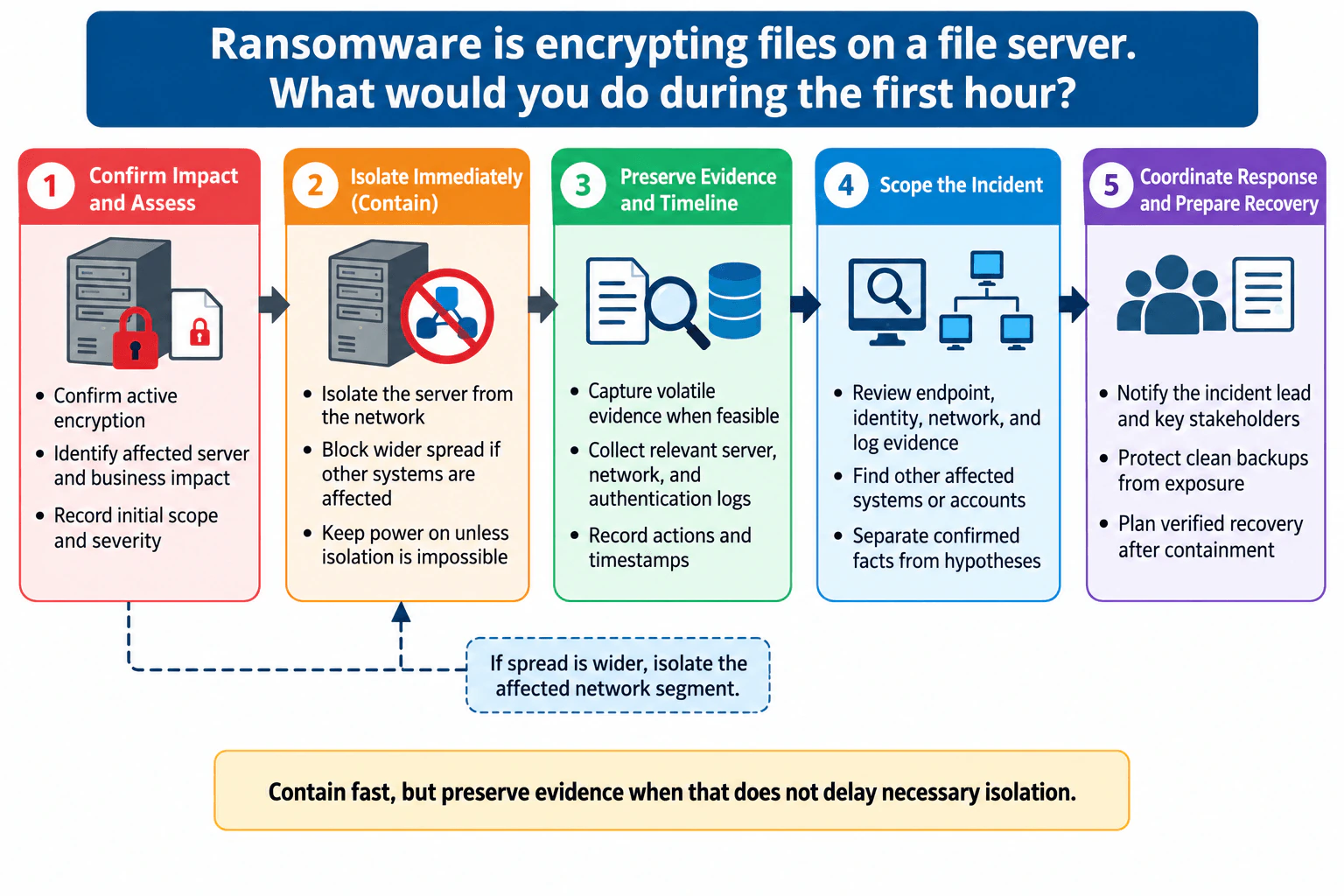
Ransomware is encrypting files on a file server. What would you do during the first hour? diagram
How to Explain It in an Interview

I would explain the first hour as five connected actions.

  1. Confirm impact and assess. I would verify active encryption rather than assuming an alert proves the complete incident. I would identify the affected server, determine the immediate business impact, and record the initial scope and severity. I would separate confirmed facts from hypotheses so the team does not make decisions based on assumptions.
  1. Isolate immediately. If encryption is active, I would isolate the affected file server from the network. The goal is to stop additional access to network resources and reduce further spread. If evidence shows that other systems are also affected, I would expand containment to the affected network segment. The tradeoff is availability: isolation may interrupt business service, but delaying containment can allow more damage.

I would keep the server powered on when it can be safely isolated from the network. That preserves the opportunity to capture volatile evidence such as running processes, active connections, and memory-resident information. If network isolation is impossible and continued operation creates greater risk, powering the server down may become the safer containment decision. Evidence preservation should not delay necessary isolation.

  1. Preserve evidence and timeline. When feasible, I would capture relevant volatile evidence and collect server, network, endpoint, identity, and authentication logs that can help answer the incident questions. I would record responder actions and timestamps so the team can reconstruct what happened. If evidence may be needed for legal, regulatory, disciplinary, or law-enforcement purposes, I would maintain provenance and appropriate chain of custody.
  1. Scope the incident. I would review endpoint, identity, network, and log evidence to find other affected systems or accounts. I would look for activity consistent with the incident and continuously separate confirmed facts from hypotheses. Isolation is containment, not eradication. It limits immediate damage but does not prove that the root cause has been removed or that another attacker path does not exist.
  1. Coordinate response and prepare recovery. I would notify the incident lead and key stakeholders with a factual update covering what is confirmed, what has been isolated, what remains unknown, and what the team is investigating. I would protect known-clean backups from exposure to the affected environment. I would plan recovery only after containment, then later validate backups and restored systems before returning services to normal operation.

The first-hour goal is not to claim that the ransomware incident is solved. It is to contain the immediate threat, preserve useful evidence, understand the likely scope, keep the right people informed, protect recovery assets, and create a safe path for later eradication and verified recovery.

Technical Approach
  1. Confirm active encryption and identify the affected file server.
  2. Assess business impact, initial scope, and severity.
  3. Isolate the affected server from the network using the smallest safe containment action.
  4. If evidence shows wider spread, isolate the affected network segment.
  5. Keep the server powered on when safe network isolation is possible; capture volatile evidence when feasible without delaying containment.
  6. Collect relevant server, endpoint, identity, network, and authentication evidence and record actions with timestamps.
  7. Scope other affected systems and accounts while separating confirmed facts from hypotheses.
  8. Notify the incident lead and key stakeholders with factual updates.
  9. Protect known-clean backups from exposure.
  10. Prepare verified recovery only after containment and sufficient scoping.
Practical Insights

The biggest cost is business disruption. Isolating a file server may temporarily stop users or applications from reaching important data, but leaving an actively encrypting system connected can cause more damage. Evidence collection takes responder time and storage, and wider network isolation can affect healthy systems. Communication also requires coordination between security, IT, business owners, and incident leadership. Recovery may take significant time because backups and restored systems must be checked before normal service resumes. The practical balance is to contain quickly while preserving evidence whenever that does not delay necessary isolation.

Why Interviewers Ask This

This question tests whether I can make safe decisions under time pressure. The interviewer wants to see whether I prioritize containment, preserve useful evidence, distinguish confirmed facts from assumptions, scope possible spread, communicate with authorized stakeholders, protect recovery assets, and understand that isolation is temporary containment rather than root-cause remediation.

Common interview mistakes

Common mistakes include investigating for too long while encryption continues, shutting the server down immediately when safe network isolation is available, treating an alert or indicator as proof of the full compromise, failing to document actions and timestamps, collecting evidence without considering provenance, assuming server isolation means eradication is complete, ignoring other affected systems or accounts, leaving clean backups exposed, giving stakeholders unverified conclusions, and beginning restoration before containment and scope are sufficiently understood.

Interview tip

Lead with the practical priority: stop further damage without unnecessarily destroying evidence. Then walk through the five stages in order: confirm impact, isolate, preserve evidence, scope the incident, and coordinate recovery. State the key tradeoff clearly: preserve evidence when feasible, but do not let evidence collection delay necessary containment.
Interviewer may ask next
What would you do if several servers in the same network segment were also encrypting files?

I would treat that as evidence of a wider incident and expand containment from a single-server action to the affected network segment. I would continue collecting evidence, identify affected systems and accounts, update the incident timeline and severity, notify the incident lead, and protect clean backups. I would also make clear that broader isolation is still containment, not proof that the root cause has been removed.

Would you shut down the infected file server immediately?

Not automatically. If I can isolate the server from the network, I would generally keep it powered on so volatile evidence remains available. If I cannot isolate it and continued operation is allowing encryption or spread to continue, powering it down may become the safer containment decision. The key principle is to contain quickly while preserving evidence when doing so does not delay necessary isolation.

52. A production role was assumed from an unfamiliar AWS account four minutes ago. How would you respond?Incident ResponseHard

Question Details

An alert reports this production role assumption four minutes ago; no other activity appears anomalous. Explain the response sequence under that uncertainty.

Short Interview Answer (30-60 seconds)

I would treat it as an urgent alert, not confirmed compromise. I would preserve CloudTrail evidence, verify the AssumeRole caller and subsequent activity, determine whether the access was expected, and apply the smallest safe containment if needed. Then I would validate the environment and monitor for recurrence.

Detailed Explanation

This question tests how I handle a very recent, suspicious cross-account AWS role assumption when the evidence is incomplete. I should not equate an unfamiliar account with compromise. I need to protect the production role and resources while preserving CloudTrail evidence, assessing business impact, and avoiding unnecessary disruption. The response is therefore evidence first: confirm the AssumeRole event, identify the caller and session, build a timeline, review subsequent API activity, decide whether the access was authorized, and then apply the smallest safe containment. Recovery comes only after validation and continued monitoring.

Useful Questions to Ask the Interviewer
  1. What production permissions does this role have, and what business services or data could those permissions affect?
  2. Is the external AWS account listed in an approved integration, deployment, vendor, or automation inventory?
  3. Which CloudTrail management events and relevant data events are available for the affected resources?
  4. Is there an established severity or containment policy for unexpected production role assumptions?
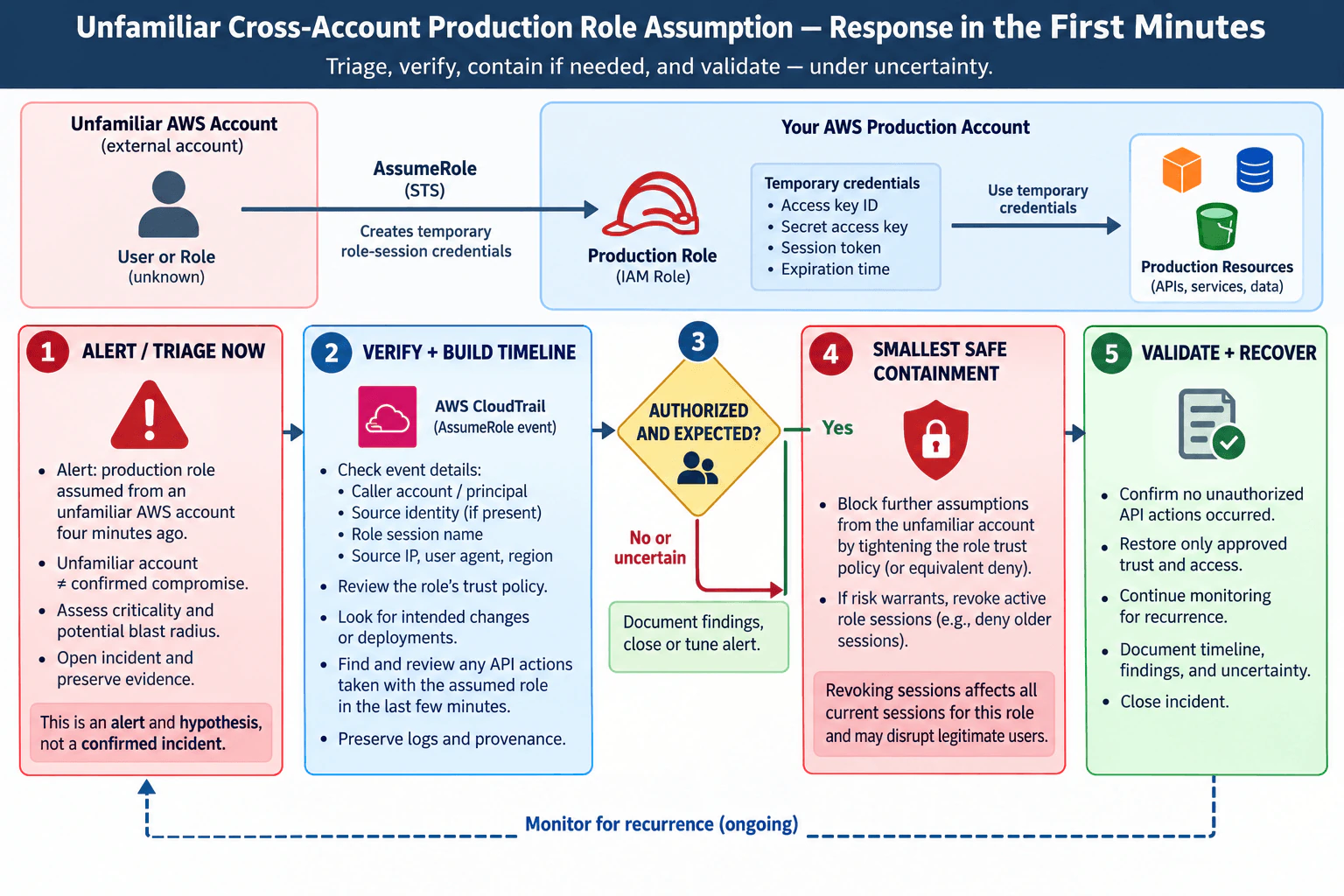
A production role was assumed from an unfamiliar AWS account four minutes ago. How would you respond? diagram
How to Explain It in an Interview

I would begin with the practical decision: investigate immediately, but do not declare compromise from one unfamiliar account. The observed AssumeRole operation is an event and an indicator that creates a hypothesis. A confirmed incident requires supporting evidence that the access was unauthorized or harmful.

The affected security capability is the production IAM role and the temporary credentials created when it is assumed. The important trust boundary is between the unfamiliar external AWS account and our AWS production account. I would first assess the role's privilege, the production resources it can reach, likely business impact, and the possible blast radius.

At the same time, I would preserve the alert and relevant CloudTrail records and start a timeline from the reported event four minutes ago. I would keep evidence provenance intact. If the evidence could later support legal, regulatory, disciplinary, or law-enforcement action, I would follow the organization's required chain-of-custody process. I would record uncertainty explicitly instead of turning assumptions into facts.

Next, I would inspect the CloudTrail record for the STS AssumeRole operation. I would identify the caller account and principal, role session name, source identity when present, source IP address, user agent, AWS Region, and event time. I would review the production role's trust policy and compare the caller with approved accounts, integrations, deployments, or recent changes.

Then I would trace activity performed by the resulting assumed-role session. I would search the relevant CloudTrail history for API operations made under that session during and after the four-minute window. This tells me what the temporary credentials actually attempted or changed. I would expand the timeline as new evidence appears and correlate the findings with the SIEM only where that telemetry can answer a specific question.

The main decision is whether the assumption was authorized and expected. If I verify that the account and principal are approved, the role assumption matches an intended change or integration, and the observed API activity matches that purpose, I would document the findings and close or tune the alert according to procedure. The initial unfamiliarity would not become a security incident merely because the responder did not recognize the account.

If the activity is unauthorized, or if uncertainty remains and continued production access creates unacceptable risk, I would choose the smallest safe containment. First, I would prevent additional assumptions from the unfamiliar source by tightening the role trust policy or applying an equivalent explicit denial. That stops future role assumptions from the blocked source, but it does not by itself remove permissions from temporary role sessions that were already issued.

If the risk from existing sessions is high enough to justify broader disruption, I would revoke permissions for active role sessions. AWS IAM can apply a deny to sessions issued before a cutoff time. This is stronger containment, but it can also interrupt legitimate users or automation using sessions for the same role. I would therefore make the decision based on the role's privilege, the observed activity, business impact, and the risk of waiting.

After containment, I would validate the production environment. I would review the evidence for unauthorized API actions or persistent changes that were within the session's permissions and within our logging coverage. If none are found, I would state only that the available evidence shows no unauthorized activity; I would not claim that absence of evidence proves nothing happened.

Recovery means restoring only approved trust and access. Legitimate users or workloads whose sessions were revoked would obtain fresh authorized sessions. I would validate affected resources and access paths, continue monitoring for another unexpected role assumption or related activity, document the final timeline and remaining uncertainty, and close the incident only when the environment is in a verified acceptable state. If investigation identifies an underlying compromised identity or incorrect trust configuration, that root cause must also be remediated; temporary containment alone is not eradication.

Technical Approach
  1. Confirm the alert time, production role, unfamiliar source account, business criticality, and potential blast radius.
  2. Preserve the alert and CloudTrail evidence, record provenance, and start a timeline.
  3. Inspect the STS AssumeRole event for the caller account and principal, role session name, source identity when present, source IP, user agent, Region, and event time.
  4. Review the production role's trust policy and compare the caller with approved accounts, integrations, deployments, and recent changes.
  5. Trace the resulting assumed-role session and review API operations performed with that identity during the relevant time window.
  6. Decide from evidence whether the role assumption was authorized and expected.
  7. If authorized, document the evidence and close or tune the alert according to procedure.
  8. If unauthorized or the remaining uncertainty creates unacceptable risk, prevent further assumptions from the suspicious source using the smallest safe trust-policy or explicit-deny change.
  9. If existing sessions present unacceptable risk, revoke their role-session permissions, accepting that legitimate sessions for the role may also be interrupted.
  10. Validate that no unauthorized changes remain within the investigated scope, restore only approved trust and access, document findings and uncertainty, and monitor for recurrence.
Practical Insights

The investigation itself can be quick because the event is only four minutes old, but operational cost depends on the role's privilege, logging coverage, and business importance. Reading CloudTrail and the trust policy has little production impact. Blocking future assumptions from one source can interrupt an approved integration if the account was legitimate. Revoking active role sessions has a larger availability risk because valid users or automation may also lose permissions and need new sessions. Evidence handling, incident coordination, validation, and continued monitoring add human and operational work. The response should therefore reduce risk with the least disruptive action that is justified by the evidence.

Why Interviewers Ask This

This question tests whether I can respond quickly without confusing an unfamiliar identity with a confirmed attacker. It evaluates AWS IAM and STS knowledge, evidence-driven triage, production-risk judgment, safe containment, timeline building, and the ability to balance security against disruption to legitimate role sessions.

Common interview mistakes

Common mistakes are declaring compromise solely because the AWS account is unfamiliar; delaying evidence preservation while debating whether the alert is real; immediately revoking every role session without considering production impact; changing only the trust policy and assuming already issued sessions have lost permissions; investigating the AssumeRole event without tracing subsequent API activity; failing to build a timeline; treating the absence of additional alerts as proof that no additional activity occurred; restoring trust before validating the affected environment; and confusing temporary containment with root-cause remediation.

Interview tip

Lead with the decision: this is an urgent alert and hypothesis, not yet a confirmed incident. Then explain the evidence you would collect, how you determine whether the assumption was authorized, the smallest safe containment action, and how you validate recovery. Explicitly distinguish blocking new role assumptions from revoking permissions for existing role sessions, and mention the availability tradeoff before taking the broader action.

Interviewer may ask next
What CloudTrail evidence would you examine to determine who assumed the role and what they did afterward?

I would start with the STS AssumeRole event and inspect the caller account and principal, role ARN, role session name, source IP, user agent, Region, event time, and source identity when present. I would then identify the resulting assumed-role session and review subsequent CloudTrail events for API requests made under that session. Those records let me build a timeline of services and resources touched and actions attempted or completed. I would compare the evidence with the role trust policy and approved account or deployment records. The conclusion must stay limited by the CloudTrail events and data-event coverage actually available.

Why would you not immediately revoke every active session for the production role?

Revoking role-session permissions can reduce risk quickly, but AWS applies the revocation deny to sessions for the role that were issued before the cutoff, so legitimate users or automation may also be interrupted. I would first assess the role's privilege, business impact, observed activity, and whether preventing new assumptions from the suspicious source gives sufficient containment. If an existing unauthorized session creates unacceptable risk, I would accept the disruption and revoke the affected role-session permissions. Legitimate users or workloads can then obtain fresh authorized sessions after the approved trust path is verified.

53. What is detection engineering, and how is it different from monitoring alerts?Detection EngineeringEasy

Question Details

Define detection engineering as the disciplined design, implementation, testing, deployment, tuning, measurement, and maintenance of logic that identifies meaningful adversary or policy-relevant behavior. Explain detection objectives, threat hypotheses, required telemetry, schemas, correlation, time windows, positive and negative tests, false positives, false negatives, coverage gaps, version control, rollout, monitoring, and retirement.

Short Interview Answer (30-60 seconds)

Detection engineering builds and continuously improves the logic that finds meaningful suspicious behavior. It covers threat hypotheses, telemetry, schema, correlation, testing, deployment, tuning, measurement, and retirement. Monitoring alerts is the operational task of triaging and investigating the alerts that this detection logic produces.

Detailed Explanation

Detection engineering is about building reliable ways to identify meaningful adversary or policy-relevant behavior, not simply watching alerts. The engineer starts with a detection objective and threat hypothesis, identifies the required logs and signals, defines normalized fields, correlation keys, and time windows, then implements and tests the detection logic. After deployment, the detection is measured and maintained as telemetry and behavior change. Monitoring alerts happens downstream: analysts triage and investigate what the detection produces. An alert is evidence that deserves review, not automatic proof of compromise.

Useful Questions to Ask the Interviewer
  1. What behavior or security condition are we trying to detect?
  2. Which telemetry sources and fields are reliably available?
  3. What should count as useful detection versus normal behavior?
  4. How are detection changes tested, versioned, and rolled out today?
  5. Who owns tuning, coverage review, telemetry health, and retirement after deployment?
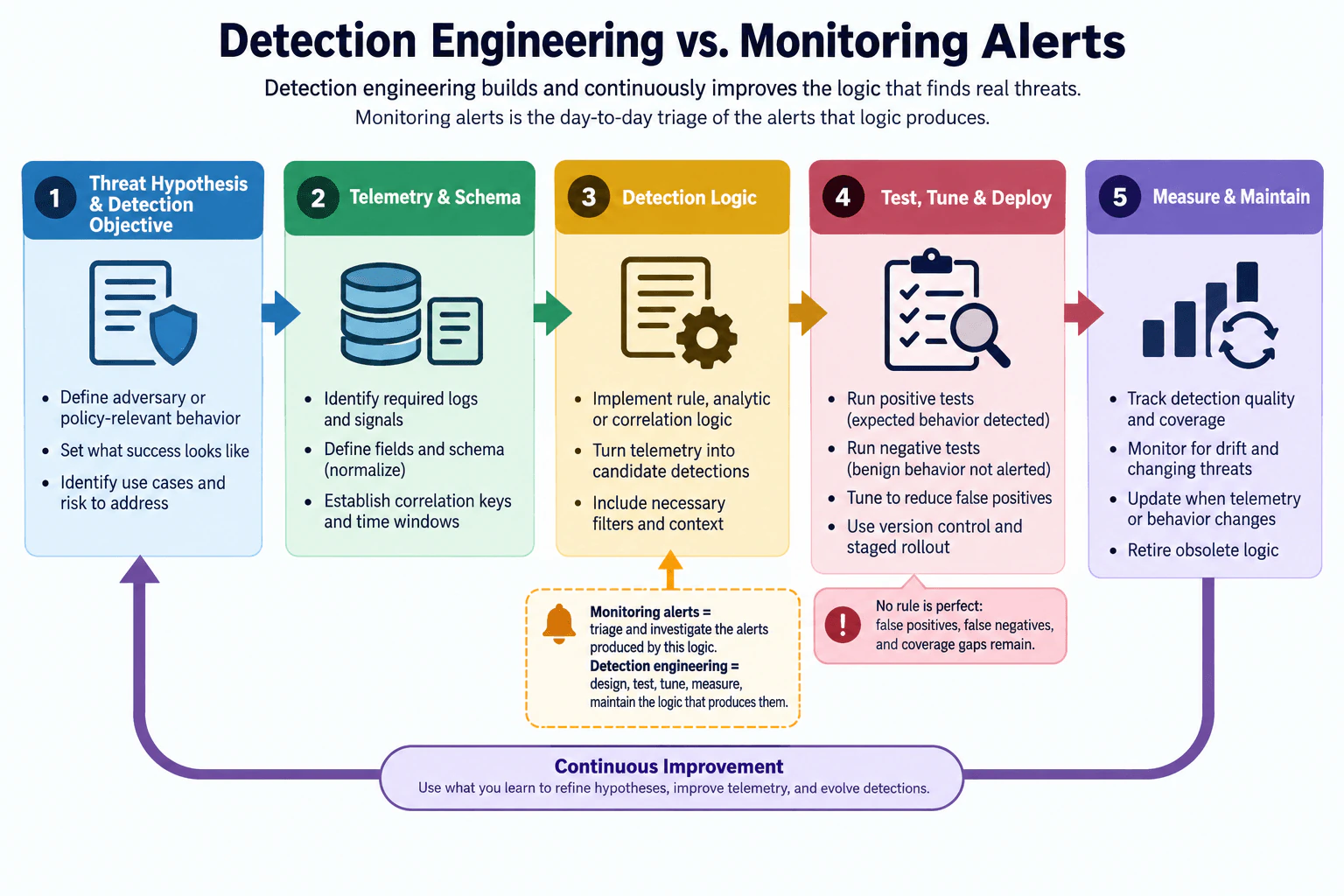
What is detection engineering, and how is it different from monitoring alerts? diagram
How to Explain It in an Interview
  1. Start with the threat hypothesis and detection objective. A detection should answer a specific defensive question. Define the adversary or policy-relevant behavior you care about, what success looks like, and which risk or use case the detection addresses. A threat hypothesis is the testable idea behind the rule: if the behavior occurs, certain observable evidence should appear in the telemetry you actually collect.
  1. Identify the required telemetry and schema. The detection can only work if the necessary evidence is available. Identify the required logs and signals before writing the logic. Define or normalize fields so events use consistent concepts such as event time, user, host, action, and other relevant attributes. Do not assume unavailable telemetry exists. Missing, delayed, or unreliable fields can create coverage gaps and false negatives.
  1. Define correlation and time semantics. Some detections need several related events instead of one independent event. Choose meaningful correlation keys, such as a user or host when appropriate, and define the time window in which events belong together. Timestamp semantics matter because duplicate, late, or out-of-order events can change whether a correlation condition matches. Correlation keys and time windows should reflect the behavior being detected rather than arbitrary values.
  1. Implement the detection logic. Turn the hypothesis and telemetry into a rule, analytic, or correlation condition. Include the filters and context required to represent the intended behavior. Detection logic converts observable telemetry into candidate detections or alerts. A match is not proof of compromise and does not automatically mean an incident exists.
  1. Test the detection before production. Run positive tests using safe synthetic events that should be detected. Run negative tests using benign events that should not alert. Add boundary and regression cases when they help verify correlation, time windows, filtering, or future changes. Positive tests show that expected behavior is detected. Negative tests help reveal false positives. Regression tests help prevent later edits from silently breaking known behavior.
  1. Tune without hiding real behavior. A false positive is an alert for behavior that does not represent the intended security condition. Tune filters or exclusions using evidence, but avoid broad exclusions that create blind spots. A false negative is relevant behavior that the rule fails to identify. Reducing alert volume is useful only if useful coverage is preserved.
  1. Use version control and staged rollout. Store detection logic in version control so changes can be reviewed, compared, tested, and rolled back. After testing and peer review, roll changes out in stages rather than changing all production coverage at once. A staged rollout limits the impact of faulty logic, unexpected alert volume, or incorrect telemetry assumptions.
  1. Measure and maintain the detection. After deployment, track detection quality and coverage instead of assuming the rule stays correct forever. Monitor telemetry health, abnormal alert-volume changes, recurring false positives, known misses, schema drift, and changing adversary or business behavior. Use those findings to refine the threat hypothesis, improve telemetry, and evolve the detection logic.
  1. Track coverage gaps explicitly. No detection rule is perfect. False positives, false negatives, and coverage gaps remain. A coverage gap means important behavior is not adequately observable or detected. It may come from missing telemetry, unsupported environments, inadequate correlation, changed behavior, or logic that is too narrow. Tracking gaps helps prioritize future detection work rather than creating a false sense of complete coverage.
  1. Retire obsolete logic. A detection should have an owner throughout its lifecycle. Retire it when its behavior is no longer relevant, its underlying telemetry has disappeared, another maintained detection replaces it, or it no longer provides useful coverage. Retirement should be reviewed and controlled rather than simply disabling a noisy rule without understanding the resulting coverage loss.
  1. Separate detection engineering from monitoring alerts. Detection engineering designs, tests, tunes, measures, deploys, and maintains the logic that produces useful alerts. Monitoring alerts consumes that output: analysts triage and investigate the alerts and decide whether the evidence requires further investigation or supports declaring an incident. The two functions are connected because analyst findings should feed back into detection tuning, but they are different responsibilities.
  1. Explain continuous improvement and residual risk. Detection engineering is a feedback loop. What you learn from tests, telemetry problems, false positives, false negatives, coverage gaps, and analyst investigations should refine hypotheses, improve telemetry, and evolve detections. A rule match does not prove compromise, and the absence of an alert does not prove that nothing happened. Detection quality always depends on available evidence and the assumptions built into the logic.
Technical Approach
  1. Define the adversary or policy-relevant behavior and detection objective.
  2. Form a testable threat hypothesis.
  3. Identify the required logs and signals.
  4. Normalize the required schema and validate important fields.
  5. Define correlation keys and time-window semantics when events must be related.
  6. Implement the smallest rule or analytic that represents the hypothesis.
  7. Run safe positive, negative, boundary, and regression tests.
  8. Tune false positives while checking false-negative and coverage-gap risk.
  9. Put the detection under version control and peer review.
  10. Use a staged production rollout with a rollback path.
  11. Monitor detection quality, telemetry health, drift, alert volume, and coverage.
  12. Feed findings back into the hypothesis, telemetry, and logic.
  13. Retire the detection when it is obsolete, replaced, or no longer provides useful coverage.
Practical Complexity & Trade-offs

The main costs are operational rather than algorithmic. More telemetry can improve visibility but increases storage, processing, privacy, and maintenance work. More correlation and longer time windows can find richer behavior but increase state, processing, delay, and sensitivity to late events. Broad logic can produce more false positives and analyst work, while excessive tuning can produce false negatives and coverage gaps. Version control, tests, staged rollout, monitoring, ownership, and retirement require engineering effort, but they reduce the risk of silently broken or unmanaged detections. The main tradeoff is useful coverage versus noise, complexity, delay, and maintenance.

Where it is used

Detection engineering is used in authorized security operations where teams need repeatable and maintainable detection logic across endpoint, identity, network, application, cloud, or other collected telemetry. Common situations include creating a new detection from a threat hypothesis, converting investigation findings into reusable logic, tuning a noisy rule, validating behavior after a schema or telemetry change, identifying coverage gaps, measuring an existing detection, and retiring obsolete logic.

Why Interviewers Ask This

Interviewers want to know whether you understand detection as an engineering lifecycle rather than only watching an alert queue. A strong answer shows that you can start from a threat hypothesis, identify the telemetry needed to observe it, build defensible detection logic, test it, deploy it safely, measure its quality, and maintain or retire it. They also want you to understand that an alert is evidence for investigation, not proof that an incident occurred.

Common interview mistakes

Common mistakes include treating detection engineering as merely watching alerts, writing detection logic before confirming that required telemetry exists, ignoring normalization and timestamp semantics, using arbitrary correlation windows, skipping negative or regression tests, measuring success only by alert count, tuning noise with overly broad exclusions, assuming an alert proves compromise, assuming no alert means no malicious behavior occurred, ignoring false negatives and coverage gaps, deploying unversioned changes directly to production, failing to monitor telemetry drift, and leaving obsolete detections enabled indefinitely.

Interview tip

Explain detection engineering as a lifecycle: threat hypothesis and objective, telemetry and schema, detection logic, testing and tuning, versioned deployment, measurement, maintenance, and retirement. Then contrast it with monitoring alerts in one sentence: detection engineering builds and improves the logic; monitoring alerts triages and investigates its output. Mention false positives, false negatives, coverage gaps, and continuous improvement to show mature judgment.

Interviewer may ask next
How would you validate a new detection before deploying it broadly?

I would first confirm that the required telemetry and fields are actually available and normalized as expected. Then I would create safe synthetic positive cases that should trigger the detection, negative cases that represent benign behavior and should not trigger, and boundary cases around correlation or time-window conditions. I would keep regression tests for known behavior. After peer review and version control, I would use a staged rollout, watch alert volume and telemetry health, inspect false positives and known misses, and keep a rollback path if the new version behaves unexpectedly.

What is the biggest limitation of a detection rule, even after it has been tuned?

A detection rule still depends on the evidence it can see and the assumptions encoded in its logic. Missing telemetry, schema changes, late events, behavior changes, and narrow correlation conditions can create false negatives or coverage gaps, while broad logic can create false positives. A rule match therefore does not prove compromise, and a missing match does not prove safety. The right approach is to measure the rule over time, monitor telemetry health and drift, track gaps, use investigation feedback, and update or retire the rule when its assumptions no longer hold.

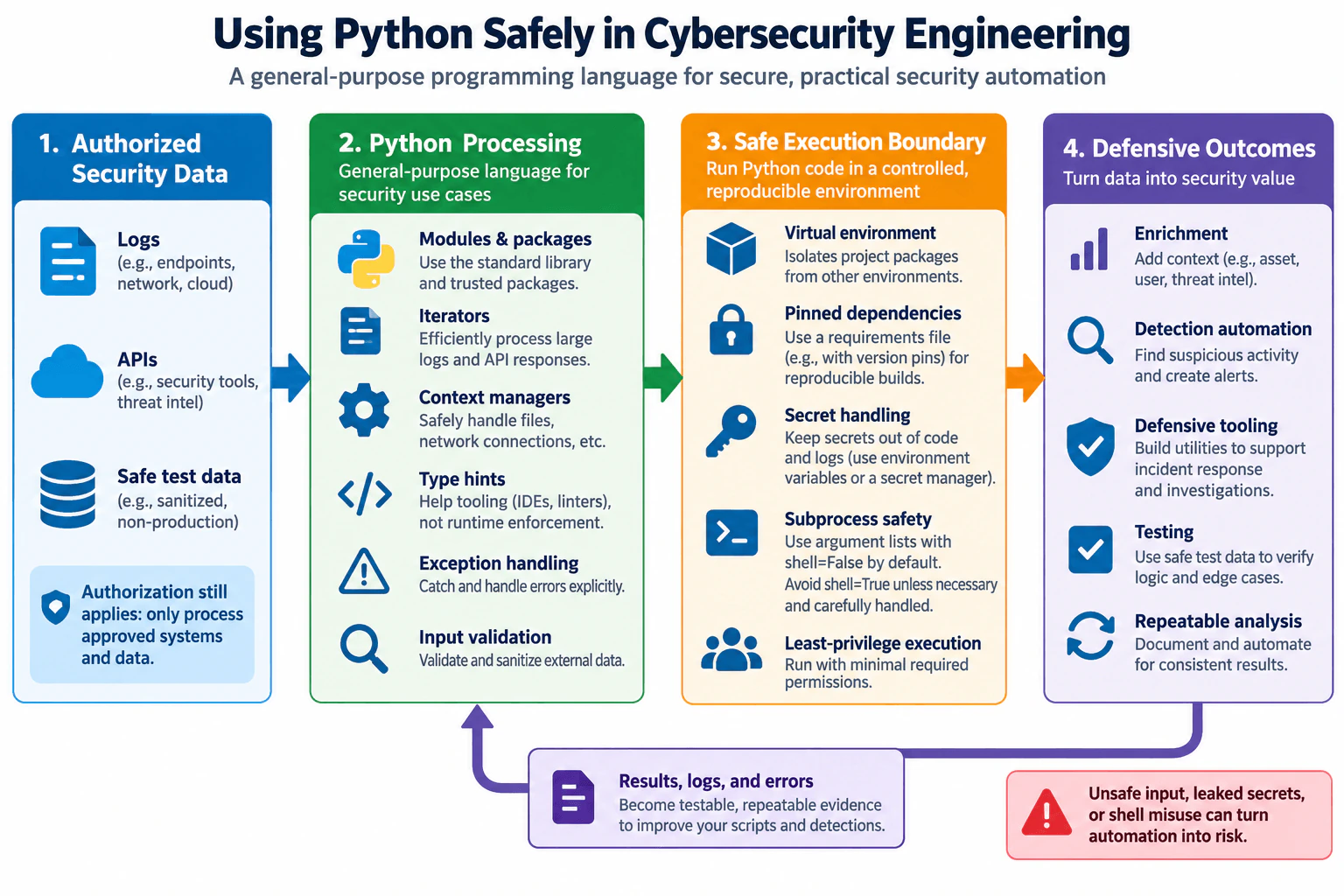
54. What is Python, and how is it used safely in cybersecurity engineering?Detection EngineeringEasy

Question Details

Define Python as a general-purpose programming language. Explain its use for log and API processing, enrichment, detection automation, defensive tooling, testing, and repeatable analysis. Cover modules, packages, virtual environments, iterators, context managers, type hints, exception handling, input validation, subprocess safety, secret handling, dependency pinning, and why authorization and safe test data still matter.

Short Interview Answer (30-60 seconds)

Python is a general-purpose programming language used for logs, APIs, enrichment, detection automation, defensive tools, testing, and repeatable analysis. I use it safely by validating input, isolating and pinning dependencies, protecting secrets, handling exceptions, avoiding unsafe shell execution, applying least privilege, and working only with authorized systems and safe test data.

Detailed Explanation

The practical question is not only whether Python is useful in cybersecurity, but whether it can be used safely and predictably. Python is a general-purpose programming language that can read logs, call security APIs, enrich data, automate detection work, build defensive utilities, test logic, and make analysis repeatable. A safe design starts with authorized systems and data, validates external input, runs code inside a controlled execution boundary, and produces defensive outcomes such as enrichment or alerts. Authorization, least privilege, protected secrets, controlled dependencies, explicit error handling, and sanitized test data remain important throughout the workflow.

Useful Questions to Ask the Interviewer
  1. Is the Python automation mainly processing logs, calling APIs, or both?
  2. Will the script only analyze data, or can it also create alerts or make other authorized changes?
  3. What systems and data are approved for the automation, and what safe testing environment is available?
What is Python, and how is it used safely in cybersecurity engineering? diagram
How to Explain It in an Interview
1. Start with what Python is

Python is a general-purpose programming language. In cybersecurity engineering, it is useful because engineers can write readable programs that automate repetitive defensive work and make analysis easier to test and repeat.

A simple workflow is: authorized security data enters Python processing, the code validates and handles that data, execution stays within a controlled boundary, and the program produces defensive outcomes. Those outcomes can include enriched records, detection alerts, investigation utilities, test results, and repeatable analysis.

2. Process only authorized security data

Authorization is the first boundary. A Python program should access only systems and data that the engineer is permitted to use. Typical inputs include endpoint, network, or cloud logs and API responses from approved security tools or threat-intelligence services.

Testing should use synthetic, sanitized, or otherwise non-sensitive test data when possible. Safe test data matters because even technically correct code can create risk if a test exposes production secrets, personal information, or sensitive security records.

3. Use modules and packages carefully

Modules organize reusable Python code. Packages provide reusable libraries that can reduce duplicate work. The standard library should be preferred when it already provides the needed functionality, while external packages should be reviewed, version-controlled, and maintained rather than treated as automatically trustworthy.

4. Use iterators for efficient processing

Iterators let a program process items one at a time. They are useful when handling large logs or API result sets because the program can often process records incrementally instead of loading the entire dataset into memory.

This improves memory efficiency, although it does not by itself make the data trustworthy or secure.

5. Use context managers for predictable resource handling

Context managers manage setup and cleanup around resources such as files and network connections. The common with pattern helps close or release resources when processing completes or when an exception occurs.

This makes resource handling more predictable and reduces mistakes such as leaving files or connections open unintentionally.

6. Use type hints for clarity, not as a security boundary

Type hints document the types a function expects and returns. They help reviewers, editors, linters, and static-analysis tools catch mistakes earlier and make security automation easier to understand.

Type hints are not automatic runtime validation. External data still needs explicit validation before the program trusts or acts on it.

7. Handle exceptions explicitly

Security automation must expect failures such as malformed records, missing files, API timeouts, unavailable services, or unexpected response formats.

Exception handling should deal with expected failures deliberately and record useful evidence without exposing secrets. Broad exception handlers that silently ignore every error make failures difficult to detect and can allow the program to continue with unsafe assumptions.

8. Validate external input

Logs, API responses, filenames, configuration values, and other external data may be malformed, incomplete, unexpected, or attacker-controlled. The program should verify required fields, data types, lengths, formats, ranges, and allowed values before using them.

Invalid data should be rejected, skipped, quarantined for review, or otherwise handled through an explicit safe path. The program should not blindly use external values in commands, filesystem operations, queries, or automated security actions.

9. Use a virtual environment

A Python virtual environment isolates a project's installed Python packages from packages used by other Python environments on the same system. This reduces dependency conflicts and helps make the project's runtime more predictable.

A virtual environment is package isolation, not a full operating-system security sandbox. It does not replace least privilege, host isolation, access controls, or input validation.

10. Pin dependencies for reproducibility

Dependency versions should be pinned or otherwise locked to known versions appropriate for the project. This makes development, testing, and deployment more reproducible because different environments are less likely to install unexpectedly different package versions.

Pinning does not prove that a package is secure. Dependencies still need review, vulnerability management, maintenance, and controlled updates.

11. Protect secrets

API keys, tokens, passwords, and similar credentials should not be embedded directly in source code or written to normal application logs.

The diagram's safe pattern is to supply them through an appropriate environment mechanism or secret-management system and grant the program only the credential access required for its task. Error messages and debugging output should also avoid printing secret values.

12. Use subprocesses safely

Starting an operating-system process increases the impact that Python code can have. If a subprocess is necessary, pass the executable and arguments as a structured argument list and keep shell execution disabled by default.

Avoid constructing shell command strings from external input. If shell execution is truly required, it should be an exceptional and carefully reviewed case with tightly controlled input. The Python process should still run with only the minimum permissions it needs.

13. Apply least privilege

A security script should not run with broad administrative privileges unless those privileges are genuinely required. Give the program only the ability to read its approved inputs and write or perform its intended outputs.

For example, a log-enrichment job may need permission to read selected events and query an enrichment API, but it should not receive unrelated administrative permissions.

14. Produce defensive outcomes

Python can enrich records by adding approved context such as asset, user, or threat-intelligence information. It can automate detection logic that identifies suspicious activity and creates an alert. It can also support incident-response utilities, testing, and repeatable analysis.

A detection alert means that configured logic matched observable evidence. It is not automatically proof that an incident or compromise occurred. Analysts or other authorized processes must evaluate the alert context before deciding on a response.

15. Keep results, logs, and errors useful

The program should produce useful results, operational logs, and error information so engineers can test behavior and understand failures. Those outputs form the feedback loop shown in the diagram: engineers use the evidence to improve scripts, detections, tests, and operational reliability.

Logging should provide enough context for troubleshooting without exposing credentials or unnecessary sensitive information.

16. Test safely and make analysis repeatable

Positive tests confirm expected valid behavior. Negative tests confirm that malformed or irrelevant input is rejected or handled safely. Boundary tests exercise unusual but valid values. Regression tests confirm that later code changes do not break previously verified behavior.

Tests should use synthetic or sanitized data and placeholder identifiers instead of real secrets or unnecessarily sensitive production records.

Safe failure behavior

If an API response is malformed, a required dependency is unavailable, a record fails validation, or another prerequisite is missing, the program should not blindly continue into an unsafe action. Depending on the task, it can reject the item, record a controlled error, retry an idempotent operation with limits, or stop before performing an action whose requirements are uncertain.

Failures should remain visible enough to investigate. Silently discarding security data or hiding repeated processing failures can create detection gaps.

Limitations and tradeoffs

Python makes security automation relatively quick to build and easy to read, but automation can also amplify mistakes. Unsafe input handling, leaked secrets, excessive privileges, poorly controlled dependencies, and careless shell execution can turn defensive automation into risk.

Virtual environments and pinned dependencies improve isolation and reproducibility but require maintenance. Strong validation and explicit exception handling add implementation work but make behavior more predictable. Least privilege can require more access-control design but reduces the damage that a bug or compromised process can cause.

Python also may not be the best choice for every high-throughput or latency-sensitive workload. Iterators, batching, and efficient libraries can help, but architecture should still match the required scale.

The key principle is simple: authorized data should move through validated Python processing inside a controlled, least-privileged execution boundary and produce defensive outcomes that are testable, repeatable, and observable.

Technical Approach
  1. Confirm which systems, logs, APIs, and datasets are authorized for the task.
  2. Create a dedicated virtual environment and use reviewed, controlled, pinned dependencies.
  3. Read logs or API data through appropriate modules and context managers.
  4. Process large inputs incrementally with iterators when useful.
  5. Validate required fields, types, formats, ranges, and allowed values before using external data.
  6. Use type hints to document expectations and explicit exception handling for expected failures.
  7. Keep secrets outside source code and normal logs, and give the process access only to the credentials it needs.
  8. Avoid subprocesses unless necessary; when used, pass arguments separately and keep shell execution disabled by default.
  9. Run the automation with least privilege and limit it to its intended defensive actions.
  10. Produce outcomes such as enrichment, detection alerts, defensive tooling results, tests, or repeatable analysis.
  11. Test with synthetic or sanitized data using positive, negative, boundary, and regression cases.
  12. Review results, logs, and errors as feedback and update the automation when failures, dependencies, or requirements change.
Practical Complexity & Trade-offs

Technical cost: Python is often quick to develop, but production scripts still need validation, exception handling, dependency control, tests, and code review. Operational cost: virtual environments, pinned dependencies, credentials, permissions, logging, and updates must be maintained. Human cost: engineers need to review what the automation can access and what actions it may perform. Security cost: excessive privileges, unsafe inputs, exposed secrets, or unsafe subprocess use increase the impact of mistakes. Performance cost: large datasets may require iterators, batching, efficient libraries, or a different architecture. Compliance and privacy cost: authorization, data minimization, and safe test data help reduce unnecessary exposure of sensitive information.

Where it is used

Python is used in authorized defensive workflows such as parsing endpoint, network, and cloud logs; calling security-tool APIs; enriching records with approved asset, user, or threat context; automating detection checks; creating investigation utilities; validating detection logic with safe test records; transforming security data; and producing repeatable analysis. The same safety controls matter whether the program runs interactively, as a scheduled job, or as part of a larger defensive workflow.

Why Interviewers Ask This

Interviewers want to know whether you understand both Python's practical value for defensive security automation and the controls needed to use that automation safely. A strong answer connects Python features such as modules, packages, iterators, context managers, type hints, and exception handling with operational safeguards such as authorization, virtual environments, dependency pinning, input validation, secret protection, subprocess safety, least privilege, and safe test data.

Common interview mistakes

Common mistakes include calling Python only a scripting language instead of recognizing it as a general-purpose language; discussing automation without authorization boundaries; hard-coding API keys or logging secrets; assuming type hints validate runtime input; trusting logs or API responses without explicit validation; catching all exceptions and hiding failures; installing uncontrolled dependency versions into shared environments; assuming a virtual environment is a security sandbox; assuming pinned dependencies are automatically safe; building shell command strings from untrusted input or enabling shell execution unnecessarily; running defensive scripts with administrative permissions when narrower access would work; testing with real credentials or sensitive production data; and treating a detection alert as proof that an incident occurred.

Interview tip

Explain the answer as one flow that matches the diagram: authorized logs and APIs enter Python processing; Python uses modules, iterators, context managers, type hints, exceptions, and validation; the code runs inside a controlled boundary with virtual environments, pinned dependencies, protected secrets, safe subprocess handling, and least privilege; and the result is enrichment, detection automation, defensive tooling, testing, or repeatable analysis. Finish by explaining that results, logs, and errors provide feedback for safer and more reliable automation.

Interviewer may ask next
Why are virtual environments and pinned dependencies both useful?

They solve different problems. A virtual environment isolates one project's installed Python packages from other Python environments, reducing dependency conflicts. Pinning or locking records the dependency versions the project expects, improving reproducibility across development, testing, and deployment. Neither control proves that a dependency is secure, so packages still require review, maintenance, controlled updates, and vulnerability management.

What can go wrong when Python automation uses subprocesses or untrusted input?

Malformed or attacker-controlled input can influence program behavior, and unsafe subprocess construction can let that input affect operating-system commands. A safer design validates external input, uses Python functionality directly instead of a subprocess when practical, passes subprocess arguments as a structured list, keeps shell execution disabled by default, handles failures explicitly, protects secrets, and runs with least privilege. The automation must still operate only on authorized systems and should be tested with synthetic or sanitized data before production use.

55. What is Bash, and how should cybersecurity engineers use shell scripts safely?Detection EngineeringEasy

Question Details

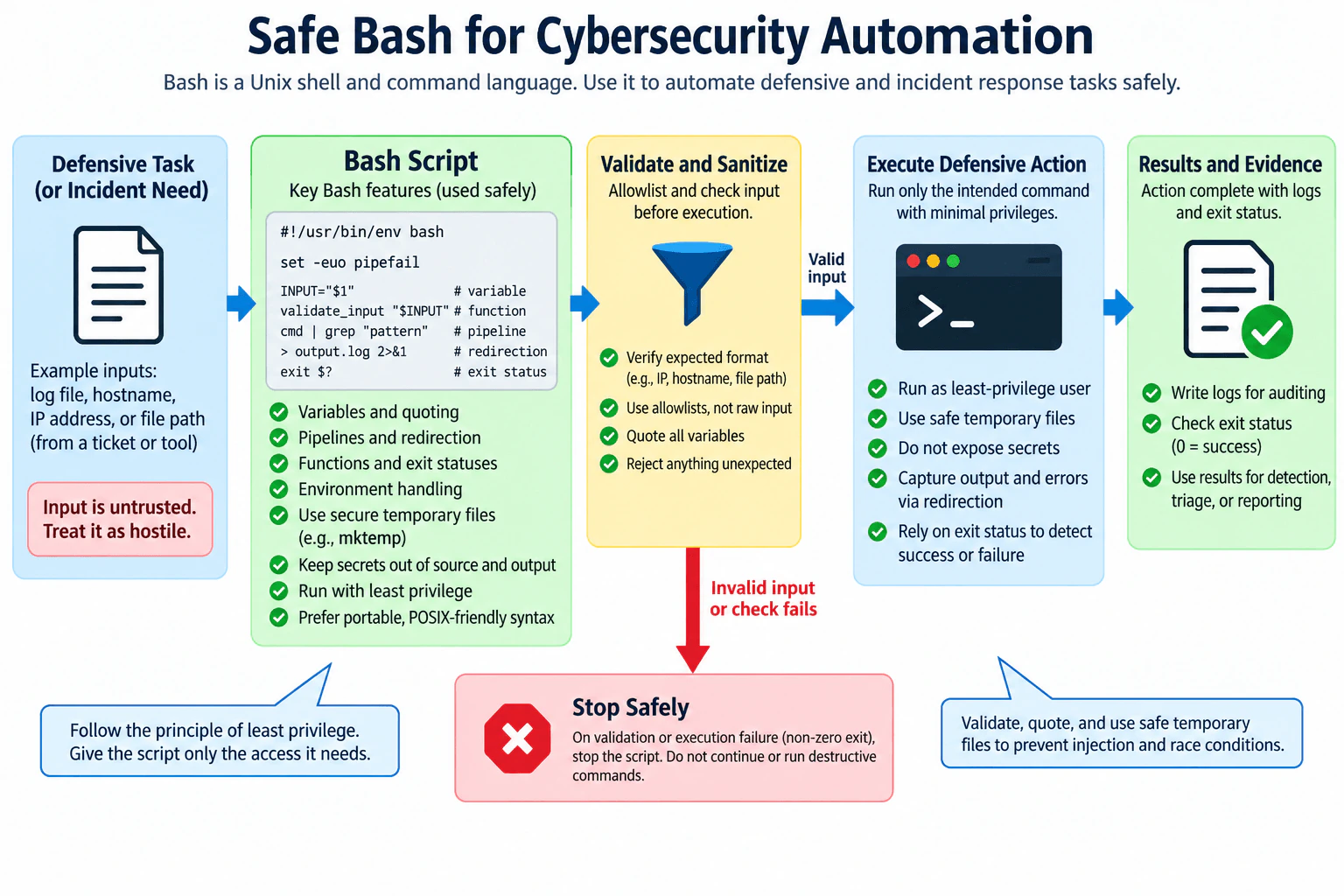
Define Bash as a Unix shell and command language. Explain commands, pipelines, variables, quoting, redirection, exit statuses, functions, and environment handling. Connect it to defensive automation and incident tooling while covering strict error handling, untrusted-input validation, safe quoting, temporary files, secret handling, least privilege, portability, and avoiding destructive defaults.

Short Interview Answer (30-60 seconds)

Bash is a Unix shell and command language. I use it for small defensive automation, but I treat inputs as untrusted, validate and quote them, handle failures strictly, use secure temporary files, protect secrets, run with least privilege, capture results, and stop safely when validation or execution fails.

Detailed Explanation

See the Code while reading this explanation.

The practical decision is to use Bash for small, clear defensive automation while treating every external value as potentially unsafe. Bash is a Unix shell and command language that runs commands and supports pipelines, variables, quoting, redirection, exit statuses, functions, and environment variables. Those features make it useful for collecting artifacts, parsing logs, and supporting incident-response tasks. The safe design is simple: receive a defensive task, validate its input, execute only the intended command with minimal privilege, capture results and errors, and stop safely if validation or execution fails.

Useful Questions to Ask the Interviewer
  1. Which values can come from tickets, command-line arguments, files, tools, or environment variables?
  2. Does the script need elevated privilege, or can it run as a restricted user or service account?
  3. Which output must be retained as evidence or logs, and which values must never appear in output?
  4. Is Bash specifically available on every target system, or is POSIX-shell portability required?
What is Bash, and how should cybersecurity engineers use shell scripts safely? diagram
How to Explain It in an Interview

Start with the language itself. Bash is both an interactive Unix shell and a scripting language. A command launches a program or shell built-in. A pipeline such as producer | consumer connects the standard output of one command to the standard input of another. Variables store values. Functions group reusable logic. Environment variables are values inherited by processes and should not automatically be treated as trustworthy.

Quoting is one of the most important safety rules. In Bash, "$value" normally passes the expanded value as one argument instead of allowing word splitting or pathname expansion to change its meaning. Quoting does not replace validation. If the script expects a hostname, IP address, file path, or another narrow value, validate it against the expected format or an allowlist before using it. Do not turn user-controlled strings into executable shell code, and avoid dynamic command construction when direct argument passing works.

Redirection controls where output goes. For example, >file writes standard output to a file, while 2>&1 sends standard error to the same destination as standard output. That is useful for defensive evidence collection, but logs should contain only information that is safe and necessary. Passwords, API tokens, private keys, and other reusable secrets should not be hardcoded in the script or printed to its output.

Exit statuses tell the caller whether a command succeeded. By convention, zero represents success and a nonzero value represents failure. A defensive script should use those statuses to decide whether to continue. set -euo pipefail is a useful Bash baseline: -u detects unset variables, pipefail exposes failures inside pipelines, and -e stops on many unhandled command failures. However, -e has context-dependent shell semantics, so important operations still need explicit success and failure handling.

Temporary files need special care. Predictable filenames can create race conditions or cause a script to operate on an unintended file. Use a secure creator such as mktemp, restrict what is written, and register cleanup with trap before the file is used. This matches the diagram's safe-execution flow: validation first, secure temporary storage where needed, then the narrow defensive action.

Least privilege limits damage if the script contains a bug or receives unexpected input. A log parser or evidence collector normally should not run as root. Give the script only the permissions needed for its approved task. Prefer read-only and non-destructive behavior, especially during incident response where preserving evidence matters. If a privileged operation is unavoidable, scope that privilege to the smallest approved action rather than elevating the whole workflow.

Environment handling should also be deliberate. A caller can influence variables such as PATH, locale settings, and application-specific environment variables. For sensitive automation, set a known command-search path, validate security-relevant environment values, and do not rely on inherited state without checking it. If portability matters, remember that Bash-specific features are not guaranteed by generic POSIX sh; either declare Bash explicitly or use the portable subset required by the target environment.

The end-to-end flow is: receive the defensive task, treat the input as untrusted, validate it, execute only the intended command with minimal privilege, capture output and errors, check the exit status, and use successful results for detection, triage, or reporting. If validation fails or execution returns an error that should stop the workflow, fail closed and stop instead of running a destructive fallback. The output is evidence about what the script observed or did; it is not automatically proof of compromise or an incident.

The main tradeoff is simplicity versus maintainability. Bash is excellent for short command-oriented automation because it is concise and works naturally with operating-system tools. As scripts grow, quoting, error paths, data structures, testing, and portability become harder to reason about. At that point, a more structured language can be easier to maintain, but the same security principles still apply.

Technical Approach
  1. Define the exact defensive task and choose only the commands needed for it.
  2. Identify every external input, including arguments, files, tool output, and environment variables.
  3. Validate each input against the expected format or an allowlist.
  4. Keep validated values as data and pass them as quoted arguments instead of building executable command strings.
  5. Enable strict error handling and explicitly handle important command failures.
  6. Create temporary files securely and register cleanup before using them.
  7. Keep secrets out of source code, command output, logs, and temporary artifacts.
  8. Run with the least privilege required and prefer read-only, non-destructive actions.
  9. Capture useful output and errors, check exit statuses, and stop safely on failure.
  10. Test valid, invalid, empty, boundary, and command-failure cases before operational use.
Practical Complexity & Trade-offs

For a small Bash script, implementation cost is usually low because the script can call existing operating-system tools directly. Operational cost increases as the script grows because quoting rules, error paths, privilege handling, platform differences, and testing become harder. Least-privilege execution may require access-control work. Secure secret delivery and safe evidence logging add operational effort but reduce exposure risk. Maintenance includes version control, peer review, testing failure cases, checking command availability on target systems, and confirming that future changes do not introduce destructive behavior.

Example

This Bash example follows the same flow as the approved diagram. It accepts one untrusted hostname, validates its structure, creates a secure temporary file, performs a narrow read-only lookup, captures normal output and errors, checks the exit status, and stops on failure. It uses an explicit Bash shebang because the question asks about Bash, establishes a known PATH, keeps the input quoted, avoids dynamic command execution, and removes the temporary file with a cleanup trap. It also checks whether the required defensive utility exists instead of assuming every system provides it.

Code
#!/usr/bin/env bash

# Stop on many unhandled failures, reject unset variables, and propagate
# failures from commands inside pipelines.
set -euo pipefail

# Use a known command-search path instead of trusting an inherited PATH.
PATH='/usr/bin:/bin'
export PATH

# Use a predictable locale for character comparisons and command behavior.
LC_ALL='C'
export LC_ALL

# Require exactly one untrusted hostname argument.
if [[ $# -ne 1 ]]; then
  printf 'Usage: %s <hostname>\n' "$0" >&2
  exit 2
fi

hostname="$1"

# Apply a conservative total-length check before parsing hostname labels.
if ((${#hostname} == 0 || ${#hostname} > 253)); then
  printf 'Rejected invalid hostname input.\n' >&2
  exit 2
fi

# Split the hostname into labels so each part can be validated independently.
IFS='.' read -r -a labels <<< "$hostname"

# Reject empty labels, labels longer than 63 characters, and labels that
# contain characters outside letters, digits, and internal hyphens.
for label in "${labels[@]}"; do
  if ((${#label} == 0 || ${#label} > 63)) \
    || [[ ! "$label" =~ ^([A-Za-z0-9]|[A-Za-z0-9][A-Za-z0-9-]{0,61}[A-Za-z0-9])$ ]]; then
    printf 'Rejected invalid hostname input.\n' >&2
    exit 2
  fi
done

# Confirm the required read-only lookup utility exists on this system.
if ! command -v getent > /dev/null 2>&1; then
  printf 'Required lookup utility is unavailable.\n' >&2
  exit 69
fi

# Create a securely named temporary file for the defensive lookup output.
tmp_file="$(mktemp)"

# Remove the temporary file whenever the script exits normally or on error.
cleanup() {
  rm -f -- "$tmp_file"
}
trap cleanup EXIT

# Run only the intended read-only lookup and keep the validated input quoted.
# Capture both standard output and standard error as troubleshooting evidence.
if getent hosts "$hostname" > "$tmp_file" 2>&1; then
  printf 'Lookup succeeded for %s\n' "$hostname"
  cat -- "$tmp_file"
else
  status=$?
  printf 'Lookup failed for %s with exit status %d\n' "$hostname" "$status" >&2
  cat -- "$tmp_file" >&2
  exit "$status"
fi
Where it is used

Bash is useful for authorized defensive tasks such as collecting host information during triage, parsing and filtering log files, gathering artifacts from approved locations, formatting evidence for another tool, checking whether a defensive command completed successfully, and automating repeatable incident-response preparation or detection-support tasks. It is a strong choice when the workflow is small, command-oriented, non-destructive, and easy to review.

Why Interviewers Ask This

Interviewers want to know whether you understand both Bash fundamentals and the security risks of shell automation. A cybersecurity engineer should understand commands, pipelines, variables, quoting, redirection, exit statuses, functions, and environment handling while preventing untrusted input, excessive privilege, temporary-file misuse, secret exposure, and unsafe failure behavior from turning a useful defensive script into a security problem.

Common interview mistakes

Common mistakes include inserting untrusted text directly into shell commands, leaving variable expansions unquoted, using eval or dynamically constructed command strings unnecessarily, trusting filenames or environment variables without validation, assuming set -e catches every failure, ignoring failures inside pipelines, using predictable temporary filenames, hardcoding secrets, writing secrets to logs, running an entire script as root when only limited access is needed, continuing after validation fails, and using destructive actions as a default. Another mistake is assuming Bash-specific syntax will work under every generic /bin/sh implementation.

Interview tip

Lead with the practical rule: Bash is useful for small defensive automation, but external input must remain data and must never become trusted command syntax. Then walk through the diagram's flow: validate input, quote it, run only the intended action with least privilege, capture results and errors, check exit status, and stop safely on failure. Mention set -euo pipefail as a useful baseline, not as a substitute for explicit error handling.

Interviewer may ask next
Why is quoting variables so important in Bash security?

The shell performs expansions before a command receives its arguments. An unquoted expansion can undergo word splitting and pathname expansion, which can change how many arguments the command receives and therefore change its behavior. Writing command "$value" normally keeps the expanded value as one argument. Quoting is necessary but not sufficient: the value should still be validated against the exact format or allowlist expected by the defensive operation.

Is `set -euo pipefail` enough to make a Bash script safe?

No. It is an error-handling baseline, not a security boundary. -u catches uses of unset variables, pipefail makes pipeline failures visible, and -e exits on many unhandled failures, but Bash has contexts where -e does not behave like a universal exception mechanism. Safe scripts still need input validation, correct quoting, least privilege, secure temporary files, secret protection, explicit handling for important failures, testing, and non-destructive defaults.

56. What is PowerShell, and how is it used in defensive security automation?Detection EngineeringEasy

Question Details

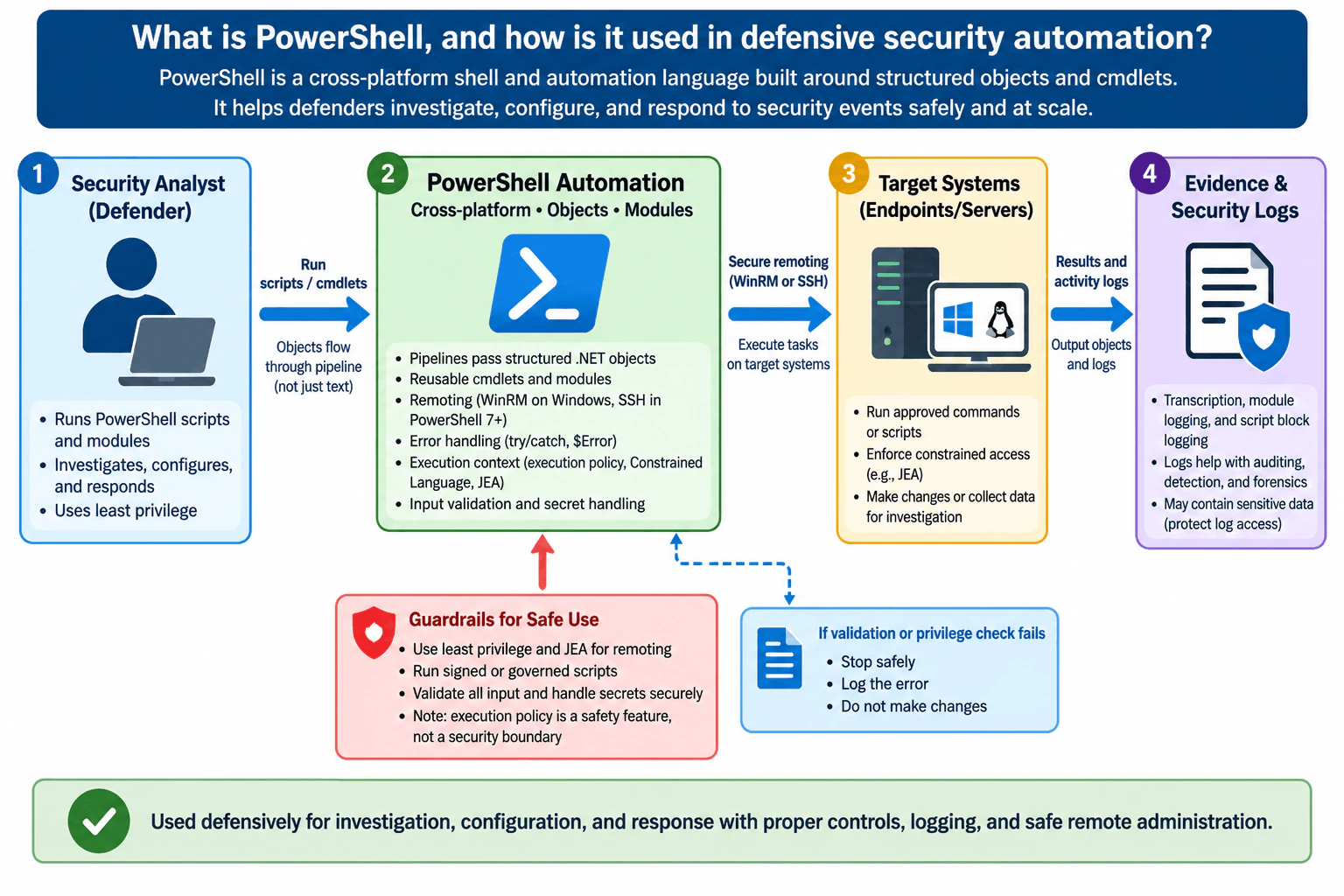
Define PowerShell as a cross-platform shell and automation language built around structured objects and cmdlets. Explain pipelines, objects, modules, remoting, error handling, execution context, logging, and its defensive uses for investigation, configuration, and response. Cover constrained privilege, signed or governed scripts, input validation, secret handling, transcription, and safe remote administration.

Short Interview Answer (30-60 seconds)

PowerShell is a cross-platform shell and automation language based on cmdlets and structured objects. Defenders use it for investigation, configuration, and response. I would run it with least privilege, validate inputs, protect secrets, govern scripts, handle errors safely, use controlled remoting, and retain appropriate logs.

Detailed Explanation

PowerShell gives defenders one automation interface for collecting information, changing approved configuration, and performing response actions on local or remote systems. Its main advantage is that commands called cmdlets return structured objects, so pipelines can filter and process properties instead of relying only on text parsing. For defensive use, the important decision is not simply whether PowerShell can perform a task, but whether it can perform that task with constrained privilege, validated input, protected secrets, controlled scripts, safe error handling, secure remoting, and enough logging to review what happened.

Useful Questions to Ask the Interviewer
  1. Are we discussing local automation, remote administration, or both?
  2. Which operating systems are in scope?
  3. Is the task mainly investigation, configuration enforcement, or incident response?
  4. What controls govern who may run administrative scripts and against which systems?
  5. Which PowerShell logging or transcription records are retained for security review?
What is PowerShell, and how is it used in defensive security automation? diagram
How to Explain It in an Interview
1. Start with what PowerShell is

PowerShell is a cross-platform command shell and scripting language. Its commands are commonly exposed as cmdlets, and its pipeline passes structured objects between commands rather than only plain text. That means one command can return objects whose properties another command can filter, select, group, or process. This object model is useful for defensive automation because security engineers often need to collect consistent system information from many endpoints.

2. Follow the diagram's primary flow

The security analyst starts an approved PowerShell script or set of cmdlets. PowerShell uses cmdlets, reusable modules, and pipelines to process the task. When remote execution is required, PowerShell can connect to target endpoints or servers through supported remoting mechanisms such as WinRM or SSH. PowerShell remoting normally uses WinRM, while SSH supports cross-platform PowerShell remoting between supported systems.

The target system performs the authorized investigation or change and returns structured results. Relevant PowerShell and activity logs then provide evidence for auditing, investigation, detection, and forensic review. On Windows, PowerShell supports module logging and script block logging, and transcription can also be configured to record session activity.

3. Use it for three defensive outcomes

For investigation, PowerShell can collect authorized information such as process, service, configuration, or event data and return it as structured objects. For configuration, it can apply approved settings consistently rather than relying on repeated manual actions. For response, it can automate authorized containment or remediation steps after the security team has made the required decision. PowerShell itself does not prove that a host is compromised, and an automation result should not automatically be treated as an incident.

4. Keep privileges constrained

Automation should run with only the permissions required for the task. Just Enough Administration, or JEA, can restrict supported PowerShell remoting sessions to defined users and commands. JEA session configurations can limit what users are allowed to invoke and reduce direct access to broader system resources.

A key limitation is that SSH-based PowerShell remoting does not currently support remote endpoint configuration or JEA. Therefore, I would not describe JEA as a control that applies equally to both WinRM and SSH remoting. This is an important distinction when designing safe remote administration.

5. Govern scripts and execution context

Defensive scripts should come from controlled repositories, receive review, and use signing or other governance where appropriate. PowerShell execution policy controls conditions under which scripts run on Windows, but it is a safety feature and defense-in-depth measure rather than a security boundary. It should not replace access control, application control, least privilege, or script governance. On non-Windows platforms, execution policy is not enforced in the same way as it is on Windows.

PowerShell can also operate with restricted language modes. ConstrainedLanguage mode can be applied automatically when supported system application-control policies are active. JEA uses a more restrictive session configuration that exposes only the commands intended for the delegated role.

6. Validate input and protect secrets

Anything supplied to an automation workflow should be treated according to its trust level. Validate allowed hosts, identifiers, paths, parameters, and requested actions before executing them. Do not build commands by blindly concatenating untrusted strings. Credentials, tokens, and other secrets should come from an approved secret-management mechanism rather than being embedded in scripts, command lines, transcripts, or source control.

7. Handle errors safely

Use PowerShell error handling such as try/catch for operations that can fail. The safe behavior shown in the diagram is important: if validation or a required privilege check fails, stop the operation, record the error, and avoid making the intended change. Error handling should distinguish a failed operation from a successful one instead of silently continuing with an incomplete state.

8. Keep useful evidence

PowerShell transcription, module logging, script block logging, and relevant operating-system or application logs can provide evidence about administrative activity when configured appropriately. Script block logging records processed PowerShell script content, while module logging records pipeline execution activity for enabled modules. These records may contain sensitive information, so access and retention should be controlled. Logging improves investigation and accountability, but logs are evidence, not automatic proof that an action was malicious.

9. Explain the trust boundary

The important boundary is between the analyst or automation identity and the target system. Local scripting stays within one system's execution context. Remote administration crosses an identity and network boundary, so authentication, authorization, least privilege, remoting configuration, and evidence become more important. The target should execute only the commands that the authenticated identity is authorized to perform.

10. State the tradeoffs and residual risk

PowerShell is powerful because the same automation model can investigate, configure, and respond across systems. That power also means a badly governed or over-privileged script can make mistakes at scale. Strong governance adds review and operational work, detailed logging consumes storage and can expose sensitive data, constrained access can reduce administrator flexibility, and remote dependencies can fail. Signed scripts can provide publisher and integrity assurances within the chosen trust model, but a signature alone does not prove that a script's behavior is safe. The goal is controlled automation with least privilege, validation, logging, and a safe failure path rather than assuming that one PowerShell feature provides complete security.

Technical Approach
  1. Define the authorized investigation, configuration, or response task and the target systems.
  2. Run PowerShell under the least-privileged identity that can perform that task.
  3. Use approved cmdlets and modules and pass structured objects through the pipeline instead of relying on fragile text parsing where object properties are available.
  4. Validate all external parameters before using them.
  5. Retrieve required secrets through an approved secret-management mechanism rather than embedding them in code.
  6. For remote administration, use an approved remoting mechanism and restrict authorization at the target; use JEA only where the selected remoting architecture supports it.
  7. Wrap failure-prone operations in explicit error handling. If validation or privilege checks fail, stop, record the error, and do not make the change.
  8. Record appropriate transcription, module, script block, and system activity evidence according to policy.
  9. Review the returned structured results and logs before treating an automation outcome as a security conclusion.
Practical Complexity & Trade-offs

Technical cost is usually moderate because PowerShell is already available or easily deployed in many administration environments, but scripts and modules still need testing and maintenance. Operational cost comes from managing permissions, remoting configuration, logging, script review, signing or governance, and secret access. Detailed logs consume storage and require access controls because they can contain sensitive information. Least privilege and constrained administration reduce risk but can make some workflows less convenient. Remote automation also depends on network connectivity, authentication, target configuration, and service availability. Human review remains important because a technically successful script does not automatically mean the security decision was correct.

Where it is used

Defensive teams use PowerShell to collect authorized endpoint information during investigations, check or apply approved configuration settings, automate repeatable response tasks, administer Windows systems remotely through controlled remoting, perform cross-platform PowerShell remoting where supported, and collect evidence for auditing or forensic review. It is especially useful when the same structured workflow must run consistently across multiple endpoints or servers.

Why Interviewers Ask This

Interviewers want to know whether you understand PowerShell as more than a command shell. A good answer connects its object-based automation model to practical defensive work while showing judgment about privilege, remote administration, script governance, logging, failure handling, and the limits of controls such as execution policy.

Common interview mistakes

Common mistakes are describing PowerShell as only a Windows command shell; saying its pipeline is only text based; ignoring its cmdlets, modules, and structured objects; running automation with permanent administrator privileges; embedding credentials or tokens in scripts; accepting unvalidated input; allowing a failed validation or privilege check to continue into a change; omitting error handling; treating execution policy as a security boundary; assuming signed code is automatically trustworthy; enabling extensive logging without protecting sensitive log data; assuming every remote PowerShell transport has the same capabilities; or claiming that an automation result or log entry by itself proves compromise.

Interview tip

Lead with the object-based automation model, then connect it to investigation, configuration, and response. Walk through the diagram from analyst to PowerShell to target systems to evidence. Finish with least privilege, governed scripts, input and secret handling, safe failure, logging, and the important point that execution policy is not a security boundary.

Interviewer may ask next
Why is PowerShell's object-based pipeline useful for defensive security work?

Cmdlets normally return structured objects with named properties rather than only formatted text. A defender can pass those objects through the pipeline and filter, select, group, or process the properties directly. This reduces fragile text parsing and makes repeatable investigation and configuration workflows easier to automate. The returned objects still need to be interpreted in context; seeing a particular property or result is an observable, not automatic proof of compromise.

What are the main security limitations or tradeoffs when using PowerShell remotely?

Remote PowerShell crosses identity and network boundaries, so an over-privileged account or poorly governed script can affect many systems quickly. Use least privilege, approved scripts, input validation, protected secrets, strong authentication and authorization, error handling, and appropriate logging. JEA can restrict supported PowerShell remoting endpoints, but SSH-based PowerShell remoting does not currently support remote endpoint configuration or JEA. Also, execution policy is a safety and defense-in-depth feature, not a security boundary.

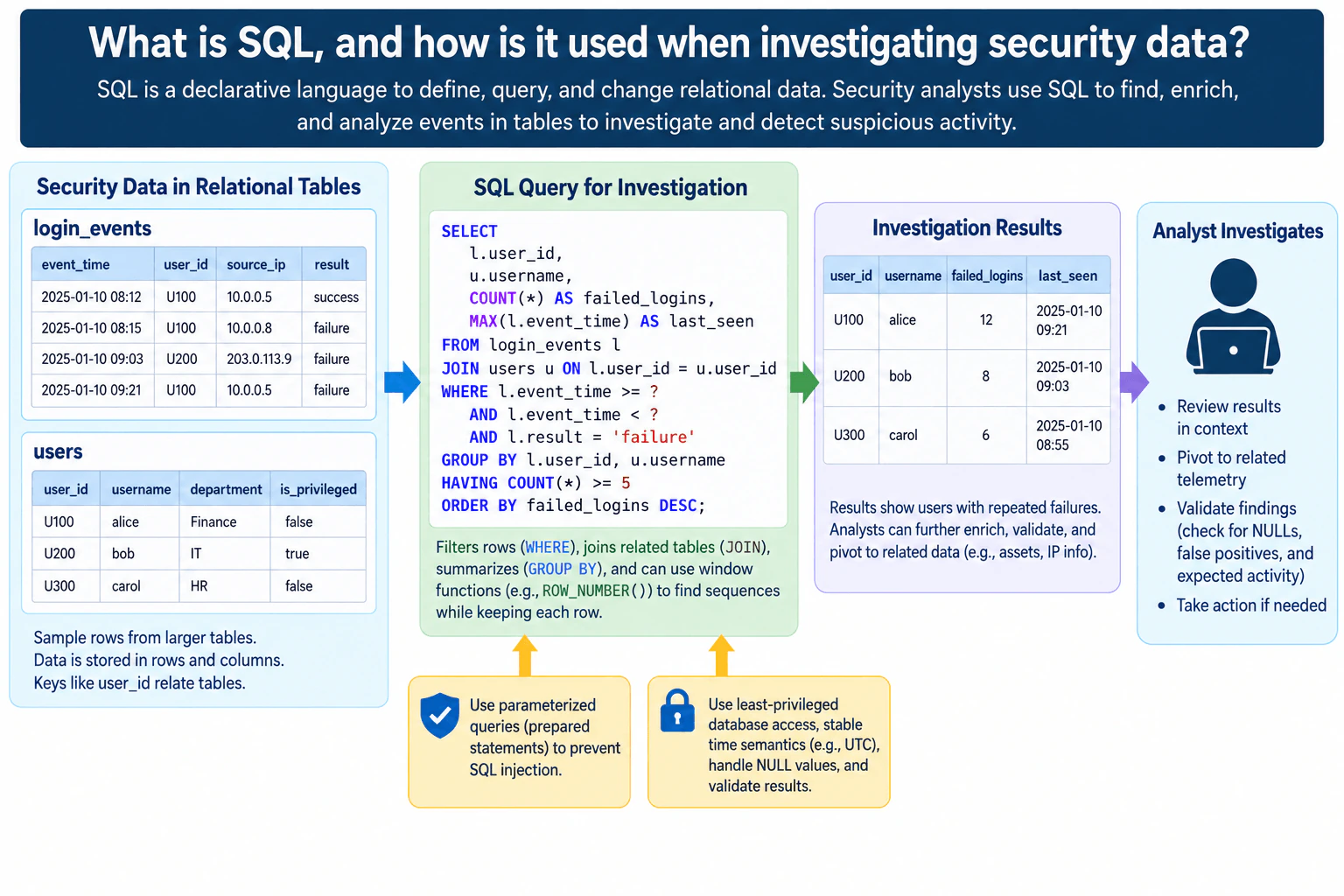
57. What is SQL, and how is it used when investigating security data?Detection EngineeringEasy

Question Details

Define SQL as a declarative language for defining, querying, and changing relational data. Explain tables, rows, columns, keys, filtering, joins, grouping, window functions, and time-bounded queries. Connect SQL to security-event investigation and enrichment while covering parameterized queries, least-privileged access, stable time semantics, null handling, result validation, and avoiding injection.

Short Interview Answer (30-60 seconds)

SQL is a declarative language for working with relational data. During security investigations, I use it to filter events, join related tables, group activity, analyze time windows, and enrich findings. I use parameterized queries, least privilege, consistent timestamps, NULL-aware logic, and result validation.

Detailed Explanation

See the Code while reading this explanation.

SQL is a declarative language: I describe the data I want, and the database determines how to retrieve it. Security analysts use SQL because event data is often represented as tables containing rows and columns. A key such as user_id can connect login records to user information. During an investigation, SQL can filter suspicious events, join related context, group activity, calculate counts, analyze ordered events with window functions, and restrict analysis to a defined time range. The result is evidence for investigation, not automatic proof that an incident occurred.

Useful Questions to Ask the Interviewer
  1. Which security-event tables and enrichment tables are available?
  2. What timestamp field and time zone should be treated as authoritative?
  3. Are the investigation queries expected to be read-only and parameterized?
  4. Should the result identify individual events, grouped patterns, or both?
What is SQL, and how is it used when investigating security data? diagram
How to Explain It in an Interview

Start with the relational model. A table represents one kind of structured data. Each row is one record, and each column is one attribute. In the diagram, login_events contains fields such as event_time, user_id, source_ip, and result. The users table contains user_id, username, department, and is_privileged. The users.user_id value can serve as the referenced key, while login_events.user_id relates login records back to the corresponding user.

Filtering narrows the investigation. A WHERE clause can select only failed logins and restrict event_time to a bounded interval. Time bounds matter because an unbounded query can mix unrelated historical activity with the period being investigated. Use stable timestamp semantics, such as comparing timestamps in a consistent UTC representation, so different systems do not silently interpret the same event time differently.

A JOIN combines related rows from different tables. Joining login_events to users by user_id enriches an event with identity information such as username. The join condition must use the intended relationship; otherwise duplicate or incorrect matches can distort the investigation.

Grouping summarizes related activity. GROUP BY user_id and username can collect failed-login events for each user, and COUNT() can calculate the number of matching events. A HAVING clause can then retain groups meeting an investigation threshold, such as five or more failures. ORDER BY can place the largest counts first. A threshold is an investigative filter, not proof of compromise.

Window functions are useful when the analyst needs calculations across related rows while still keeping individual rows. For example, ROW_NUMBER() can order each user's events so the analyst can study sequences without collapsing them into one grouped record.

The diagram's example query uses two time placeholders instead of concatenating untrusted values directly into the SQL statement. Those values should be bound through the database client's parameter mechanism. Parameterized queries keep data values separate from SQL structure and help prevent SQL injection. The investigation account should have least-privileged access, normally read-only when data changes are unnecessary.

NULL values need deliberate handling. In SQL, NULL represents an unknown or missing value, and comparisons involving NULL do not behave like ordinary equality comparisons. Analysts should check for missing values explicitly where they affect filters, joins, grouping, or interpretation before treating a result as complete.

The displayed source rows are samples from larger tables, so the grouped result counts of 12, 8, and 6 can represent additional matching rows that are not shown in the diagram. After the query returns users with repeated failed logins, the analyst reviews the result in context, pivots to related telemetry, enriches with information such as asset or IP context when available, and validates possible false positives or expected activity. The result is an observable finding that guides investigation. It is not automatically an incident and does not prove malicious intent.

The main tradeoff is between narrowing the query enough to make investigation efficient and narrowing it so much that relevant evidence is missed. Wider time ranges and more joins provide context but can increase query cost, noise, and the chance of misleading duplication. Smaller ranges and stricter filters are faster but can hide related events. I would therefore validate row counts, join behavior, time boundaries, NULL handling, and representative records before making a security decision.

Technical Approach
  1. Identify the event table and the fields needed for the investigation, such as event_time, user_id, source_ip, and result.
  2. Confirm the relationship key, such as user_id, before joining enrichment data.
  3. Apply explicit start and end time parameters using consistent timestamp semantics.
  4. Filter for the behavior being investigated, such as failed authentication events.
  5. Join only the contextual tables needed for the investigation.
  6. Group by the intended entity when a summary is useful, and calculate metrics such as event counts and the latest event time.
  7. Use HAVING only when an investigative threshold is useful, and treat that threshold as a filter rather than proof of compromise.
  8. Use window functions when ordered or per-row context is needed without collapsing individual events.
  9. Validate NULLs, duplicate-producing joins, time boundaries, and representative source records.
  10. Review the results in context and pivot to related telemetry before deciding whether further response is justified.
Practical Complexity & Trade-offs

SQL investigation cost depends mainly on how much data must be scanned, joined, grouped, and sorted. A narrow time range and selective filters usually reduce work. Joins, GROUP BY, window functions, and ORDER BY can require more CPU and memory on large event tables. Operationally, analysts also need stable schemas, trustworthy timestamps, appropriate indexes managed by the database team, least-privileged access, query review, and enough context to validate results. The human cost is important too: a fast query is not useful if its joins, NULL behavior, or time boundaries produce misleading evidence.

Example

This SQL query mirrors the approved diagram. It reads failed login events within a bounded time interval, joins the users table through user_id, groups matching events per user, calculates both the failure count and latest matching event time, keeps users meeting the investigation threshold, and orders the largest counts first. The two ? tokens are positional parameter placeholders in clients that support that placeholder style; the actual binding syntax depends on the database driver. Values must be bound through the client API rather than concatenated into the SQL text. The account executing the query should have only the database permissions needed for the investigation.

Code
SELECT
  l.user_id,
  u.username,
  COUNT() AS failed_logins,
  MAX(l.event_time) AS last_seen
FROM
  login_events AS l
  JOIN users AS u ON l.user_id = u.user_id
WHERE
  l.event_time >= ?
  AND l.event_time < ?
  AND l.result = 'failure'
GROUP BY
  l.user_id,
  u.username
HAVING
  COUNT(*) >= 5
ORDER BY
  failed_logins DESC;
Where it is used

SQL is useful in authorized investigations where security events and enrichment data are stored in relational or SQL-queryable form. Examples include reviewing repeated authentication failures, correlating event records with user or asset information, counting activity by identity, narrowing events to an incident time window, finding the latest matching event, and preparing a focused result set that an analyst can validate against related telemetry.

Why Interviewers Ask This

Interviewers want to know whether you understand both basic relational-data concepts and how to apply them safely during a security investigation. A strong answer connects tables, rows, columns, keys, filtering, joins, grouping, window functions, and time ranges to practical event analysis while recognizing that query results must be validated and do not by themselves prove malicious activity.

Common interview mistakes

Common mistakes are calling SQL only a reporting language instead of explaining that it defines, queries, and changes relational data; confusing rows with columns; joining on the wrong key; forgetting an explicit time range; mixing local time zones without clear semantics; treating NULL as an ordinary value; using string concatenation instead of bound parameters; running investigations with excessive database privileges; grouping data so aggressively that useful event detail disappears; assuming a threshold match proves compromise; and acting on results without checking source records, expected activity, false positives, or related telemetry.

Interview tip

Explain SQL through one investigation flow: structured event tables, filter by behavior and time, join enrichment through a key, group or use window functions when needed, validate the result, and investigate further. Mention parameterization, least privilege, stable UTC-based time semantics, NULL handling, and the fact that a query result is evidence rather than proof of an incident.

Interviewer may ask next
What is the difference between GROUP BY and a window function in a security investigation?

GROUP BY collapses matching rows into one result row for each group, which is useful for summaries such as failed-login counts per user. A window function calculates across related rows while retaining the individual rows. For example, ROW_NUMBER() can number each user's events in timestamp order so an analyst can study event sequences without losing the underlying records.

What can make an SQL security investigation return misleading results?

Common causes include incorrect join keys, one-to-many joins that duplicate events, inconsistent time zones, incorrect start or end boundaries, NULL values, missing telemetry, unexpected duplicates, and filters that are too broad or too narrow. I would validate representative source rows, counts before and after joins, time semantics, NULL behavior, and related telemetry before treating the result as meaningful security evidence.

58. What is Kusto Query Language, and how is KQL used for security detections?Detection EngineeringEasy

Question Details

Define Kusto Query Language as a read-only request language used to query and analyze structured, semi-structured, and unstructured data in Azure Data Explorer and related Microsoft services. Explain tabular pipelines, filtering, projection, aggregation, joins, parsing, time windows, and security-detection use. Distinguish KQL from SQL and from similarly named query languages.

Short Interview Answer (30-60 seconds)

KQL is Microsoft's read-only, pipe-based language for querying and analyzing telemetry. Security engineers use it to filter, project, aggregate, join, parse, and analyze events over time, then use matching query results in threat hunting or analytics rules that can generate alerts.

Detailed Explanation

See the Code while reading this explanation.

The practical idea is simple: KQL lets a security engineer turn large amounts of telemetry into a smaller set of useful observations. Data such as structured records, semi-structured events, logs, and unstructured text can be analyzed through tabular queries. Each KQL operator receives a table and passes another table to the next operator. A detection can therefore narrow events, select fields, count behavior, correlate tables, parse values, and apply time windows. The resulting rows are evidence for investigation or an analytics rule; they do not by themselves prove compromise.

Useful Questions to Ask the Interviewer
  1. Are you asking about KQL generally or specifically how it is used in Microsoft Sentinel detections?
  2. Should I explain the main operators with a short security example?
  3. Do you want the differences between KQL, SQL, and Kibana Query Language as well?
What is Kusto Query Language, and how is KQL used for security detections? diagram
How to Explain It in an Interview

Start with the definition. A Kusto query is a read-only request that processes data and returns results. KQL uses a data-flow model in which operators are commonly chained with the pipe character, |. The result of each stage is tabular and becomes the input to the next stage. learn.microsoft.com

This model fits security telemetry well. Logs and events from endpoints, identities, networks, cloud services, and other sources can be stored and analyzed in Azure Data Explorer and related Microsoft services. The attached diagram shows this flow through Azure Data Explorer, Microsoft Sentinel, and Microsoft Defender XDR before the results are used for security detections and investigations.

For security work, the main KQL capabilities are:

  1. where filters rows. It can keep only recent records or events with a particular value.
  2. project selects or renames the columns that matter to the investigation.
  3. summarize aggregates records, such as counting activity by account or time bucket.
  4. join combines information from multiple tables when a detection needs related telemetry.
  5. parse and extraction operators turn values embedded in text into fields that can be queried.
  6. Functions such as ago() define relative time ranges, while bin() groups timestamps into intervals for aggregation.

A simple security flow is: telemetry enters the analytics platform, a KQL query examines the data, and the query returns matching rows. Analysts can use those rows during threat hunting, or the query can be part of a detection rule.

Microsoft Sentinel scheduled analytics rules are based on Kusto queries that run at regular intervals over a defined lookback period. The rule can generate an alert when the number of query results satisfies the configured alert threshold. learn.microsoft.com

The run frequency and lookback period are different concepts. The frequency controls how often the rule executes. The lookback period controls how much historical data each execution examines. If the lookback is longer than the execution interval, query periods overlap, which can cause the same underlying activity to be considered by more than one run, so detection logic and alert grouping need to account for that behavior. learn.microsoft.com

A query result is an observable: data showing that the defined conditions matched. An alert is a notification produced by detection logic. An incident is a higher-level investigation object that can contain alerts and related evidence. A KQL match alone is not proof that an account, endpoint, or user is compromised.

KQL is different from SQL. SQL is a general relational database language. KQL is optimized for analytical queries over tabular data and commonly expresses processing as a left-to-right sequence of operators. Kusto queries are read-only operations against ingested data. learn.microsoft.com

The name can also be confusing because Kibana Query Language is abbreviated KQL too. Kibana Query Language is a text-based filtering language. Its documented role is filtering data rather than aggregating, transforming, or sorting it. Kusto Query Language supports broader tabular analytics such as filtering, projection, aggregation, joins, parsing, sorting, and time-based analysis. elastic.co

A key limitation is that a good KQL query is only as useful as the telemetry it receives. Missing events, incorrect fields, delayed ingestion, poor timestamp handling, or an overly narrow query can create detection gaps. Overly broad filtering or thresholds can create false positives. Detection engineers therefore validate queries with positive, negative, boundary, and regression cases and monitor telemetry health after deployment.

Technical Approach
  1. Identify the telemetry table that contains the behavior you need to analyze.
  2. Define the relevant event fields and timestamp semantics.
  3. Restrict the query to the required time range with a function such as ago() when appropriate.
  4. Use where to keep relevant events.
  5. Use project to select or rename useful fields.
  6. Use parse or extraction operators when useful values are embedded in text.
  7. Use summarize and bin() when the detection needs counts or time-bucketed behavior.
  8. Use join only when another table is genuinely required for correlation.
  9. Return useful investigation context such as account, host, timestamp, and event count.
  10. Test with synthetic positive, negative, boundary, and regression cases.
  11. If the query becomes a scheduled detection, align the rule frequency, lookback period, threshold, and grouping behavior with the query semantics.
  12. Monitor query failures, telemetry health, false positives, and coverage gaps after deployment.
Practical Complexity & Trade-offs

The main technical cost comes from how much data the query processes and how much work each operator performs. Narrow filters and useful projections can reduce unnecessary processing. Large joins, repeated parsing, and wide time ranges can make queries slower and harder to maintain. Operational cost also matters: engineers must validate field names, monitor telemetry health, tune false positives, review rule changes, and update detections when schemas or data sources change.

Example

This example follows the approved diagram's KQL pipeline. It starts with the SecurityEvent table, limits the data to the previous hour, keeps Windows security events with EventID 4625, groups those events by account and five-minute time bucket, counts the records in each group, and sorts the largest counts first. EventID 4625 represents a failed account logon in Windows security auditing, so the query is a safe example for demonstrating aggregation. The output is a tabular result for hunting or detection logic. A returned row shows that the query conditions matched; it does not prove compromise.

Code
-- Start with Windows security events available to the workspace.
SELECT
  Account,
  DATEADD (
    MINUTE,
    (
      DATEDIFF (
        MINUTE,
        CAST('19000101' AS datetime2),
        TimeGenerated
      ) / 5
    ) * 5,
    CAST('19000101' AS datetime2)
  ) AS TimeGenerated,
  COUNT(*) AS Count
FROM
  SecurityEvent
  -- Limit analysis to the previous hour.
WHERE
  TimeGenerated >= DATEADD (HOUR, -1, SYSUTCDATETIME ())
  -- Keep failed account-logon events for this synthetic detection example.
  AND EventID = 4625
  -- Count events per account in five-minute time buckets.
GROUP BY
  Account,
  DATEADD (
    MINUTE,
    (
      DATEDIFF (
        MINUTE,
        CAST('19000101' AS datetime2),
        TimeGenerated
      ) / 5
    ) * 5,
    CAST('19000101' AS datetime2)
  )
  -- Put the largest event counts first for review.
ORDER BY
  Count DESC;
Where it is used

KQL is used for authorized security monitoring and investigation in Azure Data Explorer and Microsoft security services such as Microsoft Sentinel and Microsoft Defender XDR. Common uses include threat hunting, investigating endpoint or identity telemetry, filtering large event sets, summarizing activity by user or device, parsing fields from logs, correlating tables, analyzing behavior over time, and implementing analytics rules that generate security alerts from query results.

Why Interviewers Ask This

Interviewers want to know whether you understand the query language used across Microsoft's security analytics ecosystem and whether you can translate raw telemetry into useful detection logic. A strong answer shows that you understand tabular pipelines, important operators, time-based analysis, aggregation, and the difference between query results, alerts, and confirmed incidents.

Common interview mistakes

Common mistakes are describing KQL as a data-modification language, treating it as identical to SQL, forgetting that Kusto operators form a tabular data-flow pipeline, confusing Kusto Query Language with Kibana Query Language, ignoring time-window semantics, using expensive joins when they are unnecessary, assuming every returned row proves malicious activity, and building a detection without validating that the required telemetry and fields are present.

Interview tip

Lead with three points: KQL is read-only, it uses tabular pipelines, and security teams use it to turn telemetry into detection evidence. Then explain where, project, summarize, join, parsing, and time windows with one small example. Finish by saying that a query match is evidence, not proof of compromise.

Interviewer may ask next
How would you turn a KQL hunting query into a scheduled Microsoft Sentinel detection?

First make sure the query returns only the events and investigation context the detection needs. Validate its fields, time semantics, grouping, and expected output with synthetic positive and negative cases. Then create a scheduled analytics rule and configure how often it runs, how far back it looks, and the result threshold that generates an alert. Microsoft documents these as the query interval, lookback period, and alert threshold. learn.microsoft.com If the lookback overlaps successive runs, account for repeated observations through appropriate query logic, event grouping, or downstream deduplication. After deployment, monitor telemetry health, false positives, false negatives, and query failures.

What are the main limitations of using KQL for security detections?

KQL cannot detect evidence that was never collected or is not available to the query. Missing telemetry, delayed ingestion, inconsistent timestamps, schema changes, missing fields, or incorrect parsing can reduce coverage. Large joins, expensive parsing, and wide time ranges can also increase query cost and maintenance effort. Most importantly, a matching KQL result is an observable produced by detection logic, not automatic proof of compromise. Analysts need context and investigation before treating an alert as a confirmed incident.

59. What is Splunk Search Processing Language, and how is SPL used in detection engineering?Detection EngineeringEasy

Question Details

Define SPL as Splunk's language for searching, transforming, correlating, and visualizing indexed event data. Explain search terms, commands, pipelines, fields, statistics, transactions or time-aware correlation, lookups, macros, and scheduled detections. Cover time range, data model, field normalization, performance, false-positive tuning, and validation with known positive and negative events.

Short Interview Answer (30-60 seconds)

SPL is Splunk's language for searching and processing event data. Detection engineers use it to filter, transform, correlate, enrich, normalize, and visualize security events, then operationalize validated searches as scheduled detections with tuned thresholds, allowlists, and alert conditions.

Detailed Explanation

See the Code while reading this explanation.

This question asks how Splunk Search Processing Language, or SPL, turns indexed security events into useful detections. The practical flow is to collect and index telemetry, search it with SPL, transform and correlate the results, enrich or normalize fields, and then run a validated search on a schedule. Detection engineers also choose the time range, grouping fields, thresholds, and allowlists; tune for performance and false positives; and test with known positive and negative events. The key point is that an SPL match creates an alerting signal for investigation, not proof of an incident.

Useful Questions to Ask the Interviewer
  1. Are we discussing basic Splunk search-based detections or a broader security workflow that consumes Splunk alerts?
  2. Is the required telemetry already indexed and normalized to consistent fields or a Common Information Model data model?
  3. What time range and execution schedule should the detection use?
  4. Which fields should group related activity, such as user, source IP, or host?
  5. What known benign activity should be handled through thresholds or narrowly scoped allowlists?
What is Splunk Search Processing Language, and how is SPL used in detection engineering? diagram
How to Explain It in an Interview

Start with the indexed event data. Splunk can receive logs and events from servers, security tools, network devices, cloud services, and applications. Detection logic depends on this telemetry being present, parsed correctly, and timestamped appropriately. Missing or delayed events, inconsistent fields, or parsing changes can reduce detection coverage even when the SPL itself is correct.

An SPL search normally starts by narrowing the data. Search terms can restrict the index, sourcetype, field values, keywords, and time range. Narrowing the search early is important for both correctness and performance because a scheduled detection should process only the data needed for its purpose.

SPL commands are then connected with the pipe character, '|'. Each command receives the previous results and performs another operation. For example, 'stats' can aggregate events, 'where' can apply a condition, 'lookup' can enrich results, and 'table' can select the fields that an analyst needs. Fields such as user, source IP, host, action, and timestamps provide the dimensions used by the detection logic.

Statistics turn individual events into behavior. For example, a detection can count authentication failures by user and source IP. The grouping key matters because counting by user answers a different question from counting by source IP or by both fields together. A threshold such as more than five matching events is detection logic, not proof that the account or source is malicious.

SPL can also perform time-aware correlation. 'stats' is often useful for grouping and aggregation, while 'timechart' can show behavior over time. 'transaction' can group related events when transaction semantics are genuinely needed, but it should not automatically replace simpler statistical approaches. The selected time range must match the behavior being detected, and scheduled searches should account for expected event delay so relevant events are not unintentionally missed.

Lookups enrich results with reference information. A lookup might add an approved department, asset classification, or another controlled reference field. Macros let teams reuse SPL fragments consistently across searches. Both are dependencies: stale lookup content or an unexpected macro change can alter detection results, so their behavior should be included in validation.

Normalization makes detections more consistent across different data sources. Splunk's Common Information Model, or CIM, provides common field names and data models for security-relevant domains. Instead of writing separate logic for every vendor's field names, a detection can work against normalized fields when the underlying data is correctly mapped. Normalization does not create missing telemetry; it only gives available data a consistent representation.

Performance matters for scheduled detections. Use a narrow time range, specify relevant indexes and sourcetypes early, and avoid processing unnecessary fields or events. The 'tstats' command performs statistical searches using indexed fields in tsidx data and can work with indexed data or data models. It is useful when the required fields and data model support that approach, but it is not a drop-in replacement for every normal SPL search.

After the logic is validated, the search can run on a schedule. Splunk evaluates its results and, when configured conditions are satisfied, can run configured alert actions. The alert should contain useful investigation context such as the user, source IP, count, and relevant timestamps. An alert is evidence that the detection condition matched. An analyst still needs to determine whether the activity is benign, suspicious, or part of an actual incident.

False-positive tuning is part of the detection lifecycle. Tune thresholds when expected behavior commonly exceeds the original condition. Add only narrow, understood allowlists for known benign cases. Broad exclusions can hide important activity. Also consider missing fields, duplicate events, and late-arriving events because each can change counts or correlation behavior.

Validation should include a known positive event set that must match, a known negative event set that must not match, and boundary cases around thresholds. For example, if the condition is 'count > 5', verify that five events do not trigger while six do. Repeat the tests after changes to the search, fields, normalization, lookup data, macros, thresholds, or allowlists.

Finally, treat the detection as a continuous-improvement loop. Review telemetry health, search performance, false positives, normalization, thresholds, allowlists, and analyst usefulness over time. The main tradeoff is between coverage, search cost, alert volume, and maintainability. Making a search broader can increase coverage but also increase cost and noise. Making it narrower can improve efficiency but can miss activity if the filters are too restrictive.

Technical Approach
  1. Define the defensive behavior or condition the search should identify.
  2. Confirm that the required event sources and fields are actually indexed.
  3. Select an appropriate search time range and narrow the index or sourcetype early.
  4. Normalize important fields when multiple sources represent the same concept differently.
  5. Apply SPL search terms to select relevant events.
  6. Pipe results through commands such as stats, where, lookup, and table to aggregate, filter, enrich, and present them.
  7. Group related activity by meaningful fields such as user and source IP, and use time-aware correlation only when needed.
  8. Apply a defensible threshold or condition and narrowly scoped allowlists for understood benign behavior.
  9. Validate with known positive, known negative, and threshold-boundary cases.
  10. Review search performance and use tstats when the required indexed fields or data-model structure make it appropriate.
  11. Save the validated logic as a scheduled search and configure the required alert condition and alert actions.
  12. Continuously review telemetry health, false positives, thresholds, allowlists, normalization, and performance.
Time & Space Complexity

The main technical cost is the amount of data the search must process. Broad searches over large indexes or long time ranges usually consume more compute and take longer. Complex correlation can also increase cost. Filtering by the correct time range, index, sourcetype, and field values early reduces unnecessary work. tstats can be faster when the required information is available through indexed fields or suitable data models. There is also an operational cost: analysts investigate alerts, engineers maintain lookups and macros, and detection owners tune thresholds and allowlists. Broader logic can improve coverage but create more noise and cost; narrower logic can be faster but may miss relevant activity.

Example

This synthetic SPL example follows the same flow as the approved diagram. It searches placeholder authentication telemetry for failed-password events, preserves the first and last timestamps while counting events by user and source IP, keeps groups above an illustrative threshold, enriches the user with a synthetic lookup, and returns useful investigation fields. Preserving timestamps inside the stats command is important because a normal stats aggregation would otherwise remove the event-level _time field. The index, sourcetype, lookup name, fields, threshold, time range, and schedule are placeholders that must be mapped to the authorized environment and validated before deployment.

Code
spl_query = (
    'index=security sourcetype=auth "Failed password"\n'
    "| stats count min(_time) as first_seen max(_time) as last_seen by user, src_ip\n"
    "| where count > 5\n"
    "| lookup user_lookup user OUTPUT dept\n"
    "| table first_seen last_seen user src_ip count dept"
)

print(spl_query)
Where it is used

SPL is used in authorized security monitoring environments where Splunk contains the required telemetry. Typical uses include detecting repeated authentication failures, unusual account or host behavior, suspicious network activity, endpoint-security events, cloud-service activity, and application-security signals. Analysts also use the same SPL capabilities during investigations to search events, aggregate behavior, enrich results, view tables or charts, and refine a useful search before operationalizing it as a scheduled detection.

Why Interviewers Ask This

Interviewers want to know whether you understand SPL as more than basic log-search syntax. A detection engineer should be able to explain how indexed events become a focused search, how commands and pipelines transform results, how fields and statistics support correlation, and how a validated search becomes a scheduled detection. They also want to hear that you consider normalization, performance, false-positive tuning, and validation rather than treating every query match as proof of compromise.

Common interview mistakes

Common mistakes include describing SPL as only a keyword search language, searching unnecessarily broad indexes or time ranges, assuming vendor-specific fields are already normalized, and using expensive correlation where simpler statistics would work. Another mistake is expecting _time to remain available after a stats aggregation without explicitly carrying a time value through the aggregation. Detection engineers can also create problems with overly broad allowlists, stale lookup data, undocumented macros, thresholds chosen without testing, or searches that ignore missing, duplicate, and delayed events. Finally, a matching search result or alert should never be presented as automatic proof of compromise or as a confirmed incident.

Interview tip

Explain SPL as one detection flow: indexed events -> focused search -> commands and pipes -> aggregation or time-aware correlation -> enrichment and normalization -> tuning and validation -> scheduled detection -> analyst investigation. Mention performance, thresholds, allowlists, and positive/negative testing, and finish by stating that an alert is evidence to investigate rather than proof of an incident.

Interviewer may ask next
How would you improve the performance of a slow SPL detection?

First reduce the amount of data searched. Use the smallest appropriate time range, specify relevant indexes and sourcetypes early, and filter unnecessary events before expensive transformations. Remove commands and fields that do not contribute to the detection. If the required information is available through indexed fields or an appropriate data model, consider tstats for statistical queries. After optimization, rerun the same known positive, known negative, and boundary tests so performance changes do not silently change detection behavior.

How would you reduce false positives without hiding real detections?

Review the matching events first to understand why benign activity triggers the rule. Adjust the grouping logic or threshold when the original condition is too broad. Add only narrow allowlists for well-understood benign cases, and keep those exclusions reviewable. Then test known positives to verify the intended behavior still matches, known negatives to verify expected benign activity stays quiet, and boundary cases around the threshold. Continue reviewing the rule because telemetry and normal behavior can change over time.

60. What is Sigma, and what problem does a Sigma rule solve?Detection EngineeringEasy

Question Details

Define Sigma as an open, generic, structured detection format for describing relevant log events. Explain log source, detection selections, conditions, metadata, fields, false positives, rule status, tags, conversion to backend queries, and testing. Clarify that Sigma supports portability of detection intent but does not guarantee identical backend semantics or replace telemetry validation.

Short Interview Answer (30-60 seconds)

Sigma is an open, generic format for expressing log-based detection intent without tying it to one SIEM query language. A Sigma rule can be converted for supported backends, but telemetry, field mappings, query semantics, testing, and false-positive tuning remain environment-specific responsibilities.

Detailed Explanation

Sigma solves a practical detection-engineering problem: teams often want to express the same detection idea across different security backends without manually rewriting it from scratch each time. A Sigma rule stores that detection intent in a structured YAML format. It describes the expected log source, observable field patterns, the condition that creates a match, and supporting metadata. A converter then produces a backend-specific query. The important boundary is that Sigma makes detection logic portable, not the underlying telemetry. Required logs, field mappings, generated queries, and resulting alerts still need environment-specific validation and testing. sigmahq.io

Useful Questions to Ask the Interviewer
  1. Are you asking mainly about the Sigma rule format, or also how rules are converted and deployed to security backends?
  2. Should I explain how field and log-source mappings affect portability between environments?
  3. Would a small Windows process-creation example help illustrate the rule structure?
What is Sigma, and what problem does a Sigma rule solve? diagram
How to Explain It in an Interview
  1. Start with the problem Sigma solves. Security products use different query languages and data models. Sigma provides a vendor-neutral way to describe a log-based detection idea once so it can be shared, reviewed, and converted for supported backends instead of rewriting the intent manually for every platform. SigmaHQ describes Sigma as an open standard for defining and sharing detection mechanisms over log events. sigmahq.io
  1. Explain the required telemetry. A Sigma rule does not collect logs. Its logsource describes what kind of telemetry the detection expects. In the approved diagram, the example expects Windows process-creation events. The environment must actually collect that telemetry and provide meaningful equivalents for fields used by the detection, including Image and CommandLine. Sigma documentation describes logsource as the component that identifies which types of logs the detection should search. sigmahq.io
  1. Explain selections. Inside detection, a selection describes observable field and value patterns. In the diagram, the synthetic example looks at a process image ending in powershell.exe and command-line values associated with the example detection. These are observables used by detection logic; their presence alone does not prove compromise.
  1. Explain the condition. The condition tells Sigma how named selections are combined to decide whether an event matches. In the diagram, condition: selection means that the displayed selection defines the match. Sigma conditions can also combine multiple selections with logical expressions when a rule needs more complex logic. sigmahq.io
  1. Explain metadata. Fields such as title, id, description, author, status, and tags describe and manage the rule. status communicates maturity or lifecycle state. tags provide classification or contextual information. Metadata helps detection engineers review, maintain, search, and share rules; it is separate from the event-matching logic.
  1. Explain fields. The fields section can identify fields that are useful to return with matching events. This is different from fields referenced by the detection logic. In the diagram, Image and CommandLine are also required by the selection, so the target environment must map those detection fields correctly for the generated query to work as intended.
  1. Explain false positives. falsepositives documents legitimate activity that may resemble the detection. In the diagram, legitimate administrative scripts are an example. This is analyst and engineering context; simply listing a false positive does not automatically exclude it from the detection. If an environment needs exclusions, engineers must implement and test that logic deliberately.
  1. Explain backend conversion. The Sigma rule is converted with a backend into the target query language. A processing pipeline can apply environment-specific transformations such as field mappings and log-source mappings during conversion. This matches the diagram's flow: Sigma Rule -> backend + processing pipeline -> Backend Queries. Sigma's processing-pipeline documentation describes pipelines as a way to transform rules during conversion for the target environment. sigmahq.io
  1. Explain portability carefully. Sigma preserves detection intent, not identical backend execution. Different platforms can have different field names, schemas, operators, indexes, and query semantics. A converted Splunk SPL, Microsoft KQL, or Elastic EQL query therefore needs validation in its actual environment. The same Sigma rule should not be assumed to provide identical behavior or coverage everywhere.
  1. Run the query against mapped telemetry. After conversion, the backend-specific query runs against the telemetry available in that security platform. If required telemetry or mappings are missing, the rule can silently lose coverage or fail to match expected events. Sigma does not replace telemetry engineering.
  1. Test and tune. Validate that the required telemetry exists, convert the rule, inspect the generated query, and test it with safe synthetic data. Use positive cases that should match, negative cases that should not match, boundary cases around important matching behavior, and regression cases after rule, pipeline, or schema changes. Review false positives and tune only with justified, tested exclusions.
  1. Interpret the result correctly. A matching backend query can create an alert for investigation. An alert means the detection condition matched available telemetry. It is not automatically an incident and does not prove malicious activity. Analysts need additional context and evidence before making that determination.

The main tradeoff is reuse versus environment-specific validation. Sigma reduces repeated query rewrites and makes detection intent easier to share, but teams still own telemetry collection, field mappings, conversion configuration, testing, tuning, deployment, and lifecycle maintenance.

Technical Approach
  1. Define the log-based detection intent.
  2. Declare the expected logsource.
  3. Define selections using the observable fields needed for the rule.
  4. Combine selections with a condition.
  5. Add useful metadata, fields, false-positive notes, status, and tags.
  6. Verify that the target environment collects the required telemetry and has mappings for detection fields.
  7. Select the appropriate backend and processing pipeline.
  8. Convert the Sigma rule into the backend query language.
  9. Inspect the generated query and run it against mapped telemetry.
  10. Test positive, negative, boundary, and regression cases.
  11. Tune justified false positives and correct mapping problems.
  12. Deploy the validated detection so matches can create alerts for analyst investigation.
Time & Space Complexity

Sigma reduces the work of maintaining the same detection idea in several query languages, but it does not remove operational cost. Teams still maintain Sigma rules, conversion backends and pipelines, telemetry mappings, test cases, and deployed detections. Schema or telemetry changes can break coverage even when the Sigma file itself has not changed. Poor mappings can create false negatives, while broad logic can create false positives. The benefit is reusable detection intent; the tradeoff is continued environment-specific engineering and validation.

Where it is used

Sigma is useful in authorized detection-engineering programs that want reusable log-based detections across different security analytics platforms. For example, a team can describe a Windows process-creation detection in Sigma, map fields such as Image and CommandLine for its environment, convert the rule with the appropriate backend and processing pipeline, test the generated query against mapped telemetry, and then deploy the validated query for alerting.

Why Interviewers Ask This

Interviewers want to see whether you understand Sigma as a portable detection representation rather than a SIEM, log collector, or universal query language. A strong answer explains the rule structure, required telemetry, backend conversion, processing pipelines, testing, false-positive tuning, and the important limitation that portability of detection intent does not guarantee identical backend semantics.

Common interview mistakes

Common mistakes are calling Sigma a SIEM or log collector; showing raw logs flowing into the Sigma file; assuming conversion guarantees identical behavior across backends; ignoring required telemetry and field mappings; confusing the fields output list with all fields required by detection logic; treating falsepositives notes as automatic exclusion logic; skipping tests of the generated query; and treating every rule match or alert as proof of compromise. Another mistake is explaining only YAML syntax while missing Sigma's main value: portable detection intent with environment-specific conversion and validation.

Interview tip

Lead with the practical point: Sigma separates detection intent from vendor-specific query syntax. Then explain logsource, selections and condition, metadata, fields, false positives, status and tags, backend conversion with processing pipelines, and finish with the key limitation that telemetry, mappings, generated queries, and alerts still require validation.

Interviewer may ask next
What are the most important parts of a Sigma rule?

The core parts are the logsource and detection sections plus supporting metadata. logsource describes the expected telemetry. Inside detection, selections describe observable field/value patterns and condition determines when they match. Metadata such as title, ID, description, status, tags, and false-positive notes helps people manage and understand the rule. fields can identify useful fields to include with matching results. Sigma documentation describes detection, log source, and metadata as the main rule components. sigmahq.io

Why can the same Sigma rule behave differently after conversion to different security backends?

Sigma carries the detection intent, but each backend can have different schemas, field names, log locations, query operators, and execution semantics. Processing pipelines can map fields and log sources during conversion, but those mappings depend on the target environment. Engineers therefore need to inspect and test each generated query against the actual telemetry rather than assuming identical behavior or coverage across platforms. sigmahq.io

More questions load as you scroll

Disclaimer: This interview guide is for educational and informational purposes only. It is designed to help readers prepare, but it does not guarantee any interview result, hiring decision, offer, or outcome. Interview questions, hiring criteria, and preferred answers can vary by employer, interviewer, industry, location, and time. All answers, examples, and explanations in this guide are suggested examples for interview preparation, not definitive answers or instructions for professional practice. They are based on research and judgment, are provided without warranties of any kind, and should be adapted to the question, role, and applicable laws and professional requirements. Diagrams are simplified illustrations intended to highlight the main concepts and their relationships; actual situations, systems, and practices may be more complex. Alternative approaches may be equally valid or better suited to a particular question, context, or interviewer. To the fullest extent permitted by applicable law, the contributors and publisher are not liable for decisions made, actions taken, or losses incurred based on this guide.

State Laws and Professional Responsibilities: Laws and requirements governing an occupation vary by state and jurisdiction. You are responsible for checking the current laws, licensing requirements, and scope-of-practice rules that apply to your location and role, and for ensuring that your answers and actions comply with them. Adapt examples in this guide to those requirements. This guide is not legal advice.

Content Accuracy and Verification: To the fullest extent permitted by applicable law, we do not represent or warrant that interview guides, questions, answers, examples, or diagrams are accurate, complete, current, error-free, or suitable for any particular purpose. You are responsible for independently reviewing and verifying the information before relying on it.