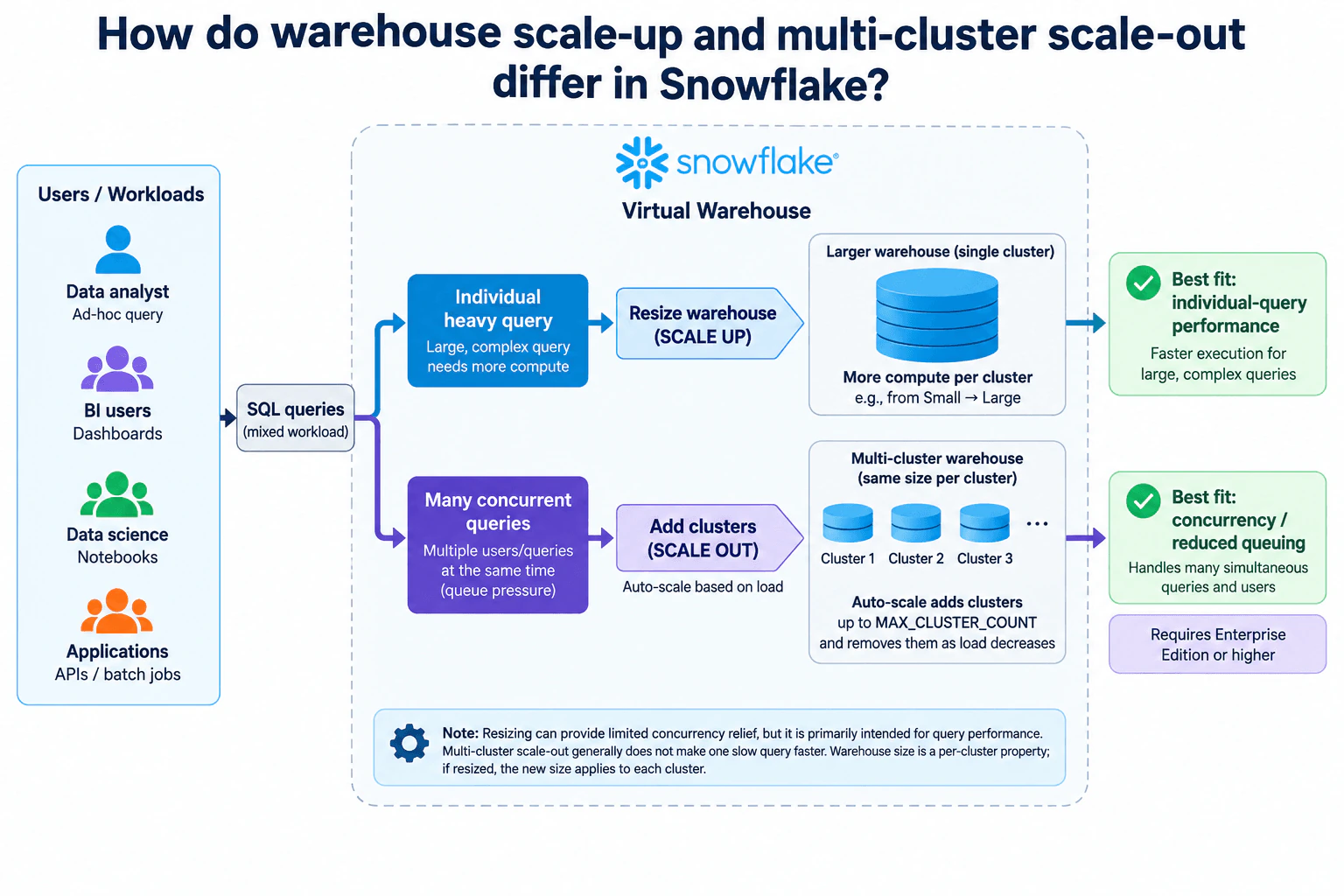
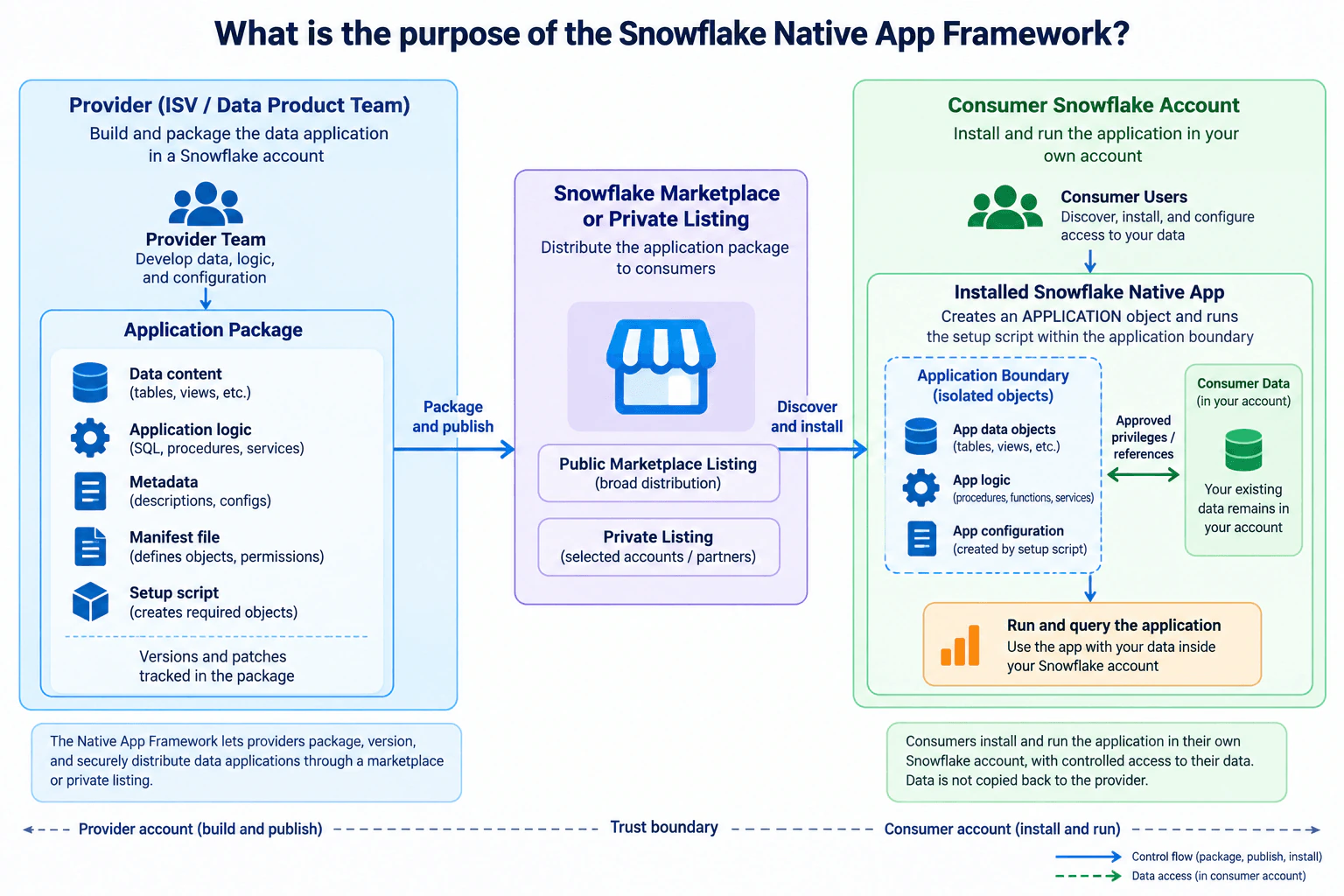
192 Data Engineer Interview Questions & Answers

88 top • 15 Amazon • 15 Apple • 15 Google • 15 Meta • 15 Microsoft • 15 Netflix • 14 NVIDIA

Data Engineer icon

Questions with Detailed ExplanationsWith Detailed Explanations

(Last Updated: September 8, 2026)

31. How does KRaft replace ZooKeeper in Kafka’s control plane?Cloud / Distributed SystemsMedium

Question Details

Describe the responsibilities for cluster metadata and coordination under the two arrangements.

Short Interview Answer (30-60 seconds)

KRaft replaces ZooKeeper by moving Kafka’s cluster metadata and coordination into a Raft-based controller quorum. The quorum maintains a replicated metadata log and elects one active controller, while Kafka brokers continue handling produce and consume traffic.

Detailed Explanation

ZooKeeper and KRaft solve Kafka’s control-plane problem in different places. In the ZooKeeper-era design, Kafka relies on an external ZooKeeper ensemble for cluster metadata, controller election, and coordination. With KRaft, those responsibilities move into Kafka itself. Dedicated Kafka controllers form a Raft-based metadata quorum, maintain a replicated metadata log, and elect one active controller while the others remain hot standbys. Kafka brokers remain the data plane: they continue serving produce and consume traffic and receive metadata and control updates from the active controller.

Useful Questions to Ask the Interviewer
  1. Do you want the comparison focused only on metadata and controller coordination, or should I also discuss the operational impact of removing ZooKeeper?
  2. Should I explain what happens when the active KRaft controller fails?
  3. Do you want me to contrast the controller quorum explicitly with the Kafka broker data plane?
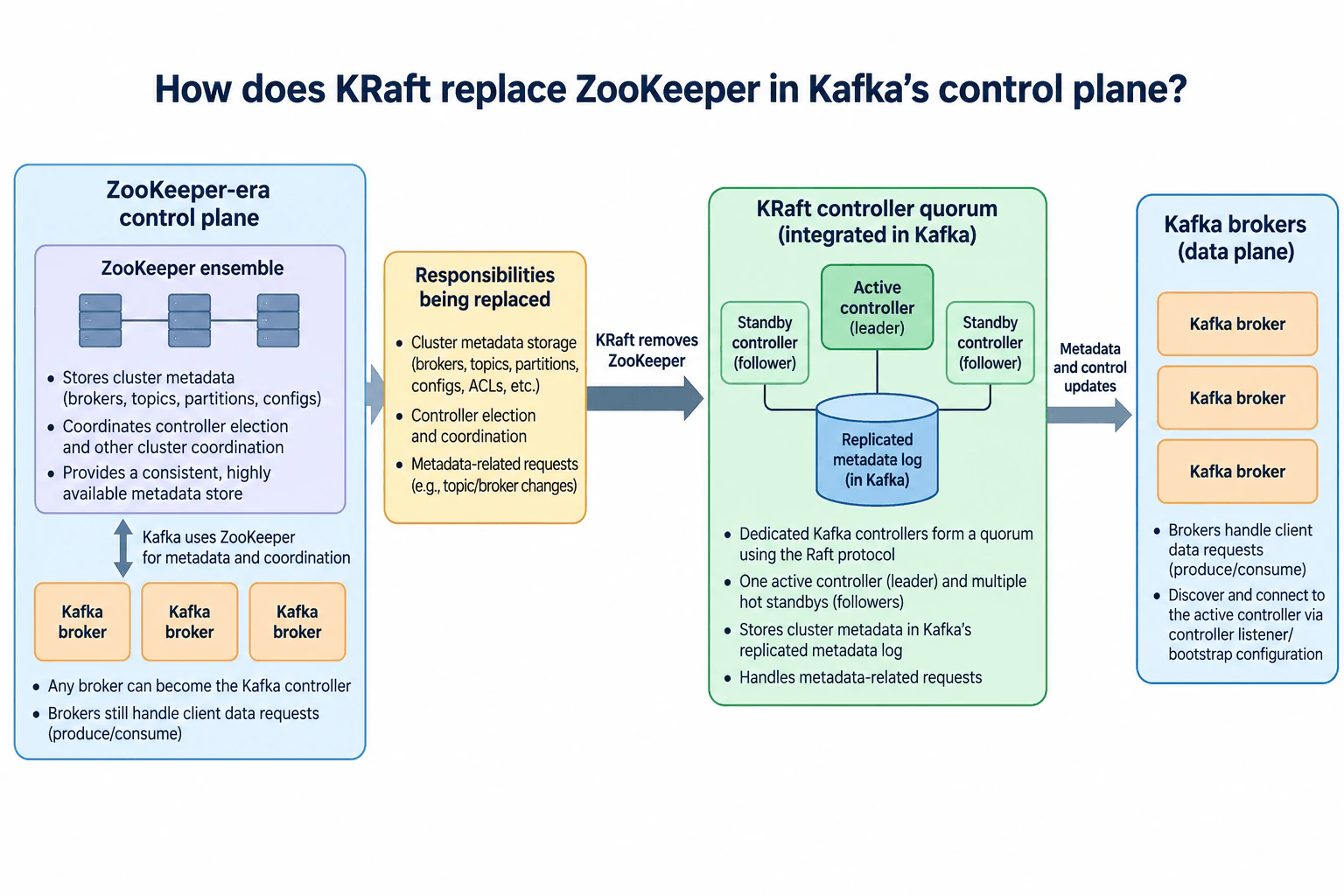
How does KRaft replace ZooKeeper in Kafka’s control plane? diagram
How to Explain It in an Interview

Start by separating the control plane from the data plane. Kafka brokers handle client data requests such as producing and consuming records. The control plane manages cluster metadata and coordinates changes to that metadata.

In the ZooKeeper-era arrangement, Kafka depends on an external ZooKeeper ensemble. ZooKeeper stores cluster metadata and participates in coordination used for controller election and other cluster-management activities. One Kafka broker becomes the Kafka controller, while the brokers continue handling client data traffic.

KRaft removes the ZooKeeper dependency by moving these control-plane responsibilities into Kafka. Specific Kafka servers are selected as controllers and form the metadata quorum. The controllers use Raft to replicate Kafka’s metadata log. One controller is active, and the other controllers are hot standbys that follow the replicated metadata state.

The active controller handles metadata-related control-plane work and communicates metadata and control updates to the brokers. The brokers remain responsible for the data plane and continue serving produce and consume requests. They do not become members of the metadata quorum merely because they are Kafka brokers.

If the active KRaft controller fails, another sufficiently up-to-date controller can become active as long as the metadata quorum still has the majority required to make progress. The replicated metadata log allows the new active controller to continue from the quorum’s committed control-plane state.

The key architectural change is therefore where Kafka’s coordination state lives. ZooKeeper provided an external metadata and coordination service. KRaft places that responsibility inside Kafka through a controller quorum and replicated metadata log. This removes a separate ZooKeeper system from the architecture, but it does not remove distributed consensus or the need for a healthy control-plane quorum.

Technical Approach
  1. Separate Kafka’s control plane from its broker data plane.
  2. Describe the ZooKeeper-era arrangement: external metadata storage, controller election, and cluster coordination.
  3. Explain that one broker acts as the Kafka controller in the ZooKeeper-era architecture while brokers continue serving client data traffic.
  4. Replace ZooKeeper with the KRaft controller quorum.
  5. Describe the replicated metadata log, one active controller, and hot-standby controller followers.
  6. Explain that the active controller sends metadata and control updates to brokers while brokers continue serving produce and consume traffic.
  7. State the availability trade-off: ZooKeeper is removed, but the KRaft metadata quorum must retain a majority to make control-plane progress.
Practical Insights

KRaft does not eliminate the work of distributed coordination; it moves that work into Kafka. Controller nodes use CPU, memory, storage, and network capacity to replicate the metadata log and participate in Raft consensus. Operationally, there is one fewer separate distributed system because ZooKeeper is no longer required. The main availability cost is that the controller quorum must keep a majority available to elect or maintain an active controller and commit metadata changes. Kafka broker data traffic remains separate from this control-plane work.

Why Interviewers Ask This

This question checks whether a candidate understands Kafka’s control plane versus its data plane, the responsibilities ZooKeeper historically handled, and how KRaft replaces that external dependency with Kafka’s own replicated controller quorum.

Common interview mistakes

A common mistake is saying KRaft removes coordination entirely. It does not; it replaces ZooKeeper with Kafka’s own Raft-based metadata quorum. Another mistake is treating ordinary Kafka brokers as controller-quorum followers. The selected controller nodes participate in the metadata quorum, while brokers remain responsible for client data traffic. Candidates also confuse the active KRaft controller with partition leaders for user records. Finally, ZooKeeper should not be described as handling client produce or consume traffic; Kafka brokers handle that data-plane work.

Interview tip

Explain it as a control-plane replacement: ZooKeeper was the external metadata and coordination service; KRaft moves those responsibilities into Kafka through a Raft-based controller quorum and replicated metadata log. Then state clearly that brokers still handle client data traffic.
Interviewer may ask next
What happens if the active KRaft controller fails?

Another controller in the metadata quorum can become active if the quorum still has the majority needed to make progress. Because the controllers replicate Kafka’s metadata log, the new active controller can continue from the committed metadata state. Kafka brokers remain the data plane and are not promoted into the controller quorum simply because the active controller failed.

What is the main trade-off when Kafka moves from ZooKeeper to KRaft?

KRaft removes the operational burden of running a separate ZooKeeper ensemble and consolidates metadata management inside Kafka. However, distributed consensus still exists: the Kafka controller quorum must replicate metadata, maintain a majority, elect an active controller, and remain healthy enough to process control-plane changes.

32. How would you prevent an obsolete Spark scheduler leader from assigning batch partitions?Cloud / Distributed SystemsHard

Question Details

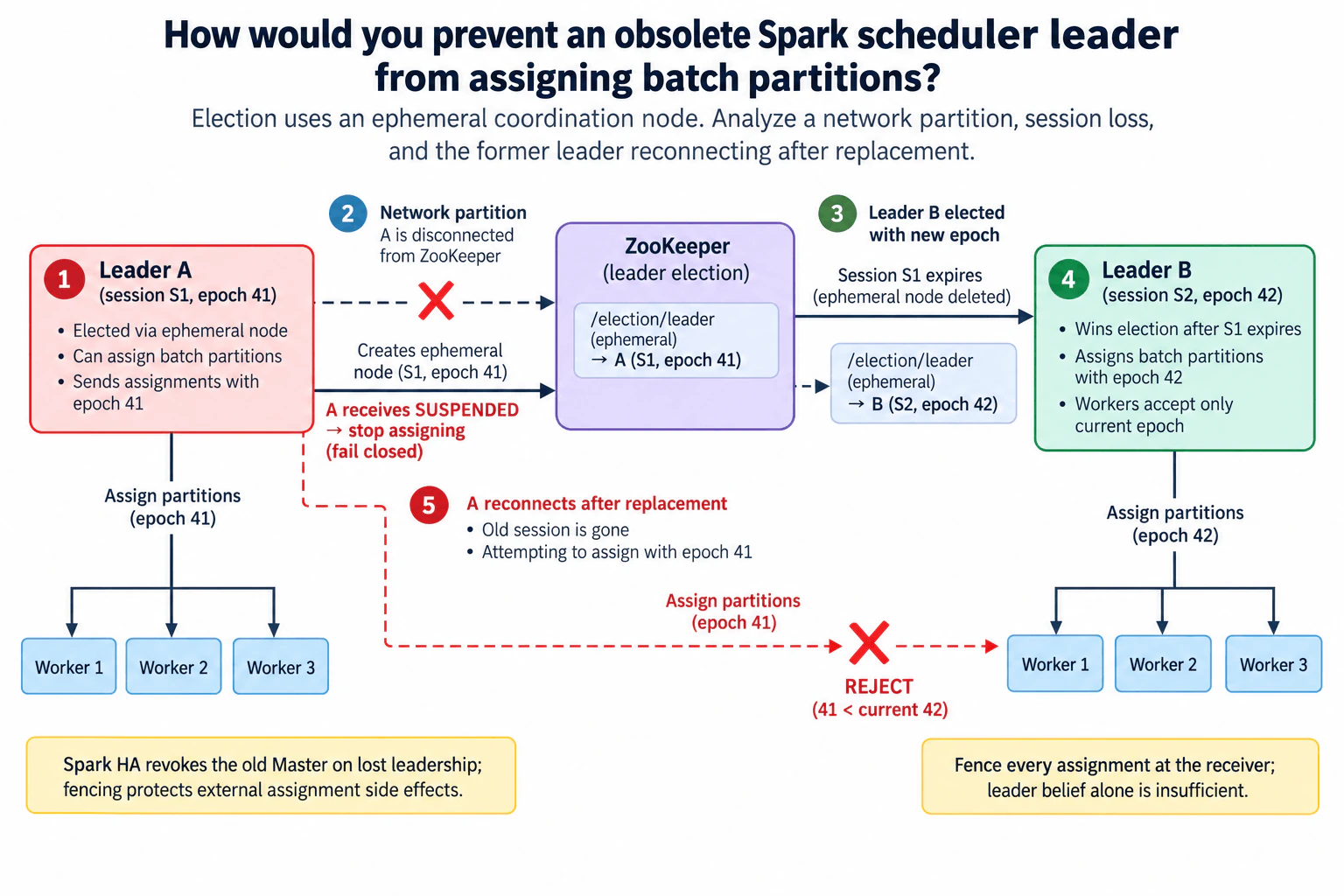
Election uses an ephemeral coordination node. Analyze a network partition, session loss, and the former leader reconnecting after replacement.

Short Interview Answer (30-60 seconds)

Use ZooKeeper leader election plus fencing. Leader A stops assigning work when its leadership becomes uncertain. If session S1 expires, Leader B takes over with a newer epoch. Every assignment carries that epoch, and workers reject assignments from A if it later reconnects with the stale epoch.

Detailed Explanation

The failure is a split-brain scheduling risk, not just a leader-election problem. Leader A can be disconnected from ZooKeeper, lose session S1, and still remain alive while Leader B is elected after the ephemeral leadership node disappears. If A later reconnects, its stale belief that it is leader must not let it assign batch partitions. The design therefore combines fail-closed behavior during uncertain leadership with a monotonically increasing fencing epoch. Assignments carry that epoch, and workers reject any assignment older than the current leader's epoch.

Useful Questions to Ask the Interviewer
  1. Can the coordination layer provide or persist a monotonically increasing leadership generation that can be used as a fencing token?
  2. Can every receiver of a batch-partition assignment validate that fencing token before acting on the assignment?
  3. Should the scheduler stop creating new assignments as soon as its ZooKeeper connection becomes suspended, or only after confirmed session loss?
  4. Are partition assignments idempotent or otherwise protected if an assignment is retried during leader failover?
How would you prevent an obsolete Spark scheduler leader from assigning batch partitions? diagram
How to Explain It in an Interview

Start with Leader A holding the ephemeral leadership node under ZooKeeper session S1 and fencing epoch 41. While A is the valid leader, it can assign batch partitions and includes epoch 41 with those assignments.

If a network partition disconnects A from ZooKeeper, A should fail closed for new scheduling. In the design shown, a suspended or otherwise uncertain coordination state means A stops issuing new assignments rather than assuming it still owns leadership.

If session S1 expires, ZooKeeper removes the ephemeral leadership node. Leader B can then win the election under a new session S2. The design gives B a newer fencing epoch, shown as epoch 42, and B sends new partition assignments carrying epoch 42.

The critical protection is receiver-side fencing. Workers do not trust an assignment merely because it came from a process that believes it is leader. They compare the assignment's epoch with the current accepted epoch. Epoch 42 assignments from Leader B are accepted; stale epoch 41 assignments are rejected.

Now consider the required reconnect case. Leader A comes back after Leader B has already replaced it. A's old ZooKeeper session is gone, so it cannot reclaim the old ephemeral node or make epoch 41 current again. Even if the old process attempts to send an assignment using epoch 41, workers reject it because 41 is older than the current epoch 42.

This gives two complementary protections. First, the leader stops scheduling when its leadership becomes uncertain. Second, fencing at the receiver prevents stale side effects even if the obsolete process remains alive. The epoch mechanism here is the explicit safety layer shown in the diagram; it should not be confused with assuming that ZooKeeper election alone automatically makes every downstream assignment safe.

Technical Approach
  1. Elect the scheduler leader through the ephemeral ZooKeeper coordination node.
  2. Associate each successful leadership term with a monotonically increasing fencing epoch.
  3. Attach the current epoch to every batch-partition assignment.
  4. When the active leader loses or suspends its coordination connection, stop issuing new assignments while leadership is uncertain.
  5. If its ZooKeeper session expires, allow the ephemeral node to disappear and elect a replacement leader with a newer epoch.
  6. Require workers to validate the assignment epoch before accepting work.
  7. Accept assignments from the current epoch and reject every older epoch.
  8. If the former leader reconnects, treat its old session and epoch as obsolete unless it later wins a new election with a new valid epoch.
Practical Insights

The CPU and memory overhead of comparing a fencing epoch is small. The larger cost is coordination and availability during failover: new scheduling may pause while leadership is uncertain, the old session expires, and the replacement leader takes control. Receiver-side validation also adds protocol and operational complexity because the accepted epoch must be maintained consistently. That cost is intentional. The design prefers temporarily delaying new batch assignments over allowing two schedulers to create conflicting assignment side effects. It also requires the epoch to increase monotonically so an old process cannot reuse a stale leadership token after reconnecting.

Why Interviewers Ask This

This tests whether you understand leader election, network partitions, ZooKeeper session expiration, stale-leader risk, and fencing. The important judgment is recognizing that replacing a leader does not automatically make the old process harmless. A safe design must stop scheduling when leadership becomes uncertain and must prevent an obsolete leader from creating assignment side effects after another leader has taken over.

Common interview mistakes

One mistake is assuming that deleting the ephemeral leadership node is enough. Session expiration lets another leader take over, but the former process can still be alive. Another mistake is letting the leader continue scheduling while its coordination state is uncertain. A third mistake is fencing only by leader identity instead of by a monotonically newer generation. Finally, validating leadership only inside the scheduler is not enough for the failure shown here; the receiver that performs the assignment side effect must reject stale epochs.

Interview tip

Explain the failure chronologically: Leader A is isolated, stops assigning, session S1 expires, Leader B wins with a newer epoch, and A later reconnects but its stale assignments are fenced. Emphasize the distinction between election, which chooses the current leader, and fencing, which prevents an obsolete leader from causing side effects.

Interviewer may ask next
Why is the ephemeral ZooKeeper leadership node not sufficient by itself?

Because session expiration changes ZooKeeper's view of leadership, but it does not necessarily terminate the old process. Leader A may still be alive and may later regain network access to workers. Without fencing, it could attempt to act on stale leadership state. The fencing epoch makes those stale actions distinguishable, so receivers can reject epoch 41 after epoch 42 has become current.

What should happen if Leader A temporarily loses ZooKeeper connectivity but its session has not expired?

The safe policy shown in the diagram is to stop creating new assignments while leadership is uncertain. If connectivity returns before session expiration and A can establish that its existing leadership session is still valid, scheduling may resume under the same valid term. If the session has expired, the old term is finished; A must not resume using that epoch, and any stale assignments must be rejected after a newer leader takes over.

33. Why might an acknowledged W=2 write be followed by a stale R=2 read in a three-replica leaderless store?Cloud / Distributed SystemsHard

Question Details

Investigate replica selection, membership changes, write versions, and reconciliation before proposing a correction.

Short Interview Answer (30-60 seconds)

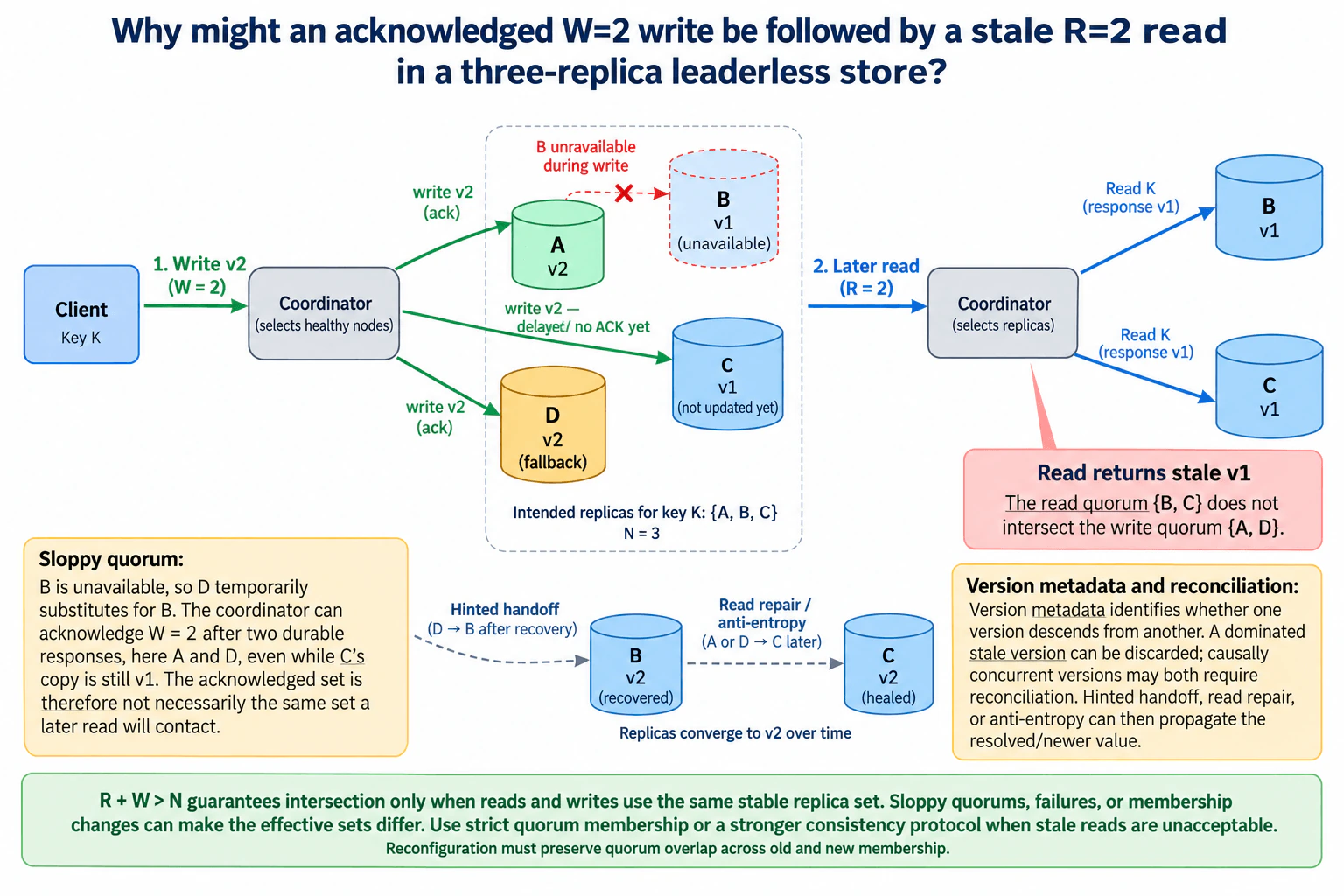
W=2 and R=2 imply overlap only when both operations draw from the same stable three-replica set. With a sloppy quorum or unsafe membership transition, v2 can be acknowledged by A and fallback D while a later read contacts stale B and C and returns v1.

Detailed Explanation

A stale read is possible because W=2 and R=2 describe counts, not necessarily the same physical replicas. In the diagram, B is unavailable during the write, so fallback D temporarily substitutes for it. A and D durably store v2 and satisfy W=2, while C is still on v1 because its write is delayed. Later, an R=2 coordinator reads B and C. If both return v1, that read set does not intersect the acknowledged write set {A, D}, so the client can receive stale v1 despite R + W > N.

Useful Questions to Ask the Interviewer
  1. Are reads and writes restricted to the same fixed replica set, or can a sloppy quorum use fallback replicas outside the normal preference set?
  2. Can replica ownership or membership change between the acknowledged write and the later read?
  3. What version metadata is stored, and how are dominated and causally concurrent versions reconciled?
  4. Does the system use hinted handoff, read repair, anti-entropy, or a stronger consistency mode?
Why might an acknowledged W=2 write be followed by a stale R=2 read in a three-replica leaderless store? diagram
How to Explain It in an Interview

Start with the apparent contradiction. With N=3, W=2, and R=2, we have R + W = 4 > 3. If both operations choose quorums from the same stable three-replica membership, every read quorum of two must intersect every write quorum of two. In that case, at least one read response should expose the acknowledged version, assuming the read correctly compares versions.

The diagram shows how that assumption can fail. The intended replicas for key K are A, B, and C. B is unavailable during the write. Under a sloppy-quorum policy, D temporarily substitutes for B. The write coordinator sends v2 to the available targets. A stores v2 and acknowledges. D stores v2 and acknowledges. The write toward C is delayed, so C is still at v1 when the second durable acknowledgment arrives. W=2 therefore succeeds with the actual acknowledged write set {A, D}.

Later, the R=2 coordinator selects B and C. B has recovered but still contains v1 because the hinted value on D has not yet been handed back. C also still contains v1 because its original write was delayed or missed. The effective read set is therefore {B, C}. Since {A, D} intersect {B, C} is empty, neither read response contains v2, and the coordinator can return stale v1.

The key point is that the equation R + W > N is not wrong. Its usual intersection argument assumes that reads and writes draw from the same stable replica universe. Sloppy quorum placement can temporarily move an acknowledged copy outside that universe. A failure by itself does not invalidate quorum intersection when membership remains fixed; the problem arises when failure handling changes which replicas are allowed to satisfy the quorum. Membership reconfiguration can create the same risk if an old write quorum and a new read quorum are allowed to become disjoint. Reconfiguration must therefore preserve quorum overlap across old and new membership.

Version metadata matters after a read actually observes different versions. If v2 causally descends from v1, v1 is dominated and can be discarded. If two versions are causally concurrent, both may need application-specific or system-defined reconciliation. Version metadata cannot recover v2 from a read that contacts only replicas holding v1.

The repair paths in the diagram restore convergence. Hinted handoff moves D's temporary v2 to B after B recovers. Read repair or anti-entropy can update C to v2. These mechanisms shrink the stale-read window and eventually converge replicas, but they do not make every R=2 read strongly consistent before repair completes.

If stale reads are unacceptable, the correction is to require reads and writes to satisfy quorum intersection over a stable or safely transitioning membership, rather than allowing disjoint effective replica sets. Alternatively, use a stronger consistency protocol that provides the required read-after-write or linearizable behavior. The trade-off is additional coordination, potentially higher latency, and lower availability during failures or reconfiguration.

Technical Approach
  1. Identify the intended replica set for the key: {A, B, C}, with N=3.
  2. Record the replicas that actually acknowledge the write. B is unavailable, D is used as a fallback, and A plus D acknowledge v2, giving the acknowledged set {A, D}.
  3. Record the state of the other intended replicas at acknowledgment time. C is still v1 because the write to C is delayed; B is unavailable and remains v1.
  4. Trace the later R=2 selection. The read contacts B and C, so the effective read set is {B, C}.
  5. Check the real physical intersection rather than relying only on R + W. {A, D} intersect {B, C} is empty, so the read cannot observe v2.
  6. Inspect the replica-selection policy. Determine whether sloppy quorum fallback placement allowed a node outside the normal three-replica set to satisfy W.
  7. Inspect membership history. Verify that any reconfiguration preserves quorum overlap between old and new configurations.
  8. Inspect version metadata. A dominated stale version can be discarded when a newer descendant is observed; causally concurrent versions require reconciliation.
  9. Inspect convergence mechanisms. Hinted handoff should transfer D's temporary copy to B after recovery, while read repair or anti-entropy can update C.
  10. If stale reads are not acceptable, enforce quorum intersection across stable or safely transitioning membership or use a stronger consistency protocol, then validate that every permitted read after an acknowledged write satisfies the required consistency guarantee.
Practical Insights

There is no useful big-O optimization here; the important costs are coordination, network traffic, storage, latency, and availability. A W=2 write waits for two durable acknowledgments, so its latency is bounded by the second successful response. An R=2 read waits for two replicas and may compare version metadata. Sloppy quorum handling improves write availability during failures but requires temporary replica placement and later hinted-handoff traffic. Read repair and anti-entropy add background network and storage I/O. Version metadata adds per-record storage and reconciliation work. Stronger consistency or stricter quorum membership can reduce stale reads but normally requires more coordination and can make operations slower or unavailable when the required replicas cannot participate. Safe reconfiguration also adds coordination because old and new memberships must maintain quorum overlap.

Why Interviewers Ask This

This question tests whether the candidate understands that quorum arithmetic is only sufficient when the actual read and write replica sets satisfy the required intersection property. It also tests reasoning about sloppy quorums, temporary fallback replicas, membership changes, delayed writes, version metadata, hinted handoff, read repair, anti-entropy, and the trade-off between availability and stronger consistency.

Common interview mistakes

A common mistake is saying that R + W > N always prevents stale reads without stating that the read and write quorums must come from the same stable replica set. Another is treating fallback D as if it were permanently one of the original N=3 replicas. Candidates also often ignore the delayed write to C, assume B immediately contains v2 when it recovers, or claim that version metadata can recover v2 when no contacted replica has it. Other mistakes are treating hinted handoff or anti-entropy as synchronous guarantees, assuming wall-clock timestamps always establish causal order, and blaming node failure alone instead of identifying that failure handling changed the effective quorum membership. Membership changes must also preserve overlap between old and new configurations.

Interview tip

Draw the actual sets: intended replicas {A,B,C}, acknowledged write set {A,D}, and later read set {B,C}. Their intersection is empty. Then explain that R + W > N assumes a common stable membership, describe version reconciliation and repair, and state the stronger consistency choice you would use when stale reads are unacceptable.

Interviewer may ask next
If the later R=2 read contacted A and C instead of B and C, what should happen?

The read set {A,C} intersects the acknowledged write set {A,D} at A. A returns v2 while C may still return v1. If the version metadata shows that v2 descends from v1, the coordinator can discard the dominated v1 and return v2. The system may then use read repair to update C. This demonstrates why physical quorum intersection matters: once the read reaches a replica containing the acknowledged version, version comparison can expose that value.

Would setting R=3 completely solve the problem?

Not by itself. In this diagram, an R=3 read of the intended replicas A, B, and C would observe v2 as long as A is reachable, because A is part of the acknowledged write set. But the deeper requirement is still correct quorum intersection across failures and membership changes. A sloppy quorum can place an acknowledged copy on fallback D, and unsafe reconfiguration can change the allowed replica universe. R=3 also increases read latency and reduces availability because more replicas must respond. The robust correction is to define a consistency protocol whose acknowledged writes and permitted reads maintain the required overlap across failure handling and membership transitions.

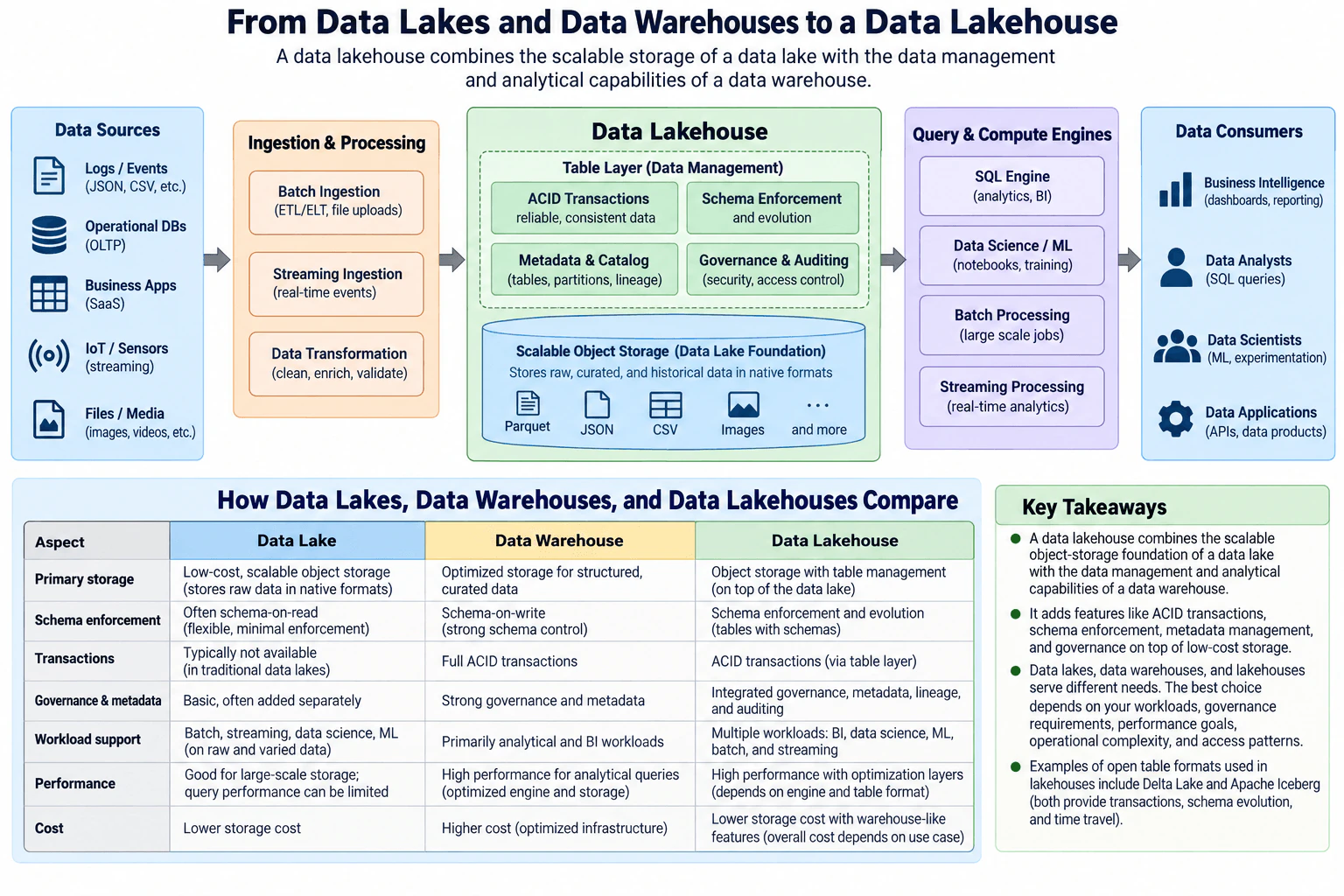
34. What is a data lakehouse, and how does it relate to data lakes and data warehouses?Cloud Data PlatformsEasy

Question Details

Define a data lakehouse as an architecture that combines scalable object-storage foundations with data-management and analytical capabilities associated with warehouses. Compare lakes, warehouses, and lakehouses across storage, schema enforcement, transactions, governance, workload support, performance, and cost without claiming that one architecture is always best.

Short Interview Answer (30-60 seconds)

A lakehouse adds warehouse-like table management to scalable object storage, giving data engineers ACID transactions, schema controls, metadata, governance, and support for SQL, batch, streaming, and ML workloads. The trade-off is more management complexity in exchange for stronger consistency, governance, and broader workload support.

Detailed Explanation

Teams often receive logs, operational database data, business-application data, sensor streams, and files in different formats. A basic data lake stores that data flexibly at scale, while a data warehouse focuses on curated analytical data with stronger management controls. A lakehouse combines those ideas. Data engineers ingest and transform batch or streaming data into scalable object storage, then manage logical tables through transactions, schema rules, metadata, cataloging, lineage, governance, and auditing. SQL, BI, machine-learning, batch, streaming, and application workloads can then use the same governed data foundation when that architecture fits the workload and cost requirements.

Useful Questions to Ask the Interviewer
  1. Which workloads matter most: BI and SQL analytics, batch processing, streaming, data science, ML, or a combination?
  2. How strict must schema validation and schema evolution be before data is published to consumers?
  3. What governance requirements exist for access control, metadata, lineage, and auditing?
  4. What query-performance expectations do analysts and applications have?
  5. Is minimizing storage cost more important than minimizing operational complexity or query latency?
  6. Does the organization already use a data lake, a warehouse, or both, and would adoption need to be gradual?
What is a data lakehouse, and how does it relate to data lakes and data warehouses? diagram
How to Explain It in an Interview
  1. Define the lakehouse goal A data lakehouse keeps scalable object storage as the data-lake foundation and adds a table-management layer with warehouse-like capabilities. In the approved architecture, the goal is to store raw, curated, and historical data while also giving analytical workloads reliable table semantics, schema controls, metadata, governance, and auditing. It is not automatically better than a lake or a warehouse; the choice depends on workload and operational needs.
  1. Follow the data from sources into the platform The normal data path begins with logs and events, operational databases, business applications, IoT or sensor streams, and files or media. Batch ingestion handles ETL, ELT, and file-upload patterns. Streaming ingestion handles real-time events. A transformation step cleans, enriches, or validates data before or as it is written to the lakehouse. These steps move or modify production data and therefore belong to the data-processing path.
  1. Separate object storage from table management The physical storage layer is scalable object storage. The diagram shows examples such as Parquet, JSON, CSV, images, and other file types. Object storage can hold raw, curated, and historical data in native formats. Above it sits the table-management layer. That layer gives logical tables behavior that plain files alone do not provide. This separation is the central lakehouse idea: scalable lake-style storage underneath, managed table semantics above it.
  1. Explain transactions and schema management The lakehouse table layer provides ACID transactions so table changes can be committed consistently. It also provides schema enforcement and schema evolution. Enforcement rejects writes that do not satisfy the table rules, while controlled evolution lets an approved schema change over time. A traditional basic lake commonly uses schema-on-read with limited enforcement, while a warehouse commonly uses stronger schema-on-write control. The lakehouse combines flexible storage with stronger managed-table rules.
  1. Explain metadata, governance, and auditing The table-management layer also includes metadata and catalog capabilities for tables, partitions, and lineage. Governance and auditing provide security and access-control boundaries plus evidence about data use. The catalog stores metadata about data; it does not replace the production records in object storage. The exact identity provider, masking model, retention policy, or compliance framework is not specified by the diagram, so I would not invent those details.
  1. Explain query and compute workloads The lakehouse feeds several types of compute. A SQL engine supports analytics and BI. Data-science and ML tools support notebooks and model training. Batch-processing engines run large-scale jobs. Streaming-processing engines support real-time analytics. These engines read managed lakehouse data and then serve the consumer boundary. The architecture does not require every workload to use one engine.
  1. Explain the consumer boundary The consumers shown are business-intelligence tools, data analysts, data scientists, and data applications. BI tools use the data for dashboards and reporting. Analysts use SQL queries. Data scientists use it for ML and experimentation. Data applications can expose APIs or other data products. The lakehouse therefore supports several consumption styles from the same governed storage foundation.
  1. Compare the three architectures directly For storage, a basic data lake emphasizes low-cost, scalable object storage and can keep raw data in native formats. A warehouse uses storage optimized for structured, curated analytical data. A lakehouse uses object storage but adds table management on top.

For schema, a lake often uses schema-on-read with flexible or minimal enforcement. A warehouse generally uses schema-on-write with stronger control. A lakehouse adds schema enforcement and controlled evolution through its managed-table layer.

For transactions, traditional basic lakes may have limited or no table-level transaction semantics. Warehouses provide ACID transactions. A lakehouse provides ACID transactions through the table layer.

For governance, a basic lake may need separate governance and metadata systems. Warehouses commonly provide strong governance and metadata capabilities. A lakehouse integrates metadata, lineage, governance, and auditing around managed tables.

For workloads, a lake is flexible for batch, streaming, data science, and ML over raw or varied data. A warehouse is primarily optimized for analytical SQL and BI. A lakehouse supports multiple workloads, including BI, SQL, data science, ML, batch, and streaming.

For performance, a basic lake is good for large-scale storage but may need extra optimization for fast analytics. Warehouses are optimized for analytical queries. Lakehouse performance depends on the table format, file organization, optimization layer, and query engine.

For cost, a basic lake often has low storage cost because it uses scalable object storage. Warehouses may have higher infrastructure or managed-service cost in exchange for optimized analytical capabilities. A lakehouse keeps the object-storage foundation while adding warehouse-like features, but total cost still depends on compute, metadata, governance, optimization, operational complexity, and workload patterns.

  1. Relate open table formats to the design Open table formats such as Delta Lake and Apache Iceberg are examples of technologies that can implement the managed-table layer in a lakehouse architecture. They are used to add capabilities such as transactions, schema evolution, metadata-driven table management, and historical table versions or time travel on top of object storage. The architectural idea is broader than any single table format.
  1. Explain failure boundaries carefully Ingestion can fail before data reaches storage. Transformation can reject invalid input. A managed-table write can fail before a transaction commits. Catalog or governance services can be unavailable even while the underlying object data still exists. Query or processing engines can also fail without destroying the stored data. The diagram does not define retry counts, checkpoint implementation, backup policy, failover, or disaster-recovery objectives, so I would not invent those guarantees. After recovery, I would verify committed table state, schema validity, metadata visibility, access controls, lineage, and consumer query results.
  1. Explain migration and adoption If an organization already has a lake and a warehouse, I would not automatically replace both. I would identify workloads that benefit from managed tables on object storage, introduce the lakehouse table layer for those datasets, validate governance and query behavior, and migrate additional workloads only when the benefits justify the operational change. Existing warehouse workloads can stay in the warehouse when that remains the better fit.
  1. State the final trade-off The lakehouse is attractive when a team wants scalable object storage together with warehouse-like transactions, schema management, metadata, governance, and support for several analytical workloads. The cost is additional table-management and governance complexity compared with a simple lake. A warehouse may still be a better fit for tightly controlled BI workloads, while a basic lake may remain appropriate when flexible large-scale storage is the main requirement.
Technical Approach
  1. Identify the source and consumer workloads shown in the architecture.
  2. Separate batch and streaming ingestion from transformation, storage, compute, and serving.
  3. Use scalable object storage as the lakehouse foundation.
  4. Add a managed table layer for ACID transactions, schema enforcement and evolution, metadata, cataloging, lineage, governance, and auditing.
  5. Connect the managed data to SQL, data-science and ML, batch, and streaming compute engines.
  6. Serve BI users, analysts, data scientists, and data applications through the appropriate engine.
  7. Compare the lake, warehouse, and lakehouse across storage, schema, transactions, governance, workloads, performance, and cost.
  8. Choose the architecture based on workload and operational trade-offs rather than assuming the lakehouse is universally best.
Practical Insights

Object storage can grow independently from compute, while SQL, batch, streaming, and ML engines can scale according to their own workloads. Large numbers of files, metadata entries, concurrent table writers, schema changes, and simultaneous queries can increase operational work. Query speed depends on file organization, metadata, the table format, and the compute engine rather than object storage alone. Batch workloads can use compute only when jobs run, while streaming or interactive workloads may need continuously available compute. Network transfer can also add latency and cost when storage and compute are separated. A lakehouse may avoid some duplicated storage, but it adds table-management, catalog, governance, optimization, and operations overhead. Migration cost also matters, so adoption should be gradual when existing lake or warehouse workloads already work well.

Why Interviewers Ask This

Interviewers want to see whether I understand the architectural difference between scalable file or object storage and managed analytical tables. They also want to see whether I can compare data lakes, warehouses, and lakehouses across storage, schema, transactions, governance, workload support, performance, and cost without incorrectly claiming that one architecture is always best.

Common interview mistakes

Common mistakes are saying a lakehouse is only a data lake with SQL, treating object storage itself as the transaction manager, claiming every data lake has no transactions, assuming every warehouse uses the same physical storage model, confusing catalog metadata with production records, assuming schema evolution means any schema change is safe, treating governance as automatic because a table format exists, and claiming a lakehouse is always cheaper or faster than a warehouse. Another mistake is describing only one ETL pipeline instead of explaining the reusable storage, table-management, compute, governance, and consumer boundaries.

Interview tip

Start with the central distinction: object storage provides the data-lake foundation, and the table layer adds warehouse-like management. Then compare lake, warehouse, and lakehouse across storage, schema, transactions, governance, workload support, performance, and cost. Finish by explaining that the best choice depends on the workload rather than declaring one architecture universally superior.

Interviewer may ask next
Suppose the company already has a large data lake, but analysts now need reliable SQL tables. How would you move toward this lakehouse design?

I would keep the existing object-storage foundation and introduce the managed table layer for selected datasets instead of rebuilding everything. I would start with a small set of curated analytical tables, define their schemas, publish them as managed lakehouse tables, and validate transactions, schema enforcement, metadata, lineage, governance, and SQL query behavior. Raw files that do not need stronger table semantics can remain in the lake. I would reconcile the new tables against the existing outputs before moving consumers, then migrate additional workloads gradually. This reduces migration risk while preserving the storage foundation already shown in the architecture.

When would you choose a traditional data warehouse instead of the lakehouse shown here?

I would favor a warehouse when the main requirement is curated SQL and BI analytics and the organization values a tightly managed analytical environment more than broad workload flexibility on object storage. The approved comparison shows warehouses with strong schema-on-write control, ACID transactions, governance, and high analytical-query performance. A lakehouse becomes more attractive when the same storage foundation also needs to support data science, ML, batch, streaming, or varied data formats. I would therefore choose based on workload mix, governance needs, performance expectations, operational complexity, access patterns, and total cost rather than assuming either architecture is always better.

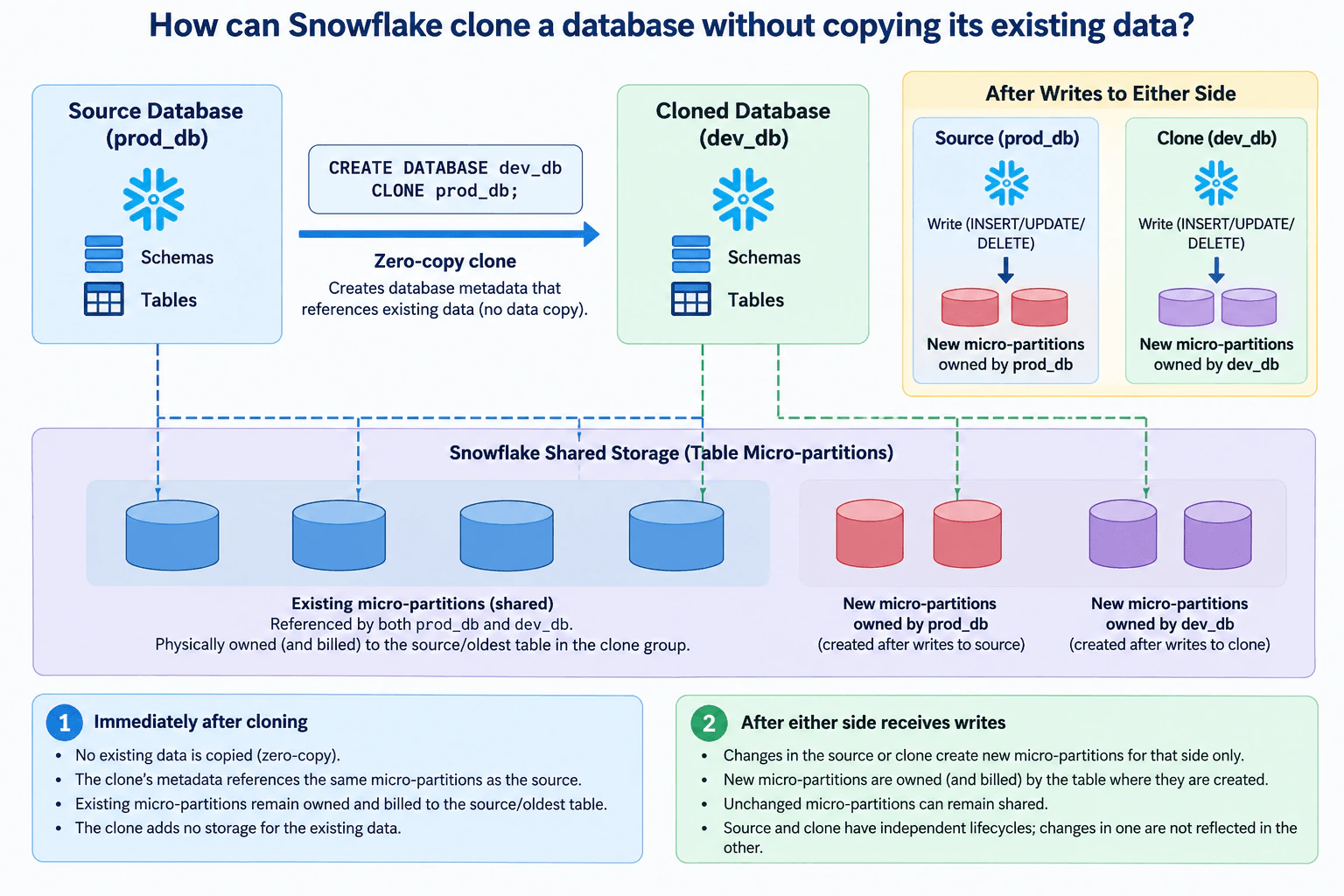
35. How can Snowflake clone a database without copying its existing data?Cloud Data PlatformsEasy

Question Details

Explain physical storage ownership immediately after cloning and after either the clone or its source receives writes.

Short Interview Answer (30-60 seconds)

Snowflake uses zero-copy cloning: the clone gets separate metadata but initially references the source's existing micro-partitions instead of copying them. Those existing bytes stay owned by the source or oldest table, while later changes create new micro-partitions owned by whichever side makes the change.

Detailed Explanation

Data engineers often need a safe copy of a Snowflake database for development, testing, or experimentation without duplicating all existing storage. A full physical copy would create another set of bytes even when most data never changes. Snowflake instead separates logical database metadata from the physical micro-partitions that hold table data. A clone gets its own database, schemas, and tables logically, but initially references the same existing micro-partitions as the source. This design prioritizes fast, space-efficient cloning while allowing the source and clone to evolve independently after creation.

Useful Questions to Ask the Interviewer
  1. Do you want me to explain only the initial zero-copy clone, or also how source and clone storage diverge after writes?
  2. Should I include how ownership of shared and newly created micro-partitions is attributed?
  3. Would you like the Snowflake SQL statement used to create the database clone?
How can Snowflake clone a database without copying its existing data? diagram
How to Explain It in an Interview
  1. Zero-copy clone creation The source database is prod_db, and the clone is created with CREATE DATABASE dev_db CLONE prod_db;. Snowflake creates separate metadata for dev_db rather than physically copying all existing table data. The clone has its own logical database, schemas, and tables, while those tables initially reference the same existing micro-partitions used by prod_db.
  1. Logical objects versus physical storage The important boundary is between Snowflake metadata and the table micro-partitions that store data. prod_db and dev_db are separate logical databases after cloning, but their unchanged table data can reference the same physical micro-partitions. This shared-storage behavior is what makes the clone zero-copy.
  1. Physical ownership immediately after cloning Immediately after cloning, the existing micro-partitions are shared by the source and clone. The physical storage for those existing bytes remains owned and billed to the source, or more generally to the oldest table in the clone group. dev_db does not receive a second physical copy of those existing bytes.
  1. Writes to the source If prod_db later receives changes such as inserts, updates, or deletes, the source can create new micro-partitions for the changed data. Those newly created micro-partitions are owned by prod_db. Unchanged micro-partitions that both databases still need can remain shared. The clone does not automatically receive the source's later logical changes.
  1. Writes to the clone The same rule applies to dev_db. When the clone changes data, it can create new micro-partitions for those changes, and those newly created micro-partitions are owned by dev_db. Unchanged data can continue to reference the original shared micro-partitions.
  1. Independent lifecycles after cloning The source and clone have independent logical lifecycles. Changes made in one are not reflected in the other. Over time, each database can therefore reference a mixture of shared existing micro-partitions and separately owned new micro-partitions created by its own changes.
  1. Main trade-off The benefit is fast, space-efficient cloning because existing data is not duplicated at clone time. The trade-off is that logical database size and physical storage ownership are not the same thing. Shared existing bytes remain attributed to their original or oldest owning table, while each side becomes responsible for the new micro-partitions it creates as it diverges.
Technical Approach
  1. Create dev_db from prod_db with CREATE DATABASE dev_db CLONE prod_db;.
  2. Create independent metadata for the cloned database.
  3. Reference the source's existing table micro-partitions instead of copying them.
  4. Keep those existing micro-partitions shared and attributed to the source or oldest table in the clone group.
  5. When prod_db changes data, create any required new micro-partitions for the source and attribute them to prod_db.
  6. When dev_db changes data, create any required new micro-partitions for the clone and attribute them to dev_db.
  7. Continue sharing unchanged micro-partitions while source and clone evolve independently.
Practical Insights

The initial clone avoids copying the full database, so its main work is creating metadata that points to existing micro-partitions. This keeps initial storage growth small because the existing bytes are shared rather than duplicated. As either database changes, additional storage is used for newly created micro-partitions on that side. Unchanged micro-partitions can remain shared. The key operational point is that logical independence does not mean every physical byte is duplicated.

Why Interviewers Ask This

Interviewers want to see whether you understand the difference between Snowflake's logical database objects and physical table storage. A strong answer explains why cloning does not copy existing bytes, who owns the initially shared storage, and how storage ownership changes as the source and clone diverge.

Common interview mistakes

A common mistake is saying Snowflake immediately copies all source data into the clone. It does not; the clone initially references the same existing micro-partitions. Another mistake is saying the source and clone remain synchronized after cloning. They have independent lifecycles. It is also incorrect to say later changes overwrite the same shared data for both databases. Changes on one side create new storage for that side as needed, while unchanged micro-partitions can remain shared. Finally, do not assume the clone initially owns a duplicate copy of all existing storage.

Interview tip

Explain the behavior in two moments: first, immediately after cloning, when source and clone share existing micro-partitions; second, after either side changes data, when newly created micro-partitions belong to the side that made the change. That directly answers both storage-ownership parts of the question.

Interviewer may ask next
What happens if both the source database and the clone receive different writes after the clone is created?

They diverge independently. Changes to the source can create new micro-partitions owned by the source, and changes to the clone can create new micro-partitions owned by the clone. Neither side automatically receives the other's later logical changes. Any unchanged micro-partitions that both still reference can remain shared.

Why is zero-copy cloning more space-efficient than making a normal physical copy?

A physical copy would create another set of bytes for the database's existing data. A zero-copy clone instead creates separate metadata and initially reuses references to the same existing micro-partitions. Additional physical storage is introduced as the source or clone changes and creates new micro-partitions, so unchanged data can continue to remain shared.

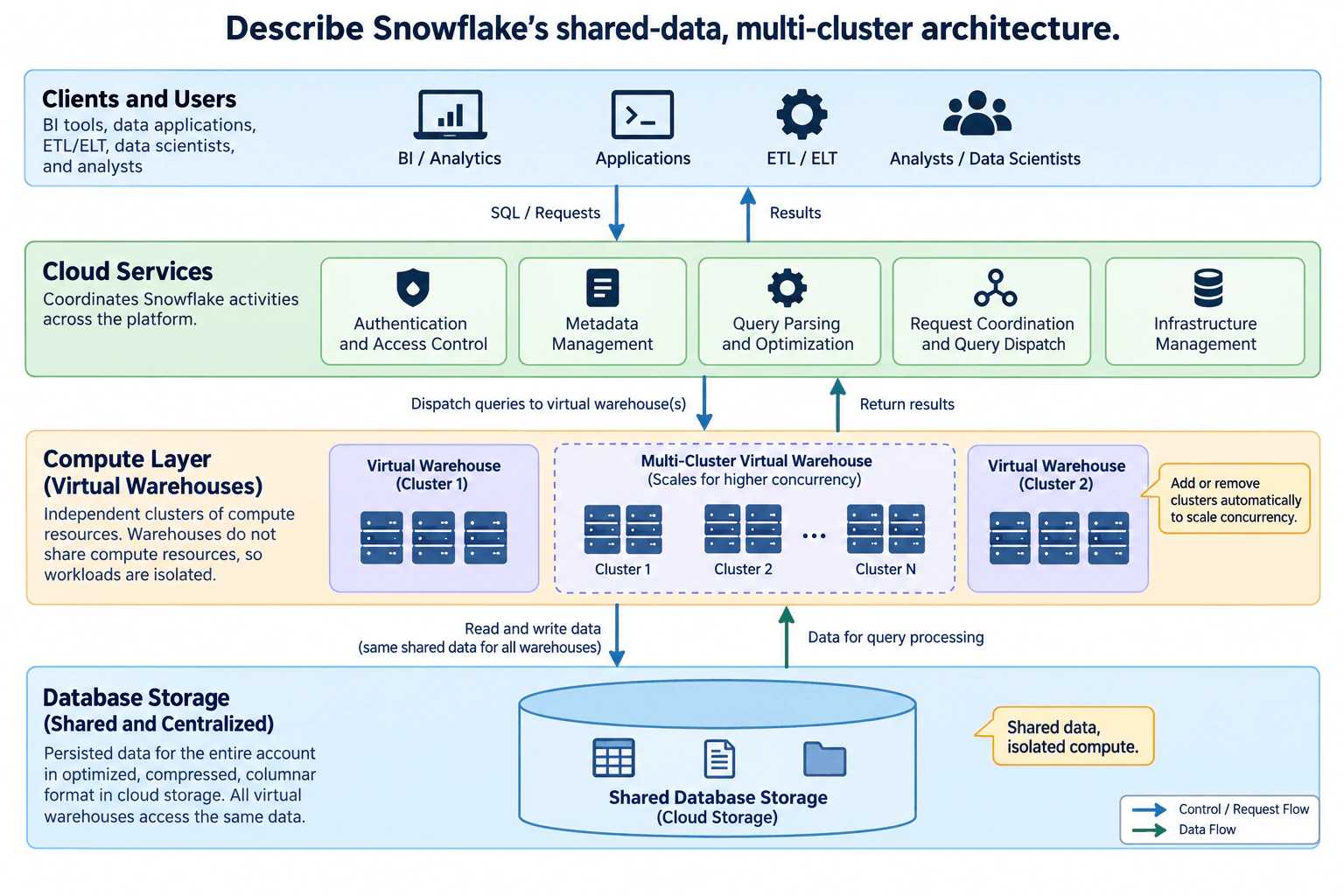
36. Describe Snowflake’s shared-data, multi-cluster architecture.Cloud Data PlatformsEasy

Question Details

Separate storage, virtual-warehouse processing, and cloud-services responsibilities.

Short Interview Answer (30-60 seconds)

Snowflake keeps persisted data in shared centralized cloud storage, runs queries on independent virtual warehouses, and uses cloud services for security, metadata, optimization, and request coordination. The trade-off is separate compute consumption for workload isolation, while multi-cluster warehouses can add clusters to handle higher concurrency.

Detailed Explanation

Analytics users, applications, ETL or ELT workloads, and data scientists may all need the same persisted data, but they should not have to compete for one shared compute pool. Snowflake solves this by separating database storage from virtual-warehouse processing and platform coordination. Persisted data is centralized in shared cloud storage, while independent warehouses supply compute for different workloads. Cloud services coordinate authentication, metadata, query optimization, dispatch, and infrastructure activity. This design prioritizes shared data access and compute isolation, with additional clusters available inside a multi-cluster warehouse when query concurrency grows.

Useful Questions to Ask the Interviewer
  1. Are we mainly explaining independent warehouses, a multi-cluster warehouse for concurrency, or both?
  2. Are the main workloads interactive analytics, applications, ETL or ELT, data science, or a mixture?
  3. Is workload isolation more important than minimizing active compute capacity?
  4. Do query-concurrency spikes vary enough that auto-scale multi-cluster behavior matters?
  5. Are there security or access-control boundaries between workloads that should be emphasized?
Describe Snowflake’s shared-data, multi-cluster architecture. diagram
How to Explain It in an Interview
1. Start with the three responsibility boundaries

Snowflake has three main architectural layers: database storage, compute, and cloud services. The storage layer owns persisted data. Virtual warehouses provide query-processing compute. Cloud services coordinate requests and platform management. Keeping these responsibilities separate is the main architectural idea.

2. Shared database storage owns persisted data

For Snowflake tables, Snowflake reorganizes loaded data into an internally optimized, compressed, columnar representation and stores it in cloud storage. The diagram represents this as one shared database-storage layer that all virtual warehouses can access.

The important point is that each warehouse does not need its own permanent copy of the database. A warehouse reads the required shared data for query processing and can write persisted changes back to that storage. This is the shared-data part of the architecture.

The diagram does not define backup, restore, replication, regional failover, or disaster-recovery behavior, so I would not infer those guarantees from this architecture alone.

3. Virtual warehouses provide independent compute

A virtual warehouse is a cluster of compute resources that processes queries against the shared data. In the diagram, separate virtual warehouses can serve different workloads while accessing the same persisted database storage.

The key isolation property is compute isolation. One virtual warehouse does not share compute resources with another virtual warehouse. That prevents one warehouse from directly consuming another warehouse's compute capacity. The trade-off is that each running warehouse consumes its own compute resources rather than sharing one common compute pool.

The diagram does not show automatic failover from one independent warehouse to another, so I would not describe that as part of the normal architecture.

4. A multi-cluster warehouse scales query concurrency

The diagram also shows a multi-cluster virtual warehouse. It is one virtual warehouse that can contain multiple compute clusters. Snowflake can allocate additional clusters to increase the pool of compute resources available to that warehouse.

In auto-scale mode, Snowflake can start or stop additional clusters as workload demand changes. This is mainly useful for concurrency: more clusters provide capacity for more simultaneous users or queries while all clusters continue to work against the same shared persisted data.

The trade-off is concurrency versus compute consumption. More running clusters provide more concurrent capacity but consume more compute resources. Multi-cluster scaling should not be presented as the main way to make one individually slow query faster; resizing a warehouse is the more relevant scaling direction for that problem.

5. Cloud services coordinate the platform

Client SQL requests enter the cloud-services layer. In the diagram, this layer owns authentication and access control, metadata management, query parsing and optimization, request coordination and query dispatch, and infrastructure management.

Cloud services coordinate the request and dispatch query work to the selected virtual warehouse. The virtual warehouse performs the data processing. Query results then return through the coordinated request path to the client.

This separation matters because cloud services coordinate execution, while persisted table data remains in shared database storage and the main query processing occurs in virtual warehouses. The cloud-services layer should not be described as the production table-data store.

6. Trace the request and data flows separately

The control and request path is: a client sends SQL or another request to cloud services; cloud services authenticate and authorize it, use metadata, parse and optimize the query, coordinate the request, and dispatch execution to a virtual warehouse. The warehouse executes the work, and results return toward the client through the coordinated request path.

The data path is separate. The virtual warehouse reads the required shared data from database storage for query processing. When an operation changes persisted data, the warehouse writes the resulting persisted data through the storage layer. Multiple warehouses can therefore work against the same shared persisted database without sharing their compute resources.

7. Keep security and metadata responsibilities clear

Users and applications submit work. Cloud services own the authentication, authorization, metadata, optimization, dispatch, and infrastructure-coordination responsibilities shown in the diagram. Virtual warehouses own query-processing compute. Database storage owns persisted data.

Authentication and access control are therefore coordination-layer responsibilities in this diagram. Metadata management also belongs in cloud services, while production table data belongs in the shared database-storage layer. This avoids confusing metadata and control functions with persistent business records.

8. Explain operational boundaries without inventing recovery guarantees

The separation gives useful troubleshooting boundaries. Authentication, metadata, optimization, or dispatch problems belong to the cloud-services area. Query queuing or compute-capacity issues belong to the relevant virtual warehouse. Shared persisted-data access belongs to the database-storage boundary.

For a multi-cluster warehouse configured for auto-scale, additional clusters can be started when concurrency requires more capacity and stopped when that extra capacity is no longer needed. The diagram does not specify retries, backups, regional failover, recovery-time objectives, or recovery-point objectives, so those should be discussed only if the interviewer adds those requirements.

9. State the main trade-offs

The main benefit is independent compute scaling around shared persisted data. Different workloads can access the same database while using separate virtual warehouses, reducing direct compute interference between those warehouses. A multi-cluster warehouse can also scale out its compute pool to handle changing concurrency.

The cost trade-off is that every running warehouse and additional running cluster consumes compute resources. Operationally, storage, compute, and cloud-services coordination are separate boundaries to understand and monitor. In this architecture, that separation is what enables shared data with isolated and independently scalable compute.

Technical Approach
  1. Identify the three Snowflake layers: database storage, virtual-warehouse compute, and cloud services.
  2. Explain that persisted Snowflake table data is centralized in shared cloud storage.
  3. Explain that each virtual warehouse is an independent compute cluster and does not share compute resources with other virtual warehouses.
  4. Distinguish separate virtual warehouses from a multi-cluster virtual warehouse containing multiple compute clusters.
  5. Explain that multi-cluster scale-out primarily addresses user and query concurrency.
  6. Trace the request path from clients to cloud services, then to the selected virtual warehouse, and back as results.
  7. Trace the data path between virtual warehouses and shared database storage.
  8. Explain authentication, access control, metadata, query parsing and optimization, request coordination, query dispatch, and infrastructure management as cloud-services responsibilities.
  9. Close with the trade-off: shared persisted data and independent compute improve workload isolation and independent scaling, while each active warehouse or cluster consumes compute resources.
Practical Insights

There is no useful single Big-O value for this architecture. Storage and warehouse compute scale along separate boundaries because persisted data lives in the shared storage layer. Query latency depends on the query and the resources of its selected warehouse. Separate virtual warehouses reduce direct compute contention between workloads, but each running warehouse consumes its own compute resources. A multi-cluster warehouse can add clusters for higher concurrent query demand; in auto-scale mode those clusters can be started and stopped as demand changes. More active clusters can reduce queuing from concurrency but consume more compute. The shared storage design means warehouses can access the same persisted data without maintaining separate permanent database copies. Operationally, teams must distinguish cloud-services coordination problems, warehouse compute problems, and shared-storage problems. The diagram supplies no migration, recovery-time, recovery-point, or regional-failover targets, so none should be invented.

Why Interviewers Ask This

Interviewers want to see whether you understand Snowflake's architectural separation instead of treating it like a traditional database server. A strong answer distinguishes persisted data, query compute, and coordination services, then explains how shared storage plus independent virtual warehouses lets workloads use the same data without sharing compute capacity. It also tests whether you understand that multi-cluster scaling is mainly a concurrency mechanism.

Common interview mistakes

Common mistakes are saying each virtual warehouse owns a separate permanent copy of the database, describing virtual warehouses as one shared compute pool, or saying cloud services perform the main query-processing workload. Another mistake is treating separate virtual warehouses and a multi-cluster warehouse as the same thing: separate warehouses isolate workloads, while a multi-cluster warehouse adds clusters inside one warehouse. Candidates also often say multi-cluster scaling is mainly for making one slow query faster, when its primary role is scaling concurrency. Finally, do not invent automatic cross-warehouse failover, multi-region recovery, backup behavior, or service-level guarantees that are not shown.

Interview tip

Lead with the three layers, then trace one request. Say that cloud services coordinate and dispatch the request, a virtual warehouse executes the query, and shared database storage holds persisted data. Then distinguish separate warehouses from a multi-cluster warehouse and explain that adding clusters primarily scales concurrency.

Interviewer may ask next
What happens if analytics and ETL workloads start competing for compute resources?

If both workloads are using the same warehouse, I would separate them onto different virtual warehouses. Each virtual warehouse has independent compute resources, so analytics and ETL can scale separately while continuing to access the same shared database storage. This reduces direct compute contention between those workloads. The trade-off is additional compute consumption because both warehouses may be running. If the real issue is many concurrent queries within one workload, I would instead evaluate a multi-cluster warehouse for that workload.

What would you change if one analytics warehouse suddenly had much higher query concurrency?

I would keep the same shared database-storage and cloud-services boundaries and change the compute configuration for that workload. A multi-cluster virtual warehouse can use additional clusters to increase concurrent capacity. If it is configured in auto-scale mode, Snowflake can start and stop additional clusters as demand changes. The benefit is more concurrent query capacity without creating a separate permanent copy of the data. The trade-off is greater compute consumption while more clusters are running. If the issue is one individually slow query instead of concurrency, I would examine the query and warehouse size rather than treating multi-cluster scale-out as the primary solution.

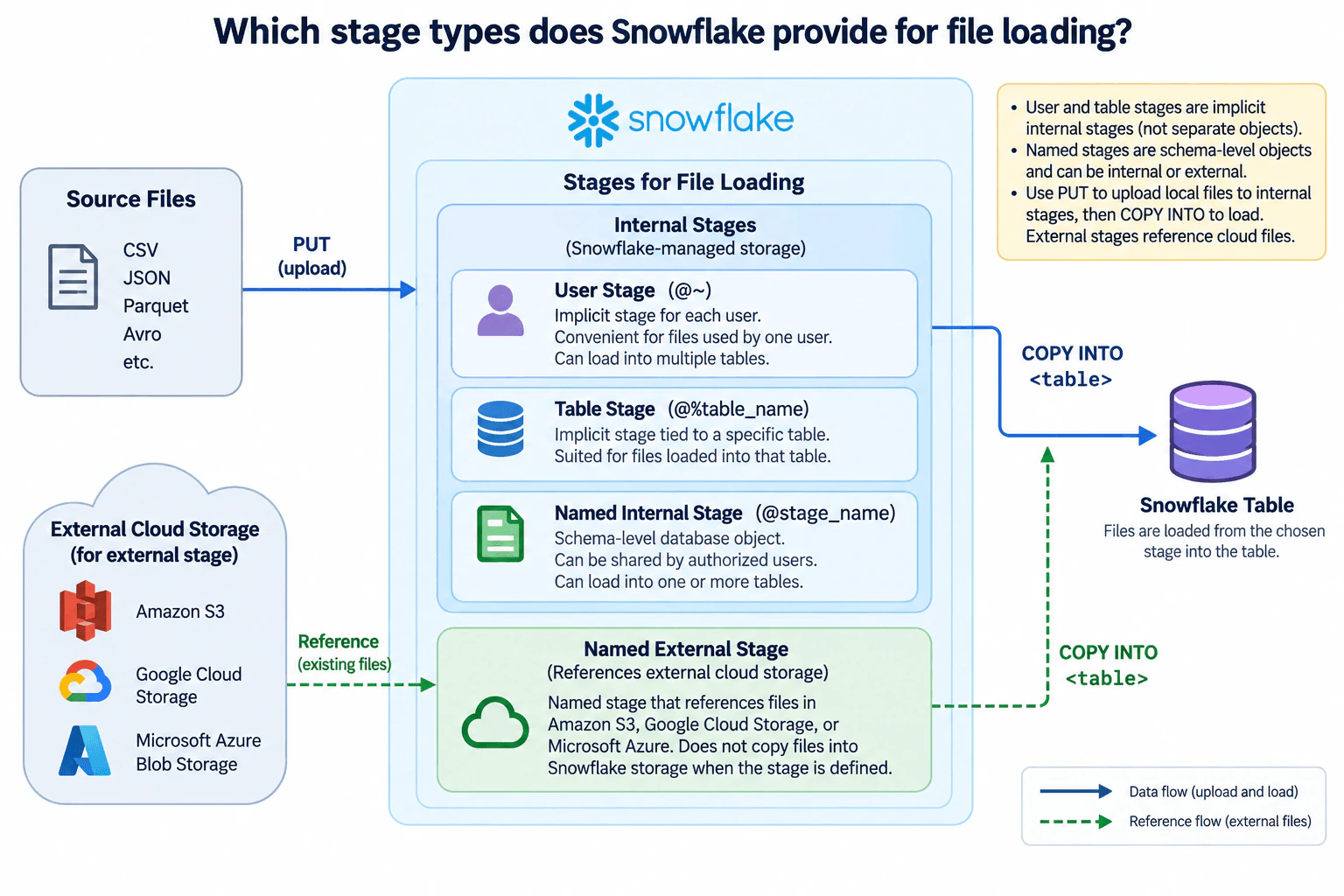
37. Which stage types does Snowflake provide for file loading?Cloud Data PlatformsEasy

Question Details

Distinguish user, table, and named stages, including internal and external storage.

Short Interview Answer (30-60 seconds)

Snowflake supports user, table, and named stages. User and table stages are implicit internal stages, while named stages are explicit schema objects that can be internal or external. The main choice is simple scoped staging versus reusable staging and whether Snowflake or external cloud storage holds the files.

Detailed Explanation

Data engineers need a reliable place for files before those files are loaded into Snowflake tables. Snowflake calls that location a stage. The correct stage depends mainly on where the files live and how broadly the staging location must be reused. User and table stages are automatically available internal stages. A named stage is an explicit schema object and can use Snowflake-managed internal storage or reference external cloud storage. This gives teams a simple path for personal or table-specific loads and a reusable path when several authorized workflows need the same staging definition.

Useful Questions to Ask the Interviewer
  1. Are the files initially on a local file system, or do they already exist in external cloud storage?
  2. Are the staged files intended for one user, one table, or reuse across multiple tables and authorized users?
  3. Should Snowflake manage the staged files internally, or should the files remain in Amazon S3, Google Cloud Storage, or Microsoft Azure?
Which stage types does Snowflake provide for file loading? diagram
How to Explain It in an Interview
  1. User stage for one user's internal files A user stage is an implicit internal stage allocated to each Snowflake user. The diagram identifies it with @~. It is convenient when files are mainly managed by one user and may later be loaded into multiple tables. Local files can be uploaded to this stage with PUT. COPY INTO <table> then reads the staged files and loads their contents into the destination table. The benefit is simplicity because no separate stage object must be created. The limitation is that the stage is scoped to the user rather than being a reusable named database object.
  1. Table stage for files associated with one table A table stage is an implicit internal stage tied to a specific table. The diagram identifies it as @%table_name. Snowflake automatically provides the stage with the table, and the files are stored in Snowflake-managed storage. It is a natural choice when the files are intended for that table. Local files can be uploaded with PUT and then loaded with COPY INTO <table>. The trade-off is scope: a table stage is tied to one table and is not the right choice when the same staged files need to be loaded into multiple tables.
  1. Named internal stage for reusable Snowflake-managed staging A named internal stage is an explicit schema-level database object, shown in the diagram as @stage_name. It stores files in Snowflake-managed internal storage. Authorized users can work with the stage according to granted privileges, and the same named stage can support loading one or more tables. Local files follow the internal-stage path shown in the diagram: PUT uploads them to the named internal stage, and COPY INTO <table> loads their contents into the destination table. The trade-off is that a named stage must be created and managed, but it provides clearer reuse and access control than an implicit stage.
  1. Named external stage for existing cloud files A named external stage is also an explicit stage object, but it references files that remain outside Snowflake-managed internal storage. The diagram shows Amazon S3, Google Cloud Storage, and Microsoft Azure Blob Storage as examples. The dashed green flow represents this reference relationship. Creating the external stage does not copy those files into Snowflake-managed storage. COPY INTO <table> can read the files through the external stage and load their data into the Snowflake table.
  1. Internal and external loading paths For an internal stage, the normal path is local source files to an internal stage with PUT, followed by COPY INTO <table> from that stage to the Snowflake table. For an external named stage, the files already exist in external cloud storage. The stage references those files, and COPY INTO <table> reads them from the external location and loads the rows into Snowflake. These are alternative staging paths, not sequential stages through which the same file must pass.
  1. Ownership and platform boundary User and table stages are implicit internal stage locations rather than separately created named stage objects. A named stage is an explicit schema object and is the reusable choice when access needs to be managed through stage privileges or when one stage should support multiple loading workflows. In the external case, the file storage remains outside Snowflake's internal-storage boundary, while the named external stage supplies the Snowflake-side reference used by the load operation.
  1. Failure handling and verification For the internal path, a PUT failure means the local file was not successfully uploaded to the intended internal stage, so the upload must succeed before that file can be loaded. For the external path, Snowflake must be able to access the referenced external files through the named external stage. A COPY INTO failure means the requested table load did not complete successfully. The engineer should inspect the load error, correct the file, stage definition, permissions, or load options as appropriate, and rerun or validate the load rather than assuming the destination table is complete.
  1. Main trade-offs A user stage is convenient for one user's files and can support loading multiple tables. A table stage is convenient when files belong to one table. A named internal stage adds an explicit reusable object while keeping staged files in Snowflake-managed storage. A named external stage is appropriate when files should remain in external cloud storage. The decision is therefore about scope, reuse, access control, and storage location rather than one stage type being universally best.
Technical Approach
  1. Identify where the files currently live: on a local file system or in external cloud storage.
  2. If the files should use Snowflake-managed staging, choose an internal stage based on scope: user stage for one user's files, table stage for files intended for one table, or named internal stage for an explicit reusable stage.
  3. Upload local files to the selected internal stage with PUT.
  4. If the files already reside in Amazon S3, Google Cloud Storage, or Microsoft Azure and should remain there, create or use a named external stage that references that location.
  5. Use COPY INTO <table> to load files from the chosen internal or external stage into the destination Snowflake table.
  6. Verify that the intended files are present or accessible and that the load completed successfully.
Practical Insights

No data volume, throughput, or latency target is given, so there is no useful numeric complexity calculation. The main cost and operational differences come from storage location and management. Internal stages store staged files in Snowflake-managed storage before loading. External named stages reference files that remain in cloud storage. User and table stages reduce stage-object management for narrow scopes, while named stages add an explicit reusable object with privilege-based access. COPY INTO still consumes Snowflake compute for loading data, but no specific performance, concurrency, or cost guarantee should be inferred.

Why Interviewers Ask This

Interviewers want to see whether a Data Engineer understands where files live before Snowflake loads them, how user, table, and named stages differ, and when to use Snowflake-managed internal storage versus a named stage that references external cloud storage.

Common interview mistakes

Common mistakes are saying Snowflake has only internal and external stages without distinguishing user, table, and named stages; treating user and table stages as separately created named objects; claiming a table stage is intended to load multiple unrelated tables; using PUT as the normal way to upload files to an external stage; claiming that creating an external stage copies external files into Snowflake-managed storage; or describing internal and external stages as sequential steps instead of alternative staging choices.

Interview tip

Start with the three internal stage types: user, table, and named. Then explain that named stages can be internal or external. Finish by tracing the diagram's two paths: PUT followed by COPY INTO for local files using internal staging, and an external-storage reference followed by COPY INTO for a named external stage.

Interviewer may ask next
If several authorized users need the same staged files to load multiple Snowflake tables, which stage would you choose?

I would normally choose a named internal stage when the files should live in Snowflake-managed storage. A named internal stage is an explicit schema object, so access can be controlled through privileges and the same stage can support loading multiple tables. Local files can be uploaded with PUT, and each destination table can then use COPY INTO <table> for the required files. A user stage is scoped to one user, while a table stage is tied to one table.

What changes if the files already exist in Amazon S3 and should remain there until Snowflake loads them?

I would use a named external stage that references the Amazon S3 location. The files remain in S3 rather than being copied into Snowflake-managed internal storage when the stage is created. Snowflake uses the stage definition to access the external files, and COPY INTO <table> loads their contents into the destination table. This keeps external storage as the file location while giving Snowflake a reusable named reference for loading.

38. How are Snowflake resource monitors configured?Cloud Data PlatformsEasy

Question Details

Specify credit budgets, measurement periods, account or warehouse scope, and threshold actions.

Short Interview Answer (30-60 seconds)

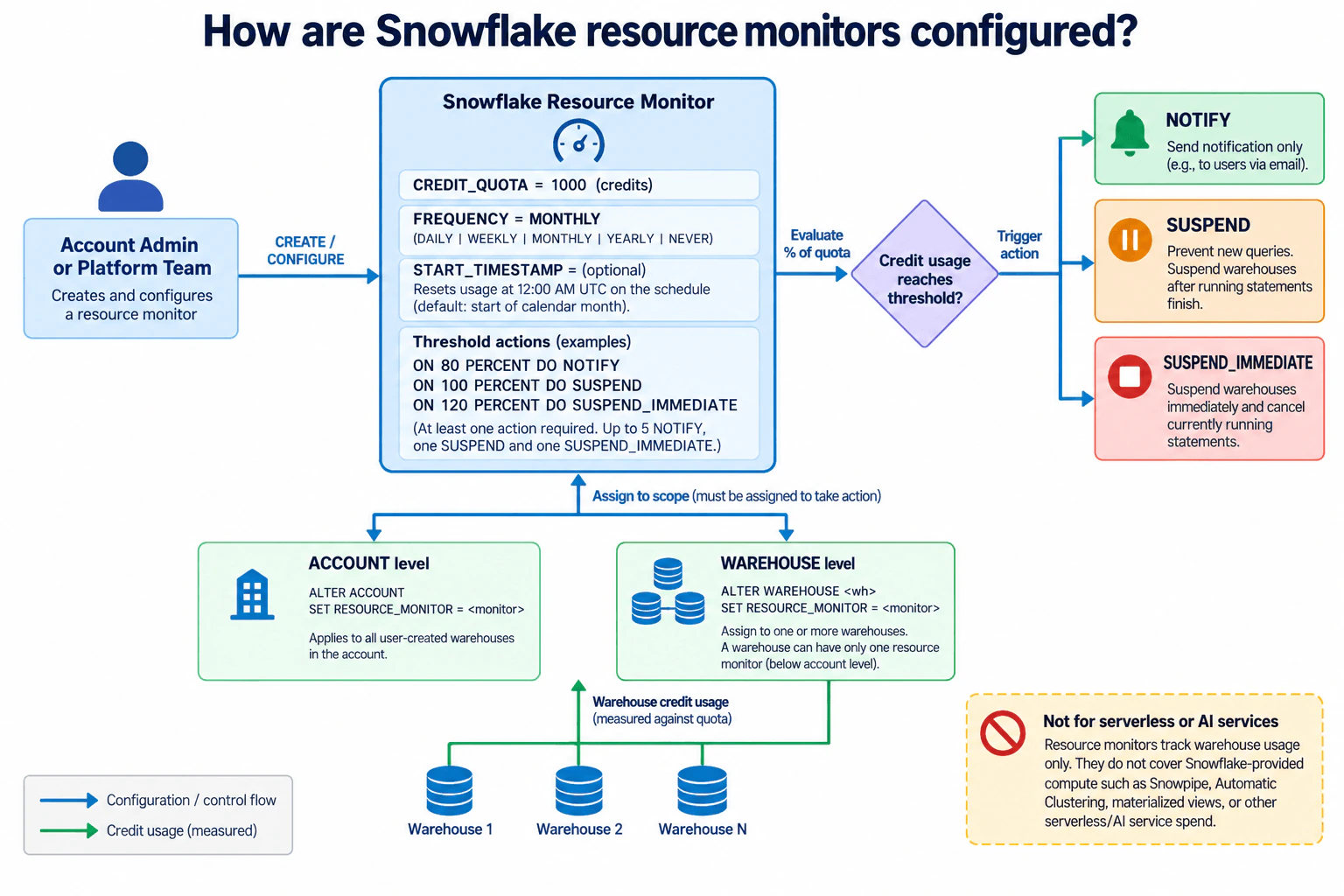
Configure a Snowflake resource monitor with a credit quota, reset schedule, and percentage-based actions, then assign it to the account or selected warehouses. The main trade-off is simple account-wide control versus finer warehouse-level cost isolation, while serverless and AI-service spend remains outside resource-monitor control.

Detailed Explanation

See the Code while reading this explanation.

Snowflake resource monitors give an account administrator or platform team a reusable control for warehouse credit consumption instead of managing every workload manually. The monitor defines a credit quota, a measurement schedule, and actions that fire when usage reaches configured percentages. It must then be assigned either at account scope or to one or more warehouses. Account scope gives broad control, while warehouse scope gives finer cost isolation. The design is intentionally limited to warehouse-related usage, including supporting cloud-services credits; Snowflake-provided serverless features and AI services require other cost controls.

Useful Questions to Ask the Interviewer
  1. Should the credit budget apply across the account or only to selected warehouses?
  2. Should the quota reset daily, weekly, monthly, yearly, or never?
  3. At which quota percentages should the monitor notify, suspend, or suspend immediately?
  4. Should several warehouses share one quota, or should individual warehouses have separate monitors for tighter isolation?
How are Snowflake resource monitors configured? diagram
How to Explain It in an Interview
  1. Define the credit budget and schedule The account administrator or platform team creates a Snowflake resource monitor and sets CREDIT_QUOTA to the number of credits allowed for the monitoring interval. The schedule can use DAILY, WEEKLY, MONTHLY, YEARLY, or NEVER. The attached design uses MONTHLY as its example. Snowflake's default schedule starts immediately and resets used credits at the beginning of each calendar month. If a custom FREQUENCY is explicitly configured in SQL, START_TIMESTAMP must also be specified; Snowflake uses that start date to determine subsequent reset dates, and resets occur at 12:00 AM UTC.
  1. Configure threshold actions Each trigger is a percentage of CREDIT_QUOTA. The attached design uses example thresholds of 80 percent for NOTIFY, 100 percent for SUSPEND, and 120 percent for SUSPEND_IMMEDIATE. Thresholds can exceed 100 percent. A resource monitor needs at least one action to have an effect when a threshold is reached. Snowflake supports up to five NOTIFY actions, one SUSPEND action, and one SUSPEND_IMMEDIATE action.
  1. Understand what each action does NOTIFY sends a notification but does not suspend warehouses. SUSPEND waits for currently executing statements on assigned standard warehouses to complete and then suspends those warehouses. SUSPEND_IMMEDIATE suspends assigned standard warehouses immediately and cancels statements that are still running. These progressively stronger actions let the platform team warn first and enforce later.
  1. Assign the monitor to a scope A created monitor remains dormant until it is assigned. At account level, the design uses ALTER ACCOUNT SET RESOURCE_MONITOR = <monitor>, which controls credit usage for warehouses in the account. At warehouse level, it uses ALTER WAREHOUSE <wh> SET RESOURCE_MONITOR = <monitor>. One warehouse monitor can be assigned to one or more warehouses, but each warehouse can be assigned to only one resource monitor below the account level.
  1. Understand account-level versus warehouse-level control An account-level monitor provides one broad quota boundary across the account's warehouses. This is simpler when the goal is aggregate control. Warehouse-level monitors provide more targeted cost boundaries. When several warehouses are assigned to the same warehouse monitor, their usage contributes to the same quota, so heavier usage from one warehouse can cause thresholds to be reached for the whole assigned group. Separate warehouse monitors provide tighter isolation but require more policies and assignments to operate.
  1. Trace the usage flow Warehouses consume credits while they run. Snowflake tracks the credits consumed by warehouses assigned to the monitor, together with cloud-services credits used to support those warehouses, during the current interval. The monitor compares that used-credit total with CREDIT_QUOTA. When a configured percentage is reached, Snowflake executes the corresponding NOTIFY, SUSPEND, or SUSPEND_IMMEDIATE action.
  1. Know the cost-control boundary Resource monitors work for warehouse-related usage. They do not control spending from Snowflake-provided serverless features or AI services. Examples of serverless features outside this control boundary include Snowpipe, automatic clustering, and materialized-view maintenance. This means a resource monitor is an important warehouse guardrail, but it is not a complete account-wide spending-control system.
  1. Handle operational failures and recovery A quota that is too low or a suspension threshold that is too aggressive can stop useful warehouse work. Earlier NOTIFY thresholds provide warning before enforcement. When a warehouse is suspended because a resource-monitor threshold is reached, it cannot simply resume while the blocking condition remains. Operation can resume after conditions such as a new monitoring interval beginning, the quota or suspend threshold being increased, or the warehouse being removed from the monitor. The platform team should therefore review usage and deliberately adjust quotas, schedules, assignments, or thresholds as workload needs change.
  1. State the main trade-off Account scope is easier to administer and provides broad protection, but a threshold can affect a larger set of warehouses. Warehouse scope adds configuration overhead but gives finer cost isolation. Sharing one warehouse monitor across several warehouses reduces policy count but also means those warehouses compete for the same quota.
Technical Approach
  1. Decide whether the budget applies at account scope or warehouse scope.
  2. Create the resource monitor with CREDIT_QUOTA.
  3. Use the default monthly schedule or configure FREQUENCY together with START_TIMESTAMP for a custom reset schedule.
  4. Add percentage-based TRIGGERS for NOTIFY, SUSPEND, and, when required, SUSPEND_IMMEDIATE.
  5. Assign the monitor to the account or selected warehouses.
  6. Measure credits consumed by assigned warehouses and their supporting cloud-services usage against the quota.
  7. Execute the configured action when a threshold is reached.
  8. Review usage and adjust the quota, schedule, scope, or thresholds as operating needs change.
Practical Insights

This is configuration and policy enforcement, so normal Big-O complexity is not useful. The important scaling issue is the number of warehouses sharing each monitor and quota. Account-level monitoring is simpler to operate but has a broader enforcement blast radius. Warehouse-level monitoring gives finer isolation but creates more assignments and policies. Several warehouses sharing one monitor also share one quota, so one workload can consume more of the available budget. Resource monitors do not cover serverless-feature or AI-service spending, so broader cost governance needs separate controls.

Code
code = "CREATE RESOURCE MONITOR cost_monitor\nWITH\n  CREDIT_QUOTA = 1000\n  FREQUENCY = MONTHLY\n  START_TIMESTAMP = IMMEDIATELY\n  TRIGGERS\n    ON 80 PERCENT DO NOTIFY\n    ON 100 PERCENT DO SUSPEND\n    ON 120 PERCENT DO SUSPEND_IMMEDIATE;\n\n-- Choose account-level scope:\nALTER ACCOUNT SET RESOURCE_MONITOR = cost_monitor;\n\n-- Or choose warehouse-level scope:\nALTER WAREHOUSE my_warehouse SET RESOURCE_MONITOR = cost_monitor;"
Why Interviewers Ask This

Interviewers want to see whether you understand Snowflake cost-control boundaries, not only the RESOURCE MONITOR syntax. A strong answer explains credit quotas, reset periods, account-versus-warehouse scope, threshold actions, and the important limitation that resource monitors control warehouse-related credit usage rather than all Snowflake spending.

Common interview mistakes

Common mistakes are creating a resource monitor without assigning it to an account or warehouse; setting FREQUENCY in SQL without also setting START_TIMESTAMP; treating CREDIT_QUOTA as a guarantee that usage can never exceed that value; treating NOTIFY as an enforcement action; confusing SUSPEND with SUSPEND_IMMEDIATE; assuming one warehouse can have multiple warehouse-level resource monitors; forgetting that several warehouses assigned to one monitor share its quota; ignoring supporting cloud-services credits counted with warehouse usage; and claiming resource monitors control Snowflake serverless-feature or AI-service spending.

Interview tip

Structure the answer around four words: quota, period, scope, actions. Then explain NOTIFY versus SUSPEND versus SUSPEND_IMMEDIATE, mention that shared warehouses share a quota, and finish with the key limitation that resource monitors control warehouse-related credits rather than serverless or AI-service spend.

Interviewer may ask next
What changes if several warehouses share one warehouse-level resource monitor?

All assigned warehouses contribute to the same monitor's used-credit total and therefore share the same credit quota and threshold percentages. Heavy usage by one warehouse can cause a NOTIFY or suspension threshold to be reached for the group. If tighter isolation is required, assign separate monitors so individual warehouses have independent quota boundaries.

What happens after a resource monitor suspends a warehouse because a threshold was reached?

The warehouse remains blocked while the resource-monitor condition is still in force. It can become usable again when the next monitoring interval begins, the credit quota is increased, the suspend threshold is increased, the warehouse is removed from the monitor, or the monitor is dropped. This is why an earlier NOTIFY threshold is useful before an enforcement threshold is reached.

39. How do warehouse scale-up and multi-cluster scale-out differ in Snowflake?Cloud Data PlatformsMedium

Question Details

Relate the choice to individual-query resource needs versus concurrent-query demand.

Short Interview Answer (30-60 seconds)

I would scale up when individual large or complex queries need more compute, and scale out when many simultaneous queries create queue pressure. Warehouse size increases compute per cluster, while multi-cluster scaling adds same-sized clusters for concurrency, with higher compute consumption as capacity increases.

Detailed Explanation

Snowflake users can create two different kinds of pressure on a virtual warehouse. A data analyst or data scientist may run one large, complex query that needs more compute, while BI users, notebooks, applications, and batch jobs may submit many queries at the same time and create queue pressure. These are different capacity problems, so I would not use the same scaling response for both. The design separates individual-query resource needs from concurrent-query demand: resize the warehouse for the first problem and use multi-cluster scale-out for the second.

Useful Questions to Ask the Interviewer
  1. Is the main problem slow execution of large or complex queries, or queuing caused by many simultaneous queries?
  2. Does concurrency stay fairly constant, or does it rise and fall enough that automatic cluster scaling is useful?
  3. Is Snowflake Enterprise Edition or higher available for multi-cluster warehouses?
  4. Is the main objective individual-query latency, concurrent throughput, reduced queuing, or a combination of these?
  5. How should additional compute consumption be balanced against the required query performance and concurrency?
How do warehouse scale-up and multi-cluster scale-out differ in Snowflake? diagram
How to Explain It in an Interview
  1. Identify which kind of pressure the warehouse has The users and workloads in the diagram submit a mixed set of SQL queries. The first step is to distinguish a resource-heavy individual query from many concurrent queries. Slow large or complex queries point toward a per-cluster compute problem. A queue that grows when many users or applications submit work at the same time points toward a concurrency problem. This distinction determines whether I change warehouse size or cluster count.
  1. Scale up for individual-query resource needs For a large or complex query that needs more compute, I would resize the virtual warehouse to a larger size. That gives each cluster more compute resources and is primarily intended to improve query performance, especially for larger and more complex queries. ([docs.snowflake.com](https://docs.snowflake.com/en/user-guide/warehouses-considerations)) The diagram represents this as an individual heavy query flowing to RESIZE WAREHOUSE, then to a larger single cluster with more compute per cluster.

If I resize a warehouse while a query is already executing, the extra resources do not accelerate that already-running query. Once the new resources are fully provisioned, they are available to queued and newly submitted statements, so I would rerun the slow query when testing the larger size. ([docs.snowflake.com](https://docs.snowflake.com/en/user-guide/warehouses-overview))

  1. Scale out for concurrent-query demand When the problem is many simultaneous queries and queue pressure, I would use a multi-cluster warehouse. Instead of making one cluster larger, Snowflake can run additional clusters of the configured warehouse size. In Auto-scale mode, clusters can start and stop according to workload demand within the configured cluster limits. Multi-cluster warehouses are designed primarily to handle concurrency and queuing from large numbers of users or queries. ([docs.snowflake.com](https://docs.snowflake.com/en/user-guide/warehouses-considerations))

The diagram shows this path as many concurrent queries flowing to ADD CLUSTERS, followed by Cluster 1, Cluster 2, Cluster 3, and potentially more clusters up to the configured maximum. This provides more concurrent execution capacity rather than simply giving one query all of the combined resources from every cluster.

  1. Warehouse size and cluster count are separate controls Warehouse size controls the compute resources available per cluster. Cluster count controls how many clusters a multi-cluster warehouse can use for concurrent work. This means the two controls can coexist. If a multi-cluster warehouse is resized, its clusters use the new warehouse size. The key interview distinction is therefore per-cluster compute versus number of clusters.
  1. Resizing can help queuing, but it is not the main concurrency mechanism A larger warehouse has more resources, so resizing can provide some limited relief when queries are competing for compute. However, the design deliberately treats resizing as the scale-up mechanism for query performance, not the preferred way to solve sustained concurrency pressure. Snowflake's guidance similarly distinguishes resizing for query performance from multi-cluster warehouses for concurrency. ([docs.snowflake.com](https://docs.snowflake.com/en/user-guide/warehouses-considerations))
  1. Multi-cluster scale-out does not normally make one slow query faster Adding clusters is useful when more queries need somewhere to run. It does not mean that a single slow query automatically combines all clusters into one larger execution resource. If queuing is low but an individual large query is still slow, I would investigate warehouse size and the query itself rather than simply increasing the number of clusters.
  1. Observe the bottleneck before changing capacity For scale-up, I would look for large or complex queries that remain slow when warehouse load is not dominated by concurrency. For scale-out, I would look for queue pressure and recurring peaks in simultaneous query demand. Snowflake recommends distinguishing an overloaded or queued warehouse from a low-load warehouse with slow queries before choosing additional clusters versus a larger warehouse. ([docs.snowflake.com](https://docs.snowflake.com/en/user-guide/warehouses-load-monitoring))
  1. Understand the cost boundary Both choices increase compute consumption in different ways. A larger warehouse provisions more compute resources per cluster. A multi-cluster warehouse can consume additional compute as more clusters run. The goal is therefore not to maximize either setting, but to match warehouse size to query complexity and cluster count to concurrency demand. ([docs.snowflake.com](https://docs.snowflake.com/en/user-guide/warehouses-considerations))
  1. Respect the edition requirement The diagram correctly marks multi-cluster warehouses as requiring Snowflake Enterprise Edition or higher. ([docs.snowflake.com](https://docs.snowflake.com/en/user-guide/warehouses-considerations)) If that feature is unavailable, I would not pretend that resizing is identical to scale-out. I would instead consider another supported warehouse arrangement for separating concurrent workloads.

The interview summary is simple: increase warehouse size when each query needs a stronger cluster; add clusters when many queries need concurrent capacity. Diagnose the bottleneck first, then choose the scaling dimension that directly addresses it.

Technical Approach
  1. Classify the symptom as individual-query slowness or concurrent-query queuing.
  2. If a large or complex query needs more compute, test scale-up by resizing the warehouse.
  3. Rerun the query after the larger warehouse resources are provisioned because resizing does not accelerate a statement that is already executing.
  4. If many simultaneous queries create queue pressure, use multi-cluster scale-out when the required Snowflake edition is available.
  5. Choose warehouse size according to per-query resource needs.
  6. Choose the multi-cluster minimum and maximum according to concurrency behavior rather than treating extra clusters as a single-query accelerator.
  7. Observe query duration, warehouse load, queue pressure, active clusters, and compute consumption.
  8. Adjust warehouse size and cluster count independently as workload characteristics change.
Practical Insights

There is no Big-O algorithmic complexity for this question. The important dimensions are per-query compute and query concurrency. Scaling up gives each cluster more compute, which can help large or complex queries, but larger warehouses consume more compute while running. Scaling out adds clusters so more queries can execute concurrently and queue less, but additional running clusters also consume compute. Storage is not the scaling dimension shown here. Operationally, the first likely bottleneck is either insufficient resources for a heavy query or queue pressure from concurrent work, and the warehouse should be monitored to distinguish those cases.

Why Interviewers Ask This

Interviewers want to see whether you can diagnose two different warehouse bottlenecks: insufficient compute for large or complex queries versus insufficient capacity for many simultaneous queries. A strong answer explains that warehouse size controls compute per cluster, while multi-cluster scaling controls the number of clusters available for concurrent work.

Common interview mistakes

A common mistake is treating scale-up and scale-out as interchangeable. They address different bottlenecks. Another mistake is saying that extra clusters combine to make one individual query faster; multi-cluster warehouses primarily provide concurrency capacity. Candidates also sometimes describe scale-out as creating larger clusters, when it actually increases the number of clusters at the configured warehouse size. Another error is forgetting that resizing a running warehouse does not add resources to a query that is already executing. Finally, candidates may ignore the Enterprise Edition-or-higher requirement or the additional compute consumption caused by larger warehouses and additional active clusters.

Interview tip

Lead with the bottleneck: "slow individual query means scale up; too many simultaneous queries means scale out." Then explain that warehouse size controls compute per cluster, cluster count controls concurrent capacity, and both dimensions should be changed only after observing which resource problem actually exists.

Interviewer may ask next
What would you do if a multi-cluster warehouse has low queuing but individual large queries are still slow?

I would treat that as a per-query resource problem rather than a concurrency problem. Adding more clusters is unlikely to be the main solution because queries already have execution capacity without significant queuing. I would test a larger warehouse size and rerun representative large or complex queries after the additional resources are fully provisioned. Because warehouse size is a per-cluster property, resizing a multi-cluster warehouse changes the compute size of its clusters. I would keep the larger size only if the performance benefit justifies the additional compute consumption.

What would you do if query demand is highly bursty and users experience queues only during peak periods?

Assuming Snowflake Enterprise Edition or higher is available, I would favor the multi-cluster scale-out path shown in the diagram. I would keep a warehouse size that matches the normal query complexity and allow additional same-sized clusters to start when concurrent demand rises, up to the configured maximum. As demand falls, Auto-scale can remove unnecessary clusters. I would monitor queue pressure and active-cluster behavior so the configured range addresses real concurrency peaks without adding unnecessary compute capacity.

40. What is the purpose of the Snowflake Native App Framework?Cloud Data PlatformsMedium

Question Details

Focus on packaging and distributing data applications for execution in consumer accounts.

Short Interview Answer (30-60 seconds)

The Snowflake Native App Framework lets providers package and distribute data applications that consumers install and run inside their own Snowflake accounts. The main trade-off is reusable distribution with consumer-side isolation, while access to existing consumer data must be explicitly controlled through privileges or references.

Detailed Explanation

A provider may need to deliver the same data application to many Snowflake consumers without rebuilding or operating a separate copy for every customer. The Snowflake Native App Framework creates a reusable packaging and distribution model for that problem. The provider builds an application package in its Snowflake account, publishes the app through a listing, and the consumer installs it in the consumer account. The design prioritizes reusable distribution and consumer-account execution while keeping a clear trust boundary between provider and consumer and requiring explicit authorization when the application needs access to existing consumer-owned objects.

Useful Questions to Ask the Interviewer
  1. Should the application be broadly distributed through Snowflake Marketplace or made available only to selected consumers through a private listing?
  2. Does the application include provider-supplied data content, or does it mainly contain logic that works with data already owned by the consumer?
  3. Which existing consumer objects must the installed application access through requested privileges or references?
  4. How should application versions and patches be rolled out without disrupting existing consumer installations?
What is the purpose of the Snowflake Native App Framework? diagram
How to Explain It in an Interview
  1. Define the provider boundary and application package. The provider team develops the data content, application logic, and configuration. In Snowflake, an application package is the provider-side container for the Native App's data content and application logic, and it also stores version and patch information. Each app version uses a manifest file and a setup script. The manifest describes configuration such as the setup-script location, version information, and requested access. The setup script contains SQL statements that create the app objects needed when the app is installed or upgraded. ([docs.snowflake.com](https://docs.snowflake.com/en/developer-guide/native-apps/creating-app-package))
  1. Publish the package through a listing. After the provider develops and tests the application package, the provider publishes the application to consumers through a listing. The listing contains the application package as its data product, and a consumer installs the app from that listing. In the approved diagram, this distribution surface is shown as either a public Snowflake Marketplace listing for broad distribution or a private listing for selected accounts or partners. These are distribution choices, not sequential processing stages. ([docs.snowflake.com](https://docs.snowflake.com/en/developer-guide/native-apps/ui-provider-publishing-app-package))
  1. Treat publish and install as control flow. The provider sends the packaged application to the distribution boundary through the diagram's "Package and publish" flow. Consumer users then follow the "Discover and install" flow into their Snowflake account. These arrows represent application publication and installation, not a data pipeline carrying the consumer's business records back to the provider.
  1. Install the app in the consumer Snowflake account. The consumer installs the Native App from the listing. Installation creates an APPLICATION object, and Snowflake runs the setup script in the context of that installation. The setup script creates application objects such as schemas, views, stored procedures, and application roles required by the app. This keeps the installed application's objects within the consumer-side application boundary shown in the diagram. ([docs.snowflake.com](https://docs.snowflake.com/en/developer-guide/native-apps/creating-setup-script))
  1. Keep existing consumer data behind an authorization boundary. The diagram shows existing consumer data remaining in the consumer account. A Native App does not automatically receive unrestricted access to those objects. If it needs to access an existing table, view, secret, integration, or other supported object, the provider can define references in the manifest and specify the privileges required for those references. The consumer then supplies the reference and grants the requested access. Account-level privileges can also be requested for supported operations. ([docs.snowflake.com](https://docs.snowflake.com/en/en/developer-guide/native-apps/manifest-reference))
  1. Run application logic in the consumer account. After installation and authorization, the Native App runs in the consumer Snowflake account. Its application objects and logic can work with app-owned content and, when the consumer permits it, referenced consumer objects. This is the central purpose of the framework: distribute application capability to consumers while keeping the installed application and consumer-owned data on the consumer side of the trust boundary.
  1. Handle installation and permission failures at the correct boundary. If the setup script is invalid, required app objects cannot be created correctly, so the provider must correct the app version or patch. If the consumer does not grant a required privilege or bind a required reference, the app cannot perform the operation that depends on that access. The correct behavior is to keep that access unavailable rather than bypass the authorization boundary. The diagram does not define a separate disaster-recovery, multi-region, backup, or observability architecture, so those capabilities should not be invented as part of this answer.
  1. Manage evolution through versions and patches. Application packages contain version and patch information, and each version has its own manifest and setup script. This gives the provider a defined lifecycle for evolving the app while preserving separate consumer installations. The provider still owns compatibility and release quality; packaging does not remove the need to test changes against the application's expected installation and permission model. ([docs.snowflake.com](https://docs.snowflake.com/en/developer-guide/native-apps/creating-app-package))
  1. Explain the main trade-off. The framework gives providers a reusable way to package an app once and distribute it to multiple consumers while consumers execute the app in their own accounts. That improves reuse and keeps a strong provider-consumer boundary, but it also means the provider must carefully manage package compatibility, setup behavior, requested privileges, references, versions, and patches across independent consumer installations.
Technical Approach
  1. Define the provider Snowflake account and consumer Snowflake account as separate trust and ownership boundaries.
  2. Build an application package containing the Native App's data content and application logic, plus the required manifest and setup script.
  3. Track application versions and patches in the package.
  4. Publish the application package through a listing, using a public Marketplace listing or private listing according to the target audience shown in the diagram.
  5. Let consumer users discover and install the application in their own Snowflake account.
  6. During installation, create the APPLICATION object and execute the setup script to create the required app objects.
  7. Keep app-owned objects and configuration inside the application boundary.
  8. When access to existing consumer objects is needed, request only the required privileges or references.
  9. Run and query the application in the consumer account.
  10. Evolve the app through tested versions and patches instead of moving consumer-owned data into the provider account.
Practical Insights

There is no algorithmic Big-O complexity that meaningfully describes this framework. The important scaling boundaries are the number of application versions, patches, listings, consumer installations, and permission configurations that the provider must support. More consumers increase compatibility, release, and support work because each consumer has its own installed application and account boundary. Application execution and access to existing consumer objects stay on the consumer side in this design, so there is no normal application flow that copies consumer data back to the provider. The diagram supplies no numeric latency, throughput, concurrency, storage, availability, recovery, or cost targets, so those values should not be invented.

Why Interviewers Ask This

Interviewers want to see whether the candidate understands the main architectural boundary of Snowflake Native Apps: the provider develops and packages the application, distribution happens through listings, and each consumer installs and runs the application in the consumer Snowflake account. A strong answer also explains the application package, manifest, setup script, version and patch lifecycle, and controlled access to consumer-owned objects.

Common interview mistakes

Common mistakes include describing the framework as only a data-sharing feature, saying the provider executes the application for every consumer, or implying that existing consumer data must be copied back to the provider. Another mistake is omitting the application package, manifest, setup script, versions, and patches. Candidates may also incorrectly describe Marketplace and private listings as consecutive execution stages instead of alternative distribution choices. A final mistake is assuming installation grants unrestricted access to consumer data; access to external consumer objects must be explicitly requested and granted through the supported privilege or reference model.

Interview tip

Explain the framework as three boundaries: the provider packages the app, a Snowflake listing distributes it, and the consumer installs and runs it in the consumer account. Then emphasize the security point: existing consumer objects remain consumer-owned and are accessed only through explicitly approved privileges or references.

Interviewer may ask next
How does the design work when the Native App needs to use a table that already exists in the consumer account?

The overall architecture stays the same. The provider packages and publishes the Native App, and the consumer installs it in the consumer Snowflake account. The provider defines an appropriate reference in the manifest for the external consumer object and specifies the privileges the app needs on that reference. After installation, the consumer binds the reference to the actual object and grants the required access. The application can then use the logical reference without the provider needing to know the consumer object's physical database and schema names in advance. If the consumer does not provide the reference or grant the required privileges, operations that depend on that object remain unavailable. ([docs.snowflake.com](https://docs.snowflake.com/en/en/developer-guide/native-apps/manifest-reference))

How would you update the application after many consumers have already installed it?

I would evolve the same application package through Snowflake's version and patch lifecycle. The provider adds and tests the new version or patch, including the corresponding manifest and setup script, and then makes that release available through the existing application distribution model. Each consumer remains an independent installation in its own Snowflake account. Before release, I would verify setup behavior, object compatibility, requested privileges, references, and application logic. If the change is defective, the provider should correct the package lifecycle rather than modify consumer-owned data or bypass the consumer application's security boundary. ([docs.snowflake.com](https://docs.snowflake.com/en/developer-guide/native-apps/creating-app-package))

More questions load as you scroll

Disclaimer: This interview guide is for educational and informational purposes only. It is designed to help readers prepare, but it does not guarantee any interview result, hiring decision, offer, or outcome. Interview questions, hiring criteria, and preferred answers can vary by employer, interviewer, industry, location, and time. The examples and explanations reflect the authors' research and judgment, are provided without warranties of any kind, and should not be treated as the only correct approach. Diagrams are simplified illustrations intended to highlight the main components and their interactions; actual systems and implementations may be more complex. Alternative approaches may be equally valid or better suited to a particular question, context, or interviewer. To the fullest extent permitted by applicable law, the author, contributors, and publisher are not liable for decisions made, actions taken, or losses incurred based on this guide.

Content Accuracy and Verification: To the fullest extent permitted by applicable law, we do not represent or warrant that interview guides, questions, answers, examples, or diagrams are accurate, complete, current, error-free, or suitable for any particular purpose. You are responsible for independently reviewing and verifying the information before relying on it.